Medion P5255 Navigation Device User Manual

Medion AG Navigation Device

User manual

           User Manual                           P5255 M20;P5255 M40
                            Revision: R00 (2/2010)  Trademarks All brand and product names are trademarks or registered trademarks of their respective companies. Disclaimer Specifications and documents are subject to change without notice.
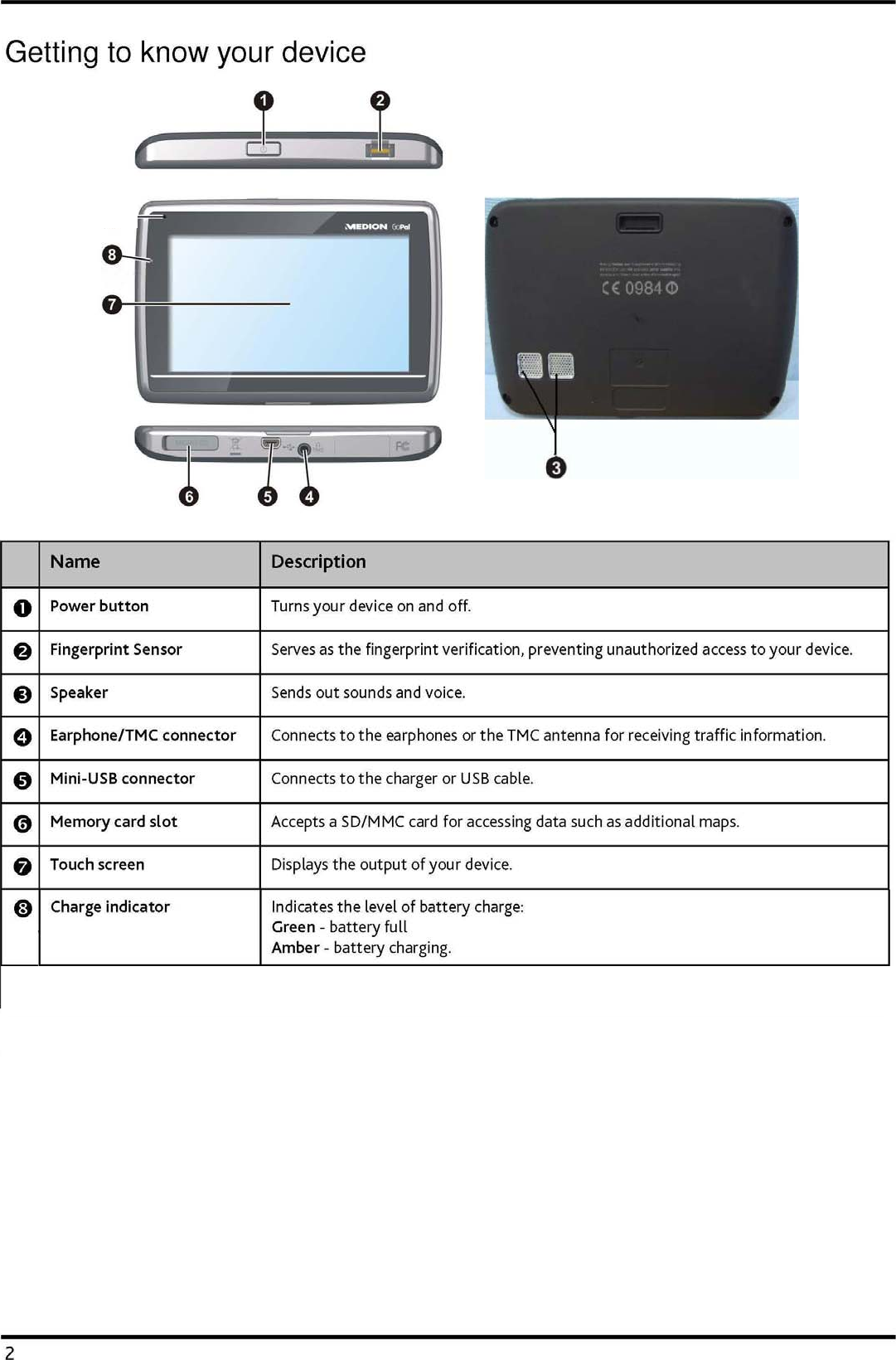
   1 Table of Contents Getting to know your device............................................................................................................................2Performing the initial start-up.........................................................................................................................3Charging the battery..........................................................................................................................................4Using your device in a vehicle .......................................................................................................................... 5Operating basics.................................................................................................................................................6Turning on and off .........................................................................................................................................6Navigating on the screen..............................................................................................................................6Reference ............................................................................................................................................................. 7Inserting a memory card .............................................................................................................................. 7Troubleshooting............................................................................................................................................. 7Caring for your device...................................................................................................................................8Regulatory information.....................................................................................................................................9Regulations statements................................................................................................................................9European notice ........................................................................................................................................9Safety precautions.......................................................................................................................................10About charging........................................................................................................................................ 10About the charger...................................................................................................................................10About the battery ................................................................................................................................... 10
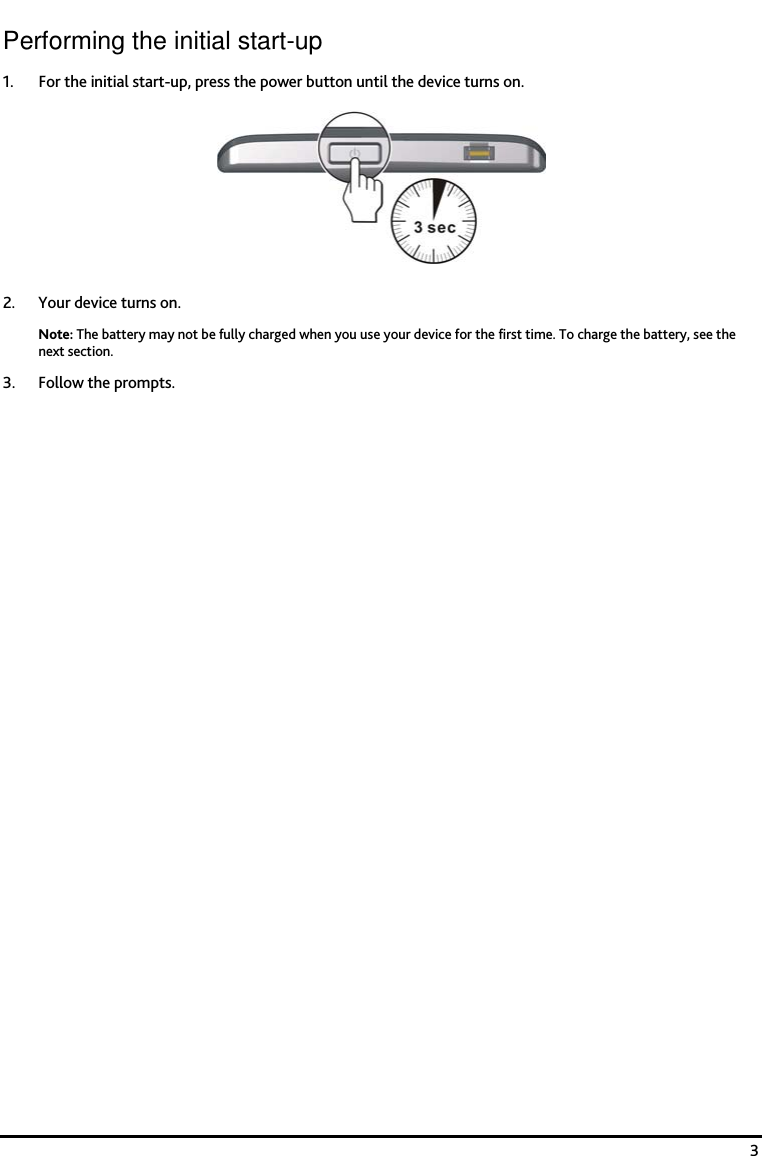
   3 Performing the initial start-up 1. For the initial start-up, press the power button until the device turns on.  2. Your device turns on. Note: The battery may not be fully charged when you use your device for the first time. To charge the battery, see the next section.  3. Follow the prompts.
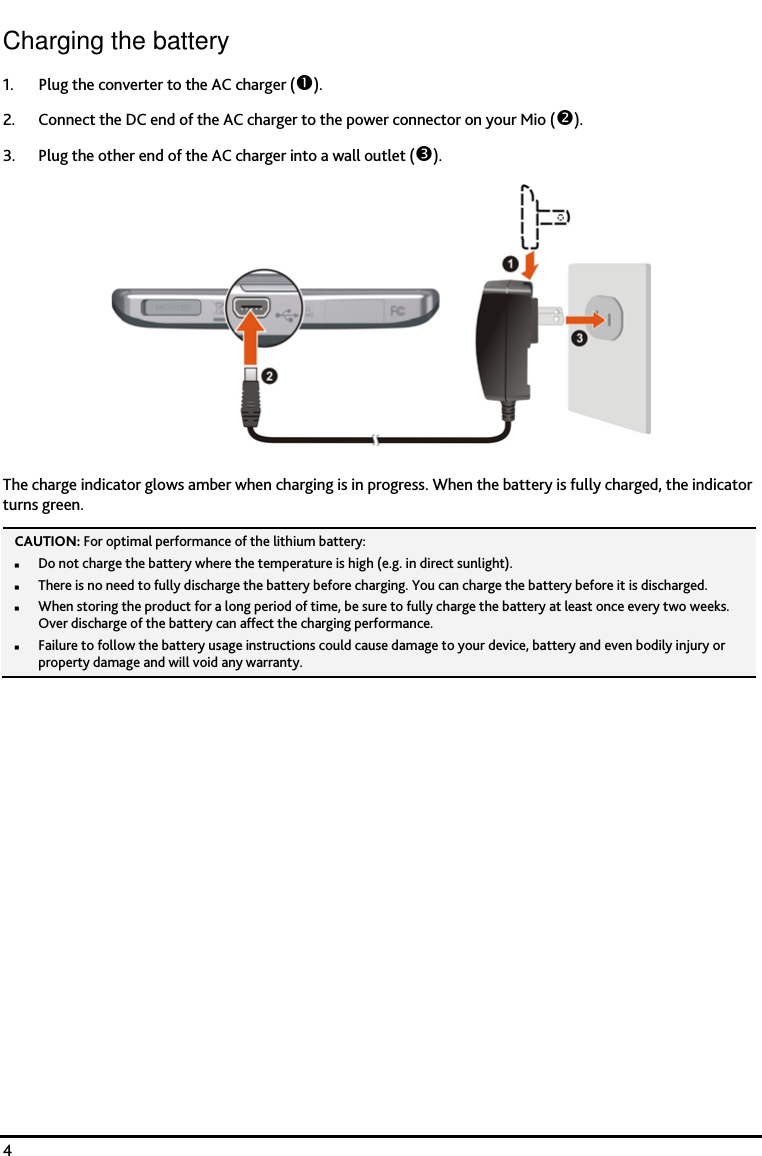
   4 Charging the battery 1. Plug the converter to the AC charger (). 2. Connect the DC end of the AC charger to the power connector on your Mio (). 3. Plug the other end of the AC charger into a wall outlet ().  The charge indicator glows amber when charging is in progress. When the battery is fully charged, the indicator turns green. CAUTION: For optimal performance of the lithium battery: Do not charge the battery where the temperature is high (e.g. in direct sunlight). There is no need to fully discharge the battery before charging. You can charge the battery before it is discharged. When storing the product for a long period of time, be sure to fully charge the battery at least once every two weeks. Over discharge of the battery can affect the charging performance. Failure to follow the battery usage instructions could cause damage to your device, battery and even bodily injury or property damage and will void any warranty.
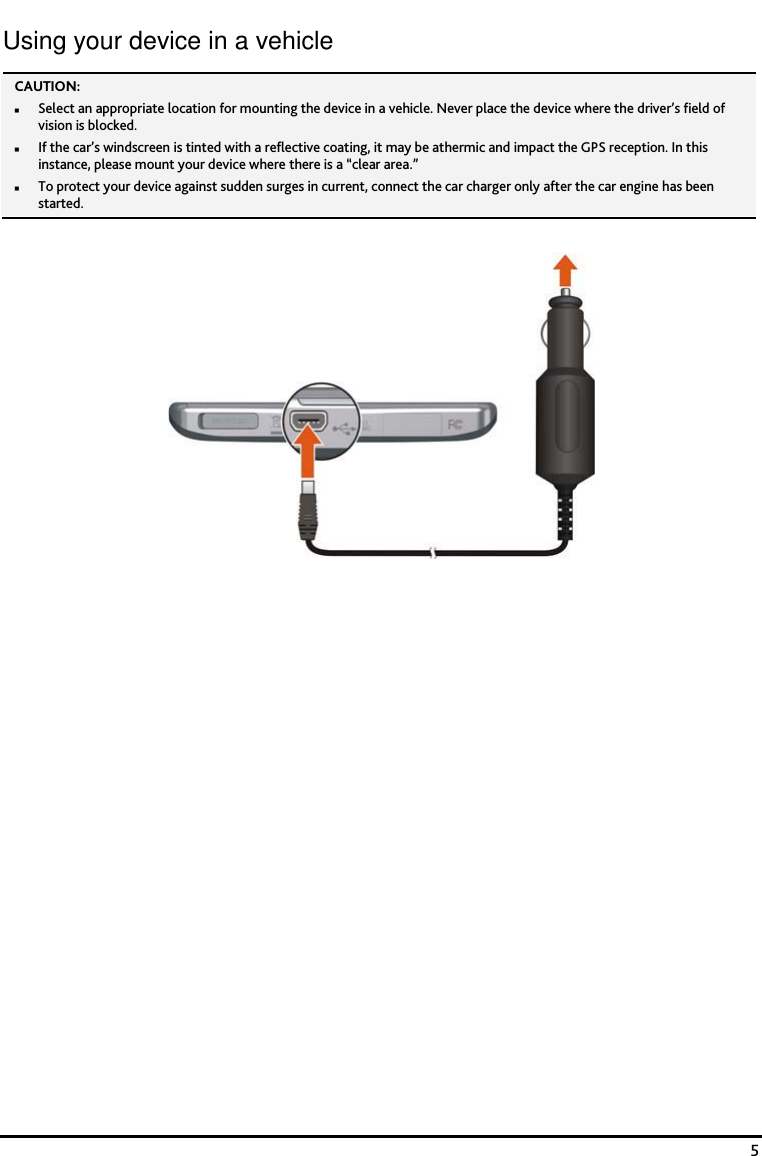
   5 Using your device in a vehicle CAUTION:  Select an appropriate location for mounting the device in a vehicle. Never place the device where the driver’s field of vision is blocked. If the car’s windscreen is tinted with a reflective coating, it may be athermic and impact the GPS reception. In this instance, please mount your device where there is a “clear area.” To protect your device against sudden surges in current, connect the car charger only after the car engine has been started.
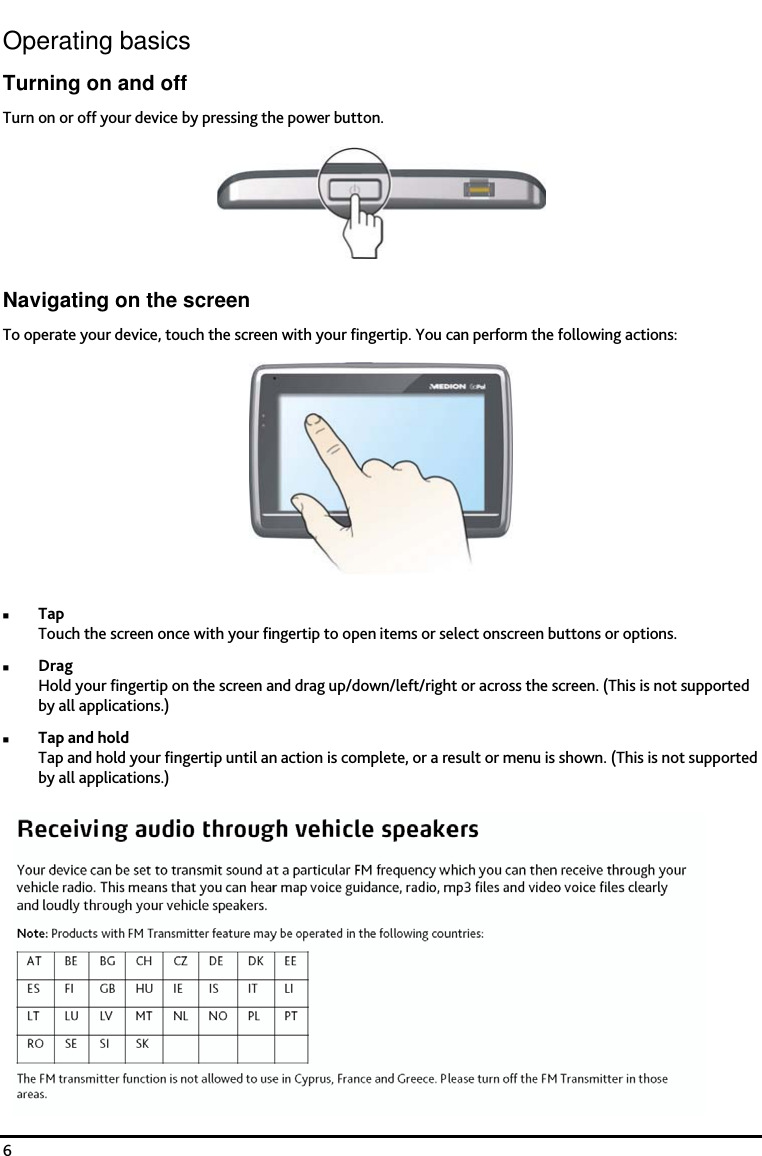
   6 Operating basics Turning on and off Turn on or off your device by pressing the power button.  Navigating on the screen To operate your device, touch the screen with your fingertip. You can perform the following actions:  Tap Touch the screen once with your fingertip to open items or select onscreen buttons or options. Drag Hold your fingertip on the screen and drag up/down/left/right or across the screen. (This is not supported by all applications.) Tap and hold Tap and hold your fingertip until an action is complete, or a result or menu is shown. (This is not supported by all applications.)
   7 Reference Inserting a memory card CAUTION: Do not apply pressure to the centre of the memory card.  Hold the card (SD or MMC) by the edges and gently insert it into the slot with the label facing the back of the device.  To remove a card, gently push the top edge of the card inwards to release it, and pull it out of the slot. Troubleshooting Note: If you encounter a problem you cannot solve, contact an authorized service center for assistance. Problems  Solutions Power does not turn on when using battery power. The remaining battery power may be too low to run your device. Charge the battery. Screen responds slowly.  Make sure that your device is not running out of battery power. If the problem still persists, restart your device. Screen freezes.  Restart your device.  Screen is hard to read.  Make sure that the backlight of the display is set to a high-enough brightness. Make sure that your device and your computer are both turned on before trying to establish a connection. Make sure that the cable is securely plugged into the USB port on your computer and on the device. Connect the USB cable directly to your computer—do not run the cable through a USB hub. Cannot establish a connection with a computer. Restart your device before connecting the cable. Always disconnect your device before you restart your computer.
   8 Caring for your device Taking good care of your device will ensure trouble-free operation and reduce the risk of damage to your device. Keep your device away from excessive moisture and extreme temperatures. Avoid exposing your device to direct sunlight or strong ultraviolet light for extended periods of time. Do not place anything on top of your device or drop objects on your device. Do not drop your device or subject it to severe shock. Do not subject your device to sudden and severe temperature changes. This could cause moisture condensation inside the unit, which could damage your device. In the event of moisture condensation, allow the device to dry out completely before use. The screen surface can easily be scratched. Avoid touching it with sharp objects. Non-adhesive generic screen protectors designed specifically for use on portable devices with LCD panels may be used to help protect the screen from minor scratches. Never clean your device with it powered on. Use a soft, lint-free cloth to wipe the screen and the exterior of your device. Do not use paper towels to clean the screen. Never attempt to disassemble, repair or make any modifications to your device. Disassembly, modification or any attempt at repair could cause damage to your device and even bodily injury or property damage and will void any warranty. Do not store or carry flammable liquids, gases or explosive materials in the same compartment as your device, its parts or accessories.
   10 Safety precautions Never attempt to disassemble, repair or make any modifications to your device. Disassembly, modification or any attempt at repair could cause damage to your device and even bodily injury or property damage and will void the warranty. About charging Use only the charger supplied with your device. Use of another type of charger will result in malfunction and/or danger. This product is intended to be supplied by a LISTED Power Unit marked with “LPS”, “Limited Power Source” and output rated + 5 V dc / 1.0 A”. Use a specified battery in the equipment. About the charger Do not use the charger in a high moisture environment. Never touch the charger when your hands or feet are wet. Allow adequate ventilation around the charger when using it to operate the device or charge the battery. Do not cover the charger with paper or other objects that will reduce cooling. Do not use the charger while it is inside a carrying case. Connect the charger to a proper power source. The voltage requirements are found on the product case and/or packaging. Do not use the charger if the cord becomes damaged. Do not attempt to service the unit. There are no serviceable parts inside. Replace the unit if it is damaged or exposed to excess moisture. About the battery Use a specified battery in the equipment. CAUTION:CAUTION:CAUTION:CAUTION:    This unit contains a non-replaceable internal Lithium Ion battery. The battery can burst or explode, releasing hazardous chemicals. To reduce the risk of fire or burns, do not disassemble, crush, puncture, or dispose of in fire or water. Important instructions (for service personnel only) Caution: Caution: Caution: Caution: Risk of explosion if battery is replaced by an incorrect type. Dispose of used batteries according to the instructions. Replace only with the same or equivalent type recommended by the manufacturer. The battery must be recycled or disposed of properly. Use the battery only in the specified equipment.

Navigation menu