Merrychef CTM3206015A Microwave Oven User Manual Mealstream02

Merrychef Limited Microwave Oven Mealstream02

User Manual

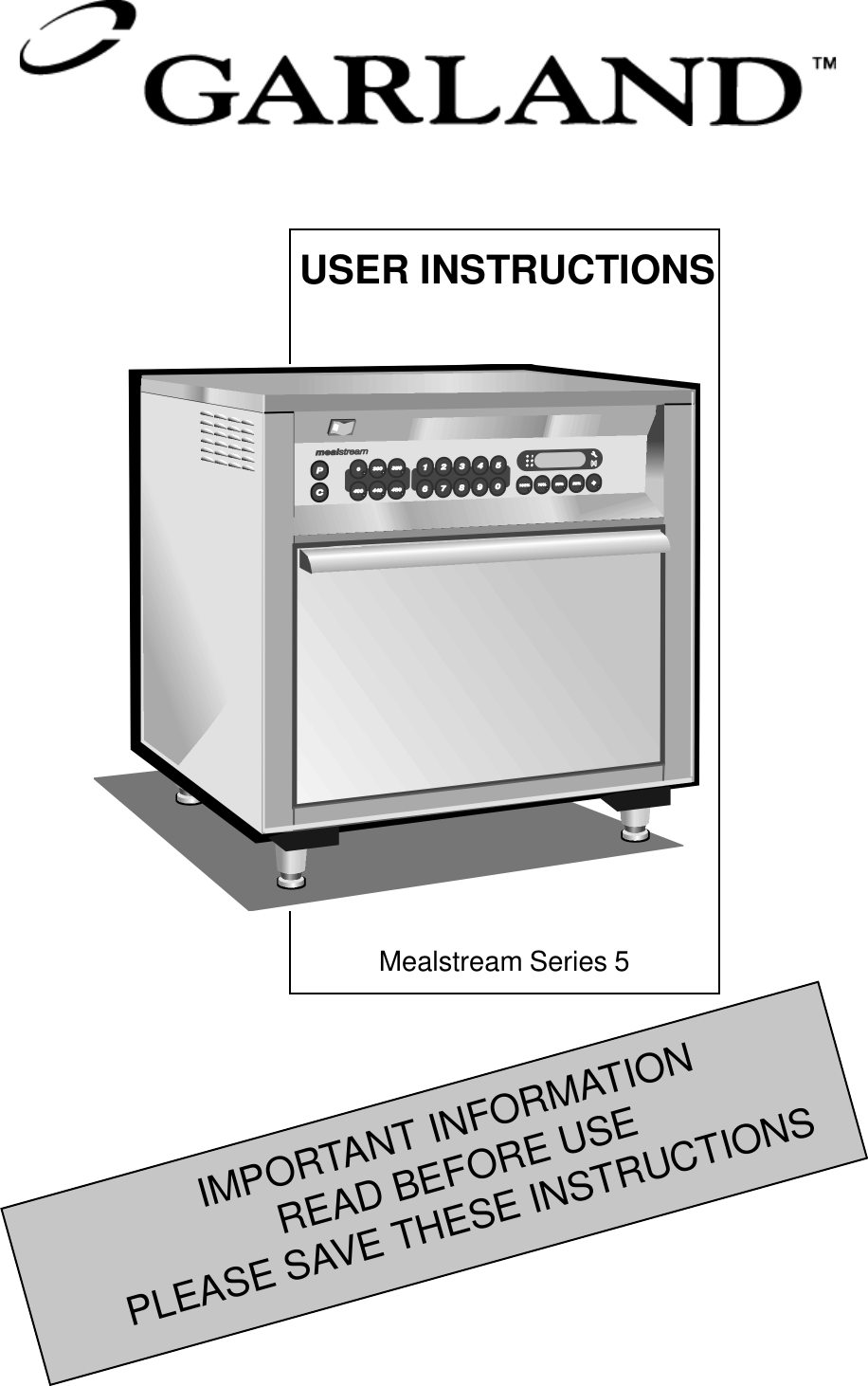
1IMPORTANT INFORMATIONREAD BEFORE USEPLEASE SAVE THESE INSTRUCTIONSUSER INSTRUCTIONSMealstream Series 5
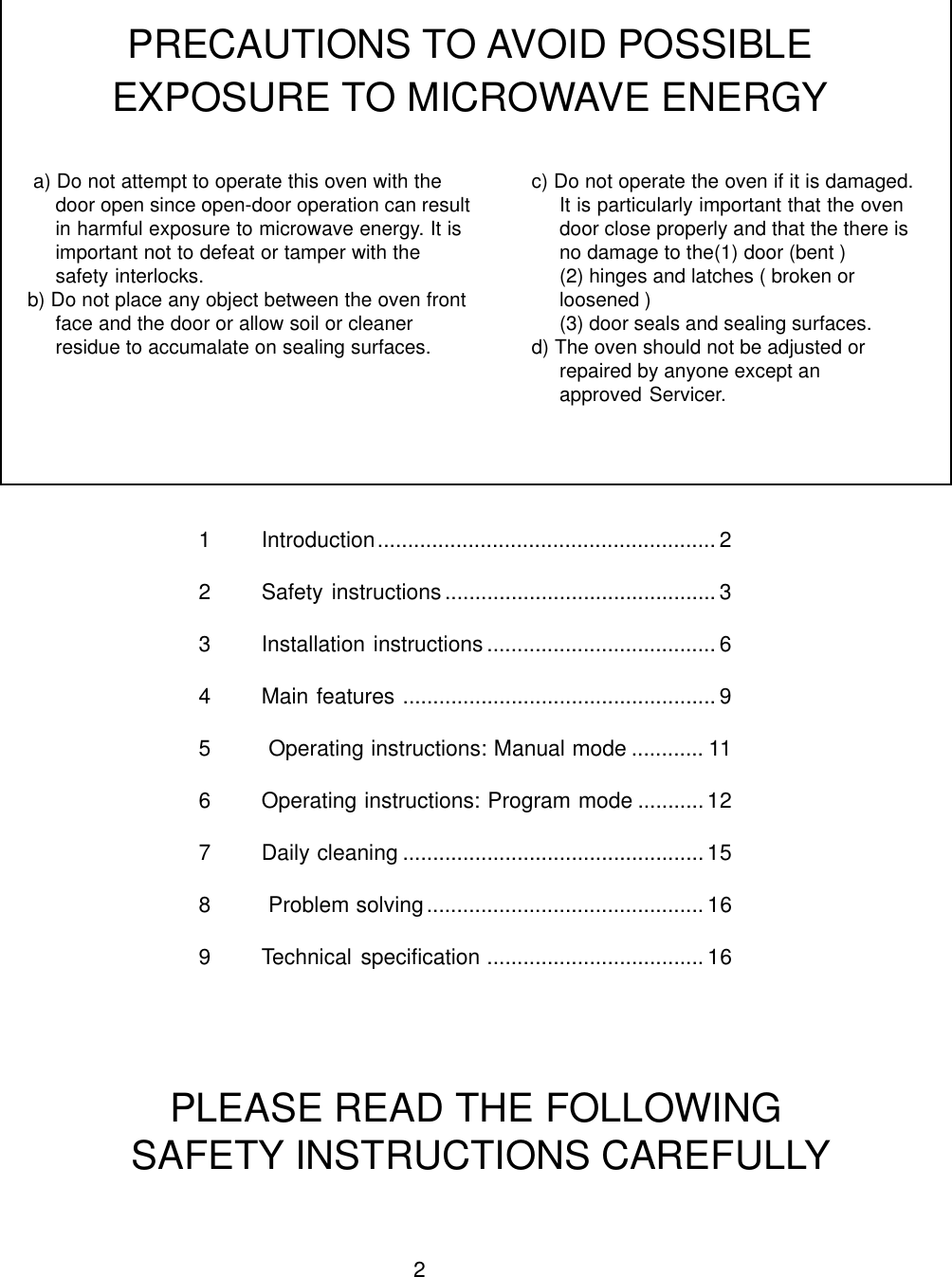
21 Introduction........................................................ 22 Safety instructions............................................. 33 Installation instructions ...................................... 64 Main features .................................................... 95  Operating instructions: Manual mode ............ 116 Operating instructions: Program mode ........... 127 Daily cleaning .................................................. 158  Problem solving..............................................169 Technical specification .................................... 16 a) Do not attempt to operate this oven with thedoor open since open-door operation can resultin harmful exposure to microwave energy. It isimportant not to defeat or tamper with thesafety interlocks.b) Do not place any object between the oven frontface and the door or allow soil or cleanerresidue to accumalate on sealing surfaces.PRECAUTIONS TO AVOID POSSIBLEEXPOSURE TO MICROWAVE ENERGYc) Do not operate the oven if it is damaged.It is particularly important that the ovendoor close properly and that the there isno damage to the(1) door (bent )(2) hinges and latches ( broken orloosened )(3) door seals and sealing surfaces.d) The oven should not be adjusted orrepaired by anyone except anapproved Servicer.PLEASE READ THE FOLLOWING SAFETY INSTRUCTIONS CAREFULLY
3When using electrical appliances basic safetyprecautions should be followed, including thefollowing:WARNING To reduce the risk of burns, electricshock, fire, injury to persons, or exposure toexcessive microwave energy:1 Read all instructions before using the appliance2 Read and follow the specific “PRECAUTIONSTO AVOID POSSIBLE EXPOSURE TO EXCES-SIVE MICROWAVE ENERGY” FOUND ONPAGE 33 This appliance must be grounded. Connect onlyto A properly grounded outlet.See “GROUNDING INSTRUCTIONS” found onpage 44 Install or locate this appliance only in accord-ance with the provided installation instructions5. Some products such as whole eggs and sealedcontainers — for example, closed jars — mayexplode and should not be heated in this oven6 Use this appliance only for its intended use asdescribed in the manual. Do not use corrosivechemicals or vapours in this appliance. This typeof oven is specifically designed to heat, cook ordry food It is not designed for industrial or labora-tory use.7 This appliance should not be used by children8 Do not operate this appliance if it has a dam-aged cord or plug, if it is not working properly, or ifit has been damaged or dropped9 This appliance should be serviced only byqualified service personnel. Contact nearestauthorized service facility for examination, repairor adjustment.10 Do not cover or block any openings on theappliance including air vents/filters and steamoutlet11 Do not store this appliance outdoors. Do notuse this product near water —– for example, neara kitchen sink, in a wet basement, or near aswimming pool, and the like12 Do not immerse cord or plug in water13 Keep cord away from heated surfaces14 Do not let cord hang over edge of table orcounter15 Either:i)When cleaning surfaces of door and oventhat comes together on closing the door, useonly mild non-abrasive soaps, or detergentsapplied with a sponge or soft cloth.ii)When separate cleaning instructions areprovided, see door surface cleaninginstructions on  page 15IMPORTANT SAFETY INSTRUCTIONSSAVE THESE INSTRUCTIONS16 To reduce risk of fire in the cavity:i) Do not overcook food. Carefully attendappliance if paper, plastic or othercombustible materials are placed inside theoven to facilitate cooking.ii) Remove wire twist-ties from paper or plasticbags before placing bag in oveniii) If materials inside the oven should ignite, keepoven door closed, turn oven off, anddisconnect the power cord , or shut off powerat the fuse or circuit breaker paneliv) Do not use the cavity for storage purposes.Do not leave paper products, cooking utensilsor food in the cavity when not in use.17. DO NOT operate using microwave only orcombination function without food or liquid insidethe oven as this may result in overheating andmay cause damage.18. NEVER Remove the exterior of the oven.19. NEVER Remove any fixed internal parts ofthe oven.20. NEVER Tamper with the control panel, door,seals, or any other part oven.21. DO NOT Obstruct air vents/filters or steamoutlet.22. NEVER hang tea towels or cloths on any partof the oven.23. If the door seals are damaged ,the ovenmust be repaired by an approved Servicer.24. All service and repair work must be carriedout by an approved Servicer.25. If the power cable is damaged in any way itMUST be replaced by an approved Servicer.26. When handling hot liquids, foods, andcontainers, care should be taken to avoid scaldsand burns.27. When heating liquids using microwave onlyor combination function, the contents should bestirred prior to heating to avoid eruptive boiling.28. Feeding bottles and baby food jars should beopened when heating, the contents stirred orshaken and the temperature checked prior toconsumption to avoid burns.29. Never use the oven to heat alcohol, e.g.brandy, rum etc. Also, food containing alcohol,such as Christmas pudding, can more easilycatch fire if overheated.30. Never attempt to deep fry in the oven.
4For all cord connected appliancesGROUNDING INSTRUCTIONSThis appliance must be grounded. In the event of an electrical short circuit, grounding reduces the risk ofelectric shock by providing an escape wire for the electric current. This appliance is equipped with a cordhaving  a grounding wire with a grounding plug. The plug must be plugged into an outlet that is properlyinstalled and grounded.WARNING — Improper use of the grounding can result in the risk of electric shockConsult a qualified electrician or approved Servicer if the grounding instructions are not completelyunderstood or if doubt exists as to whether the appliance is properly grounded.Do not use an extension cord. If the power supply cord is too short, have a qualified electrician orserviceman install an outlet near the applianceFor a permanently connected applianceGROUNDING INSTRUCTIONSThis appliance must be connected to a grounded, metallic, permanent wiring system, or an equipmentgrounding conductor should be run with the circuit conductors and connected to the equipment groundingterminal or lead on the applianceELECTRICAL INSTALLATIONIn case of Radio or Television InterferenceThis equipment generates and uses radio frequency energy and if not installed andoperated correctly, in strict accordance with the manufacturer’s instructions, maycause harmful interference to authorized radio communication services.It has been type tested and found to comply with the limits for Part 18.307conducted emissions for non-consumer equipment and Part 18.309 radiatedemissions, which are designed to provide reasonable protection against suchinterference. However, there is no guarantee that interference will not occur in aparticular installation. If this equipment does cause interference to radio ortelevision reception, which can be determined by turning the equipment off and on,the user is encouraged to try and correct the interference by one or more of thefollowing measures:1) Reorient the receiving antenna.2) Relocate the microwave with respect to the receiver.3) Plug the microwave into a different outlet so that the receiver and microwaveare on different branch circuits.If necessary the user should consult the dealer or an experienced radio/televisiontechnician for additional suggestions.Note: Modifications should only be carried out by the manufacturer or authorisedrepresentative to ensure continuing conformance.
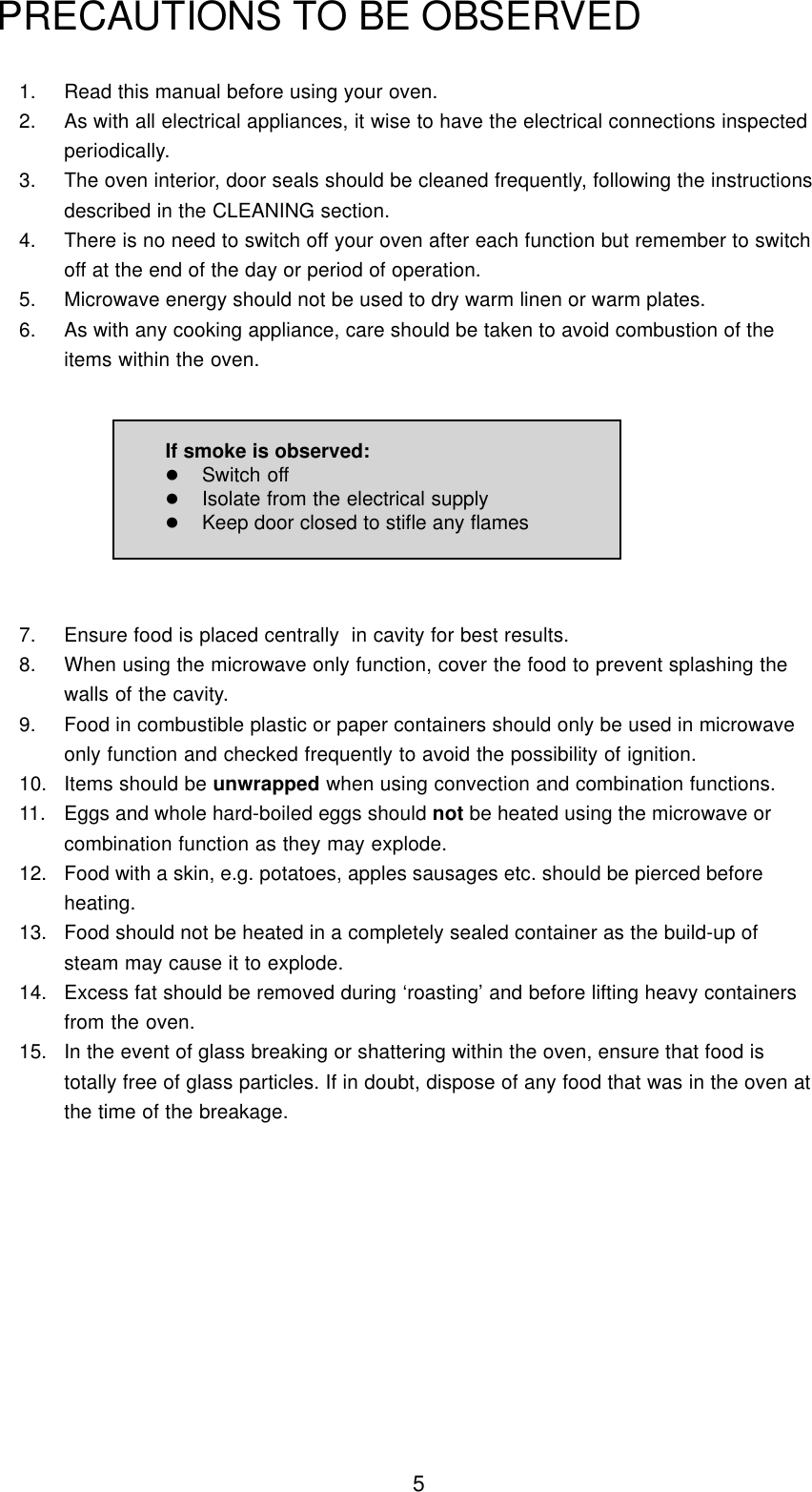
51. Read this manual before using your oven.2. As with all electrical appliances, it wise to have the electrical connections inspectedperiodically.3. The oven interior, door seals should be cleaned frequently, following the instructionsdescribed in the CLEANING section.4. There is no need to switch off your oven after each function but remember to switchoff at the end of the day or period of operation.5. Microwave energy should not be used to dry warm linen or warm plates.6. As with any cooking appliance, care should be taken to avoid combustion of theitems within the oven.PRECAUTIONS TO BE OBSERVED7. Ensure food is placed centrally  in cavity for best results.8. When using the microwave only function, cover the food to prevent splashing thewalls of the cavity.9. Food in combustible plastic or paper containers should only be used in microwaveonly function and checked frequently to avoid the possibility of ignition.10. Items should be unwrapped when using convection and combination functions.11. Eggs and whole hard-boiled eggs should not be heated using the microwave orcombination function as they may explode.12. Food with a skin, e.g. potatoes, apples sausages etc. should be pierced beforeheating.13. Food should not be heated in a completely sealed container as the build-up ofsteam may cause it to explode.14. Excess fat should be removed during ‘roasting’ and before lifting heavy containersfrom the oven.15. In the event of glass breaking or shattering within the oven, ensure that food istotally free of glass particles. If in doubt, dispose of any food that was in the oven atthe time of the breakage.If smoke is observed:lSwitch offlIsolate from the electrical supplylKeep door closed to stifle any flames
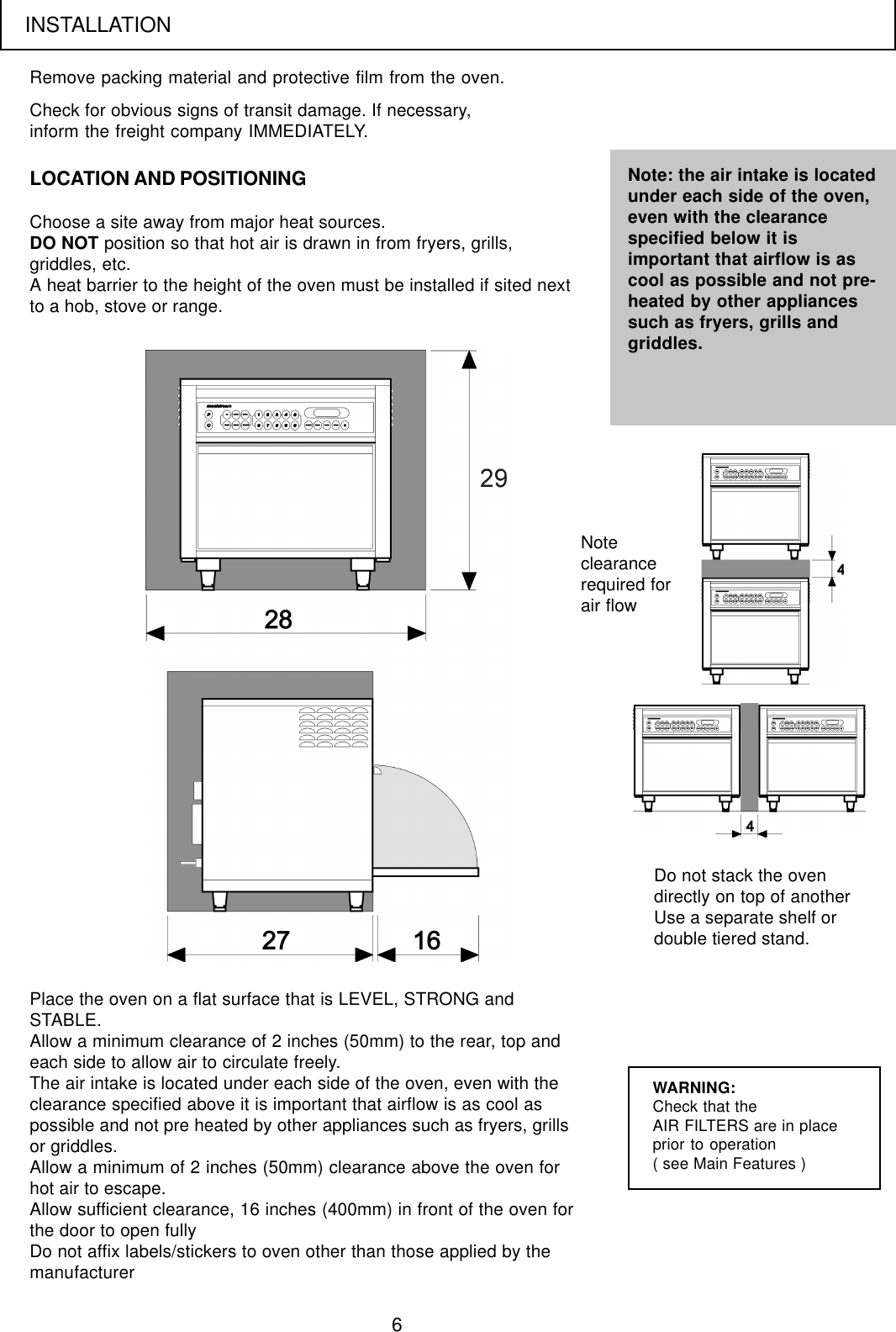
6Remove packing material and protective film from the oven.LOCATION AND POSITIONINGCheck for obvious signs of transit damage. If necessary,inform the freight company IMMEDIATELY.Choose a site away from major heat sources.DO NOT position so that hot air is drawn in from fryers, grills,griddles, etc.A heat barrier to the height of the oven must be installed if sited nextto a hob, stove or range.Note: the air intake is locatedunder each side of the oven,even with the clearancespecified below it isimportant that airflow is ascool as possible and not pre-heated by other appliancessuch as fryers, grills andgriddles.Place the oven on a flat surface that is LEVEL, STRONG andSTABLE.Allow a minimum clearance of 2 inches (50mm) to the rear, top andeach side to allow air to circulate freely.The air intake is located under each side of the oven, even with theclearance specified above it is important that airflow is as cool aspossible and not pre heated by other appliances such as fryers, grillsor griddles.Allow a minimum of 2 inches (50mm) clearance above the oven forhot air to escape.Allow sufficient clearance, 16 inches (400mm) in front of the oven forthe door to open fullyDo not affix labels/stickers to oven other than those applied by themanufacturerWARNING:Check that theAIR FILTERS are in placeprior to operation( see Main Features )Do not stack the ovendirectly on top of anotherUse a separate shelf ordouble tiered stand.Noteclearancerequired forair flowINSTALLATION
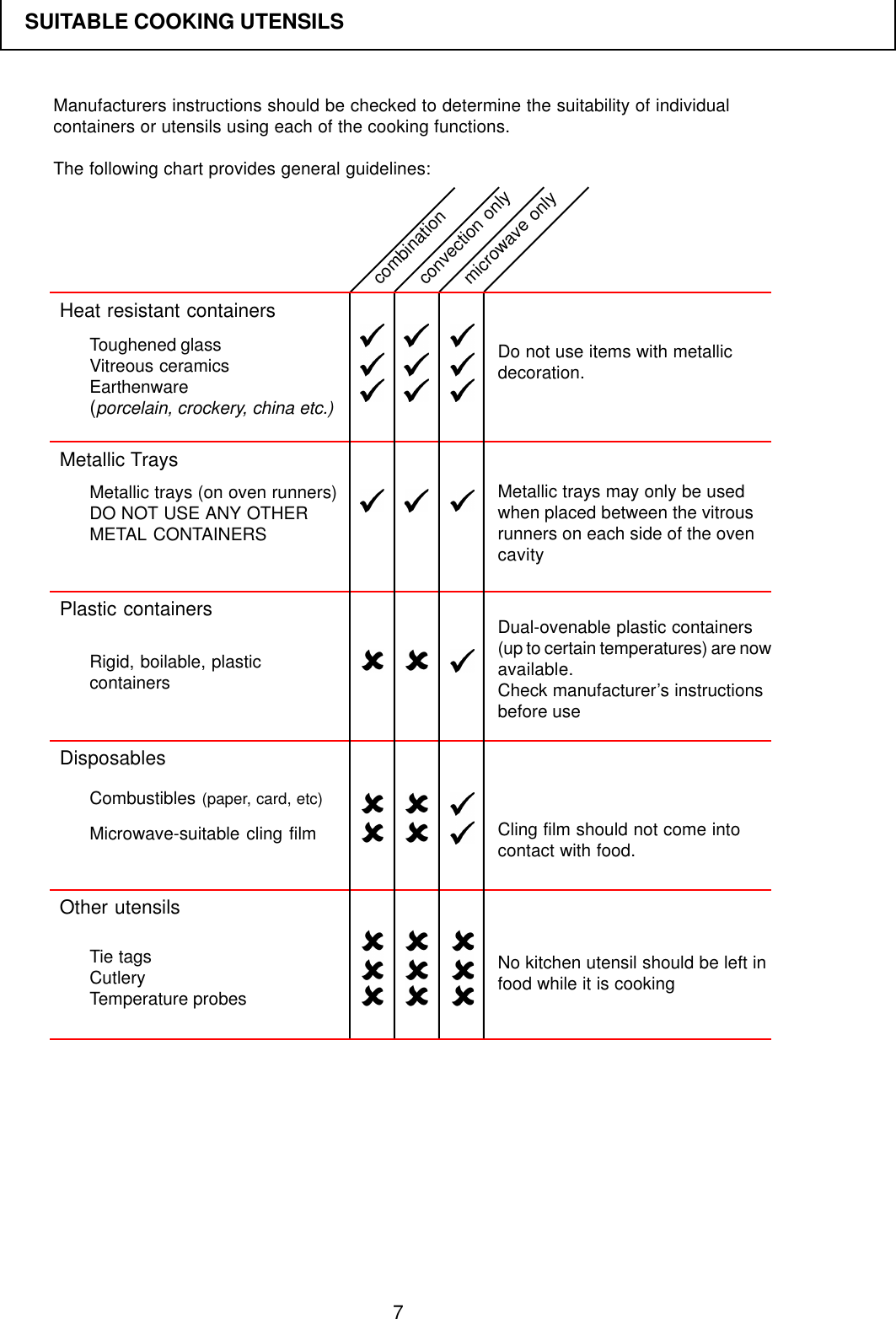
7Manufacturers instructions should be checked to determine the suitability of individualcontainers or utensils using each of the cooking functions.The following chart provides general guidelines:SUITABLE COOKING UTENSILSHeat resistant containersMetallic TraysPlastic containersDisposablesOther utensilsDo not use items with metallicdecoration.Metallic trays may only be usedwhen placed between the vitrousrunners on each side of the ovencavityDual-ovenable plastic containers(up to certain temperatures) are nowavailable.Check manufacturer’s instructionsbefore useCling film should not come intocontact with food.No kitchen utensil should be left infood while it is cookingToughened glassVitreous ceramicsEarthenware(porcelain, crockery, china etc.)Metallic trays (on oven runners)DO NOT USE ANY OTHERMETAL CONTAINERSRigid, boilable, plasticcontainersCombustibles (paper, card, etc)Microwave-suitable cling filmTie tagsCutleryTemperature probescombinationconvection onlymicrowave only
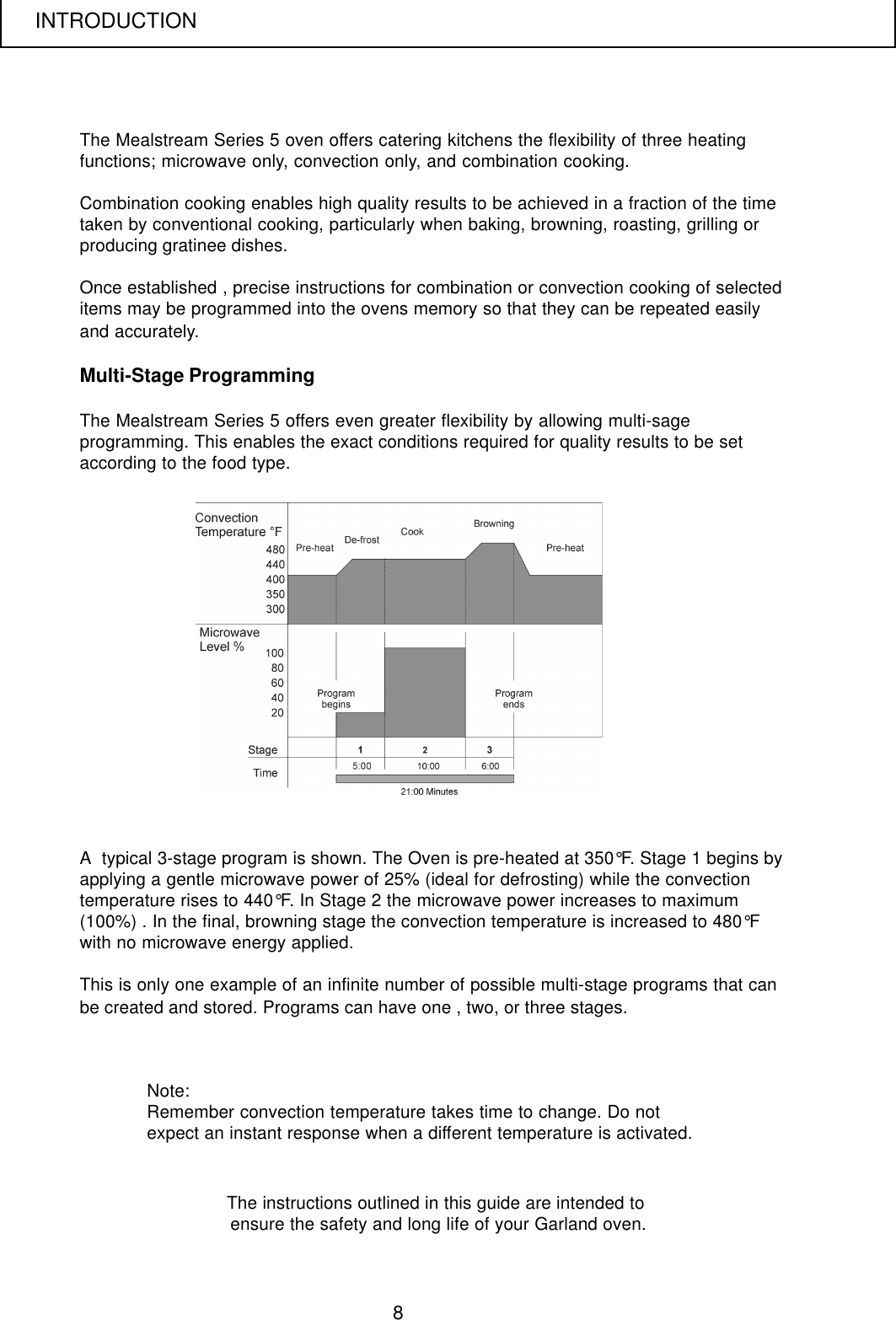
8The Mealstream Series 5 oven offers catering kitchens the flexibility of three heatingfunctions; microwave only, convection only, and combination cooking.Combination cooking enables high quality results to be achieved in a fraction of the timetaken by conventional cooking, particularly when baking, browning, roasting, grilling orproducing gratinee dishes.Once established , precise instructions for combination or convection cooking of selecteditems may be programmed into the ovens memory so that they can be repeated easilyand accurately.Multi-Stage ProgrammingThe Mealstream Series 5 offers even greater flexibility by allowing multi-sageprogramming. This enables the exact conditions required for quality results to be setaccording to the food type.Note:Remember convection temperature takes time to change. Do notexpect an instant response when a different temperature is activated.A  typical 3-stage program is shown. The Oven is pre-heated at 350°F. Stage 1 begins byapplying a gentle microwave power of 25% (ideal for defrosting) while the convectiontemperature rises to 440°F. In Stage 2 the microwave power increases to maximum(100%) . In the final, browning stage the convection temperature is increased to 480°Fwith no microwave energy applied.This is only one example of an infinite number of possible multi-stage programs that canbe created and stored. Programs can have one , two, or three stages.The instructions outlined in this guide are intended to ensure the safety and long life of your Garland oven.INTRODUCTION
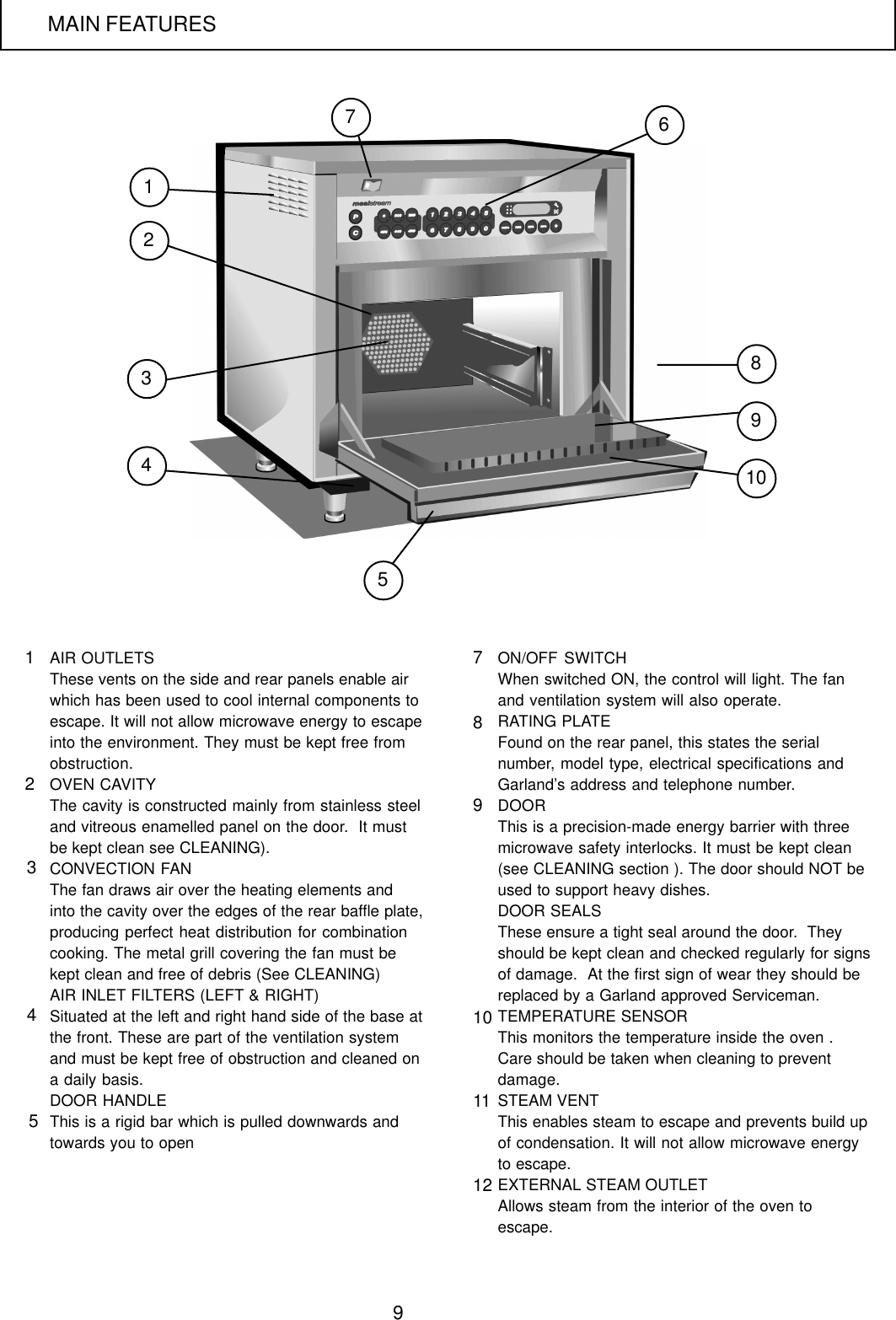
9AIR OUTLETSThese vents on the side and rear panels enable airwhich has been used to cool internal components toescape. It will not allow microwave energy to escapeinto the environment. They must be kept free fromobstruction.OVEN CAVITYThe cavity is constructed mainly from stainless steeland vitreous enamelled panel on the door.  It mustbe kept clean see CLEANING).CONVECTION FANThe fan draws air over the heating elements andinto the cavity over the edges of the rear baffle plate,producing perfect heat distribution for combinationcooking. The metal grill covering the fan must bekept clean and free of debris (See CLEANING)AIR INLET FILTERS (LEFT & RIGHT)Situated at the left and right hand side of the base atthe front. These are part of the ventilation systemand must be kept free of obstruction and cleaned ona daily basis.DOOR HANDLEThis is a rigid bar which is pulled downwards andtowards you to openON/OFF SWITCHWhen switched ON, the control will light. The fanand ventilation system will also operate.RATING PLATEFound on the rear panel, this states the serialnumber, model type, electrical specifications andGarland’s address and telephone number.DOORThis is a precision-made energy barrier with threemicrowave safety interlocks. It must be kept clean(see CLEANING section ). The door should NOT beused to support heavy dishes.DOOR SEALSThese ensure a tight seal around the door.  Theyshould be kept clean and checked regularly for signsof damage.  At the first sign of wear they should bereplaced by a Garland approved Serviceman.TEMPERATURE SENSORThis monitors the temperature inside the oven .Care should be taken when cleaning to preventdamage.STEAM VENTThis enables steam to escape and prevents build upof condensation. It will not allow microwave energyto escape.EXTERNAL STEAM OUTLETAllows steam from the interior of the oven toescape.3465217891012345789101112MAIN FEATURES
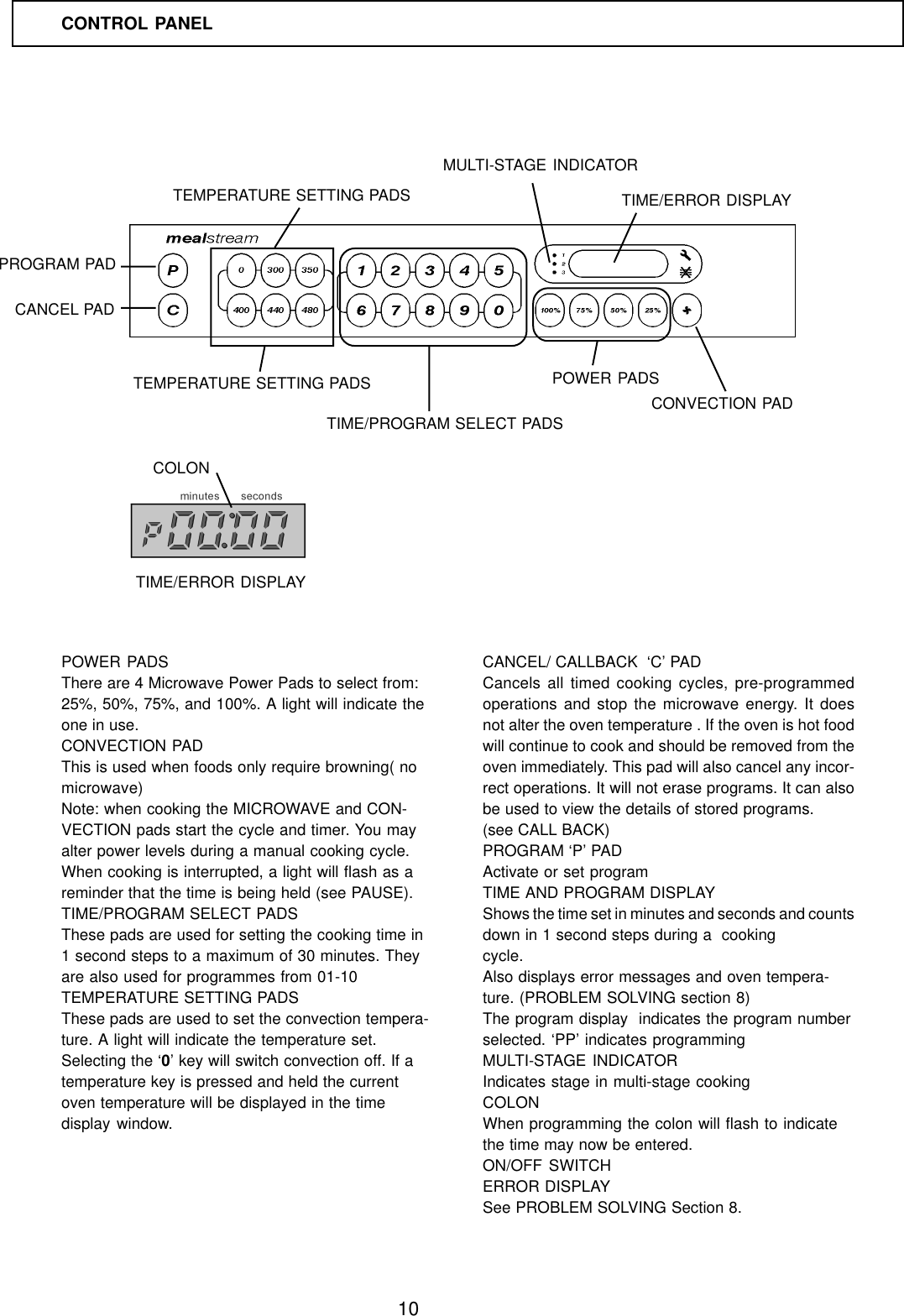
10POWER PADSThere are 4 Microwave Power Pads to select from:25%, 50%, 75%, and 100%. A light will indicate theone in use.CONVECTION PADThis is used when foods only require browning( nomicrowave)Note: when cooking the MICROWAVE and CON-VECTION pads start the cycle and timer. You mayalter power levels during a manual cooking cycle.When cooking is interrupted, a light will flash as areminder that the time is being held (see PAUSE).TIME/PROGRAM SELECT PADSThese pads are used for setting the cooking time in1 second steps to a maximum of 30 minutes. Theyare also used for programmes from 01-10TEMPERATURE SETTING PADSThese pads are used to set the convection tempera-ture. A light will indicate the temperature set.Selecting the ‘0’ key will switch convection off. If atemperature key is pressed and held the currentoven temperature will be displayed in the timedisplay window.CANCEL/ CALLBACK  ‘C’ PADCancels all timed cooking cycles, pre-programmedoperations and stop the microwave energy. It doesnot alter the oven temperature . If the oven is hot foodwill continue to cook and should be removed from theoven immediately. This pad will also cancel any incor-rect operations. It will not erase programs. It can alsobe used to view the details of stored programs.(see CALL BACK)PROGRAM ‘P’ PADActivate or set programTIME AND PROGRAM DISPLAYShows the time set in minutes and seconds and countsdown in 1 second steps during a  cookingcycle.Also displays error messages and oven tempera-ture. (PROBLEM SOLVING section 8)The program display  indicates the program numberselected. ‘PP’ indicates programmingMULTI-STAGE INDICATORIndicates stage in multi-stage cookingCOLONWhen programming the colon will flash to indicatethe time may now be entered.ON/OFF SWITCHERROR DISPLAYSee PROBLEM SOLVING Section 8.CONTROL PANELPOWER PADSCONVECTION PADTIME/PROGRAM SELECT PADSTEMPERATURE SETTING PADSPROGRAM PADCANCEL PADTEMPERATURE SETTING PADSTIME/ERROR DISPLAYMULTI-STAGE INDICATORCOLONTIME/ERROR DISPLAY
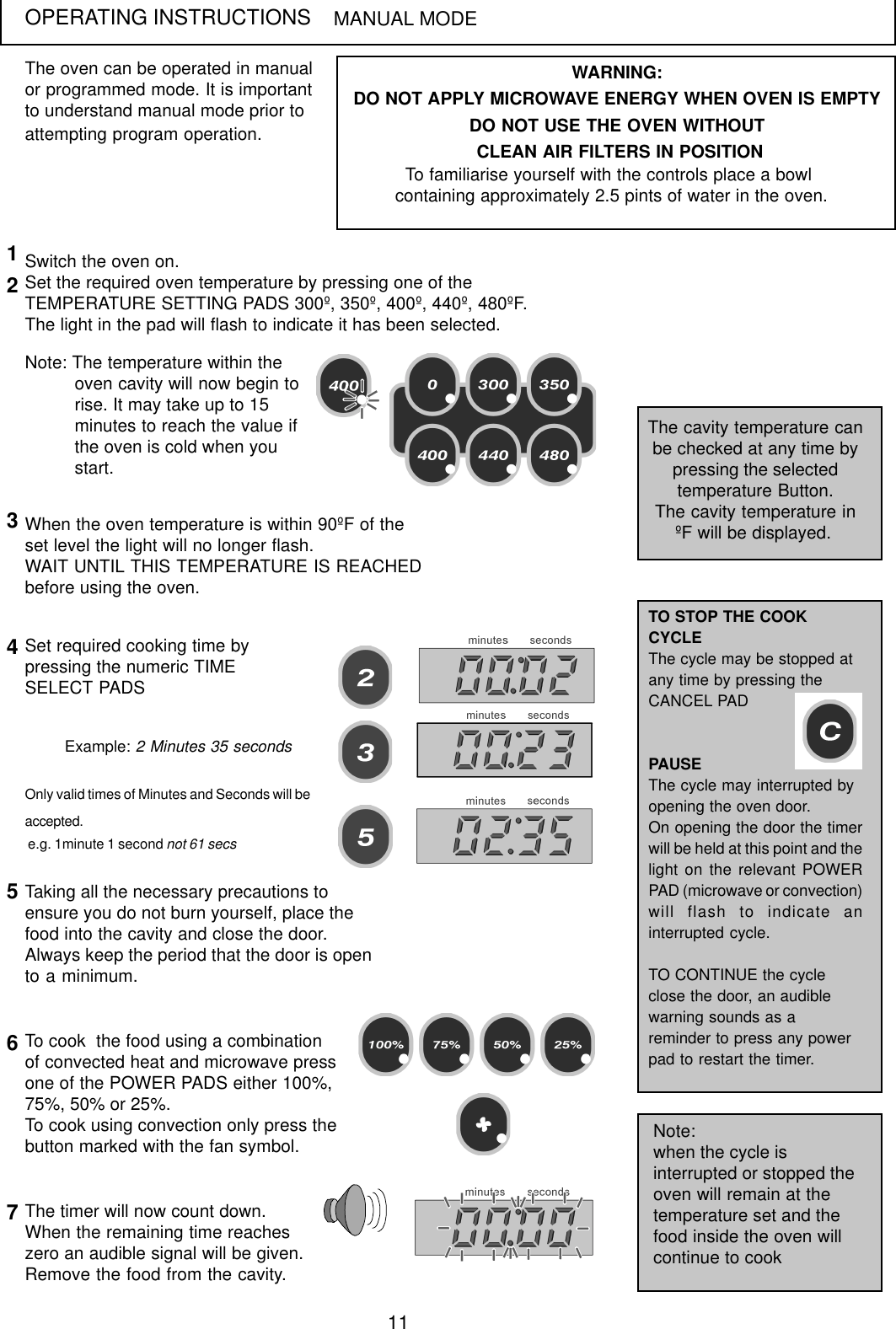
11OPERATING INSTRUCTIONSThe oven can be operated in manualor programmed mode. It is importantto understand manual mode prior toattempting program operation.MANUAL MODESwitch the oven on.Set the required oven temperature by pressing one of theTEMPERATURE SETTING PADS 300º, 350º, 400º, 440º, 480ºF.The light in the pad will flash to indicate it has been selected.Note: The temperature within theoven cavity will now begin torise. It may take up to 15minutes to reach the value ifthe oven is cold when youstart.The cavity temperature canbe checked at any time bypressing the selectedtemperature Button.The cavity temperature inºF will be displayed.12WARNING:DO NOT APPLY MICROWAVE ENERGY WHEN OVEN IS EMPTYDO NOT USE THE OVEN WITHOUT CLEAN AIR FILTERS IN POSITIONTo familiarise yourself with the controls place a bowl containing approximately 2.5 pints of water in the oven.When the oven temperature is within 90ºF of theset level the light will no longer flash.WAIT UNTIL THIS TEMPERATURE IS REACHEDbefore using the oven.3Set required cooking time bypressing the numeric TIMESELECT PADS4Only valid times of Minutes and Seconds will beaccepted. e.g. 1minute 1 second not 61 secsExample: 2 Minutes 35 secondsTaking all the necessary precautions toensure you do not burn yourself, place thefood into the cavity and close the door.Always keep the period that the door is opento a minimum.56The timer will now count down.When the remaining time reacheszero an audible signal will be given.Remove the food from the cavity.7To cook  the food using a combinationof convected heat and microwave pressone of the POWER PADS either 100%,75%, 50% or 25%.To cook using convection only press thebutton marked with the fan symbol.TO STOP THE COOKCYCLEThe cycle may be stopped atany time by pressing theCANCEL PADPAUSEThe cycle may interrupted byopening the oven door.On opening the door the timerwill be held at this point and thelight on the relevant POWERPAD (microwave or convection)will flash to indicate aninterrupted cycle.TO CONTINUE the cycleclose the door, an audiblewarning sounds as areminder to press any powerpad to restart the timer.Note:when the cycle isinterrupted or stopped theoven will remain at thetemperature set and thefood inside the oven willcontinue to cook
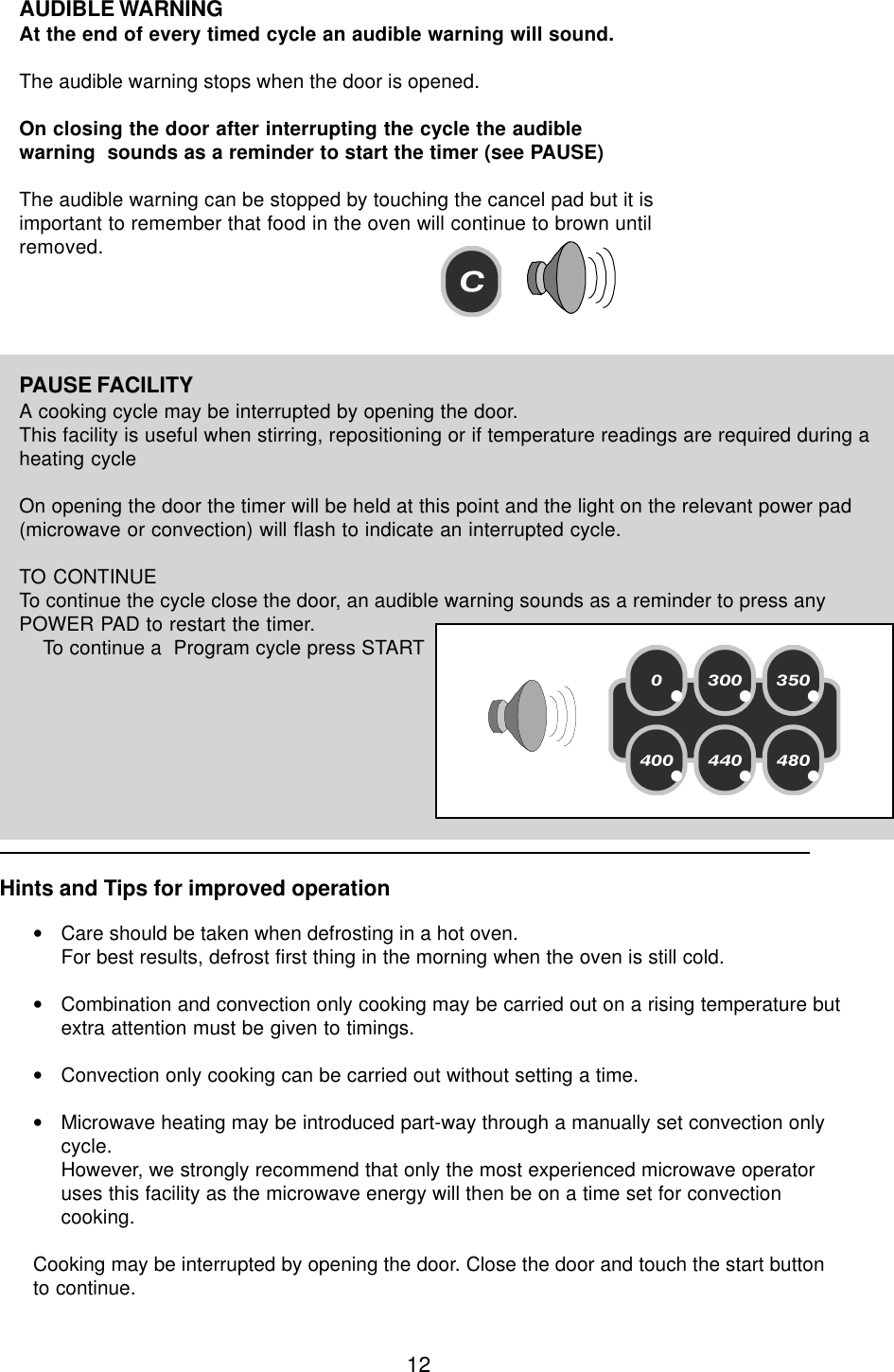
12PAUSE FACILITYA cooking cycle may be interrupted by opening the door.This facility is useful when stirring, repositioning or if temperature readings are required during aheating cycleOn opening the door the timer will be held at this point and the light on the relevant power pad(microwave or convection) will flash to indicate an interrupted cycle.TO CONTINUETo continue the cycle close the door, an audible warning sounds as a reminder to press anyPOWER PAD to restart the timer.    To continue a  Program cycle press STARTAUDIBLE WARNINGAt the end of every timed cycle an audible warning will sound.The audible warning stops when the door is opened.On closing the door after interrupting the cycle the audiblewarning  sounds as a reminder to start the timer (see PAUSE)The audible warning can be stopped by touching the cancel pad but it isimportant to remember that food in the oven will continue to brown untilremoved.Hints and Tips for improved operation•Care should be taken when defrosting in a hot oven.For best results, defrost first thing in the morning when the oven is still cold.•Combination and convection only cooking may be carried out on a rising temperature butextra attention must be given to timings.•Convection only cooking can be carried out without setting a time.•Microwave heating may be introduced part-way through a manually set convection onlycycle.However, we strongly recommend that only the most experienced microwave operatoruses this facility as the microwave energy will then be on a time set for convectioncooking.Cooking may be interrupted by opening the door. Close the door and touch the start buttonto continue.
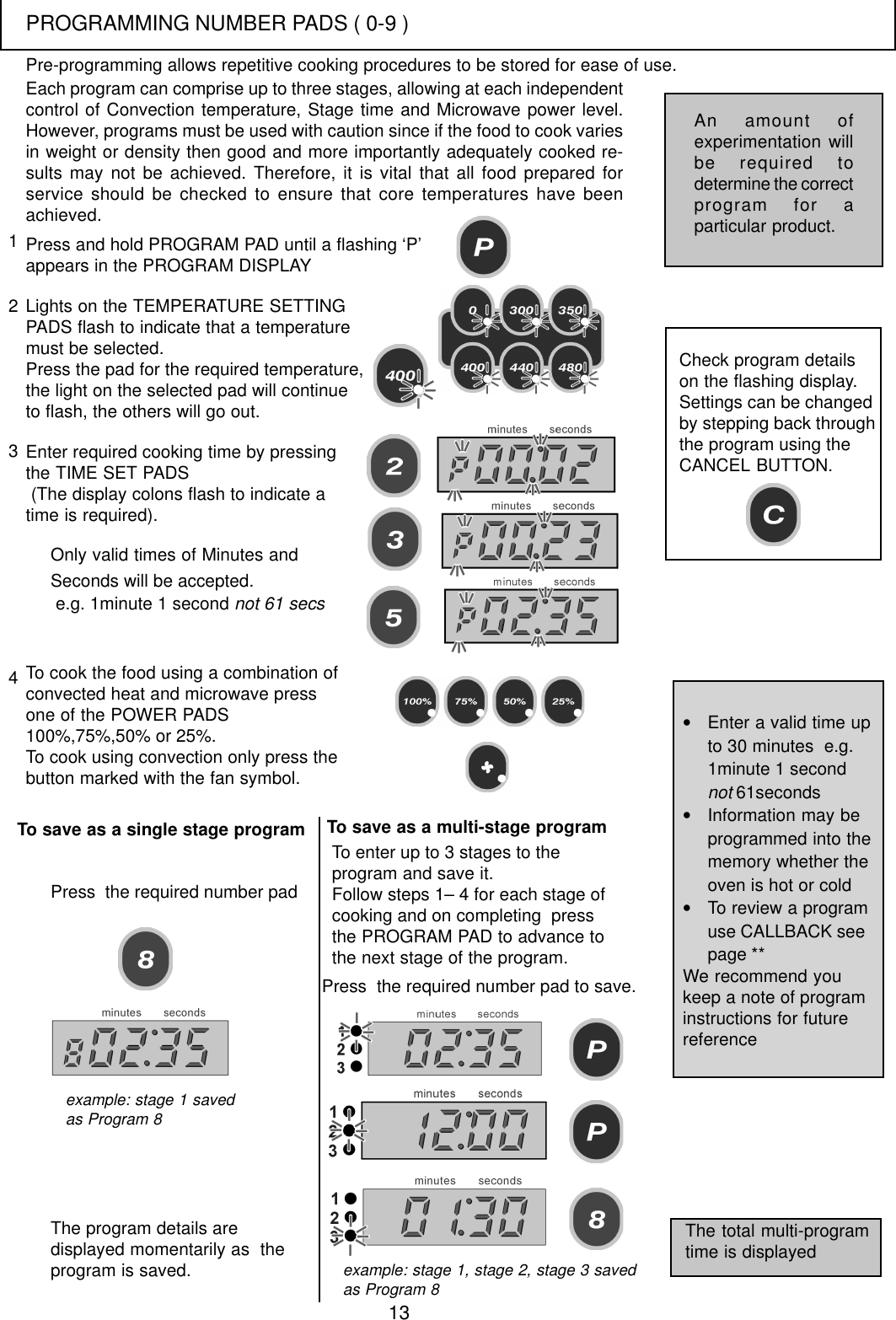
13Each program can comprise up to three stages, allowing at each independentcontrol of Convection temperature, Stage time and Microwave power level.However, programs must be used with caution since if the food to cook variesin weight or density then good and more importantly adequately cooked re-sults may not be achieved. Therefore, it is vital that all food prepared forservice should be checked to ensure that core temperatures have beenachieved.Press and hold PROGRAM PAD until a flashing ‘P’appears in the PROGRAM DISPLAYLights on the TEMPERATURE SETTINGPADS flash to indicate that a temperaturemust be selected.Press the pad for the required temperature,the light on the selected pad will continueto flash, the others will go out.Enter required cooking time by pressingthe TIME SET PADS (The display colons flash to indicate atime is required).123Only valid times of Minutes andSeconds will be accepted. e.g. 1minute 1 second not 61 secsTo cook the food using a combination ofconvected heat and microwave pressone of the POWER PADS100%,75%,50% or 25%.To cook using convection only press thebutton marked with the fan symbol.Check program detailson the flashing display.Settings can be changedby stepping back throughthe program using theCANCEL BUTTON.To save as a single stage programThe program details aredisplayed momentarily as  theprogram is saved.4Press  the required number padTo enter up to 3 stages to theprogram and save it.Follow steps 1– 4 for each stage ofcooking and on completing  pressthe PROGRAM PAD to advance tothe next stage of the program.Press  the required number pad to save.The total multi-programtime is displayed•Enter a valid time upto 30 minutes  e.g.1minute 1 secondnot 61seconds•Information may beprogrammed into thememory whether theoven is hot or cold•To review a programuse CALLBACK seepage **We recommend youkeep a note of programinstructions for futurereferenceAn amount ofexperimentation willbe required todetermine the correctprogram for aparticular product.Pre-programming allows repetitive cooking procedures to be stored for ease of use.example: stage 1 savedas Program 8example: stage 1, stage 2, stage 3 savedas Program 8To save as a multi-stage programPROGRAMMING NUMBER PADS ( 0-9 )
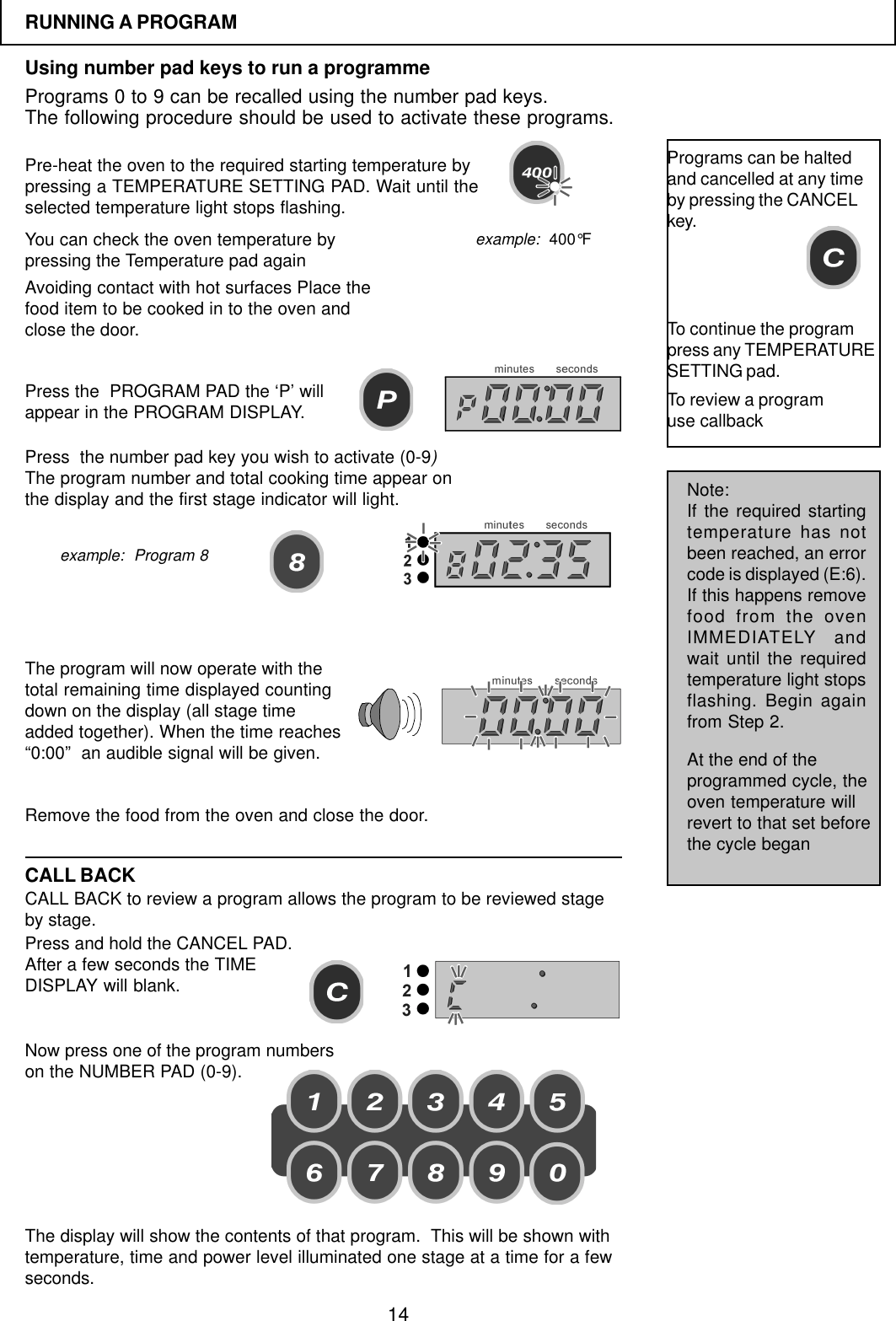
14RUNNING A PROGRAMUsing number pad keys to run a programmePrograms 0 to 9 can be recalled using the number pad keys.The following procedure should be used to activate these programs.Pre-heat the oven to the required starting temperature bypressing a TEMPERATURE SETTING PAD. Wait until theselected temperature light stops flashing.You can check the oven temperature bypressing the Temperature pad againPress the  PROGRAM PAD the ‘P’ willappear in the PROGRAM DISPLAY.Avoiding contact with hot surfaces Place thefood item to be cooked in to the oven andclose the door.Press  the number pad key you wish to activate (0-9)The program number and total cooking time appear onthe display and the first stage indicator will light.The program will now operate with thetotal remaining time displayed countingdown on the display (all stage timeadded together). When the time reaches“0:00”  an audible signal will be given.Remove the food from the oven and close the door.Programs can be haltedand cancelled at any timeby pressing the CANCELkey.To continue the programpress any TEMPERATURESETTING pad.CALL BACKCALL BACK to review a program allows the program to be reviewed stageby stage.Press and hold the CANCEL PAD.After a few seconds the TIMEDISPLAY will blank.Now press one of the program numberson the NUMBER PAD (0-9).Note:If the required startingtemperature has notbeen reached, an errorcode is displayed (E:6).If this happens removefood from the ovenIMMEDIATELY andwait until the requiredtemperature light stopsflashing. Begin againfrom Step 2.At the end of theprogrammed cycle, theoven temperature willrevert to that set beforethe cycle beganexample:  400°Fexample:  Program 8The display will show the contents of that program.  This will be shown withtemperature, time and power level illuminated one stage at a time for a fewseconds.To review a programuse callback
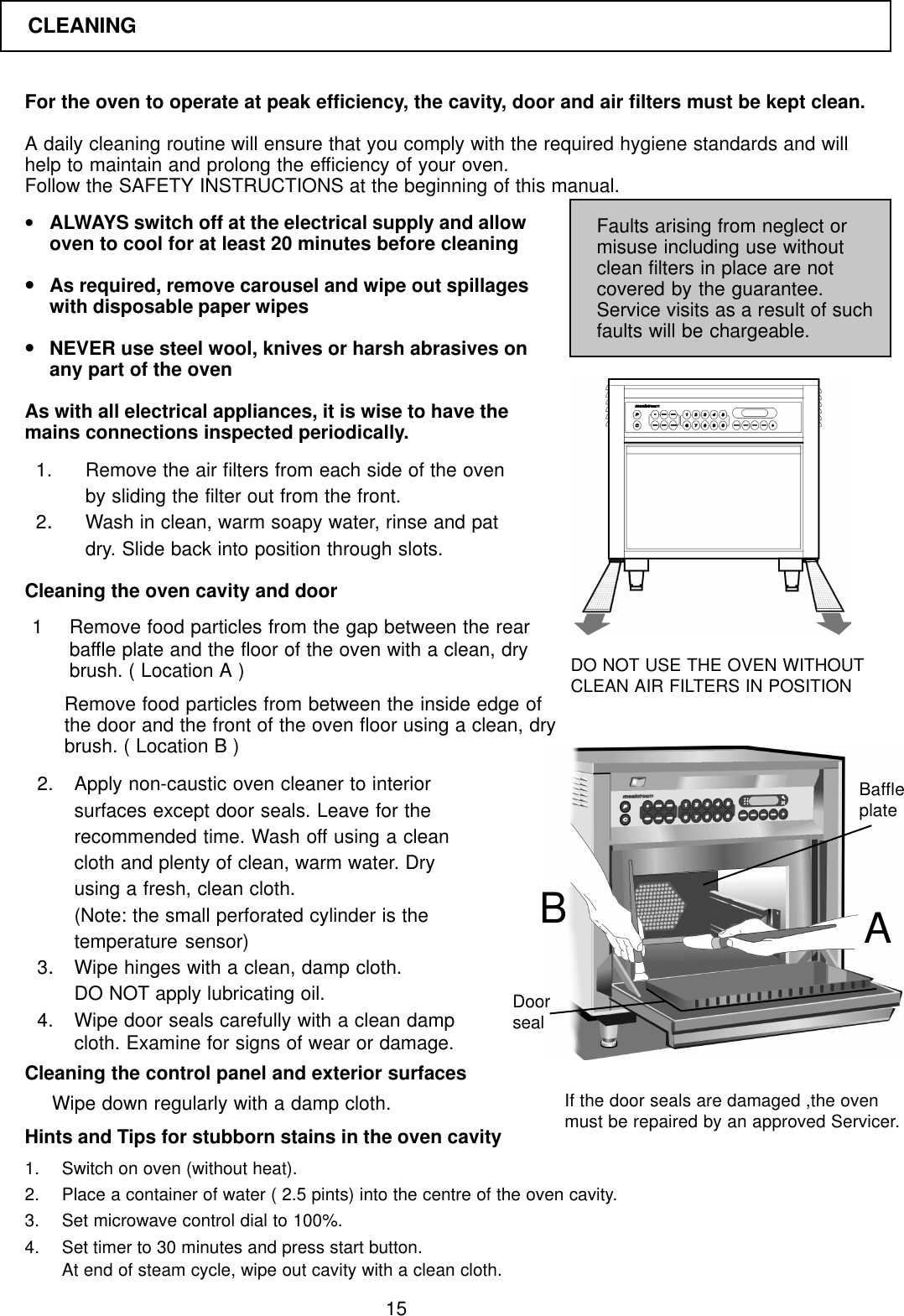
15For the oven to operate at peak efficiency, the cavity, door and air filters must be kept clean.A daily cleaning routine will ensure that you comply with the required hygiene standards and willhelp to maintain and prolong the efficiency of your oven.Follow the SAFETY INSTRUCTIONS at the beginning of this manual.•ALWAYS switch off at the electrical supply and allowoven to cool for at least 20 minutes before cleaning•As required, remove carousel and wipe out spillageswith disposable paper wipes•NEVER use steel wool, knives or harsh abrasives onany part of the ovenAs with all electrical appliances, it is wise to have themains connections inspected periodically.Faults arising from neglect ormisuse including use withoutclean filters in place are notcovered by the guarantee.Service visits as a result of suchfaults will be chargeable.1. Remove the air filters from each side of the ovenby sliding the filter out from the front.2.Wash in clean, warm soapy water, rinse and patdry. Slide back into position through slots.Cleaning the oven cavity and door1 Remove food particles from the gap between the rearbaffle plate and the floor of the oven with a clean, drybrush. ( Location A )Remove food particles from between the inside edge ofthe door and the front of the oven floor using a clean, drybrush. ( Location B )2. Apply non-caustic oven cleaner to interiorsurfaces except door seals. Leave for therecommended time. Wash off using a cleancloth and plenty of clean, warm water. Dryusing a fresh, clean cloth.(Note: the small perforated cylinder is thetemperature sensor)3.Wipe hinges with a clean, damp cloth.DO NOT apply lubricating oil.4. Wipe door seals carefully with a clean dampcloth. Examine for signs of wear or damage.Cleaning the control panel and exterior surfaces1. Switch on oven (without heat).2. Place a container of water ( 2.5 pints) into the centre of the oven cavity.3. Set microwave control dial to 100%.4. Set timer to 30 minutes and press start button.At end of steam cycle, wipe out cavity with a clean cloth.DO NOT USE THE OVEN WITHOUTCLEAN AIR FILTERS IN POSITIONHints and Tips for stubborn stains in the oven cavityWipe down regularly with a damp cloth. If the door seals are damaged ,the ovenmust be repaired by an approved Servicer.ABDoorsealBaffleplateCLEANING
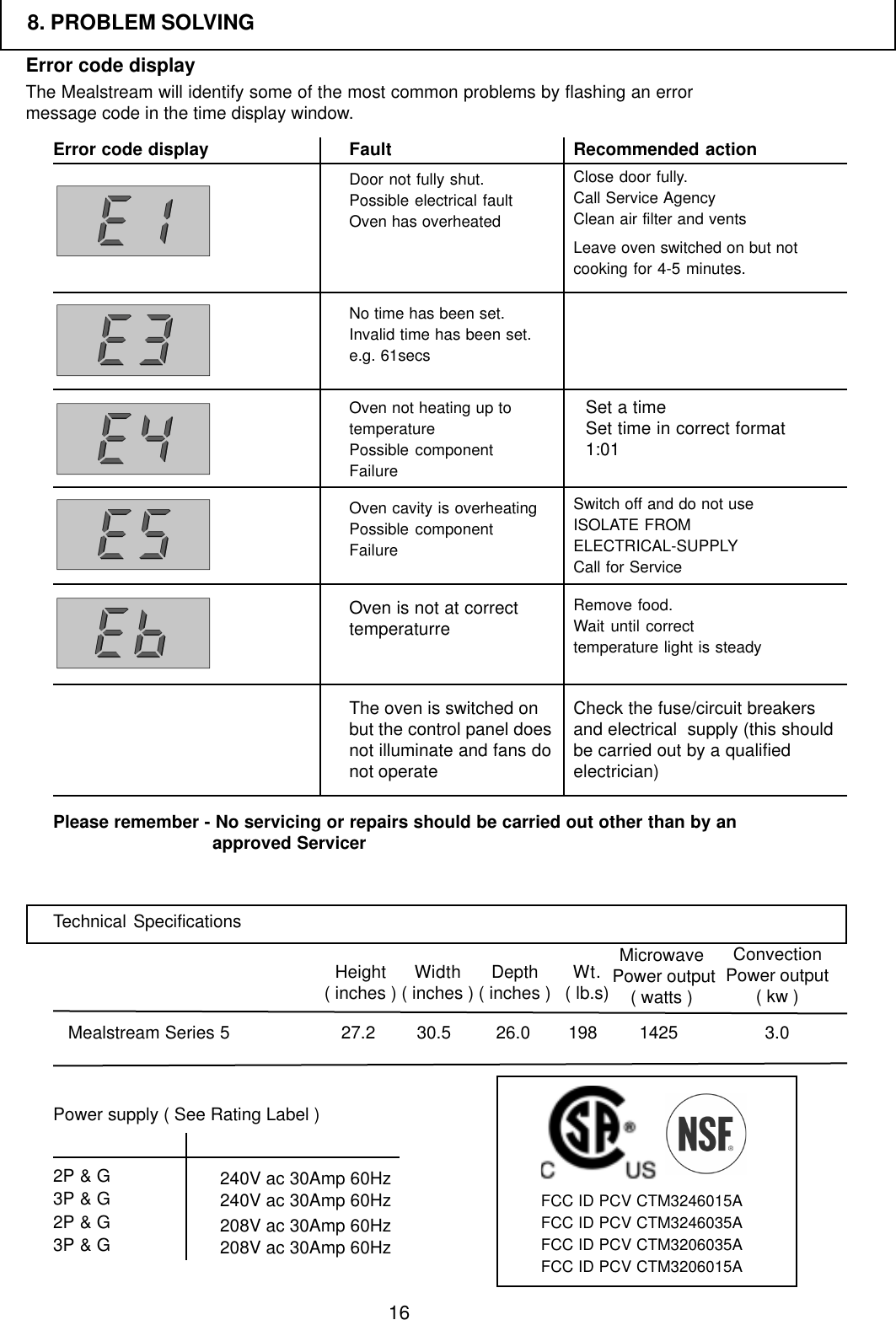
16Error code displayThe Mealstream will identify some of the most common problems by flashing an errormessage code in the time display window.Error code display Fault Recommended actionPlease remember - No servicing or repairs should be carried out other than by anapproved ServicerOven not heating up totemperaturePossible componentFailureDoor not fully shut.Possible electrical faultOven has overheatedNo time has been set.Invalid time has been set.e.g. 61secsClose door fully.Call Service AgencyClean air filter and ventsLeave oven switched on but notcooking for 4-5 minutes.Switch off and do not useISOLATE FROMELECTRICAL-SUPPLYCall for ServiceRemove food.Wait until correcttemperature light is steadyCheck the fuse/circuit breakersand electrical  supply (this shouldbe carried out by a qualifiedelectrician)8. PROBLEM SOLVINGSet a timeSet time in correct format1:01Oven cavity is overheatingPossible componentFailureOven is not at correcttemperaturreThe oven is switched onbut the control panel doesnot illuminate and fans donot operateTechnical SpecificationsMealstream Series 5Height( inches ) Width( inches ) Depth( inches )30.527.2 26.0Microwave Power output( watts )ConvectionPower output( kw )1425 3.0Wt.( lb.s)198Power supply ( See Rating Label )2P & G3P & G2P & G3P & G 240V ac 30Amp 60Hz240V ac 30Amp 60Hz208V ac 30Amp 60Hz208V ac 30Amp 60HzFCC ID PCV CTM3246015AFCC ID PCV CTM3246035AFCC ID PCV CTM3206035AFCC ID PCV CTM3206015A

Navigation menu