MetroTel of Minnesota MT9100R-SAT Fuel Tank Monitoring System User Manual Sat Rep 4 30 2008

MetroTel Corp of Minnesota Fuel Tank Monitoring System Sat Rep 4 30 2008

User Manual

WESROC© RMS Satellite Repeater – User ManualMetrotel Corporation of Minnesota, Inc.Revision A.     May 7, 2008 Page 1WESROC® RMS Satellite RepeaterMT-9100R-SATUser Manual
WESROC© RMS Satellite Repeater – User ManualMetrotel Corporation of Minnesota, Inc.Revision A.     May 7, 2008 Page 2Table of ContentsWesroc® RMS Satellite Repeater Overview.............................................................................................. 3Wesroc® RMS For Remote Sites .............................................................................................................. 3The Wesroc® RMS Remote Telemetry System ........................................................................................ 3AC or Solar Power..................................................................................................................................... 3Satellite Repeater Location........................................................................................................................ 3Compatibility ............................................................................................................................................. 3Wesroc® RMS Satellite Repeater Operation............................................................................................. 4General ...................................................................................................................................................... 4Wesroc® RMS Satellite Repeater Location .............................................................................................. 4Wesroc® RMS Satellite Repeater Power .................................................................................................. 5Wesroc® RMS Transmitters ..................................................................................................................... 5Scheduled Reporting.................................................................................................................................. 5Alarm Based Reporting ............................................................................................................................. 6Initialization Mode (or INIT mode)........................................................................................................... 6Wesroc® Portable Diagnostic Unit Field Control Module ....................................................................... 7Logo Screen............................................................................................................................................... 7Transmitter List Screen.............................................................................................................................. 7PDU Satellite Repeater Detail Screens ....................................................................................................... 8Satellite Repeater Identification Screen..................................................................................................... 8Satellite Repeater Status Screen ................................................................................................................ 9Satellite Repeater Local Time and Date Screen....................................................................................... 10Satellite Repeater GPS Detail Screen ...................................................................................................... 11Satellite Repeater Axonn STX-2 Status Screen....................................................................................... 12Satellite Repeater Configuration Screen .................................................................................................. 13Time Zone Configuration Screen: ........................................................................................................... 13Daylight Savings Time Configuration Function:..................................................................................... 14Satellite Repetitions = 3........................................................................................................................... 15Sat Interval Seconds Minimum = 300 ..................................................................................................... 15Sat Interval Seconds Maximum = 600..................................................................................................... 15Initialization Mode Minutes Function ..................................................................................................... 15Transmitters Initialized:........................................................................................................................... 16Configure Transmitter Function .............................................................................................................. 16Initialized Transmitter Configuration Screen ......................................................................................... 17Initialized Transmitter Indicator .............................................................................................................. 17Delete Initialized Transmitter Function................................................................................................... 18Transmitter Serial Number Indicator....................................................................................................... 18Transmitter Application Indicator ........................................................................................................... 18Transmitter Received Signal Strength Indicator...................................................................................... 19Day of the Week Scheduled Reporting.................................................................................................... 19Day of the Month Scheduled Reporting .................................................................................................. 20Daily Report Interval Function................................................................................................................ 22First Daily Report Hour Function............................................................................................................ 22Wesroc® RMS Satellite Repeater Specifications..................................................................................... 23Warranty Information ............................................................................................................................... 24Radio Frequency Exposure Warning ....................................................................................................... 24
WESROC© RMS Satellite Repeater – User ManualMetrotel Corporation of Minnesota, Inc.Revision A.     May 7, 2008 Page 3Wesroc® RMS Satellite Repeater OverviewWesroc® RMS For Remote SitesThe Wesroc® RMS Satellite Repeater is used for communication of Wesroc RMSremote telemetry system data to the Wesroc RMS Host System. Specifically, thepreferred use is in locations where conventional communication networks are notavailable or are not reasonably accessible.The Wesroc® RMS Remote Telemetry SystemThe Wesroc® Satellite Repeater operates by receiving Wesroc® RMS telemetrypackets. These packets are conditionally accepted based on whether theSatellite Repeater has been initialized to them. If so, the original telemetry packetis sent through the Globalstar® simplex data network, where it is then deliveredthrough the internet to the Wesroc® host server. Data inquiries and reportingfrom the Wesroc® host server function normally just as if the data were deliveredby Wesroc® RMS Base Units through the Public Switched Telephone Network.AC or Solar PowerThe Wesroc® Satellite Repeater operates on an AC power adapter or with anoptional solar powered battery backup system. The Satellite Repeater comeswith a 25 foot cord and an external power supply. When installing the SatelliteRepeater, it must be installed outside with a clear view of the sky. The SatelliteRepeater must be able to receive Global Positioning System signals and alsotransmit data to the Low Earth Orbiting Globalstar® satellite constellation. Thisrequires the open view of the sky.Satellite Repeater LocationSimply place the Satellite Repeater in an outdoor location that is within range ofthe Wesroc® RMS transmitters which it must provide service for. The SatelliteRepeater must then be initialized to these Wesroc® RMS transmitters. Oncethe Satellite Repeater knows which transmitter(s) to listen to, scheduledreporting times must be programmed for each transmitter.CompatibilityThe Satellite Repeater is fully compatible with all Wesroc® RMS telemetrydevices including standard repeaters (MT-9100R).
WESROC© RMS Satellite Repeater – User ManualMetrotel Corporation of Minnesota, Inc.Revision A.     May 7, 2008 Page 4Wesroc® RMS Satellite Repeater OperationGeneralThe Wesroc® RMS Satellite Repeater is designed to work in conjunction with allother Wesroc® RMS transmitters. The Wesroc® RMS Base Unit is used forregular communications to the Wesroc® Host Server over the Public SwitchedTelephone Network. There are plenty of potential remote monitoring sites whereaccess to the PSTN does not exist, or is cost prohibitive. There exist cellularsolutions for communication, but they are costly and are still limited to areaswhere access to cellular carriers is available. The Satellite Repeater was createdto solve the problem of remote monitoring in locations where conventionalcommunication is unavailable.The Satellite Repeater operates by receiving data packets from Wesroc® RMStransmitters. These could include Gas Meters, Thermometers, Level Sensors,etc… It is also intended to be forward compatible with Wesroc® applicationsensors which are not yet conceived. The data is then sent through theGlobalstar Simplex data network. This network consists of Low Earth OrbitingSatellites (or LEOS) which repeat the data signals. These repeated signals arethen received by Globalstar®’s ground segment stations. Globalstar® recognizesthe Electronic Serial Number of the Satellite Repeater and associates thereceived packets with Independent Technologies. The data is then sent via theinternet to the Wesroc® RMS SatComm server which processes and presentsthe data to the Wesroc® RMS Host Computer system where it is madeaccessible to the Host Administrators.The use of the Globalstar® Simplex data network is a for-fee service.Independent Technologies is charged for the setup and operation of the SatelliteRepeater. Independent Technologies then charges it’s customers appropriatelyfor the use of the Wesroc® RMS data provided through this system.Wesroc® RMS Satellite Repeater LocationThe satellite repeater must receive Global Position System signals to acquiretime and date. GPS information also is required for proper Globalstar® simplexchannel selection based on it’s proximity to Radio Astronomy Sites. The satelliterepeater must also transmit the signal used by the Globalstar® simplex datanetwork. These two requirements necessitate that the satellite repeater beplaced in a location that has a clear, unobstructed, view of the sky. Typicallocations include pole mounting, mounting the satellite repeater at the point of aroof, etc… The satellite repeater comes with a 25 foot power cord. This allows forthe AC power source to be located inside of a building or structure, or properlyprotected area.
WESROC© RMS Satellite Repeater – User ManualMetrotel Corporation of Minnesota, Inc.Revision A.     May 7, 2008 Page 5Wesroc® RMS Satellite Repeater PowerThe power source for the satellite repeater may be either AC power, or solarpower. The power consumption required for satellite communication makesprimary batteries prohibitive. By using external power, reliability of the system isassured while removing the requirement that batteries be periodically replaced.It is expected that once a Wesroc® RMS satellite repeater is properly installed inthe field using AC power, periodic service will not be required.  For solar poweredsatellite repeaters, it is recommended that the lead acid battery be replacedevery five years.Wesroc® RMS TransmittersThe Wesroc® RMS Satellite Repeater is designed to manage to up to sixteentotal Wesroc® RMS transmitters. These transmitters can be mixed and matchedin any fashion. They need not be all the same type of transmitter.The Wesroc RMS system uses a proprietary packet data protocol. This protocoluses a strict format which includes a preamble, a packet header, payload, andproprietary Cyclic Redundancy Code for error checking. For this reason, theWesroc RMS satellite repeater will reject all radio signals that are received in it’soccupied ISM band except for properly formatted data packets from Wesroc®RMS transmitters. There is no risk of erroneously receiving signals that may beincorrectly interpreted as Wesroc® RMS packets.Scheduled ReportingThe satellite repeater may be configured for scheduled reporting of data for eachtransmitter which is initialized to it. It is expected that multiple transmissions frominitialized transmitters will be received by the Satellite Repeater for eachtransmission through the Globalstar® simplex data network. The purpose ofscheduled reporting is to make sure that data in the Wesroc Host Computer isreasonably kept up to date for routine data. But at the same time, the cost ofoperation is kept to minimum by not sending Globalstar simplex data packets foreach and every transmission from a Wesroc® RMS transmitter. It will be up tothe end customer to decided how often they wish to have updates from specifictransmitters and weigh that against the per-packet costs.Each Satellite Repeater is limited by Globalstar® to no more than onetransmission every 30 minutes. This is an important limit to understand. If aparticular satellite repeater has, say, eight transmitters initialized to it. And thesatellite repeater is configured so that all eight transmitters are scheduled toreport at 3:00AM. It will require four hours for all eight transmitters to be reported,so the last transmitter will report in between 6:30AM and 7:00AM.
WESROC© RMS Satellite Repeater – User ManualMetrotel Corporation of Minnesota, Inc.Revision A.     May 7, 2008 Page 6Alarm Based ReportingFor transmitters with applications that the satellite repeater understands (i.e. caninterpret data, apply limits, apply algorithms, etc…), alarm based reporting canbe applied. For example, an alarm can be set for a temperature transmitter. If aWesroc® RMS packet is received from a temperature transmitter, then thesatellite repeater can apply limits to the reported temperature. If the reportedtemperature goes above or below a preset limit, then a Globalstar simplex datapacket would be sent. Alarm events are reported when they happen with no timeof day restrictions.Wesroc® RMS applications which the satellite repeater does not understand canonly be reported through the Globalstar® network using scheduled reporting.Again, with it’s proprietary packet format, the satellite repeater will only receivedata packets from Wesroc® RMS transmitters.Initialization Mode (or INIT mode)In order to “associate” Wesroc RMS transmitters with the Satellite Repeater, theSatellite Repeater must be “initialized” to these transmitters. While the SatelliteRepeater is in “INIT” mode, any init-mode packets that are received fromtransmitters will cause the Satellite Repeater to link, or attach, to that transmitter.This is so that during normal operation, the Satellite Repeater knows whichWesroc® transmitters to pay attention to and which Wesroc® transmitters toignore. It also allows the Satellite Repeater to respond differently from onetransmitter to the next. For instance you may want daily reports from a water flowsensor, but only weekly reports from a tank level sensor. Reporting is configuredseparately for each transmitter.The satellite repeater is placed in initialization mode by setting the initializationmode timer to a non-zero value. (see satellite repeater configuration section ofthis document). The initialization mode timer indicates time in minutes. When thevalue of the initialization mode timer is set, it automatically begins to count downto zero. While it is non-zero, the satellite repeater is in initialization mode. Apractical value for the initialization mode timer is 30 minutes.While the satellite repeater is in initialization mode, initialization is accomplishedby placing the appropriate Wesroc® RMS transmitter in initialization mode. Thisforces the transmitter to send “init-mode” packets. The satellite repeaterrecognizes the init-mode packet and initializes or links to that transmitter. Onceinitialization has taken place, both the satellite repeater and the transmitter maybe taken out of initialization mode. Initialization mode is confirmed by verifyingthat the transmitters’ serial number and application appear in the initializedtransmitter configuration screen of the Wesroc® Portable Diagnostic Unit.
WESROC© RMS Satellite Repeater – User ManualMetrotel Corporation of Minnesota, Inc.Revision A.     May 7, 2008 Page 7Wesroc® Portable Diagnostic Unit Field Control ModuleIn order to configure a Satellite Repeater in the field, the installer must have aWesroc® Portable Diagnostic Unit (PN: MT9100-PDU). The portable diagnosticunit is for receiving and displaying status and configuration informationtransmitted by the Satellite Repeater (along with any other Wesroc® RMSdevices that are present). The PDU also transmits configuration information tothe Satellite Repeater. To power up the PDU, press the PWR button. The logoscreen will then be displayed.Logo ScreenTo view Wesroc® RMS transmitters, press the right button from the logo screen.When power is applied to the Satellite Repeater it will transmit status information.The transmitter list screen shows which transmitters have been heard from. TheSerial Number of the device, the type of device, the Time Since LastTransmission and the Received Signal Strength are shown. The transmitterscreen will look something like this:Transmitter List ScreenTo look at the detailed information that is sent from the Satellite Repeater, pushthe up and down arrows until the selection arrow is pointed at the entry for theSatellite Repeater. Then press the right button.
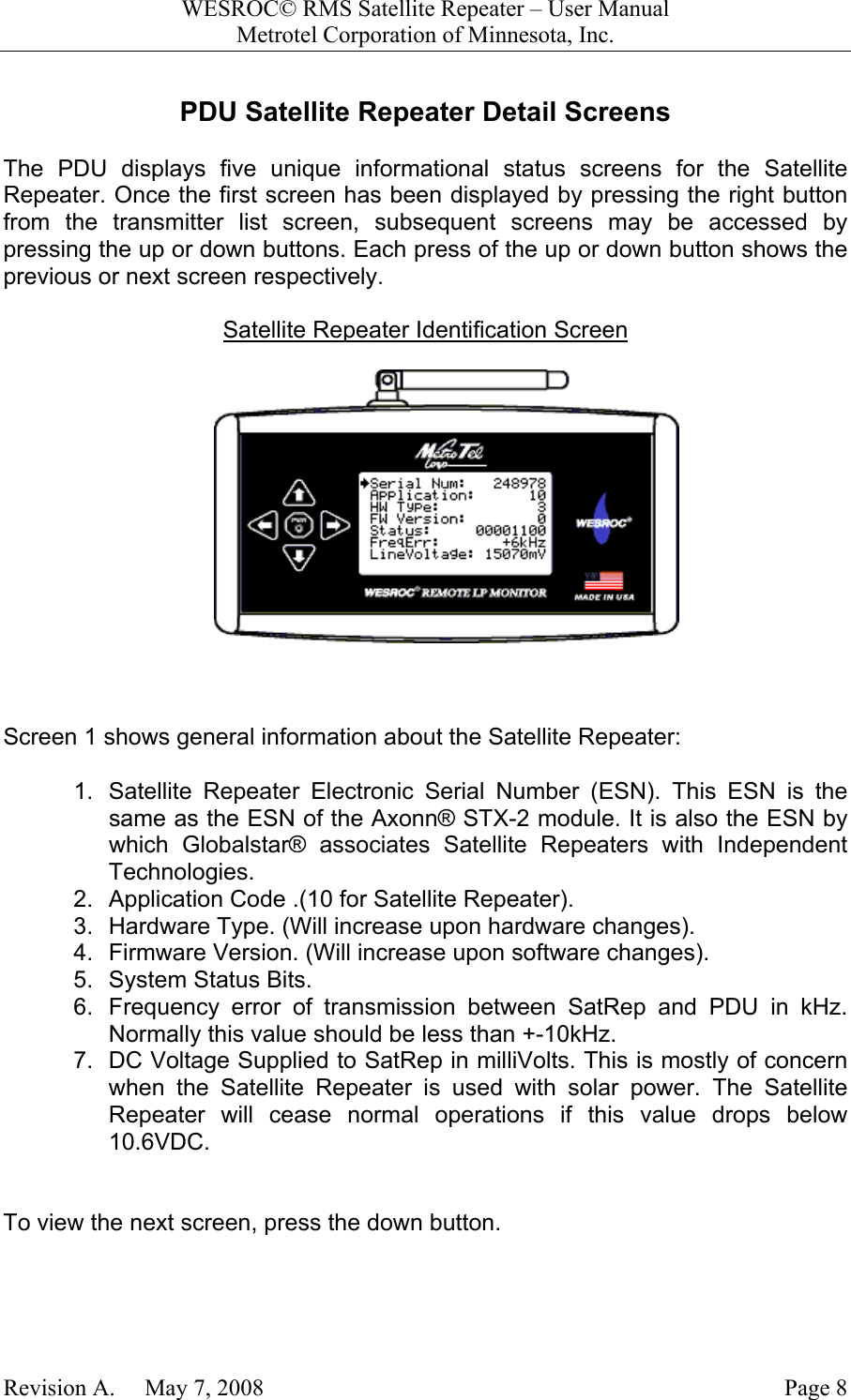
WESROC© RMS Satellite Repeater – User ManualMetrotel Corporation of Minnesota, Inc.Revision A.     May 7, 2008 Page 8PDU Satellite Repeater Detail ScreensThe PDU displays five unique informational status screens for the SatelliteRepeater. Once the first screen has been displayed by pressing the right buttonfrom the transmitter list screen, subsequent screens may be accessed bypressing the up or down buttons. Each press of the up or down button shows theprevious or next screen respectively.Satellite Repeater Identification ScreenScreen 1 shows general information about the Satellite Repeater:1.  Satellite Repeater Electronic Serial Number (ESN). This ESN is thesame as the ESN of the Axonn® STX-2 module. It is also the ESN bywhich Globalstar® associates Satellite Repeaters with IndependentTechnologies.2.  Application Code .(10 for Satellite Repeater).3.  Hardware Type. (Will increase upon hardware changes).4.  Firmware Version. (Will increase upon software changes).5.  System Status Bits.6.  Frequency error of transmission between SatRep and PDU in kHz.Normally this value should be less than +-10kHz.7.  DC Voltage Supplied to SatRep in milliVolts. This is mostly of concernwhen the Satellite Repeater is used with solar power. The SatelliteRepeater will cease normal operations if this value drops below10.6VDC.To view the next screen, press the down button.
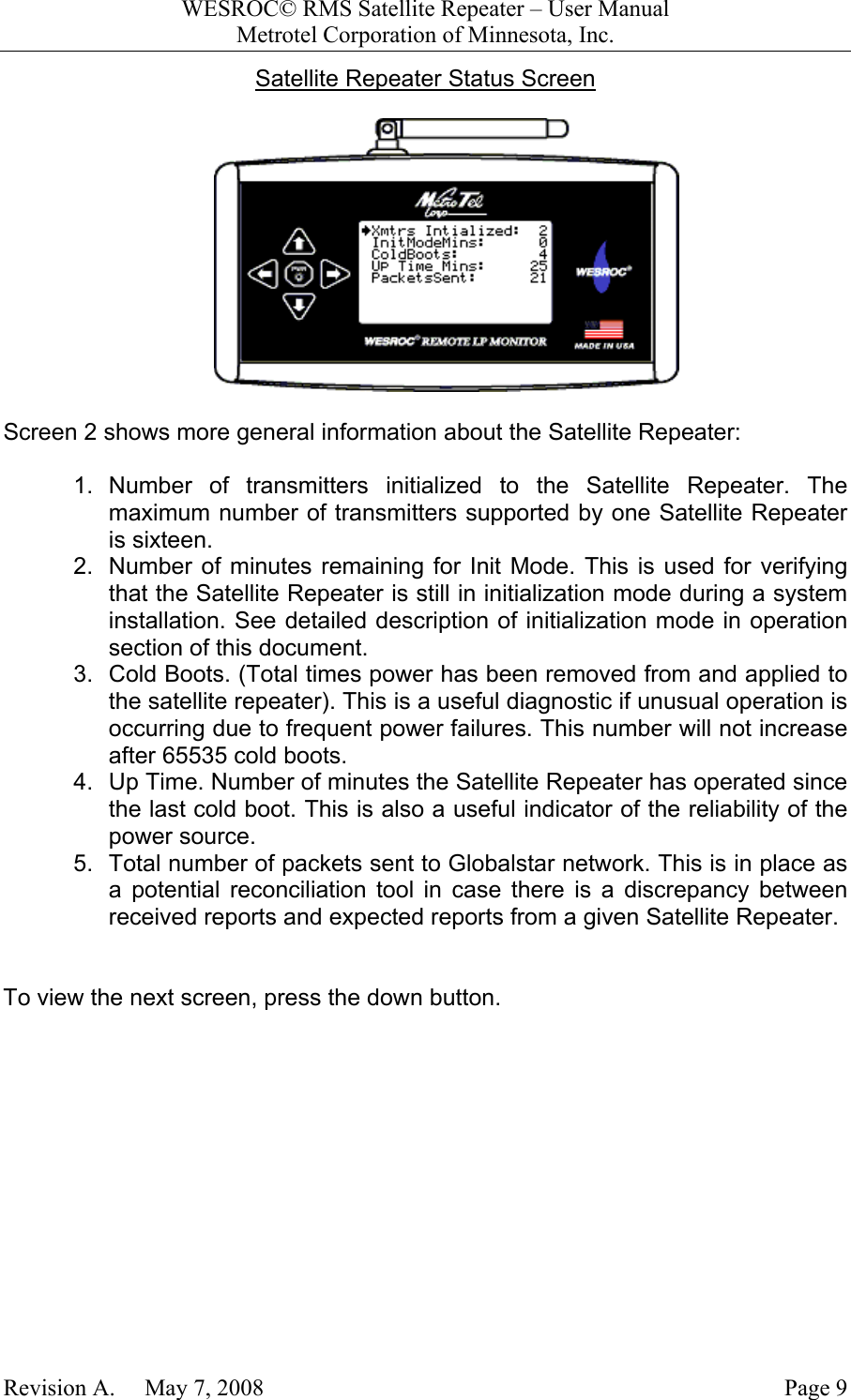
WESROC© RMS Satellite Repeater – User ManualMetrotel Corporation of Minnesota, Inc.Revision A.     May 7, 2008 Page 9Satellite Repeater Status ScreenScreen 2 shows more general information about the Satellite Repeater:1. Number of transmitters initialized to the Satellite Repeater. Themaximum number of transmitters supported by one Satellite Repeateris sixteen.2.  Number of minutes remaining for Init Mode. This is used for verifyingthat the Satellite Repeater is still in initialization mode during a systeminstallation. See detailed description of initialization mode in operationsection of this document.3.  Cold Boots. (Total times power has been removed from and applied tothe satellite repeater). This is a useful diagnostic if unusual operation isoccurring due to frequent power failures. This number will not increaseafter 65535 cold boots.4.  Up Time. Number of minutes the Satellite Repeater has operated sincethe last cold boot. This is also a useful indicator of the reliability of thepower source.5.  Total number of packets sent to Globalstar network. This is in place asa potential reconciliation tool in case there is a discrepancy betweenreceived reports and expected reports from a given Satellite Repeater.To view the next screen, press the down button.
WESROC© RMS Satellite Repeater – User ManualMetrotel Corporation of Minnesota, Inc.Revision A.     May 7, 2008 Page 10Satellite Repeater Local Time and Date ScreenScreen three shows local time information. This information is derived fromUniversal Coordinated Time as obtained by the Global Positioning Systemreceiver. This information will not be valid until the Satellite Repeater’s GPSreceiver has obtained a good position fix. Screen three shows:1.  Local Time in Hours:Minutes:Seconds format (24 hour). The time thatis displayed in quite accurate. However, it will be the time of day at thetime of the transmission from the Satellite Repeater to the PDU. Forexample, if the Satellite Repeater does not send a packet for 10minutes, the time will be 10 minutes old.2.  Local Date in  Month/Day/Year format.3.  Local Day of the Week.4.  Local Time Zone.5.  Whether Daylight Savings Time is Enabled.6.  If Enabled, whether Daylight Savings Time is active.To view the next screen, press the down button.
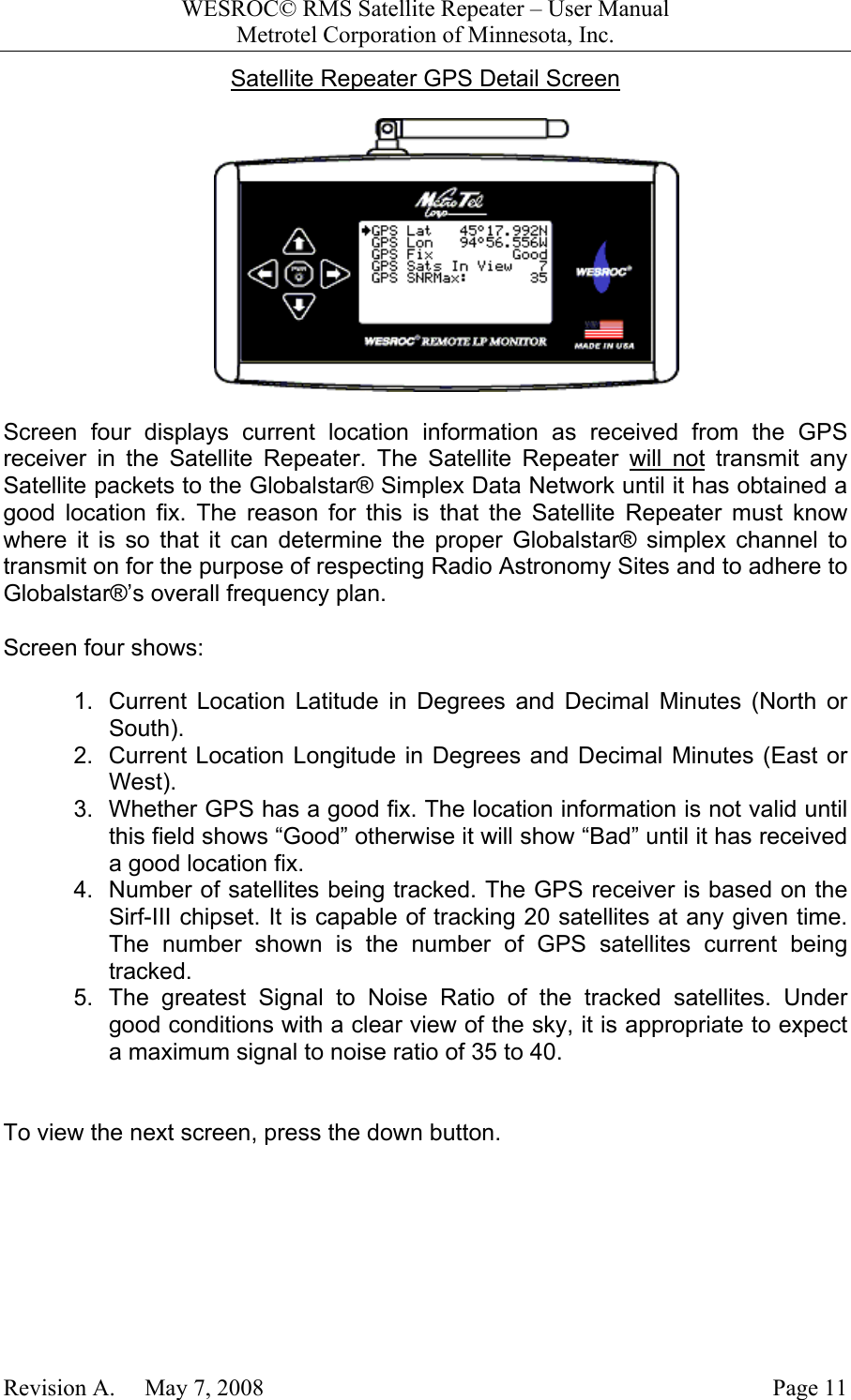
WESROC© RMS Satellite Repeater – User ManualMetrotel Corporation of Minnesota, Inc.Revision A.     May 7, 2008 Page 11Satellite Repeater GPS Detail ScreenScreen four displays current location information as received from the GPSreceiver in the Satellite Repeater. The Satellite Repeater will not transmit anySatellite packets to the Globalstar® Simplex Data Network until it has obtained agood location fix. The reason for this is that the Satellite Repeater must knowwhere it is so that it can determine the proper Globalstar® simplex channel totransmit on for the purpose of respecting Radio Astronomy Sites and to adhere toGlobalstar®’s overall frequency plan.Screen four shows:1.  Current Location Latitude in Degrees and Decimal Minutes (North orSouth).2.  Current Location Longitude in Degrees and Decimal Minutes (East orWest).3.  Whether GPS has a good fix. The location information is not valid untilthis field shows “Good” otherwise it will show “Bad” until it has receiveda good location fix.4.  Number of satellites being tracked. The GPS receiver is based on theSirf-III chipset. It is capable of tracking 20 satellites at any given time.The number shown is the number of GPS satellites current beingtracked.5.  The greatest Signal to Noise Ratio of the tracked satellites. Undergood conditions with a clear view of the sky, it is appropriate to expecta maximum signal to noise ratio of 35 to 40.To view the next screen, press the down button.
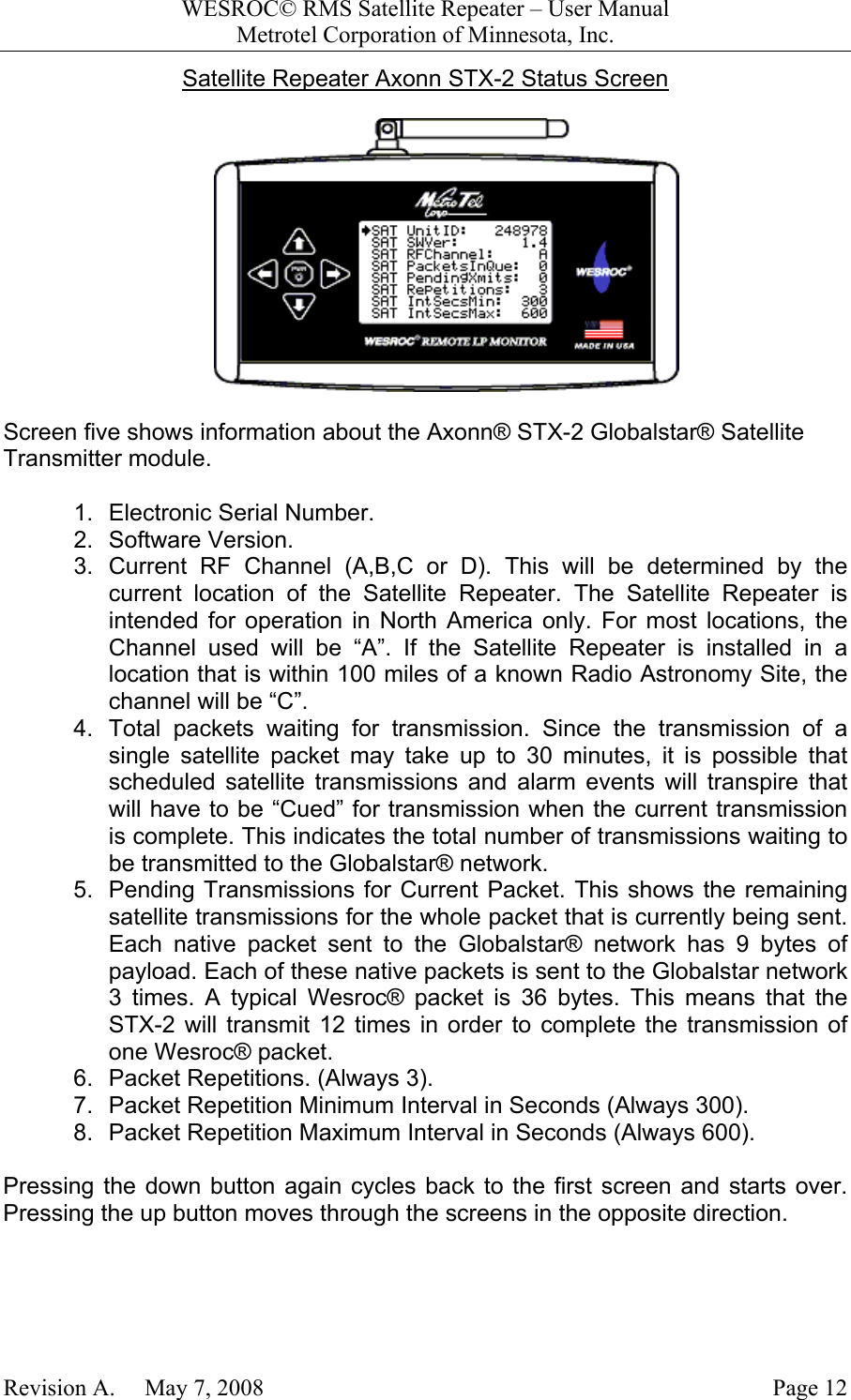
WESROC© RMS Satellite Repeater – User ManualMetrotel Corporation of Minnesota, Inc.Revision A.     May 7, 2008 Page 12Satellite Repeater Axonn STX-2 Status ScreenScreen five shows information about the Axonn® STX-2 Globalstar® SatelliteTransmitter module.1.  Electronic Serial Number.2. Software Version.3. Current RF Channel (A,B,C or D). This will be determined by thecurrent location of the Satellite Repeater. The Satellite Repeater isintended for operation in North America only. For most locations, theChannel used will be “A”. If the Satellite Repeater is installed in alocation that is within 100 miles of a known Radio Astronomy Site, thechannel will be “C”.4.  Total packets waiting for transmission. Since the transmission of asingle satellite packet may take up to 30 minutes, it is possible thatscheduled satellite transmissions and alarm events will transpire thatwill have to be “Cued” for transmission when the current transmissionis complete. This indicates the total number of transmissions waiting tobe transmitted to the Globalstar® network.5.  Pending Transmissions for Current Packet. This shows the remainingsatellite transmissions for the whole packet that is currently being sent.Each native packet sent to the Globalstar® network has 9 bytes ofpayload. Each of these native packets is sent to the Globalstar network3 times. A typical Wesroc® packet is 36 bytes. This means that theSTX-2 will transmit 12 times in order to complete the transmission ofone Wesroc® packet.6.  Packet Repetitions. (Always 3).7.  Packet Repetition Minimum Interval in Seconds (Always 300).8.  Packet Repetition Maximum Interval in Seconds (Always 600).Pressing the down button again cycles back to the first screen and starts over.Pressing the up button moves through the screens in the opposite direction.
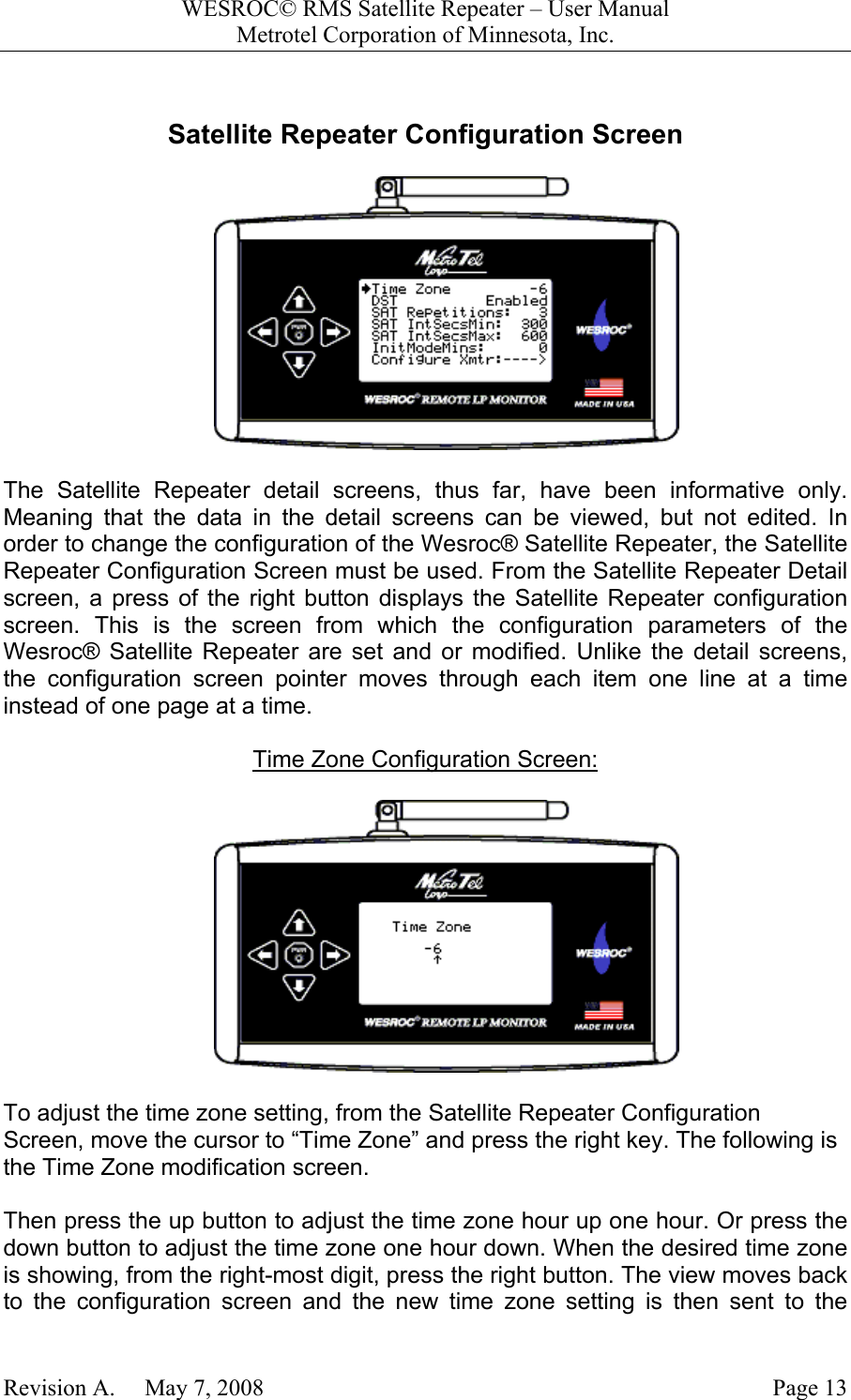
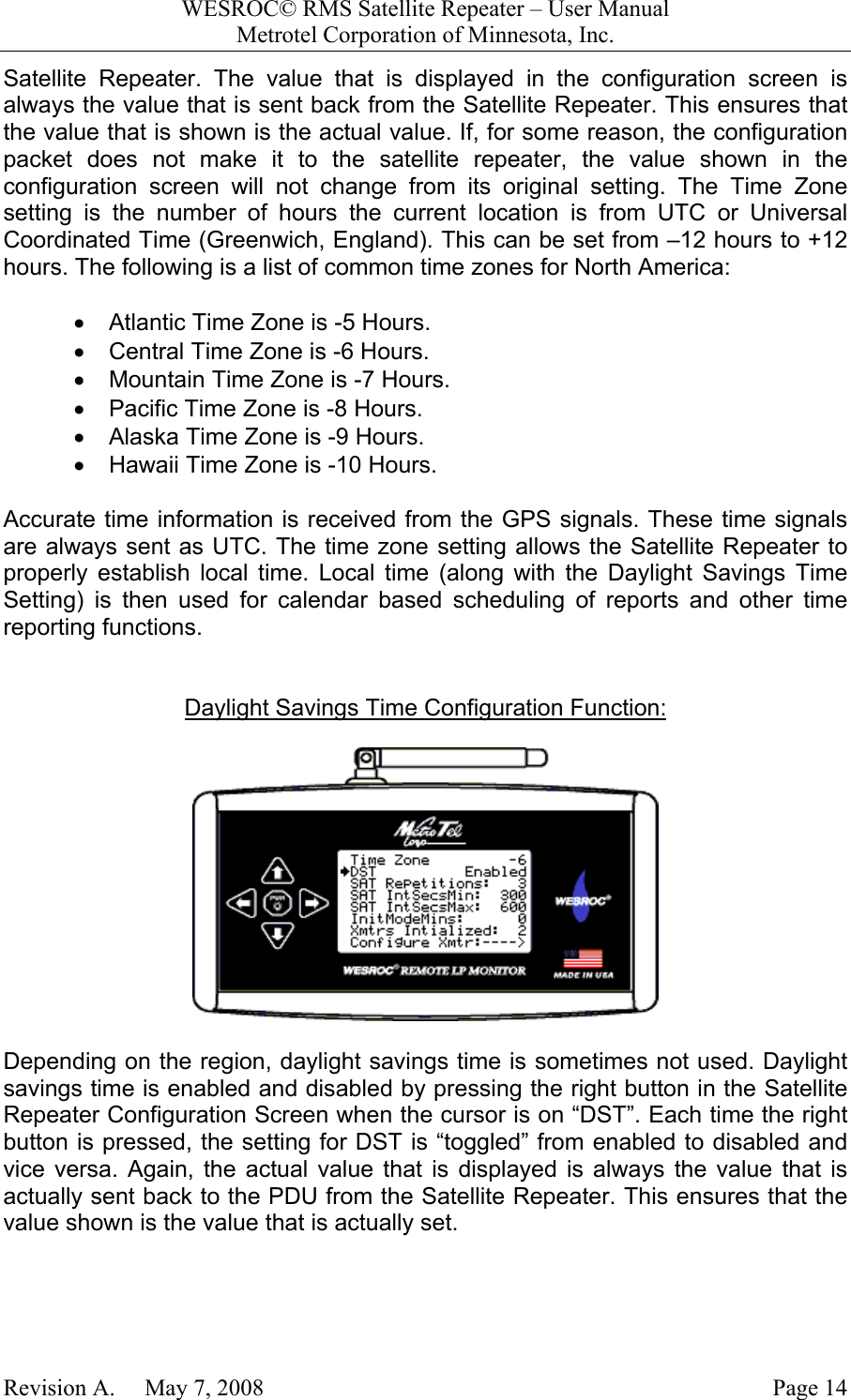
WESROC© RMS Satellite Repeater – User ManualMetrotel Corporation of Minnesota, Inc.Revision A.     May 7, 2008 Page 13Satellite Repeater Configuration ScreenThe Satellite Repeater detail screens, thus far, have been informative only.Meaning that the data in the detail screens can be viewed, but not edited. Inorder to change the configuration of the Wesroc® Satellite Repeater, the SatelliteRepeater Configuration Screen must be used. From the Satellite Repeater Detailscreen, a press of the right button displays the Satellite Repeater configurationscreen. This is the screen from which the configuration parameters of theWesroc® Satellite Repeater are set and or modified. Unlike the detail screens,the configuration screen pointer moves through each item one line at a timeinstead of one page at a time.Time Zone Configuration Screen:To adjust the time zone setting, from the Satellite Repeater ConfigurationScreen, move the cursor to “Time Zone” and press the right key. The following isthe Time Zone modification screen.Then press the up button to adjust the time zone hour up one hour. Or press thedown button to adjust the time zone one hour down. When the desired time zoneis showing, from the right-most digit, press the right button. The view moves backto the configuration screen and the new time zone setting is then sent to the
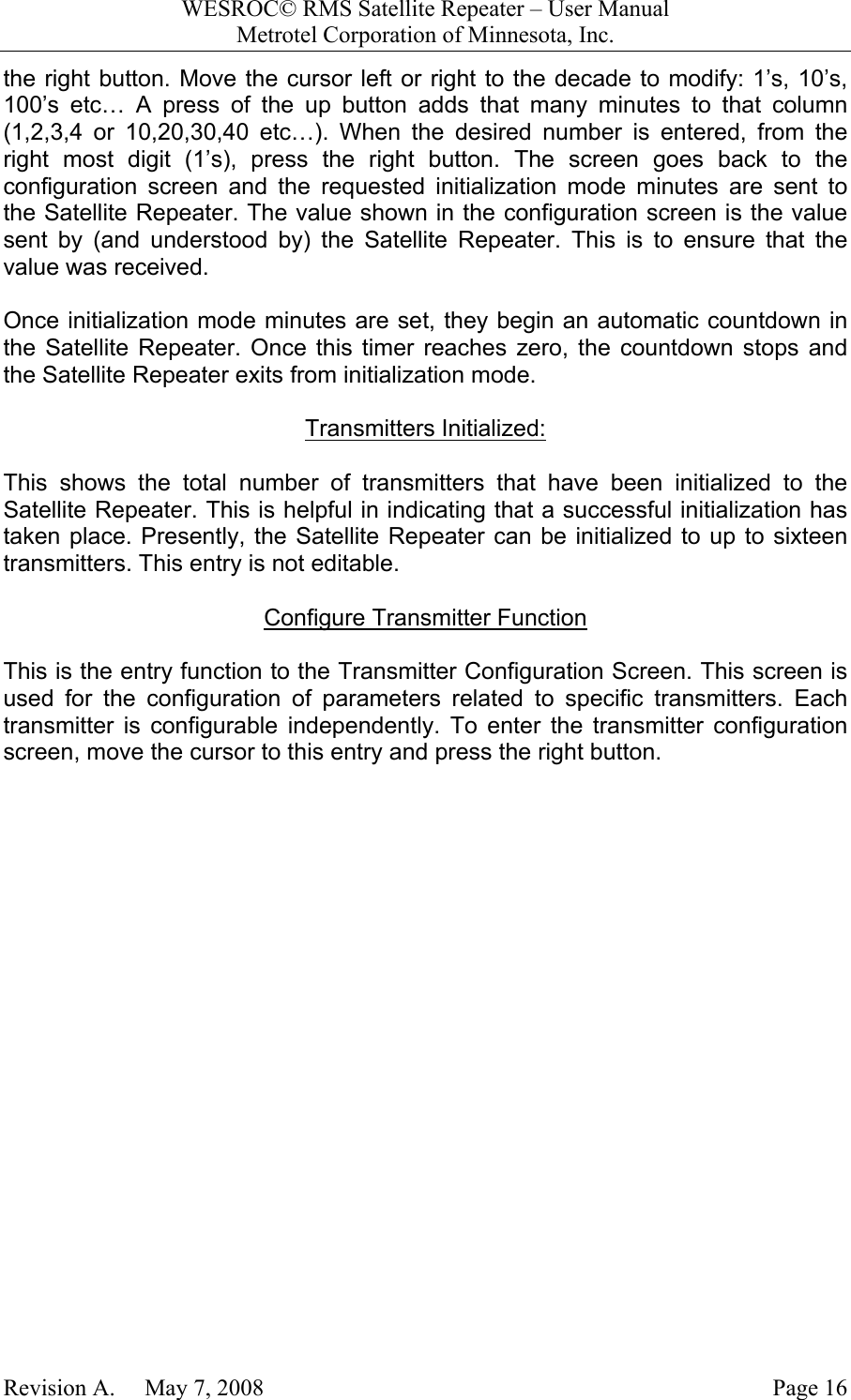
WESROC© RMS Satellite Repeater – User ManualMetrotel Corporation of Minnesota, Inc.Revision A.     May 7, 2008 Page 14Satellite Repeater. The value that is displayed in the configuration screen isalways the value that is sent back from the Satellite Repeater. This ensures thatthe value that is shown is the actual value. If, for some reason, the configurationpacket does not make it to the satellite repeater, the value shown in theconfiguration screen will not change from its original setting. The Time Zonesetting is the number of hours the current location is from UTC or UniversalCoordinated Time (Greenwich, England). This can be set from –12 hours to +12hours. The following is a list of common time zones for North America:•  Atlantic Time Zone is -5 Hours.•  Central Time Zone is -6 Hours.•  Mountain Time Zone is -7 Hours.•  Pacific Time Zone is -8 Hours.•  Alaska Time Zone is -9 Hours.•  Hawaii Time Zone is -10 Hours.Accurate time information is received from the GPS signals. These time signalsare always sent as UTC. The time zone setting allows the Satellite Repeater toproperly establish local time. Local time (along with the Daylight Savings TimeSetting) is then used for calendar based scheduling of reports and other timereporting functions.Daylight Savings Time Configuration Function:Depending on the region, daylight savings time is sometimes not used. Daylightsavings time is enabled and disabled by pressing the right button in the SatelliteRepeater Configuration Screen when the cursor is on “DST”. Each time the rightbutton is pressed, the setting for DST is “toggled” from enabled to disabled andvice versa. Again, the actual value that is displayed is always the value that isactually sent back to the PDU from the Satellite Repeater. This ensures that thevalue shown is the value that is actually set.
WESROC© RMS Satellite Repeater – User ManualMetrotel Corporation of Minnesota, Inc.Revision A.     May 7, 2008 Page 15Satellite Repetitions = 3Globalstar has determined that in order to ensure the transmission of a packetthrough their simplex data system, that every native packet must be transmitted atotal of three times. This ensures that with the high rate of change of theGlobalstar satellite constellation that at least one satellite will simultaneously bein view of the Satellite Repeater and a Globalstar ground segment station duringa transmission. This value has been determined to be three. Do not change it.Sat Interval Seconds Minimum = 300The repeated transmissions are sent at random intervals. This is to reduce thepossibility of simultaneous transmission overlap from other transmitters using theGlobalstar Simplex Data System. Globalstar has established the optimum settingfor the minimum time between the repeated transmissions to be five minutes.Five minutes is 300 seconds. Do not change this value.Sat Interval Seconds Maximum = 600The other boundary of the random interval described above is the maximum timebetween the repeated transmissions. Globalstar has determined that the propertime for this value is ten minutes or 600 seconds. Don’t change this value either.Initialization Mode Minutes FunctionThe following is a description of viewing and configuring initialization modeminutes. For a detailed description of Initialization mode, please see theOperation section of this document.This shows the number of minutes remaining before the Satellite Repeaterexpires from initialization mode. This configuration parameter may also be set tothe number of minutes required by the installer. To do this, from the SatelliteRepeater Configuration Screen, place the cursor on “InitModeMins:” and press
WESROC© RMS Satellite Repeater – User ManualMetrotel Corporation of Minnesota, Inc.Revision A.     May 7, 2008 Page 16the right button. Move the cursor left or right to the decade to modify: 1’s, 10’s,100’s etc… A press of the up button adds that many minutes to that column(1,2,3,4 or 10,20,30,40 etc…). When the desired number is entered, from theright most digit (1’s), press the right button. The screen goes back to theconfiguration screen and the requested initialization mode minutes are sent tothe Satellite Repeater. The value shown in the configuration screen is the valuesent by (and understood by) the Satellite Repeater. This is to ensure that thevalue was received.Once initialization mode minutes are set, they begin an automatic countdown inthe Satellite Repeater. Once this timer reaches zero, the countdown stops andthe Satellite Repeater exits from initialization mode.Transmitters Initialized:This shows the total number of transmitters that have been initialized to theSatellite Repeater. This is helpful in indicating that a successful initialization hastaken place. Presently, the Satellite Repeater can be initialized to up to sixteentransmitters. This entry is not editable.Configure Transmitter FunctionThis is the entry function to the Transmitter Configuration Screen. This screen isused for the configuration of parameters related to specific transmitters. Eachtransmitter is configurable independently. To enter the transmitter configurationscreen, move the cursor to this entry and press the right button.
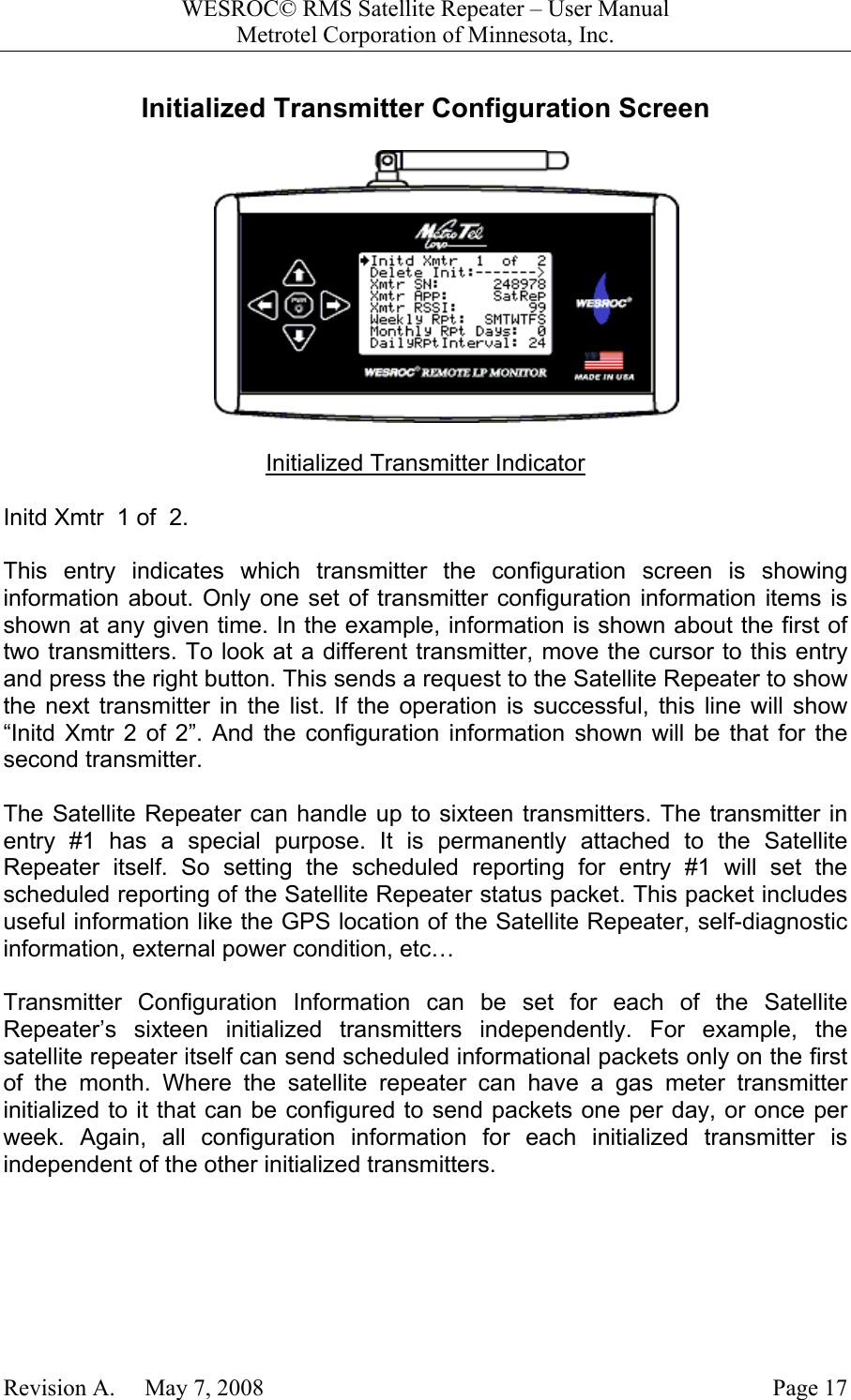
WESROC© RMS Satellite Repeater – User ManualMetrotel Corporation of Minnesota, Inc.Revision A.     May 7, 2008 Page 17Initialized Transmitter Configuration ScreenInitialized Transmitter IndicatorInitd Xmtr  1 of  2.This entry indicates which transmitter the configuration screen is showinginformation about. Only one set of transmitter configuration information items isshown at any given time. In the example, information is shown about the first oftwo transmitters. To look at a different transmitter, move the cursor to this entryand press the right button. This sends a request to the Satellite Repeater to showthe next transmitter in the list. If the operation is successful, this line will show“Initd Xmtr 2 of 2”. And the configuration information shown will be that for thesecond transmitter.The Satellite Repeater can handle up to sixteen transmitters. The transmitter inentry #1 has a special purpose. It is permanently attached to the SatelliteRepeater itself. So setting the scheduled reporting for entry #1 will set thescheduled reporting of the Satellite Repeater status packet. This packet includesuseful information like the GPS location of the Satellite Repeater, self-diagnosticinformation, external power condition, etc…Transmitter Configuration Information can be set for each of the SatelliteRepeater’s sixteen initialized transmitters independently. For example, thesatellite repeater itself can send scheduled informational packets only on the firstof the month. Where the satellite repeater can have a gas meter transmitterinitialized to it that can be configured to send packets one per day, or once perweek. Again, all configuration information for each initialized transmitter isindependent of the other initialized transmitters.
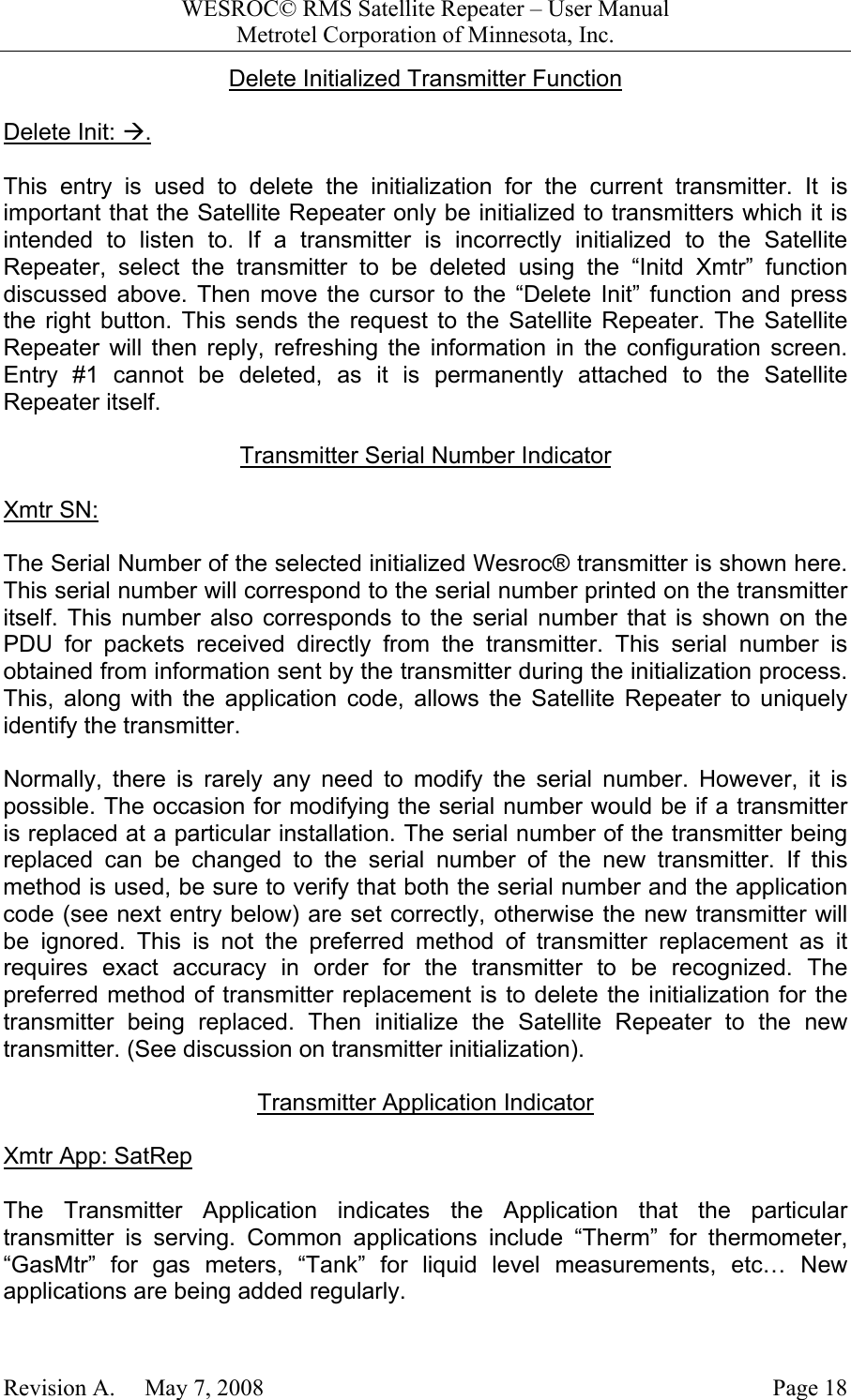
WESROC© RMS Satellite Repeater – User ManualMetrotel Corporation of Minnesota, Inc.Revision A.     May 7, 2008 Page 18Delete Initialized Transmitter FunctionDelete Init: Æ.This entry is used to delete the initialization for the current transmitter. It isimportant that the Satellite Repeater only be initialized to transmitters which it isintended to listen to. If a transmitter is incorrectly initialized to the SatelliteRepeater, select the transmitter to be deleted using the “Initd Xmtr” functiondiscussed above. Then move the cursor to the “Delete Init” function and pressthe right button. This sends the request to the Satellite Repeater. The SatelliteRepeater will then reply, refreshing the information in the configuration screen.Entry #1 cannot be deleted, as it is permanently attached to the SatelliteRepeater itself.Transmitter Serial Number IndicatorXmtr SN:The Serial Number of the selected initialized Wesroc® transmitter is shown here.This serial number will correspond to the serial number printed on the transmitteritself. This number also corresponds to the serial number that is shown on thePDU for packets received directly from the transmitter. This serial number isobtained from information sent by the transmitter during the initialization process.This, along with the application code, allows the Satellite Repeater to uniquelyidentify the transmitter.Normally, there is rarely any need to modify the serial number. However, it ispossible. The occasion for modifying the serial number would be if a transmitteris replaced at a particular installation. The serial number of the transmitter beingreplaced can be changed to the serial number of the new transmitter. If thismethod is used, be sure to verify that both the serial number and the applicationcode (see next entry below) are set correctly, otherwise the new transmitter willbe ignored. This is not the preferred method of transmitter replacement as itrequires exact accuracy in order for the transmitter to be recognized. Thepreferred method of transmitter replacement is to delete the initialization for thetransmitter being replaced. Then initialize the Satellite Repeater to the newtransmitter. (See discussion on transmitter initialization).Transmitter Application IndicatorXmtr App: SatRepThe Transmitter Application indicates the Application that the particulartransmitter is serving. Common applications include “Therm” for thermometer,“GasMtr” for gas meters, “Tank” for liquid level measurements, etc… Newapplications are being added regularly.
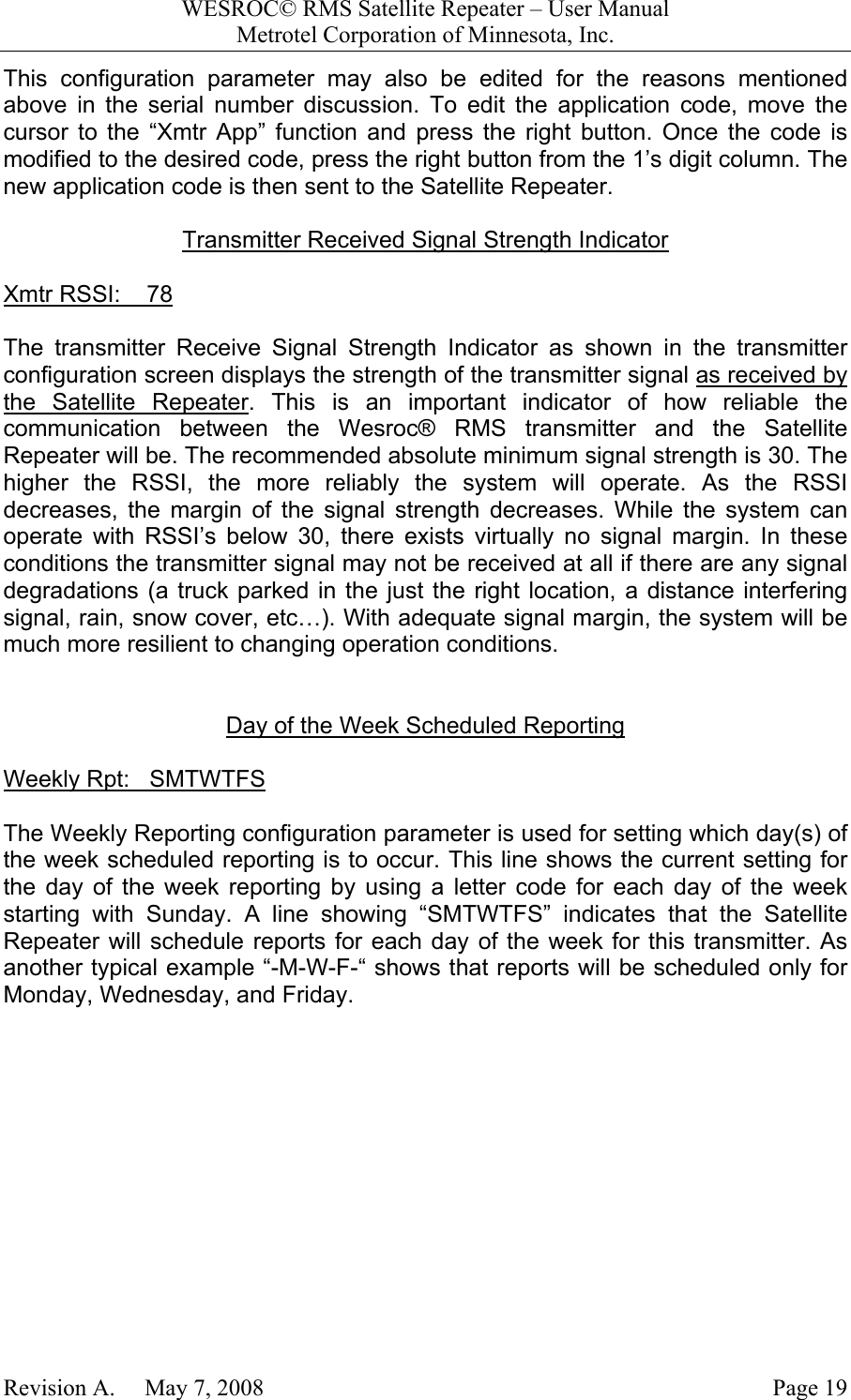
WESROC© RMS Satellite Repeater – User ManualMetrotel Corporation of Minnesota, Inc.Revision A.     May 7, 2008 Page 19This configuration parameter may also be edited for the reasons mentionedabove in the serial number discussion. To edit the application code, move thecursor to the “Xmtr App” function and press the right button. Once the code ismodified to the desired code, press the right button from the 1’s digit column. Thenew application code is then sent to the Satellite Repeater.Transmitter Received Signal Strength IndicatorXmtr RSSI:    78The transmitter Receive Signal Strength Indicator as shown in the transmitterconfiguration screen displays the strength of the transmitter signal as received bythe Satellite Repeater. This is an important indicator of how reliable thecommunication between the Wesroc® RMS transmitter and the SatelliteRepeater will be. The recommended absolute minimum signal strength is 30. Thehigher the RSSI, the more reliably the system will operate. As the RSSIdecreases, the margin of the signal strength decreases. While the system canoperate with RSSI’s below 30, there exists virtually no signal margin. In theseconditions the transmitter signal may not be received at all if there are any signaldegradations (a truck parked in the just the right location, a distance interferingsignal, rain, snow cover, etc…). With adequate signal margin, the system will bemuch more resilient to changing operation conditions.Day of the Week Scheduled ReportingWeekly Rpt:   SMTWTFSThe Weekly Reporting configuration parameter is used for setting which day(s) ofthe week scheduled reporting is to occur. This line shows the current setting forthe day of the week reporting by using a letter code for each day of the weekstarting with Sunday. A line showing “SMTWTFS” indicates that the SatelliteRepeater will schedule reports for each day of the week for this transmitter. Asanother typical example “-M-W-F-“ shows that reports will be scheduled only forMonday, Wednesday, and Friday.
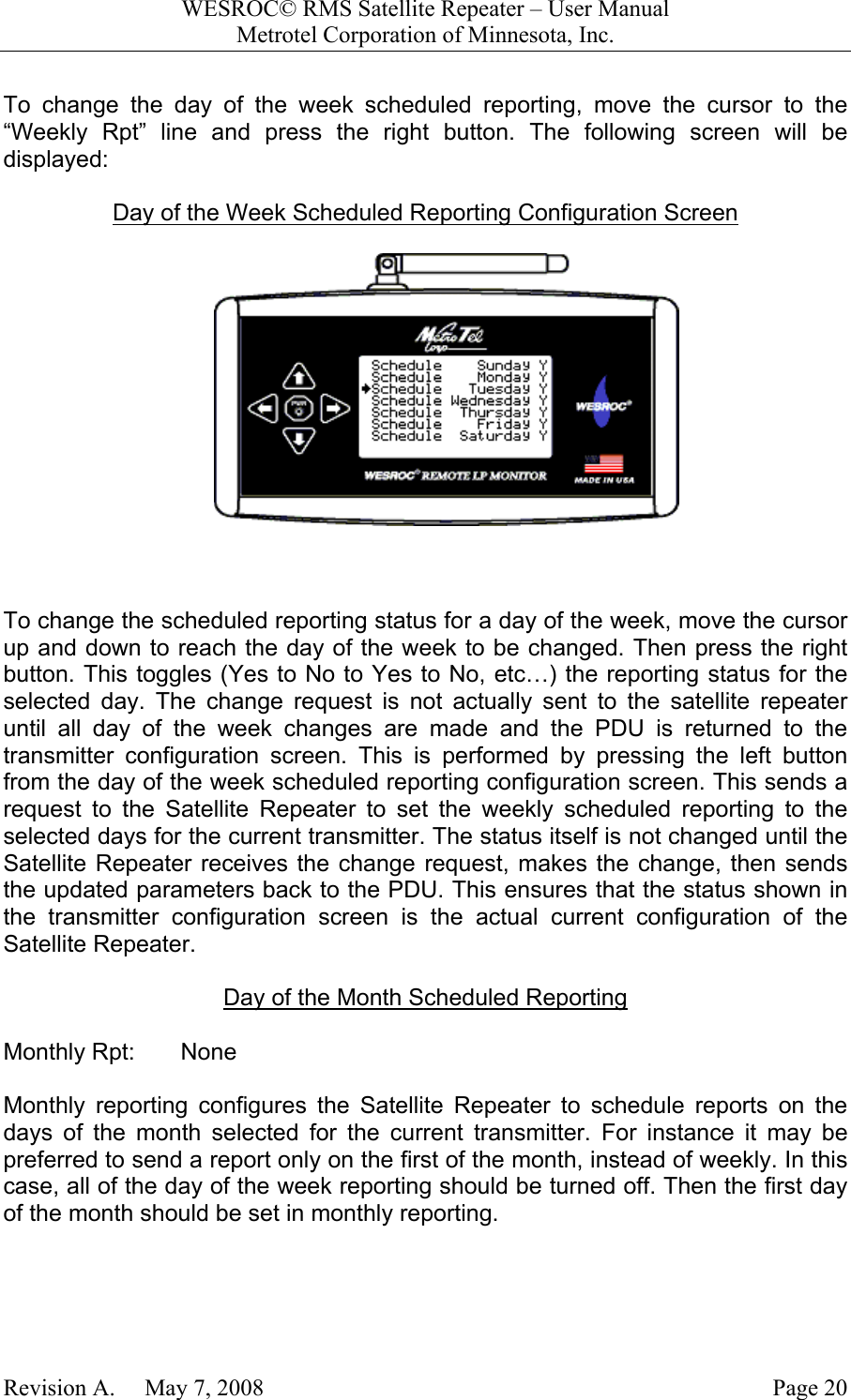
WESROC© RMS Satellite Repeater – User ManualMetrotel Corporation of Minnesota, Inc.Revision A.     May 7, 2008 Page 20To change the day of the week scheduled reporting, move the cursor to the“Weekly Rpt” line and press the right button. The following screen will bedisplayed:Day of the Week Scheduled Reporting Configuration Screen To change the scheduled reporting status for a day of the week, move the cursorup and down to reach the day of the week to be changed. Then press the rightbutton. This toggles (Yes to No to Yes to No, etc…) the reporting status for theselected day. The change request is not actually sent to the satellite repeateruntil all day of the week changes are made and the PDU is returned to thetransmitter configuration screen. This is performed by pressing the left buttonfrom the day of the week scheduled reporting configuration screen. This sends arequest to the Satellite Repeater to set the weekly scheduled reporting to theselected days for the current transmitter. The status itself is not changed until theSatellite Repeater receives the change request, makes the change, then sendsthe updated parameters back to the PDU. This ensures that the status shown inthe transmitter configuration screen is the actual current configuration of theSatellite Repeater.Day of the Month Scheduled ReportingMonthly Rpt:       NoneMonthly reporting configures the Satellite Repeater to schedule reports on thedays of the month selected for the current transmitter. For instance it may bepreferred to send a report only on the first of the month, instead of weekly. In thiscase, all of the day of the week reporting should be turned off. Then the first dayof the month should be set in monthly reporting.
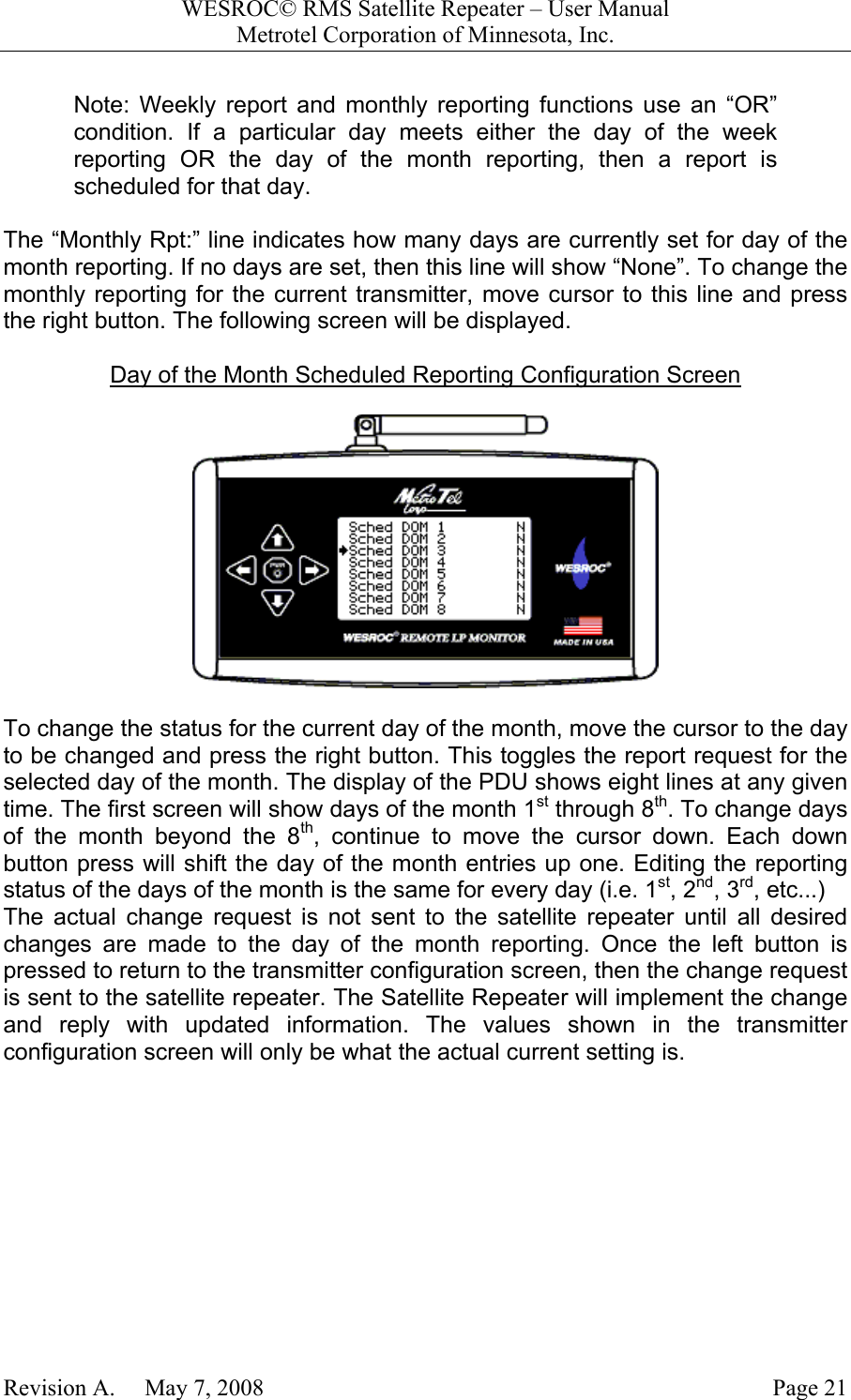
WESROC© RMS Satellite Repeater – User ManualMetrotel Corporation of Minnesota, Inc.Revision A.     May 7, 2008 Page 21Note: Weekly report and monthly reporting functions use an “OR”condition. If a particular day meets either the day of the weekreporting OR the day of the month reporting, then a report isscheduled for that day.The “Monthly Rpt:” line indicates how many days are currently set for day of themonth reporting. If no days are set, then this line will show “None”. To change themonthly reporting for the current transmitter, move cursor to this line and pressthe right button. The following screen will be displayed.Day of the Month Scheduled Reporting Configuration ScreenTo change the status for the current day of the month, move the cursor to the dayto be changed and press the right button. This toggles the report request for theselected day of the month. The display of the PDU shows eight lines at any giventime. The first screen will show days of the month 1st through 8th. To change daysof the month beyond the 8th, continue to move the cursor down. Each downbutton press will shift the day of the month entries up one. Editing the reportingstatus of the days of the month is the same for every day (i.e. 1st, 2nd, 3rd, etc...)The actual change request is not sent to the satellite repeater until all desiredchanges are made to the day of the month reporting. Once the left button ispressed to return to the transmitter configuration screen, then the change requestis sent to the satellite repeater. The Satellite Repeater will implement the changeand reply with updated information. The values shown in the transmitterconfiguration screen will only be what the actual current setting is.
WESROC© RMS Satellite Repeater – User ManualMetrotel Corporation of Minnesota, Inc.Revision A.     May 7, 2008 Page 22Daily Report Interval FunctionDailyRptInterval       24The Daily Report Interval function is used to set the number of hours betweenscheduled reports for any given day that reporting is to occur for the currenttransmitter. Unlike the OR function used with weekly reporting and monthlyreporting. The scheduled reports per day is an AND function. What this means isthat if the daily report interval for the current transmitter is set to zero. Then noscheduled reports for this transmitter will ever be sent. Similarly, if the daily reportinterval is set to 4 hours (or anything greater than zero), but no days of the weekor days of the month are set, then again, no scheduled reporting for thistransmitter will take place. Both a day setting (weekly or monthly) and a non-zerodaily report interval setting must be in place for scheduled reporting to occur. IfThe daily report interval is set to 24, then only one report per day will be sent fordays that meet the weekly or monthly scheduled reporting requirement.First Daily Report Hour FunctionFirst Report Hour:       1The First Report Hour setting is used to set the hour of the day for the first reportfor any given day that meets the weekly or monthly scheduled reportingrequirement. This is useful in circumstances where a given transmitter scheduledreport is desired at the beginning of a workday. For instance, the first report hourcan be set to 7. In this case the scheduled report will take place at about 7AM, intime for that business days’ operation.Once the first report has occurred, then the daily report interval timing is appliedfor the next report to occur that day. For example, if the first report hour were setto 7, and the daily report interval were set to 6. Then for a day that meets theweekly or monthly scheduling requirements, the first report would be sent atabout 7AM, the next report that day would be sent at 1PM. Then another reportat 7PM. The next six-hour interval would put the next report at 1AM the next day,so no more reports would occur on this day. The next day, the scheduledreporting rules, which may be the same or different, are applied for that day.
WESROC© RMS Satellite Repeater – User ManualMetrotel Corporation of Minnesota, Inc.Revision A.     May 7, 2008 Page 23Wesroc® RMS Satellite Repeater SpecificationsMechanicalSize: 7.50” x 5.25” x 2.75”Weight: 16 oz.ElectricalVoltage: 9VDC to 28VDC (Tip Positive)Current: 300mA MaximumGlobal Positioning SystemFrequency: 1.57542 GHz LHCPType: Sirf-III 20 channel parallel receiverGlobalstar Simplex Data SystemFrequency: 1.61125 GHz to 1.61875 GHz RHCPPower: +18dBm (63mW)Wesroc® RMS ISM RF SystemFrequency: 911.980 MHz to 920.980 MHz VPPower: +8dBm (6.3mW)
WESROC© RMS Satellite Repeater – User ManualMetrotel Corporation of Minnesota, Inc.Revision A.     May 7, 2008 Page 24Warranty InformationMetroTel Corporation of Minnesota, Inc. (MetroTel) warrants the MT-9100R-SAT WESROC®RMS Satellite Repeater against defects in materials or workmanship for a period of one year fromdate of shipment to original purchaser.  All units deemed defective under this warranty will bereplaced or repaired at MetroTel’s option.  No other warranty is expressed or implied, nor willresponsibility for operation of this device be assumed by MetroTel.Radio Frequency Exposure WarningTo ensure that exposure to hazardous radio frequency radiation is prevented, this equipmentmust not be installed in a location where humans will be routinely within 20 centimeters of it.To ensure that FCC requirements are met regarding radio frequency exposure, Wesroc RMSSatellite Repeaters are not to be placed in operation where they will be collocated with otherWesroc® RMS Satellite Repeaters. Collocation is considered to be where one operatingWesroc® RMS Satellite Repeater is within 20 centimeters of another operating Wesroc® RMSSatellite Repeater.Radio InterferenceThis equipment (FCC ID number RWB-MT9100R-SAT and IC number 115A-MT9100R-SAT)has been tested and found to comply with the limits for a Class B digital device, pursuant topart 15 of the FCC Rules.  These limits are designed to provide reasonable protection againstharmful interference in a residential installation.  This equipment generates, uses, and canradiate radio frequency energy and, if not installed and used in accordance with theinstructions may cause harmful interference to radio communications.  However, there is noguarantee that interference will not occur in a particular installation.  If this equipment doescause harmful interference to radio or television reception, which can be determined byturning the equipment off and on, the user is encouraged to try to correct the interference byone or more of the following measures:•  Reorient or relocate the receiving antenna.•  Increase the separation between the equipment and receiver.•  Connect the equipment into an outlet on a circuit different from that to which the receiveris connected.•  Consult the dealer or an experienced radio/TV technician for help.The Wesroc® RMS Satellite Repeater contains no user serviceable parts. Any changes ormodifications to the Wesroc® RMS Satellite Repeater that are not expressly approved byMetroTel could void authorization to use the Wesroc® RMS Satellite Repeater.Copyright© 2008 – MetroTel Corporation of Minnesota, Inc. - Ph: 402-496-4700Do not reproduce without permission.

Navigation menu