Midian Electronics SPVD-2 Vehicle Detector TX User Manual 1100 userman

Midian Electronics Inc Vehicle Detector TX 1100 userman

users manual

31 Oct. 2001    Page 1 of 3    Software v. 4.0  Ph: 520-884-7981    Toll-free: 1-800-MIDIANS     Fx: 520-884-0422 2302 E. 22nd St., Tucson, AZ  85713, USA sales@midelec.com   THE ROAD RUNNER SYSTEM SPVD-2 – DETECTOR/TRANSMITTER QUICK INSTALLATION GUIDE  SPECIFICATIONS:  U.S. Patent # 5880682   FCC ID # NOWSPVD-2 NEMA Certification TS-1 & TS-2 Frequency Range 47.02 to 47.40 MHz # of channels available 20 Channel Spacing 20 kHz Operating Temperature -34° to +74° C Relative Humidity 95% or less @ 40° C RF Output 50 – 100 mw RF Output FCC Legal Limit 100 mw Spurious & Harmonic -55 dB Frequency Stability .005% -34° to +74°C Modulation ±3.3 kHz FM Modulation FCC Legal Limit ±5.0 kHz FM Data 2000 baud NRZ w/ error correction TX power consumption 36 mA for 17 msec at 85 mW Battery 13.5 V, 15 Ah alkaline D-cell pack Battery safety fuse 200 mA auto-resettable poly switch Magnetometer circuit voltage 3 V DC regulated TX & final amplifier voltage 6 V DC regulated Low Voltage Alarm Level 7.5 V      INSTALLATION:  PREPARATION:  The SPVD-2 is shipped without the battery installed in the detector.  To install the battery, remove the four bolts from the underground housing cube.  The top half has the detector already installed.  Place the battery in the bottom half of the cube.  Plug the battery into the white connector on the corner of the PC board and turn on the power switch SW8.  Secure the cube by tightening the bolts, going around evenly, make certain the gasket is sealed firmly, but do not to crush the gasket.  It is strongly suggested to use a small amount of anti-seize or grease on the bolts.  Even though the bolts are stainless steel, several years underground can cause them to corrode.   Install the unit in the enclosed zip lock bag to keep mud and cold patch off the FCC label and the screw heads and threads.     To install the detector:  1. Install the pole-mounted antenna and the Receiver at the control cabinet (refer to a SPVDREC manual for specifics).  2. Use an 8 inch core drill or jackhammer to dig a hole for the yellow SPVD box. The unit should be buried about 3 inches below the road’s surface, therefore your hole should be about 8-9 inches deep. The deeper you bury the unit, the greater the attenuation of the radio signal, which will shorten the device’s transmitting range. At a depth of 3 inches below the road surface, the range of the unit will vary between 500 and 700 feet depending on soil composition and moisture. If greater range is desired, try burying the unit about an inch below the surface. For even longer range, a concrete enclosure with lid can be purchased from Signal Services. This allows the unit to be practically flush with the surface and simplifies changing the battery.  3. Remove all ferrous metal tools and vehicles from the detection area (10 – 15 feet away). This will prevent them from distorting the Earth’s magnetic field around the burial site.  4. Turn the SPVD unit on its side for 2-3 seconds and then return the unit to the upright position. This action will cause the mercury tilt switch to put the SPVD-2 into test and calibration mode. The detector will transmit a long tone, followed by a series of test packets.   NOTE:  When the unit is tipped on its side to activate the transmitter’s test mode it draws maximum continuous power. If the unit were tossed into the back of a vehicle and landed on its side it will only transmit for 10 seconds and then automatically shut off to conserve battery. This prevents a dead battery condition if the unit sits in the vehicle for a long period of time before being set upright. To reactivate, set the unit upright and tilt it for 2-3 seconds to activate test/calibration mode.  5. The tone and test packets can be monitored with a handheld FM scanner. You will need to program the scanner to the appropriate frequency shown on the FCC label. It may be necessary to turn off the squelch to hear the data packs. These packs are approximately 17/1000 of a second long. With a walkie talkie verify with another technician that the receiver in the control box is hearing the tone and turning on its arrival, departure, and low battery lights.   6. During this time, install the unit into the hole with the FCC label on top and the arrows pointing in the direction of traffic.    7. Pour sand around and on top of the detector, while making certain that the receiver is receiving the tone and data packs.
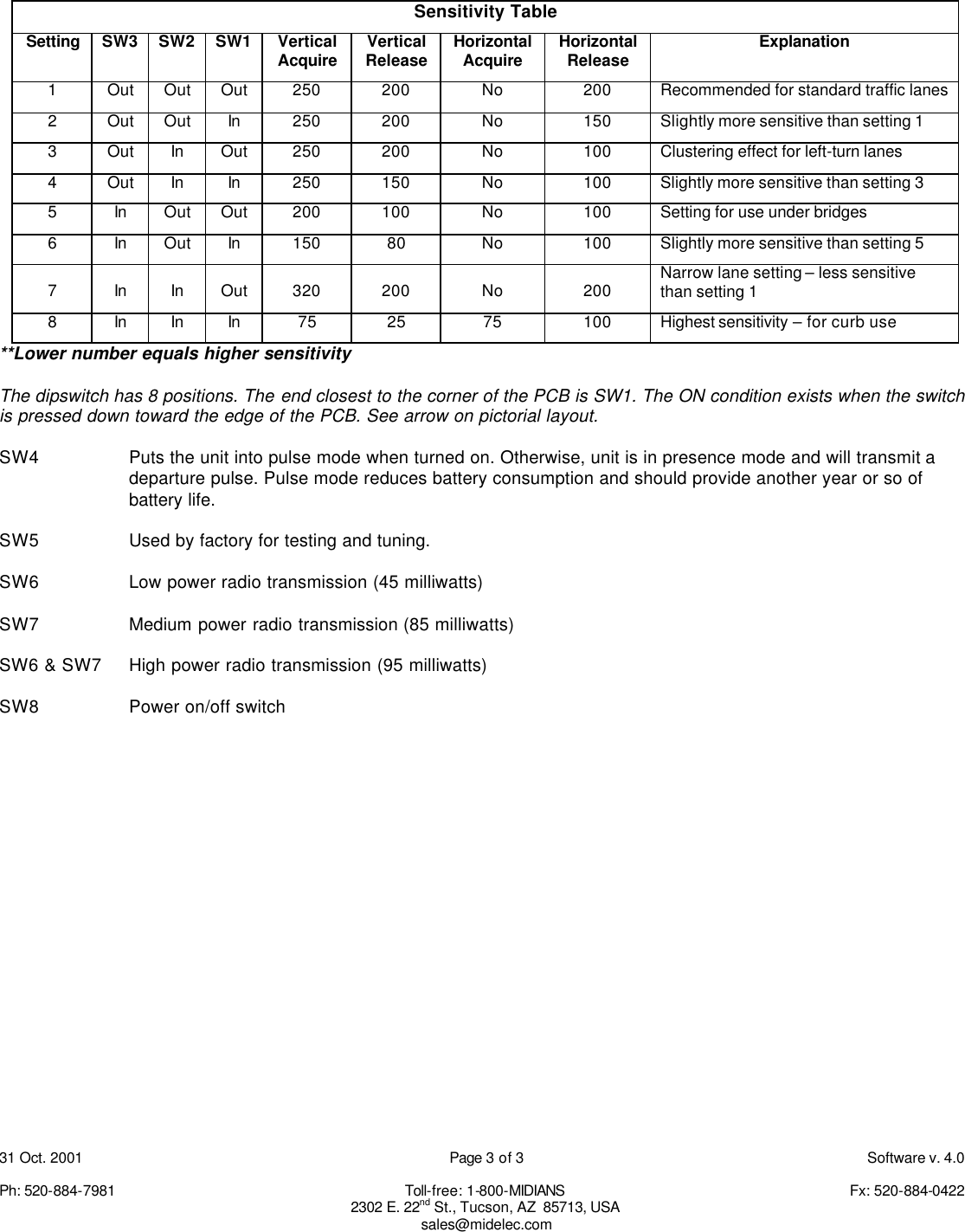
31 Oct. 2001    Page 2 of 3    Software v. 4.0  Ph: 520-884-7981    Toll-free: 1-800-MIDIANS     Fx: 520-884-0422 2302 E. 22nd St., Tucson, AZ  85713, USA sales@midelec.com  8. After the last data pack is transmitted the SPVD instantly measures the Earth’s magnetic field and saves it to memory. Once auto-calibration has occurred (last data pack was transmitted) the unit should not be rotated or tilted anymore. Doing so will require the need to tip the unit on its side and repeat the calibrating process.  While passing a magnet over the SPVD, use the scanner and receiver at the controller and once again verify arrival and departure pulses.  9.  Put cold patch or hot mix over the detector and wave a magnet over the detector to simulate a detection to verify again that the receiver is receiving the packets.    10. After these steps are completed, test the unit with a vehicle. You may also want to use the tire of the vehicle to pack the cold patch.   TECHNICAL NOTES:  1. The FCC has allocated 20 frequencies from 47.02 to 47.40 MHz for use by wireless vehicle detectors.  The FCC does not regulate spurious emissions from traffic controllers; therefore many controllers will generate RF noise on the 47 MHz band (usually 1 or 2 of the 20 frequencies).  Midian recommends using a handheld scanner to scan the cabinet for RF noise, to determine if there are any channels with birdies generated by the controller. Midian will also do an FCC database check for any licensed frequencies in the area.  Midian will then avoid any licensed frequencies or those that have been determined to have birdies at that intersection.   2. The SPVD-2 PC board has a dipswitch in one corner to adjust the sensitivity of the detection zone.  SW1 is closest to the corner. The first 3 positions on the switch adjust the sensitivity.  With no switches selected the detection zone is comparable to a six by six loop.  The sensitivity can be increased or decreased by adjusting the switch as indicated in the Sensitivity Table located on the next page.   If the departure pulse is not required, turning SW4 on will activate pulse mode, eliminating the departure pulse.  This will reduce battery consumption and add another year to the battery life.  This is typically done if presence detection is not required. You must also turn on pulse mode at the receiver.  3. If the detector will be installed within approximately 100 feet of the antenna, the power can be lowered to extend the battery life. This is accomplished by adjusting switches 6 & 7 on the dipswitch. With pins 6 & 7 both in the on position the power output is 95mW, with 6 on and 7 off 45 mW, and with 6 off and 7 on 85mW.  4.  Switch 8 works as a power on/off switch.  No power will be supplied to the board with the switch in the off position.  SPVD OPERATION:  The SPVD-2 uses a dual-axis magnetometer to measure the Earth’s magnetic field. IC-2 is a 12-bit AD converter that converts the analog information to digital data for use by the microprocessor IC-1. IC-1, IC-2 and the magnetometer receive their power from IC-3.  When the microprocessor determines a vehicle is present it turns on IC-4, a 6-volt regulator to power the transmitter. Transmission time is 20 msec. The micro also transmits a short data pack on Pin 12 during the last half of the 20 msec to tell the receiver that a vehicle has arrived.  R30 and C21 acts  as a splatter filter before data hits the true FM varactor diode D8. D7AB, R31 and R32 set the bias point for D8 and provides temperature compensation for oscillator Q2.   Oscillator Q2 employs an 11.8 MHz crystal.  L1 and C22 tune the oscillator Q2’s output to the fourth harmonic. Q3 and Q4 amplify and buffer the 47 MHz signal from the oscillator and then drive the final amplifier IC-5.  Inductor L-5 and capacitor C36 tune the base circuit of IC-5.  L7 and C40 tune IC-5 to 47.XX MHz while C41, L8, C42 and C44 act as a low-pass filter and impedance matching to the spiral antenna. Switches 6 and 7 allow the user to select Hi or Low power options.  TUNING PROCEDURE:  Oscillator Q2’s collector tank circuit (L2) is adjusted by C26. Tune for a peak level on TP9.  Buffer amp Q3’s collector tank circuit (L3 & C28) is tuned using L3 and adjusting TP10 for a peak indication.  Buffer amp Q4’s collector tank circuit (L4 & C31) is tuned using L4 and adjusting TP11 for a peak indication.  The input to IC-5 is adjusted using L5 and C36 and tuning for maximum output power on J1 antenna connector. IC-5’s collector tank circuit is tuned using C40 and peaking for maximum RF power output. C44 helps match the low-pass filter to the antenna connector. Tune C44 for peak power on the antenna connector.
31 Oct. 2001    Page 3 of 3    Software v. 4.0  Ph: 520-884-7981    Toll-free: 1-800-MIDIANS     Fx: 520-884-0422 2302 E. 22nd St., Tucson, AZ  85713, USA sales@midelec.com Sensitivity Table Setting SW3 SW2 SW1 Vertical Acquire Vertical Release Horizontal Acquire Horizontal Release Explanation 1 Out Out Out 250 200 No 200 Recommended for standard traffic lanes 2 Out Out In 250 200 No 150 Slightly more sensitive than setting 1 3 Out In Out 250 200 No 100 Clustering effect for left-turn lanes  4 Out In In 250 150 No 100 Slightly more sensitive than setting 3 5 In Out Out 200 100 No 100 Setting for use under bridges  6 In Out In 150 80 No 100 Slightly more sensitive than setting 5 7 In In Out 320 200 No 200 Narrow lane setting – less sensitive than setting 1 8 In In In 75 25 75 100 Highest sensitivity – for curb use **Lower number equals higher sensitivity   The dipswitch has 8 positions. The end closest to the corner of the PCB is SW1. The ON condition exists when the switch is pressed down toward the edge of the PCB. See arrow on pictorial layout.  SW4 Puts the unit into pulse mode when turned on. Otherwise, unit is in presence mode and will transmit a departure pulse. Pulse mode reduces battery consumption and should provide another year or so of battery life.  SW5    Used by factory for testing and tuning.  SW6    Low power radio transmission (45 milliwatts)  SW7    Medium power radio transmission (85 milliwatts)  SW6 & SW7 High power radio transmission (95 milliwatts)  SW8    Power on/off switch

Navigation menu