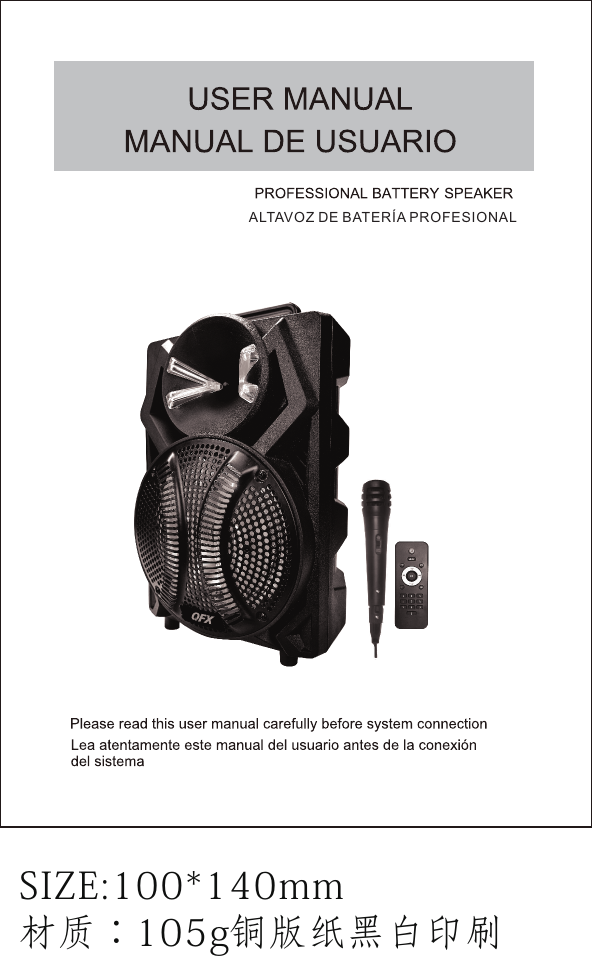
Migear Group FBX860 SPEAKER User Manual PBX 108

Migear International LLC SPEAKER PBX 108

User Manual

SIZE:100*140mm材质:105g铜版纸黑白印刷ALTAVOZ DE BATERÍA PROFESIONAL
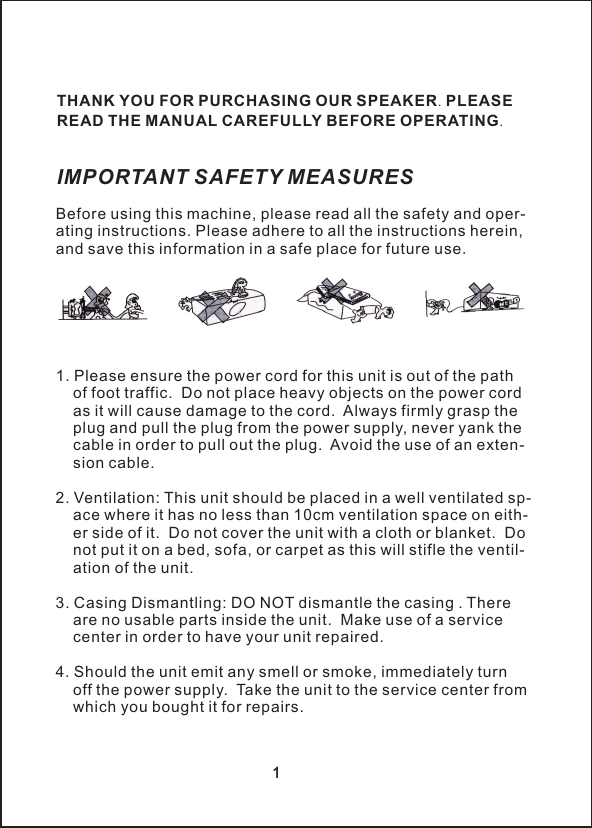
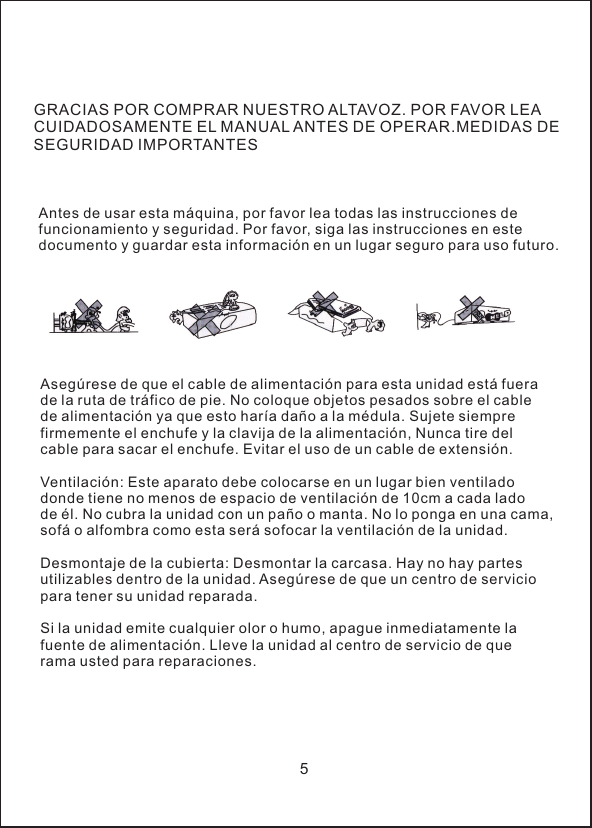
厂ΙBefore using this machine, please read all the safety and oper-ating instructions. Please adhere to all the instructions herein, and save this information in a safe place for future use.1. Please ensure the power cord for this unit is out of the path     of foot traffic.  Do not place heavy objects on the power cord     as it will cause damage to the cord.  Always firmly grasp the     plug and pull the plug from the power supply, never yank the     cable in order to pull out the plug.  Avoid the use of an exten-    sion cable.2. Ventilation: This unit should be placed in a well ventilated sp-    ace where it has no less than 10cm ventilation space on eith-    er side of it.  Do not cover the unit with a cloth or blanket.  Do     not put it on a bed, sofa, or carpet as this will stifle the ventil-    ation of the unit.3. Casing Dismantling: DO NOT dismantle the casing . There     are no usable parts inside the unit.  Make use of a service     center in order to have your unit repaired.4. Should the unit emit any smell or smoke, immediately turn     off the power supply.  Take the unit to the service center from     which you bought it for repairs.IMPORTANT SAFETY MEASURESTHANK YOU FOR PURCHASING OUR SPEAKER. PLEASE READ THE MANUAL CAREFULLY BEFORE OPERATING.1厂Ι1
22FEATURES●Bluetooth Function●             /   /     .●FM radio●Microphone inputAux input●Remote control●Built-in rechargeable batteryCONNECTING1. This set applies to AC 110V-240V, 50/60Hz2. AC power: battery can be charged when connected to AC power.     Red light on battery is charging, it will change to green once bat-    tery complete charge.3. Internal battery will be charged even device switch off when plu-    gged in to AC power4BLUETOOTH INSTRUCTIONChange the mode into"BLUE", the bluetooth sign light twinkles,and speaker will give an alarm. Ensure you enable the Bluetoothfunction on your Bluetooth device. Search for Bluetooth connectionuntil you find device model and pair. Plays Mp3 files stored in SD card USB drive external audio device●. Adjust function keys to your personal audio preference.
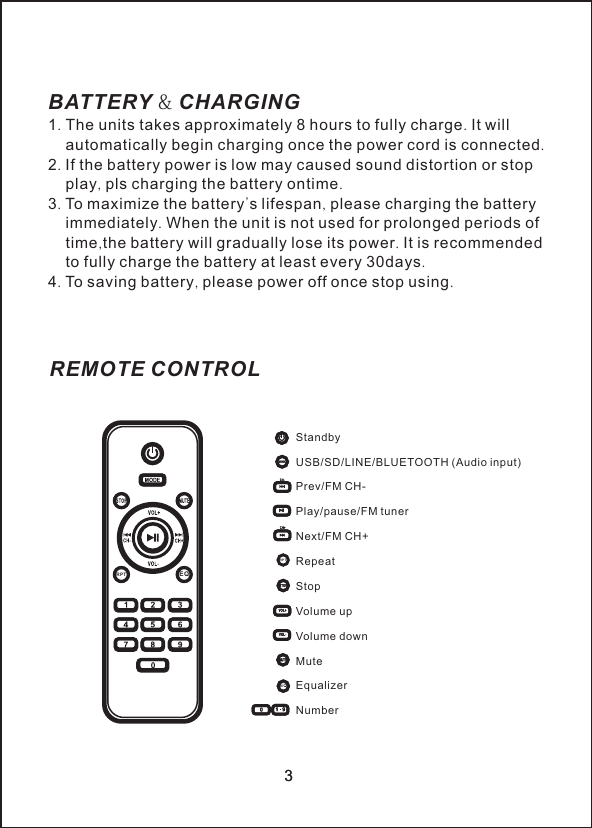
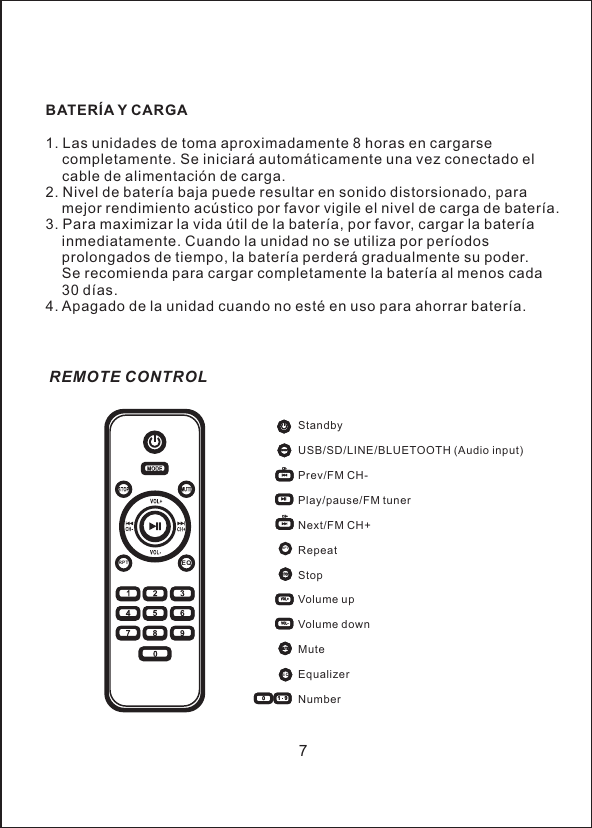
StandbyUSB/SD/LINE/BLUETOOTH (Audio input)Prev/FM CH- Play/pause/FM tunerNext/FM CH+RepeatStopVolume upVolume downMuteEqualizerNumberREMOTE CONTROL3BATTERY & CHARGING1. The units takes approximately 8 hours to fully charge. It will     automatically begin charging once the power cord is connected.2. If the battery power is low may caused sound distortion or stop     play, pls charging the battery ontime.3. To maximize the battery's lifespan, please charging the battery    immediately. When the unit is not used for prolonged periods of     time,the battery will gradually lose its power. It is recommended     to fully charge the battery at least every 30days.4. To saving battery, please power off once stop using. 3EQRPTRPTEQ
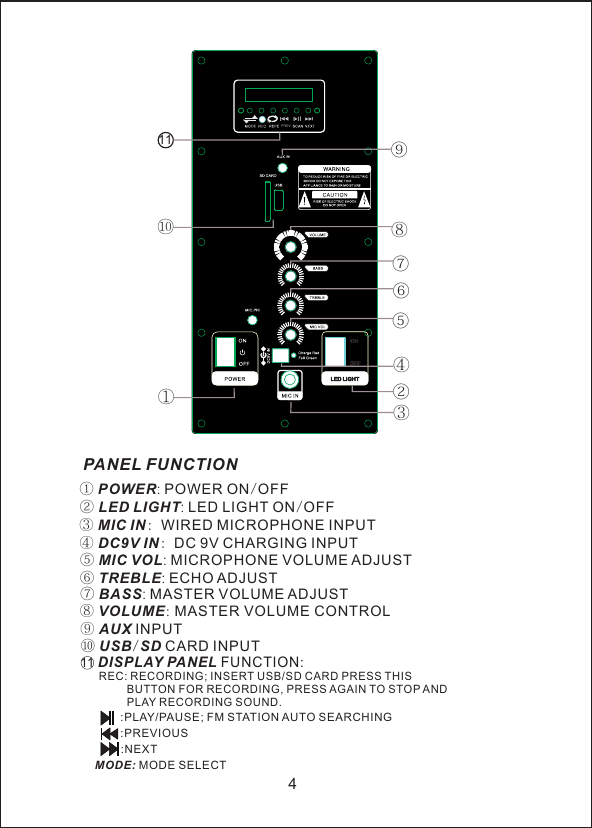
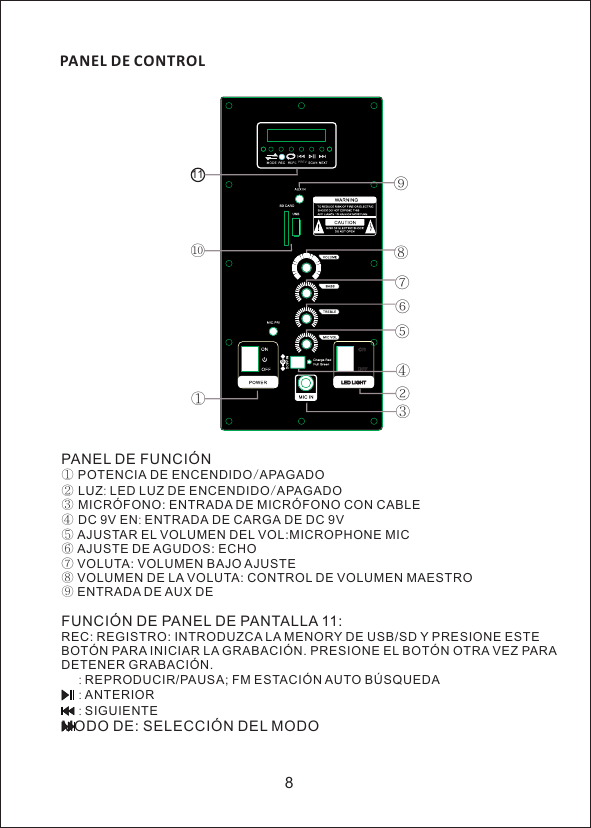
4PANEL FUNCTION① POWER: POWER ON/OFF② LED LIGHT: LED LIGHT ON/OFF③ MIC IN: WIRED MICROPHONE INPUT④ DC9V IN: DC 9V CHARGING INPUT⑤ MIC VOL: MICROPHONE VOLUME ADJUST⑥ TREBLE: ECHO ADJUST⑦ BASS: MASTER VOLUME ADJUST⑧ VOLUME: MASTER VOLUME CONTROL⑨ AUX INPUT11 DISPLAY PANEL FUNCTION:     REC: RECORDING; INSERT USB/SD CARD PRESS THIS                BUTTON FOR RECORDING, PRESS AGAIN TO STOP AND               PLAY RECORDING SOUND.   :PLAY/PAUSE; FM STATION AUTO SEARCHING:PREVIOUS:NEXTMOD E: MODE SELECT⑩ USB/SD CARD INPUT①②③④⑤⑥⑦⑧⑨⑩11PRE V
GRACIAS POR COMPRAR NUESTRO ALTAVOZ. POR FAVOR LEA CUIDADOSAMENTE EL MANUAL ANTES DE OPERAR.MEDIDAS DE SEGURIDAD IMPORTANTESAntes de usar esta máquina, por favor lea todas las instrucciones de funcionamiento y seguridad. Por favor, siga las instrucciones en este documento y guardar esta información en un lugar seguro para uso futuro.Asegúrese de que el cable de alimentación para esta unidad está fuera de la ruta de tráfico de pie. No coloque objetos pesados sobre el cable de alimentación ya que esto haría daño a la médula. Sujete siempre firmemente el enchufe y la clavija de la alimentación, Nunca tire del cable para sacar el enchufe. Evitar el uso de un cable de extensión.Ventilación: Este aparato debe colocarse en un lugar bien ventilado donde tiene no menos de espacio de ventilación de 10cm a cada lado de él. No cubra la unidad con un paño o manta. No lo ponga en una cama, sofá o alfombra como esta será sofocar la ventilación de la unidad.Desmontaje de la cubierta: Desmontar la carcasa. Hay no hay partes utilizables dentro de la unidad. Asegúrese de que un centro de servicio para tener su unidad reparada.Si la unidad emite cualquier olor o humo, apague inmediatamente la fuente de alimentación. Lleve la unidad al centro de servicio de que rama usted para reparaciones.5
CARACTERÍSTICAS* Bluetooth* Reproduce archivos MP3 almacenados en la unidad de SD card/USB /   externo dispositivo de audio.* Radio del FM* Entrada de micrófono* Batería de litio 7V/1800mAh incorporada* Prioridad micrófono encendido/apagadoCONEXIÓN1. Este sistema se aplica a CA 110V-240V, 50 / 60Hz2. Alimentación: batería se puede cargar cuando está conectado a la     corriente alterna. Luz roja de batería se está cargando, cambiará a     verde una vez la carga completa de batería.3. Batería interna se cargará incluso dispositivo interruptor cuando está     enchufado a la corriente alterna.4. Ajustar las teclas de función a sus preferencias personales de audio.BLUETOOTH INSTRUCCIONESCambiar el modo de "Azul", el signo de bluetooth luz twinkles y altavoz dará una alarma. Asegúrese de que activar la función Bluetooth en su dispositivo Bluetooth. Buscar conexión Bluetooth hasta encontrar pareja y modelo del dispositivo.6
BATERÍA Y CARGA1. Las unidades de toma aproximadamente 8 horas en cargarse     completamente. Se iniciará automáticamente una vez conectado el     cable de alimentación de carga.2. Nivel de batería baja puede resultar en sonido distorsionado, para     mejor rendimiento acústico por favor vigile el nivel de carga de batería.3. Para maximizar la vida útil de la batería, por favor, cargar la batería     inmediatamente. Cuando la unidad no se utiliza por períodos     prolongados de tiempo, la batería perderá gradualmente su poder.     Se recomienda para cargar completamente la batería al menos cada     30 días.4. Apagado de la unidad cuando no esté en uso para ahorrar batería.7StandbyUSB/SD/LINE/BLUETOOTH (Audio input)Prev/FM CH- Play/pause/FM tunerNext/FM CH+RepeatStopVolume upVolume downMuteEqualizerNumberREMOTE CONTROLEQRPTRPTEQ
①②③④⑤⑥⑦⑧⑨⑩11PRE V8PANEL DE CONTROLPANEL DE FUNCIÓN① POTENCIA DE ENCENDIDO/APAGADO② LUZ: LED LUZ DE ENCENDIDO/APAGADO③ MICRÓFONO: ENTRADA DE MICRÓFONO CON CABLE④ DC 9V EN: ENTRADA DE CARGA DE DC 9V⑤ AJUSTAR EL VOLUMEN DEL VOL:MICROPHONE MIC ⑥ AJUSTE DE AGUDOS: ECHO VOLUTA: VOLUMEN BAJO AJUSTEVOLUMEN DE LA VOLUTA: CONTROL DE VOLUMEN MAESTRO⑨ENTRADA DE AUX DE FUNCIÓN DE PANEL DE PANTALLA 11:REC: REGISTRO: INTRODUZCA LA MENORY DE USB/SD Y PRESIONE ESTE BOTÓN PARA INICIAR LA GRABACIÓN. PRESIONE EL BOTÓN OTRA VEZ PARA DETENER GRABACIÓNREPRODUCIR/PAUSA; FM ESTACIÓN AUTO BÚSQUEDAANTERIORSIGUIENTEMODO DE: SELECCIÓN DEL MODO⑦ ⑧       :      :      : .
FCC Notice  This device complies with Part 15 of the FCC Rules. Operation is subject to the following two conditions: (1) This device may not cause harmful interference, and (2) this device must accept any interference received, including interference that may cause undesired operation.  NOTE 1: This equipment has been tested and found to comply with the limits for a Class B digital device, pursuant to part 15 of the FCC Rules. These limits are designed to provide reasonable protection against harmful interference in a residential installation. This equipment generates, uses and can radiate radio frequency energy and, if not installed and used in accordance with the instructions, may cause harmful interference to radio communications. However, there is no guarantee that interference will not occur in a particular installation. If this equipment does cause harmful interference to radio or television reception, which can be determined by turning the equipment off and on, the user is encouraged to try to correct the interference by one or more of the following measures: - Reorient or relocate the receiving antenna. - Increase the separation between the equipment and receiver. -Connect the equipment into an outlet on a circuit different from that to which the receiver is connected. -Consult the dealer or an experienced radio/TV technician for help.   NOTE 2: Any changes or modifications to this unit not expressly approved by the party responsible for compliance could void the user's authority to operate the equipment.

Navigation menu