Minelab Electronics 0022 METAL DETECTOR WITH BLUETOOTH FOR RECREATIONAL USE User Manual

Minelab Electronics Pty Ltd METAL DETECTOR WITH BLUETOOTH FOR RECREATIONAL USE

User Manual

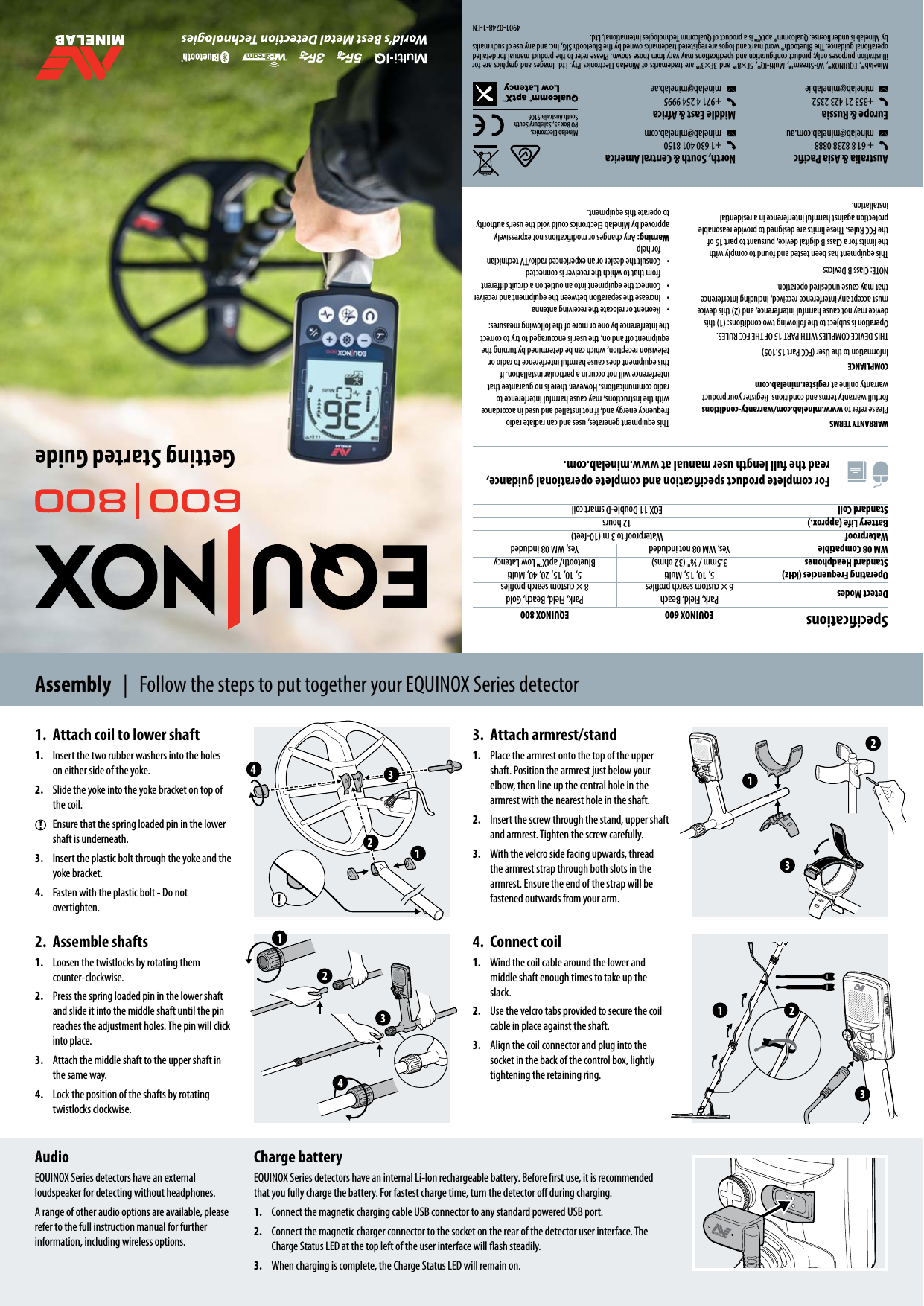
For complete product specication and complete operational guidance, read the full length user manual at www.minelab.com. 2 2 3 3 4 1 13412 3 1  2Getting Started GuideWARRANTY TERMSPlease refer to www.minelab.com/warranty-conditions for full warranty terms and conditions. Register your product warranty online at register.minelab.comCOMPLIANCEInformation to the User (FCC Part 15.105)THIS DEVICE COMPLIES WITH PART 15 OF THE FCC RULES. Operation is subject to the following two conditions: (1) this device may not cause harmful interference, and (2) this device must accept any interference received, including interference that may cause undesired operation.NOTE: Class B DevicesThis equipment has been tested and found to comply with the limits for a Class B digital device, pursuant to part 15 of the FCC Rules. These limits are designed to provide reasonable protection against harmful interference in a residential installation.This equipment generates, uses and can radiate radio frequency energy and, if not installed and used in accordance with the instructions, may cause harmful interference to radio communications. However, there is no guarantee that interference will not occur in a particular installation. If this equipment does cause harmful interference to radio or television reception, which can be determined by turning the equipment o and on, the user is encouraged to try to correct the interference by one or more of the following measures: •  Reorient or relocate the receiving antenna •  Increase the separation between the equipment and receiver•  Connect the equipment into an outlet on a circuit dierent from that to which the receiver is connected•  Consult the dealer or an experienced radio/TV technician for helpWarning: Any changes or modications not expressively approved by Minelab Electronics could void the user’s authority to operate this equipment.Australia & Asia Pacic   + 61 8 8238 0888 minelab@minelab.com.auEurope & Russia  +353 21 423 2352  minelab@minelab.ie North, South & Central America  +1 630 401 8150  minelab@minelab.comMiddle East & Africa  +971 4 254 9995  minelab@minelab.aeMinelab®, EQUINOX®, Wi-Stream™, Multi-IQ®, 5F×8™ and 3F×3™ are trademarks of Minelab Electronics Pty. Ltd. Images and graphics are for illustration purposes only; product conguration and specications may vary from those shown. Please refer to the product manual for detailed operational guidance. The Bluetooth® word mark and logos are registered trademarks owned by the Bluetooth SIG, Inc. and any use of such marks by Minelab is under license. Qualcomm® aptX™ is a product of Qualcomm Technologies International, Ltd.4901-0248-1-ENSpecications EQUINOX 600 EQUINOX 800Detect Modes Park, Field, Beach6 × custom search prolesPark, Field, Beach, Gold8 × custom search prolesOperating Frequencies (kHz) 5, 10, 15, Multi 5, 10, 15, 20, 40, MultiStandard Headphones 3.5mm / ⁄" (32 ohms) Bluetooth/ aptX™ Low LatencyWM 08 Compatible Yes, WM 08 not included Yes, WM 08 includedWaterproof Waterproof to 3 m (10-feet)Battery Life (approx.) 12 hoursStandard Coil EQX 11 Double-D smart coilAssembly  |  Follow the steps to put together your EQUINOX Series detector2.  Assemble shafts1.  Loosen the twistlocks by rotating them counter-clockwise.2.  Press the spring loaded pin in the lower shaft and slide it into the middle shaft until the pin reaches the adjustment holes. The pin will click into place. 3.  Attach the middle shaft to the upper shaft in the same way.4.  Lock the position of the shafts by rotating twistlocks clockwise.3.  Attach armrest/stand1.  Place the armrest onto the top of the upper shaft. Position the armrest just below your elbow, then line up the central hole in the armrest with the nearest hole in the shaft. 2.  Insert the screw through the stand, upper shaft and armrest. Tighten the screw carefully.3.  With the velcro side facing upwards, thread the armrest strap through both slots in the armrest. Ensure the end of the strap will be fastened outwards from your arm.1.  Attach coil to lower shaft1.  Insert the two rubber washers into the holes on either side of the yoke.2.  Slide the yoke into the yoke bracket on top of the coil.Ensure that the spring loaded pin in the lower shaft is underneath.3.  Insert the plastic bolt through the yoke and the yoke bracket. 4.  Fasten with the plastic bolt - Do not overtighten.4.  Connect coil1.  Wind the coil cable around the lower and middle shaft enough times to take up the slack.2.  Use the velcro tabs provided to secure the coil cable in place against the shaft. 3.  Align the coil connector and plug into the socket in the back of the control box, lightly tightening the retaining ring.AudioEQUINOX Series detectors have an external loudspeaker for detecting without headphones.A range of other audio options are available, please refer to the full instruction manual for further information, including wireless options.Charge batteryEQUINOX Series detectors have an internal Li-Ion rechargeable battery. Before rst use, it is recommended that you fully charge the battery. For fastest charge time, turn the detector o during charging.1.  Connect the magnetic charging cable USB connector to any standard powered USB port.2.  Connect the magnetic charger connector to the socket on the rear of the detector user interface. The Charge Status LED at the top left of the user interface will ash steadily.3.  When charging is complete, the Charge Status LED will remain on.Minelab Electronics,PO Box 35, Salisbury SouthSouth Australia 5106
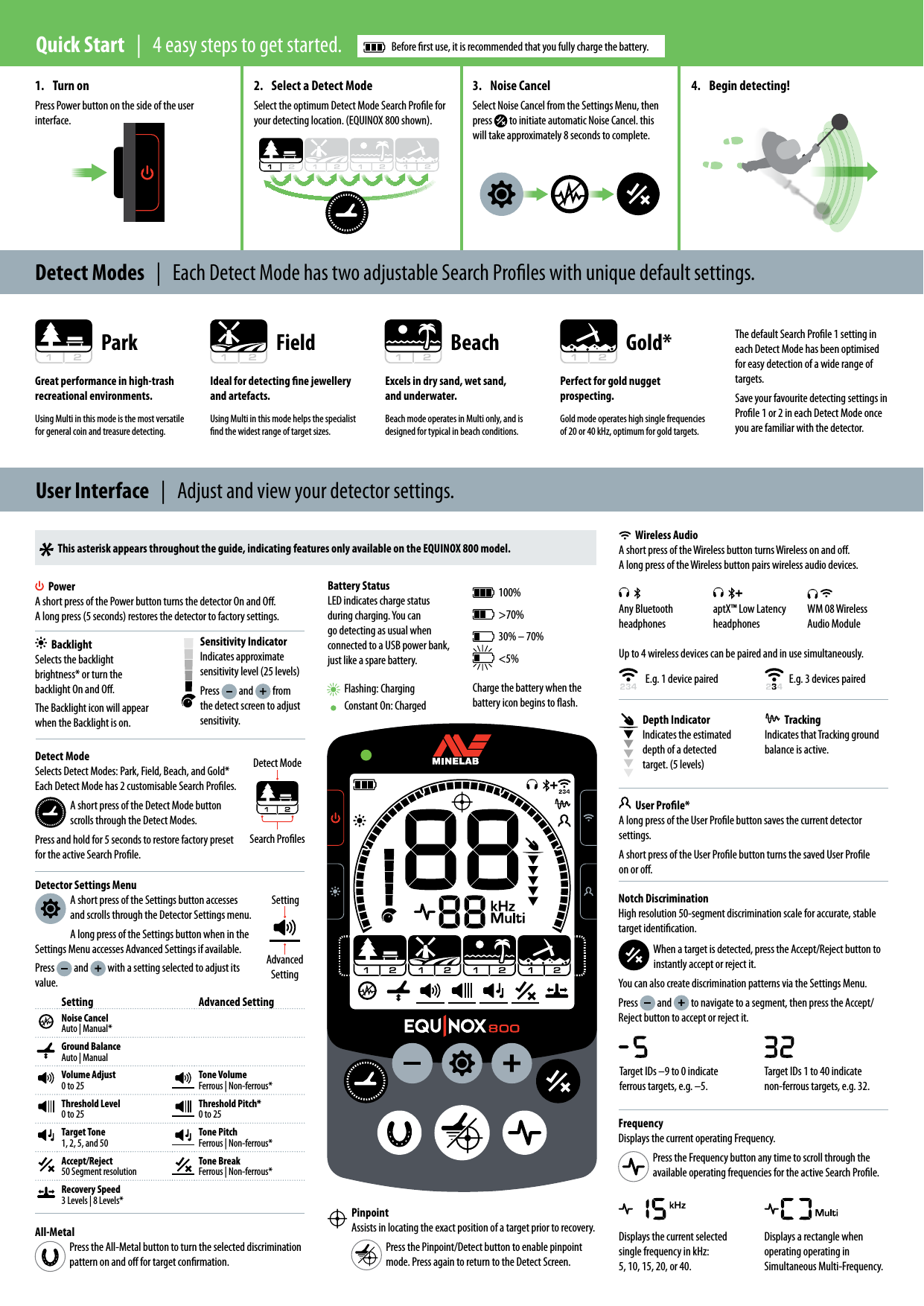
Detect ModeSelects Detect Modes: Park, Field, Beach, and Gold* Each Detect Mode has 2 customisable Search Proles.A short press of the Detect Mode button scrolls through the Detect Modes.Press and hold for 5 seconds to restore factory preset for the active Search Prole.1.  Turn onPress Power button on the side of the user  interface.2.  Select a Detect ModeSelect the optimum Detect Mode Search Prole for your detecting location. (EQUINOX 800 shown).3.  Noise CancelSelect Noise Cancel from the Settings Menu, then press   to initiate automatic Noise Cancel. this will take approximately 8 seconds to complete.4.  Begin detecting!PinpointAssists in locating the exact position of a target prior to recovery.Press the Pinpoint/Detect button to enable pinpoint mode. Press again to return to the Detect Screen.Park Field Beach Gold*Detect Modes  |  Each Detect Mode has two adjustable Search Proles with unique default settings.Quick Start  |  4 easy steps to get started.  Before rst use, it is recommended that you fully charge the battery.Flashing: ChargingUser Interface  |  Adjust and view your detector settings.This asterisk appears throughout the guide, indicating features only available on the EQUINOX 800 model.PowerA short press of the Power button turns the detector On and O. A long press (5 seconds) restores the detector to factory settings.BacklightSelects the backlight brightness* or turn the backlight On and O.The Backlight icon will appear when the Backlight is on.Sensitivity IndicatorIndicates approximate sensitivity level (25 levels)Press   and   from the detect screen to adjust sensitivity.Advanced SettingSettingDetect ModeSearch ProlesE.g. 1 device paired100%>70%30% – 70%<5%Charge the battery when the battery icon begins to ash.E.g. 3 devices pairedUp to 4 wireless devices can be paired and in use simultaneously.Depth IndicatorIndicates the estimated depth of a detected target. (5 levels)FrequencyDisplays the current operating Frequency. Press the Frequency button any time to scroll through the available operating frequencies for the active Search Prole.Detector Settings MenuA short press of the Settings button accesses and scrolls through the Detector Settings menu.A long press of the Settings button when in the Settings Menu accesses Advanced Settings if available.Press   and   with a setting selected to adjust its value.Displays the current selected single frequency in kHz:  5, 10, 15, 20, or 40.Displays a rectangle when operating operating in Simultaneous Multi-Frequency.TrackingIndicates that Tracking ground balance is active.Wireless AudioA short press of the Wireless button turns Wireless on and o. A long press of the Wireless button pairs wireless audio devices.Any Bluetooth headphonesaptX™ Low Latency headphonesWM 08 Wireless Audio ModuleBattery StatusLED indicates charge status during charging. You can go detecting as usual when connected to a USB power bank, just like a spare battery.Setting Advanced SettingNoise CancelAuto | Manual*Ground BalanceAuto | ManualVolume Adjust0 to 25Tone VolumeFerrous | Non-ferrous*Threshold Level0 to 25Threshold Pitch*0 to 25Target Tone1, 2, 5, and 50Tone PitchFerrous | Non-ferrous*Accept/Reject50 Segment resolutionTone BreakFerrous | Non-ferrous*Recovery Speed3 Levels | 8 Levels*Notch DiscriminationHigh resolution 50-segment discrimination scale for accurate, stable target identication.When a target is detected, press the Accept/Reject button to instantly accept or reject it.You can also create discrimination patterns via the Settings Menu. Press   and   to navigate to a segment, then press the Accept/Reject button to accept or reject it.All-MetalPress the All-Metal button to turn the selected discrimination pattern on and o for target conrmation.Great performance in high-trash recreational environments.Using Multi in this mode is the most versatile for general coin and treasure detecting.Excels in dry sand, wet sand,  and underwater.Beach mode operates in Multi only, and is designed for typical in beach conditions.Perfect for gold nugget prospecting. Gold mode operates high single frequencies of 20 or 40 kHz, optimum for gold targets.Ideal for detecting ne jewellery  and artefacts.Using Multi in this mode helps the specialist nd the widest range of target sizes.The default Search Prole 1 setting in each Detect Mode has been optimised for easy detection of a wide range of targets.Save your favourite detecting settings in Prole 1 or 2 in each Detect Mode once you are familiar with the detector.User Prole*A long press of the User Prole button saves the current detector settings.A short press of the User Prole button turns the saved User Prole on or o.Constant On: ChargedTarget IDs –9 to 0 indicate ferrous targets, e.g. –5.Target IDs 1 to 40 indicate non-ferrous targets, e.g. 32.

Navigation menu