Minelab Electronics 1010 METAL DETECTOR FOR RECREATIONAL USE User Manual

Minelab Electronics Pty Ltd METAL DETECTOR FOR RECREATIONAL USE Users Manual

Users Manual

1Metal detecting is a fascinating and rewarding activity enjoyed by people all over the world. By getting to know your CTX 3030 you can become one of the many successful detectorists who combine their passion for the outdoors with the excitement of discovering valuable coins, relics, gold and jewellery on a regular basis.CTX 3030 is Minelab’s most technologically advanced detector, incorporating the unique Full Band Spectrum 2 (FBS 2) Technology. Its sleek, sturdy design, innovative control panel, clear LCD, robust lightweight coil and comprehensive targeting options set it apart from any other detector available today. The Wireless Audio Receiver Module (WARM) facilitates the use of wireless speaker or headphones.Congratulations on purchasing  your Minelab  metal detector!CTX 3030 also allows you to download and upload CTX 3030 settings, User Modes and Discrimination Patterns using your own Personal Computer (PC).CTX 3030 will locate valuable metal objects in a variety of mineralized ground conditions, including extremely salty soils, sea water, wet beach sand and highly magnetic ground conditions. New functionality allows you to customise your CTX 3030 to your specic requirements.This manual is designed to help both the beginner and expert treasure hunter obtain the best performance with their CTX 3030. Minelab wishes you every success with your CTX 3030!
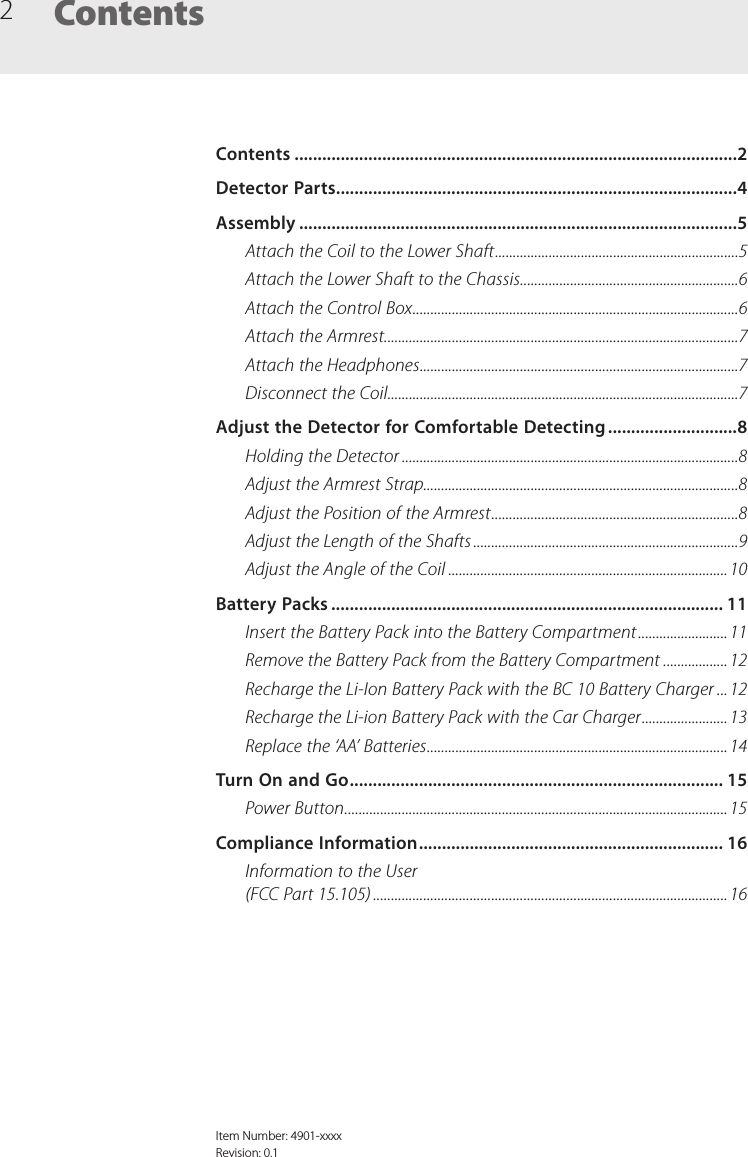
2ContentsItem Number: 4901-xxxxRevision: 0.1Contents ................................................................................................2Detector Parts .......................................................................................4Assembly ...............................................................................................5Attach the Coil to the Lower Shaft ....................................................................5Attach the Lower Shaft to the Chassis .............................................................6Attach the Control Box ...........................................................................................6Attach the Armrest ...................................................................................................7Attach the Headphones .........................................................................................7Disconnect the Coil ..................................................................................................7Adjust the Detector for Comfortable Detecting ............................8Holding the Detector ..............................................................................................8Adjust the Armrest Strap........................................................................................8Adjust the Position of the Armrest .....................................................................8Adjust the Length of the Shafts ..........................................................................9Adjust the Angle of the Coil ..............................................................................10Battery Packs ..................................................................................... 11Insert the Battery Pack into the Battery Compartment .........................11Remove the Battery Pack from the Battery Compartment ..................12Recharge the Li-Ion Battery Pack with the BC 10 Battery Charger ...12Recharge the Li-ion Battery Pack with the Car Charger ........................13Replace the ‘AA’ Batteries .................................................................................... 14Turn On and Go ................................................................................. 15Power Button ...........................................................................................................15Compliance Information .................................................................. 16Information to the User  (FCC Part 15.105) ................................................................................................... 16
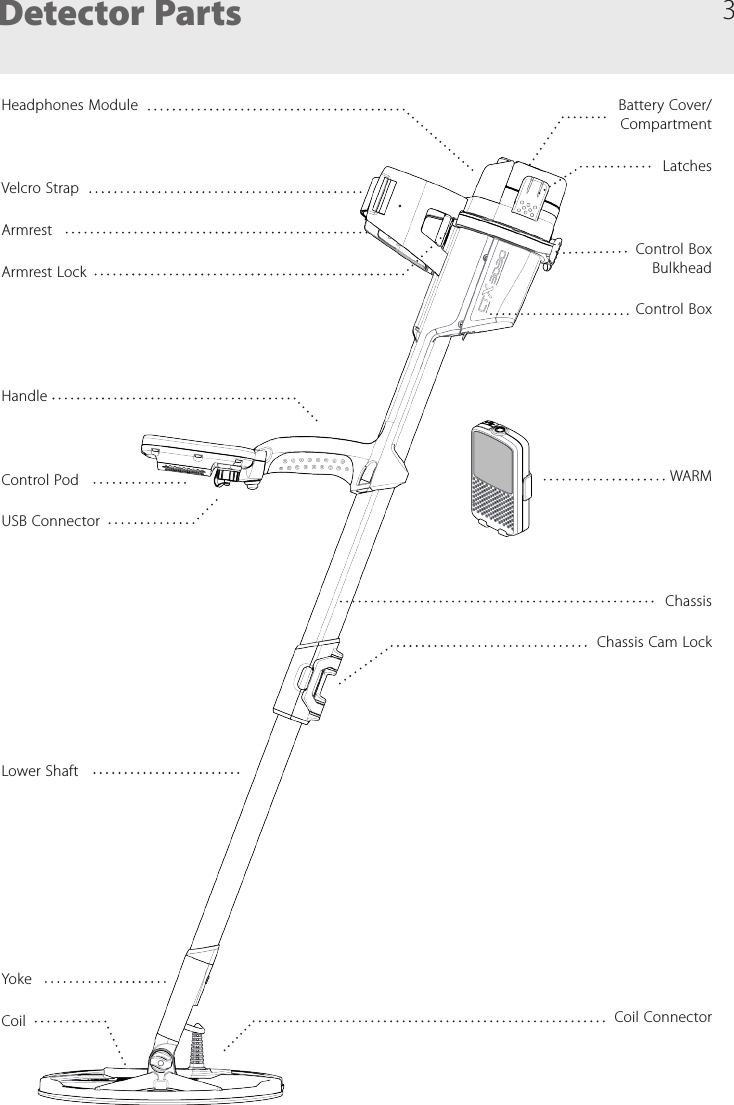
3Detector PartsHeadphones ModuleVelcro StrapArmrestArmrest LockHandleControl PodUSB ConnectorLower ShaftYokeCoilBattery Cover/ CompartmentLatchesControl Box  BulkheadControl BoxWARMChassisChassis Cam LockCoil Connector
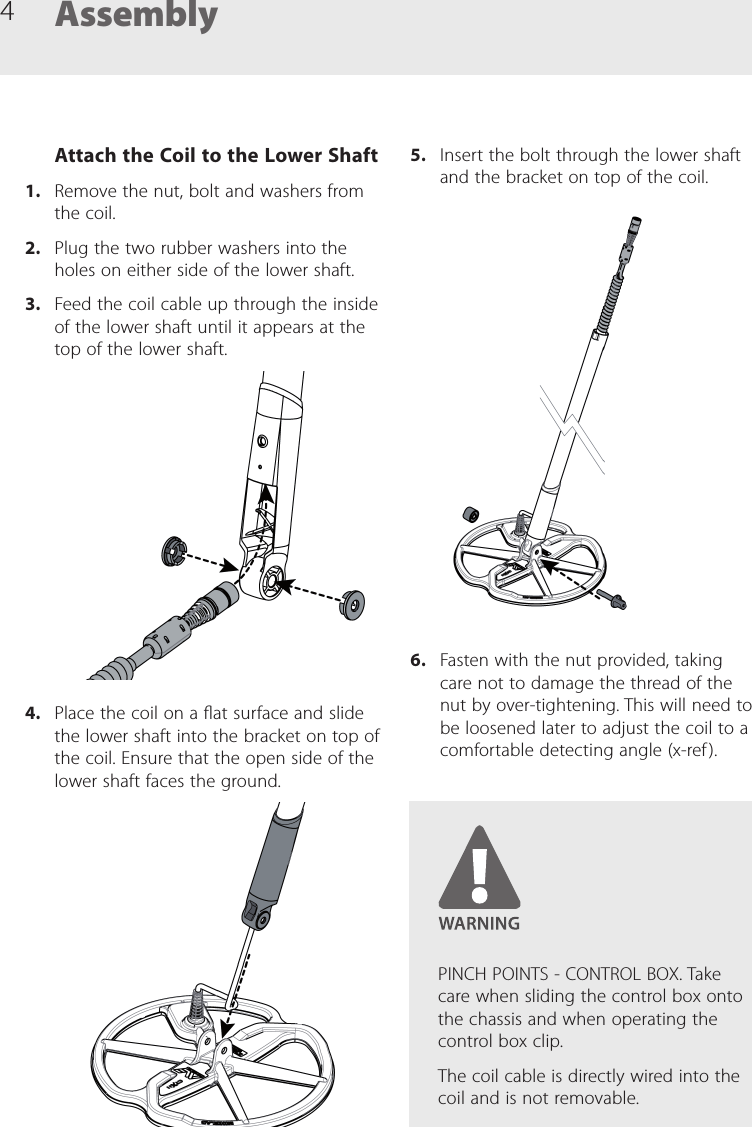
4Attach the Coil to the Lower Shaft1.  Remove the nut, bolt and washers from the coil.2.  Plug the two rubber washers into the holes on either side of the lower shaft.3.  Feed the coil cable up through the inside of the lower shaft until it appears at the top of the lower shaft.4.  Place the coil on a at surface and slide the lower shaft into the bracket on top of the coil. Ensure that the open side of the lower shaft faces the ground.Assembly5.  Insert the bolt through the lower shaft and the bracket on top of the coil.6.  Fasten with the nut provided, taking care not to damage the thread of the nut by over-tightening. This will need to be loosened later to adjust the coil to a comfortable detecting angle (x-ref ).PINCH POINTS - CONTROL BOX. Take care when sliding the control box onto the chassis and when operating the control box clip.The coil cable is directly wired into the coil and is not removable.
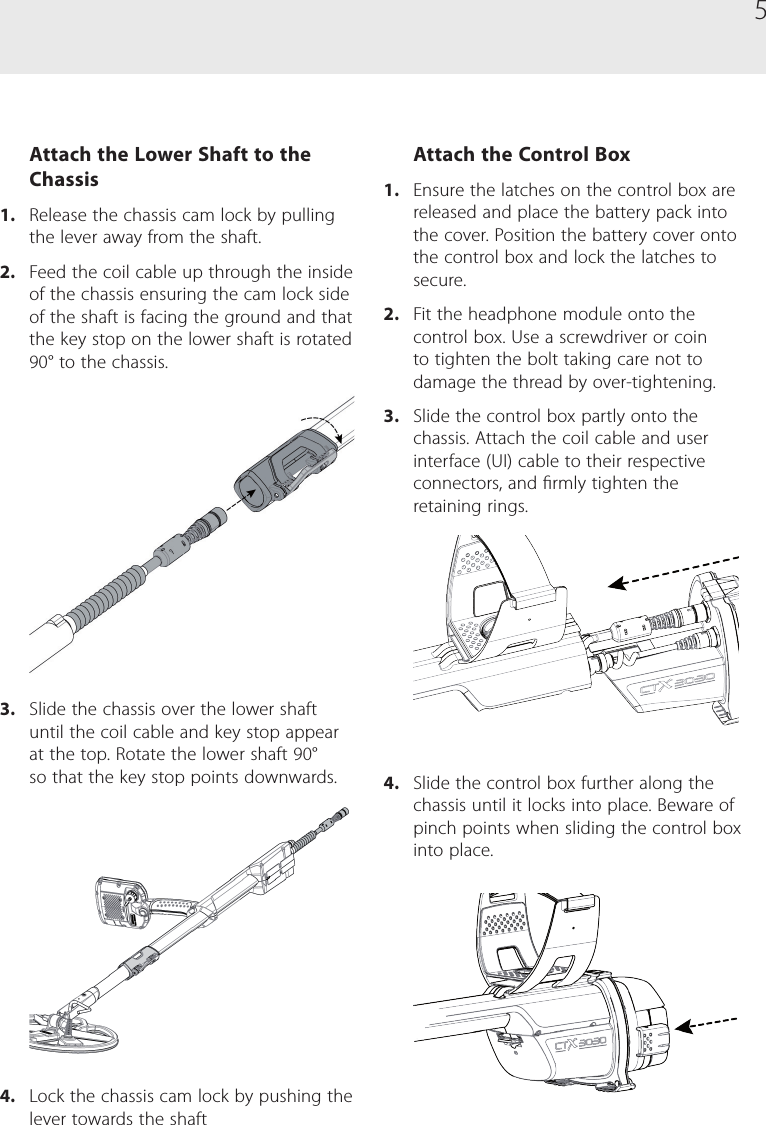
5Attach the Lower Shaft to the Chassis1.  Release the chassis cam lock by pulling the lever away from the shaft.2.  Feed the coil cable up through the inside of the chassis ensuring the cam lock side of the shaft is facing the ground and that the key stop on the lower shaft is rotated 90° to the chassis.3.  Slide the chassis over the lower shaft until the coil cable and key stop appear at the top. Rotate the lower shaft 90° so that the key stop points downwards.4.  Lock the chassis cam lock by pushing the lever towards the shaftAttach the Control Box1.  Ensure the latches on the control box are released and place the battery pack into the cover. Position the battery cover onto the control box and lock the latches to secure.2.  Fit the headphone module onto the control box. Use a screwdriver or coin to tighten the bolt taking care not to damage the thread by over-tightening.3.  Slide the control box partly onto the chassis. Attach the coil cable and user interface (UI) cable to their respective connectors, and rmly tighten the retaining rings.4.  Slide the control box further along the chassis until it locks into place. Beware of pinch points when sliding the control box into place.
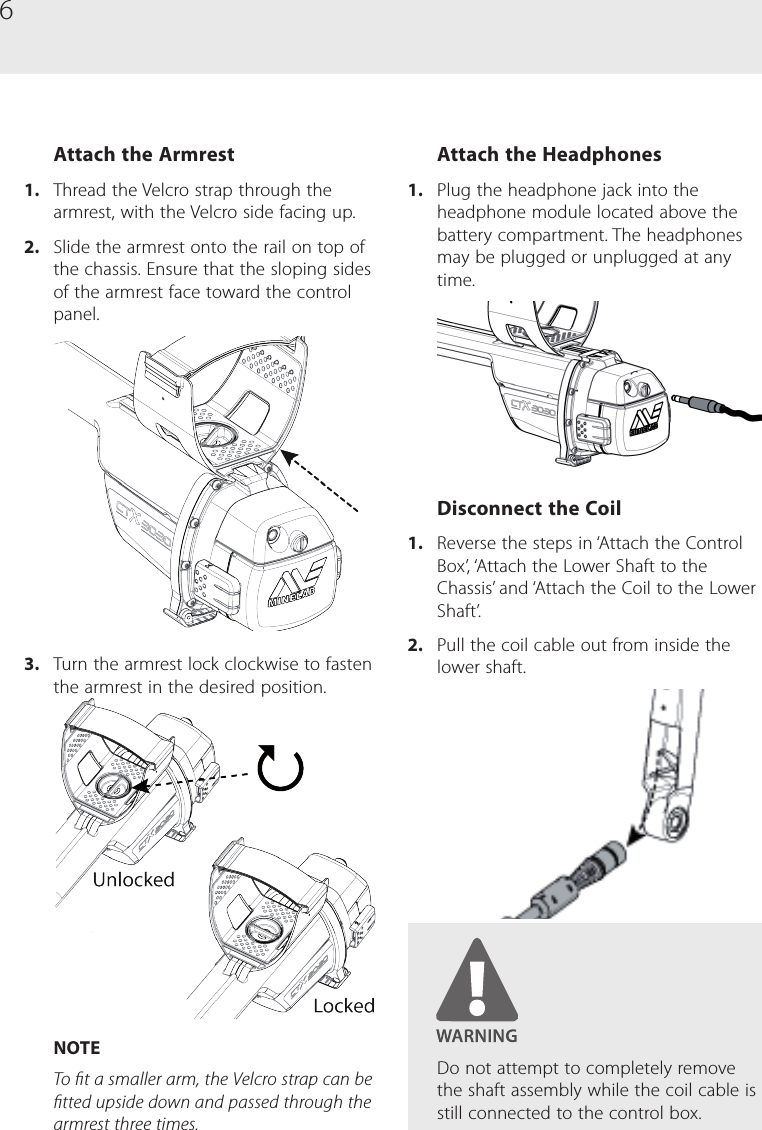
6Attach the Armrest1.  Thread the Velcro strap through the armrest, with the Velcro side facing up.2.  Slide the armrest onto the rail on top of the chassis. Ensure that the sloping sides of the armrest face toward the control panel.3.  Turn the armrest lock clockwise to fasten the armrest in the desired position. NOTETo t a smaller arm, the Velcro strap can be tted upside down and passed through the armrest three times.Attach the Headphones1.  Plug the headphone jack into the headphone module located above the battery compartment. The headphones may be plugged or unplugged at any time.Disconnect the Coil1.  Reverse the steps in ‘Attach the Control Box’, ‘Attach the Lower Shaft to the Chassis’ and ‘Attach the Coil to the Lower Shaft’. 2.  Pull the coil cable out from inside the  lower shaft.Do not attempt to completely remove the shaft assembly while the coil cable is still connected to the control box.
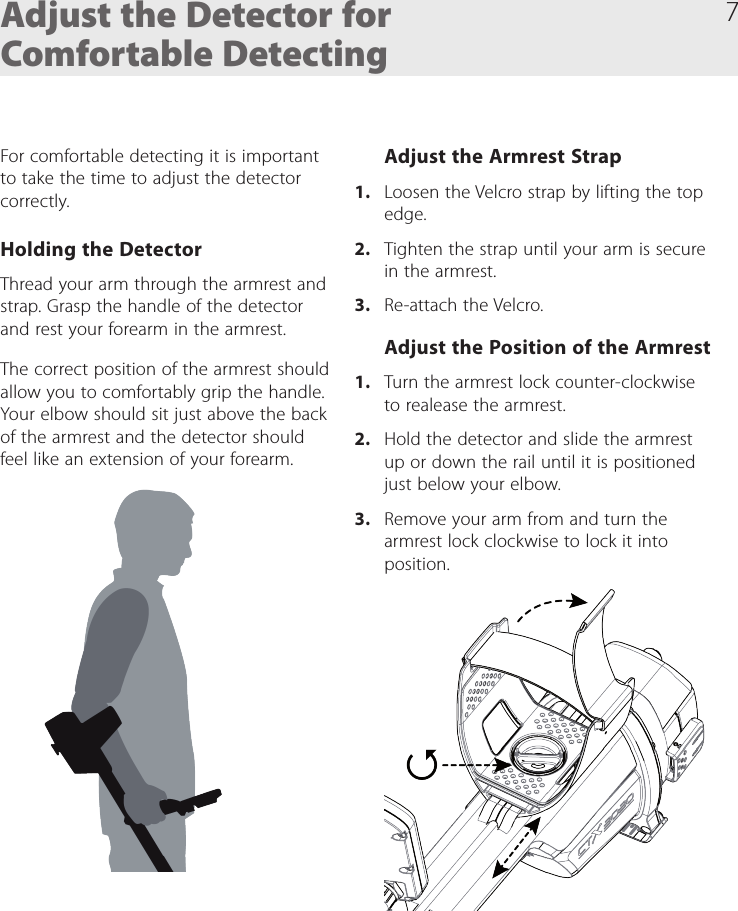
7Adjust the Detector for Comfortable DetectingFor comfortable detecting it is important to take the time to adjust the detector correctly. Holding the DetectorThread your arm through the armrest and strap. Grasp the handle of the detector and rest your forearm in the armrest.The correct position of the armrest should allow you to comfortably grip the handle. Your elbow should sit just above the back of the armrest and the detector should feel like an extension of your forearm.Adjust the Armrest Strap1.  Loosen the Velcro strap by lifting the top edge.2.  Tighten the strap until your arm is secure in the armrest. 3.  Re-attach the Velcro.Adjust the Position of the Armrest1.  Turn the armrest lock counter-clockwise to realease the armrest.2.  Hold the detector and slide the armrest up or down the rail until it is positioned just below your elbow. 3.  Remove your arm from and turn the armrest lock clockwise to lock it into position.
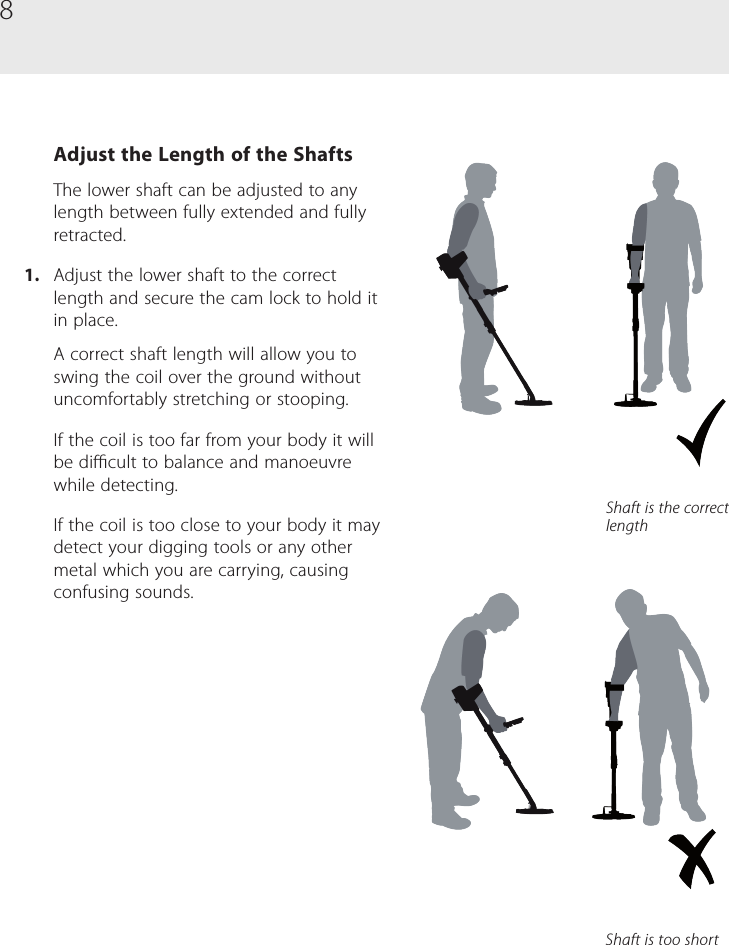
8Adjust the Length of the ShaftsThe lower shaft can be adjusted to any length between fully extended and fully retracted. 1.  Adjust the lower shaft to the correct length and secure the cam lock to hold it in place.A correct shaft length will allow you to swing the coil over the ground without uncomfortably stretching or stooping.If the coil is too far from your body it will be dicult to balance and manoeuvre while detecting.If the coil is too close to your body it may detect your digging tools or any other metal which you are carrying, causing confusing sounds.Shaft is the correct lengthShaft is too short
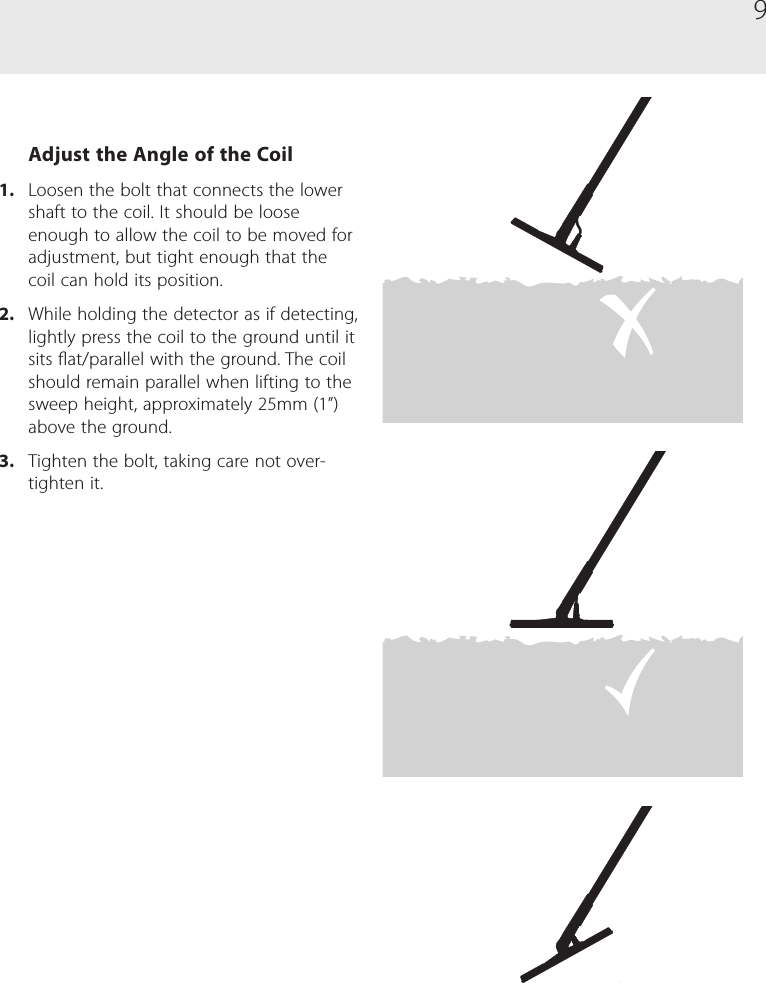
9Adjust the Angle of the Coil1.  Loosen the bolt that connects the lower shaft to the coil. It should be loose enough to allow the coil to be moved for adjustment, but tight enough that the coil can hold its position.2.  While holding the detector as if detecting, lightly press the coil to the ground until it sits at/parallel with the ground. The coil should remain parallel when lifting to the sweep height, approximately 25mm (1”) above the ground.3.  Tighten the bolt, taking care not over-tighten it.
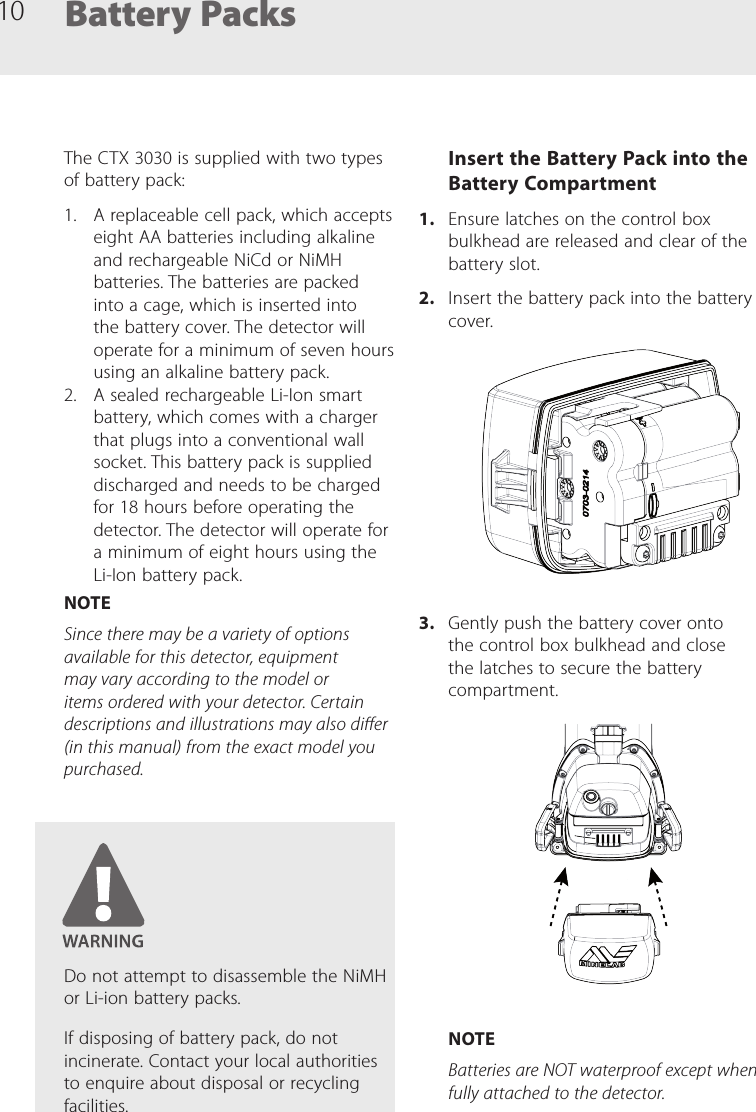
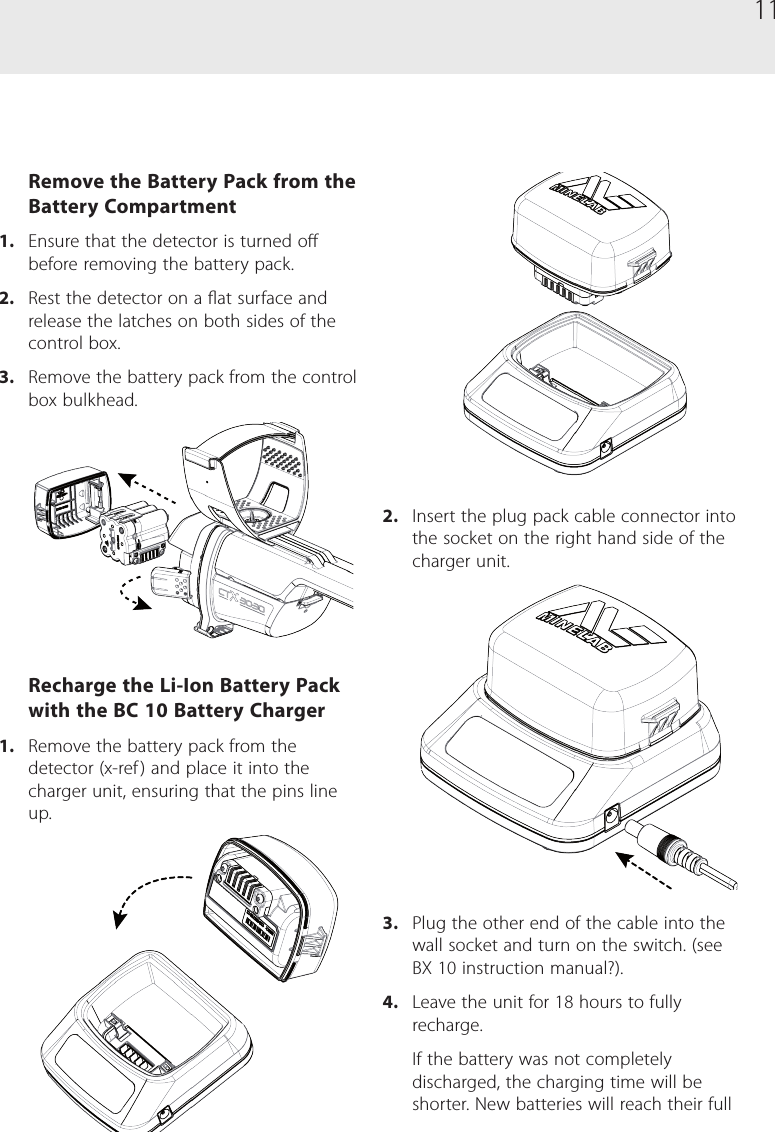
10The CTX 3030 is supplied with two types of battery pack:1.  A replaceable cell pack, which accepts eight AA batteries including alkaline and rechargeable NiCd or NiMH batteries. The batteries are packed into a cage, which is inserted into the battery cover. The detector will operate for a minimum of seven hours using an alkaline battery pack.2.  A sealed rechargeable Li-Ion smart battery, which comes with a charger that plugs into a conventional wall socket. This battery pack is supplied discharged and needs to be charged for 18 hours before operating the detector. The detector will operate for a minimum of eight hours using the Li-Ion battery pack.NOTESince there may be a variety of options available for this detector, equipment may vary according to the model or items ordered with your detector. Certain descriptions and illustrations may also dier (in this manual) from the exact model you purchased.Battery PacksInsert the Battery Pack into the Battery Compartment1.  Ensure latches on the control box bulkhead are released and clear of the battery slot.2.  Insert the battery pack into the battery cover.3.  Gently push the battery cover onto the control box bulkhead and close the latches to secure the battery compartment.NOTEBatteries are NOT waterproof except when fully attached to the detector. Do not attempt to disassemble the NiMH or Li-ion battery packs.If disposing of battery pack, do not incinerate. Contact your local authorities to enquire about disposal or recycling facilities.
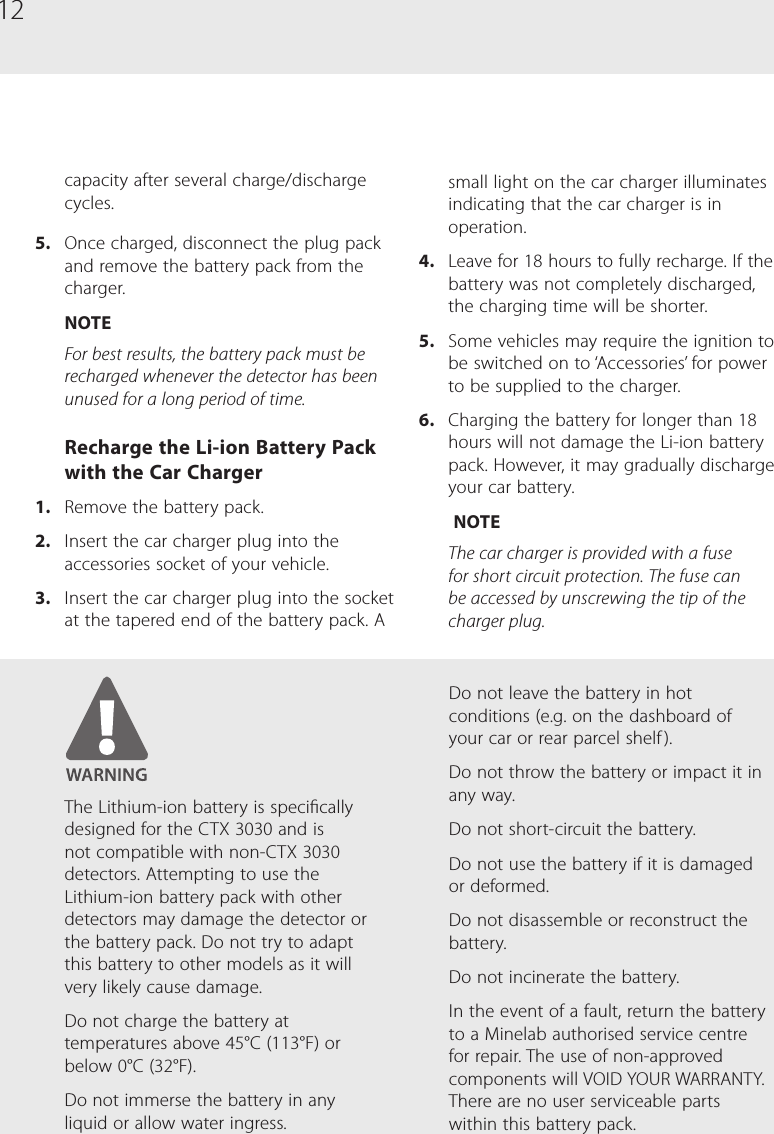
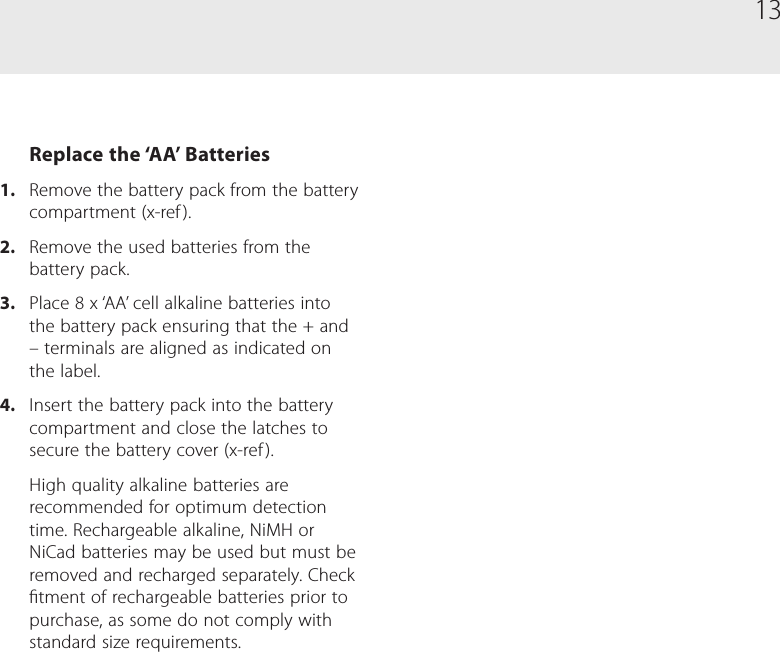
11Remove the Battery Pack from the Battery Compartment1.  Ensure that the detector is turned o before removing the battery pack.2.  Rest the detector on a at surface and release the latches on both sides of the control box.3.  Remove the battery pack from the control box bulkhead.Recharge the Li-Ion Battery Pack with the BC 10 Battery Charger1.  Remove the battery pack from the detector (x-ref ) and place it into the charger unit, ensuring that the pins line up.2.  Insert the plug pack cable connector into the socket on the right hand side of the charger unit.3.  Plug the other end of the cable into the wall socket and turn on the switch. (see BX 10 instruction manual?).4.  Leave the unit for 18 hours to fully recharge. If the battery was not completely discharged, the charging time will be shorter. New batteries will reach their full
12small light on the car charger illuminates indicating that the car charger is in operation.4.  Leave for 18 hours to fully recharge. If the battery was not completely discharged, the charging time will be shorter. 5.  Some vehicles may require the ignition to be switched on to ‘Accessories’ for power to be supplied to the charger.6.  Charging the battery for longer than 18 hours will not damage the Li-ion battery pack. However, it may gradually discharge your car battery. NOTEThe car charger is provided with a fuse for short circuit protection. The fuse can be accessed by unscrewing the tip of the charger plug.capacity after several charge/discharge cycles.5.  Once charged, disconnect the plug pack and remove the battery pack from the charger.NOTEFor best results, the battery pack must be recharged whenever the detector has been unused for a long period of time.Recharge the Li-ion Battery Pack with the Car Charger1.  Remove the battery pack.2.  Insert the car charger plug into the accessories socket of your vehicle.3.  Insert the car charger plug into the socket at the tapered end of the battery pack. A The Lithium-ion battery is specically designed for the CTX 3030 and is not compatible with non-CTX 3030 detectors. Attempting to use the Lithium-ion battery pack with other detectors may damage the detector or the battery pack. Do not try to adapt this battery to other models as it will very likely cause damage.Do not charge the battery at temperatures above 45°C (113°F) or below 0°C (32°F).Do not immerse the battery in any liquid or allow water ingress.Do not leave the battery in hot conditions (e.g. on the dashboard of your car or rear parcel shelf ).Do not throw the battery or impact it in any way.Do not short-circuit the battery.Do not use the battery if it is damaged or deformed.Do not disassemble or reconstruct the battery.Do not incinerate the battery.In the event of a fault, return the battery to a Minelab authorised service centre for repair. The use of non-approved components will VOID YOUR WARRANTY. There are no user serviceable parts within this battery pack.
13Replace the ‘AA’ Batteries1.  Remove the battery pack from the battery compartment (x-ref ).2.  Remove the used batteries from the battery pack.3.  Place 8 x ‘AA’ cell alkaline batteries into the battery pack ensuring that the + and – terminals are aligned as indicated on the label.4.  Insert the battery pack into the battery compartment and close the latches to secure the battery cover (x-ref ).High quality alkaline batteries are recommended for optimum detection time. Rechargeable alkaline, NiMH or NiCad batteries may be used but must be removed and recharged separately. Check tment of rechargeable batteries prior to purchase, as some do not comply with standard size requirements.
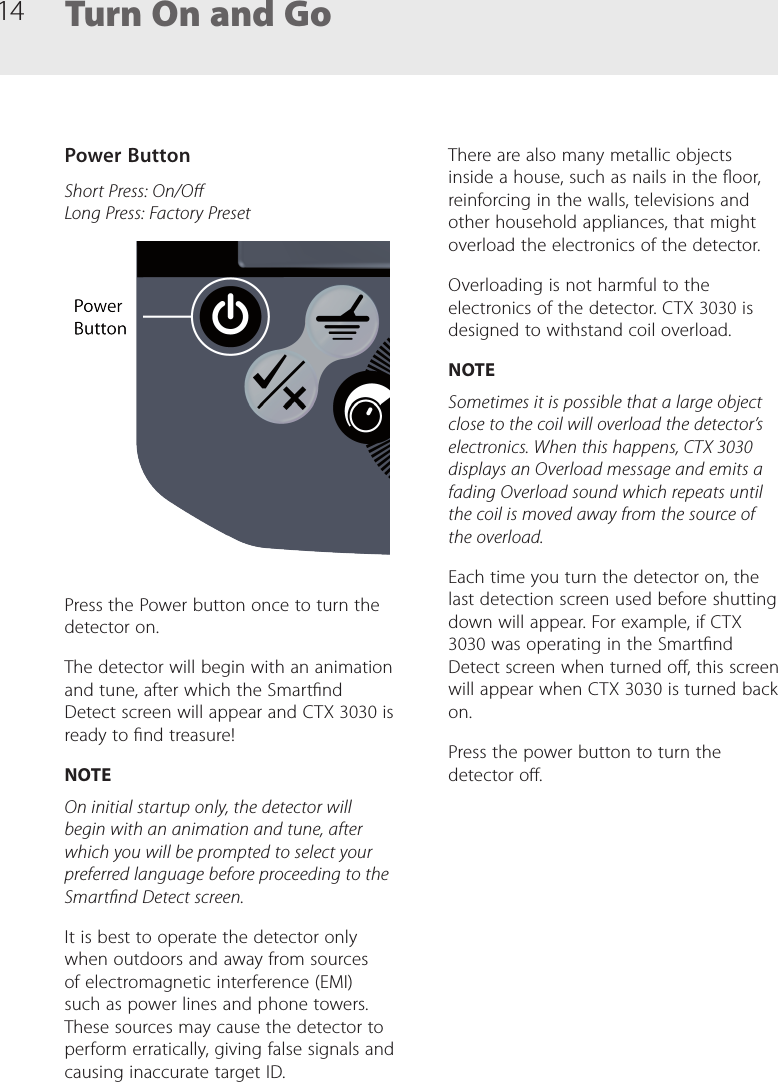
14 Turn On and GoPower ButtonShort Press: On/O Long Press: Factory PresetPress the Power button once to turn the detector on.The detector will begin with an animation and tune, after which the Smartnd Detect screen will appear and CTX 3030 is ready to nd treasure!NOTEOn initial startup only, the detector will begin with an animation and tune, after which you will be prompted to select your preferred language before proceeding to the Smartnd Detect screen.It is best to operate the detector only when outdoors and away from sources of electromagnetic interference (EMI) such as power lines and phone towers. These sources may cause the detector to perform erratically, giving false signals and causing inaccurate target ID. There are also many metallic objects inside a house, such as nails in the oor, reinforcing in the walls, televisions and other household appliances, that might overload the electronics of the detector.Overloading is not harmful to the electronics of the detector. CTX 3030 is designed to withstand coil overload.NOTESometimes it is possible that a large object close to the coil will overload the detector’s electronics. When this happens, CTX 3030 displays an Overload message and emits a fading Overload sound which repeats until the coil is moved away from the source of the overload.Each time you turn the detector on, the last detection screen used before shutting down will appear. For example, if CTX 3030 was operating in the Smartnd Detect screen when turned o, this screen will appear when CTX 3030 is turned back on.Press the power button to turn the detector o.
15Compliance InformationInformation to the User  (FCC Part 15.105)NOTE Class B DevicesThis equipment has been tested and found to comply with the limits for a Class B digital device, pursuant to part 15 of the FCC Rules. These limits are designed to provide reasonable protection against harmful interference in a residential installation.This equipment generates, uses and can radiate radio frequency energy and, if not installed and used in accordance with the instructions, may cause harmful interference to radio communications. However, there is no guarantee that interference will not occur in a particular installation. If this equipment does cause harmful interference to radio or television reception, which can be determined by turning the equipment of and on, the user is encouraged to try to correct the interference by one or more of the following measures: •Reorient or relocate the receiving antenna •Increase the separation between the equipment and receiver •Connect the equipment into an outlet on a circuit dierent from that to which the receiver is connected •Consult the dealer or an experienced radio/TV technician for helpAny changes or modications not expressively approved by Minelab Electronics Pty Ltd could void the user’s authority to operate this equipment.

Navigation menu