Minelab Electronics 2660 Metal Detector with Bluetooth for recreational use User Manual

Minelab Electronics Pty Ltd Metal Detector with Bluetooth for recreational use

User Manual

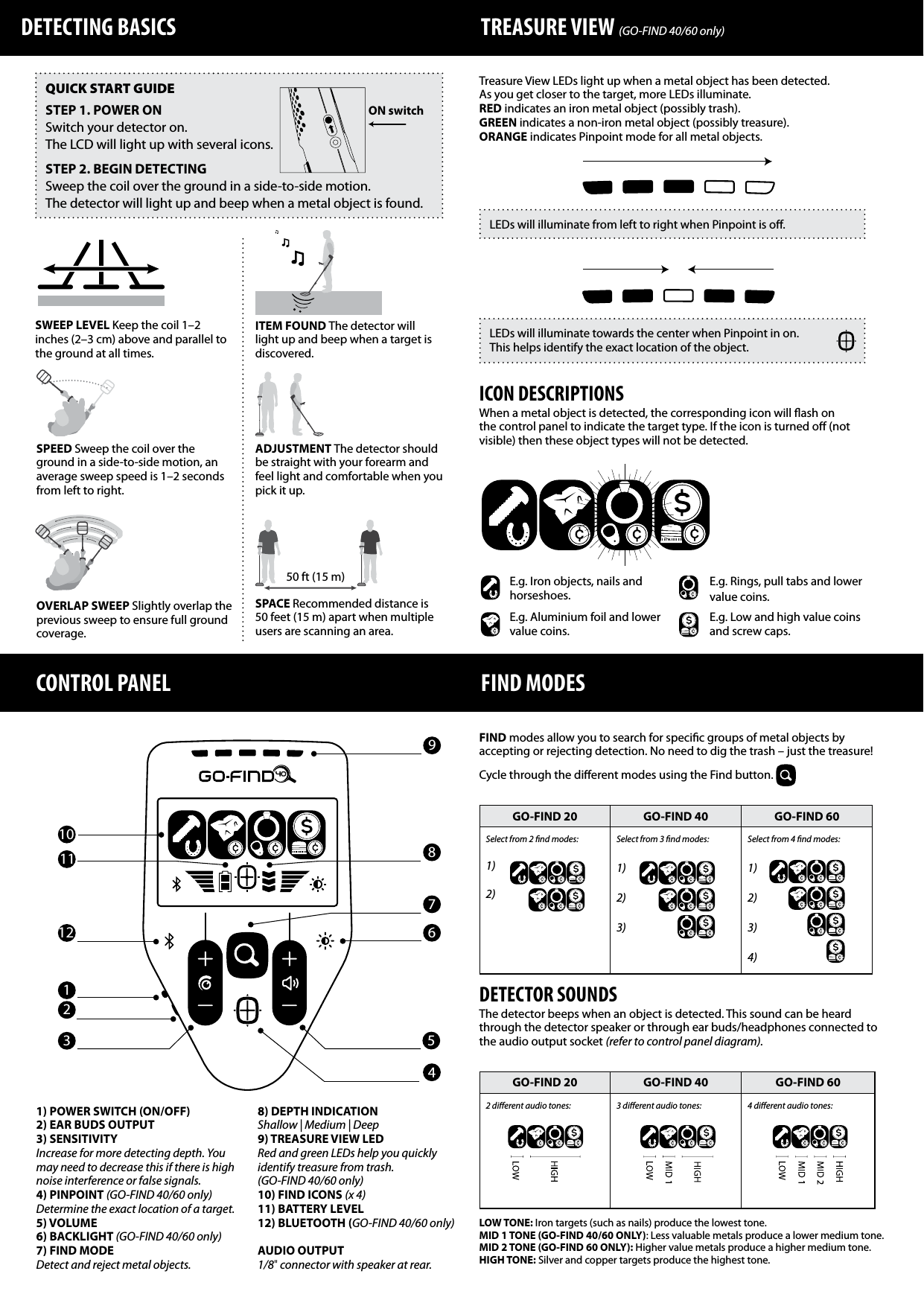
GO‑FIND 20 GO‑FIND 40 GO‑FIND 602 dierent audio tones: 3 dierent audio tones: 4 dierent audio tones: 1) POWER SWITCH (ON/OFF)2) EAR BUDS OUTPUT3) SENSITIVITYIncrease for more detecting depth. You may need to decrease this if there is high noise interference or false signals.4) PINPOINT (GO‑FIND 40/60 only)Determine the exact location of a target.5) VOLUME6) BACKLIGHT (GO‑FIND 40/60 only)7) FIND MODEDetect and reject metal objects.8) DEPTH INDICATIONShallow | Medium | Deep9) TREASURE VIEW LED Red and green LEDs help you quickly identify treasure from trash.(GO‑FIND 40/60 only)10) FIND ICONS (x 4)11) BATTERY LEVEL12) BLUETOOTH (GO‑FIND 40/60 only)AUDIO OUTPUT1/8" connector with speaker at rear.DETECTING BASICS TREASURE VIEW (GO‑FIND 40/60 only) CONTROL PANELGO‑FIND 20 GO‑FIND 40 GO‑FIND 60Select from 2 nd modes:1) 2)Select from 3 nd modes:1) 2) 3) Select from 4 nd modes: 1) 2) 3) 4)QUICK START GUIDESTEP 1. POWER ONSwitch your detector on.The LCD will light up with several icons.STEP 2. BEGIN DETECTINGSweep the coil over the ground in a side-to-side motion.The detector will light up and beep when a metal object is found.FIND MODESFIND modes allow you to search for specic groups of metal objects by accepting or rejecting detection. No need to dig the trash – just the treasure!Cycle through the dierent modes using the Find button. DETECTOR SOUNDSThe detector beeps when an object is detected. This sound can be heard through the detector speaker or through ear buds/headphones connected to the audio output socket (refer to control panel diagram).SWEEP LEVEL Keep the coil 1–2 inches (2–3 cm) above and parallel to the ground at all times. SPEED Sweep the coil over the ground in a side-to-side motion, an average sweep speed is 1–2 seconds from left to right.ADJUSTMENT The detector should be straight with your forearm and feel light and comfortable when you pick it up.SPACE Recommended distance is 50 feet (15 m) apart when multiple users are scanning an area.OVERLAP SWEEP Slightly overlap the previous sweep to ensure full ground coverage.1234567911 810Treasure View LEDs light up when a metal object has been detected. As you get closer to the target, more LEDs illuminate.RED indicates an iron metal object (possibly trash).GREEN indicates a non-iron metal object (possibly treasure).ORANGE indicates Pinpoint mode for all metal objects.LEDs will illuminate from left to right when Pinpoint is o.ICON DESCRIPTIONSWhen a metal object is detected, the corresponding icon will ash on the control panel to indicate the target type. If the icon is turned o (not visible) then these object types will not be detected. ITEM FOUND The detector will light up and beep when a target is discovered. LOW TONE: Iron targets (such as nails) produce the lowest tone.MID 1 TONE (GO‑FIND 40/60 ONLY): Less valuable metals produce a lower medium tone.MID 2 TONE (GO‑FIND 60 ONLY): Higher value metals produce a higher medium tone.HIGH TONE: Silver and copper targets produce the highest tone.E.g. Iron objects, nails and horseshoes.E.g. Aluminium foil and lower value coins.E.g. Rings, pull tabs and lower value coins.E.g. Low and high value coins and screw caps.LEDs will illuminate towards the center when Pinpoint in on.  This helps identify the exact location of the object.12ON switch50 ft (15 m)
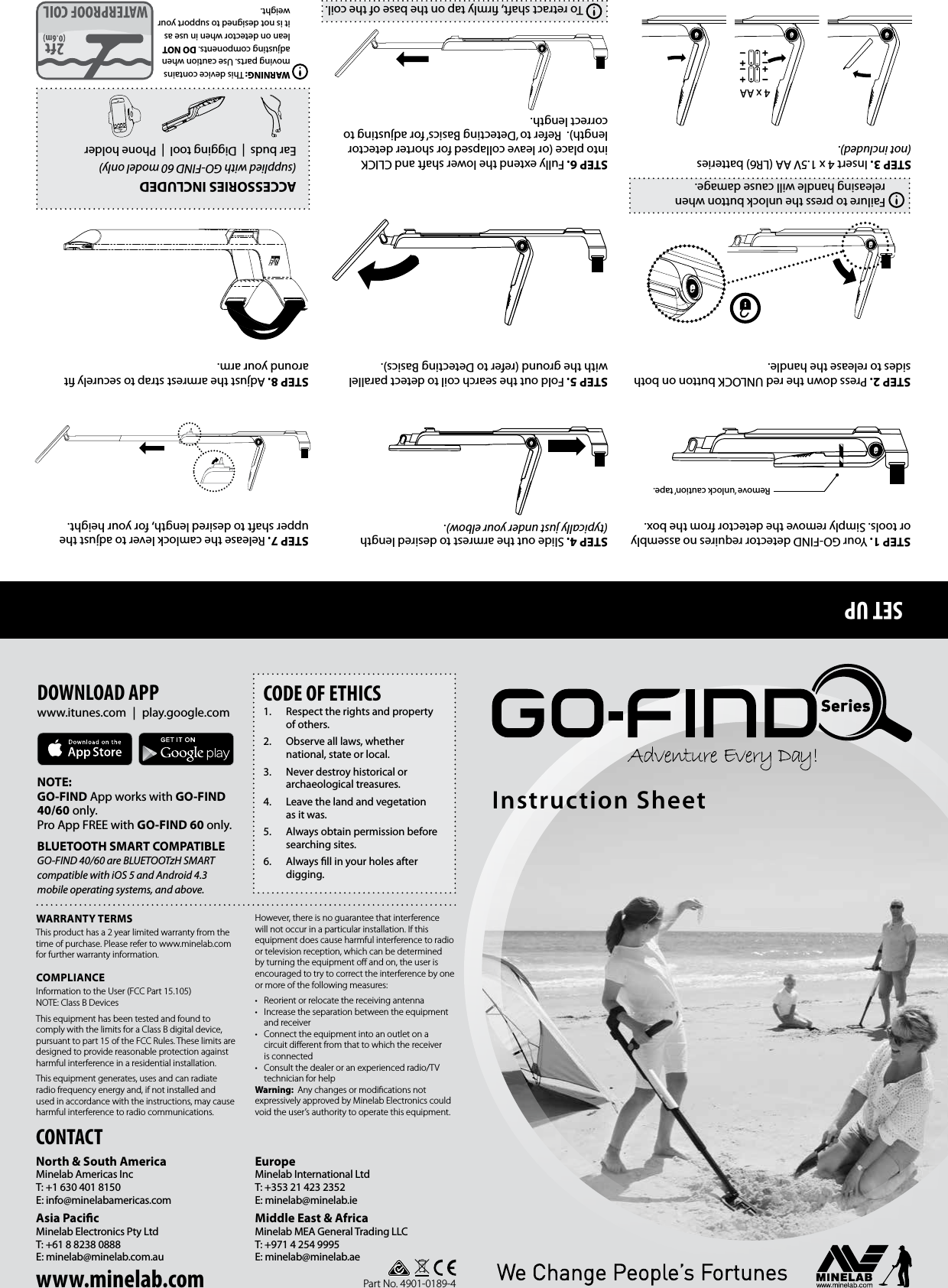
SET UPCONTACTNorth & South AmericaMinelab Americas IncT: +1 630 401 8150E: info@minelabamericas.com Asia PacicMinelab Electronics Pty LtdT: +61 8 8238 0888E: minelab@minelab.com.auEuropeMinelab International LtdT: +353 21 423 2352E: minelab@minelab.ieMiddle East & AfricaMinelab MEA General Trading LLCT: +971 4 254 9995 E: minelab@minelab.aeWARRANTY TERMSThis product has a 2 year limited warranty from the time of purchase. Please refer to www.minelab.com for further warranty information.COMPLIANCEInformation to the User (FCC Part 15.105) NOTE: Class B DevicesThis equipment has been tested and found to comply with the limits for a Class B digital device, pursuant to part 15 of the FCC Rules. These limits are designed to provide reasonable protection against harmful interference in a residential installation.This equipment generates, uses and can radiate radio frequency energy and, if not installed and used in accordance with the instructions, may cause harmful interference to radio communications. However, there is no guarantee that interference will not occur in a particular installation. If this equipment does cause harmful interference to radio or television reception, which can be determined by turning the equipment off and on, the user is encouraged to try to correct the interference by one or more of the following measures:•  Reorient or relocate the receiving antenna•  Increase the separation between the equipment and receiver•  Connect the equipment into an outlet on a circuit different from that to which the receiver is connected•  Consult the dealer or an experienced radio/TV technician for helpWarning:  Any changes or modifications not expressively approved by Minelab Electronics could void the user’s authority to operate this equipment.CODE OF ETHICS1.  Respect the rights and property of others.2.  Observe all laws, whether national, state or local.3.  Never destroy historical or archaeological treasures. 4.  Leave the land and vegetation as it was. 5.  Always obtain permission before searching sites.6.  Always ll in your holes after digging. DOWNLOAD APPwww.itunes.com | play.google.comNOTE: GO‑FIND App works with GO‑FIND 40/60 only. Pro App FREE with GO‑FIND 60 only.BLUETOOTH SMART COMPATIBLE GO‑FIND 40/60 are BLUETOOTzH SMART compatible with iOS 5 and Android 4.3 mobile operating systems, and above.Part No. 4901-0189-4Instruction SheetACCESSORIES INCLUDED(supplied with GO‑FIND 60 model only)Ear buds  |  Digging tool  |  Phone holderWARNING: This device contains moving parts. Use caution when adjusting components. DO NOT lean on detector when in use as it is not designed to support your weight.STEP 1. Your GO-FIND detector requires no assembly or tools. Simply remove the detector from the box.STEP 2. Press down the red UNLOCK button on both sides to release the handle. STEP 3. Insert 4 x 1.5V AA (LR6) batteries (not included). STEP 4. Slide out the armrest to desired length (typically just under your elbow).STEP 5. Fold out the search coil to detect parallel with the ground (refer to Detecting Basics).STEP 6. Fully extend the lower shaft and CLICK into place (or leave collapsed for shorter detector length).  Refer to ‘Detecting Basics’ for adjusting to correct length.STEP 7. Release the camlock lever to adjust the upper shaft to desired length, for your height.STEP 8. Adjust the armrest strap to securely t around your arm.Remove ‘unlock caution’ tape.Failure to press the unlock button when releasing handle will cause damage.4 x AATo retract shaft, rmly tap on the base of the coil.www.minelab.com

Navigation menu