Mini Mitter AWR1 ACTIREADER User Manual USERS MANUAL 3

Mini Mitter Co. Inc. ACTIREADER USERS MANUAL 3

Contents

USERS MANUAL 3

    5015 B.U. Bowman Drive  Buford, GA 30518 USA Voice: 770-831-8048 Fax: 770-831-8598   Certification Exhibit     FCC ID:  JIAAWR1 IC: 6041A-AWR1  FCC Rule Part: 15.209 IC Radio Standards Specification: RSS-210  ACS Report Number 08-0085 - 15C   Manufacturer: Mini Mitter Company, Inc. Model(s): ActiReader     Manual (Part 3 of 3)
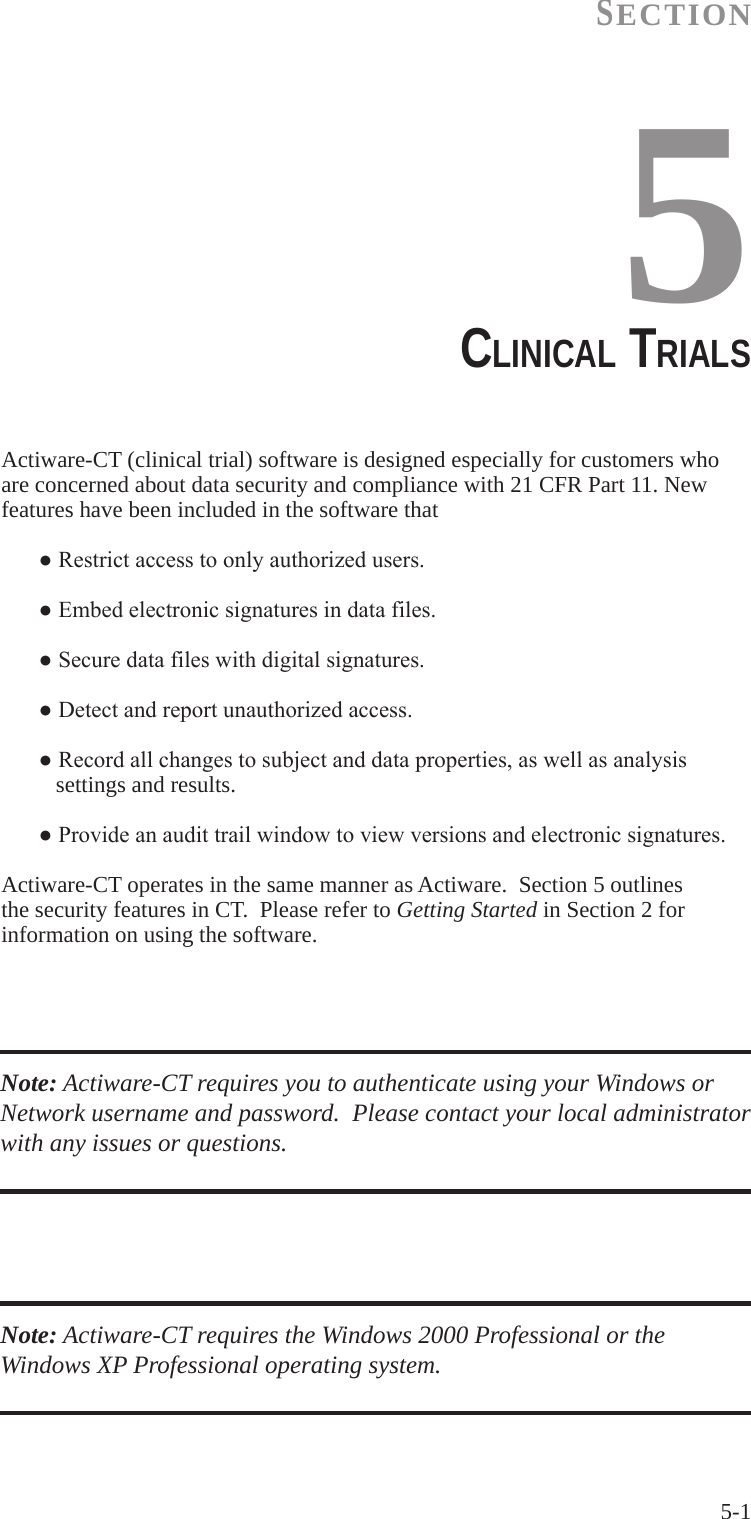
5-1SECTION5ClINICAl TRIAlSActiware-CT (clinical trial) software is designed especially for customers who are concerned about data security and compliance with 21 CFR Part 11. New features have been included in the software that ●Restrictaccesstoonlyauthorizedusers. ●Embedelectronicsignaturesindatafiles. ●Securedatafileswithdigitalsignatures. ●Detectandreportunauthorizedaccess. ●Recordallchangestosubjectanddataproperties,aswellasanalysis      settings and results. ●Provideanaudittrailwindowtoviewversionsandelectronicsignatures.Actiware-CT operates in the same manner as Actiware.  Section 5 outlines the security features in CT.  Please refer to Getting Started in Section 2 for information on using the software.Note: Actiware-CT requires you to authenticate using your Windows or Network username and password.  Please contact your local administrator with any issues or questions.Note: Actiware-CT requires the Windows 2000 Professional or the Windows XP Professional operating system.
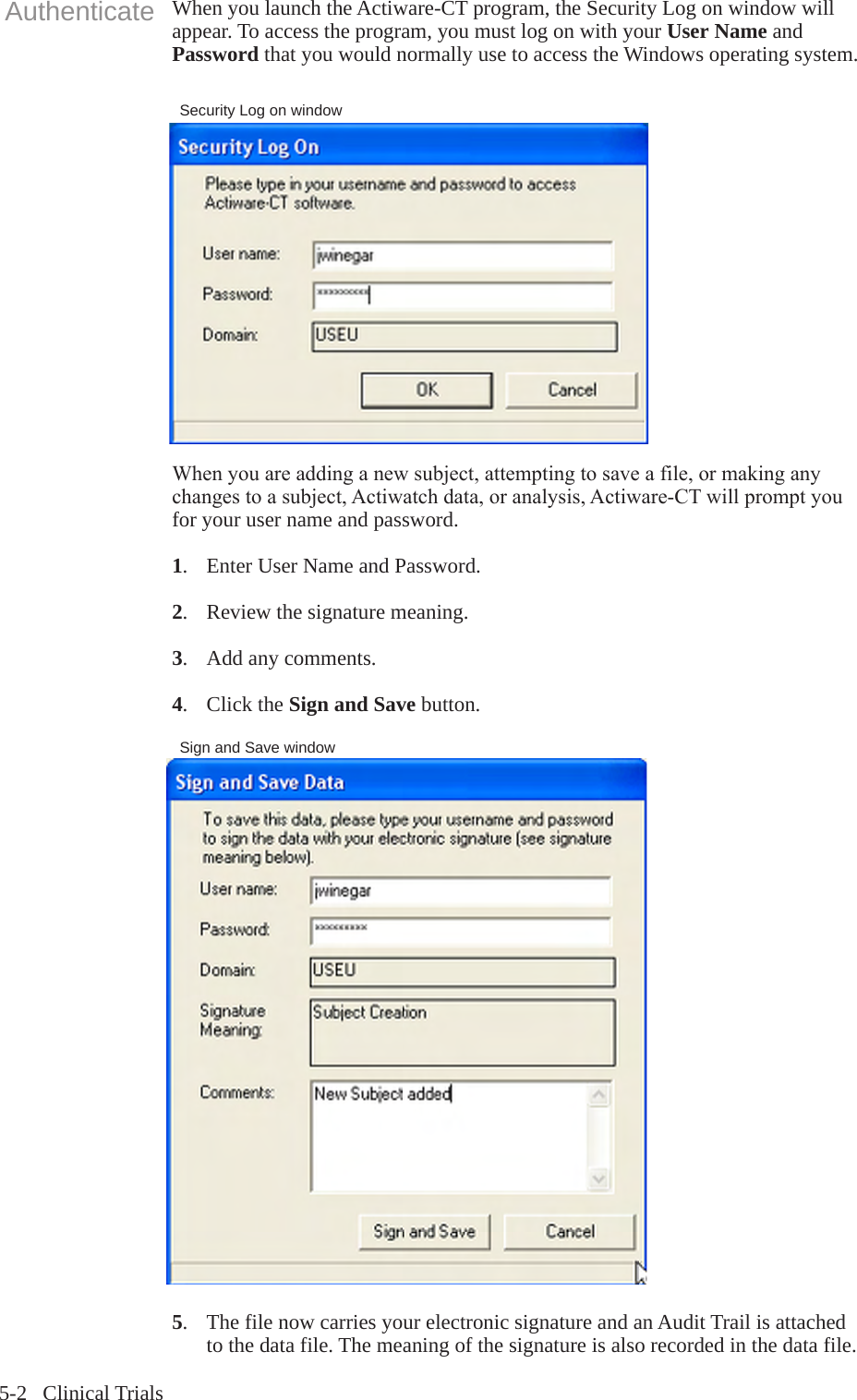
5-2   Clinical TrialsSecurity Log on windowWhen you launch the Actiware-CT program, the Security Log on window will appear. To access the program, you must log on with your User Name and Password that you would normally use to access the Windows operating system.Whenyouareaddinganewsubject,attemptingtosaveafile,ormakinganychangestoasubject,Actiwatchdata,oranalysis,Actiware-CTwillpromptyoufor your user name and password. 1.  Enter User Name and Password.2.  Review the signature meaning.3.  Add any comments.4.  Click the Sign and Save button.AuthenticateSign and Save window5.  The file now carries your electronic signature and an Audit Trail is attached   to the data file. The meaning of the signature is also recorded in the data file.
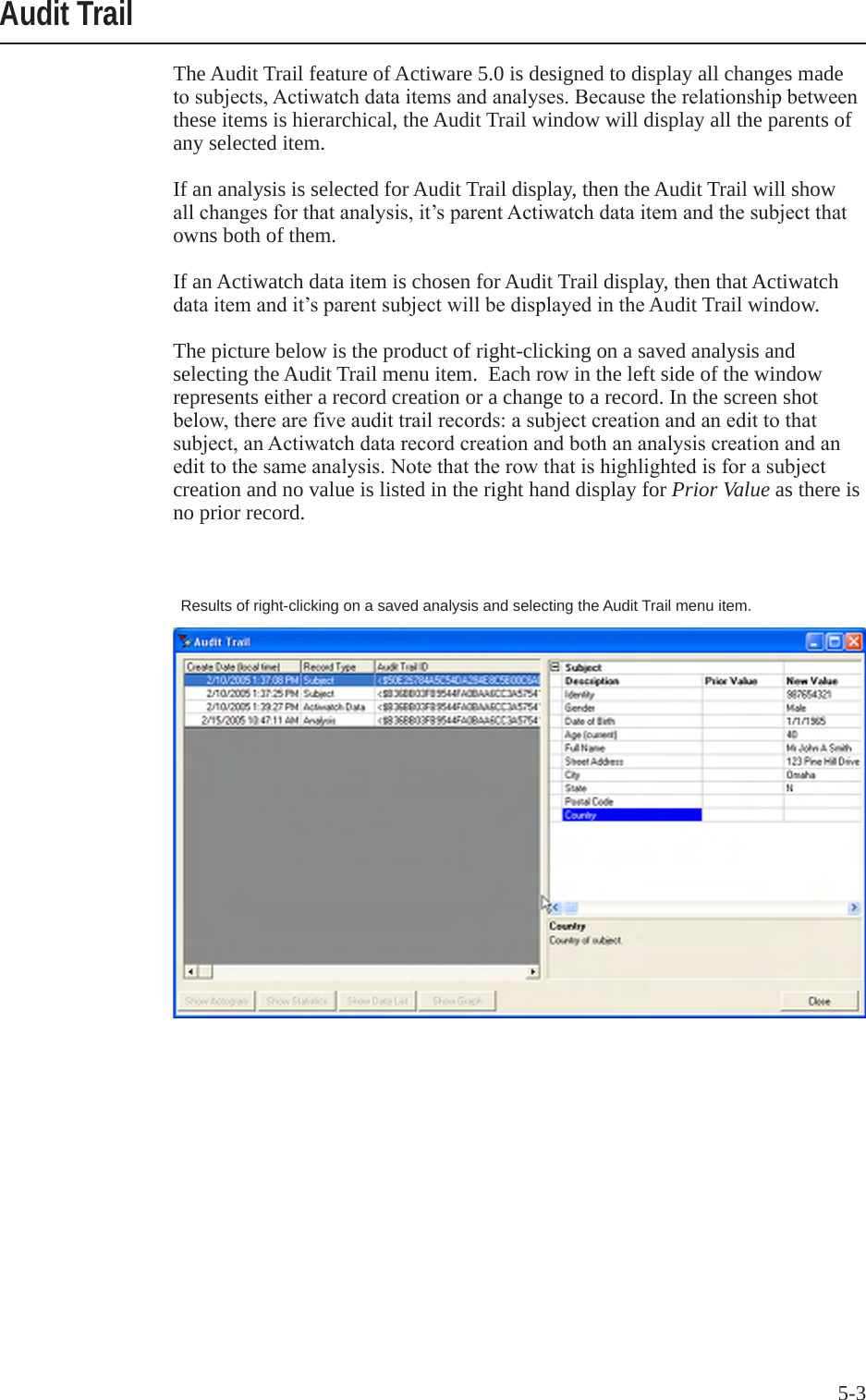
5-3The Audit Trail feature of Actiware 5.0 is designed to display all changes made tosubjects,Actiwatchdataitemsandanalyses.Becausetherelationshipbetweenthese items is hierarchical, the Audit Trail window will display all the parents of any selected item. If an analysis is selected for Audit Trail display, then the Audit Trail will show allchangesforthatanalysis,it’sparentActiwatchdataitemandthesubjectthatowns both of them. If an Actiwatch data item is chosen for Audit Trail display, then that Actiwatch dataitemandit’sparentsubjectwillbedisplayedintheAudit Trail window. The picture below is the product of right-clicking on a saved analysis and selecting the Audit Trail menu item.  Each row in the left side of the window represents either a record creation or a change to a record. In the screen shot below,therearefiveaudittrailrecords:asubjectcreationandanedittothatsubject,anActiwatchdatarecordcreationandbothananalysiscreationandanedittothesameanalysis.Notethattherowthatishighlightedisforasubjectcreation and no value is listed in the right hand display for Prior Value as there is no prior record. Audit TrailResults of right-clicking on a saved analysis and selecting the Audit Trail menu item.
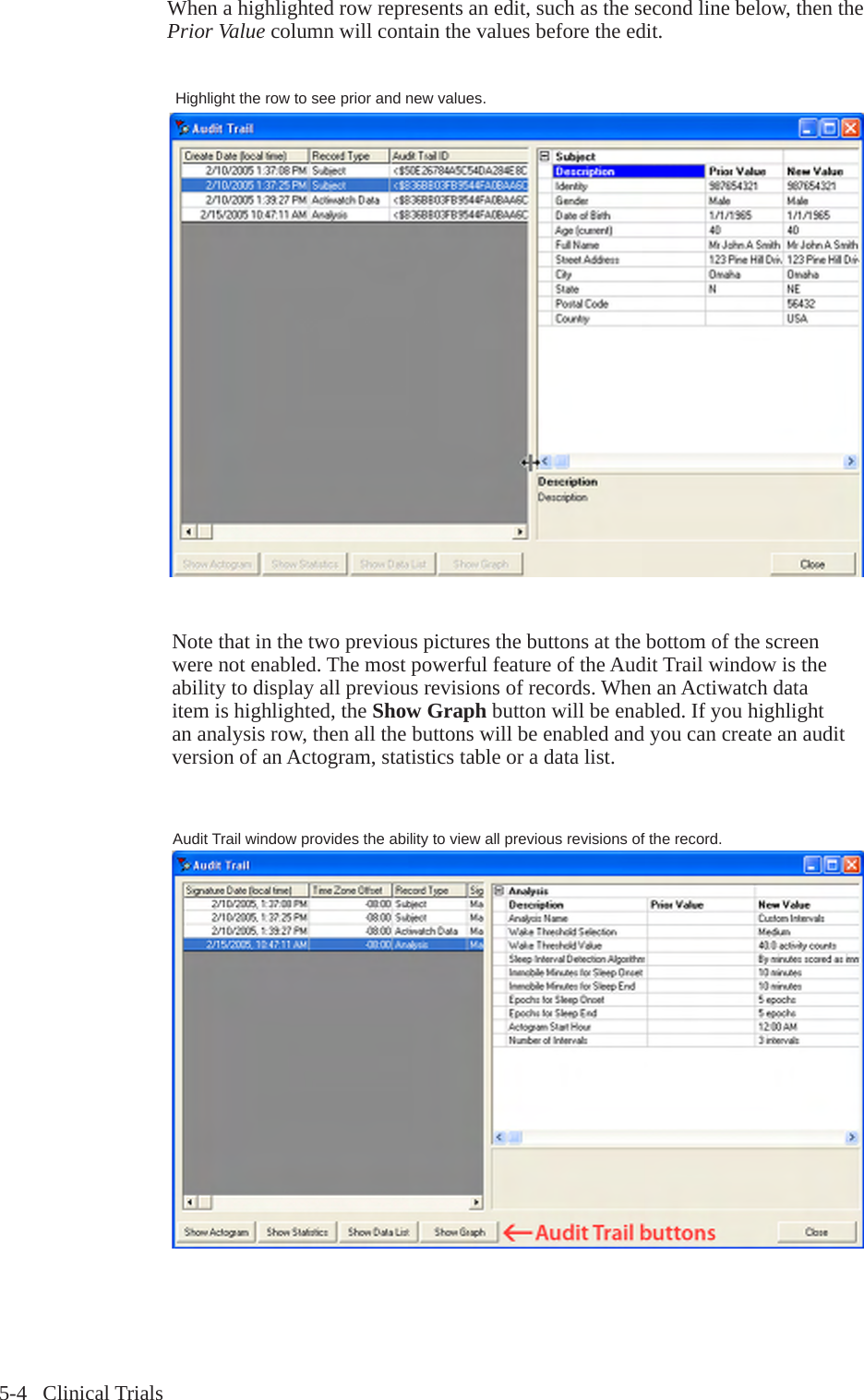
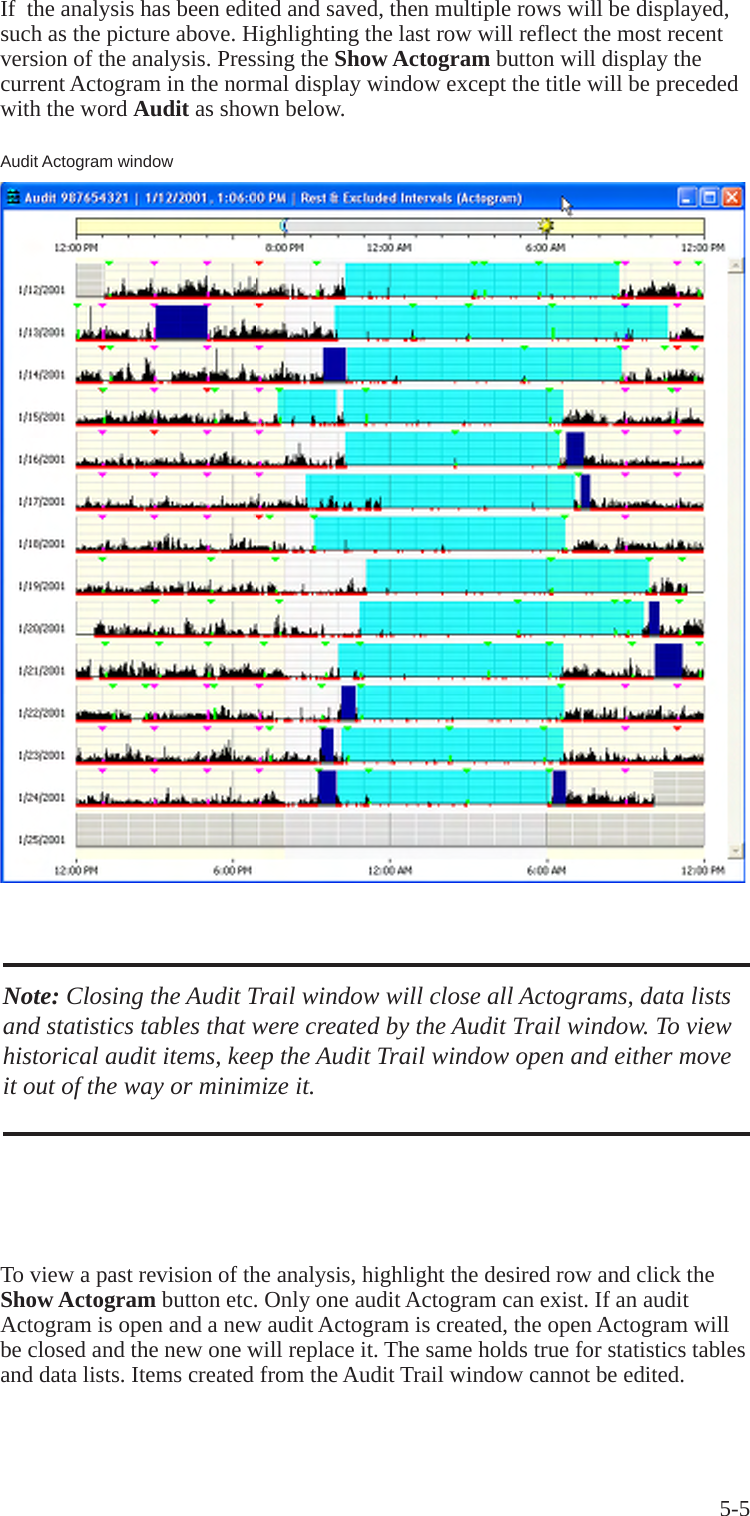
5-4   Clinical TrialsWhen a highlighted row represents an edit, such as the second line below, then the Prior Value column will contain the values before the edit. Note that in the two previous pictures the buttons at the bottom of the screen were not enabled. The most powerful feature of the Audit Trail window is the ability to display all previous revisions of records. When an Actiwatch data item is highlighted, the Show Graph button will be enabled. If you highlight an analysis row, then all the buttons will be enabled and you can create an audit version of an Actogram, statistics table or a data list.Highlight the row to see prior and new values.Audit Trail window provides the ability to view all previous revisions of the record.
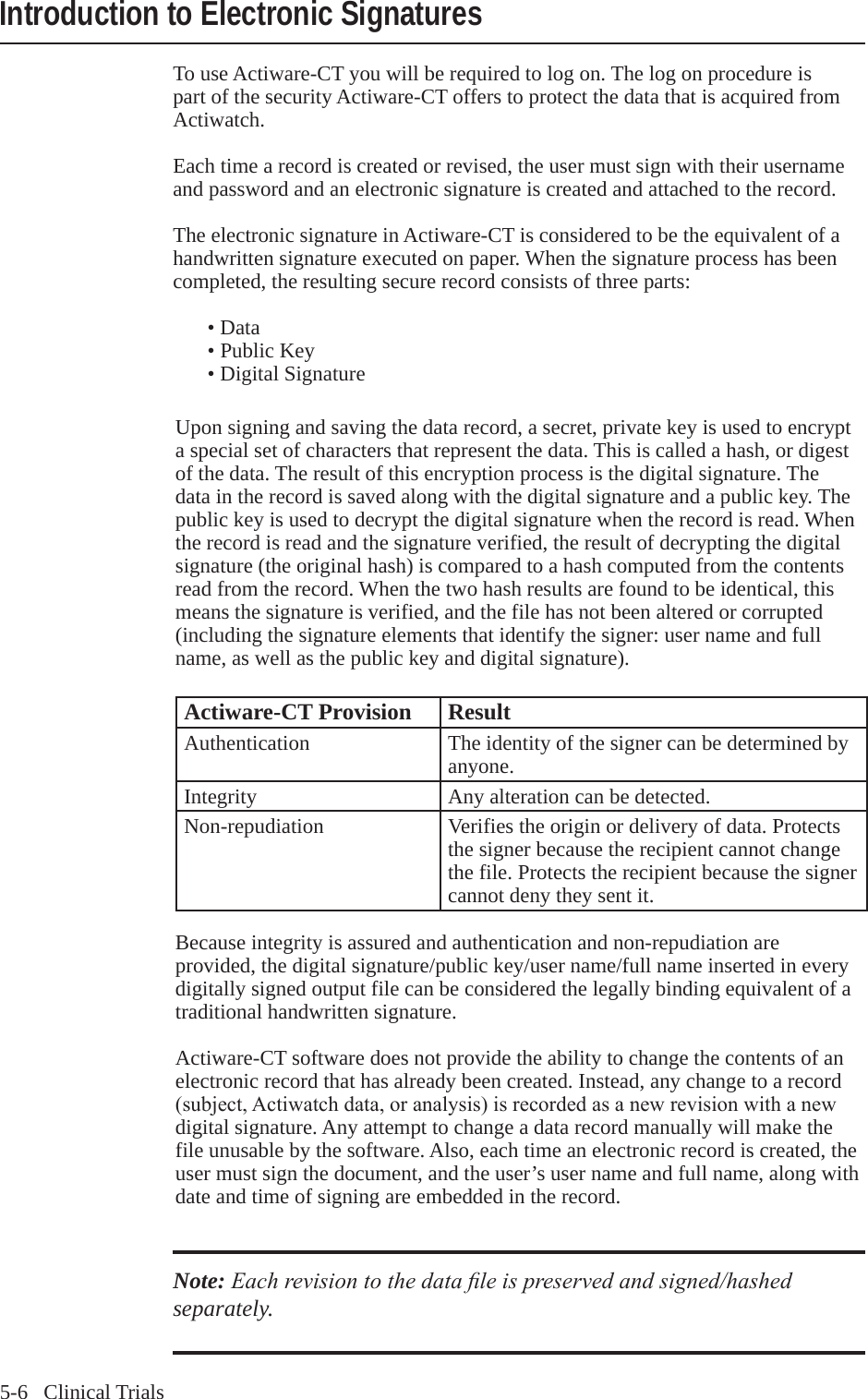
5-5If  the analysis has been edited and saved, then multiple rows will be displayed, such as the picture above. Highlighting the last row will reflect the most recent version of the analysis. Pressing the Show Actogram button will display the current Actogram in the normal display window except the title will be preceded with the word Audit as shown below.Note: Closing the Audit Trail window will close all Actograms, data lists and statistics tables that were created by the Audit Trail window. To view historical audit items, keep the Audit Trail window open and either move it out of the way or minimize it.To view a past revision of the analysis, highlight the desired row and click the Show Actogram button etc. Only one audit Actogram can exist. If an audit Actogram is open and a new audit Actogram is created, the open Actogram will be closed and the new one will replace it. The same holds true for statistics tables and data lists. Items created from the Audit Trail window cannot be edited.Audit Actogram window
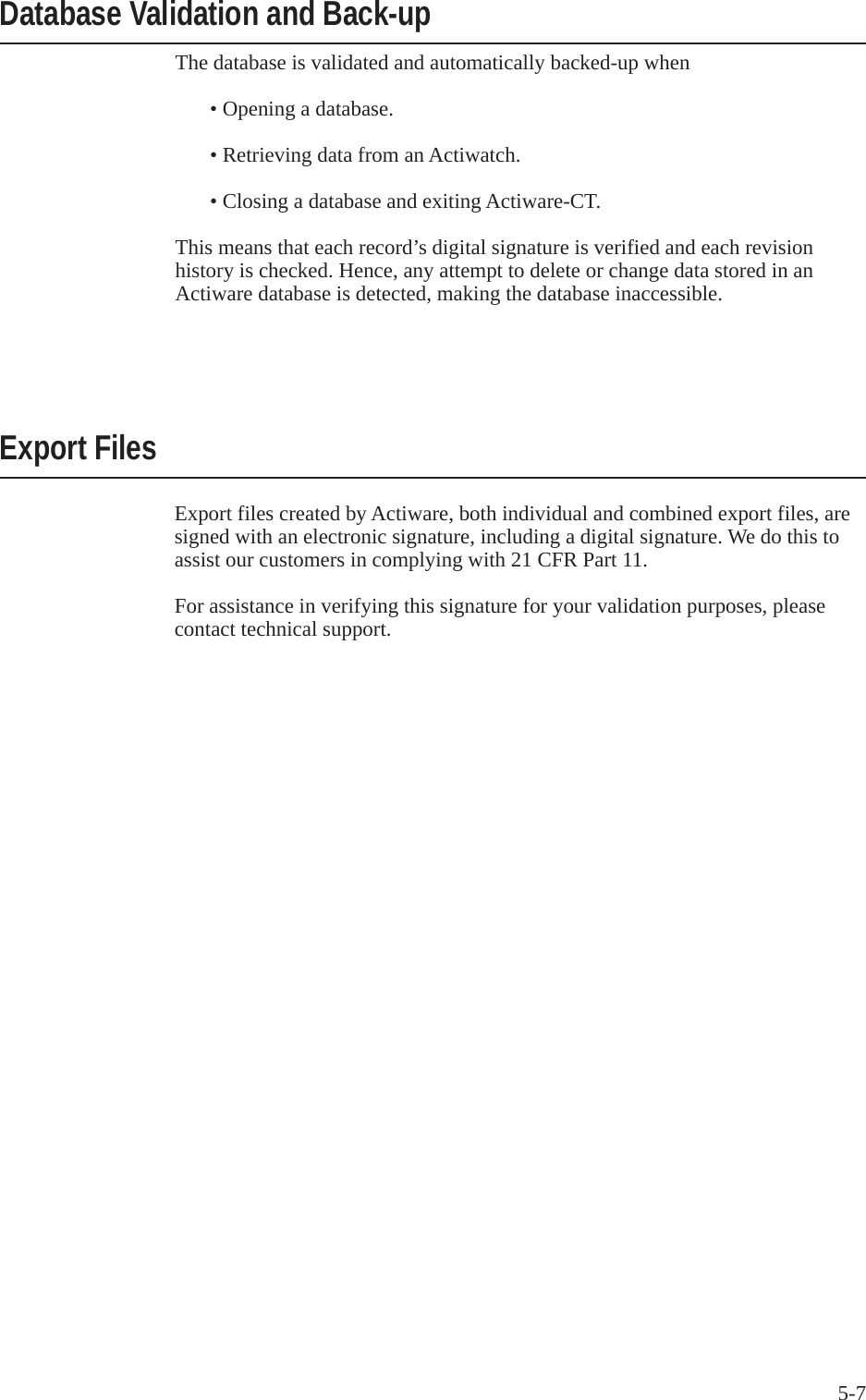
5-6   Clinical TrialsIntroduction to Electronic SignaturesTo use Actiware-CT you will be required to log on. The log on procedure is part of the security Actiware-CT offers to protect the data that is acquired from Actiwatch.Each time a record is created or revised, the user must sign with their username and password and an electronic signature is created and attached to the record.The electronic signature in Actiware-CT is considered to be the equivalent of a handwritten signature executed on paper. When the signature process has been completed, the resulting secure record consists of three parts:  • Data   • Public Key   • Digital SignatureUpon signing and saving the data record, a secret, private key is used to encrypt a special set of characters that represent the data. This is called a hash, or digest of the data. The result of this encryption process is the digital signature. The data in the record is saved along with the digital signature and a public key. The public key is used to decrypt the digital signature when the record is read. When the record is read and the signature verified, the result of decrypting the digital signature (the original hash) is compared to a hash computed from the contents read from the record. When the two hash results are found to be identical, this means the signature is verified, and the file has not been altered or corrupted (including the signature elements that identify the signer: user name and full name, as well as the public key and digital signature). Actiware-CT Provision Result Authentication The identity of the signer can be determined by anyone.Integrity Any alteration can be detected. Non-repudiation Verifies the origin or delivery of data. Protects the signer because the recipient cannot change the file. Protects the recipient because the signer cannot deny they sent it.Because integrity is assured and authentication and non-repudiation are provided, the digital signature/public key/user name/full name inserted in every digitally signed output file can be considered the legally binding equivalent of a traditional handwritten signature.Actiware-CT software does not provide the ability to change the contents of an electronic record that has already been created. Instead, any change to a record (subject,Actiwatchdata,oranalysis)isrecordedasanewrevisionwithanewdigital signature. Any attempt to change a data record manually will make the file unusable by the software. Also, each time an electronic record is created, the user must sign the document, and the user’s user name and full name, along with date and time of signing are embedded in the record.Note: Each revision to the data le is preserved and signed/hashed separately.
5-7The database is validated and automatically backed-up when  • Opening a database.  • Retrieving data from an Actiwatch.  • Closing a database and exiting Actiware-CT.This means that each record’s digital signature is verified and each revision history is checked. Hence, any attempt to delete or change data stored in an Actiware database is detected, making the database inaccessible.Database Validation and Back-upExport FilesExport files created by Actiware, both individual and combined export files, are signed with an electronic signature, including a digital signature. We do this to assist our customers in complying with 21 CFR Part 11.For assistance in verifying this signature for your validation purposes, please contact technical support.
5-8   Clinical Trials
A-1AppENdIxASlEEP/WAKE ANAlYSIS Actiware scores all epochs as either sleep or wake. Whether a particular epoch is scored as wake is determined by comparing activity counts for the epoch in question and those immediately surrounding it, to a threshold value set by the researcher. If the number of counts exceeds the threshold, the epoch is scored as wake. If it falls below, or is equal to, the threshold, the epoch is scored as sleep.Sleep  =  TotalActivityCounts≤Wake Threshold ValueWake  =  Total Activity Counts  >  Wake Threshold ValueCalculating Total Activity CountsActiware calculates total activity counts based on the sampling epoch. Below are four diagrams showing how this scoring calculation is done.15-second sampling epochs
A-2   Sleep/Wake Analysis30-second sampling epochs1-minute sampling epochs2-minute sampling epochs
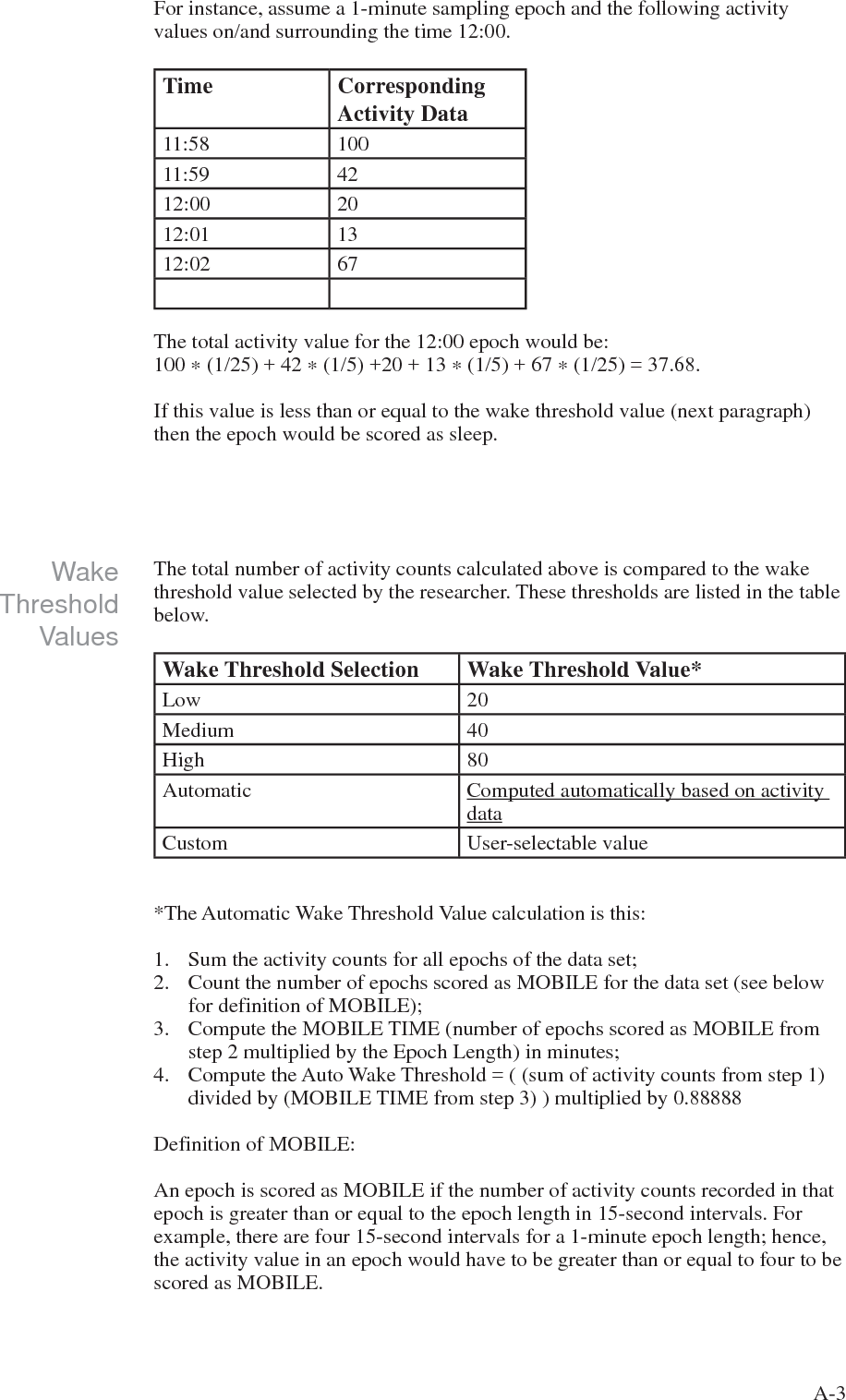
A-3For instance, assume a 1-minute sampling epoch and the following activity values on/and surrounding the time 12:00.Time CorrespondingActivity Data11:58 10011:59 4212:00 2012:01 1312:02 67The total activity value for the 12:00 epoch would be:100 * (1/25) + 42 * (1/5) +20 + 13 * (1/5) + 67 * (1/25) = 37.68. If this value is less than or equal to the wake threshold value (next paragraph) then the epoch would be scored as sleep.Wake Threshold ValuesThe total number of activity counts calculated above is compared to the wake threshold value selected by the researcher. These thresholds are listed in the table below.Wake Threshold Selection Wake Threshold Value*Low 20Medium 40High 80Automatic Computed automatically based on activity dataCustom User-selectable value*The Automatic Wake Threshold Value calculation is this: 1.  Sum the activity counts for all epochs of the data set;2.  Count the number of epochs scored as MOBILE for the data set (see below for definition of MOBILE);3.  Compute the MOBILE TIME (number of epochs scored as MOBILE from step 2 multiplied by the Epoch Length) in minutes;4.  Compute the Auto Wake Threshold = ( (sum of activity counts from step 1) divided by (MOBILE TIME from step 3) ) multiplied by 0.88888 Definition of MOBILE: An epoch is scored as MOBILE if the number of activity counts recorded in that epoch is greater than or equal to the epoch length in 15-second intervals. For example, there are four 15-second intervals for a 1-minute epoch length; hence, the activity value in an epoch would have to be greater than or equal to four to be scored as MOBILE.
A-4   Sleep/Wake Analysis
B-1AppENdIxBSTATISTIC DEFINITIONSStatistic Definitions(In the order, left to right, in which they appear in the statistics table window when all are selected.)Start TimeThe time at the start of the given Rest, Active, Sleep, Custom, or Daily Interval (the start of the first epoch in the given interval).End TimeThe time at the end of the given Rest, Active, Sleep, Custom, or Daily Interval (the end of the last epoch in the given interval).Interval DurationThe time elapsed between the Start Time and the End Time of the given interval, in minutes.Total ActivityThe sum of all valid physical activity counts [see Total Invalid Time, below] for all epochs from the Start Time to the End Time of the given interval.Average Activity Per MinuteThe average of all valid physical activity counts for all epochs from the Start Time to the End Time of the given interval divided by the Epoch Length in minutes.Average Activity Per EpochThe average of all valid physical activity counts for all epochs from the Start Time to the End Time of the given interval.Standard Deviation of ActivityThe standard deviation of all valid physical activity counts for all epochs from the Start Time to the End Time of the given interval. (The standard deviation is computed with (n – 1) rather than (n) in the denominator of the variance.)Maximum ActivityThe largest of any valid physical activity count for all epochs from the Start Time to the End Time of the given interval.
B-2   Statistic DefinitionsTotal Invalid Time (Activity)(The total number of epochs between the Start Time and the End Time of the given interval in which the physical activity count was found to exceed the maximum possible value from a properly functioning Actiwatch [i.e., invalid data due to rare hardware error, communication error, or data corruption] plus the total number of epochs with valid physical activity counts manually excluded from the data set by the practitioner using Actiware) software multiplied by the Epoch Length in minutes (so the Total Invalid Time is in minutes).Percent Invalid (Activity)a) The percentage of Total Invalid Time (Activity) [see above] to the Interval Duration [see above]. b) (Total Invalid Time (Activity) divided by Interval Duration) multiplied by 100.Total Invalid Time (Sleep/Wake)(The total number of epochs between the Start Time and the End Time of the given interval for which the sleep/wake scoring algorithm did not have enough data to determine a SLEEP or WAKE score) multiplied by the Epoch Length in minutes (so the Total Invalid Time is in minutes). Note: The insufficient data condition can be caused by invalid or manually excluded physical activity data at the epoch, and/or immediately before the epoch, and/or immediately after the epoch – how much before and after being a function of the Epoch Length.Percent Invalid (Sleep/Wake)a) The percentage of Total Invalid Time (Sleep/Wake) [see above] to the Interval Duration [see above]. b) (Total Invalid Time (Sleep/Wake) divided by Interval Duration) multiplied by 100.Sleep Onset Latencya) The time elapsed between the Start Time of a given Rest Interval and the following Sleep Start Time, in minutes. b) The time required for the onset of sleep after first attempting to get to sleep (i.e, from the “lights out” time). Calculated using the analysis setting made on Tools > Options > Analysis.Snooze Timea) The time elapsed between Sleep End Time and the End Time of a given Rest Interval, in minutes. b) The time elapsed between the end of sleep and the time lightsareswitchedonorthesubjectgetsoutofbed.Sleep Efficiencya) The percentage of Scored Total Sleep Time [see below] to (Interval Duration [see above] minus Total Invalid Time (Sleep/Wake)), for the given Rest Interval. b) (Scored Total Sleep Time divided by (Interval Duration minus Total Invalid Time (Sleep/Wake)) of the given Rest Interval) multiplied by 100.Wake After Sleep Onset (WASO)The total number of epochs between the Start Time and the End Time of the given Sleep Interval scored as WAKE by Actiware software (or manually set as WAKE by the practitioner using Actiware software) multiplied by the Epoch Length in minutes (so the Wake After Sleep Onset is in minutes). Note: Wake After Sleep Onset is identical to Scored Total Wake Time [see below] when the given interval is a Sleep Interval.
B-3Scored Total Wake Time(The total number of epochs between the Start Time and the End Time of the given interval scored as WAKE by Actiware software [or manually set as WAKE by the practitioner using Actiware software]) multiplied by the Epoch Length in minutes (so the Scored Total Wake Time is in minutes). Note: In order to be scoreable as SLEEP or WAKE, an epoch must have a valid physical activity count [see Total Invalid Time (Sleep/Wake), above], and in addition there must be a sufficient number of epochs before and after the epoch being scored that also have valid physical activity counts.Percent Wakea) The percentage of Scored Total Wake Time to (Interval Duration minus Total Invalid Time (Sleep/Wake)), for the given interval. b) (Scored Total Wake Time divided by (Interval Duration minus Total Invalid Time (Sleep/Wake)) multiplied by 100.Number of Wake BoutsThe total number of continuous blocks, one or more epochs in duration, with each epoch of each block scored as WAKE, between the Start Time and the End Time of the given interval.Average Duration of Wake BoutsThe Scored Total Wake Time [see above] divided by the Number of Wake Bouts [see above], for the given interval.Scored Total Sleep Time(The total number of epochs between the Start Time and the End Time of the given interval scored as SLEEP by Actiware software [or manually set as SLEEP by the practitioner using Actiware software]) multiplied by the Epoch Length in minutes (so the Scored Total Sleep Time is in minutes). Note: In order to be scoreable as SLEEP or WAKE, an epoch must have a valid physical activity count [see Total Invalid Time (Sleep/Wake), above], and in addition there must be a sufficient number of epochs before and after the epoch being scored that also have valid physical activity counts.Percent Sleepa) The percentage of Scored Total Sleep Time to (Interval Duration minus Total Invalid Time (Sleep/Wake)), for the given interval. b) (Scored Total Sleep Time divided by (Interval Duration minus Total Invalid Time (Sleep/Wake)) multiplied by 100.Number of Sleep BoutsThe total number of continuous blocks, one or more epochs in duration, with each epoch of each block scored as SLEEP, between the Start Time and the End Time of the given interval.Average Duration of Sleep BoutsThe Scored Total Sleep Time [see above] divided by the Number of Sleep Bouts [see above], for the given interval.Scored Total Immobile Time(The total number of epochs between the Start Time and the End Time of the given interval scored as IMMOBILE by Actiware software) multiplied by the Epoch Length in minutes (so the Scored Total Immobile Time is in minutes) Note: In order to be scoreable as IMMOBILE or MOBILE, an epoch must have a valid physical activity count [see Total Invalid Time (Activity), above].
B-4   Statistic DefinitionsPercent Immobilea) The percentage of Scored Total Immobile Time to (Interval Duration minus Total Invalid Time (Activity)), for the given interval. b) (Scored Total Immobile Time divided by (Interval Duration minus Total Invalid Time (Activity)) multiplied by 100.Number of Immobile BoutsThe total number of continuous blocks, one or more epochs in duration, with each epoch of each block scored as IMMOBILE, between the Start Time and the End Time of the given interval.Average Duration of Immobile BoutsThe Scored Total Immobile Time [see above] divided by the Number of Immobile Bouts [see above], for the given interval.Scored Total Mobile Time(The total number of epochs between the Start Time and the End Time of the given interval scored as MOBILE by Actiware software) multiplied by the Epoch Length in minutes (so the Scored Total Mobile Time is in minutes). Note: In order to be scoreable as IMMOBILE or MOBILE, an epoch must have a valid physical activity count [see Total Invalid Time (Activity), above].Percent Mobilea) The percentage of Scored Total Mobile Time to (Interval Duration minus Total Invalid Time (Activity)), for the given interval. b) (Scored Total Mobile Time divided by (Interval Duration minus Total Invalid Time (Activity)) multiplied by 100.Number of Mobile BoutsThe total number of continuous blocks, one or more epochs in duration, with each epoch of each block scored as MOBILE, between the Start Time and the End Time of the given interval.Average Duration of Mobile BoutsThe Scored Total Mobile Time [see above] divided by the Number of Mobile Bouts [see above], for the given interval.Number of Immobile Bouts 1 Minute in DurationThe total number of continuous blocks 4 epochs in duration if Epoch Length = 15 seconds, 2 epochs in duration if Epoch Length = 30 seconds, 1 epoch in duration if Epoch Length = 60 seconds (not applicable if Epoch Length is greater than 60 seconds), with each epoch of each block scored as IMMOBILE, between the Start Time and the End Time of the given interval.Percentage of  Number of Immobile Bouts 1 minute in duration to the Number of Immobile Boutsa) The percentage of Number of Immobile Bouts 1 Minute in Duration to the Number of Immobile Bouts [see above], for the given interval. b) (Number of Immobile Bouts 1 Minute in Duration divided by Number of Immobile Bouts) multiplied by 100.Fragmentation IndexThe sum of Percent Mobile [see above] and Percent Immobile Bouts Less Than 1-Minute Duration to the Number of Immobile Bouts, for the given interval. Also known as the Index of Restlessness or Movement and Framentation Index.
B-5Total Illuminance Exposure(The sum of all valid illuminance data, in Lux, from an Actiwatch-L [see Total Invalid Time (Illuminance), below] for all epochs from the Start Time to the End Time of the given interval) multiplied by the Epoch Length in minutes (so the Total Illuminance Exposure is in Lux-minutes).Average IlluminanceThe average of all valid illuminance data for all epochs from the Start Time to the End Time of the given interval.Standard Deviation of IlluminanceThe standard deviation of all valid illuminance data for all epochs from the Start Time to the End Time of the given interval. (The standard deviation is computed with (n – 1) rather than (n) in the denominator of the variance.)Maximum IlluminanceThe datum of highest value (greatest average intensity of illumination during an epoch) from the set of all valid illuminance data for all epochs from the Start Time to the End Time of the given interval, i.e. the peak value in the data set – the highest intensity of illumination the Actiwatch-L was exposed to during the interval.Time Above Illuminance Thresholda) (The total number of epochs between the Start Time and the End Time of the given interval with valid illuminance data greater than the given Illuminance Threshold) multiplied by the Epoch Length in minutes (so the Time Above Illuminance Threshold is in minutes). b) The total accumulation of time, in minutes, during which the Actiwatch-L was exposed to an intensity of illumination above the given Illuminance Threshold.Total Invalid Time (Illuminance)The total number of epochs between the Start Time and the End Time of the given interval in which the illuminance datum was found to exceed the maximum possible value from a properly functioning Actiwatch-L [i.e., invalid data due to rare hardware fault, communication error, or data corruption] plus the total number of epochs with valid illuminance data manually excluded from the data set by the practitioner using Actiware software) multiplied by the Epoch Length in minutes (so the Total Invalid Time is in minutes).Percent Invalid (Illuminance) a) The percentage of Total Invalid Time (Illuminance) [see above] to the Interval Duration [see above]. b) (Total Invalid Time (Illuminance) divided by Interval Duration) multiplied by 100.Total Number of ScoresThe Number of Manual Scores [see below] plus the Number of Scheduled Scores [seebelow]enteredbythesubjectwhilewearingActiwatch-Score, and not manually excluded later by the practitioner using Actiware software, from the Start Time to the End Time of the given interval.Number of Manual ScoresThenumberofManualScoresenteredbythesubjectwhilewearingActiwatch-Score, and not manually excluded later by the practitioner using Actiware software, from the Start Time to the End Time of the given interval.
B-6   Statistic DefinitionsNumber of Scheduled ScoresThenumberofScheduledScoresenteredbythesubjectwhilewearingActiwatch-Score, and not manually excluded later by the practitioner using Actiware software, from the Start Time to the End Time of the given interval.Number of No ResponsesThe number of No Responses to Scheduled Scores (that are not manually excluded by the practitioner using Actiware software), from the Start Time to the End Time of the given interval.Average Score(The sum of all Manual Score Values [that are not manually excluded] plus the sum of all Scheduled Score Values [that are not manually excluded]) divided by the Total Number of Scores [see above], for all epochs from the Start Time to the End Time of the given interval.Average Manual ScoreThe sum of all Manual Score Values [that are not manually excluded] divided by the Number of Manual Scores [see above], for all epochs from the Start Time to the End Time of the given interval.Average Scheduled ScoreThe sum of all Scheduled Score Values [that are not manually excluded] divided by the Number of Scheduled Scores [see above], for all epochs from the Start Time to the End Time of the given interval.Standard Deviation of All ScoresThe standard deviation of all Manual Score Values [that are not manually excluded] together with all Scheduled Score Values [that are not manually excluded] for all epochs from the Start Time to the End Time of the given interval. (The standard deviation is computed with (n – 1) rather than (n) in the denominator of the variance.)Standard Deviation of Manual ScoresThe standard deviation of all Manual Score Values [that are not manually excluded] for all epochs from the Start Time to the End Time of the given interval. (The standard deviation is computed with (n – 1) rather than (n) in the denominator of the variance.)Standard Deviation of Scheduled ScoresThe standard deviation of all Scheduled Score Values [that are not manually excluded] for all epochs from the Start Time to the End Time of the given interval. (The standard deviation is computed with (n – 1) rather than (n) in the denominator of the variance.)
C-1 AppENdIxCACTIWATCH HARDWARE All communication with Actiwatch is accomplished using an ActiReader that is connected to a computer via an RS-232 Serial Port. This connection to the computer supplies power and communication instructions. Settings made prior to the start of data collection, as well as all data values, are communicated through this device. The Actiwatch and ActiReader communicate using short range radio telemetry. Readers are not “unit specific,” i.e., any Actiwatch may communicate with any ActiReader or Actiwatch Reader.There are four models of Actiwatch currently available:  Actiwatch®-64   Actiwatch-64 contains 64 KB of on-board memory. Chronobiological studies   can be conducted over several weeks because intervals longer than five   minutes may be selected. An eventmarkerbuttonallowssubjectstomark   times at which important events occur.  Actiwatch®-16   Similar to the Actiwatch-64, but Actiwatch-16 has 16 KB of memory.  Actiwatch®-L   Actiwatch-L measures activity and ambient light exposure (illuminance).     Actiwatch-L does not have an event marker button.  Actiwatch®-Score  Actiwatch-Scoremeasuresactivityandsubjectiveweightingofspecifictimes   or events.
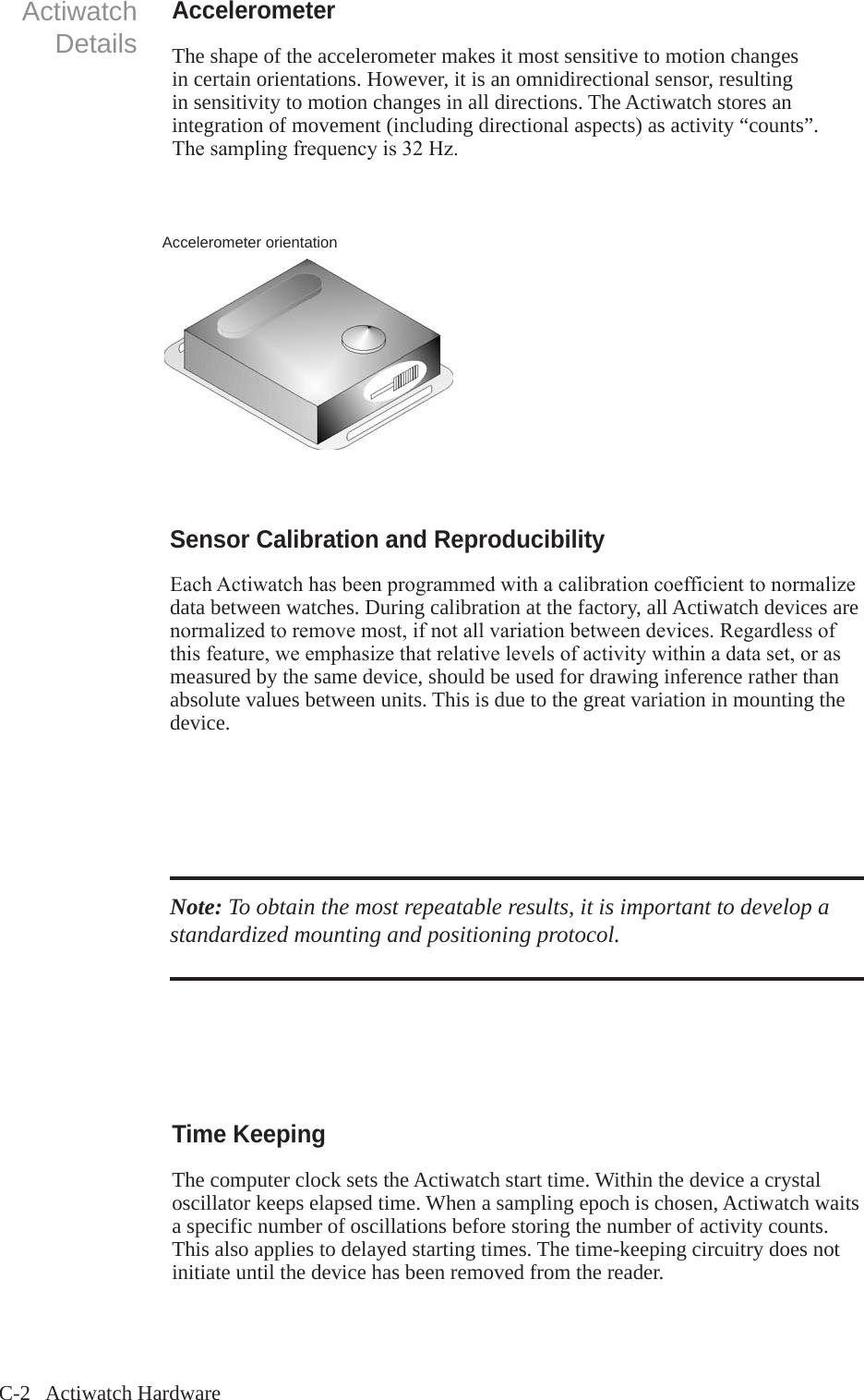
C-2   Actiwatch HardwareActiwatchDetailsAccelerometerThe shape of the accelerometer makes it most sensitive to motion changes in certain orientations. However, it is an omnidirectional sensor, resulting in sensitivity to motion changes in all directions. The Actiwatch stores an integration of movement (including directional aspects) as activity “counts”. Thesamplingfrequencyis32Hz.Accelerometer orientationSensor Calibration and ReproducibilityEachActiwatchhasbeenprogrammedwithacalibrationcoefficienttonormalizedata between watches. During calibration at the factory, all Actiwatch devices are normalizedtoremovemost,ifnotallvariationbetweendevices.Regardlessofthisfeature,weemphasizethatrelativelevelsofactivitywithinadataset,orasmeasured by the same device, should be used for drawing inference rather than absolute values between units. This is due to the great variation in mounting the device.Note: To obtain the most repeatable results, it is important to develop a standardized mounting and positioning protocol.Time KeepingThe computer clock sets the Actiwatch start time. Within the device a crystal oscillator keeps elapsed time. When a sampling epoch is chosen, Actiwatch waits a specific number of oscillations before storing the number of activity counts. This also applies to delayed starting times. The time-keeping circuitry does not initiate until the device has been removed from the reader.
C-3 Note: For Actiwatch 16/64 (SN prior to V90xxxx) and Actiwatch-L, the time-keeping function of the device will not start while on the ActiReader. These Actiwatch devices cannot keep time while retrieving data. The Actiwatch Score and Actiwatch 16/64 (SN V90xxxx and later) may keep time while on the ActiReader for short durations. You should still recongure the watch after retrieving data.Telemetric Communications LinkActiwatch requires no external communications port for configuration or data retrieval. Communication between Actiwatch and ActiReader is established via a wireless link. Water ProofActiwatch-16, 64, and Actiwatch-L devices are waterproof to IEC Standard 60529 IPX7. They are water tight to a depth of 1 meter for 30 minutes. These devices will tolerate normal daily experiences such as shower, spa (hot tub), swimming, skiing, rain, household chores, etc. Actiwatch-Score is drip-tight to IEC Standard 60529 IPX2. It is resistant to dripping and light splashing of liquids.CAUTION! Prolonged submersion or exposure exceeding the above limits may cause damage to the device.CAUTION! When replacing the battery, it is very important that the rubber O-ring in the battery compartment also be changed. The back mounting panel should be rmly screwed in place to achieve a waterproof seal. The waterproof seals of all Actiwatch devices are checked before leaving the factory. To preserve this integrity, it is imperative you follow the procedures in the Change Battery Wizard.
C-4   Actiwatch HardwareStandard Wrist BandsStandard Actiwatch wrist bands are washable and disposable. Extra bands and batteries are available from Mini Mitter. Bands may also be interconnected if the device is to be worn on locations other than the wrist. Longer bands for use around the ankle are also available from Mini Mitter, and a soft, nylon band with hook and loop fastener. Other means to attach Actiwatch may be used as long as the protocols of mounting and positioning are followed.Marker ButtonActiwatch-16, Actiwatch-64, and Actiwatch-Score models are equipped with a marker switch on the device’s front panel. When depressed this button provides tacticfeedbackalertingthesubjecttoasuccessfulmarkingofthedateandtime.A light sensor in Actiwatch-L replaces the marker button.Animal CaseBoth Actiwatch-16 and Actiwatch-64 can be fitted in the Actiwatch animal case. This case protects Actiwatch from water, soil, shock, and gnawing. It does not affect performance. Actiwatch-LThe specifications and functions in this manual for Actiwatch-L pertain to those devices manufactured on or after July 1, 1999. These devices are easy to identify as they have a serial number that begins with the letter “P.” Actiwatch-L devices manufactured before July 1, 1999 have serial numbers beginning with “L.” These previous devices have different functional specifications and are not supported by Actiware version 5 or later. If you have questions, contact Mini Mitter for additional information.Actiwatch-ScoreThisdeviceprovidesthemeanstosubjectively“score”bytwomethods.  • Auditory/flashing-display from device AnalarmsoundsandtheLEDdisplayflashesalertingtheusertosubjectively   weight the event. The annunciation times are chosen during the device  configuration.Anexampleofthisusewouldbearequestoftheusertojudge   the level of sleepiness every half-hour during a long task.  • Arbitrary input from user Inthis“manual”modetheuserinputsalevelofsubjectiveweighting   commensurate with the event. An example of this use might be a level of   recurring headache pain through the day, or perhaps a level of depression.Actiwatch-Score devices with serial numbers beginning with “N” are not supported by Actiware version 5 or later. If you have questions, contact Mini Mitter for additional information.
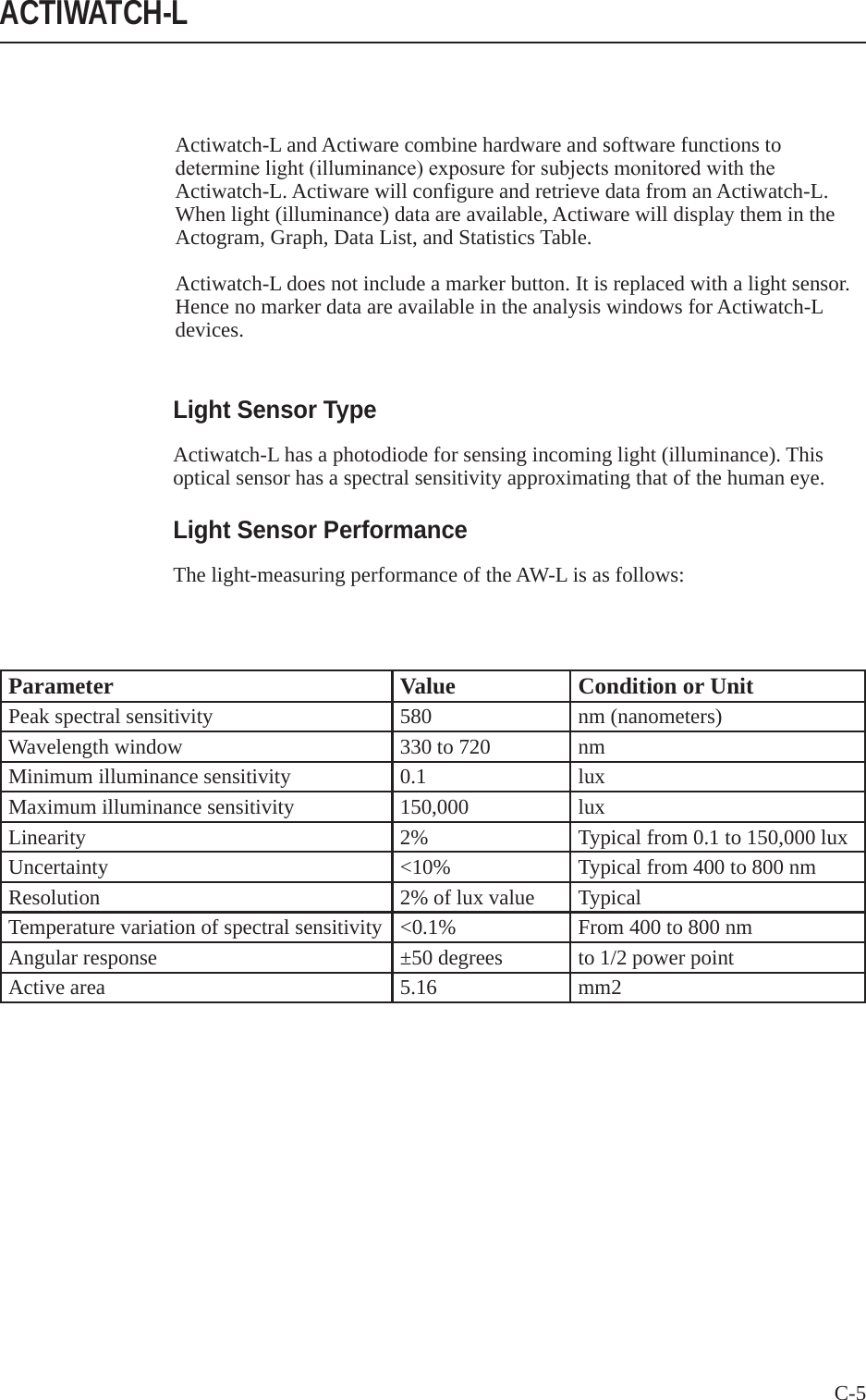
C-5 Actiwatch-L and Actiware combine hardware and software functions to determinelight(illuminance)exposureforsubjectsmonitoredwiththeActiwatch-L. Actiware will configure and retrieve data from an Actiwatch-L. When light (illuminance) data are available, Actiware will display them in the Actogram, Graph, Data List, and Statistics Table.Actiwatch-L does not include a marker button. It is replaced with a light sensor. Hence no marker data are available in the analysis windows for Actiwatch-L devices.ACTIWATCH-LParameter Value Condition or UnitPeak spectral sensitivity 580 nm (nanometers)Wavelength window 330 to 720 nmMinimum illuminance sensitivity 0.1 luxMaximum illuminance sensitivity 150,000 luxLinearity 2% Typical from 0.1 to 150,000 luxUncertainty <10% Typical from 400 to 800 nmResolution 2% of lux value TypicalTemperature variation of spectral sensitivity <0.1% From 400 to 800 nmAngular response ±50 degrees to 1/2 power pointActive area 5.16 mm2Light Sensor TypeActiwatch-L has a photodiode for sensing incoming light (illuminance). This optical sensor has a spectral sensitivity approximating that of the human eye. Light Sensor PerformanceThe light-measuring performance of the AW-L is as follows:
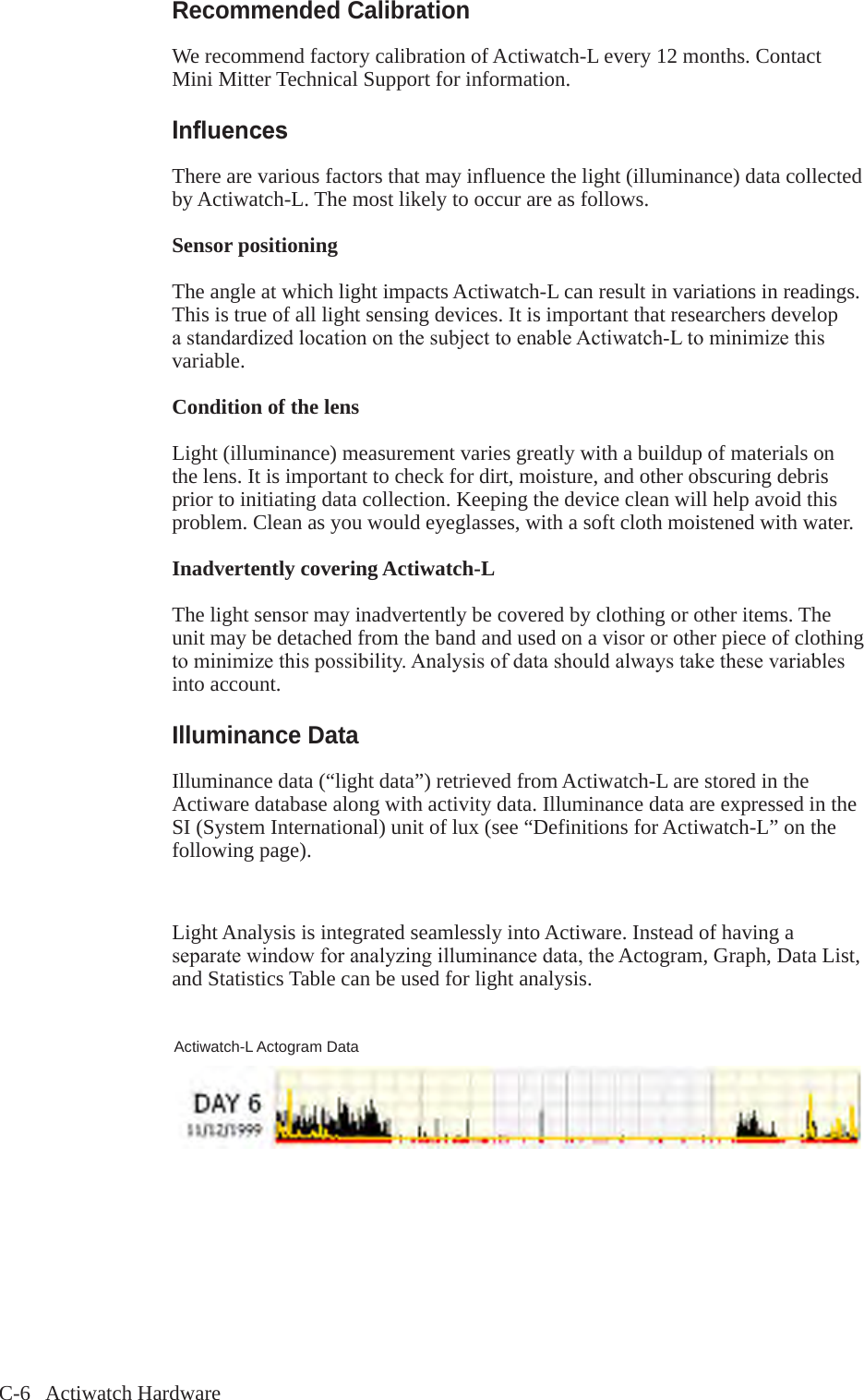
C-6   Actiwatch HardwareRecommended CalibrationWe recommend factory calibration of Actiwatch-L every 12 months. Contact Mini Mitter Technical Support for information. Inuences There are various factors that may influence the light (illuminance) data collected by Actiwatch-L. The most likely to occur are as follows. Sensor positioning The angle at which light impacts Actiwatch-L can result in variations in readings. This is true of all light sensing devices. It is important that researchers develop astandardizedlocationonthesubjecttoenableActiwatch-Ltominimizethisvariable. Condition of the lens Light (illuminance) measurement varies greatly with a buildup of materials on the lens. It is important to check for dirt, moisture, and other obscuring debris prior to initiating data collection. Keeping the device clean will help avoid this problem. Clean as you would eyeglasses, with a soft cloth moistened with water. Inadvertently covering Actiwatch-L The light sensor may inadvertently be covered by clothing or other items. The unit may be detached from the band and used on a visor or other piece of clothing tominimizethispossibility.Analysisofdatashouldalwaystakethesevariablesinto account. Illuminance DataIlluminance data (“light data”) retrieved from Actiwatch-L are stored in the Actiware database along with activity data. Illuminance data are expressed in the SI (System International) unit of lux (see “Definitions for Actiwatch-L” on the following page).Light Analysis is integrated seamlessly into Actiware. Instead of having a separatewindowforanalyzingilluminancedata,theActogram, Graph, Data List, and Statistics Table can be used for light analysis.Actiwatch-L Actogram Data
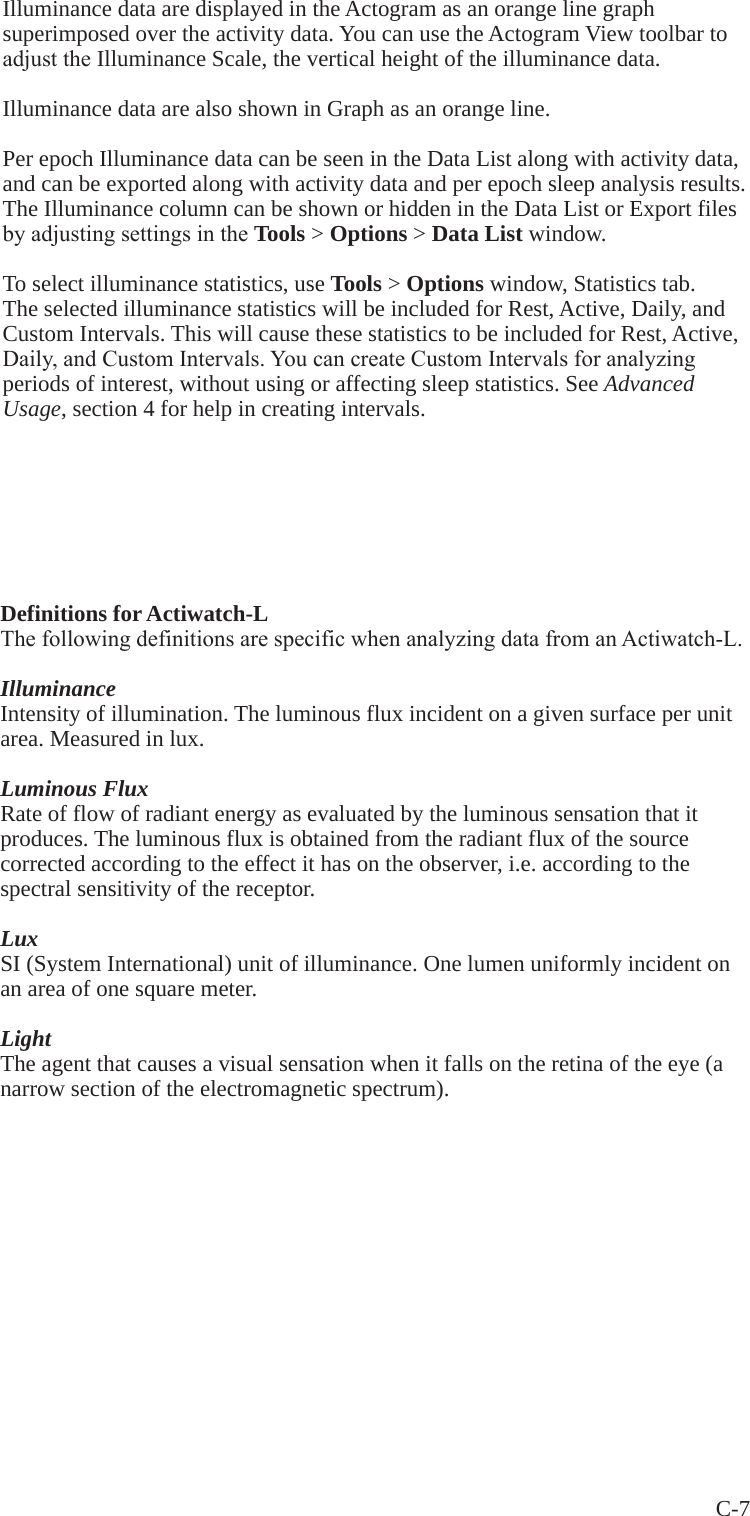
C-7 Illuminance data are displayed in the Actogram as an orange line graph superimposed over the activity data. You can use the Actogram View toolbar to adjusttheIlluminance Scale, the vertical height of the illuminance data.Illuminance data are also shown in Graph as an orange line.Per epoch Illuminance data can be seen in the Data List along with activity data, and can be exported along with activity data and per epoch sleep analysis results. The Illuminance column can be shown or hidden in the Data List or Export files byadjustingsettingsintheTools > Options > Data List window.To select illuminance statistics, use Tools > Options window, Statistics tab. The selected illuminance statistics will be included for Rest, Active, Daily, and Custom Intervals. This will cause these statistics to be included for Rest, Active, Daily,andCustomIntervals.YoucancreateCustomIntervalsforanalyzingperiods of interest, without using or affecting sleep statistics. See Advanced Usage, section 4 for help in creating intervals.Definitions for Actiwatch-LThefollowingdefinitionsarespecificwhenanalyzingdatafromanActiwatch-L.IlluminanceIntensity of illumination. The luminous flux incident on a given surface per unit area. Measured in lux.Luminous FluxRate of flow of radiant energy as evaluated by the luminous sensation that it produces. The luminous flux is obtained from the radiant flux of the source corrected according to the effect it has on the observer, i.e. according to the spectral sensitivity of the receptor.LuxSI (System International) unit of illuminance. One lumen uniformly incident on an area of one square meter.LightThe agent that causes a visual sensation when it falls on the retina of the eye (a narrow section of the electromagnetic spectrum).
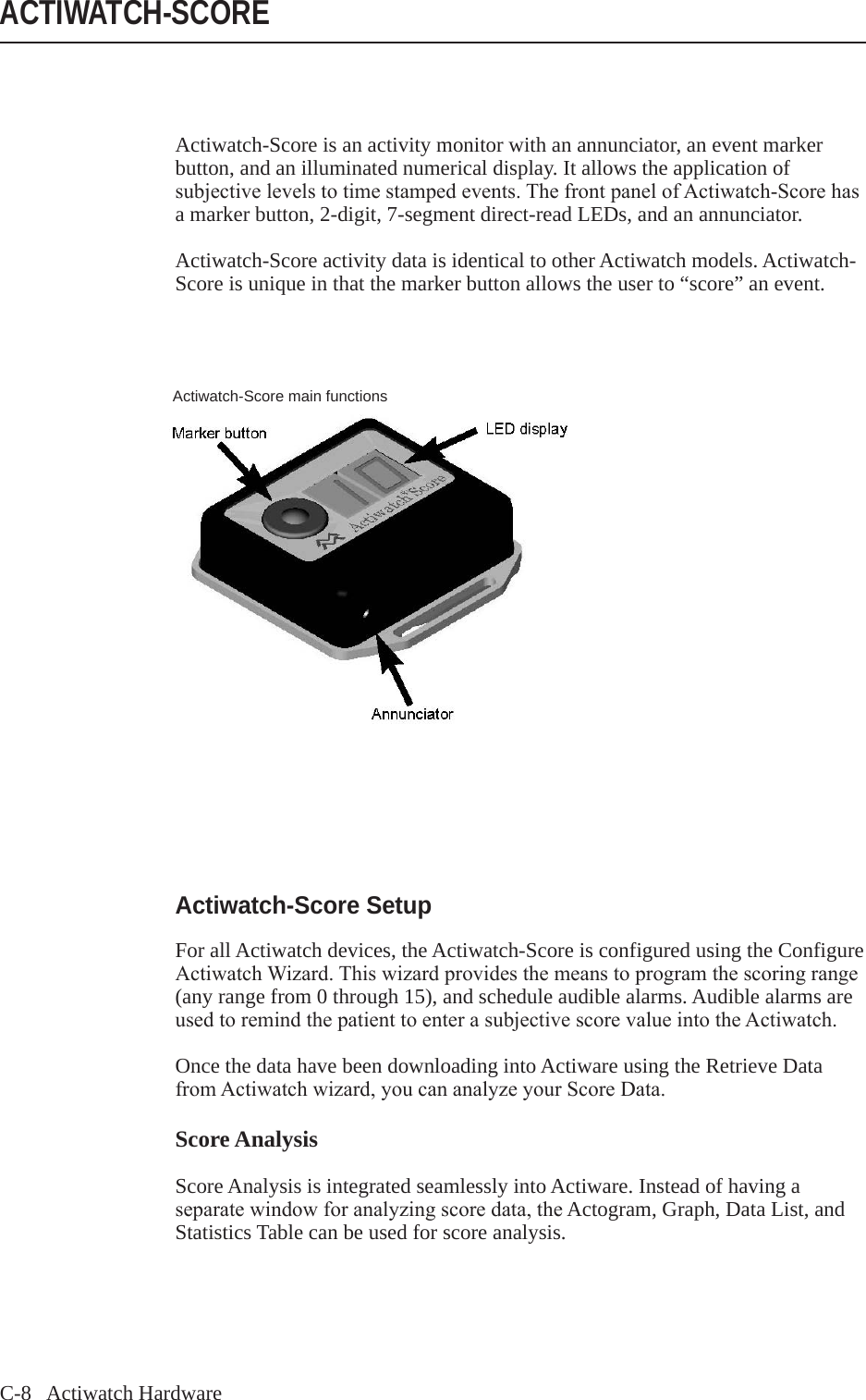
C-8   Actiwatch HardwareActiwatch-Score is an activity monitor with an annunciator, an event marker button, and an illuminated numerical display. It allows the application of subjectivelevelstotimestampedevents.ThefrontpanelofActiwatch-Scorehasa marker button, 2-digit, 7-segment direct-read LEDs, and an annunciator.Actiwatch-Score activity data is identical to other Actiwatch models. Actiwatch-Score is unique in that the marker button allows the user to “score” an event.ACTIWATCH-SCOREActiwatch-Score main functionsActiwatch-Score SetupFor all Actiwatch devices, the Actiwatch-Score is configured using the Configure ActiwatchWizard.Thiswizardprovidesthemeanstoprogramthescoringrange(any range from 0 through 15), and schedule audible alarms. Audible alarms are usedtoremindthepatienttoenterasubjectivescorevalueintotheActiwatch.Once the data have been downloading into Actiware using the Retrieve Data fromActiwatchwizard,youcananalyzeyourScoreData.Score AnalysisScore Analysis is integrated seamlessly into Actiware. Instead of having a separatewindowforanalyzingscoredata,theActogram, Graph, Data List, and Statistics Table can be used for score analysis.
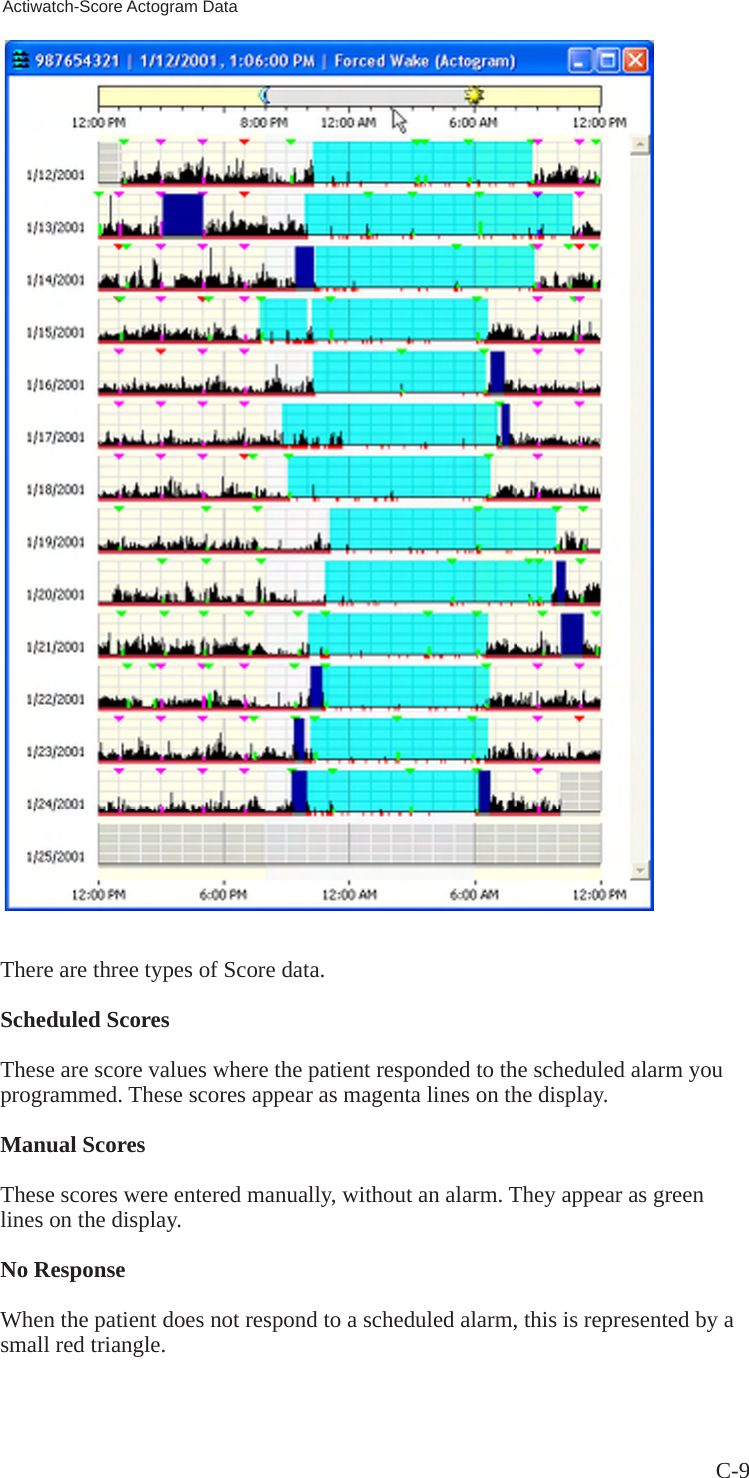
C-9 Actiwatch-Score Actogram DataThere are three types of Score data.Scheduled Scores These are score values where the patient responded to the scheduled alarm you programmed. These scores appear as magenta lines on the display.Manual Scores  These scores were entered manually, without an alarm. They appear as green lines on the display.No Response  When the patient does not respond to a scheduled alarm, this is represented by a small red triangle.
C-10   Actiwatch HardwareOnly one score can be recorded per epoch.The score value and score type can be seen by placing your mouse over the triangle at the top of the score value in the Actogram.Per epoch score data can be seen in the Data List along with activity data, and can be exported along with activity data and per epoch sleep analysis results. In addition, a Marker/Score List is provided that includes only the score data. The Score and Score Type columns can be shown or hidden in the Data List or Export filesbyadjustingsettingsintheTools > Options > Data List window.To generate statistics based on score data, use the Tools > Options window, Statistics tab to include Score Statistics. This will cause these statistics to be included for Rest, Active, Daily, and Custom Intervals. You can create Custom Intervalsforanalyzingperiodsofinterest,withoutusingoraffectingsleepstatistics. See Getting Started in section 2 for help in creating custom intervals.The annunciator is a miniature horn that generates a “chirp” form of audible announcement. The annunciator sound exits through the side of the case. The annunicator is water-resistant as well as the case. Turning off the annunciator1.  Hold the marker button down 3 seconds.2.  The LED will display OF to verify the annunciator is off.Turning on the annunciator 1.  Hold the marker button down for 3 seconds.2.  The LED will display On to verify the annunciator is on.AnnunciatorNote: After setup, the annunciator is reset to On.The marker button is a switch that is used to respond to an audible event and enter a score to “weight” the event. It can also be used to turn the annunciator on and off.Marker Button
C-11 Scheduled EventsDuring a scheduled event, if the marker button is pressed the annunciator will silence, and the score range minimum value chosen during setup will replace the two dashes. Each subsequent press of the marker will increment the display until it reaches the score range maximum value chosen during setup. If the marker button is pressed one more time, the display will begin again at the minimum value. Manual EventDuring a “manual” event, i.e., when no alarm is sounded but a marker is entered, the display will show two dashes. If the annunciator is enabled, Actiwatch-Score will beep once per second for 10 seconds, or until the event is scored.Note: Once the marker button is pressed, released, and pressed again and held, the LED will increment once per second.LED Display The display is a 2-digit, 7-segment LED. In addition to displaying the score (event weighting), there are other functions as well.   • When an event is to be scored, the annunciator will beep once per     second for 10 seconds. If the annunciator is disabled, only the LED      will activate.   • The display will show the annunciator status (on or off) after the     marker button is pressed and held for 3 seconds (refer to      Annunciator on preceding page).Note: AW-Score will not acquire activity data during the brief time the LEDs are lit, such as when setting score values.
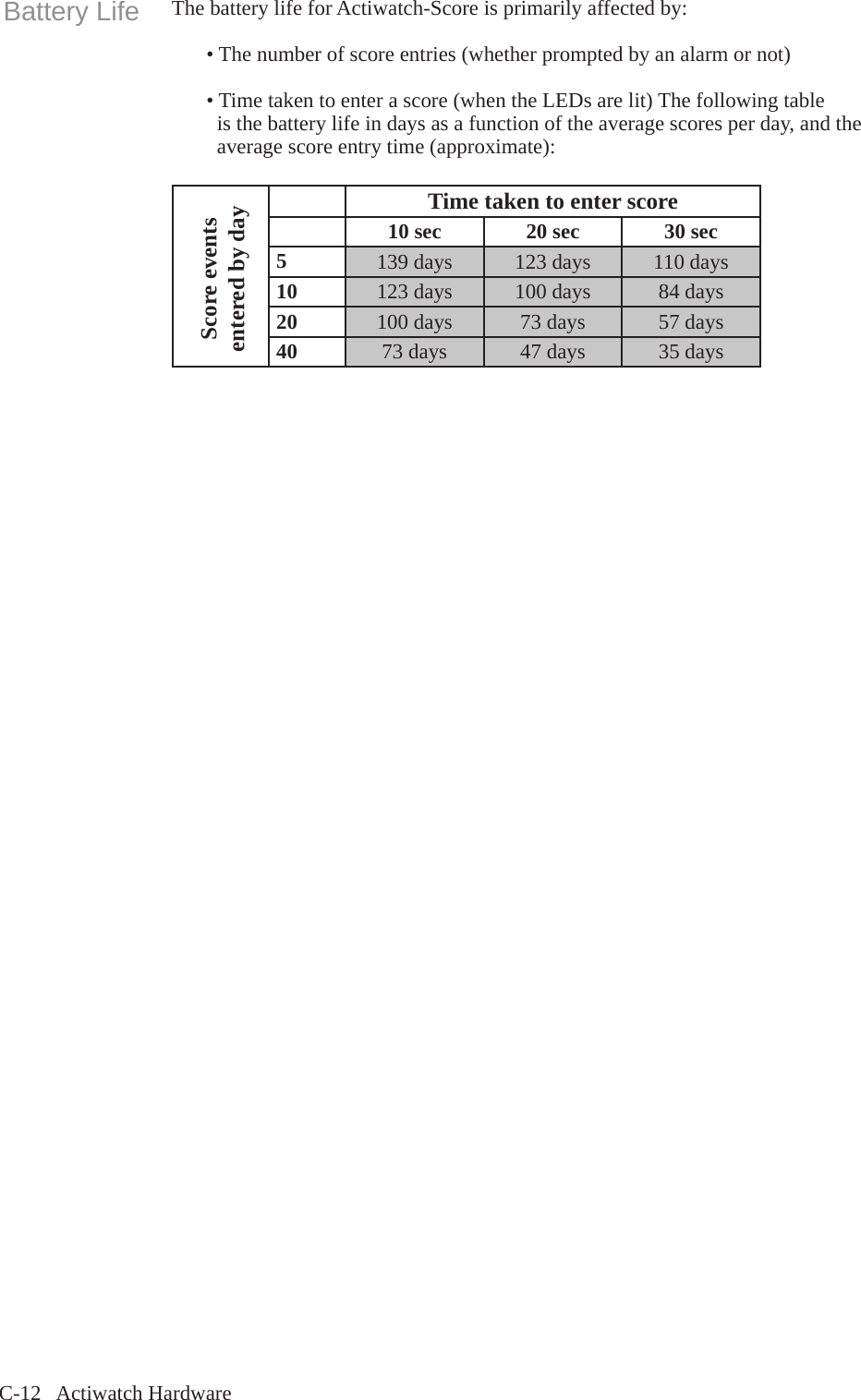
C-12   Actiwatch HardwareBattery Life The battery life for Actiwatch-Score is primarily affected by:  • The number of score entries (whether prompted by an alarm or not)   • Time taken to enter a score (when the LEDs are lit) The following table     is the battery life in days as a function of the average scores per day, and the     average score entry time (approximate):Time taken to enter score10 sec 20 sec 30 sec5139 days 123 days 110 days10 123 days 100 days 84 days20 100 days 73 days 57 days40 73 days 47 days 35 daysScore events entered by day
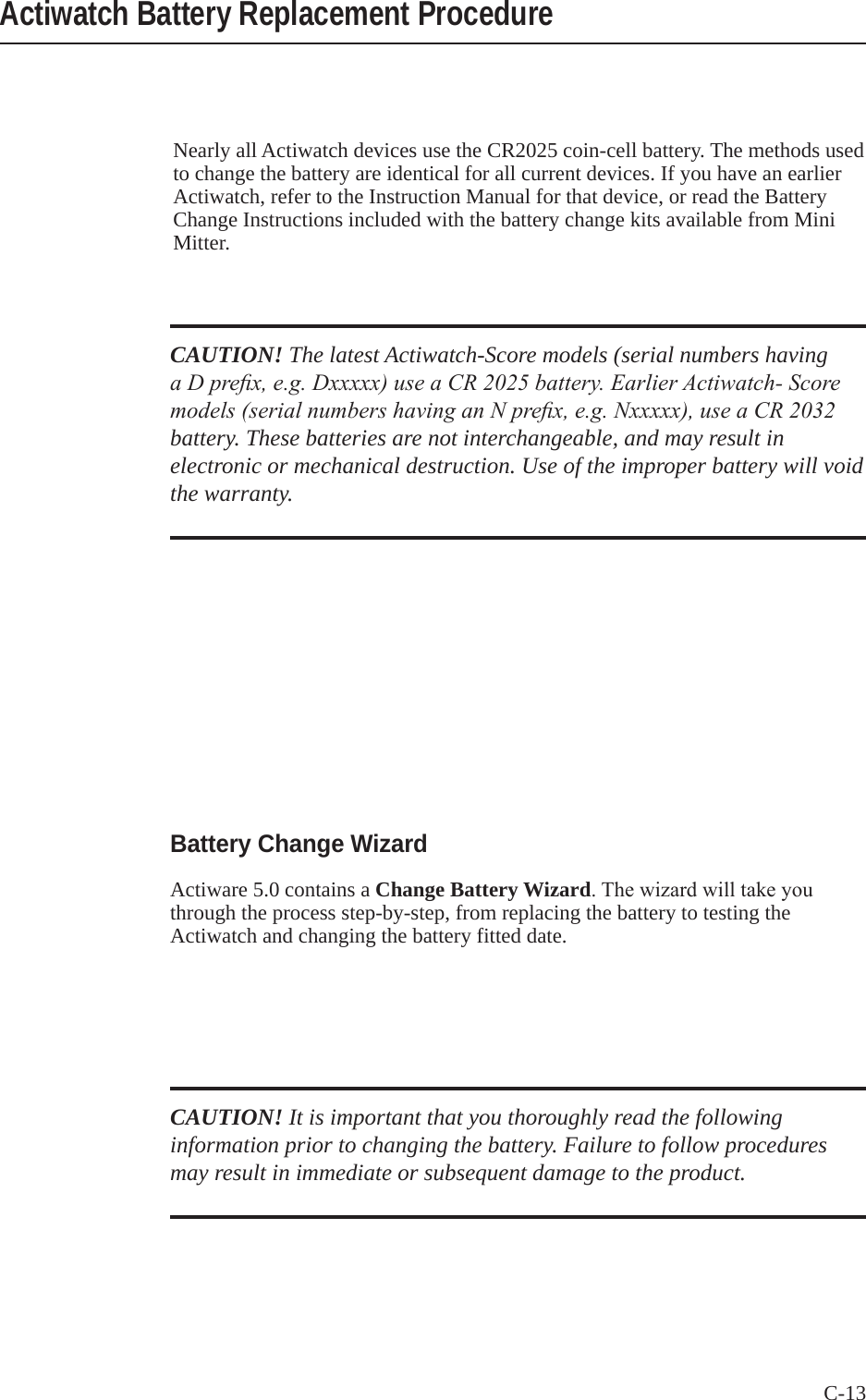
C-13 Nearly all Actiwatch devices use the CR2025 coin-cell battery. The methods used to change the battery are identical for all current devices. If you have an earlier Actiwatch, refer to the Instruction Manual for that device, or read the Battery Change Instructions included with the battery change kits available from Mini Mitter.Actiwatch Battery Replacement ProcedureCAUTION! The latest Actiwatch-Score models (serial numbers having a D prex, e.g. Dxxxxx) use a CR 2025 battery. Earlier Actiwatch- Score models (serial numbers having an N prex, e.g. Nxxxxx), use a CR 2032 battery. These batteries are not interchangeable, and may result in electronic or mechanical destruction. Use of the improper battery will void the warranty.Battery Change WizardActiware 5.0 contains a Change Battery Wizard.Thewizardwilltakeyouthrough the process step-by-step, from replacing the battery to testing the Actiwatch and changing the battery fitted date.CAUTION! It is important that you thoroughly read the following information prior to changing the battery. Failure to follow procedures may result in immediate or subsequent damage to the product.
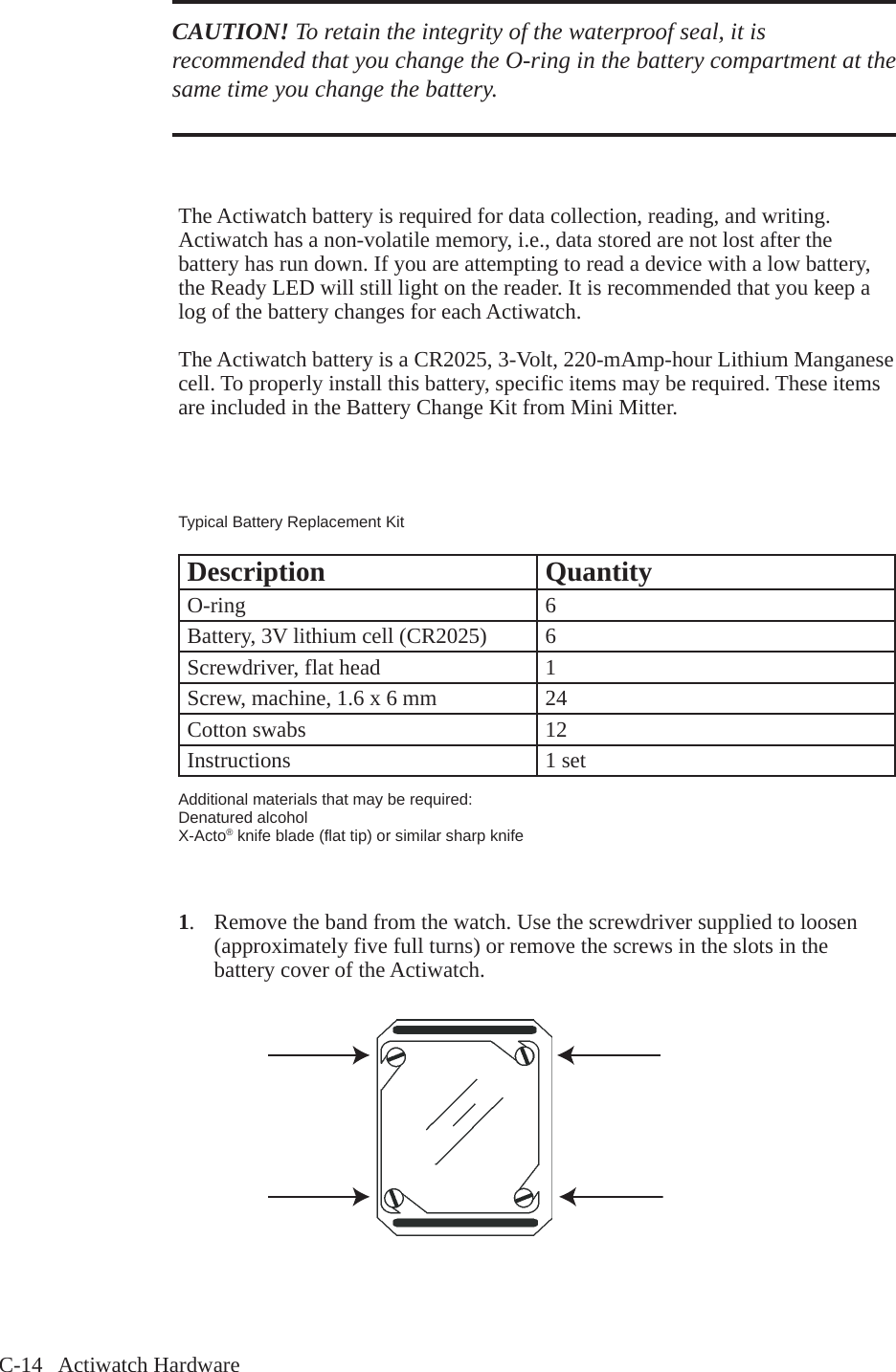
C-14   Actiwatch HardwareCAUTION! To retain the integrity of the waterproof seal, it is recommended that you change the O-ring in the battery compartment at the same time you change the battery. The Actiwatch battery is required for data collection, reading, and writing. Actiwatch has a non-volatile memory, i.e., data stored are not lost after the battery has run down. If you are attempting to read a device with a low battery, the Ready LED will still light on the reader. It is recommended that you keep a log of the battery changes for each Actiwatch. The Actiwatch battery is a CR2025, 3-Volt, 220-mAmp-hour Lithium Manganese cell. To properly install this battery, specific items may be required. These items are included in the Battery Change Kit from Mini Mitter.Typical Battery Replacement KitDescription QuantityO-ring 6Battery, 3V lithium cell (CR2025) 6Screwdriver, flat head 1Screw, machine, 1.6 x 6 mm 24Cotton swabs 12Instructions 1 setAdditional materials that may be required:Denatured alcoholX-Acto® knife blade (flat tip) or similar sharp knife1.  Remove the band from the watch. Use the screwdriver supplied to loosen   (approximately five full turns) or remove the screws in the slots in the   battery cover of the Actiwatch.
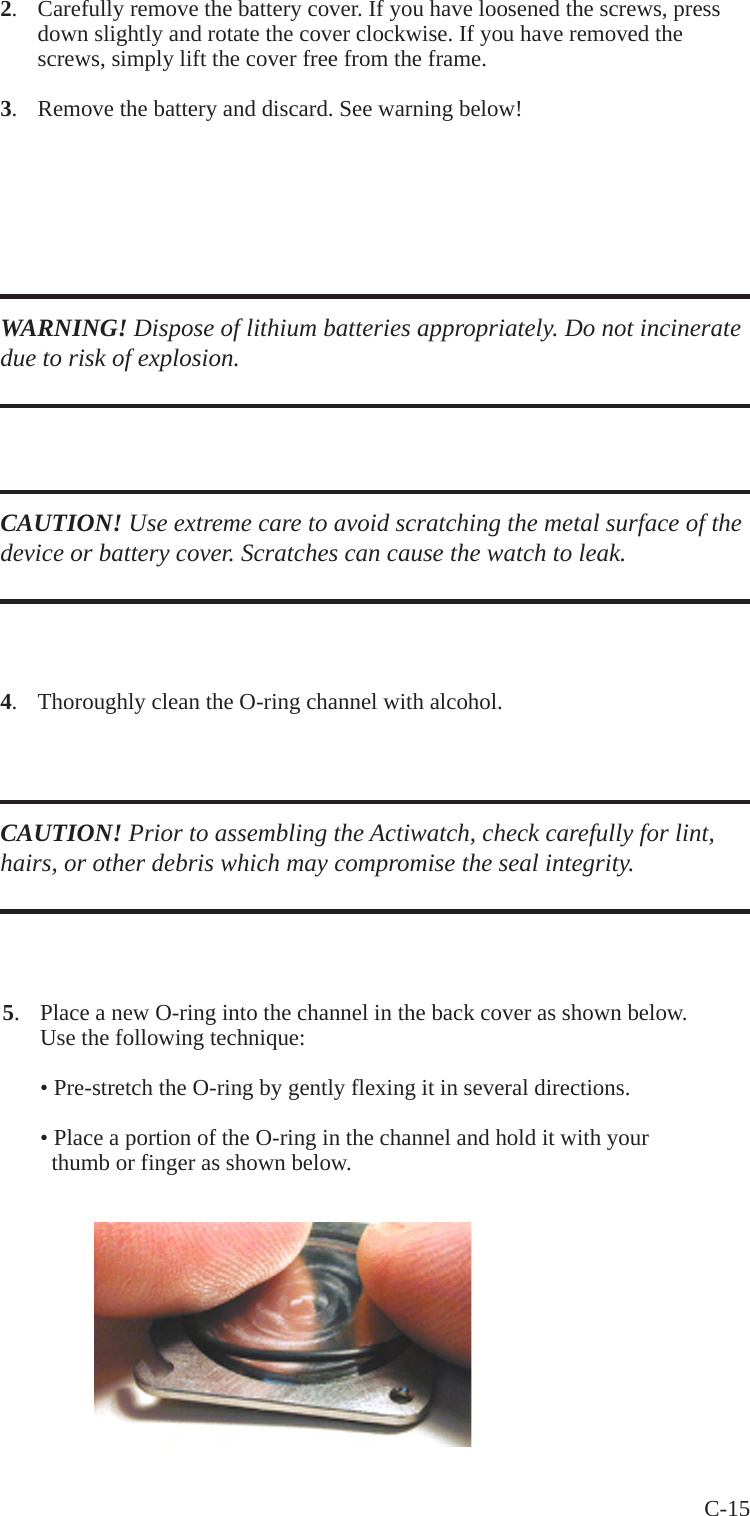
C-15 2.  Carefully remove the battery cover. If you have loosened the screws, press   down slightly and rotate the cover clockwise. If you have removed the   screws, simply lift the cover free from the frame.3.  Remove the battery and discard. See warning below! WARNING! Dispose of lithium batteries appropriately. Do not incinerate due to risk of explosion.CAUTION! Use extreme care to avoid scratching the metal surface of the device or battery cover. Scratches can cause the watch to leak.4.  Thoroughly clean the O-ring channel with alcohol.CAUTION! Prior to assembling the Actiwatch, check carefully for lint, hairs, or other debris which may compromise the seal integrity.5.  Place a new O-ring into the channel in the back cover as shown below.   Use the following technique:  • Pre-stretch the O-ring by gently flexing it in several directions.  • Place a portion of the O-ring in the channel and hold it with your     thumb or finger as shown below.
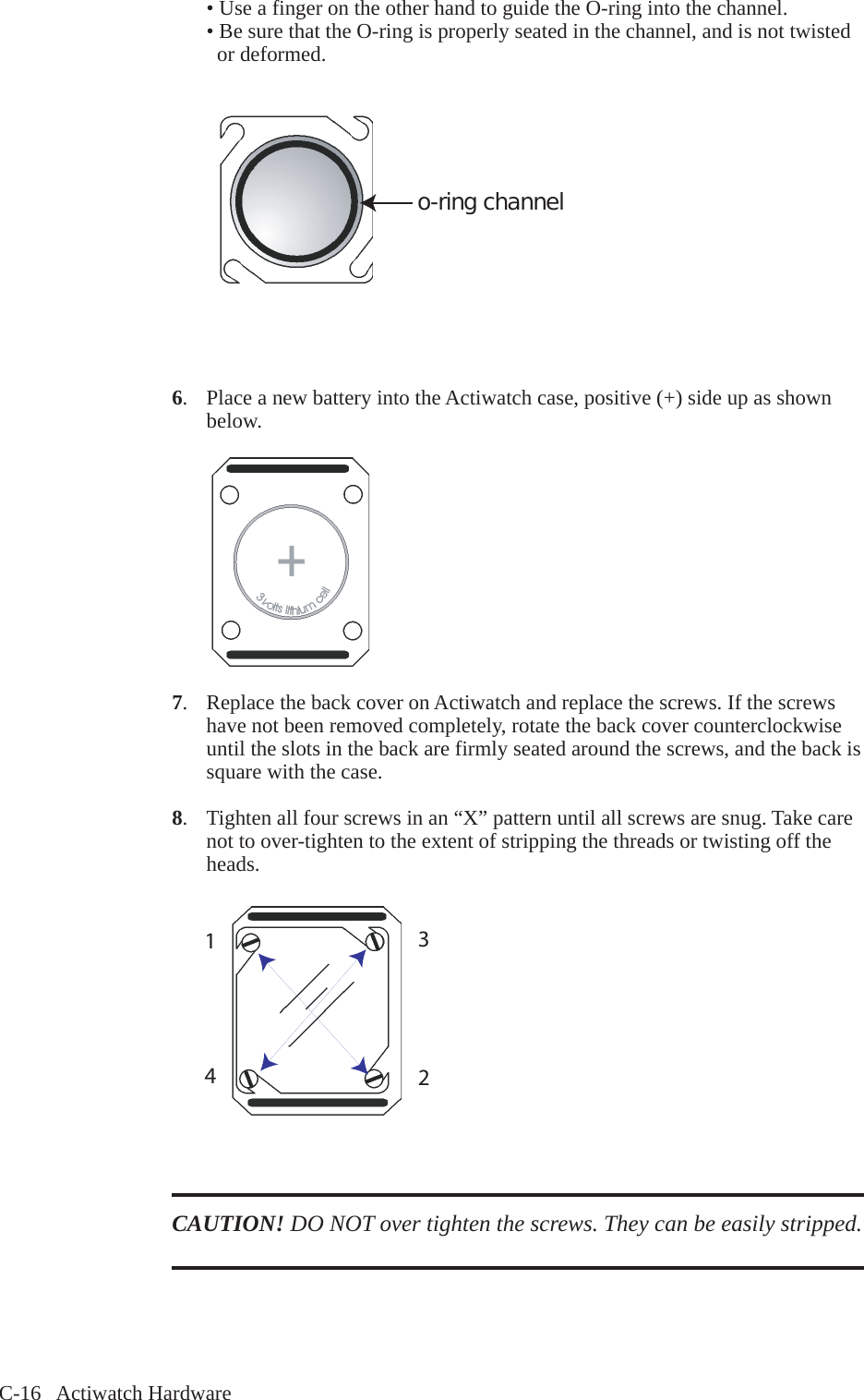
C-16   Actiwatch Hardware  • Use a finger on the other hand to guide the O-ring into the channel.   • Be sure that the O-ring is properly seated in the channel, and is not twisted     or deformed.o-ring channel6.  Place a new battery into the Actiwatch case, positive (+) side up as shown   below.7.  Replace the back cover on Actiwatch and replace the screws. If the screws   have not been removed completely, rotate the back cover counterclockwise   until the slots in the back are firmly seated around the screws, and the back is   square with the case. 8.  Tighten all four screws in an “X” pattern until all screws are snug. Take care   not to over-tighten to the extent of stripping the threads or twisting off the   heads.CAUTION! DO NOT over tighten the screws. They can be easily stripped. 1234
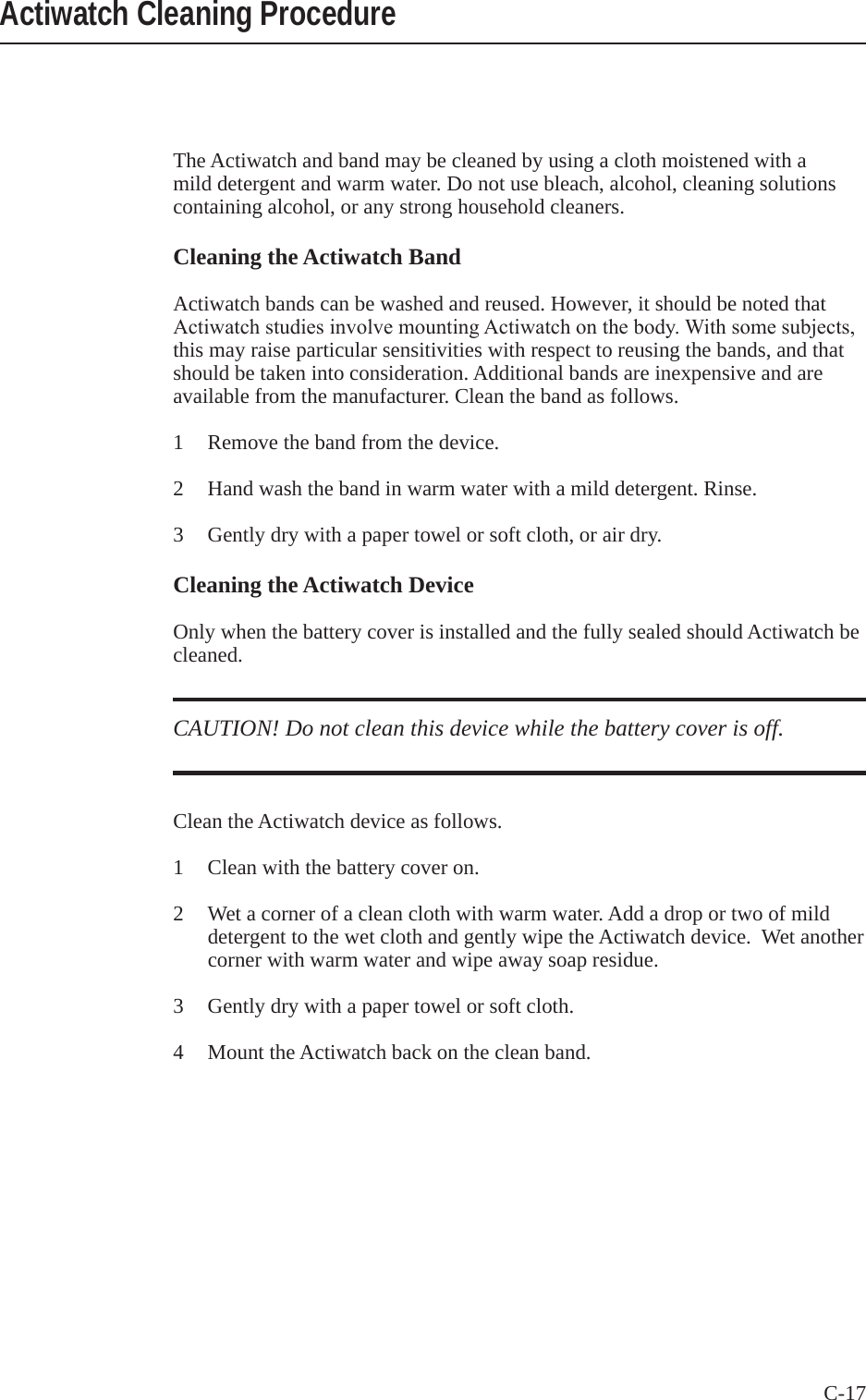
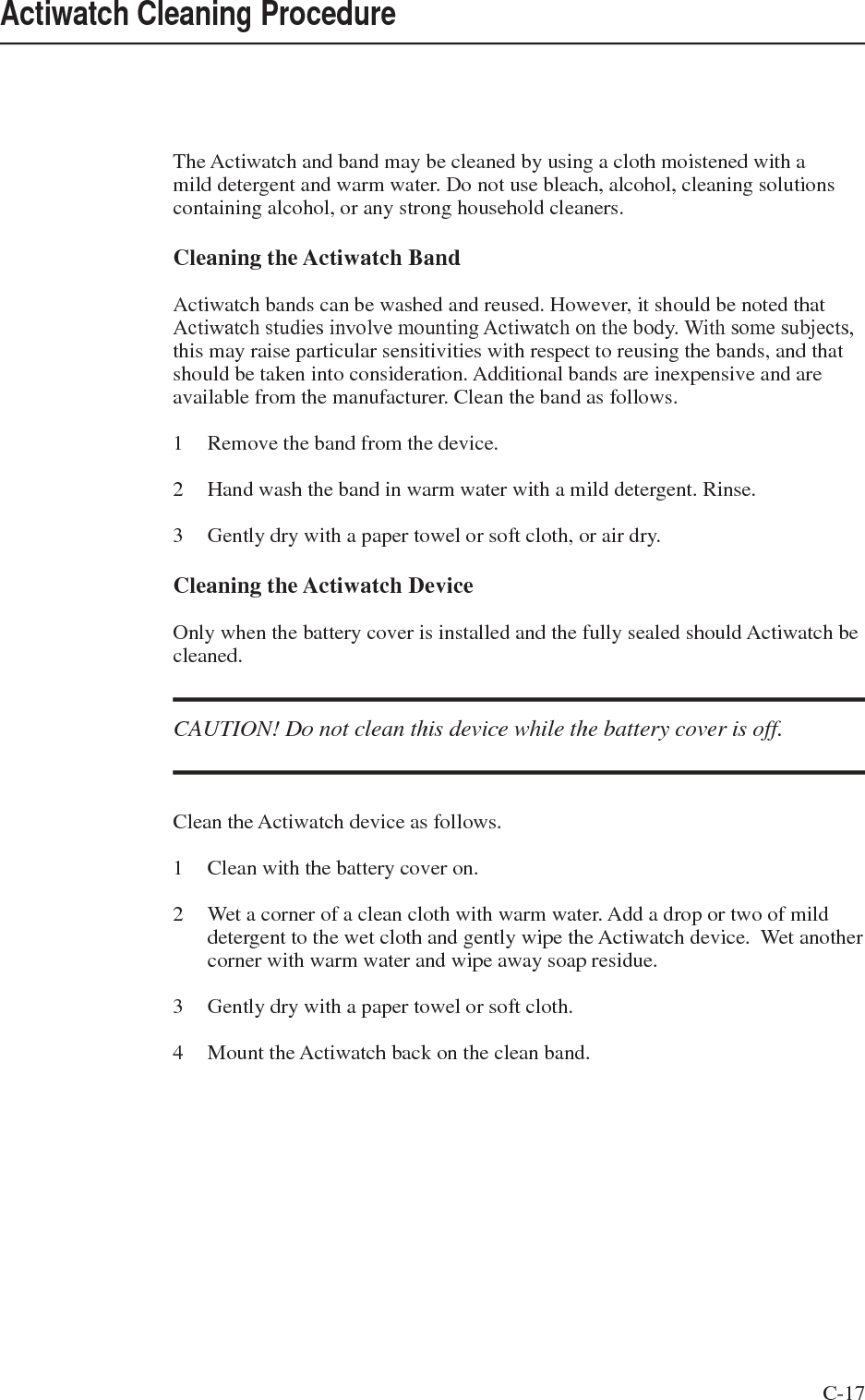
C-17 Actiwatch Cleaning ProcedureThe Actiwatch and band may be cleaned by using a cloth moistened with a mild detergent and warm water. Do not use bleach, alcohol, cleaning solutions containing alcohol, or any strong household cleaners.Cleaning the Actiwatch BandActiwatch bands can be washed and reused. However, it should be noted that ActiwatchstudiesinvolvemountingActiwatchonthebody.Withsomesubjects,this may raise particular sensitivities with respect to reusing the bands, and that should be taken into consideration. Additional bands are inexpensive and are available from the manufacturer. Clean the band as follows.1  Remove the band from the device.2  Hand wash the band in warm water with a mild detergent. Rinse.3  Gently dry with a paper towel or soft cloth, or air dry.Cleaning the Actiwatch DeviceOnly when the battery cover is installed and the fully sealed should Actiwatch be cleaned. CAUTION! Do not clean this device while the battery cover is off.Clean the Actiwatch device as follows.1  Clean with the battery cover on.2  Wet a corner of a clean cloth with warm water. Add a drop or two of mild detergent to the wet cloth and gently wipe the Actiwatch device.  Wet another corner with warm water and wipe away soap residue.3  Gently dry with a paper towel or soft cloth.4  Mount the Actiwatch back on the clean band.
C-18   Actiwatch Hardware
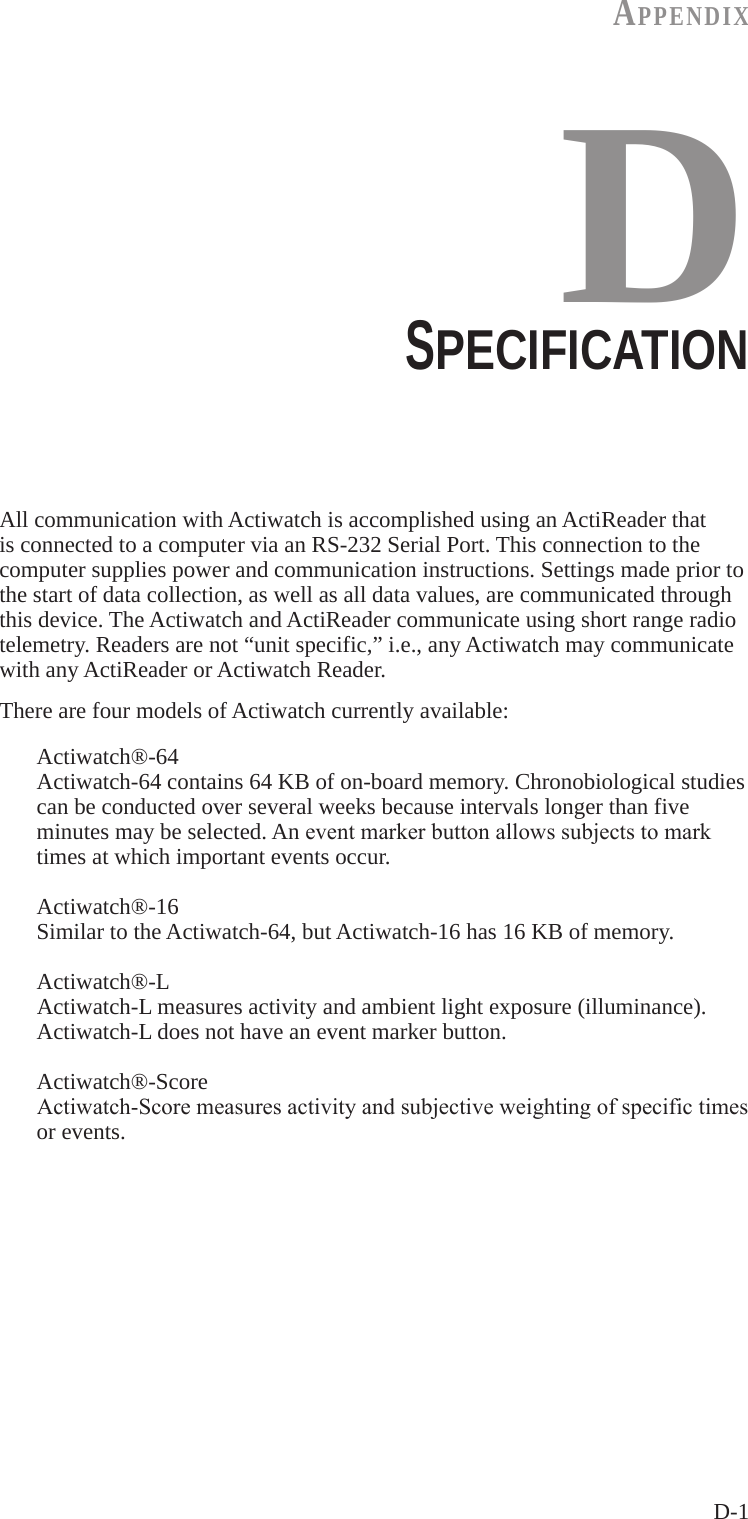
D-1AppENdIxDSPECIFICATIONAll communication with Actiwatch is accomplished using an ActiReader that is connected to a computer via an RS-232 Serial Port. This connection to the computer supplies power and communication instructions. Settings made prior to the start of data collection, as well as all data values, are communicated through this device. The Actiwatch and ActiReader communicate using short range radio telemetry. Readers are not “unit specific,” i.e., any Actiwatch may communicate with any ActiReader or Actiwatch Reader.There are four models of Actiwatch currently available:  Actiwatch®-64   Actiwatch-64 contains 64 KB of on-board memory. Chronobiological studies   can be conducted over several weeks because intervals longer than five   minutes may be selected. An eventmarkerbuttonallowssubjectstomark   times at which important events occur.  Actiwatch®-16   Similar to the Actiwatch-64, but Actiwatch-16 has 16 KB of memory.  Actiwatch®-L   Actiwatch-L measures activity and ambient light exposure (illuminance).     Actiwatch-L does not have an event marker button.  Actiwatch®-Score  Actiwatch-Scoremeasuresactivityandsubjectiveweightingofspecifictimes   or events.
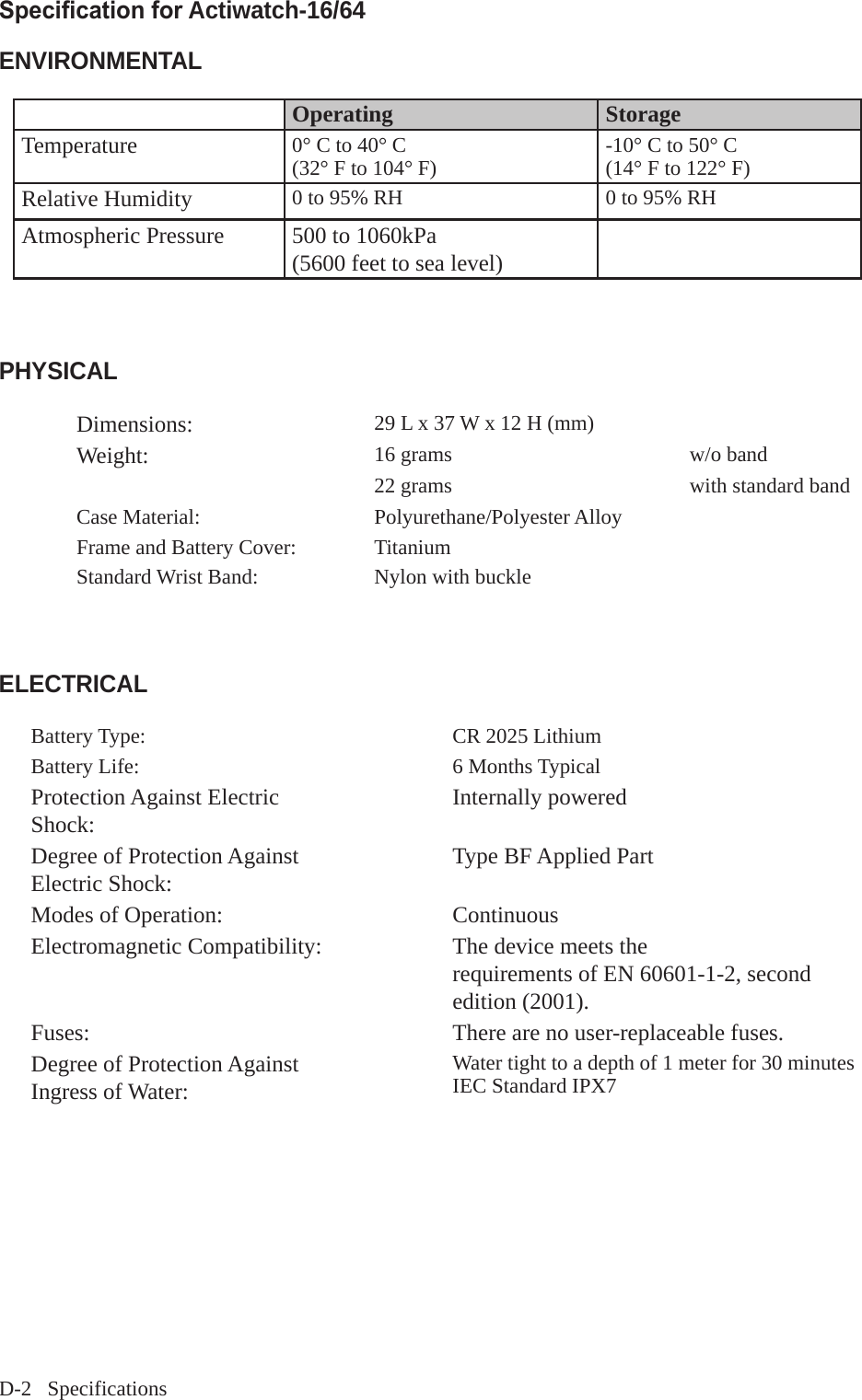
D-2   SpecificationsSpecication for Actiwatch-16/64 ENVIRONMENTALOperating StorageTemperature 0° C to 40° C(32° F to 104° F) -10° C to 50° C(14° F to 122° F)Relative Humidity 0 to 95% RH 0 to 95% RHAtmospheric Pressure 500 to 1060kPa(5600 feet to sea level)PHYSICALDimensions: 29 L x 37 W x 12 H (mm)Weight: 16 grams w/o band 22 grams  with standard band Case Material: Polyurethane/Polyester AlloyFrame and Battery Cover: TitaniumStandard Wrist Band: Nylon with buckle  ELECTRICALBattery Type: CR 2025 LithiumBattery Life: 6 Months TypicalProtection Against Electric Shock:  Internally poweredDegree of Protection Against Electric Shock:  Type BF Applied PartModes of Operation: ContinuousElectromagnetic Compatibility: The device meets therequirements of EN 60601-1-2, second edition (2001).Fuses: There are no user-replaceable fuses.Degree of Protection Against Ingress of Water: Water tight to a depth of 1 meter for 30 minutesIEC Standard IPX7
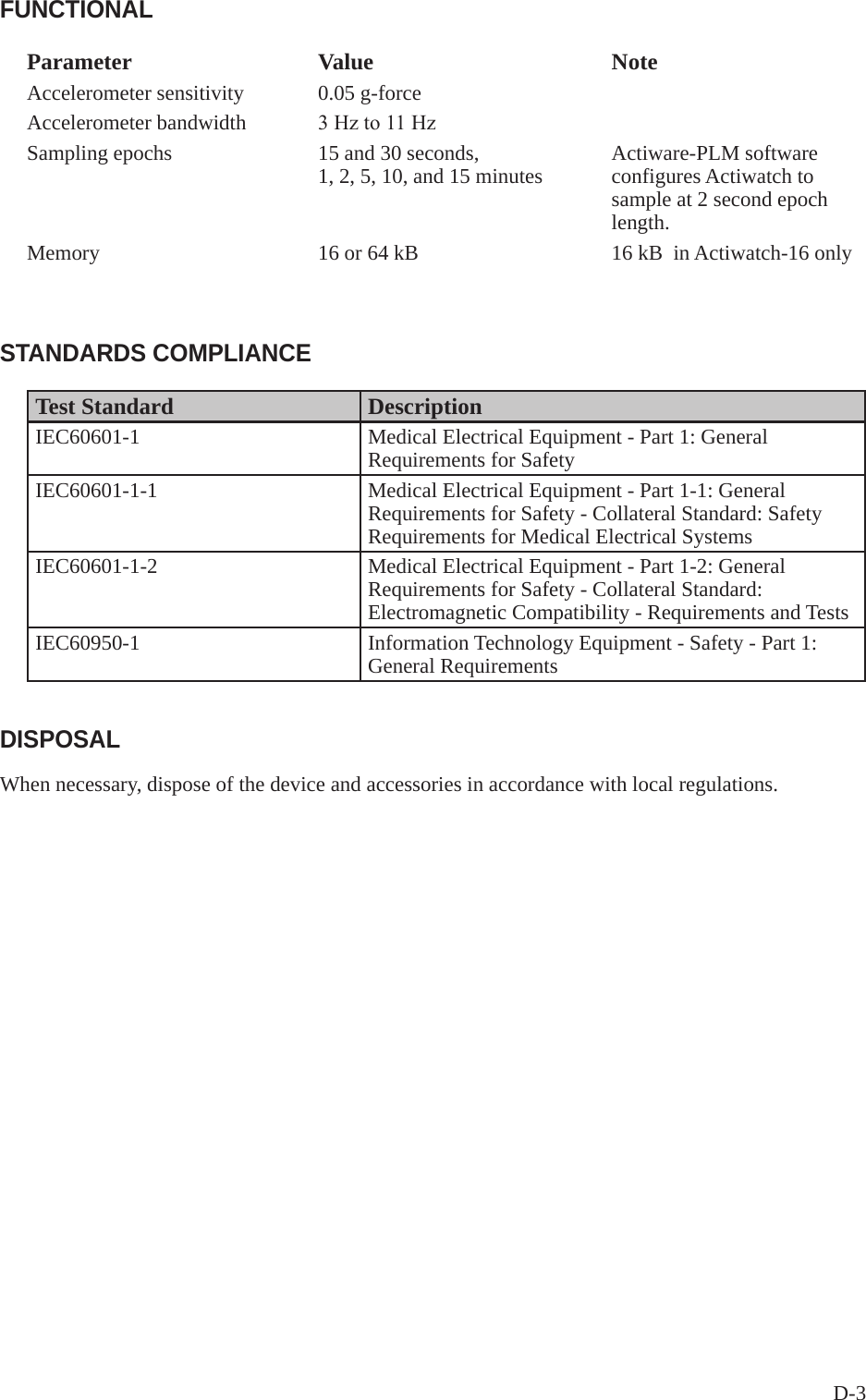
D-3FUNCTIONALParameter  Value  Note Accelerometer sensitivity  0.05 g-force Accelerometer bandwidth  3Hzto11HzSampling epochs 15 and 30 seconds,1, 2, 5, 10, and 15 minutes Actiware-PLM software configures Actiwatch to sample at 2 second epoch length.Memory  16 or 64 kB  16 kB  in Actiwatch-16 onlySTANDARDS COMPLIANCETest Standard  Description IEC60601-1  Medical Electrical Equipment - Part 1: General Requirements for Safety IEC60601-1-1  Medical Electrical Equipment - Part 1-1: General Requirements for Safety - Collateral Standard: Safety Requirements for Medical Electrical SystemsIEC60601-1-2  Medical Electrical Equipment - Part 1-2: General Requirements for Safety - Collateral Standard: Electromagnetic Compatibility - Requirements and Tests IEC60950-1  Information Technology Equipment - Safety - Part 1: General Requirements DISPOSALWhen necessary, dispose of the device and accessories in accordance with local regulations.
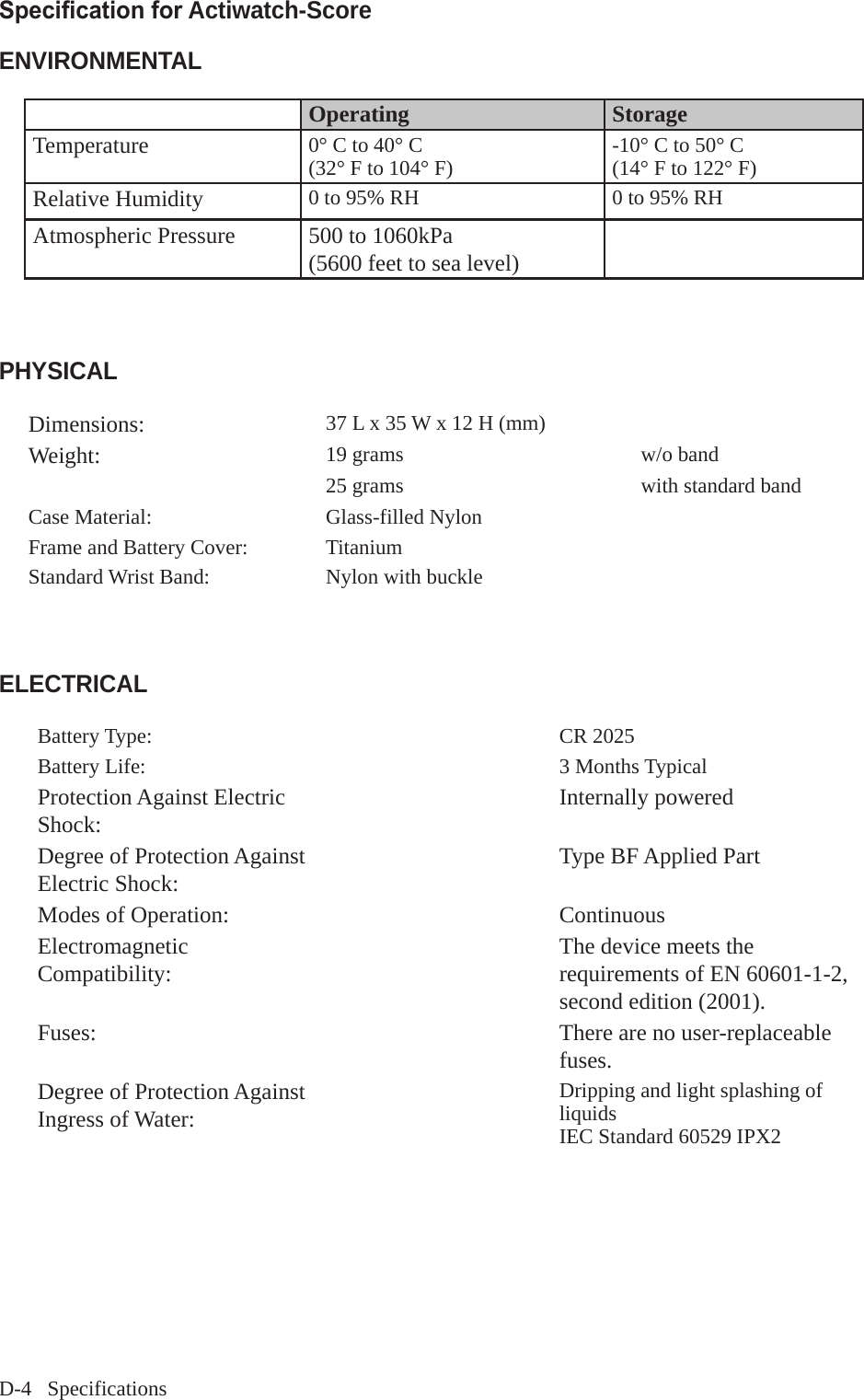
D-4   SpecificationsSpecication for Actiwatch-Score ENVIRONMENTALOperating StorageTemperature 0° C to 40° C(32° F to 104° F) -10° C to 50° C(14° F to 122° F)Relative Humidity 0 to 95% RH 0 to 95% RHAtmospheric Pressure 500 to 1060kPa(5600 feet to sea level)PHYSICALDimensions: 37 L x 35 W x 12 H (mm)Weight: 19 grams w/o band 25 grams  with standard band Case Material: Glass-filled Nylon Frame and Battery Cover: TitaniumStandard Wrist Band: Nylon with buckle  ELECTRICALBattery Type: CR 2025Battery Life: 3 Months TypicalProtection Against Electric Shock:  Internally poweredDegree of Protection Against Electric Shock:  Type BF Applied PartModes of Operation: ContinuousElectromagnetic Compatibility: The device meets therequirements of EN 60601-1-2, second edition (2001).Fuses: There are no user-replaceable fuses.Degree of Protection Against Ingress of Water: Dripping and light splashing of liquidsIEC Standard 60529 IPX2
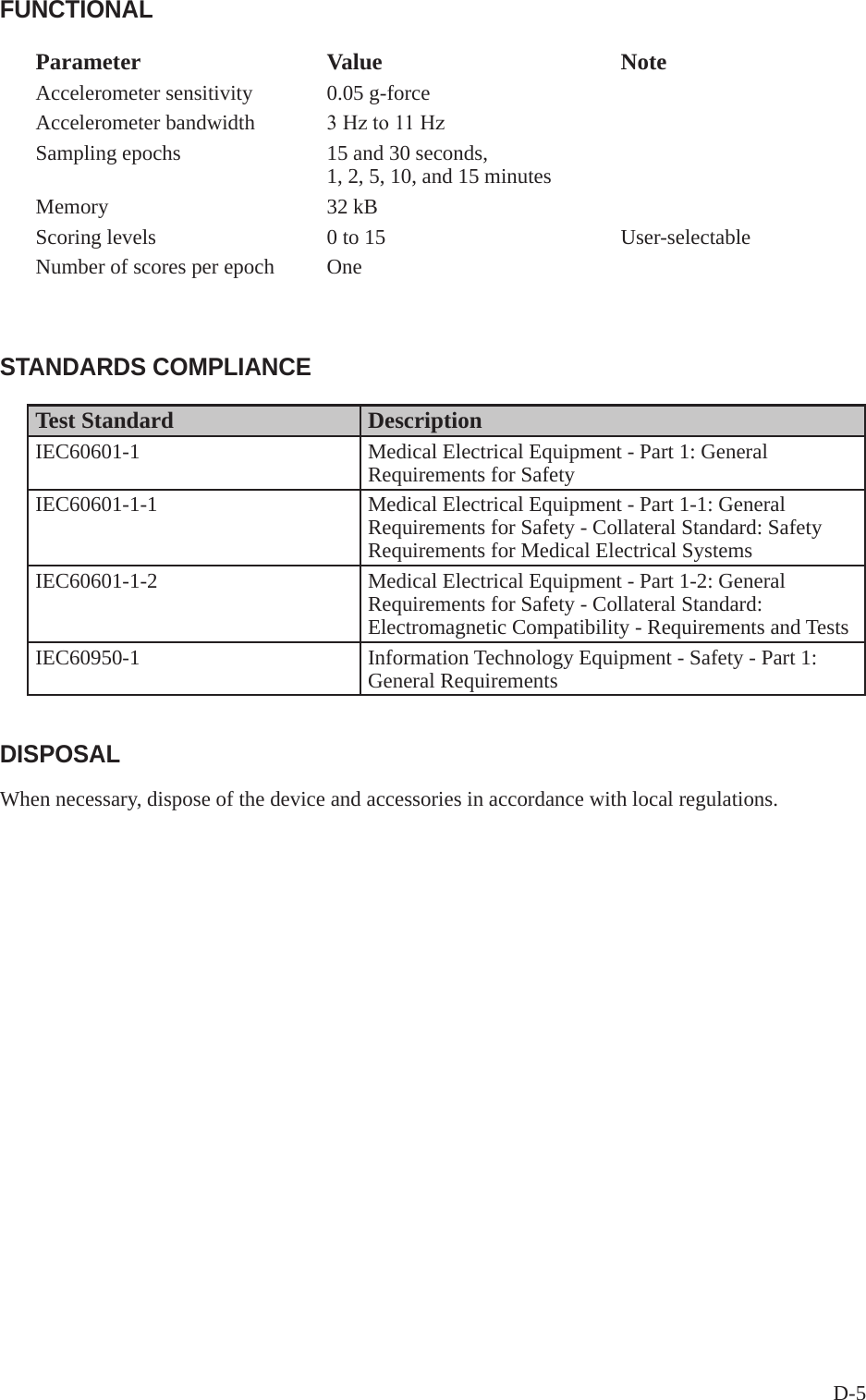
D-5FUNCTIONALParameter  Value  Note Accelerometer sensitivity  0.05 g-force Accelerometer bandwidth  3Hzto11HzSampling epochs 15 and 30 seconds,1, 2, 5, 10, and 15 minutesMemory  32 kB Scoring levels  0 to 15 User-selectable Number of scores per epoch  OneSTANDARDS COMPLIANCETest Standard  Description IEC60601-1  Medical Electrical Equipment - Part 1: General Requirements for Safety IEC60601-1-1  Medical Electrical Equipment - Part 1-1: General Requirements for Safety - Collateral Standard: Safety Requirements for Medical Electrical SystemsIEC60601-1-2  Medical Electrical Equipment - Part 1-2: General Requirements for Safety - Collateral Standard: Electromagnetic Compatibility - Requirements and Tests IEC60950-1  Information Technology Equipment - Safety - Part 1: General Requirements DISPOSALWhen necessary, dispose of the device and accessories in accordance with local regulations.
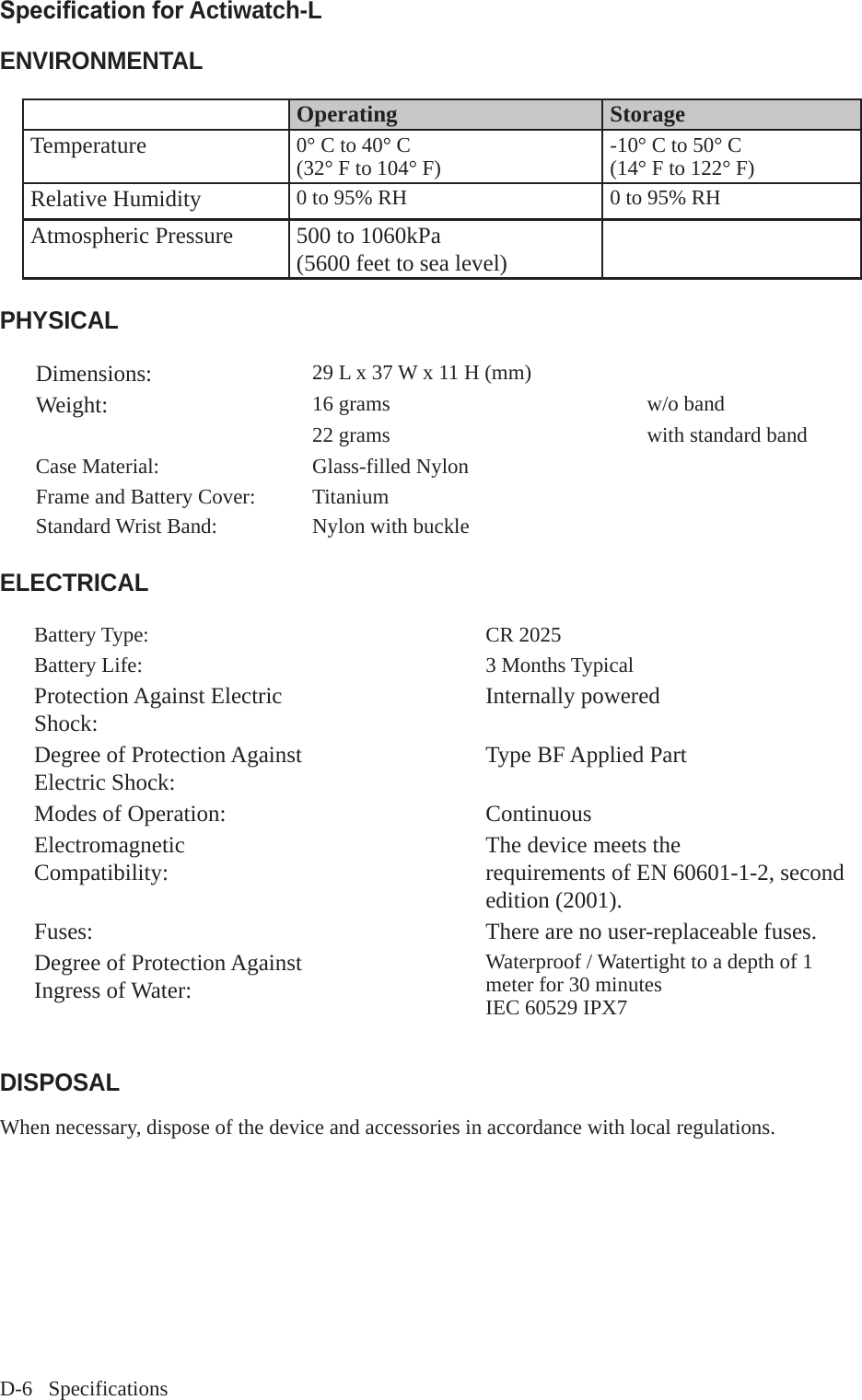
D-6   SpecificationsSpecication for Actiwatch-LENVIRONMENTALOperating StorageTemperature 0° C to 40° C(32° F to 104° F) -10° C to 50° C(14° F to 122° F)Relative Humidity 0 to 95% RH 0 to 95% RHAtmospheric Pressure 500 to 1060kPa(5600 feet to sea level)PHYSICALDimensions: 29 L x 37 W x 11 H (mm)Weight: 16 grams w/o band 22 grams  with standard band Case Material: Glass-filled NylonFrame and Battery Cover: TitaniumStandard Wrist Band: Nylon with buckle  ELECTRICALBattery Type: CR 2025Battery Life: 3 Months TypicalProtection Against Electric Shock:  Internally poweredDegree of Protection Against Electric Shock:  Type BF Applied PartModes of Operation: ContinuousElectromagnetic Compatibility: The device meets therequirements of EN 60601-1-2, second edition (2001).Fuses: There are no user-replaceable fuses.Degree of Protection Against Ingress of Water: Waterproof / Watertight to a depth of 1 meter for 30 minutesIEC 60529 IPX7 DISPOSALWhen necessary, dispose of the device and accessories in accordance with local regulations.
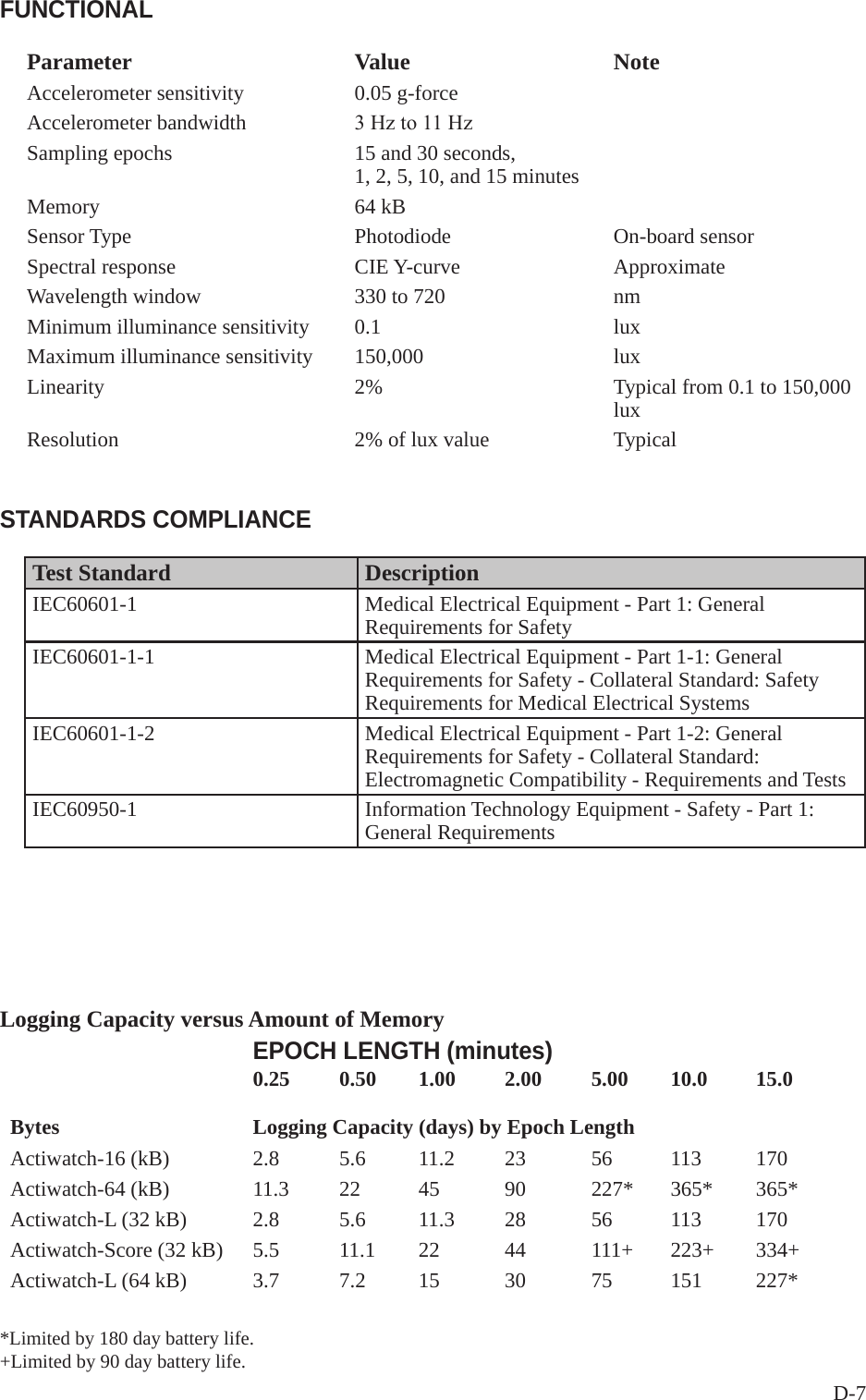
D-7FUNCTIONALParameter  Value  Note Accelerometer sensitivity  0.05 g-force Accelerometer bandwidth  3Hzto11HzSampling epochs 15 and 30 seconds,1, 2, 5, 10, and 15 minutesMemory  64 kB Sensor Type Photodiode On-board sensorSpectral response CIE Y-curve ApproximateWavelength window 330 to 720 nmMinimum illuminance sensitivity 0.1 luxMaximum illuminance sensitivity 150,000 luxLinearity 2% Typical from 0.1 to 150,000 luxResolution 2% of lux value TypicalSTANDARDS COMPLIANCETest Standard  Description IEC60601-1  Medical Electrical Equipment - Part 1: General Requirements for Safety IEC60601-1-1  Medical Electrical Equipment - Part 1-1: General Requirements for Safety - Collateral Standard: Safety Requirements for Medical Electrical SystemsIEC60601-1-2  Medical Electrical Equipment - Part 1-2: General Requirements for Safety - Collateral Standard: Electromagnetic Compatibility - Requirements and Tests IEC60950-1  Information Technology Equipment - Safety - Part 1: General Requirements Logging Capacity versus Amount of Memory  EPOCH LENGTH (minutes)  0.25   0.50  1.00   2.00  5.00   10.0   15.0  Bytes  Logging Capacity (days) by Epoch Length Actiwatch-16 (kB)  2.8  5.6  11.2  23  56  113  170 Actiwatch-64 (kB)  11.3  22  45  90  227*  365*  365* Actiwatch-L (32 kB)  2.8  5.6  11.3  28  56  113  170 Actiwatch-Score (32 kB)  5.5  11.1  22  44  111+  223+  334+ Actiwatch-L (64 kB)  3.7  7.2  15  30  75  151  227* *Limited by 180 day battery life.+Limited by 90 day battery life.
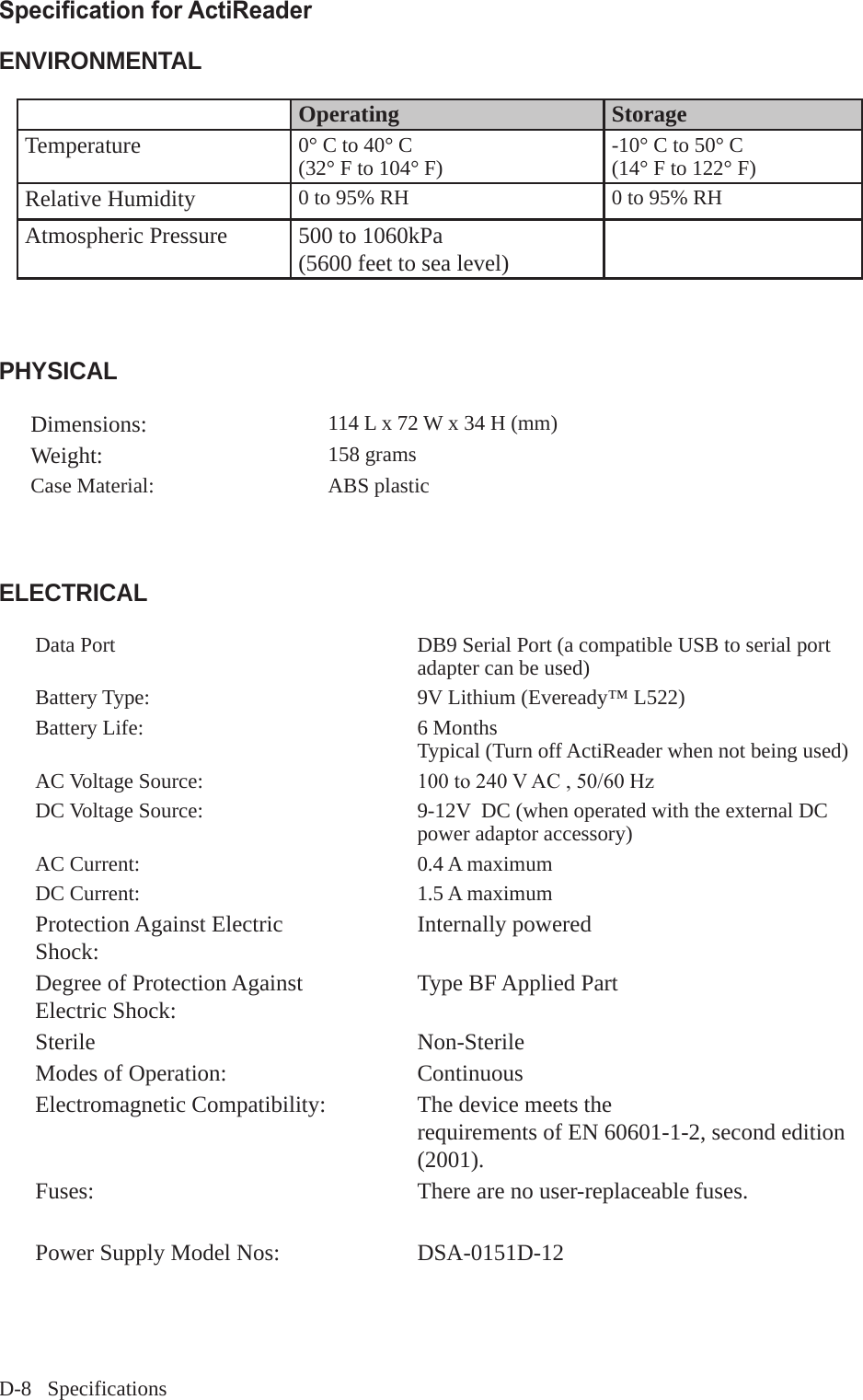
D-8   SpecificationsSpecication for ActiReaderENVIRONMENTALOperating StorageTemperature 0° C to 40° C(32° F to 104° F) -10° C to 50° C(14° F to 122° F)Relative Humidity 0 to 95% RH 0 to 95% RHAtmospheric Pressure 500 to 1060kPa(5600 feet to sea level)PHYSICALDimensions: 114 L x 72 W x 34 H (mm)Weight: 158 gramsCase Material: ABS plastic ELECTRICALData Port DB9 Serial Port (a compatible USB to serial port adapter can be used) Battery Type: 9V Lithium (Eveready™ L522)Battery Life: 6 MonthsTypical (Turn off ActiReader when not being used)AC Voltage Source: 100to240VAC,50/60HzDC Voltage Source: 9-12V  DC (when operated with the external DC power adaptor accessory)AC Current: 0.4 A maximumDC Current: 1.5 A maximumProtection Against Electric Shock:  Internally poweredDegree of Protection Against Electric Shock:  Type BF Applied PartSterile Non-SterileModes of Operation: ContinuousElectromagnetic Compatibility: The device meets therequirements of EN 60601-1-2, second edition (2001).Fuses: There are no user-replaceable fuses.Power Supply Model Nos: DSA-0151D-12
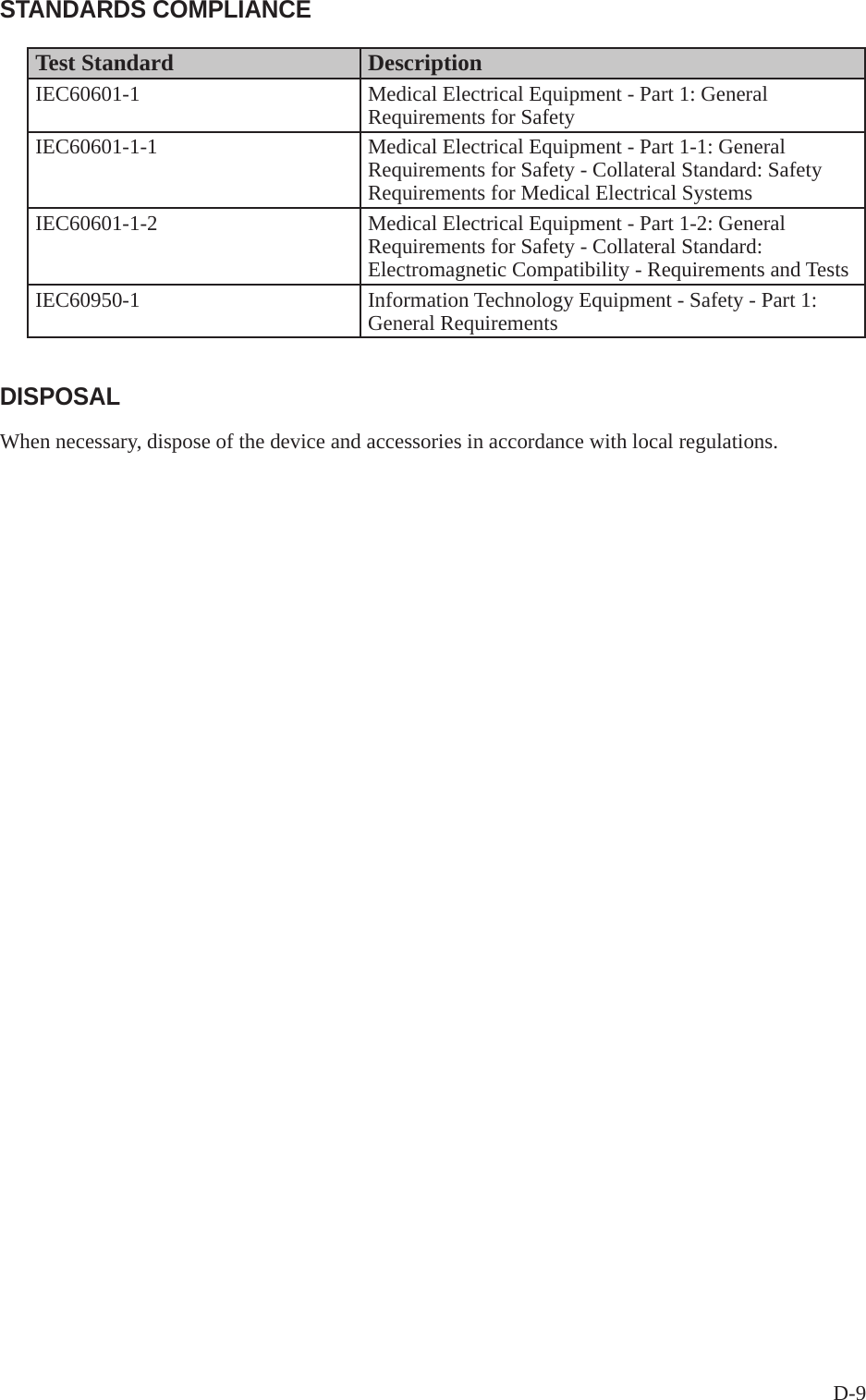
D-9STANDARDS COMPLIANCETest Standard  Description IEC60601-1  Medical Electrical Equipment - Part 1: General Requirements for Safety IEC60601-1-1  Medical Electrical Equipment - Part 1-1: General Requirements for Safety - Collateral Standard: Safety Requirements for Medical Electrical SystemsIEC60601-1-2  Medical Electrical Equipment - Part 1-2: General Requirements for Safety - Collateral Standard: Electromagnetic Compatibility - Requirements and Tests IEC60950-1  Information Technology Equipment - Safety - Part 1: General Requirements DISPOSALWhen necessary, dispose of the device and accessories in accordance with local regulations.
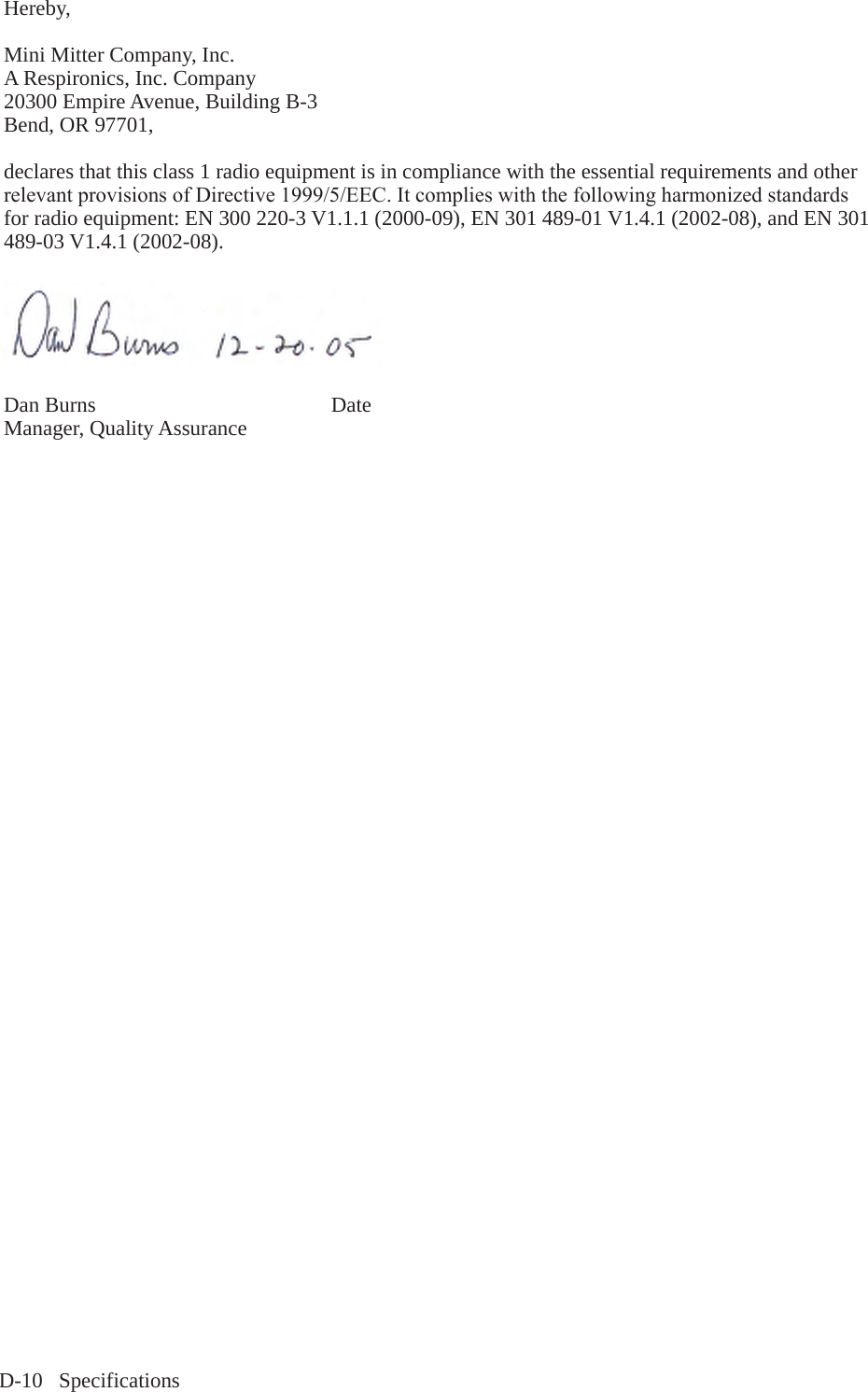
D-10   SpecificationsHereby,  Mini Mitter Company, Inc.A Respironics, Inc. Company20300 Empire Avenue, Building B-3Bend, OR 97701, declares that this class 1 radio equipment is in compliance with the essential requirements and other relevantprovisionsofDirective1999/5/EEC.Itcomplieswiththefollowingharmonizedstandardsfor radio equipment: EN 300 220-3 V1.1.1 (2000-09), EN 301 489-01 V1.4.1 (2002-08), and EN 301 489-03 V1.4.1 (2002-08).  Dan Burns                                            Date Manager, Quality Assurance
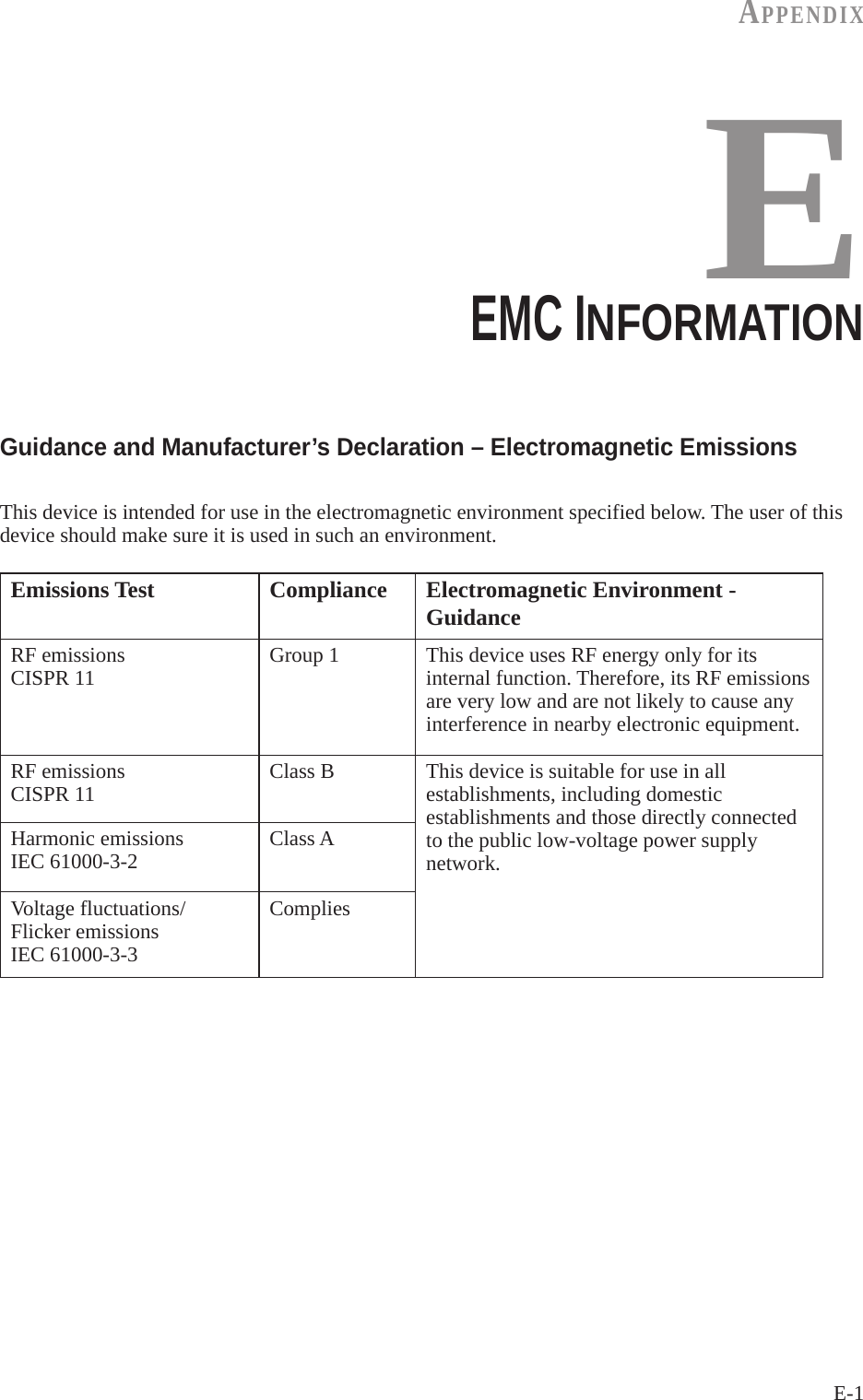
E-1AppENdIxEEMC INFORMATIONGuidance and Manufacturer’s Declaration – Electromagnetic EmissionsThis device is intended for use in the electromagnetic environment specified below. The user of this device should make sure it is used in such an environment.Emissions Test Compliance Electromagnetic Environment - GuidanceRF emissions CISPR 11 Group 1 This device uses RF energy only for its internal function. Therefore, its RF emissions are very low and are not likely to cause any interference in nearby electronic equipment.RF emissions CISPR 11 Class B This device is suitable for use in all establishments, including domestic establishments and those directly connected to the public low-voltage power supply network.Harmonic emissionsIEC 61000-3-2 Class AVoltage fluctuations/ Flicker emissions IEC 61000-3-3Complies
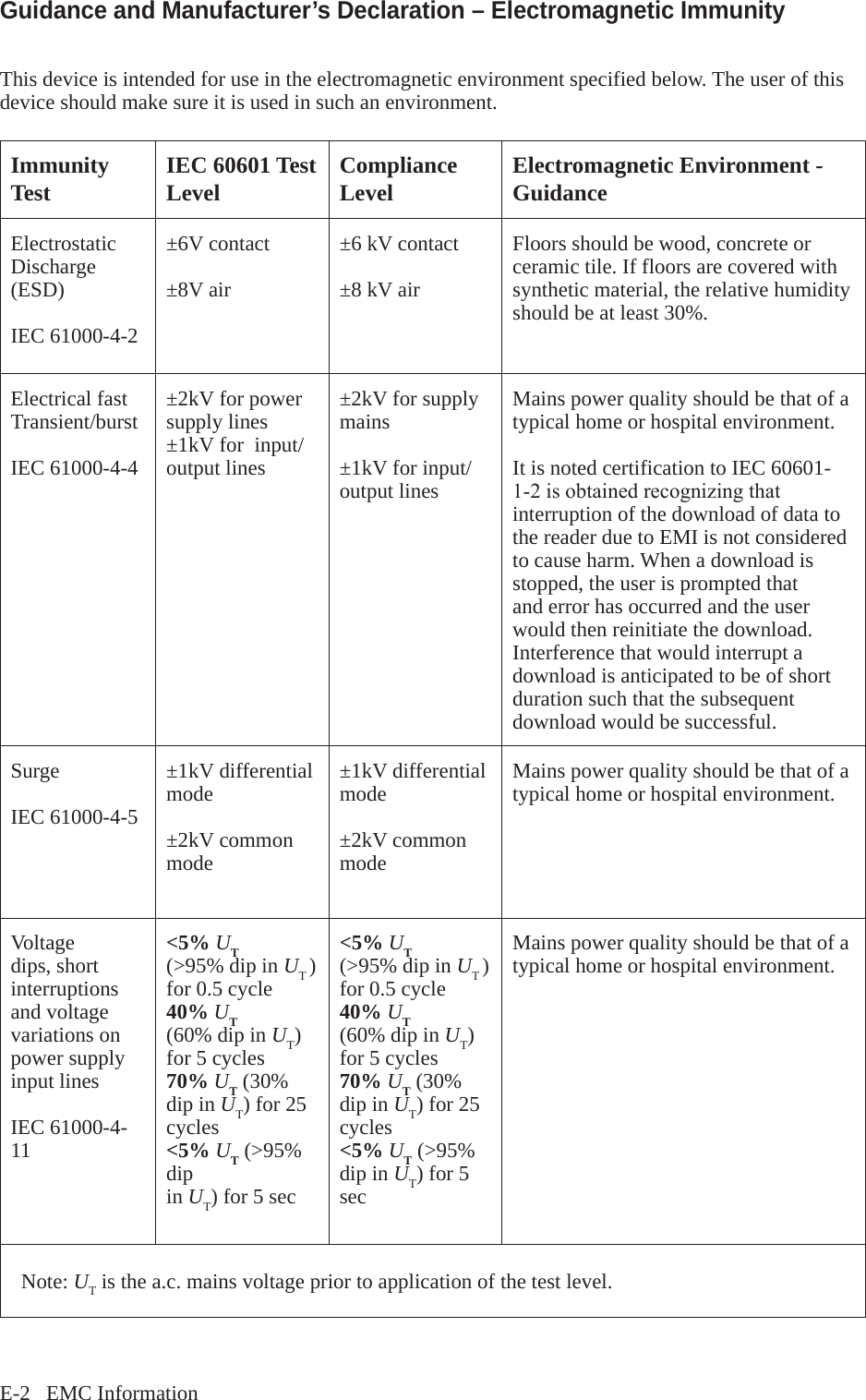
E-2   EMC InformationGuidance and Manufacturer’s Declaration – Electromagnetic ImmunityThis device is intended for use in the electromagnetic environment specified below. The user of this device should make sure it is used in such an environment.Immunity Test IEC 60601 Test Level Compliance Level Electromagnetic Environment - GuidanceElectrostatic Discharge (ESD) IEC 61000-4-2±6V contact±8V air±6 kV contact±8 kV airFloors should be wood, concrete or ceramic tile. If floors are covered with synthetic material, the relative humidity should be at least 30%.Electrical fast Transient/burstIEC 61000-4-4±2kV for power supply lines±1kV for  input/output lines±2kV for supply mains±1kV for input/output linesMains power quality should be that of a typical home or hospital environment.It is noted certification to IEC 60601-1-2isobtainedrecognizingthatinterruption of the download of data to the reader due to EMI is not considered to cause harm. When a download is stopped, the user is prompted that and error has occurred and the user would then reinitiate the download. Interference that would interrupt a download is anticipated to be of short duration such that the subsequent download would be successful.Surge IEC 61000-4-5±1kV differential mode±2kV common mode±1kV differential mode±2kV common modeMains power quality should be that of a typical home or hospital environment.Voltage dips, short interruptions and voltage variations on power supply input lines IEC 61000-4-11<5% UT(>95% dip in UT ) for 0.5 cycle40% UT(60% dip in UT) for 5 cycles70% UT (30% dip in UT) for 25 cycles<5% UT (>95% dip in UT) for 5 sec<5% UT(>95% dip in UT ) for 0.5 cycle40% UT(60% dip in UT) for 5 cycles70% UT (30% dip in UT) for 25 cycles<5% UT (>95% dip in UT) for 5 secMains power quality should be that of a typical home or hospital environment.   Note: UT is the a.c. mains voltage prior to application of the test level.
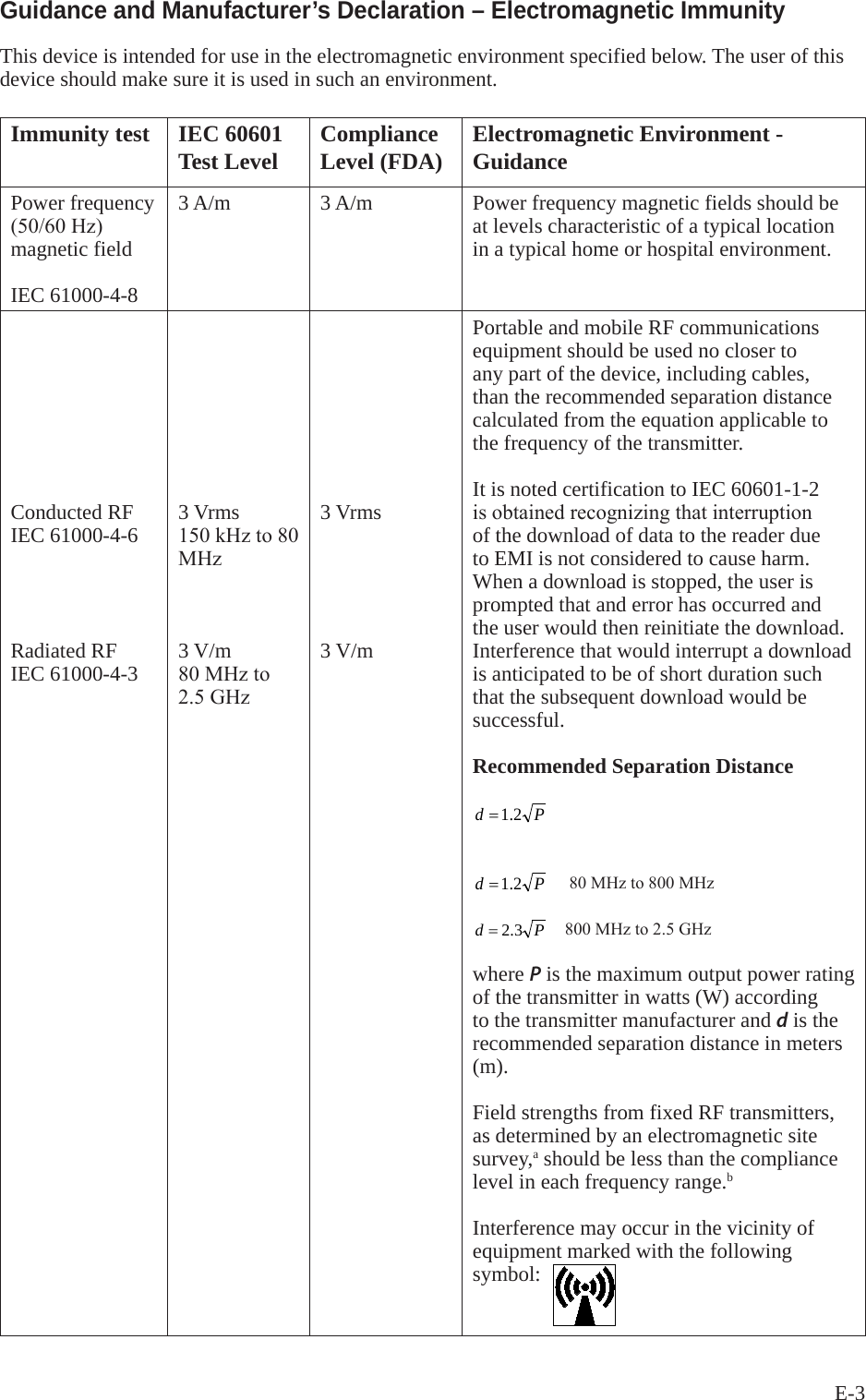
E-3Guidance and Manufacturer’s Declaration – Electromagnetic ImmunityThis device is intended for use in the electromagnetic environment specified below. The user of this device should make sure it is used in such an environment.Immunity test IEC 60601 Test Level Compliance Level (FDA) Electromagnetic Environment - GuidancePower frequency (50/60Hz) magnetic fieldIEC 61000-4-83 A/m 3 A/m Power frequency magnetic fields should be at levels characteristic of a typical location in a typical home or hospital environment.Conducted RFIEC 61000-4-6Radiated RFIEC 61000-4-33 Vrms150kHzto80MHz3 V/m80MHzto2.5GHz3 Vrms3 V/mPortable and mobile RF communications equipment should be used no closer to any part of the device, including cables, than the recommended separation distance calculated from the equation applicable to the frequency of the transmitter. It is noted certification to IEC 60601-1-2 isobtainedrecognizingthatinterruptionof the download of data to the reader due to EMI is not considered to cause harm. When a download is stopped, the user is prompted that and error has occurred and the user would then reinitiate the download. Interference that would interrupt a download is anticipated to be of short duration such that the subsequent download would be successful.Recommended Separation Distance      Pd 2.1=Pd 2.1=   80MHzto800MHz     Pd 3.2=   800MHzto2.5GHzwhere P is the maximum output power rating of the transmitter in watts (W) according to the transmitter manufacturer and d is the recommended separation distance in meters (m).Field strengths from fixed RF transmitters, as determined by an electromagnetic site survey,a should be less than the compliance level in each frequency range.b Interference may occur in the vicinity of equipment marked with the following symbol:
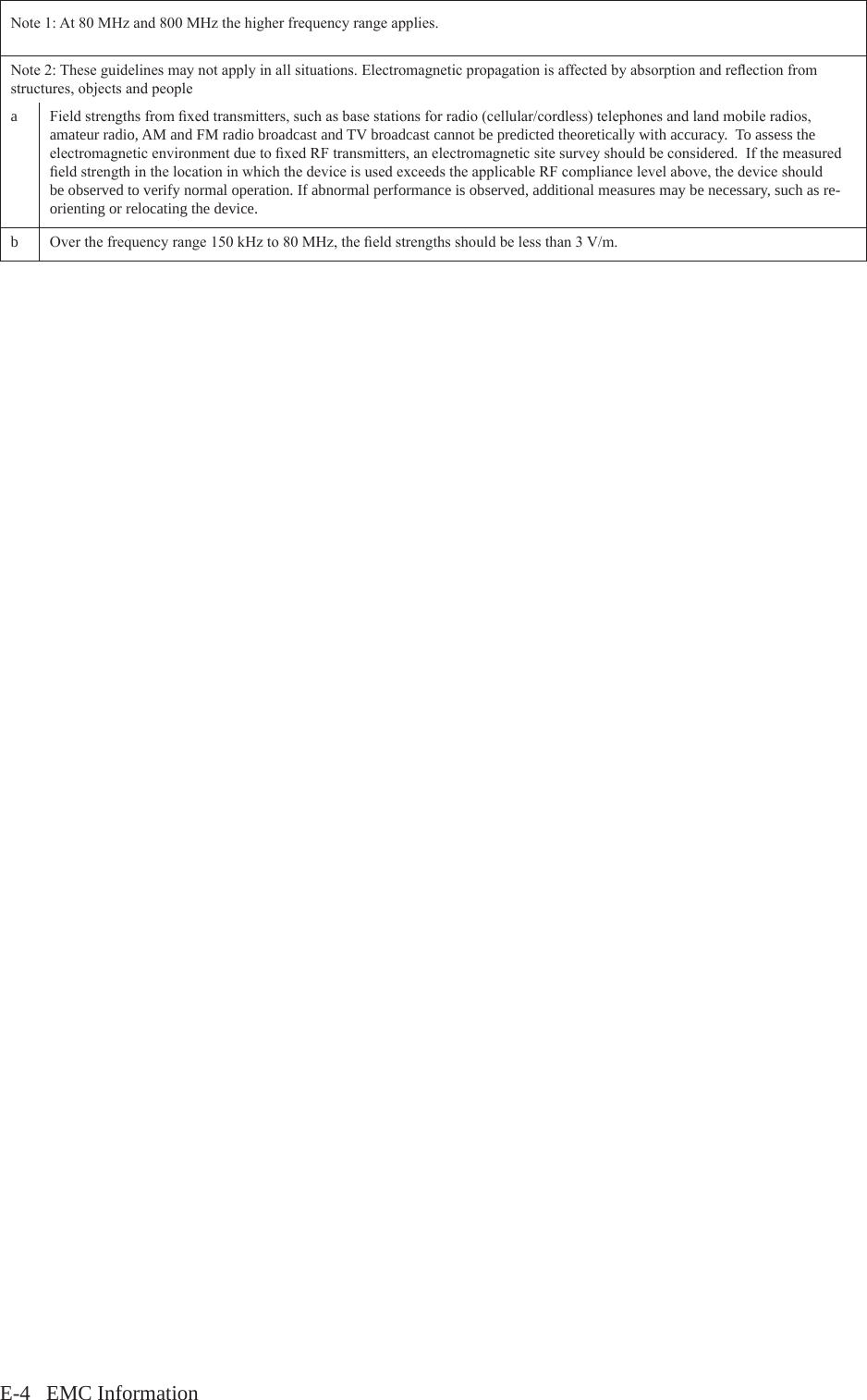
E-4   EMC InformationNote1:At80MHzand800MHzthehigherfrequencyrangeapplies.Note2:Theseguidelinesmaynotapplyinallsituations.Electromagneticpropagationisaffectedbyabsorptionandreectionfromstructures,objectsandpeopleaFieldstrengthsfromxedtransmitters,suchasbasestationsforradio(cellular/cordless)telephonesandlandmobileradios,amateur radio, AM and FM radio broadcast and TV broadcast cannot be predicted theoretically with accuracy.  To assess the electromagneticenvironmentduetoxedRFtransmitters,anelectromagneticsitesurveyshouldbeconsidered.IfthemeasuredeldstrengthinthelocationinwhichthedeviceisusedexceedstheapplicableRFcompliancelevelabove,thedeviceshouldbe observed to verify normal operation. If abnormal performance is observed, additional measures may be necessary, such as re-orienting or relocating the device.bOverthefrequencyrange150kHzto80MHz,theeldstrengthsshouldbelessthan3V/m.
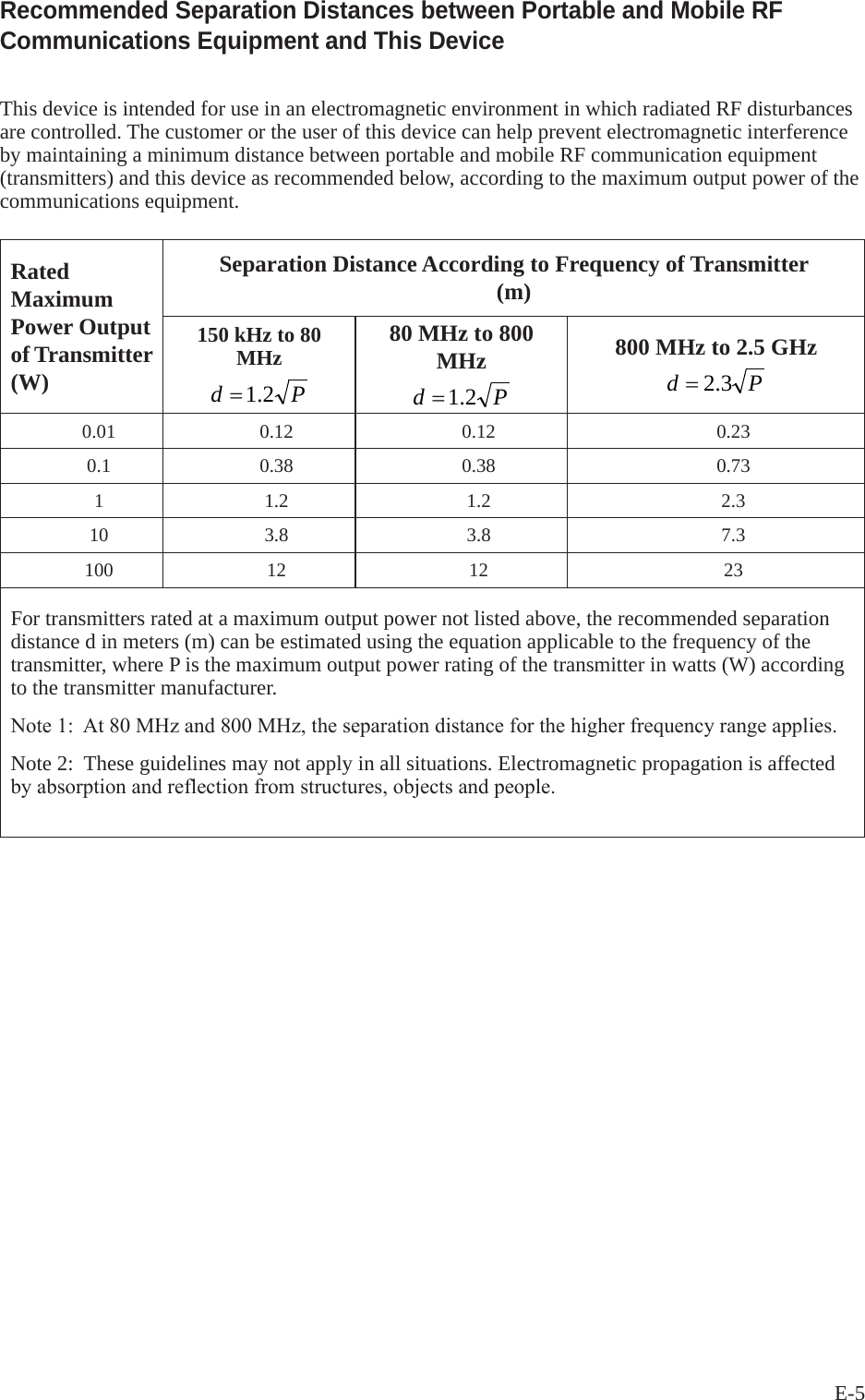
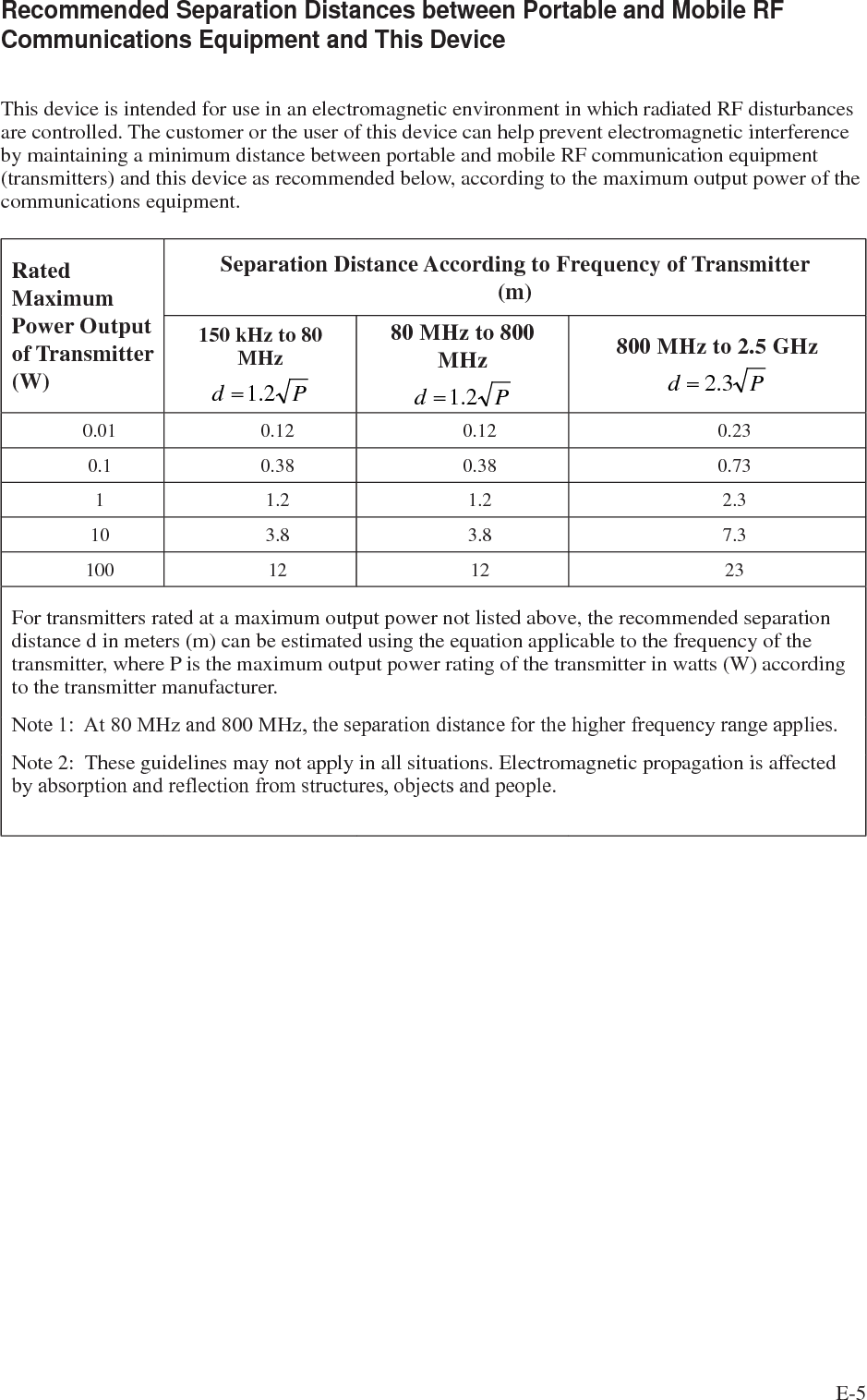
E-5Recommended Separation Distances between Portable and Mobile RF Communications Equipment and This DeviceThis device is intended for use in an electromagnetic environment in which radiated RF disturbances are controlled. The customer or the user of this device can help prevent electromagnetic interference by maintaining a minimum distance between portable and mobile RF communication equipment (transmitters) and this device as recommended below, according to the maximum output power of the communications equipment.Rated Maximum Power Output of Transmitter (W)Separation Distance According to Frequency of Transmitter(m)150 kHz to 80 MHzPd 2.1=80 MHz to 800 MHzPd 2.1=800 MHz to 2.5 GHzPd 3.2=0.01 0.12 0.12 0.230.1 0.38 0.38 0.731 1.2 1.2 2.310 3.8 3.8 7.3100 12 12 23For transmitters rated at a maximum output power not listed above, the recommended separation distance d in meters (m) can be estimated using the equation applicable to the frequency of the transmitter, where P is the maximum output power rating of the transmitter in watts (W) according to the transmitter manufacturer.Note1:At80MHzand800MHz,theseparationdistanceforthehigherfrequencyrangeapplies.Note 2:  These guidelines may not apply in all situations. Electromagnetic propagation is affected byabsorptionandreflectionfromstructures,objectsandpeople.
E-6
910-0025-01 Rev B JW 12/08/2006
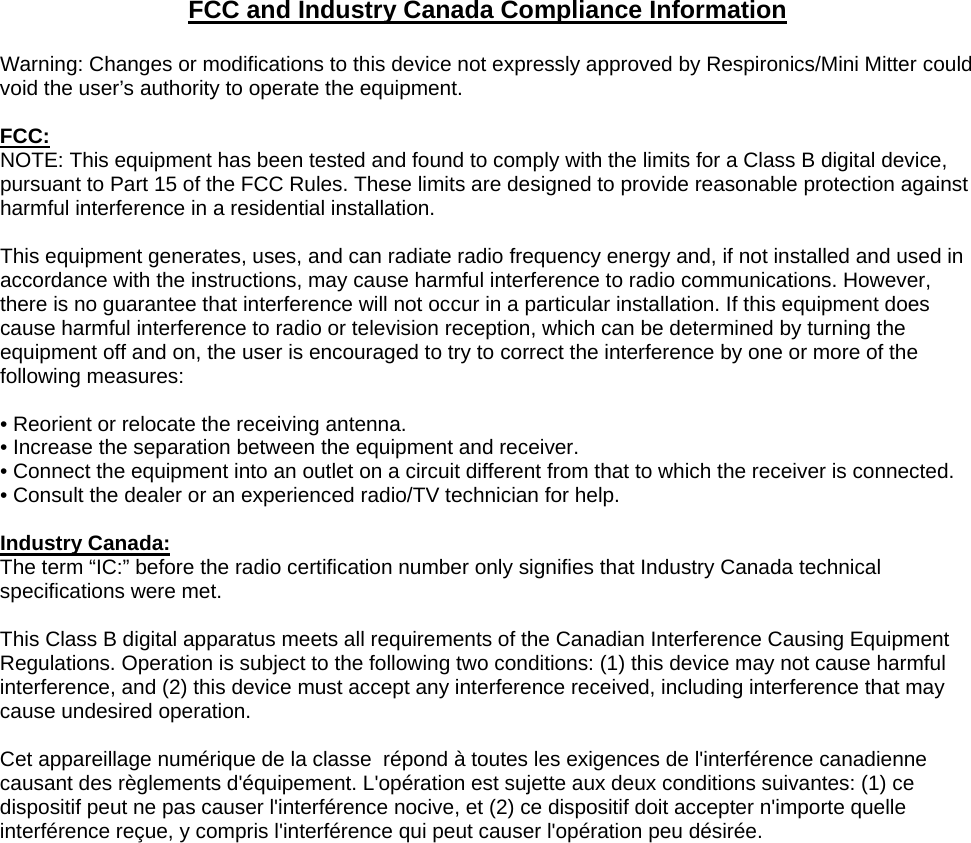
FCC and Industry Canada Compliance Information  Warning: Changes or modifications to this device not expressly approved by Respironics/Mini Mitter could void the user’s authority to operate the equipment.  FCC: NOTE: This equipment has been tested and found to comply with the limits for a Class B digital device, pursuant to Part 15 of the FCC Rules. These limits are designed to provide reasonable protection against harmful interference in a residential installation.  This equipment generates, uses, and can radiate radio frequency energy and, if not installed and used in accordance with the instructions, may cause harmful interference to radio communications. However, there is no guarantee that interference will not occur in a particular installation. If this equipment does cause harmful interference to radio or television reception, which can be determined by turning the equipment off and on, the user is encouraged to try to correct the interference by one or more of the following measures:  • Reorient or relocate the receiving antenna. • Increase the separation between the equipment and receiver. • Connect the equipment into an outlet on a circuit different from that to which the receiver is connected. • Consult the dealer or an experienced radio/TV technician for help.  Industry Canada: The term “IC:” before the radio certification number only signifies that Industry Canada technical specifications were met.  This Class B digital apparatus meets all requirements of the Canadian Interference Causing Equipment Regulations. Operation is subject to the following two conditions: (1) this device may not cause harmful interference, and (2) this device must accept any interference received, including interference that may cause undesired operation.  Cet appareillage numérique de la classe  répond à toutes les exigences de l'interférence canadienne causant des règlements d'équipement. L'opération est sujette aux deux conditions suivantes: (1) ce dispositif peut ne pas causer l'interférence nocive, et (2) ce dispositif doit accepter n'importe quelle interférence reçue, y compris l'interférence qui peut causer l'opération peu désirée.

Navigation menu