Mobile Communications BRM22050 Consumer Wideband Bi-Directional Booster User Manual Rev 1

Mobile Communications Inc. Consumer Wideband Bi-Directional Booster Users Manual Rev 1

Users Manual Rev 1

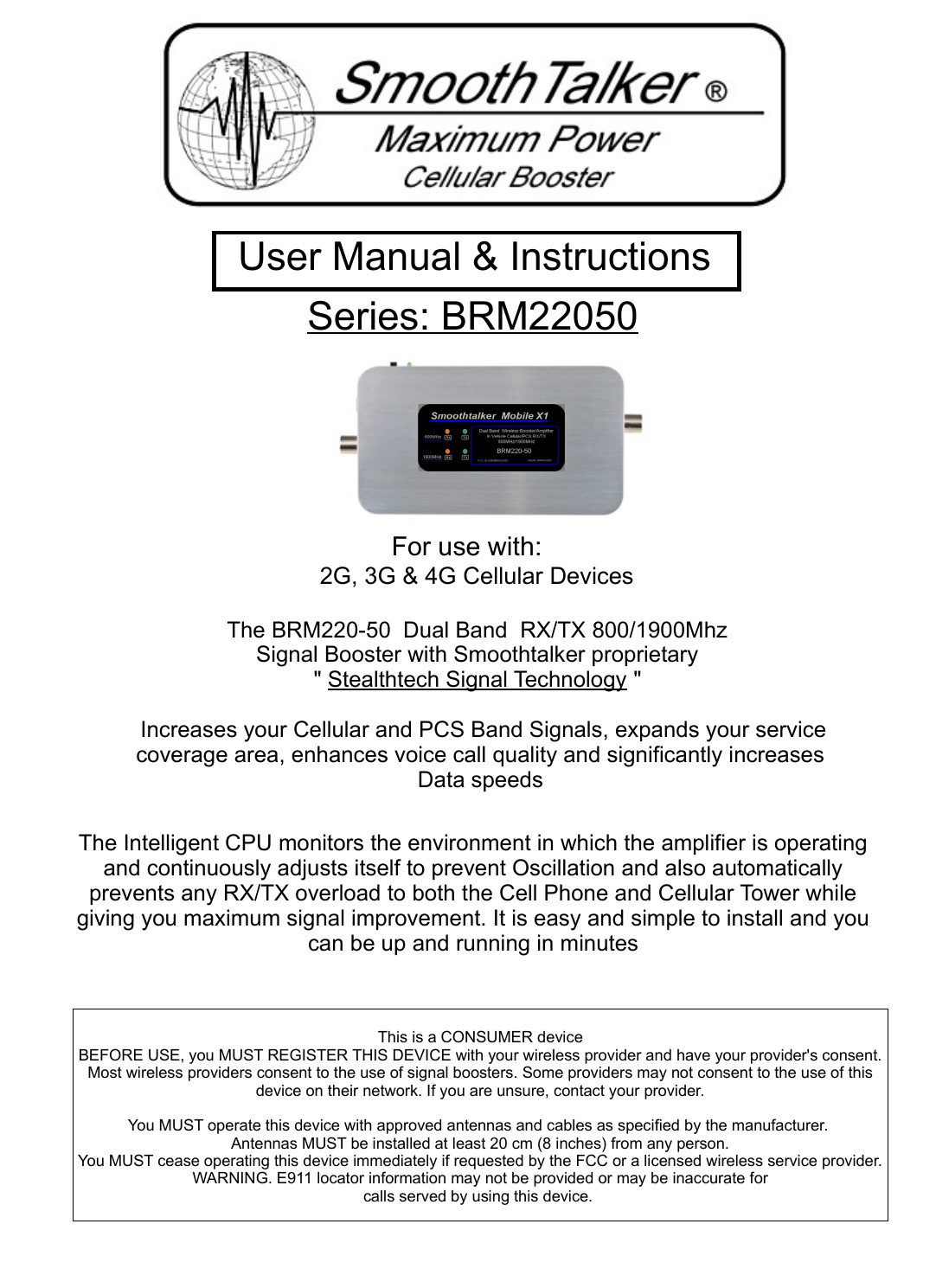
For use with:2G, 3G & 4G Cellular DevicesThe BRM220-50  Dual Band  RX/TX 800/1900Mhz Signal Booster with Smoothtalker proprietary " Stealthtech Signal Technology "  Increases your Cellular and PCS Band Signals, expands your service coverage area, enhances voice call quality and significantly increases Data speedsThe Intelligent CPU monitors the environment in which the amplifier is operating and continuously adjusts itself to prevent Oscillation and also automatically prevents any RX/TX overload to both the Cell Phone and Cellular Tower while giving you maximum signal improvement. It is easy and simple to install and you can be up and running in minutesSeries: BRM22050  User Manual & Instructions This is a CONSUMER deviceBEFORE USE, you MUST REGISTER THIS DEVICE with your wireless provider and have your provider's consent. Most wireless providers consent to the use of signal boosters. Some providers may not consent to the use of this device on their network. If you are unsure, contact your provider.You MUST operate this device with approved antennas and cables as specified by the manufacturer. Antennas MUST be installed at least 20 cm (8 inches) from any person.You MUST cease operating this device immediately if requested by the FCC or a licensed wireless service provider.WARNING. E911 locator information may not be provided or may be inaccurate forcalls served by using this device.
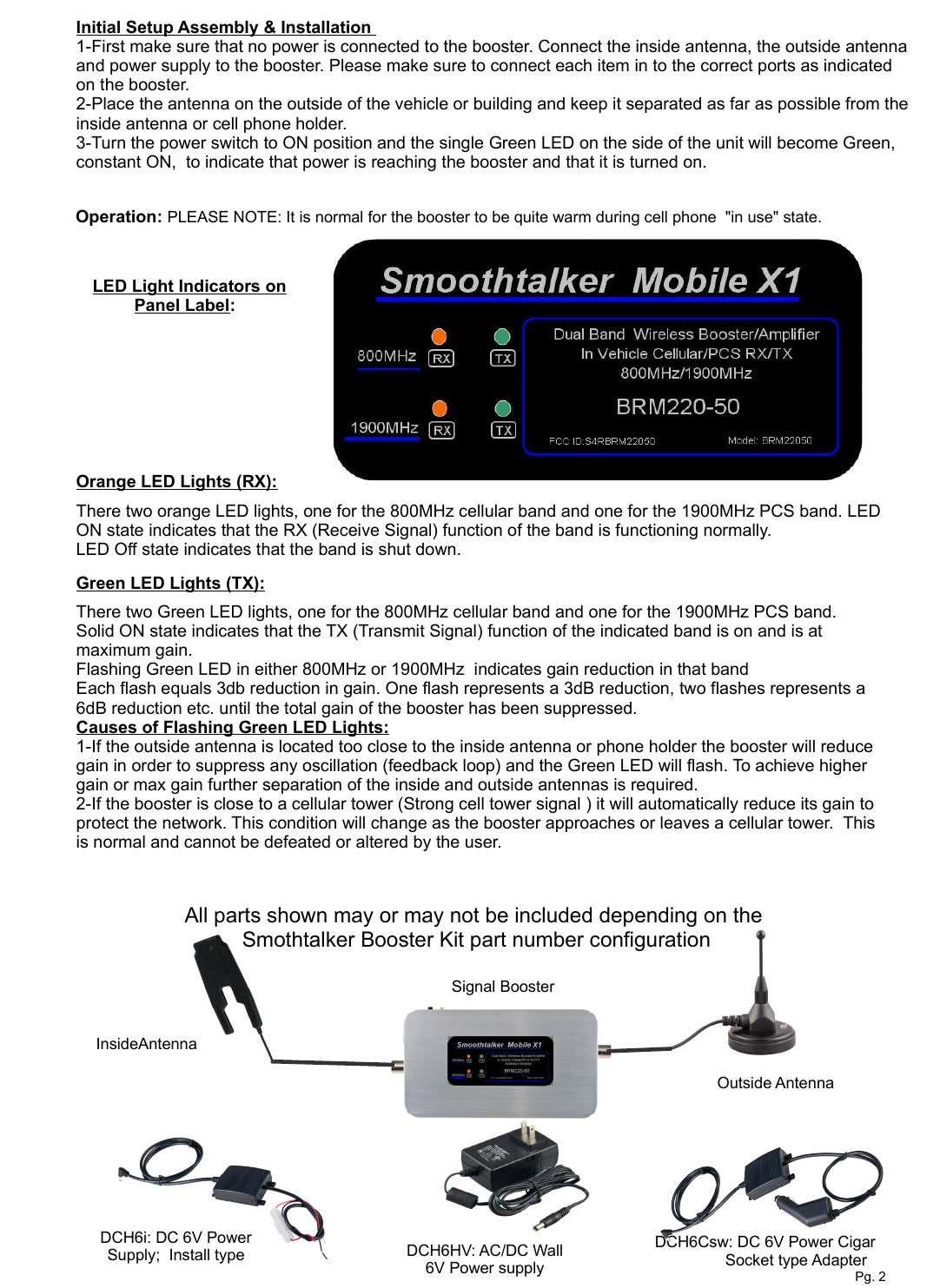
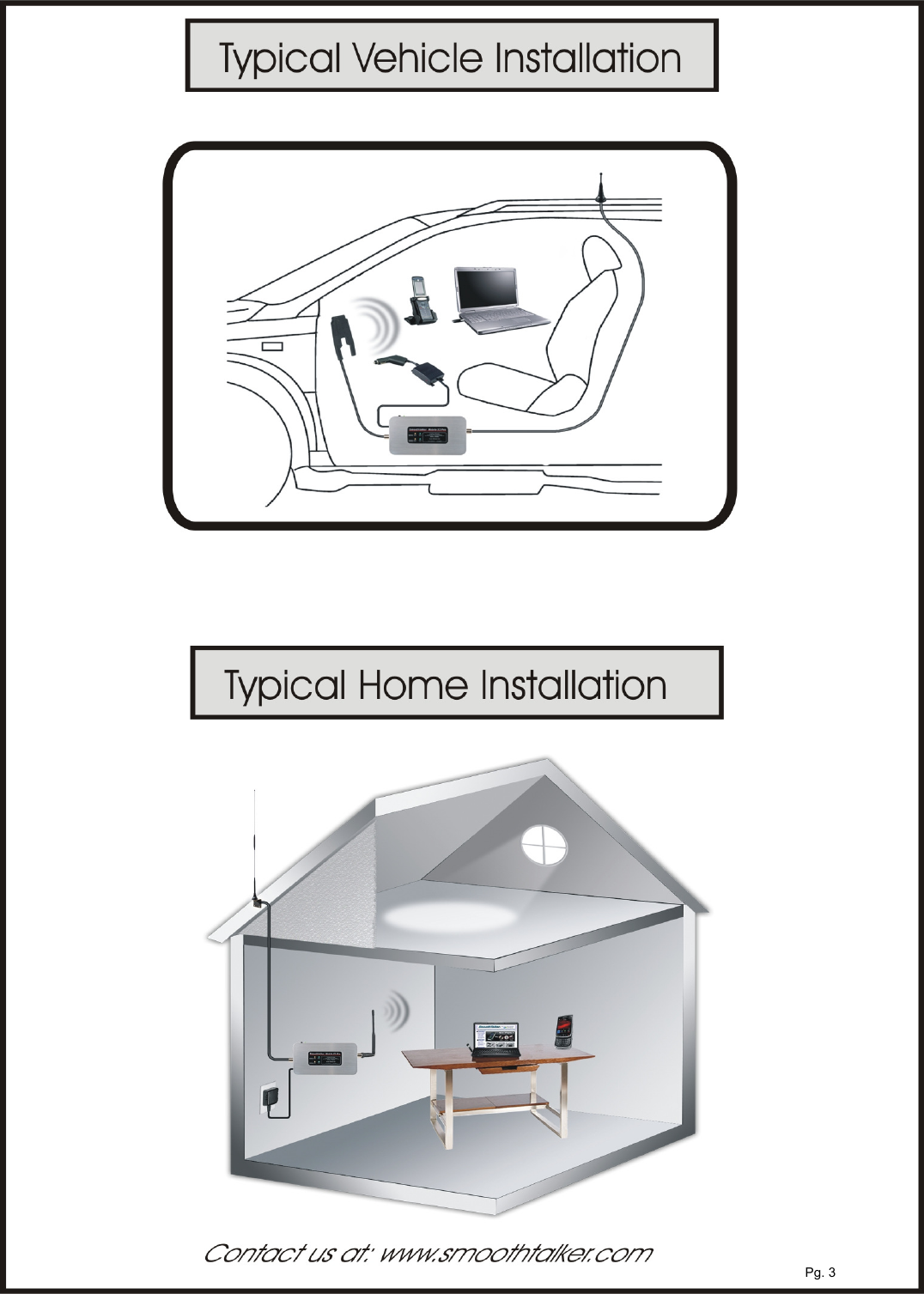
All parts shown may or may not be included depending on the Smothtalker Booster Kit part number configurationDCH6i: DC 6V Power Supply;  Install typeSignal BoosterOutside AntennaDCH6Csw: DC 6V Power Cigar                Socket type Adapter Initial Setup Assembly & Installation 1-First make sure that no power is connected to the booster. Connect the inside antenna, the outside antenna and power supply to the booster. Please make sure to connect each item in to the correct ports as indicated on the booster.2-Place the antenna on the outside of the vehicle or building and keep it separated as far as possible from the inside antenna or cell phone holder.3-Turn the power switch to ON position and the single Green LED on the side of the unit will become Green, constant ON,  to indicate that power is reaching the booster and that it is turned on. Operation: PLEASE NOTE: It is normal for the booster to be quite warm during cell phone  "in use" state.LED Light Indicators on Panel Label:  There two orange LED lights, one for the 800MHz cellular band and one for the 1900MHz PCS band. LED ON state indicates that the RX (Receive Signal) function of the band is functioning normally.LED Off state indicates that the band is shut down.There two Green LED lights, one for the 800MHz cellular band and one for the 1900MHz PCS band. Solid ON state indicates that the TX (Transmit Signal) function of the indicated band is on and is at maximum gain.Flashing Green LED in either 800MHz or 1900MHz  indicates gain reduction in that band Each flash equals 3db reduction in gain. One flash represents a 3dB reduction, two flashes represents a 6dB reduction etc. until the total gain of the booster has been suppressed. Causes of Flashing Green LED Lights: 1-If the outside antenna is located too close to the inside antenna or phone holder the booster will reduce gain in order to suppress any oscillation (feedback loop) and the Green LED will flash. To achieve higher gain or max gain further separation of the inside and outside antennas is required.2-If the booster is close to a cellular tower (Strong cell tower signal ) it will automatically reduce its gain to protect the network. This condition will change as the booster approaches or leaves a cellular tower.  This is normal and cannot be defeated or altered by the user.Green LED Lights (TX):Orange LED Lights (RX):Pg. 2DCH6HV: AC/DC Wall 6V Power supply InsideAntenna
Pg. 3
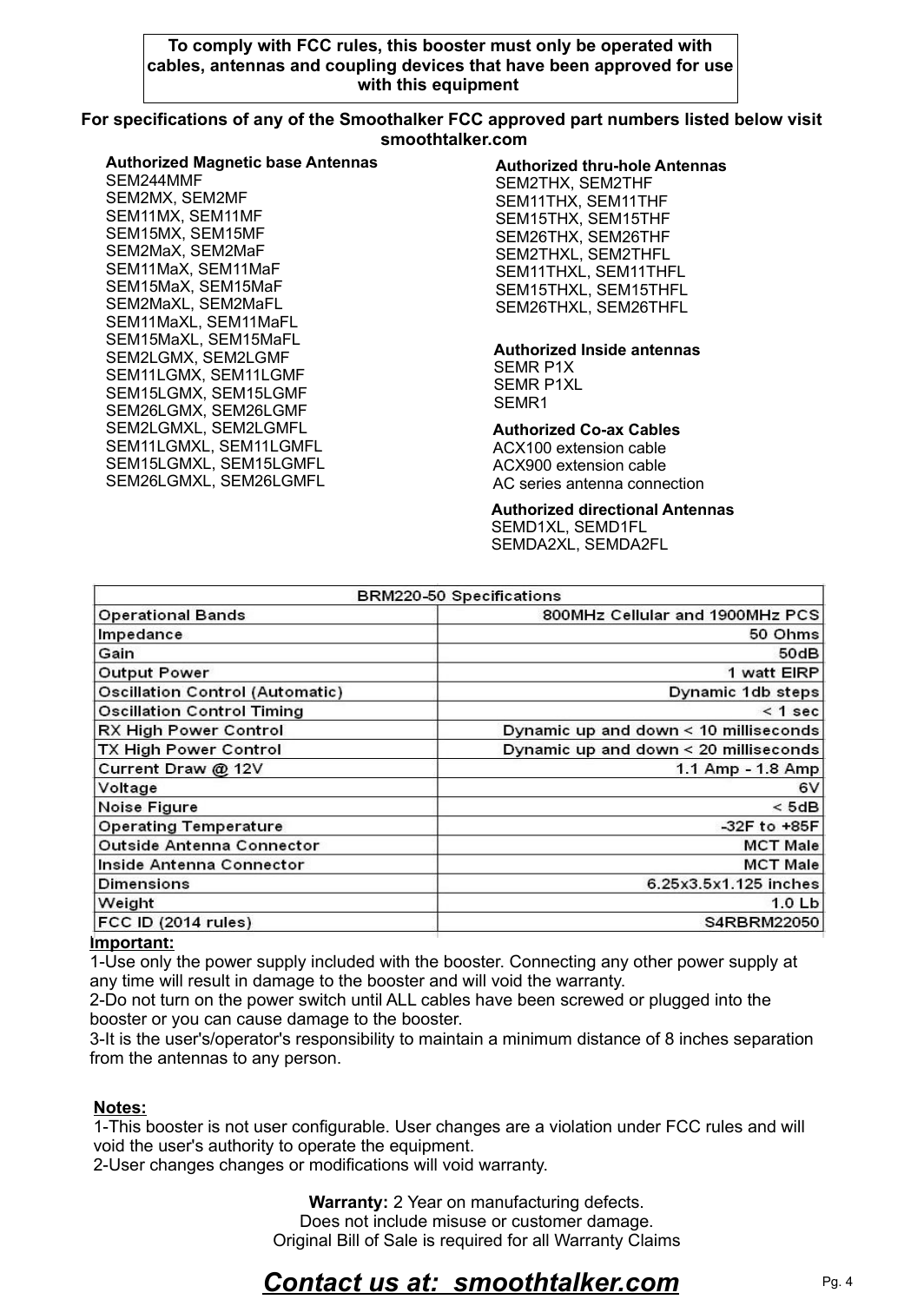
Warranty: 2 Year on manufacturing defects. Does not include misuse or customer damage. Original Bill of Sale is required for all Warranty Claims Contact us at:  smoothtalker.comImportant:1-Use only the power supply included with the booster. Connecting any other power supply at any time will result in damage to the booster and will void the warranty.2-Do not turn on the power switch until ALL cables have been screwed or plugged into the booster or you can cause damage to the booster.3-It is the user's/operator's responsibility to maintain a minimum distance of 8 inches separation from the antennas to any person.Pg. 4To comply with FCC rules, this booster must only be operated with cables, antennas and coupling devices that have been approved for use with this equipment Authorized Co-ax CablesACX100 extension cableACX900 extension cableAC series antenna connection For specifications of any of the Smoothalker FCC approved part numbers listed below visit smoothtalker.comAuthorized Magnetic base AntennasSEM244MMFSEM2MX, SEM2MFSEM11MX, SEM11MFSEM15MX, SEM15MFSEM2MaX, SEM2MaFSEM11MaX, SEM11MaFSEM15MaX, SEM15MaFSEM2MaXL, SEM2MaFLSEM11MaXL, SEM11MaFLSEM15MaXL, SEM15MaFLSEM2LGMX, SEM2LGMFSEM11LGMX, SEM11LGMFSEM15LGMX, SEM15LGMFSEM26LGMX, SEM26LGMFSEM2LGMXL, SEM2LGMFLSEM11LGMXL, SEM11LGMFLSEM15LGMXL, SEM15LGMFLSEM26LGMXL, SEM26LGMFLNotes:1-This booster is not user configurable. User changes are a violation under FCC rules and will void the user's authority to operate the equipment.2-User changes changes or modifications will void warranty. Authorized thru-hole AntennasSEM2THX, SEM2THFSEM11THX, SEM11THFSEM15THX, SEM15THFSEM26THX, SEM26THFSEM2THXL, SEM2THFLSEM11THXL, SEM11THFLSEM15THXL, SEM15THFLSEM26THXL, SEM26THFLAuthorized directional AntennasSEMD1XL, SEMD1FLSEMDA2XL, SEMDA2FLAuthorized Inside antennasSEMR P1XSEMR P1XLSEMR1

Navigation menu