Moletron MX100 Bluetooth Stereo Handsfree Speaker User Manual MX 100 manual

Moletron International Ltd. Bluetooth Stereo Handsfree Speaker MX 100 manual

manual

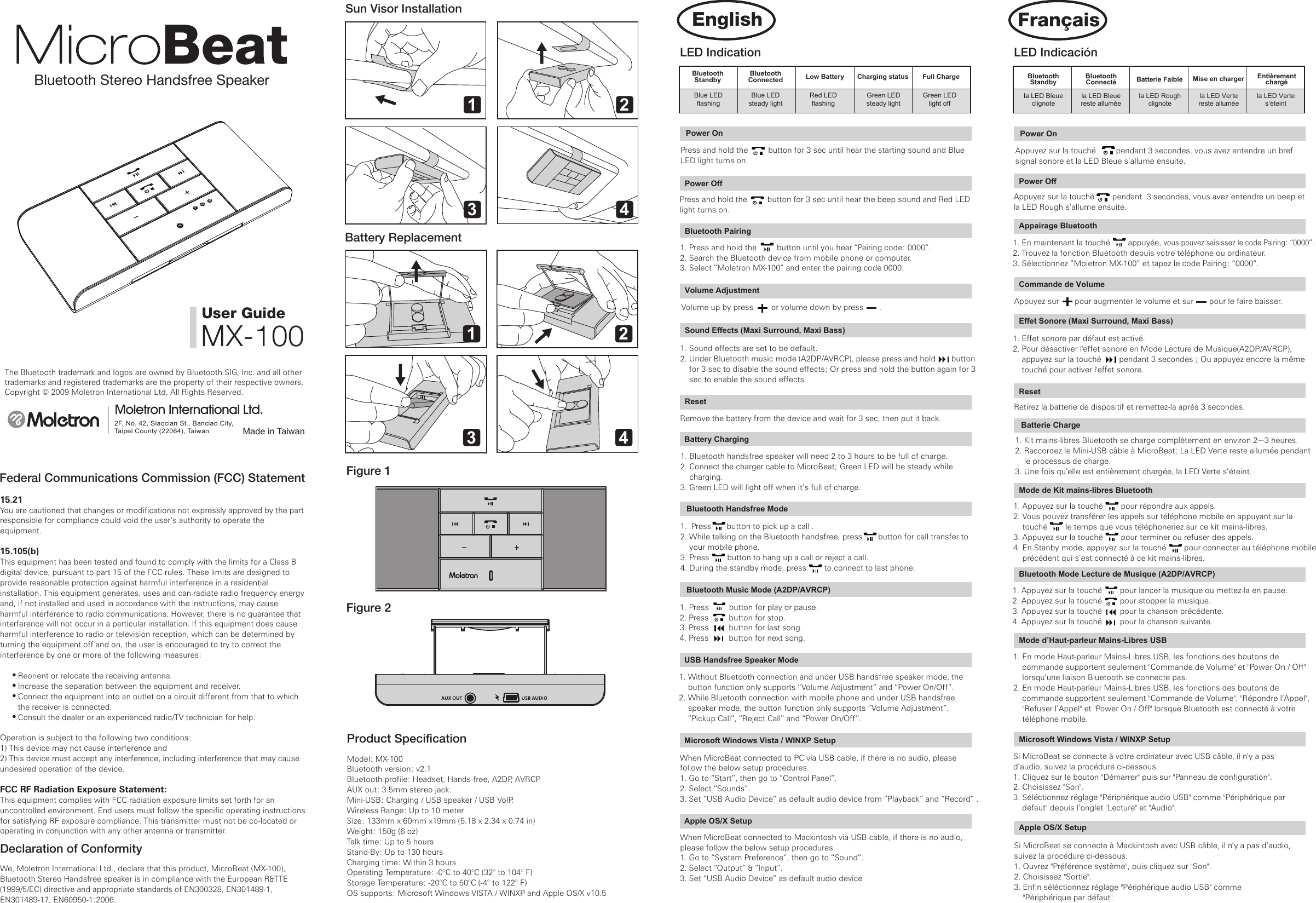
Bluetooth Stereo Handsfree SpeakerThe Bluetooth trademark and logos are owned by Bluetooth SIG, Inc. and all other trademarks and registered trademarks are the property of their respective owners.Copyright © 2009 Moletron International Ltd, All Rights Reserved.Made in TaiwanMoletron International Ltd.2F, No. 42, Siaocian St., Banciao City, Taipei County (22064), Taiwan User GuideMX-100Federal Communications Commission (FCC) Statement15.21You are cautioned that changes or modifications not expressly approved by the part responsible for compliance could void the user’s authority to operate the equipment.15.105(b)This equipment has been tested and found to comply with the limits for a Class B digital device, pursuant to part 15 of the FCC rules. These limits are designed to provide reasonable protection against harmful interference in a residential installation. This equipment generates, uses and can radiate radio frequency energy and, if not installed and used in accordance with the instructions, may cause harmful interference to radio communications. However, there is no guarantee that interference will not occur in a particular installation. If this equipment does cause harmful interference to radio or television reception, which can be determined by turning the equipment off and on, the user is encouraged to try to correct the interference by one or more of the following measures:        Reorient or relocate the receiving antenna.        Increase the separation between the equipment and receiver.        Connect the equipment into an outlet on a circuit different from that to which        the receiver is connected.        Consult the dealer or an experienced radio/TV technician for help.Operation is subject to the following two conditions:1) This device may not cause interference and2) This device must accept any interference, including interference that may cause undesired operation of the device.FCC RF Radiation Exposure Statement:This equipment complies with FCC radiation exposure limits set forth for an uncontrolled environment. End users must follow the specific operating instructions for satisfying RF exposure compliance. This transmitter must not be co-located or operating in conjunction with any other antenna or transmitter.Declaration of ConformityWe, Moletron International Ltd., declare that this product, MicroBeat (MX-100), Bluetooth Stereo Handsfree speaker is in compliance with the European R&TTE (1999/5/EC) directive and appropriate standards of EN300328, EN301489-1, EN301489-17, EN60950-1:2006. Sun Visor InstallationBattery ReplacementFigure 1Figure 2Product SpecificationModel: MX-100Bluetooth version: v2.1Bluetooth profile: Headset, Hands-free, A2DP, AVRCPAUX out: 3.5mm stereo jack.Mini-USB: Charging / USB speaker / USB VoIP.Wireless Range: Up to 10 meterSize: 133mm x 60mm x19mm (5.18 x 2.34 x 0.74 in) Weight: 150g (6 oz)Talk time: Up to 5 hours Stand-By: Up to 130 hoursCharging time: Within 3 hoursOperating Temperature: -0°C to 40°C (32° to 104° F)Storage Temperature: -20°C to 50°C (-4° to 122° F)OS supports: Microsoft Windows VISTA / WINXP and Apple OS/X v10.5LED IndicationBluetoothStandbyBluetoothConnected  Low Battery Charging status Full ChargeBlue LEDflashingBlue LEDsteady lightRed LEDflashingGreen LEDsteady lightGreen LEDlight offPower OnPress and hold the         button for 3 sec until hear the starting sound and Blue LED light turns on.Power OnAppuyez sur la touché         pendant 3 secondes, vous avez entendre un bref signal sonore et la LED Bleue s’allume ensuite.Power OffPress and hold the         button for 3 sec until hear the beep sound and Red LED light turns on.Power OffAppuyez sur la touché        pendant  3 secondes, vous avez entendre un beep et la LED Rough s’allume ensuite. Bluetooth Pairing1. Press and hold the         button until you hear “Pairing code: 0000”.2. Search the Bluetooth device from mobile phone or computer.3. Select ”Moletron MX-100” and enter the pairing code 0000. Appairage Bluetooth1. En maintenant la touché        appuyée, vous pouvez saisissez le code Pairing: “0000”.2. Trouvez la fonction Bluetooth depuis votre téléphone ou ordinateur.3. Sélectionnez ”Moletron MX-100” et tapez le code Pairing: ”0000”.Sound Effects (Maxi Surround, Maxi Bass)1. Sound effects are set to be default.2. Under Bluetooth music mode (A2DP/AVRCP), please press and hold       button     for 3 sec to disable the sound effects; Or press and hold the button again for 3     sec to enable the sound effects. Volume AdjustmentVolume up by press        or volume down by press       .Commande de VolumeAppuyez sur       pour augmenter le volume et sur       pour le faire baisser. Effet Sonore (Maxi Surround, Maxi Bass)1. Effet sonore par défaut est activé.2. Pour désactiver l'effet sonore en Mode Lecture de Musique(A2DP/AVRCP),     appuyez sur la touché        pendant 3 secondes ; Ou appuyez encore la même     touché pour activer l'effet sonore.1 23 41 23 4ResetRemove the battery from the device and wait for 3 sec, then put it back.Battery Charging 1. Bluetooth handsfree speaker will need 2 to 3 hours to be full of charge.2. Connect the charger cable to MicroBeat; Green LED will be steady while     charging.3. Green LED will light off when it’s full of charge.1. Press         button for play or pause.2. Press         button for stop.3. Press         button for last song. 4. Press         button for next song.1. Press       button to pick up a call .2. While talking on the Bluetooth handsfree, press       button for call transfer to     your mobile phone.3. Press        button to hang up a call or reject a call.4. During the standby mode, press        to connect to last phone.     Bluetooth Handsfree Mode  Bluetooth Music Mode (A2DP/AVRCP)1. Without Bluetooth connection and under USB handsfree speaker mode, the     button function only supports “Volume Adjustment” and “Power On/Off”.2. While Bluetooth connection with mobile phone and under USB handsfree     speaker mode, the button function only supports “Volume Adjustment”,     “Pickup Call”, “Reject Call” and “Power On/Off”.USB Handsfree Speaker ModeWhen MicroBeat connected to PC via USB cable, if there is no audio, please follow the below setup procedures.1. Go to “Start”, then go to “Control Panel”.2. Select “Sounds”.3. Set “USB Audio Device” as default audio device from “Playback” and “Record” .Microsoft Windows Vista / WINXP SetupWhen MicroBeat connected to Mackintosh via USB cable, if there is no audio, please follow the below setup procedures.1. Go to “System Preference”, then go to “Sound”.2. Select “Output” & “Input”.3. Set “USB Audio Device” as default audio deviceApple OS/X SetupLED IndicaciónBluetoothStandbyBluetoothConnecté Batterie Faible Mise en charger Entièrementchargéla LED Bleueclignotela LED Bleuereste alluméela LED Roughclignotela LED Vertereste alluméela LED Vertes’éteint1. Appuyez sur la touché        pour répondre aux appels.2. Vous pouvez transférer les appels sur téléphone mobile en appuyant sur la     touché        le temps que vous téléphoneriez sur ce kit mains-libres.3. Appuyez sur la touché        pour terminer ou refuser des appels.4. En Stanby mode, appuyez sur la touché        pour connecter au téléphone mobile     précédent qui s’est connecté à ce kit mains-libres.  ResetRetirez la batterie de dispositif et remettez-la après 3 secondes. Batterie Charge1. Kit mains-libres Bluetooth se charge complètement en environ 2~3 heures.2. Raccordez le Mini-USB câble à MicroBeat; La LED Verte reste allumée pendant     le processus de charge.3. Une fois qu’elle est entièrement chargée, la LED Verte s’éteint. Si MicroBeat se connecte à votre ordinateur avec USB câble, il n’y a pas d’audio, suivez la procédure ci-dessous. 1. Cliquez sur le bouton "Démarrer" puis sur "Panneau de configuration".2. Choisissez "Son". 3. Séléctionnez réglage "Périphérique audio USB" comme "Périphérique par     défaut" depuis l’onglet "Lecture" et "Audio".Microsoft Windows Vista / WINXP Setup1. En mode Haut-parleur Mains-Libres USB, les fonctions des boutons de     commande supportent seulement "Commande de Volume" et "Power On / Off"     lorsqu’une liaison Bluetooth se connecte pas.2. En mode Haut-parleur Mains-Libres USB, les fonctions des boutons de     commande supportent seulement "Commande de Volume", "Répondre l’Appel",     "Refuser l’Appel" et "Power On / Off" lorsque Bluetooth est connecté à votre     téléphone mobile.  Mode d’Haut-parleur Mains-Libres USB    Mode de Kit mains-libres Bluetooth 1. Appuyez sur la touché        pour lancer la musique ou mettez-la en pause. 2. Appuyez sur la touché        pour stopper la musique. 3. Appuyez sur la touché        pour la chanson précédente. 4. Appuyez sur la touché        pour la chanson suivante.Bluetooth Mode Lecture de Musique (A2DP/AVRCP) Si MicroBeat se connecte à Mackintosh avec USB câble, il n’y a pas d’audio, suivez la procédure ci-dessous. 1. Ouvrez "Préférence système", puis cliquez sur "Son".2. Choisissez "Sortie". 3. Enfin séléctionnez réglage "Périphérique audio USB" comme     "Périphérique par défaut".Apple OS/X SetupFrançaisEnglish(正面)說明書尺寸 420x297mm顏色:黑色
(內面)說明書尺寸 420x297mm顏色:黑色Drücken Sie die Taste         und halten diese 3 Sekunden lang fest, bis Sie den Startton hören und die blaue LED sich einschaltet.AccensionePremere e tenere premuto per 3 secondi il tasto          fino a quando si sente il segnale acustico di avvio e il LED blu si accende.Encender la máquinaMantenga apretado el botón        por tres segundos hasta escuchar el sonido de encender la máquinay el LED brillar azul.按住      按鍵三秒後, 會聽到開機嗶聲和藍色LED燈亮起.1. 按住        按鍵後,你會聽到Pairing code: 0000。2. 透過手機或電腦搜尋藍牙裝置3. 選擇Moletron MX-100”, 輸入配對碼0000。AusschaltenDrücken Sie die Taste          und halten diese 3 Sekunden lang fest, bis Sie den Piepton hören und die rote LED sich einschaltet.SpegnimentoPremere e tenere premuto per 3 secondi il tasto          fino a quando si sente il segnale acustico e il LED rosso si accende. Apagar la máquinaMantenga apretado el botón        por tres segundos, hasta escuchar el sonido de apagar la máquina y el LED rojo brilla azul.關機按住      按鍵三秒後, 會聽到關機嗶聲和紅色LED燈亮起. Bluetooth-Kopplung1. Drücken Sie die Taste       und halten diese fest, bis Sie “Pairing code: 0000” hören.2. Lassen Sie Ihren Handy oder Ihr Computer nach dem Bluetooth Gerät suchen.3. Wählen Sie ”Moletron MX-100” aus und geben Sie das Passwort 0000 ein. Abbinamento Bluetooth1. Premere e tenere premuto il tasto       fino a quando non si sente     “Pairing code: 0000”.2. Con il vostro cellulare o computer "trovare" il dispositivo Bluetooth.3. Selezionare “Moletron MX-100” e inserire il codice di abbinamento 0000 Apareamiento de Bluetooth1. Mantenga apretado el botón        hasta escuchar “ código de apareamiento: 0000”.2. Busque el dispositivo de Bluetooth a través del teléfono móvil o de la     computadora.3. Seleccione ”Moletron MX-100” y entre el código de apareamiento 0000. 藍牙配對Die Lautstärke einstellenDrücken Sie die Taste      , um die Lautstärke zu erhöhen oder die Taste      , um die Lautstärke zu verrigern..Regolazione del volumeAumentare il volume premendo       o diminuire il volume premendo      . Ajuste el volumenPara aumentar el volumen apriete el botón       , y para disminuir apriete el botón       .  調整音量調整大聲,請按     ,調整小聲, 請按    。 Soundeffekt (Maxi Surround, Maxi Bass)1. Die Voreinstellung für den Soundeffekt ist Ein. 2. Im Bluetooth Musikmodus (A2DP/AVRCP), drücken Sie bitte die Taste       und     halten diese 3 Sekunde lang fest, um den Soundeffekt zu deaktivieren, oder     drücken Sie nochmal die Taste und halten diese 3 Sekunde lang fest, um den     Soundeffekt zu aktivieren.Effetti sonori (Maxi Surround, Maxi Bass)1. Per impostazione predefinita gli effetti sonori sono attivati. 2. In modalità musica del dispositivo Bluetooth (A2DP/AVRCP), premere e tenere     premuto per 3 secondi il tasto       per disattivare gli effetti sonori; o premere     e tenere premuto nuovamente per 3 secondi il tasto per attivare gli effetti sonori.Efecto sonoro (Maxi Surround, Maxi Bass)1.  MicroBeat está programado el modo de rearce del efecto sonoro en Bluetooth.2.  En Bluetooth modo musical (A2DP/AVRCP), apriete y sostenga el botón      por 3 segundos para inhabilitar el efecto sonoro;o apriete y sostenga otra      vez el botón       por 3 segundos para habilitar nuevamente.音效增強 (Maxi Surround, Maxi Bass)1. MicroBeat預設藍牙音效增強模式2. 如欲關閉音效增強, 在藍牙音樂模式(A2DP/AVRCP)下, 請按住         按鍵3秒  關閉音效; 或再按住        按鍵3秒開啟音效增強.Bluetoothin StandbyBluetoothconnessoBatteria quasiscarica Stato carica Batteria caricaLED blulampeggianteLED blua luce fissaLED rossolampeggianteLED verdea luce fissaLED verdespentoLED-AnzeigeBluetoothStandbyBluetoothverbunden Batterieschwach Ladezustand BatterieaufgeladenBlaue LED blinkt Blaue LEDleuchtet konstant Rote LED blinkt Grüne LEDleuchtet konstant Grüne LED ausEinschalten1. Drücken Sie die Taste        , für Wiedergabe oder Pause.2. Drücken Sie die Taste         für Stopp.3. Drücken Sie die Taste         , um das vorherige Lied zu spielen. 4. Drücken Sie die Taste         , um das nächste Lied zu spielen.1. Drücken Sie die Taste        , um Anrufe oder weitergeleitete Anrufe     entgegenzunehmen.2. Während Sie über die Bluetooth Freisprecheinrichtung sprechen, drücken Sie     die Taste        , um den Anruf auf Ihr Handy zu übertragen.3. Drücken Sie die Taste         , um aufzulegen oder um einen Anruf abzuweisen.4. Im Standby-Modus drücken Sie die Taste        , um die Verbindung mit dem     zuletzt verbundenen Handy wiederherzustellen.  Einstellungen  zurücksetzen Entfernen Sie die Batterie aus dem Gerät und warten Sie für 3 Sekunde, dann legen Sie die Batterie wieder ein.Aufladen der Batterie1. Die Bluetooth Freisprecheinrichtung braucht 2 -3 Stunden, um vollständig     aufgeladen zu sein.2. Verbinden Sie das Ladekabel mit MicroBeat, die grüne LED leuchtet konstant     während des Ladevorgangs.3. Die grüne LED erlischt, wenn die Batterie vollständig aufgeladen ist. Nachdem MicroBeat mit dem PC über das USB-Kabel verbunden ist, falls kein Ton zu hören ist, folgen Sie bitte der unten stehenden Einrichtungsanleitung.1. Gehen Sie auf „Start“ und dann auf „Systemsteuerung“.2. Wählen Sie „Sounds und Audiogeräte“ und dann „Audio“ aus.3. Unter „Klangwiedergabe“ und „Aufnahme“ wählen Sie „USB-Audiogerät“ als     bevorzugtes Gerät aus. Einrichtung unter Microsoft Windows Vista / WINXP    Bluetooth FreisprechmodusBluetooth Musikmodus (A2DP/AVRCP) Nachdem MicroBeat mit dem Macintosh-Rechner über das USB-Kabel verbunden ist, falls kein Ton zu hören ist, folgen Sie bitte der unten stehenden Einrichtungsanleitung.1. Gehen Sie auf „Systemeinstellungen und dann auf „Ton“.2. Wählen Sie „Eingabe“ und „Ausgabe“ aus.3. Wählen Sie „USB-Audiogerät“ als bevorzugtes Gerät aus. Einrichtung unter Apple OS/X1. Im USB Freisprechmodus und ohne Bluetooth-Verbindung werden nur die     Tastenfunktionen „Lautstärke einstellen“ und „Ein/Ausschalten“ unterstützt.2. Im USB Freisprechmodus und mit Bluetooth-Verbindung zum Handy werden     nur die Tastenfunktionen „Lautstärke einstellen“, „Anruf entgegennehmen“,     „Anruf abweisen“ und „Ein/Ausschalten“ unterstützt.USB Freisprech-Lautsprecher ModusIndicazione LED1. Premere il tasto        per avviare la riproduzione o per mettere in pausa.2. Premere il tasto        per arrestare la riproduzione.3. Premere il tasto        per riprodurre il brano immediatamente precedente.4. Premere il tasto        per riprodurre il brano successivo.1. Premere il tasto        per rispondere ad una chiamata.2. Mentre si parla utilizzando il vivavoce Bluetooth, premere il tasto        per     trasferire la chiamata sul vostro cellulare.3. Premere il tasto         per terminare o rifiutare una chiamata.4. In modalità standby premere         per collegare il dispositivo all’ultimo telefono     cellulare con il quale è stato utilizzato. Ripristinare le impostazioni predefinite Rimuovere la batteria dal dispositivo e attendere 3 secondi, prima di inserirla nuovamente.Ricarica della batteria 1. L’altoparlante vivavoce Bluetooth impiega circa 2-3 ore per ricaricarsi     completamente.2. Collegare il cavo per la ricarica a MicroBeat, il LED verde si accende con luce     fissa durante la ricarica.3. Il LED verde si spegne, quando la carica è completata.1. Senza connessione Bluetooth e in modalità vivavoce USB, i tasti supportano     solo le funzioni “Regolazione del volume” e “Accensione/Spegnimento”2. Durante il collegamento Bluetooth con il telefono cellulare e in modalità     vivavoce USB, i tasti supportano solo le funzioni “Regolazione del volume”,     “Ricevere chiamata”, “Rifiutare chiamata” e “Accensione/Spegnimento.” Modalità altoparlante vivavoce USBQuando MicroBeat è collegato al PC tramite cavo USB, se non c'è nessun suono, si prega di seguire la seguente procedura di impostazione.1. Andare a Start > Pannello di controllo.2. Selezionare “Suoni e periferiche audio” e fare clic sulla schermata “Audio”.3. Impostare “USB Audio Device” come periferica predefinita per “Riproduzione     suoni” e “Registrazione suoni”. Impostazioni per Microsoft Windows Vista / WINXP    Modalità vivavoce BluetoothModalità riproduzione musica (A2DP/AVRCP) con Bluetooth Quando MicroBeat è collegato al Macintosh tramite cavo USB, se non c'è nessun suono, si prega di seguire la seguente procedura di impostazione.1. Andare a “Prefereze di sistema” e poi a “Suono”.2. Selezionare “Uscita e Entrata”.3. Impostare “USB Audio Device” come periferica audio predefinita.  Impostazioni per Apple OS/XIndicación de LEDBluetootha la EsperaBluetoothConectado Batería Baja Estado de Carga Carga CompletaLED azulse destellaLED azulconstanteLED rojase destellaLED verdeconstanteLED verdeapagado1. Para contestar el teléfono, apriete el botón        .2. Durante la conversación por mano libre se puede transmitir la llamada al     teléfono móvil apretando el botón        .3. Para finalizar la llamada o rechazar una llamada, apriete el botón         .4.  En modo de espera, apriete el botón"       para re-conectar la llamada.Reinstalación del sistemaRetire la batería del modulo, después de 3 segundos vuelva a instalar.Carga de la batería1. Se necesita aproximadamente 2~3 horas para una carga completa de la batería.2. Conecte el cable Mini-USB al MicroBeat para la carga, quedará encendido el     LED verde.3. El LED verde se apagará una vez la carga se completa.1. Bajo el modo USB manos libres de altavoz sin conectar el Bluetooth, el botón     de función sólo puede realizar ajuste del volumen, encender y apagar la máquina.2. Bajo el modo USB manos libres de altavoz, y el Bluetooth conectado con el     teléfono móvil, el botón de función sólo puede realizar ajuste del volumen,     recibir y rechazar llamada, encender y apagar la máquina.Modo Parlante USB Manos Libres.Conecta el MicroBeat a la computadora personal a través del cable USB, si no hay sonido, sigue los siguientes pasos:1. Vaya a “inicio”, luego al “panel de control”.2. Seleccione “sonidos”.3. Instale selección preferente en "reproducir" y "grabar", instale "dispositivo de     efecto sonoro de USB" como dispositivo de preinstalación.Instalación de Microsoft Windows Vista / WINXP    Bluetooth de modo de mano libre1. Apriete el botón         para reproducir o pausar.2. Apriete el botón         para parar.3. Apriete el botón         para retroceder. 4. Apriete el botón         para avanzar. Bluetooth Modo Musical (A2DP/AVRCP) Despúes de conectar el MicroBeat, conecta con Mackingtosh vía el cable del USB, si no hay sonido, siga por favor los siguientes procedimientos de instalación.1. Vaya a la selección de “sistema”,  después seleccione el“sonido”.2. Seleccione la “salida” y “entrada”.3. instale "dispositivo de efecto sonoro de USB" como dispositivo de preinstalación. Instalación de Apple OS/XLED 狀態顯示藍牙待機 藍牙連結 低電源 充電中 充電完成藍色LED燈 閃爍 藍色LED燈 恆亮 紅色LED燈 閃爍 綠色LED燈 恆亮 綠色LED燈 熄滅開機1. 接聽電話, 請按      按鍵。2. 使用藍牙免持通話中時,可按      轉接到手機。3. 掛電話或是拒接電話,請按       按鍵。4. 在待機模式時, 請按        連結到最近連結過手機。1. 播放或暫停, 請按        按鍵.2. 停止, 請按        按鍵.3. 上一首歌, 請按         按鍵. 4. 下一首歌, 請按         按鍵.請把電池從主機取出, 等候3秒後再安裝回去.系統重置電池充電1. 藍牙免持充電大約需要2~3個小時。2. 插入Mini-USB纜線至MicroBeat充電,綠色LED燈會恆亮。3. 充完電後, 綠色LED燈會熄滅。Microsoft Windows Vista / WINXP 設定USB免持喇叭模式     藍牙免持模式藍牙音樂模式 (A2DP/AVRCP) 1. 無藍牙連線時,在USB免持喇叭模式下, 按鍵功能只有支援聲音調整和開關  機。2. 藍芽手機連線時,在USB免持喇叭模式下, 按鍵功能只有支援聲音調整,接  聽電話,拒接電話和開關機。當MicroBeat插上USB連接到PC電腦,如沒聽到聲音,請依下列步驟設定。1. 從”開始”的選項,選擇”控制台”。2. 選擇”聲音”設定。3. 在”播放”和”錄製”設定選項,設定USB音效裝置為預設裝置。Apple OS/X Setup 設定當MicroBeat插上USB連接到Apple電腦,如沒聽到聲音, 請依下列步驟設定。1. 到:系統”的選項,然後選擇”聲音”設定。2. 之後選擇”輸出”和”輸入”。3. 設定USB音效裝置為預設裝置。繁 中Deutsch Italiano Español

Navigation menu