Moultrie Feeders MFH-ACT FEEDER ACTIVATOR User Manual USERS MANUAL

Moultrie Feeders FEEDER ACTIVATOR USERS MANUAL

USERS MANUAL

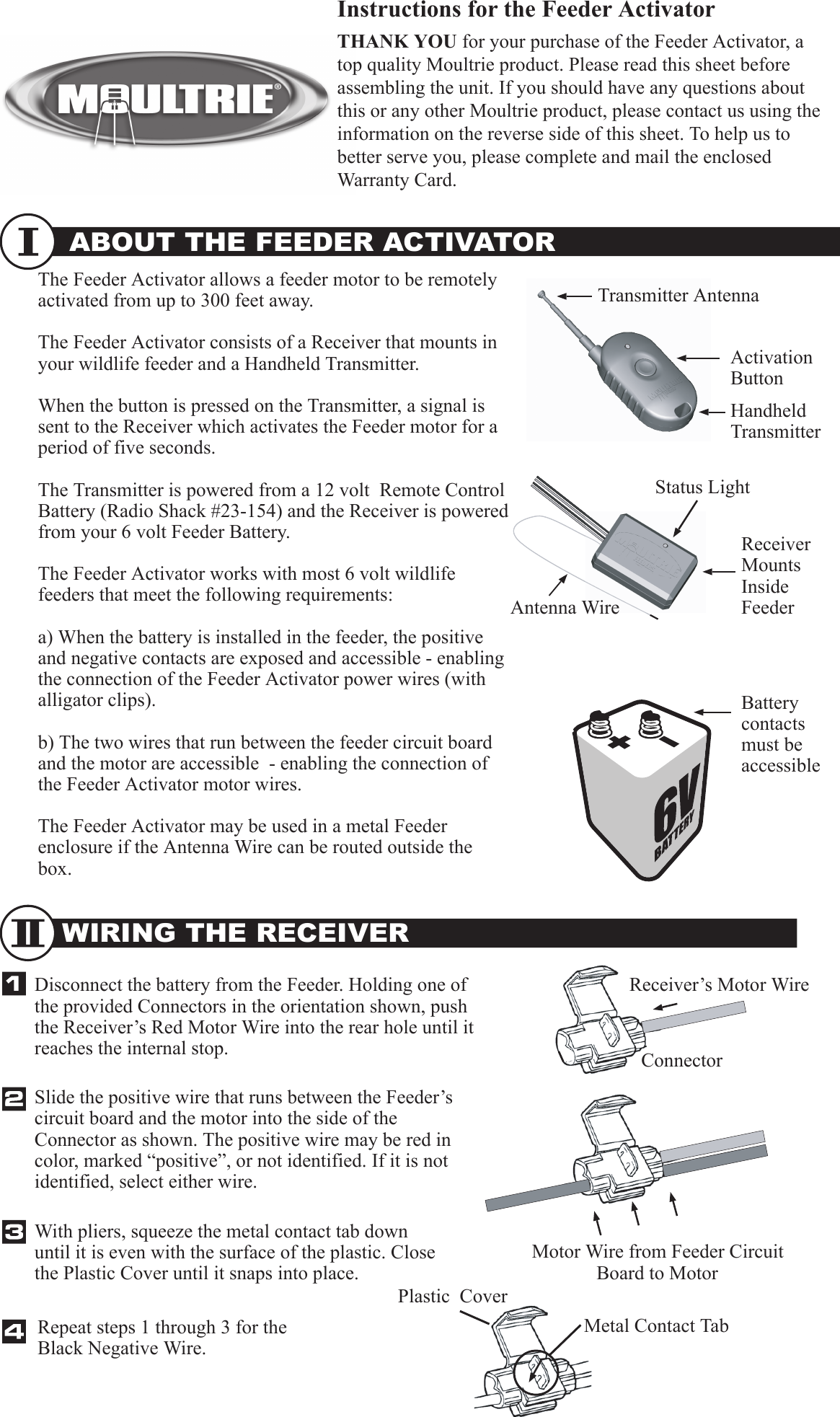
ABOUT THE FEEDER ACTIVATOR Instructions for the Feeder ActivatorTHANK YOU for your purchase of the Feeder Activator, a top quality Moultrie product. Please read this sheet before assembling the unit. If you should have any questions about this or any other Moultrie product, please contact us using the information on the reverse side of this sheet. To help us to better serve you, please complete and mail the enclosed Warranty Card.The Feeder Activator allows a feeder motor to be remotely activated from up to 300 feet away. The Feeder Activator consists of a Receiver that mounts in your wildlife feeder and a Handheld Transmitter.When the button is pressed on the Transmitter, a signal is sent to the Receiver which activates the Feeder motor for a period of five seconds. The Transmitter is powered from a 12 volt  Remote Control Battery (Radio Shack #23-154) and the Receiver is powered from your 6 volt Feeder Battery.The Feeder Activator works with most 6 volt wildlife feeders that meet the following requirements:a) When the battery is installed in the feeder, the positive and negative contacts are exposed and accessible - enabling the connection of the Feeder Activator power wires (with alligator clips).b) The two wires that run between the feeder circuit board and the motor are accessible  - enabling the connection of the Feeder Activator motor wires.The Feeder Activator may be used in a metal Feeder enclosure if the Antenna Wire can be routed outside the box.WIRING THE RECEIVERHandheld TransmitterReceiver Mounts Inside FeederBattery contacts must be accessible Disconnect the battery from the Feeder. Holding one of the provided Connectors in the orientation shown, push the Receiver’s Red Motor Wire into the rear hole until it reaches the internal stop. Slide the positive wire that runs between the Feeder’s circuit board and the motor into the side of the Connector as shown. The positive wire may be red in color, marked “positive”, or not identified. If it is not identified, select either wire. Repeat steps 1 through 3 for the Black Negative Wire.ConnectorAntenna WireStatus LightReceiver’s Motor WireMotor Wire from Feeder Circuit Board to MotorMetal Contact TabPlastic  CoverWith pliers, squeeze the metal contact tab down until it is even with the surface of the plastic. Close the Plastic Cover until it snaps into place.  Transmitter AntennaActivation Button
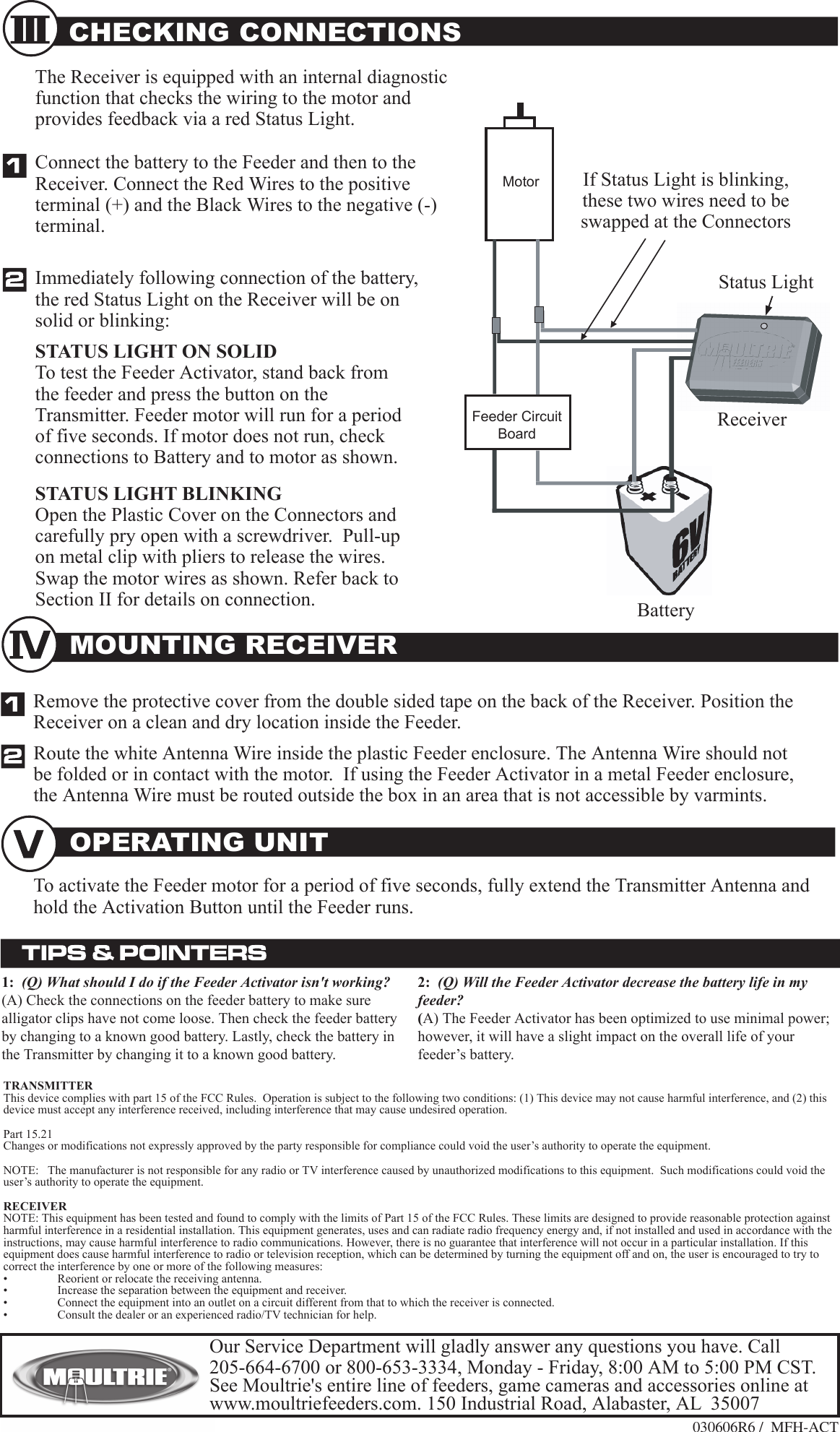
030606R6 /  MFH-ACT MOUNTING RECEIVER CHECKING CONNECTIONSConnect the battery to the Feeder and then to the Receiver. Connect the Red Wires to the positive terminal (+) and the Black Wires to the negative (-) terminal.STATUS LIGHT BLINKINGOpen the Plastic Cover on the Connectors and carefully pry open with a screwdriver.  Pull-up on metal clip with pliers to release the wires. Swap the motor wires as shown. Refer back to Section II for details on connection. Immediately following connection of the battery, the red Status Light on the Receiver will be on solid or blinking:The Receiver is equipped with an internal diagnostic function that checks the wiring to the motor and provides feedback via a red Status Light. OPERATING UNITFeeder Circuit BoardMotorStatus LightIf Status Light is blinking, these two wires need to be swapped at the ConnectorsReceiverBatteryRemove the protective cover from the double sided tape on the back of the Receiver. Position the Receiver on a clean and dry location inside the Feeder. Route the white Antenna Wire inside the plastic Feeder enclosure. The Antenna Wire should not be folded or in contact with the motor.  If using the Feeder Activator in a metal Feeder enclosure, the Antenna Wire must be routed outside the box in an area that is not accessible by varmints.  To activate the Feeder motor for a period of five seconds, fully extend the Transmitter Antenna and hold the Activation Button until the Feeder runs.2:  (Q) Will the Feeder Activator decrease the battery life in my feeder?  (A) The Feeder Activator has been optimized to use minimal power; however, it will have a slight impact on the overall life of your feeder’s battery.STATUS LIGHT ON SOLIDTo test the Feeder Activator, stand back from the feeder and press the button on the Transmitter. Feeder motor will run for a period of five seconds. If motor does not run, check connections to Battery and to motor as shown.  1:  (Q) What should I do if the Feeder Activator isn't working?  (A) Check the connections on the feeder battery to make sure alligator clips have not come loose. Then check the feeder battery by changing to a known good battery. Lastly, check the battery in the Transmitter by changing it to a known good battery.  Our Service Department will gladly answer any questions you have. Call 205-664-6700 or 800-653-3334, Monday - Friday, 8:00 AM to 5:00 PM CST.  See Moultrie's entire line of feeders, game cameras and accessories online at www.moultriefeeders.com. 150 Industrial Road, Alabaster, AL  35007TRANSMITTERThis device complies with part 15 of the FCC Rules.  Operation is subject to the following two conditions: (1) This device may not cause harmful interference, and (2) this device must accept any interference received, including interference that may cause undesired operation.Part 15.21Changes or modifications not expressly approved by the party responsible for compliance could void the user’s authority to operate the equipment.NOTE:   The manufacturer is not responsible for any radio or TV interference caused by unauthorized modifications to this equipment.  Such modifications could void the user’s authority to operate the equipment.RECEIVERNOTE: This equipment has been tested and found to comply with the limits of Part 15 of the FCC Rules. These limits are designed to provide reasonable protection against harmful interference in a residential installation. This equipment generates, uses and can radiate radio frequency energy and, if not installed and used in accordance with the instructions, may cause harmful interference to radio communications. However, there is no guarantee that interference will not occur in a particular installation. If this equipment does cause harmful interference to radio or television reception, which can be determined by turning the equipment off and on, the user is encouraged to try to correct the interference by one or more of the following measures:•  Reorient or relocate the receiving antenna.•  Increase the separation between the equipment and receiver.•  Connect the equipment into an outlet on a circuit different from that to which the receiver is connected.•  Consult the dealer or an experienced radio/TV technician for help.

Navigation menu