Multilaser S A ORION 3G WCDMA+GSM SMART PHONE User Manual Manual

Multilaser Industrial S/A 3G WCDMA+GSM SMART PHONE Manual

Contents

User Manual

Multilaser Industrial S/A  Av. Brigadeiro Faria Lima, 1811 - 15andar - Jardim Paulistano, Brazil  Tel:+551136168888 Fax: +551136168888 13GWCDMA+GSMSmartPhone  Orion Manual Safety Notice Before using the mobile phone, please read the Notice carefully, and make sure that your children have understand the information. For more details, please refer to “Safety Warnings and Precautions”.     Do not impact, drop or puncture the mobile phone, and also avoid dropping, crushing and bending.   Do not use the mobile phone in moist environment such as the bathroom, and also do not soak or wash the mobile phone in liquid.   Do not switch on the phone at places where usage of mobile phone is prohibited or if mobile phone may cause interference or danger.   Do not use the mobile phone when you are driving.   Please follow the rules or regulations in medical facilities, and turn off the mobile phone near medical instruments.   Please turn off the mobile phone when boarding the airplane to avoid interference.   Please turn off the mobile phone near high precision electronic devices to avoid malfunction of the electronic devices.   Only qualified organizations can maintain the phone. Do not disassemble the phone or accessories by yourself.   Do not put the mobile phone and accessories in the appliances with strong electromagnetic field.   Please keep the mobile phone away from magnetic devices, or else the radiation from the mobile phone may erase the data saved in the magnetic devices.   Do not use the mobile phone near high temperature or inflammable gas (e.g. gas station).  Please keep the mobile phone and accessories away from the children; do not let the children use the mobile phone unattended.   Use authorized battery and charger only, otherwise, it may cause explosion.   Please follow local laws and regulation when using the mobile phone, and respect the privacy and legal rights of others.   When using USB data cable, please follow the instructions in this Manual, or else your mobile phone or PC may be damaged.
Multilaser Industrial S/A  Av. Brigadeiro Faria Lima, 1811 - 15andar - Jardim Paulistano, Brazil  Tel:+551136168888 Fax: +551136168888 2  SpecialNoteThismobilephoneisdualSIMdualstandbysinglecalldesign,thatis,twoSIMcardsareinsertedsimultaneouslyandonlyoneSIMcardcanbeusedtomakecalloraccesstheInternetatonetime,whiletheotherSIMisinvalid;ifsomeoneiscallingtheotherSIM,itwillprompt“thesubscriberyoudialedisoutofservice”.Thispromptiscausedbysinglecalldesignofthemobilephone,andisunrelatedtothenetworkoftheoperator.Singlecallisduetosinglechipdesignofthemobilephone,whichcansignificantlyimprovethestandbydurationandreducethepowerconsumption.Pleaseconsultlocalnetworkoperator,andsubscribeforthe“CallerID”servicetoavoidmissingcalls.
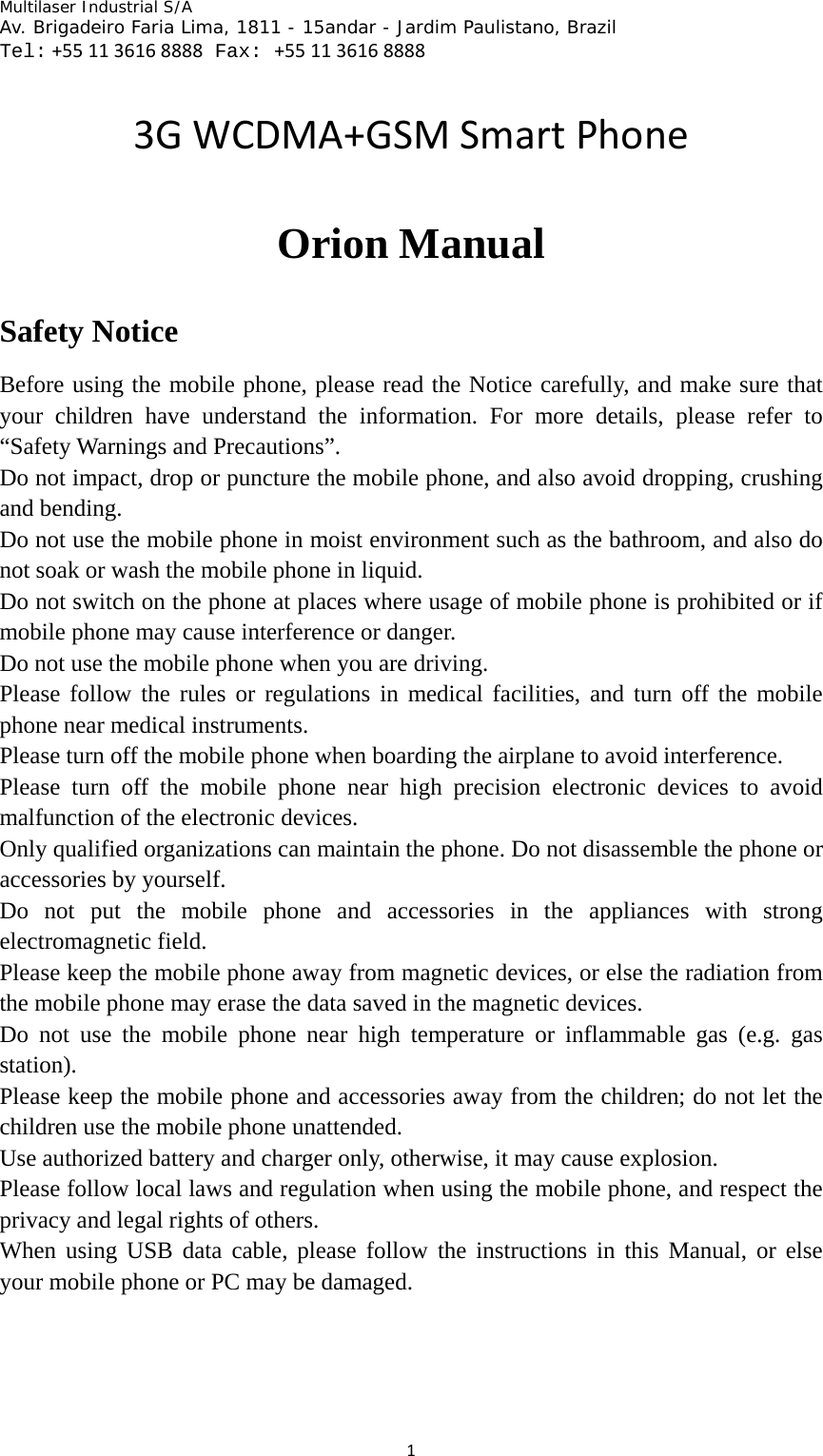
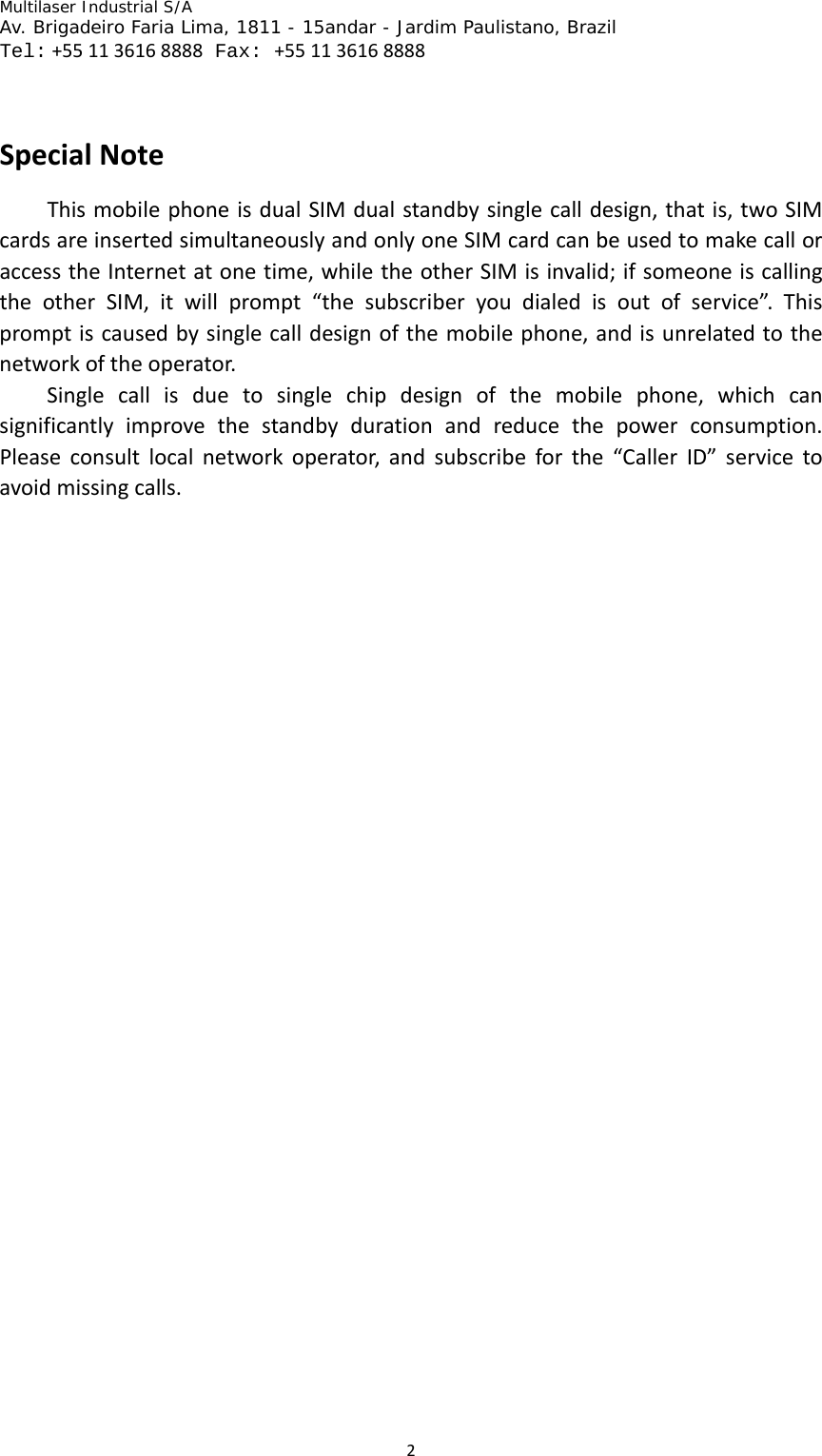
Multilaser Industrial S/A  Av. Brigadeiro Faria Lima, 1811 - 15andar - Jardim Paulistano, Brazil  Tel:+551136168888 Fax: +551136168888 3Introductiontomobilephone Key Description Power Key • Press to turn on the mobile phone • Press and hold to pop-up the option box in power-on state and turn on the silent or flight mode,or choose to restart or shutdown • Press to make the mobile phone into sleep state • Press to wake up the screen in sleep state Home screen key • Press to back home screen in any page • Press and hold to pop-up the recently used program Menu Key • Press to pop-up the menu bar options   Return Key • Press to return the previous screen Volume Key • Press to adjust the volume • Press and hold the volume(-) to    the minimun to turn into the silent mode
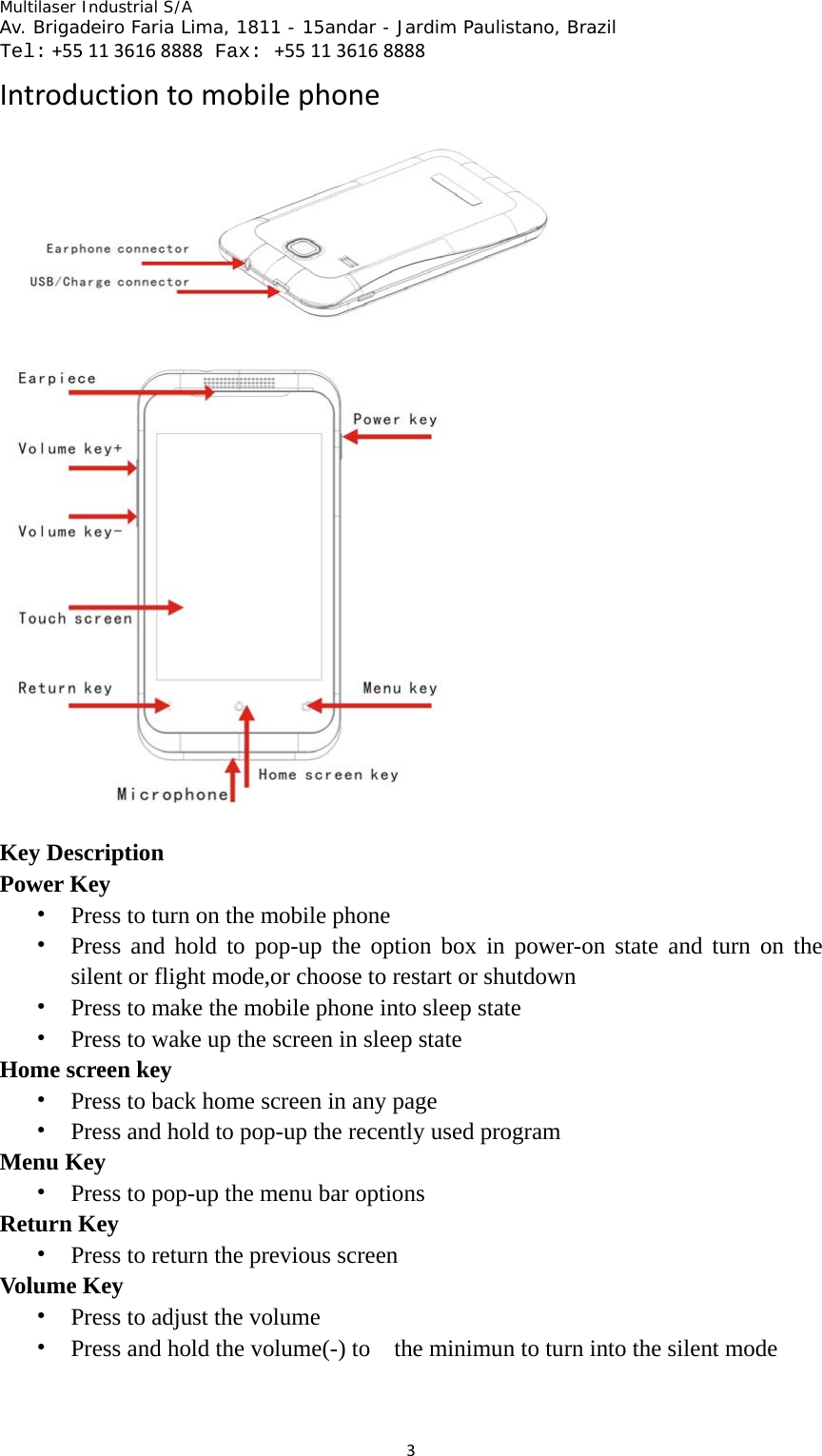
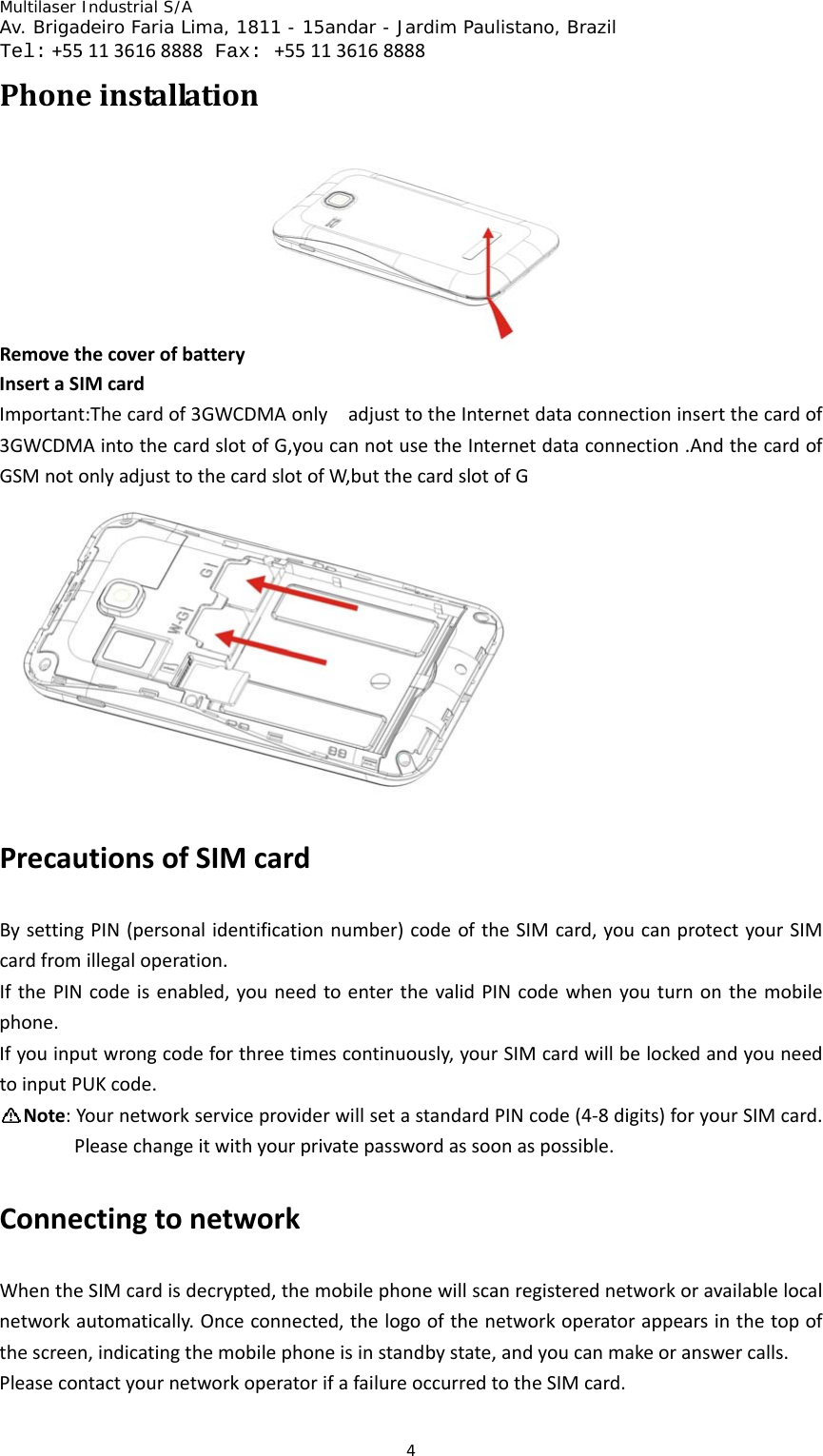
Multilaser Industrial S/A  Av. Brigadeiro Faria Lima, 1811 - 15andar - Jardim Paulistano, Brazil  Tel:+551136168888 Fax: +551136168888 4PhoneinstallationRemovethecoverofbattery InsertaSIMcardImportant:Thecardof3GWCDMAonlyadjusttotheInternetdataconnectioninsertthecardof3GWCDMAintothecardslotofG,youcannotusetheInternetdataconnection.AndthecardofGSMnotonlyadjusttothecardslotofW,butthecardslotofGPrecautionsofSIMcardBysettingPIN(personalidentificationnumber)codeoftheSIMcard,youcanprotectyourSIMcardfromillegaloperation.IfthePINcodeisenabled,youneedtoenterthevalidPINcodewhenyouturnonthemobilephone.Ifyouinputwrongcodeforthreetimescontinuously,yourSIMcardwillbelockedandyouneedtoinputPUKcode.Note:YournetworkserviceproviderwillsetastandardPINcode(4‐8digits)foryourSIMcard.Pleasechangeitwithyourprivatepasswordassoonaspossible.ConnectingtonetworkWhentheSIMcardisdecrypted,themobilephonewillscanregisterednetworkoravailablelocalnetworkautomatically.Onceconnected,thelogoofthenetworkoperatorappearsinthetopofthescreen,indicatingthemobilephoneisinstandbystate,andyoucanmakeoranswercalls.PleasecontactyournetworkoperatorifafailureoccurredtotheSIMcard.
Multilaser Industrial S/A  Av. Brigadeiro Faria Lima, 1811 - 15andar - Jardim Paulistano, Brazil  Tel:+551136168888 Fax: +551136168888 5PrecautionsofSIMcard:∙PuttheSIMcardoutofchildren’sreach.∙Pleaseuse,insertandremovetheSIMcardcarefullybecausetheSIMcardanditscontactpointsarepronetobescratchedordamagedbybending.∙DonotexposetheSIMcardtoelectrostatic,dustyormoistenvironmenttoelectrostatic,dustyenvironmentormoistenvironment.OperationandinstallationmethodsofSDcardSDcardisaremovablemobilememorycardinsertedinsidethemobilephoneandusedforextendingthestoragespaceofthemobilephone.Batteryandchargingmethods1.ConnectthechargerwiththeprovidedUSBcable.2.Insertthechargerplugintothepoweroutlet.3.ConnecttheUSBcabletothemobilephone;thebatterystatuschangesto ,indicatingchargingstarts.4.Thechargingcompleteswhenthebatteryiconchangesto ;pleasedisconnectthechargerwiththepoweroutlet.5.Disconnectthechargerwiththemobilephone.Note:Ifthebatteryisn’tusedforalongtimeorthebatteryisusedup,themobilephonemaybenotturnedonnormallywhilecharging.Itisnormal.Pleasechargeforawhile,andthenturnonthemobilephone.Thebatterycanbechargedrepeatedly;however,itisaconsumableproduct,pleasereplacewithanewbatteryifthestandbydurationreducessignificantly.Thedataserviceconsumesmorepowerandwillreducethestandbyduration.Thechargingtimevariesaccordingtothetemperatureandbatteryusage.Apromptwillshowifthebatteryisinsufficient.Themobilephonewillbeoffautomaticallyifbatteryistoolow.InsrtuctionsforuseHomescreen• Itisthestartingofmobilephone,youcanmakeyourhomescreenmorepersonalizedandyoucanusemoreconvenientandquickwhenyouaddshortcutsofyourfrequentlyusedprogramsandsomesmallparts.OpentheInternetdataconnection• WhenyouwanttouseyourGPRStoconnectthenetworks,pleaseenterthe
Multilaser Industrial S/A  Av. Brigadeiro Faria Lima, 1811 - 15andar - Jardim Paulistano, Brazil  Tel:+551136168888 Fax: +551136168888 6Wireless&networksintheSetting,choosetoentertheMobilenetworks.• AfterenteringthepageoftheMobilenetworks,checktheselectionboxbehindtheDataenable,andyoucanconnecttothenetwork.Connecttowirelessnetworks• Whenyouwanttousewirelessnetworksconnectiononyourmobilephone,pleaseentertheWireless&networksintheSettingfirstly,checktheselectionboxbehindtheWLAN.SecondlyentertheWLANsettings,pressthemenukeytosearchthewirelessnetworks.Thirdlychoosethenameofwirelessnetworkwhichyouneed,theninputthecorrespondingpasswordtoconnect.Switchthedeviceon/off• PressthePowerkeytoswitchthedeviceon(PleasemakesurewhetheryouhaveinsertedtheSIMcardorthebatterycanbeused.• PressandholdthePowerkeytopop‐uptheoptionbox,choosePoweroffandcheckOk.Lockthescreen• Afterreachingthesettimeinidlestate,thescreenofmobilephonewillswitchoffautomaticallytosavepowerandbelockedinordertopreventtheusererror.• PressthePowerkeyalsocanmakethescreenlocked.Unlockthescreen• Important:Ifyourphoneissettingpatternlocking,PINcodeorpassword,youneedtodrawtheunlockpatternorinputthecorrectcodeorpasswordtounlockthescreen.PhoneFeaturesMaking a call You can make calls in different ways, e.g. from dial pad, Contacts, Call log and Messaging.   MakingacallwithdialpadYou can tap the Dial key on the screen to switch to the dial pad; or tap the Call key and then select Dial to enter dial pad. In the dial pad, tap digit keys or the digit keys which represents the initial letters of the contact person, the number will match up automatically.   MakinganemergencycallYour service provider has set up one or several emergency numbers that can be called under any condition. You can make an emergency call even without a SIM card as long as you are in the service area.    Note:Theemergencynumbermaynotbereachedduetonetworkproblem,environmentfactorsorotherinterference.Answering a call When the phone rings and the screen prompts incoming call, tap the button in the left to answer the call; or tap the button in the right to reject the call. After connected, you can press the volume key to adjust the receiver volume during the call.
Multilaser Industrial S/A  Av. Brigadeiro Faria Lima, 1811 - 15andar - Jardim Paulistano, Brazil  Tel:+551136168888 Fax: +551136168888 7ConferencecallYou can make a conference call with the mobile phone, and communicate with multiple specified parties.  Note: Whether this function is available depends on whether the network operator provides this function and whether you have applied for this function.   Video call   During the video call process, you can execute different kinds of operation through different options on the screen and functions in Menu. You can select Silent or Cancel to turn on/off the speaker, and switch between the Camera, View and Capture picture functions.   Rejecting and sending message When the phone rings and the screen prompts incoming call, you can select Reject in the menu to reject a message. If you select Reject, the incoming call will pause, and the mobile phone will send a preset message to the sender, informing you have rejected the incoming message.   CallSettingsDefault SIM setting You can set SIM1 or SIM2 as default SIM card.   SIM1callsettingsYou can perform settings for SIM1, such as call diverting, voicemail, call waiting, etc.    Note:Whetherthesefunctionsareavailabledependsonwhetherthenetworkoperatorprovidesandwhetheryouhaveappliedforthefunctions. SIM2callsettingsYou can perform settings for SIM2, such as call diverting, voicemail, call waiting, etc.    Note:Whetherthesefunctionsareavailabledependsonwhetherthenetworkoperatorprovidessuchservicesandwhetheryouhaveappliedforthesefunctions.Rejecting message Youcaneditthecontentofthemessageinformingthesenderthatyourejectedhis/hermessage.Turning off data service Youcansetthetimetoturnoffdataserviceinstandbystate.
Multilaser Industrial S/A  Av. Brigadeiro Faria Lima, 1811 - 15andar - Jardim Paulistano, Brazil  Tel:+551136168888 Fax: +551136168888 8CallLogYoucanviewallcalllogs,includingcalltime,calltype,etc.ManagingContactListYou can save contact name, phone number, e-mail address and other information in Contact List.  AddingordeletingcontactsAdding a contact 1. Open Contacts list.   2. Click the Add button in the left of the search box to add a contact.   3. If SIM card has been inserted, you can select storage media to save the contact.   4. Enter contact information.   5. Tap Save to save the contact information. Deleting a contact 1. Enter Contacts list.   2. Tap and hold a contact to be deleted and select Delete in the popup option menu.   3. Tap OK to delete the contact.   EditingacontactEditing contact information 1. Enter Contacts list.   2. Tap and hold a contact to be edited and select Edit in the popup option.   3. Enter the information, and tap Save to save the contact. Tap Cancel to cancel the editing.   Editing default number of the contact 1. Enter Contacts list.  2. Tap the contact to set the default number.   3. Tap and hold the number you want to set to default and select Set as default in the popup option menu.     Setting caller ringtone 1. Enter Contacts list.   2. Click on the contact you want to set a caller ringtone.   3. Tap Settings > Ringtone > Select a ringtone from the ringtone library or music library.   4. Select the ringtone to be set.   5. Tap OK to finish the setting.   Searchingforcontact1. Enter Contacts list.  2. Tap the search box or press the search key directly.   3. Input the contact name and the result shows in the bottom of the search bar.   ManagingcontactsYoucanimportthecontactinformationfromSDcardorSIMcardtothemobilephone,viceversa.
Multilaser Industrial S/A  Av. Brigadeiro Faria Lima, 1811 - 15andar - Jardim Paulistano, Brazil  Tel:+551136168888 Fax: +551136168888 9EnteringtextUsinginputpanelYoucanusethetouchscreentoentertext,andcreatemessagesandcontacts.Ifyouneedtoentertext,youcantapthetextenterareatoentertheinputpanel.Switchbetweendifferentinputmethods1. Intexteditinginterface,tapandholdthetextenterareasothateditmenuwillpopup.2. Taptheinputmethod.3. Selectdesiredinputmethod.SOGOUinputmethodVoice,handwriting,pinyin,strokesandEnglishareavailable.MessagingYoucansendandreceiveSMSorMMS.Accessingthemessagingmenu•Inthehomescreen,taptheMessagingbutton.•Inthehomescreen,taptheMainmenubuttontoenterthemainmenuandthenselectMessaging.Sendingtextmessage1. EnterMessaging,andtapthebuttonintheupperlefttocreateanewmessage.2. TaptheRecipientfieldtotypetherecipientnumber;ortap+toselectrecipientfromContacts.3. TaptheContentfield,andtypethemessage.4. Afterediting,sendthroughSIM1orSIM2.Sendingmultimediamessage1. EnterMessaging,andtapthebuttonintheupperlefttocreateanewmessage.2. TaptheRecipientfieldtotypetherecipientnumber;ortap+toselectrecipientfromContacts.3. TaptheContentfield,andtypethemessage.4. TaptheAttachmentbuttonintheleftofthecontentfield,andinsertpicture,videooraudiofiles.5. Afteraddingattachmentsuccessfully,typethesubjectofthemessagewhentheoptionAddsubjectappears.6. Afterediting,sendthroughSIM1orSIM2.ReplyWhenyoureceivenewmessage,respectiveiconandpromptwillappearinthetopofthe
Multilaser Industrial S/A  Av. Brigadeiro Faria Lima, 1811 - 15andar - Jardim Paulistano, Brazil  Tel:+551136168888 Fax: +551136168888 10notificationbar.Youcanselecttoreplythemessage.1. EnterMessaging.2. Selectamessageinthelist.3. TaptheContentfield,andtypethemessage.4. Afterediting,sendthroughSIM1orSIM2.Delete1. EnterMessaging.2. Youcandeletethemessagewiththefollowingoperations.•Selectaconversationinthemessagelist,tapandholdtheconversation,andselectDeleteinthepopupoptionmenu.•Selectaconversationinthemessagelist,andthentaptoentertheconversation.Selectamessageintheconversationlist,taptheselectedmessage,andselectDeleteinthepopupoptionmenu.E‐mailYoucansendandreceivee‐mailwiththisoption.YoucanaddPOP3orIMAPe‐mailaccountfromcommonwebe‐mailserviceprovider(e.g.Sohu,163andotheroperators).Addinge‐mailaccountNote:Youneedtochangethee‐mailsetupbeforesendingorreceivinge‐mail.Networkconnectionisrequiredtosendandreceivee‐mail.1. Inthehomescreen,taptheMainMenubuttontoenterMainMenuandthenselectE‐mail.2. Typethee‐mailaddressandpassword,andtapNextorManualsetting.Note:IfyouselectManualsetting,pleasecontactyoure‐mailserviceproviderforthespecificparametersetting.3. Followthescreenprompttofinishthesetting.Deletinge‐mailaccount1. EnterMainMenu,andselectE‐mailtoenteryouraccountinterface.Note:Incertaininterfaces,youneedtopresstheMenukeytoselecttheaccountandthenentertheaccountinterface.2. Inyouraccountinterface,tapandholdtheaccounttobedeleted,andselectDeleteinthepopupoptionmenu.3. TapOKtodeletetheaccount.Sendinge‐mail1. EnterMainMenu,andselectE‐mailtoenteryouraccountinterface.2. Inyouraccountinterface,tapthee‐mailaccountyouwanttouse.3. IntheInboxinterface,presstheMenukeyandselectWriteinthepopupoptionmenu.4. Inrecipientfield,typethee‐mailaddressoftherecipient.
Multilaser Industrial S/A  Av. Brigadeiro Faria Lima, 1811 - 15andar - Jardim Paulistano, Brazil  Tel:+551136168888 Fax: +551136168888 115. Insubjectfield,typethesubjectofthee‐mail.6. Ineditingfield,typethee‐mailcontent.7. TapSendtosendthee‐mail.Checkinge‐mail1. EnterMainMenu,andselectE‐mailtoenteryouraccountinterface.2. Selectthee‐mailboxtobechecked.3. PresstheMenukey,selectRefreshinthepopupoptionmenu,andupdateinformationofnewe‐mailstotheInbox.4. Tapthee‐mailtoread.EstablishingConnectionStartingdataserviceDataserviceallowsyoutotransmitdata.AllInternetaccessserviceswillbeaffectedbythissetting,e.g.synchronization,Internetservice,e‐mail,etc.Youcanstart/terminatethedataservice.WirelessLANYoucanaccesstohighspeedInternetsurfingandexecutedownloadingbyconnectingtowirelessLAN(WLAN).InternetYoucanusetheInternettobrowsewebpagesandaccessweb‐basedapplications.Note:Accessingnetworkwillincuradditionalcharges.Pleaseconsultyourserviceproviderforspecificrates.AccessingInternetInthehomescreen,taptheBrowserbutton;orenterthemainmenu,andselectBrowsertostartthebrowser.YoucanalsotypethewebaddresstoaccesstheInternet.CustomizingInternetsettingAccesstheInternet,taptheMenukeytoselectMore>Settings,andthenyoucanvieworeditwebpagecontentsetting,privacysetting,securitysetting,advancedsetting,etc.UsingBluetoothYourmobilephonesupportswirelessconnectionthroughBluetooth.Youcancreatewirelessconnectionbetweenthemobilephoneandcompatibledevice,andtransmitdata.ThemobilephonecanbeconnectedthroughBluetoothtoadevicewithinadistanceofnomorethan10m.TheBluetoothconnectionmaybeaffectedbybarriers,e.g.wallorotherelectronicdevice. Note:Bluetoothdevicesandaccessoriesmayberestrictedorprohibitedincertainpublicplacesordistricts;pleasefollowlocallawsandregulations;pleaseconnecttheBluetoothdeviceinsafeandprivateplacestoensuredevicesafety.
Multilaser Industrial S/A  Av. Brigadeiro Faria Lima, 1811 - 15andar - Jardim Paulistano, Brazil  Tel:+551136168888 Fax: +551136168888 12TakingpicturesandVideoRecordingNote:TakingpicturesandvideorecordingfunctionsrequireSDcardsupport;otherwisethesefunctionsarenotapplicable.Turning on/off camera •EnterthemainmenuandselectCamera.•UnderViewFinderstate,presstheBackkeytoturnoffthecamera.Taking pictures 1. Turnonthecamera.2. UnderViewFinderstate,focusthelensontheobjectandadjust.3. TaptheCamerabuttontotakeapicture.Viewing pictures 1. Aftertakingapicture,thethumbnailwillappearinthelowerleftofthescreen,andyoucantapthethumbnailtoviewthepicture.2. Whenviewingpictures,youcanexecuterelatededitingandoperationtothem.Video Recording 1. Turnonthecameraandswitchtovideomode.2. Focusthelensontheobjectandadjust.3. TaptheRecordbuttontostartrecording.4. TaptheStopbuttontostoprecording.Viewing video   1.Aftervideorecording,athumbnailwillappearinthelowerrightofthescreen,andyoucantapthethumbnailtoviewthevideo.FMRadioNote:Youneedtoinsertanearphonetolistentotheradionormally.Turning on/off   • Whenanearphoneisinserted,enterMainMenu,andselectFMradiototurnontheradio.• InFMRadiointerface,taptheMenukey,andselectExittoexittheFMradio;orremovetheearphone,andselectExitinthepopupdialogboxtoexittheFMradio.
Multilaser Industrial S/A  Av. Brigadeiro Faria Lima, 1811 - 15andar - Jardim Paulistano, Brazil  Tel:+551136168888 Fax: +551136168888 13FM 1. Inchannelinterface,slidethechannelsearchcursorleftandrighttomodulatethefrequency.2. TapthequickFMkeytolocatethechannelquickly.3. TaptheTrimkeytotrimthechannel.Favorite channels 1. Inthechannelbroadcastinginterface,taptheFavoritebuttoninthebottomtosavethecurrentchannel.2. Tapachannelinthelisttosaveitinthepresetinterface,inwhichyoucanperformrelatedoperations.Settings 1. Inchannelbroadcastinginterface,taptheSettingsbuttontoentertheinterfaceandperformrelatedsettingsofFMradio.2. Settingsforaudiomode,audiooutputpath,RDSswitchandfrequencybandsareaccessible.MusicPlayerYoucanplayorpausethemusicfiles(supportfilesintheformatofMP3,MIDI,AMR,OGG,etc.)Enteringmusicapplication•Inthehomescreen,taptheMusicbutton.•EntertheMusicinterface(thedefaultsettingistheArtistinterface),andyoucanswitchtootherinterfaces.Playing1. Enterthemusiclistandtapmusictoplay.2. Enteramusicinterface(e.g.Artist),tapandholdacertainiteminthelistandselectPlay.Pause1. Entertheplayinginterface2. TapPausebutton3. Themusicwillpause.Previous/nexttrack1. Entertheplayinginterface2. TapPrevious/Nextbutton.
Multilaser Industrial S/A  Av. Brigadeiro Faria Lima, 1811 - 15andar - Jardim Paulistano, Brazil  Tel:+551136168888 Fax: +551136168888 143. Switchtoprevious/nextmusic(remarks:whentapPrevious,theplayingtimeshouldn’tbelongerthan2s,orelsethemusicwillbereplayed).Adjustingvolume1. Tapthevolumekeyintherighttoadjustthevolume.Displayinglyrics1. Renamethedownloadedlyricstointheformatofartist–music.lrc.2. Savethelyricsfilesundersdcard/lyric.3. Whenplayingmusic,theMusicPlayerwillautomaticallyscanwhetherthefolderhasmatchinglyricsanddisplaycorrespondingcontent.Favorite1. SavecurrentmusicinFavorite.OthersettingsInplayinginterface,tapMenukey,youcanseefunctionsasMusiclibrary,Random,Addtoplayinglist,Sendtoringtone,DeleteandShare.1. Musiclibrary:Returntorespectiveplayinginterfaceandviewthemusicfiles.2. Random:PlaythefilesintheMusiclibraryinrandom.3. Addtoplayinglist:Addcurrentlyplayedmusictocurrentornewplayinglist.4. Sendtoringtone:Sendcurrentlyplayedmusicforcaller,alarmornotificationringtone.5. Delete:Deletethecurrentlyplayedmusic.6. Share:SharecurrentmusicthroughBluetoothore‐mail.VideoPlayerYoucanplayorpausethevideofiles(supportfilesintheformatofMP4,3GP,etc.)Playing•Inthehomescreen,taptheGallerybutton.•Tapallvideo.•Selectavideotoplay.Pause1. Entertheplayinginterface2. TapthePausebutton3. Thevideowillpause.Fastforward/reverse1. Entertheplayinginterface2. TaptheFF/FRbutton.3. Increaseorreducetheplayingspeed.
Multilaser Industrial S/A  Av. Brigadeiro Faria Lima, 1811 - 15andar - Jardim Paulistano, Brazil  Tel:+551136168888 Fax: +551136168888 15Share1. Tapandholdavideo.2. SelectShare.3. SelecttosharethroughBluetoothormessage.Deleting1. Tapandholdavideo.2. SelectDelete.Adjustingvolume1. Tapthevolumekeyintherighttoadjustthevolume.GalleryViewing pictures YoucanviewthepicturesandvideofilesintheSDcardwithGallery.1. TaptheGalleryicontoentergroups.2. Tapagroupandselectapicture.3. Viewthepicture.Deleting pictures YoucandeletethepicturesfromSDcard.1. TaptheGalleryicontoenter.2. Viewthepictures3. TapandholdapictureandselectDelete.Cropping picture YoucancropsinglepictureintheGallery.1. EnterGallery.2. Viewsinglepicture.3. TapMENUkeyandselectCrop.4. Zoomin/outtheselectedarea.5. TapOKtocropthepicture.Playing lantern slide 1. EnterGallery.2. TapandholdtheGalleryfolderandselectPlaylanternslideZooming in/out pictures 1. EnterGallery.
Multilaser Industrial S/A  Av. Brigadeiro Faria Lima, 1811 - 15andar - Jardim Paulistano, Brazil  Tel:+551136168888 Fax: +551136168888 162. Viewsinglepicture.3. Slidetozoomin/outthepicture.Deleting all 1. TaptheicontoenterGallery.2. Selectsinglegrouppicture3. TapandholdtheMENUkey,andselectDeletetodeleteallthepicturesincurrentgroup.Multiple selection 1. TaptheicontoenterGallery.2. Selectsinglegrouppicture3. TaptheMenukeyandselectMultipletoenterthemultipleselectionstate.4. Then,youcanshareordeletemultiplepictures.Photographing 1. TaptheicontoenterGallery.2. TaptheMENUkeyandselectPhotographing.Video Recording   1. TaptheicontoenterGallery.2. TaptheMENUkeyandselectVideoRecording.SoundRecorderSound recording Theformatofsoundrecordingfileis.amr.YouneedtoinsertanSDcardbeforerecording.TherecordingtimedependsonthefreespaceoftheSDcard(max:2hour).1.1Entertheinterface,tapthecircularicononthelefttostartrecording.1.2Afterrecording,tapthesquareicontofinishandsaveinSDcardautomatically.Youcanalsocanceltodeletetherecordingfile.Playing  1.Whentherecordingisstopped,andbeforesaving,tapthetriangleicontopre‐listentherecording,andtapthesquareicontostopplaying.2.Tapthefileiconontherighttoenterthelistofrecordedfiles,tapdesiredfileandselectPlay.3.Whenarecordedfileisselectedinthelist,youcanalsoperformthefollowingoperations:Renaming  Renametheselectedfile.
Multilaser Industrial S/A  Av. Brigadeiro Faria Lima, 1811 - 15andar - Jardim Paulistano, Brazil  Tel:+551136168888 Fax: +551136168888 17Deleting  Deletetheselectedfile.AlarmClock1.Youcanaddandeditoneorseveralalarmclocks.2.Youcansetthetimeofthethreecitiesasaworldclockdisplay3.Youcanthetimingandcountdown.BrowserBrowsing WebPages   1. AccesstheInternet.2. Typethedesiredwebaddress,andtapGototoopendesiredwebsite.YoucanalsotaptheMENUkeytoselectBookmark,andaccessthedesiredwebsitebychoosingthelinksinbookmark,mostvisitedwebsiteorhistoryrecord.3. Openthewebpage,andslideonthescreentobrowseandviewothersectionsofthewebpage.Zooming in/out page Whenbrowsingwebpage,youcanzoomin/outthepageinthefollowingmethods.•Taponthescreentwiceconsecutivelytozoominthepage,andthentaptwicetozoomoutthepage.•Slidetoanydirectionquicklyonthescreen,andthebottomwillshowthezoomingicon.Searching in the web   1. Whenbrowsingtheweb,taptheMENUkeytoselectMore>Searchwithinthepage.2. Typedesiredcontent,andthematchingresultswillbehighlighted.3. Presstheleft/rightarrowtomovetopreviousornextmatchingresult.Adding the page to bookmark 1. Whenyoubrowsetheweb,taptheMENUkeytoselectBookmark>Add>Addbookmark.2. Editthenameofthebookmark.3. TapOKtofinish.Launching multiple windows   Youcanlaunchmultiplewindowsandswitchamongeachwindow.1. WhenbrowsingWebPages,youcantaptheMENUkeytoselectNewwindow.2. Launchanotherwebpageinthenewwindow.
Multilaser Industrial S/A  Av. Brigadeiro Faria Lima, 1811 - 15andar - Jardim Paulistano, Brazil  Tel:+551136168888 Fax: +551136168888 183. TaptheMENUkeytoselectawindow,andbrowsecurrentlylaunchedwebpage.4. Selectthedesiredwebpage.Browsing history   YoucanviewtheWebPagesthatyouhavevisited.1. Whenbrowsingthewebpage,youcantaptheMENUkeytoselectBookmark>History.2. ViewthehistoryofvisitedWebPages.Exiting the browser Youcanexitthebrowser.1. Whenbrowsingthewebpage,youcantaptheMENUkeytoselectExit.ExitthebrowserSelecting text   Youcanselecttocopythetextonthewebpage.1. Afteropeningthewebpage,taptheMENUkeytoselectthetextmenu.2. Then,clickonthetexttobecopied.3. Finally,tapandholdthetextinputboxandselectPaste.Downloading Youcanviewthefilesdownloadedbythebrowser.1. OpenthewebpageandselectDownload,andthebrowserwillpromptdownloading.2. Afterdownloaded,tapMENUkeytoselectthecontenttobedownloaded.Entertoviewthedownloadinglist.ManagingthephoneEnterMainMenu,selectSettings,andthenyoucanperformthedetailedsettingsofthemobilephone.Setting date and time Themobilephonewillusedefaultdate,timezoneandtimeprovidedbythesystemautomatically.Display settings Adjustingscreenbrightness1. EnterthemainmenuandselectSettings>Display.2. TapBrightness.3. Dragthebrightnessslidebartothelefttoreducethescreenbrightness,ordragtothe
Multilaser Industrial S/A  Av. Brigadeiro Faria Lima, 1811 - 15andar - Jardim Paulistano, Brazil  Tel:+551136168888 Fax: +551136168888 19righttoincreasethebrightness.4. TapOKtosavethesetting.SettingscreentimeoutYoucansetthescreentimeouttoadjustthedelaybeforethescreenturnsoffautomatically.1. EnterMainMenuandselectSettings>Display.2. TapScreentimeout.3. Taptheselectedtimeouttofinishthesetting.CancellingG‐sensor1. EnterMainMenuandselectSettings>Display.2. Then,clearthecheckboxofauto‐rotatescreentocancelG‐sensorfunction.G‐sensorcalibration1. EnterMainMenuandselectSettings>Display.2. TapG‐sensorcalibrationtoentertheinterfaceandcalibratetheG‐sensoraccordingtotheprompt.Sound settings Activatesilentmode1. EnterMainMenuandselectSettings>Sound.2. Selectthecheckboxofsilentmode,andallsoundsexceptformediaandalarmclockwillbedisabled. Note:YoucanalsopressandholdthePowerkey,andselectSilentmodeinthepopupmenutoenable/disablethesilentmode.Settingringervolume1. EnterMainMenuandselectSettings>Sound>Volume.2. Dragtheslidebartothelefttoreducethevolume,ordragtotherighttoincreasethevolume.3. TapOKtosavethesetting.Changingringtone1. EnterMainMenuandselectSettings>Sound>Notificationringtonetoaccesstheringtonelist.2. Selectthedesiredringtone,andthentapOK.Settingvibrator1. EnterMainMenuandselectSettings>Sound>Vibrator.2. Selectthedesiredvibrator,andthismodeisactivatedwhenthereisincomingcall.Services  CallsettingsEnterthemainmenu,selectSettings>Call>SelectSIM(SIM1/SIM2),andthenyoucansetthefunctionssuchasvoicemail,diverting,callwaiting,etc.Fordetailsoftheseservices,pleaseconsultyourserviceprovider.TurningondataroamingIfyouareoutofthecoverageareaofyourserviceprovider,dataroamingenablesyoutoconnecttothepartnernetworkofyourserviceprovidertousedataservice.
Multilaser Industrial S/A  Av. Brigadeiro Faria Lima, 1811 - 15andar - Jardim Paulistano, Brazil  Tel:+551136168888 Fax: +551136168888 20 Note:Usingdataserviceswhenroamingmayincuradditionalcharges.Forspecificroamingrate,pleaseconsultyourserviceprovider.Setting phone language 1. Enterthemainmenu,selectSettings>Languageandkeyboard>selectlanguage.2. Tapthedesiredlanguage.Managing applications Viewinginstalledapplications1. EnterMainMenu,selectSettings>Applicationprograms>Managingapplicationprograms,andopentheapplicationslist.2. Youcanperformthefollowingoperations:•Tapthedesiredapplicationprogramtoviewthedetailsoftheapplication.•PresstheMENUkeyandselectArrangebysizeinthepopupmenu,andtheapplicationprogramswillbearrangedbysizeautomatically.Uninstallingapplicationprograms1. EnterMainMenu,selectSettings>Applications>Managingapplication,andopentheapplicationslist.2. Tapanapplicationprogramandenterdetailedinformationinterfaceoftheapplicationprogram.3. TaptheUninstallbuttonandfollowtheOSDprompttouninstalltheapplication.Managingrunningserviceprograms1.EnterMainMenu,selectSettings>ApplicationPrograms>Runningservicesandopenthelistofrunningservices.2.Youcanperformthefollowingoperations:•Viewcurrentrunningserviceprograms.•Tapaserviceprogramtomanageorstopit.Managing memory   ViewingphonememoryandfreespaceofSDcardEnterMainMenu,selectSettings>SDcardandphonememory,andviewthefreespaceofphonememoryandSDcard.ReleasingphonememoryIfthephonememoryisinsufficient,pleasetrythefollowingmethods:•Copyfilesande‐mailattachmentstoSDcard.•Clearallwebcontentcacheandhistory.•Uninstalltheapplicationprogramsthatwon’tbeused.•Resetthemobilephonetofactorydefault.Reset Theresettingoperationwillclearalldata,includingdownloadedapplicationprograms,andresetthemobilephonetofactorydefault.
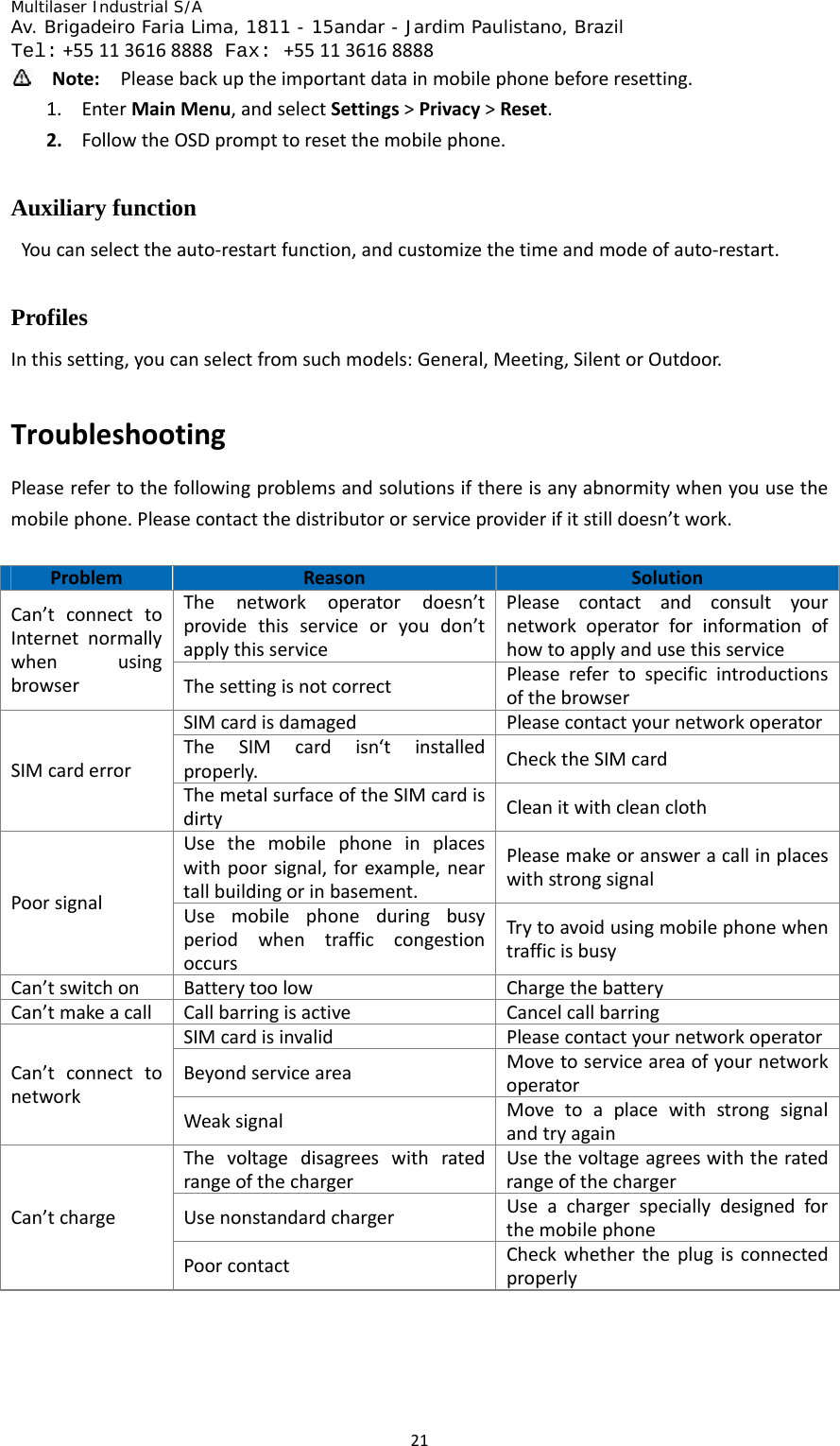
Multilaser Industrial S/A  Av. Brigadeiro Faria Lima, 1811 - 15andar - Jardim Paulistano, Brazil  Tel:+551136168888 Fax: +551136168888 21 Note:Pleasebackuptheimportantdatainmobilephonebeforeresetting.1. EnterMainMenu,andselectSettings>Privacy>Reset.2. FollowtheOSDprompttoresetthemobilephone.Auxiliary function   Youcanselecttheauto‐restartfunction,andcustomizethetimeandmodeofauto‐restart.Profiles Inthissetting,youcanselectfromsuchmodels:General,Meeting,SilentorOutdoor.TroubleshootingPleaserefertothefollowingproblemsandsolutionsifthereisanyabnormitywhenyouusethemobilephone.Pleasecontactthedistributororserviceproviderifitstilldoesn’twork.ProblemReasonSolutionThenetworkoperatordoesn’tprovidethisserviceoryoudon’tapplythisservicePleasecontactandconsultyournetworkoperatorforinformationofhowtoapplyandusethisserviceCan’tconnecttoInternetnormallywhenusingbrowserThesettingisnotcorrectPleaserefertospecificintroductionsofthebrowserSIMcardisdamagedPleasecontactyournetworkoperatorTheSIMcardisn‘tinstalledproperly.ChecktheSIMcardSIMcarderrorThemetalsurfaceoftheSIMcardisdirtyCleanitwithcleanclothUsethemobilephoneinplaceswithpoorsignal,forexample,neartallbuildingorinbasement.PleasemakeoransweracallinplaceswithstrongsignalPoorsignalUsemobilephoneduringbusyperiodwhentrafficcongestionoccursTrytoavoidusingmobilephonewhentrafficisbusyCan’tswitchonBatterytoolowChargethebatteryCan’tmakeacallCallbarringisactiveCancelcallbarringSIMcardisinvalidPleasecontactyournetworkoperatorBeyondserviceareaMovetoserviceareaofyournetworkoperatorCan’tconnecttonetworkWeaksignalMovetoaplacewithstrongsignalandtryagainThevoltagedisagreeswithratedrangeofthechargerUsethevoltageagreeswiththeratedrangeofthechargerUsenonstandardchargerUseachargerspeciallydesignedforthemobilephoneCan’tchargePoorcontactCheckwhethertheplugisconnectedproperly
Multilaser Industrial S/A  Av. Brigadeiro Faria Lima, 1811 - 15andar - Jardim Paulistano, Brazil  Tel:+551136168888 Fax: +551136168888 22
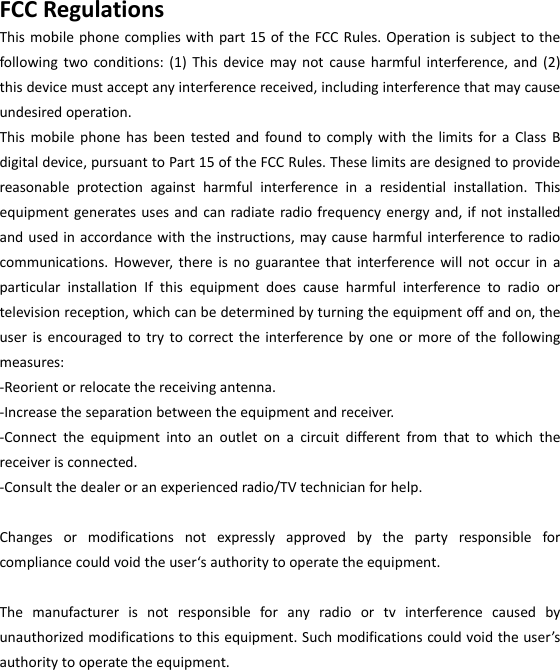
 FCCRegulationsThismobilephonecomplieswithpart15oftheFCCRules.Operationissubjecttothefollowingtwoconditions:(1)Thisdevicemaynotcauseharmfulinterference,and(2)thisdevicemustacceptanyinterferencereceived,includinginterferencethatmaycauseundesiredoperation.ThismobilephonehasbeentestedandfoundtocomplywiththelimitsforaClassBdigitaldevice,pursuanttoPart15oftheFCCRules.Theselimitsaredesignedtoprovidereasonableprotectionagainstharmfulinterferenceinaresidentialinstallation.Thisequipmentgeneratesusesandcanradiateradiofrequencyenergyand,ifnotinstalledandusedinaccordancewiththeinstructions,maycauseharmfulinterferencetoradiocommunications.However,thereisnoguaranteethatinterferencewillnotoccurinaparticularinstallationIfthisequipmentdoescauseharmfulinterferencetoradioortelevisionreception,whichcanbedeterminedbyturningtheequipmentoffandon,theuserisencouragedtotrytocorrecttheinterferencebyoneormoreofthefollowingmeasures:‐Reorientorrelocatethereceivingantenna.‐Increasetheseparationbetweentheequipmentandreceiver.‐Connecttheequipmentintoanoutletonacircuitdifferentfromthattowhichthereceiverisconnected.‐Consultthedealeroranexperiencedradio/TVtechnicianforhelp.Changesormodificationsnotexpresslyapprovedbythepartyresponsibleforcompliancecouldvoidtheuser‘sauthoritytooperatetheequipment.Themanufacturerisnotresponsibleforanyradioortvinterferencecausedbyunauthorizedmodificationstothisequipment.Suchmodificationscouldvoidtheuser’sauthoritytooperatetheequipment.
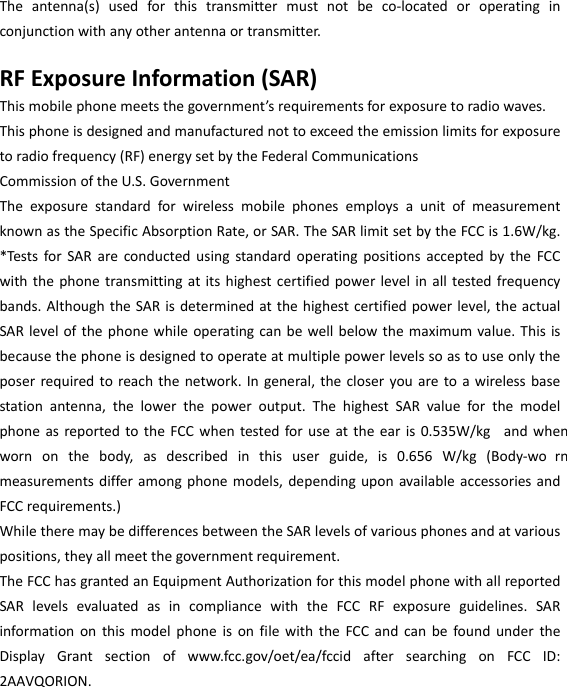
 Theantenna(s)usedforthistransmittermustnotbeco‐locatedoroperatinginconjunctionwithanyotherantennaortransmitter.RFExposureInformation(SAR)Thismobilephonemeetsthegovernment’srequirementsforexposuretoradiowaves.Thisphoneisdesignedandmanufacturednottoexceedtheemissionlimitsforexposuretoradiofrequency(RF)energysetbytheFederalCommunicationsCommissionoftheU.S.GovernmentTheexposurestandardforwirelessmobilephonesemploysaunitofmeasurementknownastheSpecificAbsorptionRate,orSAR.TheSARlimitsetbytheFCCis1.6W/kg.*TestsforSARareconductedusingstandardoperatingpositionsacceptedbytheFCCwiththephonetransmittingatitshighestcertifiedpowerlevelinalltestedfrequencybands.AlthoughtheSARisdeterminedatthehighestcertifiedpowerlevel,theactualSARlevelofthephonewhileoperatingcanbewellbelowthemaximumvalue.Thisisbecausethephoneisdesignedtooperateatmultiplepowerlevelssoastouseonlytheposerrequiredtoreachthenetwork.Ingeneral,thecloseryouaretoawirelessbasestationantenna,thelowerthepoweroutput.ThehighestSARvalueforthemodelphoneasreportedtotheFCCwhentestedforuseattheearis0.535W/kg andwhenwornonthebody,asdescribedinthisuserguide,is0.656W/kg(Body‐wo rnmeasurementsdifferamongphonemodels,dependinguponavailableaccessoriesandFCCrequirements.)WhiletheremaybedifferencesbetweentheSARlevelsofvariousphonesandatvariouspositions,theyallmeetthegovernmentrequirement.TheFCChasgrantedanEquipmentAuthorizationforthismodelphonewithallreportedSARlevelsevaluatedasincompliancewiththeFCCRFexposureguidelines.SARinformationonthismodelphoneisonfilewiththeFCCandcanbefoundundertheDisplayGrantsectionofwww.fcc.gov/oet/ea/fccidaftersearchingonFCCID:2AAVQORION.
 Forbodywornoperation,thisphonehasbeentestedandmeetstheFCCRFexposureguidelinesforusewithanaccessorythatcontainsnometalandthepositionsthehandsetaminimumof1.5cmfromthebody.UseofotheraccessoriesmaynotensurecompliancewithFCCRFexposureguidelines.Ifyoudonotuseabody‐wornaccessoryandarenotholdingthephoneattheear,positionthehandsetaminimumof1.5cmfromyourbodywhenthephoneisswitchedon.Pleasemakesurethetemperatureforproductionunitwillbebetween‐10~50˚C.

Navigation menu