NBS Payment Solutions LUXE6200M Point of Sale Terminal User Manual Luxe 6200m Family Installation Guide

NBS Payment Solutions Inc. Point of Sale Terminal Luxe 6200m Family Installation Guide

User manual

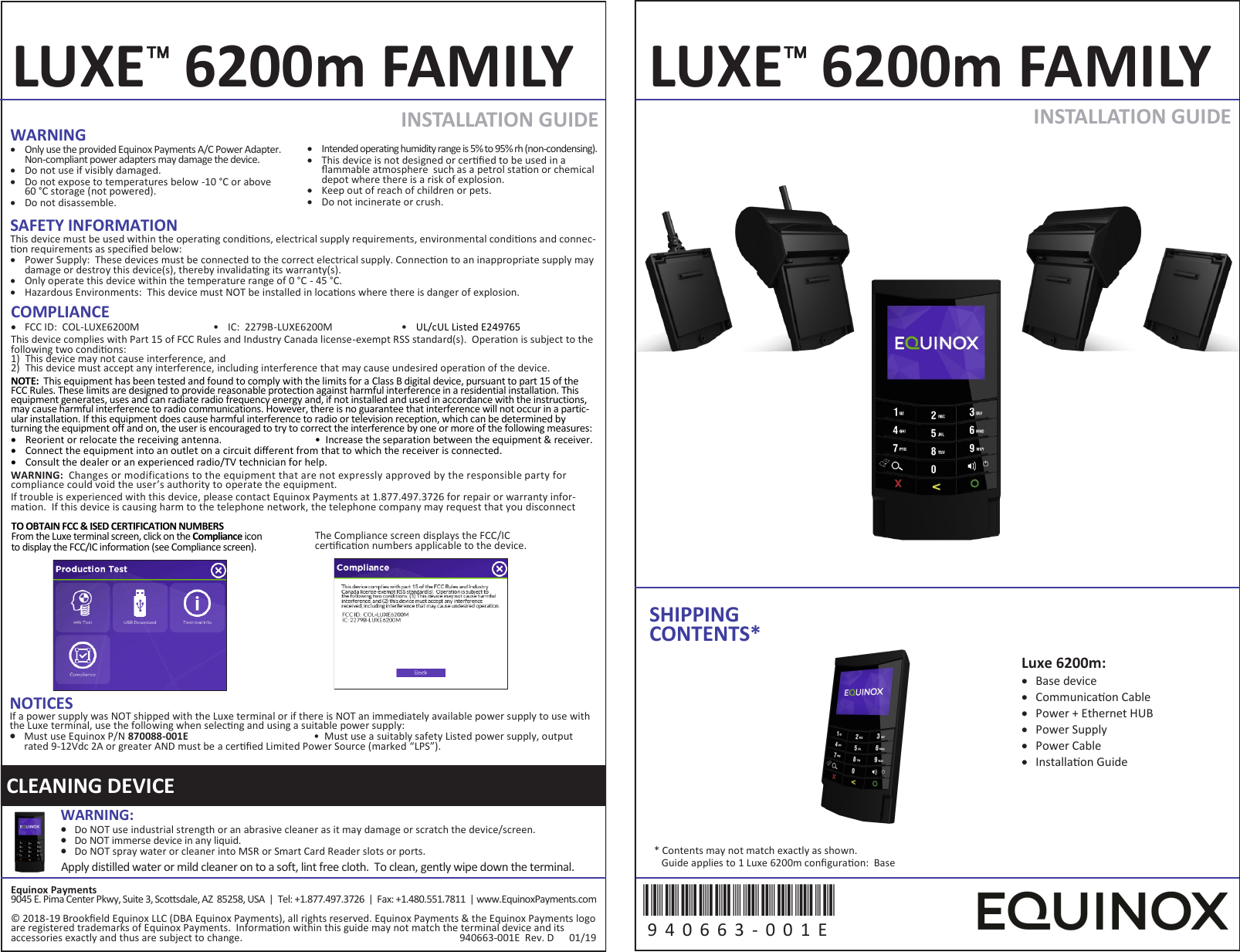
TO OBTAIN FCC & ISED CERTIFICATION NUMBERS From the Luxe terminal screen, click on the Compliance icon to display the FCC/IC information (see Compliance screen). The Compliance screen displays the FCC/IC cercaon numbers applicable to the device. SAFETY INFORMATION This device must be used within the operang condions, electrical supply requirements, environmental condions and connec-on requirements as specied below:   Power Supply:  These devices must be connected to the correct electrical supply. Connecon to an inappropriate supply may damage or destroy this device(s), thereby invalidang its warranty(s).   Only operate this device within the temperature range of 0 °C - 45 °C.   Hazardous Environments:  This device must NOT be installed in locaons where there is danger of explosion. INSTALLATION GUIDE  INSTALLATION GUIDE  LUXE 6200m FAMILY LUXE 6200m FAMILY SHIPPING CONTENTS* Equinox Payments 9045 E. Pima Center Pkwy, Suite 3, Scosdale, AZ  85258, USA  |  Tel: +1.877.497.3726  |  Fax: +1.480.551.7811  | www.EquinoxPayments.com © 2018-19 Brookeld Equinox LLC (DBA Equinox Payments), all rights reserved. Equinox Payments & the Equinox Payments logo are registered trademarks of Equinox Payments.  Informaon within this guide may not match the terminal device and its accessories exactly and thus are subject to change.                                                                                     940663-001E  Rev. D      01/19 Luxe 6200m:   Base device   Communicaon Cable   Power + Ethernet HUB   Power Supply   Power Cable   Installaon Guide 940663-001E 9 4 0 6 6 3 -0 0 1 E  * Contents may not match exactly as shown.    Guide applies to 1 Luxe 6200m conguraon:  Base CLEANING DEVICE WARNING:    Do NOT use industrial strength or an abrasive cleaner as it may damage or scratch the device/screen.   Do NOT immerse device in any liquid.   Do NOT spray water or cleaner into MSR or Smart Card Reader slots or ports. Apply distilled water or mild cleaner on to a soft, lint free cloth.  To clean, gently wipe down the terminal. WARNING   Only use the provided Equinox Payments A/C Power Adapter. Non-compliant power adapters may damage the device.    Do not use if visibly damaged.    Do not expose to temperatures below -10 °C or above  60 °C storage (not powered).    Do not disassemble.    Intended operating humidity range is 5% to 95% rh (non-condensing).   This device is not designed or cered to be used in a ammable atmosphere  such as a petrol staon or chemical depot where there is a risk of explosion.   Keep out of reach of children or pets.   Do not incinerate or crush. NOTICES If a power supply was NOT shipped with the Luxe terminal or if there is NOT an immediately available power supply to use with the Luxe terminal, use the following when selecng and using a suitable power supply:   Must use Equinox P/N 870088-001E   •  Must use a suitably safety Listed power supply, output rated 9-12Vdc 2A or greater AND must be a cered Limited Power Source (marked “LPS”). COMPLIANCE   FCC ID:  COL-LUXE6200M • IC:  2279B-LUXE6200M • UL/cUL Listed E249765 This device complies with Part 15 of FCC Rules and Industry Canada license-exempt RSS standard(s).  Operaon is subject to the following two condions: 1) This device may not cause interference, and 2) This device must accept any interference, including interference that may cause undesired operaon of the device. NOTE:  This equipment has been tested and found to comply with the limits for a Class B digital device, pursuant to part 15 of the FCC Rules. These limits are designed to provide reasonable protection against harmful interference in a residential installation. This equipment generates, uses and can radiate radio frequency energy and, if not installed and used in accordance with the instructions, may cause harmful interference to radio communications. However, there is no guarantee that interference will not occur in a partic-ular installation. If this equipment does cause harmful interference to radio or television reception, which can be determined by turning the equipment off and on, the user is encouraged to try to correct the interference by one or more of the following measures:   Reorient or relocate the receiving antenna. •  Increase the separation between the equipment & receiver.   Connect the equipment into an outlet on a circuit dierent from that to which the receiver is connected.   Consult the dealer or an experienced radio/TV technician for help.  WARNING:  Changes or modifications to the equipment that are not expressly approved by the responsible party for compliance could void the user’s authority to operate the equipment. If trouble is experienced with this device, please contact Equinox Payments at 1.877.497.3726 for repair or warranty infor-mation.  If this device is causing harm to the telephone network, the telephone company may request that you disconnect
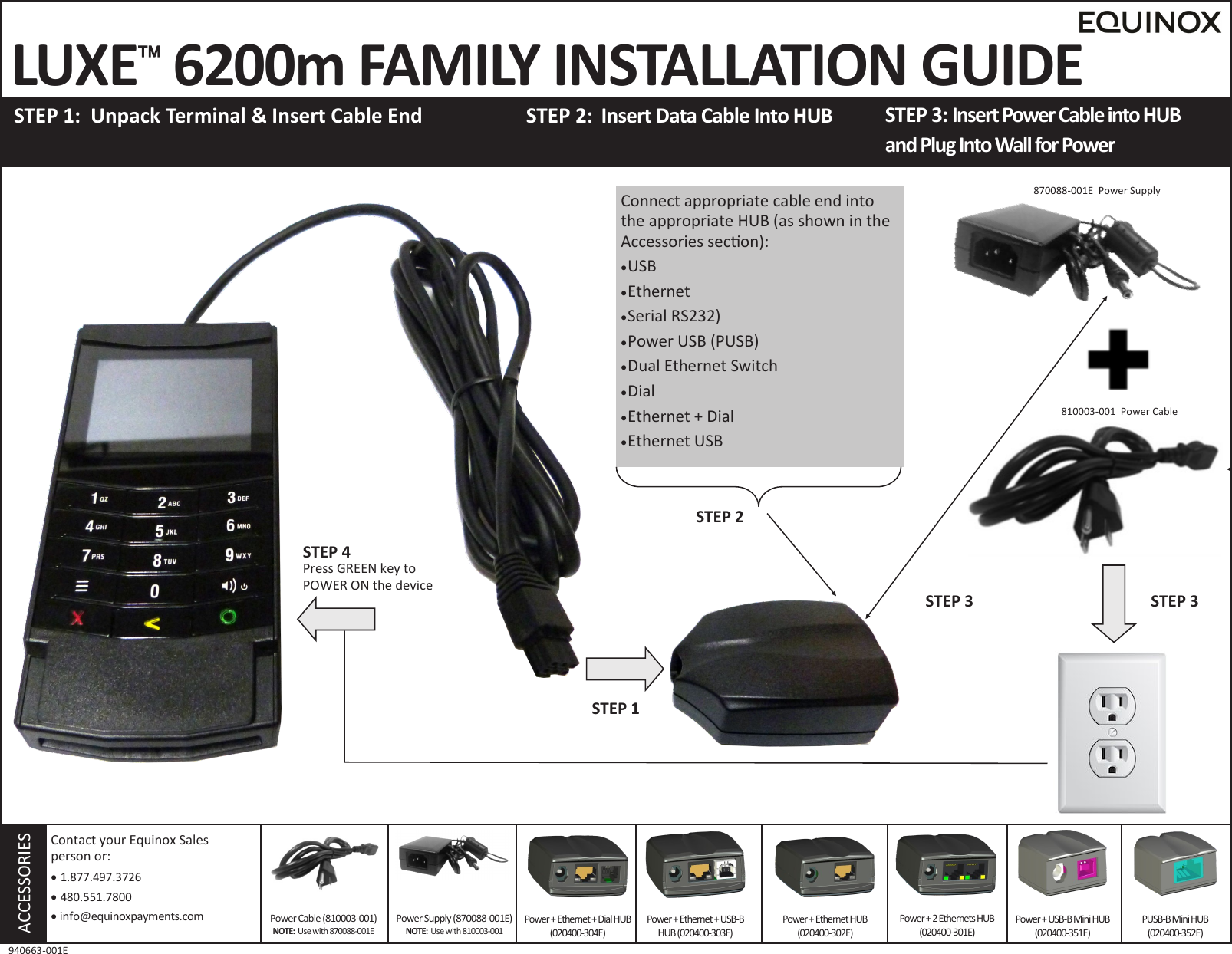
 LUXE 6200m FAMILY INSTALLATION GUIDE  STEP 1:  Unpack Terminal & Insert Cable End STEP 3: Insert Power Cable into HUB  and Plug Into Wall for Power STEP 2:  Insert Data Cable Into HUB     ACCESSORIES Power Supply (870088-001E) NOTE:  Use with 810003-001 Contact your Equinox Sales  person or:    1.877.497.3726   480.551.7800   info@equinoxpayments.com 940663-001E Power + Ethernet + Dial HUB(020400-304E) Power + Ethernet + USB-B HUB (020400-303E) Power + Ethernet HUB (020400-302E) Power + 2 Ethernets HUB (020400-301E) Power + USB-B Mini HUB (020400-351E) PUSB-B Mini HUB  (020400-352E) 810003-001  Power Cable Power Cable (810003-001) NOTE:  Use with 870088-001E Connect appropriate cable end into the appropriate HUB (as shown in the Accessories secon):  USB  Ethernet  Serial RS232)  Power USB (PUSB)  Dual Ethernet Switch  Dial  Ethernet + Dial  Ethernet USB STEP 1 STEP 3 STEP 2 STEP 3 870088-001E  Power Supply STEP 4 Press GREEN key to POWER ON the device

Navigation menu