NDS RSC600I CONTROLLER User Manual Layout 1

NDS, Inc. CONTROLLER Layout 1

Users Manual

Smart ControllerInstallation& ProgramingRSC600iwatch the video at raindrip.com/smartSmrtCntrl_InstlltnPrgrmng_Bklt  3/31/09  4:51 PM  Page 1
Supportwatch the video at raindrip.com/smartInstallation & ProgrammingProduct InformationThe model and serial numbers are located at the rear of thecontroller. Record these numbers in the space providedbelow. Have these numbers available when contacting Technical Support.MODEL NO.:SERIAL NO.:Additional SupportIf additional support is required after reading the instructionsin this guide, then Internet Video Support or Technical PhoneSupport is available.Internet Video Support:raindrip.com/smartTechnical Phone Support: 877-502-7952Monday - Friday 8:00 AM - 5:00 PM (Pacific Standard Time)Saturday - Sunday 9:00 AM - 1:00 PM (Pacific Standard Time)SmrtCntrl_InstlltnPrgrmng_Bklt  3/31/09  4:51 PM  Page 2
Smart Controller Technology  . . . . . . . . . . . . . . . . . . .1Irrigation System Overview  . . . . . . . . . . . . . . . . . . .2Package Contents . . . . . . . . . . . . . . . . . . . . . . . . . . . .3Smart Controller Features  . . . . . . . . . . . . . . . . . . . .4Overview  . . . . . . . . . . . . . . . . . . . . . . . . . . . . . . . . .5-6Installation Requirements  . . . . . . . . . . . . . . . . . . . . .7Installation Mount Docking Station  . . . . . . . . . . . .8Wiring  . . . . . . . . . . . . . . . . . . . . . . . . . . .9Dock Controller  . . . . . . . . . . . . . . . . . . .10Programming: Settings  . . . . . . . . . . . . . . . . . . . . .11-12Programming: Edit Schedule  . . . . . . . . . . . . . . . .13-16Auto Run (ON / SKIP / OFF)  . . . . . . . . . . . . . . . . . .17Water Now . . . . . . . . . . . . . . . . . . . . . . . . . . . . . . . . .18Disabling Smart Mode  . . . . . . . . . . . . . . . . . . . . . . .19Rain Sensor / Switch  . . . . . . . . . . . . . . . . . . . . . . .20Operational Notes  . . . . . . . . . . . . . . . . . . . . . . . . . . .21Status Indicators . . . . . . . . . . . . . . . . . . . . . . . . . . .22FAQ  . . . . . . . . . . . . . . . . . . . . . . . . . . . . . . . . . . . . . .23Troubleshooting  . . . . . . . . . . . . . . . . . . . . . . . . . . . .24Programming Aid - Introduction  . . . . . . . . . . .25-26Programming Aid - Example  . . . . . . . . . . . . . .27-28Programming Aid - Worksheet  . . . . . . . . . . . .29-30Specifications . . . . . . . . . . . . . . . . . . . . . . . . . . . . . . .31Warranty . . . . . . . . . . . . . . . . . . . . . . . . . . . . . . . . . .32Table of Contentswatch the video at raindrip.com/smartInstallation & ProgrammingSmrtCntrl_InstlltnPrgrmng_Bklt  3/31/09  4:51 PM  Page 3
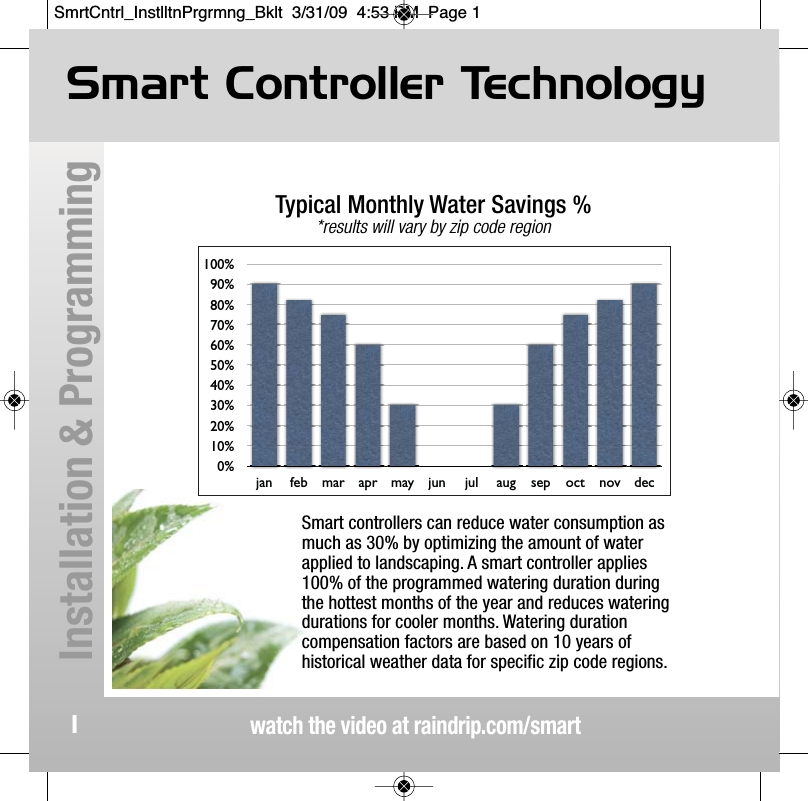
Smart Controller Technologywatch the video at raindrip.com/smartInstallation & Programming1Smart controllers can reduce water consumption asmuch as 30% by optimizing the amount of waterapplied to landscaping. A smart controller applies100% of the programmed watering duration duringthe hottest months of the year and reduces wateringdurations for cooler months. Watering durationcompensation factors are based on 10 years ofhistorical weather data for specific zip code regions.0%10%20%30%40%50%60%70%80%90%100%jan feb mar apr may jun jul aug sep oct nov decTypical Monthly Water Savings %*results will vary by zip code regionSmrtCntrl_InstlltnPrgrmng_Bklt  3/31/09  4:53 PM  Page 1
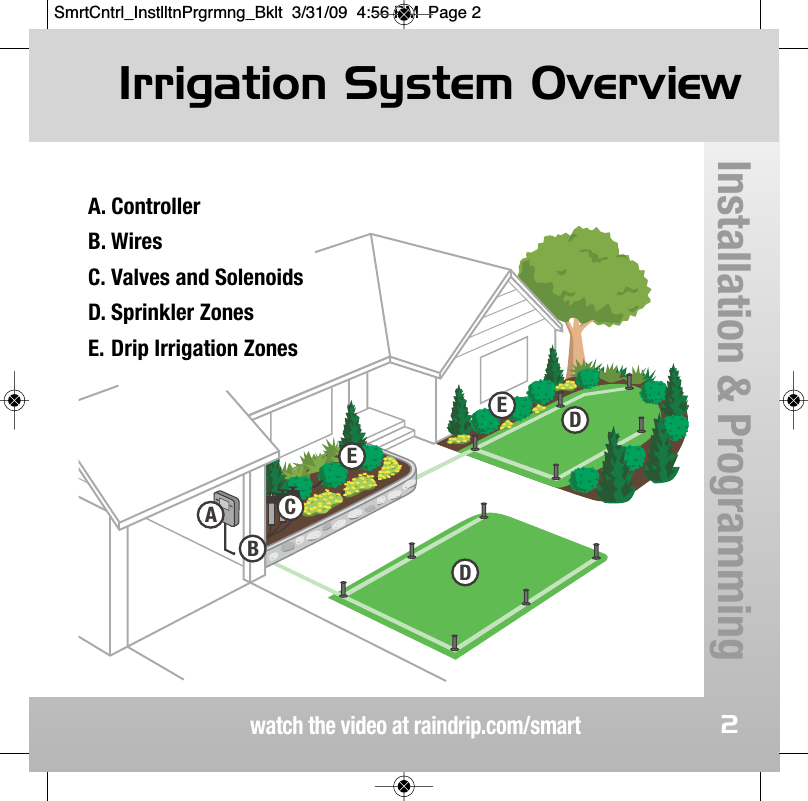
watch the video at raindrip.com/smartInstallation & Programming2illustration 3 EEDABDCA. ControllerB. WiresC. Valves and SolenoidsD. Sprinkler ZonesE. Drip Irrigation Zones Irrigation System OverviewSmrtCntrl_InstlltnPrgrmng_Bklt  3/31/09  4:56 PM  Page 2
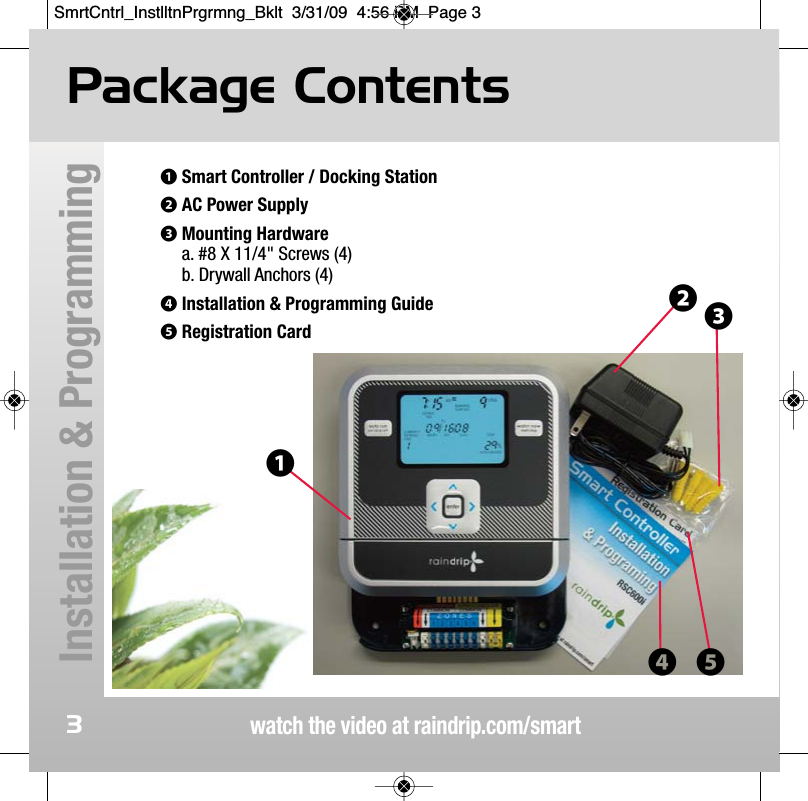
watch the video at raindrip.com/smartInstallation & Programming3Package Contents❶Smart Controller / Docking Station❷AC Power Supply❸Mounting Hardwarea. #8 X 11/4" Screws (4)b. Drywall Anchors (4)❹Installation & Programming Guide❺Registration Card❶❷❸❹ ❺SmrtCntrl_InstlltnPrgrmng_Bklt  3/31/09  4:56 PM  Page 3
Smart Controller FeaturesRSC600iwatch the video at raindrip.com/smartInstallation & Programming4• 6 zones with up to 4 independent watering cycles per day per zone. • Automatically adjusts watering duration based on historical weatherpatterns for your zip code and time of year.• Daily and Year-to-Date water savings displayed.• Built-in diagnostics automatically troubleshoots and alerts of wiring issues.• Audible beeps to alert for low batteries, wiring faults, and other userinterface actions.• "Skip" function allows for manual interruption of watering schedule foryard work and other activities.• "Water Now" function allows for manual watering to test irrigation system.• Rain Sensor / Switch ready - works with most major brands.• Easy to read, oversized backlit display.• Controller "undocks" to allow for comfortable / convenient programming.• Automatically adjusts for daylight savings.• Optional conventional timer mode (non-smart).• Requires 2 AA batteries (not included).SmrtCntrl_InstlltnPrgrmng_Bklt  3/31/09  4:56 PM  Page 4
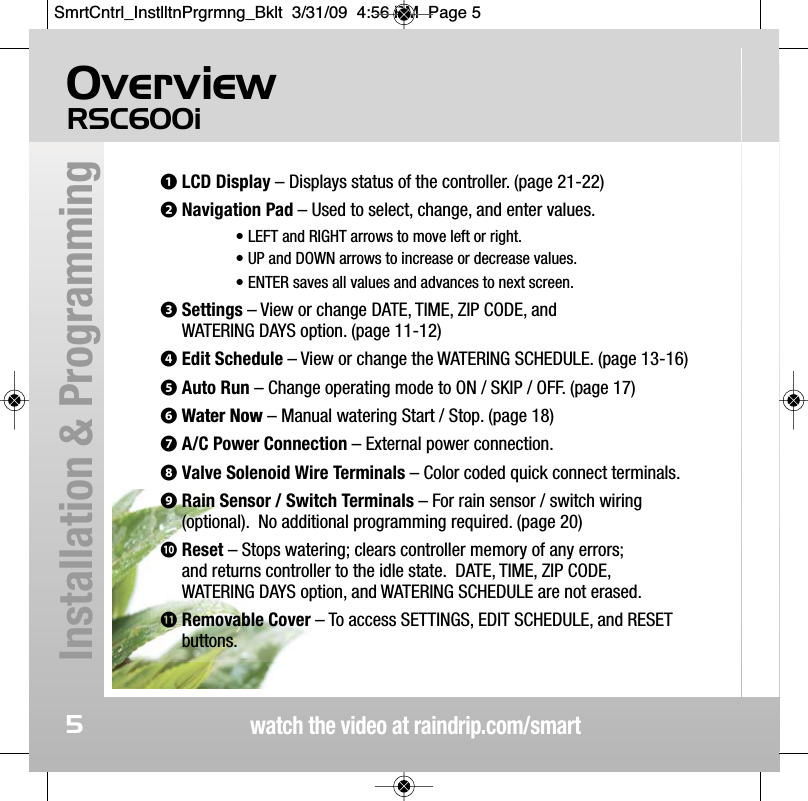
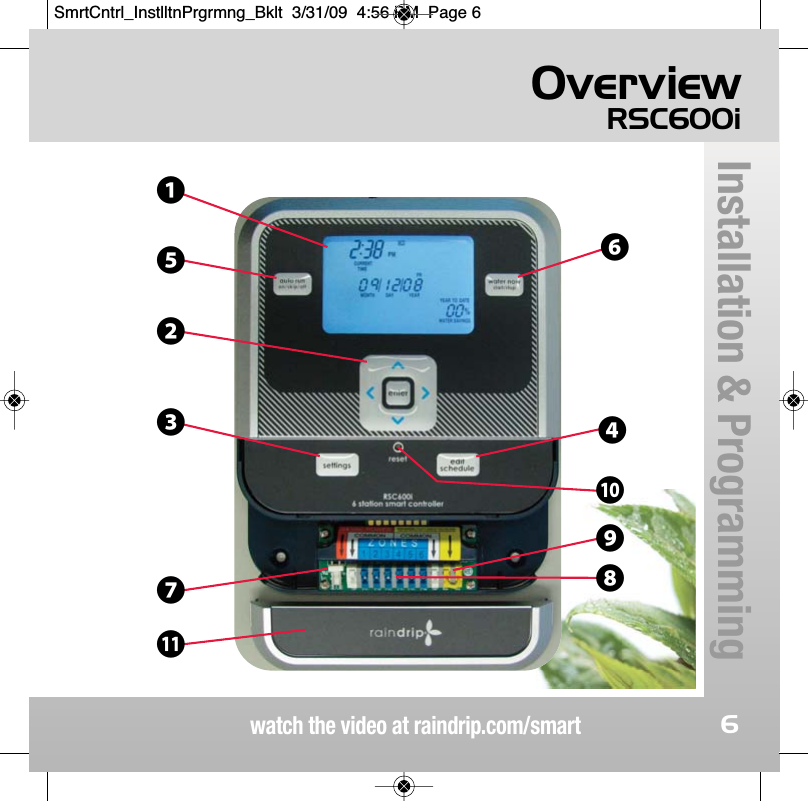
OverviewRSC600iwatch the video at raindrip.com/smartInstallation & Programming5❶LCD Display – Displays status of the controller. (page 21-22)❷Navigation Pad – Used to select, change, and enter values.• LEFT and RIGHT arrows to move left or right. • UP and DOWN arrows to increase or decrease values. • ENTER saves all values and advances to next screen.❸Settings – View or change DATE, TIME, ZIP CODE, and WATERING DAYS option. (page 11-12)❹Edit Schedule – View or change the WATERING SCHEDULE. (page 13-16)❺Auto Run – Change operating mode to ON / SKIP / OFF. (page 17)❻Water Now – Manual watering Start / Stop. (page 18)❼A/C Power Connection – External power connection.❽Valve Solenoid Wire Terminals – Color coded quick connect terminals.❾Rain Sensor / Switch Terminals – For rain sensor / switch wiring(optional).  No additional programming required. (page 20) 󱀓Reset – Stops watering; clears controller memory of any errors; and returns controller to the idle state.  DATE, TIME, ZIP CODE, WATERING DAYS option, and WATERING SCHEDULE are not erased. 󱀔Removable Cover – To access SETTINGS, EDIT SCHEDULE, and RESETbuttons.SmrtCntrl_InstlltnPrgrmng_Bklt  3/31/09  4:56 PM  Page 5
OverviewRSC600iwatch the video at raindrip.com/smartInstallation & Programming6❼󱀔❶❺❸❷❻❹󱀓❾❽SmrtCntrl_InstlltnPrgrmng_Bklt  3/31/09  4:56 PM  Page 6
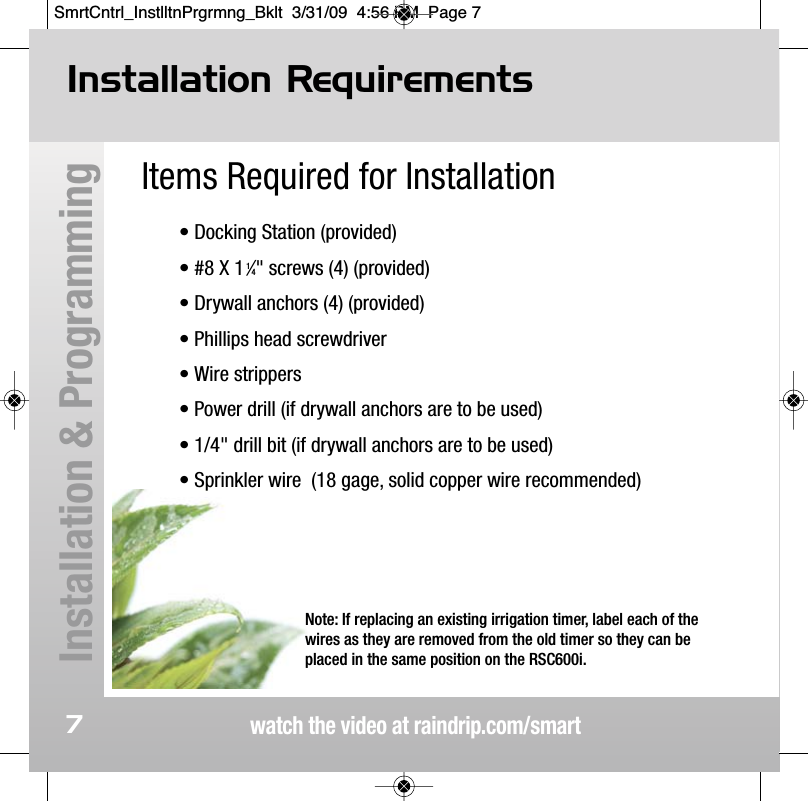
watch the video at raindrip.com/smartInstallation & Programming7Items Required for Installation• Docking Station (provided)• #8 X 11⁄4" screws (4) (provided)• Drywall anchors (4) (provided)• Phillips head screwdriver• Wire strippers• Power drill (if drywall anchors are to be used)• 1/4" drill bit (if drywall anchors are to be used)• Sprinkler wire  (18 gage, solid copper wire recommended)Installation RequirementsNote: If replacing an existing irrigation timer, label each of thewires as they are removed from the old timer so they can beplaced in the same position on the RSC600i.SmrtCntrl_InstlltnPrgrmng_Bklt  3/31/09  4:56 PM  Page 7
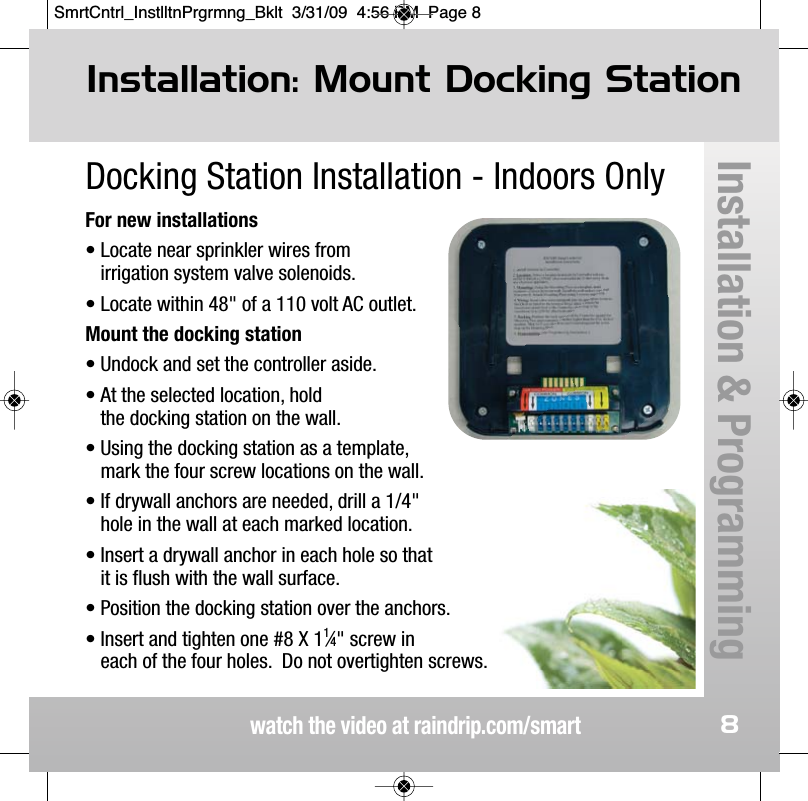
watch the video at raindrip.com/smart8Docking Station Installation - Indoors OnlyFor new installations• Locate near sprinkler wires from irrigation system valve solenoids.• Locate within 48" of a 110 volt AC outlet.Mount the docking station • Undock and set the controller aside.• At the selected location, hold the docking station on the wall.• Using the docking station as a template, mark the four screw locations on the wall.• If drywall anchors are needed, drill a 1/4" hole in the wall at each marked location.• Insert a drywall anchor in each hole so that it is flush with the wall surface.• Position the docking station over the anchors. • Insert and tighten one #8 X 11⁄4" screw in each of the four holes.  Do not overtighten screws. Installation: Mount Docking StationInstallation & ProgrammingSmrtCntrl_InstlltnPrgrmng_Bklt  3/31/09  4:56 PM  Page 8
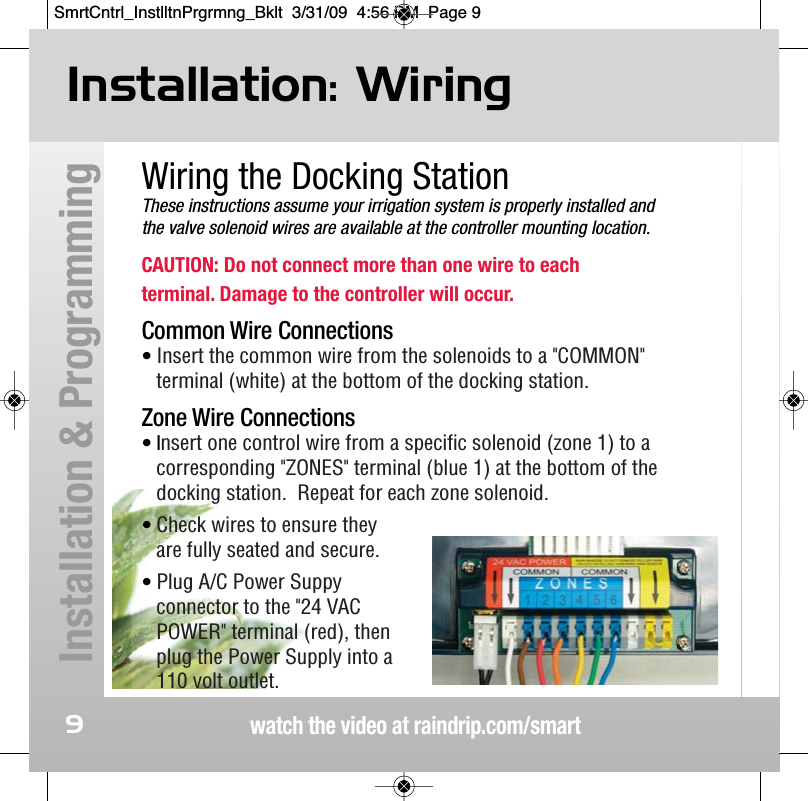
watch the video at raindrip.com/smartInstallation & Programming9Wiring the Docking StationThese instructions assume your irrigation system is properly installed and the valve solenoid wires are available at the controller mounting location.CAUTION: Do not connect more than one wire to each terminal. Damage to the controller will occur.Common Wire Connections• Insert the common wire from the solenoids to a "COMMON"terminal (white) at the bottom of the docking station.Zone Wire Connections• Insert one control wire from a specific solenoid (zone 1) to a corresponding "ZONES" terminal (blue 1) at the bottom of the docking station.  Repeat for each zone solenoid.• Check wires to ensure they are fully seated and secure.• Plug A/C Power Suppyconnector to the "24 VACPOWER" terminal (red), thenplug the Power Supply into a110 volt outlet.Installation: WiringSmrtCntrl_InstlltnPrgrmng_Bklt  3/31/09  4:56 PM  Page 9
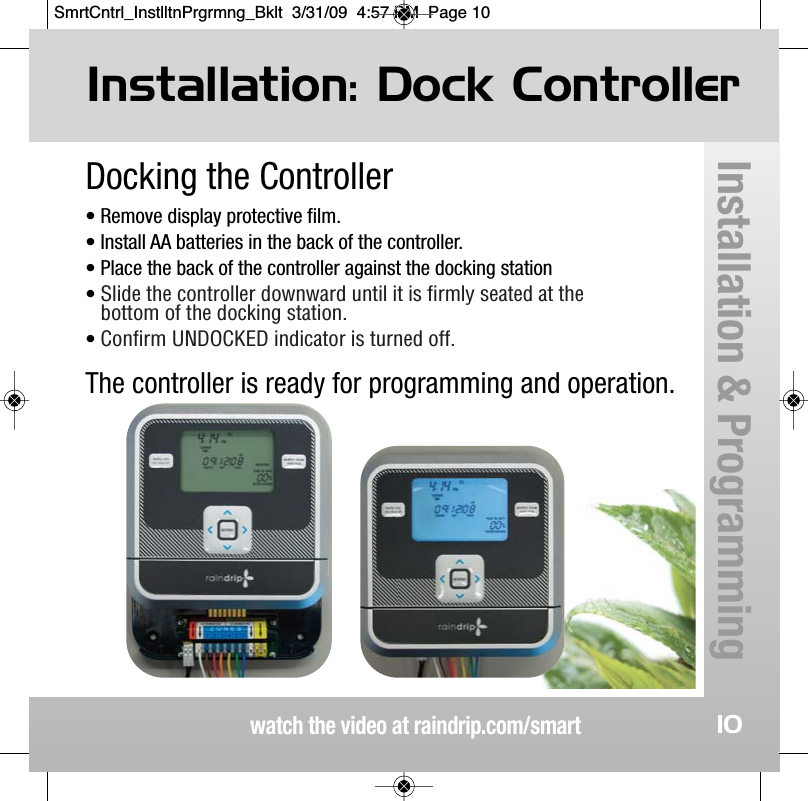
Docking the Controller• Remove display protective film.• Install AA batteries in the back of the controller. • Place the back of the controller against the docking station • Slide the controller downward until it is firmly seated at thebottom of the docking station.• Confirm UNDOCKED indicator is turned off.The controller is ready for programming and operation.Installation: Dock Controllerwatch the video at raindrip.com/smartInstallation & Programming10SmrtCntrl_InstlltnPrgrmng_Bklt  3/31/09  4:57 PM  Page 10
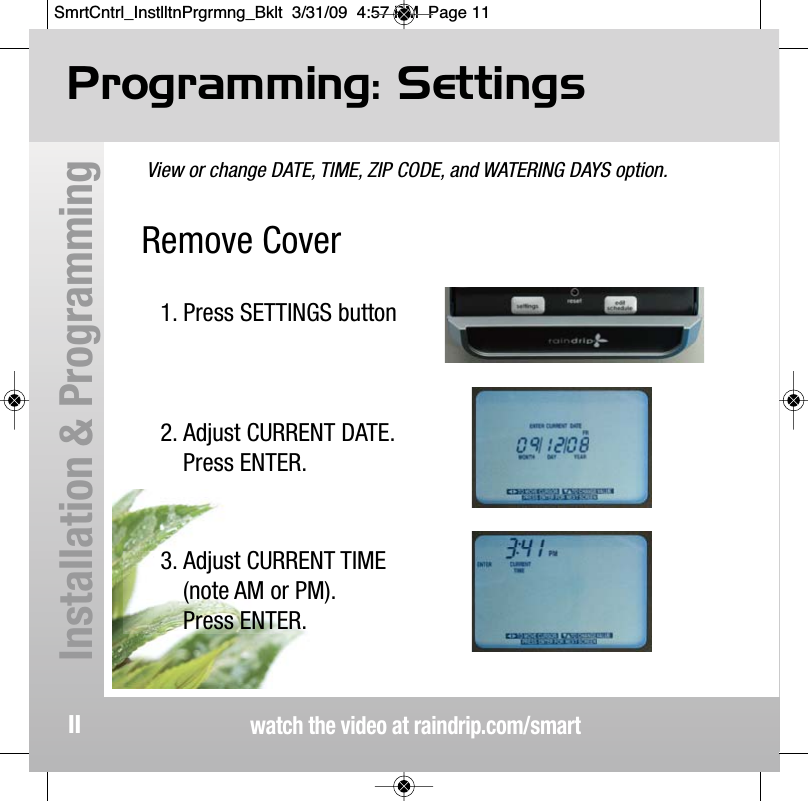
Remove Cover View or change DATE, TIME, ZIP CODE, and WATERING DAYS option.Programming: Settingswatch the video at raindrip.com/smartInstallation & Programming111. Press SETTINGS button2. Adjust CURRENT DATE.Press ENTER.3. Adjust CURRENT TIME(note AM or PM).Press ENTER.SmrtCntrl_InstlltnPrgrmng_Bklt  3/31/09  4:57 PM  Page 11
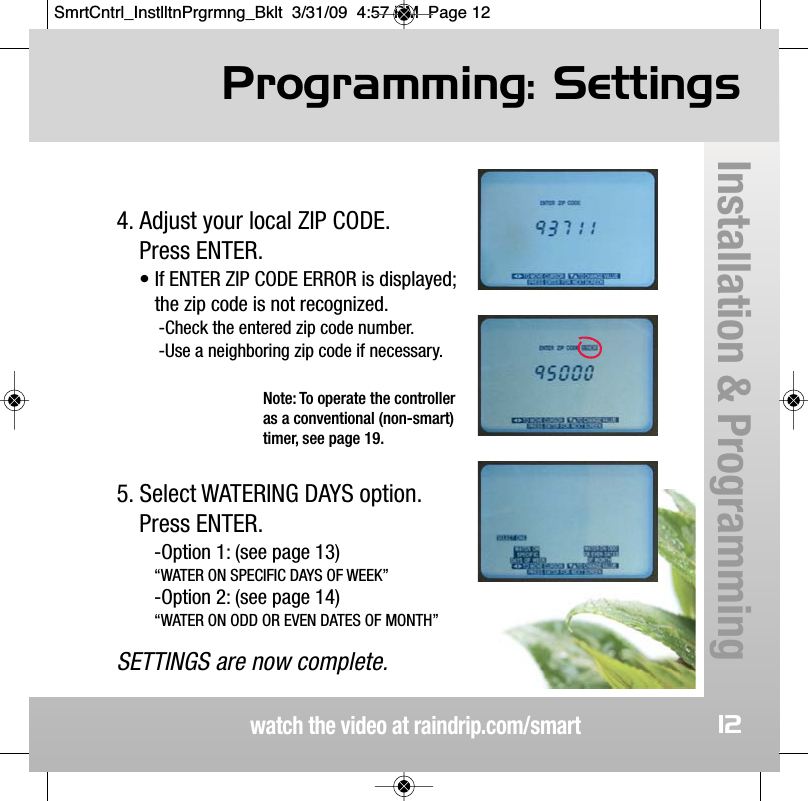
Programming: Settingswatch the video at raindrip.com/smartInstallation & Programming124. Adjust your local ZIP CODE.  Press ENTER.• If ENTER ZIP CODE ERROR is displayed;the zip code is not recognized.-Check the entered zip code number.-Use a neighboring zip code if necessary.5. Select WATERING DAYS option.Press ENTER.-Option 1: (see page 13)“WATER ON SPECIFIC DAYS OF WEEK”-Option 2: (see page 14)“WATER ON ODD OR EVEN DATES OF MONTH”SETTINGS are now complete.Note: To operate the controlleras a conventional (non-smart)timer, see page 19.SmrtCntrl_InstlltnPrgrmng_Bklt  3/31/09  4:57 PM  Page 12
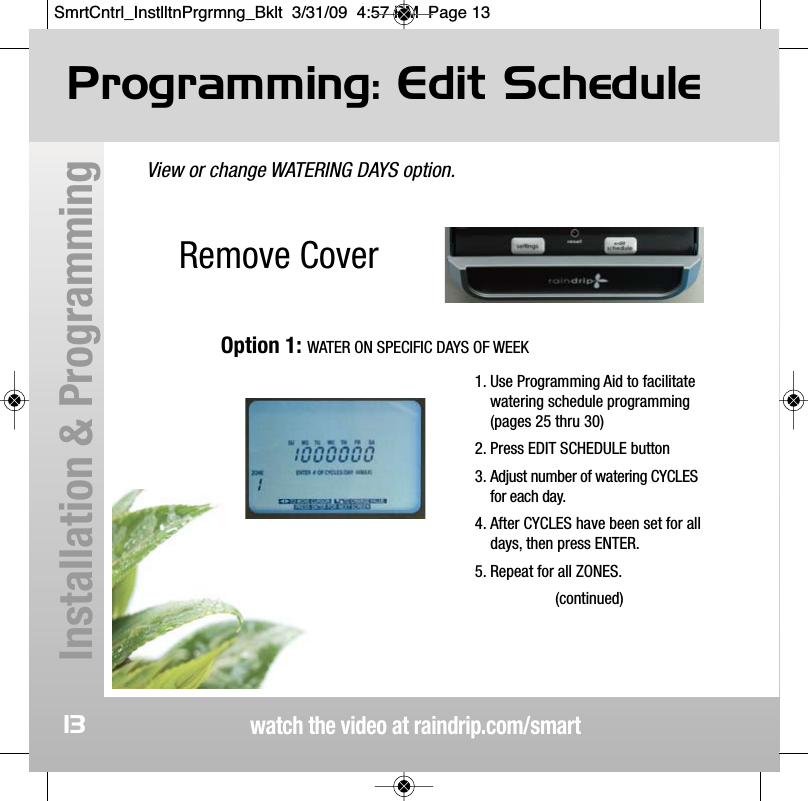
Remove CoverView or change WATERING DAYS option.Programming: Edit Schedulewatch the video at raindrip.com/smartInstallation & Programming131. Use Programming Aid to facilitatewatering schedule programming(pages 25 thru 30)2. Press EDIT SCHEDULE button3. Adjust number of watering CYCLESfor each day.4. After CYCLES have been set for alldays, then press ENTER.5. Repeat for all ZONES.(continued)Option 1: WATER ON SPECIFIC DAYS OF WEEKSmrtCntrl_InstlltnPrgrmng_Bklt  3/31/09  4:57 PM  Page 13
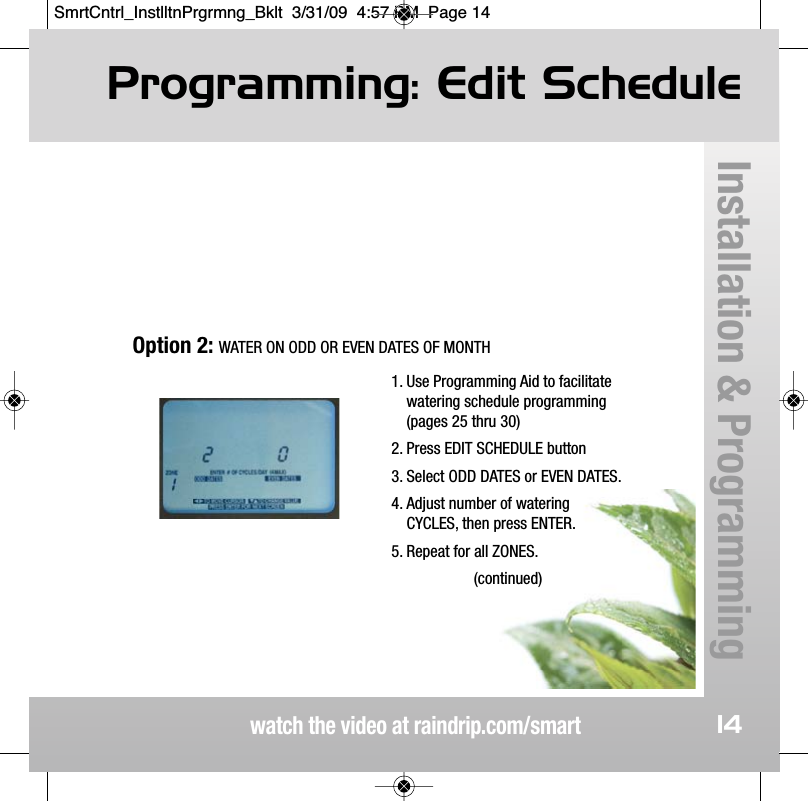
Programming: Edit Schedulewatch the video at raindrip.com/smartInstallation & Programming141. Use Programming Aid to facilitatewatering schedule programming(pages 25 thru 30)2. Press EDIT SCHEDULE button3. Select ODD DATES or EVEN DATES.4. Adjust number of wateringCYCLES, then press ENTER.5. Repeat for all ZONES.(continued)Option 2: WATER ON ODD OR EVEN DATES OF MONTHSmrtCntrl_InstlltnPrgrmng_Bklt  3/31/09  4:57 PM  Page 14
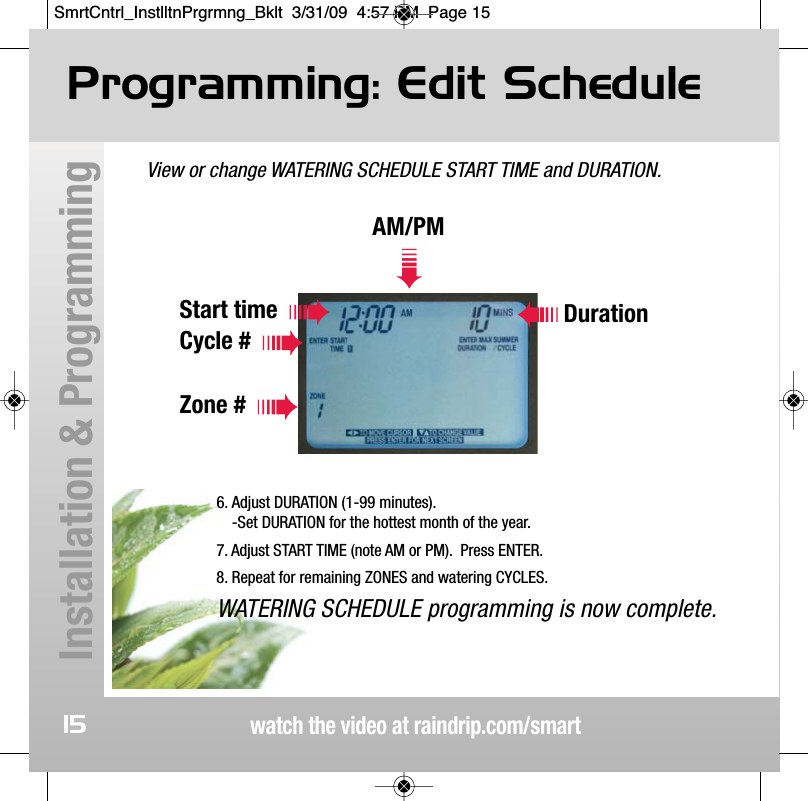
View or change WATERING SCHEDULE START TIME and DURATION.Programming: Edit Schedulewatch the video at raindrip.com/smartInstallation & Programming15AM/PM➠Start timeCycle #Zone #Duration6. Adjust DURATION (1-99 minutes).-Set DURATION for the hottest month of the year.7. Adjust START TIME (note AM or PM).  Press ENTER.8. Repeat for remaining ZONES and watering CYCLES.WATERING SCHEDULE programming is now complete.SmrtCntrl_InstlltnPrgrmng_Bklt  3/31/09  4:57 PM  Page 15
Programming: Edit Schedulewatch the video at raindrip.com/smartInstallation & Programming16WATERING SCHEDULE Notes:• Zone watering schedules are reserved to avoid duplicate or overlapping START TIMES and DURATIONS.  During programming,START TIMES may skip to the next available time slot.• DURATION should be set before setting a START TIME.• Watering schedule entries can be reviewed and corrected at anytime during programming by pressing the EDIT SCHEDULE button.• START TIMES and DURATIONS are restricted so that wateringcannot cross midnight.• The automatically adjusted minimum watering duration will beone (1) minute.  If the adjusted duration is less that 30 seconds,the actual watering duration will be zero (0) minutes and nowatering will occur for that specific zone.• To erase ALL watering schedule programs, press and hold EDITSCHEDULE for 5 seconds.SmrtCntrl_InstlltnPrgrmng_Bklt  3/31/09  4:57 PM  Page 16
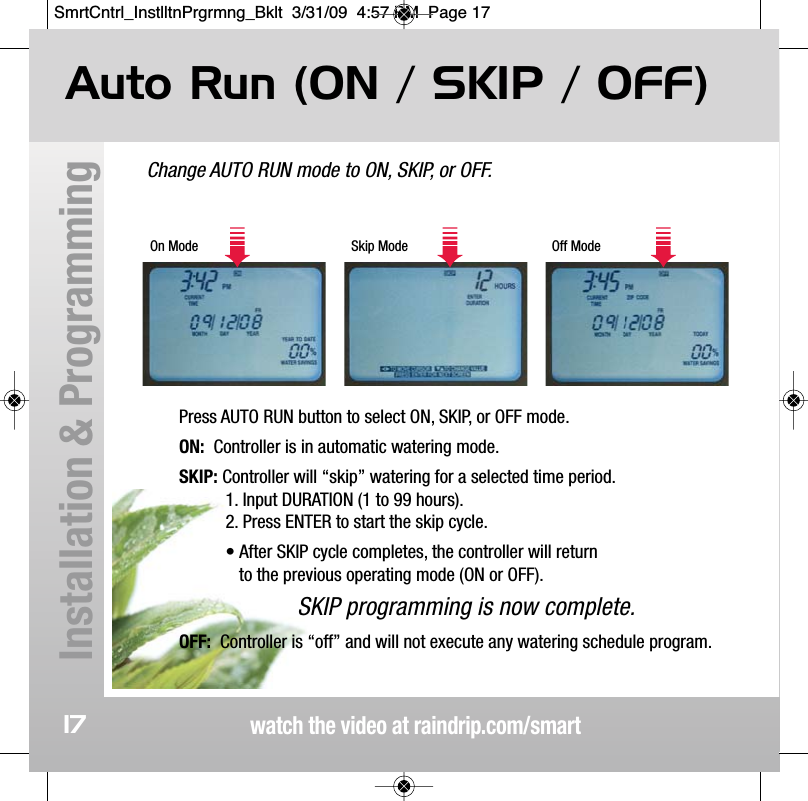
Change AUTO RUN mode to ON, SKIP, or OFF.Auto Run (ON / SKIP / OFF)watch the video at raindrip.com/smartInstallation & Programming17On Mode Skip Mode Off ModePress AUTO RUN button to select ON, SKIP, or OFF mode.ON: Controller is in automatic watering mode.SKIP: Controller will “skip” watering for a selected time period. 1. Input DURATION (1 to 99 hours).  2. Press ENTER to start the skip cycle.• After SKIP cycle completes, the controller will return to the previous operating mode (ON or OFF).SKIP programming is now complete.OFF: Controller is “off” and will not execute any watering schedule program.SmrtCntrl_InstlltnPrgrmng_Bklt  3/31/09  4:57 PM  Page 17
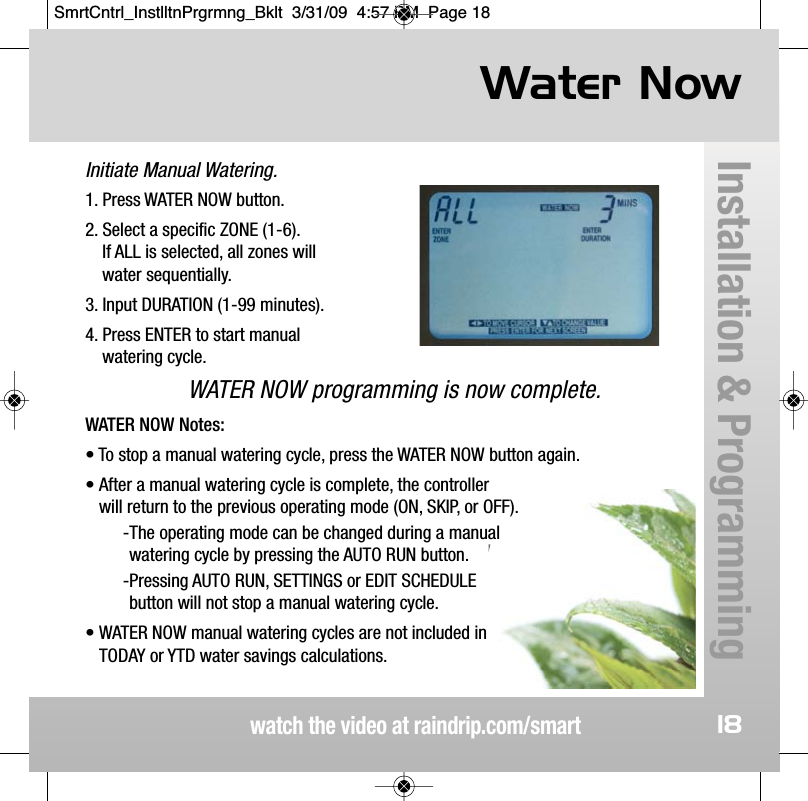
Initiate Manual Watering.Water Nowwatch the video at raindrip.com/smartInstallation & Programming181. Press WATER NOW button.2. Select a specific ZONE (1-6).  If ALL is selected, all zones will water sequentially.3. Input DURATION (1-99 minutes). 4. Press ENTER to start manual watering cycle.WATER NOW programming is now complete.WATER NOW Notes:• To stop a manual watering cycle, press the WATER NOW button again.• After a manual watering cycle is complete, the controller will return to the previous operating mode (ON, SKIP, or OFF).-The operating mode can be changed during a manual watering cycle by pressing the AUTO RUN button.-Pressing AUTO RUN, SETTINGS or EDIT SCHEDULE button will not stop a manual watering cycle.• WATER NOW manual watering cycles are not included in TODAY or YTD water savings calculations. SmrtCntrl_InstlltnPrgrmng_Bklt  3/31/09  4:57 PM  Page 18
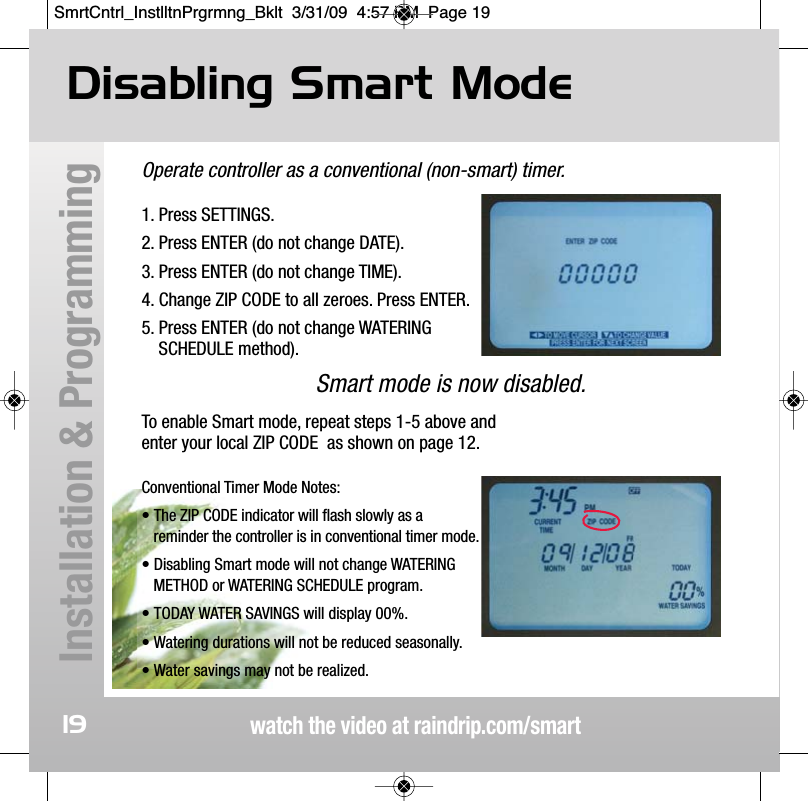
watch the video at raindrip.com/smartInstallation & Programming19Operate controller as a conventional (non-smart) timer.1. Press SETTINGS.2. Press ENTER (do not change DATE).3. Press ENTER (do not change TIME).4. Change ZIP CODE to all zeroes. Press ENTER.5. Press ENTER (do not change WATERING SCHEDULE method).Smart mode is now disabled.To enable Smart mode, repeat steps 1-5 above and enter your local ZIP CODE  as shown on page 12. Conventional Timer Mode Notes:• The ZIP CODE indicator will flash slowly as areminder the controller is in conventional timer mode.• Disabling Smart mode will not change WATERING METHOD or WATERING SCHEDULE program.• TODAY WATER SAVINGS will display 00%.• Watering durations will not be reduced seasonally.• Water savings may not be realized.Disabling Smart Mode SmrtCntrl_InstlltnPrgrmng_Bklt  3/31/09  4:57 PM  Page 19
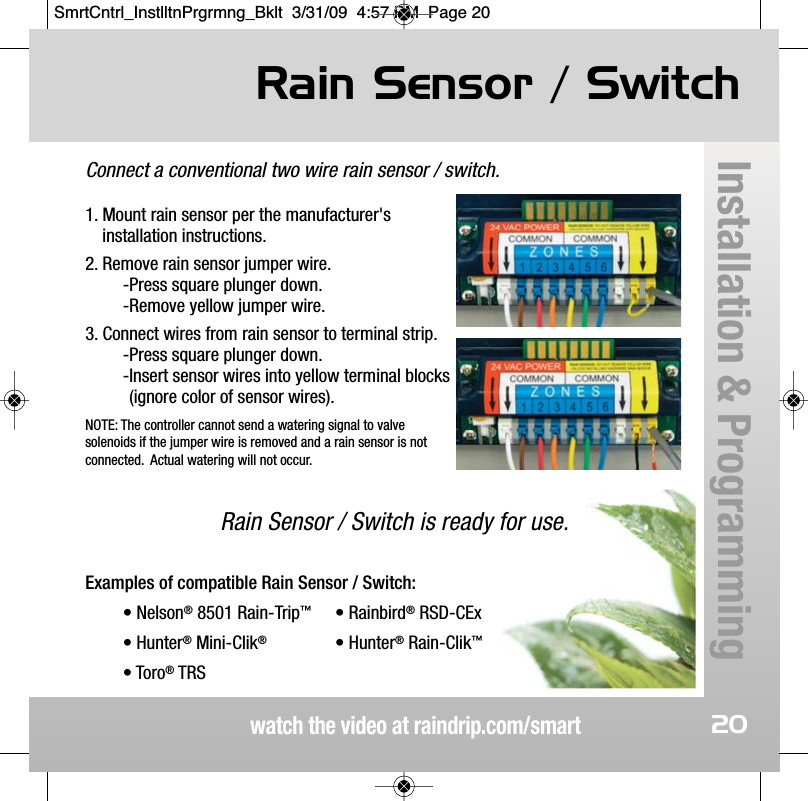
Connect a conventional two wire rain sensor / switch.1. Mount rain sensor per the manufacturer'sinstallation instructions.2. Remove rain sensor jumper wire.-Press square plunger down.-Remove yellow jumper wire.3. Connect wires from rain sensor to terminal strip.-Press square plunger down.-Insert sensor wires into yellow terminal blocks(ignore color of sensor wires).NOTE: The controller cannot send a watering signal to valvesolenoids if the jumper wire is removed and a rain sensor is notconnected.  Actual watering will not occur.Rain Sensor / Switch is ready for use.Examples of compatible Rain Sensor / Switch:• Nelson®8501 Rain-Trip™• Rainbird®RSD-CEx• Hunter®Mini-Clik®• Hunter®Rain-Clik™• Toro®TRSRain Sensor / Switchwatch the video at raindrip.com/smartInstallation & Programming20SmrtCntrl_InstlltnPrgrmng_Bklt  3/31/09  4:57 PM  Page 20
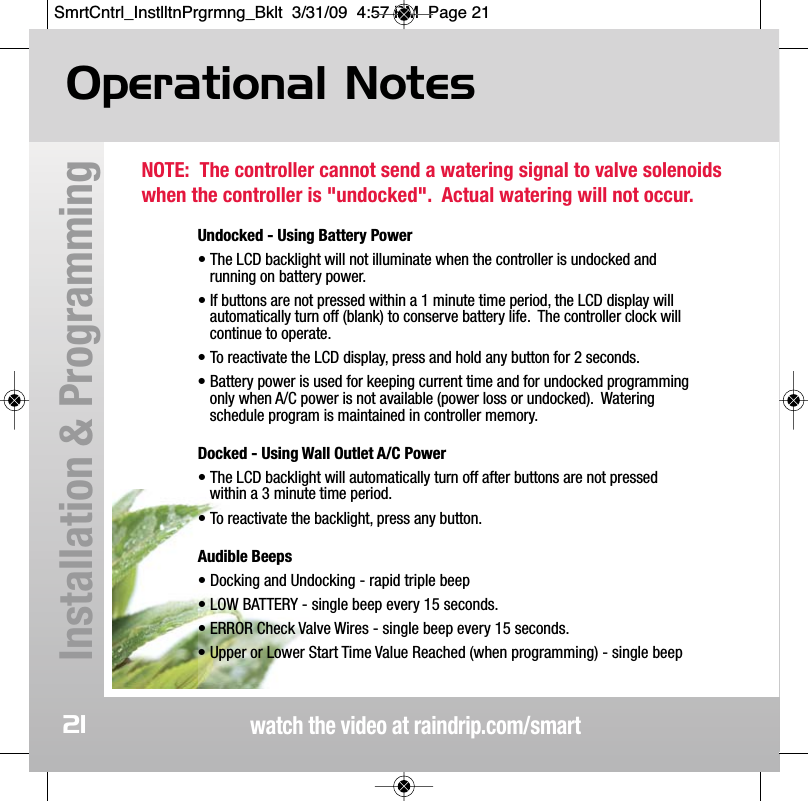
NOTE:  The controller cannot send a watering signal to valve solenoidswhen the controller is "undocked".  Actual watering will not occur.Operational Noteswatch the video at raindrip.com/smartInstallation & Programming21Undocked - Using Battery Power• The LCD backlight will not illuminate when the controller is undocked andrunning on battery power.  • If buttons are not pressed within a 1 minute time period, the LCD display willautomatically turn off (blank) to conserve battery life.  The controller clock willcontinue to operate.• To reactivate the LCD display, press and hold any button for 2 seconds.• Battery power is used for keeping current time and for undocked programmingonly when A/C power is not available (power loss or undocked).  Wateringschedule program is maintained in controller memory.Docked - Using Wall Outlet A/C Power• The LCD backlight will automatically turn off after buttons are not pressedwithin a 3 minute time period.• To reactivate the backlight, press any button.Audible Beeps• Docking and Undocking - rapid triple beep• LOW BATTERY - single beep every 15 seconds.• ERROR Check Valve Wires - single beep every 15 seconds.• Upper or Lower Start Time Value Reached (when programming) - single beep SmrtCntrl_InstlltnPrgrmng_Bklt  3/31/09  4:57 PM  Page 21
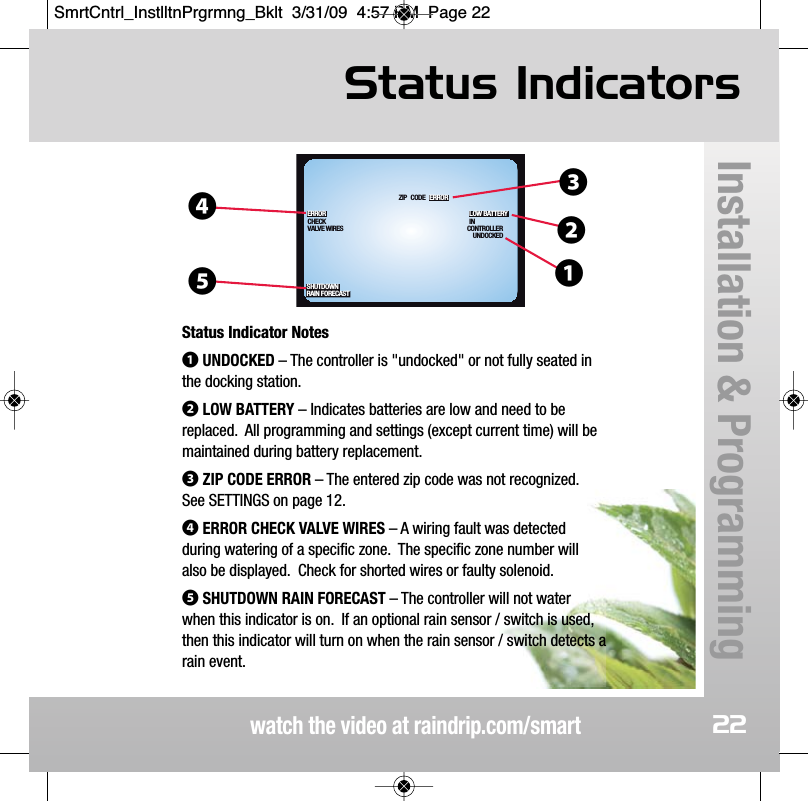
Status Indicatorswatch the video at raindrip.com/smartInstallation & Programming22SHUTDOWNRAIN FORECASTUNDOCKEDCONTROLLERIN LOW BATTERYCODEZIP ERRORVALVE WIRESCHECKERROR❹❸❷❶❺Status Indicator Notes❶UNDOCKED – The controller is "undocked" or not fully seated inthe docking station.❷LOW BATTERY – Indicates batteries are low and need to bereplaced.  All programming and settings (except current time) will bemaintained during battery replacement.❸ZIP CODE ERROR – The entered zip code was not recognized.See SETTINGS on page 12.❹ERROR CHECK VALVE WIRES – A wiring fault was detectedduring watering of a specific zone.  The specific zone number willalso be displayed.  Check for shorted wires or faulty solenoid.❺SHUTDOWN RAIN FORECAST – The controller will not waterwhen this indicator is on.  If an optional rain sensor / switch is used,then this indicator will turn on when the rain sensor / switch detects arain event.SmrtCntrl_InstlltnPrgrmng_Bklt  3/31/09  4:57 PM  Page 22
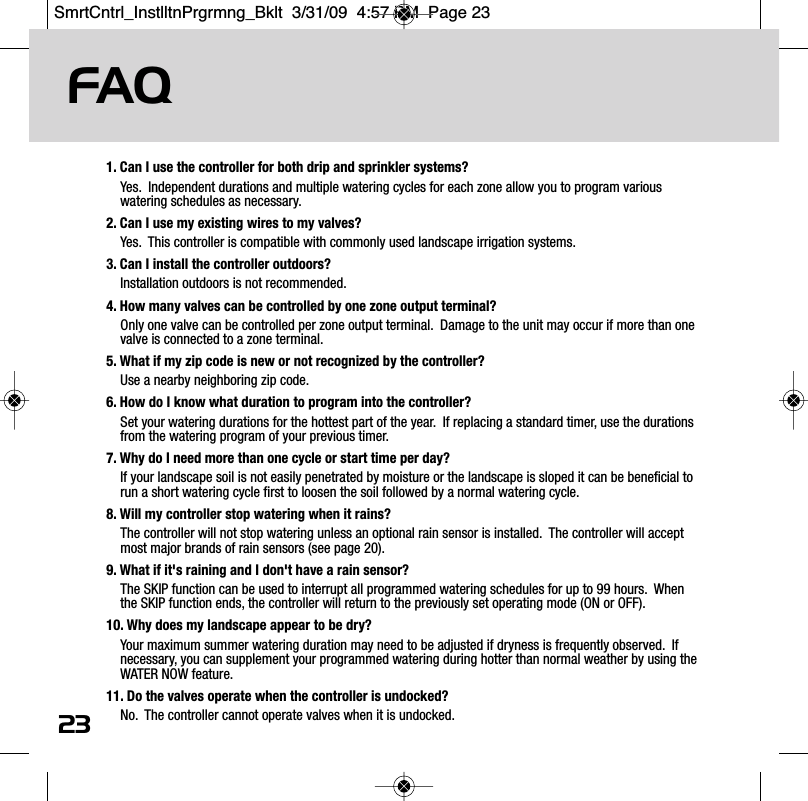
FAQ231. Can I use the controller for both drip and sprinkler systems? Yes.  Independent durations and multiple watering cycles for each zone allow you to program variouswatering schedules as necessary.2. Can I use my existing wires to my valves?Yes.  This controller is compatible with commonly used landscape irrigation systems.3. Can I install the controller outdoors?Installation outdoors is not recommended. 4. How many valves can be controlled by one zone output terminal?Only one valve can be controlled per zone output terminal.  Damage to the unit may occur if more than onevalve is connected to a zone terminal. 5. What if my zip code is new or not recognized by the controller?Use a nearby neighboring zip code.6. How do I know what duration to program into the controller?Set your watering durations for the hottest part of the year.  If replacing a standard timer, use the durationsfrom the watering program of your previous timer.7. Why do I need more than one cycle or start time per day?If your landscape soil is not easily penetrated by moisture or the landscape is sloped it can be beneficial torun a short watering cycle first to loosen the soil followed by a normal watering cycle.8. Will my controller stop watering when it rains?The controller will not stop watering unless an optional rain sensor is installed.  The controller will acceptmost major brands of rain sensors (see page 20).9. What if it's raining and I don't have a rain sensor?The SKIP function can be used to interrupt all programmed watering schedules for up to 99 hours.  Whenthe SKIP function ends, the controller will return to the previously set operating mode (ON or OFF).10. Why does my landscape appear to be dry?Your maximum summer watering duration may need to be adjusted if dryness is frequently observed.  Ifnecessary, you can supplement your programmed watering during hotter than normal weather by using theWATER NOW feature.11. Do the valves operate when the controller is undocked?No.  The controller cannot operate valves when it is undocked. SmrtCntrl_InstlltnPrgrmng_Bklt  3/31/09  4:57 PM  Page 23
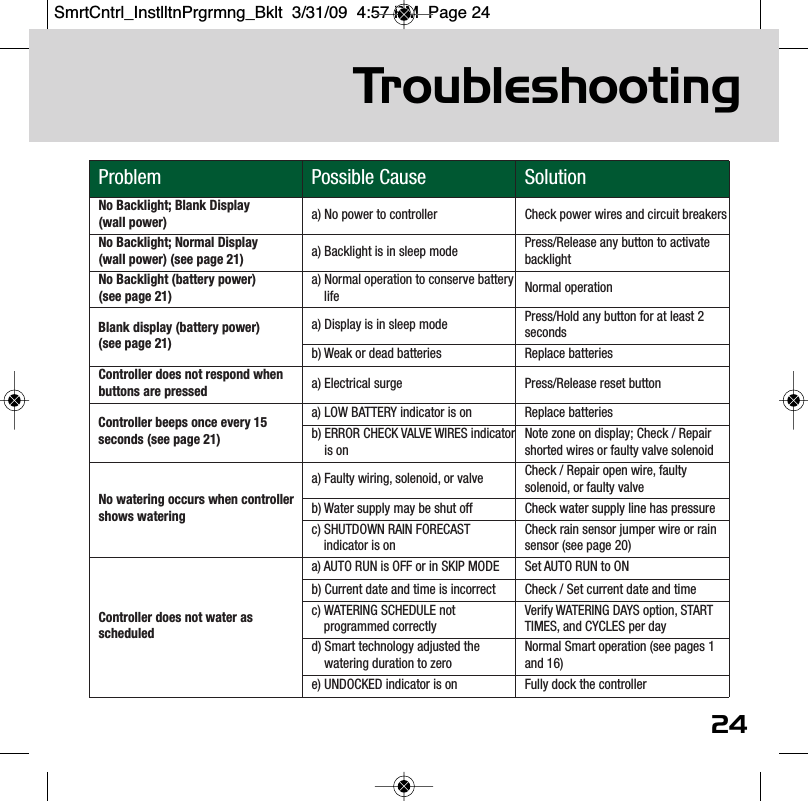
Troubleshootingwatch the video at raindrip.com/smartProblem Possible Cause SolutionNo Backlight; Blank Display (wall power)  a) No power to controller Check power wires and circuit breakersNo Backlight; Normal Display (wall power) (see page 21) a) Backlight is in sleep mode  Press/Release any button to activatebacklightNo Backlight (battery power) (see page 21)a) Normal operation to conserve batterylife Normal operationBlank display (battery power) (see page 21)a) Display is in sleep mode Press/Hold any button for at least 2secondsb) Weak or dead batteries Replace batteriesController does not respond whenbuttons are pressed a) Electrical surge Press/Release reset buttonController beeps once every 15seconds (see page 21)a) LOW BATTERY indicator is on  Replace batteriesb) ERROR CHECK VALVE WIRES indicatoris onNote zone on display; Check / Repairshorted wires or faulty valve solenoidNo watering occurs when controllershows wateringa) Faulty wiring, solenoid, or valve Check / Repair open wire, faultysolenoid, or faulty valveb) Water supply may be shut off Check water supply line has pressurec) SHUTDOWN RAIN FORECASTindicator is onCheck rain sensor jumper wire or rainsensor (see page 20)Controller does not water asscheduleda) AUTO RUN is OFF or in SKIP MODE Set AUTO RUN to ONb) Current date and time is incorrect Check / Set current date and timec) WATERING SCHEDULE notprogrammed correctlyVerify WATERING DAYS option, STARTTIMES, and CYCLES per dayd) Smart technology adjusted thewatering duration to zeroNormal Smart operation (see pages 1and 16)e) UNDOCKED indicator is on Fully dock the controller24SmrtCntrl_InstlltnPrgrmng_Bklt  3/31/09  4:57 PM  Page 24
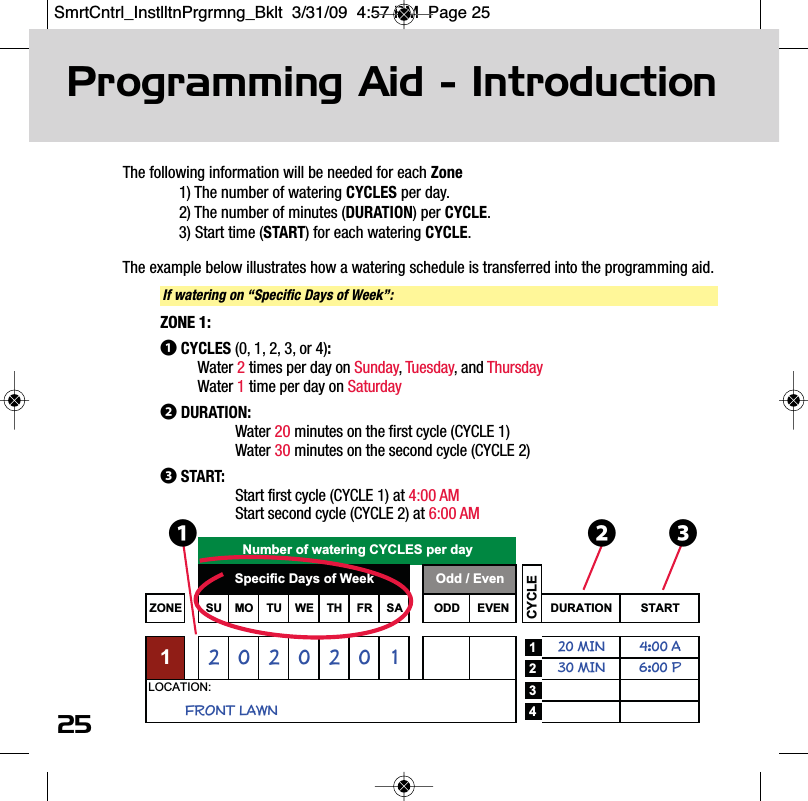
The following information will be needed for each Zone1) The number of watering CYCLES per day.2) The number of minutes (DURATION) per CYCLE.3) Start time (START) for each watering CYCLE.The example below illustrates how a watering schedule is transferred into the programming aid.ZONE SU MO TU WE TH FR SA ODD EVEN DURATION START120 MIN 4:00 A230 MIN 6:00 P342FRONT LAWNLOCATION:0002Odd / EvenSpecific Days of Week2Number of watering CYCLES per dayCYCLE1125Programming Aid - IntroductionIf watering on “Specific Days of Week”:❶ZONE 1:❶CYCLES (0, 1, 2, 3, or 4):Water 2times per day on Sunday, Tuesday, and ThursdayWater 1time per day on Saturday❷DURATION:Water 20 minutes on the first cycle (CYCLE 1)Water 30 minutes on the second cycle (CYCLE 2)❸START:Start first cycle (CYCLE 1) at 4:00 AMStart second cycle (CYCLE 2) at 6:00 AM❸❷SmrtCntrl_InstlltnPrgrmng_Bklt  3/31/09  4:57 PM  Page 25
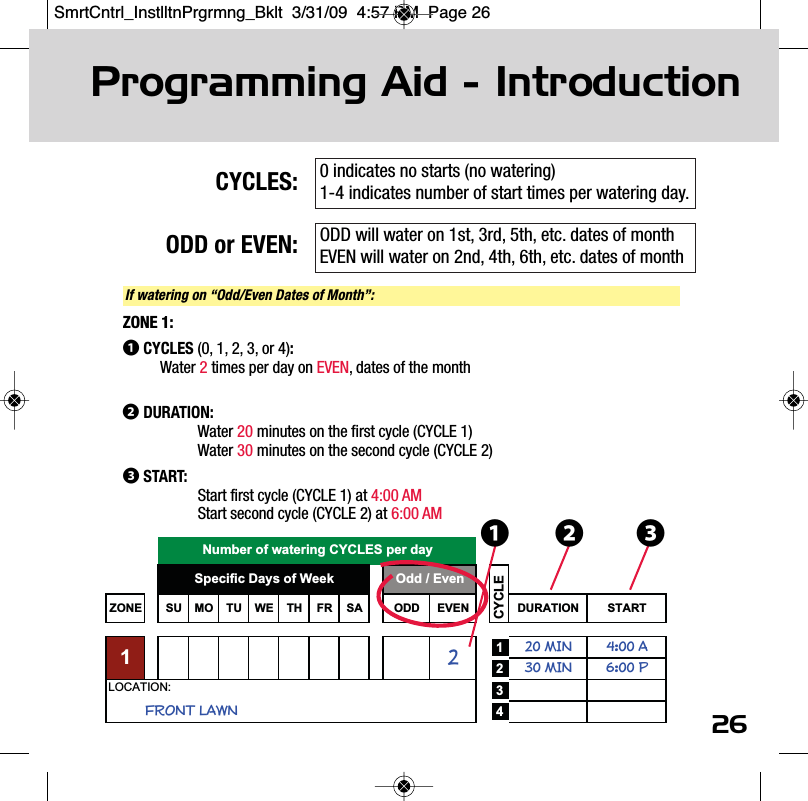
26CYCLES:ODD or EVEN:Programming Aid - IntroductionZONE SU MO TU WE TH FR SA ODD EVEN DURATION START120 MIN 4:00 A230 MIN 6:00 P342LOCATION:Specific Days of Week Odd / EvenFRONT LAWN1CYCLENumber of watering CYCLES per day ❶If watering on “Odd/Even Dates of Month”:ZONE 1:❶CYCLES (0, 1, 2, 3, or 4):Water 2times per day on EVEN, dates of the month❷DURATION:Water 20 minutes on the first cycle (CYCLE 1)Water 30 minutes on the second cycle (CYCLE 2)❸START:Start first cycle (CYCLE 1) at 4:00 AMStart second cycle (CYCLE 2) at 6:00 AM ❸❷0 indicates no starts (no watering)1-4 indicates number of start times per watering day.ODD will water on 1st, 3rd, 5th, etc. dates of monthEVEN will water on 2nd, 4th, 6th, etc. dates of monthSmrtCntrl_InstlltnPrgrmng_Bklt  3/31/09  4:57 PM  Page 26
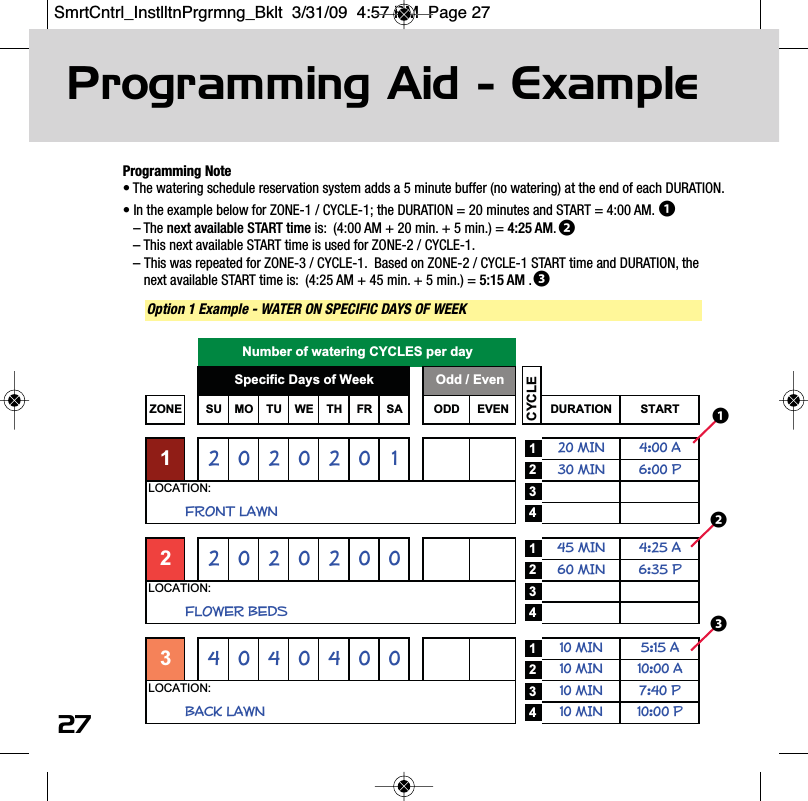
Programming Note• The watering schedule reservation system adds a 5 minute buffer (no watering) at the end of each DURATION.• In the example below for ZONE-1 / CYCLE-1; the DURATION = 20 minutes and START = 4:00 AM.– The next available START time is:  (4:00 AM + 20 min. + 5 min.) = 4:25 AM.  – This next available START time is used for ZONE-2 / CYCLE-1.– This was repeated for ZONE-3 / CYCLE-1.  Based on ZONE-2 / CYCLE-1 START time and DURATION, the next available START time is:  (4:25 AM + 45 min. + 5 min.) = 5:15 AM .Programming Aid - Examplewatch the video at raindrip.com/smart27Option 1 Example - WATER ON SPECIFIC DAYS OF WEEK ZONE SU MO TU WE TH FR SA ODD EVEN DURATION START120 MIN 4:00 A230 MIN 6:00 P34145 MIN 4:25 A260 MIN 6:35 P34110 MIN 5:15 A210 MIN 10:00 A310 MIN 7:40 P410 MIN 10:00 P202020LOCATION:BACK LAWN2FRONT LAWNLOCATION:4040LOCATION:4300FLOWER BEDS020002Odd / EvenSpecific Days of Week2Number of watering CYCLES per dayCYCLE11❸❷❶❶❷❸SmrtCntrl_InstlltnPrgrmng_Bklt  3/31/09  4:57 PM  Page 27
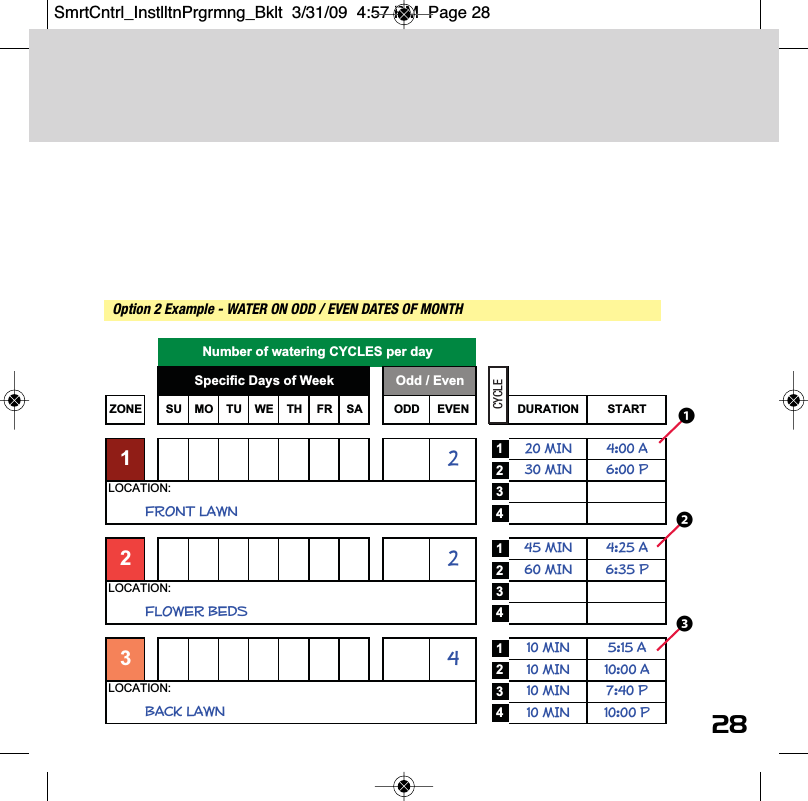
watch the video at raindrip.com/smart28Option 2 Example - WATER ON ODD / EVEN DATES OF MONTHZONE SU MO TU WE TH FR SA ODD EVEN DURATION START120 MIN 4:00 A230 MIN 6:00 P34145 MIN 4:25 A260 MIN 6:35 P34110 MIN 5:15 A210 MIN 10:00 A310 MIN 7:40 P410 MIN 10:00 P4LOCATION:2BACK LAWN32LOCATION:2LOCATION:FLOWER BEDSSpecific Days of Week Odd / EvenFRONT LAWN1CYCLENumber of watering CYCLES per dayCYCLE❶❷❸SmrtCntrl_InstlltnPrgrmng_Bklt  3/31/09  4:57 PM  Page 28
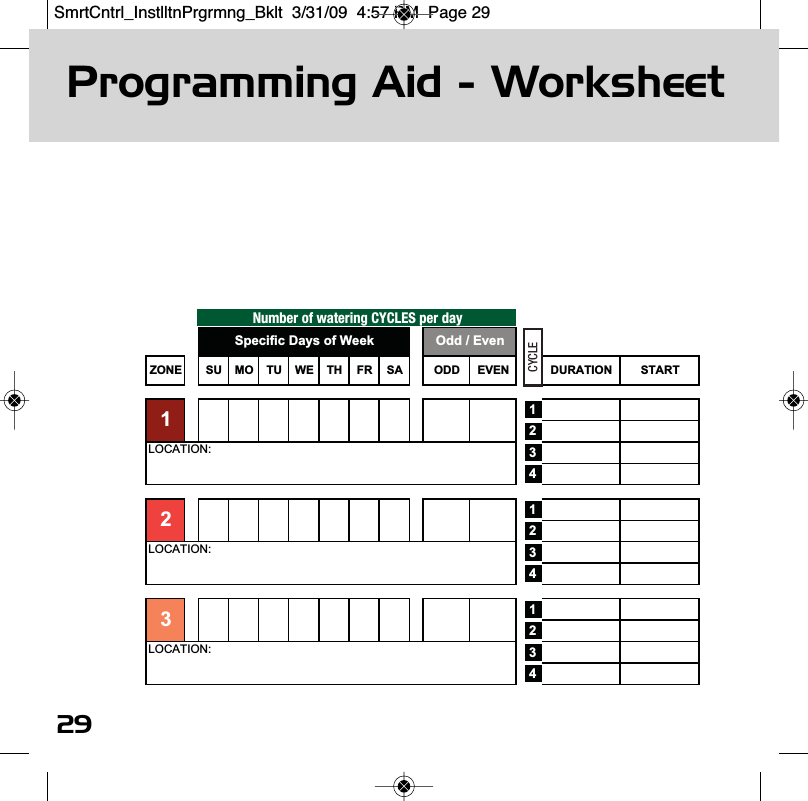
Programming Aid - Worksheet29Number of watering CYCLES per dayZONE SU MO TU WE TH FR SA ODD EVEN DURATION START123412341234LOCATION:LOCATION:3LOCATION:2Odd / EvenSpecific Days of Week1CYCLESmrtCntrl_InstlltnPrgrmng_Bklt  3/31/09  4:57 PM  Page 29
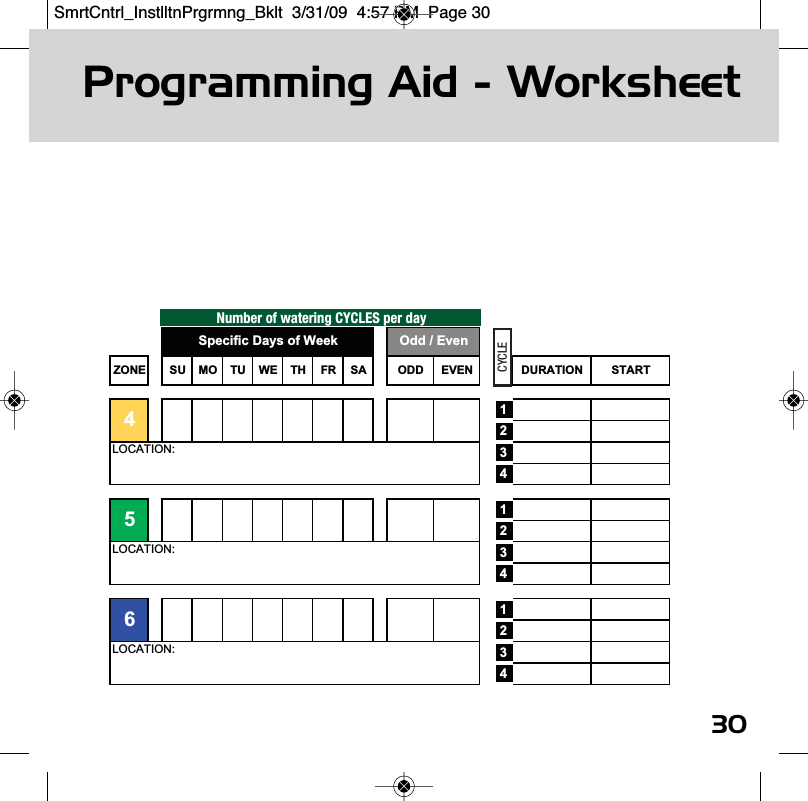
Programming Aid - Worksheet30Number of watering CYCLES per dayZONE SU MO TU WE TH FR SA ODD EVEN DURATION START123412341234LOCATION:LOCATION:65LOCATION:4Specific Days of Week Odd / EvenCYCLESmrtCntrl_InstlltnPrgrmng_Bklt  3/31/09  4:57 PM  Page 30
watch the video at raindrip.com/smartwww.raindrip.com31A/C Power SupplyInput: 120VAC, 60 HZOutput: 24VAC, 0.45ampsController Zone Output: 24VAC, 0.25ampsBattery PowerTwo (2) "AA" alkaline (not included).  Depending on battery usage, batteries should be replaced once a year.(do not use lithium or rechargeable batteries)Operating Temperature RangeStorage: 0˚ F to 140˚ FOperating: 30˚ F to 130˚ FSpecificationsSmrtCntrl_InstlltnPrgrmng_Bklt  3/31/09  4:57 PM  Page 31
WarrantyRaindrip Smart Controller - Limited Warrantywatch the video at raindrip.com/smartwww.raindrip.comRaindrip warrants to the original product or service purchaser ('the Customer') that the Raindrip product, for which the Customerreceived this warranty, was designed, developed and/or fabricated using all due reasonable commercial care and goodmanufacturing practices. Raindrip's product shall be free from defects in material and workmanship for one year, from the originaldate of purchase. Raindrip's sole and exclusive obligation under this warranty is to provide for the free repair or replacement of theproduct or of defective part in the product, at Raindrip's option.Warranty Limitations. The duration of any implied warranty or condition, of merchantability, fitness for a particular purpose, orotherwise, on this product shall be limited to the duration of the express warranty set forth above. In no event shall Raindrip beliable for any loss, inconvenience or damage, whether direct, incidental, consequential or otherwise, resulting from breach of anyexpress or implied warranty or condition, of merchantability, fitness for a particular purpose or otherwise with respect to thisproduct, except as set forth herein. Some states or countries do not allow limitation on how long an implied warranty lasts andsome do not allow exclusions or limitations of incidental or consequential damages, so the above limitations or exclusions may notapply to you. This warranty will be interpreted pursuant to the laws of the United States and the State of California. The originalEnglish language version (meaning) of this warranty controls over all translations.Warranty Service Options. For service under this warranty you must return the product to the store where you purchased [the units] it.Warranty Exclusions.This warranty does not cover the following:• Products that have been modified, neglected or poorly maintained, misused, abused or involved in accidents or natural disasters.• Damage to the product resulting from improper maintenance or repair, the use or installation of parts and/or accessories that arenot compatible with the original intended use of the product, or the failure to follow the product warnings and usage instructions. • Damage or deterioration to the surface finish, aesthetics or appearance of the product. • The labor costs required to remove and/or refit and readjust the product covered by this warranty.• Normal wear and tear to the product.• Product installed outdoors or in a manner not recommended by Raindrip.• Or, any products for which the Customer does not follow the warranty procedures outlined [above] in this Limited Warranty.877.502.7952techservice@ndspro.comraindrip.com/smart32SmrtCntrl_InstlltnPrgrmng_Bklt  3/31/09  4:57 PM  Page 32
877.502.7952techservice@ndspro.comraindrip.com/smartMonday - Friday 8:00 AM - 5:00 PM (Pacific Standard Time)Saturday - Sunday 9:00 AM - 1:00 PM (Pacific Standard Time)RSC INSTG-ASmrtCntrl_InstlltnPrgrmng_Bklt  3/31/09  4:57 PM  Page 33

Navigation menu