NGSTB M30WL11 Set Top Box for Smart TV/OTT/Hybrid User Manual M30WL Manual indd

NGSTB Company Limited Set Top Box for Smart TV/OTT/Hybrid M30WL Manual indd

Users Manual

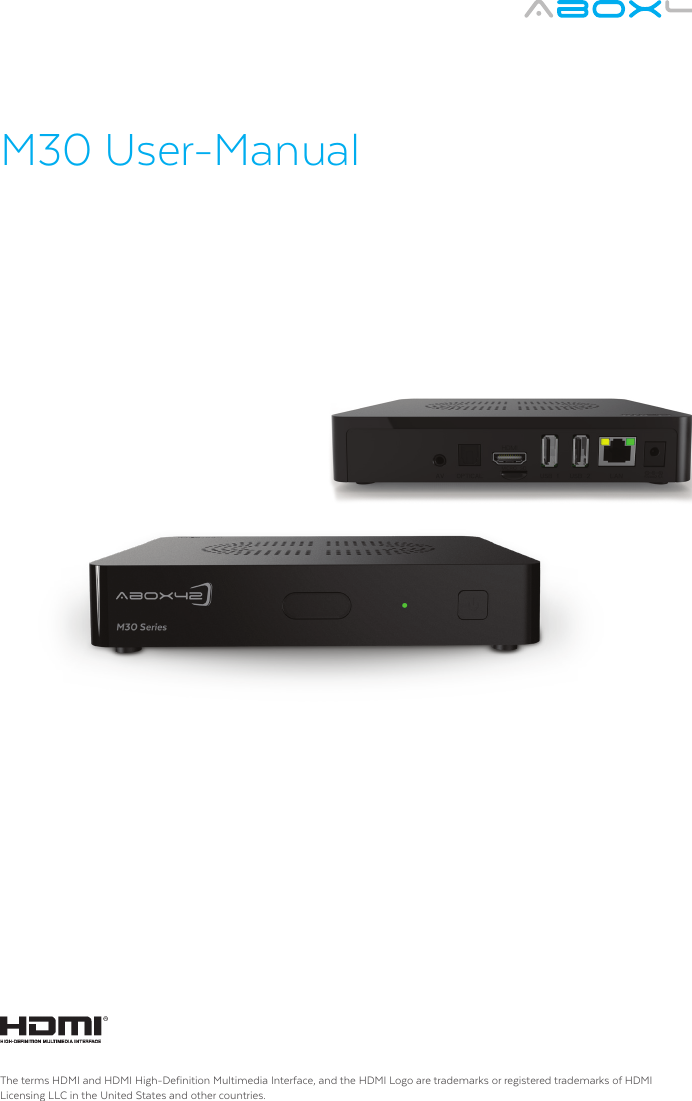
M30 User-ManualThe terms HDMI and HDMI High-Definition Multimedia Interface, and the HDMI Logo are trademarks or registered trademarks of HDMI Licensing LLC in the United States and other countries.
Table of content:1. Safety Advice and Warning     32. End User License Agreement           63. Precautions        64. Remote Control       75. System        86. Initial Installation      9 7. Support        101. Safety Advice and WarningSafety First!  It is imperative that you take the safety advice and warning  seriously. This helps to prevent accidents and bodily injuries as well as property damages. Please read this chapter carefully and follow all instructions.  This ensures the reliable operation and long lifespan of your M30 device.  Keep the packaging and the instruction manual to be able to pass them on to the new owner in case of sale of the device.General  preventive measures •  Do not allow children to play unsupervised with electrical devices. Children may not        always be able to recognize and assess possible danger.•   Keep packaging materials such as plastic film out of reach of children. There is danger of   suffocation. •   Disconnect the device from the power supply during a thunderstorm or lightening.   These preventive measures should also be taken when the device remains unattended    or not in use over a longer period of time. This will protect the device from damage by    lightening or electrical surge. Warning – Property damage General adviseIgnoring this advice may lead to injury, to the damage of the device, or to property damage.•  Ensure that no objects are inserted in the interior of the casing.•   Protect the device from overheating. Do not place the device near a heat source   (i.e. radiator or exhaust of a fan heater) and do not cover the ventilation slots.   The device may be damaged and/or there is fire hazard.  •  Do not expose the M30 device to direct sunlight, high temperatures or high humidity.        The device may be damaged and/or there is fire hazard.  •   Do not place any heavy devices, such as a video player or a television set on top of the    M30 device. The device may be damaged and/or there is fire hazard due to the   impairment of the ventilation/cooling.  •   Do not place the device on upholstered furniture or carpets or easily inflammable   materials. There is danger of overheating and fire. •   Never use force when connecting the cables. There is probably a reason if the cable    does not fit into a jack or an electrical outlet. Ensure that the plug is suitable for the    outlet and that it is connected in the intended direction. •   Do not modify or manipulate the device cables or connectors. •   Take care that the cables are not twisted or bent.•   Always pull on the plug and never on the cable when separating a cable connection.•   Ensure that at least one end of the adapter can be reached easily in order to disconnect    the device from the power supply in an instant. •   Disconnect the M30 device from the power supply prior to cleaning. Clean the device    with a slightly damp, never a wet cloth. Do not use a solvent.3
Requirements on the operating environment. Ignoring this advice may lead to malfunction or damage to the device.•   Set up the device only indoor in order to protect it from harmful environmental impact. •   Keep the M30 device, as well as all connected devices away from humidity and avoid    dust, heat and direct sunlight.•   Protect the device from moisture, humidity and liquids of any kind. These may lead    to damage or destruction of the device and in an extreme case may cause a fatal elec   tric shock.•   Ensure that the M30 device has a minimum clearance of 10 cm to other devices, such as    television sets or video recorder, which could cause electro-magnetic interference.  •   Ensure sufficient ventilation when placing the device on a shelf or bookcase.•   Do not position the M30 device on an instable cart, rack, tripod, console or table from    which it could fall down. The device could be damaged, bodily injury could occur or other    devices or furnishings could be damaged. •   Wait after transportation of the device with the start of operation until the device has    reached the surrounding temperature. •   Great deviation in temperature and humidity may result in the accumulation of moisture    within the device due to condensation which may lead to short-circuit.  •   The device may be operated in a surrounding temperature or 0°C ~ +40°C and relative    humidity of 10% to 80% (non-condensing).Danger to PersonsGeneral AdviceIgnoring this advice may lead to accidents, minor to major injuries, to damage of the device or to pro-perty damage.•   Never use the adapter in a moist environment. Never touch the adapter with moist    hands or moist feet. Contact with 230V voltage may have a fatal impact.•   Ensure that all electrical connections are carried out prior to connection of the M30    device. Always pull the power plug prior to connecting or disconnection cables.•   Always connect the adapter first to the jack on the back of the M30 device, prior to    connecting the other end of the cable to the power outlet.  •   Never attempt to repair the device. There is danger of electric shock if the device is    repaired, opened or taken apart by unauthorized persons. Please contact the B-12   support team (rear page of the cover)•   Ensure that the M30 device does not come in contact with liquids, dripping or splashing    water. Furthermore, no water filled vessels, such as vases may be placed on the device.•   In case liquids should get inside the device, immediately pull the power plug from the   power outlet and contact the M30 support team (rear page of the cover).•   Ensure sufficient ventilation around the adapter when the device is connected to it. Do    not cover the adapter with paper or other objects which could obstruct cooling.•  Connect the adapter only to a 110 or 230 V power outlets.  The adapter has the   following parameters:   Input: 100 - 240 V ~ 50/60 Hz 500mA  Output:  5 V --- / 2,5A  •   Never connect the adapter to a direct current source, as this could cause fire or   short-circuit. •   Never use the adapter when the cable is damaged.•   If you suspect malfunction of the adapter, contact the M30 support team.•   Never open the casing of the device and /or the adapter; they do not contain parts that    require maintenance.  When opening the casing risk of fatal injury from electric current      exists.•   Do not place any objects on the device and do not apply pressure on it.•  Ensure that the device is not dropped and the casing is not damaged. There is danger    of fire or electric shock. Danger due to the use of batteries•   For the remote control use two micro batteries of the type AAA, R03, UM4, 1,5V. Do    not use the remote control in humid, wet or caustic environment. Do not store or use    the remote control in the vicinity of sources of heat, in high temperature, in direct    sunlight, in microwave ovens or in pressure vessels. Do not expose the remote control    to temperatures exceeding 60°C. Otherwise the batteries could lose battery filling    agent, heat up or burn and result in further property damage or bodily injury.•   Do not open or perforate the batteries. The battery filling agent may cause injuries or    property damage. •   Ensure that you do not come in contact with the battery acid.•   Immediately and thoroughly wash the parts of the body that have come in contact with    battery acid and promptly seek medical advice.•   Remove the batteries if the remote control will remain unused over a longer period of   time.•   Remove exhausted batteries immediately.•   Under no circumstance mix new and old batteries.•   Do not use rechargeable and disposable batteries.•   Do not use batteries of different manufacturers.•   Danger of an explosion exists during incorrect exchange of the batteries or insertion of    the wrong type of batteries. •   Never attempt to recharge disposable batteries. There is danger of explosion, electric      shock or fire. •   Do not expose the batteries to excess heat such as sunlight, fire or the like. There is    danger of fire or explosion.•   Dispose of the batteries according to the legal requirements.54
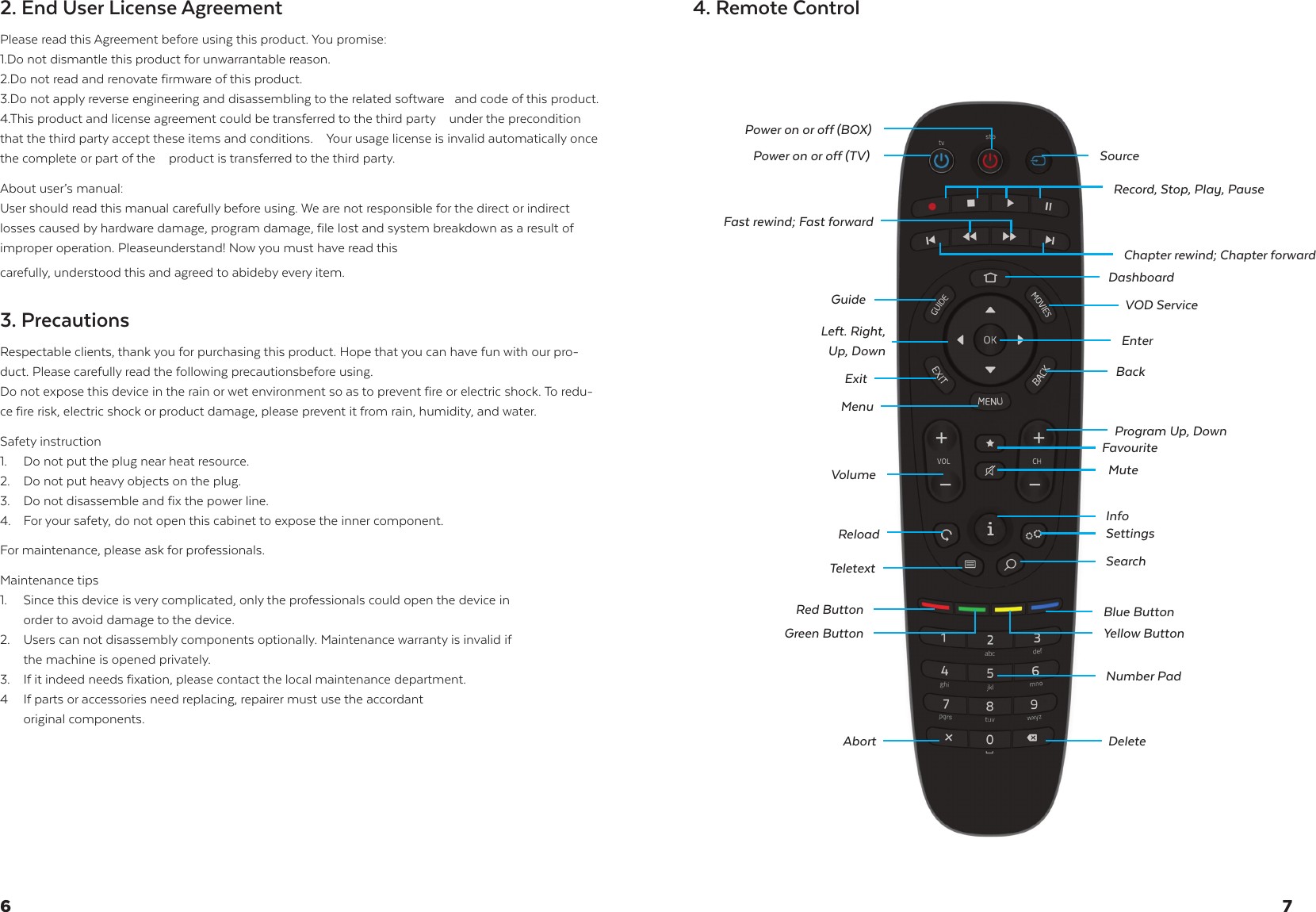
2. End User License Agreement Please read this Agreement before using this product. You promise: 1.Do not dismantle this product for unwarrantable reason. 2.Do not read and renovate firmware of this product.3.Do not apply reverse engineering and disassembling to the related software   and code of this product.4.This product and license agreement could be transferred to the third party    under the precondition that the third party accept these items and conditions.    Your usage license is invalid automatically once the complete or part of the    product is transferred to the third party. About user’s manual:User should read this manual carefully before using. We are not responsible for the direct or indirect losses caused by hardware damage, program damage, file lost and system breakdown as a result of improper operation. Pleaseunderstand! Now you must have read this carefully, understood this and agreed to abideby every item.3. Precautions Respectable clients, thank you for purchasing this product. Hope that you can have fun with our pro-duct. Please carefully read the following precautionsbefore using. Do not expose this device in the rain or wet environment so as to prevent fire or electric shock. To redu-ce fire risk, electric shock or product damage, please prevent it from rain, humidity, and water. Safety instruction 1.  Do not put the plug near heat resource.2.  Do not put heavy objects on the plug.3.  Do not disassemble and fix the power line.4.  For your safety, do not open this cabinet to expose the inner component.    For maintenance, please ask for professionals.  Maintenance tips 1.  Since this device is very complicated, only the professionals could open the device in    order to avoid damage to the device.2.  Users can not disassembly components optionally. Maintenance warranty is invalid if    the machine is opened privately. 3.  If it indeed needs fixation, please contact the local maintenance department. 4  If parts or accessories need replacing, repairer must use the accordant   original components.4. Remote Control76Power on or off (TV)Power on or off (BOX)Left. Right,  Up, DownVolumeExitGuideBackProgram Up, DownFavouriteMuteReloadNumber PadInfoSettingsSearchDeleteAbortTeletextFast rewind; Fast forwardMenuDashboardVOD ServiceChapter rewind; Chapter forwardRecord, Stop, Play, PauseEnterBlue ButtonYellow ButtonRed ButtonGreen ButtonSource
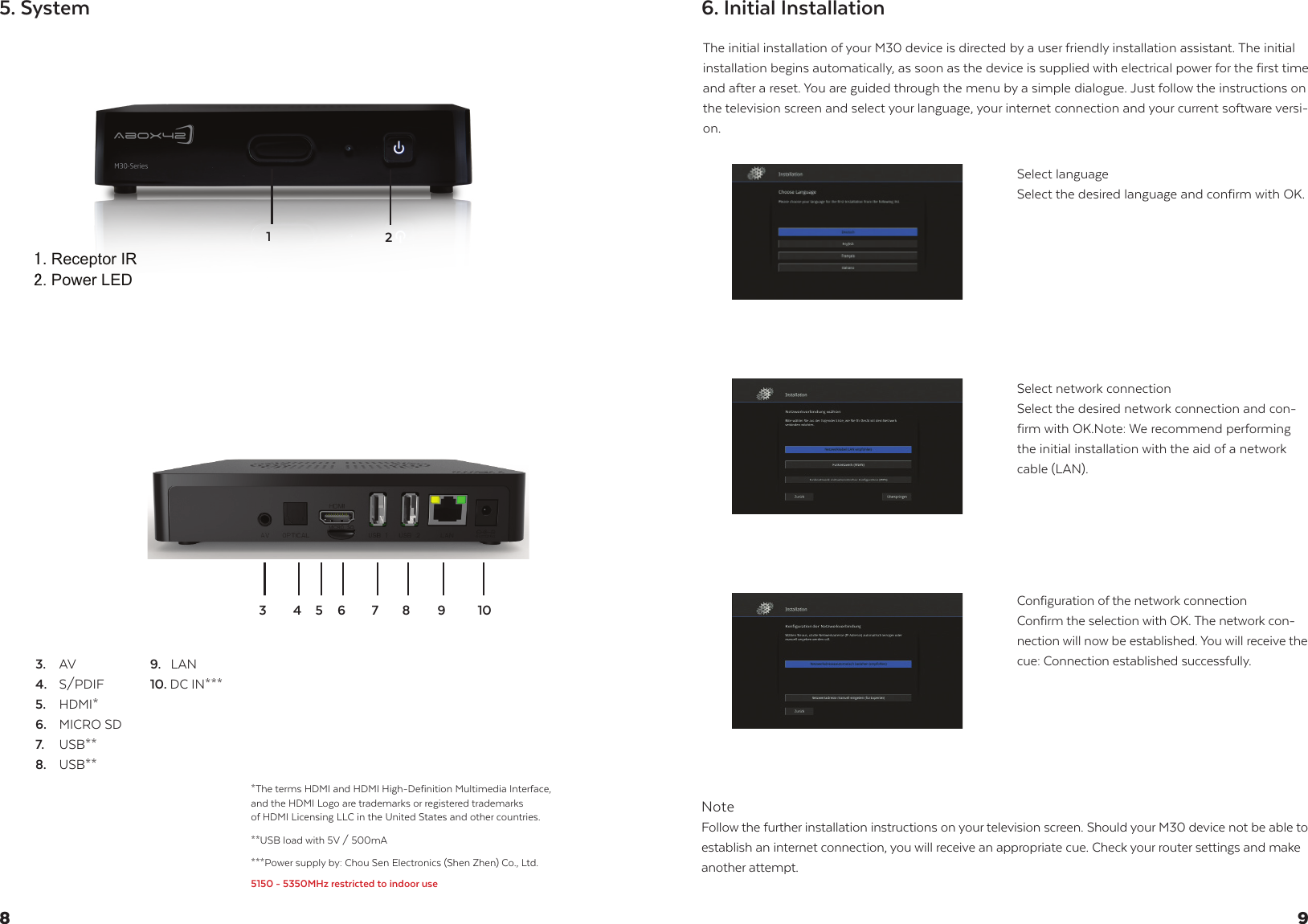
Receptor IRPower LED5. SystemThe initial installation of your M30 device is directed by a user friendly installation assistant. The initial installation begins automatically, as soon as the device is supplied with electrical power for the first time and after a reset. You are guided through the menu by a simple dialogue. Just follow the instructions on the television screen and select your language, your internet connection and your current software versi-on.NoteFollow the further installation instructions on your television screen. Should your M30 device not be able to establish an internet connection, you will receive an appropriate cue. Check your router settings and make another attempt.Select languageSelect the desired language and confirm with OK.Select network connectionSelect the desired network connection and con-firm with OK.Note: We recommend performing the initial installation with the aid of a network cable (LAN).Configuration of the network connection Confirm the selection with OK. The network con-nection will now be established. You will receive the cue: Connection established successfully.6. Initial Installation983.  AV4.  S/PDIF5.  HDMI*6.  MICRO SD7. USB**8.  USB**9.   LAN 10. DC IN***76512***Power supply by: Chou Sen Electronics (Shen Zhen) Co., Ltd.5150 - 5350MHz restricted to indoor use*The terms HDMI and HDMI High-Definition Multimedia Interface,and the HDMI Logo are trademarks or registered trademarks of HDMI Licensing LLC in the United States and other countries.**USB load with 5V / 500mA8 9 1043
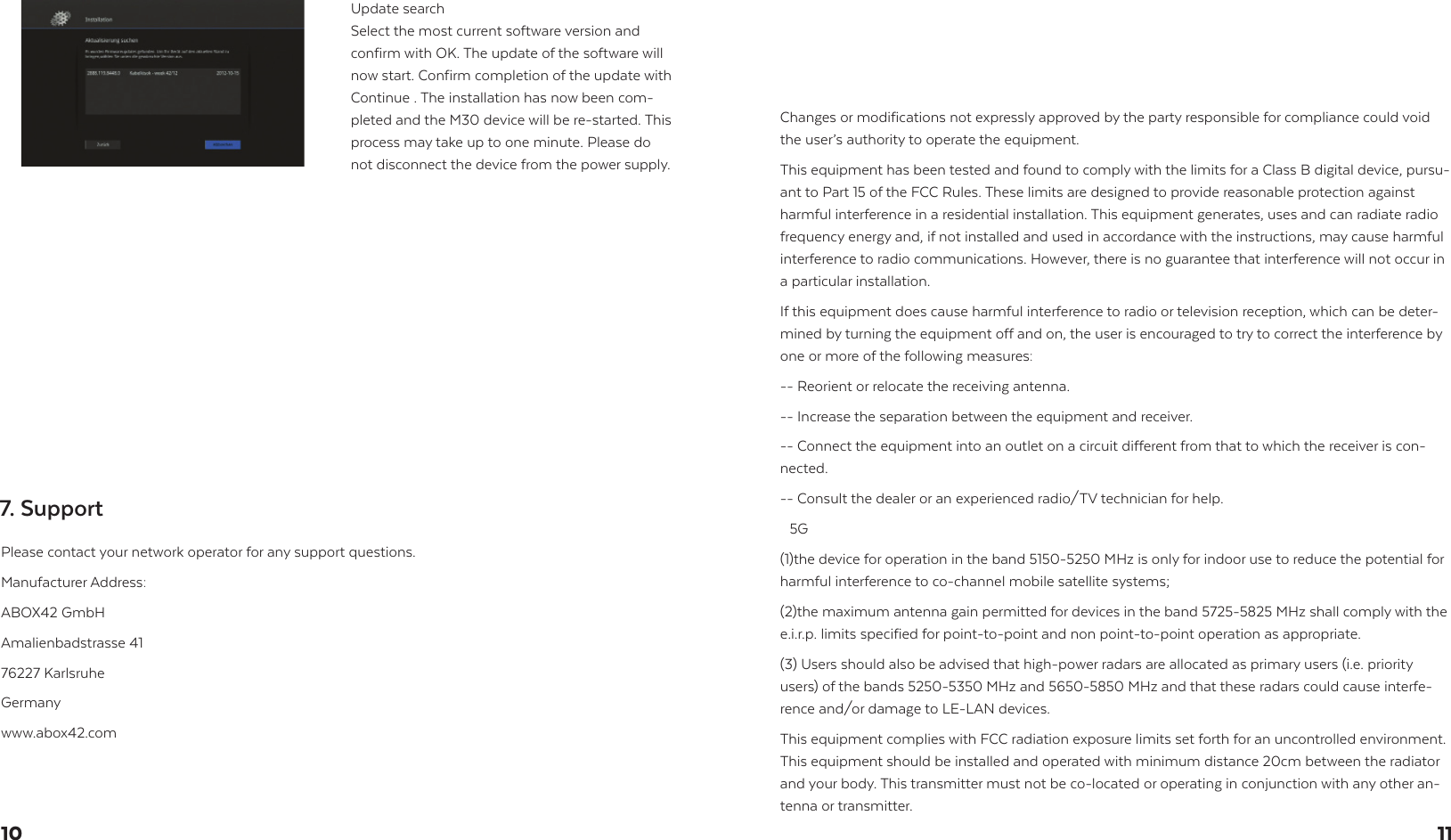
Update searchSelect the most current software version and confirm with OK. The update of the software will now start. Confirm completion of the update with Continue . The installation has now been com-pleted and the M30 device will be re-started. This process may take up to one minute. Please do not disconnect the device from the power supply.Please contact your network operator for any support questions.Manufacturer Address:ABOX42 GmbHAmalienbadstrasse 4176227 KarlsruheGermanywww.abox42.comChanges or modifications not expressly approved by the party responsible for compliance could void the user’s authority to operate the equipment.This equipment has been tested and found to comply with the limits for a Class B digital device, pursu-ant to Part 15 of the FCC Rules. These limits are designed to provide reasonable protection against harmful interference in a residential installation. This equipment generates, uses and can radiate radio frequency energy and, if not installed and used in accordance with the instructions, may cause harmful interference to radio communications. However, there is no guarantee that interference will not occur in a particular installation.If this equipment does cause harmful interference to radio or television reception, which can be deter-mined by turning the equipment off and on, the user is encouraged to try to correct the interference by one or more of the following measures:-- Reorient or relocate the receiving antenna.-- Increase the separation between the equipment and receiver.-- Connect the equipment into an outlet on a circuit different from that to which the receiver is con-nected.-- Consult the dealer or an experienced radio/TV technician for help.(5G((1)the device for operation in the band 5150-5250 MHz is only for indoor use to reduce the potential for harmful interference to co-channel mobile satellite systems;(2)the maximum antenna gain permitted for devices in the band 5725-5825 MHz shall comply with the e.i.r.p. limits specified for point-to-point and non point-to-point operation as appropriate.(3) Users should also be advised that high-power radars are allocated as primary users (i.e. priority users) of the bands 5250-5350 MHz and 5650-5850 MHz and that these radars could cause interfe-rence and/or damage to LE-LAN devices.This equipment complies with FCC radiation exposure limits set forth for an uncontrolled environment. This equipment should be installed and operated with minimum distance 20cm between the radiator and your body. This transmitter must not be co-located or operating in conjunction with any other an-tenna or transmitter.7. Support1110
This device complies with Part 15 of the FCC Rules. Operation is subject to the following two conditions: (1) this device may not cause harmful interference, and (2) this device must accept any interference re-ceived, including interference that may cause undesired operation.

Navigation menu