Nortek Security and Control 2GIG BRDG 2GIG-BRDG1-900 User Manual Go Bridge Install Instructions

2GIG Technologies, Inc. 2GIG-BRDG1-900 Go Bridge Install Instructions

User Manual

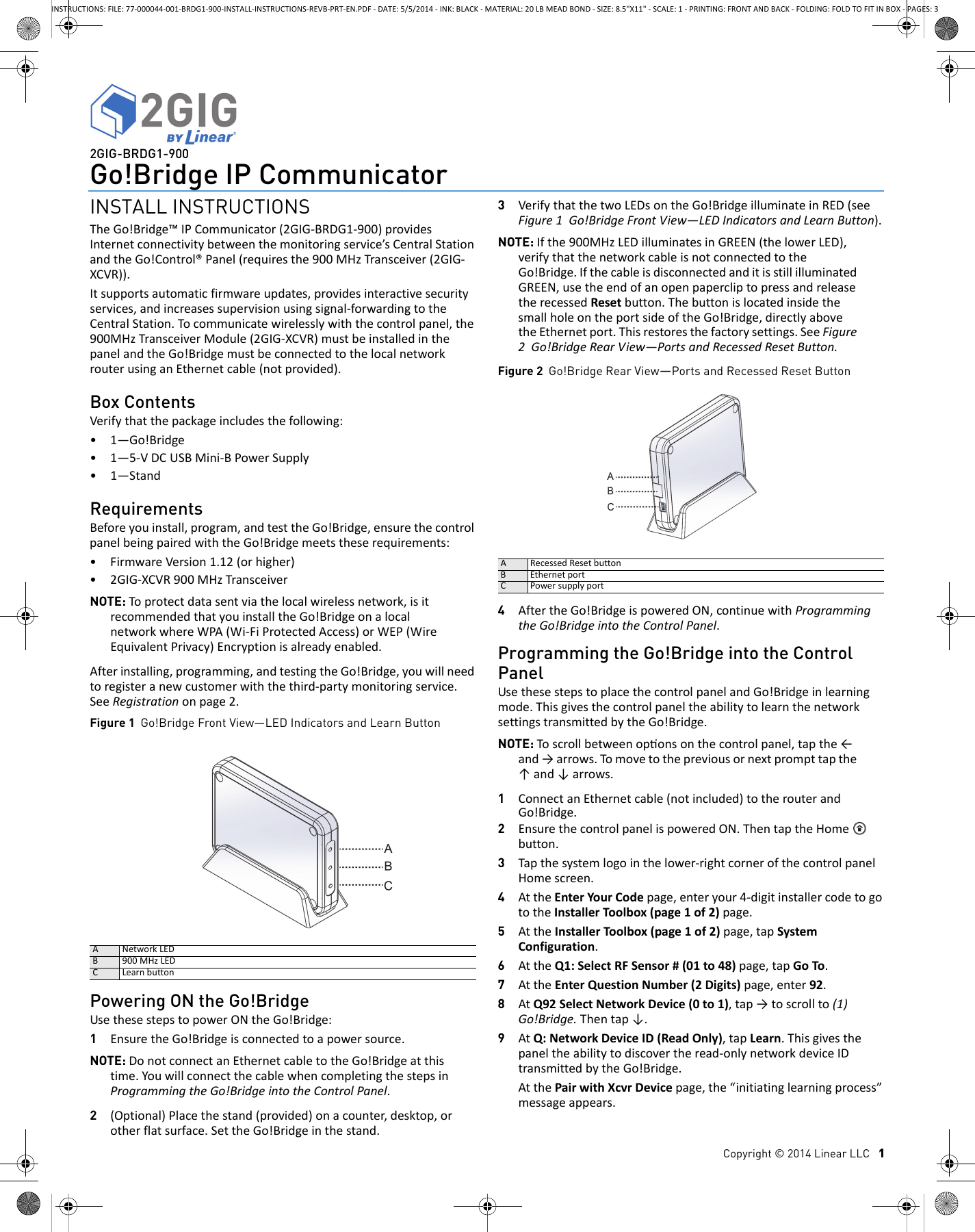
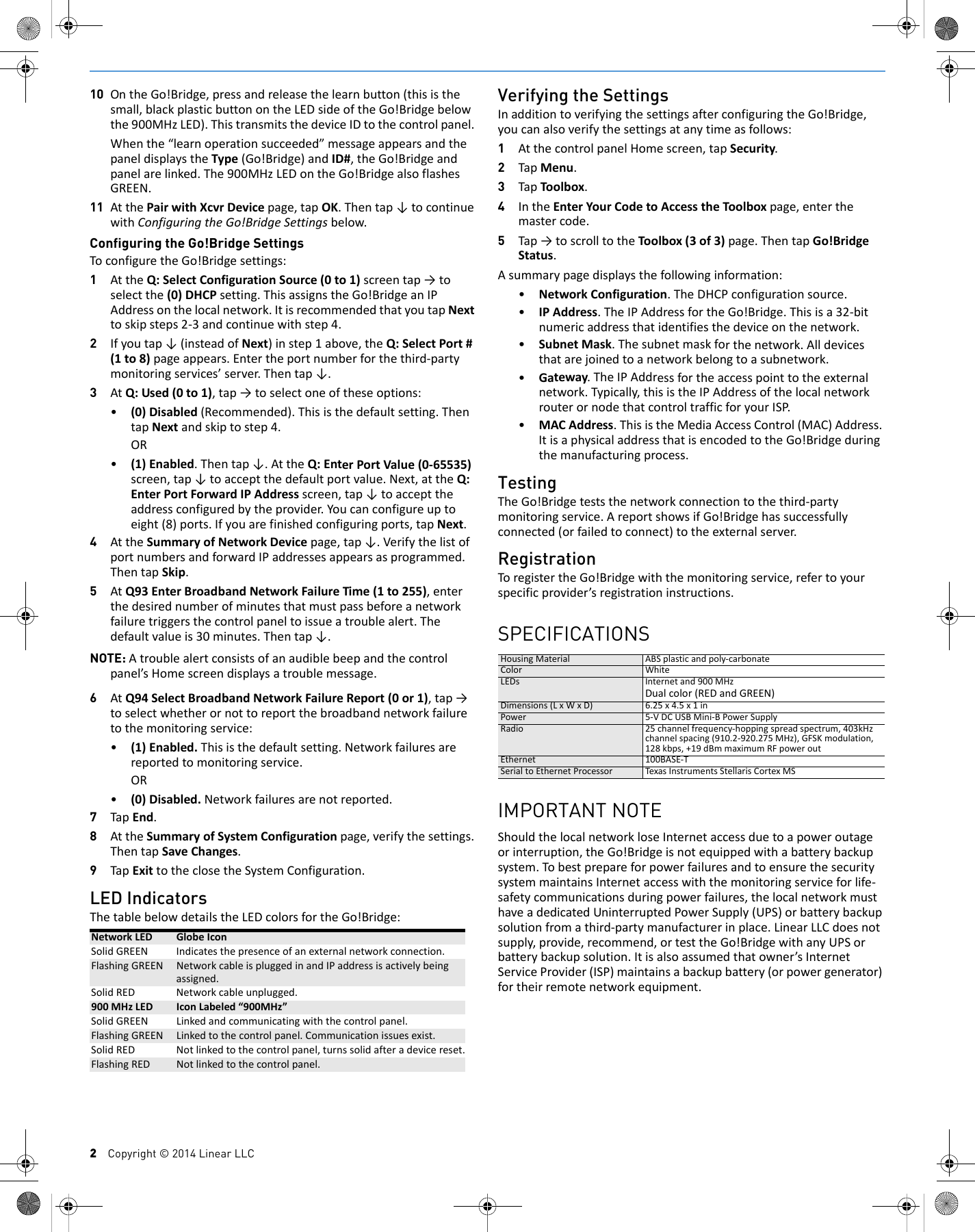
Copyright © 2014 Linear LLC   12GIG-BRDG1-900Go!Bridge IP CommunicatorINSTALL INSTRUCTIONSTheGo!Bridge™IPCommunicator(2GIG‐BRDG1‐900)providesInternetconnectivitybetweenthemonitoringservice’sCentralStationandtheGo!Control®Panel(requiresthe900MHzTransceiver(2GIG‐XCVR)).Itsupportsautomaticfirmwareupdates,providesinteractivesecurityservices,andincreasessupervisionusingsignal‐forwardingtotheCentralStation.Tocommunicatewirelesslywiththecontrolpanel,the900MHzTransceiverModule(2GIG‐XCVR)mustbeinstalledinthepanelandtheGo!BridgemustbeconnectedtothelocalnetworkrouterusinganEthernetcable(notprovided).Box ContentsVerifythatthepackageincludesthefollowing:•1—Go!Bridge•1—5‐VDCUSBMini‐BPowerSupply•1—StandRequirementsBeforeyouinstall,program,andtesttheGo!Bridge,ensurethecontrolpanelbeingpairedwiththeGo!Bridgemeetstheserequirements:•FirmwareVersion1.12(orhigher)•2GIG‐XCVR900MHzTransceiverNOTE: Toprotectdatasentviathelocalwirelessnetwork,isitrecommendedthatyouinstalltheGo!BridgeonalocalnetworkwhereWPA(Wi‐FiProtectedAccess)orWEP(WireEquivalentPrivacy)Encryptionisalreadyenabled.Afterinstalling,programming,andtestingtheGo!Bridge,youwillneedtoregisteranewcustomerwiththethird‐partymonitoringservice.SeeRegistrationonpage2.Figure 1  Go!Bridge Front View—LED Indicators and Learn ButtonPowering ON the Go!BridgeUsethesestepstopowerONtheGo!Bridge:1EnsuretheGo!Bridgeisconnectedtoapowersource.NOTE: DonotconnectanEthernetcabletotheGo!Bridgeatthistime.YouwillconnectthecablewhencompletingthestepsinProgrammingtheGo!BridgeintotheControlPanel.2(Optional)Placethestand(provided)onacounter,desktop,orotherflatsurface.SettheGo!Bridgeinthestand.3VerifythatthetwoLEDsontheGo!BridgeilluminateinRED(seeFigure1Go!BridgeFrontView—LEDIndicatorsandLearnButton).NOTE: Ifthe900MHzLEDilluminatesinGREEN(thelowerLED),verifythatthenetworkcableisnotconnectedtotheGo!Bridge.IfthecableisdisconnectedanditisstillilluminatedGREEN,usetheendofanopenpapercliptopressandreleasetherecessedResetbutton.ThebuttonislocatedinsidethesmallholeontheportsideoftheGo!Bridge,directlyabovetheEthernetport.Thisrestoresthefactorysettings.SeeFigure2Go!BridgeRearView—PortsandRecessedResetButton.Figure 2  Go!Bridge Rear View—Ports and Recessed Reset Button4AftertheGo!BridgeispoweredON,continuewithProgrammingtheGo!BridgeintotheControlPanel.Programming the Go!Bridge into the Control PanelUsethesestepstoplacethecontrolpanelandGo!Bridgeinlearningmode.ThisgivesthecontrolpaneltheabilitytolearnthenetworksettingstransmittedbytheGo!Bridge.NOTE: Toscrollbetweenoponsonthecontrolpanel,tapthe←and→arrows.Tomovetothepreviousornextprompttapthe↑and↓arrows.1ConnectanEthernetcable(notincluded)totherouterandGo!Bridge.2EnsurethecontrolpanelispoweredON.ThentaptheHome button.3Tapthesystemlogointhelower‐rightcornerofthecontrolpanelHomescreen.4AttheEnterYourCodepage,enteryour4‐digitinstallercodetogototheInstallerToolbox(page1of2)page.5AttheInstallerToolbox(page1of2)page,tapSystemConfiguration.6AttheQ1:SelectRFSensor#(01to48)page,tapGoTo.7AttheEnterQuestionNumber(2Digits)page,enter92.8AtQ92SelectNetworkDevice(0to1),tap→toscrollto(1)Go!Bridge.Thentap↓.9AtQ:NetworkDeviceID(ReadOnly),tapLearn.Thisgivesthepaneltheabilitytodiscovertheread‐onlynetworkdeviceIDtransmittedbytheGo!Bridge.AtthePairwithXcvrDevicepage,the“initiatinglearningprocess”messageappears.ANetworkLEDB 900MHzLEDCLearnbuttonARecessedResetbuttonBEthernetportCPowersupplyportINSTRUCTIONS: FILE: 77-000044-001-BRDG1-900-INSTALL-INSTRUCTIONS-REVB-PRT-EN.PDF - DATE: 5/5/2014 - INK: BLACK - MATERIAL: 20 LB MEAD BOND - SIZE: 8.5"X11" - SCALE: 1 - PRINTING: FRONT AND BACK - FOLDING: FOLD TO FIT IN BOX - PAGES: 3
2    Copyright © 2014 Linear LLC10 OntheGo!Bridge,pressandreleasethelearnbutton(thisisthesmall,blackplasticbuttonontheLEDsideoftheGo!Bridgebelowthe900MHzLED).ThistransmitsthedeviceIDtothecontrolpanel.Whenthe“learnoperationsucceeded”messageappearsandthepaneldisplaystheType(Go!Bridge)andID#,theGo!Bridgeandpanelarelinked.The900MHzLEDontheGo!BridgealsoflashesGREEN.11 AtthePairwithXcvrDevicepage,tapOK.Thentap↓tocontinuewithConfiguringtheGo!BridgeSettingsbelow.Configuring the Go!Bridge SettingsToconfiguretheGo!Bridgesettings:1AttheQ:SelectConfigurationSource(0to1)screentap→toselectthe(0)DHCPsetting.ThisassignstheGo!BridgeanIPAddressonthelocalnetwork.ItisrecommendedthatyoutapNexttoskipsteps2‐3andcontinuewithstep4.2Ifyoutap↓(insteadofNext)instep1above,theQ:SelectPort#(1to8)pageappears.Entertheportnumberforthethird‐partymonitoringservices’server.Thentap↓.3AtQ:Used(0to1),tap→toselectoneoftheseoptions:•(0)Disabled(Recommended).Thisisthedefaultsetting.ThentapNextandskiptostep4.OR•(1)Enabled.Thentap↓.AttheQ:EnterPortValue(0‐65535)screen,tap↓toacceptthedefaultportvalue.Next,attheQ:EnterPortForwardIPAddressscreen,tap↓toaccepttheaddressconfiguredbytheprovider.Youcanconfigureuptoeight(8)ports.Ifyouarefinishedconfiguringports,tapNext.4AttheSummaryofNetworkDevicepage,tap↓.VerifythelistofportnumbersandforwardIPaddressesappearsasprogrammed.ThentapSkip.5AtQ93EnterBroadbandNetworkFailureTime(1to255),enterthedesirednumberofminutesthatmustpassbeforeanetworkfailuretriggersthecontrolpaneltoissueatroublealert.Thedefaultvalueis30minutes.Thentap↓.NOTE: Atroublealertconsistsofanaudiblebeepandthecontrolpanel’sHomescreendisplaysatroublemessage.6AtQ94SelectBroadbandNetworkFailureReport(0or1),tap→toselectwhetherornottoreportthebroadbandnetworkfailuretothemonitoringservice:•(1)Enabled.Thisisthedefaultsetting.Networkfailuresarereportedtomonitoringservice.OR•(0)Disabled.Networkfailuresarenotreported.7TapEnd.8AttheSummaryofSystemConfigurationpage,verifythesettings.ThentapSaveChanges.9TapExittotheclosetheSystemConfiguration.LED IndicatorsThetablebelowdetailstheLEDcolorsfortheGo!Bridge:Verifying the SettingsInadditiontoverifyingthesettingsafterconfiguringtheGo!Bridge,youcanalsoverifythesettingsatanytimeasfollows:1AtthecontrolpanelHomescreen,tapSecurity.2TapMenu.3TapToolbox.4IntheEnterYourCodetoAccesstheToolboxpage,enterthemastercode.5Tap→toscrolltotheToolbox(3of3)page.ThentapGo!BridgeStatus.Asummarypagedisplaysthefollowinginformation:•NetworkConfiguration.TheDHCPconfigurationsource.•IPAddress.TheIPAddressfortheGo!Bridge.Thisisa32‐bitnumericaddressthatidentifiesthedeviceonthenetwork.•SubnetMask.Thesubnetmaskforthenetwork.Alldevicesthatarejoinedtoanetworkbelongtoasubnetwork.•Gateway.TheIPAddressfortheaccesspointtotheexternalnetwork.Typically,thisistheIPAddressofthelocalnetworkrouterornodethatcontroltrafficforyourISP.•MACAddress.ThisistheMediaAccessControl(MAC)Address.ItisaphysicaladdressthatisencodedtotheGo!Bridgeduringthemanufacturingprocess.TestingTheGo!Bridgeteststhenetworkconnectiontothethird‐partymonitoringservice.AreportshowsifGo!Bridgehassuccessfullyconnected(orfailedtoconnect)totheexternalserver.RegistrationToregistertheGo!Bridgewiththemonitoringservice,refertoyourspecificprovider’sregistrationinstructions.SPECIFICATIONSHousingMaterial ABSplasticandpoly‐carbonateColor WhiteLEDs Internetand900MHzDualcolor(REDandGREEN)Dimensions(LxWxD) 6.25x4.5x1inPower 5‐VDCUSBMini‐BPowerSupplyRadio 25channelfrequency‐hoppingspreadspectrum,403kHzchannelspacing(910.2‐920.275MHz),GFSKmodulation,128kbps,+19dBmmaximumRFpoweroutEthernet100BASE‐TSerialtoEthernetProcessor Texas InstrumentsStellarisCortexMSIMPORTANT NOTEShouldthelocalnetworkloseInternetaccessduetoapoweroutageorinterruption,theGo!Bridgeisnotequippedwithabatterybackupsystem.TobestprepareforpowerfailuresandtoensurethesecuritysystemmaintainsInternetaccesswiththemonitoringserviceforlife‐safetycommunicationsduringpowerfailures,thelocalnetworkmusthaveadedicatedUninterruptedPowerSupply(UPS)orbatterybackupsolutionfromathird‐partymanufacturerinplace.LinearLLCdoesnotsupply,provide,recommend,ortesttheGo!BridgewithanyUPSorbatterybackupsolution.Itisalsoassumedthatowner’sInternetServiceProvider(ISP)maintainsabackupbattery(orpowergenerator)fortheirremotenetworkequipment.NetworkLED GlobeIconSolidGREEN Indicatesthepresenceofanexternalnetworkconnection.FlashingGREEN NetworkcableispluggedinandIPaddressisactivelybeingassigned.SolidRED Networkcableunplugged.900MHzLED IconLabeled“900MHz”SolidGREEN Linkedandcommunicatingwiththecontrolpanel.FlashingGREEN Linkedtothecontrolpanel.Communicationissuesexist.SolidRED Notlinkedtothecontrolpanel,turnssolidafteradevicereset.FlashingRED Notlinkedtothecontrolpanel.
Copyright © 2014 Linear LLC    3REGULATORY INFORMATIONWireless Product NoticeRadiocontrolsprovideareliablecommunicationslinkandfillanimportantneedinportablewirelesssignaling;however,therearesomelimitationswhichmustbeobserved.•ForUnitedStatesInstallationsOnly:TheradiosarerequiredtocomplywithFCCRulesandRegulationsasPart15devices.Assuch,theyhavelimitedtransmitterpowerandthereforelimitedrange(approximately400ft.).•Areceivercannotrespondtomorethanonetransmittedsignalatatimeandmaybeblockedbyradiosignalsthatoccuronorneartheiroperatingfrequencies,regardlessofcodesettings.• ChangesormodificationstothedevicemayvoidFCCcompliance.• Infrequentlyusedradiolinksshouldbetestedregularlytoprotectagainstundetectedinterferenceorfault.•Ageneralknowledgeofradioanditsvagariesshouldbegainedpriortoactingasawholesaledistributorordealer,andthesefactsshouldbecommunicatedtotheendusers.FCC NoticeThisdevicecomplieswithPart15oftheFCCRules.Operationissubjecttothefollowingtwoconditions:1Thisdevicemaynotcauseharmfulinterference,and2Thisdevicemustacceptanyinterferencereceived,includinginterferencethatmaycauseundesiredoperation.ThisequipmenthasbeentestedandfoundtocomplywiththelimitsforClassBDigitalDevice,pursuanttoPart15oftheFCCRules.Theselimitsaredesignedtoprovidereasonableprotectionagainstharmfulinterferenceinaresidentialinstallation.Thisequipmentgeneratesandcanradiateradiofrequencyenergyand,ifnotinstalledandusedinaccordancewiththeinstructions,maycauseharmfulinterferencetoradiocommunications.However,thereisnoguaranteethatinterferencewillnotoccurinaparticularinstallation.Ifthisequipmentdoescauseharmfulinterferencetoradioortelevisionreception,whichcanbedeterminedbyturningtheequipmentoffandon,theuserisencouragedtotrytocorrecttheinterferencebyoneormoreofthefollowingmeasures.•Reorientorrelocatethereceivingantenna•Increasetheseparationbetweentheequipmentandreceiver•Connecttheequipmentintoanoutletonacircuitdifferentfromthattowhichthereceiverisconnected•Consultthedealeroranexperiencedradio/TVtechnicianforhelpAnychangesormodificationsnotexpresslyapprovedbythepartyresponsibleforcompliancecouldvoidtheuser’sauthoritytooperatetheequipment.Leschangementsoumodificationsnonapprouvésexpressémentparlapartieresponsabledelaconformitépourraitannulerl'autoritédel'utilisateuràfairefonctionnerl'équipement.Industry Canada NoticesThisdevicecomplieswithIndustryCanadalicense‐exemptRSSstandard(s).Operationissubjecttothefollowingtwoconditions:(1)thisdevicemaynotcauseinterference,and(2)thisdevicemustacceptanyinterference,includinginterferencethatmaycauseundesiredoperationofthedevice.LeprésentappareilestconformeauxCNRd'IndustrieCanadaapplicablesauxappareilsradioexemptsdelicence.L'exploitationestautoriséeauxdeuxconditionssuivantes:(1)l'appareilnedoitpasproduiredebrouillage,et(2)l'utilisateurdel'appareildoitacceptertoutbrouillageradioélectriquesubi,mêmesilebrouillageestsusceptibled'encompromettrelefonctionnement.RepairstocertifiedequipmentshouldbemadebyanauthorizedCanadianmaintenancefacilitydesignatedbythesupplier.Anyrepairsoralterationsmadebytheusertothisequipment,orequipmentmalfunctions,maygivethetelecommunicationscompanycausetorequesttheusertodisconnecttheequipment.Usersshouldensurefortheirownprotectionthattheelectricalgroundconnectionsofthepowerutility,telephonelinesandinternalmetallicwaterpipesystem,ifpresent,areconnectedtogether.Thisprecautionmaybeparticularlyimportantinruralareas.WARNING: Usersshouldnotattempttomakesuchconnectionsthemselves,butshouldcontacttheappropriateelectricinspectionauthority,orelectrician,asappropriate.Limited WarrantyThisLinearproductiswarrantedagainstdefectsinmaterialandworkmanshipfortwo(2)years.ThiswarrantyextendsonlytowholesalecustomerswhobuydirectfromLinearLLCorthroughLinearLLC’snormaldistributionchannels.LinearLLCdoesnotwarrantthisproducttoconsumers.Consumersshouldinquirefromtheirsellingdealerastothenatureofthedealer’swarranty,ifany.TherearenoobligationsorliabilitiesonthepartofLinearLLCforconsequentialdamagesarisingoutoforinconnectionwithuseorperformanceofthisproductorotherindirectdamageswithrespecttolossofproperty,revenue,orprofit,orcostofremoval,installation,orreinstallation.Allimpliedwarrantiesforfunctionality,arevalidonlyuntilthewarrantyexpires.ThisLinearLLCWarrantyisinlieuofallotherwarrantiesexpressedorimplied.FortechnicalsupportintheUSAandCanada:855‐2GIG‐TECH(855‐244‐4832)Email:2gigtechsupport@linearcorp.comVisitwebsitefortechnicalsupporthoursofoperationFortechnicalsupportoutsideoftheUSAandCanada:ContactyourregionaldistributorVisitdealer.2gig.comforalistofdistributorsinyourregionPN:77‐000044‐001Rev.B

Navigation menu