Nortek Security and Control 2GIG DW10 THIN DOOR/WINDOW CONTACT User Manual Thin Door Window Contact Installation Instructions

2GIG Technologies, Inc. THIN DOOR/WINDOW CONTACT Thin Door Window Contact Installation Instructions

Users Manual

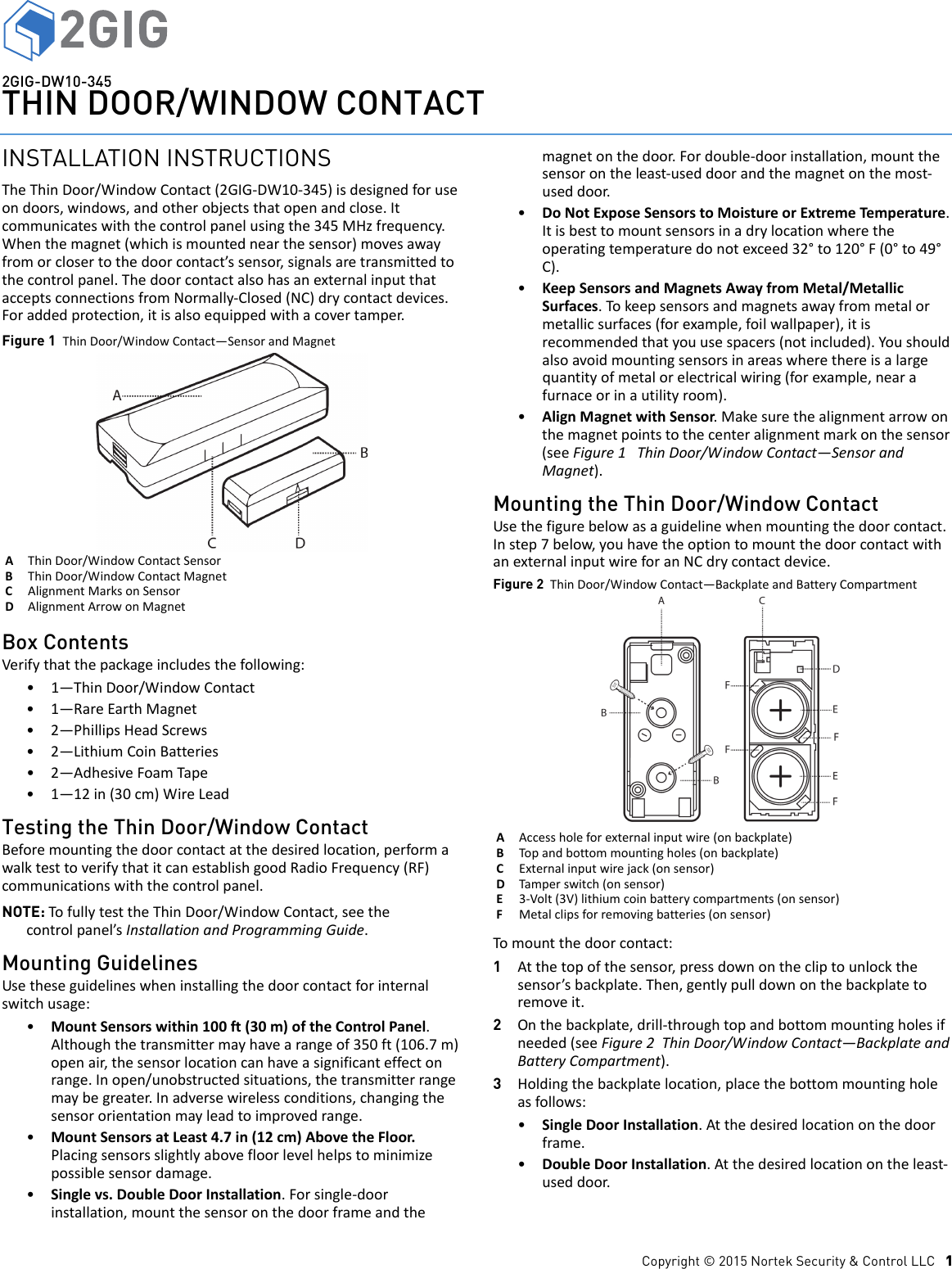
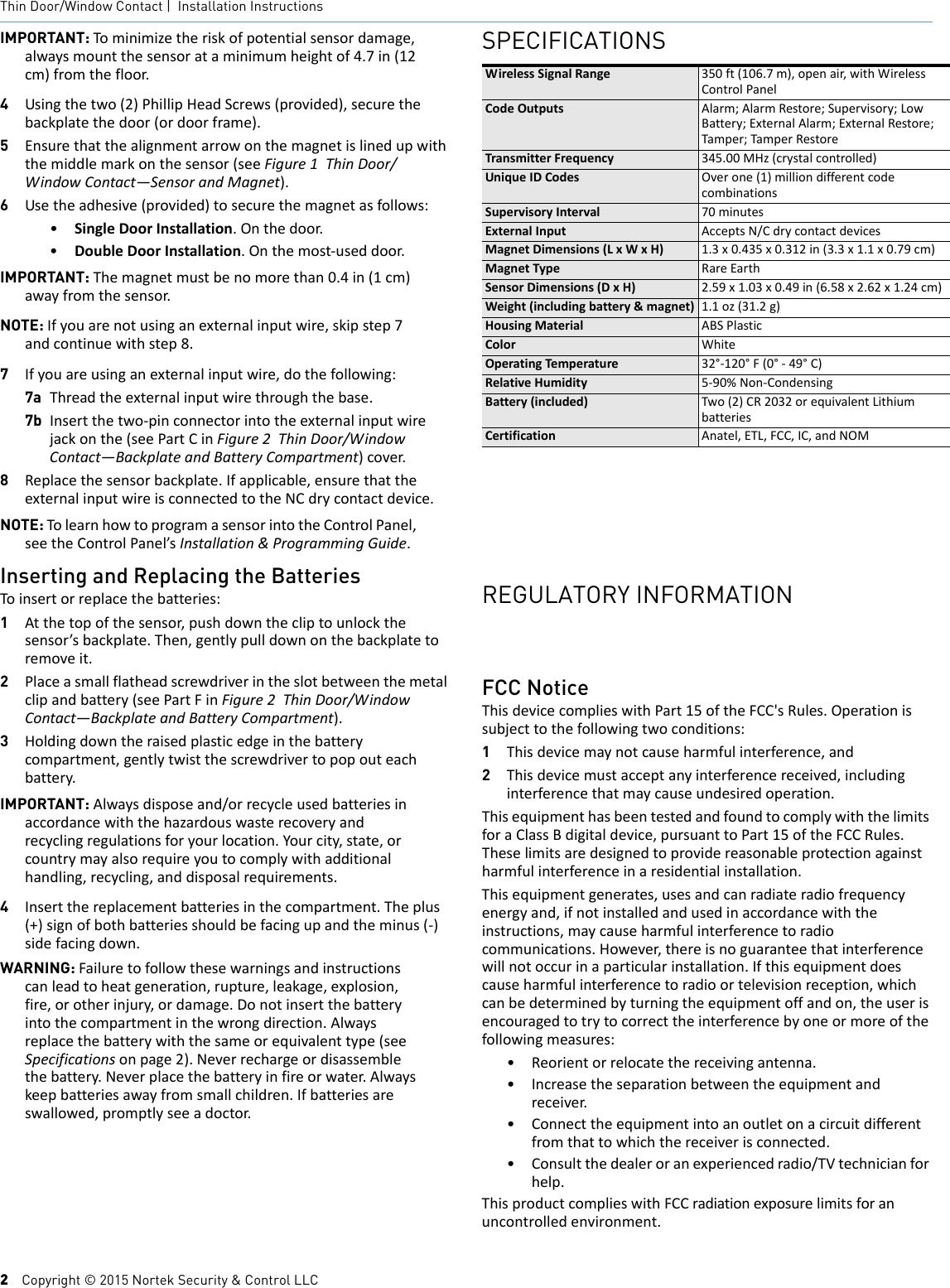
Copyright © 2015 Nortek Security & Control LLC   12GIG-DW10-345THIN DOOR/WINDOW CONTACTINSTALLATION INSTRUCTIONSTheThinDoor/WindowContact(2GIG‐DW10‐345)isdesignedforuseondoors,windows,andotherobjectsthatopenandclose.Itcommunicateswiththecontrolpanelusingthe345MHzfrequency.Whenthemagnet(whichismountednearthesensor)movesawayfromorclosertothedoorcontact’ssensor,signalsaretransmittedtothecontrolpanel.ThedoorcontactalsohasanexternalinputthatacceptsconnectionsfromNormally‐Closed(NC)drycontactdevices.Foraddedprotection,itisalsoequippedwithacovertamper.Figure 1  ThinDoor/WindowContact—SensorandMagnetBox ContentsVerifythatthepackageincludesthefollowing:•1—ThinDoor/WindowContact•1—RareEarthMagnet• 2—PhillipsHeadScrews• 2—LithiumCoinBatteries•2—AdhesiveFoamTape•1—12in(30cm)WireLeadTesting the Thin Door/Window Contact Beforemountingthedoorcontactatthedesiredlocation,performawalktesttoverifythatitcanestablishgoodRadioFrequency(RF)communicationswiththecontrolpanel.NOTE: TofullytesttheThinDoor/WindowContact,seethecontrolpanel’sInstallationandProgrammingGuide.Mounting GuidelinesUsetheseguidelineswheninstallingthedoorcontactforinternalswitchusage:•MountSensorswithin100ft(30m)oftheControlPanel.Althoughthetransmittermayhavearangeof350ft(106.7m)openair,thesensorlocationcanhaveasignificanteffectonrange.Inopen/unobstructedsituations,thetransmitterrangemaybegreater.Inadversewirelessconditions,changingthesensororientationmayleadtoimprovedrange.•MountSensorsatLeast4.7in(12cm)AbovetheFloor.Placingsensorsslightlyabovefloorlevelhelpstominimizepossiblesensordamage.•Singlevs.DoubleDoorInstallation.Forsingle‐doorinstallation,mountthesensoronthedoorframeandthemagnetonthedoor.Fordouble‐doorinstallation,mountthesensorontheleast‐useddoorandthemagnetonthemost‐useddoor.•DoNotExposeSensorstoMoistureorExtremeTemperature.Itisbesttomountsensorsinadrylocationwheretheoperatingtemperaturedonotexceed32°to120°F(0°to49°C).•KeepSensorsandMagnetsAwayfromMetal/MetallicSurfaces.Tokeepsensorsandmagnetsawayfrommetalormetallicsurfaces(forexample,foilwallpaper),itisrecommendedthatyouusespacers(notincluded).Youshouldalsoavoidmountingsensorsinareaswherethereisalargequantityofmetalorelectricalwiring(forexample,nearafurnaceorinautilityroom).•AlignMagnetwithSensor.Makesurethealignmentarrowonthemagnetpointstothecenteralignmentmarkonthesensor(seeFigure1ThinDoor/WindowContact—SensorandMagnet).Mounting the Thin Door/Window ContactUsethefigurebelowasaguidelinewhenmountingthedoorcontact.Instep7below,youhavetheoptiontomountthedoorcontactwithanexternalinputwireforanNCdrycontactdevice.Figure 2  ThinDoor/WindowContact—BackplateandBatteryCompartmentTomountthedoorcontact:1Atthetopofthesensor,pressdownonthecliptounlockthesensor’sbackplate.Then,gentlypulldownonthebackplatetoremoveit.2Onthebackplate,drill‐throughtopandbottommountingholesifneeded(seeFigure2ThinDoor/WindowContact—BackplateandBatteryCompartment).3Holdingthebackplatelocation,placethebottommountingholeasfollows:•SingleDoorInstallation.Atthedesiredlocationonthedoorframe.•DoubleDoorInstallation.Atthedesiredlocationontheleast‐useddoor.AThinDoor/WindowContactSensorBThinDoor/WindowContactMagnetCAlignmentMarksonSensorDAlignmentArrowonMagnetAAccessholeforexternalinputwire(onbackplate)BTopandbottommountingholes(onbackplate)CExternalinputwirejack(onsensor)DTamperswitch(onsensor)E3‐Volt(3V)lithiumcoinbatterycompartments(onsensor)FMetalclipsforremovingbatteries(onsensor)
2    Copyright © 2015 Nortek Security & Control LLCThin Door/Window Contact |  Installation InstructionsIMPORTANT: Tominimizetheriskofpotentialsensordamage,alwaysmountthesensorataminimumheightof4.7in(12cm)fromthefloor.4Usingthetwo(2)PhillipHeadScrews(provided),securethebackplatethedoor(ordoorframe).5Ensurethatthealignmentarrowonthemagnetislinedupwiththemiddlemarkonthesensor(seeFigure1ThinDoor/WindowContact—SensorandMagnet).6Usetheadhesive(provided)tosecurethemagnetasfollows:•SingleDoorInstallation.Onthedoor.•DoubleDoorInstallation.Onthemost‐useddoor.IMPORTANT: Themagnetmustbenomorethan0.4in(1cm)awayfromthesensor.NOTE: Ifyouarenotusinganexternalinputwire,skipstep7andcontinuewithstep8.7Ifyouareusinganexternalinputwire,dothefollowing:7a Threadtheexternalinputwirethroughthebase.7b Insertthetwo‐pinconnectorintotheexternalinputwirejackonthe(seePartCinFigure2ThinDoor/WindowContact—BackplateandBatteryCompartment)cover.8Replacethesensorbackplate.Ifapplicable,ensurethattheexternalinputwireisconnectedtotheNCdrycontactdevice.NOTE: TolearnhowtoprogramasensorintotheControlPanel,seetheControlPanel’sInstallation&ProgrammingGuide.Inserting and Replacing the BatteriesToinsertorreplacethebatteries:1Atthetopofthesensor,pushdownthecliptounlockthesensor’sbackplate.Then,gentlypulldownonthebackplatetoremoveit.2Placeasmallflatheadscrewdriverintheslotbetweenthemetalclipandbattery(seePartFinFigure2ThinDoor/WindowContact—BackplateandBatteryCompartment).3Holdingdowntheraisedplasticedgeinthebatterycompartment,gentlytwistthescrewdrivertopopouteachbattery.IMPORTANT: Alwaysdisposeand/orrecycleusedbatteriesinaccordancewiththehazardouswasterecoveryandrecyclingregulationsforyourlocation.Yourcity,state,orcountrymayalsorequireyoutocomplywithadditionalhandling,recycling,anddisposalrequirements.4Insertthereplacementbatteriesinthecompartment.Theplus(+)signofbothbatteriesshouldbefacingupandtheminus(‐)sidefacingdown.WARNING: Failuretofollowthesewarningsandinstructionscanleadtoheatgeneration,rupture,leakage,explosion,fire,orotherinjury,ordamage.Donotinsertthebatteryintothecompartmentinthewrongdirection.Alwaysreplacethebatterywiththesameorequivalenttype(seeSpecificationsonpage2).Neverrechargeordisassemblethebattery.Neverplacethebatteryinfireorwater.Alwayskeepbatteriesawayfromsmallchildren.Ifbatteriesareswallowed,promptlyseeadoctor.SPECIFICATIONSWirelessSignalRange 350ft(106.7m),openair,withWirelessControlPanelCodeOutputs Alarm;AlarmRestore;Supervisory;LowBattery;ExternalAlarm;ExternalRestore;Tamper;Tampe rRestoreTransmitterFrequency 345.00MHz(crystalcontrolled)UniqueIDCodes Overone(1)milliondifferentcodecombinationsSupervisoryInterval 70minutesExternalInput AcceptsN/CdrycontactdevicesMagnetDimensions(LxWxH) 1.3x0.435x0.312in(3.3x1.1x0.79cm)MagnetType RareEarthSensorDimensions(DxH) 2.59x1.03x0.49in(6.58x2.62x1.24cm)Weight(includingbattery&magnet) 1.1oz(31.2g)HousingMaterial ABSPlasticColor WhiteOperatingTemperature 32°‐120°F(0°‐49°C)RelativeHumidity 5‐90%Non‐CondensingBattery(included) Two(2)CR2032orequivalentLithiumbatteriesCertification Anatel,ETL,FCC,IC,andNOMREGULATORY INFORMATIONFCC NoticeThisdevicecomplieswithPart15oftheFCC'sRules.Operationissubjecttothefollowingtwoconditions:1Thisdevicemaynotcauseharmfulinterference,and2Thisdevicemustacceptanyinterferencereceived,includinginterferencethatmaycauseundesiredoperation.ThisequipmenthasbeentestedandfoundtocomplywiththelimitsforaClassBdigitaldevice,pursuanttoPart15oftheFCCRules.Theselimitsaredesignedtoprovidereasonableprotectionagainstharmfulinterferenceinaresidentialinstallation.Thisequipmentgenerates,usesandcanradiateradiofrequencyenergyand,ifnotinstalledandusedinaccordancewiththeinstructions,maycauseharmfulinterferencetoradiocommunications.However,thereisnoguaranteethatinterferencewillnotoccurinaparticularinstallation.Ifthisequipmentdoescauseharmfulinterferencetoradioortelevisionreception,whichcanbedeterminedbyturningtheequipmentoffandon,theuserisencouragedtotrytocorrecttheinterferencebyoneormoreofthefollowingmeasures:•Reorientorrelocatethereceivingantenna.•Increasetheseparationbetweentheequipmentandreceiver.• Connecttheequipmentintoanoutletonacircuitdifferentfromthattowhichthereceiverisconnected.•Consultthedealeroranexperiencedradio/TVtechnicianforhelp.ThisproductcomplieswithFCCradiationexposurelimitsforanuncontrolledenvironment.
Copyright © 2015 Nortek Security & Control LLC    3CAUTION: Anychangedormodificationsnotexpresslyapprovedbythepartyresponsibleforcompliancecouldvoidtheuser'sauthoritytooperatethisequipment.Industry Canada (IC) ComplianceThisdevicecomplieswithIndustryCanadalicense‐exemptRSSstandard(s).Operationissubjecttothefollowingtwoconditions:(1)thisdevicemaynotcauseinterference,and(2)thisdevicemustacceptanyinterference,includinginterferencethatmaycauseundesiredoperationofthedevice.RepairstocertifiedequipmentshouldbemadebyanauthorizedCanadianmaintenancefacilitydesignatedbythesupplier.Anyrepairsoralterationsmadebytheusertothisequipment,orequipmentmalfunctions,maygivethetelecommunicationscompanycausetorequesttheusertodisconnecttheequipment.Usersshouldensurefortheirownprotectionthattheelectricalgroundconnectionsofthepowerutility,telephonelinesandinternalmetallicwaterpipesystem,ifpresent,areconnectedtogether.Thisprecautionmaybeparticularlyimportantinruralareas.Usersshouldnotattempttomakesuchconnectionsthemselves,butshouldcontacttheappropriateelectricinspectionauthority,orelectrician,asappropriate.LIMITED WARRANTYThisNortekSecurity&ControlLLCproductiswarrantedagainstdefectsinmaterialandworkmanshipfortwo(2)years.ThiswarrantyextendsonlytowholesalecustomerswhobuydirectfromNortekSecurity&ControlLLCorthroughNortekSecurity&ControlLLC’snormaldistributionchannels.NortekSecurity&ControlLLCdoesnotwarrantthisproducttoconsumers.Consumersshouldinquirefromtheirsellingdealerastothenatureofthedealer’swarranty,ifany.TherearenoobligationsorliabilitiesonthepartofNortekSecurity&ControlLLCforconsequentialdamagesarisingoutoforinconnectionwithuseorperformanceofthisproductorotherindirectdamageswithrespecttolossofproperty,revenue,orprofit,orcostofremoval,installation,orreinstallation.Allimpliedwarrantiesforfunctionality,arevalidonlyuntilthewarrantyexpires.ThisNortekSecurity&ControlLLCWarrantyisinlieuofallotherwarrantiesexpressedorimplied.NortekSecurity&ControlLLC2GIG1950CaminoVidaRoble,Suite150Carlsbad,CA92008‐6517USAFortechnicalsupportintheUSAandCanada:855‐2GIG‐TECH(855‐244‐4832)Email:2gigtechsupport@nortek.comVisitwww.nortekcontrol.comfortechnicalsupporthoursofoperationFortechnicalsupportoutsideoftheUSAandCanada:ContactyourregionaldistributorVisitdealer.2gig.comforalistofdistributorsinyourregion77‐000015‐001Rev.D

Navigation menu