Nortek Security and Control 2GIG DW40345 Wireless door/window contact with local bypass User Manual 10005518X10 indd

2GIG Technologies, Inc. Wireless door/window contact with local bypass 10005518X10 indd

User Manual

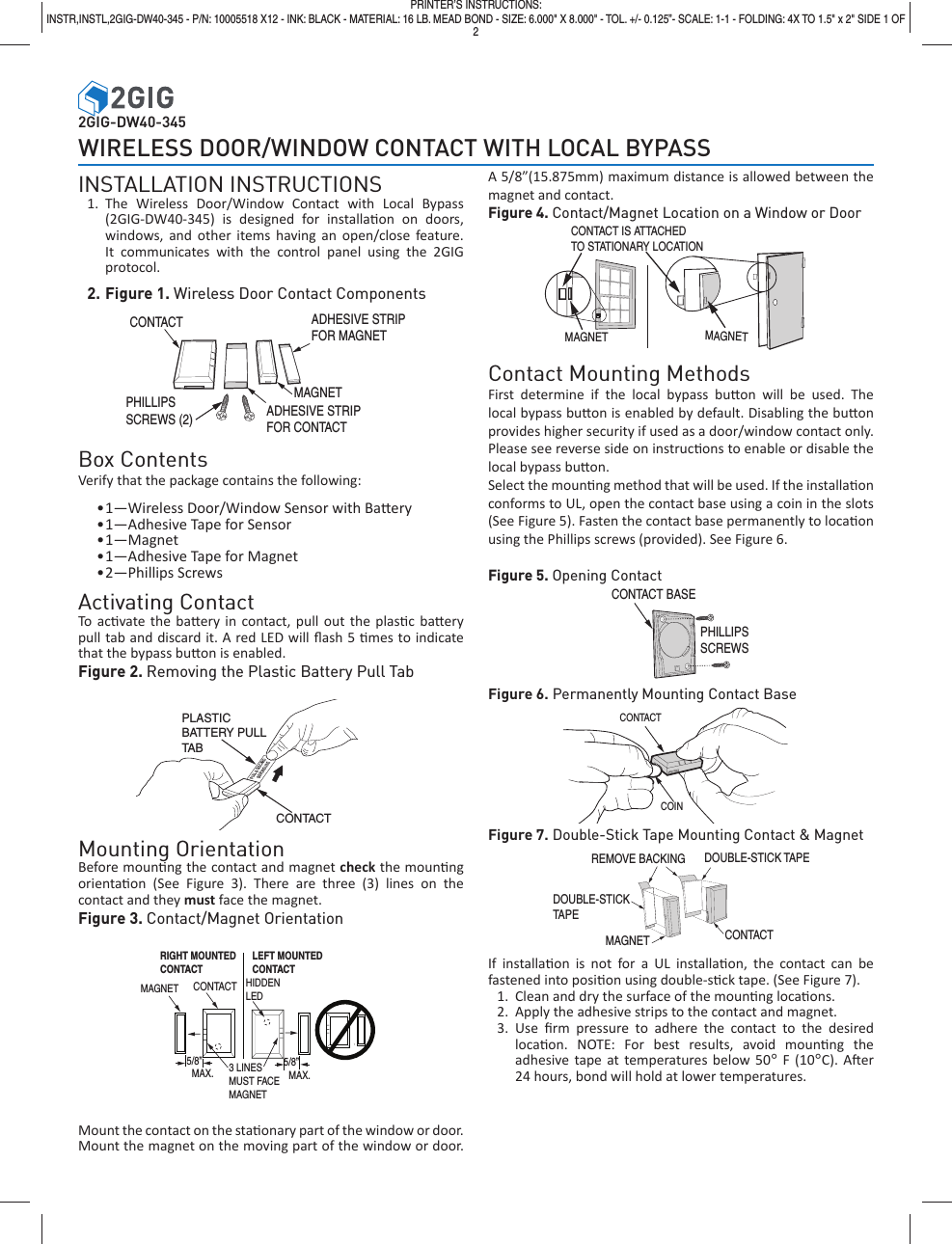
2GIG-DW40-345WIRELESS DOOR/WINDOW CONTACT WITH LOCAL BYPASSINSTALLATION INSTRUCTIONS1. The Wireless Door/Window Contact with Local Bypass (2GIG-DW40-345) is designed for installa on on doors, windows, and other items having an open/close feature. It communicates with the control panel using the 2GIG protocol.2. Figure 1. Wireless Door Contact Components Box ContentsVerify that the package contains the following:• 1—Wireless Door/Window Sensor with Ba ery• 1—Adhesive Tape for Sensor• 1—Magnet• 1—Adhesive Tape for Magnet• 2—Phillips  ScrewsActivating ContactTo ac vate the ba ery in contact, pull out the plas c ba ery pull tab and discard it. A red LED will fl ash 5  mes to indicate that the bypass bu on is enabled.Figure 2. Removing the Plastic Battery Pull Tab Mounting OrientationBefore moun ng the contact and magnet check the moun ng orienta on (See Figure 3). There are three (3) lines on the contact and they must face the magnet.Figure 3. Contact/Magnet OrientationCONTACTMAGNET  3 LINESMUST FACEMAGNET5/8”  MAX.HIDDENLED5/8”  MAX.RIGHT MOUNTEDCONTACTLEFT MOUNTEDCONTACT     Mount the contact on the sta  onary part of the window or door. Mount the magnet on the moving part of the window or door.  A 5/8”(15.875mm) maximum distance is allowed between the magnet and contact.Figure 4. Contact/Magnet Location on a Window or DoorContact Mounting MethodsFirst determine if the local bypass bu on will be used. The local bypass bu on is enabled by default. Disabling the bu on provides higher security if used as a door/window contact only. Please see reverse side on instruc ons to enable or disable the local bypass bu on. Select the moun ng method that will be used. If the installa on conforms to UL, open the contact base using a coin in the slots (See Figure 5). Fasten the contact base permanently to loca on using the Phillips screws (provided). See Figure 6.Figure 5. Opening ContactFigure 6. Permanently Mounting Contact BaseFigure 7. Double-Stick Tape Mounting Contact & MagnetIf installa on is not for a UL installa on, the contact can be fastened into posi on using double-s ck tape. (See Figure 7).1.  Clean and dry the surface of the moun ng loca ons.2.  Apply the adhesive strips to the contact and magnet.3. Use fi rm pressure to adhere the contact to the desired loca on. NOTE: For best results, avoid moun ng  the adhesive tape at temperatures below 50° F (10°C). A er 24 hours, bond will hold at lower temperatures.ADHESIVE STRIPFOR MAGNETMAGNETADHESIVE STRIPFOR CONTACTCONTACTPHILLIPSSCREWS (2)PULL & DISCARDBEFORE USEPLASTIC BATTERY PULLTAB CONTACTCONTACTCOINPRINTER’S INSTRUCTIONS:INSTR,INSTL,2GIG-DW40-345 - P/N: 10005518 X12 - INK: BLACK - MATERIAL: 16 LB. MEAD BOND - SIZE: 6.000" X 8.000" - TOL. +/- 0.125”- SCALE: 1-1 - FOLDING: 4X TO 1.5" x 2" SIDE 1 OF  2 CONTACT BASEPHILLIPSSCREWSCONTACT IS ATTACHEDTO STATIONARY LOCATIONMAGNETMAGNETREMOVE BACKINGMAGNET CONTACTDOUBLE-STICK TAPEDOUBLE-STICK TAPE
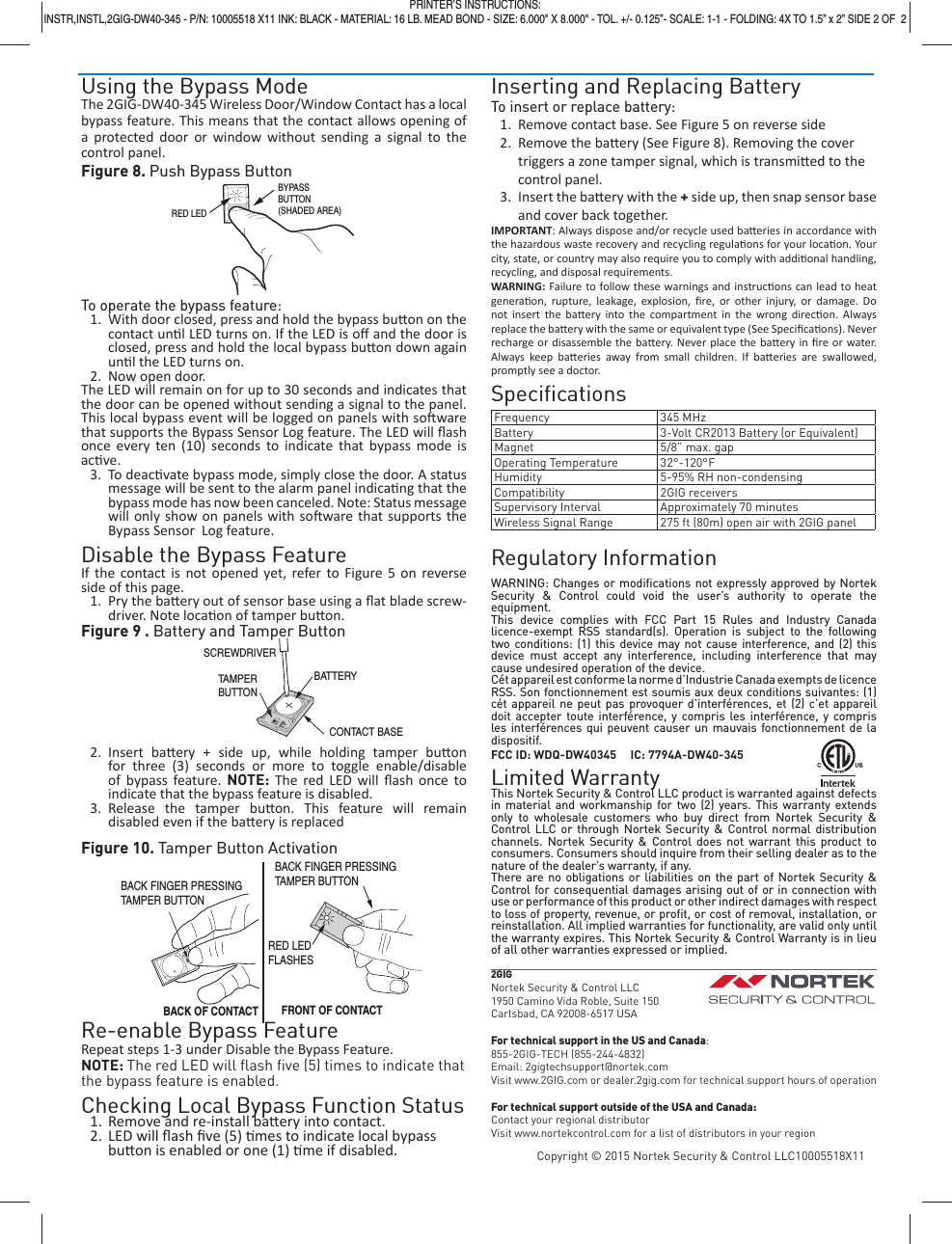
Using the Bypass ModeThe 2GIG-DW40-345 Wireless Door/Window Contact has a local bypass feature. This means that the contact allows opening of a protected door or window without sending a signal to the control panel.Figure 8. Push Bypass ButtonTo operate the bypass feature:1.  With door closed, press and hold the bypass bu on on the contact un l LED turns on. If the LED is off  and the door is closed, press and hold the local bypass bu on down again un l the LED turns on. 2.  Now open door.The LED will remain on for up to 30 seconds and indicates that the door can be opened without sending a signal to the panel. This local bypass event will be logged on panels with so ware that supports the Bypass Sensor Log feature. The LED will fl ash once every ten (10) seconds to indicate that bypass mode is ac ve.3. To deac vate bypass mode, simply close the door. A status message will be sent to the alarm panel indica ng that the bypass mode has now been canceled. Note: Status message will only show on panels with so ware that supports the Bypass Sensor  Log feature.Disable the Bypass FeatureIf the contact is not opened yet, refer to Figure 5 on reverse side of this page.1.  Pry the ba ery out of sensor base using a fl at blade screw-driver. Note loca on of tamper bu on.Figure 9 . Battery and Tamper Button2. Insert ba ery + side up, while holding tamper bu on for three (3) seconds or more to toggle enable/disable of bypass feature. NOTE: The red LED will fl ash once to indicate that the bypass feature is disabled.3. Release the tamper bu on. This feature will remain disabled even if the ba ery is replacedFigure 10. Tamper Button ActivationRe-enable Bypass FeatureRepeat steps 1-3 under Disable the Bypass Feature. NOTE: The red LED will fl ash fi ve (5) times to indicate that the bypass feature is enabled.Checking Local Bypass Function Status1.  Remove and re-install ba ery into contact.2. LED will fl ash fi ve (5)  mes to indicate local bypass bu on is enabled or one (1)  me if disabled.Inserting and Replacing BatteryTo insert or replace battery:1.  Remove contact base. See Figure 5 on reverse side2.  Remove the ba ery (See Figure 8). Removing the cover triggers a zone tamper signal, which is transmi ed to the control panel.3.  Insert the ba  ery with the + side up, then snap sensor base and cover back together.IMPORTANT: Always dispose and/or recycle used ba eries in accordance with the hazardous waste recovery and recycling regula ons for your loca on. Your city, state, or country may also require you to comply with addi onal handling, recycling, and disposal requirements.WARNING:  Failure to follow these warnings and instruc ons can lead to heat genera on, rupture, leakage, explosion, fi re, or other injury, or damage. Do not insert the ba ery into the compartment in the wrong direc on. Always replace the ba  ery with the same or equivalent type (See Specifi ca ons). Never recharge or disassemble the ba ery. Never place the ba ery in fi re or water. Always keep ba eries away from small children. If ba eries are swallowed, promptly see a doctor.Specifi cationsFrequency 345 MHzBattery 3-Volt CR2013 Battery (or Equivalent)Magnet 5/8” max. gapOperating Temperature 32°-120°FHumidity 5-95% RH non-condensingCompatibility 2GIG receiversSupervisory Interval Approximately 70 minutesWireless Signal Range 275 ft (80m) open air with 2GIG panelRegulatory InformationWARNING: Changes or modifi cations not expressly approved by Nortek Security & Control could void the user’s authority to operate the equipment.This device complies with FCC Part 15 Rules and Industry Canada licence-exempt RSS standard(s). Operation is subject to the following  two conditions: (1) this device may not cause interference, and (2) this device must accept any interference, including interference that may cause undesired operation of the device.Cét appareil est conforme la norme d’Industrie Canada exempts de licence RSS. Son fonctionnement est soumis aux deux conditions suivantes: (1) cét appareil ne peut pas provoquer d’interférences, et (2) c’et appareil doit accepter toute interférence, y compris les interférence, y compris les interférences qui peuvent causer un mauvais fonctionnement de la dispositif.FCC ID: WDQ-DW40345     IC: 7794A-DW40-345Limited WarrantyThis Nortek Security & Control LLC product is warranted against defects in material and workmanship for two (2) years. This warranty extends only to wholesale customers who buy direct from Nortek Security & Control LLC or through Nortek Security & Control normal distribution channels. Nortek Security & Control does not warrant this product to consumers. Consumers should inquire from their selling dealer as to the nature of the dealer’s warranty, if any.There are no obligations or liabilities on the part of Nortek Security & Control for consequential damages arising out of or in connection with use or performance of this product or other indirect damages with respect to loss of property, revenue, or profi t, or cost of removal, installation, or reinstallation. All implied warranties for functionality, are valid only until the warranty expires. This Nortek Security & Control Warranty is in lieu of all other warranties expressed or implied.2GIGNortek Security & Control LLC1950 Camino Vida Roble, Suite 150Carlsbad, CA 92008-6517 USAFor technical support in the US and Canada:855-2GIG-TECH (855-244-4832)Email: 2gigtechsupport@nortek.comVisit www.2GIG.com or dealer.2gig.com for technical support hours of operationFor technical support outside of the USA and Canada:Contact your regional distributorVisit www.nortekcontrol.com for a list of distributors in your regionCopyright © 2015 Nortek Security & Control LLC10005518X11BYPASSBUTTON(SHADED AREA)RED LEDPRINTER’S INSTRUCTIONS:INSTR,INSTL,2GIG-DW40-345 - P/N: 10005518 X11 INK: BLACK - MATERIAL: 16 LB. MEAD BOND - SIZE: 6.000" X 8.000" - TOL. +/- 0.125”- SCALE: 1-1 - FOLDING: 4X TO 1.5” x 2” SIDE 2 OF  2SCREWDRIVERBATTERYCONTACT BASETAMPERBUTTONRED LEDFLASHESBACK FINGER PRESSINGTAMPER BUTTONBACK OF CONTACT FRONT OF CONTACTBACK FINGER PRESSINGTAMPER BUTTON

Navigation menu