Nortek Security and Control 2GIG PAD1345 Wireless Security Remote Key Fob User Manual

2GIG Technologies, Inc. Wireless Security Remote Key Fob

User manual

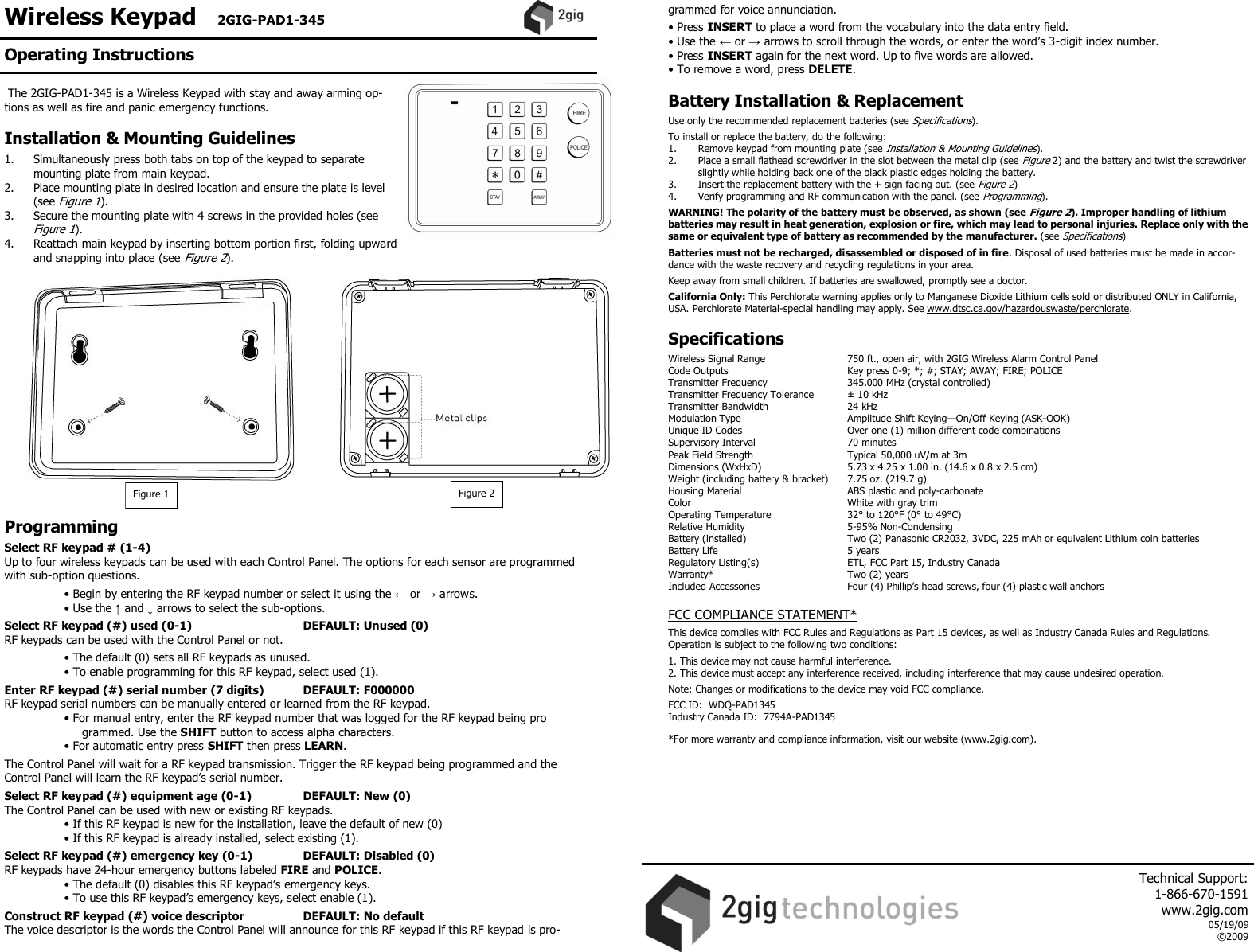
Wireless Keypad   2GIG-PAD1-345     The 2GIG-PAD1-345 is a Wireless Keypad with stay and away arming op-tions as well as fire and panic emergency functions.  Installation & Mounting Guidelines  1.  Simultaneously press both tabs on top of the keypad to separate mounting plate from main keypad. 2.  Place mounting plate in desired location and ensure the plate is level (see Figure 1). 3.  Secure the mounting plate with 4 screws in the provided holes (see Figure 1). 4.  Reattach main keypad by inserting bottom portion first, folding upward and snapping into place (see Figure 2).                   Programming  Select RF keypad # (1-4) Up to four wireless keypads can be used with each Control Panel. The options for each sensor are programmed with sub-option questions.   • Begin by entering the RF keypad number or select it using the ← or → arrows.  • Use the ↑ and ↓ arrows to select the sub-options.  Select RF keypad (#) used (0-1)          DEFAULT: Unused (0) RF keypads can be used with the Control Panel or not.   • The default (0) sets all RF keypads as unused.  • To enable programming for this RF keypad, select used (1).  Enter RF keypad (#) serial number (7 digits)        DEFAULT: F000000 RF keypad serial numbers can be manually entered or learned from the RF keypad.  • For manual entry, enter the RF keypad number that was logged for the RF keypad being pro      grammed. Use the SHIFT button to access alpha characters.  • For automatic entry press SHIFT then press LEARN.  The Control Panel will wait for a RF keypad transmission. Trigger the RF keypad being programmed and the Control Panel will learn the RF keypad’s serial number.  Select RF keypad (#) equipment age (0-1)        DEFAULT: New (0) The Control Panel can be used with new or existing RF keypads.  • If this RF keypad is new for the installation, leave the default of new (0)  • If this RF keypad is already installed, select existing (1).  Select RF keypad (#) emergency key (0-1)        DEFAULT: Disabled (0) RF keypads have 24-hour emergency buttons labeled FIRE and POLICE.  • The default (0) disables this RF keypad’s emergency keys.  • To use this RF keypad’s emergency keys, select enable (1).  Construct RF keypad (#) voice descriptor        DEFAULT: No default The voice descriptor is the words the Control Panel will announce for this RF keypad if this RF keypad is pro-grammed for voice annunciation.  • Press INSERT to place a word from the vocabulary into the data entry field. • Use the ← or → arrows to scroll through the words, or enter the word’s 3-digit index number. • Press INSERT again for the next word. Up to five words are allowed. • To remove a word, press DELETE.  Battery Installation & Replacement  Use only the recommended replacement batteries (see Specifications).  To install or replace the battery, do the following: 1.   Remove keypad from mounting plate (see Installation & Mounting Guidelines).  2.  Place a small flathead screwdriver in the slot between the metal clip (see Figure 2) and the battery and twist the screwdriver slightly while holding back one of the black plastic edges holding the battery.  3.  Insert the replacement battery with the + sign facing out. (see Figure 2)  4.   Verify programming and RF communication with the panel. (see Programming).  WARNING! The polarity of the battery must be observed, as shown (see Figure 2). Improper handling of lithium batteries may result in heat generation, explosion or fire, which may lead to personal injuries. Replace only with the same or equivalent type of battery as recommended by the manufacturer. (see Specifications)  Batteries must not be recharged, disassembled or disposed of in fire. Disposal of used batteries must be made in accor-dance with the waste recovery and recycling regulations in your area.  Keep away from small children. If batteries are swallowed, promptly see a doctor.  California Only: This Perchlorate warning applies only to Manganese Dioxide Lithium cells sold or distributed ONLY in California, USA. Perchlorate Material-special handling may apply. See www.dtsc.ca.gov/hazardouswaste/perchlorate.   Specifications  Wireless Signal Range    750 ft., open air, with 2GIG Wireless Alarm Control Panel Code Outputs    Key press 0-9; *; #; STAY; AWAY; FIRE; POLICE Transmitter Frequency     345.000 MHz (crystal controlled) Transmitter Frequency Tolerance   ± 10 kHz Transmitter Bandwidth     24 kHz Modulation Type     Amplitude Shift Keying—On/Off Keying (ASK-OOK) Unique ID Codes     Over one (1) million different code combinations Supervisory Interval    70 minutes Peak Field Strength     Typical 50,000 uV/m at 3m Dimensions (WxHxD)     5.73 x 4.25 x 1.00 in. (14.6 x 0.8 x 2.5 cm) Weight (including battery & bracket)   7.75 oz. (219.7 g) Housing Material    ABS plastic and poly-carbonate Color      White with gray trim Operating Temperature     32° to 120°F (0° to 49°C) Relative Humidity    5-95% Non-Condensing Battery (installed)    Two (2) Panasonic CR2032, 3VDC, 225 mAh or equivalent Lithium coin batteries Battery Life      5 years Regulatory Listing(s)    ETL, FCC Part 15, Industry Canada Warranty*      Two (2) years Included Accessories    Four (4) Phillip’s head screws, four (4) plastic wall anchors    FCC COMPLIANCE STATEMENT*  This device complies with FCC Rules and Regulations as Part 15 devices, as well as Industry Canada Rules and Regulations.  Operation is subject to the following two conditions:  1. This device may not cause harmful interference. 2. This device must accept any interference received, including interference that may cause undesired operation.  Note: Changes or modifications to the device may void FCC compliance.  FCC ID:  WDQ-PAD1345 Industry Canada ID:  7794A-PAD1345  *For more warranty and compliance information, visit our website (www.2gig.com).   Figure 1  Figure 2 Operating Instructions     Technical Support:  1-866-670-1591 www.2gig.com 05/19/09 ©2009

Navigation menu