Nortek Security and Control 2GIG ZWM500 Z-Wave Module User Manual

2GIG Technologies, Inc. Z-Wave Module

User Manual

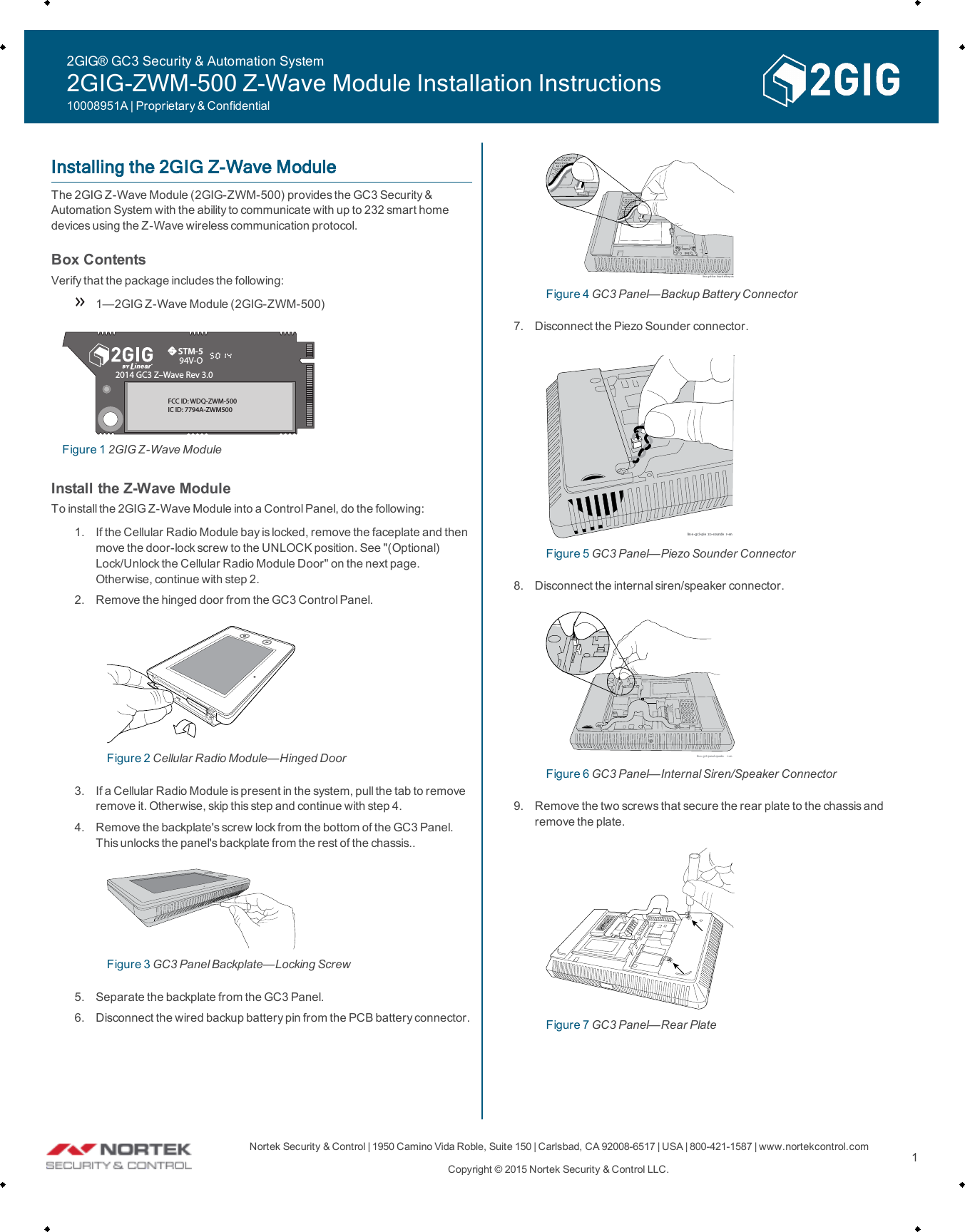
Nortek Security &Control | 1950 Camino VidaRoble, Suite 150 | Carlsbad, CA92008-6517 | USA | 800-421-1587 | www.nortekcontrol.comCopyright © 2015 Nortek Security &Control LLC. 1Installing the 2GIG Z-Wave ModuleThe 2GIG Z-Wave Module (2GIG-ZWM-500) provides the GC3 Security &Automation System with the abilityto communicate with up to 232 smart homedevices using the Z-Wave wireless communication protocol.Box ContentsVerifythat the package includes the following:1—2GIG Z-Wave Module (2GIG-ZWM-500)STM-594V-O2014 GC3 Z–Wave Rev 3.0FCC ID: WDQ-ZWM-500IC ID: 7794A-ZWM500Figure 1 2GIG Z-Wave ModuleInstall the Z-Wave ModuleTo install the 2GIGZ-Wave Module into a Control Panel, do the following:1. If the Cellular Radio Module bay is locked, remove the faceplate and thenmove the door-lockscrew to the UNLOCK position. See "(Optional)Lock/Unlock the Cellular Radio Module Door" on the next page.Otherwise, continue with step 2.2. Remove the hinged door from the GC3 Control Panel.Figure 2 Cellular Radio Module—Hinged Door3. If a Cellular Radio Module is present in the system, pull the tab to removeremove it. Otherwise, skip this step and continue with step 4.4. Remove the backplate's screw lock from the bottom of the GC3 Panel.This unlocks the panel's backplate from the rest of the chassis..Figure 3 GC3 Panel Backplate—Locking Screw5. Separate the backplate from the GC3 Panel.6. Disconnect the wired backup battery pin from the PCBbattery connector.lin e- gc3-bac kup-b a tt ery -enFigure 4 GC3 Panel—Backup Battery Connector7. Disconnect the Piezo Sounder connector.lin e -gc3-pie z o-sounde r-enFigure 5 GC3 Panel—Piezo Sounder Connector8. Disconnect the internal siren/speaker connector.lin e- gc3-panel-speake r-enFigure 6 GC3 Panel—Internal Siren/Speaker Connector9. Remove the two screws that secure the rear plate to the chassis andremove the plate.Figure 7 GC3 Panel—Rear Plate2GIG® GC3 Security & Automation System2GIG-ZWM-500 Z-Wave Module Installation Instructions10008951A | Proprietary & Confidential
Nortek Security &Control | 1950 Camino VidaRoble, Suite 150 | Carlsbad, CA92008-6517 | USA | 800-421-1587 | www.nortekcontrol.comCopyright © 2015 Nortek Security &Control LLC. 210. Insert the 2GIG Z-Wave module into the STM-5 connector on the PCBand secure with the Phillips head screw.Figure 8 GC3 Panel—Install the Z-Wave Module11. Replace the rear plate and secure it with two Phillips head screws.12. Connect the internal siren/speaker connector, the Piezo Sounderconnector, and the backup battery connector to their respective PCBconnectors.13. Install the backplate to the chassisand secure with the screw lock on thebottom of the Control Panel.14. Install the Cellular Radio Module, if one was present.15. Install the hinged door.(Optional) Lock/Unlock the Cellular Radio Module DoorThe Cellular Radio Module fits into the bay on the side of the GC3 Panel andfeatures a built-in door lock under the faceplate. The Control Panel ships with thedoor-lock screw in the UNLOCK position. To limit the possibilityof someoneremoving the door, installers have the option of moving the screw to the LOCKposition.ABFigure 9 GC3 Cellular Radio Module Door LockTo lock and unlock the Cellular Radio Module door:1. Use your fingertips or carefullyinsert a screwdriver at the edge of thefaceplate. Then gently pry the faceplate from the chassis.Figure 10 GC3 Panel—Removeable Faceplate2. Remove the door-lock screw from the UNLOCK position on the right.Figure 11 GC3 Panel—UNLOCK position3. Install the screw into the LOCK position on the left. This locks the hingeddoor on the GC3 Control Panel.Figure 12 GC3 Panel—LOCK position4. Snap the faceplate back on the GC3 Control Panel.FCCPart 15: Class B Digital Device Statementfor the 2GIG-ZWM-500If the module's label is not visible when installed, then an additional permanentlabel referring to the enclosed module: "Contains Transmitter Module FCC ID:WDQ-ZWM500" must be placed on the rear panel in a visible location.FCC ID: WDQ-ZWM500IC ID: 7794A-ZWM500This device has been tested and found to comply with the limits for a Class B digitaldevice, pursuant to Part 15 of FCC Rules. Operation is subject to the following twoconditions:1. This device may not cause harmful interference, and2. This device must accept interference received, including interference thatmay cause undesired operation.These limits are designed to provide reasonable protection against harmfulinterference in a residential installation. This equipment generates and can radiate2GIG® GC3 Security & Automation System2GIG-ZWM-500 Z-Wave Module Installation Instructions10008951A | Proprietary & Confidential
Nortek Security &Control | 1950 Camino VidaRoble, Suite 150 | Carlsbad, CA92008-6517 | USA | 800-421-1587 | www.nortekcontrol.comCopyright © 2015 Nortek Security &Control LLC. 3radio frequency energy and, if not installed and used in accordance with theinstructions, may cause harmful interference to radio communications. However,there is no guarantee that interference will not occur in a particular installation. Ifthis equipment does cause harmful interference to radio or television reception,which can be determined by turning the equipment off and on, the user isencouraged to try to correct the interference byone (1) or more of the followingmeasures:Reorient or relocate the receiving antenna.Increase the separation between the equipment and receiver.Connect the equipment into an outlet on a circuit different from that towhich the receiver is connected.Consult the dealer or an experienced radio/TV technician for help.NOTE: Any changes or modifications made to this device that are notapproved by 2GIG may void the authority granted to the user by theFCCto operate this equipment.Industry Canada (IC)Compliance NoticeThis device complies with Industry Canada license-exempt Radio StandardSpecifications (RSS). Operation is subject to the following two conditions:1. This device may not cause harmful interference, and2. This device must accept interference received, including interference thatmay cause undesired operation.According to regulations of Industry Canada, this radio transmitter can operatewith an antenna of a type and a maximum gain (or lower) approved for thetransmitter by Industry Canada. In order to reduce the riskof radio interference forother users, choose the type of antenna and its gain so that the Effective IsotropicRadiated Power (EIRP) is not more than the necessary intensity to establishmentof successful communication.NOTE: Unauthorized modifications made to this device that are notapproved by 2GIG may void the authority granted to the user by theIndustry Canada label to operate this equipment.Avis de Conformité d'Industrie Canada (IC)Le présent appareil est conforme aux les Cahiers des charges sur les NormesRadioélectriques (CNR) d’Industrie Canada applicables aux appareils radioexempts de licence. L’exploitation est autorisée aux deux conditions suivantes:1. l’appareilne doit pasproduire de brouillage, et2. l’utilisateur de l’appareil doit accepter tout brouillage radioélectrique subi,même si le brouillage est susceptible d’en compromettre lefonctionnement.Conformément à la réglementation d'Industrie Canada, le présent émetteur radiopeut fonctionner avec une antenne d'un type et d'un gain maximal (ou inférieur)approuvé pour l'émetteur par Industrie Canada. Dans le but de réduire les risquesde brouillage radioélectrique à l'intention des autres utilisateurs, il faut choisir letype d'antenne et son gain de sorte que la Puissance Isotrope RayonnéeÉquivalente (P.I.R.E.) ne dépasse pas l'intensité nécessaire à l'établissementd'une communication satisfaisante.NOTE: Les modifications non autorisées apportées à cet appareilqui ne sont pas approuvés par Nortek Security &Control LLC peutannuler le pouvoir d'accorder à l'utilisateur par l'étiquette d'IndustrieCanada à utiliser ce équipement.Limited WarrantyThis product is warranted against defects in material and workmanship for one (1)year. This warranty extends only to wholesale customers who buy directly fromNortek Security &Control LLC or through Nortek Security &Control’s normaldistribution channels. Nortek Security &Control LLC does not warrant this productto consumers. Consumers should inquire from their selling dealer as to the natureof the dealer’s warranty, if any.There are no obligations or liabilities on the part of Nortek Security &Control LLCfor consequential damages arising out of or in connection with use or performanceof this product or other indirect damages with respect to lossof property, revenue,or profit, or cost of removal, installation, or re-installation. All implied warranties forfunctionality are valid only until the warranty expires. This Nortek Security&Control LLC Warranty is in lieu of all other warranties, expressed or implied.All productsreturned for warranty service require a Return Authorization Number(RA#). Contact Returns at 1-855-546-3351 for an RA# and other importantdetails.2GIG® GC3 Security & Automation System2GIG-ZWM-500 Z-Wave Module Installation Instructions10008951A | Proprietary & Confidential

Navigation menu