Nuran Wireless GSM310-850 GSM Base Station User Manual GSM LiteCell Installation Guide

Nuran Wireless GSM Base Station GSM LiteCell Installation Guide

Users Manual

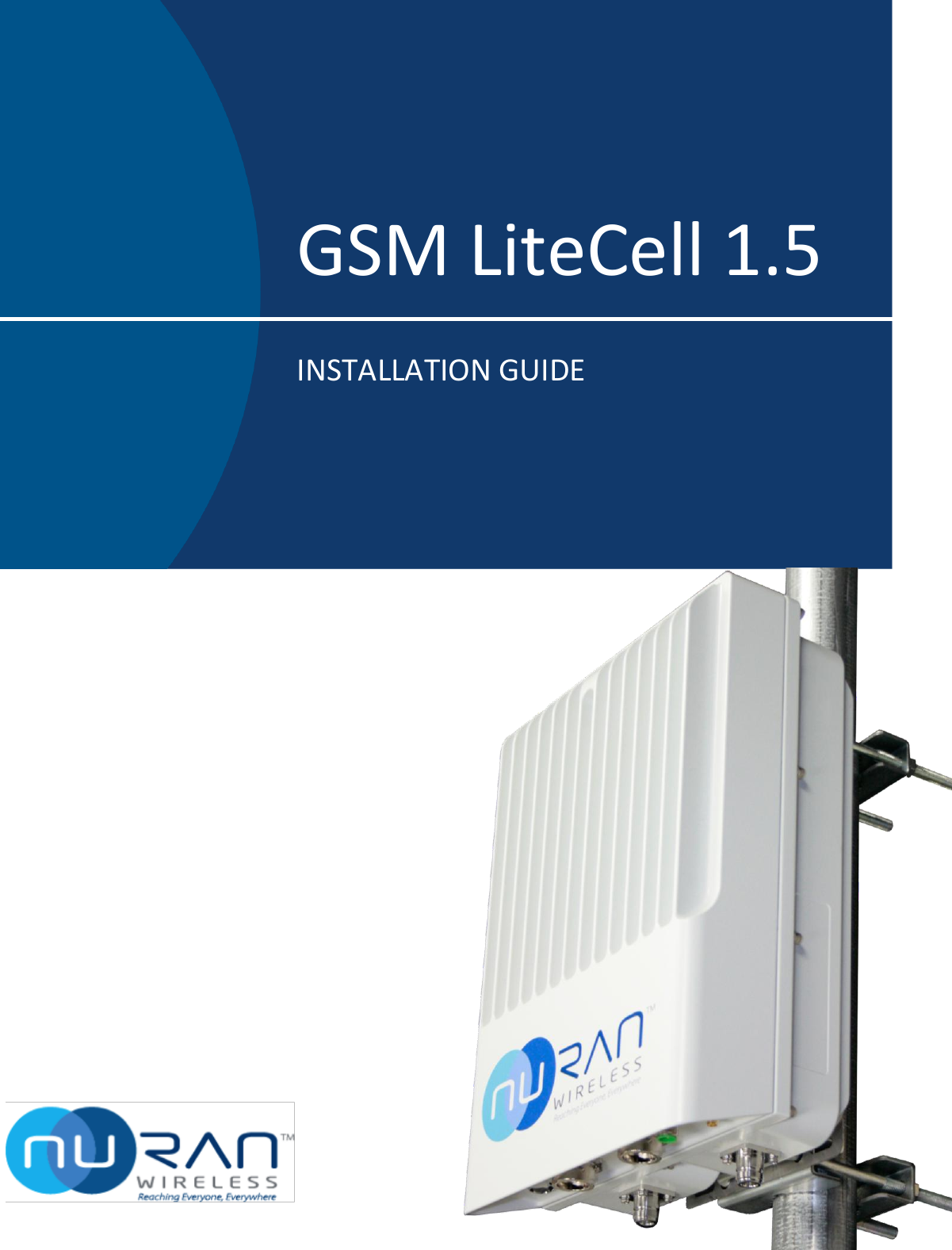
 GSM LiteCell 1.5 INSTALLATION GUIDE
GSM LiteCell Installation Guide  Version 0.95   CONFIDENTIAL  2 of 40    Trademarks  The names of products which are found within these pages may be registered trademarks or trademarks pertaining to their respective owners. The symbols TM and ® have been omitted. WARNING Never use NuRAN products in parallel with survival or medical equipment. Not respecting this warning excludes NuRan of any responsibility. © 2016 NuRAN. All rights reserved. It is strictly prohibited to reproduce or use this document, partly or in its entirety, by any means including but not limited to graphic, electronic, and mechanical (which includes photocopy and recording) systems without the permission of NuRAN. To guarantee the accuracy of the information contained in this document, a very detailed review of its contents was performed during its preparation. The information corresponds to the version of the product manufactured before the date indicated on the cover. Differences can exist between this document and the product if the product was modified after the release of this document. NuRAN reserves the right to modify, improve, or change the products describe in this document without notice.  Revision History Revision Date Comment 0.8 September 2016 Corrections to images and specs through the document 0.9 October 2016 Changed the power connector, corrected deployment kit content and added missing information 0.91 November 2016 Added statement regarding restricted access necessisty for installation. 0.92 March 2017 Added LED patterns in section 3.8 Changed VSWR value from TBD to <2 in table of section 2.3 0.93 March 21, 2017 Esthetics modifcations 0.94 April 13, 2017 Yannick Lebel review and merge with Jordan’s corrections.
GSM LiteCell Installation Guide  Version 0.95   CONFIDENTIAL  3 of 40 0.95 April 25, 2017 Added a note about atenna separation to persons to meet RF exposure requirements
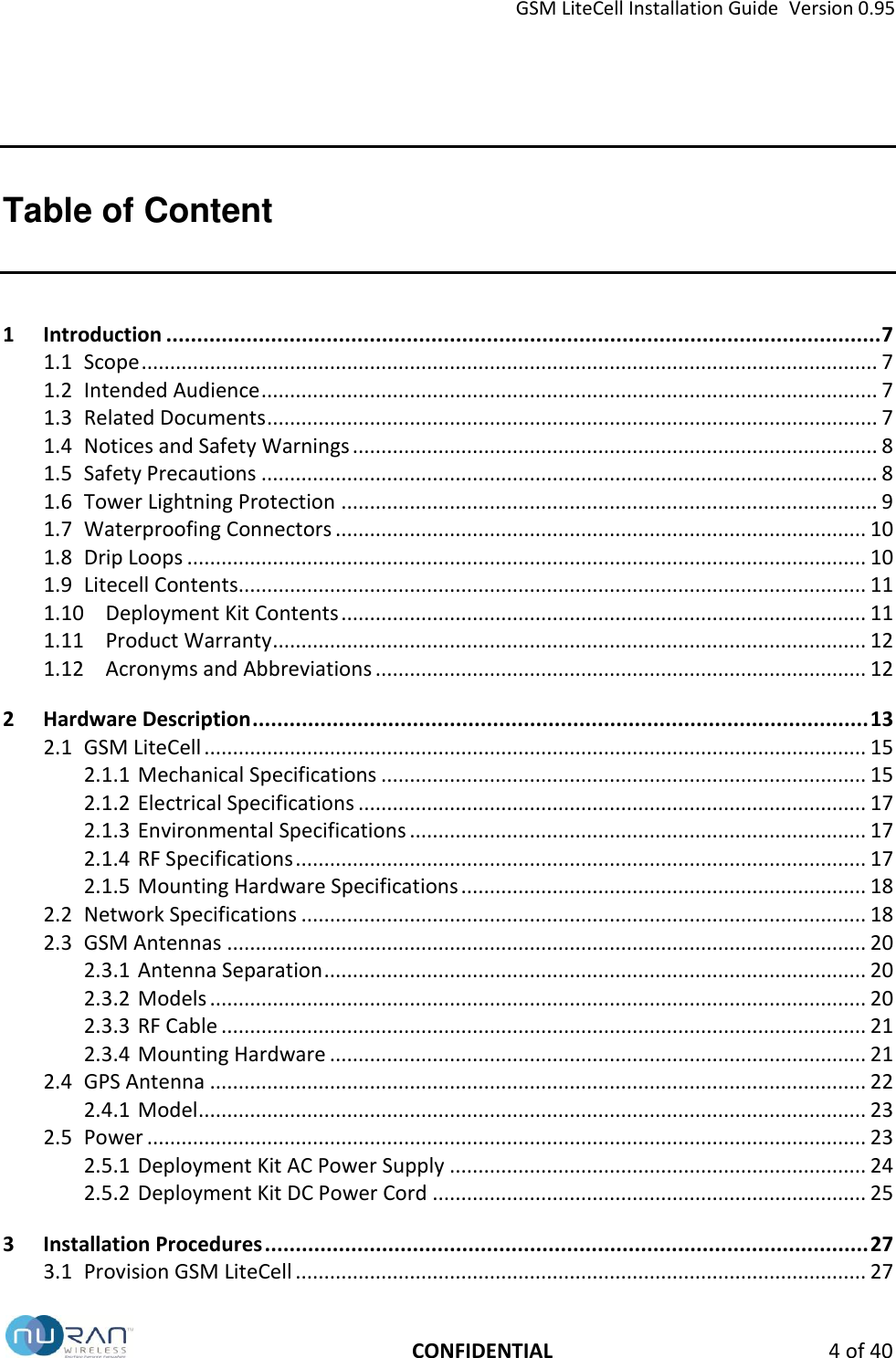
GSM LiteCell Installation Guide  Version 0.95   CONFIDENTIAL  4 of 40 Table of Content 1 Introduction .................................................................................................................... 7 1.1 Scope ................................................................................................................................. 7 1.2 Intended Audience ............................................................................................................ 7 1.3 Related Documents ........................................................................................................... 7 1.4 Notices and Safety Warnings ............................................................................................ 8 1.5 Safety Precautions ............................................................................................................ 8 1.6 Tower Lightning Protection .............................................................................................. 9 1.7 Waterproofing Connectors ............................................................................................. 10 1.8 Drip Loops ....................................................................................................................... 10 1.9 Litecell Contents.............................................................................................................. 11 1.10 Deployment Kit Contents ............................................................................................ 11 1.11 Product Warranty ........................................................................................................ 12 1.12 Acronyms and Abbreviations ...................................................................................... 12 2 Hardware Description .................................................................................................... 13 2.1 GSM LiteCell .................................................................................................................... 15 2.1.1 Mechanical Specifications ..................................................................................... 15 2.1.2 Electrical Specifications ......................................................................................... 17 2.1.3 Environmental Specifications ................................................................................ 17 2.1.4 RF Specifications .................................................................................................... 17 2.1.5 Mounting Hardware Specifications ....................................................................... 18 2.2 Network Specifications ................................................................................................... 18 2.3 GSM Antennas ................................................................................................................ 20 2.3.1 Antenna Separation ............................................................................................... 20 2.3.2 Models ................................................................................................................... 20 2.3.3 RF Cable ................................................................................................................. 21 2.3.4 Mounting Hardware .............................................................................................. 21 2.4 GPS Antenna ................................................................................................................... 22 2.4.1 Model ..................................................................................................................... 23 2.5 Power .............................................................................................................................. 23 2.5.1 Deployment Kit AC Power Supply ......................................................................... 24 2.5.2 Deployment Kit DC Power Cord ............................................................................ 25 3 Installation Procedures .................................................................................................. 27 3.1 Provision GSM LiteCell .................................................................................................... 27
GSM LiteCell Installation Guide  Version 0.95   CONFIDENTIAL  5 of 40 3.2 Prepare for Installation ................................................................................................... 27 3.2.1 Required Tools ....................................................................................................... 27 3.2.2 Safety Equipment .................................................................................................. 28 3.2.3 Cable Guidelines .................................................................................................... 28 3.3 Install GSM Antennas ...................................................................................................... 28 3.4 Install GPS Antenna ........................................................................................................ 31 3.5 Install GSM LiteCell ......................................................................................................... 32 3.6 Install Power Supply ....................................................................................................... 34 3.7 Grounding and Lightning Protection Guidelines ............................................................ 35 3.8 LED Activity and System Operation ................................................................................ 37 3.8.1 LiteCell LED Colors and Flashing Patterns ............................................................. 37 3.8.2 LED Indication Priority ........................................................................................... 39
GSM LiteCell Installation Guide  Version 0.95   CONFIDENTIAL  6 of 40 Figures and Tables Figures Figure 1. Tower Lightning Protection .......................................................................................... 9 Figure 2. Waterproofing Connectors ........................................................................................ 10 Figure 3. Drip Loop .................................................................................................................... 10 Figure 4. Base Station Installed Using Deployment Kit (AC Powered) ...................................... 13 Figure 5. Base Station Powered By Solar Panels ....................................................................... 14 Figure 6. GSM LiteCell ............................................................................................................... 15 Figure 7. Deployment Kit GPS Antenna..................................................................................... 22 Figure 8. Deployment Kit Power Supply.................................................................................... 24 Figure 9. GSM Antenna Installation .......................................................................................... 29 Figure 10. GPS Antenna Installation ............................................................................................ 31 Figure 11. GSM LiteCell Installation ............................................................................................ 32 Figure 12. Power Supply Installation ........................................................................................... 34 Figure 13. Grounding and Lightning Protection .......................................................................... 36 Figure 14. GSM LiteCell LED ........................................................................................................ 37  Tables Table 1 GSM LiteCell Mechanical Specifications .................................................................... 15 Table 2 GSM LiteCell Electrical Specifications ........................................................................ 17 Table 3 GSM LiteCell Environmental Specifications ............................................................... 17 Table 4 GSM LiteCell RF Specifications ................................................................................... 17 Table 5 GSM LiteCell Mounting Hardware ............................................................................. 18 Table 6 General GSM Antenna Specifications ........................................................................ 20 Table 7 Deployment Kit GSM Antennas .................................................................................. 20 Table 8 GSM Antenna Deployment Kit Hardware .................................................................. 21 Table 9 General GPS Antenna Specifications 1 ....................................................................... 22 Table 10 Deployment Kit GPS Antenna..................................................................................... 23 Table 11 Deployment Kit Power Supply Specifications ............................................................ 23 Table 12 Deployment Kit Power Supply Specifications ............................................................ 24
GSM LiteCell Installation Guide  Version 0.95   CONFIDENTIAL  7 of 40 1  Introduction This document explains how to install the GSM LiteCell, an easy-to-deploy and low-power consumption cellular base station. 1.1  Scope This document covers installation requirements, site preparation, and physical equipment installation. After completing these procedures, the base station equipment will be powered on and ready for configuration.  1.2  Intended Audience This document is intended for installation technicians. The reader should have a basic understanding of electricity, telecommunications equipment, and RF technology. 1.3  Related Documents The following documents are included in the GSM LiteCell documentation suite:  Nuran – Return of Merchandise Policy  Nuran – Limited Product Warranty_EN_FR-4-15  GSM LiteCell Deployment Kit
GSM LiteCell Installation Guide  Version 0.95   CONFIDENTIAL  8 of 40 1.4  Notices and Safety Warnings Critical reader information is indicated throughout this document using specially formatted text and/or icons.   NOTE: Notes contain information that  may be of  particular usefulness or direct the reader's attention to issues that may cause difficulties if ignored.  CAUTION:  A  general  caution  is  shown  when  there  is  risk  of  personal  injury  or equipment damage from non-electrical hazards.  WARNING:  An  electrical  warning  is  shown  when  there  is  risk  of  personal  injury  or equipment damage from electrical hazards. 1.5  Safety Precautions Always observe the following recommendations to ensure maximum safety:   The equipment is intended for installation in a restricted access location.  Do not install or operate the equipment without proper training. 󳋡  Do not operate the equipment without the specified antennas correctly installed.   Observe all local or national RF regulations with respect to operating RF equipment.  Do not stand in front of, or in close proximity to, the antennas when they are powered on.  Do not modify the equipment, integrate with non-approved devices, or operate in a non-approved manner.  Always follow applicable electrical codes when installing the equipment.  Disconnect power from the equipment when it is not in use for an extended period of time.  CAUTION: Remove all protective foils and packaging material prior to usage.
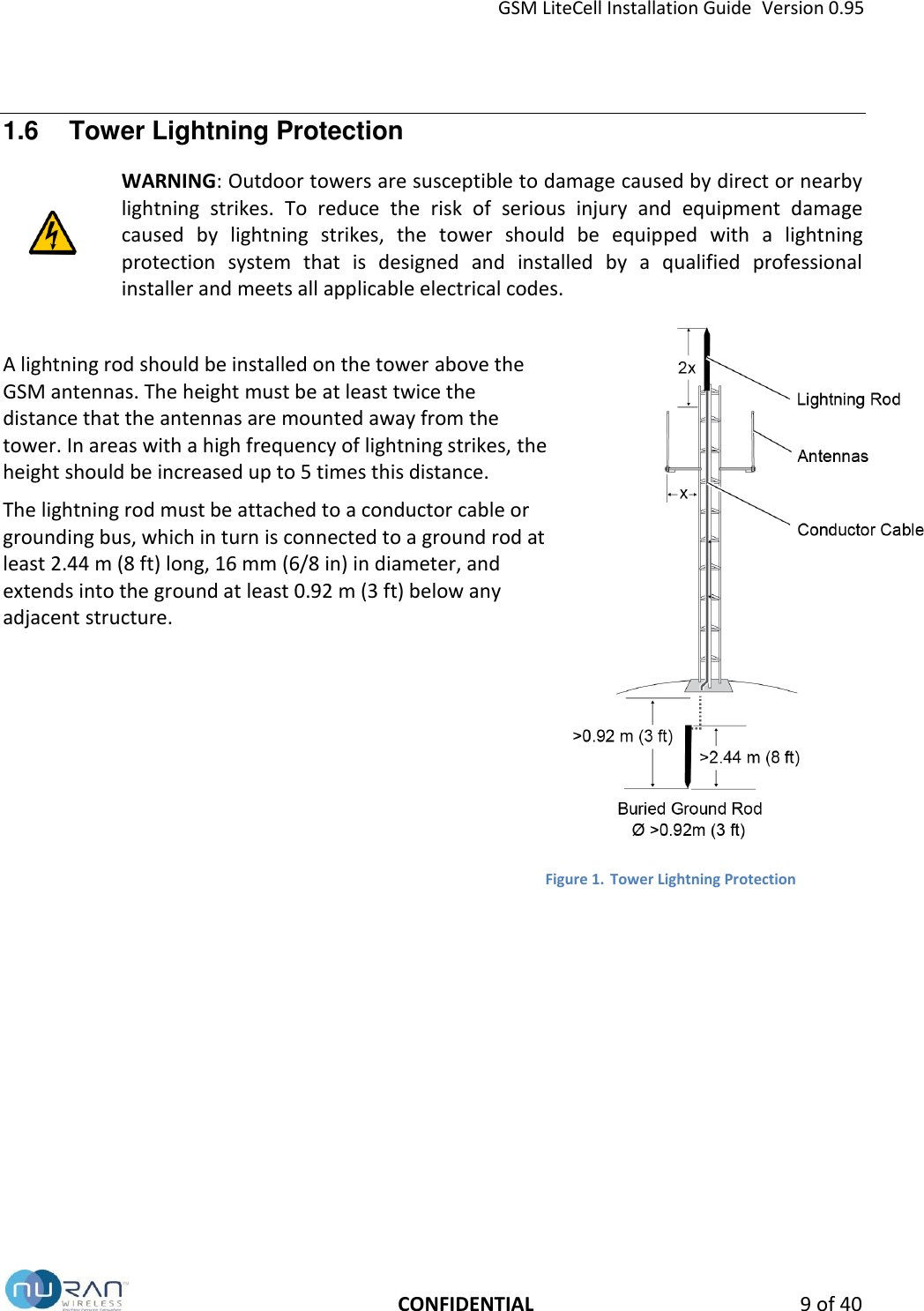
GSM LiteCell Installation Guide  Version 0.95   CONFIDENTIAL  9 of 40 1.6  Tower Lightning Protection  WARNING: Outdoor towers are susceptible to damage caused by direct or nearby lightning  strikes.  To  reduce  the  risk  of  serious  injury  and  equipment  damage caused  by  lightning  strikes,  the  tower  should  be  equipped  with  a  lightning protection  system  that  is  designed  and  installed  by  a  qualified  professional installer and meets all applicable electrical codes.   A lightning rod should be installed on the tower above the GSM antennas. The height must be at least twice the distance that the antennas are mounted away from the tower. In areas with a high frequency of lightning strikes, the height should be increased up to 5 times this distance.  The lightning rod must be attached to a conductor cable or grounding bus, which in turn is connected to a ground rod at least 2.44 m (8 ft) long, 16 mm (6/8 in) in diameter, and extends into the ground at least 0.92 m (3 ft) below any adjacent structure.       Figure 1. Tower Lightning Protection
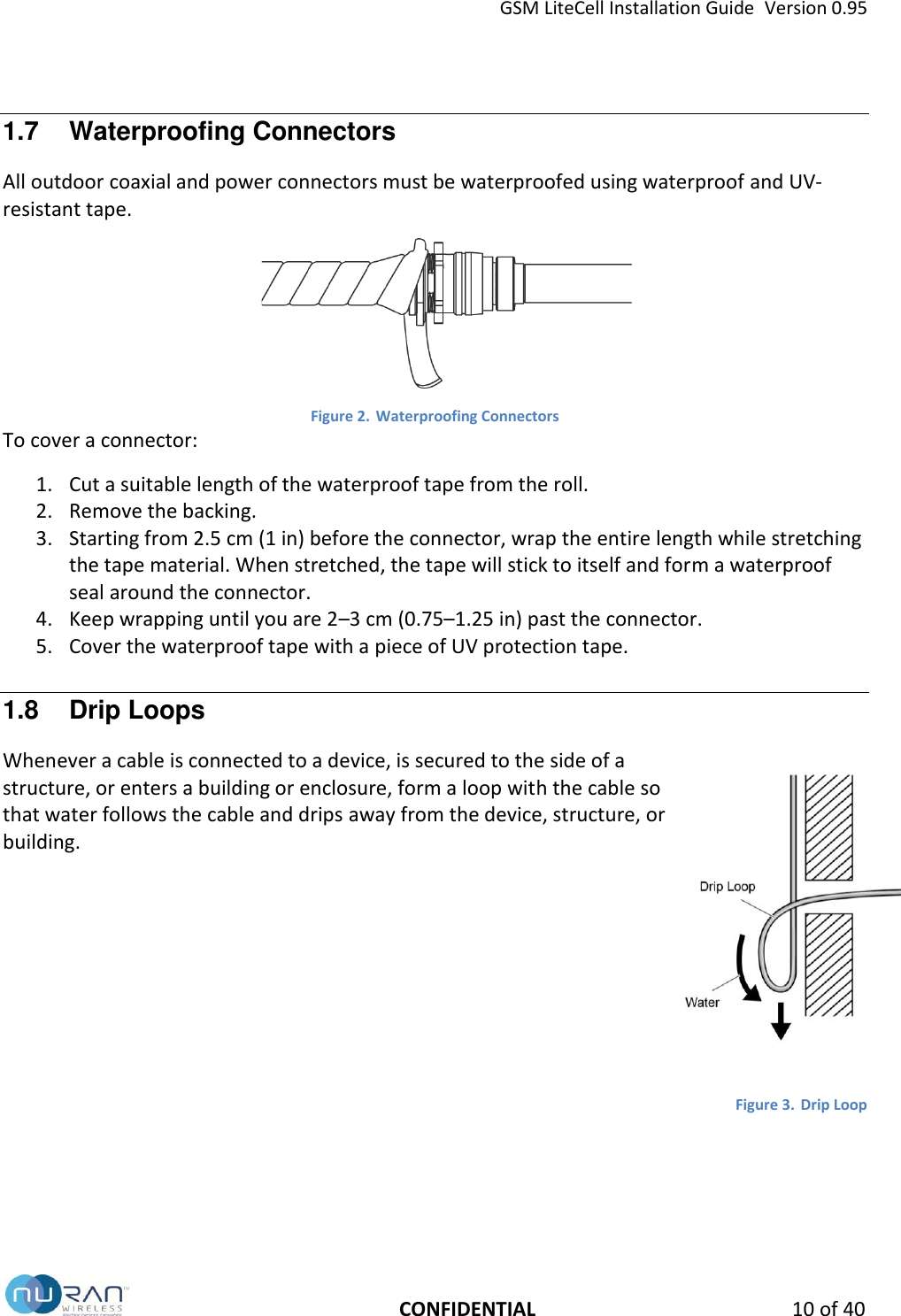
GSM LiteCell Installation Guide  Version 0.95   CONFIDENTIAL 10 of 40 1.7  Waterproofing Connectors All outdoor coaxial and power connectors must be waterproofed using waterproof and UV-resistant tape.   Figure 2. Waterproofing Connectors To cover a connector: 1. Cut a suitable length of the waterproof tape from the roll. 2. Remove the backing. 3. Starting from 2.5 cm (1 in) before the connector, wrap the entire length while stretching the tape material. When stretched, the tape will stick to itself and form a waterproof seal around the connector. 4. Keep wrapping until you are 2–3 cm (0.75–1.25 in) past the connector. 5. Cover the waterproof tape with a piece of UV protection tape. 1.8  Drip Loops Whenever a cable is connected to a device, is secured to the side of a structure, or enters a building or enclosure, form a loop with the cable so that water follows the cable and drips away from the device, structure, or building.        Figure 3. Drip Loop
GSM LiteCell Installation Guide  Version 0.95   CONFIDENTIAL 11 of 40 1.9  Litecell Contents The GSM LiteCell box includes the following items:  GSM Litecell  Flange nuts and screws  U-bolts and clamps  Waterproof RF cap  Power cable plug   Ethernet cable plug  1.10  Deployment Kit Contents The GSM LiteCell deployment kit, if ordered, includes the following items:  GPS antenna with cable and SMA connector.  GPS antenna mounting hardware  2 GSM omni-direction antennas  RF cable with N-Type connectors, 4.75 m (15 ft)  15 mounting clamps (used for both GSM LiteCell and standoff pipes)  2 standoff pipes  Flange nuts and screws  Power supply fixation clamps  Waterproofing tape  UV protection tape  UV-rated tie wraps (x50)  Outdoor Ethernet cable, 50 m (164 ft) and RJ-45 connectors  Optional AC power supply or DC power cord, 50 m (164 ft)  Tool kit (screw drivers, adjustable wrench)
GSM LiteCell Installation Guide  Version 0.95   CONFIDENTIAL 12 of 40 1.11  Product Warranty For warranty information about this product, refer to your NuRan Limited Product Warranty and any applicable service agreements.  CAUTION:  The  GSM  LiteCell  contains  no  user-serviceable  parts.  Do  not  open  or modify any part of the product, as this action will automatically void the product’s warranty. All repairs must be performed by qualified service personnel. Do not use the GSM LiteCell with any non-approved third-party products. For customer support, contact NuRan: Website:  http://nuranwireless.com Email:    support@nuranwireless.com  Telephone:   (418) 914-7484 Address:   2150 Cyrille-Duqet, Quebec, QC, Canada   G1N 2G3 When contacting NuRan, obtain the serial number and MAC address of your GSM LiteCell. This information is printed on the product label and will assist in troubleshooting and resolving your issues. 1.12  Acronyms and Abbreviations AC Alternating Current Mbps Megabits per second ARFCN Absolute Radio-Frequency Channel Number PPM Parts Per Million BER Bit error rate PSU Power Supply Unit DC Direct current RAN Radio Access Network EDGE Enhanced Data rates for GSM Evolution RF Radio Frequency GSM Global System for Mobile Communications (GSM) SMA Sub Miniature version A GPP 3rd Generation Partnership Project IP Internet Protocol GPS Global Positioning System IP## Ingress Protection LED Light-Emitting Diode UV Ultraviolet light
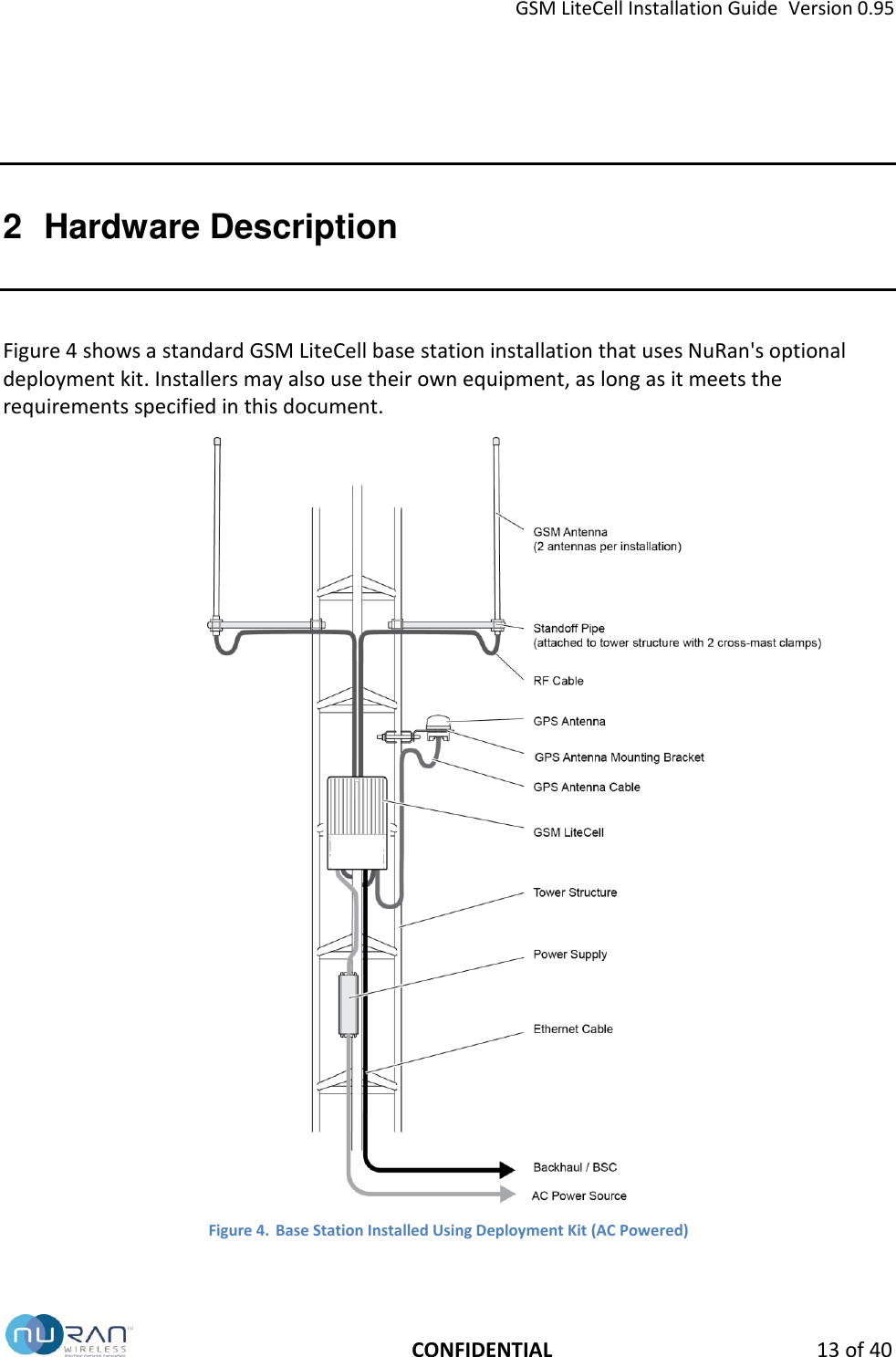
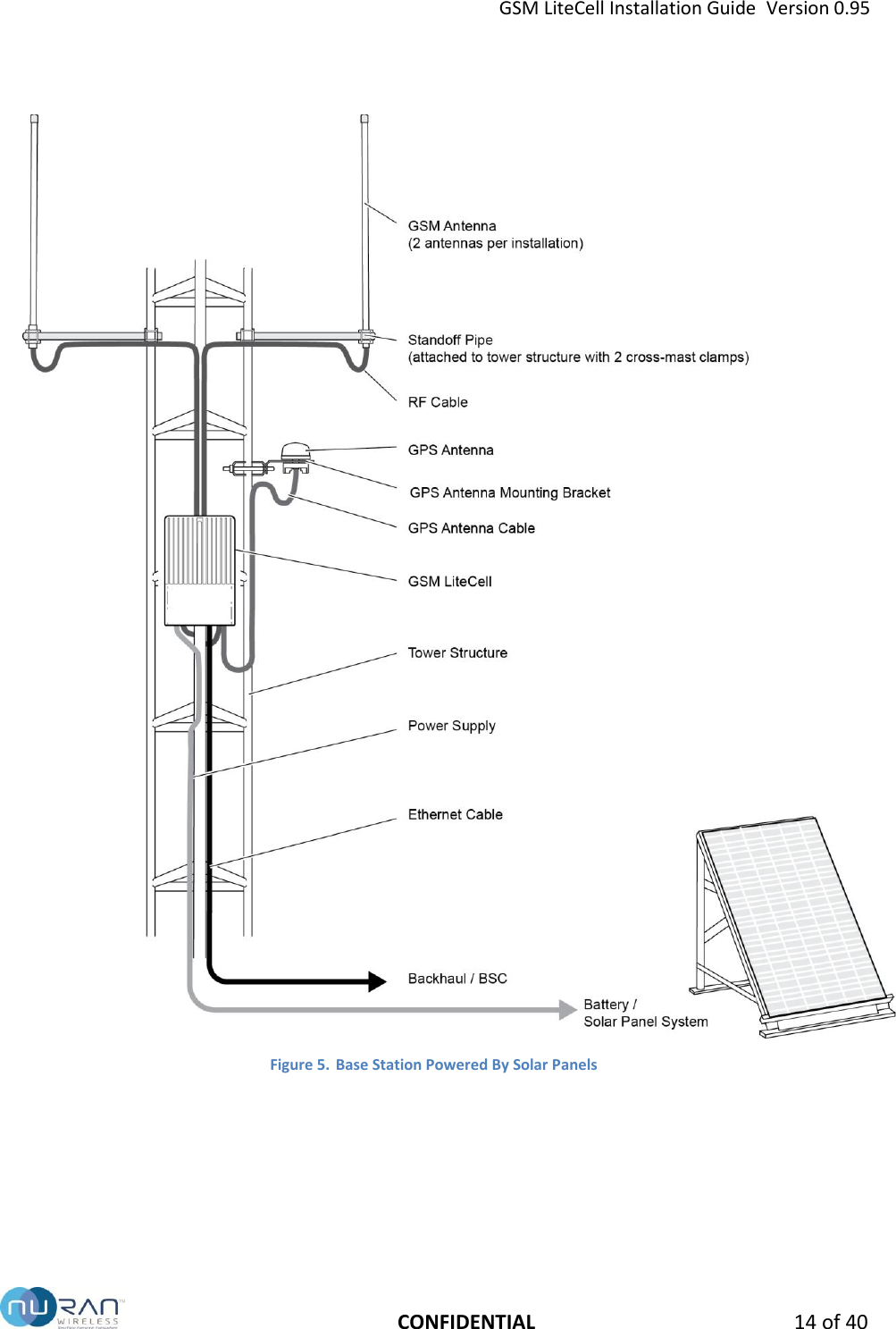
GSM LiteCell Installation Guide  Version 0.95   CONFIDENTIAL 13 of 40 2  Hardware Description Figure 4 shows a standard GSM LiteCell base station installation that uses NuRan's optional deployment kit. Installers may also use their own equipment, as long as it meets the requirements specified in this document.  Figure 4. Base Station Installed Using Deployment Kit (AC Powered)
GSM LiteCell Installation Guide  Version 0.95   CONFIDENTIAL 14 of 40  Figure 5. Base Station Powered By Solar Panels
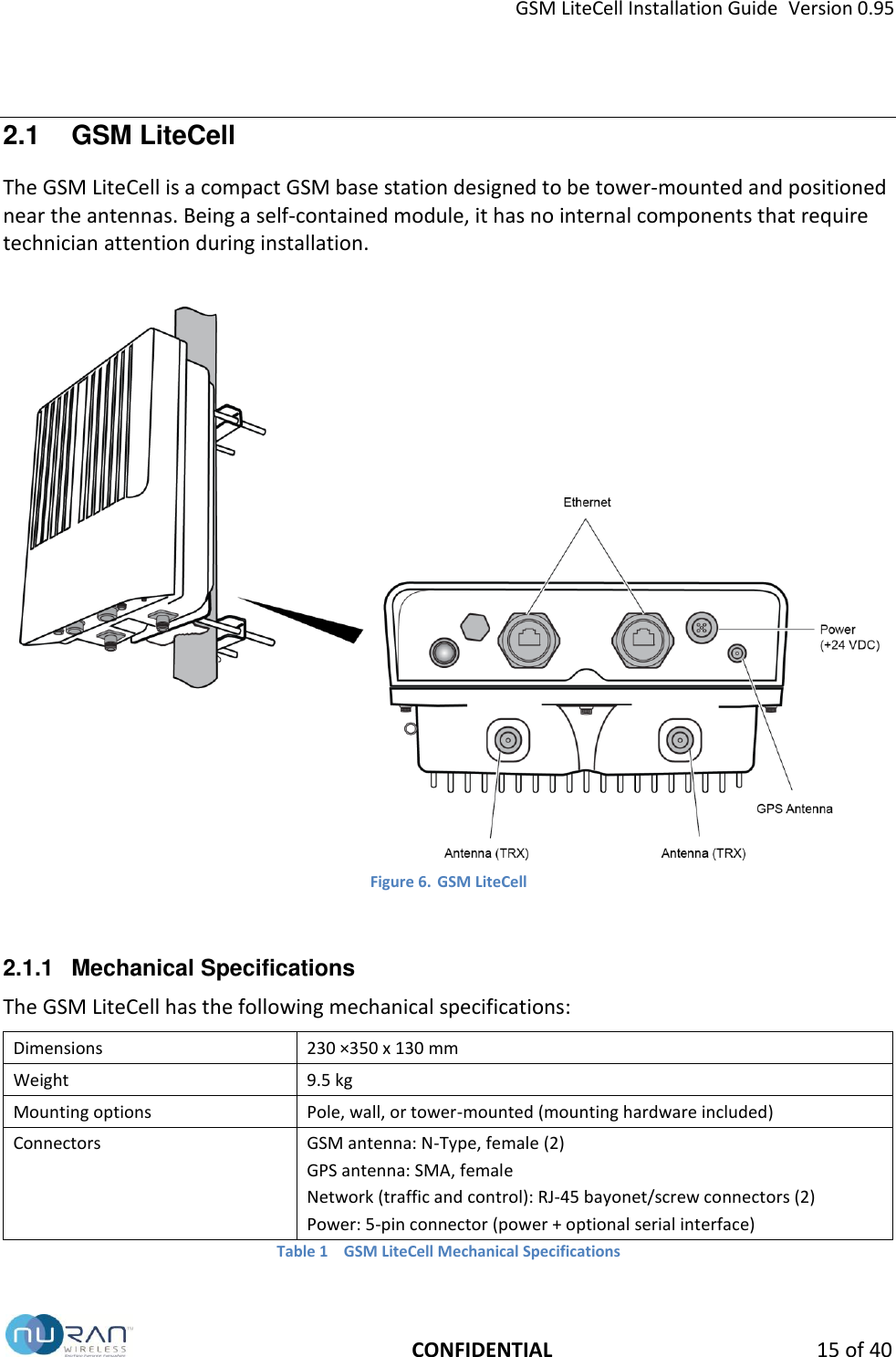
GSM LiteCell Installation Guide  Version 0.95   CONFIDENTIAL 15 of 40 2.1  GSM LiteCell The GSM LiteCell is a compact GSM base station designed to be tower-mounted and positioned near the antennas. Being a self-contained module, it has no internal components that require technician attention during installation.   Figure 6. GSM LiteCell  2.1.1  Mechanical Specifications The GSM LiteCell has the following mechanical specifications: Dimensions 230 ×350 x 130 mm Weight 9.5 kg Mounting options Pole, wall, or tower-mounted (mounting hardware included) Connectors GSM antenna: N-Type, female (2) GPS antenna: SMA, female Network (traffic and control): RJ-45 bayonet/screw connectors (2) Power: 5-pin connector (power + optional serial interface) Table 1  GSM LiteCell Mechanical Specifications
GSM LiteCell Installation Guide  Version 0.95   CONFIDENTIAL 16 of 40
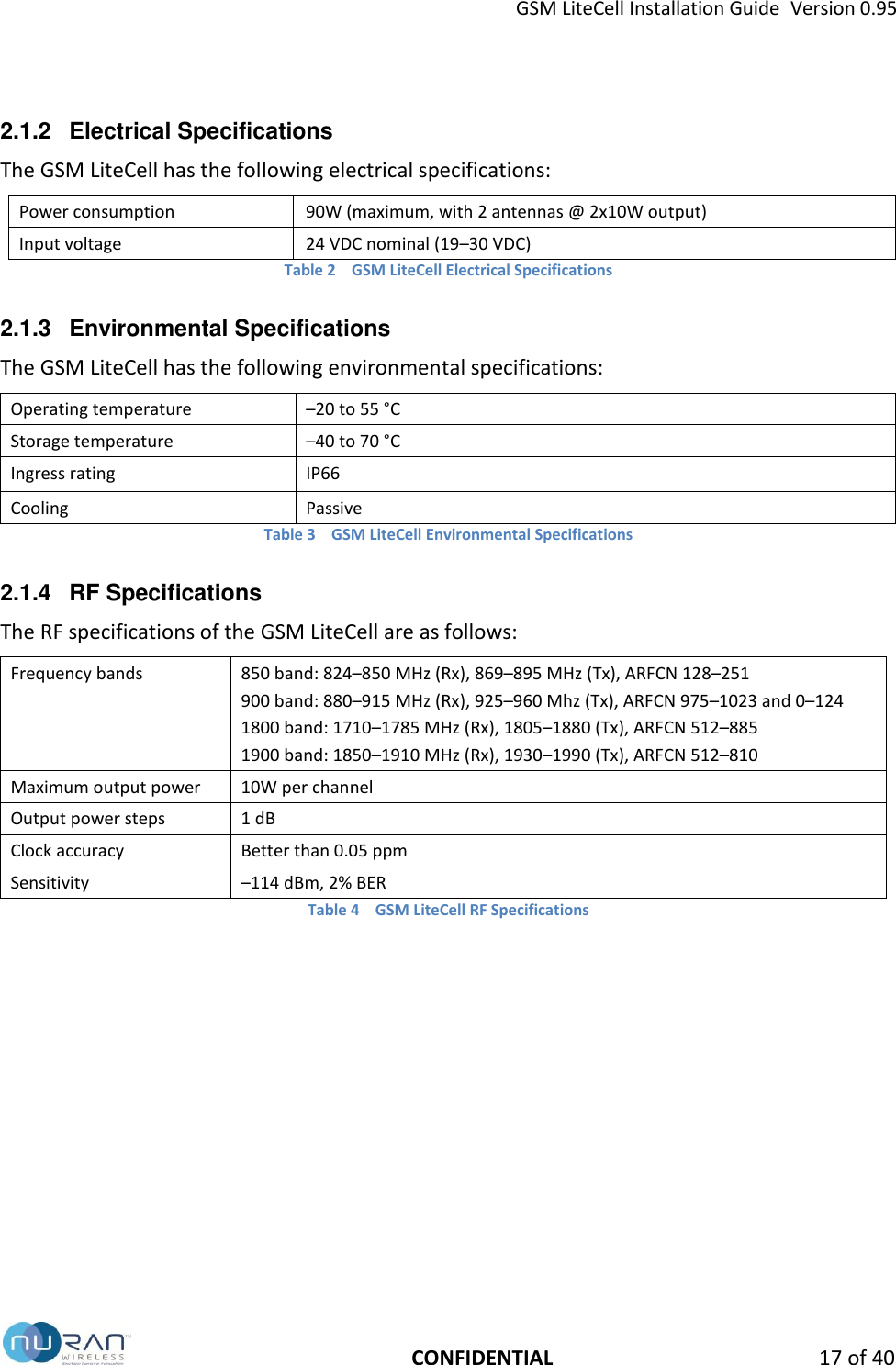
GSM LiteCell Installation Guide  Version 0.95   CONFIDENTIAL 17 of 40 2.1.2  Electrical Specifications The GSM LiteCell has the following electrical specifications: Power consumption 90W (maximum, with 2 antennas @ 2x10W output) Input voltage 24 VDC nominal (19–30 VDC)   Table 2  GSM LiteCell Electrical Specifications 2.1.3  Environmental Specifications The GSM LiteCell has the following environmental specifications: Operating temperature –20 to 55 °C Storage temperature –40 to 70 °C Ingress rating IP66 Cooling Passive Table 3  GSM LiteCell Environmental Specifications 2.1.4  RF Specifications The RF specifications of the GSM LiteCell are as follows: Frequency bands 850 band: 824–850 MHz (Rx), 869–895 MHz (Tx), ARFCN 128–251 900 band: 880–915 MHz (Rx), 925–960 Mhz (Tx), ARFCN 975–1023 and 0–124 1800 band: 1710–1785 MHz (Rx), 1805–1880 (Tx), ARFCN 512–885 1900 band: 1850–1910 MHz (Rx), 1930–1990 (Tx), ARFCN 512–810 Maximum output power 10W per channel Output power steps 1 dB Clock accuracy Better than 0.05 ppm Sensitivity –114 dBm, 2% BER Table 4  GSM LiteCell RF Specifications
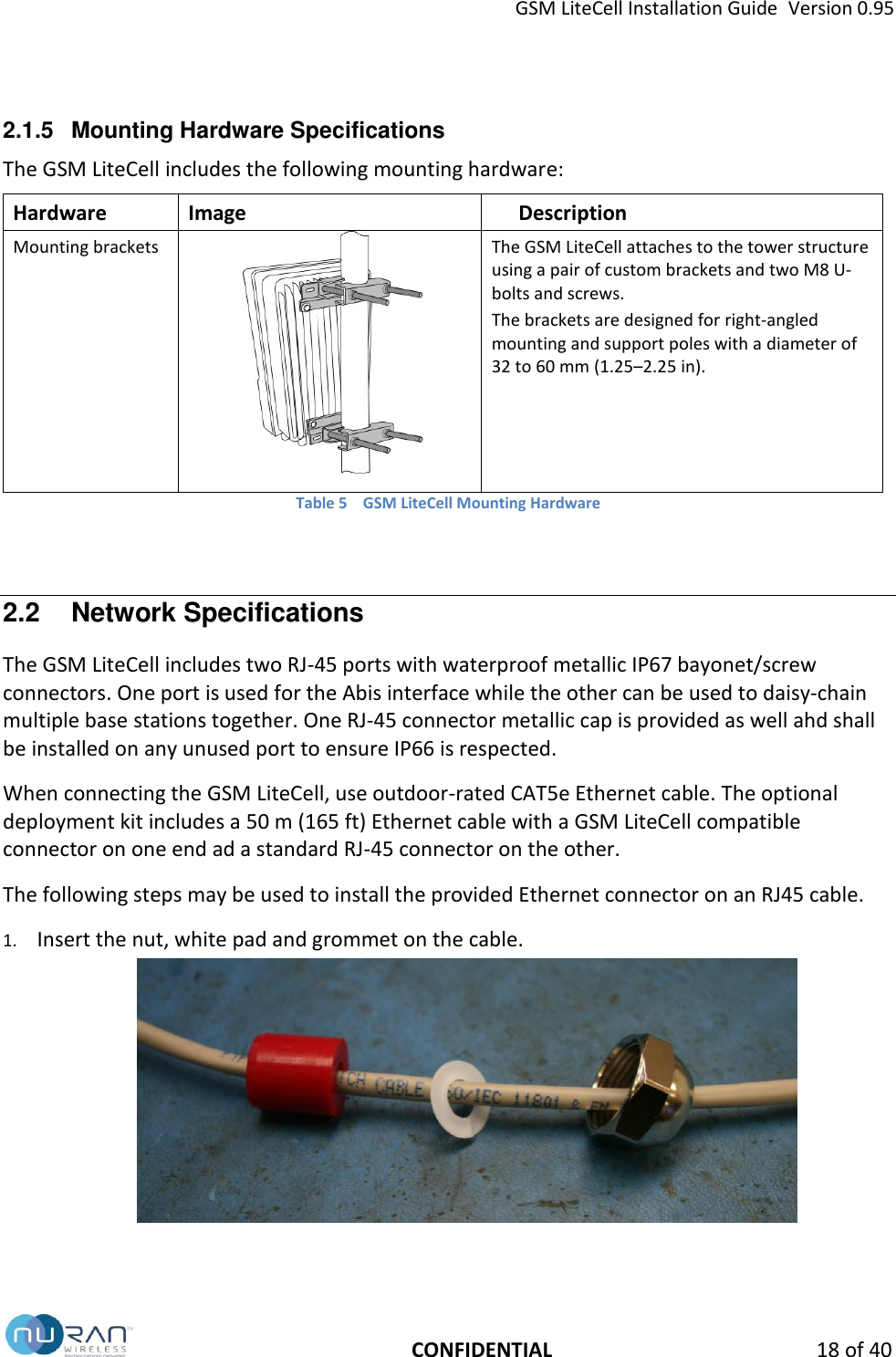
GSM LiteCell Installation Guide  Version 0.95   CONFIDENTIAL 18 of 40 2.1.5  Mounting Hardware Specifications The GSM LiteCell includes the following mounting hardware: Hardware Image Description Mounting brackets  The GSM LiteCell attaches to the tower structure using a pair of custom brackets and two M8 U-bolts and screws.  The brackets are designed for right-angled mounting and support poles with a diameter of 32 to 60 mm (1.25–2.25 in).  Table 5  GSM LiteCell Mounting Hardware  2.2  Network Specifications The GSM LiteCell includes two RJ-45 ports with waterproof metallic IP67 bayonet/screw connectors. One port is used for the Abis interface while the other can be used to daisy-chain multiple base stations together. One RJ-45 connector metallic cap is provided as well ahd shall be installed on any unused port to ensure IP66 is respected. When connecting the GSM LiteCell, use outdoor-rated CAT5e Ethernet cable. The optional deployment kit includes a 50 m (165 ft) Ethernet cable with a GSM LiteCell compatible connector on one end ad a standard RJ-45 connector on the other. The following steps may be used to install the provided Ethernet connector on an RJ45 cable. 1. Insert the nut, white pad and grommet on the cable.
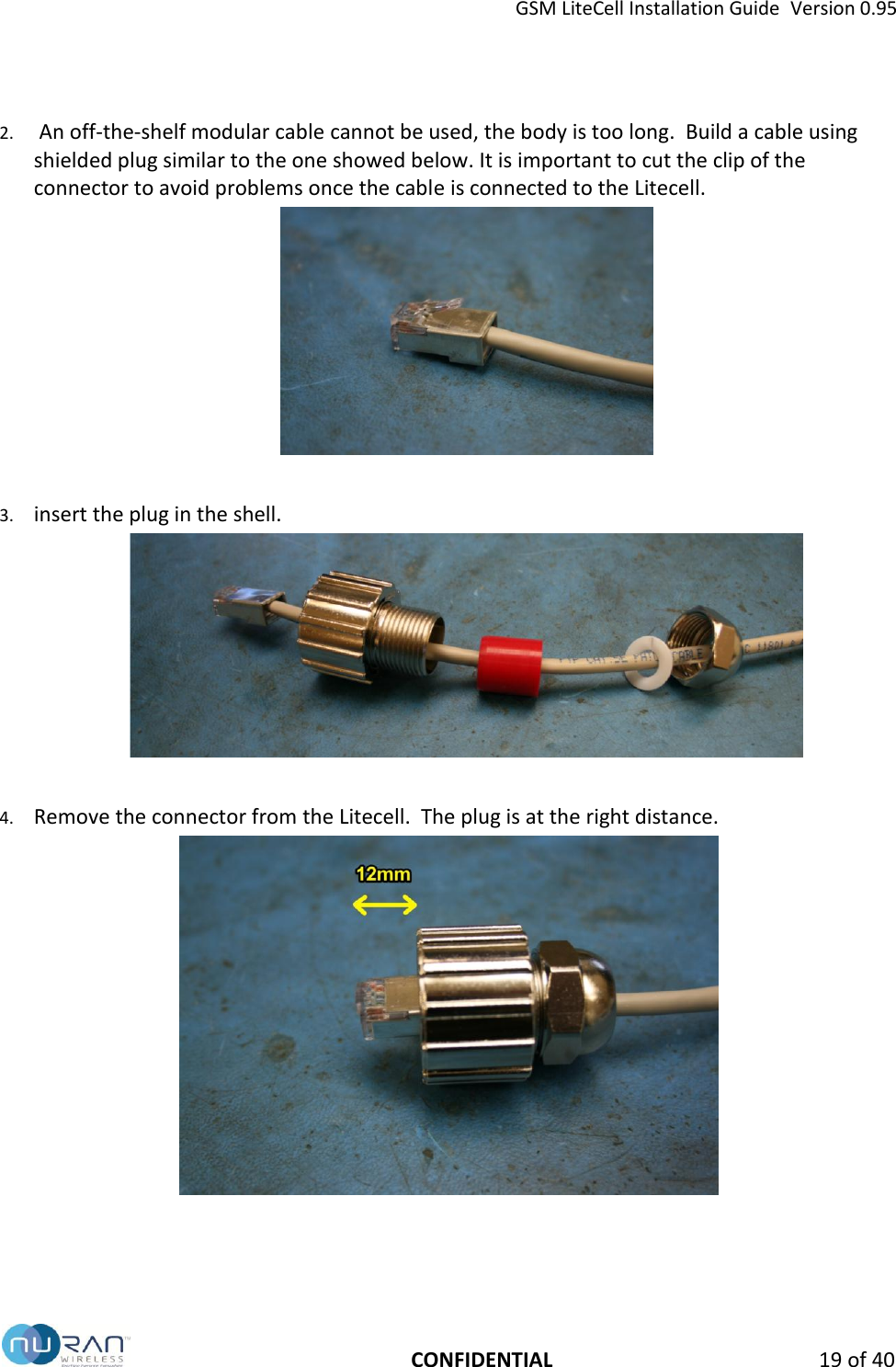
GSM LiteCell Installation Guide  Version 0.95   CONFIDENTIAL 19 of 40 2.  An off-the-shelf modular cable cannot be used, the body is too long.  Build a cable using shielded plug similar to the one showed below. It is important to cut the clip of the connector to avoid problems once the cable is connected to the Litecell.   3. insert the plug in the shell.   4. Remove the connector from the Litecell.  The plug is at the right distance.
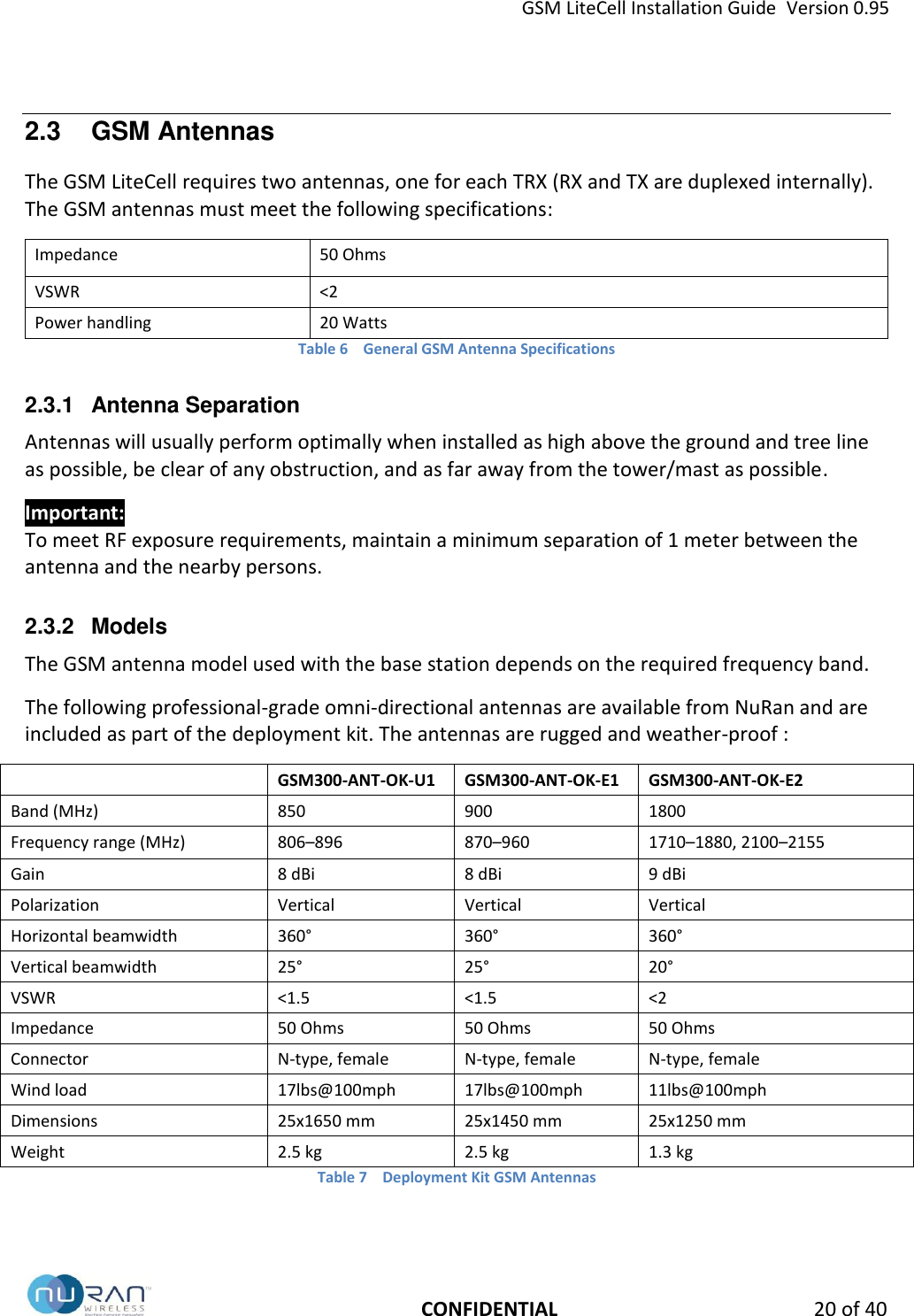
GSM LiteCell Installation Guide  Version 0.95   CONFIDENTIAL 20 of 40 2.3  GSM Antennas The GSM LiteCell requires two antennas, one for each TRX (RX and TX are duplexed internally). The GSM antennas must meet the following specifications: Impedance 50 Ohms VSWR <2 Power handling 20 Watts Table 6  General GSM Antenna Specifications 2.3.1  Antenna Separation Antennas will usually perform optimally when installed as high above the ground and tree line as possible, be clear of any obstruction, and as far away from the tower/mast as possible. Important: To meet RF exposure requirements, maintain a minimum separation of 1 meter between the antenna and the nearby persons. 2.3.2  Models The GSM antenna model used with the base station depends on the required frequency band. The following professional-grade omni-directional antennas are available from NuRan and are included as part of the deployment kit. The antennas are rugged and weather-proof :  GSM300-ANT-OK-U1 GSM300-ANT-OK-E1 GSM300-ANT-OK-E2 Band (MHz) 850 900 1800 Frequency range (MHz) 806–896 870–960 1710–1880, 2100–2155 Gain 8 dBi 8 dBi 9 dBi Polarization Vertical Vertical Vertical Horizontal beamwidth 360° 360° 360° Vertical beamwidth 25° 25° 20° VSWR <1.5 <1.5 <2 Impedance 50 Ohms 50 Ohms 50 Ohms Connector N-type, female N-type, female N-type, female Wind load 17lbs@100mph 17lbs@100mph 11lbs@100mph Dimensions 25x1650 mm 25x1450 mm 25x1250 mm Weight 2.5 kg 2.5 kg 1.3 kg Table 7  Deployment Kit GSM Antennas
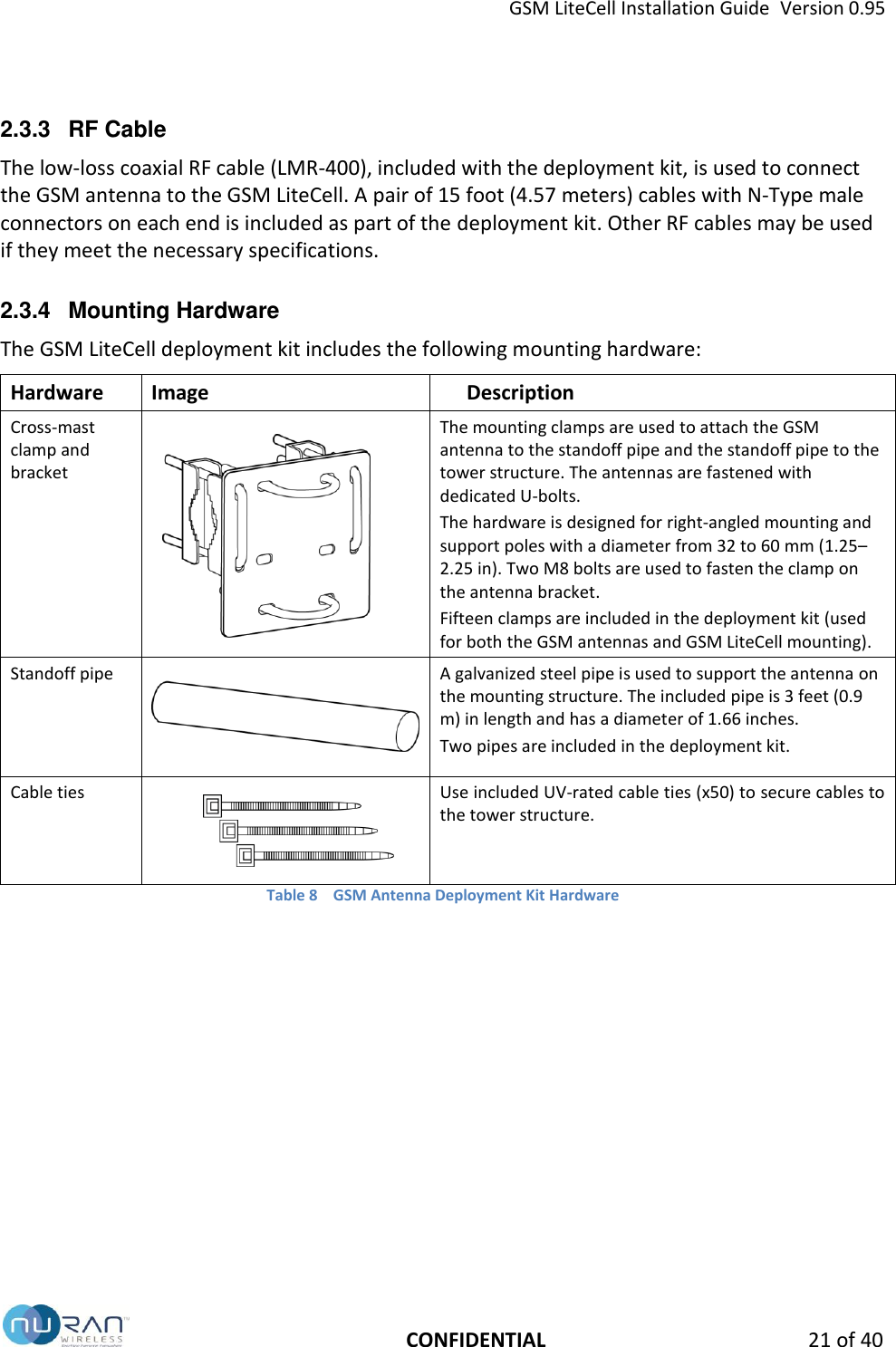
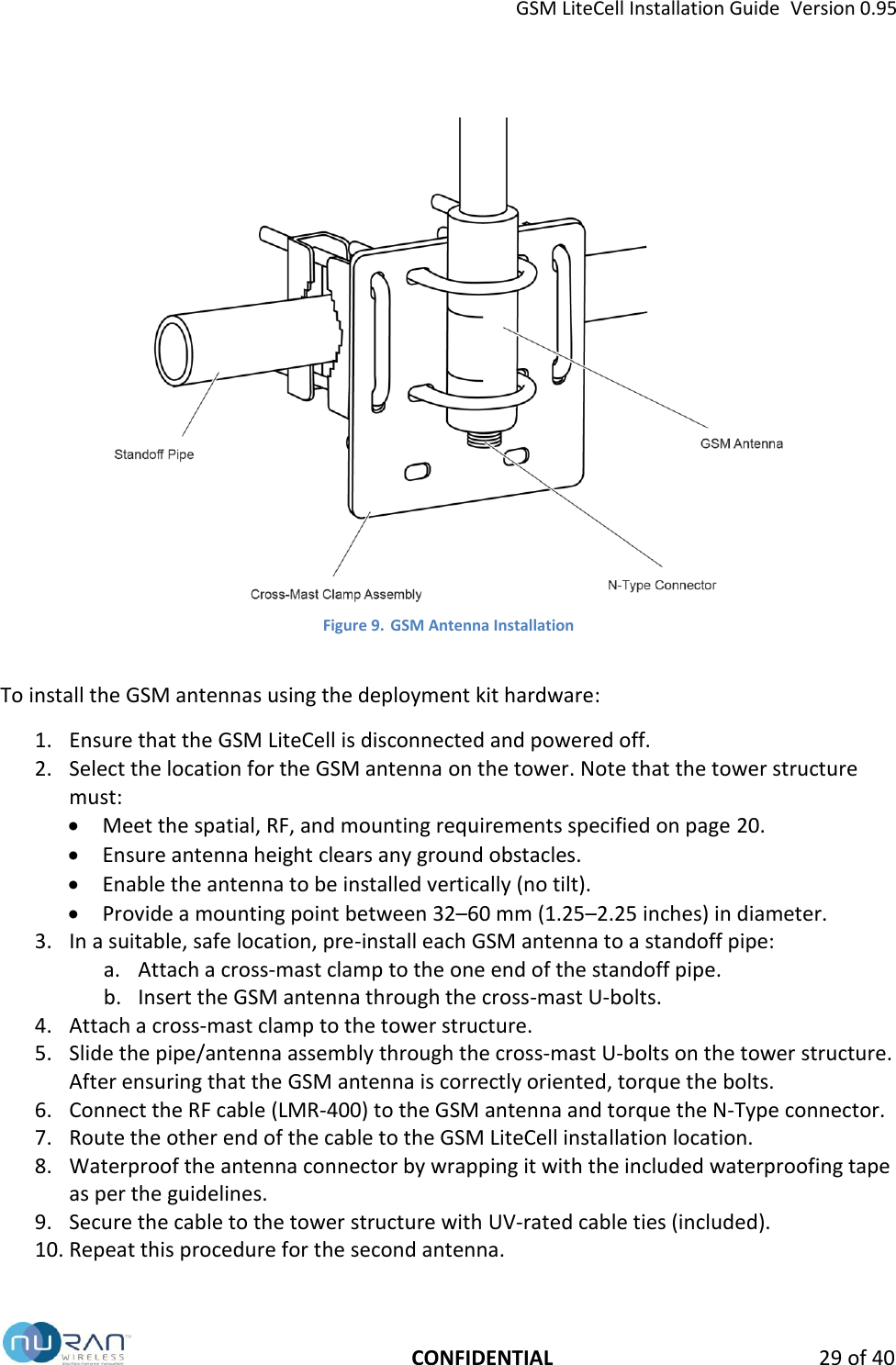
GSM LiteCell Installation Guide  Version 0.95   CONFIDENTIAL 21 of 40 2.3.3  RF Cable The low-loss coaxial RF cable (LMR-400), included with the deployment kit, is used to connect the GSM antenna to the GSM LiteCell. A pair of 15 foot (4.57 meters) cables with N-Type male connectors on each end is included as part of the deployment kit. Other RF cables may be used if they meet the necessary specifications. 2.3.4  Mounting Hardware The GSM LiteCell deployment kit includes the following mounting hardware: Hardware Image Description Cross-mast clamp and bracket   The mounting clamps are used to attach the GSM antenna to the standoff pipe and the standoff pipe to the tower structure. The antennas are fastened with dedicated U-bolts. The hardware is designed for right-angled mounting and support poles with a diameter from 32 to 60 mm (1.25–2.25 in). Two M8 bolts are used to fasten the clamp on the antenna bracket. Fifteen clamps are included in the deployment kit (used for both the GSM antennas and GSM LiteCell mounting). Standoff pipe  A galvanized steel pipe is used to support the antenna on the mounting structure. The included pipe is 3 feet (0.9 m) in length and has a diameter of 1.66 inches. Two pipes are included in the deployment kit. Cable ties  Use included UV-rated cable ties (x50) to secure cables to the tower structure.   Table 8  GSM Antenna Deployment Kit Hardware
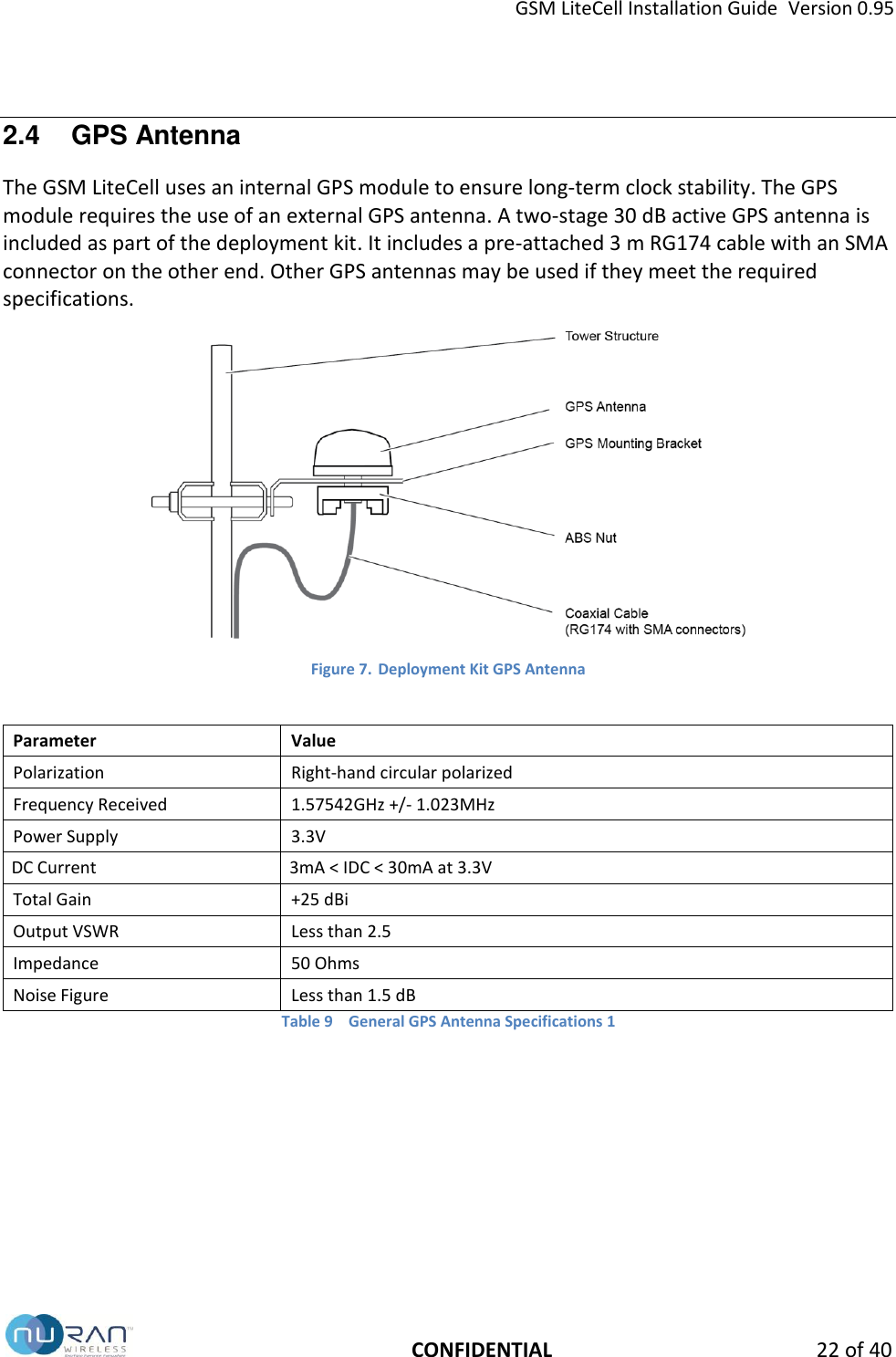
GSM LiteCell Installation Guide  Version 0.95   CONFIDENTIAL 22 of 40 2.4  GPS Antenna The GSM LiteCell uses an internal GPS module to ensure long-term clock stability. The GPS module requires the use of an external GPS antenna. A two-stage 30 dB active GPS antenna is included as part of the deployment kit. It includes a pre-attached 3 m RG174 cable with an SMA connector on the other end. Other GPS antennas may be used if they meet the required specifications.  Figure 7. Deployment Kit GPS Antenna  Parameter Value Polarization Right-hand circular polarized Frequency Received 1.57542GHz +/- 1.023MHz Power Supply 3.3V DC Current 3mA < IDC < 30mA at 3.3V Total Gain +25 dBi Output VSWR Less than 2.5 Impedance 50 Ohms Noise Figure Less than 1.5 dB Table 9  General GPS Antenna Specifications 1
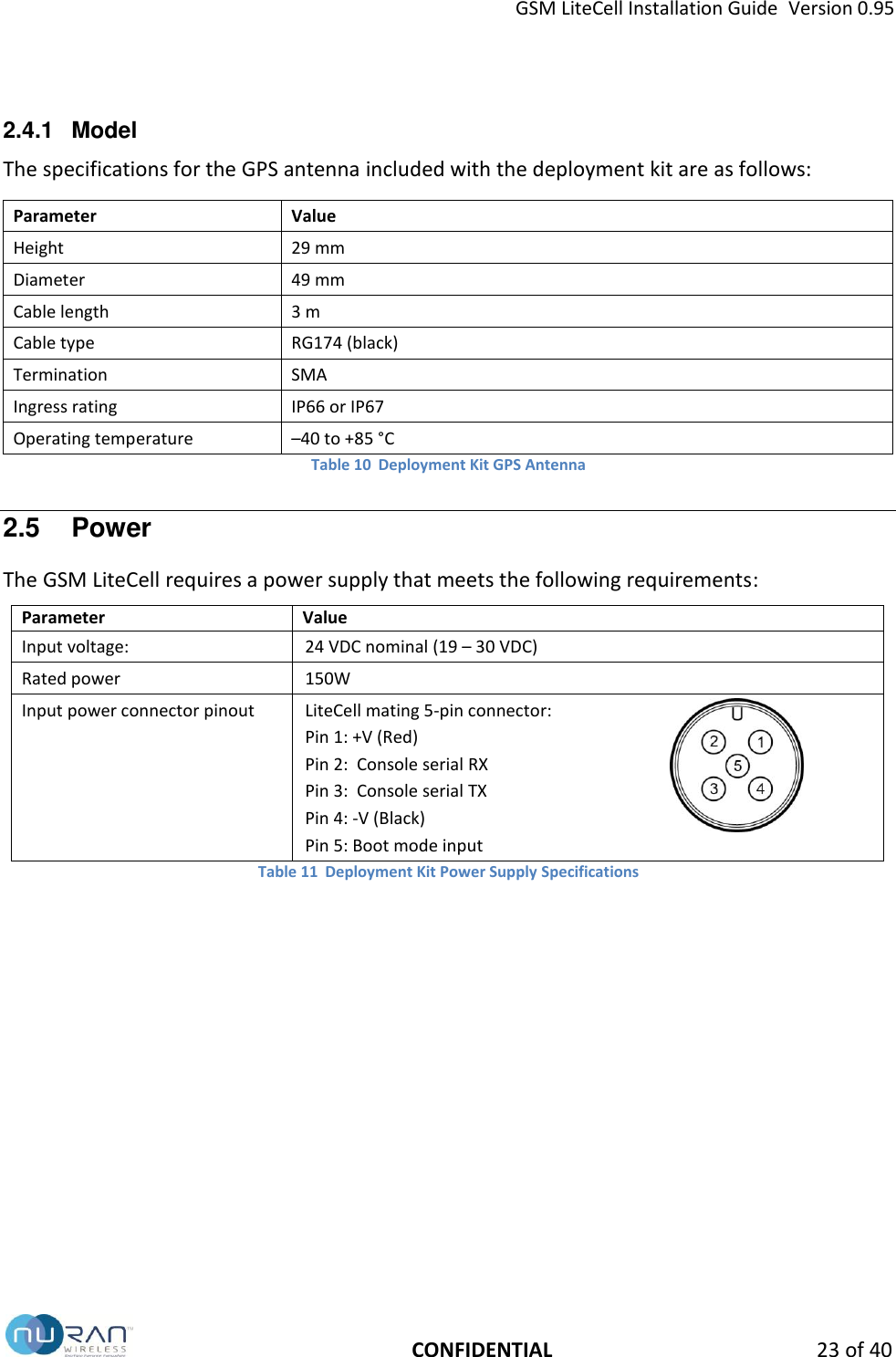
GSM LiteCell Installation Guide  Version 0.95   CONFIDENTIAL 23 of 40 2.4.1  Model The specifications for the GPS antenna included with the deployment kit are as follows: Parameter Value Height 29 mm Diameter 49 mm Cable length 3 m Cable type RG174 (black) Termination SMA Ingress rating IP66 or IP67 Operating temperature –40 to +85 °C Table 10  Deployment Kit GPS Antenna 2.5  Power The GSM LiteCell requires a power supply that meets the following requirements: Parameter Value Input voltage: 24 VDC nominal (19 – 30 VDC)   Rated power   150W Input power connector pinout LiteCell mating 5-pin connector: Pin 1: +V (Red) Pin 2:  Console serial RX Pin 3:  Console serial TX Pin 4: -V (Black) Pin 5: Boot mode input  Table 11  Deployment Kit Power Supply Specifications
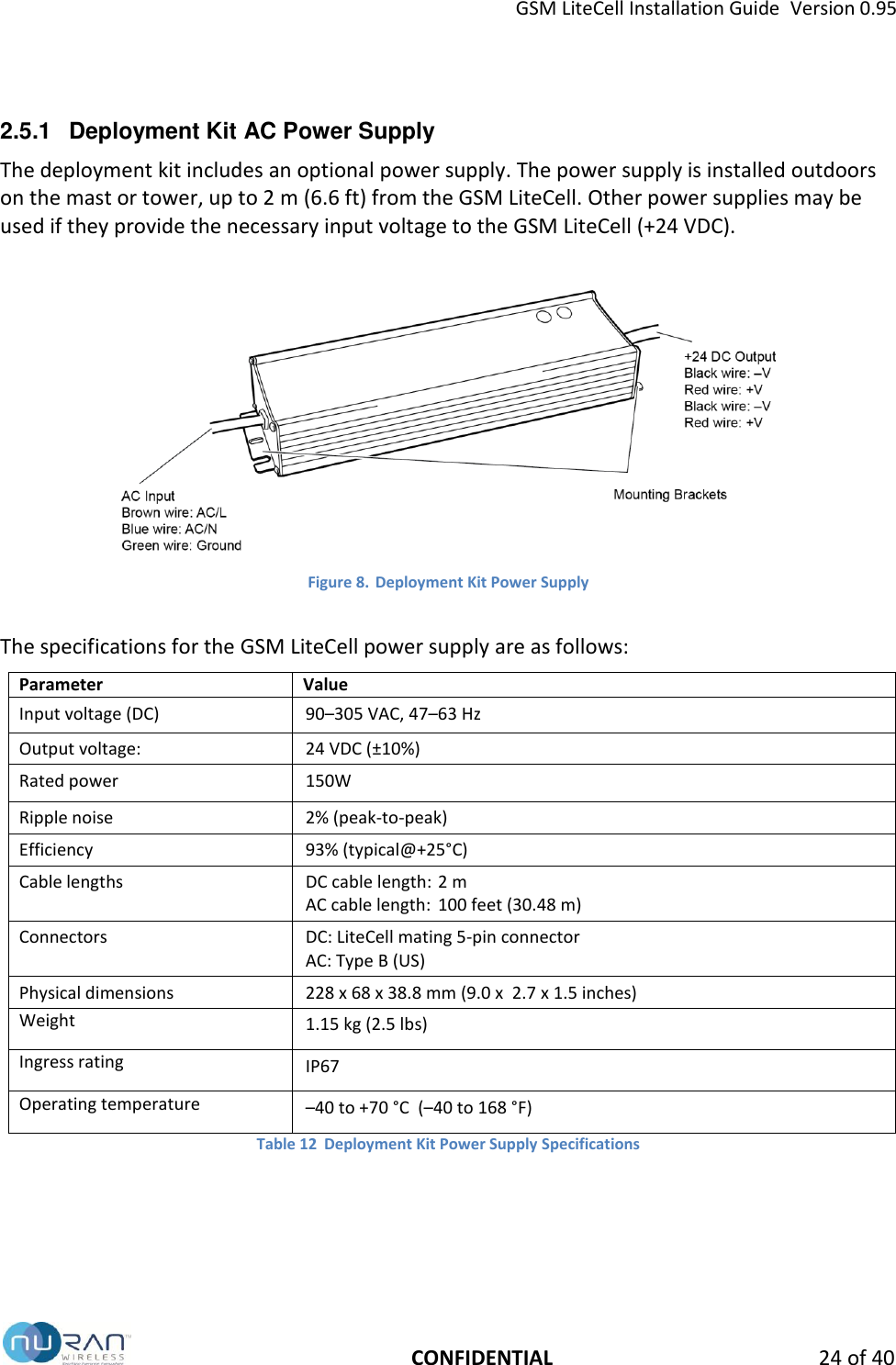
GSM LiteCell Installation Guide  Version 0.95   CONFIDENTIAL 24 of 40 2.5.1  Deployment Kit AC Power Supply The deployment kit includes an optional power supply. The power supply is installed outdoors on the mast or tower, up to 2 m (6.6 ft) from the GSM LiteCell. Other power supplies may be used if they provide the necessary input voltage to the GSM LiteCell (+24 VDC).   Figure 8. Deployment Kit Power Supply   The specifications for the GSM LiteCell power supply are as follows: Parameter Value Input voltage (DC) 90–305 VAC, 47–63 Hz Output voltage: 24 VDC (±10%)   Rated power 150W Ripple noise 2% (peak-to-peak) Efficiency 93% (typical@+25°C) Cable lengths DC cable length: 2 m AC cable length:  100 feet (30.48 m) Connectors DC: LiteCell mating 5-pin connector AC: Type B (US) Physical dimensions 228 x 68 x 38.8 mm (9.0 x  2.7 x 1.5 inches) Weight 1.15 kg (2.5 lbs) Ingress rating IP67 Operating temperature –40 to +70 °C  (–40 to 168 °F) Table 12  Deployment Kit Power Supply Specifications
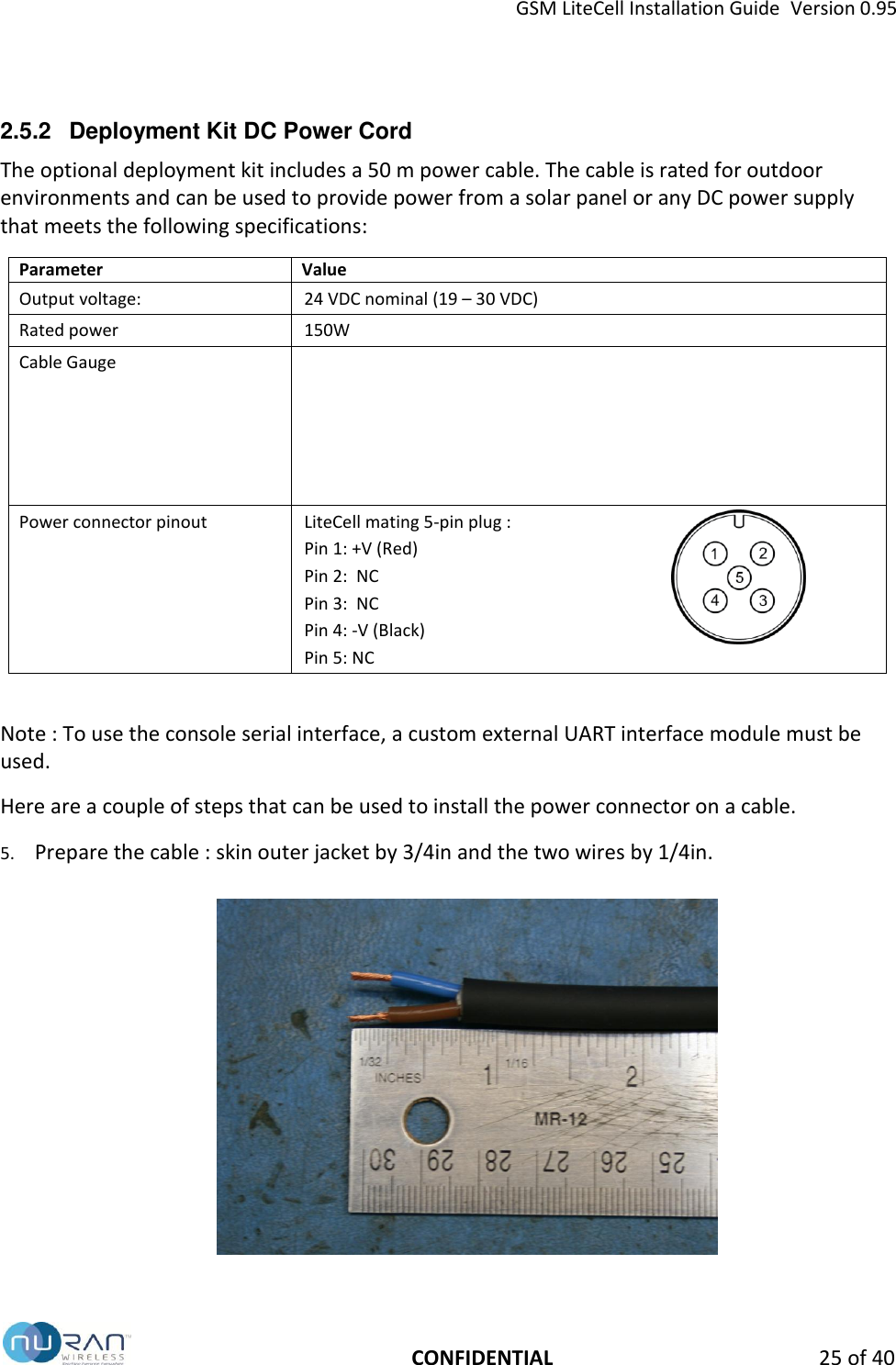
GSM LiteCell Installation Guide  Version 0.95   CONFIDENTIAL 25 of 40 2.5.2  Deployment Kit DC Power Cord The optional deployment kit includes a 50 m power cable. The cable is rated for outdoor environments and can be used to provide power from a solar panel or any DC power supply that meets the following specifications: Parameter Value Output voltage: 24 VDC nominal (19 – 30 VDC)   Rated power   150W Cable Gauge   Power connector pinout LiteCell mating 5-pin plug : Pin 1: +V (Red) Pin 2:  NC Pin 3:  NC Pin 4: -V (Black) Pin 5: NC   Note : To use the console serial interface, a custom external UART interface module must be used. Here are a couple of steps that can be used to install the power connector on a cable. 5. Prepare the cable : skin outer jacket by 3/4in and the two wires by 1/4in.
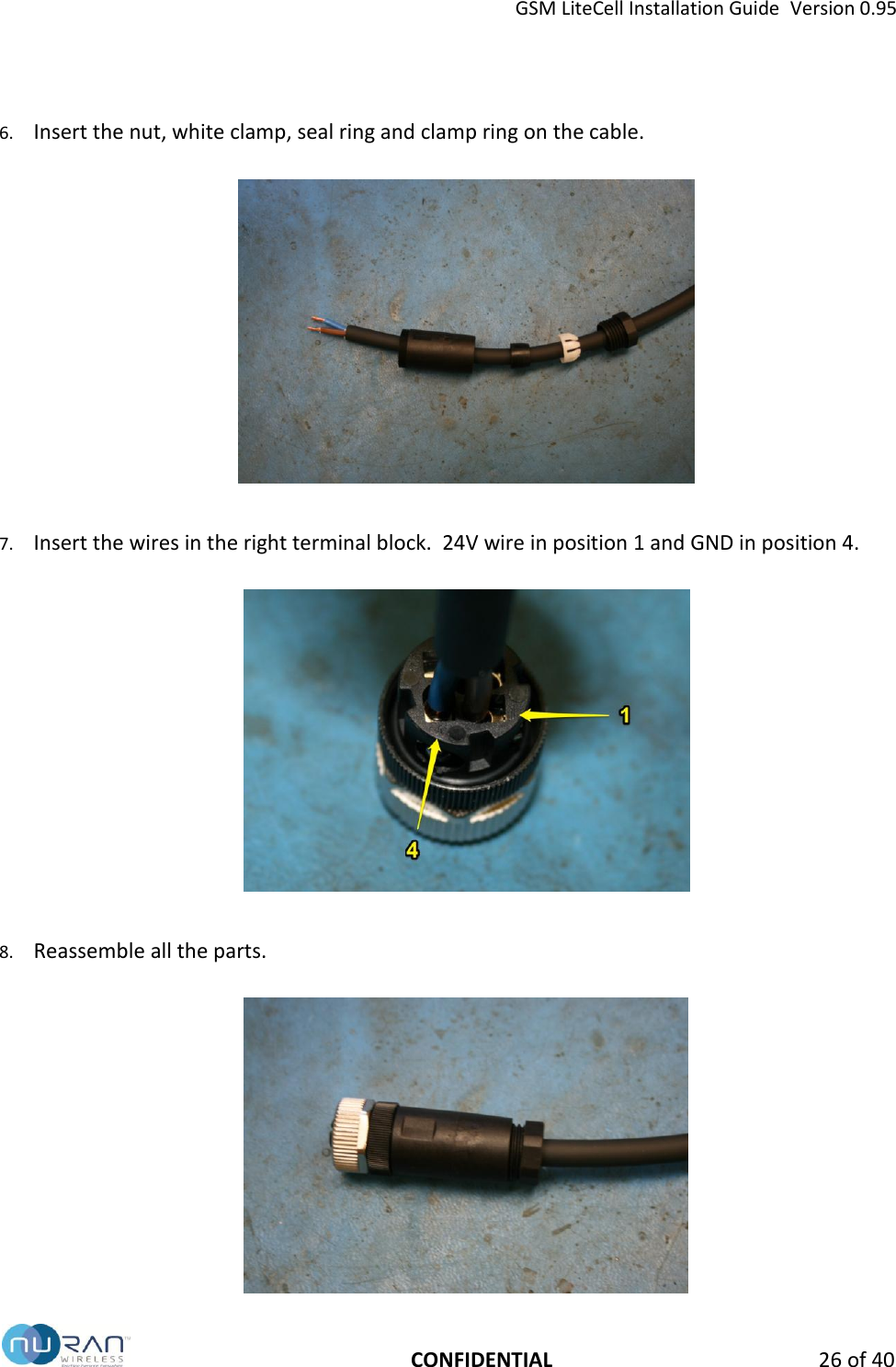
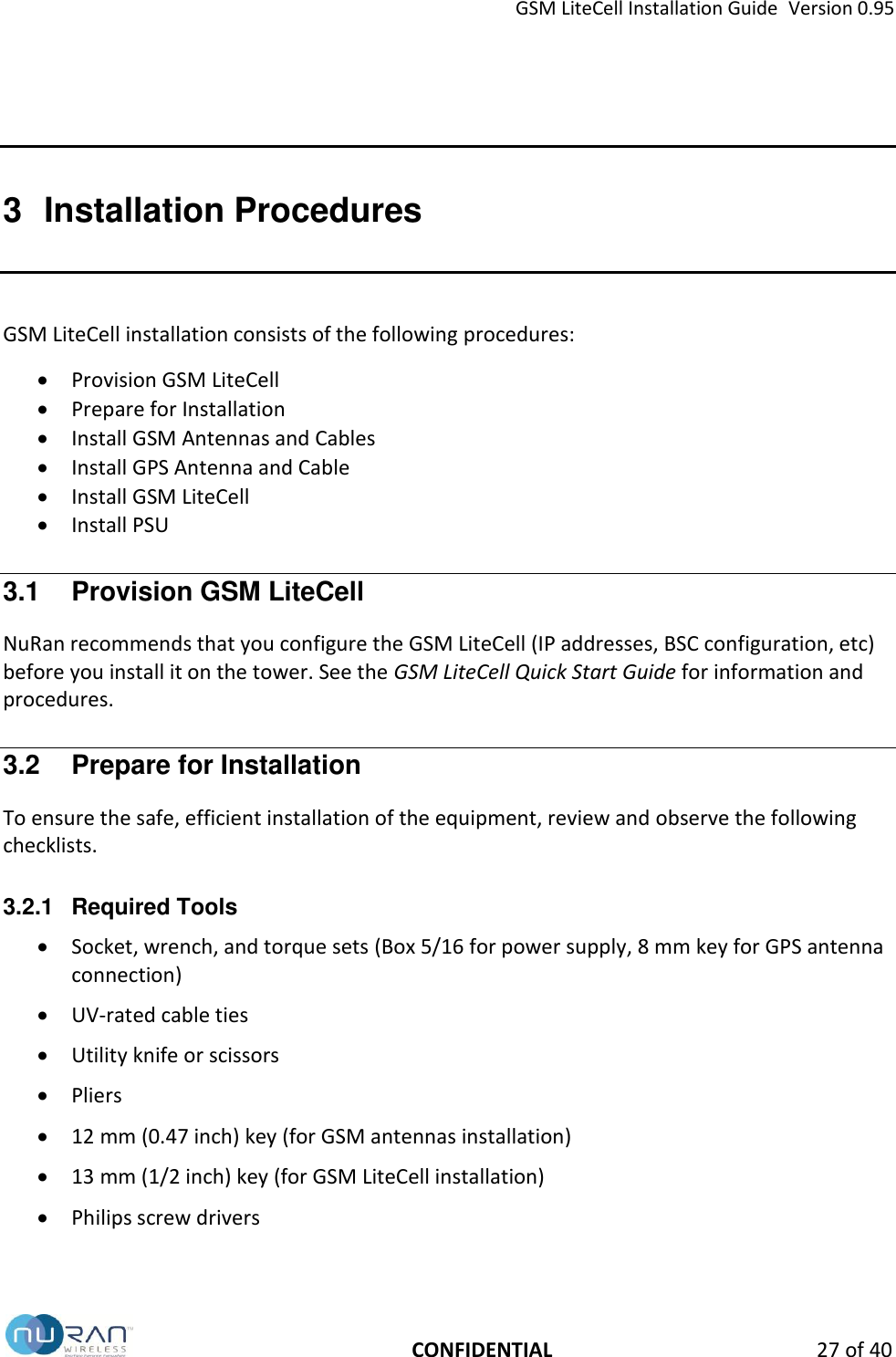
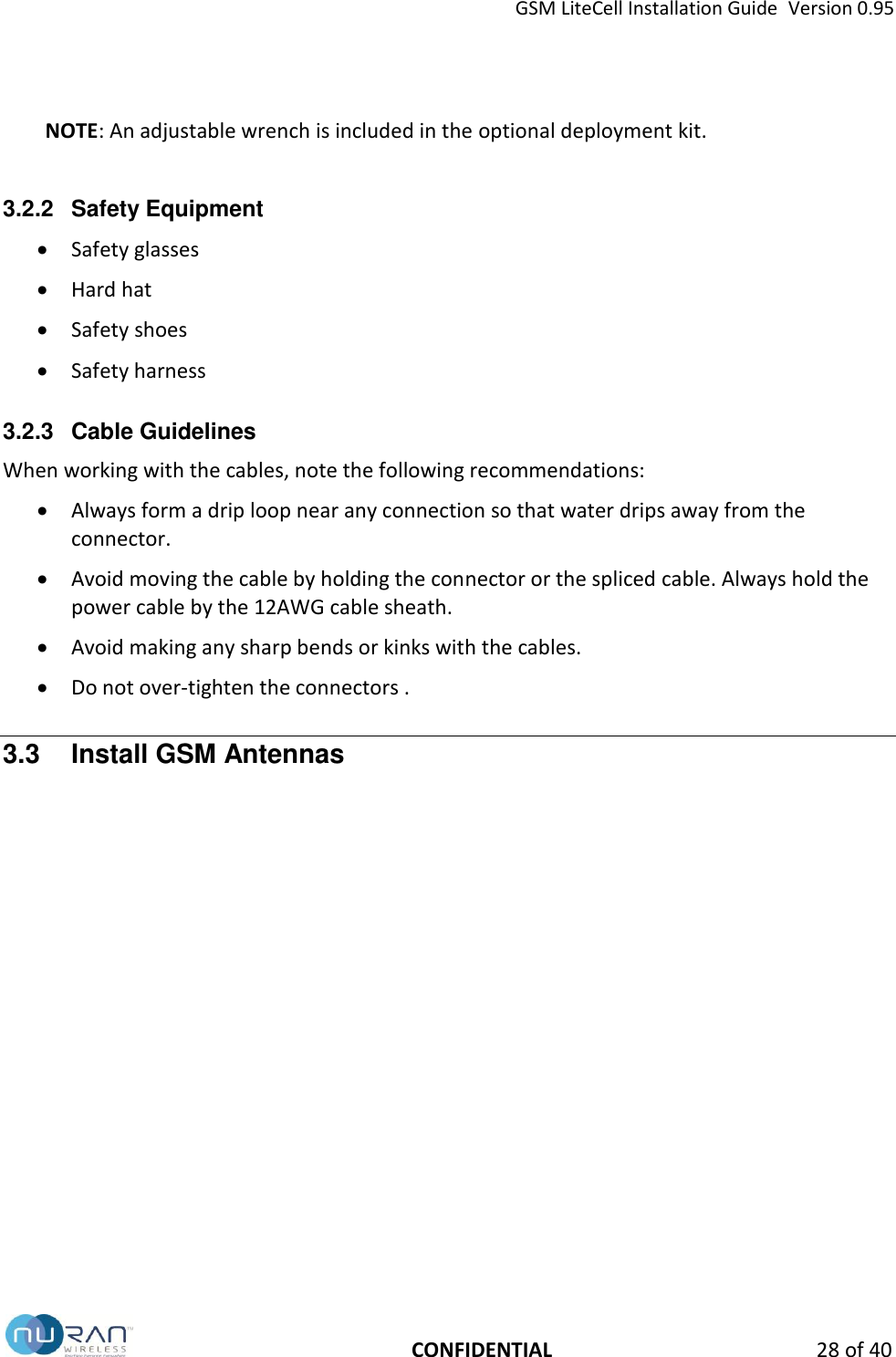
GSM LiteCell Installation Guide  Version 0.95   CONFIDENTIAL 26 of 40 6. Insert the nut, white clamp, seal ring and clamp ring on the cable.    7. Insert the wires in the right terminal block.  24V wire in position 1 and GND in position 4.    8. Reassemble all the parts.
GSM LiteCell Installation Guide  Version 0.95   CONFIDENTIAL 27 of 40 3  Installation Procedures GSM LiteCell installation consists of the following procedures:  Provision GSM LiteCell   Prepare for Installation  Install GSM Antennas and Cables  Install GPS Antenna and Cable  Install GSM LiteCell  Install PSU  3.1  Provision GSM LiteCell NuRan recommends that you configure the GSM LiteCell (IP addresses, BSC configuration, etc) before you install it on the tower. See the GSM LiteCell Quick Start Guide for information and procedures. 3.2  Prepare for Installation To ensure the safe, efficient installation of the equipment, review and observe the following checklists.  3.2.1  Required Tools  Socket, wrench, and torque sets (Box 5/16 for power supply, 8 mm key for GPS antenna connection)  UV-rated cable ties  Utility knife or scissors   Pliers  12 mm (0.47 inch) key (for GSM antennas installation)  13 mm (1/2 inch) key (for GSM LiteCell installation)  Philips screw drivers
GSM LiteCell Installation Guide  Version 0.95   CONFIDENTIAL 28 of 40  NOTE: An adjustable wrench is included in the optional deployment kit.  3.2.2  Safety Equipment  Safety glasses  Hard hat  Safety shoes  Safety harness 3.2.3  Cable Guidelines When working with the cables, note the following recommendations:  Always form a drip loop near any connection so that water drips away from the connector.  Avoid moving the cable by holding the connector or the spliced cable. Always hold the power cable by the 12AWG cable sheath.  Avoid making any sharp bends or kinks with the cables.  Do not over-tighten the connectors . 3.3  Install GSM Antennas
GSM LiteCell Installation Guide  Version 0.95   CONFIDENTIAL 29 of 40  Figure 9. GSM Antenna Installation  To install the GSM antennas using the deployment kit hardware: 1. Ensure that the GSM LiteCell is disconnected and powered off.  2. Select the location for the GSM antenna on the tower. Note that the tower structure must:  Meet the spatial, RF, and mounting requirements specified on page 20.  Ensure antenna height clears any ground obstacles.  Enable the antenna to be installed vertically (no tilt).   Provide a mounting point between 32–60 mm (1.25–2.25 inches) in diameter. 3. In a suitable, safe location, pre-install each GSM antenna to a standoff pipe: a. Attach a cross-mast clamp to the one end of the standoff pipe.  b. Insert the GSM antenna through the cross-mast U-bolts.  4. Attach a cross-mast clamp to the tower structure.  5. Slide the pipe/antenna assembly through the cross-mast U-bolts on the tower structure. After ensuring that the GSM antenna is correctly oriented, torque the bolts. 6. Connect the RF cable (LMR-400) to the GSM antenna and torque the N-Type connector. 7. Route the other end of the cable to the GSM LiteCell installation location. 8. Waterproof the antenna connector by wrapping it with the included waterproofing tape as per the guidelines. 9. Secure the cable to the tower structure with UV-rated cable ties (included).  10. Repeat this procedure for the second antenna.
GSM LiteCell Installation Guide  Version 0.95   CONFIDENTIAL 30 of 40
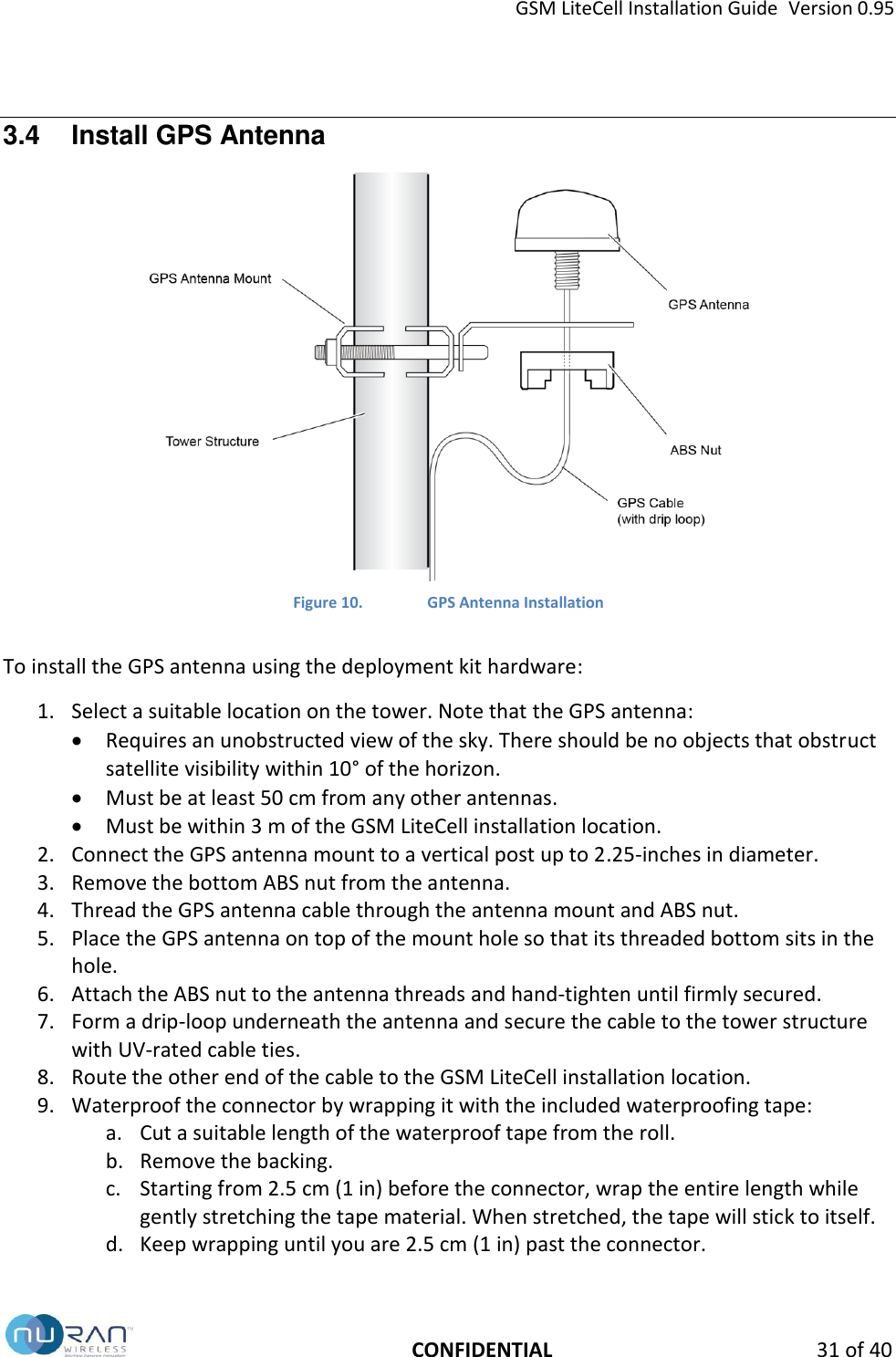
GSM LiteCell Installation Guide  Version 0.95   CONFIDENTIAL 31 of 40 3.4  Install GPS Antenna  Figure 10. GPS Antenna Installation  To install the GPS antenna using the deployment kit hardware: 1. Select a suitable location on the tower. Note that the GPS antenna:  Requires an unobstructed view of the sky. There should be no objects that obstruct satellite visibility within 10° of the horizon.  Must be at least 50 cm from any other antennas.  Must be within 3 m of the GSM LiteCell installation location. 2. Connect the GPS antenna mount to a vertical post up to 2.25-inches in diameter.  3. Remove the bottom ABS nut from the antenna. 4. Thread the GPS antenna cable through the antenna mount and ABS nut.  5. Place the GPS antenna on top of the mount hole so that its threaded bottom sits in the hole. 6. Attach the ABS nut to the antenna threads and hand-tighten until firmly secured. 7. Form a drip-loop underneath the antenna and secure the cable to the tower structure with UV-rated cable ties. 8. Route the other end of the cable to the GSM LiteCell installation location. 9. Waterproof the connector by wrapping it with the included waterproofing tape: a. Cut a suitable length of the waterproof tape from the roll. b. Remove the backing. c. Starting from 2.5 cm (1 in) before the connector, wrap the entire length while gently stretching the tape material. When stretched, the tape will stick to itself. d. Keep wrapping until you are 2.5 cm (1 in) past the connector.
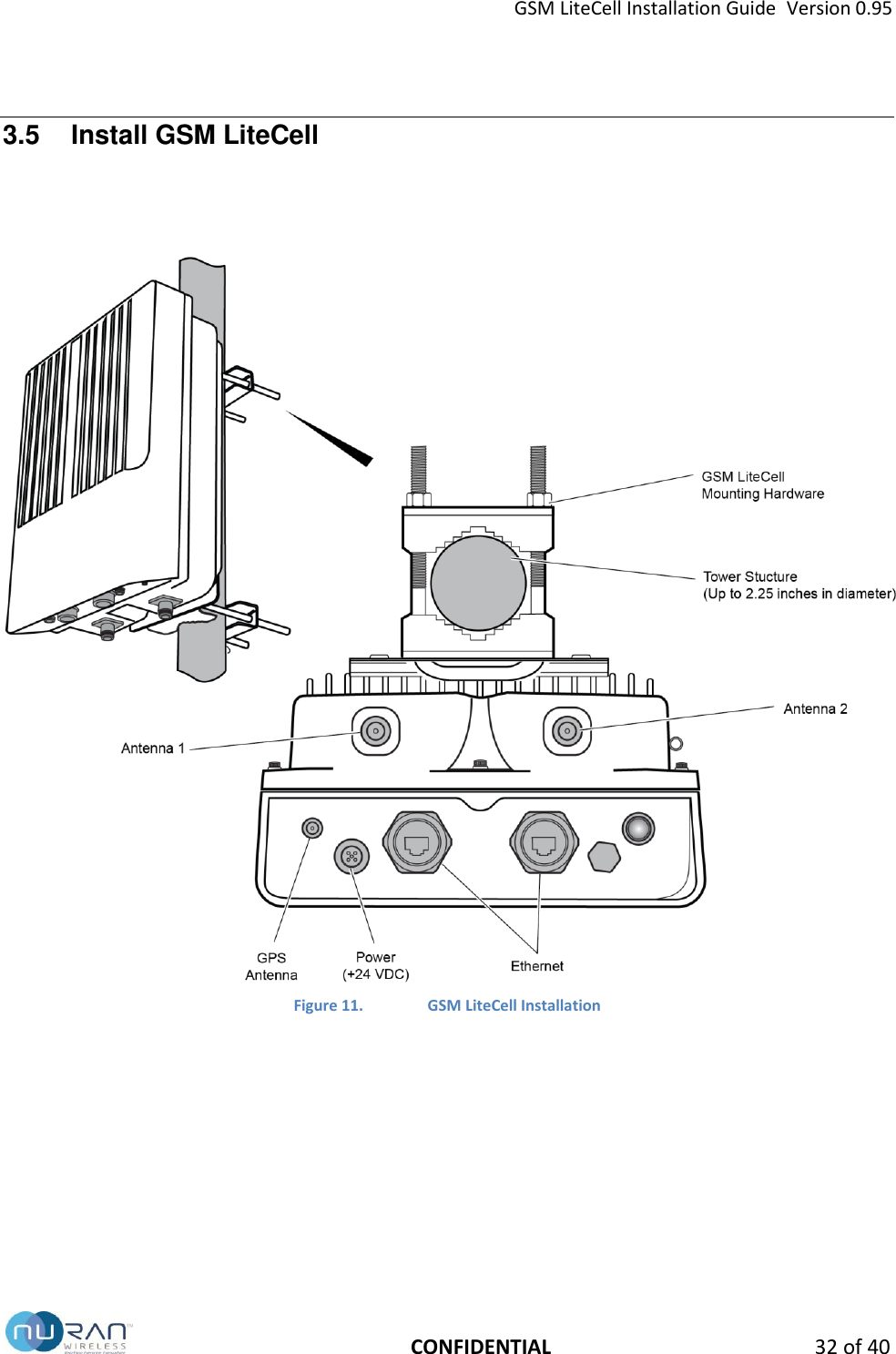
GSM LiteCell Installation Guide  Version 0.95   CONFIDENTIAL 32 of 40 3.5  Install GSM LiteCell  Figure 11. GSM LiteCell Installation
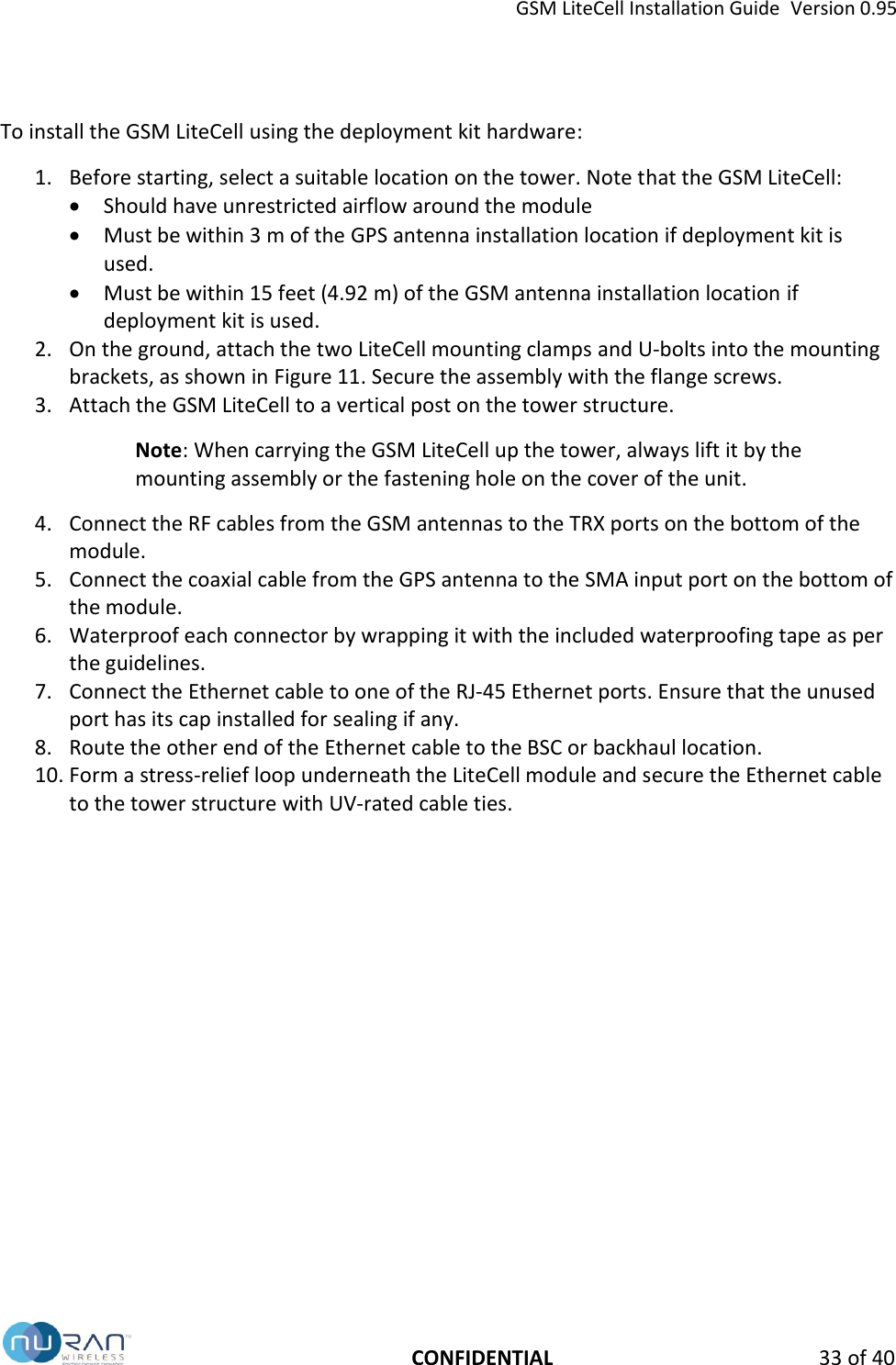
GSM LiteCell Installation Guide  Version 0.95   CONFIDENTIAL 33 of 40 To install the GSM LiteCell using the deployment kit hardware: 1. Before starting, select a suitable location on the tower. Note that the GSM LiteCell:  Should have unrestricted airflow around the module  Must be within 3 m of the GPS antenna installation location if deployment kit is used.  Must be within 15 feet (4.92 m) of the GSM antenna installation location if deployment kit is used. 2. On the ground, attach the two LiteCell mounting clamps and U-bolts into the mounting brackets, as shown in Figure 11. Secure the assembly with the flange screws. 3. Attach the GSM LiteCell to a vertical post on the tower structure.  Note: When carrying the GSM LiteCell up the tower, always lift it by the mounting assembly or the fastening hole on the cover of the unit. 4. Connect the RF cables from the GSM antennas to the TRX ports on the bottom of the module.  5. Connect the coaxial cable from the GPS antenna to the SMA input port on the bottom of the module.  6. Waterproof each connector by wrapping it with the included waterproofing tape as per the guidelines.  7. Connect the Ethernet cable to one of the RJ-45 Ethernet ports. Ensure that the unused port has its cap installed for sealing if any. 8. Route the other end of the Ethernet cable to the BSC or backhaul location. 10. Form a stress-relief loop underneath the LiteCell module and secure the Ethernet cable to the tower structure with UV-rated cable ties.
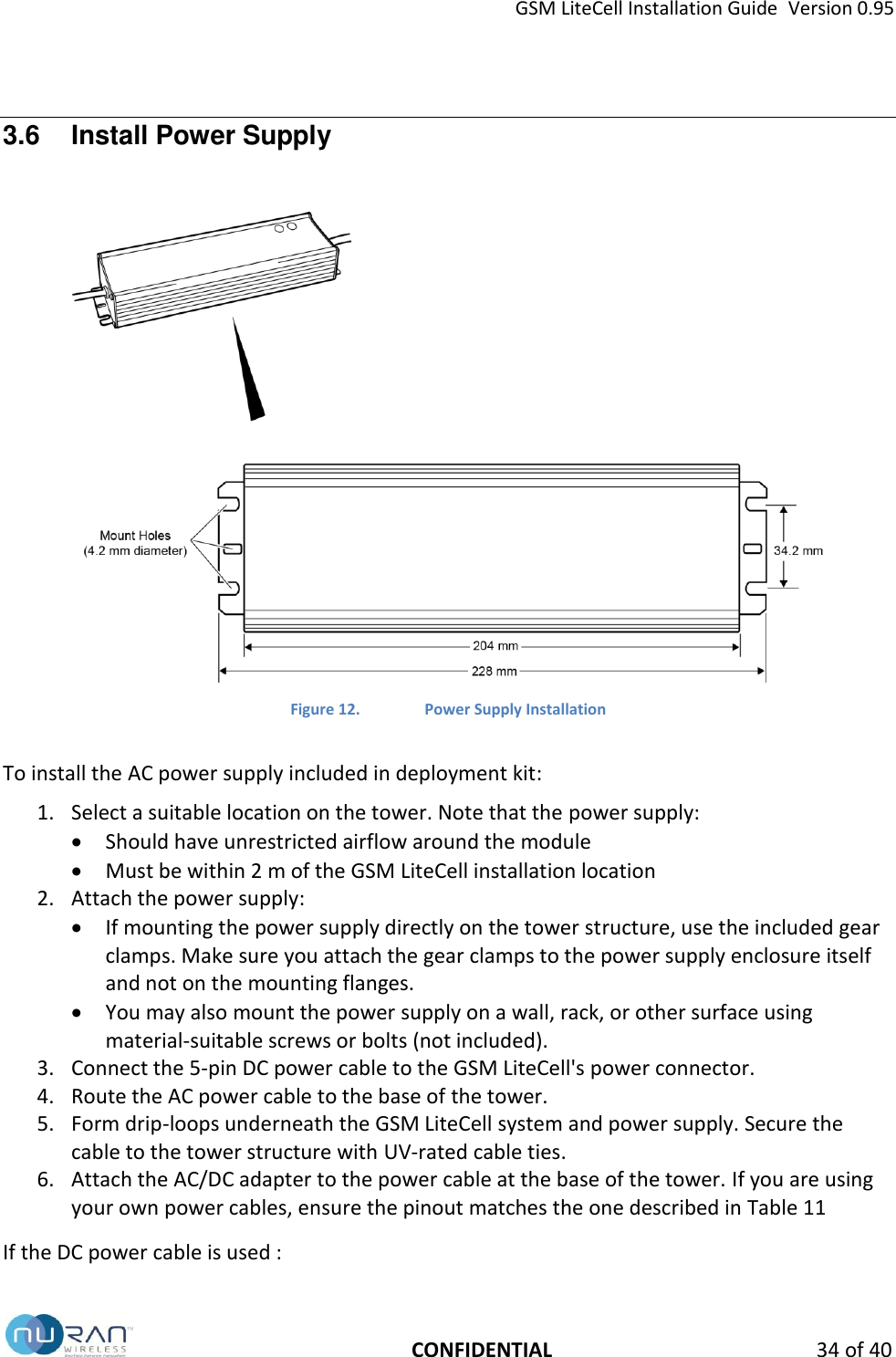
GSM LiteCell Installation Guide  Version 0.95   CONFIDENTIAL 34 of 40 3.6  Install Power Supply   Figure 12. Power Supply Installation  To install the AC power supply included in deployment kit: 1. Select a suitable location on the tower. Note that the power supply:  Should have unrestricted airflow around the module  Must be within 2 m of the GSM LiteCell installation location 2. Attach the power supply:  If mounting the power supply directly on the tower structure, use the included gear clamps. Make sure you attach the gear clamps to the power supply enclosure itself and not on the mounting flanges.  You may also mount the power supply on a wall, rack, or other surface using material-suitable screws or bolts (not included). 3. Connect the 5-pin DC power cable to the GSM LiteCell's power connector. 4. Route the AC power cable to the base of the tower. 5. Form drip-loops underneath the GSM LiteCell system and power supply. Secure the cable to the tower structure with UV-rated cable ties. 6. Attach the AC/DC adapter to the power cable at the base of the tower. If you are using your own power cables, ensure the pinout matches the one described in Table 11  If the DC power cable is used :
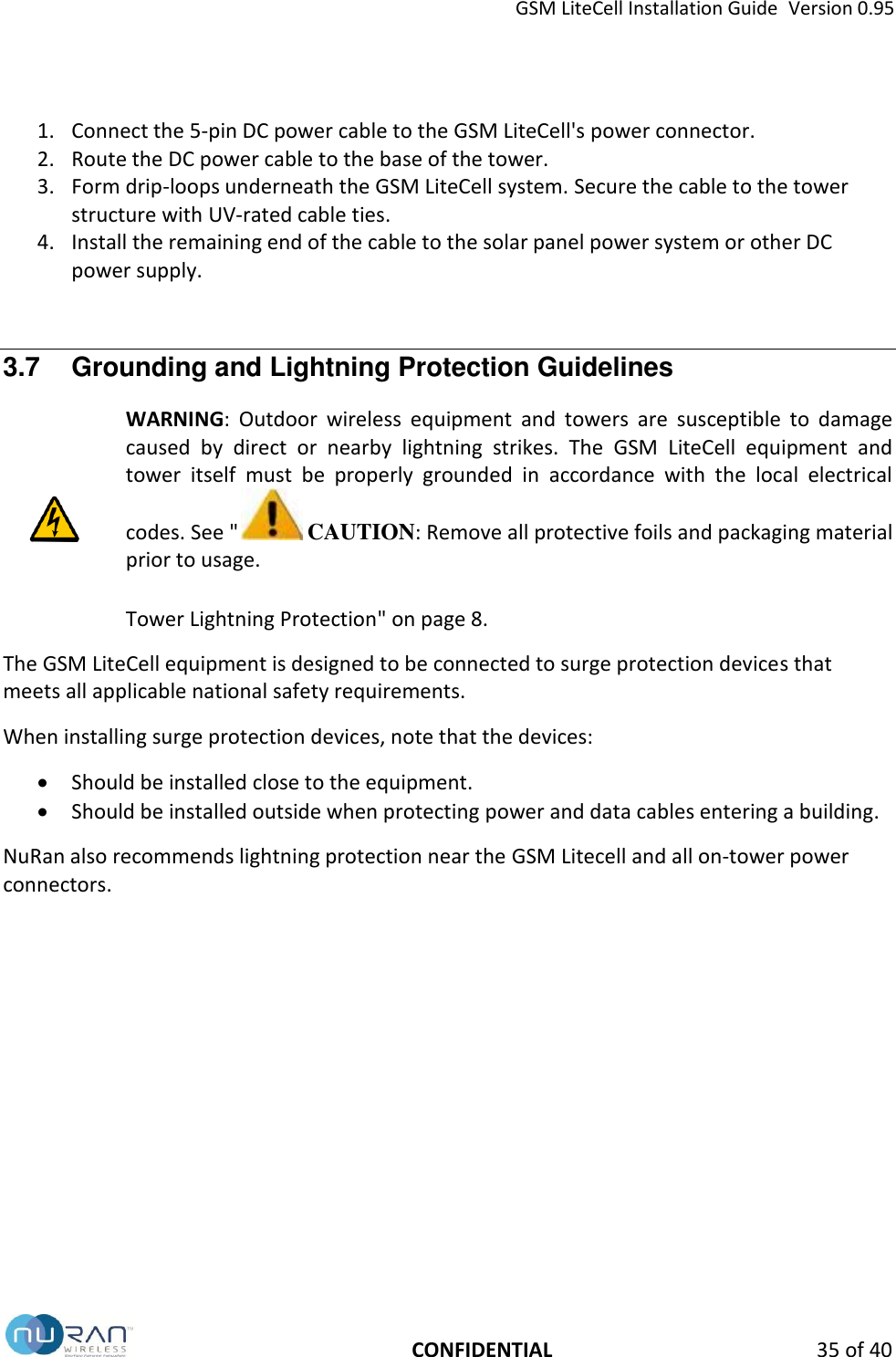
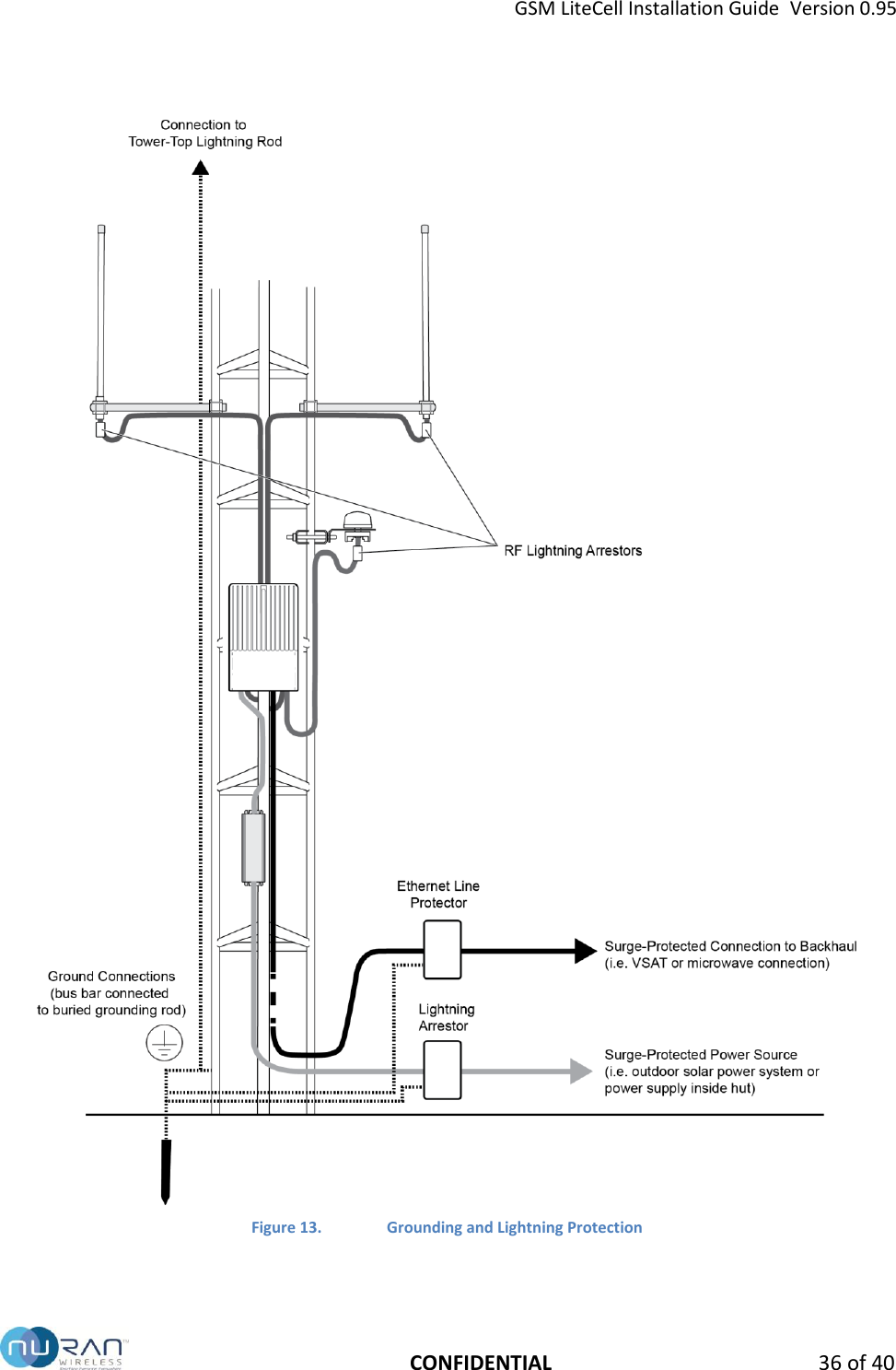
GSM LiteCell Installation Guide  Version 0.95   CONFIDENTIAL 35 of 40 1. Connect the 5-pin DC power cable to the GSM LiteCell's power connector. 2. Route the DC power cable to the base of the tower. 3. Form drip-loops underneath the GSM LiteCell system. Secure the cable to the tower structure with UV-rated cable ties. 4. Install the remaining end of the cable to the solar panel power system or other DC power supply.  3.7  Grounding and Lightning Protection Guidelines  WARNING:  Outdoor  wireless  equipment  and  towers  are  susceptible  to  damage caused  by  direct  or  nearby  lightning  strikes.  The  GSM  LiteCell  equipment  and tower  itself  must  be  properly  grounded  in  accordance  with  the  local  electrical codes. See "  CAUTION: Remove all protective foils and packaging material prior to usage.  Tower Lightning Protection" on page 8. The GSM LiteCell equipment is designed to be connected to surge protection devices that meets all applicable national safety requirements.  When installing surge protection devices, note that the devices:  Should be installed close to the equipment.  Should be installed outside when protecting power and data cables entering a building. NuRan also recommends lightning protection near the GSM Litecell and all on-tower power connectors.
GSM LiteCell Installation Guide  Version 0.95   CONFIDENTIAL 36 of 40    Figure 13. Grounding and Lightning Protection
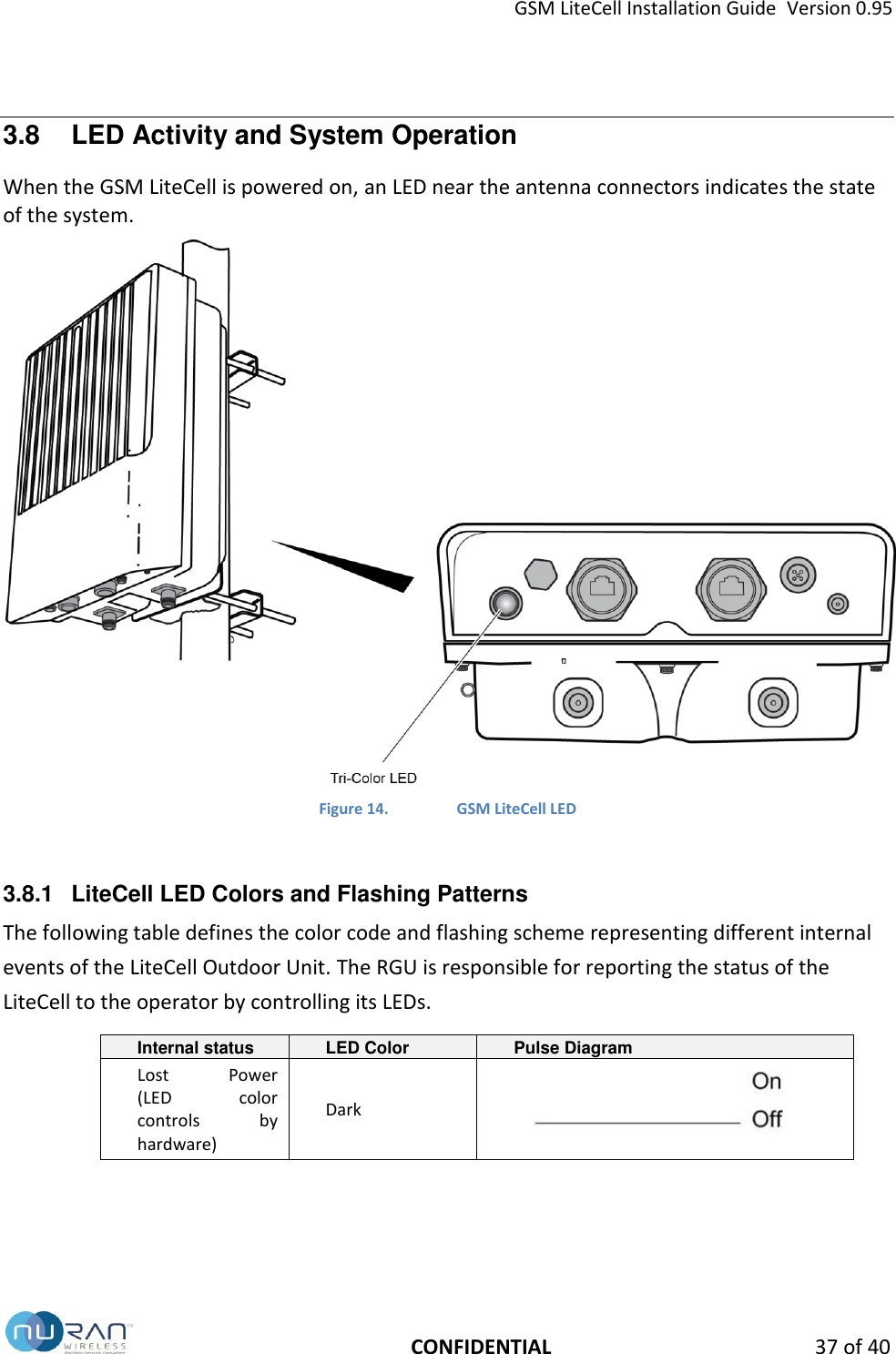
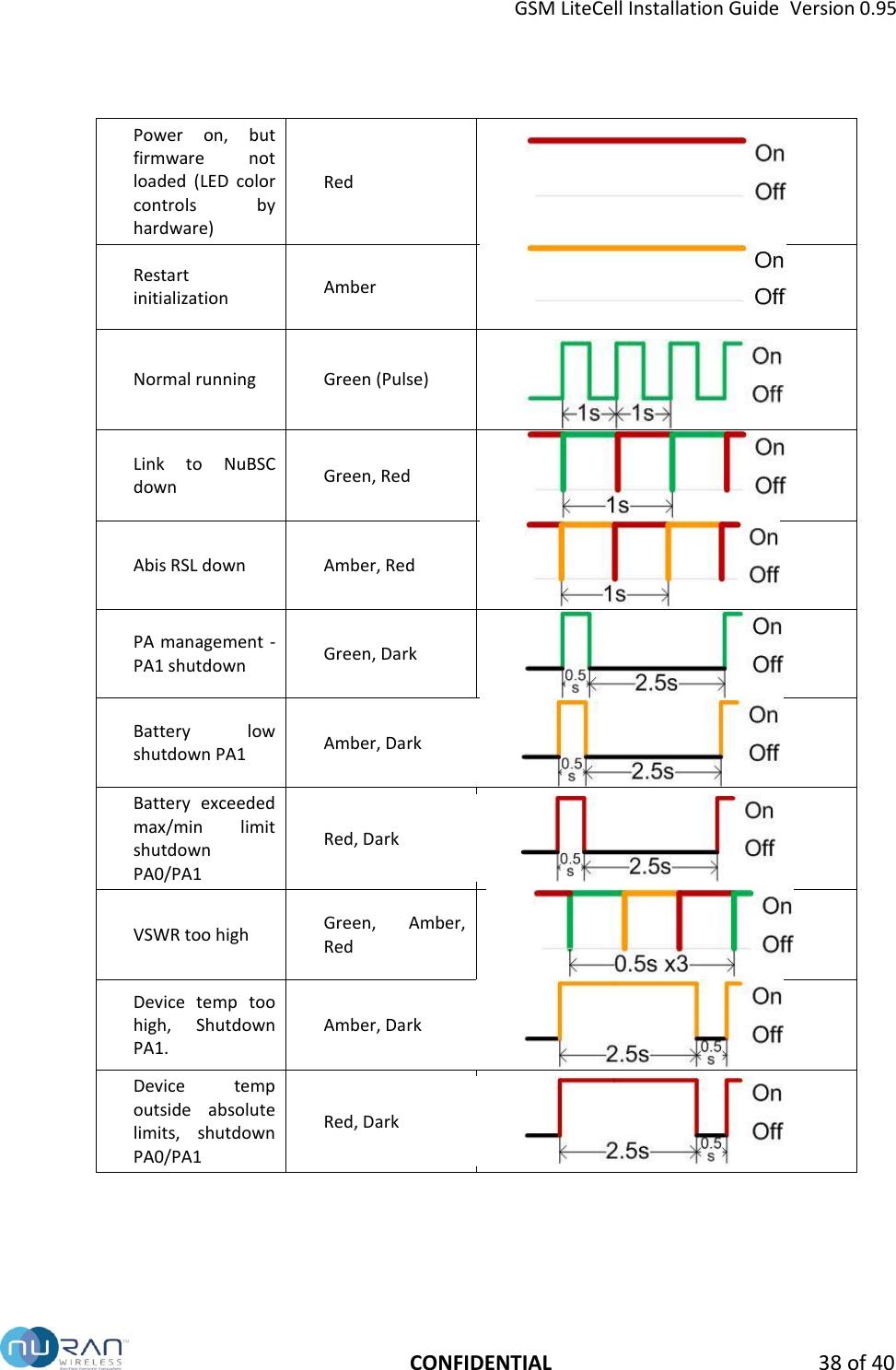
GSM LiteCell Installation Guide  Version 0.95   CONFIDENTIAL 37 of 40 3.8  LED Activity and System Operation When the GSM LiteCell is powered on, an LED near the antenna connectors indicates the state of the system.  Figure 14.  GSM LiteCell LED  3.8.1  LiteCell LED Colors and Flashing Patterns The following table defines the color code and flashing scheme representing different internal events of the LiteCell Outdoor Unit. The RGU is responsible for reporting the status of the LiteCell to the operator by controlling its LEDs. Internal status LED Color Pulse Diagram Lost  Power       (LED  color controls  by hardware) Dark
GSM LiteCell Installation Guide  Version 0.95   CONFIDENTIAL 38 of 40 Power  on,  but firmware  not loaded  (LED  color controls  by hardware) Red  Restart initialization Amber  Normal running Green (Pulse)  Link  to  NuBSC down Green, Red  Abis RSL down Amber, Red  PA management -  PA1 shutdown Green, Dark  Battery  low         shutdown PA1 Amber, Dark  Battery  exceeded max/min  limit shutdown PA0/PA1 Red, Dark  VSWR too high Green,  Amber, Red  Device  temp  too high,  Shutdown PA1. Amber, Dark  Device  temp outside  absolute limits,  shutdown PA0/PA1 Red, Dark
GSM LiteCell Installation Guide  Version 0.95   CONFIDENTIAL 39 of 40 3.8.2  LED Indication Priority LED color and flashing priority follows the list below if more than one event are detected:  Restart initialization; (highest)  PA0 & PA1 shutdown due to battery level fell outside the absolute limits  PA0 & PA1 shutdown due to device temperature fell outside absolute limits;  RSL down;  Link between RGU and CGS down;  PA1 shutdown due to battery level is below low limit;  PA1 shutdown due to device temperature is too high;  VSWR too high;  PA1 shutdown by PA Management;  Normal;(lowest)
              NuRAN Wireless products are constantly being improved; therefore, NuRAN reserves itself the right to modify the information herein at any time and without notice.      2150 Cyrille-Duquet, Quebec City (Quebec)  G1N 2G3  CANADA T. 418-914-7484  | 1-855-914-7484 | F. 418-914-9477  www.nuranwireless.com

Navigation menu