OE Power Systems TL108 GPS Tracker User Manual

OE Power Systems Inc. GPS Tracker

User Manual

 1             TracUSA TL108 VEHICLE GPS TRACKER SOLUTION
 2  Content Tables  1. Introduction--------------------------------------------------------------1 2. What’s new? ------------------------------------------------------------2 3.Main Features------------------------------------------------------------3 4. Applications--------------------------------------------------------------3 5. Specification-------------------------------------------------------------3 6. Installation----------------------------------------------------------------4 7. Set the authorized numbers----------------------------------------6 8. Delete authorized number-------------------------------------------7 9. Get position SMS-------------------------------------------------------7 10. Switch to listen in or talk mode----------------------------------8 11. All of the SMS commands list ------------------------------------8
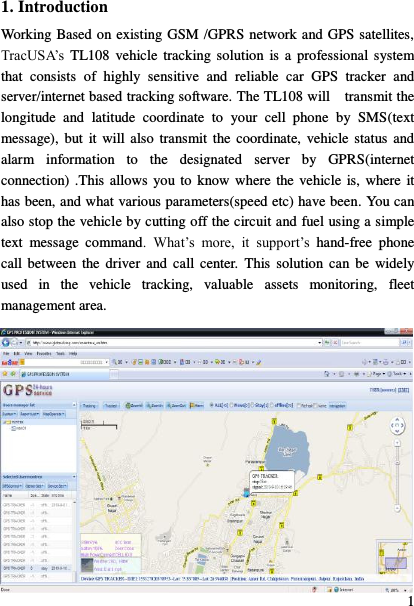
 1 1. Introduction Working Based on existing GSM /GPRS network and GPS satellites, TracUSA‟s  TL108 vehicle  tracking solution  is  a  professional  system that  consists  of  highly  sensitive  and  reliable  car  GPS  tracker  and server/internet based tracking software. The TL108 will    transmit the longitude  and  latitude  coordinate  to  your  cell  phone  by  SMS(text message),  but  it  will also  transmit the coordinate,  vehicle  status and alarm  information  to  the  designated  server  by  GPRS(internet connection) .This allows  you to know where  the vehicle is, where it has been, and what various parameters(speed etc) have been. You can also stop the vehicle by cutting off the circuit and fuel using a simple text  message  command.  What‟s  more,  it  support‟s  hand-free  phone call between the driver  and  call center.  This solution  can  be  widely used  in  the  vehicle  tracking,  valuable  assets  monitoring,  fleet management area.
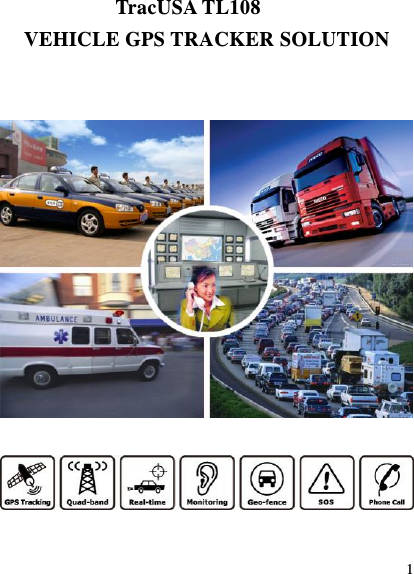
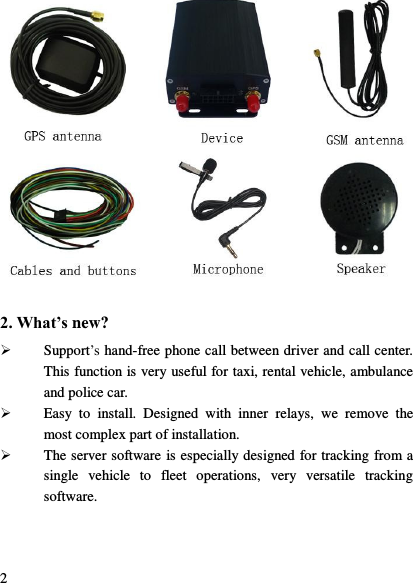
 2  2. What’s new?  Support‟s hand-free phone call between driver and call center. This function is very useful for taxi, rental vehicle, ambulance and police car.  Easy  to  install.  Designed  with  inner  relays,  we  remove  the most complex part of installation.  The server software is especially designed for tracking from a single  vehicle  to  fleet  operations,  very  versatile  tracking software.
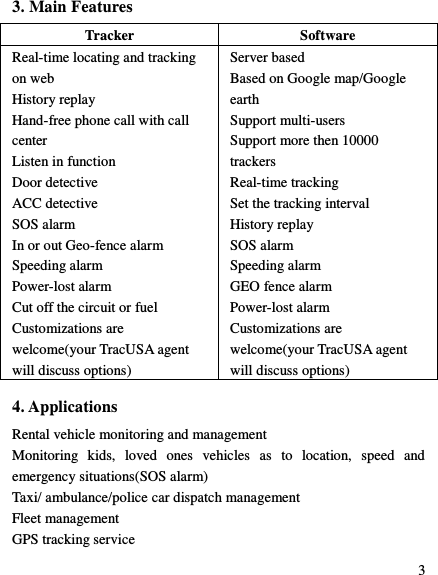
 3  3. Main Features Tracker Software Real-time locating and tracking on web History replay Hand-free phone call with call center Listen in function Door detective ACC detective SOS alarm In or out Geo-fence alarm Speeding alarm Power-lost alarm Cut off the circuit or fuel Customizations are welcome(your TracUSA agent will discuss options) Server based Based on Google map/Google earth Support multi-users Support more then 10000 trackers Real-time tracking Set the tracking interval History replay SOS alarm Speeding alarm GEO fence alarm Power-lost alarm Customizations are welcome(your TracUSA agent will discuss options) 4. Applications Rental vehicle monitoring and management Monitoring  kids,  loved  ones  vehicles  as  to  location,  speed  and emergency situations(SOS alarm) Taxi/ ambulance/police car dispatch management Fleet management GPS tracking service
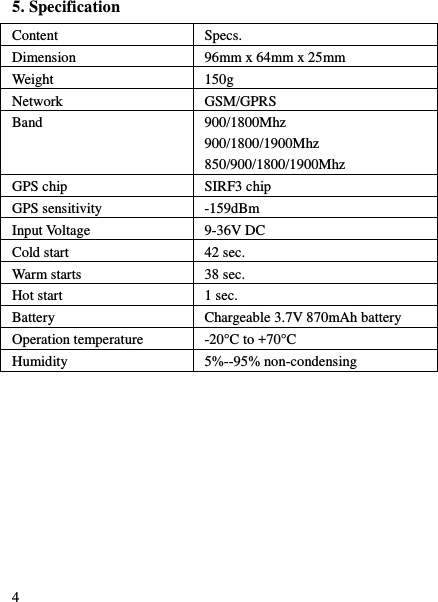
 4 5. Specification Content Specs. Dimension 96mm x 64mm x 25mm Weight 150g Network GSM/GPRS Band 900/1800Mhz 900/1800/1900Mhz   850/900/1800/1900Mhz GPS chip SIRF3 chip GPS sensitivity -159dBm Input Voltage 9-36V DC Cold start 42 sec. Warm starts 38 sec. Hot start 1 sec. Battery Chargeable 3.7V 870mAh battery Operation temperature -20°C to +70°C Humidity 5%--95% non-condensing
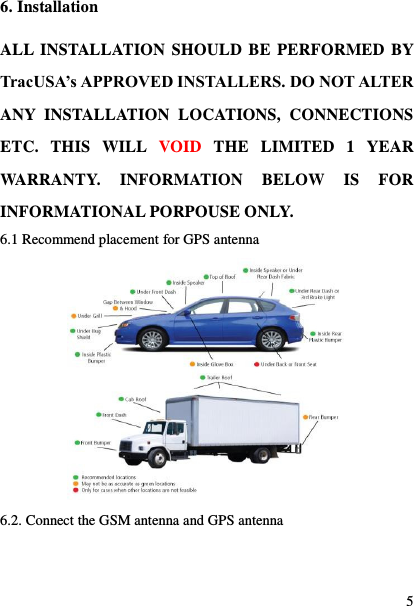
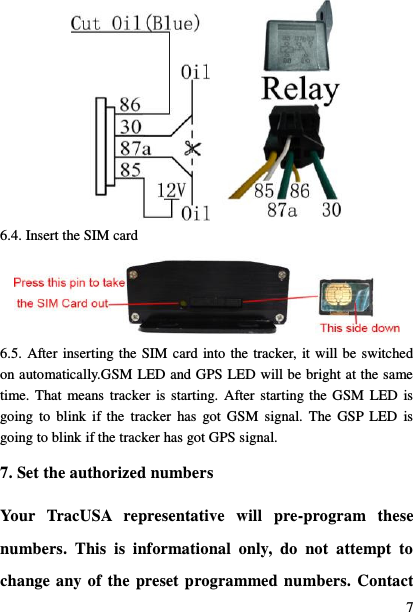
 5 6. Installation ALL INSTALLATION SHOULD BE PERFORMED BY TracUSA’s APPROVED INSTALLERS. DO NOT ALTER ANY  INSTALLATION  LOCATIONS,  CONNECTIONS ETC.  THIS  WILL  VOID  THE  LIMITED  1  YEAR WARRANTY.  INFORMATION  BELOW  IS  FOR INFORMATIONAL PORPOUSE ONLY.   6.1 Recommend placement for GPS antenna  6.2. Connect the GSM antenna and GPS antenna
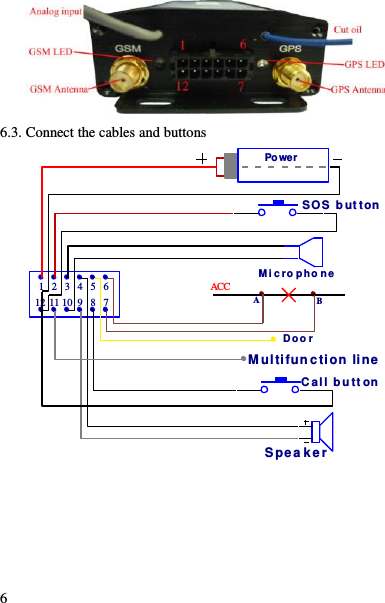
 6  6.3. Connect the cables and buttons PowerSpea kerDoo r  SOS  b ut tonC al l b u tt onM i c ro p ho ne1 2 3 4 5 6789101112 ABACCM ultifun ction  line
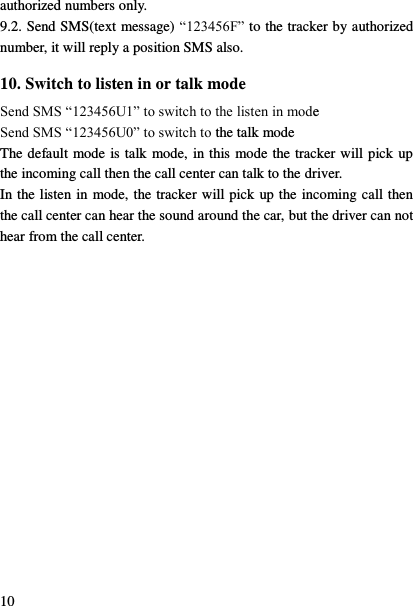
 7  6.4. Insert the SIM card  6.5. After inserting the SIM card into the tracker, it will be switched on automatically.GSM LED and GPS LED will be bright at the same time. That means tracker  is starting.  After starting the GSM  LED  is going  to  blink  if the  tracker  has  got GSM  signal.  The  GSP  LED  is going to blink if the tracker has got GPS signal. 7. Set the authorized numbers Your  TracUSA  representative  will  pre-program  these numbers.  This  is  informational  only,  do  not  attempt  to change any of the preset programmed numbers. Contact
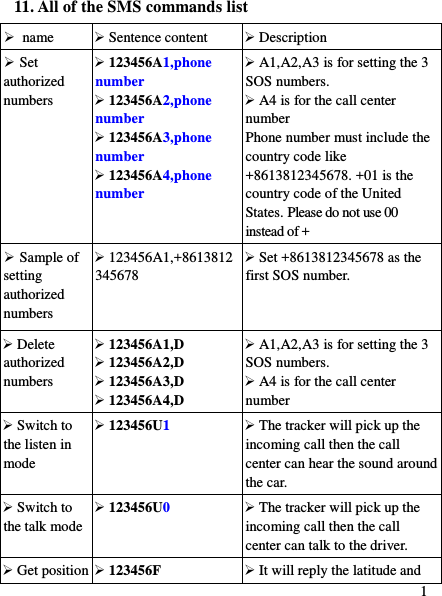
 8 your TracUSA agent for any changes. There are 3 SOS numbers and 1 call center number which can be set. If SOS button is pressed for 3 seconds, The SOS alarm will be sent to 3 SOS numbers by SMS(text message) and sent to the TracUSA web based server by GPRS(internet connection).   If call button is pressed for 3 seconds, the TL108 will make a call  to  the  preset  call  center  number.  The  tracker  will  pick  up  the incoming  call  automatically  then  the  call  center  can  talk  with  the driver using the microphone and speaker. All of the authorized numbers do not need to be programmed, but your TracUSA agent will ask that at least one of these numbers‟s is provided.  The  tracker  will  accept  the  SMS  commands  from  the authorized numbers only. So your TracUSA agent needs at least  one cell phone number to program into the TracUSA TL108 unit.  PASSWORDS  THIS  IS  FOR  INFORMATIONAL  PORPOUSE  ONLY, YOUR TracUSA AGENT WILL PRE-PROGRAM ALL OF YOUR  SOS  NUMBERS  WHEN  YOU  PURCHASE  AND OUR  AUTHORIZED  INSTALLATION  SERVICE INSTALLS  THE  TL108  UNIT.  DO  NOT  ATTEMPT  TO CHANGE  THESE  SETTINGS,  CONTACT  TracUSA  IS CHANGES ARE NEEDED. 123456 is the default password of the tracker and we will take 123456 as the password to explain all the commands in this document.  Send SMS“123456A1,phone number” to set the first SOS number.
 9 Send SMS“123456A2,phone number” to set the second SOS number. Send SMS“123456A3,phone number” to set the third SOS number. Send SMS“123456A4,phone number” to set the call center number. Note:  123456  is  the  default  password.  A  must be  English  in capital and make sure there is no space in the command. Phone number must include the country code E.g. send SMS “123456A1,+8613812345678” to set +8613812345678 as the first SOS number. +001 is the country code of the United States. Please do not use 00 instead of +. 8. Delete authorized numbers Send SMS“123456A1,D” to delete the first SOS number. Send SMS“123456A2,D” to delete the second SOS number. Send SMS“123456A3,D” to delete the third SOS number. Send SMS“123456A4,D” to delete the call center number. E.g. send “123456A1,D” to delete the first SOS number. 9. Get position SMS 9.1. You can use the cell phone to call the SIM number(your TracUSA agent will provide this number at installation) that is in the tracker for 3  seconds,  then  hang  up  the  call  before  the  tracker  hangs  up  or receives  it.  The  tracker  will  reply a  position  SMS with  latitude  and longitude in it. You can put the coordinate into Google map and search for the position. The tracker will not reply the SMS location report if you do not hang up the call before the tracker hangs up or receives it. The tracker  will reply position SMS  to any  incoming call  number  if you  haven‟t  set  the  authorized  numbers  yet.  Once  you  have  set  the authorized  number,  the  tracker  will  reply  SMS  position  to  the
 10 authorized numbers only. 9.2. Send SMS(text message) “123456F” to the tracker by authorized number, it will reply a position SMS also. 10. Switch to listen in or talk mode Send SMS “123456U1” to switch to the listen in mode Send SMS “123456U0” to switch to the talk mode The default mode is talk mode, in this mode the tracker will pick up the incoming call then the call center can talk to the driver. In the listen in mode, the tracker will pick up the incoming call then the call center can hear the sound around the car, but the driver can not hear from the call center.
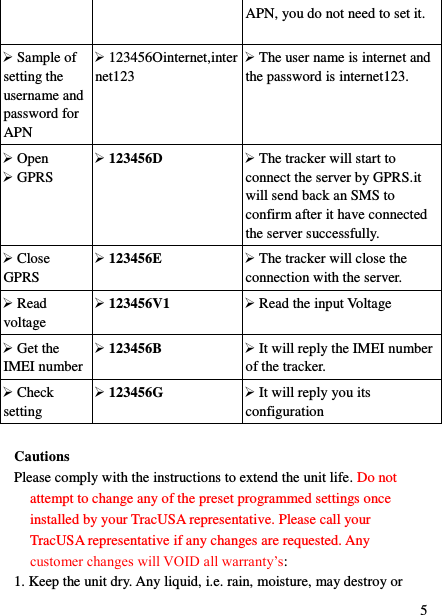
 1 11. All of the SMS commands list  name  Sentence content  Description  Set authorized numbers  123456A1,phone number  123456A2,phone number  123456A3,phone number  123456A4,phone number  A1,A2,A3 is for setting the 3 SOS numbers.  A4 is for the call center number Phone number must include the country code like +8613812345678. +01 is the country code of the United States. Please do not use 00 instead of +  Sample of setting authorized numbers  123456A1,+8613812345678    Set +8613812345678 as the first SOS number.  Delete authorized numbers  123456A1,D  123456A2,D  123456A3,D  123456A4,D  A1,A2,A3 is for setting the 3 SOS numbers.  A4 is for the call center number  Switch to the listen in mode  123456U1  The tracker will pick up the incoming call then the call center can hear the sound around the car.  Switch to the talk mode  123456U0  The tracker will pick up the incoming call then the call center can talk to the driver.  Get position  123456F  It will reply the latitude and
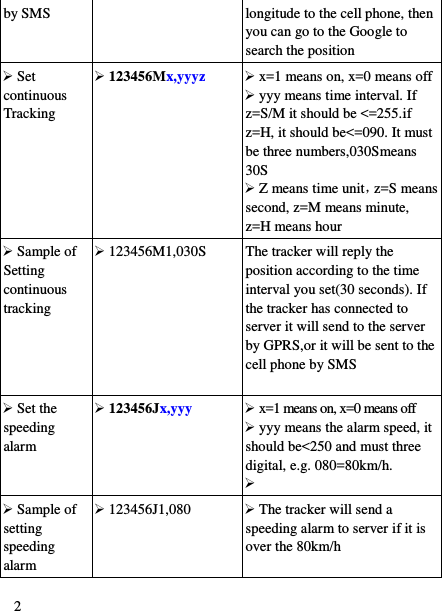
 2 by SMS longitude to the cell phone, then you can go to the Google to search the position  Set continuous Tracking  123456Mx,yyyz  x=1 means on, x=0 means off  yyy means time interval. If z=S/M it should be <=255.if z=H, it should be<=090. It must be three numbers,030Smeans 30S  Z means time unit,z=S means second, z=M means minute, z=H means hour  Sample of Setting continuous tracking  123456M1,030S The tracker will reply the position according to the time interval you set(30 seconds). If the tracker has connected to server it will send to the server by GPRS,or it will be sent to the cell phone by SMS   Set the speeding alarm  123456Jx,yyy  x=1 means on, x=0 means off  yyy means the alarm speed, it should be<250 and must three digital, e.g. 080=80km/h.    Sample of setting speeding alarm  123456J1,080  The tracker will send a speeding alarm to server if it is over the 80km/h
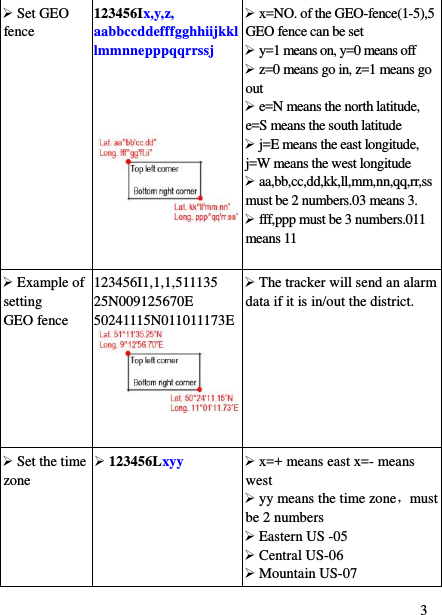
 3  Set GEO fence 123456Ix,y,z, aabbccddefffgghhiijkkllmmnnepppqqrrssj    x=NO. of the GEO-fence(1-5),5 GEO fence can be set  y=1 means on, y=0 means off  z=0 means go in, z=1 means go out  e=N means the north latitude, e=S means the south latitude  j=E means the east longitude, j=W means the west longitude  aa,bb,cc,dd,kk,ll,mm,nn,qq,rr,ss must be 2 numbers.03 means 3.  fff,ppp must be 3 numbers.011 means 11   Example of setting     GEO fence 123456I1,1,1,511135 25N009125670E 50241115N011011173E   The tracker will send an alarm data if it is in/out the district.  Set the time zone  123456Lxyy  x=+ means east x=- means west  yy means the time zone,must be 2 numbers  Eastern US -05  Central US-06  Mountain US-07
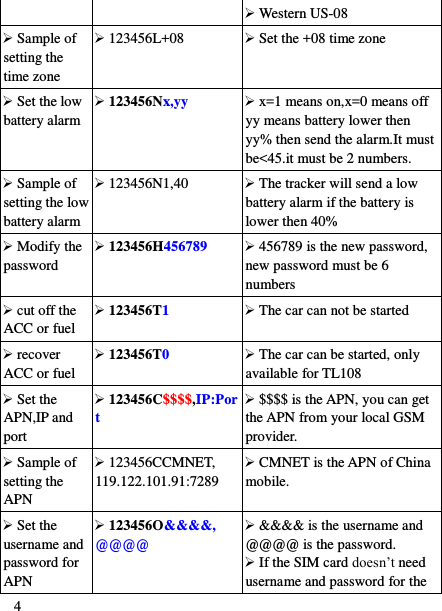
 4  Western US-08  Sample of setting the time zone  123456L+08  Set the +08 time zone  Set the low battery alarm  123456Nx,yy  x=1 means on,x=0 means off yy means battery lower then yy% then send the alarm.It must be<45.it must be 2 numbers.  Sample of setting the low battery alarm  123456N1,40  The tracker will send a low battery alarm if the battery is lower then 40%  Modify the password  123456H456789  456789 is the new password, new password must be 6 numbers  cut off the ACC or fuel  123456T1  The car can not be started  recover ACC or fuel  123456T0  The car can be started, only available for TL108  Set the APN,IP and port  123456C$$$$,IP:Port  $$$$ is the APN, you can get the APN from your local GSM provider.  Sample of setting the APN  123456CCMNET, 119.122.101.91:7289  CMNET is the APN of China mobile.  Set the username and password for APN  123456O&&&&, @@@@  &&&& is the username and @@@@ is the password.  If the SIM card doesn‟t need username and password for the
 5 APN, you do not need to set it.  Sample of setting the username and password for APN    123456Ointernet,internet123  The user name is internet and the password is internet123.  Open  GPRS  123456D  The tracker will start to connect the server by GPRS.it will send back an SMS to confirm after it have connected the server successfully.  Close GPRS  123456E  The tracker will close the connection with the server.  Read voltage  123456V1  Read the input Voltage  Get the IMEI number  123456B  It will reply the IMEI number of the tracker.  Check setting  123456G  It will reply you its configuration  Cautions Please comply with the instructions to extend the unit life. Do not attempt to change any of the preset programmed settings once installed by your TracUSA representative. Please call your TracUSA representative if any changes are requested. Any customer changes will VOID all warranty‟s:   1. Keep the unit dry. Any liquid, i.e. rain, moisture, may destroy or
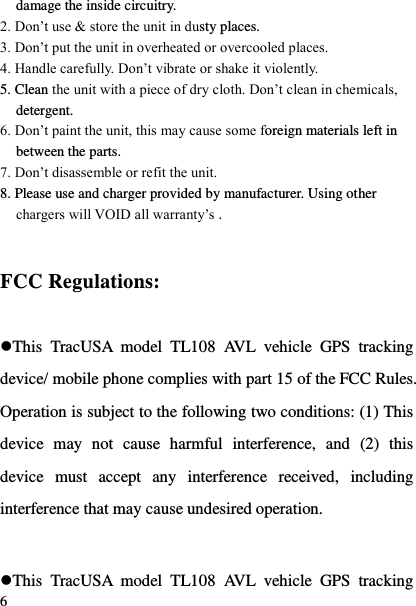
 6 damage the inside circuitry. 2. Don‟t use & store the unit in dusty places. 3. Don‟t put the unit in overheated or overcooled places. 4. Handle carefully. Don‟t vibrate or shake it violently. 5. Clean the unit with a piece of dry cloth. Don‟t clean in chemicals, detergent. 6. Don‟t paint the unit, this may cause some foreign materials left in between the parts. 7. Don‟t disassemble or refit the unit. 8. Please use and charger provided by manufacturer. Using other chargers will VOID all warranty‟s .   FCC Regulations:  This  TracUSA  model  TL108  AVL  vehicle  GPS  tracking device/ mobile phone complies with part 15 of the FCC Rules. Operation is subject to the following two conditions: (1) This device  may  not  cause  harmful  interference,  and  (2)  this device  must  accept  any  interference  received,  including interference that may cause undesired operation.  This  TracUSA  model  TL108  AVL  vehicle  GPS  tracking
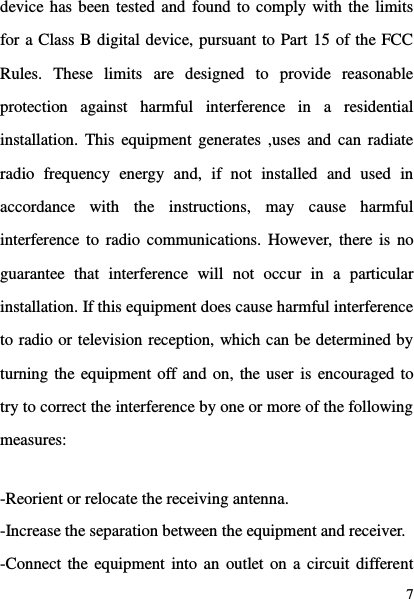
 7 device has been tested and found to comply with the limits for a Class B digital device, pursuant to Part 15 of the FCC Rules.  These  limits  are  designed  to  provide  reasonable protection  against  harmful  interference  in  a  residential installation. This  equipment generates ,uses  and can  radiate radio  frequency  energy  and,  if  not  installed  and  used  in accordance  with  the  instructions,  may  cause  harmful interference  to radio  communications. However,  there is  no guarantee  that  interference  will  not  occur  in  a  particular installation. If this equipment does cause harmful interference to radio or television reception, which can be determined by turning the equipment off and on, the user is encouraged to try to correct the interference by one or more of the following measures:  -Reorient or relocate the receiving antenna. -Increase the separation between the equipment and receiver. -Connect the equipment into an  outlet on a circuit different
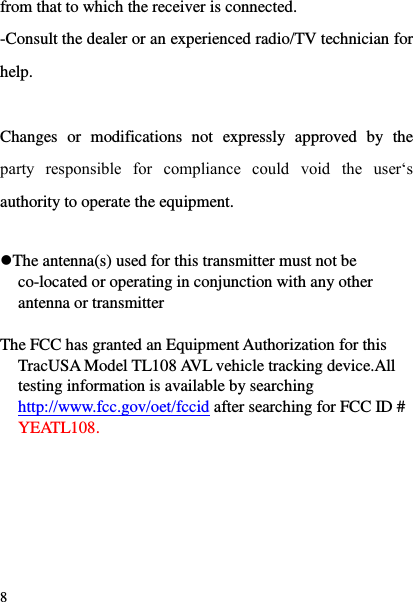
 8 from that to which the receiver is connected. -Consult the dealer or an experienced radio/TV technician for help.  Changes  or  modifications  not  expressly  approved  by  the party  responsible  for  compliance  could  void  the  user„s authority to operate the equipment.  The antenna(s) used for this transmitter must not be co-located or operating in conjunction with any other antenna or transmitter  The FCC has granted an Equipment Authorization for this TracUSA Model TL108 AVL vehicle tracking device.All testing information is available by searching http://www.fcc.gov/oet/fccid after searching for FCC ID # YEATL108.
 9  RF Exposure Information  This  device  meets  the  government‟s  requirements  for exposure to radio waves. This device is designed and manufactured not to exceed the emission limits for exposure to radio frequency (RF) energy set by the Federal Communications Commission of the U.S. Government.  This  device  complies  with  FCC  radiation  exposure limits set forth for an uncontrolled environment. In order to avoid the  possibility  of  exceeding  the  FCC  radio  frequency exposure limits, human proximity to the antenna shall not be less than 20cm (8 inches) during normal operation.

Navigation menu