OKAYO Electronics DGBDUT DigiBee Group Guide System User Manual

OKAYO Electronics Co., Ltd. DigiBee Group Guide System Users Manual

Users Manual

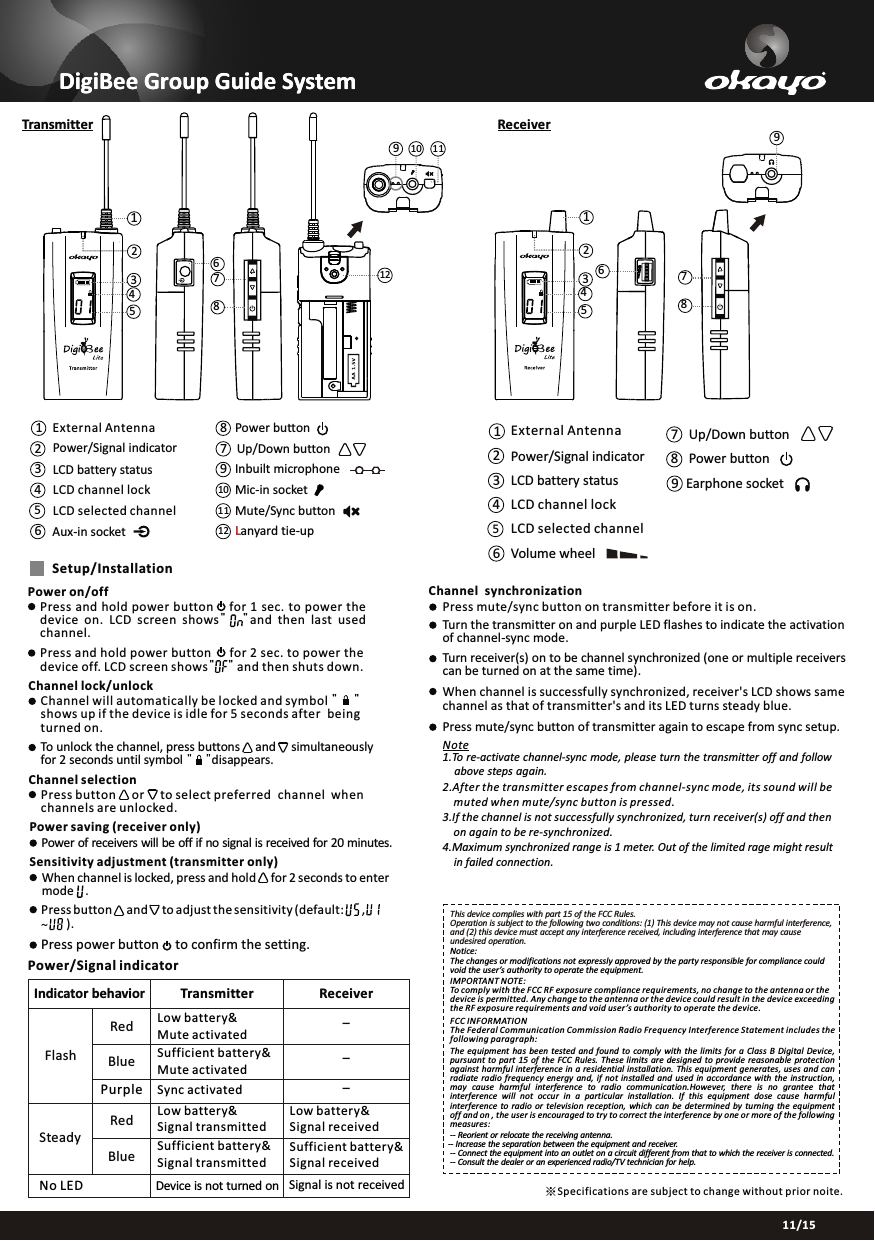
11/15DigiBee Group Guide SystemDigiBee Group Guide SystemSpecifications are subject to change without prior noite.※TransmitterChannel synchronizationPress mute/sync button on transmitter before it is on.Turn the transmitter on and purple LED flashes to indicate the activation of channel-sync mode.Turn receiver(s) on to be channel synchronized (one or multiple receiverscan be turned on at the same time).When channel is successfully synchronized, receiver's LCD shows same channel as that of transmitter's and its LED turns steady blue.Press mute/sync button of transmitter again to escape from sync setup.Note1.To re-activate channel-sync mode, please turn the transmitter off and follow     above steps again.2.After the transmitter escapes from channel-sync mode, its sound will be     muted when mute/sync button is pressed.3.If the channel is not successfully synchronized, turn receiver(s) off and then     on again to be re-synchronized.4.Maximum synchronized range is 1 meter. Out of the limited rage might result     in failed connection.Setup/InstallationPower on/offPress and hold power button   for 1 sec. to power the device on.  LCD  screen  shows"    "and  then last  used channel.     Press and hold power button   for 2 sec. to power thedevice off. LCD screen shows"    " and then shuts down.  Channel lock/unlockChannel will automatically be locked and symbol "     "shows up if the device is idle for 5 seconds after being turned on.To unlock the channel, press buttons and    simultaneouslyfor 2 seconds until symbol "    "disappears.                             Channel selectionPress button    or    to select preferred channel  when channels are unlocked.Power saving (receiver only)Power of receivers will be off if no signal is received for 20 minutes.Sensitivity adjustment (transmitter only)When channel is locked, press and hold     for 2 seconds to enter mode    .Press button     and     to adjust the sensitivity (default:   ,        ).~ Press power button     to confirm the setting.Receiver6781234597Up/Down button8Power button12 Lanyard tie-up9Inbuilt microphone10 Mic-in socket11 Mute/Sync button9786123454LCD channel lock3LCD battery statusL2Power/Signal indicator5LCD selected channel6Aux-in socket 1   External Antenna 1   4LCD channel lock23LCD battery statusPower/Signal indicator65LCD selected channelVolume wheel978Up/Down buttonPower buttonEarphone socketExternal Antenna121110Power/Signal indicatorIndicator behavior Transmitter ReceiverFlashSteadyNo LEDRedBluePurpleLow battery&Mute activatedLow battery&Signal transmittedSufficient battery&Signal transmittedSufficient battery&Mute activatedRed Low battery& Signal receivedBlue---Sync activatedSufficient battery& Signal receivedSignal is not receivedDevice is not turned onThis device complies with part 15 of the FCC Rules.Operation is subject to the following two conditions: (1) This device may not cause harmful interference, and (2) this device must accept any interference received, including interference that may cause undesired operation.IMPORTANT NOTE:To comply with the FCC RF exposure compliance requirements, no change to the antenna or the device is permitted. Any change to the antenna or the device could result in the device exceeding the RF exposure requirements and void user ’s authority to operate the device.  FCC INFORMATIONThe Federal Communication Commission Radio Frequency Interference Statement includes the following paragraph:The  equipment  has been  tested  and found  to  comply  with  the  limits  for  a  Class  B Digital  Device, pursuant  to part  15  of the FCC  Rules.  These  limits  are  designed  to  provide  reasonable  protection against harmful interference in  a residential installation. This equipment generates,  uses and can radiate  radio frequency energy  and,  if  not  installed  and  used  in  accordance  with  the  instruction, may  cause  harmful  interference  to  radio  communication.However,  there  is  no  grantee  that interference  will  not  occur  in  a  particular  installation.  If  this  equipment  dose  cause  harmful interference  to radio  or  television  reception,  which  can  be  determined  by  turning  the  equipment off and on , the user is encouraged to try to correct the interference by one or more of the following measures:Notice:The changes or modifications not expressly approved by the party responsible for compliance could void the user’s authority to operate the equipment.  -- Reorient or relocate the receiving antenna.-- Increase the separation between the equipment and receiver. -- Connect the equipment into an outlet on a circuit different from that to which the receiver is connected. -- Consult the dealer or an experienced radio/TV technician for help.

Navigation menu