OKAYO Electronics EJ-5T Wireless Bodypack Transmitter User Manual

OKAYO Electronics Co., Ltd. Wireless Bodypack Transmitter

User Manual

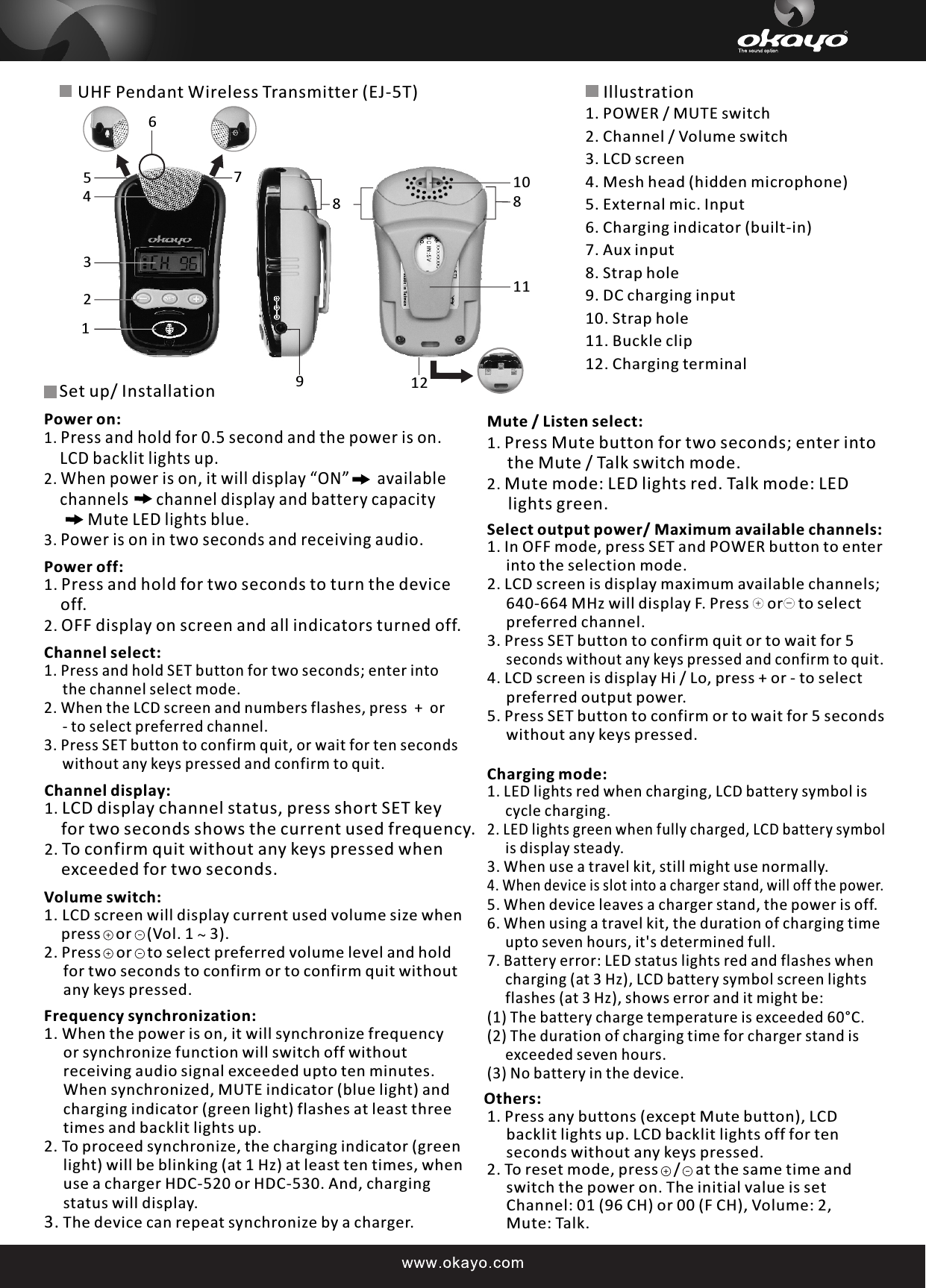
UHF Pendant Wireless Transmitter (EJ-5T)Channel display:1. LCD display channel status, press short SET key     for two seconds shows the current used frequency.2. To confirm quit without any keys pressed when     exceeded for two seconds.Select output power/ Maximum available channels:1. In OFF mode, press SET and POWER button to enter      into the selection mode. 2. LCD screen is display maximum available channels;     640-664 MHz will display F. Press   or  to select     preferred channel.3. Press SET button to confirm quit or to wait for 5      seconds without any keys pressed and confirm to quit.  4. LCD screen is display Hi / Lo, press + or - to select      preferred output power.  5. Press SET button to confirm or to wait for 5 seconds      without any keys pressed. Charging mode:1. LED lights red when charging, LCD battery symbol is     cycle charging.2. LED lights green when fully charged, LCD battery symbol      is display steady. 3. When use a travel kit, still might use normally. 4. When device is slot into a charger stand, will off the power. 5. When device leaves a charger stand, the power is off. 6. When using a travel kit, the duration of charging time      upto seven hours, it's determined full.7. Battery error: LED status lights red and flashes when      charging (at 3 Hz), LCD battery symbol screen lights      flashes (at 3 Hz), shows error and it might be:(1) The battery charge temperature is exceeded 60°C.(2) The duration of charging time for charger stand is     exceeded seven hours. (3) No battery in the device.Others:1. Press any buttons (except Mute button), LCD      backlit lights up. LCD backlit lights off for ten      seconds without any keys pressed.2. To reset mode, press    /    at the same time and      switch the power on. The initial value is set      Channel: 01 (96 CH) or 00 (F CH), Volume: 2,      Mute: Talk.Illustration1. POWER / MUTE switch2. Channel / Volume switch 3. LCD screen 4. Mesh head (hidden microphone)5. External mic. Input 6. Charging indicator (built-in)7. Aux input 8. Strap hole9. DC charging input 10. Strap hole11. Buckle clip12. Charging terminal1234567910111288Set up/ InstallationPower off:1. Press and hold for two seconds to turn the device     off.2. OFF display on screen and all indicators turned off.Channel select:1. Press and hold SET button for two seconds; enter into      the channel select mode.2. When the LCD screen and numbers flashes, press  +  or     - to select preferred channel.3. Press SET button to confirm quit, or wait for ten seconds     without any keys pressed and confirm to quit.Power on:1. Press and hold for 0.5 second and the power is on.     LCD backlit lights up.2. When power is on, it will display “ON”       available     channels       channel display and battery capacity             Mute LED lights blue.3. Power is on in two seconds and receiving audio.Mute / Listen select:1. Press Mute button for two seconds; enter into     the Mute / Talk switch mode.2. Mute mode: LED lights red. Talk mode: LED      lights green.    Volume switch:1. LCD screen will display current used volume size when    press    or    (Vol. 1 ~ 3).2. Press    or    to select preferred volume level and hold      for two seconds to confirm or to confirm quit without      any keys pressed.Frequency synchronization:1. When the power is on, it will synchronize frequency      or synchronize function will switch off without      receiving audio signal exceeded upto ten minutes.      When synchronized, MUTE indicator (blue light) and      charging indicator (green light) flashes at least three      times and backlit lights up.2. To proceed synchronize, the charging indicator (green      light) will be blinking (at 1 Hz) at least ten times, when      use a charger HDC-520 or HDC-530. And, charging      status will display.3. The device can repeat synchronize by a charger.
Consumer Alert Most users do not need a license to operate this wireless microphone system. Nevertheless, operating this microphone system without a license is subject to certain restrictions: The system may not cause harmful interference; it must operate at a low power level (not in excess of 50 milliwatts); and it has no protection from interference received from any other device. Purchasers should also be aware that the FCC is currently evaluating use of wireless microphone systems, and these rules are subject to change. For more information, call the FCC at 1–888–CALL–FCC (TTY: 1–888–TELL–FCC) or visit the FCC's wireless microphone Web site at http://www.fcc.gov/cgb/wirelessmicrophones.

Navigation menu