OKAYO Electronics WT-500T Tour Guide System User Manual Exhibit 8 Users Manual

OKAYO Electronics Co., Ltd. Tour Guide System Exhibit 8 Users Manual

Exhibit 8 Users Manual

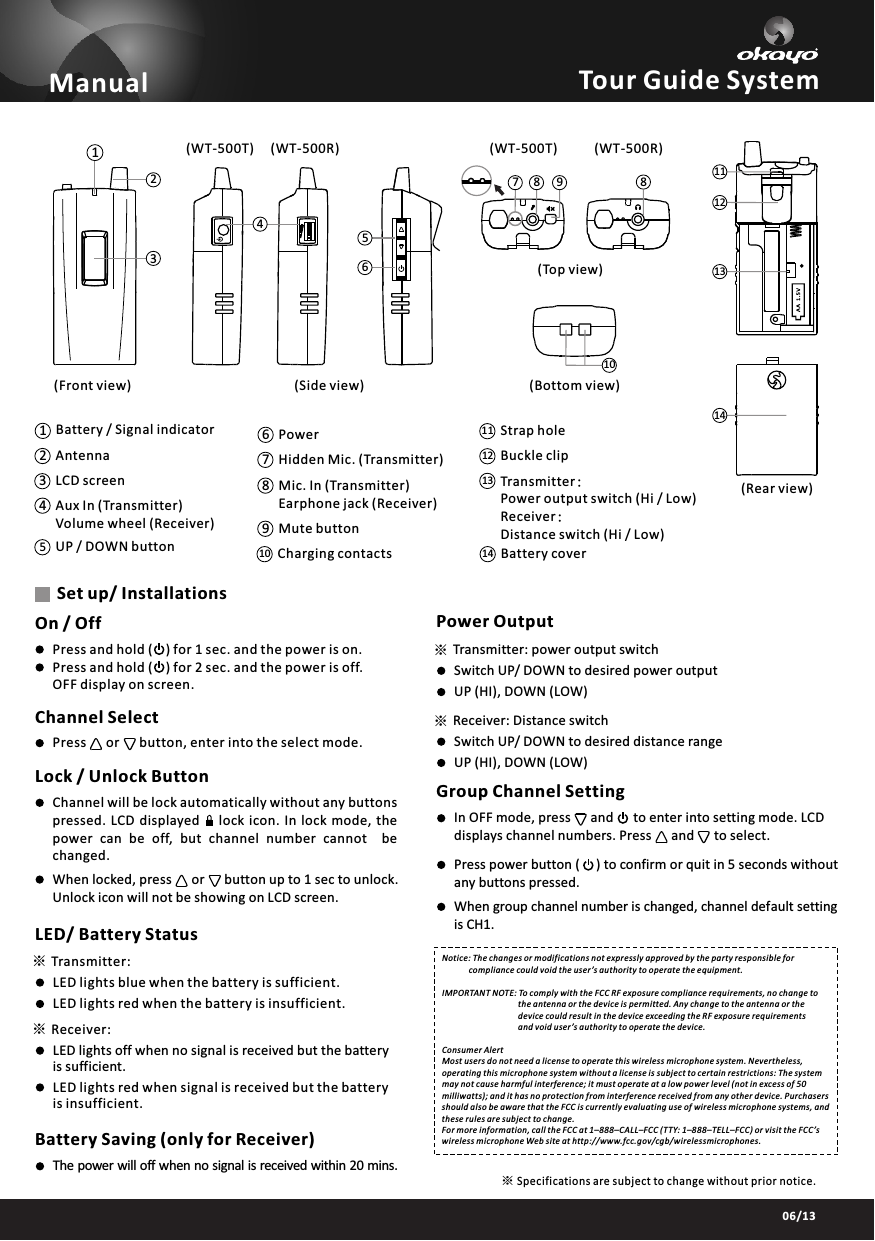
03/1306/13※※38102179814131112456Tour Guide SystemOn / OffPress and hold (    ) for 1 sec. and the power is on.Press and hold (    ) for 2 sec. and the power is off. OFF display on screen.Channel SelectPress      or      button, enter into the select mode.Lock / Unlock ButtonChannel will be lock automatically without any buttons pressed.  LCD  displayed       lock  icon.  In  lock  mode,  thepower  can  be  off,  but  channel  number  cannot    bechanged.When locked, press      or      button up to 1 sec to unlock. Unlock icon will not be showing on LCD screen.LED/ Battery StatusTransmitter:Receiver:LED lights blue when the battery is sufficient.LED lights red when the battery is insufficient.LED lights off when no signal is received but the battery is sufficient.LED lights red when signal is received but the battery is insufficient.Battery Saving (only for Receiver)The power will off when no signal is received within 20 mins.Set up/ Installations※※Power OutputTransmitter: power output switchReceiver: Distance switchSwitch UP/ DOWN to desired power outputSwitch UP/ DOWN to desired distance rangeUP (HI), DOWN (LOW)UP (HI), DOWN (LOW)Group Channel SettingIn OFF mode, press      and      to enter into setting mode. LCD displays channel numbers. Press      and      to select.Press power button (     ) to confirm or quit in 5 seconds without any buttons pressed.When group channel number is changed, channel default settingis CH1.Transmitter:Power output switch (Hi / Low) Receiver:Distance switch (Hi / Low) 1314 Battery coverBuckle clipStrap hole1211Charging contactsMute buttonMic. In (Transmitter)Earphone jack (Receiver) Hidden Mic. (Transmitter)PowerUP / DOWN buttonAux In (Transmitter)Volume wheel (Receiver)LCD screen Antenna14239106785Battery / Signal indicatorManual(Front view) (Side view)(Rear view)(Top view)(Bottom view)Notice: The changes or modifications not expressly approved by the party responsible for              compliance could void the user’s authority to operate the equipment.IMPORTANT NOTE: To comply with the FCC RF exposure compliance requirements, no change to                                      the antenna or the device is permitted. Any change to the antenna or the                                      device could result in the device exceeding the RF exposure requirements                                      and void user’s authority to operate the device.Consumer AlertMost users do not need a license to operate this wireless microphone system. Nevertheless, operating this microphone system without a license is subject to certain restrictions: The system may not cause harmful interference; it must operate at a low power level (not in excess of 50 milliwatts); and it has no protection from interference received from any other device. Purchasers should also be aware that the FCC is currently evaluating use of wireless microphone systems, and these rules are subject to change. For more information, call the FCC at 1–888–CALL–FCC (TTY: 1–888–TELL–FCC) or visit the FCC’s wireless microphone Web site at http://www.fcc.gov/cgb/wirelessmicrophones.Specifications are subject to change without prior notice.※(WT-500T) (WT-500R) (WT-500T) (WT-500R)

Navigation menu