OKAYO Electronics WT-600T Digital Tour Guide System Transmitter User Manual

OKAYO Electronics Co., Ltd. Digital Tour Guide System Transmitter

User Manual

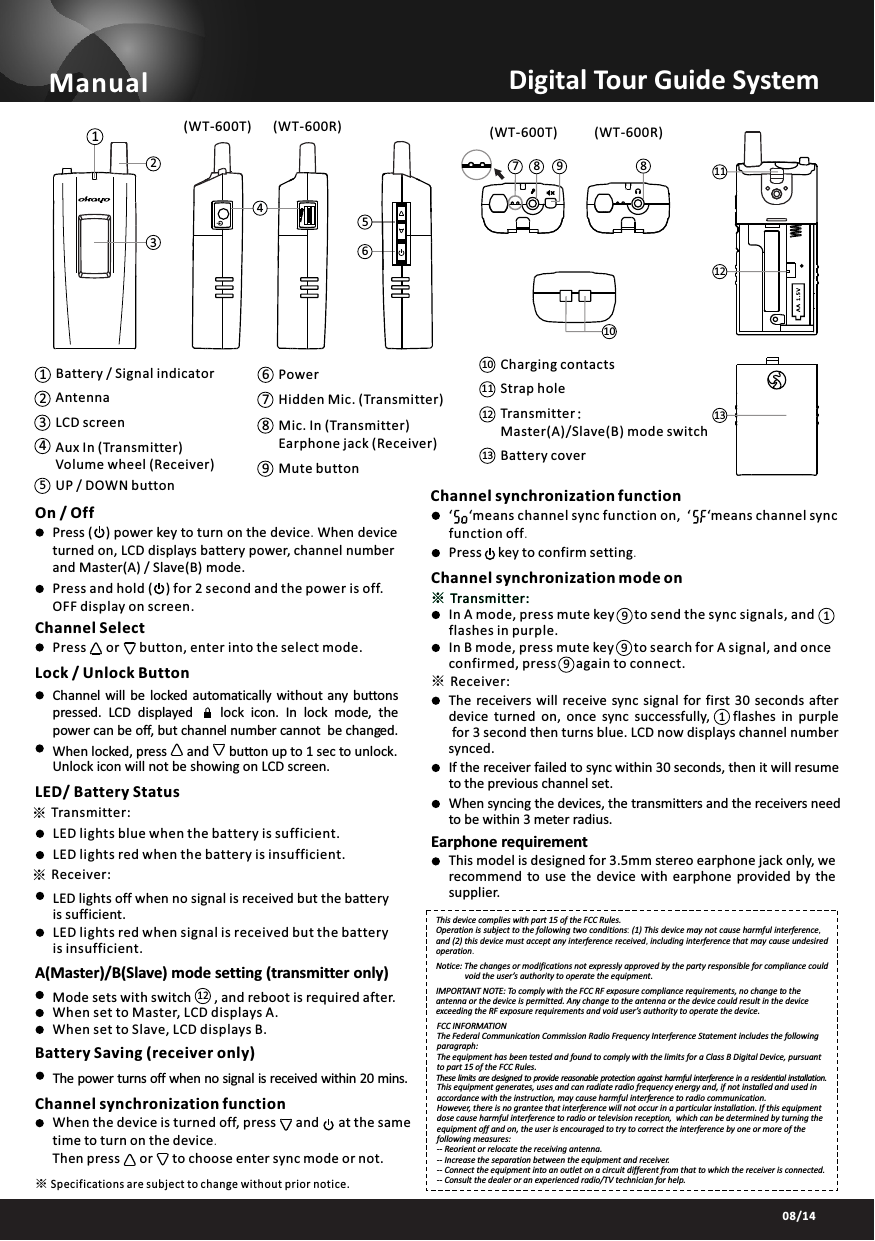
03/1308/14※※On / OffPress and hold (    ) for 2 second and the power is off. OFF display on screen.Channel SelectPress      or      button, enter into the select mode.Lock / Unlock ButtonChannel will  be locked automatically without any buttons pressed.  LCD  displayed        lock  icon.  In  lock  mode,  thepower can be off, but channel number cannot  be changed.When locked, press      and      button up to 1 sec to unlock. Unlock icon will not be showing on LCD screen.LED/ Battery StatusTransmitter:Receiver:LED lights blue when the battery is sufficient.LED lights red when the battery is insufficient.LED lights off when no signal is received but the battery is sufficient.LED lights red when signal is received but the battery is insufficient.Battery Saving (receiver only)The power turns off when no signal is received within 20 mins.UP / DOWN buttonAux In (Transmitter)Volume wheel (Receiver) LCD screen Antenna14235 Battery / Signal indicatorManual381021456798131211Digital Tour Guide SystemMute buttonMic. In (Transmitter)Earphone jack (Receiver) Hidden Mic. (Transmitter)Power9678Charging contacts10Battery cover13Strap hole1211Transmitter:Master(A)/Slave(B) mode switch(WT-600T) (WT-600T)(WT-600R) (WT-600R)Press (    )powerkeytoturnonthedevice.Whendeviceturnedon,LCDdisplaysbatterypower, channelnumberandMaster(A) / Slave(B)mode.A(Master)/B(Slave) mode setting (transmitteronly)Channel synchronizationfunction Mode sets with switch       , and reboot is required after. When set to Master, LCD displays A. When set to Slave, LCD displays B.12Channel synchronizationmodeon‘     ‘ means channel sync function on, ‘     ‘ meanschannelsyncfunctionoff.Press     keytoconfirmsetting.If the receiver failed to sync within 30 seconds, then it will resume to the previous channel set.When syncing the devices, the transmitters and the receivers need to be within 3 meter radius.※Transmitter:1※Receiver:The receivers  will  receive  sync  signal  for  first  30  seconds  after device  turned  on,  once  sync  successfully,        flashes  in  purple for 3 second then turns blue. LCD now displays channel number synced.Earphone requirement This model is designed for 3.5mm stereo earphone jack only, we recommend  to  use  the  device  with  earphone  provided  by  the supplier.Channel synchronizationfunction When the device is turned off, press     and     atthesametimetoturnonthedevice.Then press     or     tochooseentersyncmodeornot.FCC INFORMATIONThe Federal Communication Commission Radio Frequency Interference Statement includes the following paragraph:The equipment has been tested and found to comply with the limits for a Class B Digital Device, pursuant to part 15 of the FCC Rules.This equipment generates, uses and can radiate radio frequency energy and, if not installed and used in accordance with the instruction, may cause harmful interference to radio communication.However, there is no grantee that interference will not occur in a particular installation. If this equipment dose cause harmful interference to radio or television reception,  which can be determined by turning the equipment off and on, the user is encouraged to try to correct the interference by one or more of the following measures:-- Reorient or relocate the receiving antenna.-- Increase the separation between the equipment and receiver.-- Connect the equipment into an outlet on a circuit different from that to which the receiver is connected.-- Consult the dealer or an experienced radio/TV technician for help.These limits are designed to provide reasonable protection against harmful interference in a residential installation.IMPORTANT NOTE: To comply with the FCC RF exposure compliance requirements, no change to the antenna or the device is permitted. Any change to the antenna or the device could result in the device exceeding the RF exposure requirements and void user’s authority to operate the device.Notice: The changes or modifications not expressly approved by the party responsible for compliance could              void the user’s authority to operate the equipment.This device complies with part 15 of the FCC Rules.Operationissubjecttothefollowingtwoconditions:(1) Thisdevicemaynotcauseharmfulinterference,and(2) thisdevicemustacceptanyinterferencereceived,includinginterferencethatmaycauseundesiredoperation.Specifications are subject to change without prior notice.※In A mode, press mute key      to send the sync signals, and      flashes in purple.In B mode, press mute key      to search for A signal, and once confirmed, press      again to connect.※Transmitter:9919

Navigation menu