ORBCOMM License ST6000 Mobile Satellite Earth Station Module User Manual T407 ST 6000 Hardware Guide

ORBCOMM License Corp. Mobile Satellite Earth Station Module T407 ST 6000 Hardware Guide

Users Manual

ST 6000Hardware GuideT407, Version 0.10 BETASep 2017© ORBCOMMInc.
ST 6000 - HARDWARE GUIDELEGAL NOTICEThis documentation is owned by ORBCOMM and protected by applicable copyright laws and international treatyprovisions. Other copyrighted names used are the property of their respective owners. Therefore, you must treat thisdocumentation like any other copyrighted material. This publication, or any part thereof, may not be reproduced ortransmitted in any form or by any means, electronic or mechanical, including photocopying, recording, storage in aninformation retrieval system, or otherwise, without prior written permission by ORBCOMM, Inc. 395 W Passaic Street,Suite 325, Rochelle Park, NJ 07662 USA Phone 703-433-6325. The information in this document is for informationpurposes only and contains technical information and descriptions of the ORBCOMM product(s) and is subject tochange without notice. No warranty or representation, express or implied, is made with respect to its contents.INMARSAT, the Inmarsat logo and IsatData Pro are trademarks of Inmarsat used under license by SkyWave (anORBCOMM company). Inmarsat is not responsible for the operation and regulatory compliance of the products andservices referred to in this document that connect to the Inmarsat system.T407, VERSION 0.10 BETA2© ORBCOMM PROPRIETARY
ST 6000 - HARDWARE GUIDECONTACT INFORMATIONVisit ORBCOMM Onlinewww.ORBCOMM.comContact Customer Supportsupport@skywave.com+1.613.836.2222Headquarters395 W Passaic Street, Suite 325Rochelle Park, NJ 07662 USATel: +1-703-433-6300Fax: 1-703-433-6400Email: sales@orbcomm.comT407, VERSION 0.10 BETA3© ORBCOMM PROPRIETARY
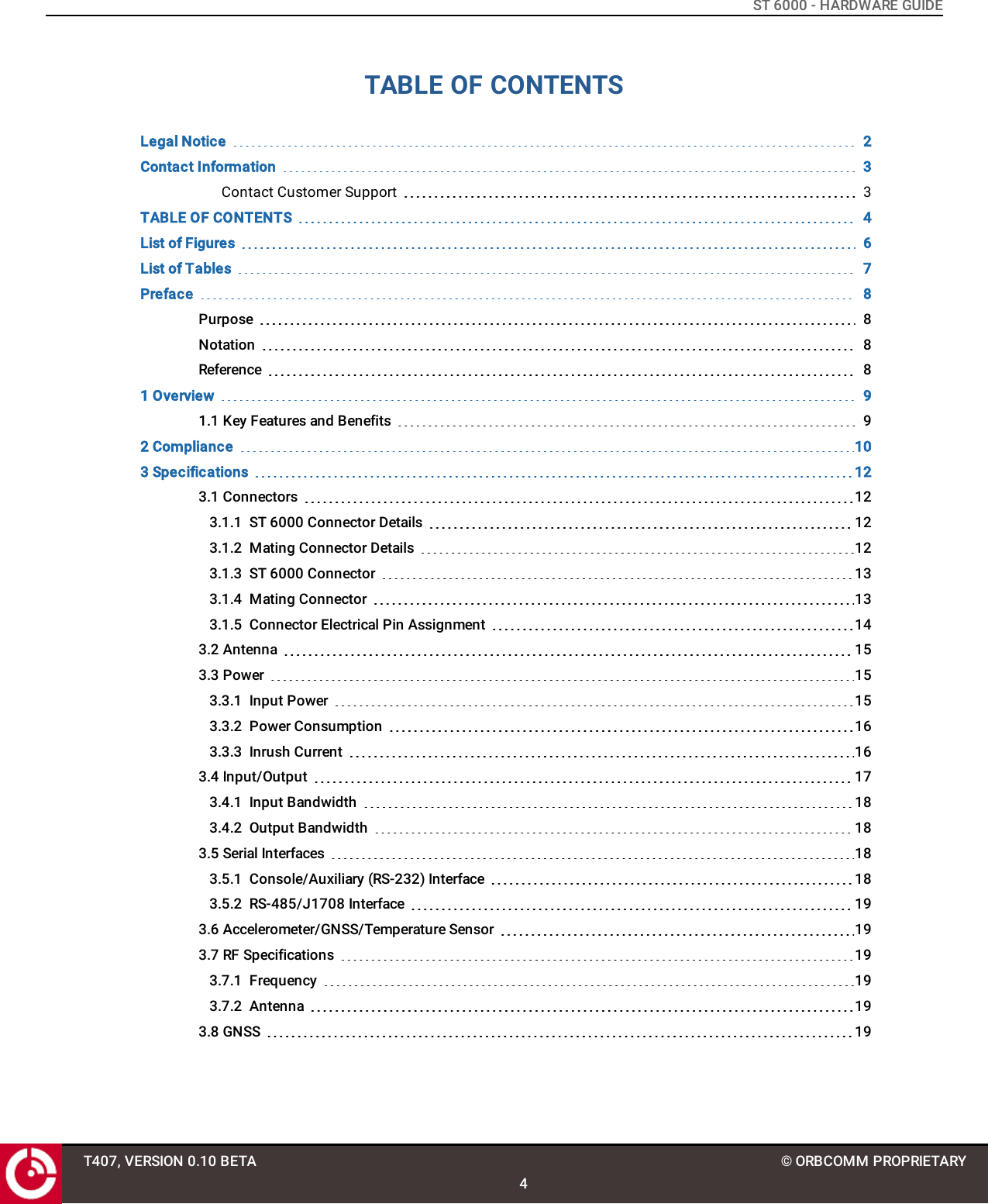
ST 6000 - HARDWARE GUIDETABLE OF CONTENTSLegal Notice 2Contact Information 3Contact Customer Support 3TABLE OF CONTENTS 4List of Figures 6List of Tables 7Preface 8Purpose 8Notation 8Reference 81 Overview 91.1 Key Features and Benefits 92 Compliance 103 Specifications 123.1 Connectors 123.1.1 ST 6000 Connector Details 123.1.2 Mating Connector Details 123.1.3 ST 6000 Connector 133.1.4 Mating Connector 133.1.5 Connector Electrical Pin Assignment 143.2 Antenna 153.3 Power 153.3.1 Input Power 153.3.2 Power Consumption 163.3.3 Inrush Current 163.4 Input/Output 173.4.1 Input Bandwidth 183.4.2 Output Bandwidth 183.5 Serial Interfaces 183.5.1 Console/Auxiliary (RS-232) Interface 183.5.2 RS-485/J1708 Interface 193.6 Accelerometer/GNSS/Temperature Sensor 193.7 RF Specifications 193.7.1 Frequency 193.7.2 Antenna 193.8 GNSS 19T407, VERSION 0.10 BETA4© ORBCOMM PROPRIETARY
ST 6000 - HARDWARE GUIDE3.9 Accelerometer 203.10 Mechanical 223.10.1 Dimensions 223.10.2 Mass and UV Resistance 233.11 LED 233.12 Nonvolatile Storage 233.13 Environmental 243.13.1 Temperature 243.13.2 Environmental 244 Integration Guidelines 254.1 Enclosure Design 254.2 Ground Plane Requirements 254.3 Labeling 26T407, VERSION 0.10 BETA5© ORBCOMM PROPRIETARY
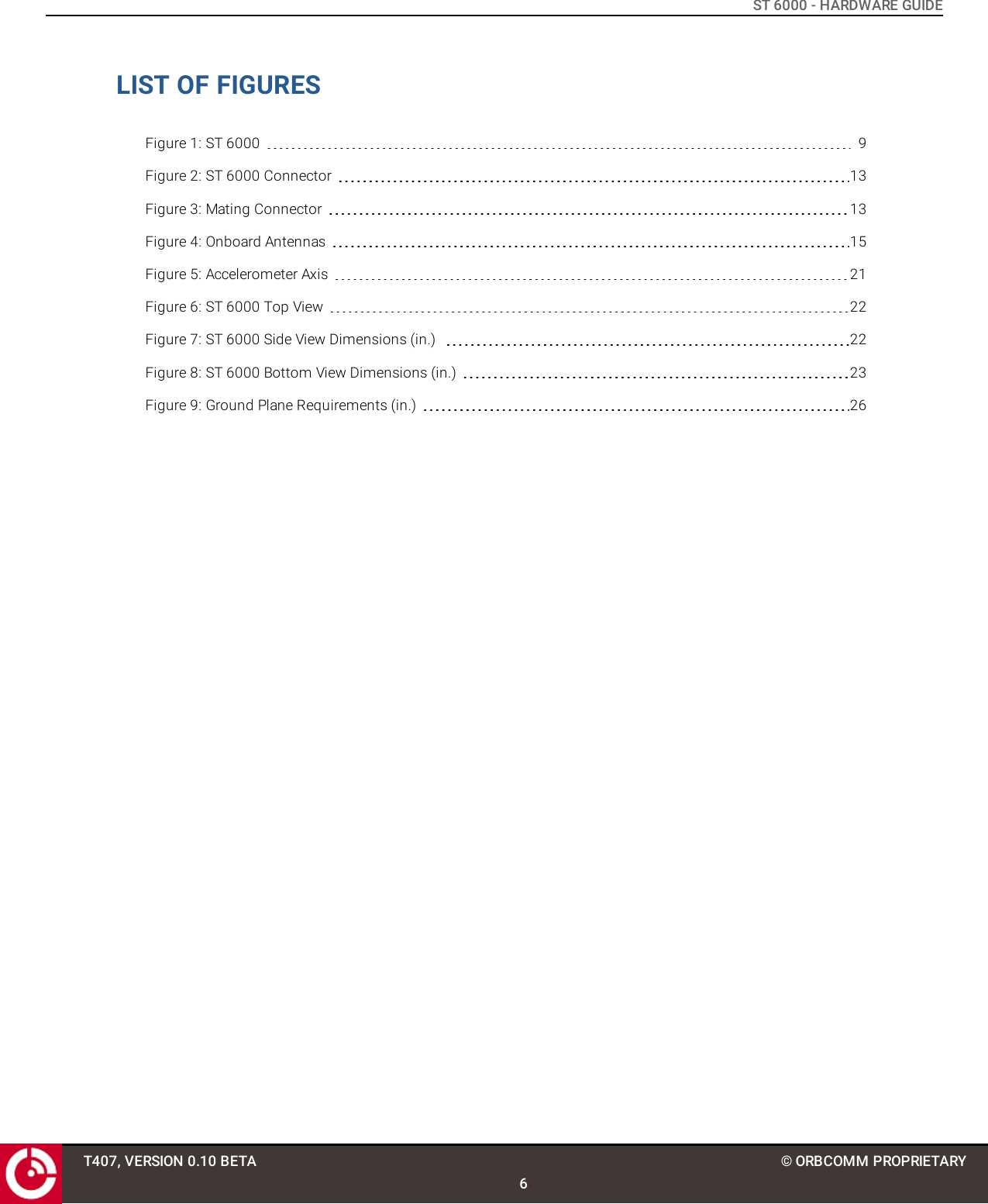
ST 6000 - HARDWARE GUIDELIST OF FIGURESFigure 1: ST 6000 9Figure 2: ST 6000 Connector 13Figure 3: Mating Connector 13Figure 4: Onboard Antennas 15Figure 5: Accelerometer Axis 21Figure 6: ST 6000 Top View 22Figure 7: ST 6000 Side View Dimensions (in.) 22Figure 8: ST 6000 Bottom View Dimensions (in.) 23Figure 9: Ground Plane Requirements (in.) 26T407, VERSION 0.10 BETA6© ORBCOMM PROPRIETARY
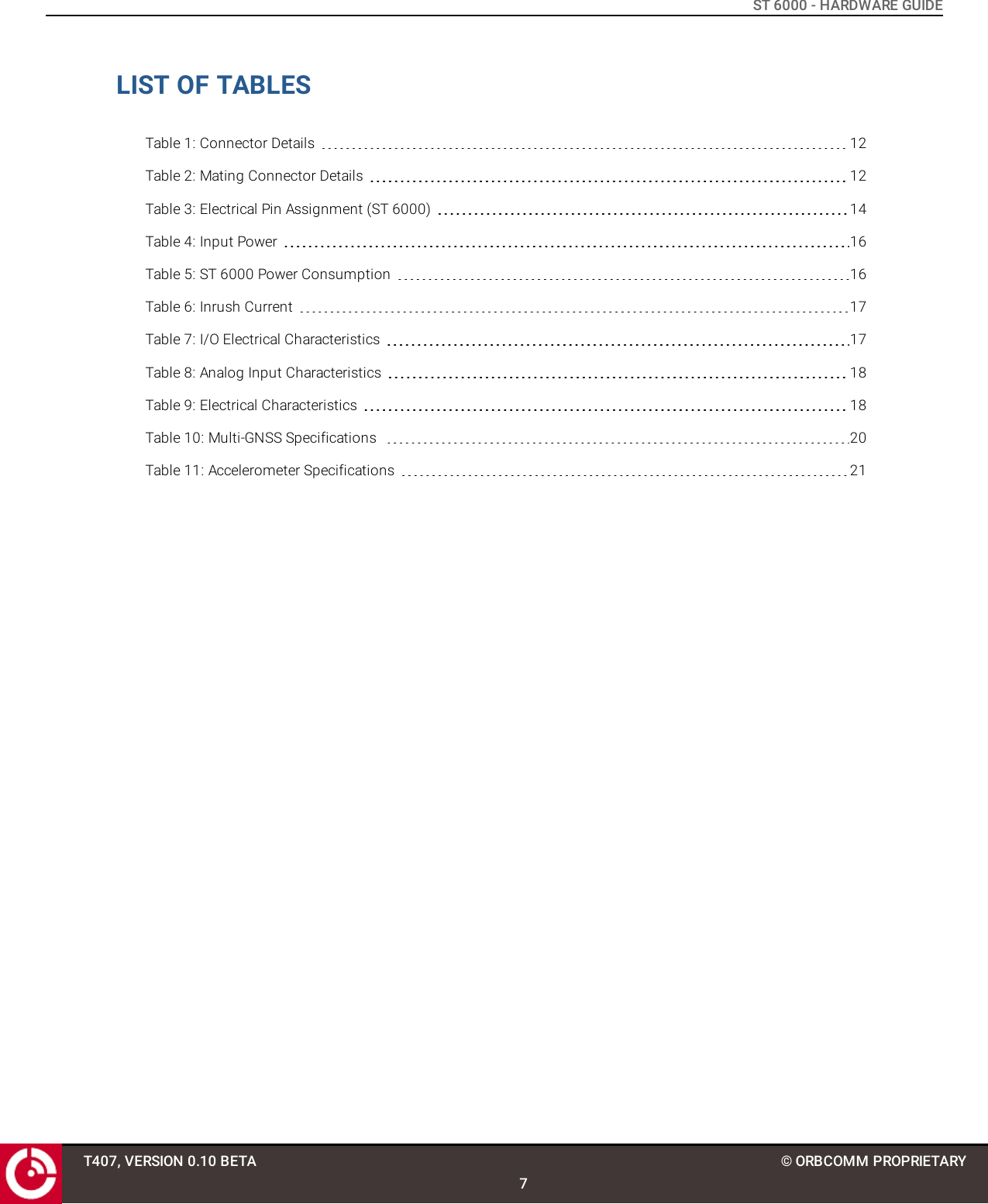
ST 6000 - HARDWARE GUIDELIST OF TABLESTable 1: Connector Details 12Table 2: Mating Connector Details 12Table 3: Electrical Pin Assignment (ST 6000) 14Table 4: Input Power 16Table 5: ST 6000 Power Consumption 16Table 6: Inrush Current 17Table 7: I/O Electrical Characteristics 17Table 8: Analog Input Characteristics 18Table 9: Electrical Characteristics 18Table 10: Multi-GNSS Specifications 20Table 11: Accelerometer Specifications 21T407, VERSION 0.10 BETA7© ORBCOMM PROPRIETARY
ST 6000 - HARDWARE GUIDEPREFACEPurposeThis document provides an overview of the hardware characteristics and specifications for the 20-pin ST 6000.NotationAn OEM Integrator is an ORBCOMM customer who purchases an ST 6000 for integration into their own enclosure. Tobecome an OEM Integrator certain commercial criteria must be met. Contact your Account Executive for furtherdetails.Hardware components and hardware stickers in this document might not be exactly as shown and are subject tochange without notice.CAUTION: This safety symbol warns of possible hazards to personnel, equipment, or both. It includeshazards that will or can cause personal injury, property damage, or death if the hazard is notavoided.Note: A note indicates information with no potential hazard. A note indicates points of interest or providessupplementary information about a feature or task.Numbered lists indicate a series of steps required to complete a task or function.Bulleted lists highlight information where order or sequence is not crucial.ReferenceThe content of the following documents may be useful in conjunction with this guide. These documents areavailable from the ORBCOMM Developer Toolkit (hereafter referred to as the Toolkit) or customer support.[T404] LSF Developer Guide for FW v3.x[T405] IsatData Pro Service API Reference for FW v3.xT407, VERSION 0.10 BETA8© ORBCOMM PROPRIETARY
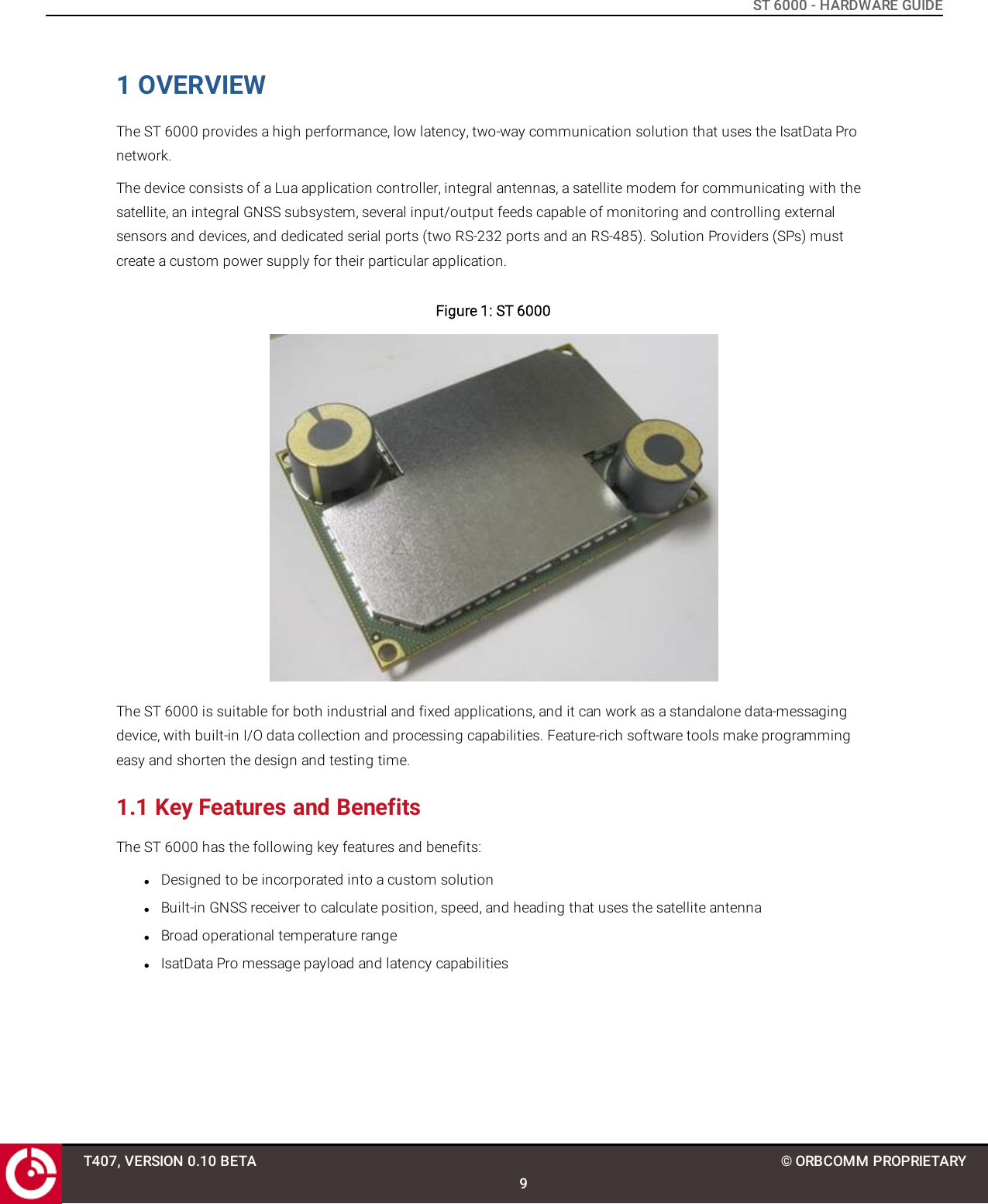
ST 6000 - HARDWARE GUIDE1 OVERVIEWThe ST 6000 provides a high performance, low latency, two-way communication solution that uses the IsatData Pronetwork.The device consists of a Lua application controller, integral antennas, a satellite modem for communicating with thesatellite, an integral GNSS subsystem, several input/output feeds capable of monitoring and controlling externalsensors and devices, and dedicated serial ports (two RS-232 ports and an RS-485). Solution Providers (SPs) mustcreate a custom power supply for their particular application.Figure 1: ST 6000The ST 6000 is suitable for both industrial and fixed applications, and it can work as a standalone data-messagingdevice, with built-in I/O data collection and processing capabilities. Feature-rich software tools make programmingeasy and shorten the design and testing time.1.1 Key Features and BenefitsThe ST 6000 has the following key features and benefits:lDesigned to be incorporated into a custom solutionlBuilt-in GNSS receiver to calculate position, speed, and heading that uses the satellite antennalBroad operational temperature rangelIsatData Pro message payload and latency capabilitiesT407, VERSION 0.10 BETA9© ORBCOMM PROPRIETARY
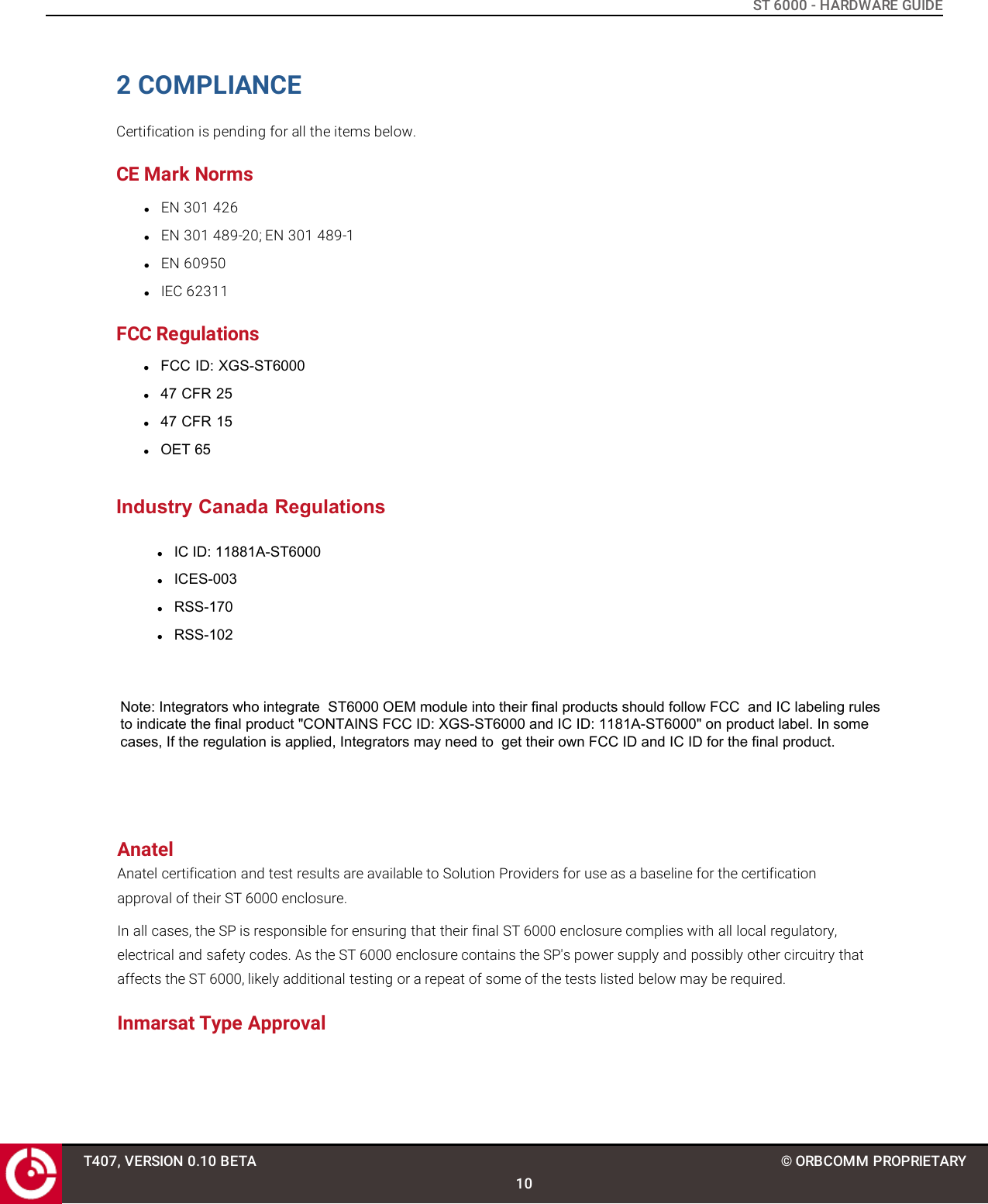
ST 6000 - HARDWARE GUIDE2 COMPLIANCECertification is pending for all the items below.CE Mark NormslEN 301 426lEN 301 489-20; EN 301 489-1lEN 60950lIEC 62311FCC RegulationslFCC ID: XGS-ST6000l47 CFR 25l47 CFR 15lOET 65Industry Canada RegulationslIC ID: 11881A-ST6000lICES-003lRSS-170lRSS-102T407, VERSION 0.10 BETA10© ORBCOMM PROPRIETARYNote: Integrators who integrate  ST6000 OEM module into their final products should follow FCC  and IC labeling rules to indicate the final product "CONTAINS FCC ID: XGS-ST6000 and IC ID: 1181A-ST6000" on product label. In some cases, If the regulation is applied, Integrators may need to  get their own FCC ID and IC ID for the final product.AnatelAnatel certification and test results are available to Solution Providers for use as a baseline for the certification approval of their ST 6000 enclosure.In all cases, the SP is responsible for ensuring that their final ST 6000 enclosure complies with all local regulatory, electrical and safety codes. As the ST 6000 enclosure contains the SP's power supply and possibly other circuitry that affects the ST 6000, likely additional testing or a repeat of some of the tests listed below may be required.Inmarsat Type Approval
ST 6000 - HARDWARE GUIDERoHS 2lRestriction of Hazardous Substances (RoHS) 2 11European Union's (EU) Directive 2011/65/EU "Restriction of Hazardous Substances" (RoHS) 2 in Electronic and ElectricalEquipment.T407, VERSION 0.10 BETA11© ORBCOMM PROPRIETARY
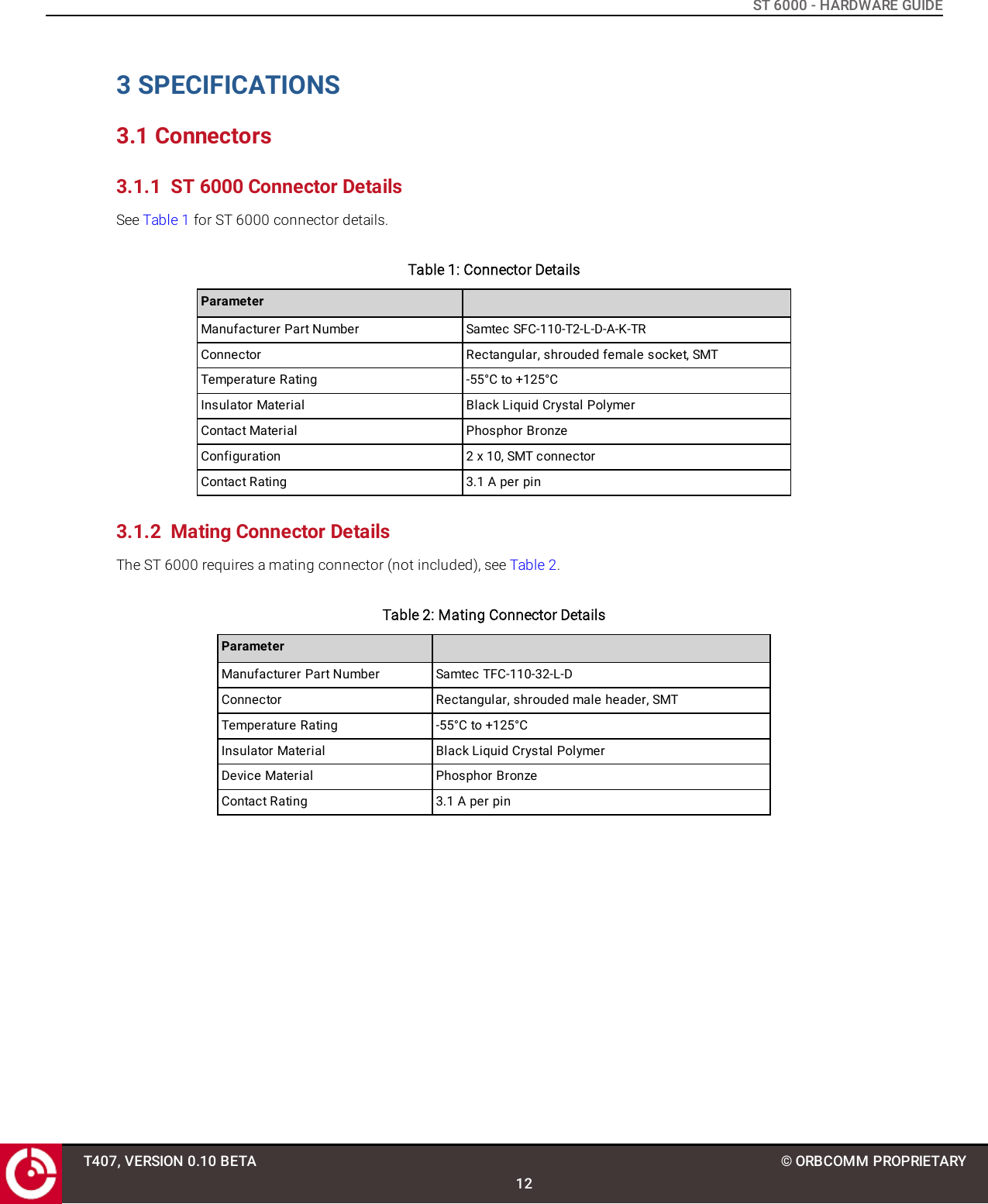
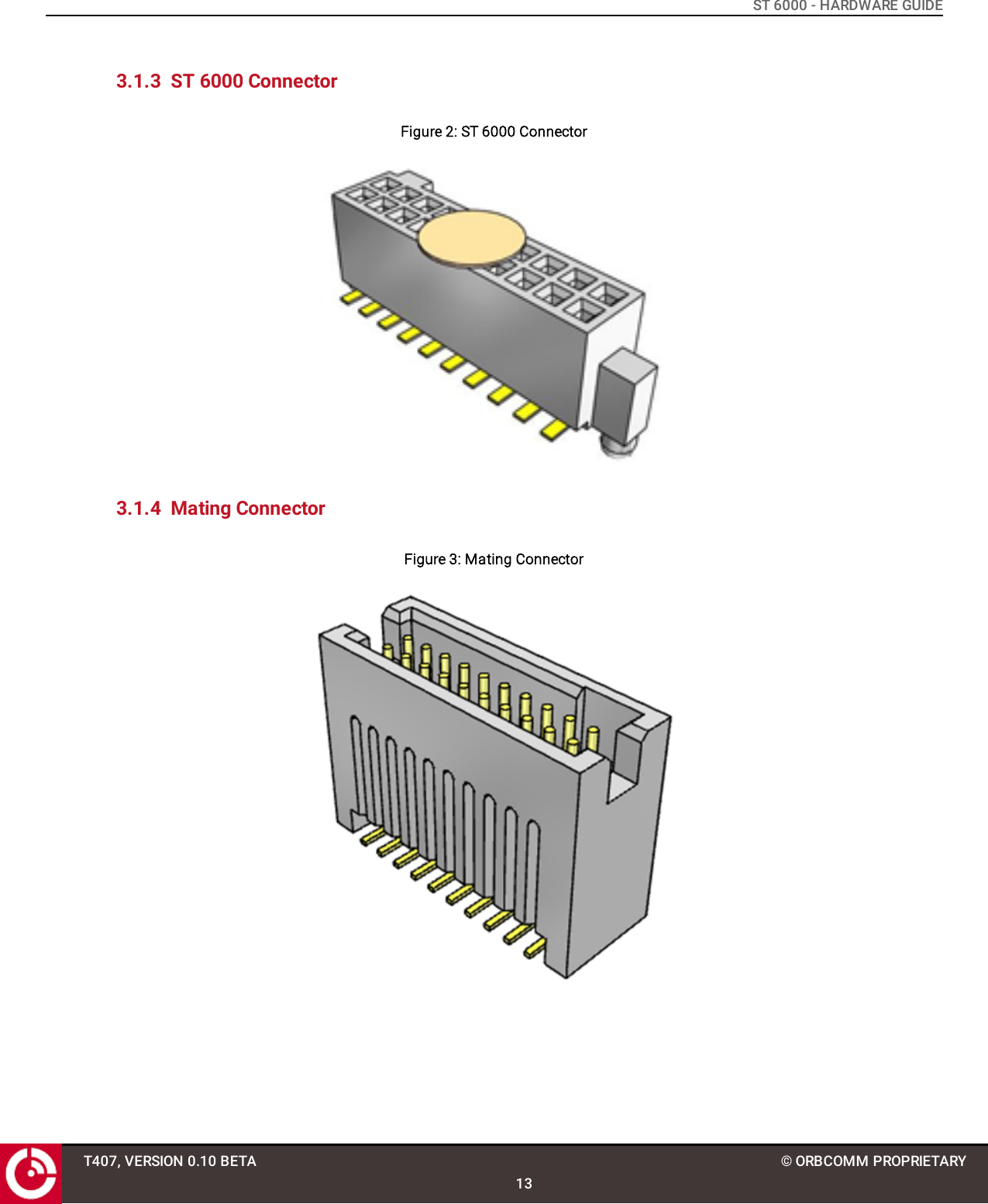
ST 6000 - HARDWARE GUIDE3 SPECIFICATIONS3.1 Connectors3.1.1 ST 6000 Connector DetailsSee Table 1 for ST 6000 connector details.Table 1: Connector DetailsParameterManufacturer Part Number Samtec SFC-110-T2-L-D-A-K-TRConnector Rectangular, shrouded female socket, SMTTemperature Rating -55°C to +125°CInsulator Material Black Liquid Crystal PolymerContact Material Phosphor BronzeConfiguration 2 x 10, SMT connectorContact Rating 3.1 A per pin3.1.2 Mating Connector DetailsThe ST 6000 requires a mating connector (not included), see Table 2.Table 2: Mating Connector DetailsParameterManufacturer Part Number Samtec TFC-110-32-L-DConnector Rectangular, shrouded male header, SMTTemperature Rating -55°C to +125°CInsulator Material Black Liquid Crystal PolymerDevice Material Phosphor BronzeContact Rating 3.1 A per pinT407, VERSION 0.10 BETA12© ORBCOMM PROPRIETARY
ST 6000 - HARDWARE GUIDE3.1.3 ST 6000 ConnectorFigure 2: ST 6000 Connector3.1.4 Mating ConnectorFigure 3: Mating ConnectorT407, VERSION 0.10 BETA13© ORBCOMM PROPRIETARY
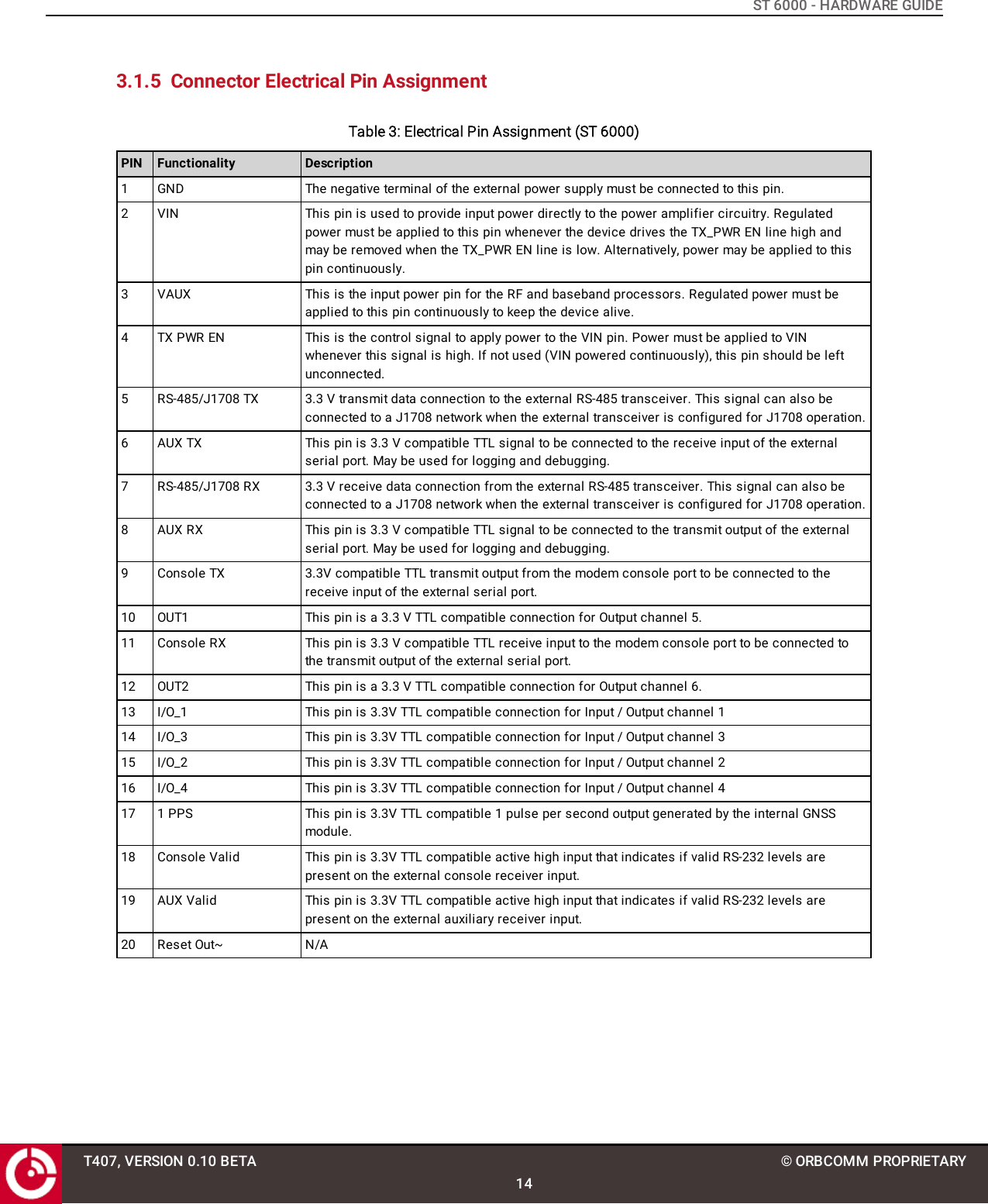
ST 6000 - HARDWARE GUIDE3.1.5 Connector Electrical Pin AssignmentTable 3: Electrical Pin Assignment (ST 6000)PIN Functionality Description1 GND The negative terminal of the external power supply must be connected to this pin.2 VIN This pin is used to provide input power directly to the power amplifier circuitry. Regulatedpower must be applied to this pin whenever the device drives the TX_PWR EN line high andmay be removed when the TX_PWR EN line is low. Alternatively, power may be applied to thispin continuously.3 VAUX This is the input power pin for the RF and baseband processors. Regulated power must beapplied to this pin continuously to keep the device alive.4 TX PWR EN This is the control signal to apply power to the VIN pin. Power must be applied to VINwhenever this signal is high. If not used (VIN powered continuously), this pin should be leftunconnected.5 RS-485/J1708 TX 3.3 V transmit data connection to the external RS-485 transceiver. This signal can also beconnected to a J1708 network when the external transceiver is configured for J1708 operation.6 AUX TX This pin is 3.3 V compatible TTL signal to be connected to the receive input of the externalserial port. May be used for logging and debugging.7 RS-485/J1708 RX 3.3 V receive data connection from the external RS-485 transceiver. This signal can also beconnected to a J1708 network when the external transceiver is configured for J1708 operation.8 AUX RX This pin is 3.3 V compatible TTL signal to be connected to the transmit output of the externalserial port. May be used for logging and debugging.9 Console TX 3.3V compatible TTL transmit output from the modem console port to be connected to thereceive input of the external serial port.10 OUT1 This pin is a 3.3 V TTL compatible connection for Output channel 5.11 Console RX This pin is 3.3 V compatible TTL receive input to the modem console port to be connected tothe transmit output of the external serial port.12 OUT2 This pin is a 3.3 V TTL compatible connection for Output channel 6.13 I/O_1 This pin is 3.3V TTL compatible connection for Input / Output channel 114 I/O_3 This pin is 3.3V TTL compatible connection for Input / Output channel 315 I/O_2 This pin is 3.3V TTL compatible connection for Input / Output channel 216 I/O_4 This pin is 3.3V TTL compatible connection for Input / Output channel 417 1 PPS This pin is 3.3V TTL compatible 1 pulse per second output generated by the internal GNSSmodule.18 Console Valid This pin is 3.3V TTL compatible active high input that indicates if valid RS-232 levels arepresent on the external console receiver input.19 AUX Valid This pin is 3.3V TTL compatible active high input that indicates if valid RS-232 levels arepresent on the external auxiliary receiver input.20 Reset Out~ N/AT407, VERSION 0.10 BETA14© ORBCOMM PROPRIETARY
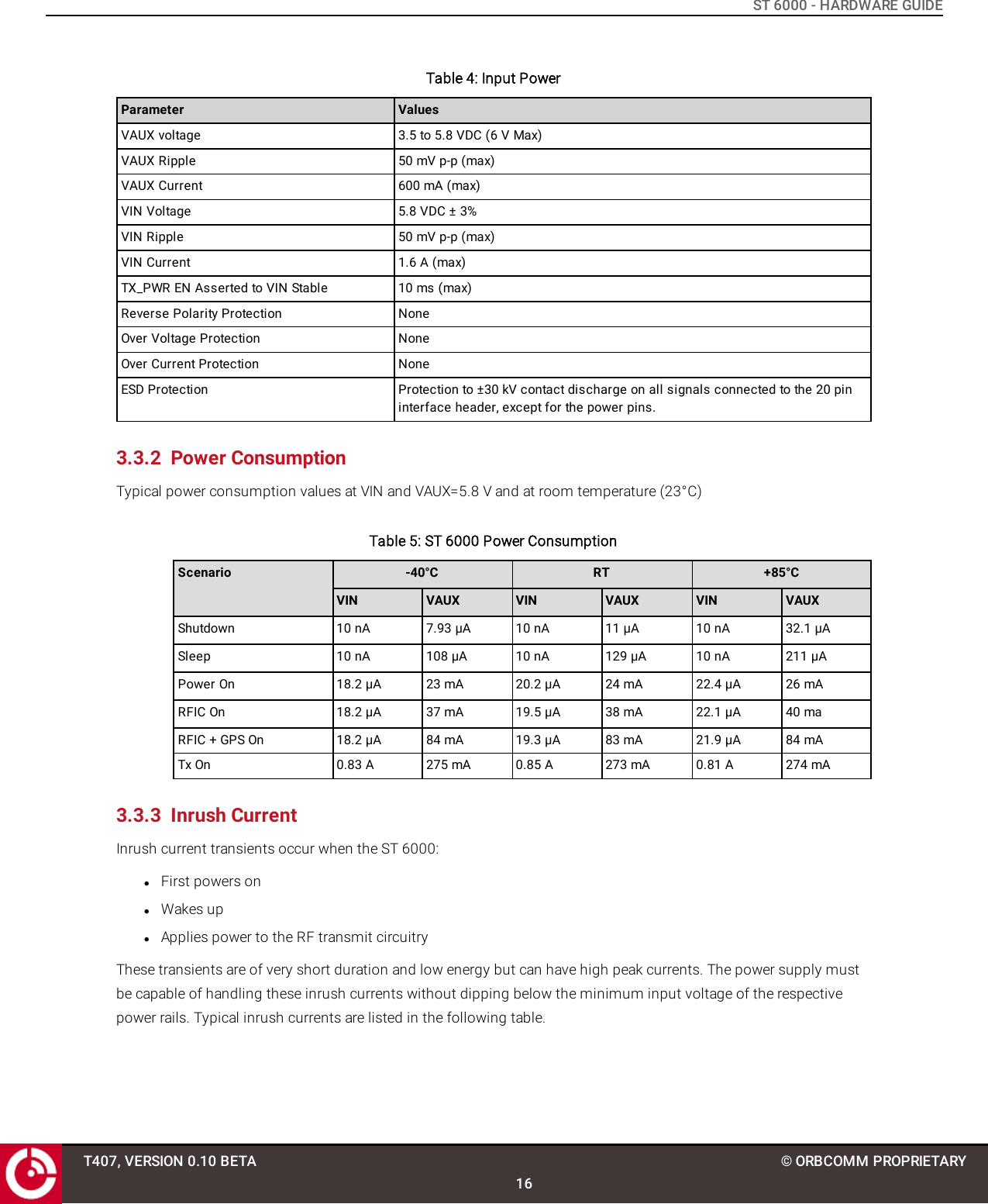
ST 6000 - HARDWARE GUIDE3.2 AntennaThe ST 6000 supports two standard onboard antennas: Main and Diversity. Refer to [T406] for general antennaspecifications.Figure 4: Onboard Antennas3.3 Power3.3.1 Input PowerThe ST 6000 has two power input pins (VAUX and VIN), and can be powered from either a single or dual external DCpower source.VAUX supplies power to the ST 6000 baseband and RF processors. Regulated power must be applied to this pincontinuously to keep the device alive and synchronized with the satellite network.VIN is the input power pin for the RF power amplifier circuitry. Regulated power must be applied to this pin wheneverthe device drives the TX_PWR EN line high and may be removed when the TX_PWR EN line is low. Alternatively, powermay be applied to this pin continuously and TX_PWR_EN ignored.Note: Input power protection is not provided on the ST 6000.T407, VERSION 0.10 BETA15© ORBCOMM PROPRIETARY
ST 6000 - HARDWARE GUIDETable 4: Input PowerParameter ValuesVAUX voltage 3.5 to 5.8 VDC (6 V Max)VAUX Ripple 50 mV p-p (max)VAUX Current 600 mA (max)VIN Voltage 5.8 VDC ± 3%VIN Ripple 50 mV p-p (max)VIN Current 1.6 A (max)TX_PWR EN Asserted to VIN Stable 10 ms (max)Reverse Polarity Protection NoneOver Voltage Protection NoneOver Current Protection NoneESD Protection Protection to ±30 kV contact discharge on all signals connected to the 20 pininterface header, except for the power pins.3.3.2 Power ConsumptionTypical power consumption values at VIN and VAUX=5.8 V and at room temperature (23°C)Table 5: ST 6000 Power ConsumptionScenario -40°C RT +85°CVIN VAUX VIN VAUX VIN VAUXShutdown 10 nA 7.93 µA 10 nA 11 µA 10 nA 32.1 µASleep 10 nA 108 µA 10 nA 129 µA 10 nA 211 µAPower On 18.2 µA 23 mA 20.2 µA 24 mA 22.4 µA 26 mARFIC On 18.2 µA 37 mA 19.5 µA 38 mA 22.1 µA 40 maRFIC + GPS On 18.2 µA 84 mA 19.3 µA 83 mA 21.9 µA 84 mATx On 0.83 A 275 mA 0.85 A 273 mA 0.81 A 274 mA3.3.3 Inrush CurrentInrush current transients occur when the ST 6000:lFirst powers onlWakes uplApplies power to the RF transmit circuitryThese transients are of very short duration and low energy but can have high peak currents. The power supply mustbe capable of handling these inrush currents without dipping below the minimum input voltage of the respectivepower rails. Typical inrush currents are listed in the following table.T407, VERSION 0.10 BETA16© ORBCOMM PROPRIETARY
ST 6000 - HARDWARE GUIDETable 6: Inrush CurrentScenario1-40°C RT +85°CVIN VAUX VIN VAUX VIN VAUXPower Application - 1.71 A(<343µs)- 1.9 A(<263µs)- 1.6 A (<263µs)RFIC On - 1.4 A (<333µs) - 2 A (<243µs) - 1.7 A (<253µs)GPS On - 1 A (<243µs) - 1 A (<173µs) - 1 A (<212µs)Tx Activation (with mainantenna)1.5 A(<1ms)0.7 A (<262µs) 1.7 A(<1ms)0.6 A(<105µs)0.85 A(<1ms)0.35 A(<425µs)3.4 Input/OutputThe ST 6000 I/Os are each independently operable and configurable in one of the following modes:lAnalog inputlDigital inputlDigital output – push pullThe ST 6000 is equipped with various I/O ports. Refer to the pin number descriptions in section 3.1.5 for anexplanation of each I/O signal. To connect these ports to an external device you may need to use a suitable translatordepending on what the signal is connected to.The I/O electrical characteristics of this interface are shown in Table 7 and Table 8 shows the analog characteristics.Table 7: I/O Electrical CharacteristicsParameter Min. Typ. Max. UnitsInput high voltage threshold 2.31 - - VInput low voltage threshold - - 1.155 VOutput high voltage threshold 2.8 - - VOutput low voltage threshold - - 0.5 VOutput high voltage, high drive strength - - -8 mAOutput high voltage, low drive strength - - -2 mAOutput low voltage, high drive strength - - 9 mAOutput low voltage, low drive strength - - 2 mAOUT1 and OUT2 are dedicated push-pull outputs only. These outputs may be used to drive off board circuitry capableof driving high current loads.1All VIN and VAUX measurements were performed at 5.8 V.T407, VERSION 0.10 BETA17© ORBCOMM PROPRIETARY
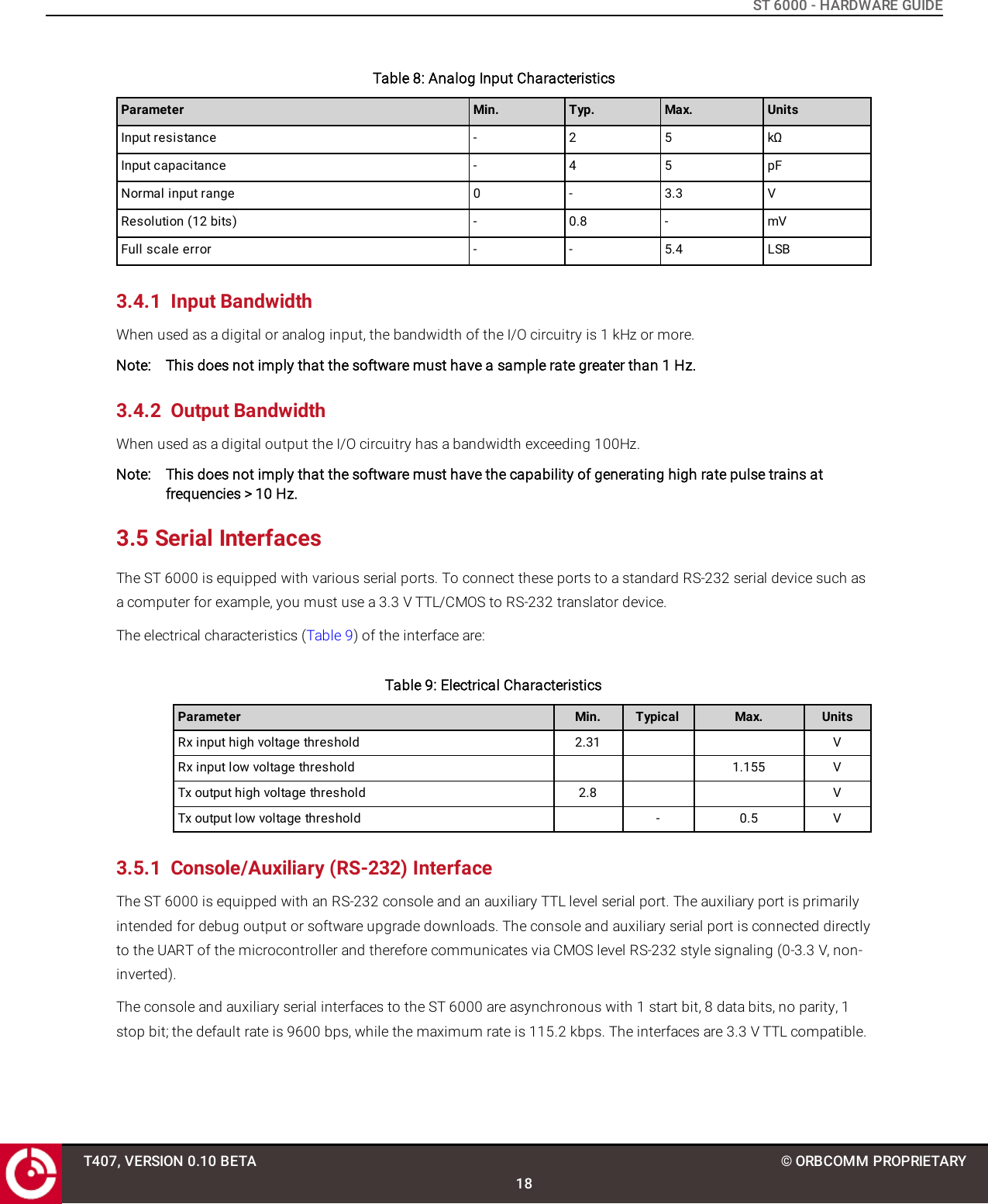
ST 6000 - HARDWARE GUIDETable 8: Analog Input CharacteristicsParameter Min. Typ. Max. UnitsInput resistance - 2 5 kΩInput capacitance - 4 5 pFNormal input range 0 - 3.3 VResolution (12 bits) - 0.8 - mVFull scale error - - 5.4 LSB3.4.1 Input BandwidthWhen used as a digital or analog input, the bandwidth of the I/O circuitry is 1 kHz or more.Note: This does not imply that the software must have a sample rate greater than 1 Hz.3.4.2 Output BandwidthWhen used as a digital output the I/O circuitry has a bandwidth exceeding 100Hz.Note: This does not imply that the software must have the capability of generating high rate pulse trains atfrequencies > 10 Hz.3.5 Serial InterfacesThe ST 6000 is equipped with various serial ports. To connect these ports to a standard RS-232 serial device such asa computer for example, you must use a 3.3 V TTL/CMOS to RS-232 translator device.The electrical characteristics (Table 9) of the interface are:Table 9: Electrical CharacteristicsParameter Min. Typical Max. UnitsRx input high voltage threshold 2.31 VRx input low voltage threshold 1.155 VTx output high voltage threshold 2.8 VTx output low voltage threshold - 0.5 V3.5.1 Console/Auxiliary (RS-232) InterfaceThe ST 6000 is equipped with an RS-232 console and an auxiliary TTL level serial port. The auxiliary port is primarilyintended for debug output or software upgrade downloads. The console and auxiliary serial port is connected directlyto the UART of the microcontroller and therefore communicates via CMOS level RS-232 style signaling (0-3.3 V, non-inverted).The console and auxiliary serial interfaces to the ST 6000 are asynchronous with 1 start bit, 8 data bits, no parity, 1stop bit; the default rate is 9600 bps, while the maximum rate is 115.2 kbps. The interfaces are 3.3 V TTL compatible.T407, VERSION 0.10 BETA18© ORBCOMM PROPRIETARY
ST 6000 - HARDWARE GUIDE3.5.2 RS-485/J1708 InterfaceThe ST 6000 has a dedicated TTL level serial port for interfacing to an RS-485/J1708 interface as an accessory busand for SCADA interfacing. The ST 6000 does not incorporate a driver and termination resistor. The RS-485 serial portis connected directly to the UART of the microcontroller and therefore communicates via 3.3 V CMOS levels.3.6 Accelerometer/GNSS/Temperature SensorThe ST 6000 supports an accelerometer, a multi-GNSS module, and a temperature sensor. Refer to [T406] for details.3.7 RF Specifications3.7.1 FrequencyParameter ValueReceiveFrequency Band 1525 to 1559 MHzModulation OQPSKSymbol Rate 3000 symbols/secondsPolarization RHCPTransmitFrequency Band 1626.5 to 1660.5 MHzModulation OQPSKSymbol Rate 900 symbols/seconds (maximum)Polarization RHCPParameter ValueMaximum EIRP 7 dBWElevation Angle 0 to 90 degreesMaximum transmit antenna gain 3.9 dBic3.8 GNSSThe manufacturer's specifications are given in the table below.T407, VERSION 0.10 BETA19© ORBCOMM PROPRIETARYTypical Output Power 1.5WWARNING: Please keep the device minimum 20cm  away from human body 3.7.2 Antenna
ST 6000 - HARDWARE GUIDETable 10: Multi-GNSS SpecificationsParameter GPS GLONASS BeiDou GPS/GLONASS GPS/BeiDouTime to First Fix1Cold Start 29 s 30 s 36 s 26 s 27 sHot Start 1 s 1 s 1 s 1 s 1 sSensitivityTracking -166 dBm -166 dBm -160 dBm -167 dBm -165 dBmHot Start -156 dBm -155 dBm -155 dBm -156 dBm -156 dBmCold Start -148 dBm -145 dBm -138 dBm -148 dBm -148 dBmAccuracyHorizontal Position(CEP) 22.5/2.0 m 4.0 m 3.0 m 2.5/2.0 m 2.5/2.0 mVelocity 0.05 m/s 0.1 m/s 0.1 m/s 0.05 m/s 0.05 m/sHeading 0.3 degrees 0.4 degrees - 0.3 degrees 0.3 degrees3.9 AccelerometerThe device has an internal 3D accelerometer to detect motion in any axis. Figure 5 shows the positive axes for theaccelerometer.1All satellites at -130 dBm2CEP, 50%, 24 hours static, -130 dBmT407, VERSION 0.10 BETA20© ORBCOMM PROPRIETARY
ST 6000 - HARDWARE GUIDEFigure 5: Accelerometer AxisThe accelerometer is very important for low power devices when it is critical to save power while stationary andquickly detect when motion starts. In powered devices where low power is not critical, GPS can be polled to detectmotion. However, for low power applications frequent GPS fixes can dominate the power budget. To reduce powerbudget effects of GPS fixes, an accelerometer can be used to trigger a GPS fix to detect if motion occurred.The accelerometer thresholds to detect motion vary depending on the environment. In order to avoid, false motiondetects, extensive testing is required to ensure that adequate acceleration magnitude thresholds and time durationsare used. Refer to [T405] for further details about the accelerometer.Table 11: Accelerometer SpecificationsParameter Condition Min. Typical Max. UnitsResolution 2 g - 3.91 - mGTracking software selectable - ±2 - g- ±4 - g- ±8 - g- ±16 - gBandwidth Filtering Selectable via digital interface 8 - 1000 HzSensitivity 2 g - 256 - LSB/g4 g - 128 - LSB/g8 g - 64 - LSB/g16 g - 32 - LSB/gT407, VERSION 0.10 BETA21© ORBCOMM PROPRIETARY
ST 6000 - HARDWARE GUIDEIf using the accelerometer, mount the device in one of the configurations shown in [T405].3.10 Mechanical3.10.1 DimensionsFigure 6: ST 6000 Top ViewFigure 7: ST 6000 Side View Dimensions (in.)T407, VERSION 0.10 BETA22© ORBCOMM PROPRIETARY
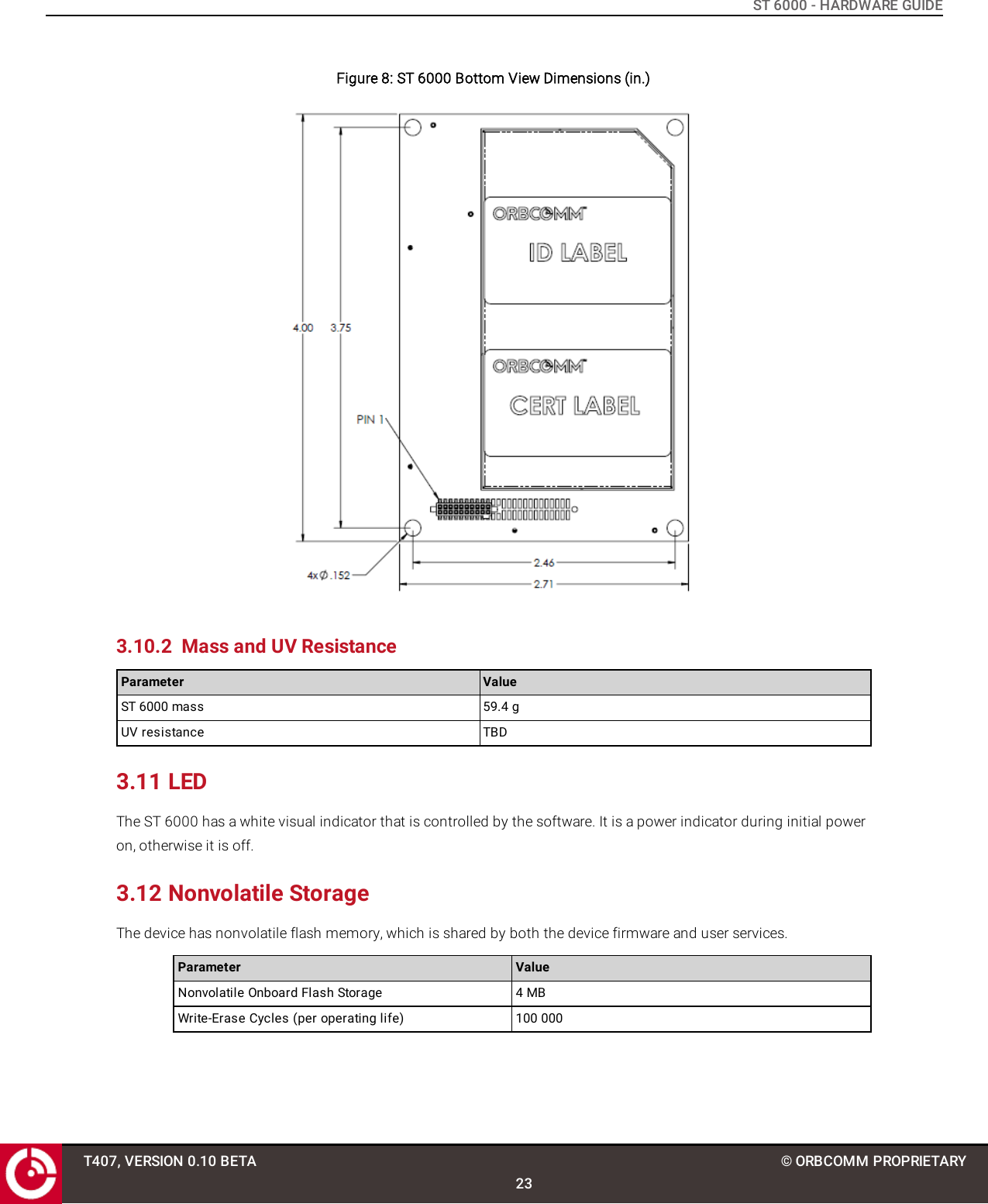
ST 6000 - HARDWARE GUIDEFigure 8: ST 6000 Bottom View Dimensions (in.)3.10.2 Mass and UV ResistanceParameter ValueST 6000 mass 59.4 gUV resistance TBD3.11 LEDThe ST 6000 has a white visual indicator that is controlled by the software. It is a power indicator during initial poweron, otherwise it is off.3.12 Nonvolatile StorageThe device has nonvolatile flash memory, which is shared by both the device firmware and user services.Parameter ValueNonvolatile Onboard Flash Storage 4 MBWrite-Erase Cycles (per operating life) 100 000T407, VERSION 0.10 BETA23© ORBCOMM PROPRIETARY
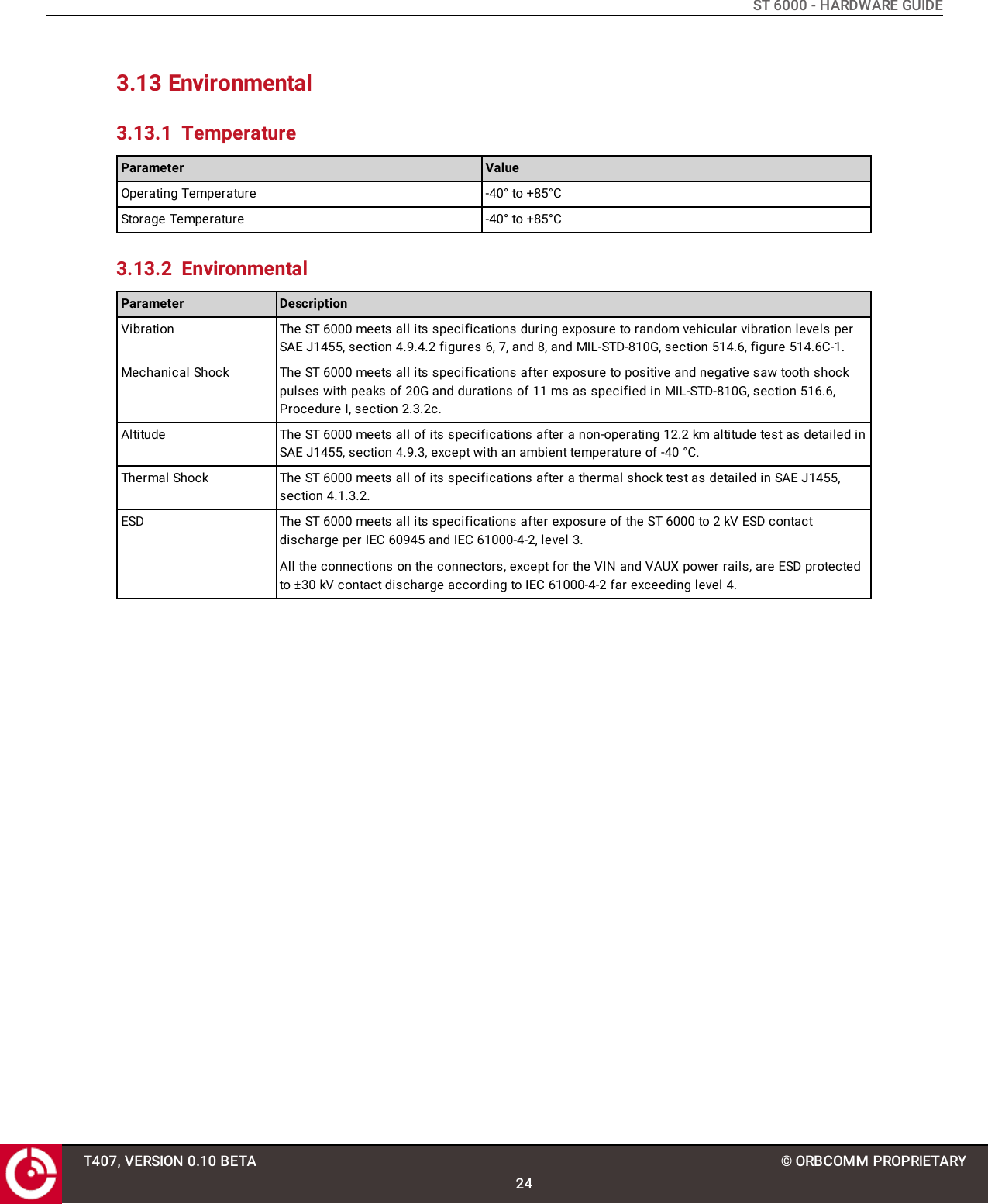
ST 6000 - HARDWARE GUIDE3.13 Environmental3.13.1 TemperatureParameter ValueOperating Temperature -40° to +85°CStorage Temperature -40° to +85°C3.13.2 EnvironmentalParameter DescriptionVibration The ST 6000 meets all its specifications during exposure to random vehicular vibration levels perSAE J1455, section 4.9.4.2 figures 6, 7, and 8, and MIL-STD-810G, section 514.6, figure 514.6C-1.Mechanical Shock The ST 6000 meets all its specifications after exposure to positive and negative saw tooth shockpulses with peaks of 20G and durations of 11 ms as specified in MIL-STD-810G, section 516.6,Procedure I, section 2.3.2c.Altitude The ST 6000 meets all of its specifications after a non-operating 12.2 km altitude test as detailed inSAE J1455, section 4.9.3, except with an ambient temperature of -40 °C.Thermal Shock The ST 6000 meets all of its specifications after a thermal shock test as detailed in SAE J1455,section 4.1.3.2.ESD The ST 6000 meets all its specifications after exposure of the ST 6000 to 2 kV ESD contactdischarge per IEC 60945 and IEC 61000-4-2, level 3.All the connections on the connectors, except for the VIN and VAUX power rails, are ESD protectedto ±30 kV contact discharge according to IEC 61000-4-2 far exceeding level 4.T407, VERSION 0.10 BETA24© ORBCOMM PROPRIETARY
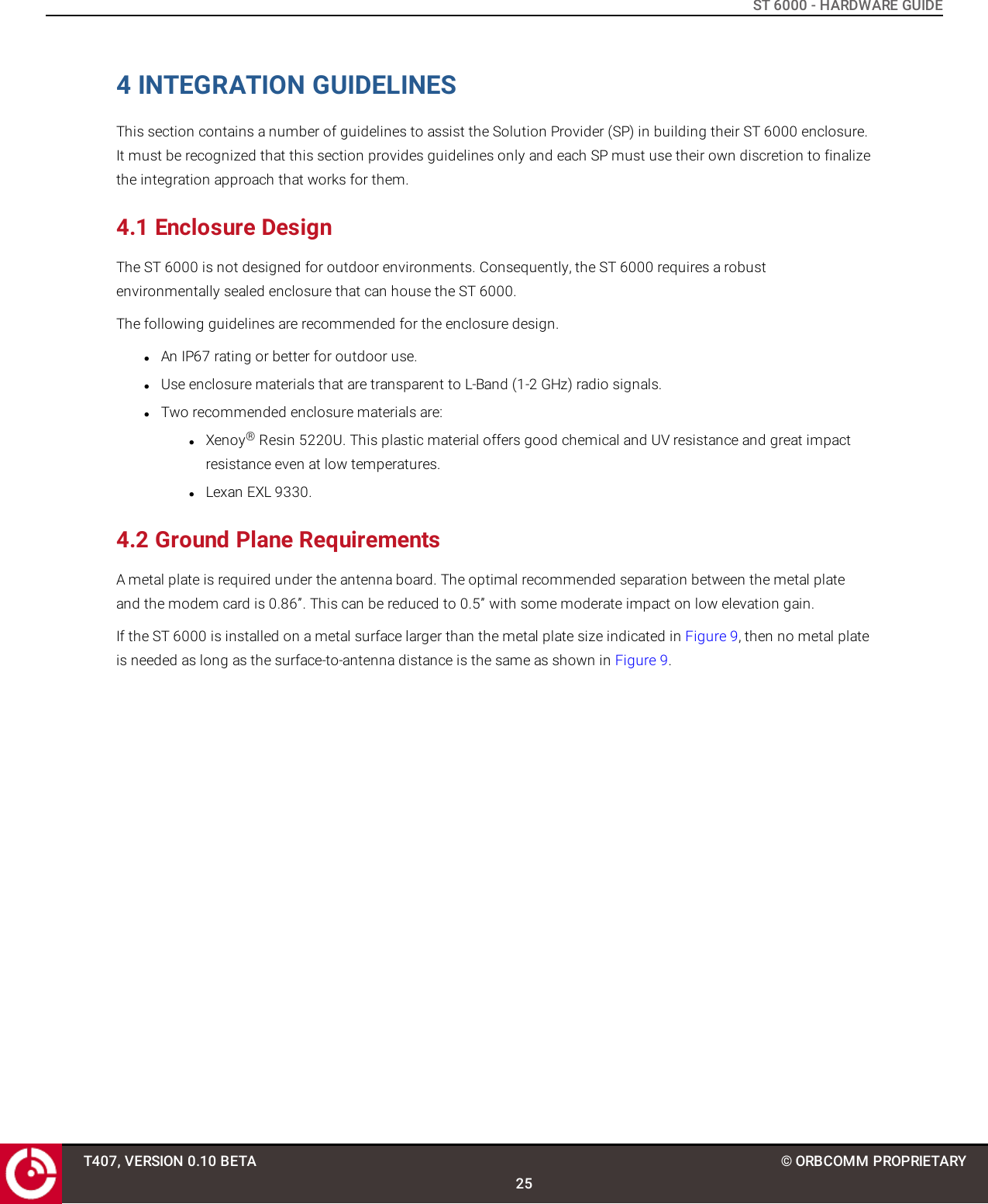
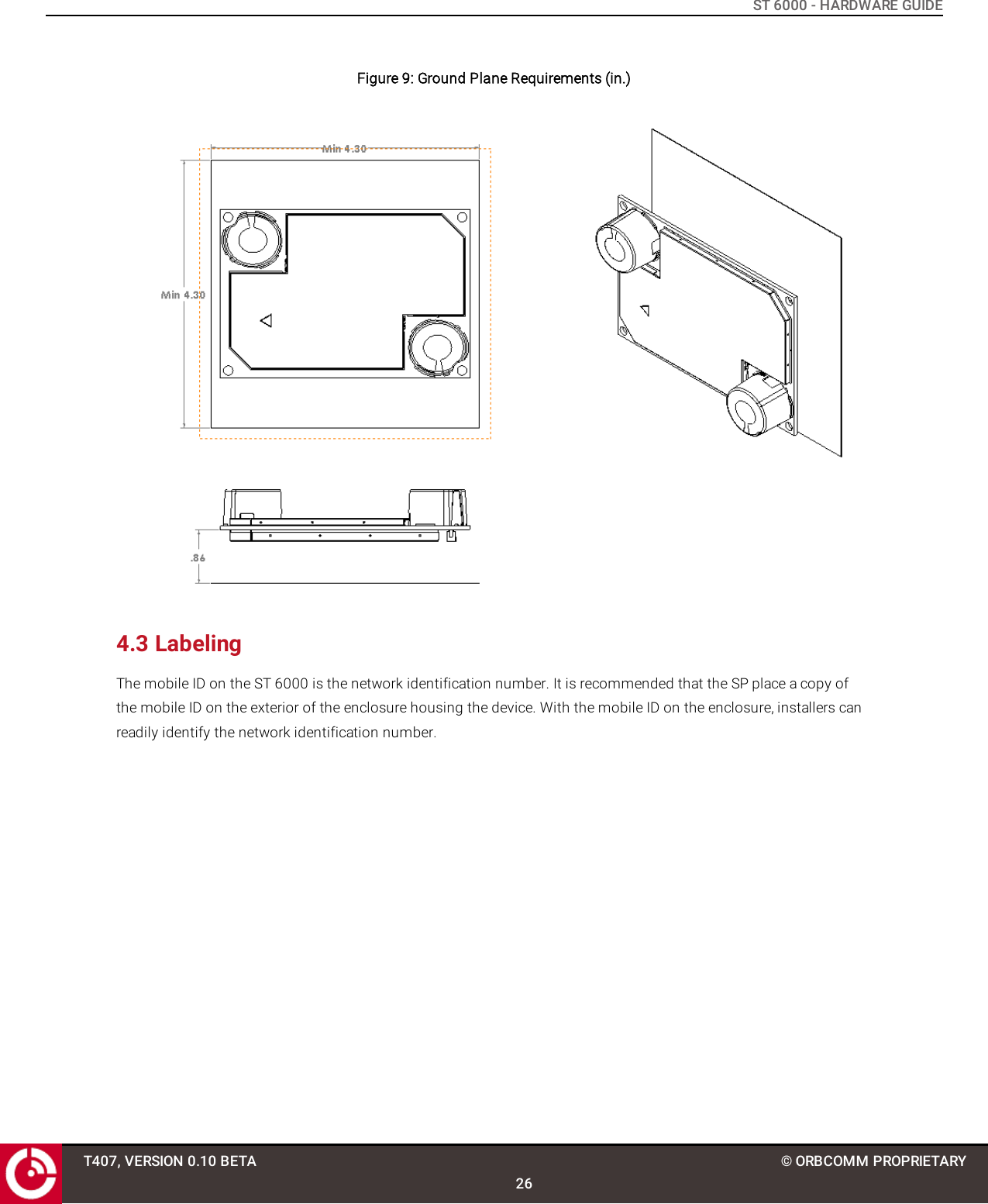
ST 6000 - HARDWARE GUIDE4 INTEGRATION GUIDELINESThis section contains a number of guidelines to assist the Solution Provider (SP) in building their ST 6000 enclosure.It must be recognized that this section provides guidelines only and each SP must use their own discretion to finalizethe integration approach that works for them.4.1 Enclosure DesignThe ST 6000 is not designed for outdoor environments. Consequently, the ST 6000 requires a robustenvironmentally sealed enclosure that can house the ST 6000.The following guidelines are recommended for the enclosure design.lAn IP67 rating or better for outdoor use.lUse enclosure materials that are transparent to L-Band (1-2 GHz) radio signals.lTwo recommended enclosure materials are:lXenoy®Resin 5220U. This plastic material offers good chemical and UV resistance and great impactresistance even at low temperatures.lLexan EXL 9330.4.2 Ground Plane RequirementsA metal plate is required under the antenna board. The optimal recommended separation between the metal plateand the modem card is 0.86”. This can be reduced to 0.5” with some moderate impact on low elevation gain.If the ST 6000 is installed on a metal surface larger than the metal plate size indicated in Figure 9, then no metal plateis needed as long as the surface-to-antenna distance is the same as shown in Figure 9.T407, VERSION 0.10 BETA25© ORBCOMM PROPRIETARY
ST 6000 - HARDWARE GUIDEFigure 9: Ground Plane Requirements (in.)4.3 LabelingThe mobile ID on the ST 6000 is the network identification number. It is recommended that the SP place a copy ofthe mobile ID on the exterior of the enclosure housing the device. With the mobile ID on the enclosure, installers canreadily identify the network identification number.T407, VERSION 0.10 BETA26© ORBCOMM PROPRIETARY

Navigation menu