PNI IFS-11428 Radar Detector User Manual ZodiacII 0903 EN

PNI Corporation Radar Detector ZodiacII 0903 EN

Contents

Users Manual for Zodiac II

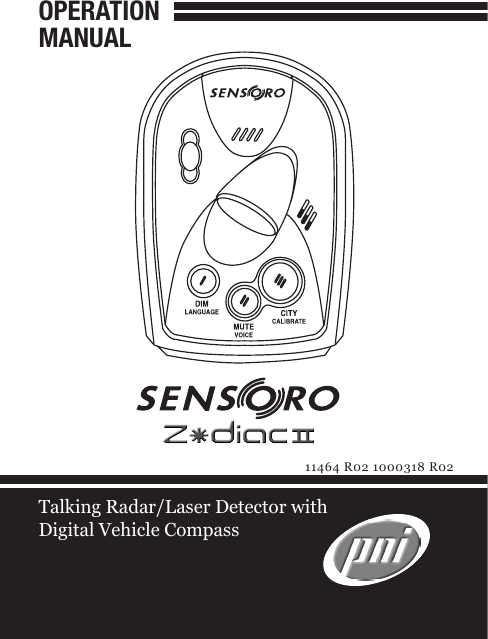
OPERATIONMANUALTalking Radar/Laser Detector with Digital Vehicle Compass11464 R02 1000318 R02
CONTENTS1Congratulations  ........................................  1Features  ..................................................................  1Package Contents  ...................................................  2Identifying Parts of the Detector  ...........................  3Installing the Detector................................  5Mounting Guidelines  .............................................  5Windshield Mounting  ............................................  6Operation  .................................................  7Power & Volume Control  .......................................  7Brightness Control  .................................................  8Voice Alert Language Selection  .............................  9Audio On/Off Selection  .........................................  9Voice On/Off Selection  ..........................................  10Highway & City Mode Selection  ............................  11Compass Calibration  .............................................  12Tutorial Mode  ........................................................  14Care and Maintenance  ..............................  16Fuse Replacement  .................................................  17Troubleshooting  .......................................  17Specications  ...........................................  19Service and Replacement  ..........................  20Warranty Information  ..............................  22
CONTENTS1CONGRATULATIONSYou  have  acquired  the  SENSORO  ZODIAC  II  from PNI  Corporation,  the  talking  radar/laser  detector  with a  digital  vehicle  compass.  The    SENSORO  ZODIAC  II incorporates  the  same  compass  technology  used  in built-in compasses for GM, Ford, and Chrysler vehicles, to provide highly accurate and reliable compass readings in a radar/laser detector.Features •  Protection against all radar/laser bands•  Alert  on  all  types  of  radar  signals:  Constant-On,   Instant-On, and POP signals•  360° laser  coverage  that  protects  you  against  laser   guns in all directions•  Undetectable  by  all  radar  detector  sensing  devices   used in the USA•  Patented  digital  compass  that  displays  8  cardinal  points: N – NE – E – SE – S – SW – W – NW•  Dual screens: detector display at front and compass  periscope display on top•  Text display backlit by LEDs•  4 driving modes: Highway1 – Highway 2 – City 1 – City 2•  4-step  brightness  control:  Bright  –  Dim  –   Dimmer – Dark•  Audio on/off (Mute off/on) selection
CONTENTS23•  Auto audio control (Auto quiet)•  Volume control by rotary thumb wheel•  Voice alert on/off selection•  Voice alert language selection – English or Spanish•  Tutorial mode that demonstrates detector operations•  Memory retention on previous user settings•  Easy-to-use windshield mounting•  Manual compass calibration•  12V DC input power – use the power cord included  in the packagePackage ContentsYour  SENSORO  ZODIAC  II  package  includes  the following components:•  The SENSORO ZODIAC II detector (1ea)•  Mounting bracket (1ea)•  Suction cups (3ea)•  Coiled 12V DC power cord (1ea)•  Operation manual (1ea)•  Quick Guide (1ea)PACKAGE CONTENTS
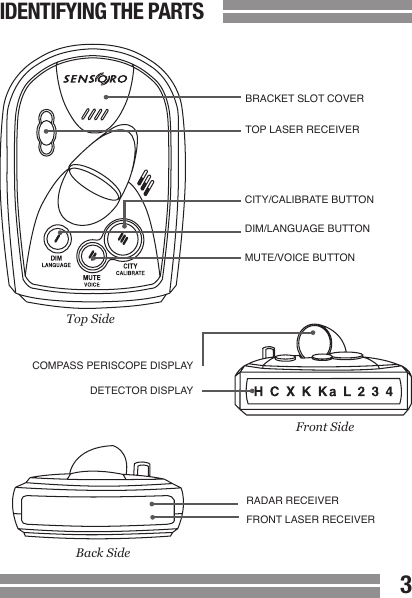
CONTENTS23IDENTIFYING THE PARTSBRACKET SLOT COVERTOP LASER RECEIVERFront SideBack SideCOMPASS PERISCOPE DISPLAYDETECTOR DISPLAYRADAR RECEIVERFRONT LASER RECEIVERTop SideCITY/CALIBRATE BUTTONDIM/LANGUAGE BUTTONMUTE/VOICE BUTTON
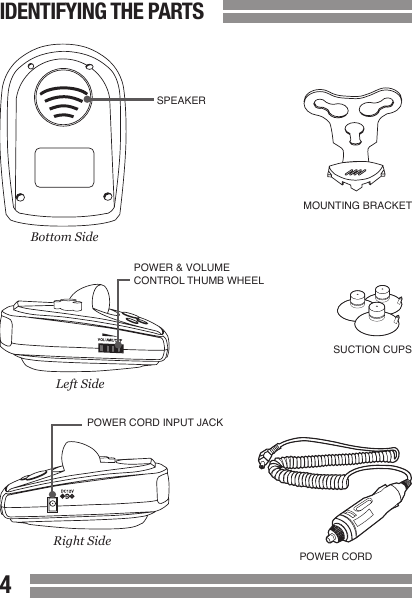
45CONTENTSIDENTIFYING THE PARTS MOUNTING BRACKETSUCTION CUPSPOWER CORDSPEAKERPOWER & VOLUME CONTROL THUMB WHEELPOWER CORD INPUT JACKBottom SideLeft SideRight Side
45CONTENTSMounting GuidelinesThe  SENSORO  ZODIAC  II  can  be  mounted  on  your windshield using the bracket provided.•  Mount  on  the  windshield  in  a  centered  location  within the driver’s reach so that the buttons can be  easily accessed.  Make sure that the mounted device  does not obstruct the view of the driver.•  Do  not  mount  behind  windshield  wipers,  metal  surfaces,  ornaments,  or  mirrored  sunscreen  glass,  as it will affect radar/laser signals. Tinted glass does  not affect radar/laser signal reception.•  Do not mount close to strong stereo speakers, as it  will affect compass accuracy.•  Conceal the  SENSORO ZODIAC II  when you leave  your  vehicle  to  prevent  theft  and  to  minimize  the  detector’s exposure to extreme temperatures, which  can temporarily impair performance.INSTALLING THE DETECTOR
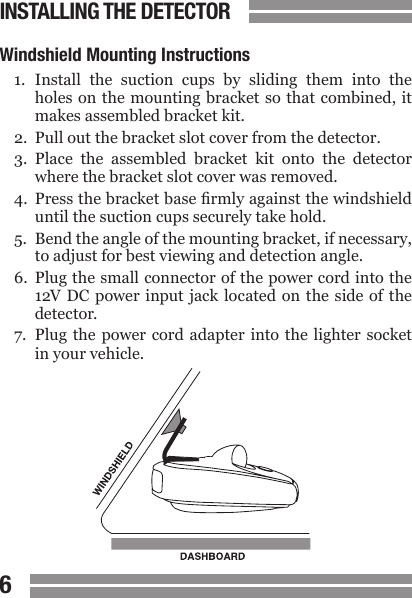
CONTENTS67CONTENTSWindshield Mounting Instructions1.  Install  the  suction  cups  by  sliding  them  into  the  holes on the mounting bracket so  that combined, it  makes assembled bracket kit.2.  Pull out the bracket slot cover from the detector.3.  Place  the  assembled  bracket  kit  onto  the  detector  where the bracket slot cover was removed.4.  Press the bracket base rmly against the windshield  until the suction cups securely take hold.5.  Bend the angle of the mounting bracket, if necessary,  to adjust for best viewing and detection angle.6.  Plug the small connector of the power cord into the  12V  DC  power  input jack  located on  the  side of  the   detector.7.  Plug  the  power  cord adapter into  the  lighter  socket   in your vehicle.INSTALLING THE DETECTOR
CONTENTS67CONTENTSPower & Volume ControlPlug the adapter of the provided 12V DC power cord into the lighter of your vehicle, and plug the small connector at the other end of the 12V DC power cord into the power jack of your detector.  This will send power to  the detector when  your  vehicle  is  running.  To  turn  on  the  detector, rotate  the  wheel  controller  (located  on  the  side  of  the detector) until you hear it click. To turn off the detector, rotate the wheel controller in the opposite direction until it clicks again. You can also use the  controller to  adjust the  volume  level  by  turning  it  up  or  down  within  the range that it does not click.•  Opening Diagnosis: The detector performs a single  loop of checking and demonstrating its audio, visual,  and voice alert capability for about 3~5 seconds each  time it is powered on.• Voice  Preamble:  While  the  opening  diagnosis  is  running,  the  voice  preamble  lets  you  know  which  user settings you used last. The user setting options  announced by voice preamble are:-  “HIGHWAY1” or “HIGHWAY2” or “CITY1” or “CITY2”-  “BRIGHT” or “DIM” or “DIMMER” or “DARK”-  “VOICE ON” or “VOICE OFF”One beep after the voice message of “HIGHWAY” means Highway1,  and  two  beeps  after  “HIGHWAY”  means Highway2. This is the same for City1 and City2 options.OPERATION
CONTENTS89CONTENTSIf the voice alert language is set to Spanish mode, the voice preamble will occur in Spanish.Even when the voice alert mode is turned off, the detector will give the voice preamble.   The voice alert “on/off” feature controls alert-related voice messages only.  Brightness ControlPress the DIM button repeatedly (for less than 2 seconds each  time)  to  toggle  between  4  different  brightness levels. The brightness options are: Bright – Dim – Dimmer – Dark.  Dark is not the complete blackout option. Once the brightness level is set, a corresponding voice message will  follow.    The  corresponding  voice  messages  are: “BRIGHT (CLARO)” or “DIM  (DEBIL)” or “DIMMER  (MAS DEBIL)”  or  “DARK  (OSCURO)”.   In  Spanish  alert  mode, the corresponding voice messages are spoken in Spanish.  The factory default mode is Bright.When a signal is detected, alerts are always displayed in Bright, regardless of the brightness level you’ve selected. The  display  returns  to  your  setting  following  the  alert. Also,  even  when  the  voice  alert  feature  is  turned  “off”, the detector will still announce which user interface you selected because it is not an alert-related message.OPERATION
CONTENTS89CONTENTSVoice Alert Language SelectionPress and hold  the LANGUAGE button (= DIM button) repeatedly (for more than 2 seconds each time) to toggle between English and Spanish mode. The factory default is English mode. Spanish mode is engaged with the voice message  of  “VOZ  ESPAÑOLA”  and  English  mode  with “ENGLISH VOICE”. You can always choose either English or Spanish for your voice  alert  system.  When  the  detector  is  set  in  English mode, it will speak only in English, and when in Spanish mode, only Spanish. Audio On/Off SelectionPress the MUTE button repeatedly (for less than 2 seconds each time) to  toggle  between  Mute  On  (Audio  Off)  and Mute Off (Audio On). The factory default mode is Mute Off.    Mute  On  is  turned  on  with  the  voice  message  of: “MUTE ON (SONIDO DESACTIVADO)” and Mute Off with: “MUTE  OFF  (SONIDO  ACTIVADO)”.    Mute  On/Off  can be used when you manually turn the  audio  alert  off,  or restored while the detector is reporting alerts.Mute  On  will  be  automatically  reset  to  Mute  Off  when you turn the detector off. Mute On does not remain in the detector’s memory. OPERATION
CONTENTS1011CONTENTS• Auto  Audio  Control:  Auto  Audio  will  have  the  detector  report  with  reduced  audio  alarms  for  continuously  detected  alerts.  When  a  signal  is  constantly  reported  for  more  than  5  seconds,  the  detector will gradually reduce the audio level in the following 5 seconds to the ambient noise level in your   vehicle.  The  reduced  audio  level  will  continue  for   new  alerts  detected  within  60  seconds  from  the   previous alert.Voice On/Off SelectionPress  and  hold  the  VOICE  button  (=  MUTE  button) repeatedly (for more than 2 seconds each time) to toggle between  Voice  On  and  Voice  Off.  The  factory  default mode  is  Voice  On.  Voice  Off  is  activated  followed  by the voice message: “VOICE  OFF  (VOZ  DESACTIVADA)” and Voice On with the voice message: “VOICE  ON  (VOZ ACTIVADA)”.Voice  alert  messages  always  occur  rst.    Audio  and visual  alert  messages  occur  next  when  the  detector is  set  to  “VOICE  ON”  mode.  When  the  detector  is  set to “VOICE  OFF” mode, you will not be notied by voice alerts, but by audio and visual alerts only.OPERATION
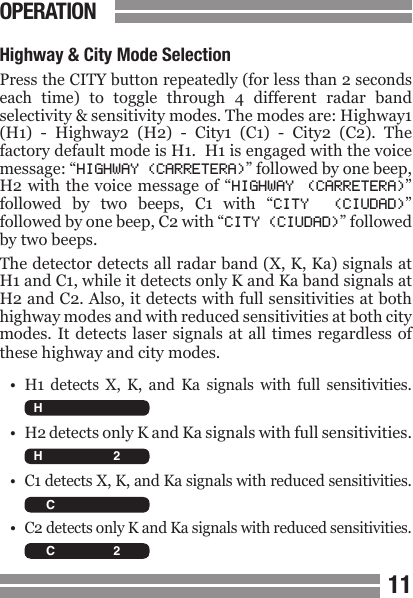
CONTENTS1011CONTENTSHighway & City Mode SelectionPress the CITY button repeatedly (for less than 2 seconds each  time)  to  toggle  through  4  different  radar  band selectivity & sensitivity modes. The modes are: Highway1 (H1)  -  Highway2  (H2)  -  City1  (C1)  -  City2  (C2).  The factory default mode is H1.  H1 is engaged with the voice message: “HIGHWAY (CARRETERA)” followed by one beep, H2 with  the voice message  of  “HIGHWAY  (CARRETERA)” followed  by  two  beeps,  C1  with  “CITY  (CIUDAD)” followed by one beep, C2 with “CITY (CIUDAD)” followed by two beeps.The detector detects all radar band (X, K, Ka) signals at H1 and C1, while it detects only K and Ka band signals at H2 and C2. Also, it detects with full sensitivities at both highway modes and with reduced sensitivities at both city modes. It  detects laser signals  at all times  regardless of these highway and city modes.•  H1  detects  X,  K,  and  Ka  signals  with  full  sensitivities.•  H2 detects only K and Ka signals with full sensitivities.•  C1 detects X, K, and Ka signals with reduced sensitivities.• C2 detects only K and Ka signals with reduced sensitivities.OPERATION  H C X K Ka L 2 3 4   H C X K Ka L 2 3 4   H C X K Ka L 2 3 4   H C X K Ka L 2 3 4
CONTENTS1213Compass CalibrationPress and hold the CALIBRATE button (= CITY button) for  more  than  2  seconds  to  access  compass  calibration mode.  In  English  mode,  the  calibration  mode  starts with  the  voice  message:  “START  YOUR  CALIBRATION” and (after 2 seconds) “DRIVE  YOUR  VEHICLE  IN  TWO COMPLETE  CIRCLES”.    In  Spanish  mode,  the  messages are:  “EMPIEZA  CALIBRAR”  and  (after  2  seconds)  “HAGA DOS  VUELTAS  ENTERAS  EN  SU  COCHE”.   The detector ashes the 4 compass LEDs one after another (clockwise) until the calibration is completed.Perform the calibration on a level surface and following these steps:•  Turn the detector on. (See Power & Volume Control .)•  Mount the detector on the windshield in your vehicle.  (See INSTALLING THE DETECTOR.)•  Press  and  hold  the  CALIBRATE  button  (=  CITY  button)  until  you  hear  the  detector  talk  and  see  it  ashing  the  compass  LEDs  clockwise,  one  after  another. •  Drive  your  vehicle  in  two  circles.  The  size  of  the  circles  and  the  direction  that  you  drive  does  not   matter. The circles  do not need  to be perfect  circles  but  must  be  completed  in  the  same  direction.  Each  circle should take  a minimum  of 20 seconds but noOPERATION
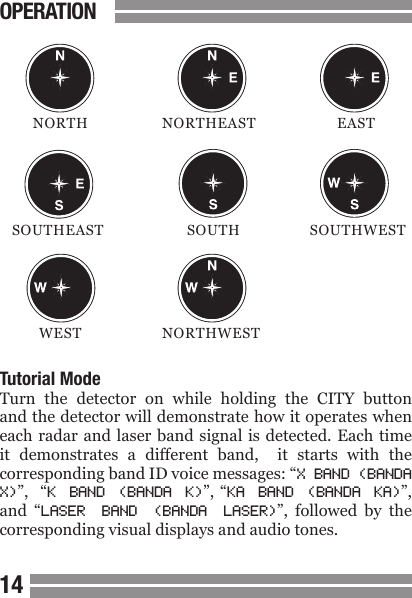
CONTENTS1213  more than 1 minute to complete.•  Press  the CALIBRATE button (=  CITY  button).  The   detector  will  end  the  compass  calibration  with  the  voice  message:  “CALIBRATION  COMPLETED”  (English mode) or “CALIBRACION LOGRADA” (Spanish  mode) and with the 4 compass LEDs ashing twice.  The  compass  screen  will  indicate  which  direction  your vehicle is pointing. Calibration is now complete.While  the  detector  is  calibrating,  the  front  screen  will remain completely blacked out.•  When  to  Calibrate:  The  compass  must  be  calibrated:-  When  the  detector  is  used  for  the  rst  time  in  a  vehicle, and-  When the detector is mounted in a new location.•  Compass Display: The compass periscope displays  8 cardinal points. (See graphics next page.)OPERATION
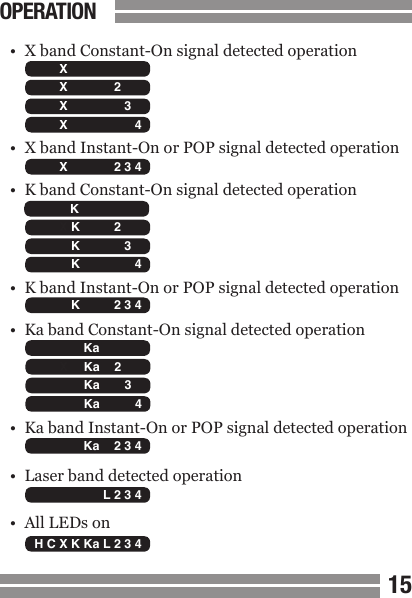
1415  NORTH  NORTHEAST  EAST SOUTHEAST  SOUTH  SOUTHWEST  WEST  NORTHWESTTutorial ModeTurn  the  detector  on  while  holding  the  CITY  button and the detector will demonstrate how it operates when each radar and laser  band signal  is detected.  Each time it  demonstrates  a  different  band,    it  starts  with  the corresponding band ID voice messages: “X BAND (BANDA X)”,   “K  BAND  (BANDA  K)”, “KA  BAND  (BANDA  KA)”, and  “LASER  BAND  (BANDA  LASER)”,  followed  by  the corresponding visual displays and audio tones.OPERATION
1415•  X band Constant-On signal detected operation•  X band Instant-On or POP signal detected operation•  K band Constant-On signal detected operation•  K band Instant-On or POP signal detected operation•  Ka band Constant-On signal detected operation•  Ka band Instant-On or POP signal detected operation•  Laser band detected operation•  All LEDs on  H C X K Ka L 2 3 4   H C X K Ka L 2 3 4   H C X K Ka L 2 3 4   H C X K Ka L 2 3 4   H C X K Ka L 2 3 4   H C X K Ka L 2 3 4   H C X K Ka L 2 3 4   H C X K Ka L 2 3 4   H C X K Ka L 2 3 4   H C X K Ka L 2 3 4   H C X K Ka L 2 3 4   H C X K Ka L 2 3 4   H C X K Ka L 2 3 4   H C X K Ka L 2 3 4   H C X K Ka L 2 3 4   H C X K Ka L 2 3 4   H C X K Ka L 2 3 4 OPERATION
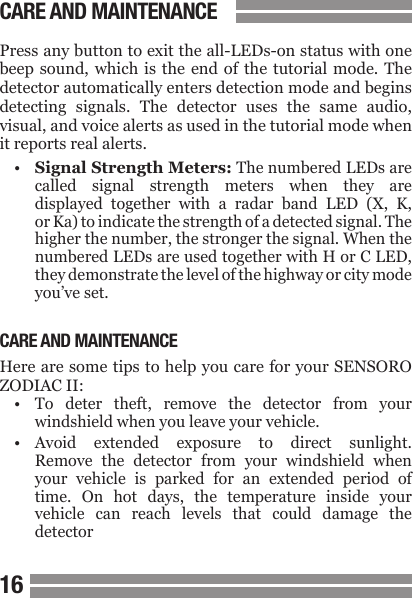
1617Press any button to exit the all-LEDs-on status with one beep sound, which  is  the  end  of  the tutorial mode. The detector automatically enters detection mode and begins detecting  signals.  The  detector  uses  the  same  audio, visual, and voice alerts as used in the tutorial mode when it reports real alerts.•  Signal Strength Meters: The numbered LEDs are  called  signal  strength  meters  when  they  are  displayed  together  with  a  radar  band  LED  (X,  K,  or Ka) to indicate the strength of a detected signal. The  higher the number, the stronger the signal. When the   numbered LEDs are used together with H or C LED,  they demonstrate the level of the highway or city mode  you’ve set.CARE AND MAINTENANCEHere are some tips to help you care for your SENSORO ZODIAC II:•  To  deter  theft,  remove  the  detector  from  your  windshield when you leave your vehicle.•  Avoid  extended  exposure  to  direct  sunlight.  Remove  the  detector  from  your  windshield  when  your  vehicle  is  parked  for  an  extended  period  of  time.  On  hot  days,  the  temperature  inside  your  vehicle  can  reach  levels  that  could  damage  the  detectorCARE AND MAINTENANCE
1617•  Do  not  expose  the  detector  to  rain,  moisture,  spray  cleaners,  or  liquids  that  could  damage  the  internal  circuitry of the detector.Fuse ReplacementThe  lighter  socket  adapter  of  the  power  cord  has  a replaceable 2-Amp SAG fuse located below the silver tip. To check or replace the fuse, slowly and carefully unscrew the tip of the plug, making sure the spring and silver tip located inside  the plug  do not y  out when  you remove the cap. Check fuse and replace if necessary.Your  SENSORO  ZODIAC  II  is  designed  for  reliable service.  If  you  encounter  a  problem,  however,  please refer to the TROUBLESHOOTING section of this manual before making a service call.TROUBLESHOOTINGThe SENSORO ZODIAC II will not power up.•  Make sure that  the  Power & Volume  On/Off thumb   wheel is turned on.•  Check all power cord connections.•  Check  the  fuse  in  the  lighter  socket  adapter  and  replace if necessary.•  Check lighter socket. Clean if dirty.•  Check your vehicle’s fuse panel (refer to your vehicle’s  manual).TROUBLESHOOTING
1819The  SENSORO  ZODIAC  II  did  not  alert  when  passing an ofcer.•  Not  all  police  cars  have  radar/laser,  or  the  radar/  laser  may not be  in  use at that  time  you passed the  ofcerThe SENSORO ZODIAC II signal is weak.•  Set the detector to H1 or H2 mode.•  Make sure the detector is level to the road.•  Make sure the radar window or the top laser receiver  is not obstructed. Move the detector if necessary.The  SENSORO  ZODIAC  II  beeps  over  bumps  or  when using vehicle’s equipment or electrical accessories, such as brakes, windshield wipers, power windows, etc.•  Check power cord for loose connections.•  Vehicle  has  electrical noise. Install a  lter  capacitor   (470µF;  35-volt,  or larger capacitance value)  on  the  back  of  the  lighter  socket  across  the  power  connection.TROUBLESHOOTING
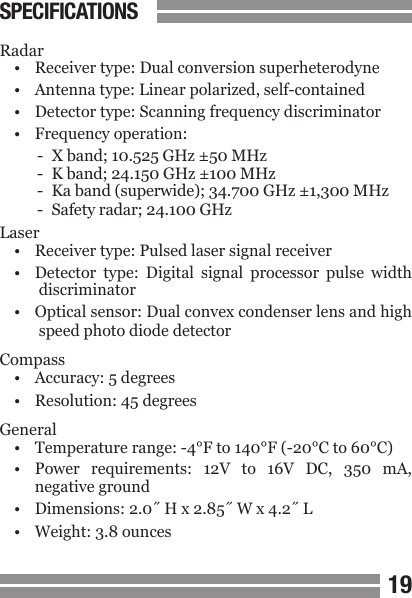
1819Radar•  Receiver type: Dual conversion superheterodyne•  Antenna type: Linear polarized, self-contained•  Detector type: Scanning frequency discriminator•  Frequency operation:-  X band; 10.525 GHz ±50 MHz-  K band; 24.150 GHz ±100 MHz-  Ka band (superwide); 34.700 GHz ±1,300 MHz-  Safety radar; 24.100 GHzLaser•  Receiver type: Pulsed laser signal receiver•  Detector  type:  Digital  signal  processor  pulse  width   discriminator•  Optical sensor: Dual convex condenser lens and high   speed photo diode detectorCompass•  Accuracy: 5 degrees•  Resolution: 45 degreesGeneral•  Temperature range: -4°F to 140°F (-20°C to 60°C)•  Power  requirements:  12V  to  16V  DC,  350  mA,  negative ground•  Dimensions: 2.0˝ H x 2.85˝ W x 4.2˝ L•  Weight: 3.8 ouncesSPECIFICATIONS
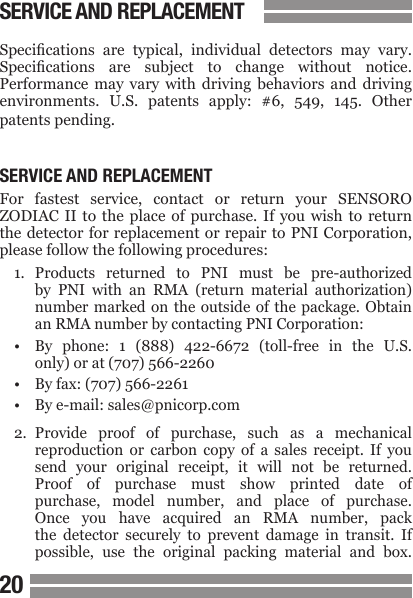
2021Specications  are  typical,  individual  detectors  may  vary. Specications  are  subject  to  change  without  notice. Performance  may  vary  with  driving  behaviors  and  driving environments.  U.S.  patents  apply:  #6,  549,  145.  Other patents pending.SERVICE AND REPLACEMENTFor  fastest  service,  contact  or  return  your  SENSORO ZODIAC  II  to  the  place of purchase. If you wish to return the detector for replacement or repair to PNI Corporation, please follow the following procedures:1.  Products  returned  to  PNI  must  be  pre-authorized  by  PNI  with  an  RMA  (return  material  authorization)  number  marked  on the  outside  of the  package. Obtain  an RMA number by contacting PNI Corporation:•  By  phone:  1  (888)  422-6672  (toll-free  in  the  U.S.  only) or at (707) 566-2260•  By fax: (707) 566-2261•  By e-mail: sales@pnicorp.com2.  Provide  proof  of  purchase,  such  as  a  mechanical  reproduction  or  carbon  copy  of  a  sales  receipt.  If  you  send  your  original  receipt,  it  will  not  be  returned.  Proof  of  purchase  must  show  printed  date  of  purchase,  model  number,  and  place  of  purchase.  Once  you  have  acquired  an  RMA  number,  pack   the  detector  securely  to  prevent  damage  in  transit.  If  possible,  use  the  original  packing  material  and  box.SERVICE AND REPLACEMENT
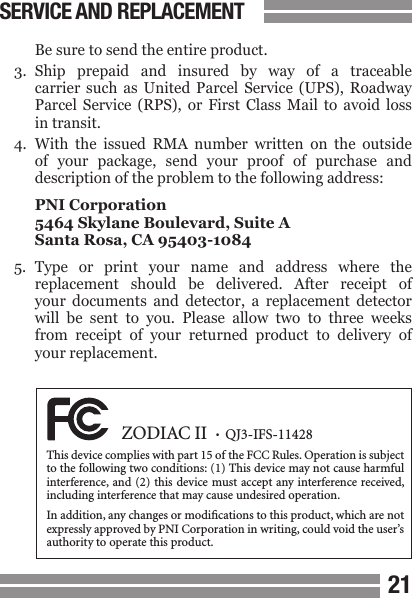
2021  Be sure to send the entire product.3.  Ship  prepaid  and  insured  by  way  of  a  traceable  carrier  such  as  United  Parcel  Service  (UPS),  Roadway  Parcel  Service  (RPS),  or  First  Class  Mail  to  avoid  loss  in transit.4.  With  the  issued  RMA  number  written  on  the  outside  of  your  package,  send  your  proof  of  purchase  and  description of the problem to the following address:  PNI Corporation  5464 Skylane Boulevard, Suite A  Santa Rosa, CA 95403-10845.  Type  or  print  your  name  and  address  where  the  replacement  should  be  delivered.  After  receipt  of  your  documents  and  detector,  a  replacement  detector  will  be  sent  to  you.  Please  allow  two  to  three  weeks  from  receipt  of  your  returned  product  to  delivery  of  your replacement. SERVICE AND REPLACEMENT  ZODIAC II  •  QJ3-IFS-11428This device complies with part 15 of the FCC Rules. Operation is subject to the following two conditions: (1) This device may not cause harmful interference, and (2) this device must accept any interference received, including interference that may cause undesired operation.In addition, any changes or modications to this product, which are not expressly approved by PNI Corporation in writing, could void the user’s authority to operate this product.
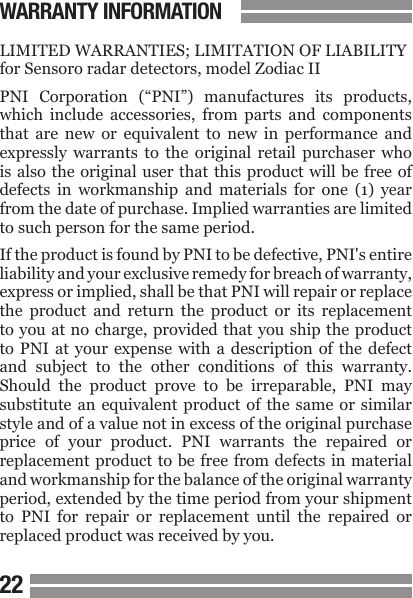
2223LIMITED WARRANTIES; LIMITATION OF LIABILITYfor Sensoro radar detectors, model Zodiac IIPNI  Corporation  (“PNI”)  manufactures  its  products, which  include  accessories,  from  parts  and  components that  are  new  or  equivalent  to  new  in  performance  and expressly  warrants  to  the  original  retail  purchaser  who is also the original user that this product will  be free  of defects  in  workmanship  and  materials  for  one  (1)  year from the date of purchase. Implied warranties are limited to such person for the same period.If the product is found by PNI to be defective, PNI's entire liability and your exclusive remedy for breach of warranty, express or implied, shall be that PNI will repair or replace the  product  and  return  the  product  or  its  replacement to you at no charge, provided that you ship the product to PNI at  your  expense  with  a  description  of  the  defect and  subject  to  the  other  conditions  of  this  warranty. Should  the  product  prove  to  be  irreparable,  PNI  may substitute an equivalent product of the same or similar style and of a value not in excess of the original purchase price  of  your  product.  PNI  warrants  the  repaired  or replacement product to be free from defects in material and workmanship for the balance of the original warranty period, extended by the time period from your shipment to  PNI  for  repair  or  replacement  until  the  repaired  or replaced product was received by you.WARRANTY INFORMATION
2223This warranty will  be void if the serial number or other identication marks on the product or its accessories have been defaced, damaged or removed. This warranty does not  cover  wear  and  tear  due  to  normal  use,  or  damage to  the  product  as  the  result  of  improper  usage,  neglect of care,  alteration,  accident  or unauthorized repair, nor does  this  warranty  apply  to  the  battery  necessary  to operate the product.This  warranty  is  extended  only  to  the  original  retail purchaser who  is  also the original  user  and may not  be transferred  or  assigned  to  subsequent  owners.  In  order to  validate  your  warranty,  you  must  provide  proof  of purchase  acceptable  to  PNI,  together  with  the  product shipped  for  warranty  repair/replacement.  Products returned to PNI must be pre-authorized by PNI with an RMA  (return  material  authorization)  number  marked on the outside of the package. Please refer to the Service and  Replacement  section  for  PNI  Corporation  contact information.THE  FOREGOING  WARRANTY  IS  GIVEN  IN  LIEU OF  AND  PNI  DISCLAIMS  ALL  OTHER  EXPRESS WARRANTIES  OR  REPRESENTATIONS  IN  FACT OR  IN  LAW  WITH  RESPECT  TO  THIS  PRODUCT, INCLUDING, BUT NOT LIMITED TO, ANY WARRANTY OR REPRESENTATION THAT USE OF THE PRODUCT WILL BE UNINTERRUPTED OR ERROR FREE.WARRANTY INFORMATION
24Except  for  the  breach  of  warranty  remedies  set  forth herein, or for personal injury, PNI shall have no liability for  any  indirect  or  speculative  damages  (including,  but not  limited  to,  consequential,  incidental,  punitive  and special damages) relating to the use of or inability to use this product, whether arising out of contract, negligence, tort, or under any warranty theory, or for infringement of any other party's intellectual property rights, irrespective of whether  PNI  had  advance notice of  the  possibility of any  such  damages,  including,  but  not  limited  to,  loss of  use,  revenue  or  prot.  In  no  event  shall  PNl's  total liability  for  all  claims  regarding  the  product  exceed  the price  paid  for  the  product.  PNI  neither  assumes  nor authorizes anyone to assume for it any other liabilities.Some  states  and  provinces  do  not  allow  limitations  on how  long  an  implied  warranty  lasts  or  the  exclusion  or limitation of incidental or consequential damages, so the above limitations or exclusions may not apply to you. This warranty gives you specic legal rights and you may have other rights that vary by state or province.WARRANTY INFORMATION

Navigation menu