Parente Fireworks Srl FIREMASTER4KR FIREMASTER IV REMOTE UNIT User Manual 2

Parente Fireworks Srl FIREMASTER IV REMOTE UNIT 2

Users Manual III

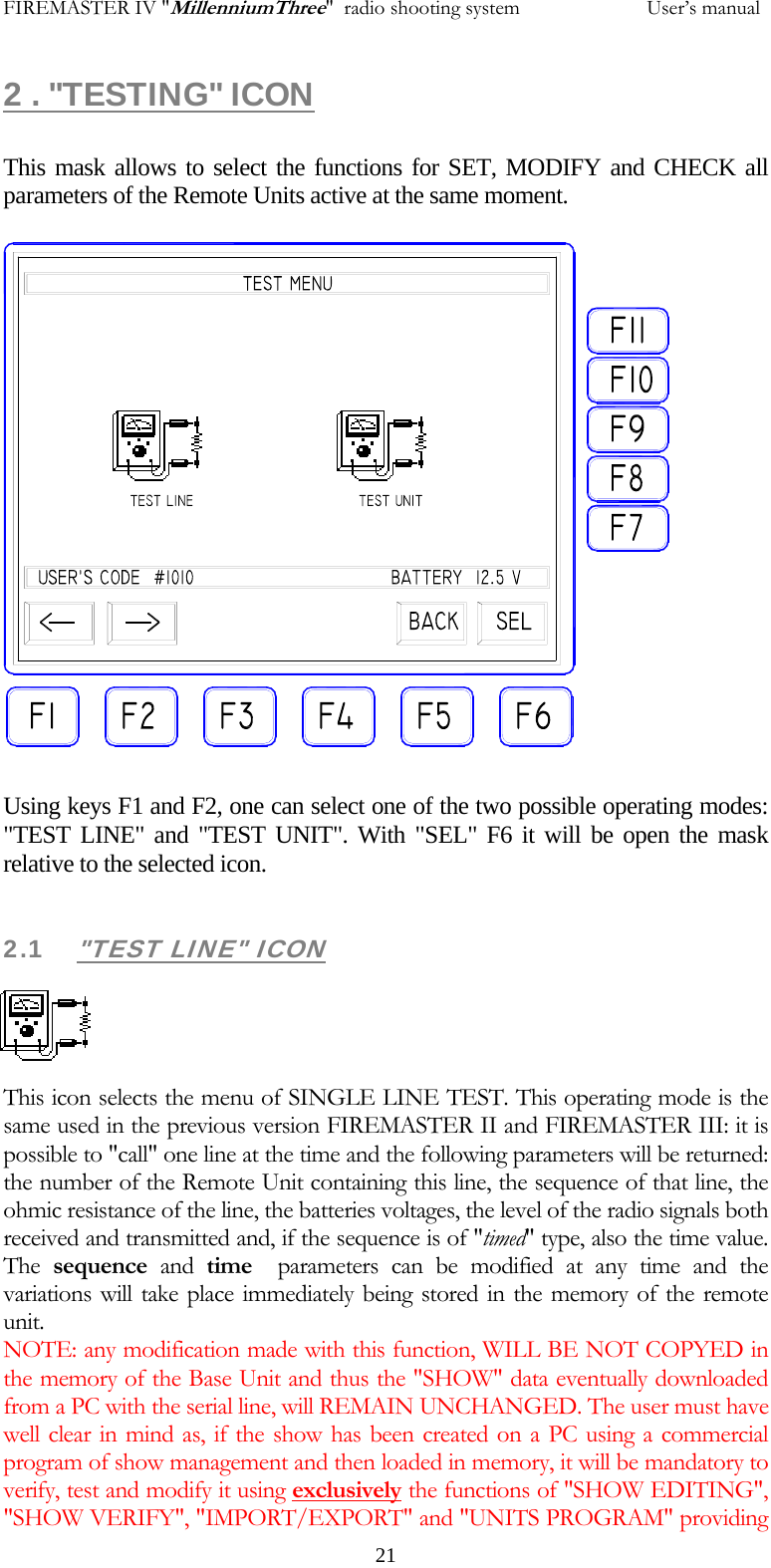
FIREMASTER IV "MillenniumThree"  radio shooting system           User’s manual2 . "TESTING" ICON  This mask allows to select the functions for SET, MODIFY and CHECK all parameters of the Remote Units active at the same moment.            Using keys F1 and F2, one can select one of the two possible operating modes: "TEST LINE" and "TEST UNIT". With "SEL" F6 it will be open the mask relative to the selected icon.  2.1 "TEST LINE" ICON     This icon selects the menu of SINGLE LINE TEST. This operating mode is the same used in the previous version FIREMASTER II and FIREMASTER III: it is possible to "call" one line at the time and the following parameters will be returned: the number of the Remote Unit containing this line, the sequence of that line, the ohmic resistance of the line, the batteries voltages, the level of the radio signals both received and transmitted and, if the sequence is of "timed" type, also the time value. The  sequence and time  parameters can be modified at any time and the variations will take place immediately being stored in the memory of the remote unit. NOTE: any modification made with this function, WILL BE NOT COPYED in the memory of the Base Unit and thus the "SHOW" data eventually downloaded from a PC with the serial line, will REMAIN UNCHANGED. The user must have well clear in mind as, if the show has been created on a PC using a commercial program of show management and then loaded in memory, it will be mandatory to verify, test and modify it using exclusively the functions of "SHOW EDITING", "SHOW VERIFY", "IMPORT/EXPORT" and "UNITS PROGRAM" providing   21
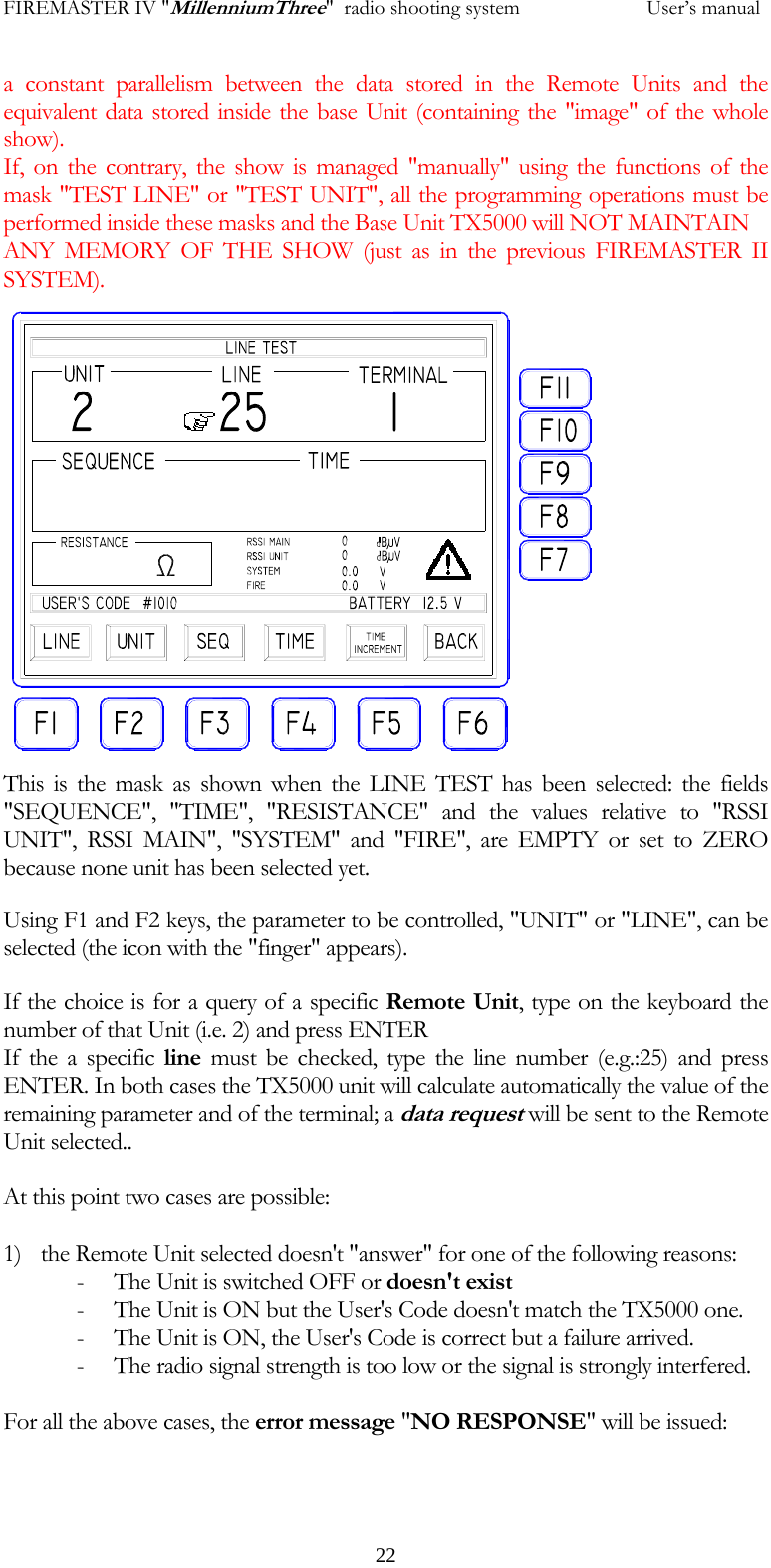
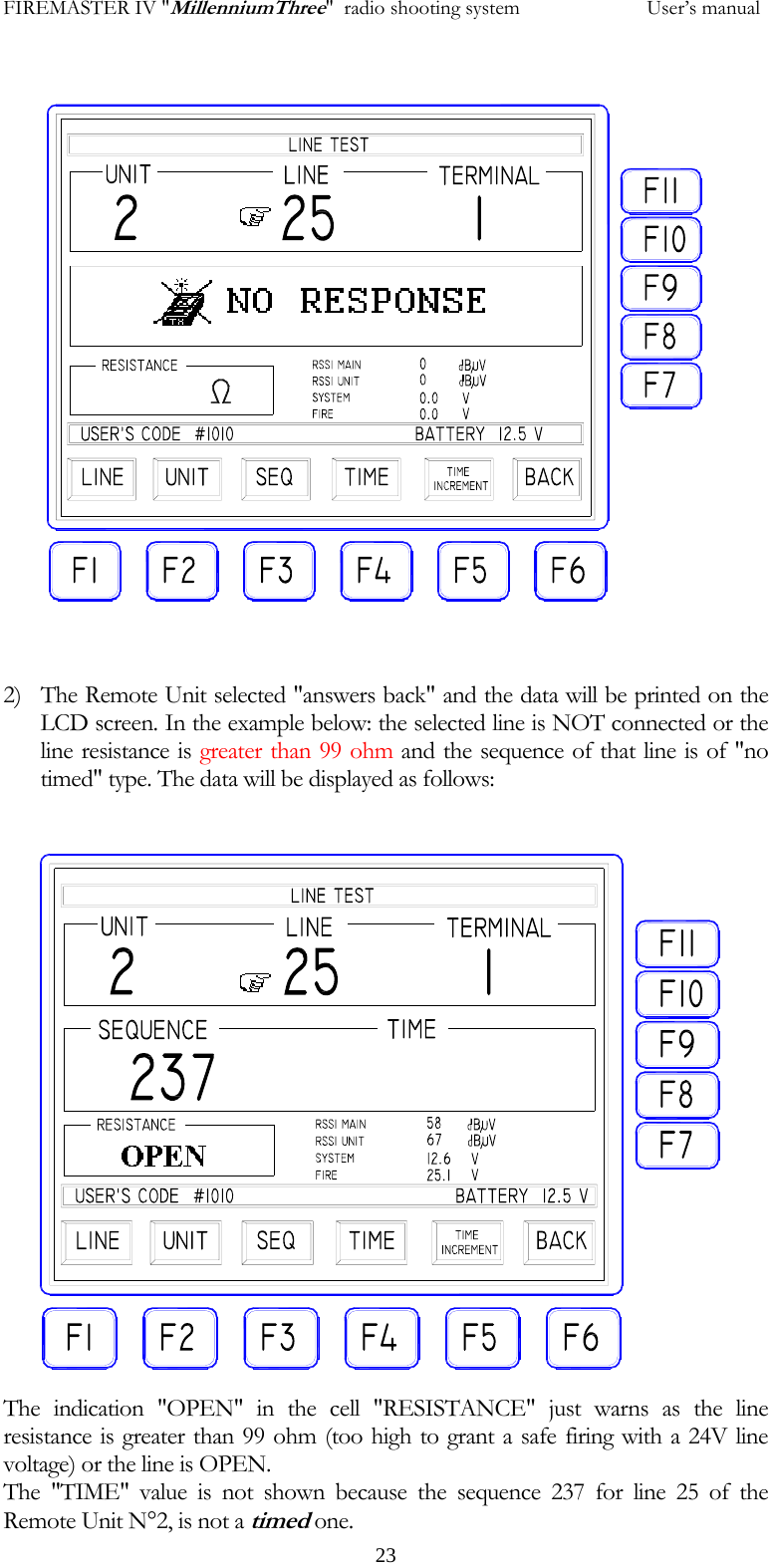
FIREMASTER IV "MillenniumThree"  radio shooting system           User’s manuala constant parallelism between the data stored in the Remote Units and the equivalent data stored inside the base Unit (containing the "image" of the whole show). If, on the contrary, the show is managed "manually" using the functions of the mask "TEST LINE" or "TEST UNIT", all the programming operations must be performed inside these masks and the Base Unit TX5000 will NOT MAINTAIN  ANY MEMORY OF THE SHOW (just as in the previous FIREMASTER II SYSTEM).   22        This is the mask as shown when the LINE TEST has been selected: the fields "SEQUENCE", "TIME", "RESISTANCE" and the values relative to "RSSI UNIT", RSSI MAIN", "SYSTEM" and "FIRE", are EMPTY or set to ZERO because none unit has been selected yet. Using F1 and F2 keys, the parameter to be controlled, "UNIT" or "LINE", can be selected (the icon with the "finger" appears). If the choice is for a query of a specific Remote Unit, type on the keyboard the number of that Unit (i.e. 2) and press ENTER If the a specific line must be checked, type the line number (e.g.:25) and press ENTER. In both cases the TX5000 unit will calculate automatically the value of the remaining parameter and of the terminal; a data request will be sent to the Remote Unit selected..  At this point two cases are possible:  1) the Remote Unit selected doesn't "answer" for one of the following reasons: - The Unit is switched OFF or doesn't exist - The Unit is ON but the User's Code doesn't match the TX5000 one. - The Unit is ON, the User's Code is correct but a failure arrived. - The radio signal strength is too low or the signal is strongly interfered.  For all the above cases, the error message "NO RESPONSE" will be issued:
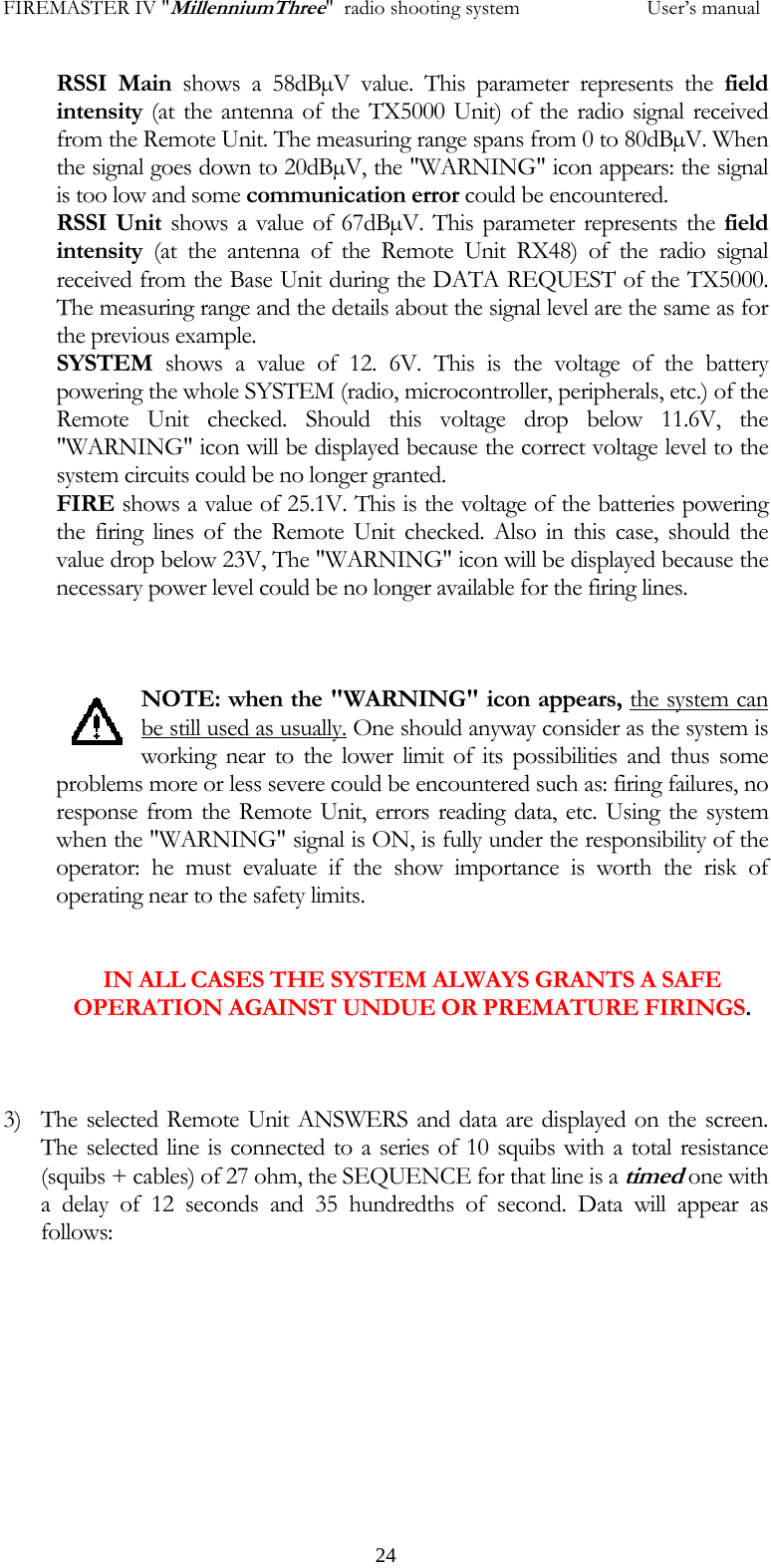
FIREMASTER IV "MillenniumThree"  radio shooting system           User’s manual     23                2) The Remote Unit selected "answers back" and the data will be printed on the LCD screen. In the example below: the selected line is NOT connected or the line resistance is greater than 99 ohm and the sequence of that line is of "no timed" type. The data will be displayed as follows:                   The indication "OPEN" in the cell "RESISTANCE" just warns as the line resistance is greater than 99 ohm (too high to grant a safe firing with a 24V line voltage) or the line is OPEN. The "TIME" value is not shown because the sequence 237 for line 25 of the Remote Unit N°2, is not a timed one.
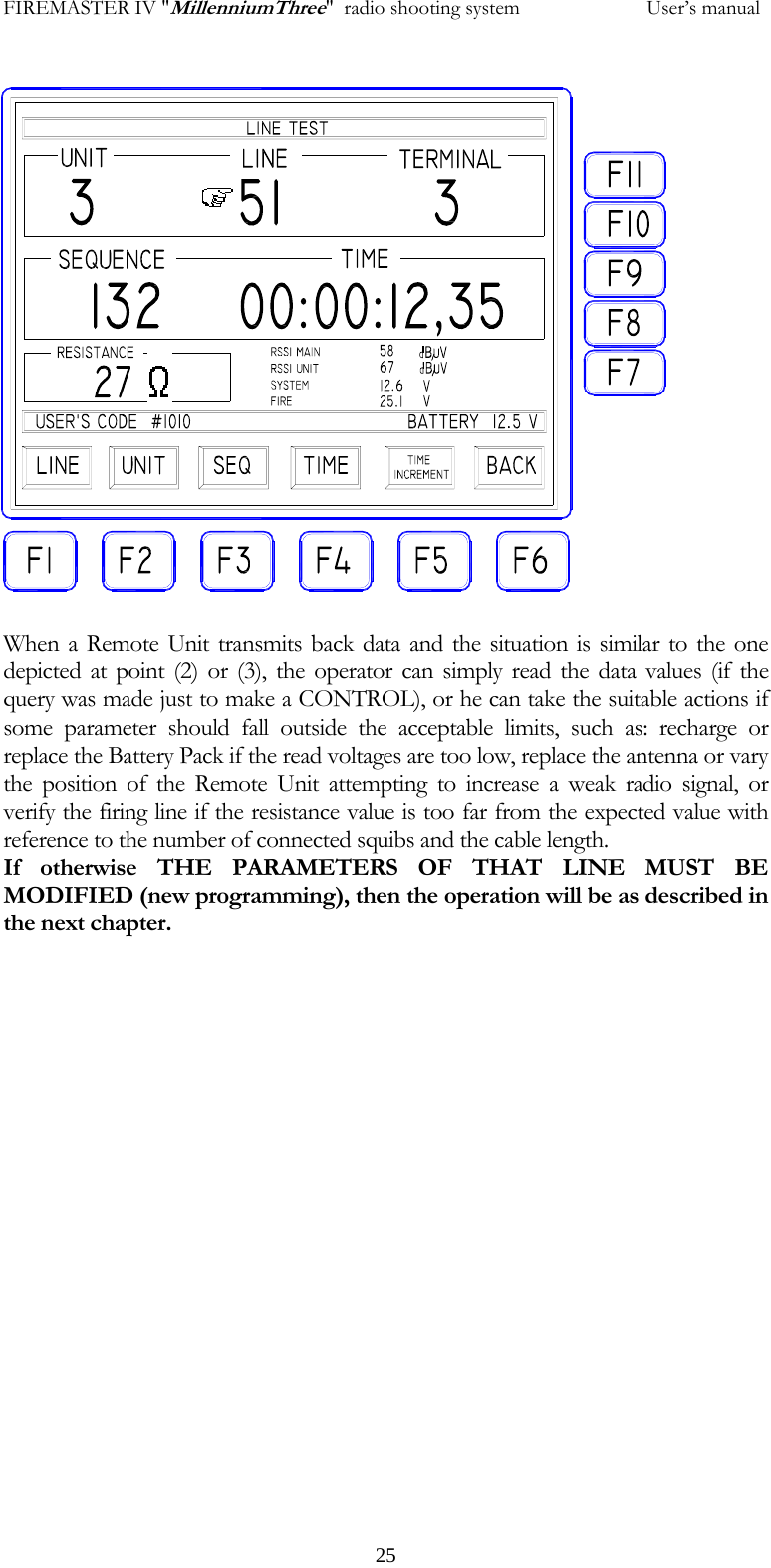
FIREMASTER IV "MillenniumThree"  radio shooting system           User’s manualRSSI Main shows a 58dBµV value. This parameter represents the field intensity (at the antenna of the TX5000 Unit) of the radio signal received from the Remote Unit. The measuring range spans from 0 to 80dBµV. When the signal goes down to 20dBµV, the "WARNING" icon appears: the signal is too low and some communication error could be encountered. RSSI Unit shows a value of 67dBµV. This parameter represents the field intensity (at the antenna of the Remote Unit RX48) of the radio signal received from the Base Unit during the DATA REQUEST of the TX5000. The measuring range and the details about the signal level are the same as for the previous example. SYSTEM  shows a value of 12. 6V. This is the voltage of the battery powering the whole SYSTEM (radio, microcontroller, peripherals, etc.) of the Remote Unit checked. Should this voltage drop below 11.6V, the "WARNING" icon will be displayed because the correct voltage level to the system circuits could be no longer granted. FIRE shows a value of 25.1V. This is the voltage of the batteries powering the firing lines of the Remote Unit checked. Also in this case, should the value drop below 23V, The "WARNING" icon will be displayed because the necessary power level could be no longer available for the firing lines.    NOTE: when the "WARNING" icon appears, the system can be still used as usually. One should anyway consider as the system is working near to the lower limit of its possibilities and thus some problems more or less severe could be encountered such as: firing failures, no response from the Remote Unit, errors reading data, etc. Using the system when the "WARNING" signal is ON, is fully under the responsibility of the operator: he must evaluate if the show importance is worth the risk of operating near to the safety limits.    IN ALL CASES THE SYSTEM ALWAYS GRANTS A SAFE OPERATION AGAINST UNDUE OR PREMATURE FIRINGS.    3) The selected Remote Unit ANSWERS and data are displayed on the screen. The selected line is connected to a series of 10 squibs with a total resistance (squibs + cables) of 27 ohm, the SEQUENCE for that line is a timed one with a delay of 12 seconds and 35 hundredths of second. Data will appear as follows:             24
FIREMASTER IV "MillenniumThree"  radio shooting system           User’s manual 25                    When a Remote Unit transmits back data and the situation is similar to the one depicted at point (2) or (3), the operator can simply read the data values (if the query was made just to make a CONTROL), or he can take the suitable actions if some parameter should fall outside the acceptable limits, such as: recharge or replace the Battery Pack if the read voltages are too low, replace the antenna or vary the position of the Remote Unit attempting to increase a weak radio signal, or verify the firing line if the resistance value is too far from the expected value with reference to the number of connected squibs and the cable length. If otherwise THE PARAMETERS OF THAT LINE MUST BE MODIFIED (new programming), then the operation will be as described in the next chapter.
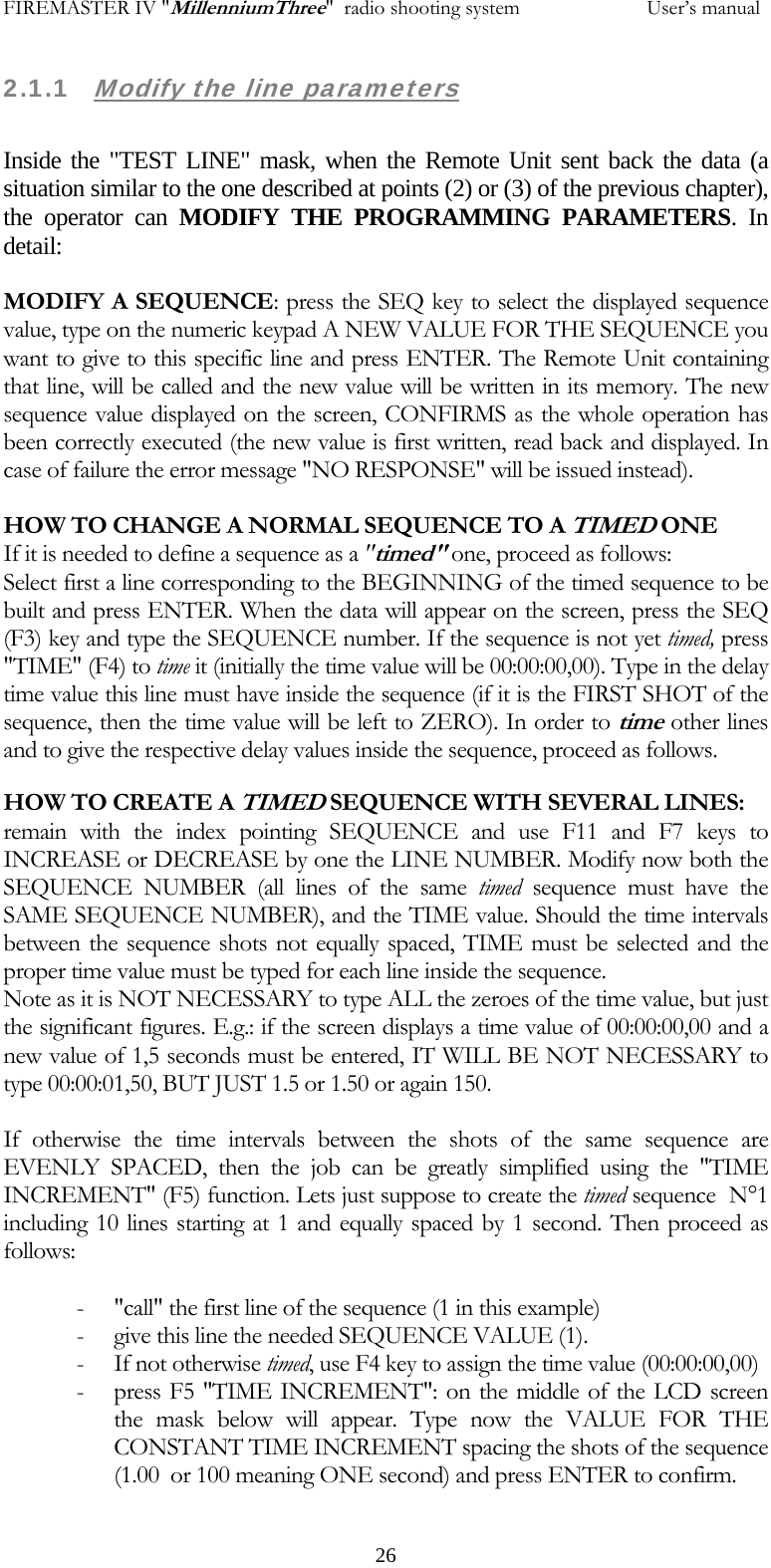
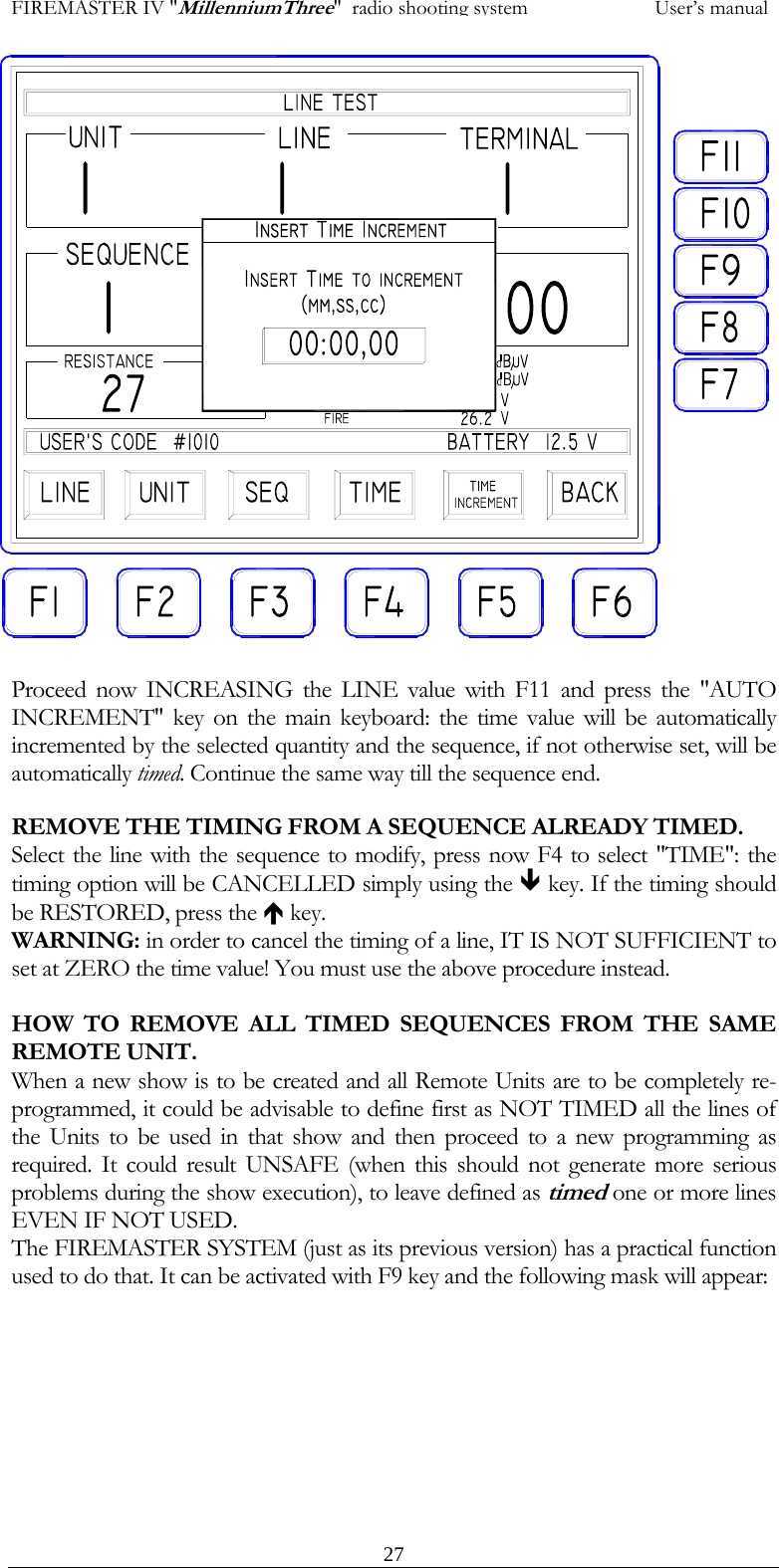
FIREMASTER IV "MillenniumThree"  radio shooting system           User’s manual2.1.1   Modify the line parameters  Inside the "TEST LINE" mask, when the Remote Unit sent back the data (a situation similar to the one described at points (2) or (3) of the previous chapter), the operator can MODIFY THE PROGRAMMING PARAMETERS. In detail:  MODIFY A SEQUENCE: press the SEQ key to select the displayed sequence value, type on the numeric keypad A NEW VALUE FOR THE SEQUENCE you want to give to this specific line and press ENTER. The Remote Unit containing that line, will be called and the new value will be written in its memory. The new sequence value displayed on the screen, CONFIRMS as the whole operation has been correctly executed (the new value is first written, read back and displayed. In case of failure the error message "NO RESPONSE" will be issued instead).  HOW TO CHANGE A NORMAL SEQUENCE TO A TIMED ONE If it is needed to define a sequence as a "timed" one, proceed as follows: Select first a line corresponding to the BEGINNING of the timed sequence to be built and press ENTER. When the data will appear on the screen, press the SEQ (F3) key and type the SEQUENCE number. If the sequence is not yet timed, press "TIME" (F4) to time it (initially the time value will be 00:00:00,00). Type in the delay time value this line must have inside the sequence (if it is the FIRST SHOT of the sequence, then the time value will be left to ZERO). In order to time other lines and to give the respective delay values inside the sequence, proceed as follows. HOW TO CREATE A TIMED SEQUENCE WITH SEVERAL LINES: remain with the index pointing SEQUENCE and use F11 and F7 keys to INCREASE or DECREASE by one the LINE NUMBER. Modify now both the SEQUENCE NUMBER (all lines of the same timed sequence must have the SAME SEQUENCE NUMBER), and the TIME value. Should the time intervals between the sequence shots not equally spaced, TIME must be selected and the proper time value must be typed for each line inside the sequence. Note as it is NOT NECESSARY to type ALL the zeroes of the time value, but just the significant figures. E.g.: if the screen displays a time value of 00:00:00,00 and a new value of 1,5 seconds must be entered, IT WILL BE NOT NECESSARY to type 00:00:01,50, BUT JUST 1.5 or 1.50 or again 150.  If otherwise the time intervals between the shots of the same sequence are EVENLY SPACED, then the job can be greatly simplified using the "TIME INCREMENT" (F5) function. Lets just suppose to create the timed sequence  N°1 including 10 lines starting at 1 and equally spaced by 1 second. Then proceed as follows:  - "call" the first line of the sequence (1 in this example) - give this line the needed SEQUENCE VALUE (1). - If not otherwise timed, use F4 key to assign the time value (00:00:00,00) - press F5 "TIME INCREMENT": on the middle of the LCD screen the mask below will appear. Type now the VALUE FOR THE CONSTANT TIME INCREMENT spacing the shots of the sequence (1.00  or 100 meaning ONE second) and press ENTER to confirm.    26
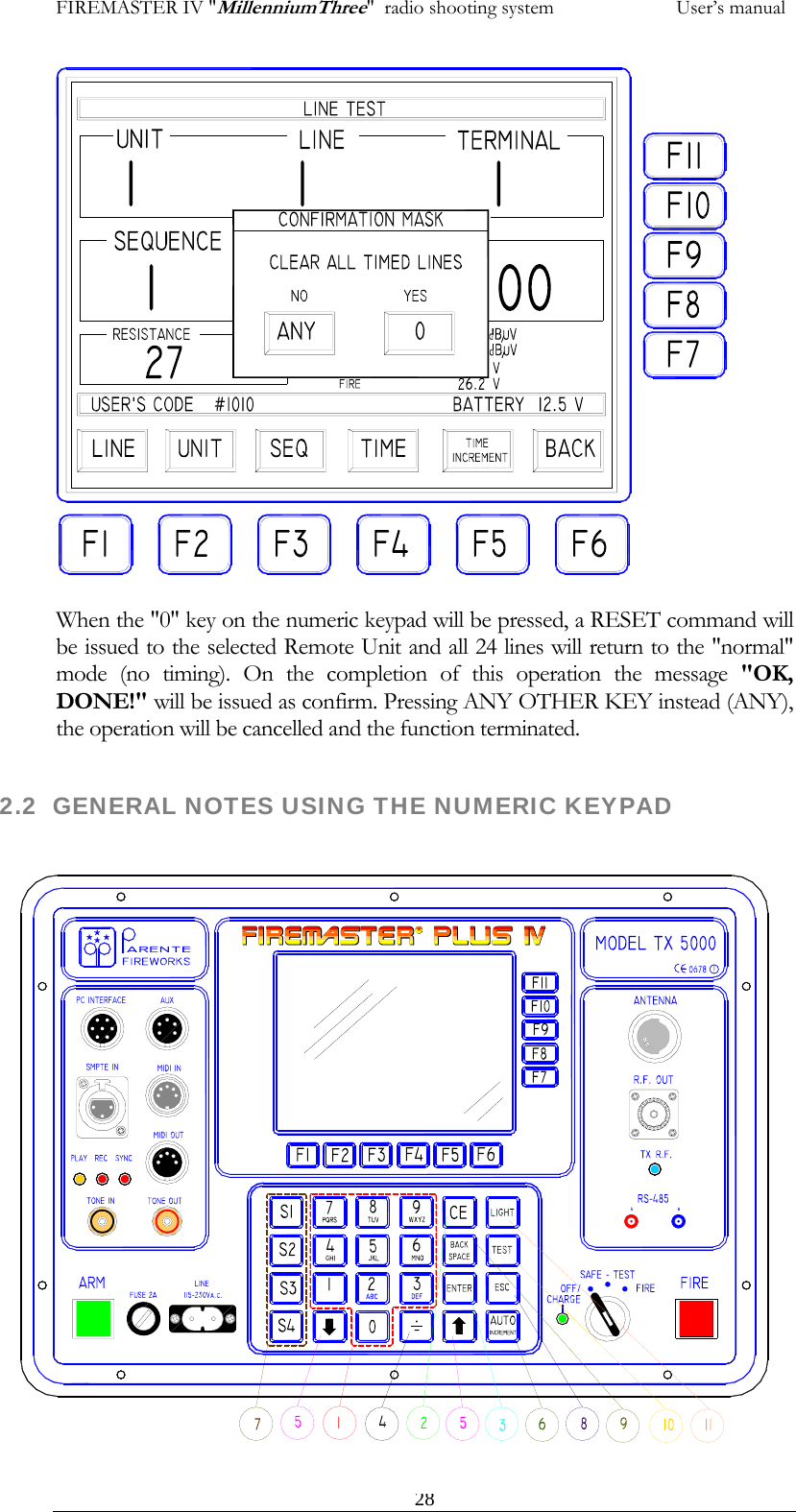
FIREMASTER IV "MillenniumThree"  radio shooting system           User’s manual                   Proceed now INCREASING the LINE value with F11 and press the "AUTO INCREMENT" key on the main keyboard: the time value will be automatically incremented by the selected quantity and the sequence, if not otherwise set, will be automatically timed. Continue the same way till the sequence end. REMOVE THE TIMING FROM A SEQUENCE ALREADY TIMED. Select the line with the sequence to modify, press now F4 to select "TIME": the timing option will be CANCELLED simply using the Ð key. If the timing should be RESTORED, press the Ï key. WARNING: in order to cancel the timing of a line, IT IS NOT SUFFICIENT to set at ZERO the time value! You must use the above procedure instead.  HOW TO REMOVE ALL TIMED SEQUENCES FROM THE SAME REMOTE UNIT. When a new show is to be created and all Remote Units are to be completely re-programmed, it could be advisable to define first as NOT TIMED all the lines of the Units to be used in that show and then proceed to a new programming as required. It could result UNSAFE (when this should not generate more serious problems during the show execution), to leave defined as timed one or more lines EVEN IF NOT USED. The FIREMASTER SYSTEM (just as its previous version) has a practical function used to do that. It can be activated with F9 key and the following mask will appear:   27
FIREMASTER IV "MillenniumThree"  radio shooting system           User’s manual                    When the "0" key on the numeric keypad will be pressed, a RESET command will be issued to the selected Remote Unit and all 24 lines will return to the "normal" mode (no timing). On the completion of this operation the message "OK, DONE!" will be issued as confirm. Pressing ANY OTHER KEY instead (ANY), the operation will be cancelled and the function terminated.   282.2  GENERAL NOTES USING THE NUMERIC KEYPAD
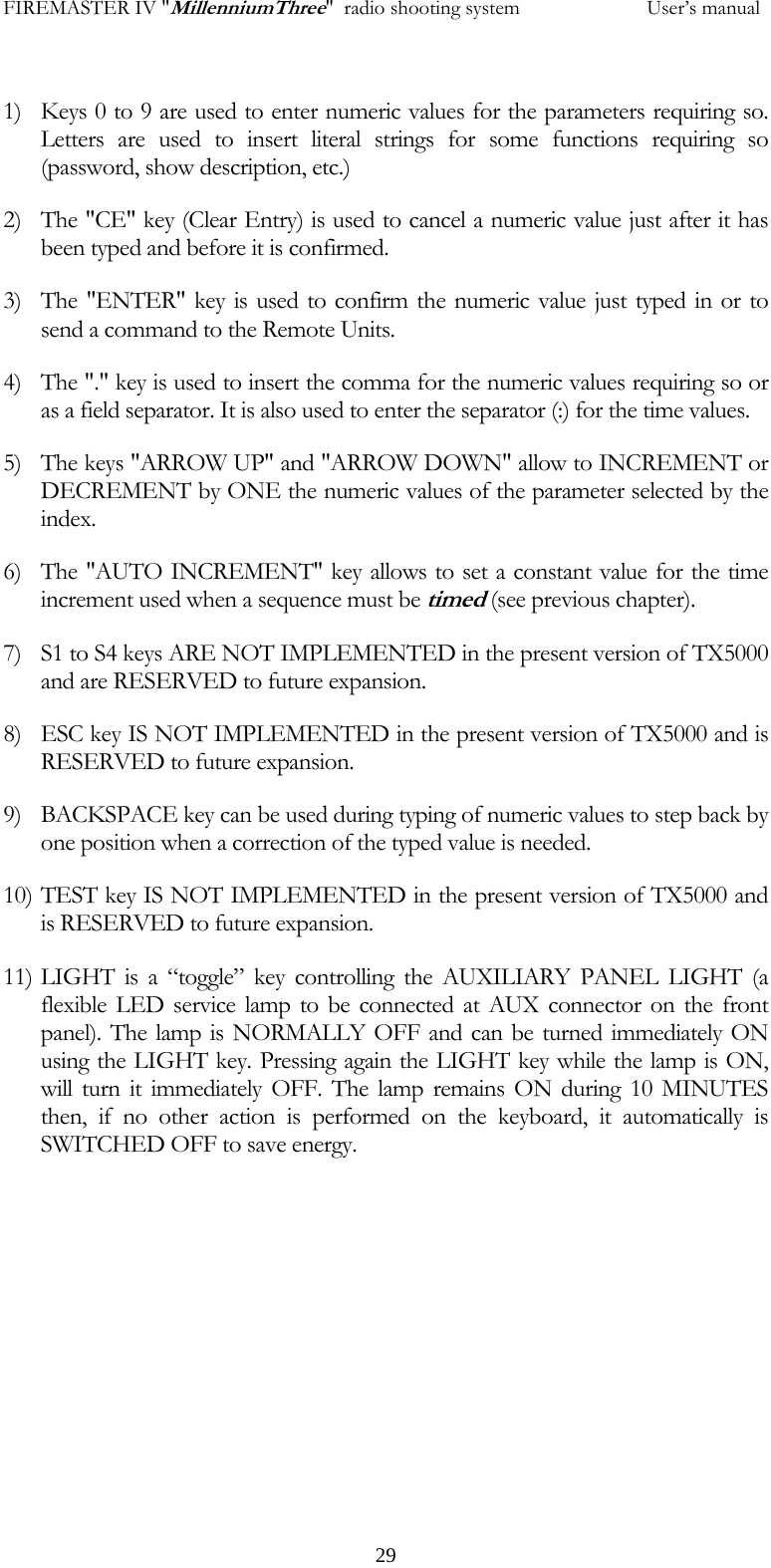
FIREMASTER IV "MillenniumThree"  radio shooting system           User’s manual 1) Keys 0 to 9 are used to enter numeric values for the parameters requiring so. Letters are used to insert literal strings for some functions requiring so (password, show description, etc.) 2) The "CE" key (Clear Entry) is used to cancel a numeric value just after it has been typed and before it is confirmed. 3) The "ENTER" key is used to confirm the numeric value just typed in or to send a command to the Remote Units. 4) The "." key is used to insert the comma for the numeric values requiring so or as a field separator. It is also used to enter the separator (:) for the time values. 5) The keys "ARROW UP" and "ARROW DOWN" allow to INCREMENT or DECREMENT by ONE the numeric values of the parameter selected by the index. 6) The "AUTO INCREMENT" key allows to set a constant value for the time increment used when a sequence must be timed (see previous chapter). 7) S1 to S4 keys ARE NOT IMPLEMENTED in the present version of TX5000 and are RESERVED to future expansion. 8) ESC key IS NOT IMPLEMENTED in the present version of TX5000 and is RESERVED to future expansion. 9) BACKSPACE key can be used during typing of numeric values to step back by one position when a correction of the typed value is needed. 10) TEST key IS NOT IMPLEMENTED in the present version of TX5000 and is RESERVED to future expansion. 11) LIGHT is a “toggle” key controlling the AUXILIARY PANEL LIGHT (a flexible LED service lamp to be connected at AUX connector on the front panel). The lamp is NORMALLY OFF and can be turned immediately ON using the LIGHT key. Pressing again the LIGHT key while the lamp is ON, will turn it immediately OFF. The lamp remains ON during 10 MINUTES then, if no other action is performed on the keyboard, it automatically is SWITCHED OFF to save energy.       29
FIREMASTER IV "MillenniumThree"  radio shooting system           User’s manual 2.3 "TEST UNIT" ICON  The high-resolution graphic display of the new FIREMASTER IV SYSTEM, allows to display at the same time a lot more information than it was possible on the previous version. The "TEST UNIT" function in particular, uses this possibility to display, WITH A SINGLE COMMAND, the complete situation relative to all 24  lines   of a selected Remote Unit. IMPORTANT NOTICE: as previously remarked, the new FIREMASTER IV "Millennium Three", is completely compatible with the previous versions FIREMASTER II and FIREMASTER III. Nevertheless, the behavior of the "old" Remote Units RX24-A, when inquired using the "TEST UNIT" function, cannot be identical to the one of the new generation Units. The compatibility has been anyway maintained to the detriment of the response time. While the new RX24-B and RX48 Units implement a special function to send back a whole "block" of data relative to the 24 lines with a single operation, the previous RX24-A Units will do that A LINE AT THE TIME and it will be then necessary 24 consecutive transmission. This process is carried out in a complete automatic way and it results completely "transparent" to the user, provided he previously specified correctly the numbers relative to the RX24-A Units in the "OLD UNITS SETUP". However, when a TEST UNIT request is sent to a RX24-B Unit or RX48 (new type), the parameters relative to ALL 24 LINES will be displayed in only about 4 seconds. If the same command is otherwise sent to a RX24-A Unit ("old" type), exactly the same result will be obtained, but it will be necessary to wait about 25 seconds (the 24 lines are tested automatically one at the time). If otherwise the TEST UNIT function is used with an "old" typ RX24-A Unit, without previously specify its number inside the  "OLD UNITS SETUP" mask, then the Unit WILL NOT RECOGNIZE THIS COMMAND (the "LINE TEST" menu must be used instead).   30
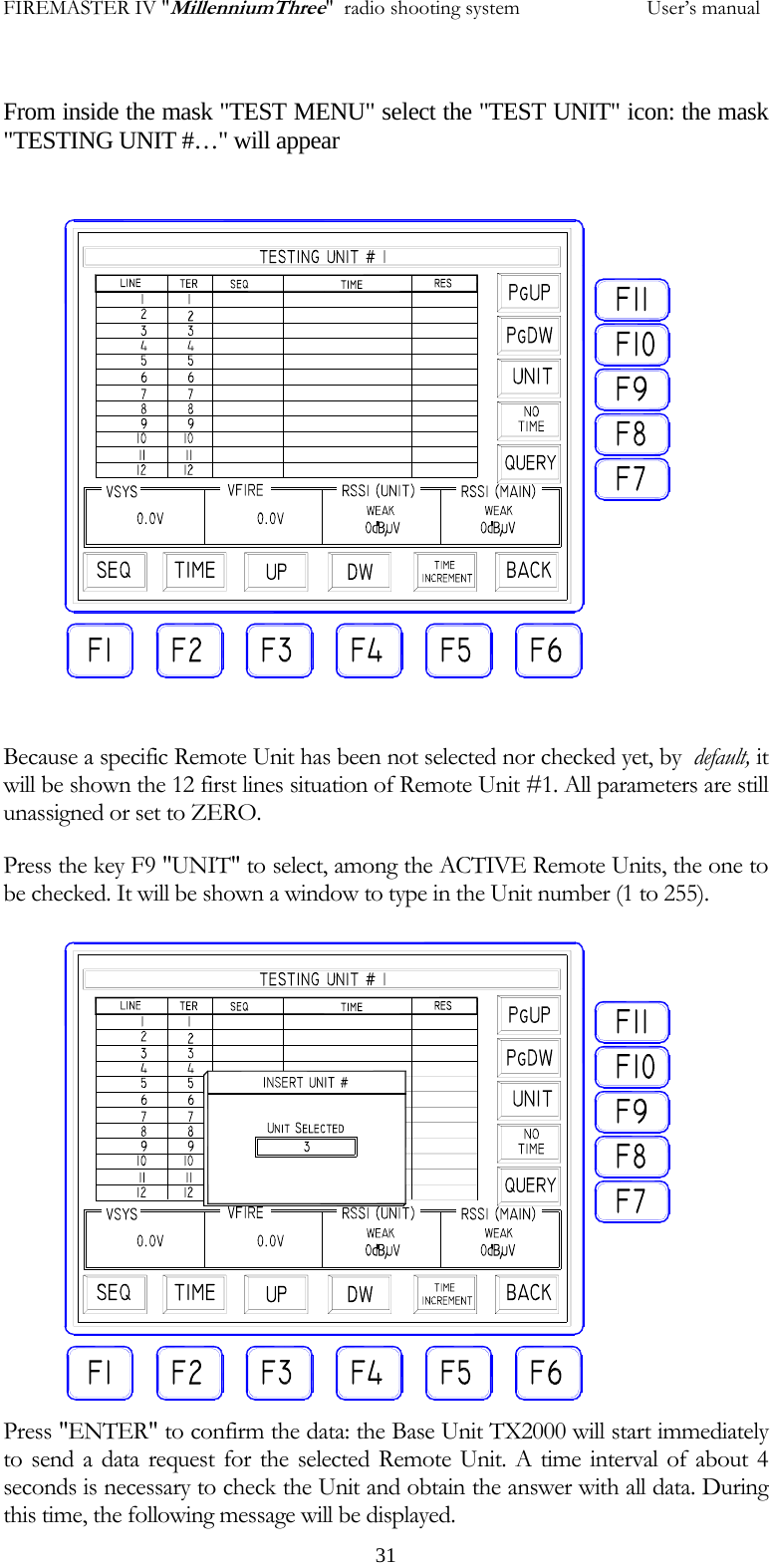
FIREMASTER IV "MillenniumThree"  radio shooting system           User’s manual From inside the mask "TEST MENU" select the "TEST UNIT" icon: the mask "TESTING UNIT #…" will appear  Because a specific Remote Unit has been not selected nor checked yet, by  default, it will be shown the 12 first lines situation of Remote Unit #1. All parameters are still unassigned or set to ZERO. Press the key F9 "UNIT" to select, among the ACTIVE Remote Units, the one to be checked. It will be shown a window to type in the Unit number (1 to 255). Press "ENTER" to confirm the data: the Base Unit TX2000 will start immediately to send a data request for the selected Remote Unit. A time interval of about 4 seconds is necessary to check the Unit and obtain the answer with all data. During this time, the following message will be displayed.   31
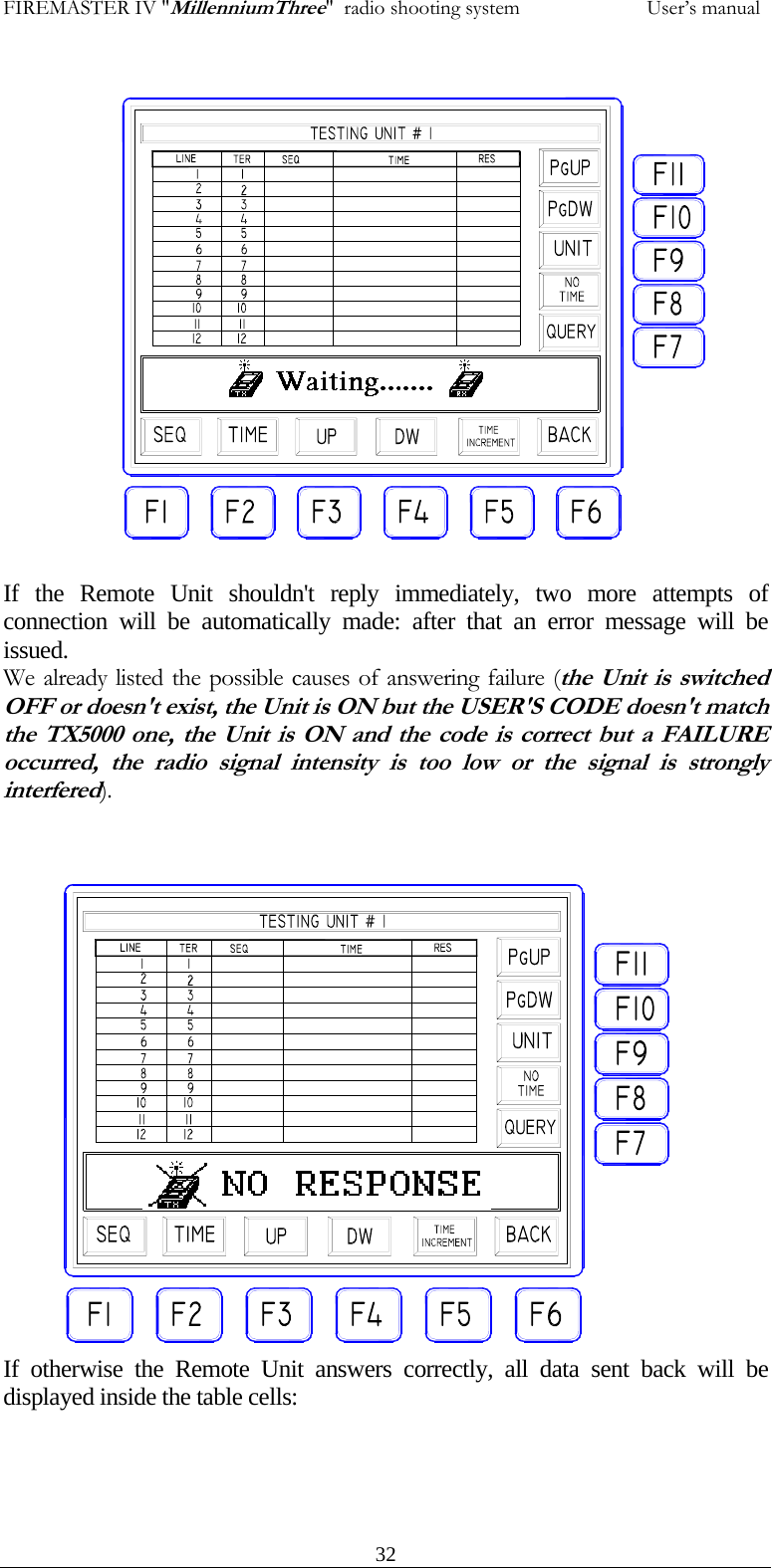
FIREMASTER IV "MillenniumThree"  radio shooting system           User’s manual If the Remote Unit shouldn't reply immediately, two more attempts of connection will be automatically made: after that an error message will be issued. We already listed the possible causes of answering failure (the Unit is switched OFF or doesn't exist, the Unit is ON but the USER'S CODE doesn't match the TX5000 one, the Unit is ON and the code is correct but a FAILURE occurred, the radio signal intensity is too low or the signal is strongly interfered).   If otherwise the Remote Unit answers correctly, all data sent back will be displayed inside the table cells:   32
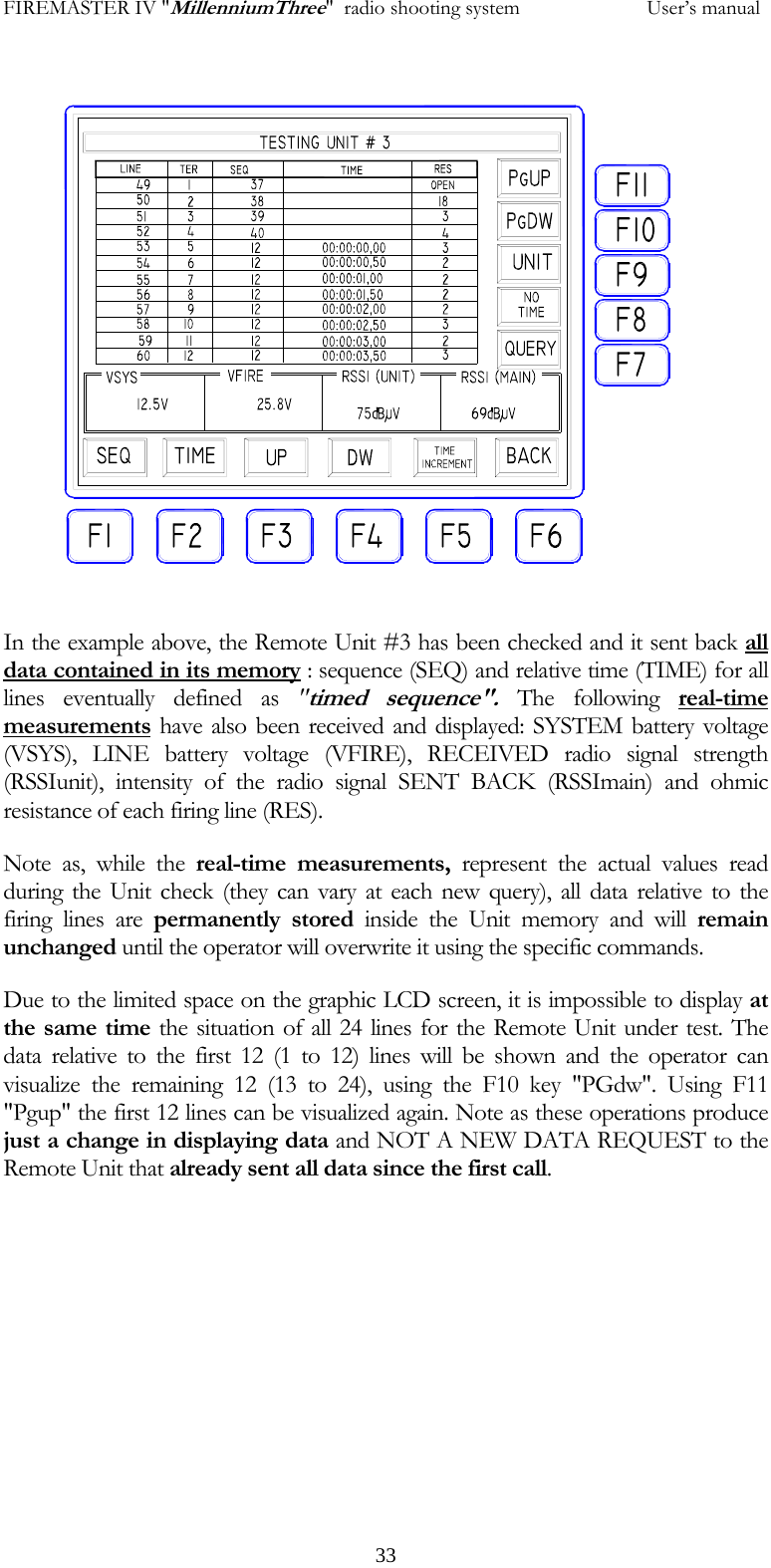
FIREMASTER IV "MillenniumThree"  radio shooting system           User’s manual In the example above, the Remote Unit #3 has been checked and it sent back all data contained in its memory : sequence (SEQ) and relative time (TIME) for all lines eventually defined as "timed sequence". The following real-time measurements have also been received and displayed: SYSTEM battery voltage (VSYS), LINE battery voltage (VFIRE), RECEIVED radio signal strength (RSSIunit), intensity of the radio signal SENT BACK (RSSImain) and ohmic resistance of each firing line (RES). Note as, while the real-time measurements, represent the actual values read during the Unit check (they can vary at each new query), all data relative to the firing lines are permanently stored inside the Unit memory and will remain unchanged until the operator will overwrite it using the specific commands. Due to the limited space on the graphic LCD screen, it is impossible to display at the same time the situation of all 24 lines for the Remote Unit under test. The data relative to the first 12 (1 to 12) lines will be shown and the operator can visualize the remaining 12 (13 to 24), using the F10 key "PGdw". Using F11 "Pgup" the first 12 lines can be visualized again. Note as these operations produce just a change in displaying data and NOT A NEW DATA REQUEST to the Remote Unit that already sent all data since the first call.   33
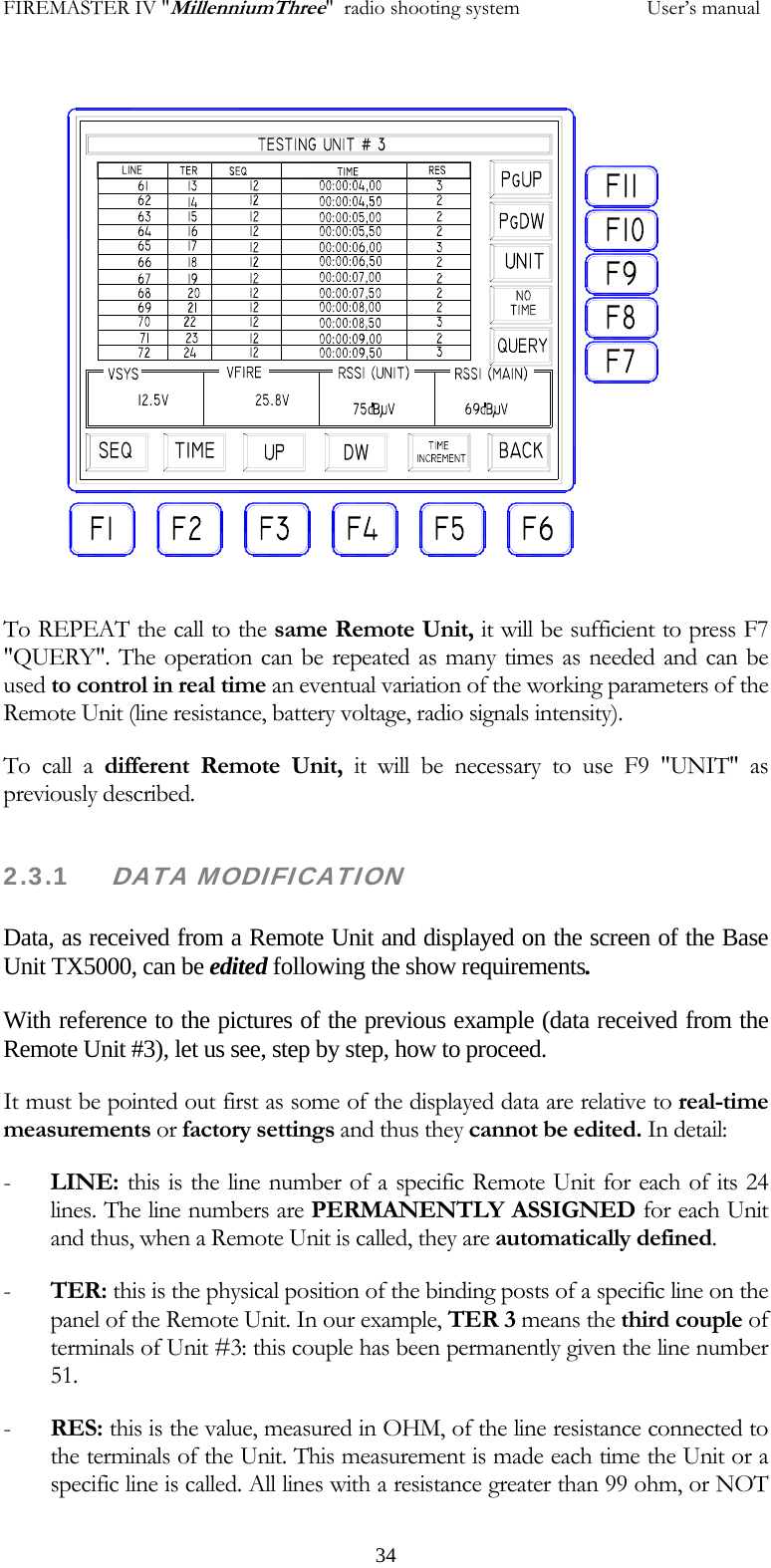
FIREMASTER IV "MillenniumThree"  radio shooting system           User’s manual To REPEAT the call to the same Remote Unit, it will be sufficient to press F7 "QUERY". The operation can be repeated as many times as needed and can be used to control in real time an eventual variation of the working parameters of the Remote Unit (line resistance, battery voltage, radio signals intensity). To call a different Remote Unit, it will be necessary to use F9 "UNIT" as previously described. 2.3.1     DATA MODIFICATION  Data, as received from a Remote Unit and displayed on the screen of the Base Unit TX5000, can be edited following the show requirements. With reference to the pictures of the previous example (data received from the Remote Unit #3), let us see, step by step, how to proceed. It must be pointed out first as some of the displayed data are relative to real-time measurements or factory settings and thus they cannot be edited. In detail: - LINE: this is the line number of a specific Remote Unit for each of its 24 lines. The line numbers are PERMANENTLY ASSIGNED for each Unit and thus, when a Remote Unit is called, they are automatically defined. - TER: this is the physical position of the binding posts of a specific line on the panel of the Remote Unit. In our example, TER 3 means the third couple of terminals of Unit #3: this couple has been permanently given the line number 51.  - RES: this is the value, measured in OHM, of the line resistance connected to the terminals of the Unit. This measurement is made each time the Unit or a specific line is called. All lines with a resistance greater than 99 ohm, or NOT   34
FIREMASTER IV "MillenniumThree"  radio shooting system           User’s manualCONNECTED, are regarded as OPEN CIRCUIT and the corresponding message "OPEN" will be displayed in the cell RES - VSYS: this is the value, measured in volt, of the SYSTEM battery (microcontroller, peripherals, radio) on the Remote Unit. The measurement is made EACH TIME the Unit or a specific line is called. If the voltage of this battery falls down a preset value, the error message "FAULT" will be displayed. This message shouldn't regarded as a catastrophic failure on the Remote Unit, but it is just a WARNING about the poor charge level of the battery (a recharge is urgently needed!) - VFIRE: this is the value, measured in volt, of the FIRING LINES BATTERIES on the Remote Unit (2 batteries in series for 24V total). The measurement is made EACH TIME the Unit or a specific line is called. If the voltage of these batteries falls down a preset value, the error message "FAULT" will be displayed. This message shouldn't regarded as a catastrophic failure on the Remote Unit, but it is just a WARNING about the poor charge level of the batteries (a recharge is urgently needed!). - RSSI(unit): it represents the value, in dBµV, of the field strength present at the receiving antenna on the Remote Unit. Practically: this reading gives an idea of the quality of the radio reception on the Remote Unit during a request of data. The measuring range is between 0 and 80dBµV (0dBµV = NO SIGNAL, 80dBµV  = MAXIMUM SIGNAL). When the reading is BELOW 20dBµV, some error in data reception could occur and it would be advisable to check the antenna or Unit position (see specific notes to the relative chapter) in order to improve the radio signal level. When the reading is down to 12dBµV, the warning message "WEAK" is displayed. - RSSI(main): it represents the value, in dBµV, of the field strength present at the receiving antenna on the Base Unit. Practically: this reading gives an idea of the quality of the radio reception on the Base Unit during the reception of answer back from the Remote Unit. All other details are the same as in the previous case.  The only data the operator can modify are: SEQ ("SEQUENCE") and TIME. In order to modify these parameters, the keys F1 (SEQ), F2 (TIME), F3 (UP), F4 (DW - down) will be used. Eventually also F11 (Pgup) and F10 (PGdw)  if the data to be modified are not displayed in the actual page. In any case F3 and F4 keys, provide to scroll automatically the displayed lines when the table limits are reached. Using the above listed keys, it will be marked (in reverse) the parameter relative to the specific line to be changed and the new value will be typed in directly using the numeric keypad; ENTER will confirm the value and the new data will be immediately sent to the Remote Unit and stored accordingly in memory.  All data relative to TIME can be also typed without the separators and disregarding all non-significant zeroes. E.g.: the time value 00:17:12,35 (17 minutes, 12 seconds and 35 hundredths) can be typed "171235" as well as "17.12.35" or "00.17.12.35" or again as "00171235". It will be accepted in all cases.   35
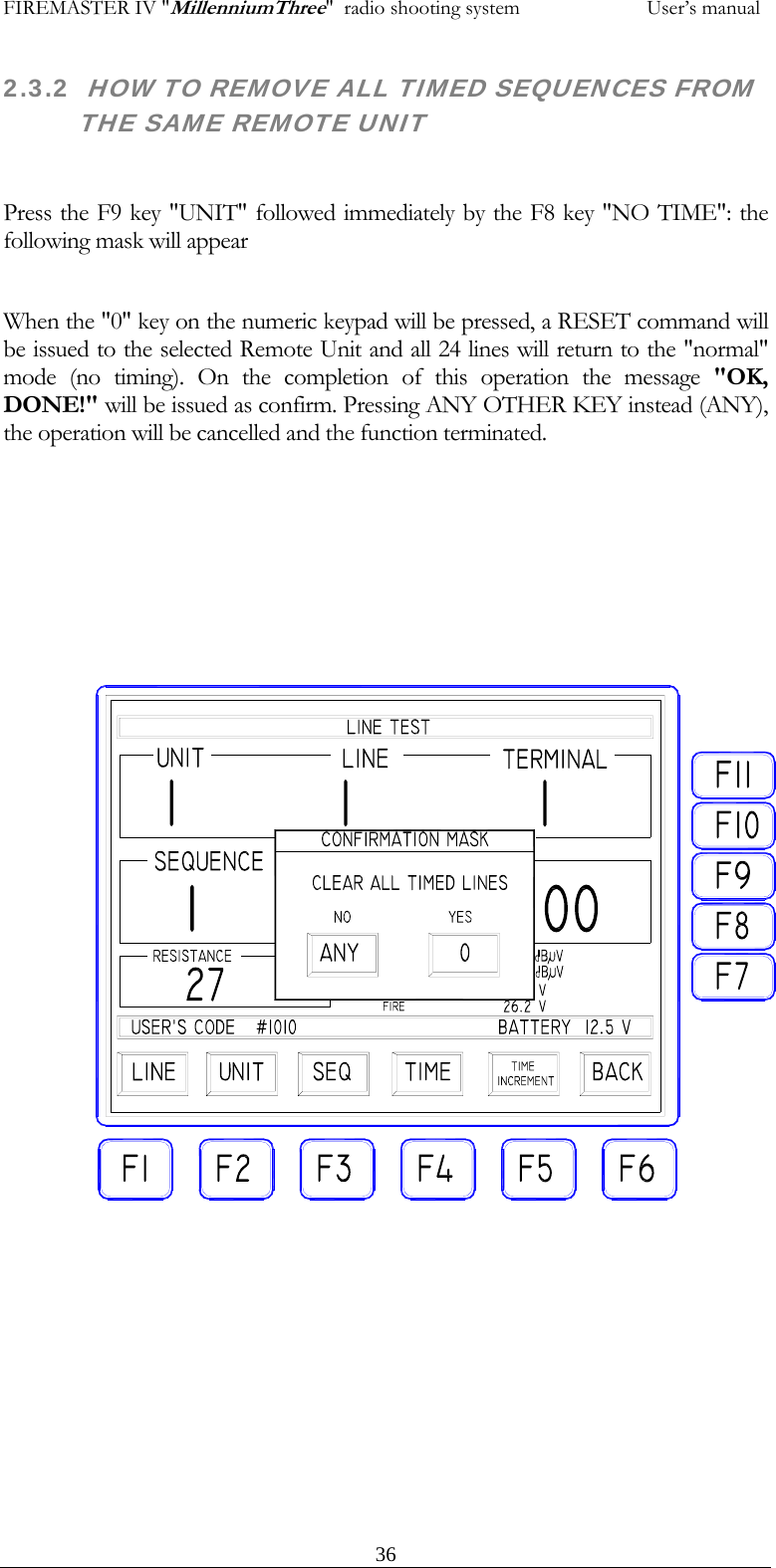
FIREMASTER IV "MillenniumThree"  radio shooting system           User’s manual2.3.2  HOW TO REMOVE ALL TIMED SEQUENCES FROM THE SAME REMOTE UNIT  Press the F9 key "UNIT" followed immediately by the F8 key "NO TIME": the following mask will appear  When the "0" key on the numeric keypad will be pressed, a RESET command will be issued to the selected Remote Unit and all 24 lines will return to the "normal" mode (no timing). On the completion of this operation the message "OK, DONE!" will be issued as confirm. Pressing ANY OTHER KEY instead (ANY), the operation will be cancelled and the function terminated.    36

Navigation menu