Perfect Tech Co 803 Bluetooth Headset User Manual Manual

Perfect Tech Co ., Ltd Bluetooth Headset Manual

Manual

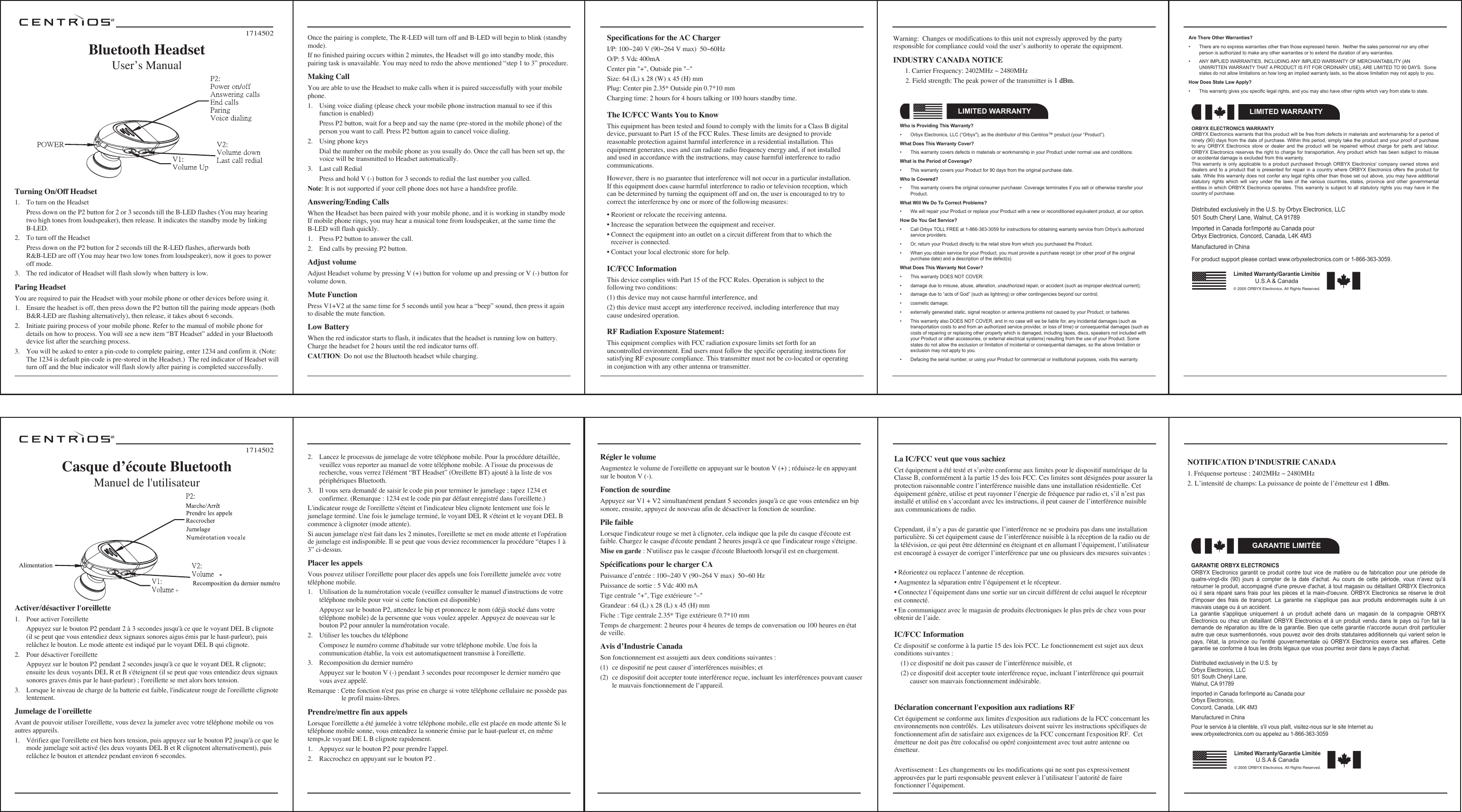
Activer/désactiver l'oreillette1.  Pour activer l'oreillette  Appuyez sur le bouton P2 pendant 2 à 3 secondes jusqu'à ce que le voyant DEL B clignote (il se peut que vous entendiez deux signaux sonores aigus émis par le haut-parleur), puis relâchez le bouton. Le mode attente est indiqué par le voyant DEL B qui clignote.2.  Pour désactiver l'oreillette  Appuyez sur le bouton P2 pendant 2 secondes jusqu'à ce que le voyant DEL R clignote; ensuite les deux voyants DEL R et B s'éteignent (il se peut que vous entendiez deux signaux sonores graves émis par le haut-parleur) ; l'oreillette se met alors hors tension. 3.  Lorsque le niveau de charge de la batterie est faible, l'indicateur rouge de l'oreillette clignote lentement.Jumelage de l'oreillette Avant de pouvoir utiliser l'oreillette, vous devez la jumeler avec votre téléphone mobile ou vos autres appareils.1.  Vérifiez que l'oreillette est bien hors tension, puis appuyez sur le bouton P2 jusqu'à ce que le mode jumelage soit activé (les deux voyants DEL B et R clignotent alternativement), puis relâchez le bouton et attendez pendant environ 6 secondes.2.  Lancez le processus de jumelage de votre téléphone mobile. Pour la procédure détaillée, veuillez vous reporter au manuel de votre téléphone mobile. A l'issue du processus de recherche, vous verrez l'élément “BT Headset” (Oreillette BT) ajouté à la liste de vos périphériques Bluetooth.3.  Il vous sera demandé de saisir le code pin pour terminer le jumelage ; tapez 1234 et confirmez. (Remarque : 1234 est le code pin par défaut enregistré dans l'oreillette.) L'indicateur rouge de l'oreillette s'éteint et l'indicateur bleu clignote lentement une fois le jumelage terminé. Une fois le jumelage terminé, le voyant DEL R s'éteint et le voyant DEL B commence à clignoter (mode attente).Si aucun jumelage n'est fait dans les 2 minutes, l'oreillette se met en mode attente et l'opération de jumelage est indisponible. Il se peut que vous deviez recommencer la procédure “étapes 1 à 3” ci-dessus.Placer les appels Vous pouvez utiliser l'oreillette pour placer des appels une fois l'oreillette jumelée avec votre téléphone mobile.1.  Utilisation de la numérotation vocale (veuillez consulter le manuel d'instructions de votre téléphone mobile pour voir si cette fonction est disponible)  Appuyez sur le bouton P2, attendez le bip et prononcez le nom (déjà stocké dans votre téléphone mobile) de la personne que vous voulez appeler. Appuyez de nouveau sur le bouton P2 pour annuler la numérotation vocale. 2.  Utiliser les touches du téléphone  Composez le numéro comme d'habitude sur votre téléphone mobile. Une fois la communication établie, la voix est automatiquement transmise à l'oreillette.3.  Recomposition du dernier numéro  Appuyez sur le bouton V (-) pendant 3 secondes pour recomposer le dernier numéro que vous avez appelé.Remarque : Cette fonction n'est pas prise en charge si votre téléphone cellulaire ne possède pas     le profil mains-libres.Prendre/mettre fin aux appelsLorsque l'oreillette a été jumelée à votre téléphone mobile, elle est placée en mode attente Si le téléphone mobile sonne, vous entendrez la sonnerie émise par le haut-parleur et, en même temps,le voyant DE L B clignote rapidement.1.  Appuyez sur le bouton P2 pour prendre l'appel.2.  Raccrochez en appuyant sur le bouton P2 .1714502Casque dʼécoute BluetoothManuel de l'utilisateurRégler le volume Augmentez le volume de l'oreillette en appuyant sur le bouton V (+) ; réduisez-le en appuyant sur le bouton V (-).Fonction de sourdineAppuyez sur V1 + V2 simultanément pendant 5 secondes jusqu'à ce que vous entendiez un bip sonore, ensuite, appuyez de nouveau afin de désactiver la fonction de sourdine.Pile faibleLorsque l'indicateur rouge se met à clignoter, cela indique que la pile du casque d'écoute est faible. Chargez le casque d'écoute pendant 2 heures jusqu'à ce que l'indicateur rouge s'éteigne.Mise en garde : N'utilisez pas le casque d'écoute Bluetooth lorsqu'il est en chargement.Spécifications pour le charger CAPuissance dʼentrée : 100~240 V (90~264 V max)  50~60 HzPuissance de sortie : 5 Vdc 400 mATige centrale "+", Tige extérieure "–"Grandeur : 64 (L) x 28 (L) x 45 (H) mm Fiche : Tige centrale 2.35* Tige extérieure 0.7*10 mm Temps de chargement: 2 heures pour 4 heures de temps de conversation ou 100 heures en état de veille.Avis dʼIndustrie CanadaSon fonctionnement est assujetti aux deux conditions suivantes :(1)  ce dispositif ne peut causer dʼinterférences nuisibles; et(2)  ce dispositif doit accepter toute interférence reçue, incluant les interférences pouvant causer le mauvais fonctionnement de lʼappareil.GARANTIE ORBYX ELECTRONICSORBYX Electronics garantit ce produit contre  tout  vice  de  matière  ou  de  fabrication  pour  une  période  de quatre-vingt-dix  (90)  jours  à  compter  de  la  date  d'achat. Au  cours  de  cette  période,  vous  n'avez  qu'à retourner le produit, accompagné d'une preuve d'achat, à tout magasin ou détaillant ORBYX Electronics où il sera  réparé  sans frais pour  les  pièces et la main-d'oeuvre.  ORBYX  Electronics se réserve le  droit d'imposer  des  frais  de  transport.  La  garantie  ne  s'applique  pas  aux  produits  endommagés  suite  à  un mauvais usage ou à un accident.La  garantie  s'applique  uniquement  à  un  produit  acheté  dans  un  magasin  de  la  compagnie  ORBYX Electronics ou chez un détaillant ORBYX Electronics  et  à  un  produit  vendu  dans  le  pays  où  l'on  fait  la demande de  réparation au titre de  la garantie. Bien  que cette garantie  n'accorde aucun droit  particulier autre que ceux susmentionnés, vous pouvez avoir des droits statutaires additionnels qui varient selon le pays,  l'état,  la  province  ou  l'entité  gouvernementale  où  ORBYX  Electronics  exerce  ses  affaires.  Cette garantie se conforme à tous les droits légaux que vous pourriez avoir dans le pays d'achat.GARANTIE LIMITÉELimited Warranty/Garantie LimitéeU.S.A & Canada© 2005 ORBYX Electronics. All Rights Reserved.Distributed exclusively in the U.S. byOrbyx Electronics, LLC501 South Cheryl Lane,Walnut, CA 91789Imported in Canada for/Importé au Canada pourOrbyx Electronics,Concord, Canada, L4K 4M3Manufactured in ChinaPour le service à la clientèle, s'il vous plaît, visitez-nous sur le site Internet au www.orbyxelectronics.com ou appelez au 1-866-363-3059Turning On/Off Headset1.  To turn on the Headset  Press down on the P2 button for 2 or 3 seconds till the B-LED flashes (You may hearing two high tones from loudspeaker), then release. It indicates the standby mode by linking B-LED.2.  To turn off the Headset  Press down on the P2 button for 2 seconds till the R-LED flashes, afterwards both R&B-LED are off (You may hear two low tones from loudspeaker), now it goes to power off mode.3.  The red indicator of Headset will flash slowly when battery is low.Paring HeadsetYou are required to pair the Headset with your mobile phone or other devices before using it. 1.  Ensure the headset is off, then press down the P2 button till the pairing mode appears (both B&R-LED are flashing alternatively), then release, it takes about 6 seconds.2.  Initiate pairing process of your mobile phone. Refer to the manual of mobile phone for details on how to process. You will see a new item “BT Headset” added in your Bluetooth device list after the searching process.3.  You will be asked to enter a pin-code to complete pairing, enter 1234 and confirm it. (Note: The 1234 is default pin-code is pre-stored in the Headset.)  The red indicator of Headset will turn off and the blue indicator will flash slowly after pairing is completed successfully.Once the pairing is complete, The R-LED will turn off and B-LED will begin to blink (standby mode). If no finished pairing occurs within 2 minutes, the Headset will go into standby mode, this pairing task is unavailable. You may need to redo the above mentioned “step 1 to 3” procedure. Making CallYou are able to use the Headset to make calls when it is paired successfully with your mobile phone.1.  Using voice dialing (please check your mobile phone instruction manual to see if this function is enabled)  Press P2 button, wait for a beep and say the name (pre-stored in the mobile phone) of the person you want to call. Press P2 button again to cancel voice dialing.2.  Using phone keys  Dial the number on the mobile phone as you usually do. Once the call has been set up, the voice will be transmitted to Headset automatically.3.  Last call Redial  Press and hold V (-) button for 3 seconds to redial the last number you called.Note: It is not supported if your cell phone does not have a handsfree profile. Answering/Ending CallsWhen the Headset has been paired with your mobile phone, and it is working in standby mode If mobile phone rings, you may hear a musical tone from loudspeaker, at the same time the B-LED will flash quickly. 1.  Press P2 button to answer the call.2.  End calls by pressing P2 button. Adjust volume Adjust Headset volume by pressing V (+) button for volume up and pressing or V (-) button for volume down.Mute FunctionPress V1+V2 at the same time for 5 seconds until you hear a “beep” sound, then press it again to disable the mute function.Low Battery When the red indicator starts to flash, it indicates that the headset is running low on battery. Charge the headset for 2 hours until the red indicator turns off.CAUTION: Do not use the Bluetooth headset while charging.1714502Bluetooth HeadsetUserʼs ManualLIMITED WARRANTYWho is Providing This Warranty?•  Orbyx Electronics, LLC (“Orbyx"), as the distributor of this Centrios™ product (your “Product”).What Does This Warranty Cover?•  This warranty covers defects in materials or workmanship in your Product under normal use and conditions.What is the Period of Coverage?•  This warranty covers your Product for 90 days from the original purchase date.Who Is Covered?•  This warranty covers the original consumer purchaser. Coverage terminates if you sell or otherwise transfer your Product.What Will We Do To Correct Problems?•  We will repair your Product or replace your Product with a new or reconditioned equivalent product, at our option.How Do You Get Service?•  Call Orbyx TOLL FREE at 1-866-363-3059 for instructions for obtaining warranty service from Orbyx’s authorized service providers.•  Or, return your Product directly to the retail store from which you purchased the Product.•  When you obtain service for your Product, you must provide a purchase receipt (or other proof of the original purchase date) and a description of the defect(s).What Does This Warranty Not Cover?•  This warranty DOES NOT COVER:•  damage due to misuse, abuse, alteration, unauthorized repair, or accident (such as improper electrical current);•  damage due to “acts of God” (such as lightning) or other contingencies beyond our control;•  cosmetic damage;•  externally generated static, signal reception or antenna problems not caused by your Product; or batteries.•  This warranty also DOES NOT COVER, and in no case will we be liable for, any incidental damages (such as transportation costs to and from an authorized service provider, or loss of time) or consequential damages (such as costs of repairing or replacing other property which is damaged, including tapes, discs, speakers not included with your Product or other accessories, or external electrical systems) resulting from the use of your Product. Some states do not allow the exclusion or limitation of incidental or consequential damages, so the above limitation or exclusion may not apply to you.•  Defacing the serial number, or using your Product for commercial or institutional purposes, voids this warranty.Are There Other Warranties?•  There are no express warranties other than those expressed herein.  Neither the sales personnel nor any other person is authorized to make any other warranties or to extend the duration of any warranties.•  ANY IMPLIED WARRANTIES, INCLUDING ANY IMPLIED WARRANTY OF MERCHANTABILITY (AN UNWRITTEN WARRANTY THAT A PRODUCT IS FIT FOR ORDINARY USE), ARE LIMITED TO 90 DAYS.  Some states do not allow limitations on how long an implied warranty lasts, so the above limitation may not apply to you.How Does State Law Apply?•  This warranty gives you specific legal rights, and you may also have other rights which vary from state to state.ORBYX ELECTRONICS WARRANTYORBYX Electronics warrants that this product will be free from defects in materials and workmanship for a period of ninety (90) days from the date of purchase. Within this period, simply take the product and your proof of purchase to  any  ORBYX  Electronics  store  or  dealer and  the  product  will be  repaired  without charge  for  parts  and labour. ORBYX Electronics reserves the right to charge for transportation. Any product which has been subject to misuse or accidental damage is excluded from this warranty.This warranty  is only  applicable to a  product purchased  through ORBYX  Electronics' company  owned stores  and dealers and to a  product that is presented  for repair in a  country where ORBYX Electronics offers the  product for sale. While this warranty does not confer any legal rights other than those set out above, you may have additional statutory  rights  which  will  vary  under  the  laws  of  the  various  countries,  states,  province  and  other  governmental entities in which  ORBYX Electronics operates. This warranty is subject  to all statutory rights you may have  in the country of purchase.LIMITED WARRANTYLimited Warranty/Garantie LimitéeU.S.A & Canada© 2005 ORBYX Electronics. All Rights Reserved.Distributed exclusively in the U.S. by Orbyx Electronics, LLC501 South Cheryl Lane, Walnut, CA 91789Imported in Canada for/Importé au Canada pourOrbyx Electronics, Concord, Canada, L4K 4M3Manufactured in ChinaFor product support please contact www.orbyxelectronics.com or 1-866-363-3059.Specifications for the AC Charger I/P: 100~240 V (90~264 V max)  50~60HzO/P: 5 Vdc 400mACenter pin "+", Outside pin "–"Size: 64 (L) x 28 (W) x 45 (H) mm Plug: Center pin 2.35* Outside pin 0.7*10 mm Charging time: 2 hours for 4 hours talking or 100 hours standby time.The IC/FCC Wants You to KnowThis equipment has been tested and found to comply with the limits for a Class B digital device, pursuant to Part 15 of the FCC Rules. These limits are designed to provide reasonable protection against harmful interference in a residential installation. This equipment generates, uses and can radiate radio frequency energy and, if not installed and used in accordance with the instructions, may cause harmful interference to radio communications. However, there is no guarantee that interference will not occur in a particular installation. If this equipment does cause harmful interference to radio or television reception, which can be determined by turning the equipment off and on, the user is encouraged to try to correct the interference by one or more of the following measures: • Reorient or relocate the receiving antenna.• Increase the separation between the equipment and receiver. • Connect the equipment into an outlet on a circuit different from that to which the    receiver is connected. • Contact your local electronic store for help. IC/FCC InformationThis device complies with Part 15 of the FCC Rules. Operation is subject to the following two conditions: (1) this device may not cause harmful interference, and (2) this device must accept any interference received, including interference that may cause undesired operation.RF Radiation Exposure Statement:This equipment complies with FCC radiation exposure limits set forth for an uncontrolled environment. End users must follow the specific operating instructions for satisfying RF exposure compliance. This transmitter must not be co-located or operating in conjunction with any other antenna or transmitter. Warning:  Changes or modifications to this unit not expressly approved by the party responsible for compliance could void the userʼs authority to operate the equipment.INDUSTRY CANADA NOTICE   1. Carrier Frequency: 2402MHz ~ 2480MHz 2. Field strength: The peak power of the transmitter is 1 dBm.  La IC/FCC veut que vous sachiezCet équipement a été testé et sʼavère conforme aux limites pour le dispositif numérique de la Classe B, conformément à la partie 15 des lois FCC. Ces limites sont désignées pour assurer la protection raisonnable contre lʼinterférence nuisible dans une installation résidentielle. Cet équipement génère, utilise et peut rayonner lʼénergie de fréquence par radio et, sʼil nʼest pas installé et utilisé en sʼaccordant avec les instructions, il peut causer de lʼinterférence nuisible aux communications de radio. Cependant, il nʼy a pas de garantie que lʼinterférence ne se produira pas dans une installation particulière. Si cet équipement cause de lʼinterférence nuisible à la réception de la radio ou de la télévision, ce qui peut être déterminé en éteignant et en allumant lʼéquipement, lʼutilisateur est encouragé à essayer de corriger lʼinterférence par une ou plusieurs des mesures suivantes :• Réorientez ou replacez lʼantenne de réception.• Augmentez la séparation entre lʼéquipement et le récepteur.• Connectez lʼéquipement dans une sortie sur un circuit différent de celui auquel le récepteur est connecté.• En communiquez avec le magasin de produits électroniques le plus près de chez vous pour obtenir de lʼaide.IC/FCC InformationCe dispositif se conforme à la partie 15 des lois FCC. Le fonctionnement est sujet aux deux conditions suivantes :   (1) ce dispositif ne doit pas causer de lʼinterférence nuisible, et   (2) ce dispositif doit accepter toute interférence reçue, incluant lʼinterférence qui pourrait      causer son mauvais fonctionnement indésirable.Déclaration concernant l'exposition aux radiations RFCet équipement se conforme aux limites d'exposition aux radiations de la FCC concernant les environnements non contrôlés.  Les utilisateurs doivent suivre les instructions spécifiques de fonctionnement afin de satisfaire aux exigences de la FCC concernant l'exposition RF.  Cet émetteur ne doit pas être colocalisé ou opéré conjointement avec tout autre antenne ou émetteur. Avertissement : Les changements ou les modifications qui ne sont pas expressivement approuvées par le parti responsable peuvent enlever à lʼutilisateur lʼautorité de faire fonctionner lʼéquipement.NOTIFICATION DʼINDUSTRIE CANADA 1. Fréquense porteuse : 2402MHz ~ 2480MHz2. Lʼintensité de champs: La puissance de pointe de lʼémetteur est 1 dBm.

Navigation menu