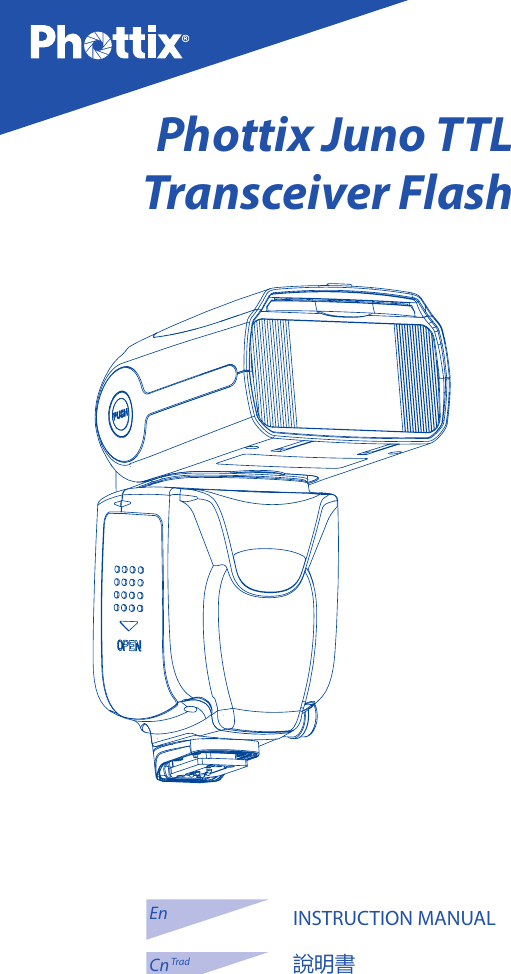
Phottix JUNOTTL Phottix Juno TTL Transceiver Flash User Manual

Phottix (HK) Ltd. Phottix Juno TTL Transceiver Flash

User manual

En INSTRUCTION MANUAL1INSTRUCTION MANUAL說明書EnCn TradPhottix Juno TTL Transceiver Flash
2
En INSTRUCTION MANUAL3Note: To start immediately using this ash please refer to the Quick-Start guide. For advanced features please read this manual and be familiar with your camera manual and operations.The Phottix Juno TTL Transceiver Flash for Canon is designed to work with Canon DSLR cameras and features ETTL I/II, Manual, Multi Modes as well as Wireless (Radio and Optical) triggering.Warnings1. Use your ash safely. Do not re the ash into the eyes of people or animals at short distances – damage and/or blindness can occur.2. Be careful using the flash in or around cars, buses, motorcycles or other moving vehicles as accidents can result.3. Never use the ash near combustible gases (gasoline, solvents, etc.).4. Do not expose the flash or batteries to dripping/splashing water, or high humidity.5. Do not leave the ash or batteries in a hot location (direct sunlight, in a closed car, etc.).6. Remove batteries from the ash when not being used for an extended period of time.7. Change the batteries when required. Use undamaged batteries in good condition. Do not mix battery types or new and used batteries.8. Do not put opaque objects in front of the ash lens when ring the ash. The energy emitted by the ash may cause objects to burn, or cause damage to the ash tube or fresnel lens.9. Use caution in touching the ash head after use. It may be hot and can cause burns.10. The flash contains high voltage electronic parts. Do not disassemble or attempt to repair the ash. Never touch the ash’s internal components.11. Do not touch the External Power Port contacts with any metal objects – this can cause electric shock and serious injury.Table of contents1. Parts and Function .......................................................................................... 42. Flash Set-up ....................................................................................................... 53. LCD display ........................................................................................................ 94. Functions and Operations ............................................................................145. Wireless triggering ..........................................................................................196. Other Functions .............................................................................................. 297. Custom Function ............................................................................................ 298. Technical Specications ............................................................................... 319. Appendix ........................................................................................................... 32
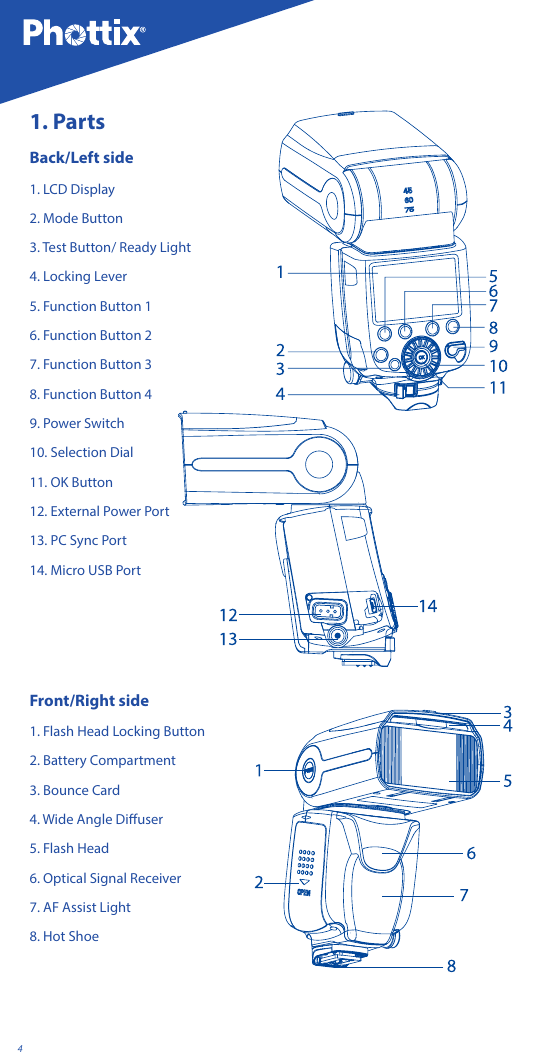
41. PartsBack/Left side1. LCD Display2. Mode Button3. Test Button/ Ready Light4. Locking Lever5. Function Button 16. Function Button 27. Function Button 38. Function Button 49. Power Switch10. Selection Dial11. OK Button12. External Power Port13. PC Sync Port14. Micro USB PortFront/Right side1. Flash Head Locking Button2. Battery Compartment3. Bounce Card4. Wide Angle Diuser5. Flash Head6. Optical Signal Receiver7. AF Assist Light8. Hot Shoe
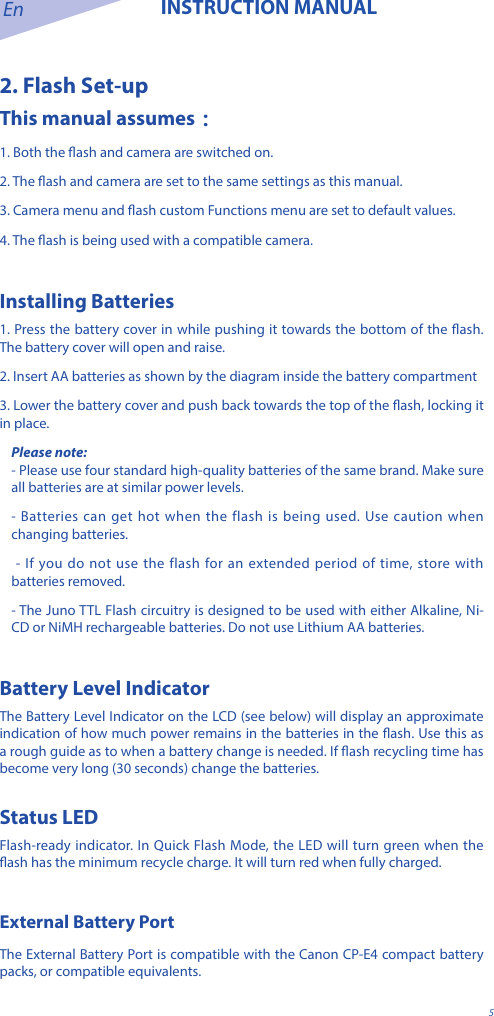
En INSTRUCTION MANUAL52. Flash Set-upThis manual assumes:1. Both the ash and camera are switched on.2. The ash and camera are set to the same settings as this manual.3. Camera menu and ash custom Functions menu are set to default values.4. The ash is being used with a compatible camera.Installing Batteries1. Press the battery cover in while pushing it towards the bottom of the ash. The battery cover will open and raise.2. Insert AA batteries as shown by the diagram inside the battery compartment3. Lower the battery cover and push back towards the top of the ash, locking it in place.Please note:- Please use four standard high-quality batteries of the same brand. Make sure all batteries are at similar power levels. - Batteries can get hot when the flash is being used. Use caution when changing batteries. - If you do not use the flash for an extended period of time, store with batteries removed.- The Juno TTL Flash circuitry is designed to be used with either Alkaline, Ni-CD or NiMH rechargeable batteries. Do not use Lithium AA batteries.Battery Level IndicatorThe Battery Level Indicator on the LCD (see below) will display an approximate indication of how much power remains in the batteries in the ash. Use this as a rough guide as to when a battery change is needed. If ash recycling time has become very long (30 seconds) change the batteries.Status LEDFlash-ready indicator. In Quick Flash Mode, the LED will turn green when the ash has the minimum recycle charge. It will turn red when fully charged.External Battery Port The External Battery Port is compatible with the Canon CP-E4 compact battery packs, or compatible equivalents.
6Please note: - Batteries must be used in the ash even when an external battery pack is used. - Do not use non Canon-compatible battery packs.Overheating Protection The Phottix Juno TTL contains an overheating protection circuit that will slow ash recycle time to avoid overheating-related damage. Approximately 30 full-power ashes in a short amount of time will trigger this protection. Stop using the ash and wait 10 minutes for it to cool down. Sync and USB Ports 1. The PC Sync Port can be used with a PC Sync Cable to trigger the ash – from a ash trigger or camera. This port is input only – ash signals are not output from this port. 2. The Micro USB port is used for rmware upgrades. Firmware announcements and instructions will be made available on Phottix websites.Attaching the Flash to the camera1. Turn o both the camera and ash 2. Align the ash hot shoe with the camera hot shoe.3. Slide the ash into the camera hot shoe until fully inserted. 4. Lock the ash in position by pushing the locking lever to the right until the lock engages with a click. 5. To Unlock, press the locking release Button on the locking lever and slide to the left.Turning the Flash On/ O1. To power on the ash move the power switch to the on position. 2. To power o the ash move the power switch to the o position.3. To Lock the ash:Move the power switch to the“LOCK”positios. This “locks” the Buttons and Dial of the ash, so setting cannot be accidentally changed. Raising and Rotating the Flash Head1. The ash head will elevate from -7 to 90 degrees with stops at -7, 0, 45, 60, 75 and 90 degrees. 2. To Adjust: Press the Flash Head Locking Button and gently raise or lower the ash head into the desired position.
En INSTRUCTION MANUAL73. The ash head will rotate 180 degrees in either direction with stops at 30, 60, 90, 120, 150 and 180 degrees. 4. To Adjust: Press the Flash Head Locking Button and gently rotate the flash head into the desired position. 5. When the ash head is raised or rotated from the 0 degree standard forward position the ash zoom will set itself to 50mm. “- -” will be displayed on the LCD. Flash zoom when the head is raised or rotated can be changed in MZoom Mode (see below). 6. At -7 degrees the ash zoom will act the same as 0 degree – it will not change any settings.Using the Bounce Card or Wide Angle Diuser The Phottix Juno TTL Flash comes equipped with a White Bounce Card and Wide Angle Diuser Panel in the ash head. 1. The Wide Angle Diuser Panel will cause the ash to spread light to a 14mm equivalent. 2. The White Bounce Card can be used when the ash head is in a raised position to bounce light forward to assist with catch lights in a subject’s eyes.To use: 1. Gently pull the Diuser Panel and Bounce Card from the Flash Head using the ridge on the bottom of the Diuser Panel. 2. If using the Diffuser Panel it will drop into position over the Flash Head. Gently push the Bounce Card back into the Flash Head if not needed.3. If using the Bounce Card only gently push the Diuser Panel back into the Flash Head.Using the Flash Head Diuser The Phottix Juno TTL Flash comes with an attachable diffuser that can be added to the front of the ash head when needed. It is good for softening light, reducing hot spots and shadows and better coverage for macro photography. Setting ash zoomThere are two ways to control the zoom of the flash while it is on camera: automatic (Azoom) and manual (Mzoom)。 While in automatic zoom, the zoom on the ash will follow the zoom of the lens to provide the best coverage. When in manual zoom, the zoom setting on the ash is set by the user.Setting the ash zoom1. Press the Function Button underneath   or   (depending on the ash Mode)to enter the ash zoom adjustment Mode.
82. Use the Selection Dial to set Automatic Zoom Mode (Azoom) or set the manual zoom value (Mzoom).3. When nished, press the OK Button to exit.Please note: 1. When in Azoom and the ash head is raised or rotated from the 0 degree standard forward position - the ash zoom will set itself to 50mm. “- -” will be displayed on the LCD. The ash zoom will not change if the head is lowered to -7 degrees. 2. Azoom will work ONLY when the ash head is set to either 0 or -7 degrees. 3. When using Mzoom and the flash head is raised or rotated from the 0 degree standard forward position - the ash zoom will not be changed from the previous setting. 4. Flash Zoom can be adjusted when the head is raised or rotated by switching to Mzoom Mode and making desired adjustments.Test Button Pressing the test Button will trigger the ash. This can be used for metering (in manual Mode only). In Wireless Master Mode pressing the test Button will re slave ashes on the same channel, group and matching ID being controlled by the Master ash. Modeling Flash 1. Pressing the camera depth-of-eld preview Button (if available) will re the ash continuously for 1 second. This Modeling Flash is useful in seeing lighting eects and balance on the subject. (Please see your camera manual for more information on the DOF Button and Button assignment.) 2. Modeling Flash is available in all Modes, TTL, Multi and Manual. Please note: 1. Overheating and damage can result from excessive use of the Modeling Flash. Do not use more than 20 times in succession. 2. When overheating the ash will automatically increase charging time until the ash temperature has decreased. Autofocus (AF) Assist Light 1. In low light/contrast situations the Phottix Juno TTL built-in Auto Focus Assist Light will illuminate to assist with AF. The AF Assist Light on the front of the ash will project a focusing target on the subject. 2. AF Assist Light Functions can be set to on or o (see C.Fn-03 below).Note:AF assist light will not work when ash is in Receiver or Slave Mode.
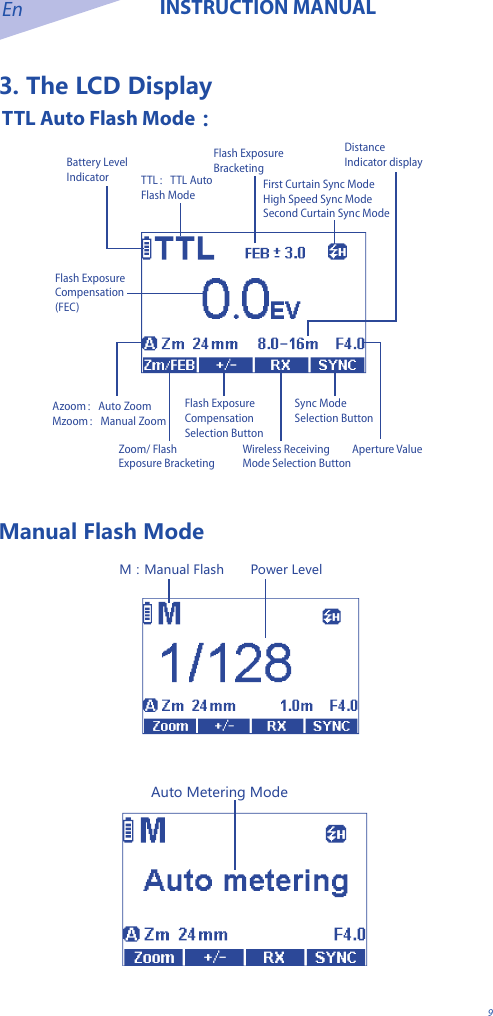
En INSTRUCTION MANUAL93. The LCD Display TTL Auto Flash Mode:TTL:TTL Auto Flash ModeFlash ExposureBracketingBattery Level IndicatorAperture ValueDistance Indicator displayFirst Curtain Sync ModeHigh Speed Sync ModeSecond Curtain Sync ModeFlash Exposure Compensation (FEC)Zoom/ Flash Exposure Bracketing Selection ButtonWireless Receiving Mode Selection ButtonFlash Exposure Compensation Selection ButtonSync Mode Selection ButtonAzoom:Auto ZoomMzoom:Manual ZoomManual Flash ModePower LevelM:Manual Flash   Auto Metering Mode
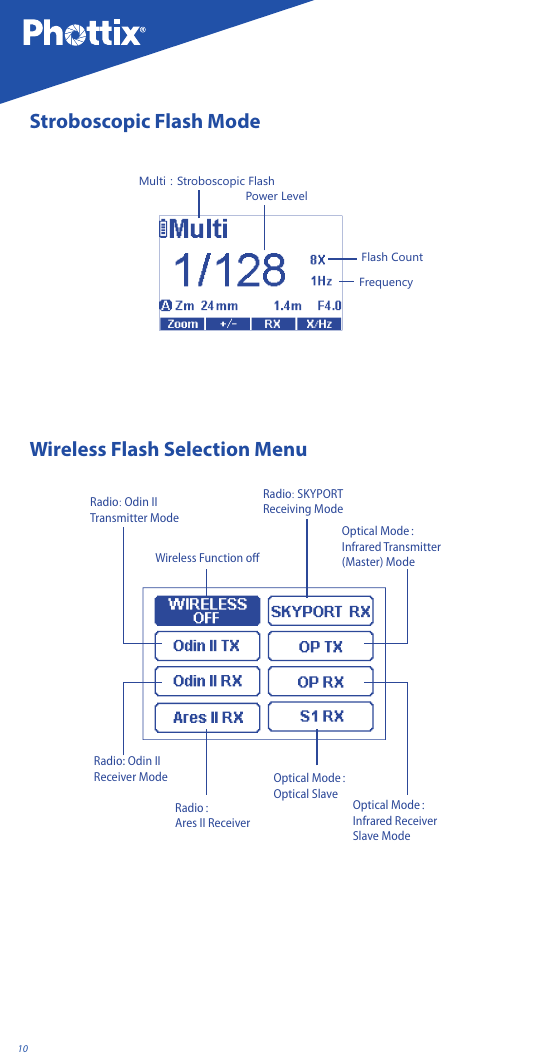
10Stroboscopic Flash ModeFrequencyFlash CountPower LevelMulti:Stroboscopic Flash Wireless Flash Selection MenuWireless Function off Optical Mode:Infrared Transmitter (Master) ModeOptical Mode:Infrared Receiver Slave ModeOptical Mode:Optical SlaveRadio:Ares II Receiver Radio: Odin II Receiver ModeRadio: Odin II Transmitter ModeRadio: SKYPORT Receiving Mode
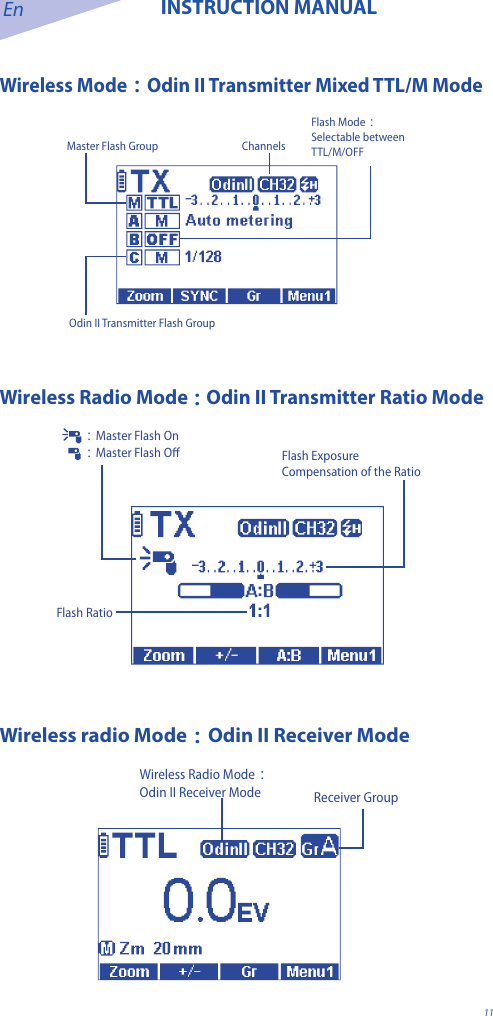
En INSTRUCTION MANUAL11Wireless Mode:Odin II Transmitter Mixed TTL/M ModeMaster Flash Group ChannelsOdin II Transmitter Flash GroupFlash Mode:Selectable between TTL/M/OFF Wireless Radio Mode:Odin II Transmitter Ratio ModeFlash RatioFlash Exposure Compensation of the Ratio:Master Flash On:Master Flash OffWireless radio Mode:Odin II Receiver ModeWireless Radio Mode:Odin II Receiver Mode Receiver Group
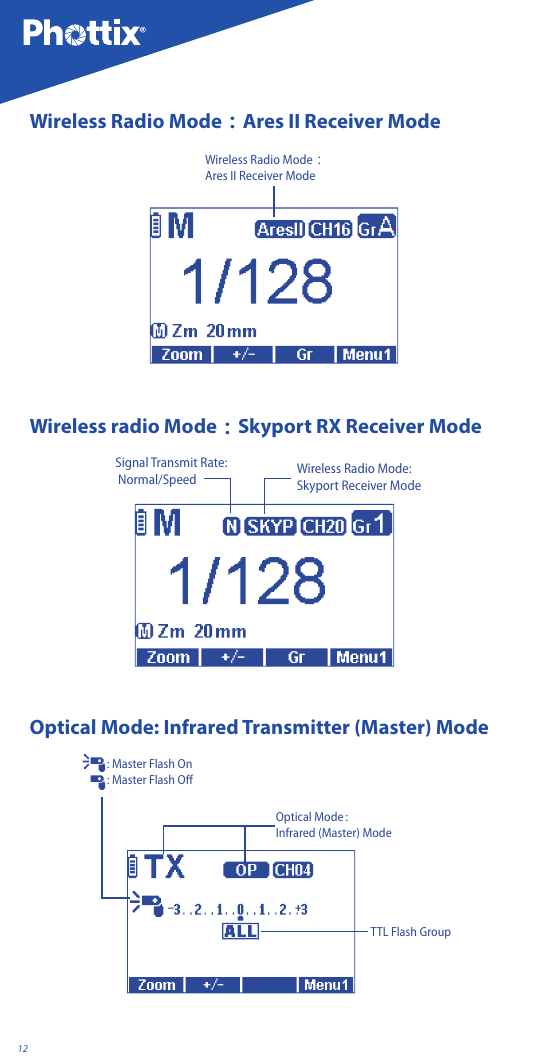
12Wireless Radio Mode:Ares II Receiver ModeWireless Radio Mode:Ares II Receiver ModeWireless radio Mode:Skyport RX Receiver ModeSignal Transmit Rate:  Normal/Speed Wireless Radio Mode:Skyport Receiver ModeOptical Mode: Infrared Transmitter (Master) ModeOptical Mode:Infrared (Master) ModeTTL Flash Group: Master Flash On: Master Flash Off
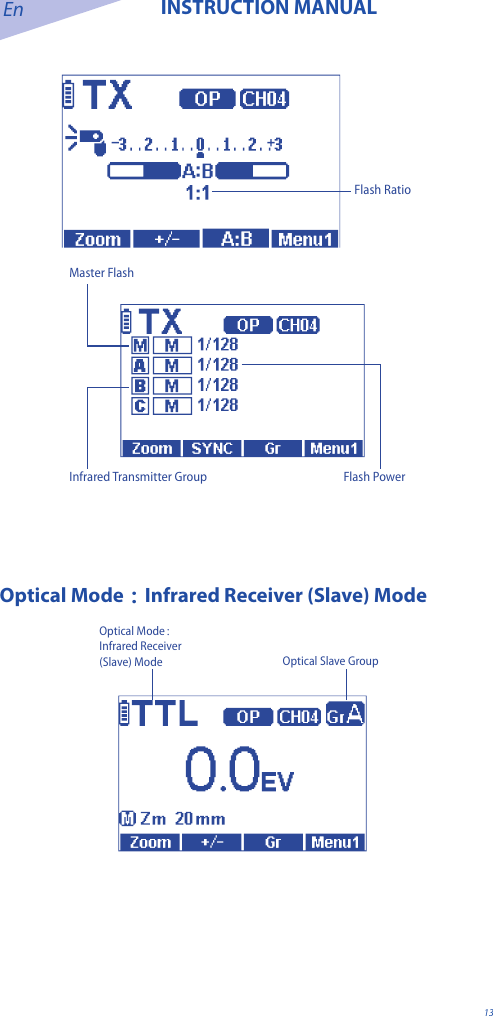
En INSTRUCTION MANUAL13Flash RatioMaster FlashInfrared Transmitter Group Flash PowerOptical Mode:Infrared Receiver (Slave) ModeOptical Mode:Infrared Receiver (Slave) Mode Optical Slave Group
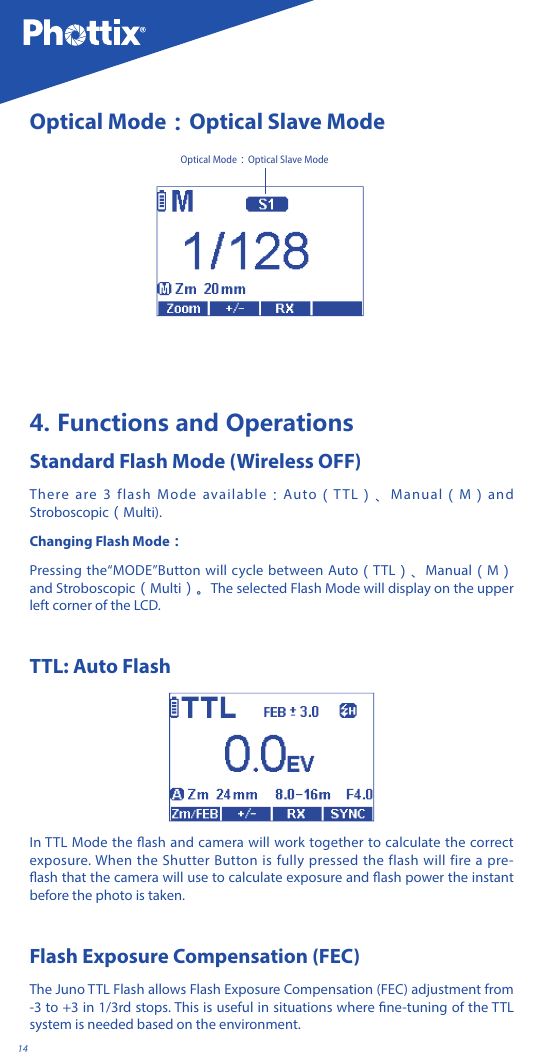
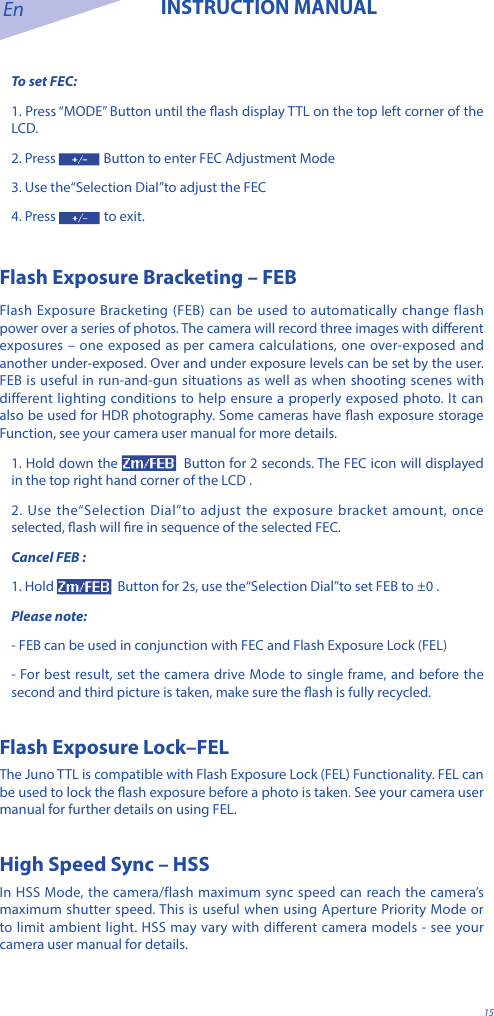
14Optical Mode:Optical Slave ModeOptical Mode:Optical Slave Mode4. Functions and OperationsStandard Flash Mode (Wireless OFF)There are 3 flash Mode available:Auto(TTL)、Manual(M)and Stroboscopic(Multi).Changing Flash Mode:Pressing the“MODE”Button will cycle between Auto(TTL)、Manual(M)and Stroboscopic(Multi)。The selected Flash Mode will display on the upper left corner of the LCD.TTL: Auto FlashIn TTL Mode the ash and camera will work together to calculate the correct exposure. When the Shutter Button is fully pressed the flash will fire a pre-ash that the camera will use to calculate exposure and ash power the instant before the photo is taken.Flash Exposure Compensation (FEC)The Juno TTL Flash allows Flash Exposure Compensation (FEC) adjustment from -3 to +3 in 1/3rd stops. This is useful in situations where ne-tuning of the TTL system is needed based on the environment.
En INSTRUCTION MANUAL15To set FEC:1. Press “MODE” Button until the ash display TTL on the top left corner of the LCD.2. Press  Button to enter FEC Adjustment Mode3. Use the“Selection Dial”to adjust the FEC4. Press   to exit.Flash Exposure Bracketing – FEBFlash Exposure Bracketing (FEB) can be used to automatically change flash power over a series of photos. The camera will record three images with dierent exposures – one exposed as per camera calculations, one over-exposed and another under-exposed. Over and under exposure levels can be set by the user. FEB is useful in run-and-gun situations as well as when shooting scenes with different lighting conditions to help ensure a properly exposed photo. It can also be used for HDR photography. Some cameras have ash exposure storage Function, see your camera user manual for more details. 1. Hold down the    Button for 2 seconds. The FEC icon will displayed in the top right hand corner of the LCD .2. Use the“Selection Dial”to adjust the exposure bracket amount, once selected, ash will re in sequence of the selected FEC. Cancel FEB :1. Hold    Button for 2s, use the“Selection Dial”to set FEB to ±0 .Please note:- FEB can be used in conjunction with FEC and Flash Exposure Lock (FEL) - For best result, set the camera drive Mode to single frame, and before the second and third picture is taken, make sure the ash is fully recycled.Flash Exposure Lock–FELThe Juno TTL is compatible with Flash Exposure Lock (FEL) Functionality. FEL can be used to lock the ash exposure before a photo is taken. See your camera user manual for further details on using FEL. High Speed Sync – HSSIn HSS Mode, the camera/flash maximum sync speed can reach the camera’s maximum shutter speed. This is useful when using Aperture Priority Mode or to limit ambient light. HSS may vary with dierent camera models - see your camera user manual for details.
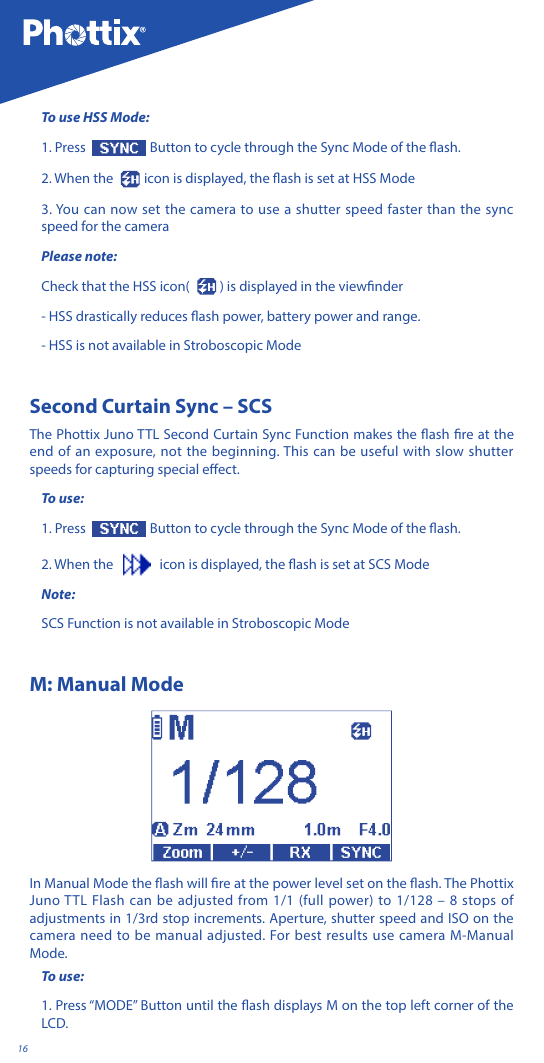
16To use HSS Mode:1. Press   Button to cycle through the Sync Mode of the ash.2. When the    icon is displayed, the ash is set at HSS Mode3. You can now set the camera to use a shutter speed faster than the sync speed for the cameraPlease note: Check that the HSS icon(  ) is displayed in the viewnder- HSS drastically reduces ash power, battery power and range.- HSS is not available in Stroboscopic ModeSecond Curtain Sync – SCS The Phottix Juno TTL Second Curtain Sync Function makes the ash re at the end of an exposure, not the beginning. This can be useful with slow shutter speeds for capturing special eect.To use:1. Press   Button to cycle through the Sync Mode of the ash.2. When the      icon is displayed, the ash is set at SCS ModeNote:SCS Function is not available in Stroboscopic ModeM: Manual ModeIn Manual Mode the ash will re at the power level set on the ash. The Phottix Juno TTL Flash can be adjusted from 1/1 (full power) to 1/128 – 8 stops of adjustments in 1/3rd stop increments. Aperture, shutter speed and ISO on the camera need to be manual adjusted. For best results use camera M-Manual Mode.To use:1. Press “MODE” Button until the ash displays M on the top left corner of the LCD.
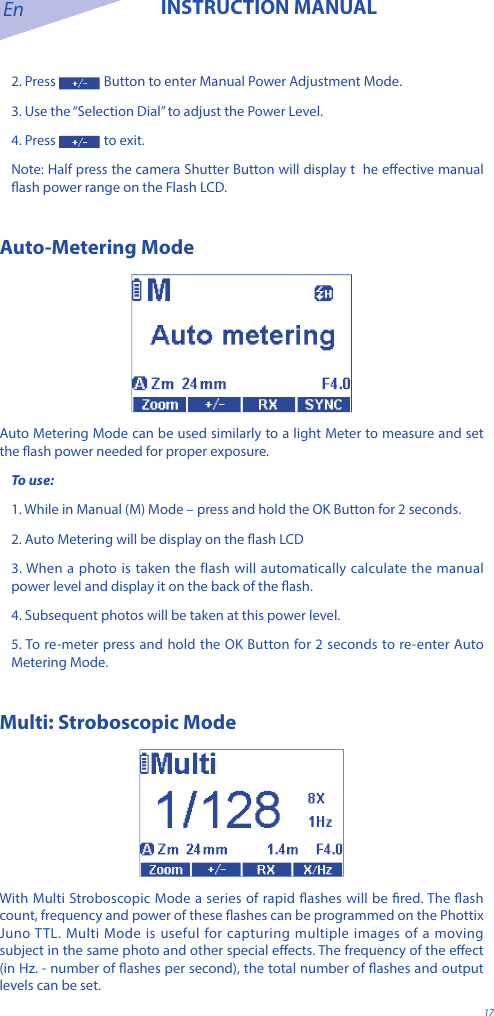
En INSTRUCTION MANUAL172. Press   Button to enter Manual Power Adjustment Mode.3. Use the “Selection Dial” to adjust the Power Level.4. Press   to exit.Note: Half press the camera Shutter Button will display t  he eective manual ash power range on the Flash LCD.Auto-Metering ModeAuto Metering Mode can be used similarly to a light Meter to measure and set the ash power needed for proper exposure. To use:1. While in Manual (M) Mode – press and hold the OK Button for 2 seconds. 2. Auto Metering will be display on the ash LCD3. When a photo is taken the flash will automatically calculate the manual power level and display it on the back of the ash. 4. Subsequent photos will be taken at this power level. 5. To re-meter press and hold the OK Button for 2 seconds to re-enter Auto Metering Mode. Multi: Stroboscopic ModeWith Multi Stroboscopic Mode a series of rapid ashes will be red. The ash count, frequency and power of these ashes can be programmed on the Phottix Juno TTL. Multi Mode is useful for capturing multiple images of a moving subject in the same photo and other special eects. The frequency of the eect (in Hz. - number of ashes per second), the total number of ashes and output levels can be set.
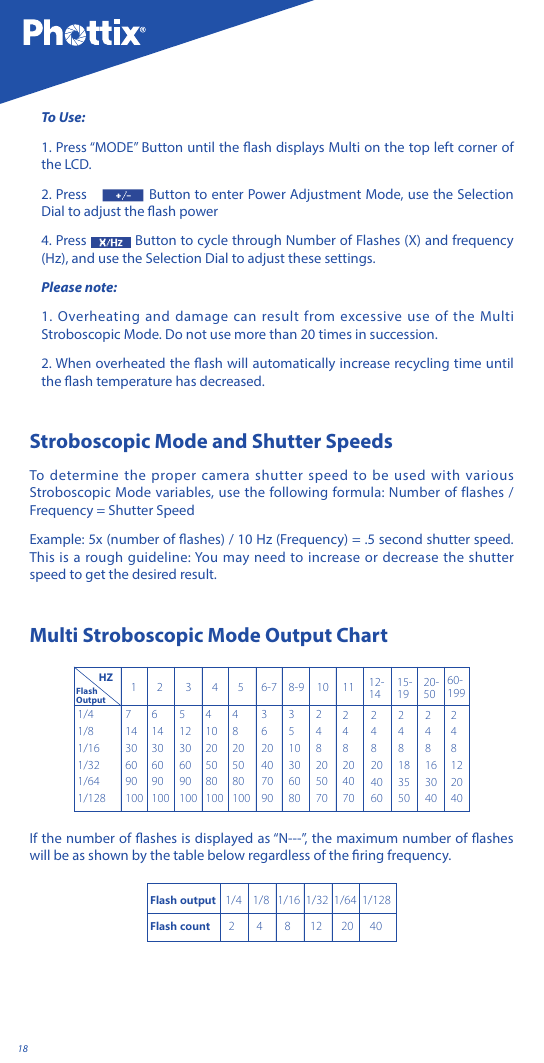
18To Use:1. Press “MODE” Button until the ash displays Multi on the top left corner of the LCD.2. Press   Button to enter Power Adjustment Mode, use the Selection Dial to adjust the ash power4. Press   Button to cycle through Number of Flashes (X) and frequency (Hz), and use the Selection Dial to adjust these settings.Please note: 1. Overheating and damage can result from excessive use of the Multi Stroboscopic Mode. Do not use more than 20 times in succession. 2. When overheated the ash will automatically increase recycling time until the ash temperature has decreased.Stroboscopic Mode and Shutter Speeds To determine the proper camera shutter speed to be used with various Stroboscopic Mode variables, use the following formula: Number of flashes / Frequency = Shutter Speed Example: 5x (number of ashes) / 10 Hz (Frequency) = .5 second shutter speed. This is a rough guideline: You may need to increase or decrease the shutter speed to get the desired result.Multi Stroboscopic Mode Output Chart1/41/81/161/321/641/1287143060901006143060901005123060901004 10 20 50 80 10048205080100362040709035103060802482050702482040702482040602481835502481630402481220401 2 3 4 5 6-7 8-9 10 11 12-1415-1920-5060-199 HZFlash OutputIf the number of ashes is displayed as “N---”, the maximum number of ashes will be as shown by the table below regardless of the ring frequency.Flash output   1/4    1/8   1/16  1/32  1/64  1/128Flash count      2        4        8       12       20      40
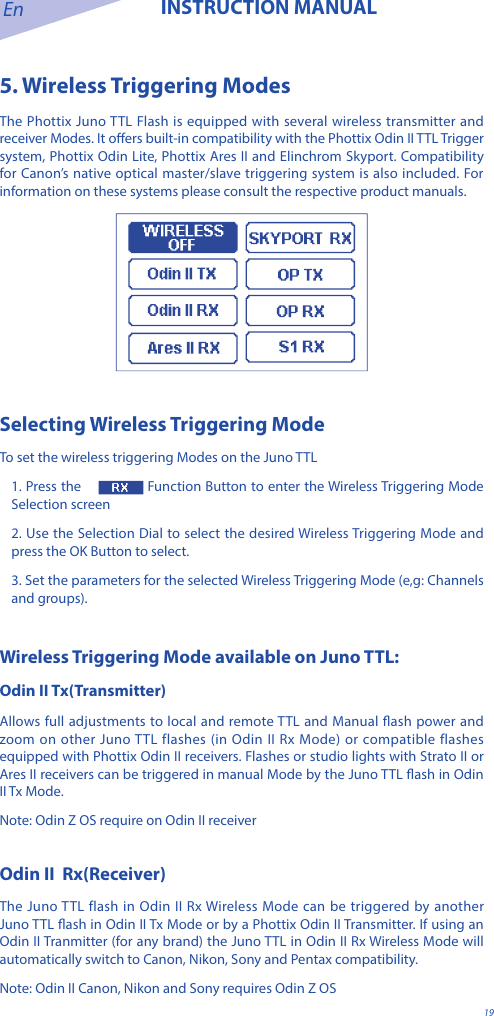
En INSTRUCTION MANUAL195. Wireless Triggering ModesThe Phottix Juno TTL Flash is equipped with several wireless transmitter and receiver Modes. It oers built-in compatibility with the Phottix Odin II TTL Trigger system, Phottix Odin Lite, Phottix Ares II and Elinchrom Skyport. Compatibility for Canon’s native optical master/slave triggering system is also included. For information on these systems please consult the respective product manuals.Selecting Wireless Triggering ModeTo set the wireless triggering Modes on the Juno TTL1. Press the   Function Button to enter the Wireless Triggering Mode Selection screen2. Use the Selection Dial to select the desired Wireless Triggering Mode and press the OK Button to select.3. Set the parameters for the selected Wireless Triggering Mode (e,g: Channels and groups).Wireless Triggering Mode available on Juno TTL:Odin II Tx(Transmitter)Allows full adjustments to local and remote TTL and Manual ash power and zoom on other Juno TTL flashes (in Odin II Rx Mode) or compatible flashes equipped with Phottix Odin II receivers. Flashes or studio lights with Strato II or Ares II receivers can be triggered in manual Mode by the Juno TTL ash in Odin II Tx Mode.Note: Odin Z OS require on Odin II receiverOdin II  Rx(Receiver)The Juno TTL flash in Odin II Rx Wireless Mode can be triggered by another Juno TTL ash in Odin II Tx Mode or by a Phottix Odin II Transmitter. If using an Odin II Tranmitter (for any brand) the Juno TTL in Odin II Rx Wireless Mode will automatically switch to Canon, Nikon, Sony and Pentax compatibility. Note: Odin II Canon, Nikon and Sony requires Odin Z OS
20Ares II  Rx(Receiver)The Juno TTL in Ares II Rx Wireless Mode can be triggered by Phottix Ares II Transmitters, Phottix Odin II Transmitters and Phottix Juno TTL ash in Odin II Tx Mode.Skyport RX(Receiver)In Skyport Rx Mode, the Juno TTL flash can be triggered by Elinchrom EL Skyport Transmitter Plus, Elinchrom EL Skyport Transmitter Plus HS, Elinchrom EL Skyport transmitter Pro.OP Tx(Master)— Using Canon Infrared triggering system Using pulses of light, the Juno TTL ash on camera can adjust and re remote ashes in OP Rx Mode . OP Rx (Slave)—Using Canon Infrared triggering systemRemote Juno TTL (Canon) in OP Rx Mode are controlled and red by on-camera ashes in OP Tx Master Mode. Note: Both OP Tx and OP Rx ash needs to be Juno TTL for Canon.S1 Rx (Slave)— Optical SlaveIn S1 Rx Mode other nearby ashes will trigger the Juno TTL in manual Mode only when they are red. Please note: The Juno TTL cannot be triggered by Phottix Strato, Odin I TCU or Ares .In the wireless triggering Mode Selection screen, if the OK Button is not pressed, after 12 seconds the ash will enter the current selected Wireless Mode.OdinII Tx (Transmitter Mode)Using the Juno TTL Flash in Odin II Tx Mode allows for a ash to be used on-camera in TTL or Manual Mode as well as control three groups (A, B, C) – adjusting TTL and manual power levels as well as ash head zoom on Juno TTL ashes set in Odin II Rx Mode or other compatible ashes mounted on Phottix Odin II receivers. In ash groups under manual Mode can also set ‘auto metering’ feature to assist it setting the desired power.
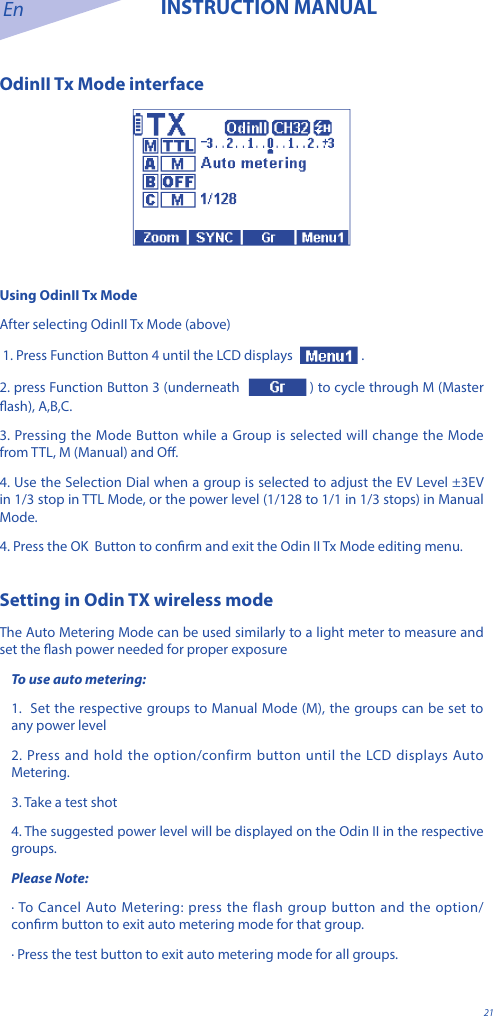
En INSTRUCTION MANUAL21OdinII Tx Mode interfaceUsing OdinII Tx ModeAfter selecting OdinII Tx Mode (above) 1. Press Function Button 4 until the LCD displays  . 2. press Function Button 3 (underneath  ) to cycle through M (Master ash), A,B,C. 3. Pressing the Mode Button while a Group is selected will change the Mode from TTL, M (Manual) and O. 4. Use the Selection Dial when a group is selected to adjust the EV Level ±3EV in 1/3 stop in TTL Mode, or the power level (1/128 to 1/1 in 1/3 stops) in Manual Mode. 4. Press the OK  Button to conrm and exit the Odin II Tx Mode editing menu.Setting in Odin TX wireless modeThe Auto Metering Mode can be used similarly to a light meter to measure and set the ash power needed for proper exposureTo use auto metering:1.  Set the respective groups to Manual Mode (M), the groups can be set to any power level2. Press and hold the option/confirm button until the LCD displays Auto Metering.3. Take a test shot4. The suggested power level will be displayed on the Odin II in the respective groups.Please Note:· To Cancel Auto Metering: press the flash group button and the option/conrm button to exit auto metering mode for that group.· Press the test button to exit auto metering mode for all groups.
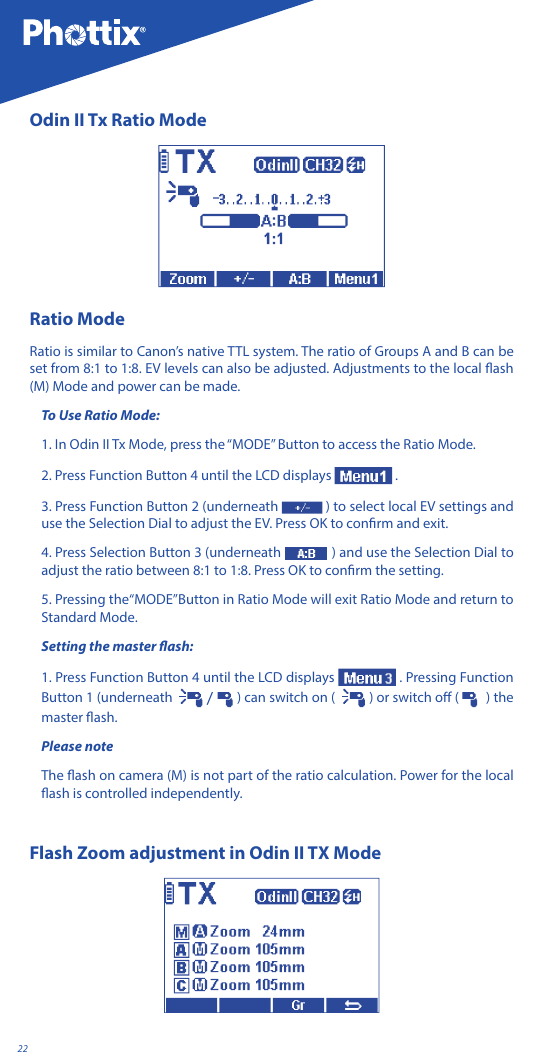
22Odin II Tx Ratio ModeRatio ModeRatio is similar to Canon’s native TTL system. The ratio of Groups A and B can be set from 8:1 to 1:8. EV levels can also be adjusted. Adjustments to the local ash (M) Mode and power can be made.To Use Ratio Mode:1. In Odin II Tx Mode, press the “MODE” Button to access the Ratio Mode.2. Press Function Button 4 until the LCD displays   .3. Press Function Button 2 (underneath  ) to select local EV settings and use the Selection Dial to adjust the EV. Press OK to conrm and exit.4. Press Selection Button 3 (underneath   ) and use the Selection Dial to adjust the ratio between 8:1 to 1:8. Press OK to conrm the setting.5. Pressing the“MODE”Button in Ratio Mode will exit Ratio Mode and return to Standard Mode.Setting the master ash:1. Press Function Button 4 until the LCD displays  . Pressing Function Button 1 (underneath    /   ) can switch on (   ) or switch o (    ) the master ash.Please note The ash on camera (M) is not part of the ratio calculation. Power for the local ash is controlled independently.Flash Zoom adjustment in Odin II TX Mode
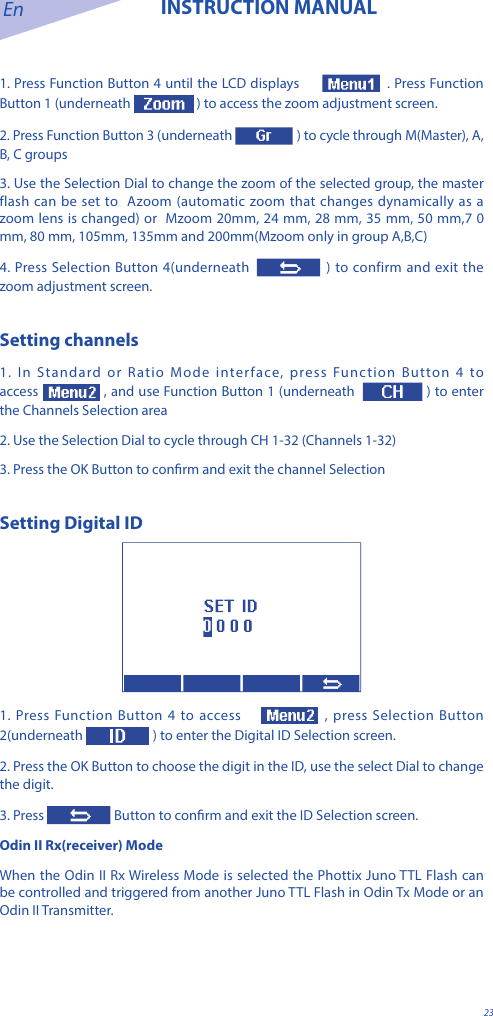
En INSTRUCTION MANUAL231. Press Function Button 4 until the LCD displays  . Press Function Button 1 (underneath   ) to access the zoom adjustment screen. 2. Press Function Button 3 (underneath   ) to cycle through M(Master), A, B, C groups3. Use the Selection Dial to change the zoom of the selected group, the master flash can be set to  Azoom (automatic zoom that changes dynamically as a zoom lens is changed) or  Mzoom 20mm, 24 mm, 28 mm, 35 mm, 50 mm,7 0 mm, 80 mm, 105mm, 135mm and 200mm(Mzoom only in group A,B,C)4. Press Selection Button 4(underneath  ) to confirm and exit the zoom adjustment screen.Setting channels1. In Standard or Ratio Mode interface, press Function Button 4 to access , and use Function Button 1 (underneath  ) to enter the Channels Selection area2. Use the Selection Dial to cycle through CH 1-32 (Channels 1-32) 3. Press the OK Button to conrm and exit the channel SelectionSetting Digital ID  1. Press Function Button 4 to access   , press Selection Button 2(underneath  ) to enter the Digital ID Selection screen.2. Press the OK Button to choose the digit in the ID, use the select Dial to change the digit.3. Press  Button to conrm and exit the ID Selection screen.Odin II Rx(receiver) ModeWhen the Odin II Rx Wireless Mode is selected the Phottix Juno TTL Flash can be controlled and triggered from another Juno TTL Flash in Odin Tx Mode or an Odin II Transmitter.
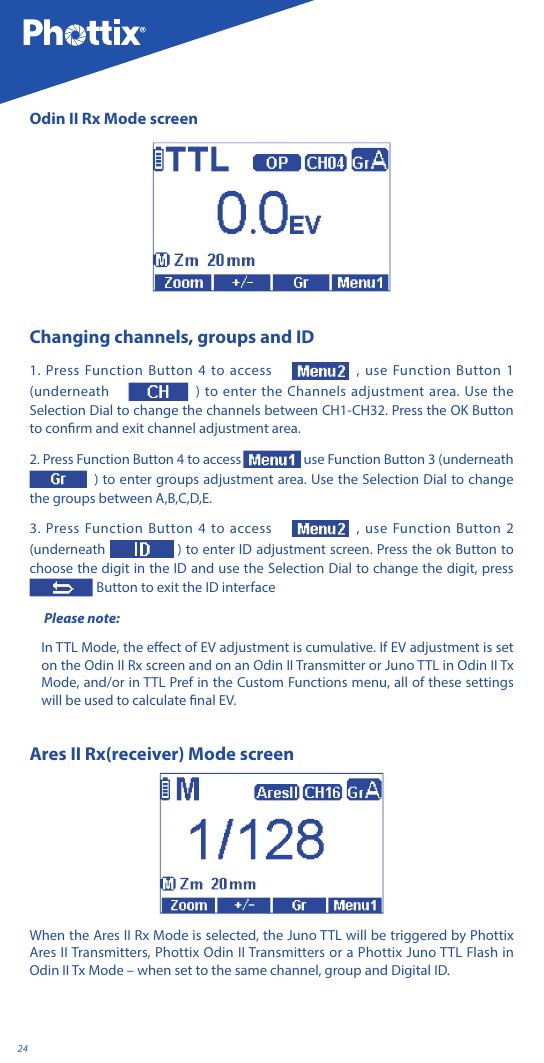
24Odin II Rx Mode screenChanging channels, groups and ID1. Press Function Button 4 to access  , use Function Button 1 (underneath  ) to enter the Channels adjustment area. Use the Selection Dial to change the channels between CH1-CH32. Press the OK Button to conrm and exit channel adjustment area.2. Press Function Button 4 to access  use Function Button 3 (underneath ) to enter groups adjustment area. Use the Selection Dial to change the groups between A,B,C,D,E.  3. Press Function Button 4 to access  , use Function Button 2 (underneath  ) to enter ID adjustment screen. Press the ok Button to choose the digit in the ID and use the Selection Dial to change the digit, press   Button to exit the ID interface Please note: In TTL Mode, the eect of EV adjustment is cumulative. If EV adjustment is set on the Odin II Rx screen and on an Odin II Transmitter or Juno TTL in Odin II Tx Mode, and/or in TTL Pref in the Custom Functions menu, all of these settings will be used to calculate nal EV.Ares II Rx(receiver) Mode screen When the Ares II Rx Mode is selected, the Juno TTL will be triggered by Phottix Ares II Transmitters, Phottix Odin II Transmitters or a Phottix Juno TTL Flash in Odin II Tx Mode – when set to the same channel, group and Digital ID.
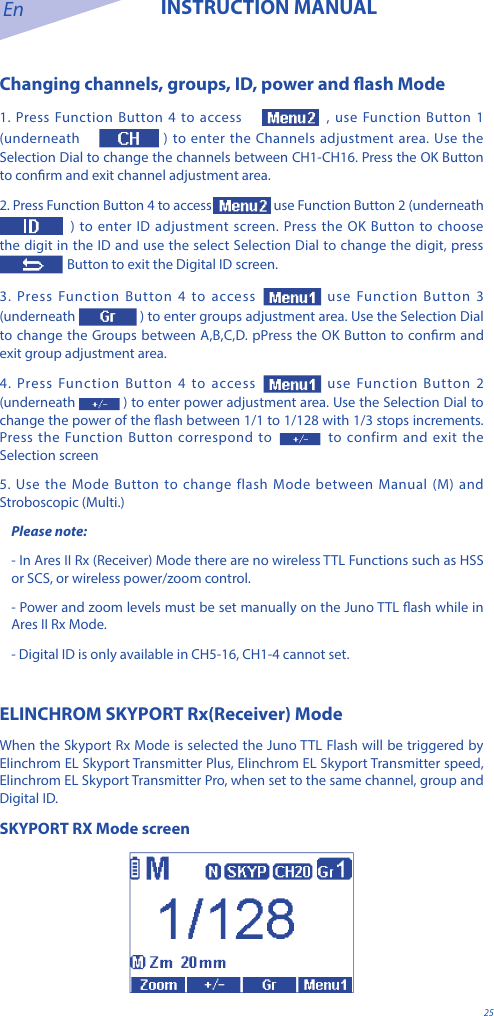
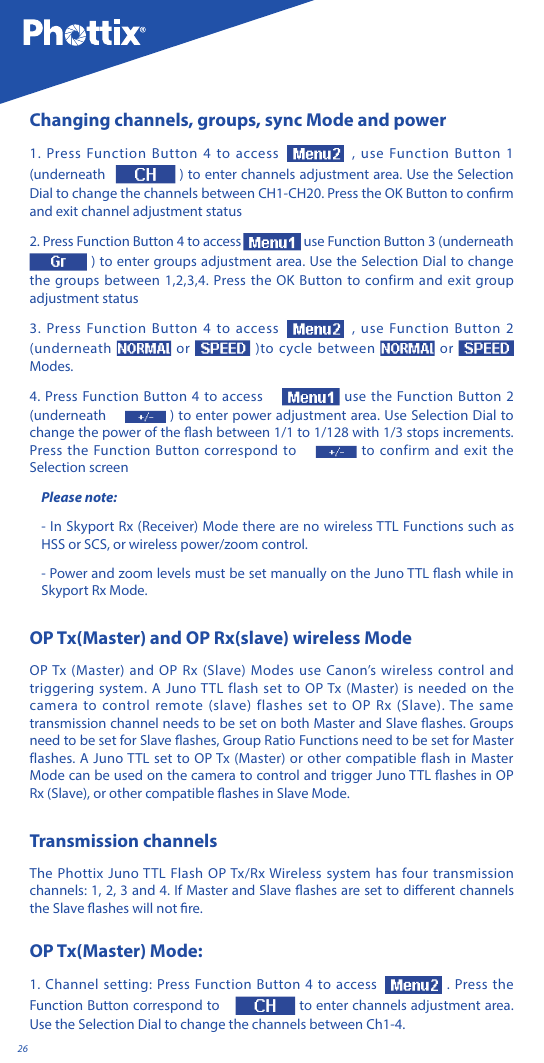
En INSTRUCTION MANUAL25Changing channels, groups, ID, power and ash Mode1. Press Function Button 4 to access  , use Function Button 1 (underneath   ) to enter the Channels adjustment area. Use the Selection Dial to change the channels between CH1-CH16. Press the OK Button to conrm and exit channel adjustment area.2. Press Function Button 4 to access  use Function Button 2 (underneath  ) to enter ID adjustment screen. Press the OK Button to choose the digit in the ID and use the select Selection Dial to change the digit, press   Button to exit the Digital ID screen.3. Press Function Button 4 to access  use Function Button 3 (underneath ) to enter groups adjustment area. Use the Selection Dial to change the Groups between A,B,C,D. pPress the OK Button to conrm and exit group adjustment area.4. Press Function Button 4 to access  use Function Button 2 (underneath  ) to enter power adjustment area. Use the Selection Dial to change the power of the ash between 1/1 to 1/128 with 1/3 stops increments. Press the Function Button correspond to to confirm and exit the Selection screen5. Use the Mode Button to change flash Mode between Manual (M) and Stroboscopic (Multi.)Please note: - In Ares II Rx (Receiver) Mode there are no wireless TTL Functions such as HSS or SCS, or wireless power/zoom control. - Power and zoom levels must be set manually on the Juno TTL ash while in Ares II Rx Mode.- Digital ID is only available in CH5-16, CH1-4 cannot set.ELINCHROM SKYPORT Rx(Receiver) ModeWhen the Skyport Rx Mode is selected the Juno TTL Flash will be triggered by Elinchrom EL Skyport Transmitter Plus, Elinchrom EL Skyport Transmitter speed, Elinchrom EL Skyport Transmitter Pro, when set to the same channel, group and Digital ID. SKYPORT RX Mode screen
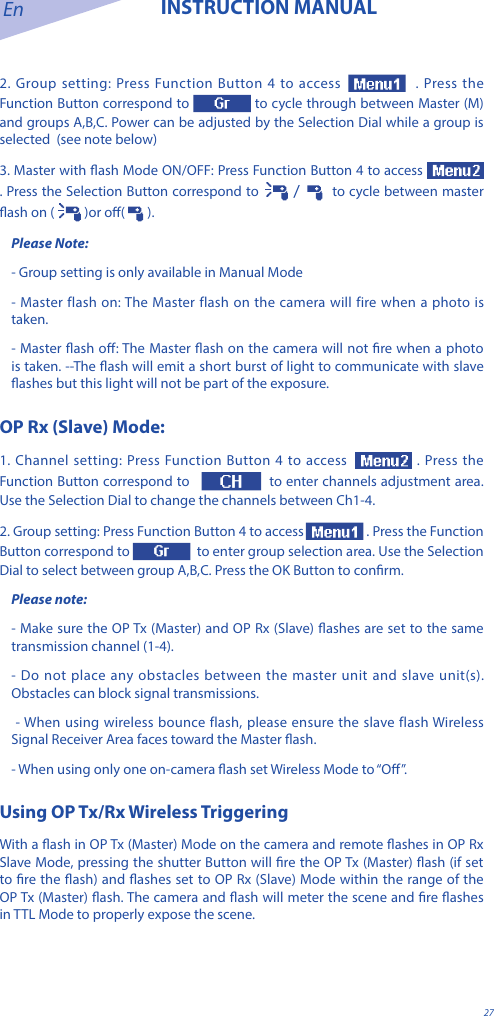
26Changing channels, groups, sync Mode and power1. Press Function Button 4 to access , use Function Button 1 (underneath   ) to enter channels adjustment area. Use the Selection Dial to change the channels between CH1-CH20. Press the OK Button to conrm and exit channel adjustment status2. Press Function Button 4 to access  use Function Button 3 (underneath  ) to enter groups adjustment area. Use the Selection Dial to change the groups between 1,2,3,4. Press the OK Button to confirm and exit group adjustment status3. Press Function Button 4 to access , use Function Button 2 (underneath   or   )to cycle between   or    Modes.4. Press Function Button 4 to access   use the Function Button 2 (underneath   ) to enter power adjustment area. Use Selection Dial to change the power of the ash between 1/1 to 1/128 with 1/3 stops increments. Press the Function Button correspond to   to confirm and exit the Selection screenPlease note:- In Skyport Rx (Receiver) Mode there are no wireless TTL Functions such as HSS or SCS, or wireless power/zoom control. - Power and zoom levels must be set manually on the Juno TTL ash while in Skyport Rx Mode.OP Tx(Master) and OP Rx(slave) wireless ModeOP Tx (Master) and OP Rx (Slave) Modes use Canon’s wireless control and triggering system. A Juno TTL flash set to OP Tx (Master) is needed on the camera to control remote (slave) flashes set to OP Rx (Slave). The same transmission channel needs to be set on both Master and Slave ashes. Groups need to be set for Slave ashes, Group Ratio Functions need to be set for Master flashes. A Juno TTL set to OP Tx (Master) or other compatible flash in Master Mode can be used on the camera to control and trigger Juno TTL ashes in OP Rx (Slave), or other compatible ashes in Slave Mode.Transmission channelsThe Phottix Juno TTL Flash OP Tx/Rx Wireless system has four transmission channels: 1, 2, 3 and 4. If Master and Slave ashes are set to dierent channels the Slave ashes will not re.OP Tx(Master) Mode:1. Channel setting: Press Function Button 4 to access  . Press the Function Button correspond to   to enter channels adjustment area. Use the Selection Dial to change the channels between Ch1-4.
En INSTRUCTION MANUAL272. Group setting: Press Function Button 4 to access   . Press the Function Button correspond to  to cycle through between Master (M) and groups A,B,C. Power can be adjusted by the Selection Dial while a group is selected  (see note below)3. Master with ash Mode ON/OFF: Press Function Button 4 to access  . Press the Selection Button correspond to   /    to cycle between master ash on (  )or o(   ).Please Note:- Group setting is only available in Manual Mode- Master flash on: The Master flash on the camera will fire when a photo is taken.- Master ash o: The Master ash on the camera will not re when a photo is taken. --The ash will emit a short burst of light to communicate with slave ashes but this light will not be part of the exposure.OP Rx (Slave) Mode:1. Channel setting: Press Function Button 4 to access  . Press the Function Button correspond to    to enter channels adjustment area. Use the Selection Dial to change the channels between Ch1-4.2. Group setting: Press Function Button 4 to access  . Press the Function Button correspond to    to enter group selection area. Use the Selection Dial to select between group A,B,C. Press the OK Button to conrm.Please note: - Make sure the OP Tx (Master) and OP Rx (Slave) ashes are set to the same transmission channel (1-4). - Do not place any obstacles between the master unit and slave unit(s). Obstacles can block signal transmissions. - When using wireless bounce flash, please ensure the slave flash Wireless Signal Receiver Area faces toward the Master ash. - When using only one on-camera ash set Wireless Mode to “O”.Using OP Tx/Rx Wireless Triggering With a ash in OP Tx (Master) Mode on the camera and remote ashes in OP Rx Slave Mode, pressing the shutter Button will re the OP Tx (Master) ash (if set to re the ash) and ashes set to OP Rx (Slave) Mode within the range of the OP Tx (Master) ash. The camera and ash will meter the scene and re ashes in TTL Mode to properly expose the scene.
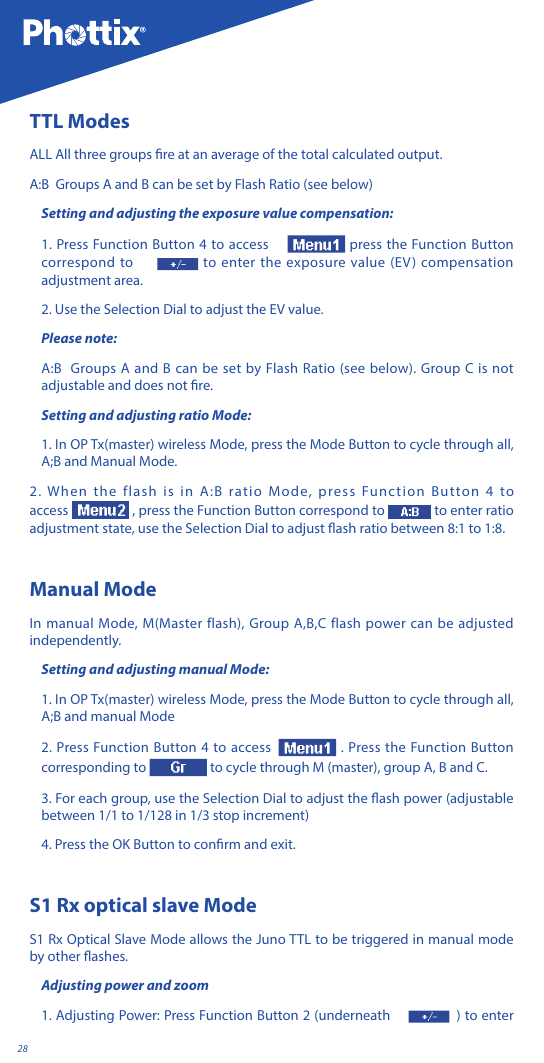
28TTL ModesALL All three groups re at an average of the total calculated output.A:B  Groups A and B can be set by Flash Ratio (see below)Setting and adjusting the exposure value compensation:1. Press Function Button 4 to access   press the Function Button correspond to   to enter the exposure value (EV) compensation adjustment area.2. Use the Selection Dial to adjust the EV value.Please note:A:B  Groups A and B can be set by Flash Ratio (see below). Group C is not adjustable and does not re.Setting and adjusting ratio Mode:1. In OP Tx(master) wireless Mode, press the Mode Button to cycle through all, A;B and Manual Mode.2. When the flash is in A:B ratio Mode, press Function Button 4 to access  , press the Function Button correspond to  to enter ratio adjustment state, use the Selection Dial to adjust ash ratio between 8:1 to 1:8. Manual ModeIn manual Mode, M(Master flash), Group A,B,C flash power can be adjusted independently. Setting and adjusting manual Mode:1. In OP Tx(master) wireless Mode, press the Mode Button to cycle through all, A;B and manual Mode2. Press Function Button 4 to access  . Press the Function Button corresponding to   to cycle through M (master), group A, B and C.3. For each group, use the Selection Dial to adjust the ash power (adjustable between 1/1 to 1/128 in 1/3 stop increment)4. Press the OK Button to conrm and exit.S1 Rx optical slave ModeS1 Rx Optical Slave Mode allows the Juno TTL to be triggered in manual mode by other ashes.Adjusting power and zoom1. Adjusting Power: Press Function Button 2 (underneath  ) to enter
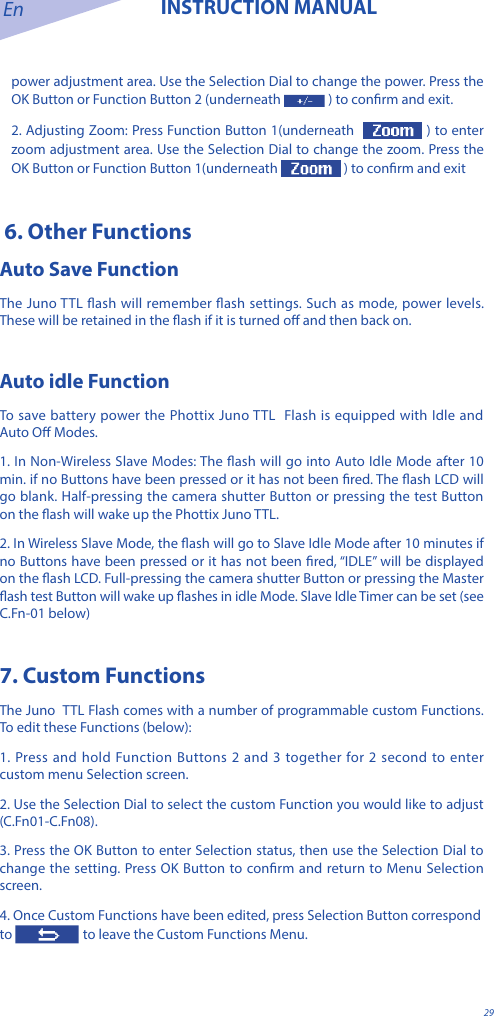
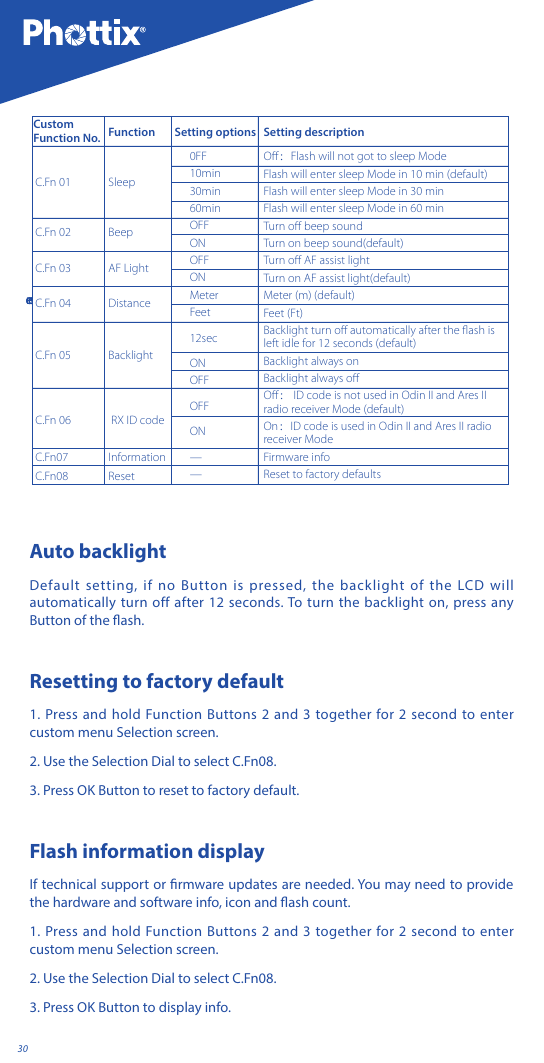
En INSTRUCTION MANUAL29power adjustment area. Use the Selection Dial to change the power. Press the OK Button or Function Button 2 (underneath  ) to conrm and exit.2. Adjusting Zoom: Press Function Button 1(underneath   ) to enter zoom adjustment area. Use the Selection Dial to change the zoom. Press the OK Button or Function Button 1(underneath   ) to conrm and exit 6. Other Functions Auto Save FunctionThe Juno TTL ash will remember ash settings. Such as mode, power levels. These will be retained in the ash if it is turned o and then back on.Auto idle FunctionTo save battery power the Phottix Juno TTL  Flash is equipped with Idle and Auto O Modes. 1. In Non-Wireless Slave Modes: The ash will go into Auto Idle Mode after 10 min. if no Buttons have been pressed or it has not been red. The ash LCD will go blank. Half-pressing the camera shutter Button or pressing the test Button on the ash will wake up the Phottix Juno TTL. 2. In Wireless Slave Mode, the ash will go to Slave Idle Mode after 10 minutes if no Buttons have been pressed or it has not been red, “IDLE” will be displayed on the ash LCD. Full-pressing the camera shutter Button or pressing the Master ash test Button will wake up ashes in idle Mode. Slave Idle Timer can be set (see C.Fn-01 below)7. Custom FunctionsThe Juno  TTL Flash comes with a number of programmable custom Functions. To edit these Functions (below):1. Press and hold Function Buttons 2 and 3 together for 2 second to enter custom menu Selection screen.2. Use the Selection Dial to select the custom Function you would like to adjust (C.Fn01-C.Fn08).3. Press the OK Button to enter Selection status, then use the Selection Dial to change the setting. Press OK Button to conrm and return to Menu Selection screen.4. Once Custom Functions have been edited, press Selection Button correspond to   to leave the Custom Functions Menu.
30screenC.Fn 01C.Fn 02C.Fn 03C.Fn 04C.Fn 05C.Fn 06C.Fn07C.Fn08SleepBeepAF LightDistanceBacklight RX ID codeInformationReset0FF10min30min60minOFFONOFFONMeterFeet12secONOFFOFFON——Off:Flash will not got to sleep ModeFlash will enter sleep Mode in 10 min (default)Flash will enter sleep Mode in 30 minFlash will enter sleep Mode in 60 minTurn off beep soundTurn on beep sound(default)Turn off AF assist lightTurn on AF assist light(default)Meter (m) (default)Feet (Ft)Backlight turn off automatically after the flash is left idle for 12 seconds (default)Backlight always on Backlight always offOff: ID code is not used in Odin II and Ares II radio receiver Mode (default)On:ID code is used in Odin II and Ares II radio receiver ModeFirmware infoReset to factory defaultsCustom Function No. Function Setting options Setting descriptionAuto backlightDefault setting, if no Button is pressed, the backlight of the LCD will automatically turn off after 12 seconds. To turn the backlight on, press any Button of the ash.Resetting to factory default1. Press and hold Function Buttons 2 and 3 together for 2 second to enter custom menu Selection screen.2. Use the Selection Dial to select C.Fn08.3. Press OK Button to reset to factory default.Flash information displayIf technical support or rmware updates are needed. You may need to provide the hardware and software info, icon and ash count.1. Press and hold Function Buttons 2 and 3 together for 2 second to enter custom menu Selection screen.2. Use the Selection Dial to select C.Fn08.3. Press OK Button to display info.
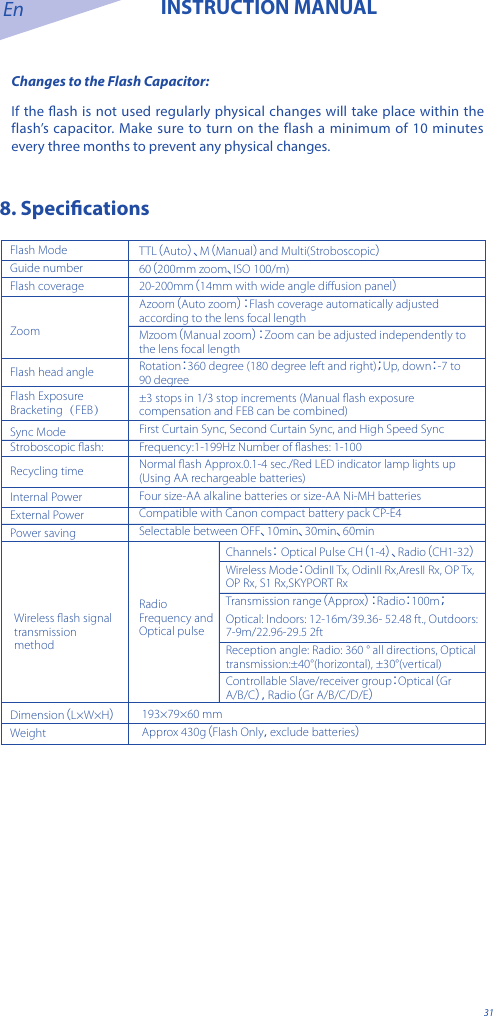
En INSTRUCTION MANUAL31Changes to the Flash Capacitor:If the ash is not used regularly physical changes will take place within the flash’s capacitor. Make sure to turn on the flash a minimum of 10 minutes every three months to prevent any physical changes.8. SpecicationsFlash ModeGuide numberFlash coverageZoomFlash head angleFlash Exposure Bracketing(FEB)Sync ModeStroboscopic flash:Recycling timeInternal PowerExternal PowerPower savingTTL(Auto)、M(Manual)and Multi(Stroboscopic)60(200mm zoom、ISO 100/m)20-200mm(14mm with wide angle diffusion panel)Azoom(Auto zoom): Flash coverage automatically adjusted according to the lens focal lengthMzoom(Manual zoom): Zoom can be adjusted independently to the lens focal length Rotation:360 degree (180 degree left and right);Up, down:-7 to 90 degree±3 stops in 1/3 stop increments (Manual flash exposure compensation and FEB can be combined)First Curtain Sync, Second Curtain Sync, and High Speed SyncFrequency:1-199Hz Number of flashes: 1-100Normal flash Approx.0.1-4 sec./Red LED indicator lamp lights up (Using AA rechargeable batteries)Four size-AA alkaline batteries or size-AA Ni-MH batteriesCompatible with Canon compact battery pack CP-E4 Selectable between OFF、10min、30min、60min193×79×60 mm Approx 430g(Flash Only,exclude batteries)Dimension(L×W×H)WeightChannels: Optical Pulse CH(1-4)、Radio(CH1-32)Wireless Mode:OdinII Tx, OdinII Rx,AresII Rx, OP Tx, OP Rx, S1 Rx,SKYPORT RxTransmission range(Approx): Radio:100m;Optical: Indoors: 12-16m/39.36- 52.48 ft., Outdoors: 7-9m/22.96-29.5 2ft  Reception angle: Radio: 360 ° all directions, Optical transmission:±40°(horizontal), ±30°(vertical)Controllable Slave/receiver group:Optical(Gr A/B/C),Radio(Gr A/B/C/D/E)Radio Frequency and Optical pulse Wireless flash signal transmission method
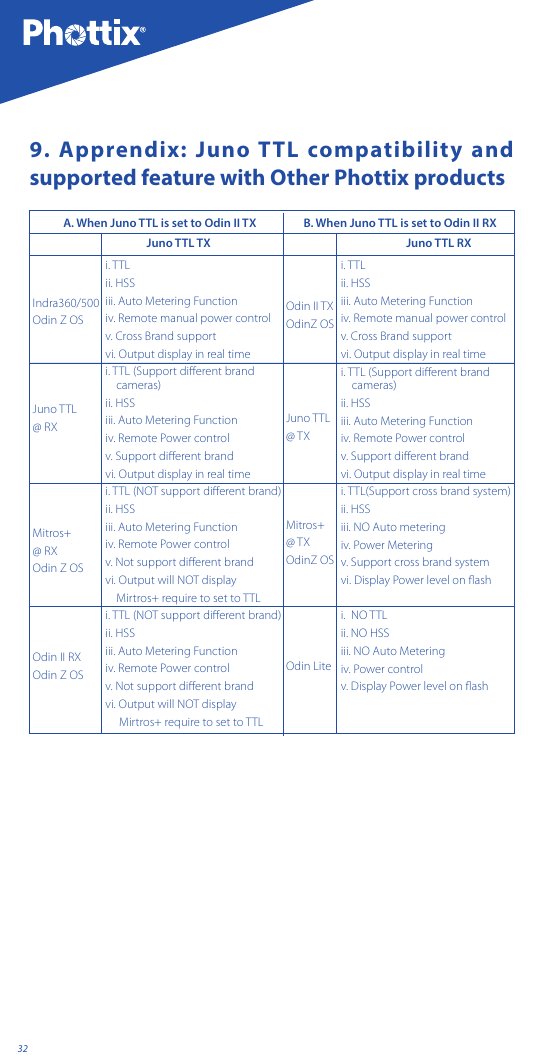
329. Apprendix: Juno TTL compatibility and supported feature with Other Phottix productsi. TTL ii. HSSiii. Auto Metering Function iv. Remote manual power controlv. Cross Brand supportvi. Output display in real timei. TTL (Support different brand      cameras)ii. HSSiii. Auto Metering Function iv. Remote Power controlv. Support different brandvi. Output display in real timei. TTL (NOT support different brand)ii. HSSiii. Auto Metering Functioniv. Remote Power controlv. Not support different brandvi. Output will NOT display    Mirtros+ require to set to TTLi. TTL (NOT support different brand)ii. HSSiii. Auto Metering Functioniv. Remote Power controlv. Not support different brandvi. Output will NOT display     Mirtros+ require to set to TTLi. TTL ii. HSSiii. Auto Metering Function iv. Remote manual power controlv. Cross Brand supportvi. Output display in real timei. TTL (Support different brand     cameras)ii. HSSiii. Auto Metering Function iv. Remote Power controlv. Support different brandvi. Output display in real timei. TTL(Support cross brand system)ii. HSSiii. NO Auto meteringiv. Power Meteringv. Support cross brand systemvi. Display Power level on flashi.  NO TTLii. NO HSSiii. NO Auto Metering iv. Power controlv. Display Power level on flashIndra360/500Odin Z OSJuno TTL @ RXMitros+ @ RXOdin Z OSOdin II RXOdin Z OSOdin II TXOdinZ OSJuno TTL @ TXMitros+ @ TXOdinZ OSOdin LiteA. When Juno TTL is set to Odin II TXJuno TTL TX Juno TTL RXB. When Juno TTL is set to Odin II RX
En INSTRUCTION MANUAL33RED 2014/53/EUDeclaration of Conformity Hereby, Phottix (HK) Ltd. declares that this product is in compliance with essential requirements and other relevant provisions of Directive 2014/53/EU. This product can be used across EU member states. A copy of the Declaration of conformity can be found at www.phottix.com.
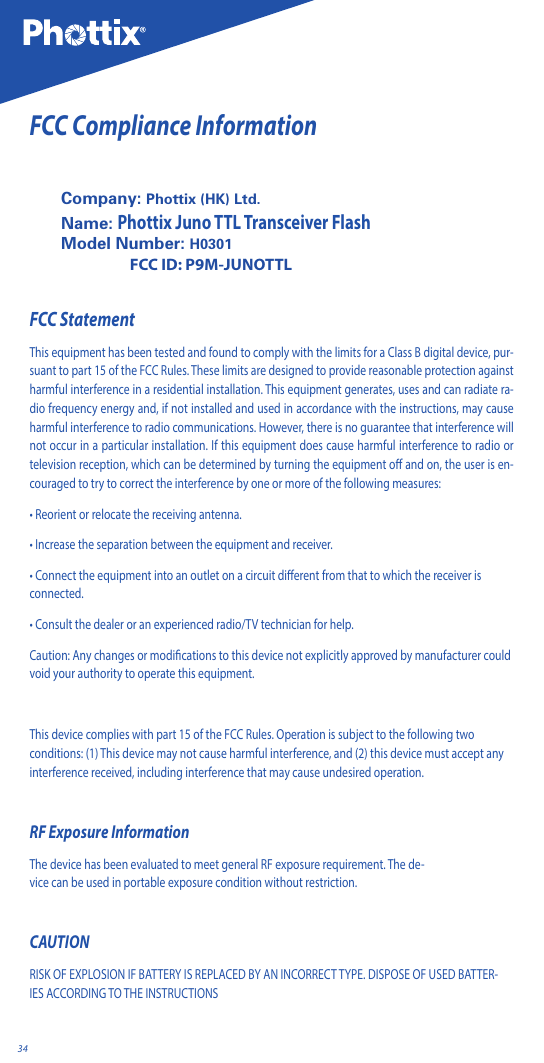
34FCC Compliance InformationCompany: Phottix (HK) Ltd.Name: Phottix Juno TTL Transceiver FlashModel Number: H0301                 FCC ID: P9M-JUNOTTLFCC StatementThis equipment has been tested and found to comply with the limits for a Class B digital device, pur-suant to part 15 of the FCC Rules. These limits are designed to provide reasonable protection against harmful interference in a residential installation. This equipment generates, uses and can radiate ra-dio frequency energy and, if not installed and used in accordance with the instructions, may cause harmful interference to radio communications. However, there is no guarantee that interference will not occur in a particular installation. If this equipment does cause harmful interference to radio or television reception, which can be determined by turning the equipment o and on, the user is en-couraged to try to correct the interference by one or more of the following measures:• Reorient or relocate the receiving antenna.• Increase the separation between the equipment and receiver.• Connect the equipment into an outlet on a circuit dierent from that to which the receiver is connected.• Consult the dealer or an experienced radio/TV technician for help.Caution: Any changes or modifications to this device not explicitly approved by manufacturer could void your authority to operate this equipment.This device complies with part 15 of the FCC Rules. Operation is subject to the following two conditions: (1) This device may not cause harmful interference, and (2) this device must accept any interference received, including interference that may cause undesired operation.RF Exposure InformationThedevicehasbeenevaluatedtomeetgeneralRFexposurerequirement.Thede-vicecanbeusedinportableexposureconditionwithoutrestriction.CAUTIONRISKOFEXPLOSIONIFBATTERYISREPLACED BYANINCORRECTTYPE. DISPOSEOFUSEDBATTER-IESACCORDING TOTHEINSTRUCTIONS
En INSTRUCTION MANUAL35What's included:1. Juno TTL unit X 12. Carrying bag.3. Diuser cap (white color)4. Printed user manual.5. Hot shoe stand. www.phottix.com

Navigation menu