Prime Electronics and Satellitics VT2RSP Video Sender User Manual VS
Prime Electronics & Satellitics Inc. Video Sender VS
users manual

Video Sender
Operation Manual

Table of Contents
1 Introduction............................................................................................................1
1.1 Features..................................................................................................1
2 List of package contents.........................................................................................2
3 Outline....................................................................................................................3
4 Setting up units ......................................................................................................6
4.1 Transmitter :...........................................................................................7
4.2 Receiver : ...............................................................................................8
5 Channel and dwell time selection ..........................................................................9
5.1 Transmitter channel setting....................................................................9
5.2 Receiver setting......................................................................................9
6 Using the remote relay feature.............................................................................11
7 Trouble shooting ..................................................................................................12
IMPORTANT
This equipment has been tested and found to comply with the limits for a
Consumer Equipment RF Lighting device,pursuant to Part ISC of the FCC
Rules. These limits are designed to provide reasonable protection against
harmful interference in a residential installation. This equipment generates,
uses and can radiate radio frequency energy and,if not installed and used in
accordance with the instructions, may cause harmful interference to radio
communications. However,there is no guarantee that interference will not occur
in a particular installation.If this equipment does cause harmful interference to
radio or television reception,which can be determined by turning the equipment
off and on, the user is encouraged to try to correct the interference by one or
more of the following measures:
--Reorient or relocate the receiving antenna.
--Increase the separation between the equipment and receiver.
--Connect the equipment into an outlet on a circuir different from that to which
the receiver is connected
--Consult the dealer or an experienced radio/TV technician for help.
CAUTION:
Any changes or modifications not expressly approved by the grantee of this
device could void the user’s authority to operate the equipment.
Safety Pre-caution
To prevent fire or shock hazard,
Do not expose this product to rain or moisture.
Do not use near a bath tub, wash bowl, sink or laundry tub
Do not use in a wet basement or in or around a swimming pool.
Do not open the case of this product
Use only the power supply packed with it
1
Video Sender Manual Version 5/2
1 Introduction
The new 2.4GHz system VF2RSP sends consistent, sharp audio and video images up
to 100M to other rooms without running cable. The 2.4 GHz FM signal penetrates
wall and avoids interference from other crowded 900 MHz band. Due to FM
modulation, it provides a superior quality. With four channels, you could find optimal
reception and transmit different sources using multiple pairs. The special hidden omni
directional antenna maximizes the signal range. FCC,CE approved Easy installation.
1.1 Features
2.4GHz signal avoids interference from the crowed 900MHz band
Provides clear reception up to 300 feet.
Four selectable PLL channels eliminate interference and allow use of multiple
systems in the same area
Send stereo audio and clear video signals from Cable TV, VCR, LD, VCD, CD,
satellite receiver to your TV in another room without running cable.
Penetrates walls, doors and ceilings.
Hidden 2.4GHz antenna design
Simple to use - just plug it in and switch it on.
infrared extender build-in
2
Video Sender Manual Version 5/2
2 List of package contents
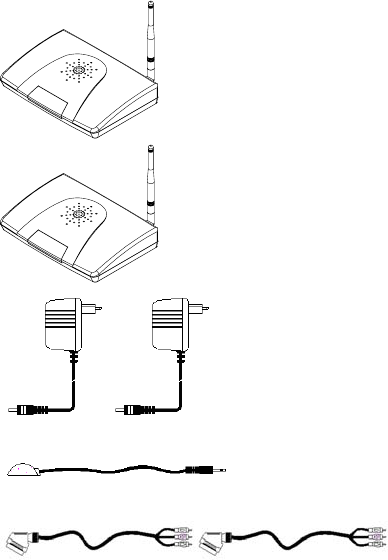
The following devices should be included in the box.
One Transmitter
TX
One Receiver
RX
Two power adaptor
One infrared extender
Two A/V cable (or euro/scart cable)
3
Video Sender Manual Version 5/2
3 Outline
Model# VF2RSP

4
Video Sender Manual Version 5/2
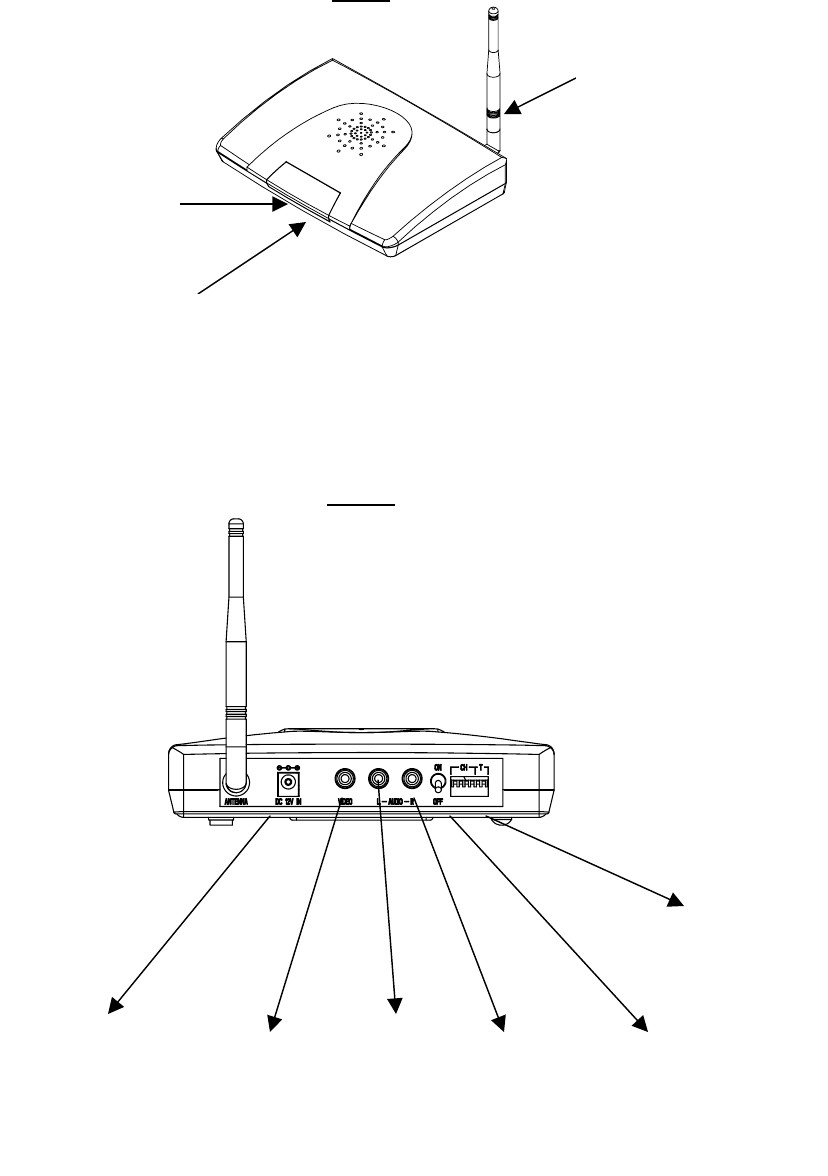
Transmitter (VT2RSP)
Front
REAR
IR extender antenna
Receives 433 remote
control signals
Power LED
Power
On/Off
Switch
Audio
Right in
Audio
Left in
VideoIn
Channel
selection
DC12V
out
DC12V
in
IR Mouse
in
5
Video Sender Manual Version 5/2
Receiver (VR2RSP)
Front
REAR
IR extender antenna
Send 433 remote
control signals
Power LED
Video
out
Audio
Left out Audio
Right out
Power
On/Off
Switch
Channel
selection
Receives infrared signal
from remoter controller
DC12V
in
6
Video Sender Manual Version 5/2
Setting up units
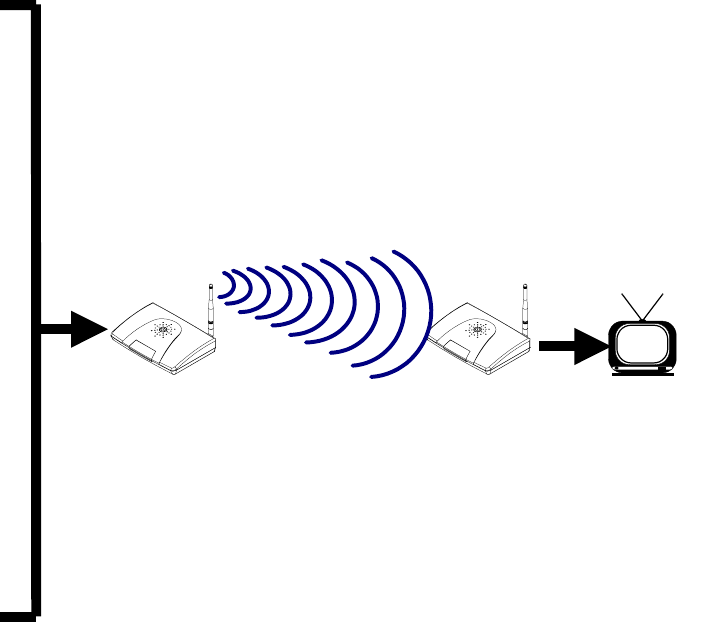
It takes only few minutes to set up Video Sender. You could connect most of
audio/video source to transmitter and connect TV to receiver in another location.
There is no wire needed between transmitter and receiver.
VCR
VCD
DVD
TV
Satellite
Receiver
Transmitter
(VT2RSP)
Receiver
(VR2RSP)
Camcorder
7
Video Sender Manual Version 5/2
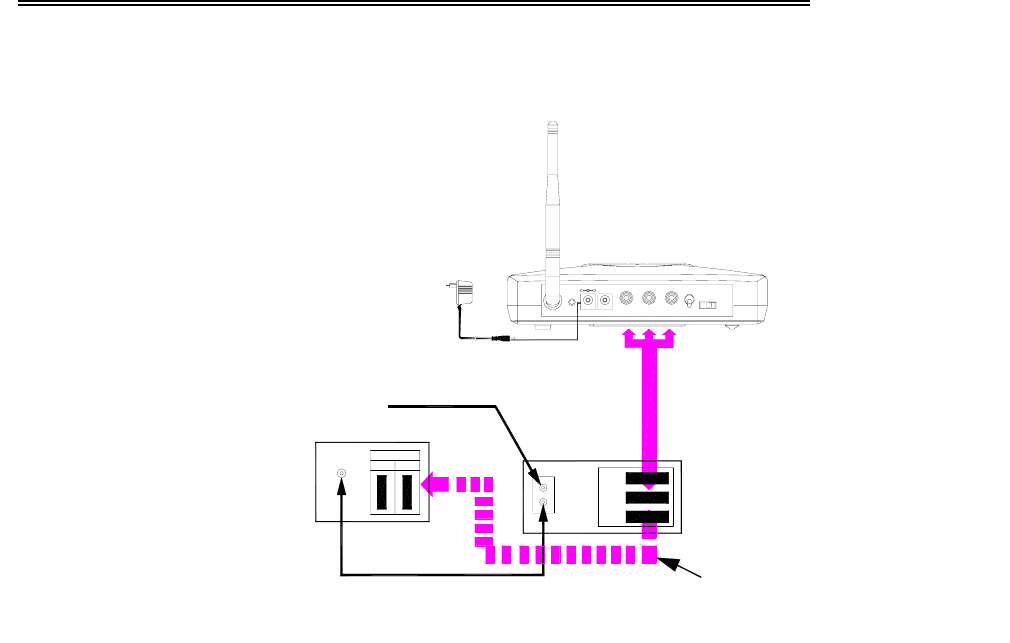
3.1 Transmitter :
Make sure the ON/OFF switch is at the OFF position before setup.
Connect power adaptor to transmitter.
Plug power adaptor to wall outlet..
Connect transmitter to A/V source you want to view or hear at another
location.
Set the transmitting channel at back panel of transmitter. See “Channel
and dwell time selection” to setup the channel..
If you want to us remote relay function, please refer “Using the remote
relay feature”.
Turn the ON/OFF switch to ON position, the related channel indicator
should be lit.
Example: From VCR with TV
(must be purchased)
TV
RF IN
Coaxial cable
A/V 1
IN
LINE
A/V Cable
OUT2
RF IN
RF OUT
LINE
OUT1
LINE
IN
VCR
Recommended TV
connection for
dual-output VCR
Cable TV Hookup
Signal from antenna
To wall outlet
CHANNEL
1 2 3 4
A/V Cable
ANTENNA IR DC 12V IN DC OUT
+
-
L - AUDIO - R
VIDEO
ON
OFF
A/V 2
Fr o m VCR - S
8
Video Sender Manual Version 5/2
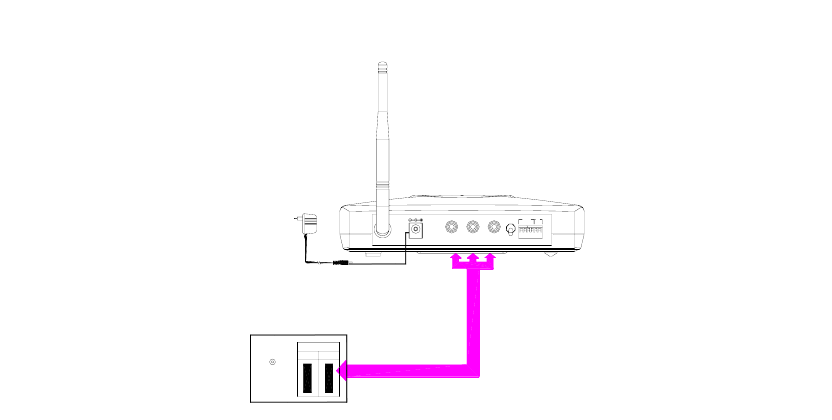
3.2 Receiver :
Make sure the ON/OFF switch is at the OFF position before setup.
Connect power adaptor to receiver.
Plug power adaptor to wall outlet.
Connect receiver to TV set or other A/V displays.
Set the receiving channel same as transmitter at back panel of receiver.
See “Channel and dwell time selection” to setup channel.
Turn the ON/OFF switch to ON position, the related channel indicator
should be lit.
ANTENNA
IN
RF IN
A/V1 A/V2
To wall outlet
TV
L - AUDIO - R
DC 12V IN VIDEO
A/V Cable
OFF
ON T
CH
Note : If the accessory cable are euro/scart, they are different cable for
transmitter and receiver. There has indicator on scart connector,
please follow the indicator to install.
For RCA cable they are identically.
9
Video Sender Manual Version 5/2
4 Channel and dwell time selection
4.1 Transmitter channel setting
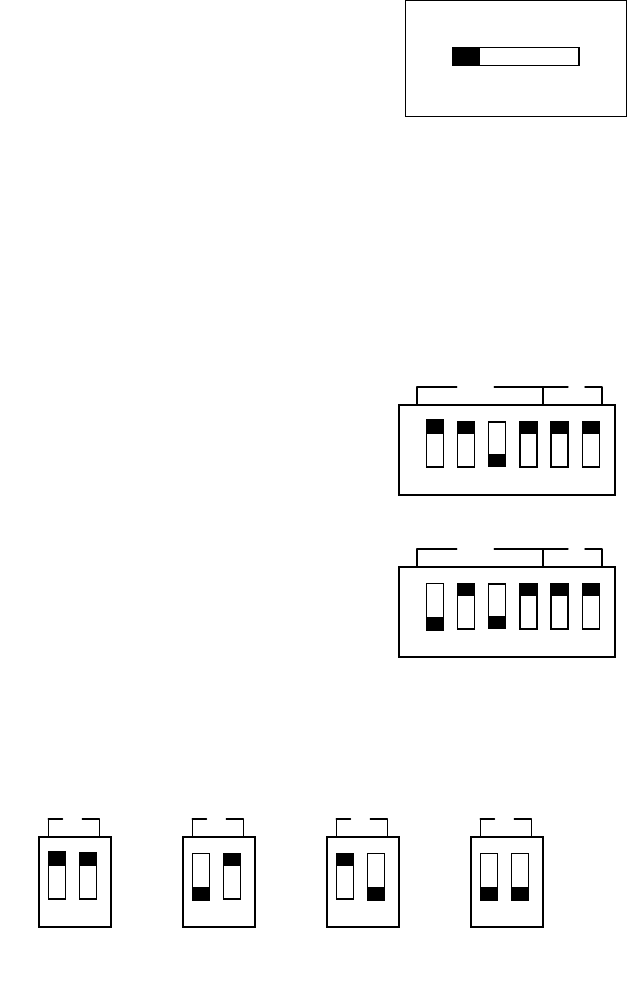
The transmitter of video sender can send A/V source by the channel that you
selected. You can use up to 4 transmitter in the same time, but make sure
each transmitter is set in different channel. Receiver can receive all channel
sequentially as you specified.
For example as the figure, A/V signal was send
by channel 1.
4.2 Receiver setting
You can set received channel and dwell time by two way :
Set channel and dwell time at back panel.
Use optional remote handheld to select channel .
a. set at back panel
For example as the figure, it will receive
channel 3.
For example as the figure, it will receive
channel 1 and 3 sequentially with 2
seconds dwell time.
There have 4 different dwell time can be selected by changing switch
number 5 and 6 as following figure.
1 2 3 4
CHANNEL
CH T
1 2 3 4 5 6
CH T
1 2 3 4 5 6
T
5 6
16 seconds
T
5 6
2 seconds
T
5 6
4 seconds
T
5 6
8 seconds
on
on
10
Video Sender Manual Version 5/2
b. set by optional remote handheld
Channel select
Press “CH1”, ”CH2”, ”CH3”, ”CH4” to select the channel you want to
receive.
Scan mode channel selection
If you want to receive channel 2 and 4 sequentially :
1. Press “PRGM”, all 4 channel indicator will be lit.
2. Press “CH2”, CH 2 indicator will be flash.
3. Press “CH4”, CH4 indicator will be flash too.
4. Press “PRGM”, all 4 channel indicator will be flash quickly for 5
times.
Start the scan mode
Press “SCAN” then the receiver will start to scan the channel you set.
The current channel indicator will flash during scan mode.
11
Video Sender Manual Version 5/2
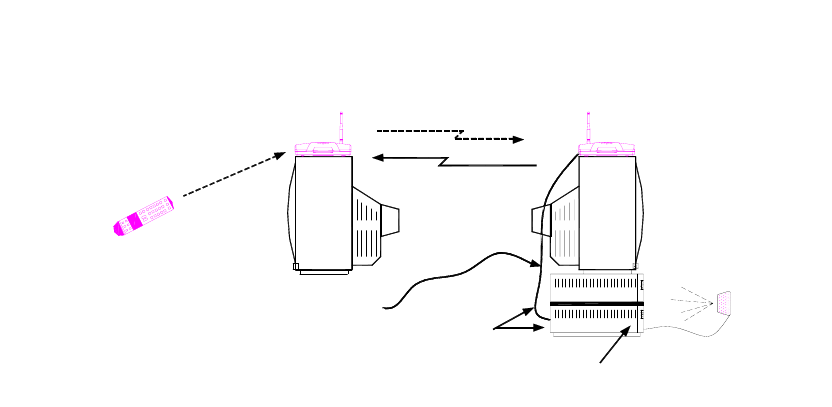
5 Using the remote relay feature
1. Plug the IR extender to the transmitter of video sender.
2. Locate the IR sensor of the A/V source equipment you want to control. You
can find it by user’s manual of the equipment.
3. Point the lamp of IR extender to the IR sensor of A/V equipment you want to
control. Both the IR extender lamp and the IR sensor are with working angle
about ±30 to ±40 degree. So be sure the IR extender is pointed to the IR
sensor in general direction.
4. Position the receiver of video sender for your remote handheld signal can be
received by the IR sensor in the front of receiver box.
Remote
control
TV
IR signal
RECEIVER
IR Sensor
Other
Audio/Video
components
TV
IR signal
IR Extender
Mouse
TRANSMITTER
IR Remote Control Signal
2.4 GHz Audio/Video Signal
Audio/Video
cable
IR - Return
12
Video Sender Manual Version 5/2
6 Trouble shooting
1. No video or sound
Check the power switch on the back side of both transmitter and
receiver.
Check the A/V source.
Make sure all cables are connected correctly (especially for euro/scart
connector).
Make sure the channel setting are match in both transmitter and
receiver.
2. Interference in video and sound
If there has any microwave oven close by, please turn off the oven
when you use video sender.
Change different channel to avoid interference from other device.
3. Use two transmitter in the same time
Use channel 1 & 4 for better receiving quality.
4. Remote relay function not work
Clear the obstruction between IR extender and A/V equipment you
want to control.
Make sure the IR extender lamp is pointed toward the IR sensor of
A/V equipment you want to control.
Adjust the antenna of remote relay in both of transmitter and receiver.