R H Peterson l VR-2 Remote Control Transmitter User Manual a2 170 pmd

R. H. Peterson Co.l Remote Control Transmitter a2 170 pmd

User Manual

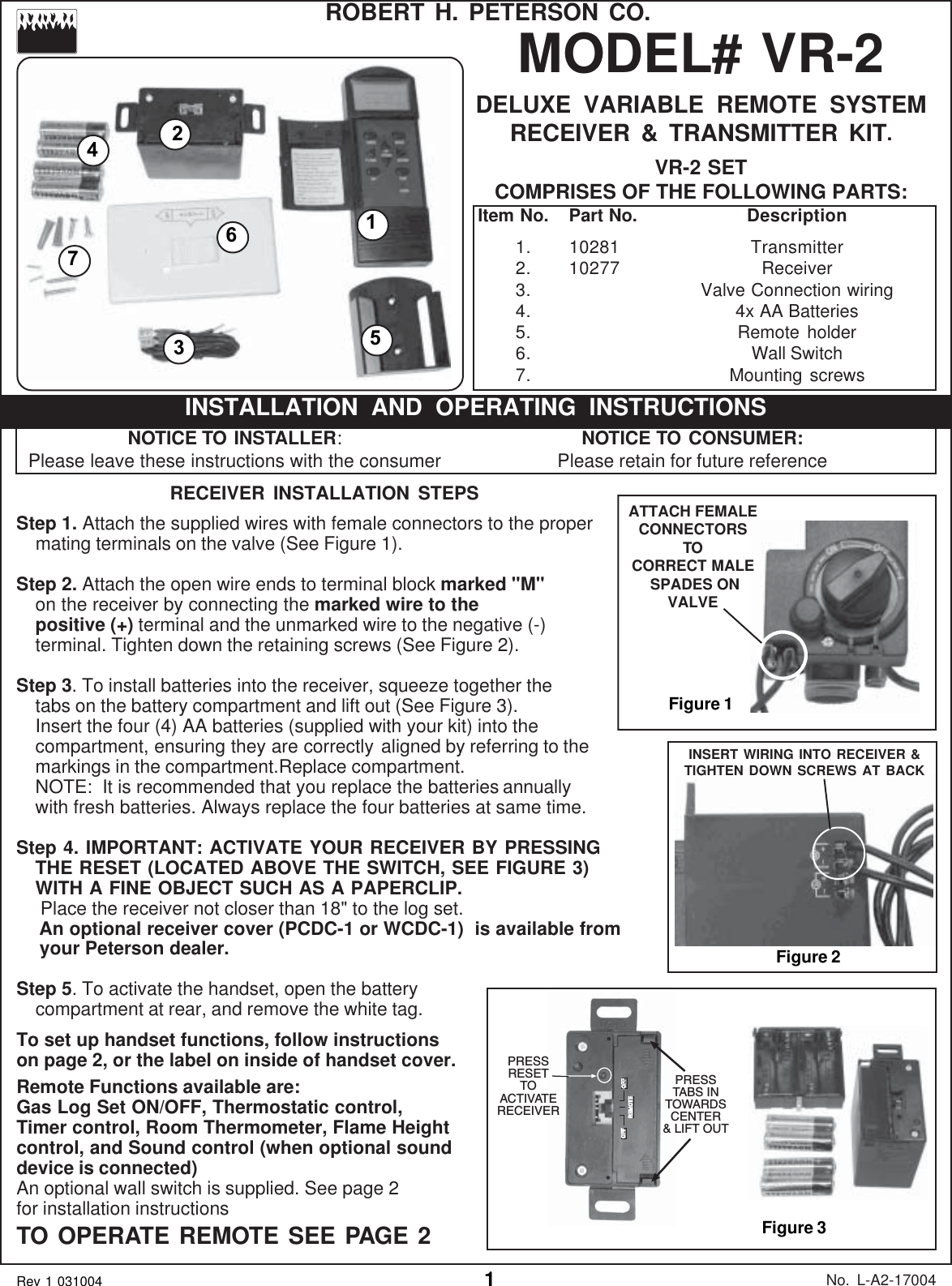
146215MODEL# VR-2DELUXE VARIABLE REMOTE SYSTEMRECEIVER & TRANSMITTER KIT.VR-2 SETCOMPRISES OF THE FOLLOWING PARTS:No. L-A2-17004Rev 1 031004ROBERT H. PETERSON CO.Item No. Part No. Description1. 10281 Transmitter2. 10277 Receiver3. Valve Connection wiring4. 4x AA Batteries5. Remote holder6. Wall Switch7. Mounting screwsFigure 1INSERT WIRING INTO RECEIVER &TIGHTEN DOWN SCREWS AT BACKFigure 2ATTACH FEMALECONNECTORSTOCORRECT MALE SPADES ONVALVERECEIVER INSTALLATION STEPSStep 1. Attach the supplied wires with female connectors to the propermating terminals on the valve (See Figure 1).Step 2. Attach the open wire ends to terminal block marked "M"on the receiver by connecting the marked wire to thepositive (+) terminal and the unmarked wire to the negative (-)terminal. Tighten down the retaining screws (See Figure 2).Step 3. To install batteries into the receiver, squeeze together thetabs on the battery compartment and lift out (See Figure 3).Insert the four (4) AA batteries (supplied with your kit) into thecompartment, ensuring they are correctly aligned by referring to themarkings in the compartment.Replace compartment.NOTE:  It is recommended that you replace the batteries annuallywith fresh batteries. Always replace the four batteries at same time.Step 4. IMPORTANT: ACTIVATE YOUR RECEIVER BY PRESSINGTHE RESET (LOCATED ABOVE THE SWITCH, SEE FIGURE 3)WITH A FINE OBJECT SUCH AS A PAPERCLIP. Place the receiver not closer than 18" to the log set.   An optional receiver cover (PCDC-1 or WCDC-1)  is available from   your Peterson dealer.Step 5. To activate the handset, open the batterycompartment at rear, and remove the white tag.To set up handset functions, follow instructionson page 2, or the label on inside of handset cover.Remote Functions available are:Gas Log Set ON/OFF, Thermostatic control,Timer control, Room Thermometer, Flame Heightcontrol, and Sound control (when optional sounddevice is connected)An optional wall switch is supplied. See page 2for installation instructionsTO OPERATE REMOTE SEE PAGE 2 Figure 3NOTICE TO INSTALLER:Please leave these instructions with the consumerINSTALLATION AND OPERATING INSTRUCTIONSNOTICE TO CONSUMER:Please retain for future reference37OFF OFFREMOTEPRESSTABS INTOWARDSCENTER& LIFT OUTPRESSRESETTOACTIVATERECEIVER
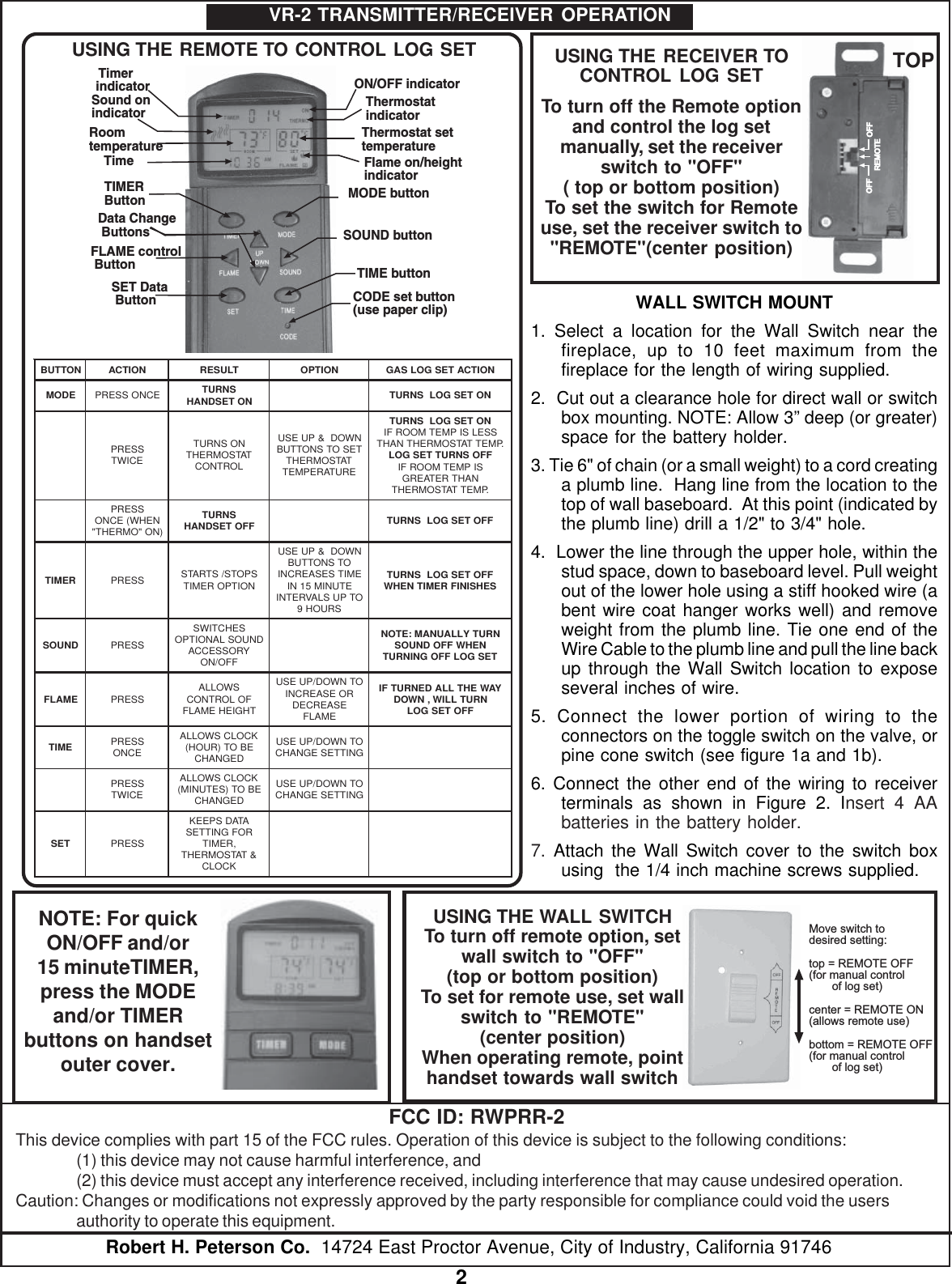
2Robert H. Peterson Co.  14724 East Proctor Avenue, City of Industry, California 91746VR-2 TRANSMITTER/RECEIVER OPERATIONThermostat settemperatureON/OFF indicatorThermostatindicatorFlame on/heightindicatorSound onindicatorRoomtemperatureTime TimerindicatorMODE buttonSOUND buttonTIME buttonCODE set button(use paper clip)TIMERButtonData Change ButtonsSET Data ButtonFLAME control ButtonNOTTUBNOITCATLUSERNOITPONOITCATESGOLSAGEDOM ECNOSSERP SNRUT NOTESDNAH NOTESGOLSNRUTSSERP ECIWTNOSNRUT TATSOMREHT LORTNOCNWOD&PUESU TESOTSNOTTUB TATSOMREHT ERUTAREPMETNOTESGOLSNRUT SSELSIPMETMOORFI .PMETTATSOMREHTNAHT FFOSNRUTTESGOL SIPMETMOORFI NAHTRETAERG .PMETTATSOMREHTSSERP NEHW(ECNO )NO"OMREHT"SNRUT FFOTESDNAH FFOTESGOLSNRUTREMIT SSERP SPOTS/STRATS NOITPOREMITNWOD&PUESU OTSNOTTUB EMITSESAERCNI ETUNIM51NI OTPUSLAVRETNI SRUOH9FFOTESGOLSNRUT SEHSINIFREMITNEHWDNUOS SSERPSEHCTIWS DNUOSLANOITPO YROSSECCA FFO/NONRUTYLLAUNAM:ETON NEHWFFODNUOS TESGOLFFOGNINRUTEMALF SSERP SWOLLA FOLORTNOC THGIEHEMALFOTNWOD/PUESU ROESAERCNI ESAERCED EMALFYAWEHTLLADENRUTFI NRUTLLIW,NWOD FFOTESGOLEMIT SSERP ECNOKCOLCSWOLLA EBOT)RUOH( DEGNAHCOTNWOD/PUESU GNITTESEGNAHCSSERP ECIWTKCOLCSWOLLA EBOT)SETUNIM( DEGNAHCOTNWOD/PUESU GNITTESEGNAHCTES SSERPATADSPEEK ROFGNITTES ,REMIT &TATSOMREHT KCOLCUSING THE REMOTE TO CONTROL LOG SETOFF OFFREMOTEUSING THE RECEIVER TOCONTROL LOG SETTo turn off the Remote optionand control the log setmanually, set the receiverswitch to "OFF"( top or bottom position)To set the switch for Remoteuse, set the receiver switch to"REMOTE"(center position)TOPMove switch todesired setting:top = REMOTE OFF(for manual controlof log set)center = REMOTE ON(allows remote use)bottom = REMOTE OFF(for manual controlof log set)USING THE WALL SWITCHTo turn off remote option, setwall switch to "OFF"(top or bottom position)To set for remote use, set wallswitch to "REMOTE"(center position)When operating remote, pointhandset towards wall switchNOTE: For quickON/OFF and/or15 minuteTIMER,press the MODEand/or TIMERbuttons on handsetouter cover.FCC ID: RWPRR-2This device complies with part 15 of the FCC rules. Operation of this device is subject to the following conditions:(1) this device may not cause harmful interference, and(2) this device must accept any interference received, including interference that may cause undesired operation.Caution: Changes or modifications not expressly approved by the party responsible for compliance could void the usersauthority to operate this equipment.WALL SWITCH MOUNT1. Select a location for the Wall Switch near thefireplace, up to 10 feet maximum from thefireplace for the length of wiring supplied.2.  Cut out a clearance hole for direct wall or switchbox mounting. NOTE: Allow 3” deep (or greater)space for the battery holder.3. Tie 6" of chain (or a small weight) to a cord creatinga plumb line.  Hang line from the location to thetop of wall baseboard.  At this point (indicated bythe plumb line) drill a 1/2" to 3/4" hole.4.  Lower the line through the upper hole, within thestud space, down to baseboard level. Pull weightout of the lower hole using a stiff hooked wire (abent wire coat hanger works well) and removeweight from the plumb line. Tie one end of theWire Cable to the plumb line and pull the line backup through the Wall Switch location to exposeseveral inches of wire.5. Connect the lower portion of wiring to theconnectors on the toggle switch on the valve, orpine cone switch (see figure 1a and 1b).6. Connect the other end of the wiring to receiverterminals as shown in Figure 2. Insert 4 AAbatteries in the battery holder.7.  Attach the Wall Switch cover to the switch boxusing  the 1/4 inch machine screws supplied.

Navigation menu