RBH SOUND BT-100 Audio power amplifier User Manual

RBH SOUND Audio power amplifier

User Manual

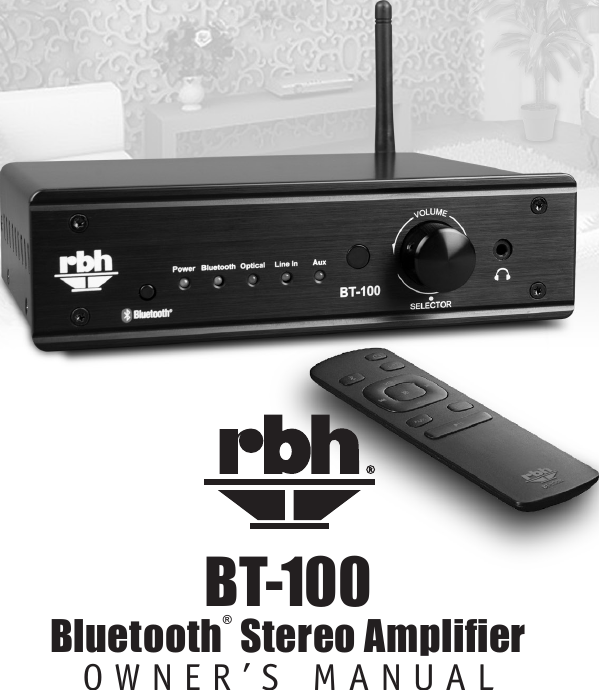
BT-100 Bluetooth® Stereo AmplierOWNER’S MANUAL
Important Safety InstructionsThe lightning flash with the arrowhead symbol within an equilateral triangle, is intended to alert the user to the presence of un-insulated “dangerous voltage” within the product enclosure that may be of sufficient magnitude to constitute a risk of shock to persons.The exclamation point within an equilateral triangle is intended to alert the user to the presence of important operating and maintenance (servicing) instructions in the literature accompanying the product.When using your amplifier basic safety precautions should always be followed to reduce the risk of fire, electric shock, and injury.1.  Do not open the amplifier, attempt any modifications or repairs. There are extremely high voltages present and any servicing must be referred to RBH or an authorized qualified technician.2.  Opening the amplifier will void the warranty.3.  To prevent shock or fire hazard, never permit moisture or any liquid to get into the amplifier. If an accidental spill occurs, immediately shut off the power, unplug its AC power cord and seek a qualified technician for repair.4.  To reduce the risk of electric shock, do not remove the cover (or back). No user serviceable parts inside of amplifier.5.  All safety instructions should be read before this amplifier is operated. Please retain these safety instructions for future reference. All warnings on the amplifier and in this manual should be adhered to.6.  The amplifier should be placed so its location or position provides proper ventilation on all sides of the amplifier on a solid surface.7.  The amplifier should only be connected to a power supply type described in this manual or as marked on the amplifier.8.  Power supply cords should be routed so they will not be pinched or walked on.9.  The amplifier should never be exposed to any liquids of any kind or objects filled with liquids (vases or plants)1This product contains magnetic material. Please contact your physician if you have any questions on whether this might affect the operation of your implantable medical device.This product conforms to all applicable EU directive requirements. RECYCLING: This product’s packaging materials are recyclable and can be reused. This product and the accessories packed together are the applicable product to the WEEE directive except batteries. Please dispose of any materials in accordance with your local recycling regulations. When discarding the unit, comply with your local rules or regulations. Batteries should never be thrown away or incinerated but disposed of in accordance with your local regulations concerning chemical wastes.
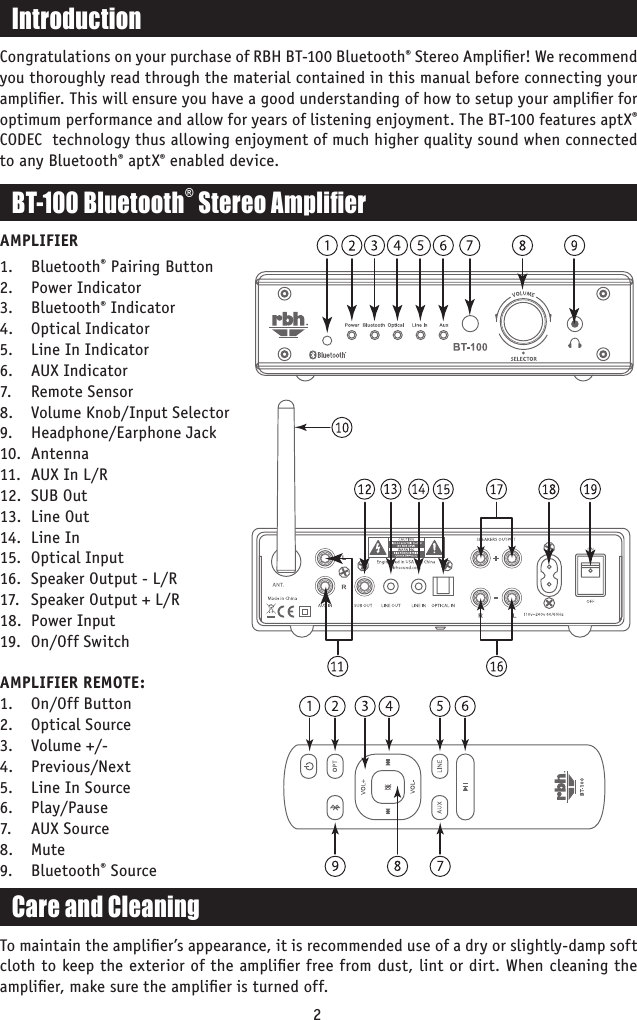
BT-100 Bluetooth® Stereo Amplier2AMPLIFIER1. Bluetooth® Pairing Button2.   Power Indicator3.   Bluetooth® Indicator4.   Optical Indicator5.   Line In Indicator6.   AUX Indicator7.   Remote Sensor8.   Volume Knob/Input Selector9.  Headphone/Earphone Jack10.  Antenna11.  AUX In L/R12.  SUB Out13.  Line Out14.  Line In15.  Optical Input16.  Speaker Output - L/R17.  Speaker Output + L/R18.  Power Input19.  On/Off SwitchAMPLIFIER REMOTE:1.  On/Off Button2.  Optical Source3.  Volume +/-4. Previous/Next5.  Line In Source6. Play/Pause7.  AUX Source8. Mute9. Bluetooth® SourceIntroductionCongratulations on your purchase of RBH BT-100 Bluetooth® Stereo Amplifier! We recommend you thoroughly read through the material contained in this manual before connecting your amplifier. This will ensure you have a good understanding of how to setup your amplifier for optimum performance and allow for years of listening enjoyment. The BT-100 features aptX® CODEC  technology thus allowing enjoyment of much higher quality sound when connected to any Bluetooth® aptX® enabled device.Care and CleaningTo maintain the amplifier’s appearance, it is recommended use of a dry or slightly-damp soft cloth to keep the exterior of the amplifier free from dust, lint or dirt. When cleaning the amplifier, make sure the amplifier is turned off.
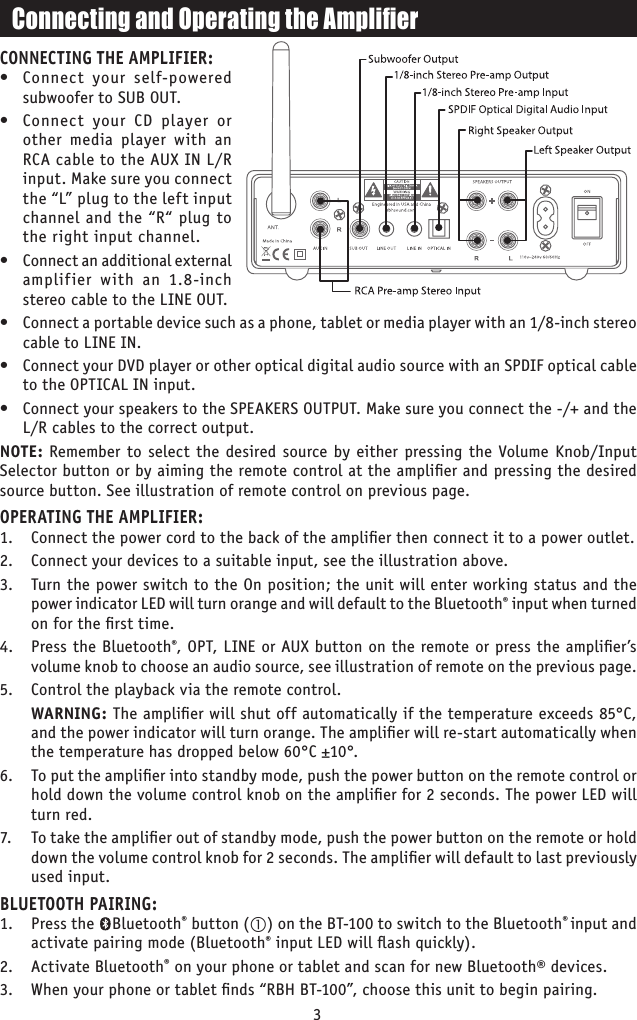
CONNECTING THE AMPLIFIER:•  Connect your self-powered subwoofer to SUB OUT.•  Connect your CD player or other media player with an RCA cable to the AUX IN L/R input. Make sure you connect the “L” plug to the left input channel and the “R“ plug to the right input channel.•  Connect an additional external amplifier with an 1.8-inch stereo cable to the LINE OUT.•  Connect a portable device such as a phone, tablet or media player with an 1/8-inch stereo cable to LINE IN.•  Connect your DVD player or other optical digital audio source with an SPDIF optical cable to the OPTICAL IN input.•  Connect your speakers to the SPEAKERS OUTPUT. Make sure you connect the -/+ and the L/R cables to the correct output.NOTE: Remember to select the desired source by either pressing the Volume Knob/Input Selector button or by aiming the remote control at the amplifier and pressing the desired source button. See illustration of remote control on previous page.OPERATING THE AMPLIFIER:1.  Connect the power cord to the back of the amplifier then connect it to a power outlet. 2.  Connect your devices to a suitable input, see the illustration above. 3.  Turn the power switch to the On position; the unit will enter working status and the power indicator LED will turn orange and will default to the Bluetooth® input when turned on for the first time. 4.  Press the Bluetooth®, OPT, LINE or AUX button on the remote or press the amplifier’s volume knob to choose an audio source, see illustration of remote on the previous page.5.  Control the playback via the remote control.  WARNING: The amplifier will shut off automatically if the temperature exceeds 85°C, and the power indicator will turn orange. The amplifier will re-start automatically when the temperature has dropped below 60°C ±10°.6.  To put the amplifier into standby mode, push the power button on the remote control or hold down the volume control knob on the amplifier for 2 seconds. The power LED will turn red. 7.   To take the amplifier out of standby mode, push the power button on the remote or hold down the volume control knob for 2 seconds. The amplifier will default to last previously used input.BLUETOOTH PAIRING:1.  Press the    Bluetooth® button () on the BT-100 to switch to the Bluetooth® input and activate pairing mode (Bluetooth® input LED will flash quickly).2.  Activate Bluetooth® on your phone or tablet and scan for new Bluetooth® devices.3.  When your phone or tablet finds “RBH BT-100”, choose this unit to begin pairing.3Connecting and Operating the Amplier
4FCC Interference StatementFederal Communication Commission Interference StatementThis device complies with part 15 of the FCC Rules. Operation is subject to the following two conditions: (1) This device may not cause harmful interference, and (2) this device must accept any interference received, including interference that may cause undesired operation. To comply with FCC’s and Industry Canada’s RF radiation exposure limits for general population/uncontrolled exposure, this device must be installed to provide a separation distance of at least 20cm from all persons. This device must not be co-located or operating in conjunction with any other antenna or transmitter.This equipment has been tested and found to comply with the limits for a Class B digital device, pursuant to part 15 of the FCC Rules. These limits are designed to provide reasonable protection against harmful interference in a residential installation. This equipment generates, uses and can radiate radio frequency energy and, if not installed and used in accordance with the instructions, may cause harmful interference to radio communications. However, there is no guarantee that interference will not occur in a particular installation. If this equipment does cause harmful interference to radio or television reception, which can be determined by turning the equipment off and on, the user is encouraged to try to correct the interference by one or more of the following measures:• Reorient or relocate the receiving antenna.• Increase the separation between the equipment and receiver.•  Connect the equipment into an outlet on a circuit different from that to which the receiver is connected.• Consult the dealer or an experienced radio/TV technician for help.WARNING: Any changes or modifications to this unit not expressly approved by the party responsible for compliance could void the user’s authority to operate the equipment.IC STATEMENTThis device complies with Industry Canada license-exempt RSS standard(s). Operation is subject to the following two conditions: (1) this device may not cause interference, and (2) this device must accept any interference, including interference that may cause undesired operation of the device.Le présent appareil est conforme aux CNR d’Industrie Canada applicables aux appareils radio exempts de licence. L’exploitation est autorisée aux deux conditions suivantes :(1) l’appareil ne doit pas produire de brouillage, et (2) l’utilisateur de l’appareil doit accepter tout brouillage radioélectrique subi, même si le brouillage est susceptible d’en compromettre le fonctionnement.The device is compliance with RF field strength limits, users can obtain Canadian information on RF exposure and compliance.Le présent appareil est conforme de ce matériel aux conformités ou aux limites d’intensité de champ RF, les utilisateurs peuvent sur l’exposition aux radiofréquences et la conformité d’acquérir les informations correspondante.This Class B digital apparatus complies with Canadian ICES-003.Cet appareil numérique de la classe B est conforme à la norme NMB-003 du Canada. CAN ICES-3 (B)/NMB-3(B)
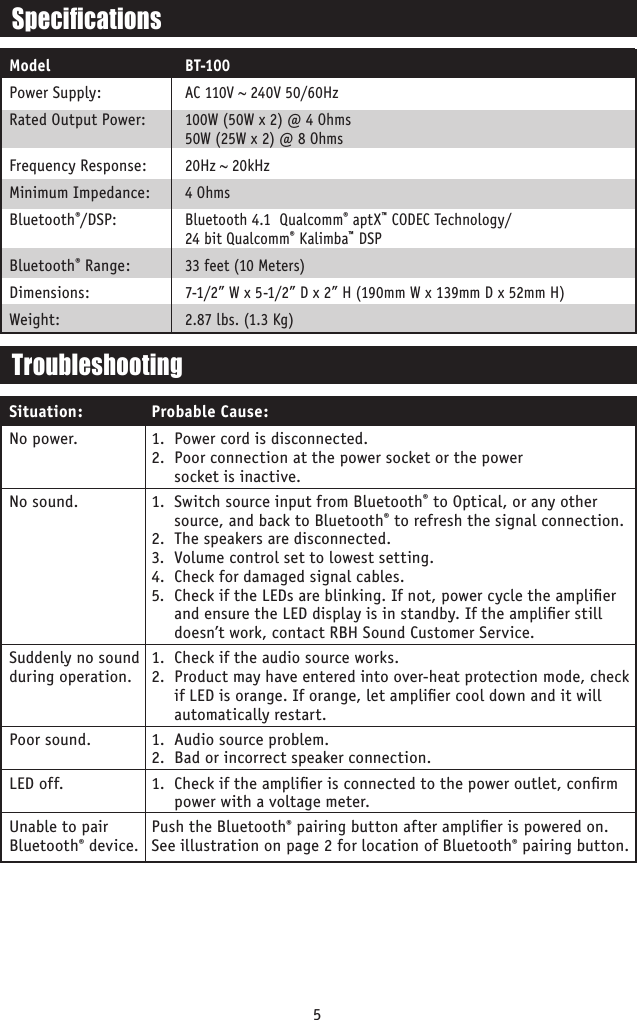
5SpecicationsModelPower Supply:Rated Output Power: Frequency Response:Minimum Impedance:Bluetooth®/DSP: Bluetooth® Range:Dimensions:Weight:BT-100AC 110V ~ 240V 50/60Hz100W (50W x 2) @ 4 Ohms 50W (25W x 2) @ 8 Ohms 20Hz ~ 20kHz4 OhmsBluetooth 4.1  Qualcomm® aptX™ CODEC Technology/ 24 bit Qualcomm® Kalimba™ DSP33 feet (10 Meters)7-1/2” W x 5-1/2” D x 2” H (190mm W x 139mm D x 52mm H)2.87 lbs. (1.3 Kg)No power.No sound.   Suddenly no sound  during operation. Poor sound.LED off. Unable to pair Bluetooth® device.1.  Power cord is disconnected.2.  Poor connection at the power socket or the power  socket is inactive.1.  Switch source input from Bluetooth® to Optical, or any other source, and back to Bluetooth® to refresh the signal connection. 2.  The speakers are disconnected.3.  Volume control set to lowest setting.4.  Check for damaged signal cables.5.  Check if the LEDs are blinking. If not, power cycle the amplifier and ensure the LED display is in standby. If the amplifier still doesn’t work, contact RBH Sound Customer Service.1.  Check if the audio source works.2.  Product may have entered into over-heat protection mode, check if LED is orange. If orange, let amplifier cool down and it will automatically restart.1.  Audio source problem.2.  Bad or incorrect speaker connection.1.  Check if the amplifier is connected to the power outlet, confirm power with a voltage meter.Push the Bluetooth® pairing button after amplifier is powered on. See illustration on page 2 for location of Bluetooth® pairing button. TroubleshootingProbable Cause:Situation:
6WarrantyYour RBH BT-100 Bluetooth® Amplifier is covered by a limited warranty against defects in materials and workmanship for a period of 1 year from the original date of purchase. This warranty is provided by the authorized RBH Sound dealer or factory, wherever the amplifier was purchased. Warranty repair will be performed only when your purchase receipt is presented as proof of ownership and date of purchase. Defective parts will be repaired or replaced without charge by your dealer’s store or the location designated by RBH Sound authorized to service RBH Sound products. Charges for unauthorized service and transportation cost are not reimbursable under this warranty. This warranty becomes void if the product has been damaged by alteration, misuse or neglect. RBH Sound assumes no liability for property damage or any other incidental or consequential damage whatsoever which may result from the failure of this product. Any and all warranties of merchantability and fitness implied by law are limited to the duration of this express warranty. Some states do not allow limitations on how long an implied warranty lasts, so the above limitations may not apply to you. Some states do not allow the exclusion or limitation of incidental or consequential damages, so the above limitation or exclusion may not apply to you.Warranty RegistrationPlease fill out and submit the registration form found online at http://rbhsound.com to register your amplifier.
382 Marshall Way, Suite A, Layton, Utah • USA • 84041Toll Free: (800) 543-2205 • Fax: (801) 543-3300http://rbhsound.comRedening the Way You Experience Sound.TMThe aptX® mark and the aptX logo are trademarks of Qualcomm Technologies International, Ltd.  and/or its affiliated companies and may be registered in one or more jurisdictionsBluetooth® is a registered trademark of Bluetooth® SIG.It is the policy of RBH Sound to continuously incorporate improvements into products. All specifications  are subject to change without notice. Copyright © 2017 RBH Sound. All rights reserved.

Navigation menu