Raycan Technology RADTARGE Electronic personal dosimeter User Manual RadTarge Mini EN FCC

Raycan Technology Co.,Ltd.(Su Zhou) Electronic personal dosimeter RadTarge Mini EN FCC

User Manual

User ManualRadTarge-MiniPioneer of All-Digital Positron Emission Tomography & Radiation Detection
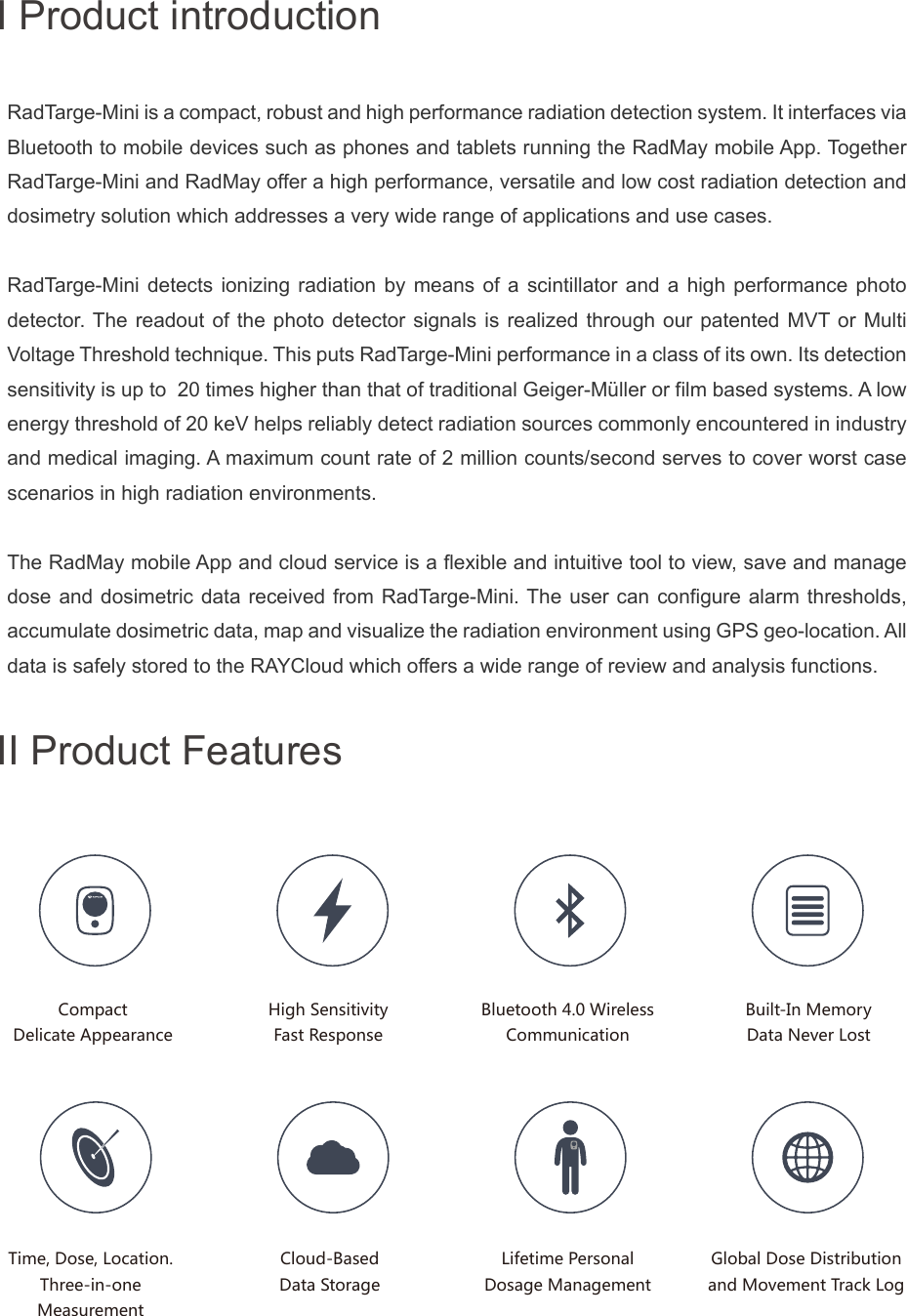
II Product FeaturesLifetime PersonalDosage ManagementBuilt-In MemoryData Never LostHigh SensitivityFast ResponseRadTarge-Mini is a compact, robust and high performance radiation detection system. It interfaces via Bluetooth to mobile devices such as phones and tablets running the RadMay mobile App. Together RadTarge-Mini and RadMay offer a high performance, versatile and low cost radiation detection and dosimetry solution which addresses a very wide range of applications and use cases.RadTarge-Mini detects ionizing radiation by means of a scintillator and a high performance photo detector. The readout of the photo detector signals is realized through our patented MVT or Multi Voltage Threshold technique. This puts RadTarge-Mini performance in a class of its own. Its detection sensitivity is up to  20 times higher than that of traditional Geiger-Müller or film based systems. A low energy threshold of 20 keV helps reliably detect radiation sources commonly encountered in industry and medical imaging. A maximum count rate of 2 million counts/second serves to cover worst case scenarios in high radiation environments. The RadMay mobile App and cloud service is a flexible and intuitive tool to view, save and manage dose and dosimetric data received from RadTarge-Mini. The user can configure alarm thresholds, accumulate dosimetric data, map and visualize the radiation environment using GPS geo-location. All data is safely stored to the RAYCloud which offers a wide range of review and analysis functions.Time, Dose, Location.Three-in-oneMeasurementI Product introductionCompactDelicate AppearanceBluetooth 4.0 WirelessCommunicationCloud-BasedData StorageGlobal Dose Distributionand Movement Track Log
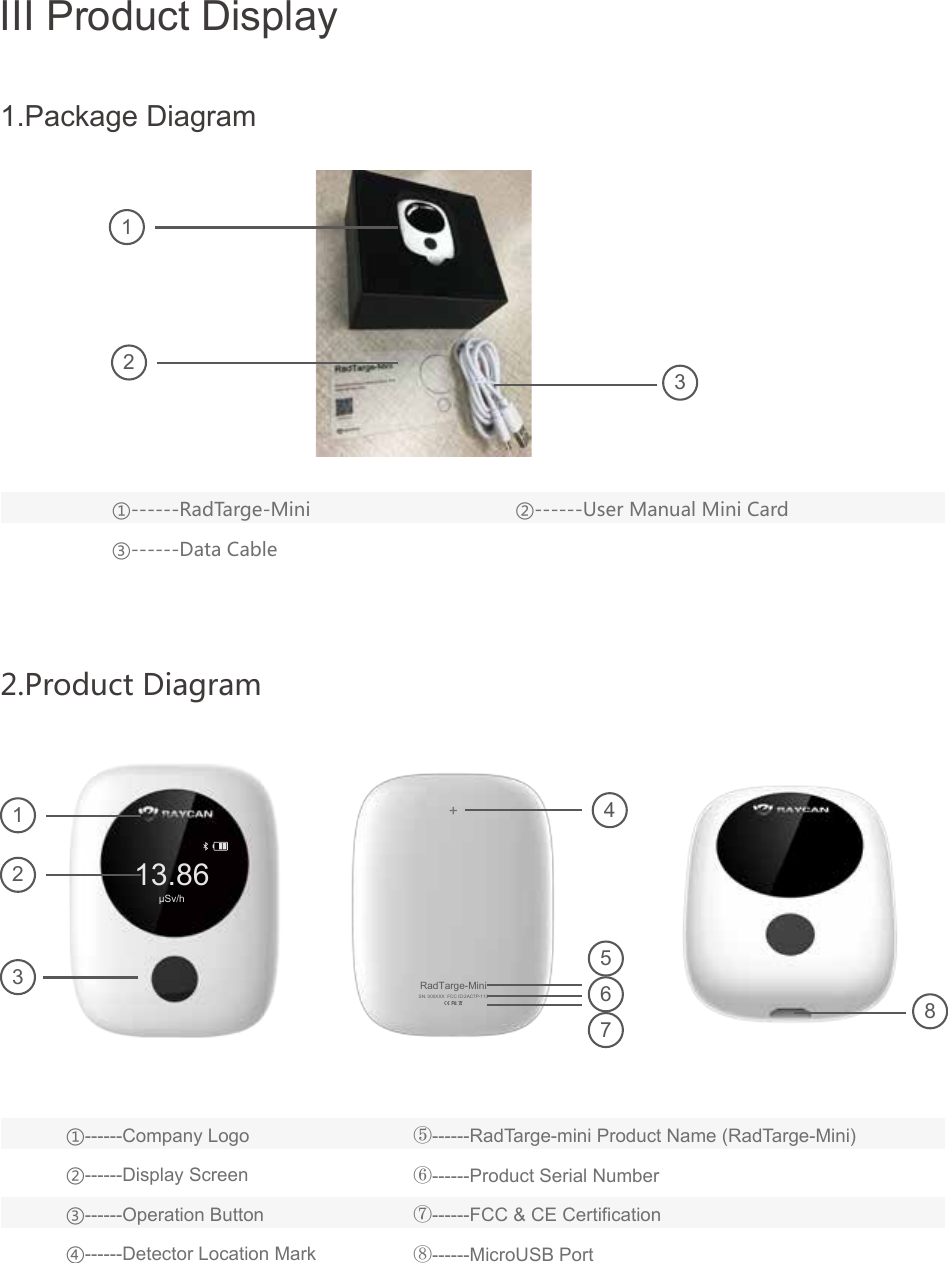
III Product Display2.Product Diagram13.86μSv/h+SN: 000XXX  FCC ID:2AC7P-113RadTarge-Mini①------Company Logo②------Display Screen③------Operation Button④------Detector Location Mark⑤------RadTarge-mini Product Name (RadTarge-Mini)⑥------Product Serial Number⑦------FCC & CE Certification⑧------MicroUSB Port①------RadTarge-Mini③------Data Cable②------User Manual Mini Card112324567831.Package Diagram
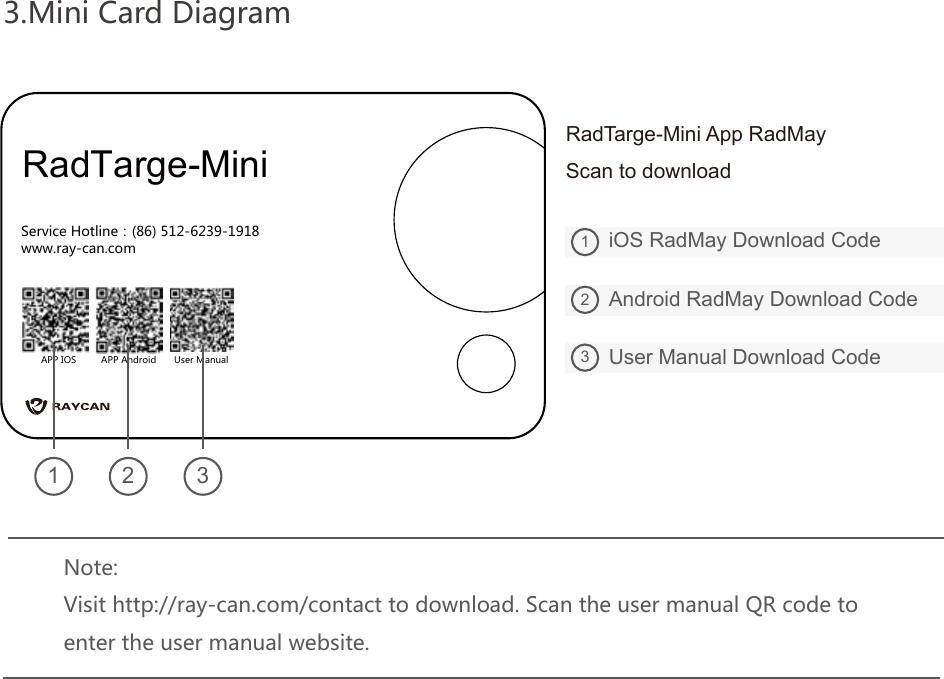
3.Mini Card DiagramService Hotline:(86) 512-6239-1918www.ray-can.comAPP IOS APP Android User ManualRadTarge-Mini   iOS RadMay Download CodeAndroid RadMay Download CodeUser Manual Download Code123123RadTarge-Mini App RadMayScan to downloadNote: Visit http://ray-can.com/contact to download. Scan the user manual QR code toenter the user manual website.
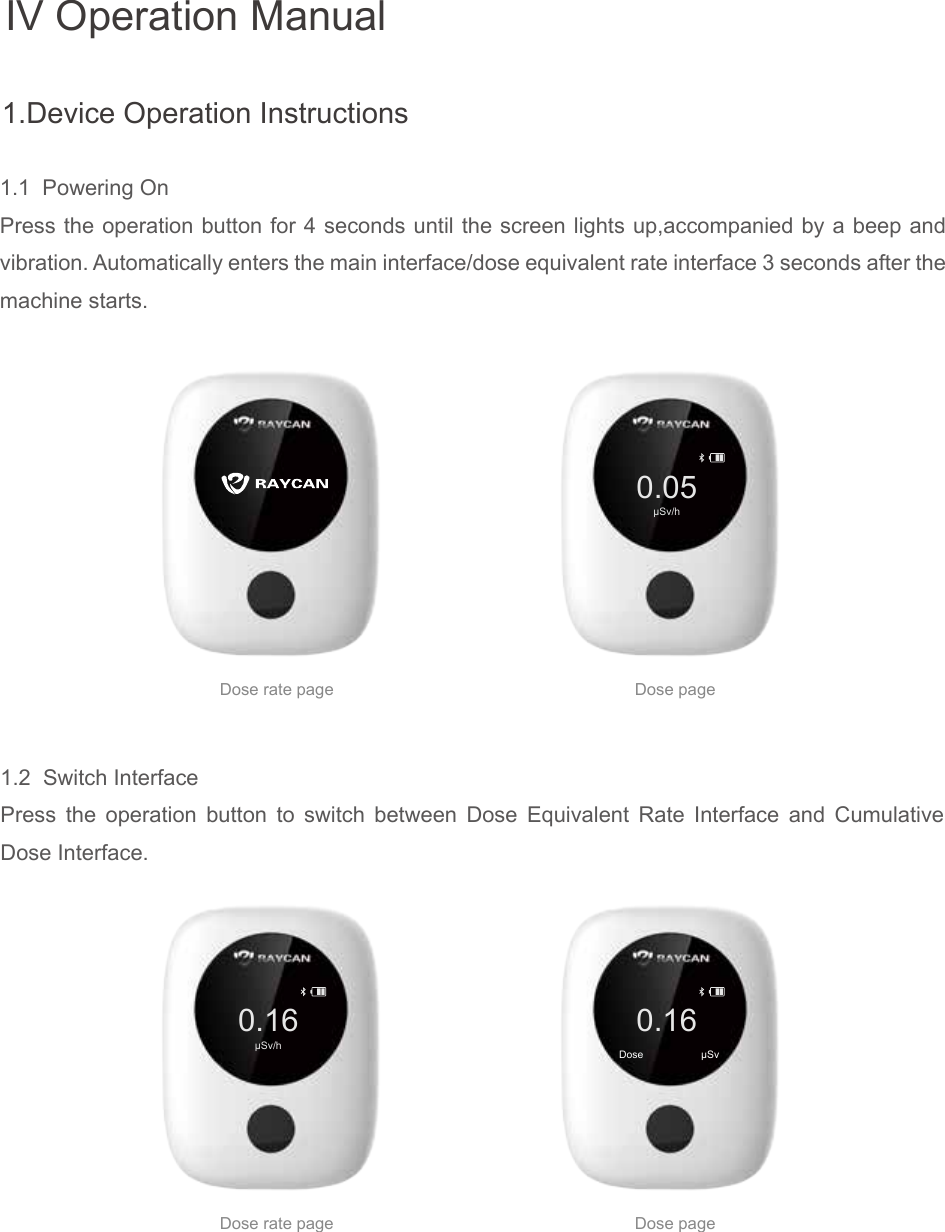
1.1  Powering OnPress the operation button for 4 seconds until the screen lights up,accompanied by a beep and vibration. Automatically enters the main interface/dose equivalent rate interface 3 seconds after the machine starts.0.16μSv/hIV Operation Manual0.16Dose                    μSvDose pageDose rate page0.05μSv/hDose pageDose rate page1.2  Switch InterfacePress the operation button to switch between Dose Equivalent Rate Interface and Cumulative Dose Interface.1.Device Operation Instructions
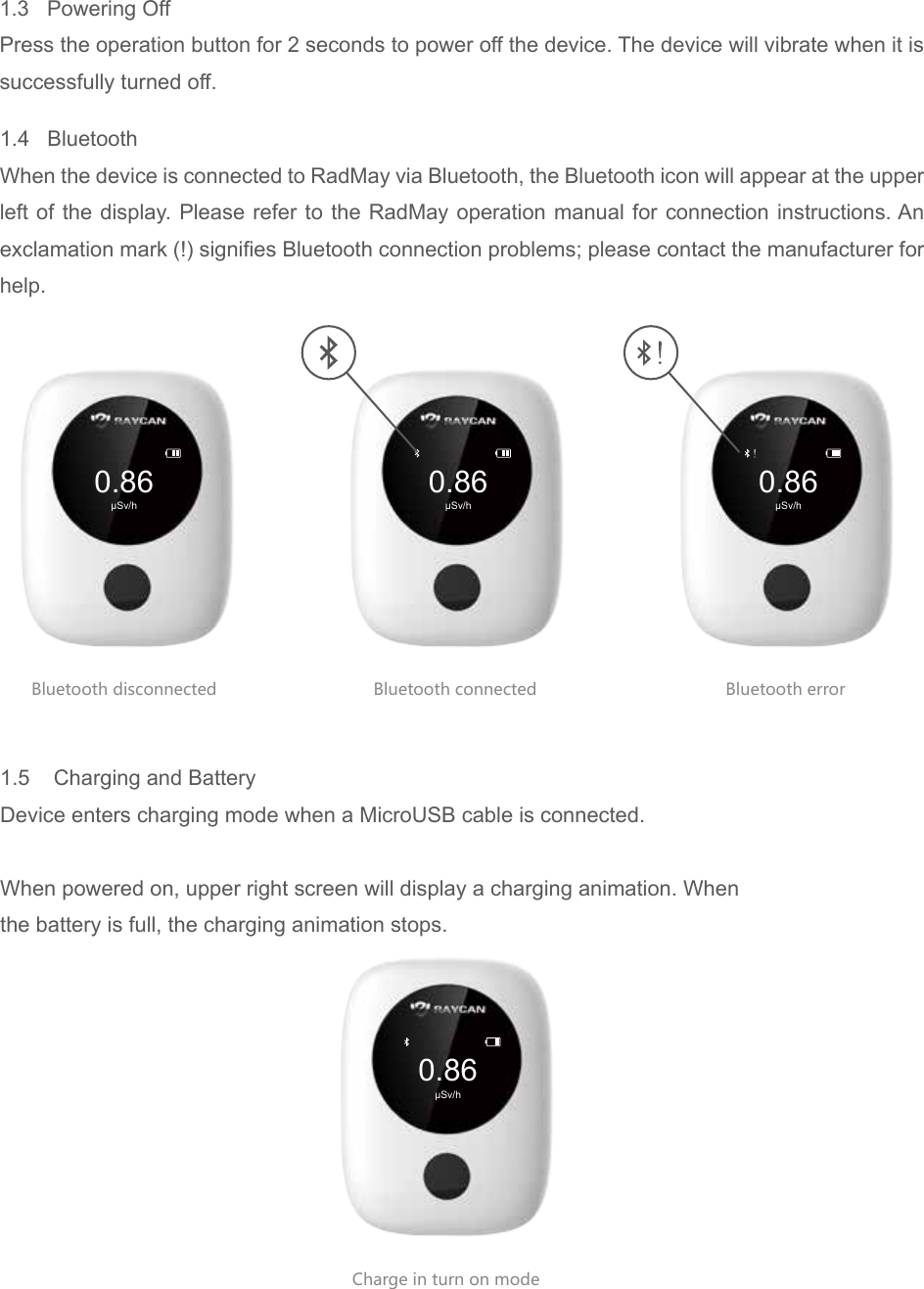
0.86μSv/h0.86μSv/h0.86μSv/h0.86μSv/hBluetooth disconnected Bluetooth connectedCharge in turn on modeBluetooth error1.3   Powering Off Press the operation button for 2 seconds to power off the device. The device will vibrate when it is successfully turned off.1.5    Charging and BatteryDevice enters charging mode when a MicroUSB cable is connected.When powered on, upper right screen will display a charging animation. Whenthe battery is full, the charging animation stops.1.4   BluetoothWhen the device is connected to RadMay via Bluetooth, the Bluetooth icon will appear at the upper left of the display. Please refer to the RadMay operation manual for connection instructions. An exclamation mark (!) signifies Bluetooth connection problems; please contact the manufacturer for help.
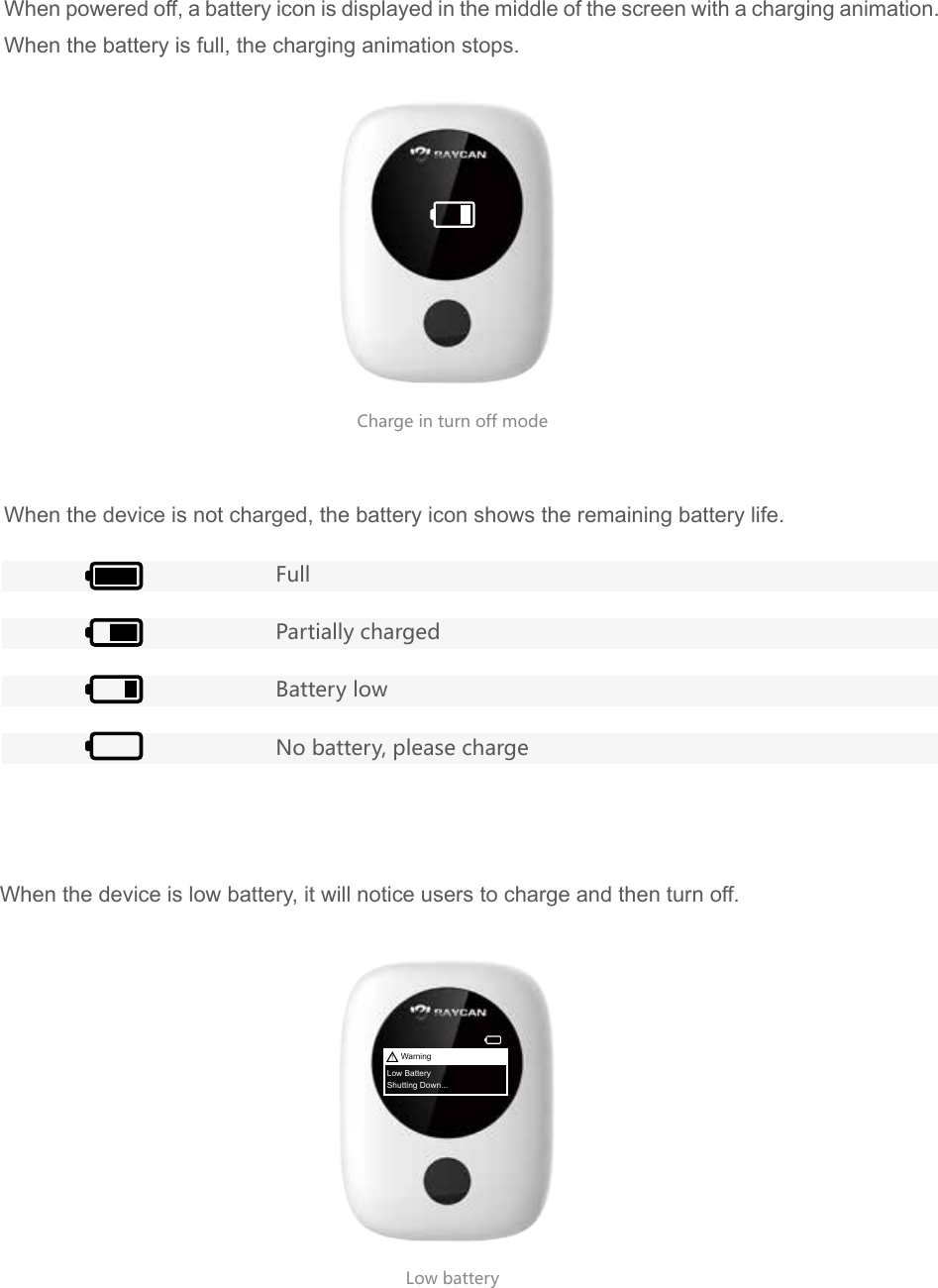
Charge in turn off modeLow battery When powered off, a battery icon is displayed in the middle of the screen with a charging animation. When the battery is full, the charging animation stops.When the device is not charged, the battery icon shows the remaining battery life.When the device is low battery, it will notice users to charge and then turn off.FullPartially chargedBattery lowNo battery, please chargeWarningLow BatteryShutting Down...
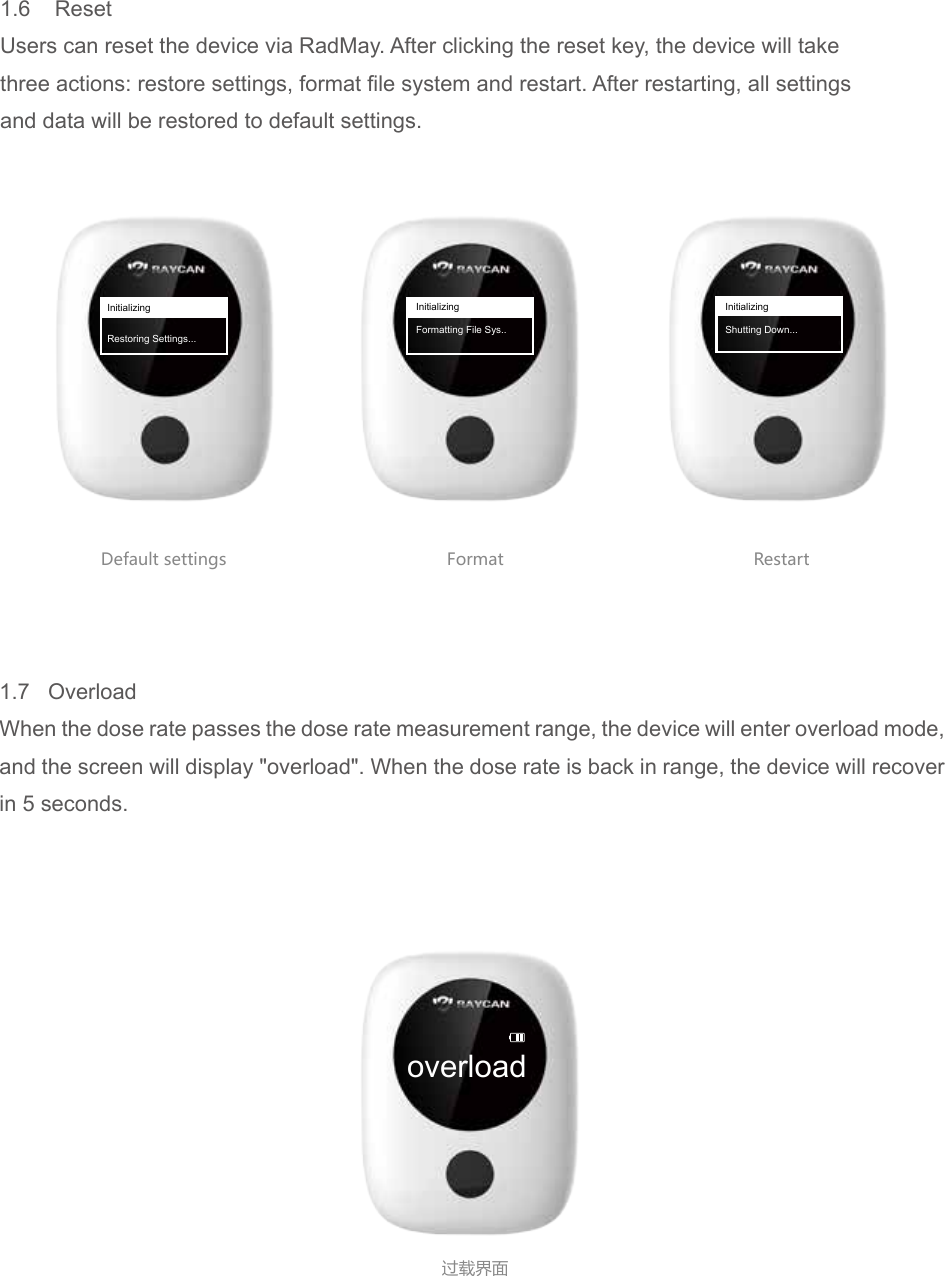
overload过载界面Default settings Format Restart1.6    ResetUsers can reset the device via RadMay. After clicking the reset key, the device will takethree actions: restore settings, format file system and restart. After restarting, all settingsand data will be restored to default settings.InitializingRestoring Settings...InitializingFormatting File Sys..InitializingShutting Down...1.7   OverloadWhen the dose rate passes the dose rate measurement range, the device will enter overload mode, and the screen will display "overload". When the dose rate is back in range, the device will recover in 5 seconds.
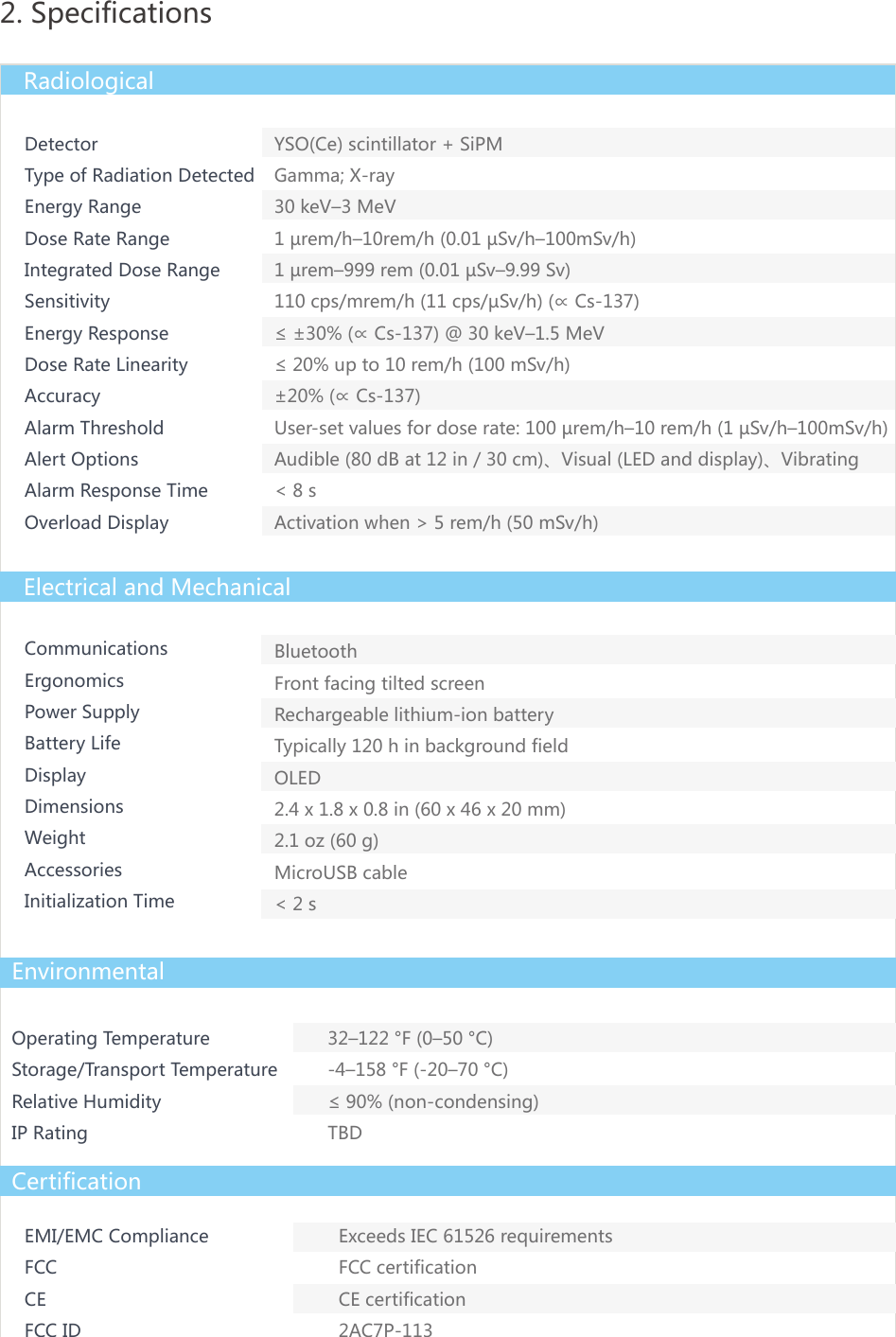
DetectorType of Radiation DetectedEnergy RangeDose Rate RangeIntegrated Dose RangeSensitivityEnergy ResponseDose Rate LinearityAccuracyAlarm ThresholdAlert OptionsAlarm Response TimeOverload DisplayCommunicationsErgonomicsPower SupplyBattery LifeDisplayDimensionsWeightAccessoriesInitialization TimeBluetoothFront facing tilted screenRechargeable lithium-ion batteryTypically 120 h in background fieldOLED2.4 x 1.8 x 0.8 in (60 x 46 x 20 mm)2.1 oz (60 g)MicroUSB cable< 2 sOperating TemperatureStorage/Transport TemperatureRelative HumidityIP Rating32–122 °F (0–50 °C)-4–158 °F (-20–70 °C)≤ 90% (non-condensing)TBD2. SpecificationsRadiologicalElectrical and MechanicalEnvironmentalCertificationEMI/EMC ComplianceFCC CEFCC IDExceeds IEC 61526 requirementsFCC certificationCE certification2AC7P-113YSO(Ce) scintillator + SiPMGamma; X-ray30 keV–3 MeV1 µrem/h–10rem/h (0.01 µSv/h–100mSv/h)1 µrem–999 rem (0.01 µSv–9.99 Sv)110 cps/mrem/h (11 cps/µSv/h) (∝ Cs-137)≤ ±30% (∝ Cs-137) @ 30 keV–1.5 MeV≤ 20% up to 10 rem/h (100 mSv/h)±20% (∝ Cs-137)User-set values for dose rate: 100 µrem/h–10 rem/h (1 µSv/h–100mSv/h)Audible (80 dB at 12 in / 30 cm)、Visual (LED and display)、Vibrating< 8 sActivation when > 5 rem/h (50 mSv/h)
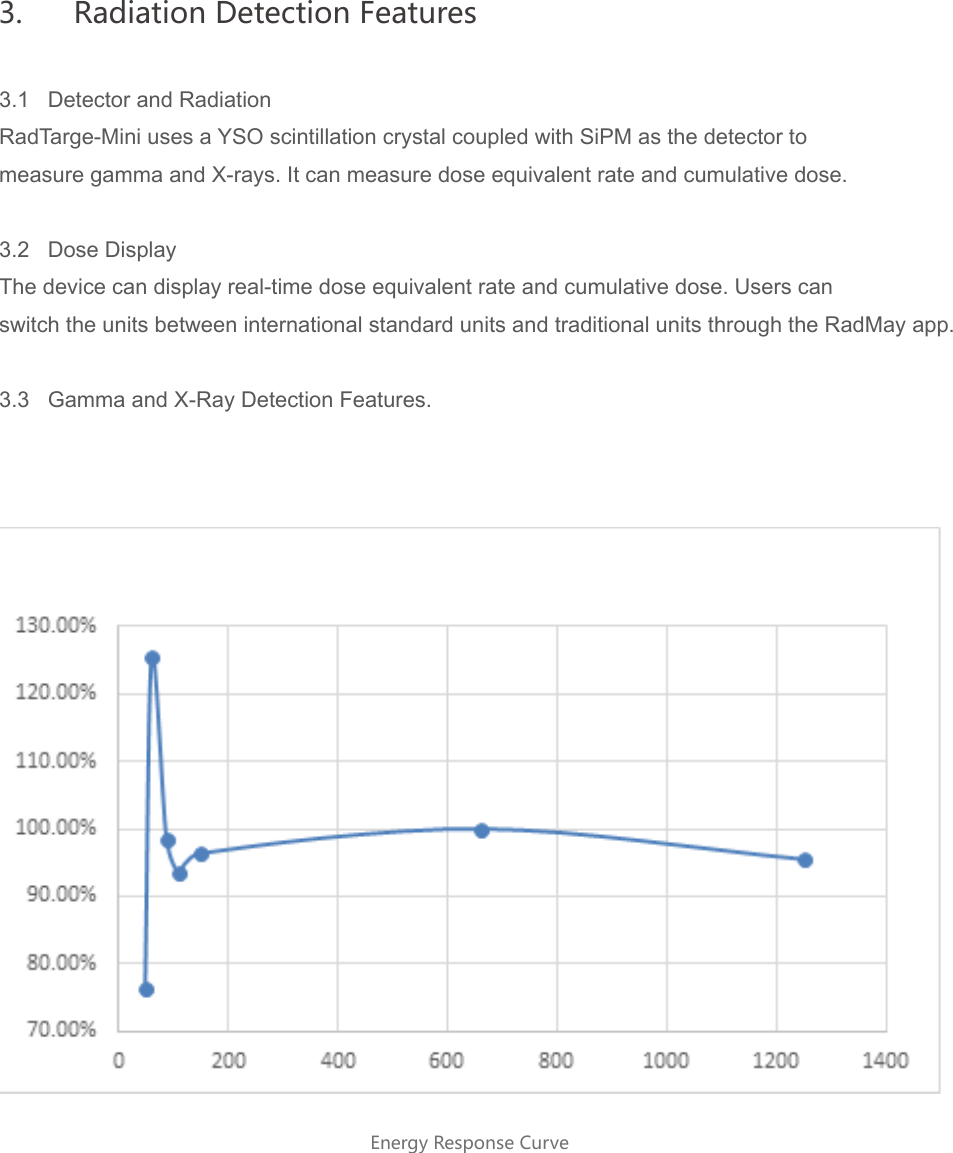
3.1   Detector and RadiationRadTarge-Mini uses a YSO scintillation crystal coupled with SiPM as the detector tomeasure gamma and X-rays. It can measure dose equivalent rate and cumulative dose.3.2   Dose DisplayThe device can display real-time dose equivalent rate and cumulative dose. Users canswitch the units between international standard units and traditional units through the RadMay app.3.3   Gamma and X-Ray Detection Features.Energy Response Curve3.  Radiation Detection Features
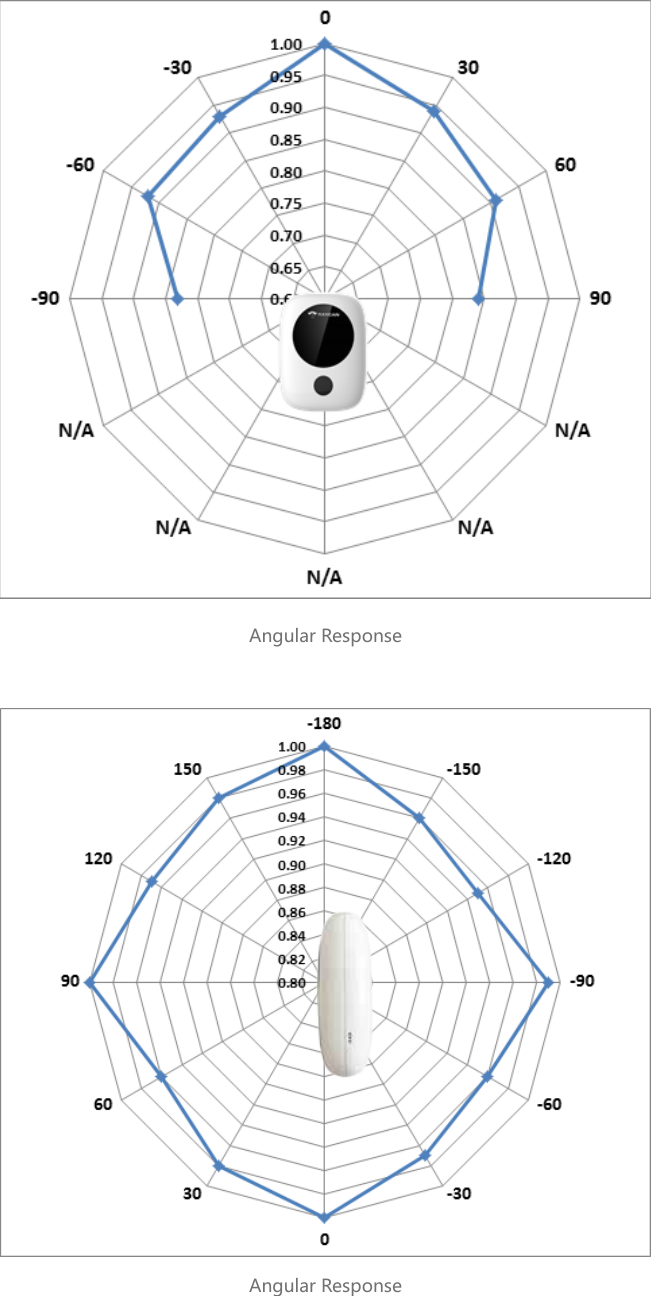
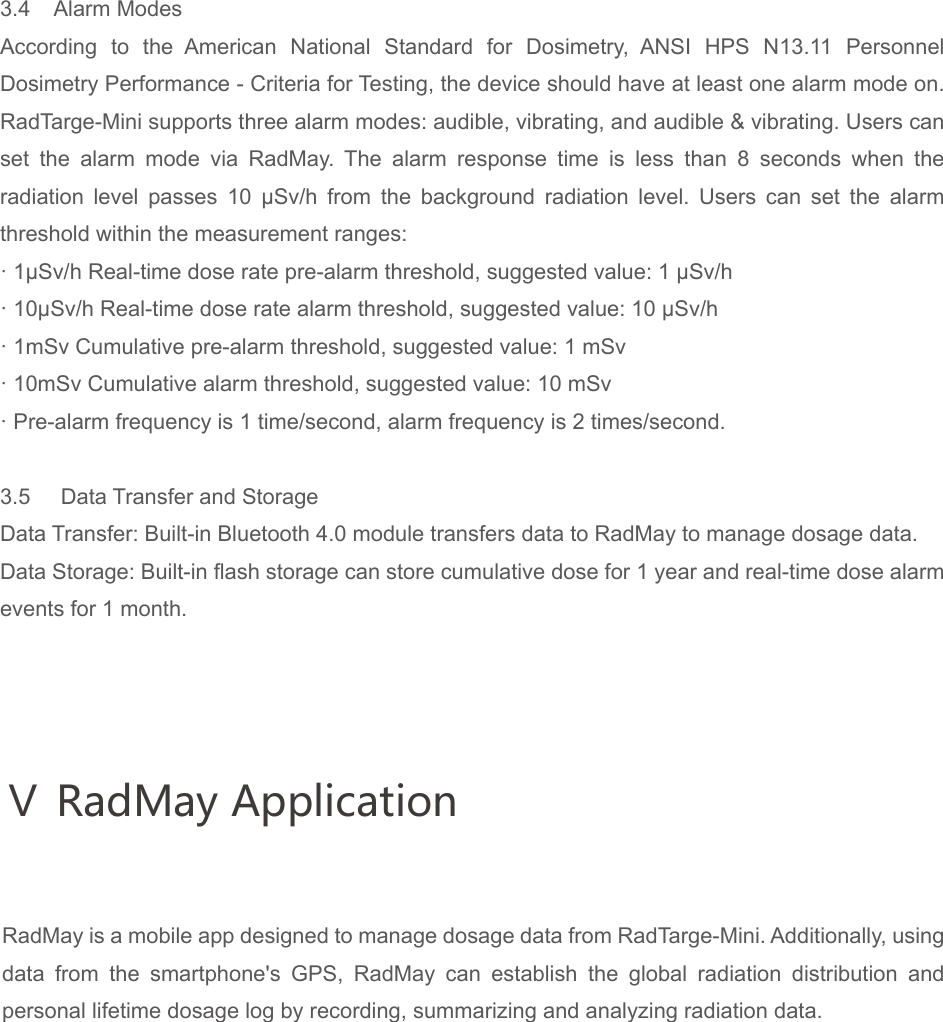
Angular ResponseAngular Response
Ⅴ RadMay Application3.4    Alarm ModesAccording to the American National Standard for Dosimetry, ANSI HPS N13.11 Personnel Dosimetry Performance - Criteria for Testing, the device should have at least one alarm mode on. RadTarge-Mini supports three alarm modes: audible, vibrating, and audible & vibrating. Users can set the alarm mode via RadMay. The alarm response time is less than 8 seconds when the radiation  level  passes  10  μSv/h  from  the  background  radiation  level.  Users  can  set  the  alarm threshold within the measurement ranges:· 1μSv/h Real-time dose rate pre-alarm threshold, suggested value: 1 μSv/h       · 10μSv/h Real-time dose rate alarm threshold, suggested value: 10 μSv/h     · 1mSv Cumulative pre-alarm threshold, suggested value: 1 mSv       · 10mSv Cumulative alarm threshold, suggested value: 10 mSv· Pre-alarm frequency is 1 time/second, alarm frequency is 2 times/second.3.5     Data Transfer and StorageData Transfer: Built-in Bluetooth 4.0 module transfers data to RadMay to manage dosage data.Data Storage: Built-in flash storage can store cumulative dose for 1 year and real-time dose alarm events for 1 month.RadMay is a mobile app designed to manage dosage data from RadTarge-Mini. Additionally, using data from the smartphone's GPS, RadMay can establish the global radiation distribution and personal lifetime dosage log by recording, summarizing and analyzing radiation data.
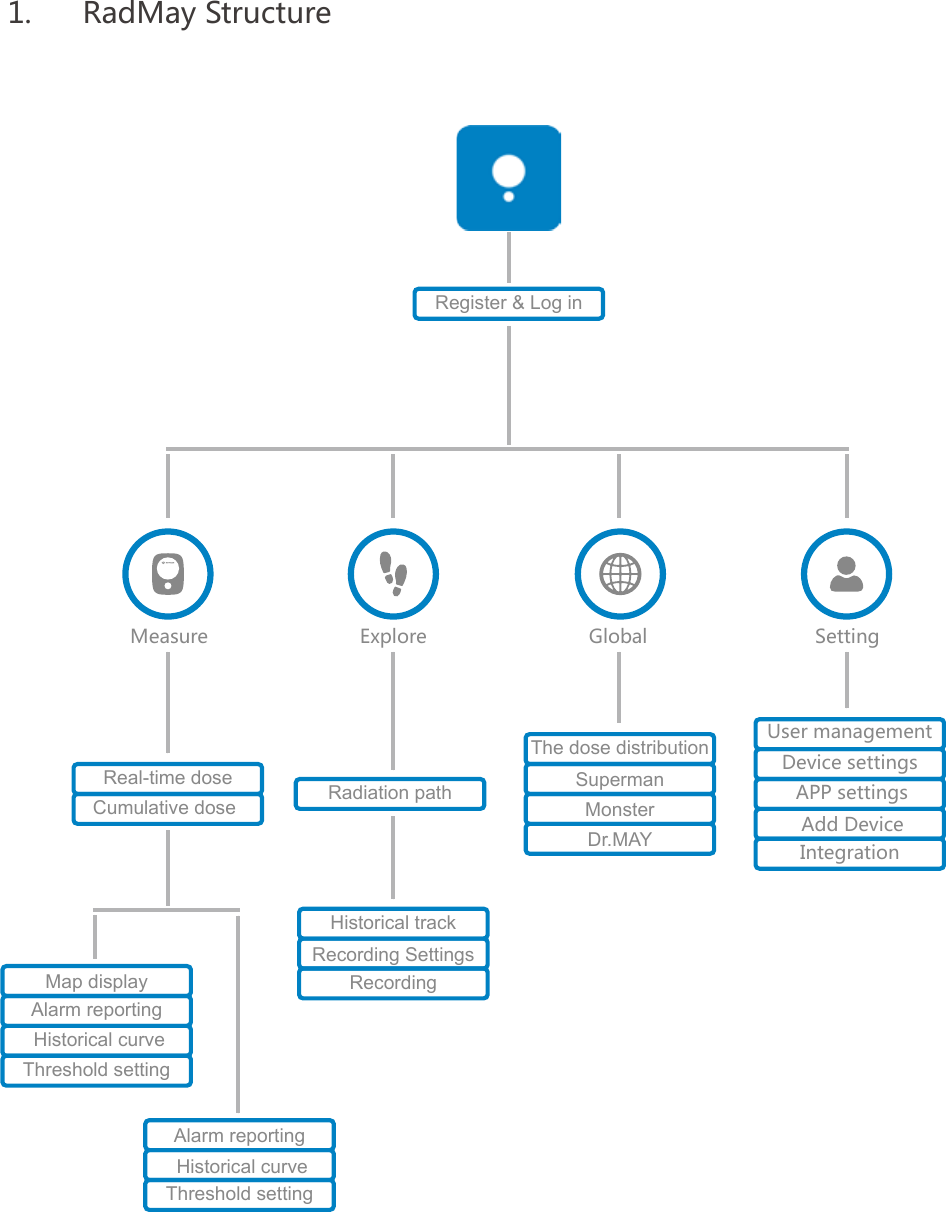
1.  RadMay StructureMeasure Explore Global SettingRegister & Log inRadiation pathThe dose distributionMonsterDr.MAYSupermanUser managementDevice settingsAPP settings Add DeviceIntegrationReal-time doseCumulative doseMap displayAlarm reporting Historical curveThreshold settingAlarm reporting Historical curveThreshold settingHistorical trackRecording SettingsRecording
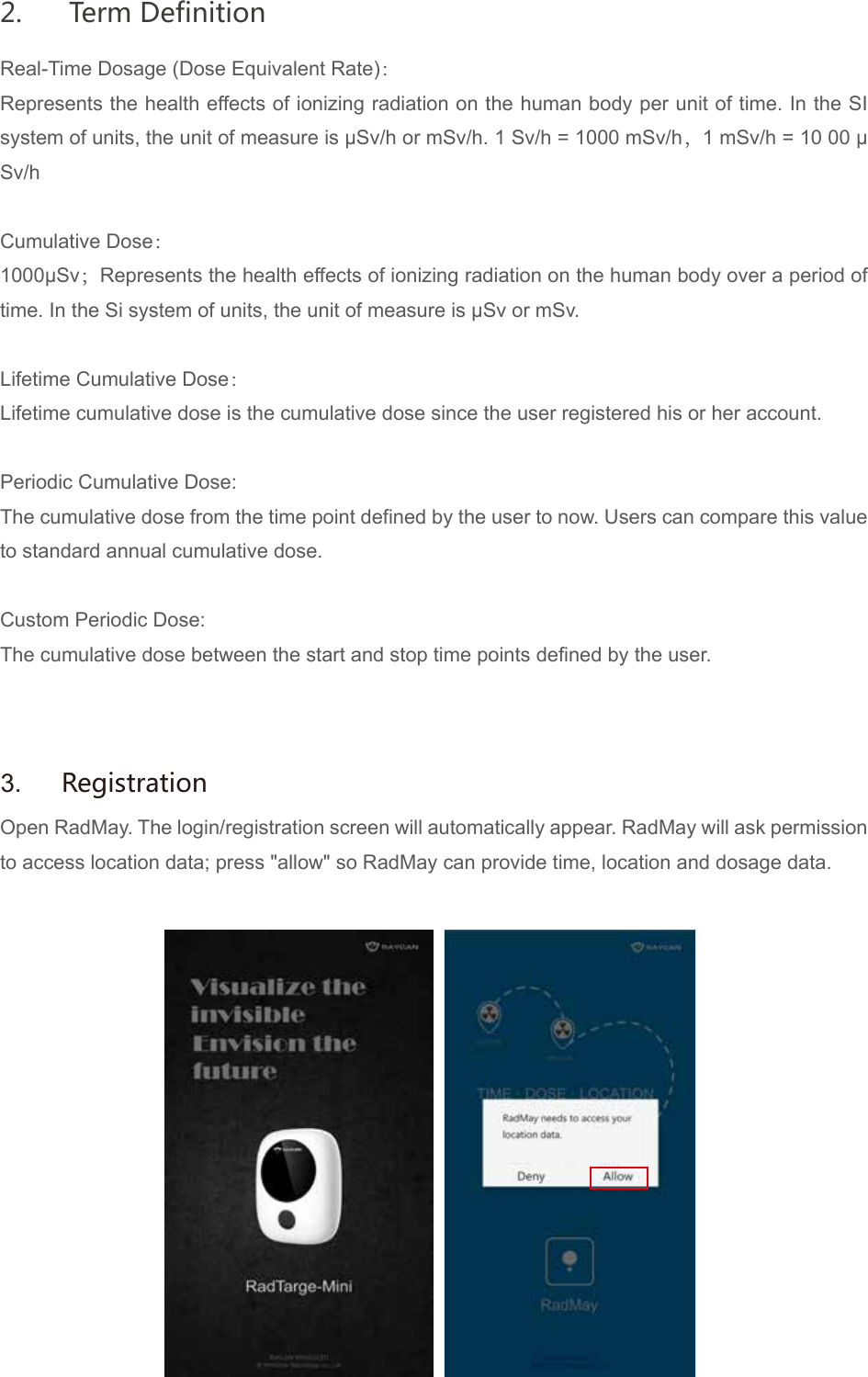
Real-Time Dosage (Dose Equivalent Rate):Represents the health effects of ionizing radiation on the human body per unit of time. In the SI system of units, the unit of measure is μSv/h or mSv/h. 1 Sv/h = 1000 mSv/h,1 mSv/h = 10 00 μSv/hCumulative Dose:1000μSv;Represents the health effects of ionizing radiation on the human body over a period of time. In the Si system of units, the unit of measure is μSv or mSv.Lifetime Cumulative Dose:Lifetime cumulative dose is the cumulative dose since the user registered his or her account.Periodic Cumulative Dose:The cumulative dose from the time point defined by the user to now. Users can compare this value to standard annual cumulative dose.Custom Periodic Dose:The cumulative dose between the start and stop time points defined by the user.Open RadMay. The login/registration screen will automatically appear. RadMay will ask permission to access location data; press "allow" so RadMay can provide time, location and dosage data.3.  Registration2.  Term Definition
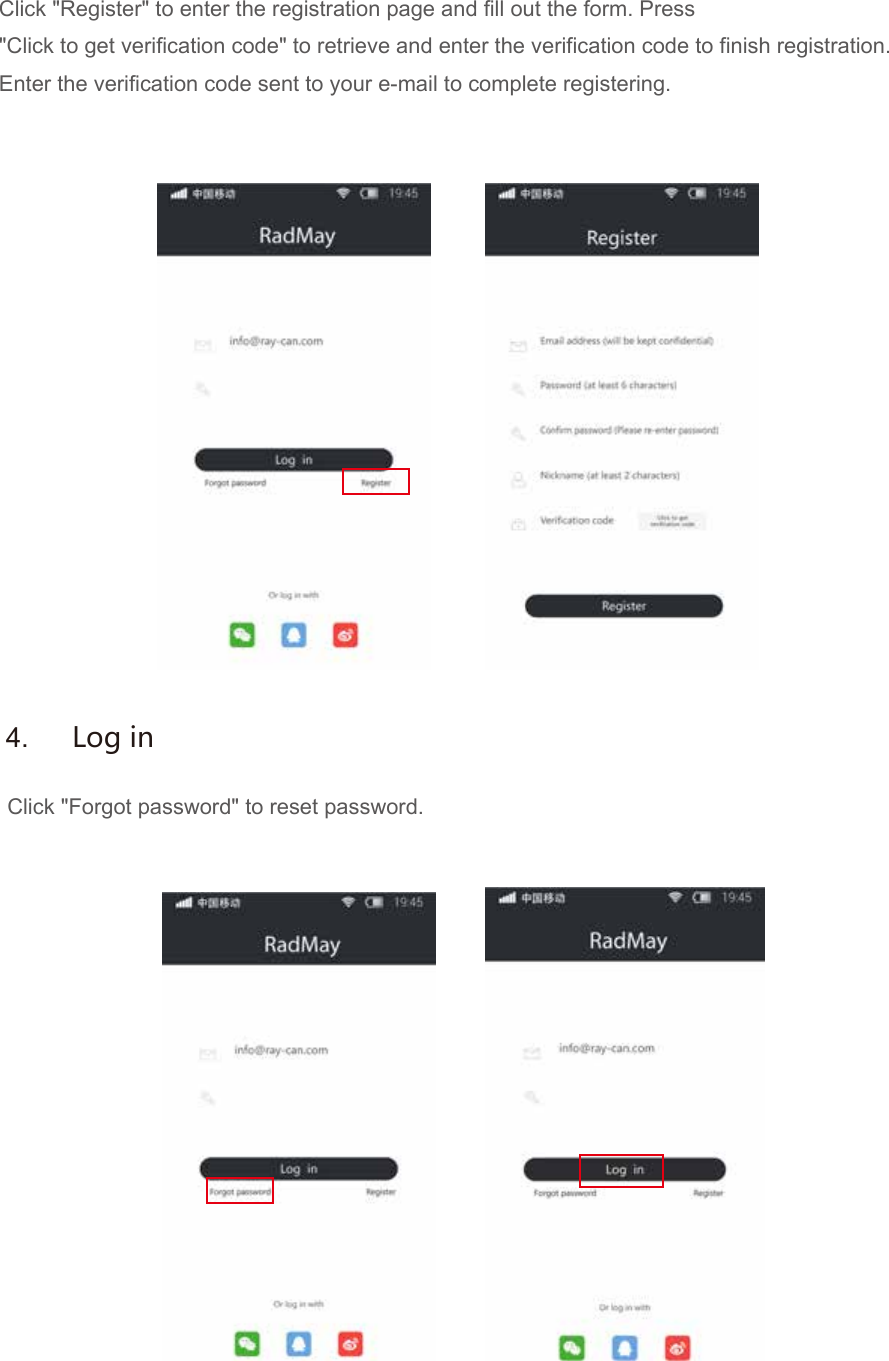
Click "Register" to enter the registration page and fill out the form. Press"Click to get verification code" to retrieve and enter the verification code to finish registration.Enter the verification code sent to your e-mail to complete registering.Click "Forgot password" to reset password.4.  Log in
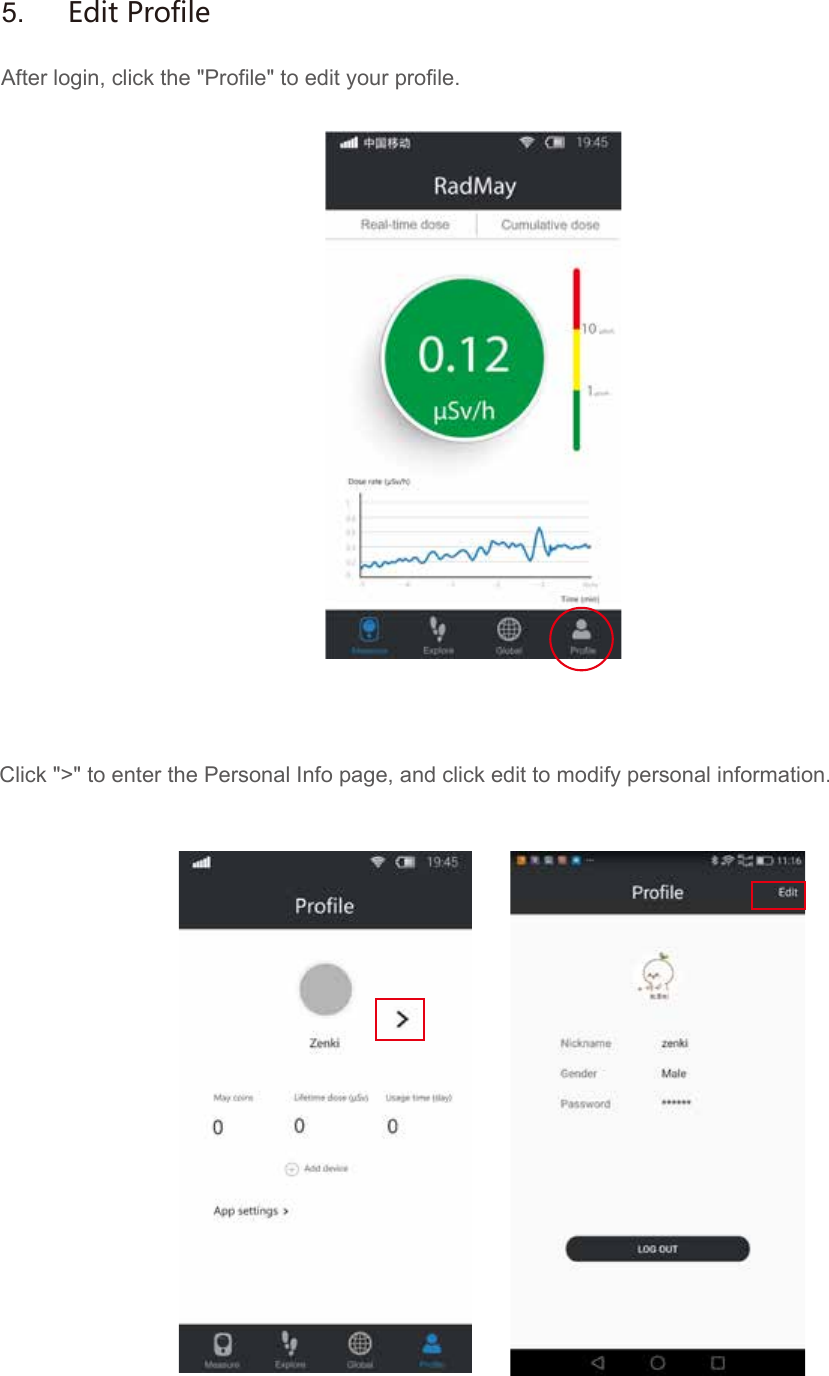
After login, click the "Profile" to edit your profile.  Click ">" to enter the Personal Info page, and click edit to modify personal information.5.  Edit Profile
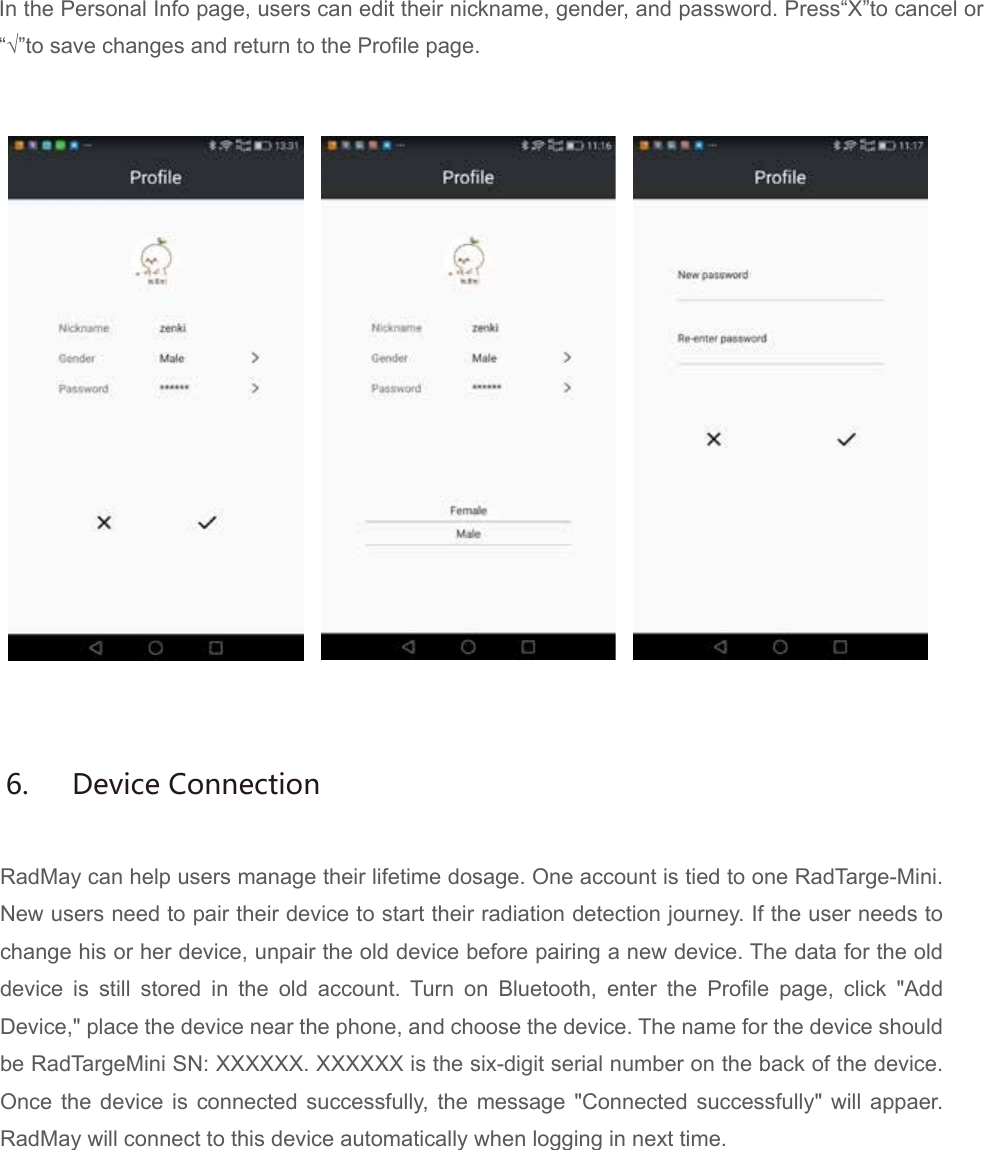
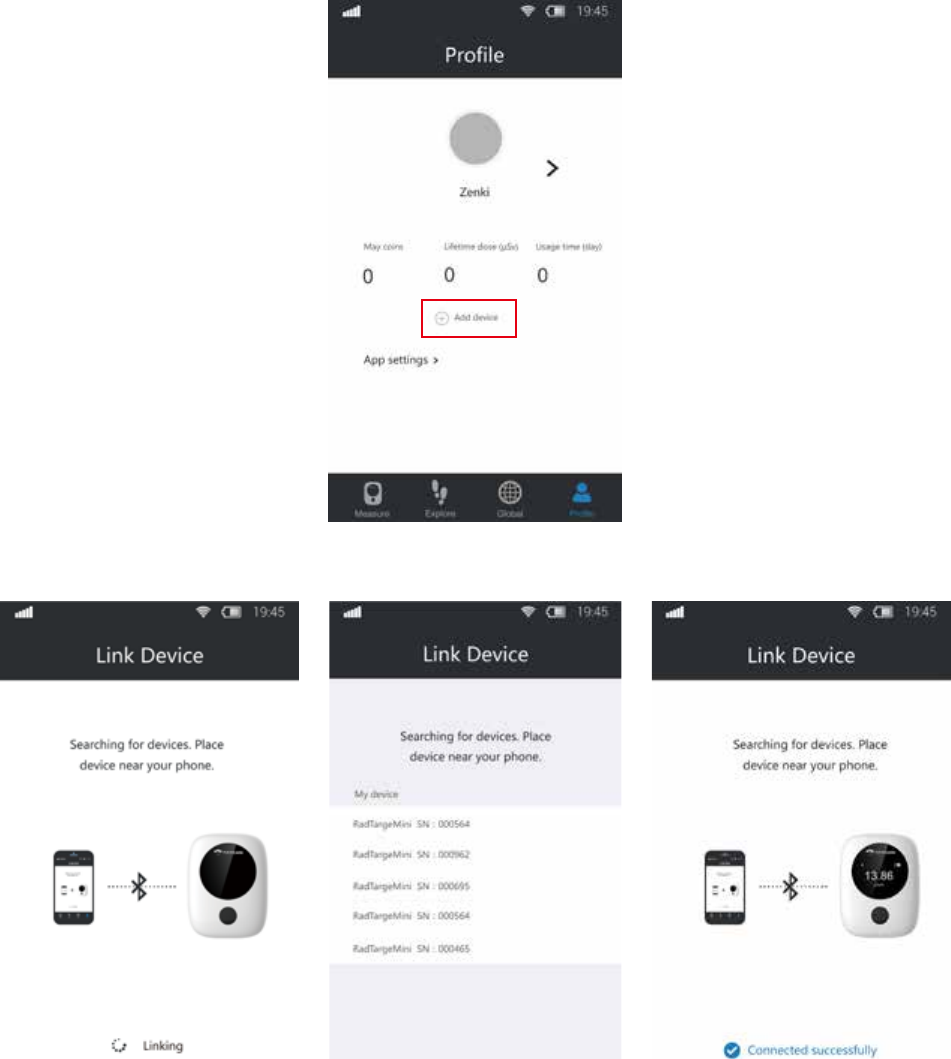
In the Personal Info page, users can edit their nickname, gender, and password. Press“X”to cancel or“√”to save changes and return to the Profile page.RadMay can help users manage their lifetime dosage. One account is tied to one RadTarge-Mini. New users need to pair their device to start their radiation detection journey. If the user needs to change his or her device, unpair the old device before pairing a new device. The data for the old device is still stored in the old account. Turn on Bluetooth, enter the Profile page, click "Add Device," place the device near the phone, and choose the device. The name for the device should be RadTargeMini SN: XXXXXX. XXXXXX is the six-digit serial number on the back of the device. Once the device is connected successfully, the message "Connected successfully" will appaer. RadMay will connect to this device automatically when logging in next time.6.  Device Connection
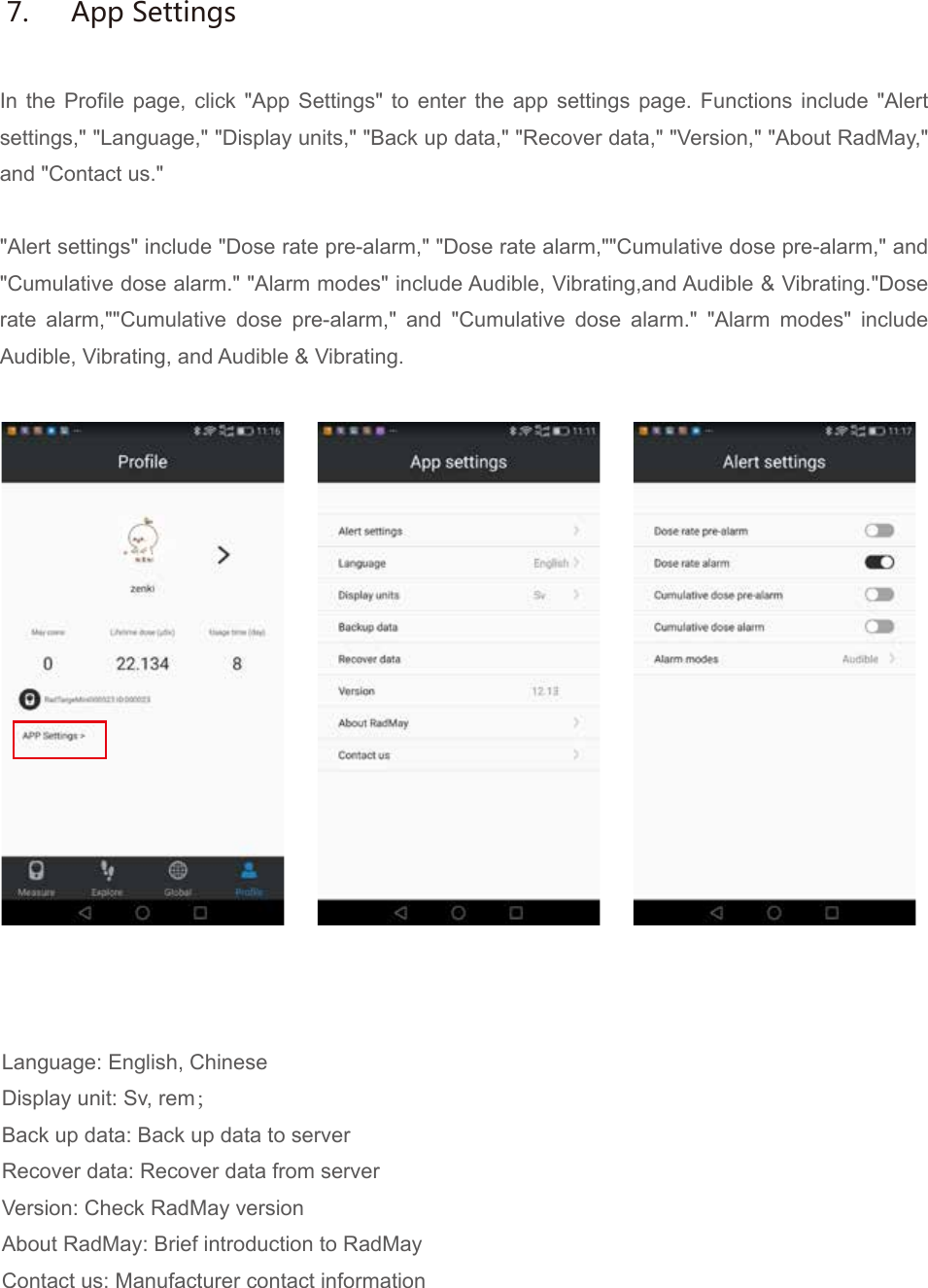
In the Profile page, click "App Settings" to enter the app settings page. Functions include "Alert settings," "Language," "Display units," "Back up data," "Recover data," "Version," "About RadMay," and "Contact us.""Alert settings" include "Dose rate pre-alarm," "Dose rate alarm,""Cumulative dose pre-alarm," and "Cumulative dose alarm." "Alarm modes" include Audible, Vibrating,and Audible & Vibrating."Dose rate alarm,""Cumulative dose pre-alarm," and "Cumulative dose alarm." "Alarm modes" include Audible, Vibrating, and Audible & Vibrating.Language: English, ChineseDisplay unit: Sv, rem;Back up data: Back up data to serverRecover data: Recover data from serverVersion: Check RadMay versionAbout RadMay: Brief introduction to RadMayContact us: Manufacturer contact information7.  App Settings
Click device name on "Profile" to enter "Device Settings" page.[Link device]: When on, RadMay will automatically link the device to transfer data.[Energy saver]: When on, the device display will turn off after 10 seconds of inactivity. Recommended function.[Sync data]: When on, will automatically sync device data to local storage[Alert settings]: Change the alarm modes of RadTarge-Mini.[Clear dose]: Reset lifetime cumulative dose to 0. This operation will not clear device data history; please use carefully.[Unpair device]: Unpair device from app.[Sync time]: Sync the device time with phone time, GMT.[Update firmware]: Update RadTarge-Mini firmware.[Default settings]: Reset settings to default.Measurement is the basicfunction module of RadMay. It can display and process RadTarge-Mini's dose rate and cumulative dose simultaneously.8.  Device Settings9.  Measurement
By using the phone's GPS function, RadMay can record the trajectory of radiation, including time, location and dosage.Users can adjust measurement frequency by changing the distance and time parameters. Explore module uses Google Maps and Gaode Maps.All track logs are stored in the cloud server. Users can review their history and share their data to social media.10.  ExploreUsers can check the global radiation distribution via the RayCloud data platform.[Superman]: Rank based on points, cumulative dose, highest real-time dose rate, and track distance.[Monster]: National and global top 10 realtimedose rate loactions.[Dr. May]: Radiation related info.11.  Global
Users can earn May coins by sharing dose rate, cumulative dose and track logs. Please click "EarnMay coins" to learn the rules to earning May coins; click "Spend May coins" to contact usto redeem gifts.12. May coins13.1  Cannot pair device to appCheck if both the device and the Bluetooth function on your smartphone are turned on. Place the device as close as possible to phone.13.2  Real-time dose rate doesn't updateCheck if the device is linked to the app. If the device works normally, log out of the app and log in again.13.3  Device/phone does not alarmCheck if the radiation level has already passed the pre-alarm or alarm threshold. If passed, please check if the audible and vibrating functions on device and phone are "on".13. Problems
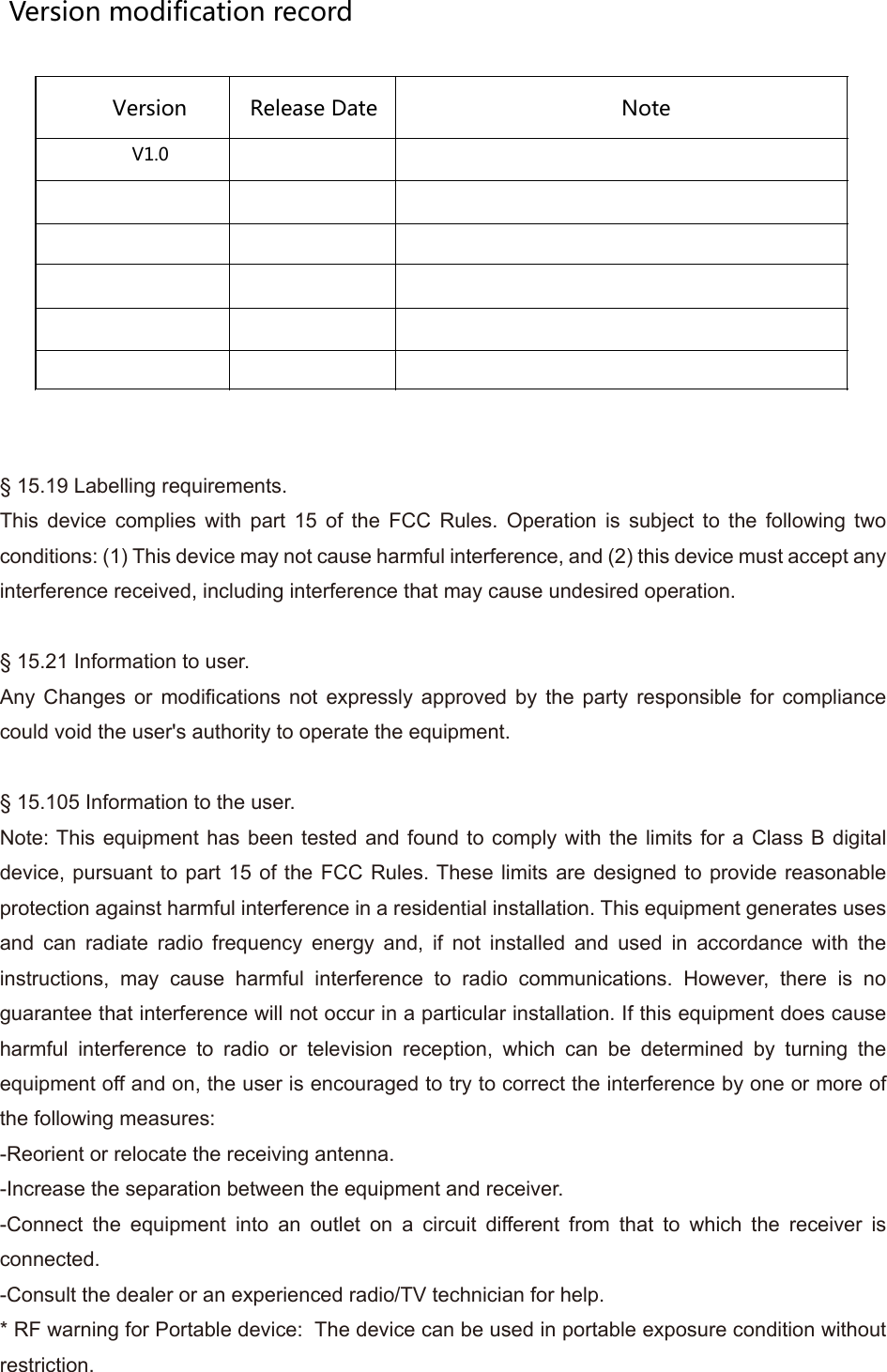
Version modification recordVersion  Release Date  Note V1.0                           § 15.19 Labelling requirements.This device complies with part 15 of the FCC Rules. Operation is subject to the following two conditions: (1) This device may not cause harmful interference, and (2) this device must accept any interference received, including interference that may cause undesired operation.§ 15.21 Information to user.Any Changes or modifications not expressly approved by the party responsible for compliance could void the user's authority to operate the equipment.§ 15.105 Information to the user.Note: This equipment has been tested and found to comply with the limits for a Class B digital device, pursuant to part 15 of the FCC Rules. These limits are designed to provide reasonable protection against harmful interference in a residential installation. This equipment generates uses and can radiate radio frequency energy and, if not installed and used in accordance with the instructions, may cause harmful interference to radio communications. However, there is no guarantee that interference will not occur in a particular installation. If this equipment does cause harmful interference to radio or television reception, which can be determined by turning the equipment off and on, the user is encouraged to try to correct the interference by one or more of the following measures:-Reorient or relocate the receiving antenna.-Increase the separation between the equipment and receiver.-Connect the equipment into an outlet on a circuit different from that to which the receiver is connected.-Consult the dealer or an experienced radio/TV technician for help.* RF warning for Portable device:  The device can be used in portable exposure condition without restriction.
RAYCAN HeadquartersBldg 17, 8 Jinfeng Rd. Suzhou New District, Suzhou, 215163, ChinaTel  86-0512-62391918Fax 86-0512-62391928Email info@ray-can.comwww.ray-can.comRAYCAN US SubsidiaryX-Z LAB, Inc.2440 Camino Ramon Suite #264, San Ramon, CA 94583Tel 925-359-6908Fax 925-380-6784Email contact@x-zlab.comwww.x-zlab.com                                                                 ©2016 RAYCAN Technology Co., Ltd. All Rights Reserved.   Edition number:L-2-000002

Navigation menu