Residential Control Systems TZW020 Z-wave enabled wireless sensor User Manual

Residential Control Systems Z-wave enabled wireless sensor

user manual

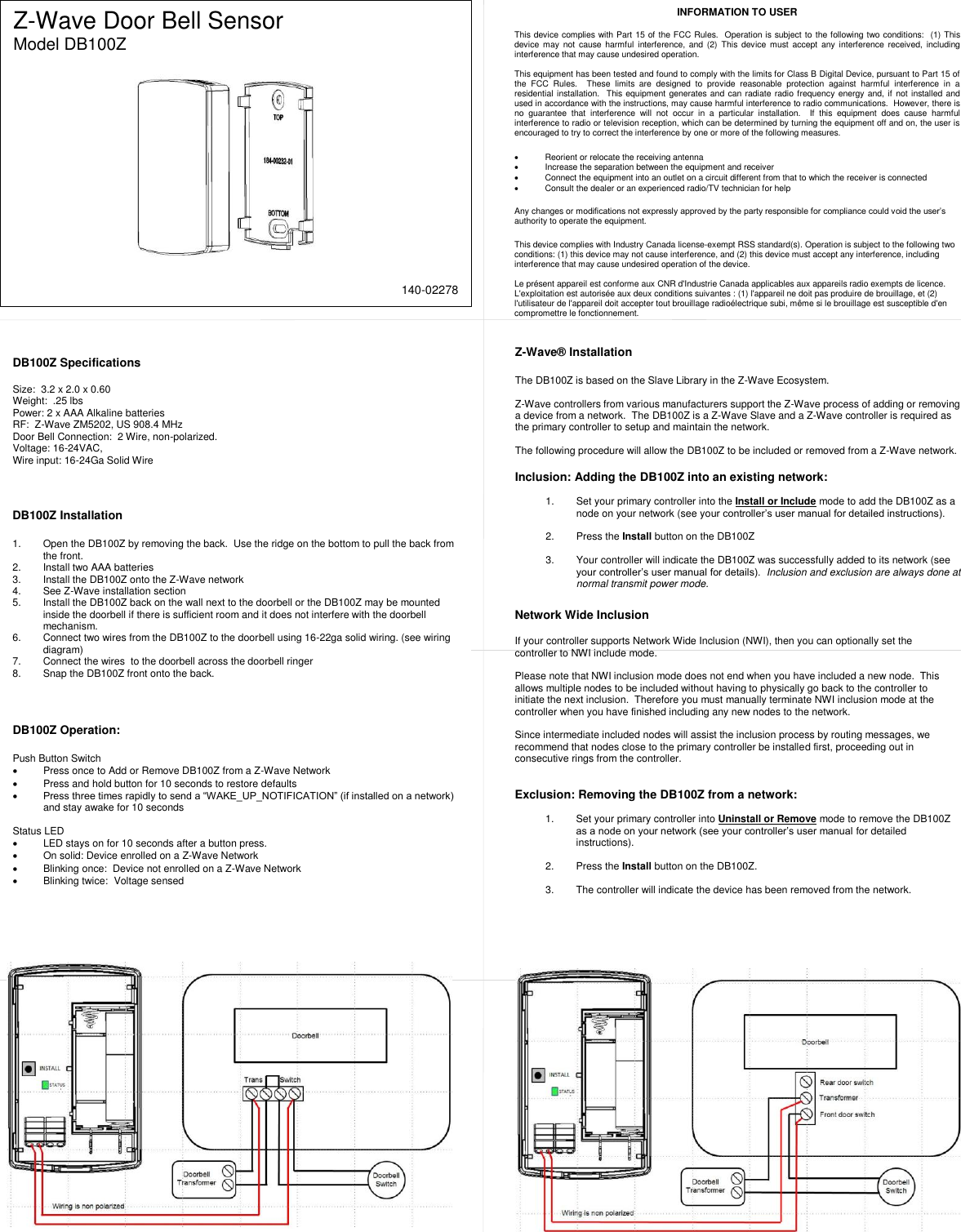
 Z-Wave Door Bell Sensor Model DB100Z   DB100Z Specifications  Size:  3.2 x 2.0 x 0.60 Weight:  .25 lbs Power: 2 x AAA Alkaline batteries RF:  Z-Wave ZM5202, US 908.4 MHz Door Bell Connection:  2 Wire, non-polarized.  Voltage: 16-24VAC,  Wire input: 16-24Ga Solid Wire Z-Wave® Installation  The DB100Z is based on the Slave Library in the Z-Wave Ecosystem.    Z-Wave controllers from various manufacturers support the Z-Wave process of adding or removing a device from a network.  The DB100Z is a Z-Wave Slave and a Z-Wave controller is required as the primary controller to setup and maintain the network.  The following procedure will allow the DB100Z to be included or removed from a Z-Wave network.  Inclusion: Adding the DB100Z into an existing network:  1.  Set your primary controller into the Install or Include mode to add the DB100Z as a node on your network (see your controller’s user manual for detailed instructions).  2.  Press the Install button on the DB100Z  3.  Your controller will indicate the DB100Z was successfully added to its network (see your controller’s user manual for details).  Inclusion and exclusion are always done at normal transmit power mode.      INFORMATION TO USER  This device complies with Part 15 of the FCC Rules.  Operation is subject to the following two conditions:  (1) This device  may  not  cause harmful  interference,  and (2)  This device  must accept  any interference  received,  including interference that may cause undesired operation.  This equipment has been tested and found to comply with the limits for Class B Digital Device, pursuant to Part 15 of the  FCC  Rules.    These  limits  are  designed  to  provide  reasonable  protection  against  harmful  interference  in  a residential installation.  This equipment generates and can radiate radio frequency energy and, if not installed and used in accordance with the instructions, may cause harmful interference to radio communications.  However, there is no  guarantee  that  interference  will  not  occur  in  a  particular  installation.    If  this  equipment  does  cause  harmful interference to radio or television reception, which can be determined by turning the equipment off and on, the user is encouraged to try to correct the interference by one or more of the following measures.    Reorient or relocate the receiving antenna   Increase the separation between the equipment and receiver   Connect the equipment into an outlet on a circuit different from that to which the receiver is connected   Consult the dealer or an experienced radio/TV technician for help  Any changes or modifications not expressly approved by the party responsible for compliance could void the user’s authority to operate the equipment.  This device complies with Industry Canada license-exempt RSS standard(s). Operation is subject to the following two conditions: (1) this device may not cause interference, and (2) this device must accept any interference, including interference that may cause undesired operation of the device.  Le présent appareil est conforme aux CNR d'Industrie Canada applicables aux appareils radio exempts de licence. L'exploitation est autorisée aux deux conditions suivantes : (1) l'appareil ne doit pas produire de brouillage, et (2) l'utilisateur de l'appareil doit accepter tout brouillage radioélectrique subi, même si le brouillage est susceptible d'en compromettre le fonctionnement.  Network Wide Inclusion  If your controller supports Network Wide Inclusion (NWI), then you can optionally set the controller to NWI include mode.     Please note that NWI inclusion mode does not end when you have included a new node.  This allows multiple nodes to be included without having to physically go back to the controller to initiate the next inclusion.  Therefore you must manually terminate NWI inclusion mode at the controller when you have finished including any new nodes to the network.    Since intermediate included nodes will assist the inclusion process by routing messages, we recommend that nodes close to the primary controller be installed first, proceeding out in consecutive rings from the controller.   Exclusion: Removing the DB100Z from a network:  1.  Set your primary controller into Uninstall or Remove mode to remove the DB100Z as a node on your network (see your controller’s user manual for detailed instructions).  2.  Press the Install button on the DB100Z.   3.  The controller will indicate the device has been removed from the network.  DB100Z Installation  1.  Open the DB100Z by removing the back.  Use the ridge on the bottom to pull the back from the front. 2.  Install two AAA batteries 3.  Install the DB100Z onto the Z-Wave network 4.  See Z-Wave installation section 5.  Install the DB100Z back on the wall next to the doorbell or the DB100Z may be mounted inside the doorbell if there is sufficient room and it does not interfere with the doorbell mechanism.  6.  Connect two wires from the DB100Z to the doorbell using 16-22ga solid wiring. (see wiring diagram) 7.  Connect the wires  to the doorbell across the doorbell ringer   8.  Snap the DB100Z front onto the back.  DB100Z Operation:  Push Button Switch   Press once to Add or Remove DB100Z from a Z-Wave Network   Press and hold button for 10 seconds to restore defaults  Press three times rapidly to send a “WAKE_UP_NOTIFICATION” (if installed on a network) and stay awake for 10 seconds  Status LED   LED stays on for 10 seconds after a button press.   On solid: Device enrolled on a Z-Wave Network   Blinking once:  Device not enrolled on a Z-Wave Network   Blinking twice:  Voltage sensed    140-02278

Navigation menu