Revolabs 01HDVENUNM MICROPHONE SYSTEM User Manual

Revolabs Inc. MICROPHONE SYSTEM Users Manual

Users Manual

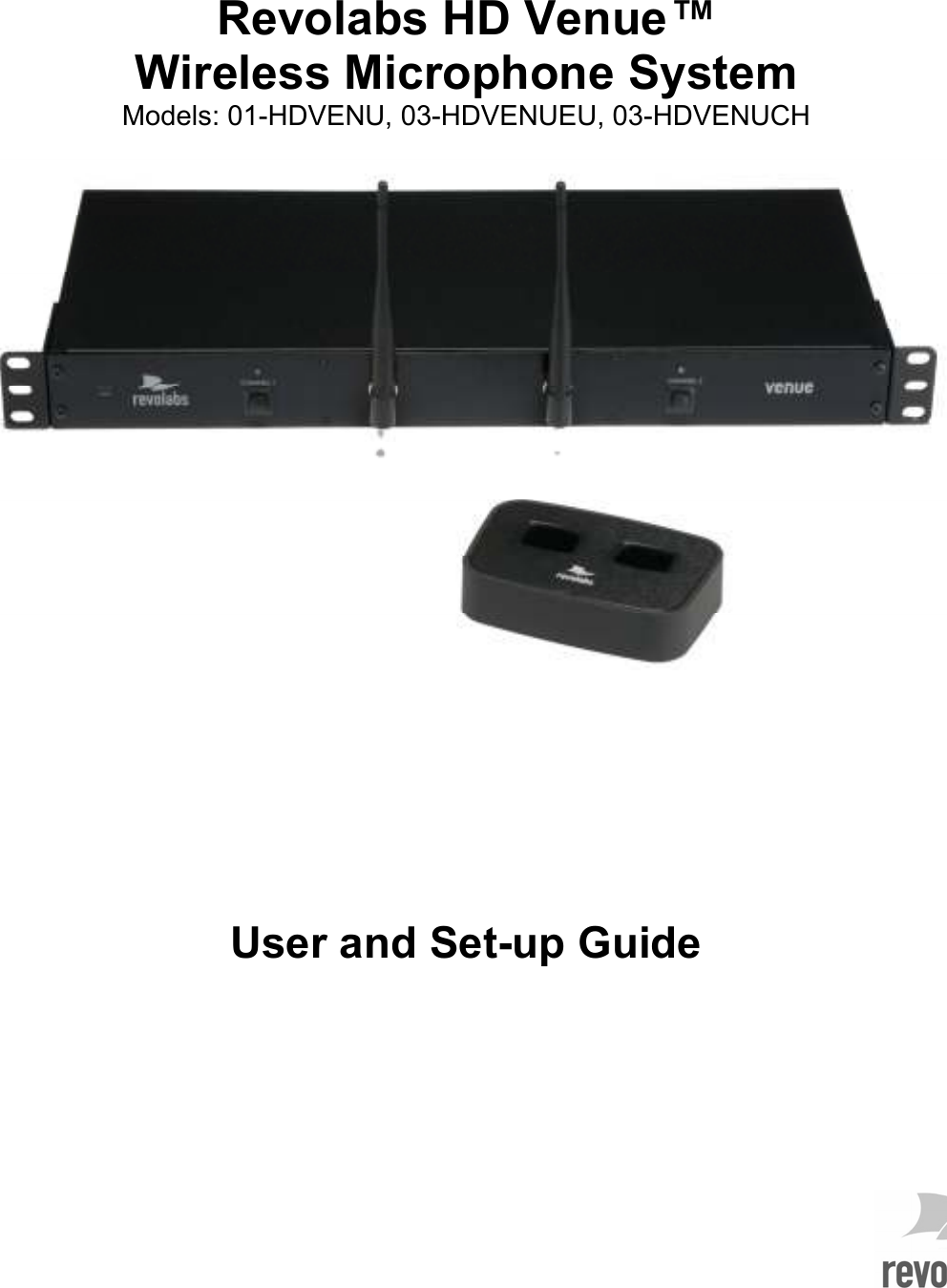
    Revolabs HD Venue™  Wireless Microphone System Models: 01-HDVENU, 03-HDVENUEU, 03-HDVENUCH            User and Set-up Guide
   © 2010 REVOLABS, INC. All rights reserved. No part of this document may be reproduced in any form or by any means without express written permission from Revolabs, Inc. Product specifications are subject to change without notice.                                           R e v o l a b s   H D   V e n u e ™   W i r e l e s s   M i c r o p h o n e   S y s t e m   M a n u a l    0 1 - H D V N U M A N - P A P - 1 1  S E P T   2 0 1 0   ( R e v   1 . 1 )
  Contents Safety and General Information .................................................................................................................... 1 Introduction .................................................................................................................................................... 3 System Components ................................................................................................................................. 3 Installing the Revolabs HD Venue™ Base Station ....................................................................................... 5 Controls and Connections: ........................................................................................................................ 5 Configuring the Revolabs HD Venue TM Base Station ................................................................................... 7 Using the Rear Panel Configuration DIP Switches ................................................................................... 7 Revolabs HD Microphones and HD Microphone Adapters ........................................................................... 9 Using the HD Wearable Wireless Microphones ........................................................................................ 9 Using the HD Omni-Directional Tabletop Wireless Boundary Microphones........................................... 10 Using the HD Directional Tabletop Wireless Boundary Microphones .................................................... 12 Using the HD XLR Microphone Wireless Adapter .................................................................................. 13 Using the HD Wireless Adapter for Countryman Microphone ................................................................ 14 Pairing Wireless Microphones to Base Station ....................................................................................... 15 Revolabs HD VenueTM Charger Base ......................................................................................................... 16 Power Module ......................................................................................................................................... 16 Charging the Microphone Batteries ........................................................................................................ 16 Updating the Revolabs HDTM Firmware ...................................................................................................... 17 Revolabs HD™ Indicator LEDs ................................................................................................................... 18 Warranty ...................................................................................................................................................... 19 Specifications .............................................................................................................................................. 20
    - 1 -   Safety and General Information Please read the following information to ensure safe and efficient use of your Revolabs system. FCC User Information FCC Registration Number: 0014898290 FCC ID: T5V01HDVENUNM  Revolabs HD Venue™ Station FCC ID: T5V01HDEXEMIC  Revolabs HD ™ Microphone FCC Notice to Users Users are not permitted to make changes or modify the equipment in any way. Changes or modifications not expressly approved by Revolabs, Inc. could void the user’s authority to operate the equipment.  This device complies with Part 15 of the FCC Rules. Operation is subject to the following two conditions: (1) this device may not cause harmful interference, and (2) this device must accept any interference received, including interference that may cause undesired operation. IMPORTANT NOTE: Federal Communications Commission (FCC) Radiation Exposure Statement This equipment complies with FCC radiation exposure limits for an uncontrolled environment. Professional Installation Recommended This product should be professionally installed. Industry Canada Notice to Users Operation is subject to the following two conditions:  (1) This device may not cause interference and  (2) This device must accept any interference, including interference that may cause undesired operation of the device   IC: 6455A-01HDVENUNM  Revolabs HD Venue™ Station IC: 6455A-01HDEXEMIC   Revolabs HD ™ Microphone Restricted use with certain medical devices Hearing Aids Some devices may interfere with some hearing aids. In the event of such interference, you may want to consult with your hearing aid manufacturer to discuss alternatives.  Other Medical Devices If you use any other personal medical device, consult the manufacturer of your device to determine if it is adequately shielded from RF energy. Your physician may be able to assist you in obtaining this information.
 - 2 - Export Law Assurances This product is controlled under the export regulations of the United States of America and Canada. The Governments of the United States of America and Canada may restrict the exportation or re-exportation of this product to certain destinations. For further information contact the U.S. Department of Commerce or the Canadian Department of Foreign Affairs and International Trade. The use of wireless devices and their accessories may be prohibited or restricted in certain areas. Always obey the laws and regulations on the use of these products. 01-HDVENU North America UPCS Usage Restriction Due to the UPCS frequencies used, this product is licensed for operation only in the United States of America and Canada. The radio has been found to be compliant to the requirements set forth in CFR 47 Sections 2.1091, and 15.247 (b) (4) addressing RF Exposure from radio frequency devices as defined in Evaluating Compliance with FCC Guidelines for Human Exposure to Radio Frequency Electromagnetic Fields. The equipment should be installed more than 20 cm (7.9 in.) from your body or nearby persons. 03-HDVENUEU European Union Usage Restriction Due to the DECT frequencies used, this product is licensed for operation only in the European Union countries. European Compliance This equipment has been approved in accordance with Council Directive 1999/5/EC “Radio Equipment and telecommunications Equipment.  Model Numbers: 03-HDVENUEU-NM  HD Venue 2 Channel Rack-mount System, w/o mics 03-HDEXEMICEU-11  HD Microphone, Wearable   03-HDTBLMICEU-OM-11  HD Microphone, Tabletop, Omni-directional   03-HDTBLMICEU-DR-11  HD Microphone, Tabletop, Directional   03-HDXLRMICEU-11  HD, XLR Wireless Adapter for Dynamic Handheld Microphone   03-HDCOMANEU-11  HD Wireless Adapter for Countryman Microphone   Standards to which Conformity is declared: RF  ETSI EN 301 406 V 1.4.1 03/2001 EMC  ETSI EN 301 489-6 v1.2.1 (2002-04) WEEE Notification: The Waste Electrical and Electronic Equipment (WEEE) directive (2002/96/EC) is intended to promote recycling of electrical and electronic equipment and their components at end of life.  2003/11/EC & 2002/95/EC “RoHS Compliance Directive”: The products referenced herein are in compliance with the EU directive 2003/11/EC and EU directive 2002/95/EC.
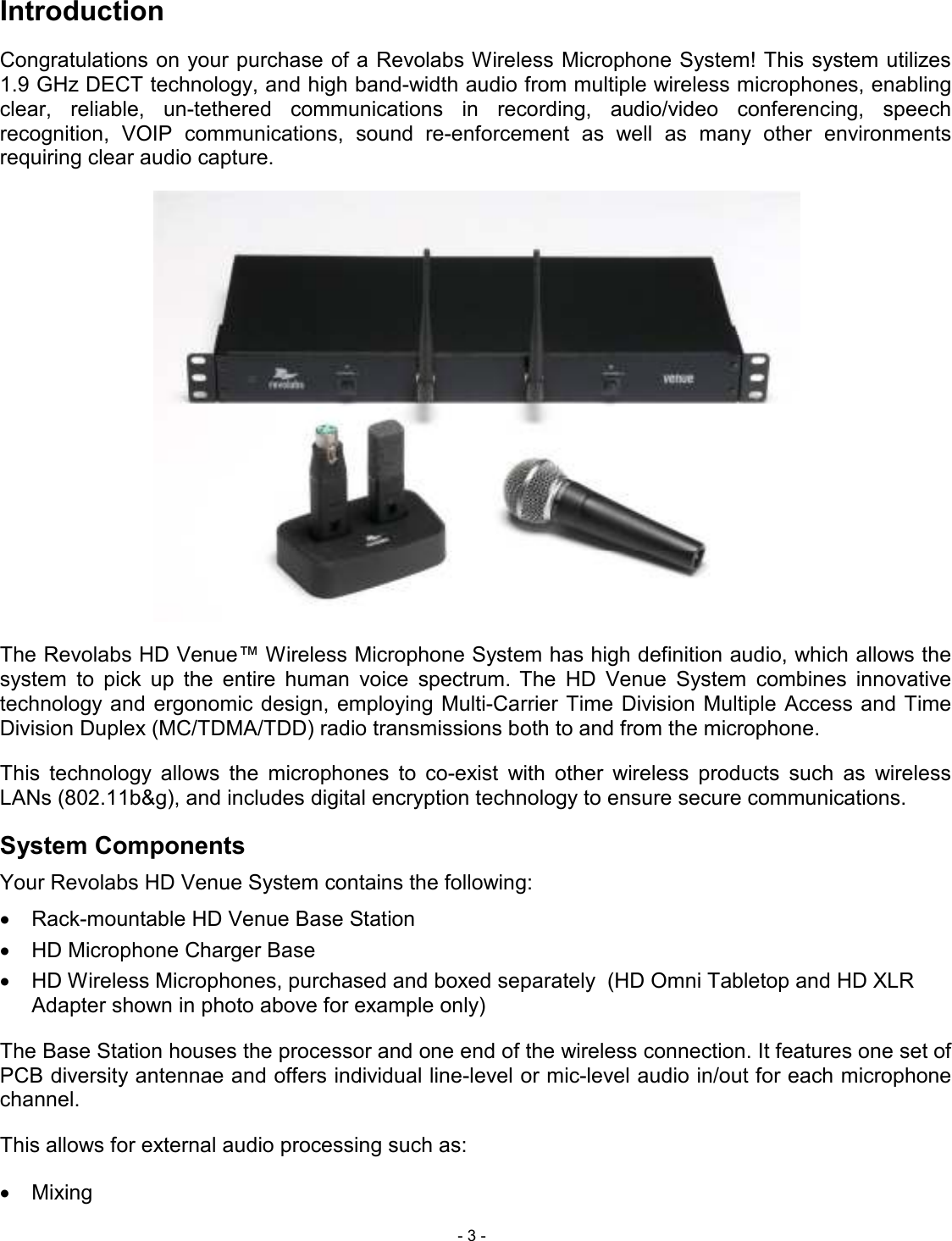
 - 3 - Introduction Congratulations on your purchase of a Revolabs Wireless Microphone System! This system utilizes 1.9 GHz DECT technology, and high band-width audio from multiple wireless microphones, enabling clear,  reliable,  un-tethered  communications  in  recording,  audio/video  conferencing,  speech recognition,  VOIP  communications,  sound  re-enforcement  as  well  as  many  other  environments requiring clear audio capture.  The Revolabs HD Venue™ Wireless Microphone System has high definition audio, which allows the system  to  pick  up  the  entire  human  voice  spectrum. The  HD  Venue  System  combines  innovative technology and ergonomic  design, employing Multi-Carrier Time  Division Multiple Access and Time Division Duplex (MC/TDMA/TDD) radio transmissions both to and from the microphone.  This  technology  allows  the  microphones  to  co-exist  with  other  wireless  products  such  as  wireless LANs (802.11b&g), and includes digital encryption technology to ensure secure communications. System Components Your Revolabs HD Venue System contains the following: •  Rack-mountable HD Venue Base Station •  HD Microphone Charger Base •  HD Wireless Microphones, purchased and boxed separately  (HD Omni Tabletop and HD XLR Adapter shown in photo above for example only) The Base Station houses the processor and one end of the wireless connection. It features one set of PCB diversity antennae and offers individual line-level or mic-level audio in/out for each microphone channel.  This allows for external audio processing such as: •  Mixing
 - 4 - •  Acoustic echo cancellation (AEC) •  Feedback elimination •  Level control •  Equalization •  Noise cancellation  The system is designed to optimize audio capture/reproduction by providing: •  Consistent audio input from all participants  •  Minimum room noise  •  Mute control •  Wireless encryption •  Automatic channel selection •  Full duplex audio   The Charger Base charges the HD Wireless Microphones and stores them when not in use.
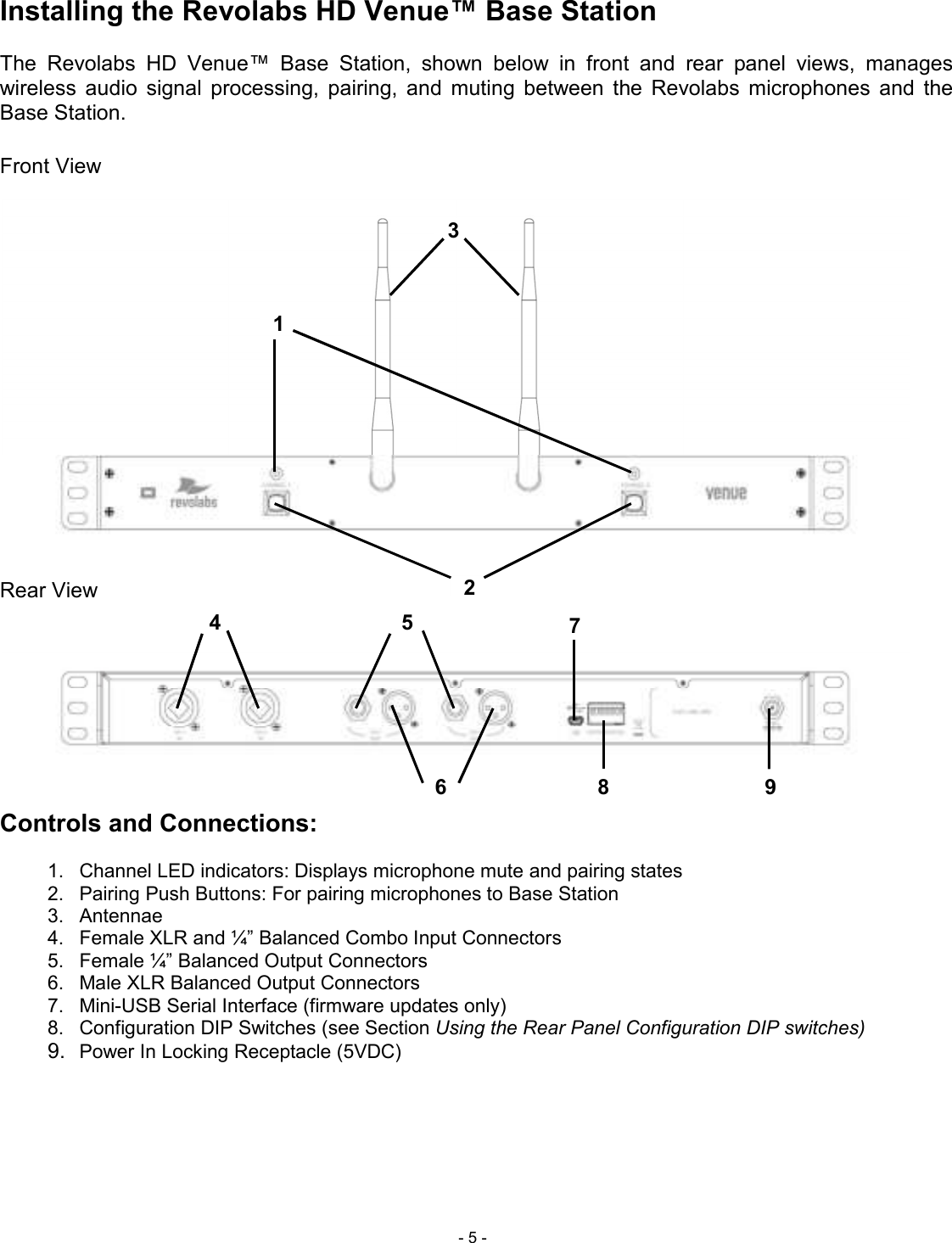
 - 5 - Installing the Revolabs HD Venue™ Base Station   The  Revolabs  HD  Venue™  Base  Station,  shown  below  in  front  and  rear  panel  views,  manages wireless  audio  signal  processing,  pairing,  and  muting  between  the  Revolabs  microphones  and  the Base Station.  Front View  Rear View      Controls and Connections:  1.  Channel LED indicators: Displays microphone mute and pairing states 2.  Pairing Push Buttons: For pairing microphones to Base Station   3.  Antennae 4.  Female XLR and ¼” Balanced Combo Input Connectors 5.  Female ¼” Balanced Output Connectors 6.  Male XLR Balanced Output Connectors 7.  Mini-USB Serial Interface (firmware updates only) 8.  Configuration DIP Switches (see Section Using the Rear Panel Configuration DIP switches)  9. Power In Locking Receptacle (5VDC)      1 2 3 4 5 6 7 89
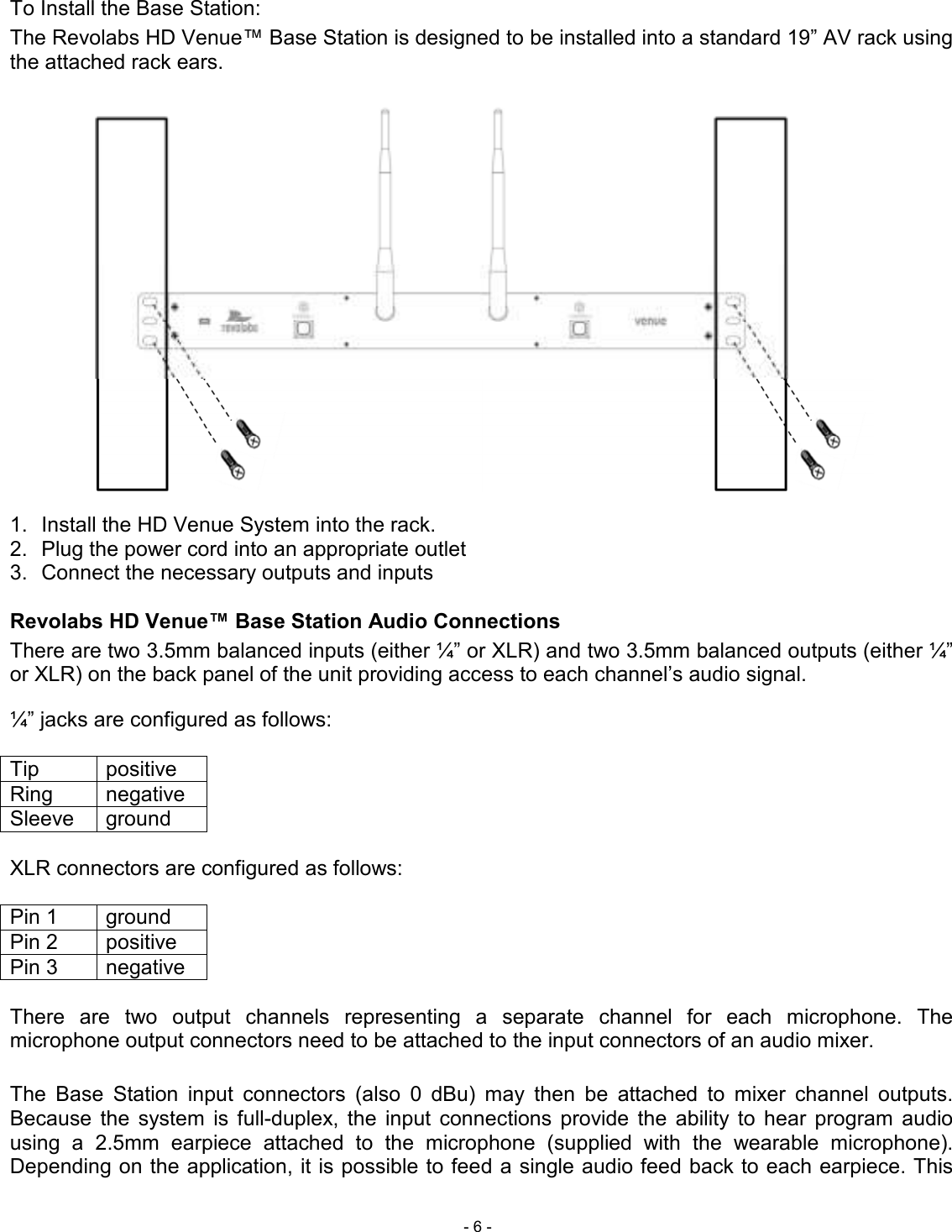
 - 6 - To Install the Base Station: The Revolabs HD Venue™ Base Station is designed to be installed into a standard 19” AV rack using the attached rack ears.   1.  Install the HD Venue System into the rack. 2.  Plug the power cord into an appropriate outlet 3.  Connect the necessary outputs and inputs  Revolabs HD Venue™ Base Station Audio Connections There are two 3.5mm balanced inputs (either ¼” or XLR) and two 3.5mm balanced outputs (either ¼” or XLR) on the back panel of the unit providing access to each channel’s audio signal.  ¼” jacks are configured as follows:  Tip  positive Ring  negative Sleeve  ground  XLR connectors are configured as follows:  Pin 1  ground Pin 2  positive Pin 3  negative  There  are  two  output  channels  representing  a  separate  channel  for  each  microphone.  The microphone output connectors need to be attached to the input connectors of an audio mixer.   The  Base  Station  input  connectors  (also  0  dBu)  may  then  be  attached  to  mixer  channel  outputs. Because  the  system  is  full-duplex,  the  input  connections  provide  the  ability  to  hear  program  audio using  a  2.5mm  earpiece  attached  to  the  microphone  (supplied  with  the  wearable  microphone). Depending on the application, it is possible to feed a single audio feed back to each earpiece. This
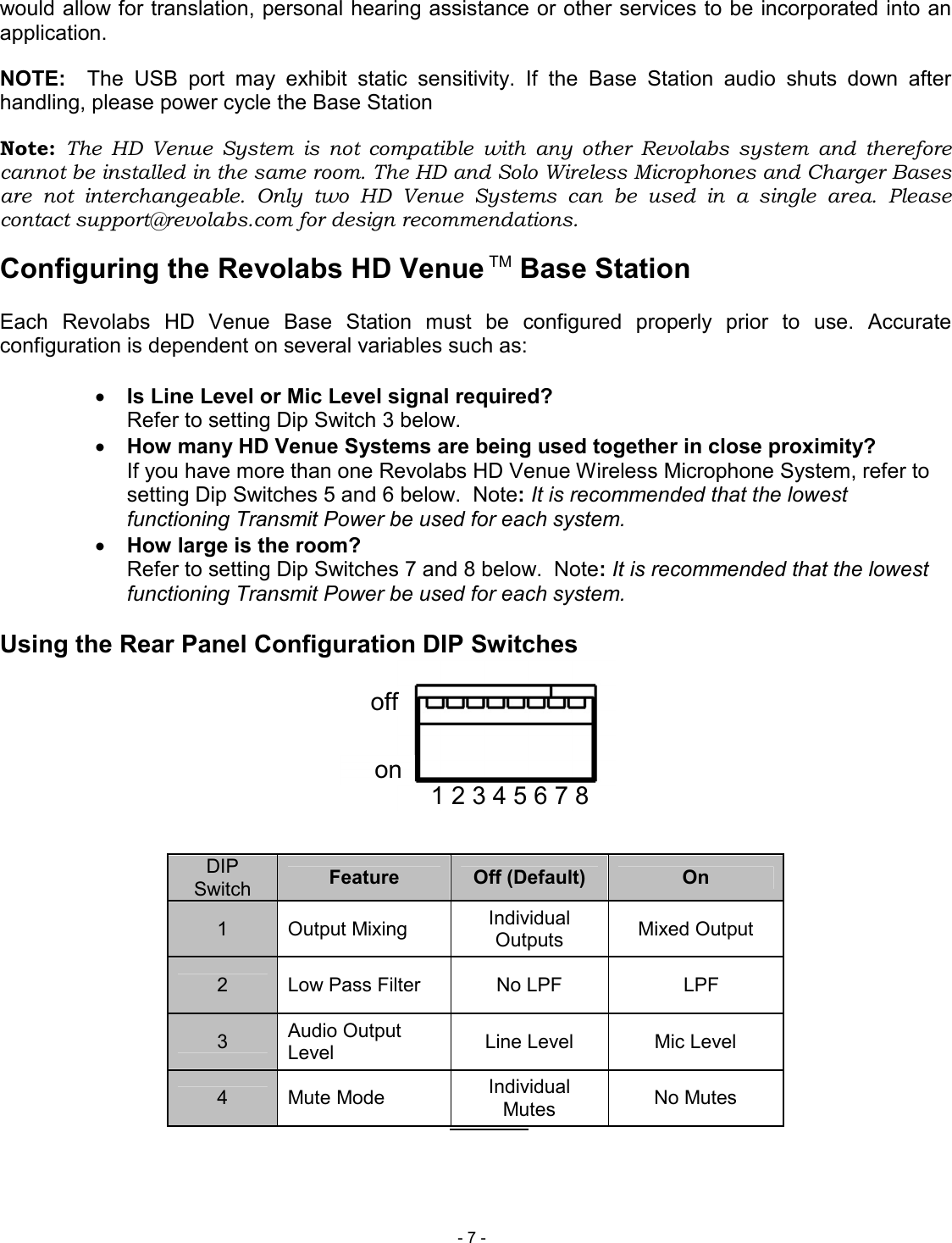
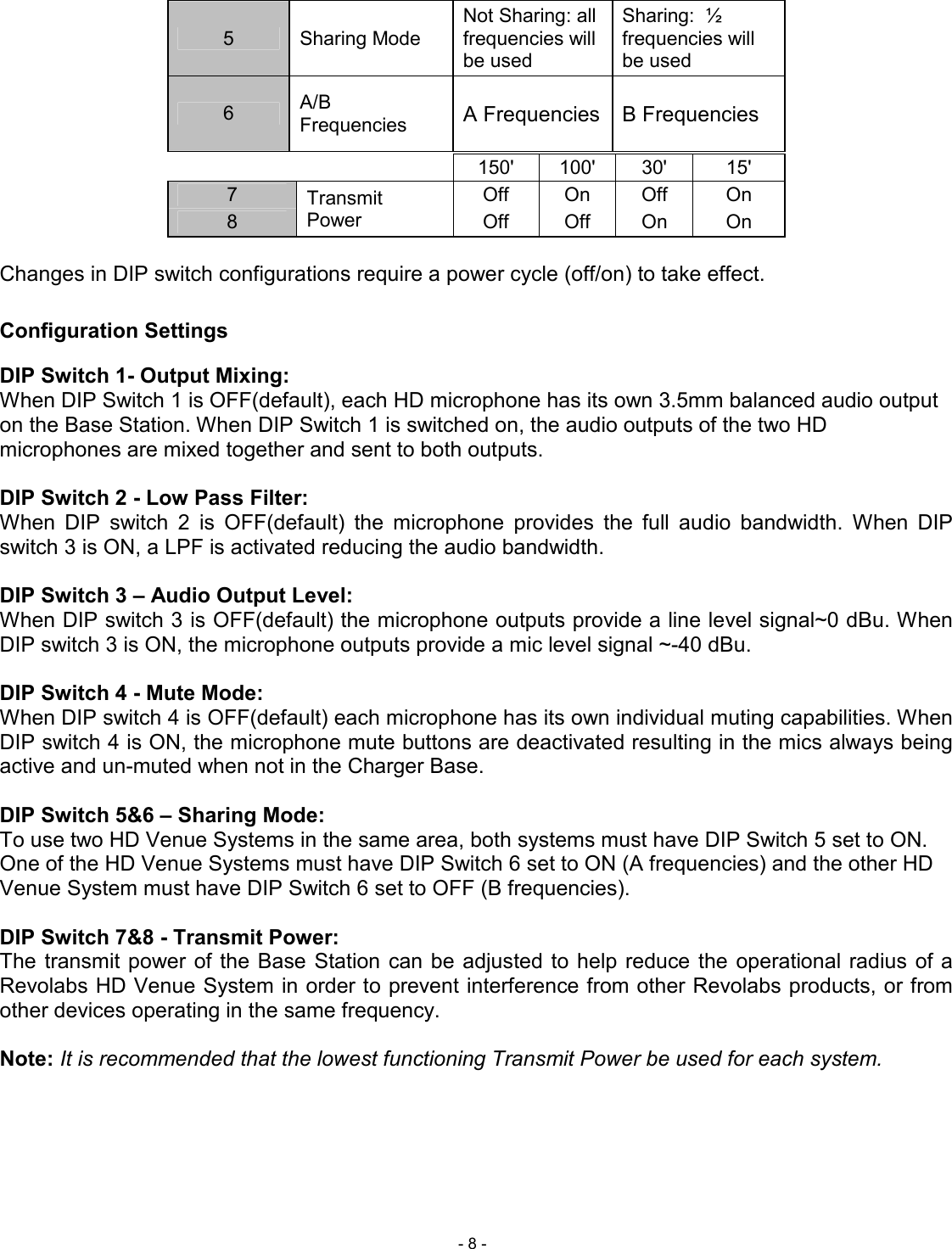
 - 7 - 1 2 3 4 5 6 7 8 on off would allow for translation, personal hearing assistance or other services to be incorporated into an application. NOTE:    The  USB  port  may  exhibit  static  sensitivity.  If  the  Base  Station  audio  shuts  down  after handling, please power cycle the Base Station Note:  The  HD  Venue  System  is  not  compatible  with  any  other  Revolabs  system  and  therefore cannot be installed in the same room. The HD and Solo Wireless Microphones and Charger Bases are  not  interchangeable.  Only  two  HD  Venue  Systems  can  be  used  in  a  single  area.  Please contact support@revolabs.com for design recommendations. Configuring the Revolabs HD Venue TM Base Station  Each  Revolabs  HD  Venue  Base  Station  must  be  configured  properly  prior  to  use.  Accurate configuration is dependent on several variables such as:  • Is Line Level or Mic Level signal required? Refer to setting Dip Switch 3 below. • How many HD Venue Systems are being used together in close proximity?   If you have more than one Revolabs HD Venue Wireless Microphone System, refer to setting Dip Switches 5 and 6 below.  Note: It is recommended that the lowest functioning Transmit Power be used for each system. • How large is the room? Refer to setting Dip Switches 7 and 8 below.  Note: It is recommended that the lowest functioning Transmit Power be used for each system.  Using the Rear Panel Configuration DIP Switches         DIP Switch  Feature  Off (Default)  On 1  Output Mixing  Individual Outputs  Mixed Output 2  Low Pass Filter  No LPF    LPF 3  Audio Output Level  Line Level  Mic Level 4  Mute Mode  Individual Mutes  No Mutes
 - 8 - 5  Sharing Mode Not Sharing: all frequencies will be used Sharing:  ½ frequencies will be used 6  A/B Frequencies  A Frequencies   B Frequencies           150'  100'  30'  15' 7  Transmit Power Off  On  Off  On 8  Off  Off  On  On  Changes in DIP switch configurations require a power cycle (off/on) to take effect.  Configuration Settings DIP Switch 1- Output Mixing: When DIP Switch 1 is OFF(default), each HD microphone has its own 3.5mm balanced audio output on the Base Station. When DIP Switch 1 is switched on, the audio outputs of the two HD microphones are mixed together and sent to both outputs.   DIP Switch 2 - Low Pass Filter: When  DIP  switch  2  is  OFF(default)  the  microphone  provides  the  full  audio  bandwidth.  When  DIP switch 3 is ON, a LPF is activated reducing the audio bandwidth.   DIP Switch 3 – Audio Output Level:  When DIP switch 3 is OFF(default) the microphone outputs provide a line level signal~0 dBu. When DIP switch 3 is ON, the microphone outputs provide a mic level signal ~-40 dBu.   DIP Switch 4 - Mute Mode: When DIP switch 4 is OFF(default) each microphone has its own individual muting capabilities. When DIP switch 4 is ON, the microphone mute buttons are deactivated resulting in the mics always being active and un-muted when not in the Charger Base.   DIP Switch 5&6 – Sharing Mode: To use two HD Venue Systems in the same area, both systems must have DIP Switch 5 set to ON.  One of the HD Venue Systems must have DIP Switch 6 set to ON (A frequencies) and the other HD Venue System must have DIP Switch 6 set to OFF (B frequencies).  DIP Switch 7&8 - Transmit Power: The  transmit  power  of the Base Station can be  adjusted to  help  reduce  the  operational radius  of a Revolabs HD Venue System in order to prevent interference from other Revolabs products, or from other devices operating in the same frequency.   Note: It is recommended that the lowest functioning Transmit Power be used for each system.
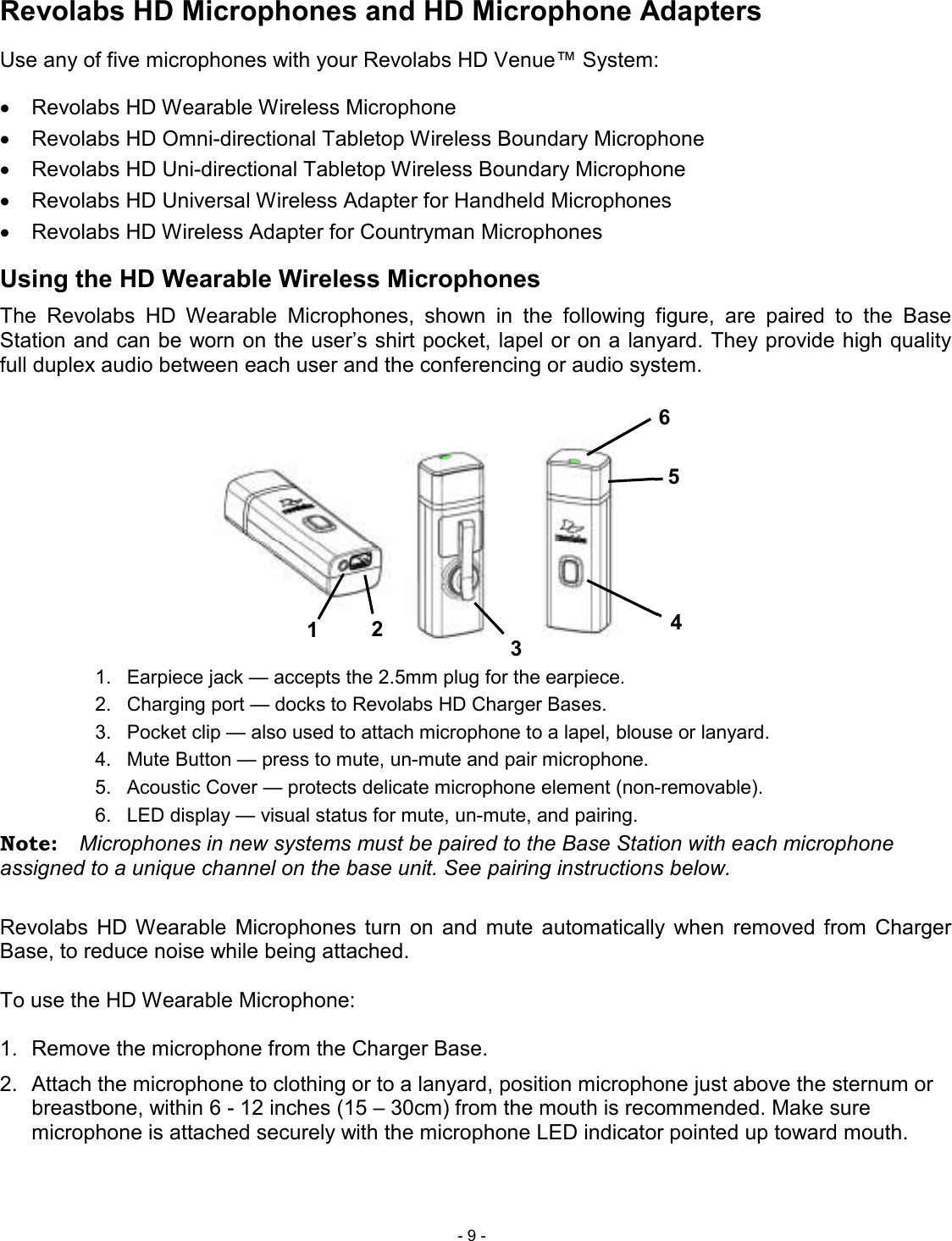
 - 9 - Revolabs HD Microphones and HD Microphone Adapters Use any of five microphones with your Revolabs HD Venue™ System: •  Revolabs HD Wearable Wireless Microphone •  Revolabs HD Omni-directional Tabletop Wireless Boundary Microphone •  Revolabs HD Uni-directional Tabletop Wireless Boundary Microphone •  Revolabs HD Universal Wireless Adapter for Handheld Microphones •  Revolabs HD Wireless Adapter for Countryman Microphones Using the HD Wearable Wireless Microphones The  Revolabs  HD  Wearable  Microphones,  shown  in  the  following  figure,  are  paired  to  the  Base Station and can be worn on the user’s shirt pocket, lapel or on a lanyard. They provide high quality full duplex audio between each user and the conferencing or audio system.  1.  Earpiece jack — accepts the 2.5mm plug for the earpiece. 2.  Charging port — docks to Revolabs HD Charger Bases. 3.  Pocket clip — also used to attach microphone to a lapel, blouse or lanyard. 4.  Mute Button — press to mute, un-mute and pair microphone. 5.  Acoustic Cover — protects delicate microphone element (non-removable). 6.  LED display — visual status for mute, un-mute, and pairing. Note:  Microphones in new systems must be paired to the Base Station with each microphone assigned to a unique channel on the base unit. See pairing instructions below.  Revolabs  HD Wearable  Microphones  turn  on  and  mute  automatically  when  removed  from  Charger Base, to reduce noise while being attached.   To use the HD Wearable Microphone:  1.  Remove the microphone from the Charger Base. 2.  Attach the microphone to clothing or to a lanyard, position microphone just above the sternum or breastbone, within 6 - 12 inches (15 – 30cm) from the mouth is recommended. Make sure microphone is attached securely with the microphone LED indicator pointed up toward mouth. 4 6 5 3 2 1
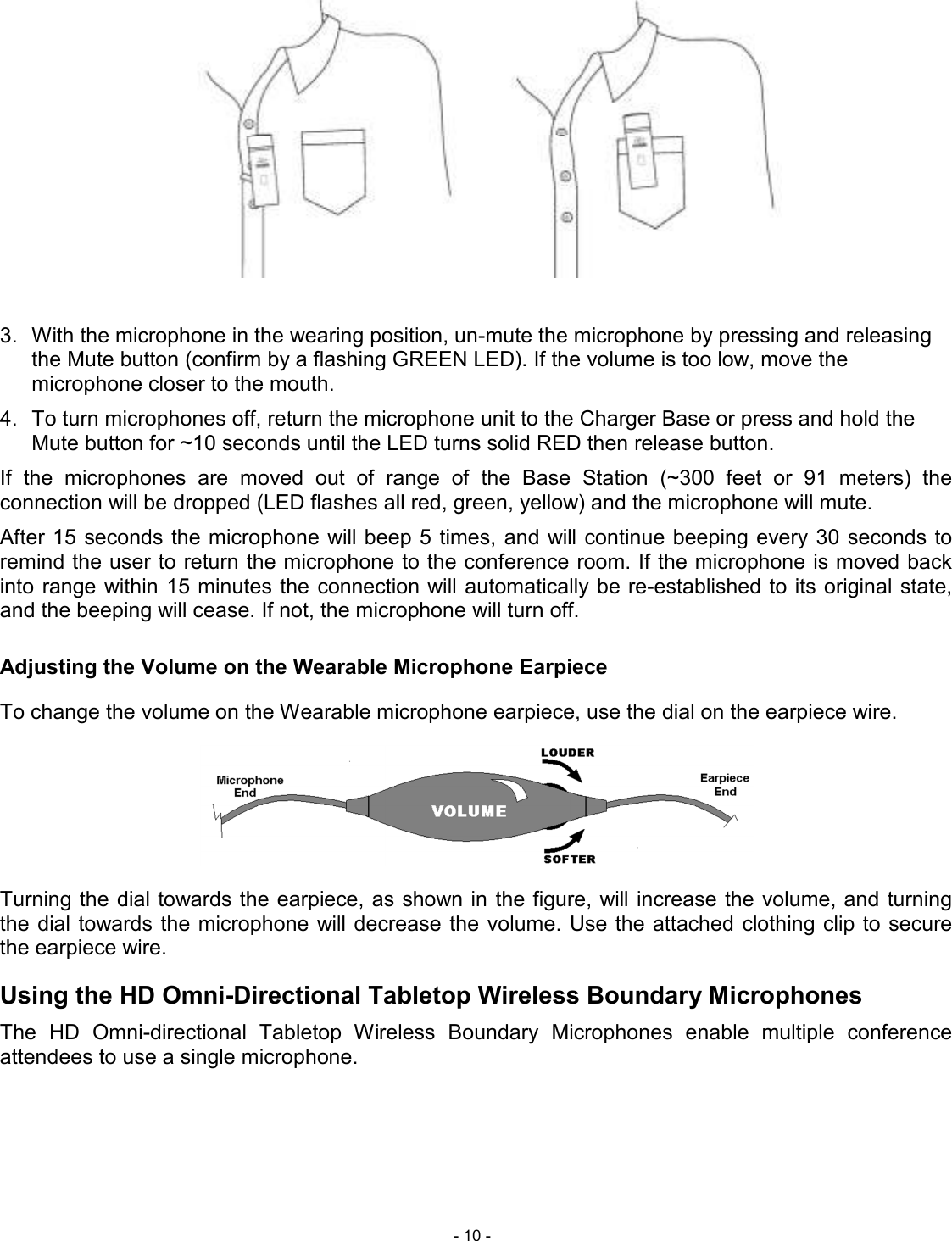
 - 10 -   3.  With the microphone in the wearing position, un-mute the microphone by pressing and releasing the Mute button (confirm by a flashing GREEN LED). If the volume is too low, move the microphone closer to the mouth. 4.  To turn microphones off, return the microphone unit to the Charger Base or press and hold the Mute button for ~10 seconds until the LED turns solid RED then release button. If  the  microphones  are  moved  out  of  range  of  the  Base  Station  (~300  feet  or  91  meters)  the connection will be dropped (LED flashes all red, green, yellow) and the microphone will mute.  After 15 seconds  the microphone will beep 5 times, and will continue beeping every 30  seconds to remind the user to return the microphone to the conference room. If the microphone is moved back into range within 15 minutes the  connection will automatically be re-established to its original state, and the beeping will cease. If not, the microphone will turn off. Adjusting the Volume on the Wearable Microphone Earpiece To change the volume on the Wearable microphone earpiece, use the dial on the earpiece wire.   Turning the dial towards the earpiece, as shown in the figure, will increase the volume, and turning the dial towards the microphone will decrease  the  volume. Use the attached  clothing clip to secure the earpiece wire. Using the HD Omni-Directional Tabletop Wireless Boundary Microphones The  HD  Omni-directional  Tabletop  Wireless  Boundary  Microphones  enable  multiple  conference attendees to use a single microphone.
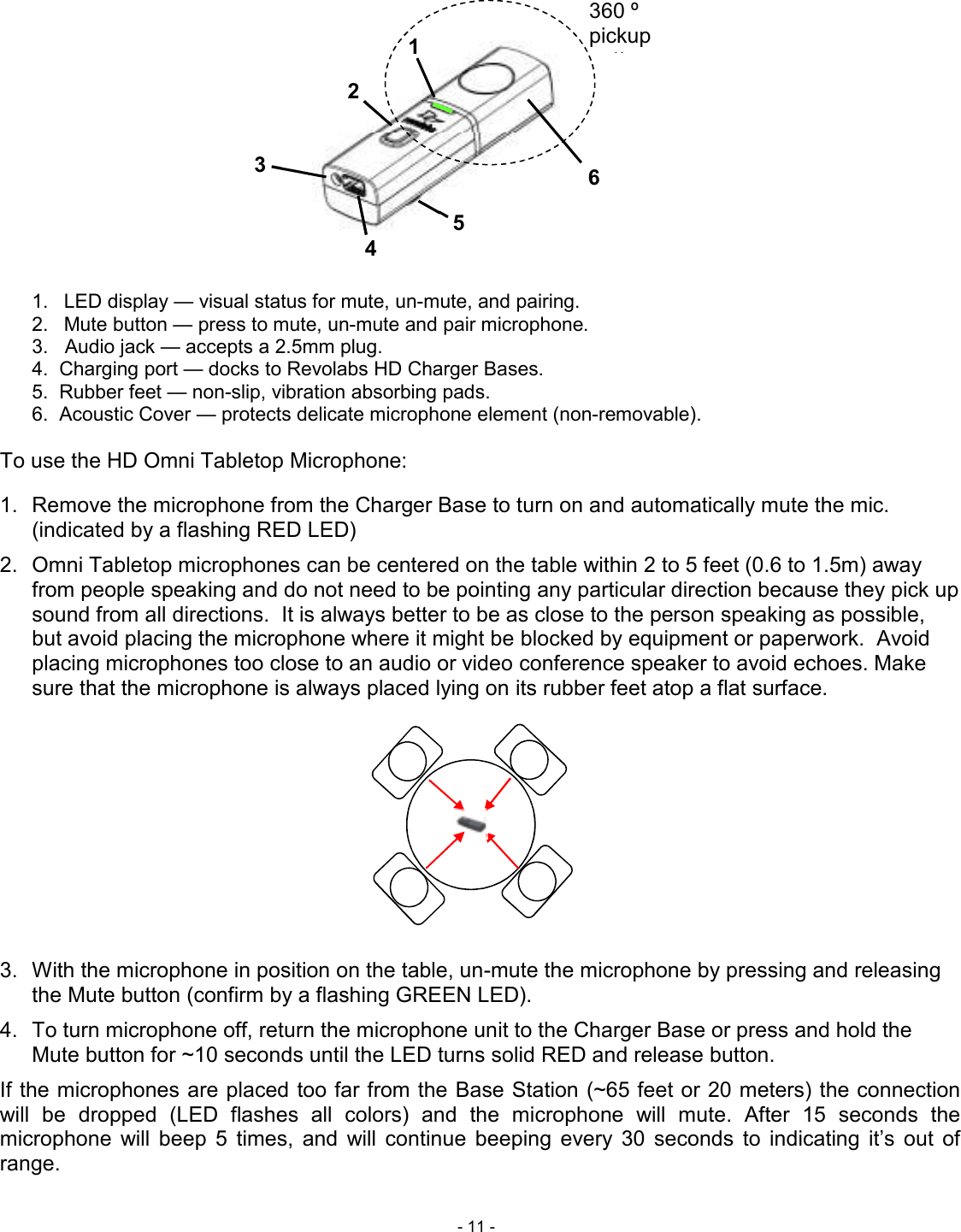
 - 11 -  1.  LED display — visual status for mute, un-mute, and pairing. 2.  Mute button — press to mute, un-mute and pair microphone. 3.   Audio jack — accepts a 2.5mm plug. 4.  Charging port — docks to Revolabs HD Charger Bases. 5.  Rubber feet — non-slip, vibration absorbing pads. 6.  Acoustic Cover — protects delicate microphone element (non-removable).  To use the HD Omni Tabletop Microphone:  1.  Remove the microphone from the Charger Base to turn on and automatically mute the mic. (indicated by a flashing RED LED) 2.  Omni Tabletop microphones can be centered on the table within 2 to 5 feet (0.6 to 1.5m) away from people speaking and do not need to be pointing any particular direction because they pick up sound from all directions.  It is always better to be as close to the person speaking as possible, but avoid placing the microphone where it might be blocked by equipment or paperwork.  Avoid placing microphones too close to an audio or video conference speaker to avoid echoes. Make sure that the microphone is always placed lying on its rubber feet atop a flat surface.         3.  With the microphone in position on the table, un-mute the microphone by pressing and releasing the Mute button (confirm by a flashing GREEN LED).  4.  To turn microphone off, return the microphone unit to the Charger Base or press and hold the Mute button for ~10 seconds until the LED turns solid RED and release button. If the microphones are placed too far from the Base Station (~65 feet or 20 meters) the connection will  be  dropped  (LED  flashes  all  colors)  and  the  microphone  will  mute.  After  15  seconds  the microphone  will  beep  5  times,  and  will  continue  beeping  every  30  seconds  to  indicating  it’s  out  of range.  6 2 3 1 4 5 360 º pickup pattern
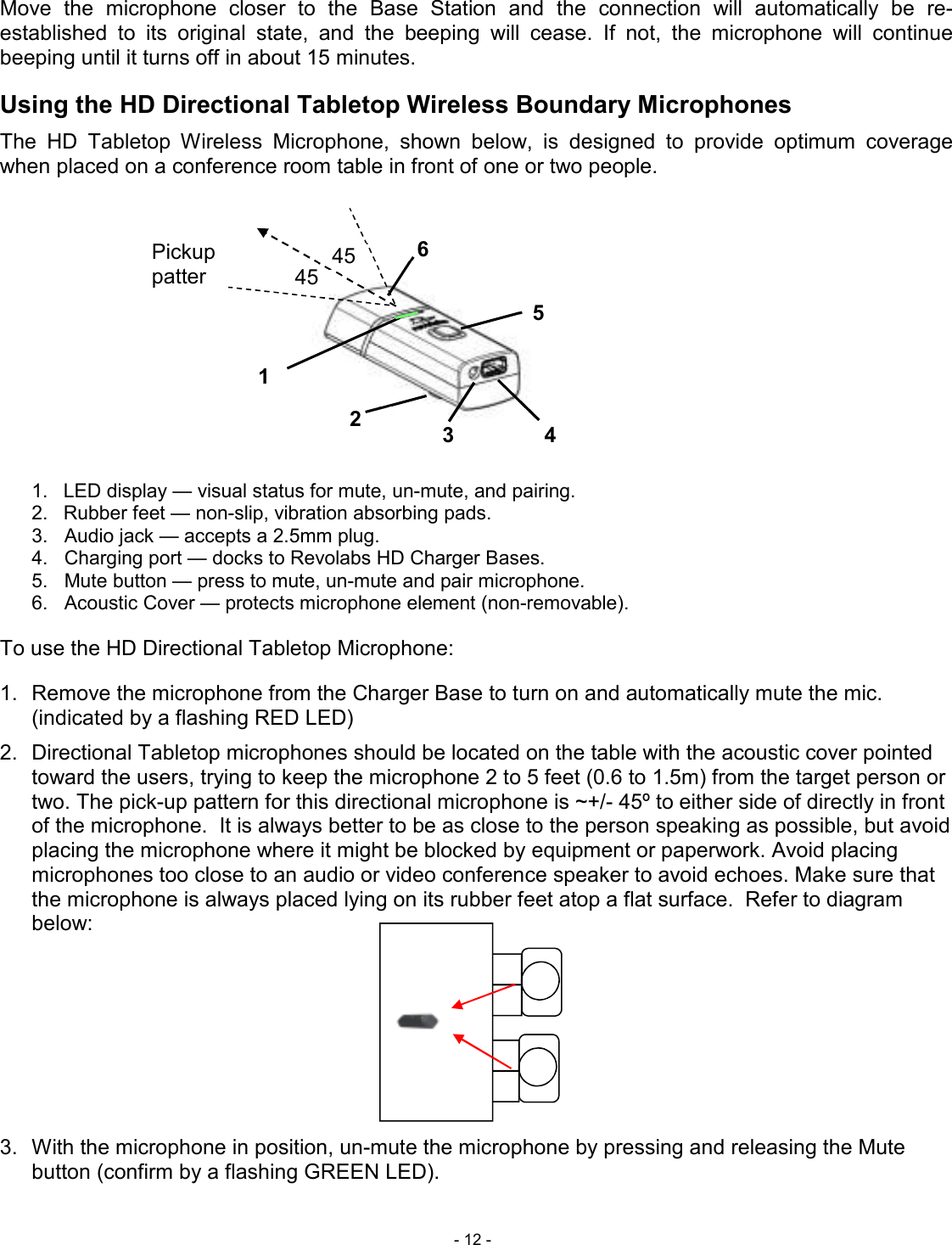
 - 12 - Move  the  microphone  closer  to  the  Base  Station  and  the  connection  will  automatically  be  re-established  to  its  original  state,  and  the  beeping  will  cease.  If  not,  the  microphone  will  continue beeping until it turns off in about 15 minutes. Using the HD Directional Tabletop Wireless Boundary Microphones The  HD  Tabletop  Wireless  Microphone,  shown  below,  is  designed  to  provide  optimum  coverage when placed on a conference room table in front of one or two people.  1.  LED display — visual status for mute, un-mute, and pairing. 2.  Rubber feet — non-slip, vibration absorbing pads.  3.   Audio jack — accepts a 2.5mm plug. 4.   Charging port — docks to Revolabs HD Charger Bases. 5.   Mute button — press to mute, un-mute and pair microphone. 6.   Acoustic Cover — protects microphone element (non-removable).   To use the HD Directional Tabletop Microphone:  1.  Remove the microphone from the Charger Base to turn on and automatically mute the mic. (indicated by a flashing RED LED) 2.  Directional Tabletop microphones should be located on the table with the acoustic cover pointed toward the users, trying to keep the microphone 2 to 5 feet (0.6 to 1.5m) from the target person or two. The pick-up pattern for this directional microphone is ~+/- 45º to either side of directly in front of the microphone.  It is always better to be as close to the person speaking as possible, but avoid placing the microphone where it might be blocked by equipment or paperwork. Avoid placing microphones too close to an audio or video conference speaker to avoid echoes. Make sure that the microphone is always placed lying on its rubber feet atop a flat surface.  Refer to diagram below:        3.  With the microphone in position, un-mute the microphone by pressing and releasing the Mute button (confirm by a flashing GREEN LED).  1 2 3 4 5 6 45 º 45 º Pickup pattern
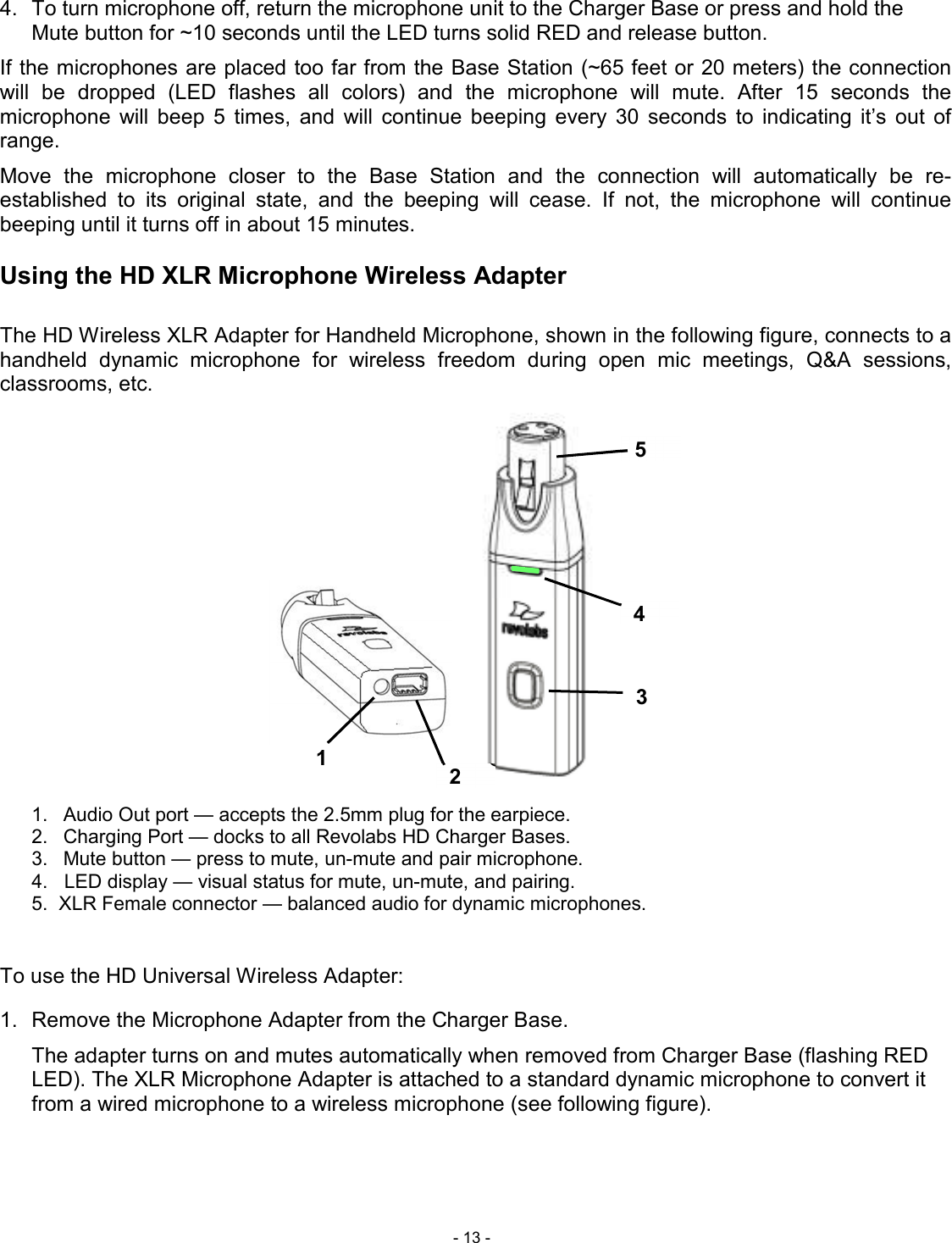
 - 13 - 5 4 3 2 1 4.  To turn microphone off, return the microphone unit to the Charger Base or press and hold the Mute button for ~10 seconds until the LED turns solid RED and release button. If the microphones are placed too far from the Base Station (~65 feet or 20 meters) the connection will  be  dropped  (LED  flashes  all  colors)  and  the  microphone  will  mute.  After  15  seconds  the microphone  will  beep  5  times,  and  will  continue  beeping  every  30  seconds  to  indicating  it’s  out  of range.  Move  the  microphone  closer  to  the  Base  Station  and  the  connection  will  automatically  be  re-established  to  its  original  state,  and  the  beeping  will  cease.  If  not,  the  microphone  will  continue beeping until it turns off in about 15 minutes.  Using the HD XLR Microphone Wireless Adapter  The HD Wireless XLR Adapter for Handheld Microphone, shown in the following figure, connects to a handheld  dynamic  microphone  for  wireless  freedom  during  open  mic  meetings,  Q&A  sessions, classrooms, etc.                    1.  Audio Out port — accepts the 2.5mm plug for the earpiece. 2.  Charging Port — docks to all Revolabs HD Charger Bases. 3.  Mute button — press to mute, un-mute and pair microphone. 4.   LED display — visual status for mute, un-mute, and pairing. 5.  XLR Female connector — balanced audio for dynamic microphones.   To use the HD Universal Wireless Adapter:  1.  Remove the Microphone Adapter from the Charger Base.    The adapter turns on and mutes automatically when removed from Charger Base (flashing RED LED). The XLR Microphone Adapter is attached to a standard dynamic microphone to convert it from a wired microphone to a wireless microphone (see following figure).
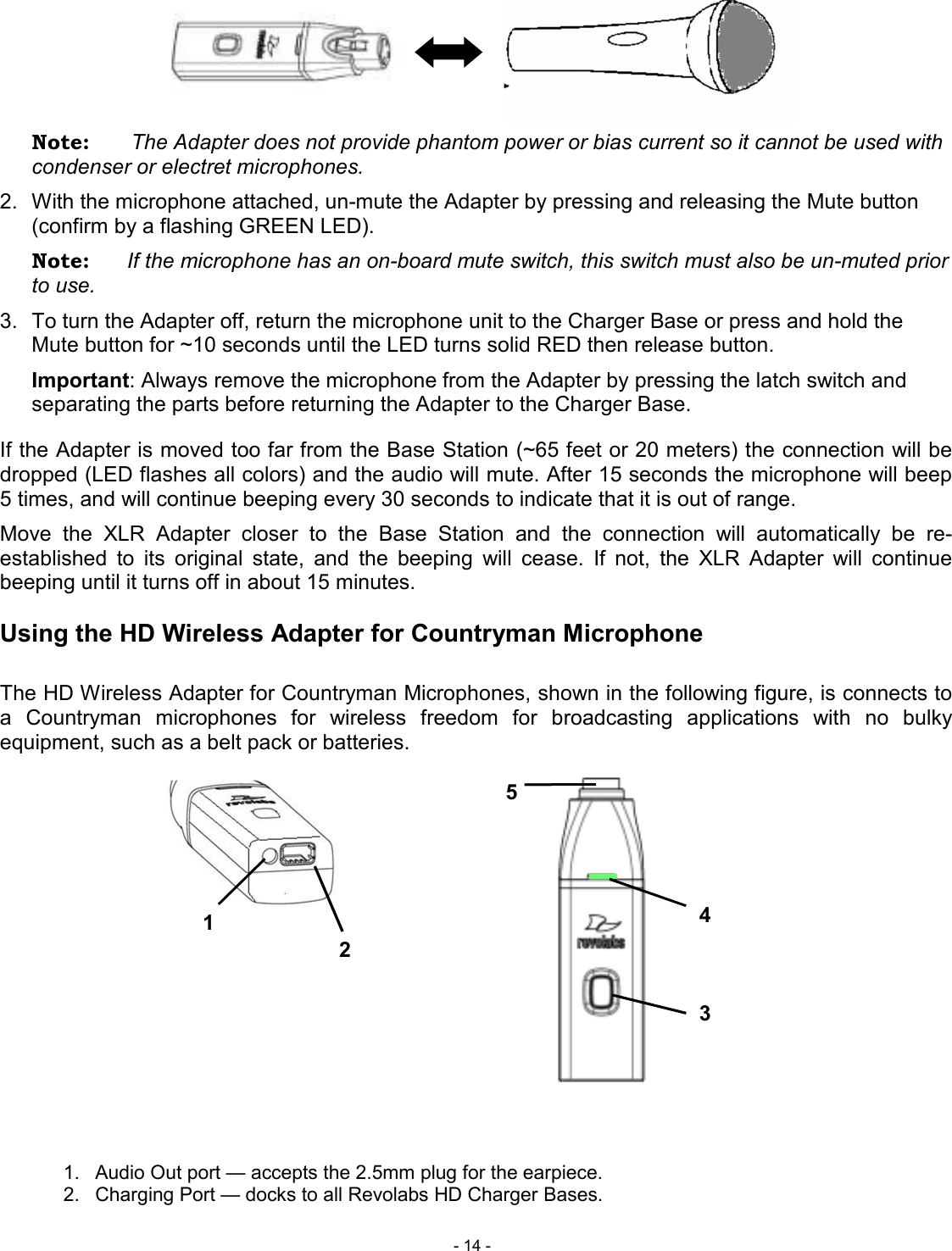
 - 14 - 5 4 3 2 1       Note:       The Adapter does not provide phantom power or bias current so it cannot be used with condenser or electret microphones. 2.  With the microphone attached, un-mute the Adapter by pressing and releasing the Mute button (confirm by a flashing GREEN LED).  Note:  If the microphone has an on-board mute switch, this switch must also be un-muted prior to use. 3.  To turn the Adapter off, return the microphone unit to the Charger Base or press and hold the Mute button for ~10 seconds until the LED turns solid RED then release button. Important: Always remove the microphone from the Adapter by pressing the latch switch and separating the parts before returning the Adapter to the Charger Base. If the Adapter is moved too far from the Base Station (~65 feet or 20 meters) the connection will be dropped (LED flashes all colors) and the audio will mute. After 15 seconds the microphone will beep 5 times, and will continue beeping every 30 seconds to indicate that it is out of range.  Move  the  XLR  Adapter  closer  to  the  Base  Station  and  the  connection  will  automatically  be  re-established  to  its  original  state,  and  the  beeping  will  cease.  If  not,  the  XLR  Adapter  will  continue beeping until it turns off in about 15 minutes.  Using the HD Wireless Adapter for Countryman Microphone  The HD Wireless Adapter for Countryman Microphones, shown in the following figure, is connects to a  Countryman  microphones  for  wireless  freedom  for  broadcasting  applications  with  no  bulky equipment, such as a belt pack or batteries.                    1.  Audio Out port — accepts the 2.5mm plug for the earpiece. 2.  Charging Port — docks to all Revolabs HD Charger Bases.
 - 15 - 3.  Mute button — press to mute, un-mute and pair microphone. 4.  LED display — visual status for mute, un-mute, and pairing. 5.  TA4F connector — connects to Countryman microphone cable.  To use the HD Wireless Adapter for Countryman Microphone:  4.  Remove the Microphone Adapter from the Charger Base.    The adapter turns on and mutes automatically when removed from Charger Base (flashing RED LED). The Microphone Adapter is attached to a Countryman Microphone with the specific cable designed for Revolabs.  The HD Wireless Adapter for Countryman microphone supplies the necessary phantom power specifically for the Countryman microphone.   5.  To turn the Adapter off, return the microphone unit to the Charger Base or press and hold the Mute button for ~10 seconds until the LED turns solid RED then release button. Important: Always remove the microphone from the Adapter and separate the parts before returning the Adapter to the Charger Base. If the Adapter is moved too far from the Base Station (~65 feet or 20 meters) the connection will be dropped (LED flashes all colors) and the audio will mute. After 15 seconds the microphone will beep 5 times, and will continue beeping every 30 seconds to indicate that it is out of range.  Move the Countryman Adapter closer to the Base Station and the connection will automatically be re-established  to  its  original  state,  and  the  beeping  will  cease.  If  not,  the  Countryman  Adapter  will continue beeping until it turns off in about 15 minutes.  Pairing Wireless Microphones to Base Station   Pairing  creates  a  link  between  the  HD  Wireless  Microphone  and  the  Base  Station,  with  a  unique electronic  serial number. When the microphone and Base Station have been previously paired, the mic will automatically try to connect to the same Base Station whenever it is lifted from the Charger Base.  Note:  Microphones in new systems must be paired to the Base Station with each microphone assigned to a unique channel on the Base Station. Remember,  microphones  are  always  muted  (flashing  RED  LED)  when  they  are  removed  from  the Charger Base and the Mute button needs to be pressed to make it “live” (flashing GREEN LED).  A  microphone  that  is  not  paired  will  be  indicated  by  a  cycling  RED-GREEN  LED  pattern.  A  Base Station  channel  that  is  not  paired  to  a  microphone  will  not  show  any  activity  on  the  channel  LED (make sure unit is first powered on by observing GREEN backlit front panel display).  When channels are paired, both microphone and channel LEDs will flash RED as microphones are removed  from  the  Charger  Base  and  flash  GREEN  when  un-muted.  Remember  that  only  one microphone can be paired to any single Base Station channel. To pair an individual microphone to the Base Station: 1.  Turn the microphone OFF (no LED activity). If the microphone is ON, press and hold the Mute button for 10 seconds until the LED turns solid RED then release the button to turn the unit off. (do not release the button when you hear two beeps).
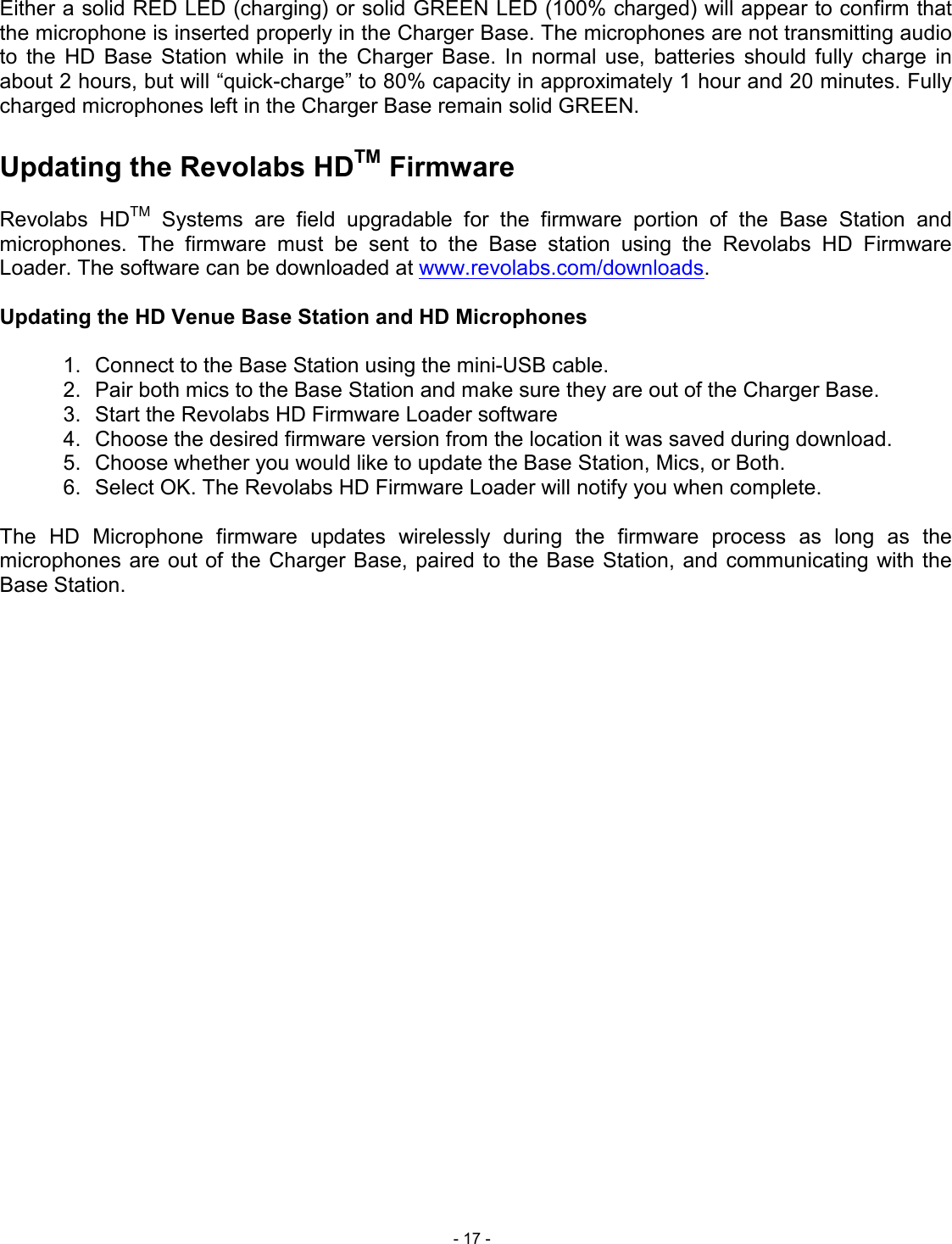
 - 16 - 1 2 3 2.  Place the microphone unit into pairing mode by holding the Mute button down for seven seconds. The LED will turn solid RED. Release the Mute button. The microphone is now in pairing mode. 3.  Within one minute, push and hold the button for the desired channel on the Base Station for seven seconds until the LED turns solid red then release. The LED for that channel will be solid red until pairing starts, as indicated by a quick GREEN flash, then switching to flashing RED on both the microphone and the Base Station (muted audio). Pairing is now complete.   Revolabs HD VenueTM Charger Base When microphones  are not in  use,  they should be properly inserted into the Revolabs HD Charger Base.  It  is  important  to  ensure  that  all  system  microphones  are  inserted  fully  in  the  base  so  that charging will occur. Features of the base are shown in the following figure.               1. LED indicator — power status indicator     2. Charger Bays — charges up to 2 Microphones   3. Power Cord Receptacle — power supply input, 9-24VDC (on rear) Power Module The Charger Base requires 5VDC power, provided by the AC Adapter. Plug the supplied AC adapter into  an  appropriate  power  outlet  110-240  AC,  50-60Hz.  The  power  LED  on  the  Charger  Base  will illuminate.  Charging the Microphone Batteries  First-time  use  —  Before  using  the  wireless  microphone  the  first  time,  charge  the  batteries  in  the microphones for eight hours (or overnight) in the Charger Base.  Recharging — When the YELLOW LED starts to flash intermittently on the microphone the battery has 30 minutes of charge remaining. Over time (years), batteries gradually wear down and will result in shorter run times. This is normal. Always return microphones to the Charger Base when not in use. Important: The Lithium Polymer rechargeable batteries that power the microphones are not user serviceable. Please contact Revolabs (www.revolabs.com) or your AV service provider for replacement instructions and to assure the proper disposal method is used. Warning: Never dispose of batteries in a fire because they may explode.
 - 17 - Either a solid RED LED (charging) or solid GREEN LED (100% charged) will appear to confirm that the microphone is inserted properly in the Charger Base. The microphones are not transmitting audio to  the  HD  Base  Station  while  in  the  Charger  Base.  In  normal  use,  batteries  should  fully  charge  in about 2 hours, but will “quick-charge” to 80% capacity in approximately 1 hour and 20 minutes. Fully charged microphones left in the Charger Base remain solid GREEN.  Updating the Revolabs HDTM Firmware  Revolabs  HDTM  Systems  are  field  upgradable  for  the  firmware  portion  of  the  Base  Station  and microphones.  The  firmware  must  be  sent  to  the  Base  station  using  the  Revolabs  HD  Firmware Loader. The software can be downloaded at www.revolabs.com/downloads.  Updating the HD Venue Base Station and HD Microphones  1.  Connect to the Base Station using the mini-USB cable. 2.  Pair both mics to the Base Station and make sure they are out of the Charger Base. 3.  Start the Revolabs HD Firmware Loader software 4.  Choose the desired firmware version from the location it was saved during download. 5.  Choose whether you would like to update the Base Station, Mics, or Both.  6.  Select OK. The Revolabs HD Firmware Loader will notify you when complete.  The  HD  Microphone  firmware  updates  wirelessly  during  the  firmware  process  as  long  as  the microphones are out of the Charger Base,  paired  to  the Base Station, and  communicating  with the Base Station.
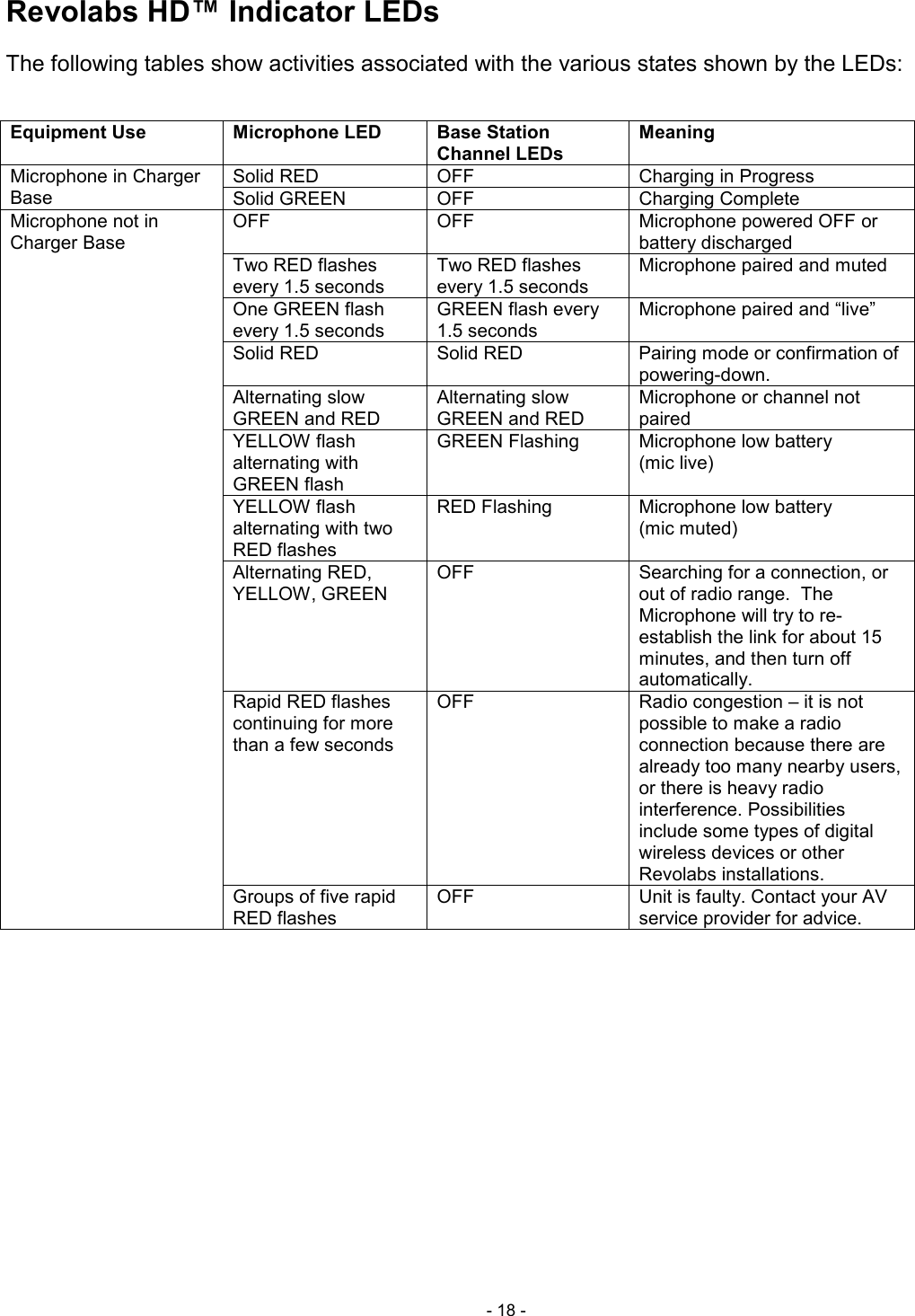
 - 18 - Revolabs HD™ Indicator LEDs The following tables show activities associated with the various states shown by the LEDs:  Equipment Use Microphone LED Base Station  Channel LEDs Meaning Microphone in Charger Base   Solid RED  OFF  Charging in Progress Solid GREEN  OFF  Charging Complete Microphone not in Charger Base   OFF  OFF  Microphone powered OFF or battery discharged Two RED flashes every 1.5 seconds Two RED flashes every 1.5 seconds Microphone paired and muted One GREEN flash every 1.5 seconds GREEN flash every 1.5 seconds Microphone paired and “live” Solid RED  Solid RED  Pairing mode or confirmation of powering-down. Alternating slow GREEN and RED Alternating slow GREEN and RED Microphone or channel not paired YELLOW flash alternating with GREEN flash GREEN Flashing  Microphone low battery  (mic live) YELLOW flash alternating with two RED flashes RED Flashing  Microphone low battery  (mic muted) Alternating RED, YELLOW, GREEN OFF  Searching for a connection, or out of radio range.  The Microphone will try to re-establish the link for about 15 minutes, and then turn off automatically. Rapid RED flashes continuing for more than a few seconds OFF  Radio congestion – it is not possible to make a radio connection because there are already too many nearby users, or there is heavy radio interference. Possibilities include some types of digital wireless devices or other Revolabs installations. Groups of five rapid RED flashes OFF  Unit is faulty. Contact your AV service provider for advice.
 - 19 - Warranty Revolabs, Inc. warrants this product to be free of manufacturing defects. Repair or replacement of any defective part or unit (at the discretion of the Seller) will be free of charge for the period of one year. Any attempt by the user to alter the equipment, or equipment damaged by negligence, accident, or Acts of God voids this warranty. The  Seller  shall  not  be  liable  for  any  consequential  damage  resulting  from  the  malfunction  of  this product.  Should  the  user  experience  unsatisfactory  performance  from  this  equipment,  contact  the Seller to obtain instructions for return, or replacement, as deemed necessary. This warranty is not transferable by the original end user.  Revolabs, Inc. 63 Great Road Maynard, MA 01754 www.revolabs.com 800.326.1200
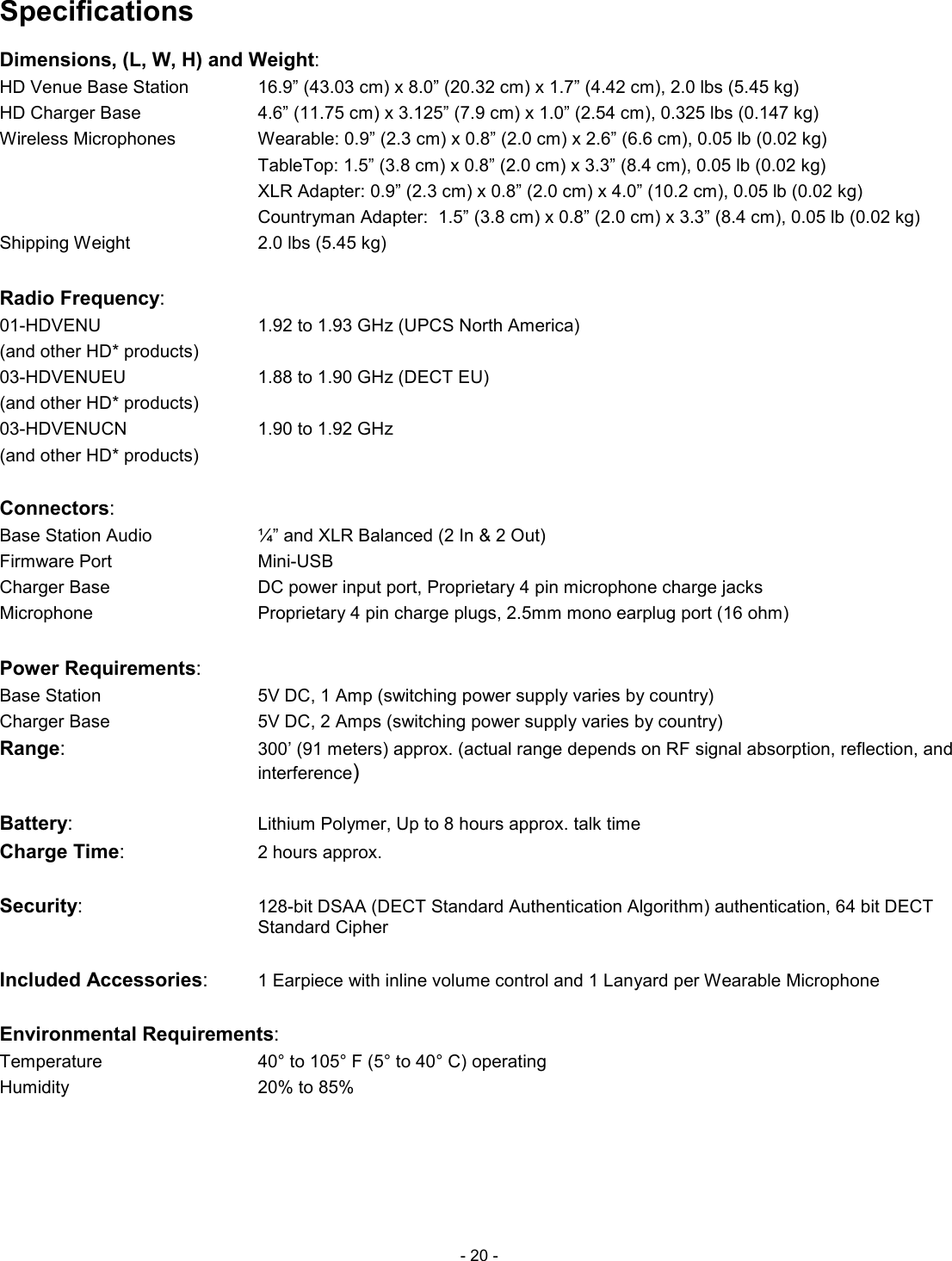
 - 20 - Specifications Dimensions, (L, W, H) and Weight: HD Venue Base Station     16.9” (43.03 cm) x 8.0” (20.32 cm) x 1.7” (4.42 cm), 2.0 lbs (5.45 kg) HD Charger Base          4.6” (11.75 cm) x 3.125” (7.9 cm) x 1.0” (2.54 cm), 0.325 lbs (0.147 kg) Wireless Microphones      Wearable: 0.9” (2.3 cm) x 0.8” (2.0 cm) x 2.6” (6.6 cm), 0.05 lb (0.02 kg)             TableTop: 1.5” (3.8 cm) x 0.8” (2.0 cm) x 3.3” (8.4 cm), 0.05 lb (0.02 kg)             XLR Adapter: 0.9” (2.3 cm) x 0.8” (2.0 cm) x 4.0” (10.2 cm), 0.05 lb (0.02 kg)             Countryman Adapter:  1.5” (3.8 cm) x 0.8” (2.0 cm) x 3.3” (8.4 cm), 0.05 lb (0.02 kg) Shipping Weight        2.0 lbs (5.45 kg)  Radio Frequency:  01-HDVENU          1.92 to 1.93 GHz (UPCS North America) (and other HD* products)         03-HDVENUEU         1.88 to 1.90 GHz (DECT EU) (and other HD* products)     03-HDVENUCN         1.90 to 1.92 GHz (and other HD* products)        Connectors:      Base Station Audio        ¼” and XLR Balanced (2 In & 2 Out) Firmware Port           Mini-USB Charger Base          DC power input port, Proprietary 4 pin microphone charge jacks Microphone          Proprietary 4 pin charge plugs, 2.5mm mono earplug port (16 ohm)  Power Requirements: Base Station           5V DC, 1 Amp (switching power supply varies by country) Charger Base            5V DC, 2 Amps (switching power supply varies by country) Range: 300’ (91 meters) approx. (actual range depends on RF signal absorption, reflection, and interference)  Battery:          Lithium Polymer, Up to 8 hours approx. talk time Charge Time:         2 hours approx.  Security:          128-bit DSAA (DECT Standard Authentication Algorithm) authentication, 64 bit DECT Standard Cipher  Included Accessories:     1 Earpiece with inline volume control and 1 Lanyard per Wearable Microphone  Environmental Requirements: Temperature          40° to 105° F (5° to 40° C) operating Humidity          20% to 85%
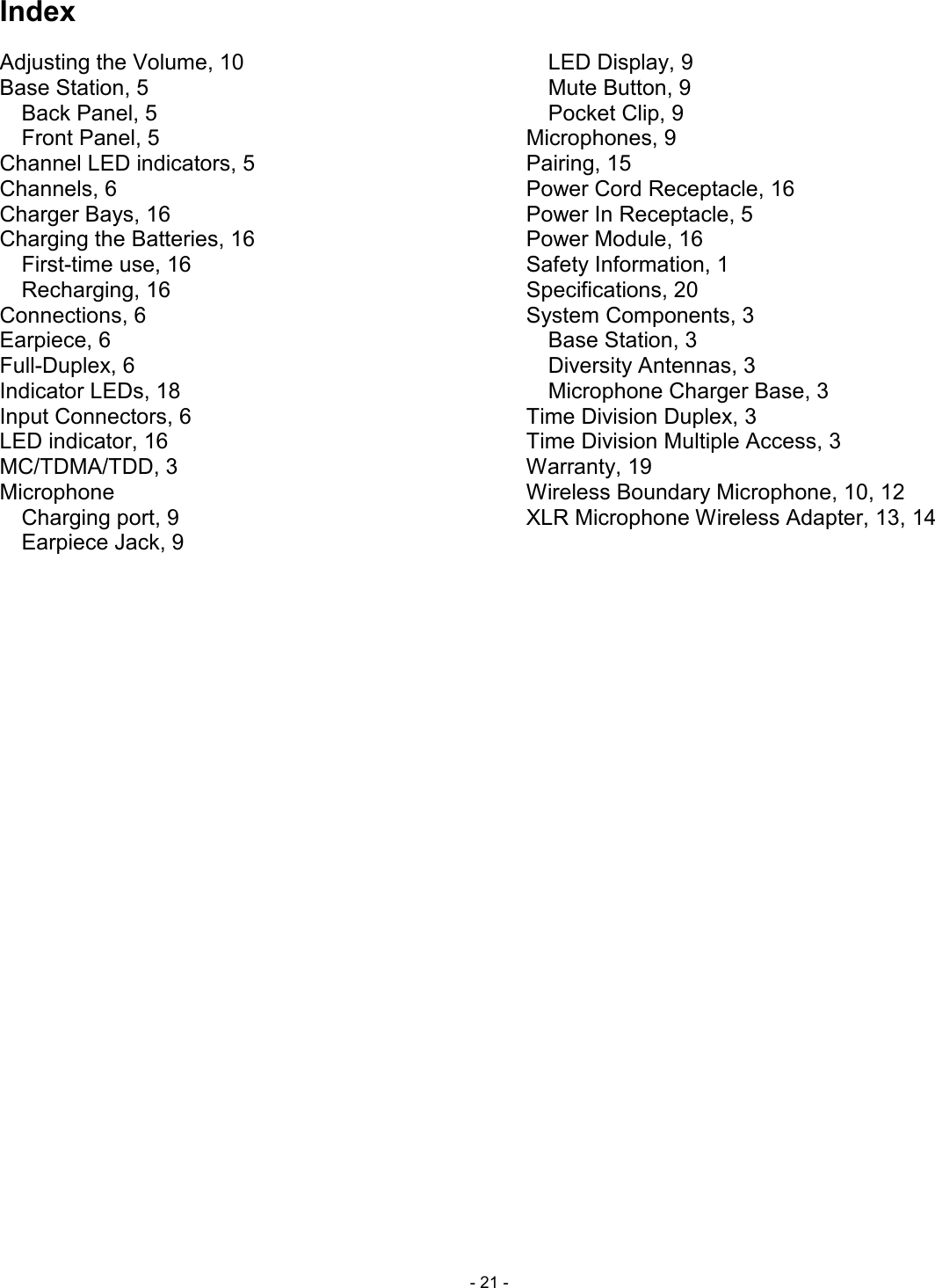
 - 21 - Index Adjusting the Volume, 10 Base Station, 5 Back Panel, 5 Front Panel, 5 Channel LED indicators, 5 Channels, 6 Charger Bays, 16 Charging the Batteries, 16 First-time use, 16 Recharging, 16 Connections, 6 Earpiece, 6 Full-Duplex, 6 Indicator LEDs, 18 Input Connectors, 6 LED indicator, 16 MC/TDMA/TDD, 3 Microphone Charging port, 9 Earpiece Jack, 9 LED Display, 9 Mute Button, 9 Pocket Clip, 9 Microphones, 9 Pairing, 15 Power Cord Receptacle, 16 Power In Receptacle, 5 Power Module, 16 Safety Information, 1 Specifications, 20 System Components, 3 Base Station, 3 Diversity Antennas, 3 Microphone Charger Base, 3 Time Division Duplex, 3 Time Division Multiple Access, 3 Warranty, 19 Wireless Boundary Microphone, 10, 12 XLR Microphone Wireless Adapter, 13, 14
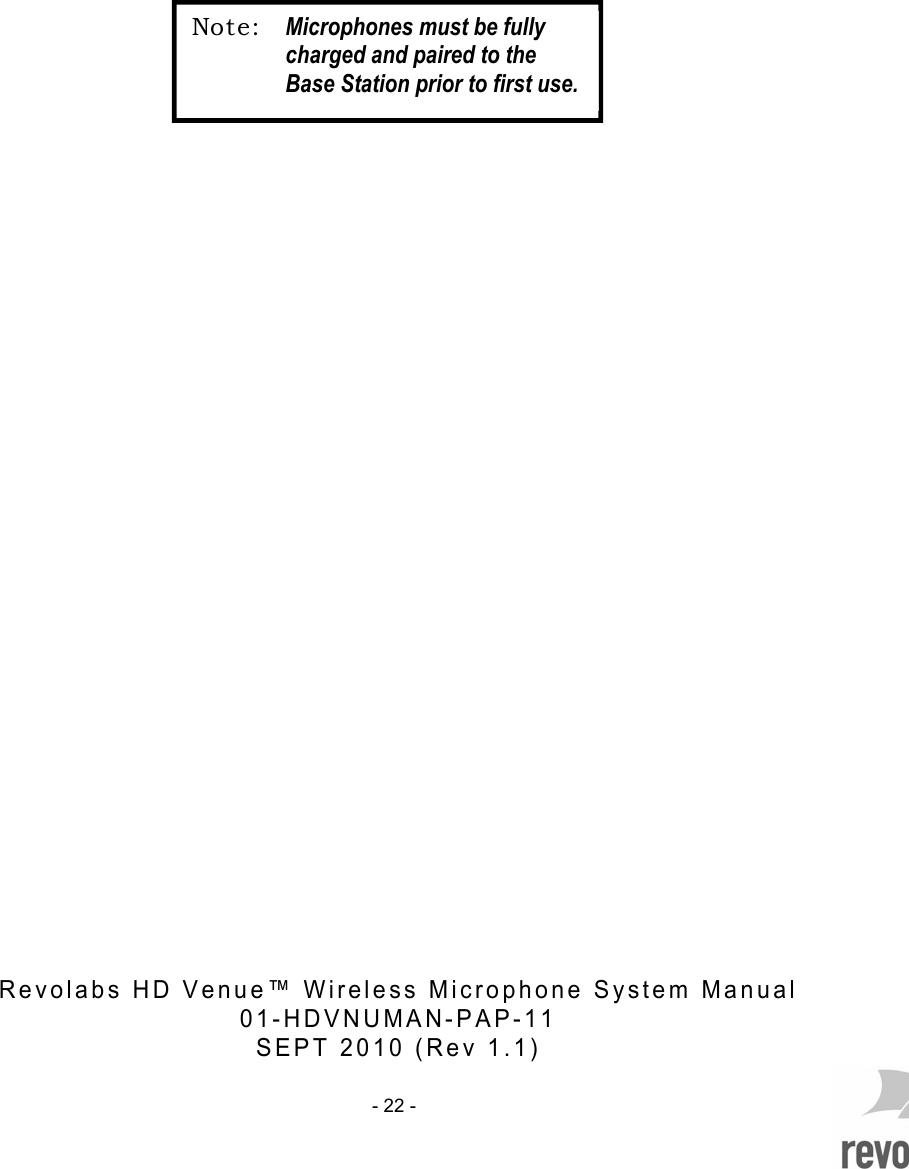
    - 22 -                                                        R e v o l a b s   H D   V e n u e ™   W i r e l e s s   M i c r o p h o n e   S y s t e m   M a n u a l    0 1 - H D V N U M A N - P A P - 1 1  S E P T   2 0 1 0   ( R e v   1 . 1 )  Not e: Microphones must be fully charged and paired to the Base Station prior to first use.

Navigation menu