Robertshaw Controls d b a Invensys Home Control Systems EMSL-200 Wireless Load Control Meter User Manual TD2001

Robertshaw Controls Company d/b/a Invensys Home Control Systems Wireless Load Control Meter TD2001

User Manual

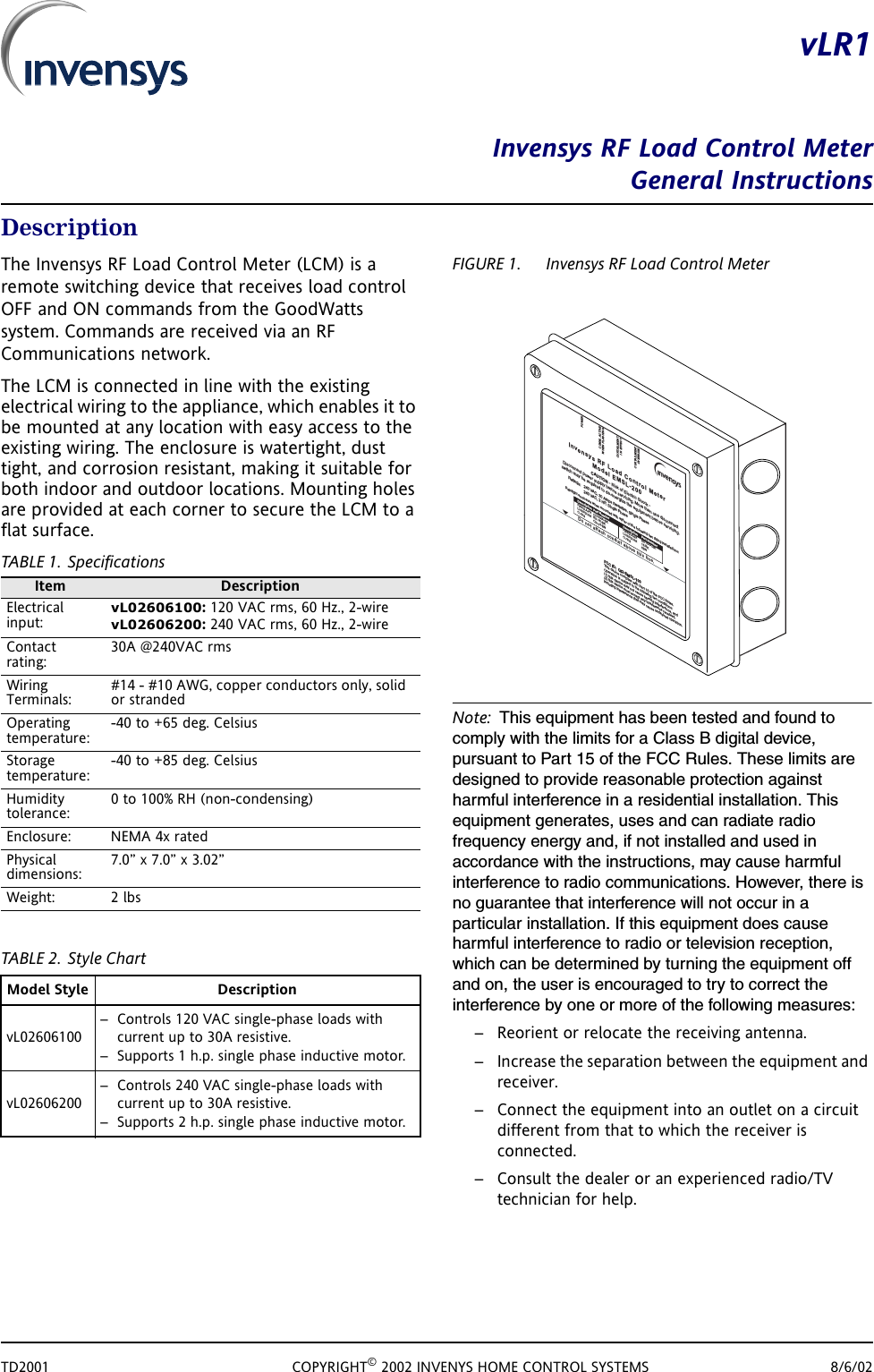
TD2001 COPYRIGHT© 2002 INVENYS HOME CONTROL SYSTEMS 8/6/02vLR1Invensys RF Load Control MeterGeneral InstructionsDescriptionThe Invensys RF Load Control Meter (LCM) is a remote switching device that receives load control OFF and ON commands from the GoodWatts system. Commands are received via an RF Communications network.The LCM is connected in line with the existing electrical wiring to the appliance, which enables it to be mounted at any location with easy access to the existing wiring. The enclosure is watertight, dust tight, and corrosion resistant, making it suitable for both indoor and outdoor locations. Mounting holes are provided at each corner to secure the LCM to a flat surface.TABLE 1. SpecificationsTABLE 2. Style ChartFIGURE 1. Invensys RF Load Control MeterNote: This equipment has been tested and found to comply with the limits for a Class B digital device, pursuant to Part 15 of the FCC Rules. These limits are designed to provide reasonable protection against harmful interference in a residential installation. This equipment generates, uses and can radiate radio frequency energy and, if not installed and used in accordance with the instructions, may cause harmful interference to radio communications. However, there is no guarantee that interference will not occur in a particular installation. If this equipment does cause harmful interference to radio or television reception, which can be determined by turning the equipment off and on, the user is encouraged to try to correct the interference by one or more of the following measures:– Reorient or relocate the receiving antenna.– Increase the separation between the equipment and receiver.– Connect the equipment into an outlet on a circuit different from that to which the receiver is connected.– Consult the dealer or an experienced radio/TV technician for help.Item DescriptionElectrical input:vL02606100: 120 VAC rms, 60 Hz., 2-wirevL02606200: 240 VAC rms, 60 Hz., 2-wireContact rating:30A @240VAC rmsWiring Terminals:#14 - #10 AWG, copper conductors only, solid or strandedOperating temperature:-40 to +65 deg. CelsiusStorage temperature:-40 to +85 deg. CelsiusHumidity tolerance:0 to 100% RH (non-condensing)Enclosure: NEMA 4x ratedPhysical dimensions:7.0” x 7.0” x 3.02”Weight: 2 lbsModel Style DescriptionvL02606100– Controls 120 VAC single-phase loads with current up to 30A resistive. – Supports 1 h.p. single phase inductive motor.vL02606200– Controls 240 VAC single-phase loads with current up to 30A resistive.– Supports 2 h.p. single phase inductive motor.POWERCOMM. ACTIVEWHEN FLASHINGCURTAILMENTINEFFECTCURTAILMENTOVERRIDEInvensys RF Load ControlMeterModel EMSL-200CAUTI ON-Riskof ElectricShock-Disconnectpower supply before servicing. More thanone disconnectswitch mayberequired to de-energize theequipment beforeservicing.Ratings:240VAC, 30 AmpsResistive, Single Phase240VAC, 2HP,Single PhaseDo notattach conduit abovethis line.FCC ID:QI2-EMSL-100This devicecomplieswith Part15of the FCC Rules.Operationissubject tothe followingtwo conditions:(1)this device maynot cause harmful interference, and(2) this device must accept any interferencereceived,including interference that may causeundesired operation.Raintight enclosure whenmounted witheitherofthefollowingtwofittinginstallations:Description PartNumberFittingAssy. CD16AA-BKLockingNut NP-16-BKO-ringOR-16-BNDescription PartNumberFittingAssy.ED16AA-BKLocking Nut 16-BKO-ring6BNabc
INVENSYS RF LOAD CONTROL METER2 PRELIMINARY DOCUMENT TD2001InstallationCaution: This equipment is authorized for use under the United States Federal Communication Commission Rules and Regulations, Code of Federal Regulations Chapter 47 part 15 and must be installed in accordance with the instructions provided in this document. In accordance with FCC requirements, changes or modifications to this equipment that are not expressly approved by the party responsible for FCC compliance could void the user's authority to operate this equipment.InspectionInspect the carton for damage. If damaged, notify carrier immediately. Inspect LCM for damage. Return damaged products.Requirements– Installer must be a qualified, experienced technician.– Job wiring diagrams–Tools•Drill bits for panel mounting holes•Static protection wrist strap–Mounting screws (4)General PrecautionsWarning: Electrical shock hazard! High voltage is present in the Load Control Meter. Turn OFF electrical power to the LCM and the electrical appliance prior to installation or service. Failure to turn off power may result in serious personal injury.– Follow Static Precautions when installing this equipment.– Use suitable copper conductors.– Make all connections according to electrical wiring diagram, national and local electrical codes.Static PrecautionsStatic charges damage electronic components. The microprocessor and associated circuitry are sensitive to static discharge. Use the following precautions when installing, servicing, or operating the system.– Work in a static free area– Discharge static electricity by touching a known, securely grounded object.LocationThe LCM is connected in line with the existing electrical wiring to the appliance, which enables it to be mounted at any location with easy access to the existing wiring. The enclosure is watertight, dust tight, and corrosion resistant, making it suitable for both indoor and outdoor locations.– Avoid mounting locations where excessive moisture, corrosive fumes, vibration, or explosive vapors are present.– Avoid electrical noise interference. Do not install near large contactors, electrical machinery, or welding equipment.– Locate where ambient temperatures do not exceed 150 deg. F (65 deg. C) or fall below -40 deg. F (-40 deg. C).
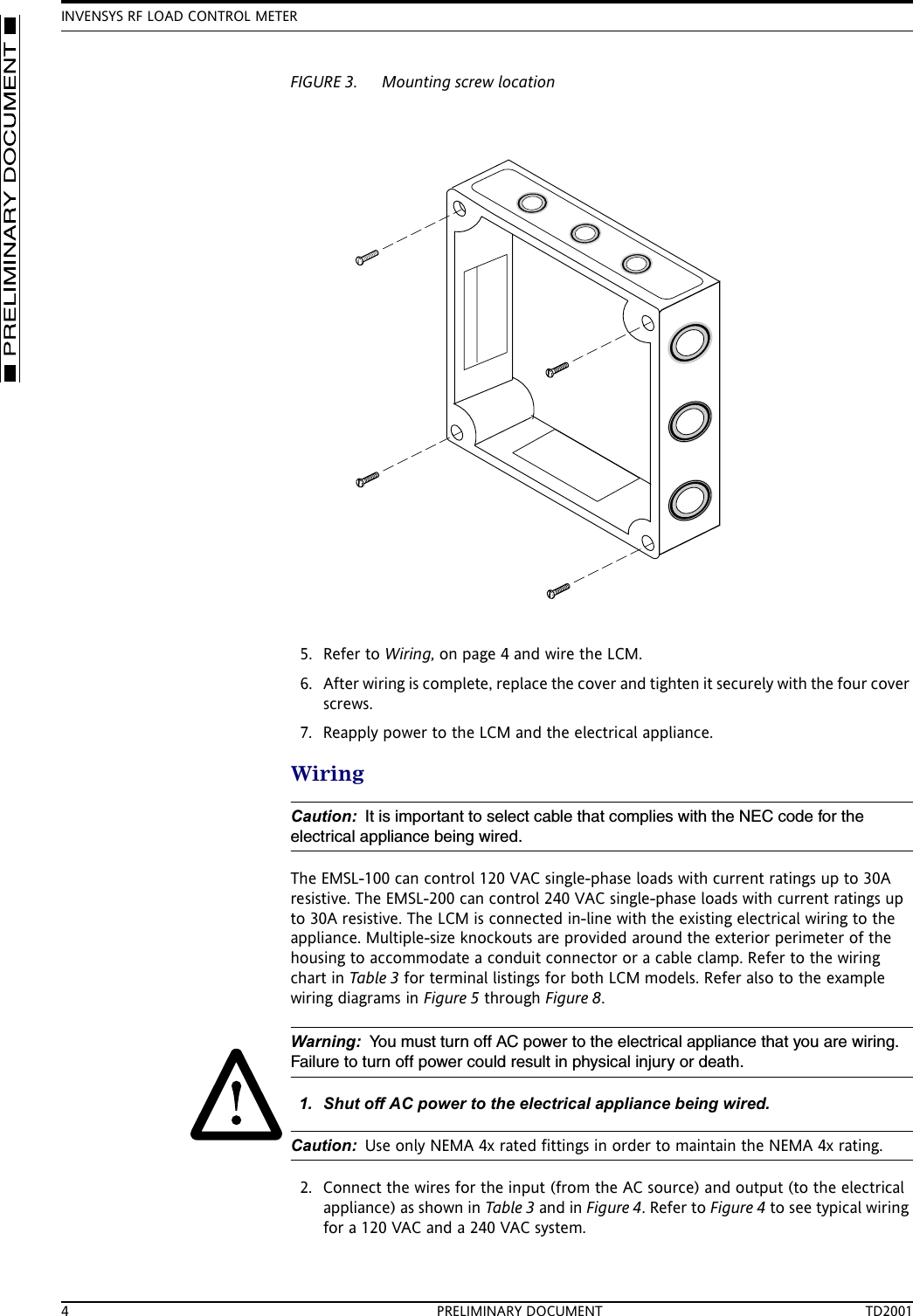
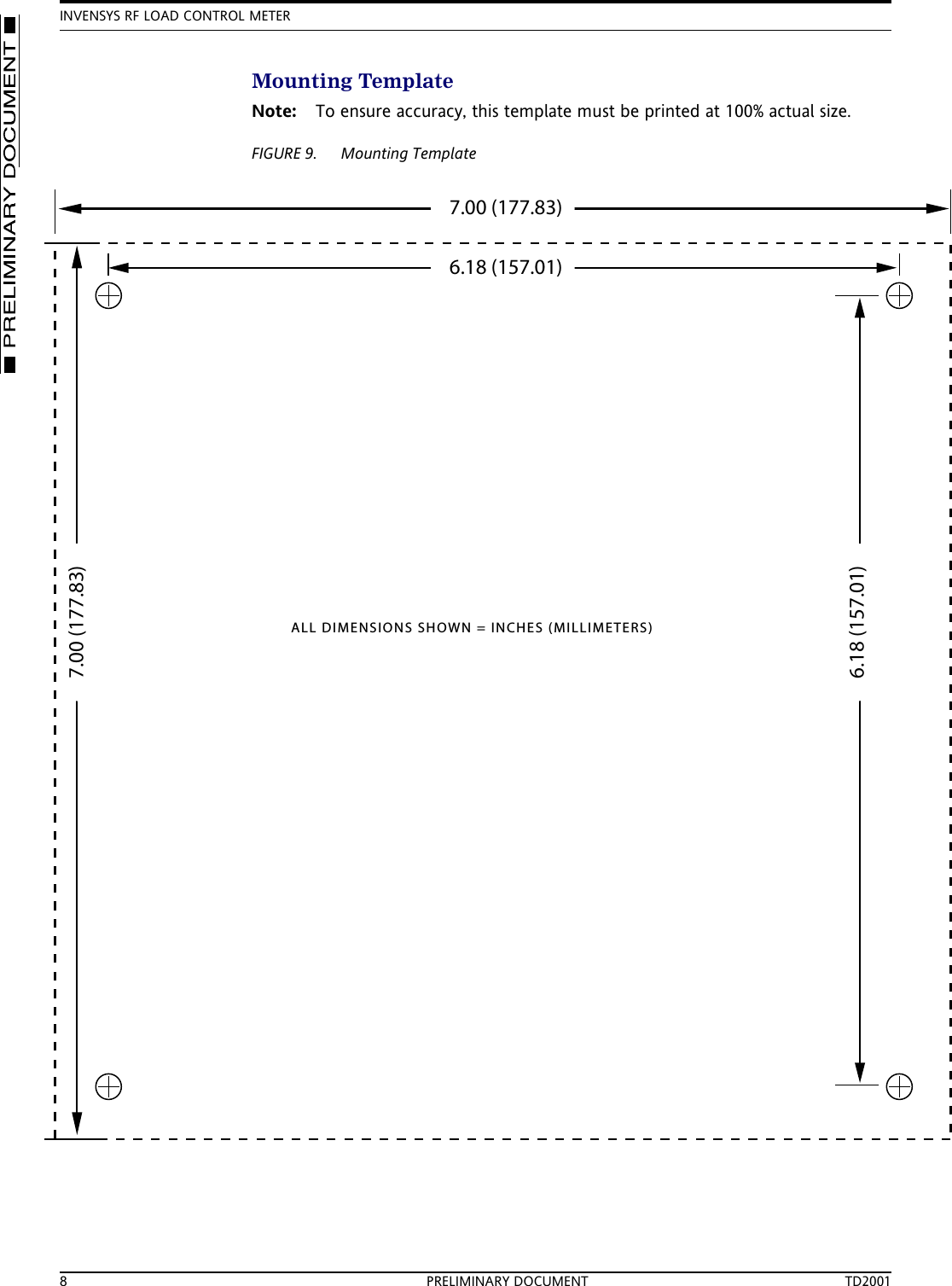
MOUNTING8/6/02 PRELIMINARY DOCUMENT 3MountingMounting holes are provided at each corner to secure the LCM to a flat surface. Figure 4 shows mounting dimensions. Refer to FIGURE 9. Mounting Template, on page 8 for an installation template at actual size.FIGURE 2. Enclosure dimensions1. Select a flat mounting location.2. Mark and prepare the surface mounting holes, using dimensions above or use the template in FIGURE 9. Mounting Template, on page 8.3. Remove the cover from the LCM enclosure by removing the four cover attaching screws in the corners of the cover.4. Insert mounting screws down through the same holes that the cover screws came out of and securely fasten the LCM enclosure to the flat surface.6.90 [175.36]7.00 [177.83]5.43 [138.03]5.50 [139.58]3.94 [100.00]6.18 [157.01]1.42 [36.09]1.00 [25.40]3.94 [100.00]1.99 [50.50]6.18 [157.03]5.51 [140.00]5.00 [127.00]END VIEWREAR VIEW0.39 [10.00]5.51 [140.00]5.43 [138.03]7.00 [177.83]1.97 [50.00]3.02 [76.62]MOUNTING HOLESMOUNTING HOLESNOTE: DIMENSIONS ARE IN INCHES (MILLIMETERS)
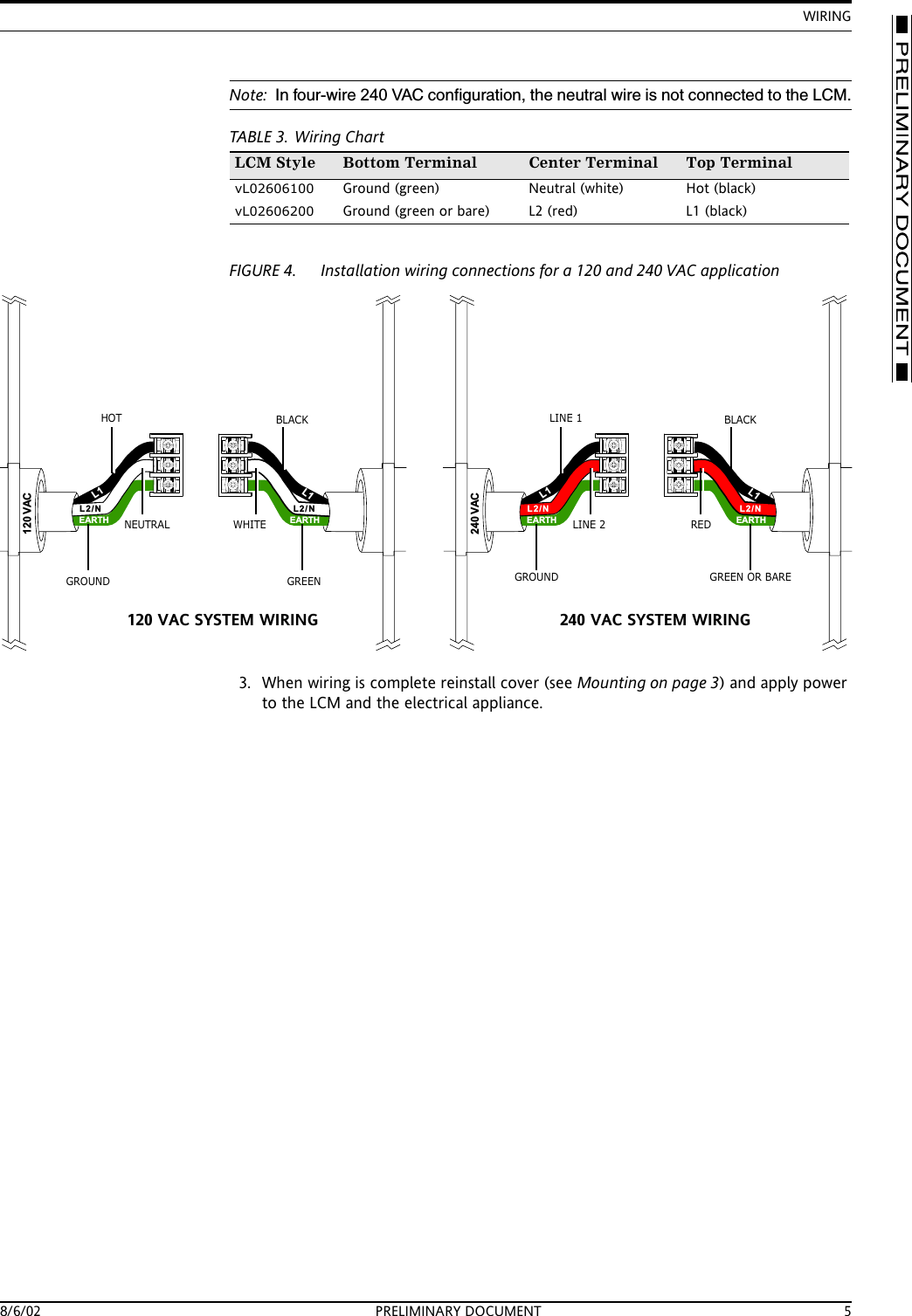
INVENSYS RF LOAD CONTROL METER4 PRELIMINARY DOCUMENT TD2001FIGURE 3. Mounting screw location5. Refer to Wiring, on page 4 and wire the LCM.6. After wiring is complete, replace the cover and tighten it securely with the four cover screws.7. Reapply power to the LCM and the electrical appliance.WiringCaution: It is important to select cable that complies with the NEC code for the electrical appliance being wired. The EMSL-100 can control 120 VAC single-phase loads with current ratings up to 30A resistive. The EMSL-200 can control 240 VAC single-phase loads with current ratings up to 30A resistive. The LCM is connected in-line with the existing electrical wiring to the appliance. Multiple-size knockouts are provided around the exterior perimeter of the housing to accommodate a conduit connector or a cable clamp. Refer to the wiring chart in Table 3 for terminal listings for both LCM models. Refer also to the example wiring diagrams in Figure 5 through Figure 8.Warning: You must turn off AC power to the electrical appliance that you are wiring. Failure to turn off power could result in physical injury or death.1. Shut off AC power to the electrical appliance being wired.Caution: Use only NEMA 4x rated fittings in order to maintain the NEMA 4x rating.2. Connect the wires for the input (from the AC source) and output (to the electrical appliance) as shown in Table 3 and in Figure 4. Refer to Figure 4 to see typical wiring for a 120 VAC and a 240 VAC system.
WIRING8/6/02 PRELIMINARY DOCUMENT 5Note: In four-wire 240 VAC configuration, the neutral wire is not connected to the LCM.TABLE 3. Wiring ChartFIGURE 4. Installation wiring connections for a 120 and 240 VAC application3. When wiring is complete reinstall cover (see Mounting on page 3) and apply power to the LCM and the electrical appliance.LCM Style Bottom Terminal Center Terminal Top TerminalvL02606100 Ground (green) Neutral (white) Hot (black)vL02606200 Ground (green or bare) L2 (red) L1 (black)L1L1240 VACL2/N L2/NEARTH EARTHL1L1120 VACL2/N L2/NEARTH EARTHGROUNDNEUTRALHOT BLACKWHITEGREEN GROUNDLINE 2LINE 1 BLACKREDGREEN OR BARE120 VAC SYSTEM WIRING 240 VAC SYSTEM WIRING
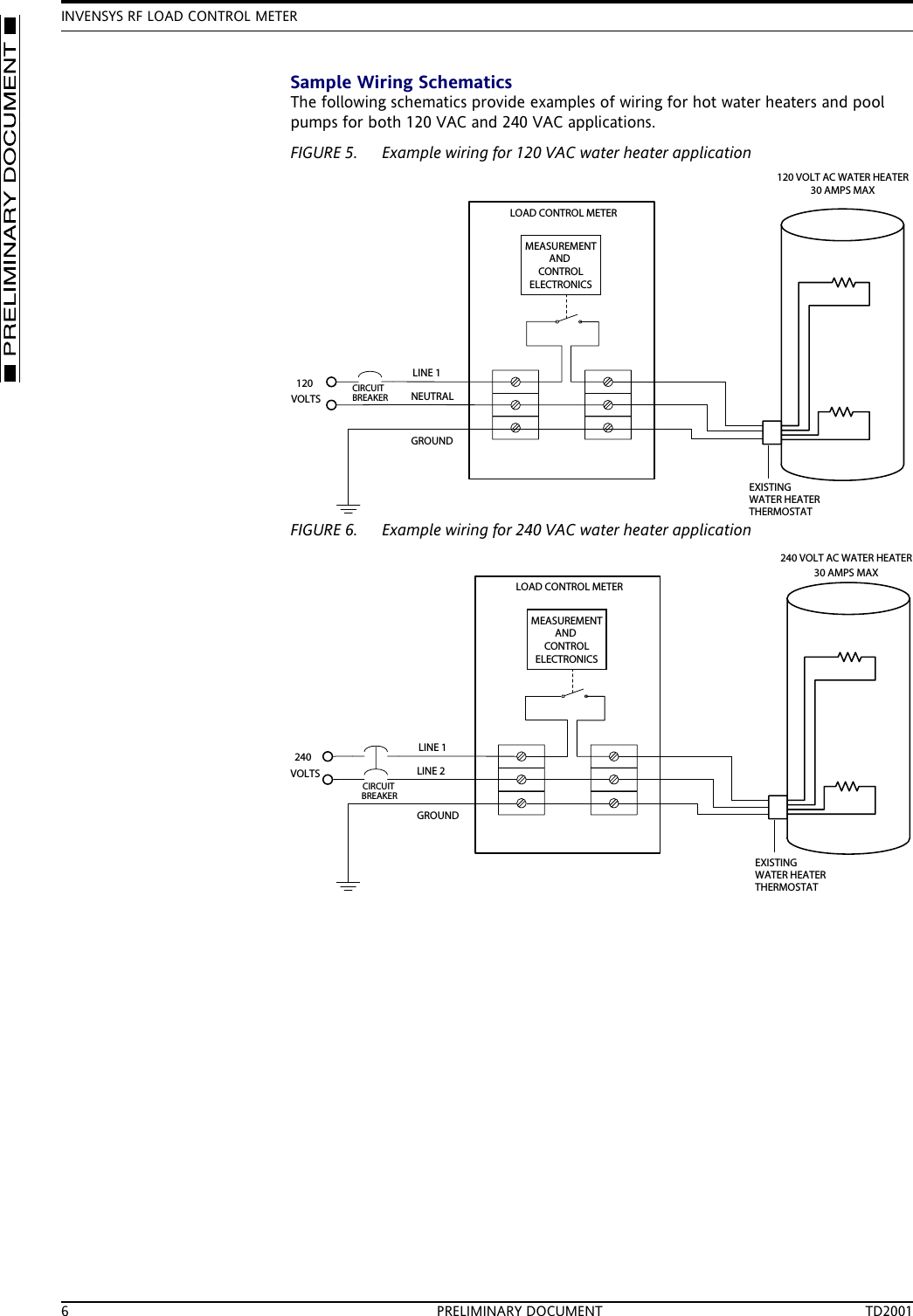
INVENSYS RF LOAD CONTROL METER6 PRELIMINARY DOCUMENT TD2001Sample Wiring SchematicsThe following schematics provide examples of wiring for hot water heaters and pool pumps for both 120 VAC and 240 VAC applications.FIGURE 5. Example wiring for 120 VAC water heater applicationFIGURE 6. Example wiring for 240 VAC water heater applicationNEUTRALLINE 1GROUNDLOAD CONTROL METER120 VOLT AC WATER HEATER30 AMPS MAX120VOLTSCIRCUITBREAKERMEASUREMENTANDCONTROLELECTRONICSEXISTINGWATER HEATERTHERMOSTATLINE 2LINE 1GROUNDLOAD CONTROL METERCIRCUITBREAKER240 VOLT AC WATER HEATER30 AMPS MAX240VOLTSMEASUREMENTANDCONTROLELECTRONICSEXISTINGWATER HEATERTHERMOSTAT
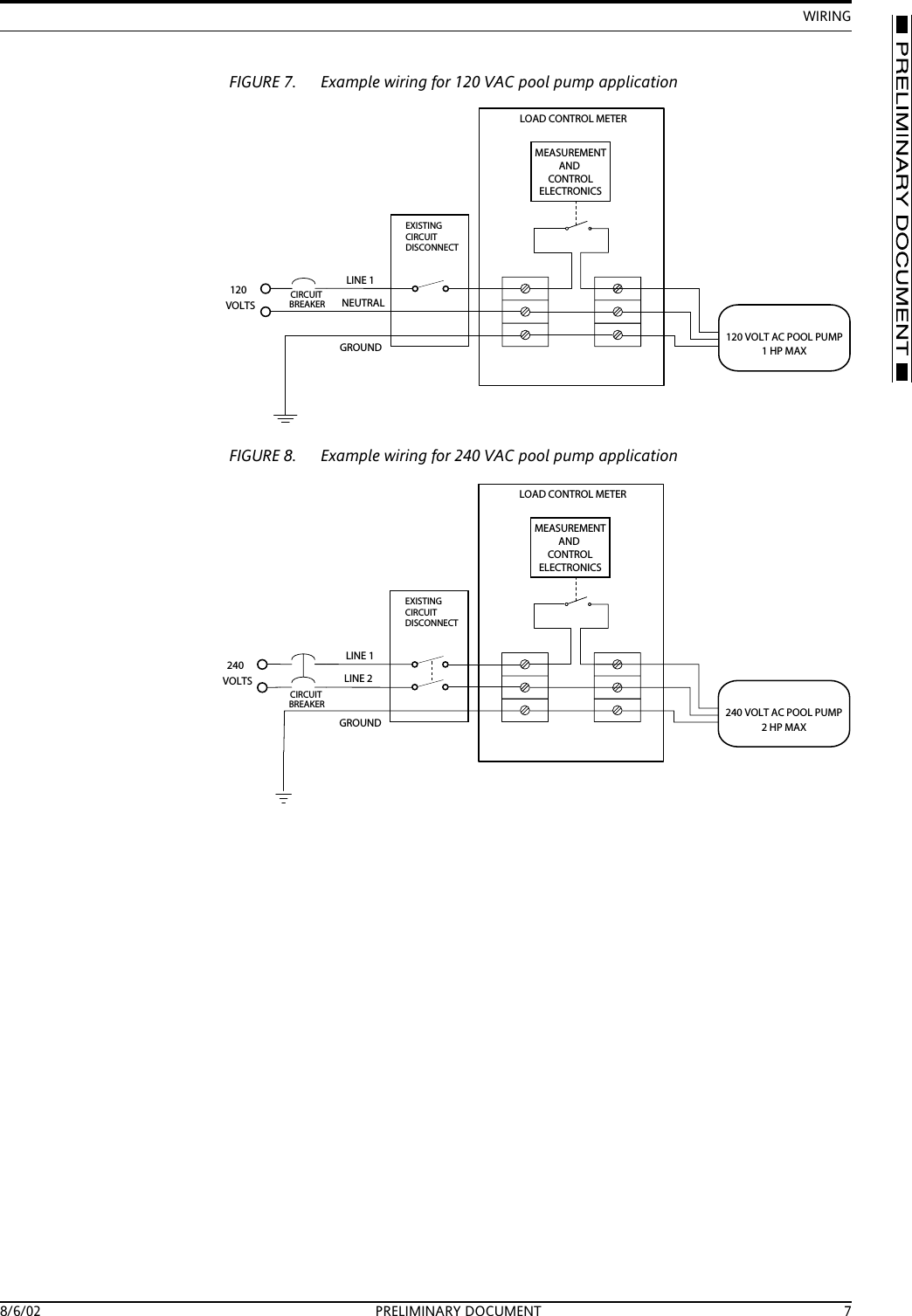
WIRING8/6/02 PRELIMINARY DOCUMENT 7FIGURE 7. Example wiring for 120 VAC pool pump applicationFIGURE 8. Example wiring for 240 VAC pool pump applicationNEUTRALLINE 1GROUNDCIRCUITEXISTINGCIRCUITDISCONNECTBREAKER120VOLTSLOAD CONTROL METERMEASUREMENTANDCONTROLELECTRONICS120 VOLT AC POOL PUMP1HPMAXLINE 2LINE 1GROUNDLOAD CONTROL METERMEASUREMENTANDCONTROLELECTRONICSCIRCUITEXISTINGCIRCUITDISCONNECTBREAKER240VOLTS240 VOLT AC POOL PUMP2HPMAX
INVENSYS RF LOAD CONTROL METER8 PRELIMINARY DOCUMENT TD2001Mounting TemplateNote: To ensure accuracy, this template must be printed at 100% actual size.FIGURE 9. Mounting Template6.18 (157.01)7.00 (177.83)7.00 (177.83)6.18 (157.01)ALL DIMENSIONS SHOWN = INCHES (MILLIMETERS)
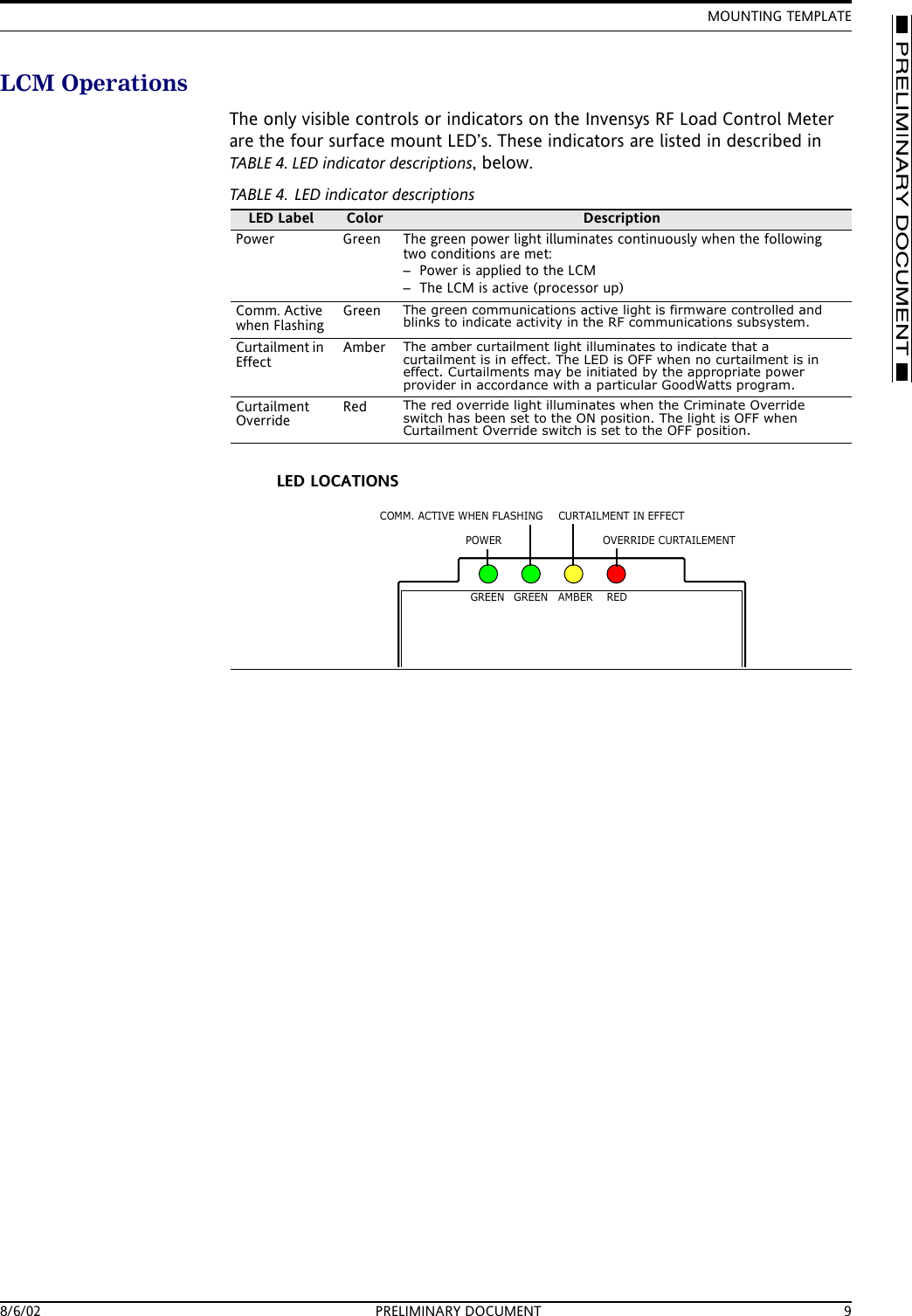
MOUNTING TEMPLATE8/6/02 PRELIMINARY DOCUMENT 9LCM OperationsThe only visible controls or indicators on the Invensys RF Load Control Meter are the four surface mount LED’s. These indicators are listed in described in TABLE 4. LED indicator descriptions, below.TABLE 4. LED indicator descriptionsLED Label Color DescriptionPower Green The green power light illuminates continuously when the following two conditions are met:– Power is applied to the LCM– The LCM is active (processor up)Comm. Active when FlashingGreen The green communications active light is firmware controlled and blinks to indicate activity in the RF communications subsystem.Curtailment in EffectAmber The amber curtailment light illuminates to indicate that a curtailment is in effect. The LED is OFF when no curtailment is in effect. Curtailments may be initiated by the appropriate power provider in accordance with a particular GoodWatts program. Curtailment OverrideRed The red override light illuminates when the Criminate Override switch has been set to the ON position. The light is OFF when Curtailment Override switch is set to the OFF position.POWERCURTAILMENT IN EFFECTOVERRIDE CURTAILEMENTCOMM. ACTIVE WHEN FLASHINGLED LOCATIONSGREEN GREEN AMBER RED
TD2001 INVENSYS RF LOAD CONTROL METER PRINTED IN U.S.A.© Invensys 2002All specifications are nominal and may change as design improvements are introduced. Invensys shall not be liable for damages resulting from mis-application or misuse of its products.Marks bearing ® and/or ™ are registered trademarks and trademarks of Invensys.Terms and product names in this document may be trademarks of others.

Navigation menu