RuiXingHengFang Network 76052 RHF76-052 Module User Manual

RuiXingHengFang Network(Shenzhen) Co., Ltd. RHF76-052 Module Users Manual

Users Manual

V2.5 2016-01-11www.risinghf.comLoRaWAN Module RHF76-052 User ManualRisingHFDocument informationInfoContentKeywordsLoRaWAN, RHF76-052, AT Command, UART, USBAbstractThis document shows how to use RisingHF LoRaWANmodule RHF76-052 set up a LoRa/LoRaWAN node, anddefines AT command format used by the moduleUM01509LoRaWAN Module RHF76-052 User ManualV2.6
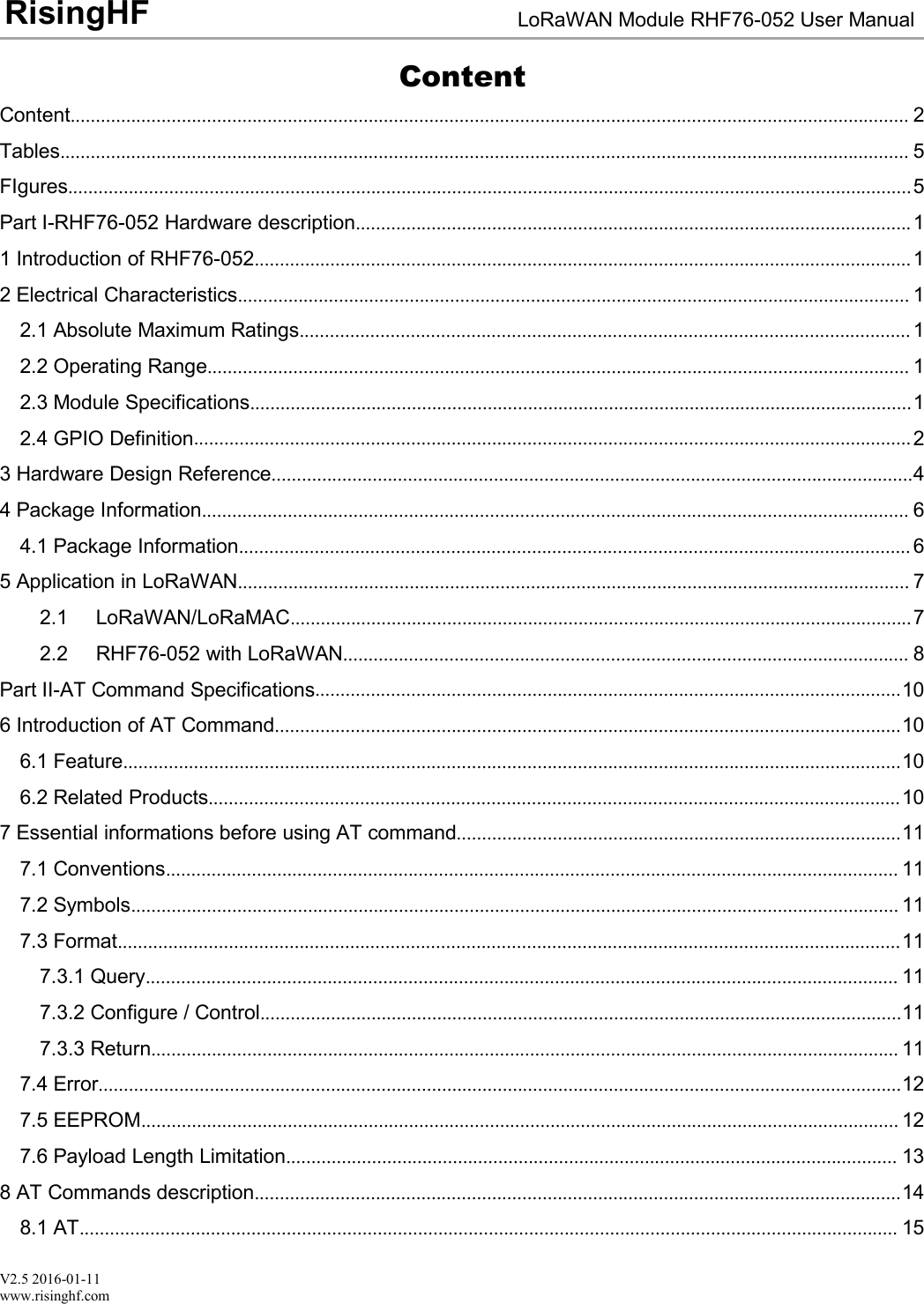
V2.5 2016-01-11www.risinghf.comLoRaWAN Module RHF76-052 User ManualRisingHFContentContent...................................................................................................................................................................... 2Tables........................................................................................................................................................................ 5FIgures.......................................................................................................................................................................5Part I-RHF76-052 Hardware description..............................................................................................................11 Introduction of RHF76-052..................................................................................................................................12 Electrical Characteristics..................................................................................................................................... 12.1 Absolute Maximum Ratings......................................................................................................................... 12.2 Operating Range........................................................................................................................................... 12.3 Module Specifications...................................................................................................................................12.4 GPIO Definition..............................................................................................................................................23 Hardware Design Reference...............................................................................................................................44 Package Information............................................................................................................................................ 64.1 Package Information..................................................................................................................................... 65 Application in LoRaWAN..................................................................................................................................... 72.1 LoRaWAN/LoRaMAC...........................................................................................................................72.2 RHF76-052 with LoRaWAN................................................................................................................ 8Part II-AT Command Specifications....................................................................................................................106 Introduction of AT Command............................................................................................................................106.1 Feature..........................................................................................................................................................106.2 Related Products.........................................................................................................................................107 Essential informations before using AT command........................................................................................117.1 Conventions................................................................................................................................................. 117.2 Symbols........................................................................................................................................................ 117.3 Format...........................................................................................................................................................117.3.1 Query..................................................................................................................................................... 117.3.2 Configure / Control...............................................................................................................................117.3.3 Return.................................................................................................................................................... 117.4 Error...............................................................................................................................................................127.5 EEPROM...................................................................................................................................................... 127.6 Payload Length Limitation......................................................................................................................... 138 AT Commands description................................................................................................................................148.1 AT.................................................................................................................................................................. 15
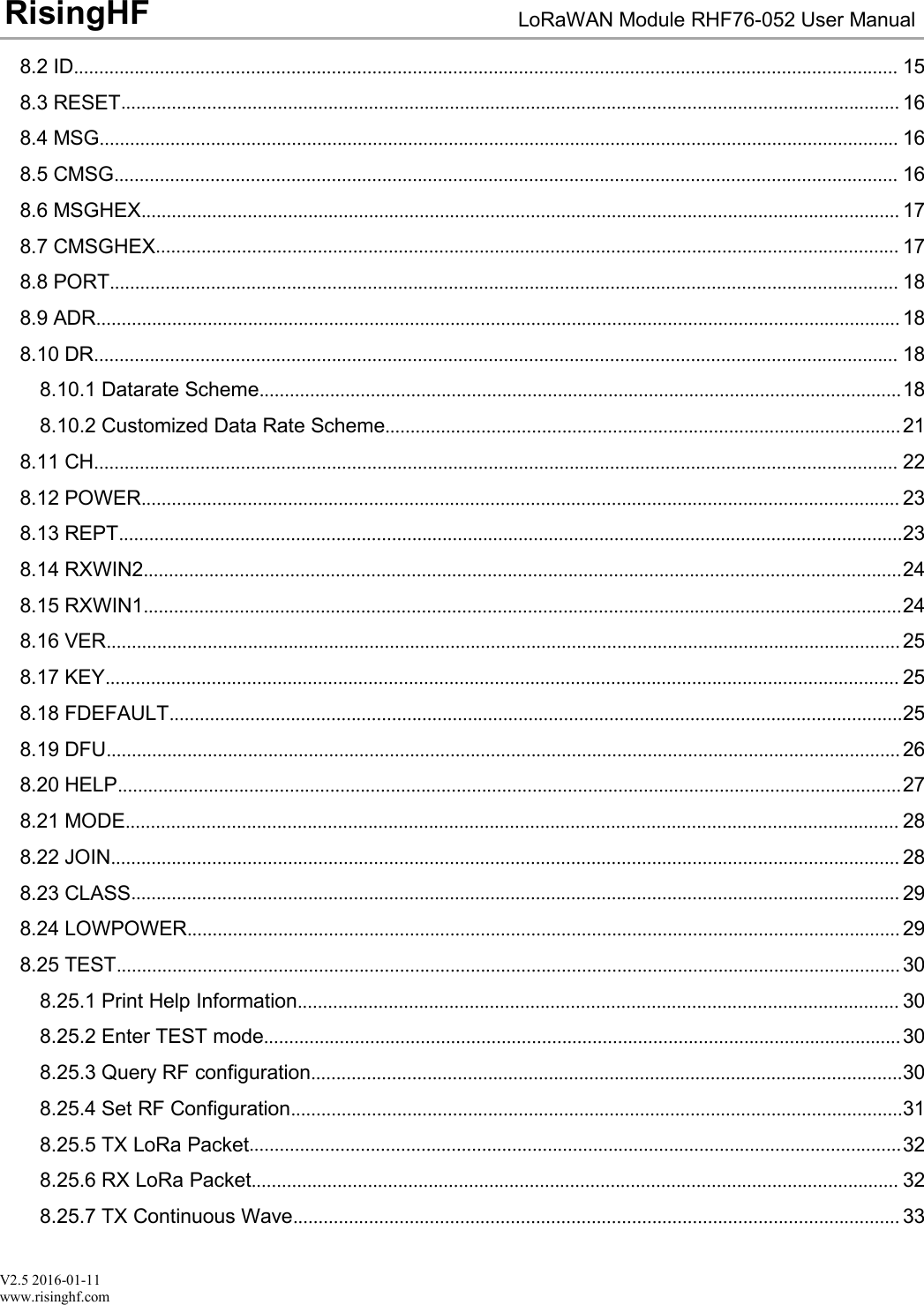
V2.5 2016-01-11www.risinghf.comLoRaWAN Module RHF76-052 User ManualRisingHF8.2 ID................................................................................................................................................................... 158.3 RESET.......................................................................................................................................................... 168.4 MSG.............................................................................................................................................................. 168.5 CMSG........................................................................................................................................................... 168.6 MSGHEX...................................................................................................................................................... 178.7 CMSGHEX................................................................................................................................................... 178.8 PORT............................................................................................................................................................ 188.9 ADR............................................................................................................................................................... 188.10 DR............................................................................................................................................................... 188.10.1 Datarate Scheme...............................................................................................................................188.10.2 Customized Data Rate Scheme......................................................................................................218.11 CH............................................................................................................................................................... 228.12 POWER...................................................................................................................................................... 238.13 REPT...........................................................................................................................................................238.14 RXWIN2......................................................................................................................................................248.15 RXWIN1......................................................................................................................................................248.16 VER............................................................................................................................................................. 258.17 KEY............................................................................................................................................................. 258.18 FDEFAULT.................................................................................................................................................258.19 DFU............................................................................................................................................................. 268.20 HELP...........................................................................................................................................................278.21 MODE......................................................................................................................................................... 288.22 JOIN............................................................................................................................................................ 288.23 CLASS........................................................................................................................................................ 298.24 LOWPOWER............................................................................................................................................. 298.25 TEST........................................................................................................................................................... 308.25.1 Print Help Information....................................................................................................................... 308.25.2 Enter TEST mode..............................................................................................................................308.25.3 Query RF configuration.....................................................................................................................308.25.4 Set RF Configuration.........................................................................................................................318.25.5 TX LoRa Packet.................................................................................................................................328.25.6 RX LoRa Packet................................................................................................................................ 328.25.7 TX Continuous Wave........................................................................................................................ 33
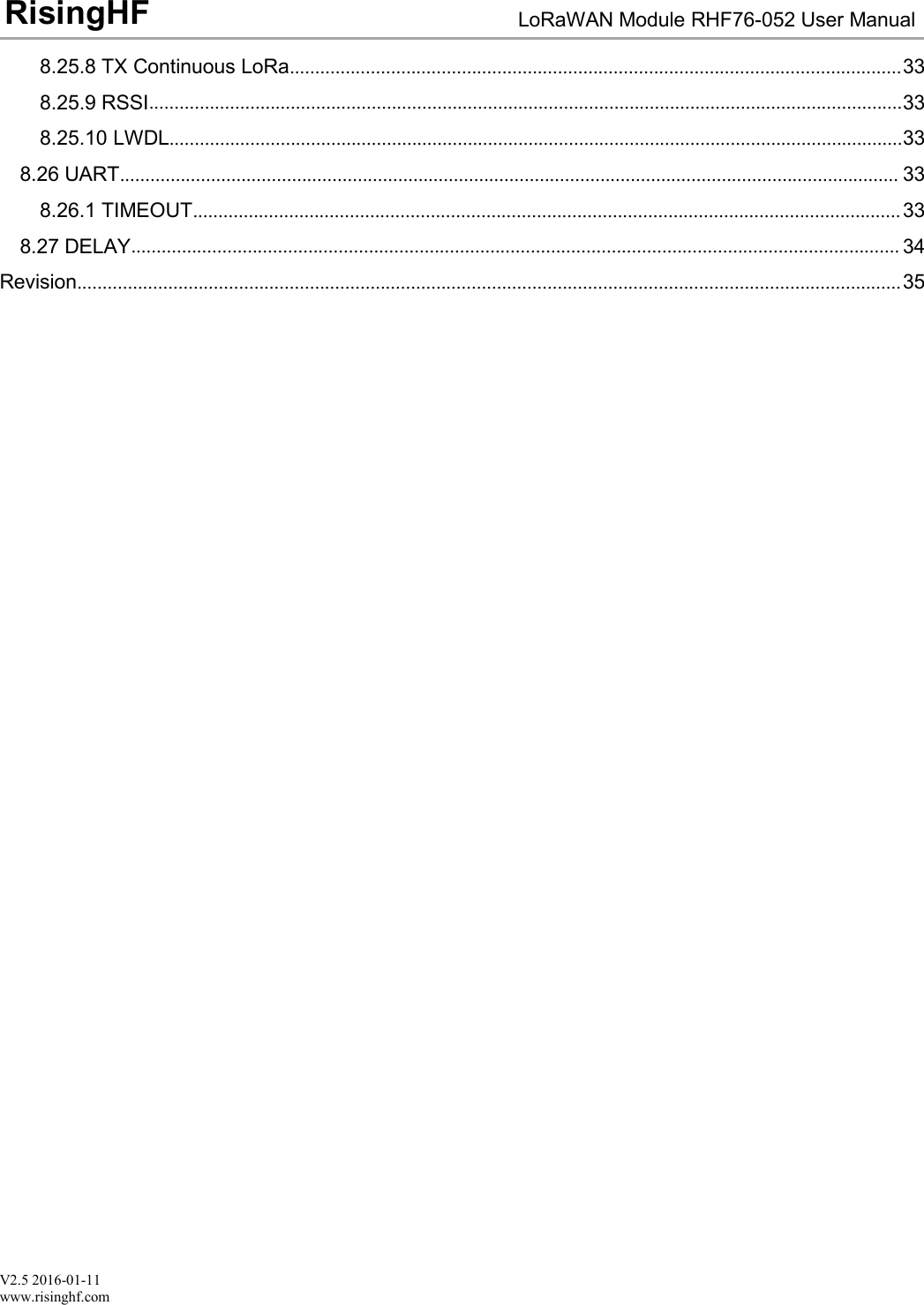
V2.5 2016-01-11www.risinghf.comLoRaWAN Module RHF76-052 User ManualRisingHF8.25.8 TX Continuous LoRa.........................................................................................................................338.25.9 RSSI.....................................................................................................................................................338.25.10 LWDL.................................................................................................................................................338.26 UART.......................................................................................................................................................... 338.26.1 TIMEOUT............................................................................................................................................338.27 DELAY........................................................................................................................................................ 34Revision...................................................................................................................................................................35
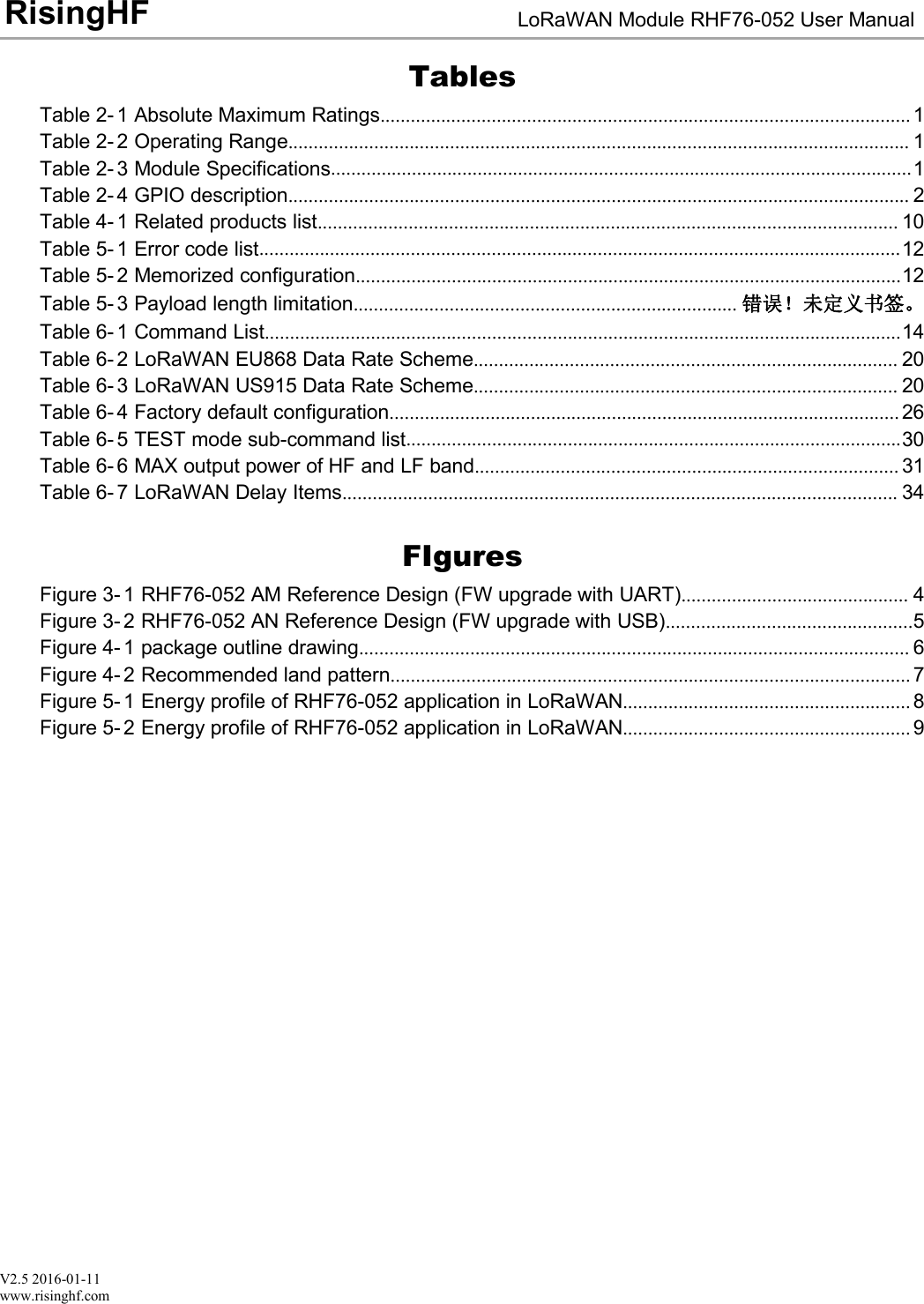
V2.5 2016-01-11www.risinghf.comLoRaWAN Module RHF76-052 User ManualRisingHFTablesTable 2- 1 Absolute Maximum Ratings......................................................................................................... 1Table 2- 2 Operating Range........................................................................................................................... 1Table 2- 3 Module Specifications...................................................................................................................1Table 2- 4 GPIO description........................................................................................................................... 2Table 4- 1 Related products list................................................................................................................... 10Table 5- 1 Error code list...............................................................................................................................12Table 5- 2 Memorized configuration............................................................................................................12Table 5- 3 Payload length limitation............................................................................ 错误!未定义书签。Table 6- 1 Command List..............................................................................................................................14Table 6- 2 LoRaWAN EU868 Data Rate Scheme.................................................................................... 20Table 6- 3 LoRaWAN US915 Data Rate Scheme.................................................................................... 20Table 6- 4 Factory default configuration..................................................................................................... 26Table 6- 5 TEST mode sub-command list..................................................................................................30Table 6- 6 MAX output power of HF and LF band.................................................................................... 31Table 6- 7 LoRaWAN Delay Items.............................................................................................................. 34FIguresFigure 3- 1 RHF76-052 AM Reference Design (FW upgrade with UART)............................................. 4Figure 3- 2 RHF76-052 AN Reference Design (FW upgrade with USB).................................................5Figure 4- 1 package outline drawing............................................................................................................. 6Figure 4- 2 Recommended land pattern....................................................................................................... 7Figure 5- 1 Energy profile of RHF76-052 application in LoRaWAN......................................................... 8Figure 5- 2 Energy profile of RHF76-052 application in LoRaWAN......................................................... 9
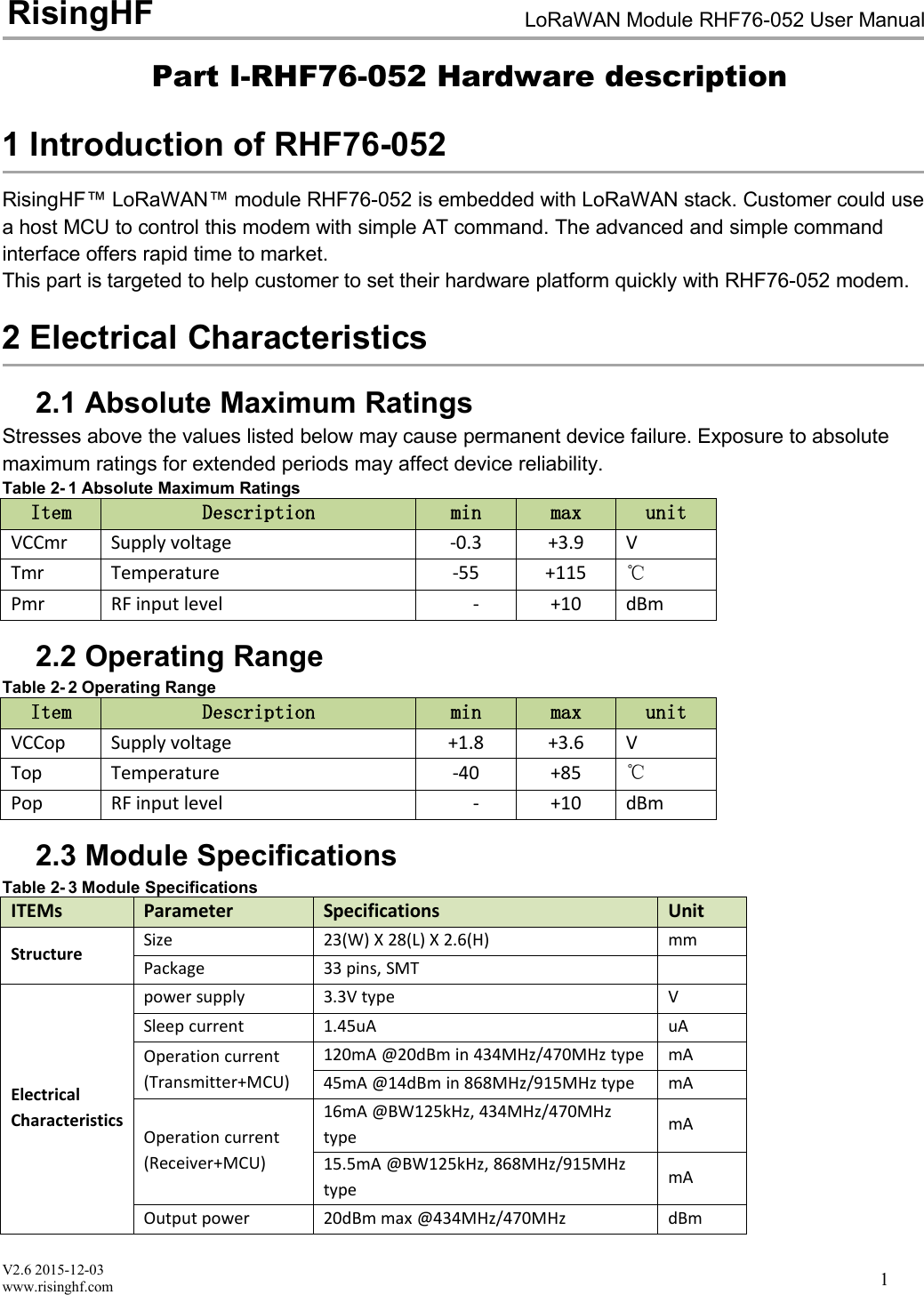
V2.6 2015-12-03www.risinghf.comLoRaWAN Module RHF76-052 User ManualRisingHF1Part I-RHF76-052 Hardware description1 Introduction of RHF76-052RisingHF™ LoRaWAN™ module RHF76-052 is embedded with LoRaWAN stack. Customer could usea host MCU to control this modem with simple AT command. The advanced and simple commandinterface offers rapid time to market.This part is targeted to help customer to set their hardware platform quickly with RHF76-052 modem.2 Electrical Characteristics2.1 Absolute Maximum RatingsStresses above the values listed below may cause permanent device failure. Exposure to absolutemaximum ratings for extended periods may affect device reliability.Table 2- 1 Absolute Maximum RatingsItemDescriptionminmaxunitVCCmrSupply voltage-0.3+3.9VTmrTemperature-55+115℃PmrRF input level-+10dBm2.2 Operating RangeTable 2- 2 Operating RangeItemDescriptionminmaxunitVCCopSupply voltage+1.8+3.6VTopTemperature-40+85℃PopRF input level-+10dBm2.3 Module SpecificationsTable 2- 3 Module SpecificationsITEMsParameterSpecificationsUnitStructureSize23(W) X 28(L) X 2.6(H)mmPackage33 pins, SMTElectricalCharacteristicspower supply3.3V typeVSleep current1.45uAuAOperation current(Transmitter+MCU)120mA @20dBm in 434MHz/470MHz typemA45mA @14dBm in 868MHz/915MHz typemAOperation current(Receiver+MCU)16mA @BW125kHz, 434MHz/470MHztypemA15.5mA @BW125kHz, 868MHz/915MHztypemAOutput power20dBm max @434MHz/470MHzdBm
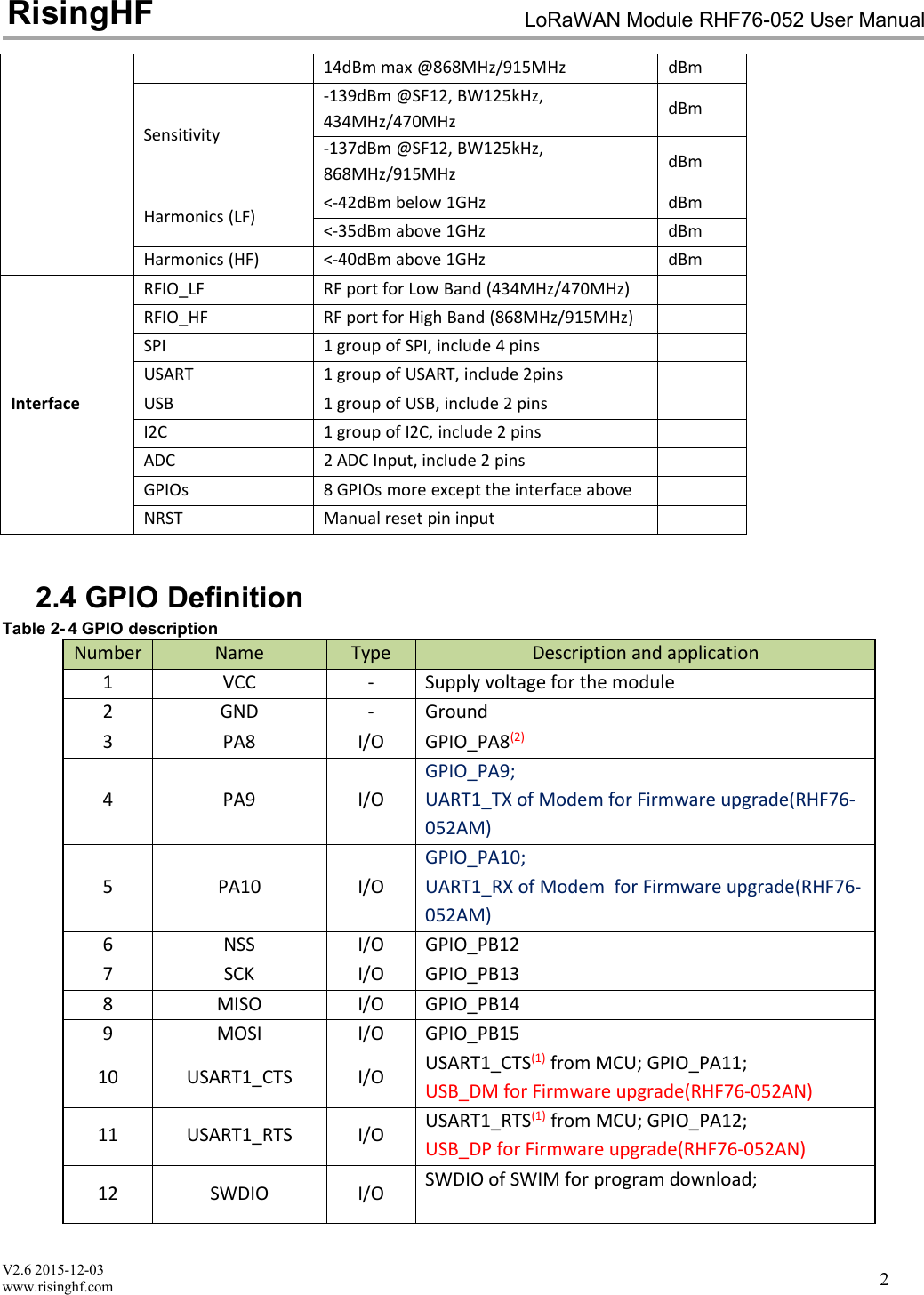
V2.6 2015-12-03www.risinghf.comLoRaWAN Module RHF76-052 User ManualRisingHF214dBm max @868MHz/915MHzdBmSensitivity-139dBm @SF12, BW125kHz,434MHz/470MHzdBm-137dBm @SF12, BW125kHz,868MHz/915MHzdBmHarmonics (LF)<-42dBm below 1GHzdBm<-35dBm above 1GHzdBmHarmonics (HF)<-40dBm above 1GHzdBmInterfaceRFIO_LFRF port for Low Band (434MHz/470MHz)RFIO_HFRF port for High Band (868MHz/915MHz)SPI1 group of SPI, include 4 pinsUSART1 group of USART, include 2pinsUSB1 group of USB, include 2 pinsI2C1 group of I2C, include 2 pinsADC2 ADC Input, include 2 pinsGPIOs8 GPIOs more except the interface aboveNRSTManual reset pin input2.4 GPIO DefinitionTable 2- 4 GPIO descriptionNumberNameTypeDescription and application1VCC-Supply voltage for the module2GND-Ground3PA8I/OGPIO_PA8(2)4PA9I/OGPIO_PA9;UART1_TX of Modem for Firmware upgrade(RHF76-052AM)5PA10I/OGPIO_PA10;UART1_RX of Modem for Firmware upgrade(RHF76-052AM)6NSSI/OGPIO_PB127SCKI/OGPIO_PB138MISOI/OGPIO_PB149MOSII/OGPIO_PB1510USART1_CTSI/OUSART1_CTS(1) from MCU; GPIO_PA11;USB_DM for Firmware upgrade(RHF76-052AN)11USART1_RTSI/OUSART1_RTS(1) from MCU; GPIO_PA12;USB_DP for Firmware upgrade(RHF76-052AN)12SWDIOI/OSWDIO of SWIM for program download;
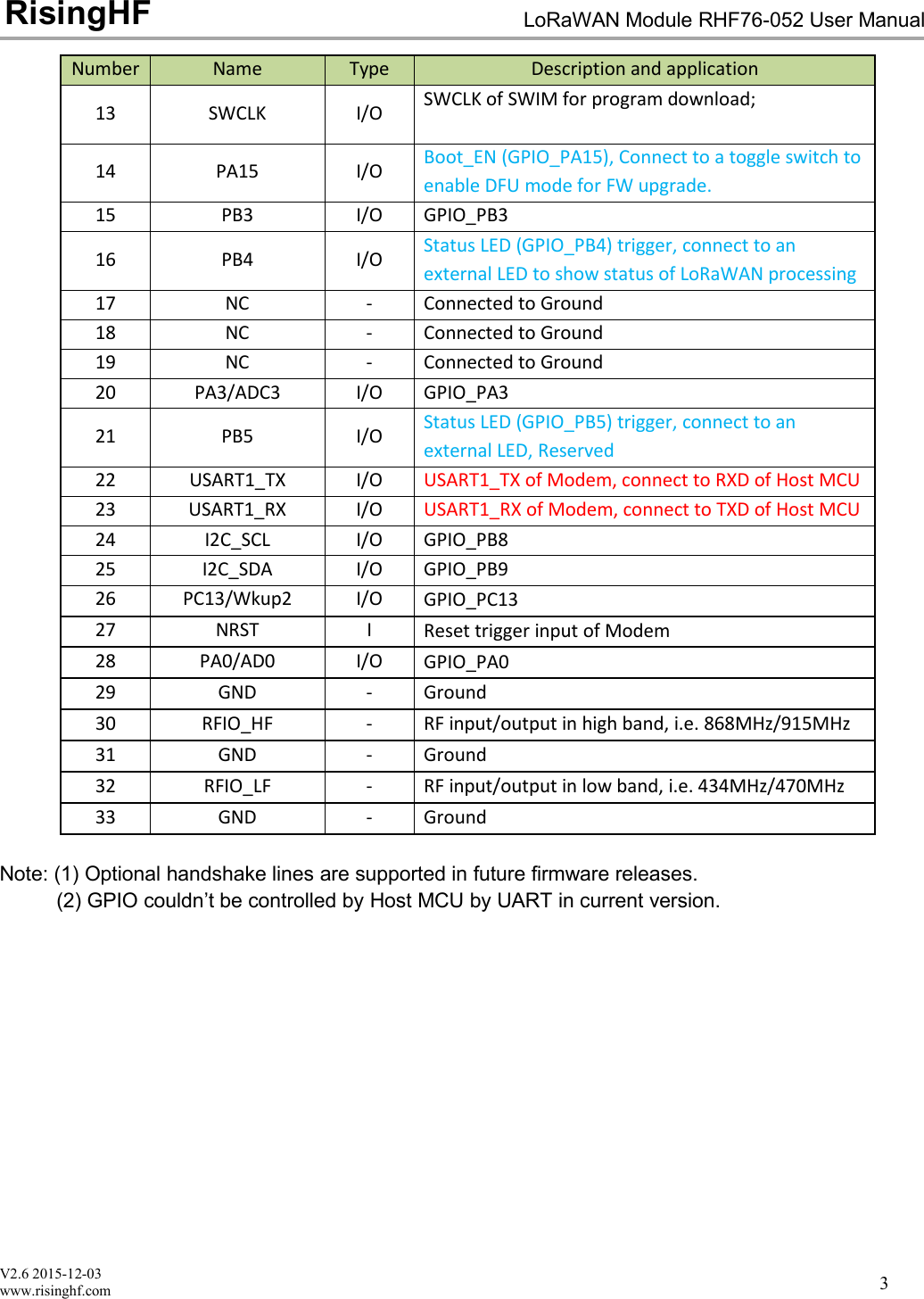
V2.6 2015-12-03www.risinghf.comLoRaWAN Module RHF76-052 User ManualRisingHF3NumberNameTypeDescription and application13SWCLKI/OSWCLK of SWIM for program download;14PA15I/OBoot_EN (GPIO_PA15), Connect to a toggle switch toenable DFU mode for FW upgrade.15PB3I/OGPIO_PB316PB4I/OStatus LED (GPIO_PB4) trigger, connect to anexternal LED to show status of LoRaWAN processing17NC-Connected to Ground18NC-Connected to Ground19NC-Connected to Ground20PA3/ADC3I/OGPIO_PA321PB5I/OStatus LED (GPIO_PB5) trigger, connect to anexternal LED, Reserved22USART1_TXI/OUSART1_TX of Modem, connect to RXD of Host MCU23USART1_RXI/OUSART1_RX of Modem, connect to TXD of Host MCU24I2C_SCLI/OGPIO_PB825I2C_SDAI/OGPIO_PB926PC13/Wkup2I/OGPIO_PC1327NRSTIReset trigger input of Modem28PA0/AD0I/OGPIO_PA029GND-Ground30RFIO_HF-RF input/output in high band, i.e. 868MHz/915MHz31GND-Ground32RFIO_LF-RF input/output in low band, i.e. 434MHz/470MHz33GND-GroundNote: (1) Optional handshake lines are supported in future firmware releases.(2) GPIO couldn’t be controlled by Host MCU by UART in current version.
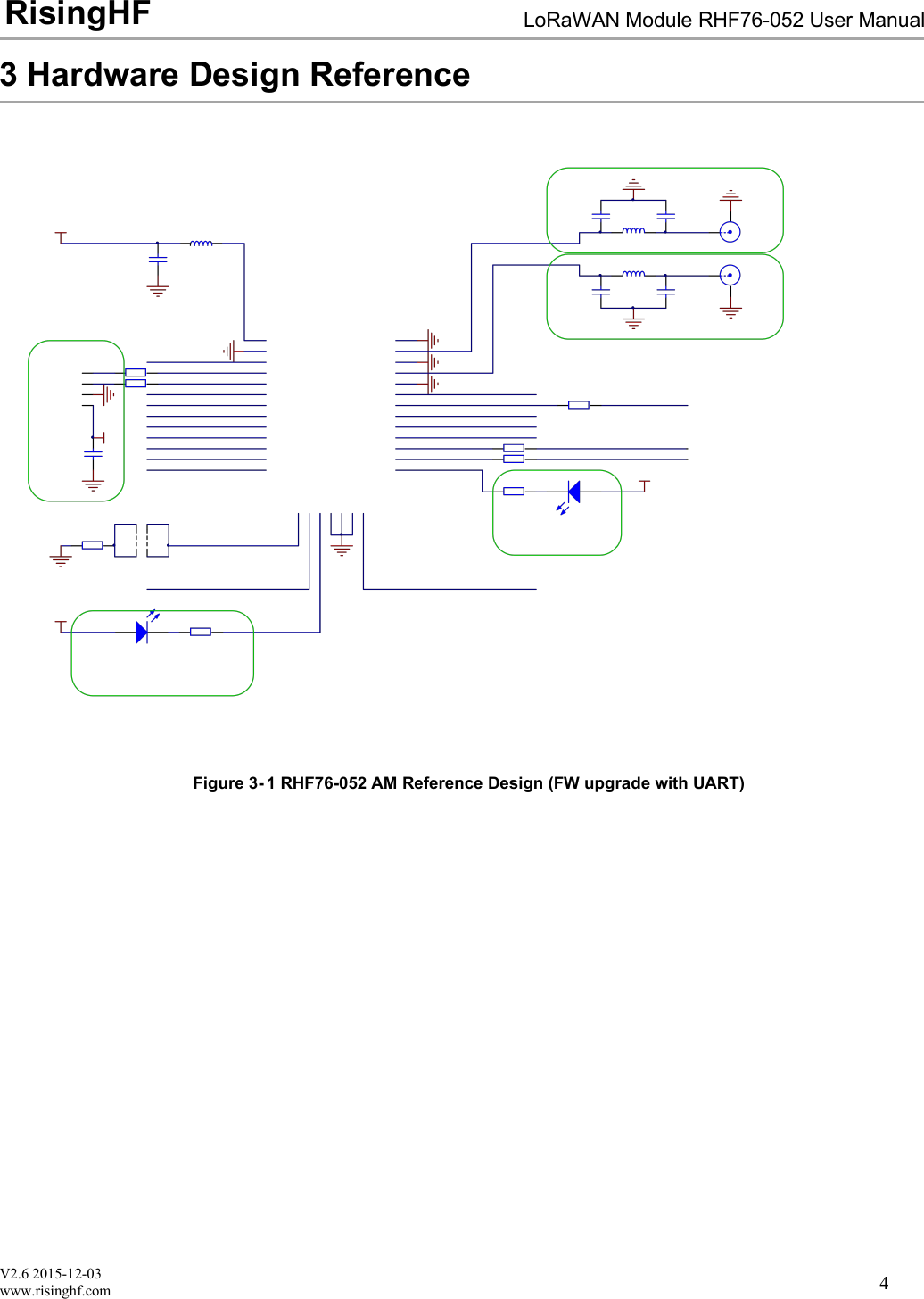
V2.6 2015-12-03www.risinghf.comLoRaWAN Module RHF76-052 User ManualRisingHF43 Hardware Design ReferenceFigure 3- 1 RHF76-052 AM Reference Design (FW upgrade with UART)
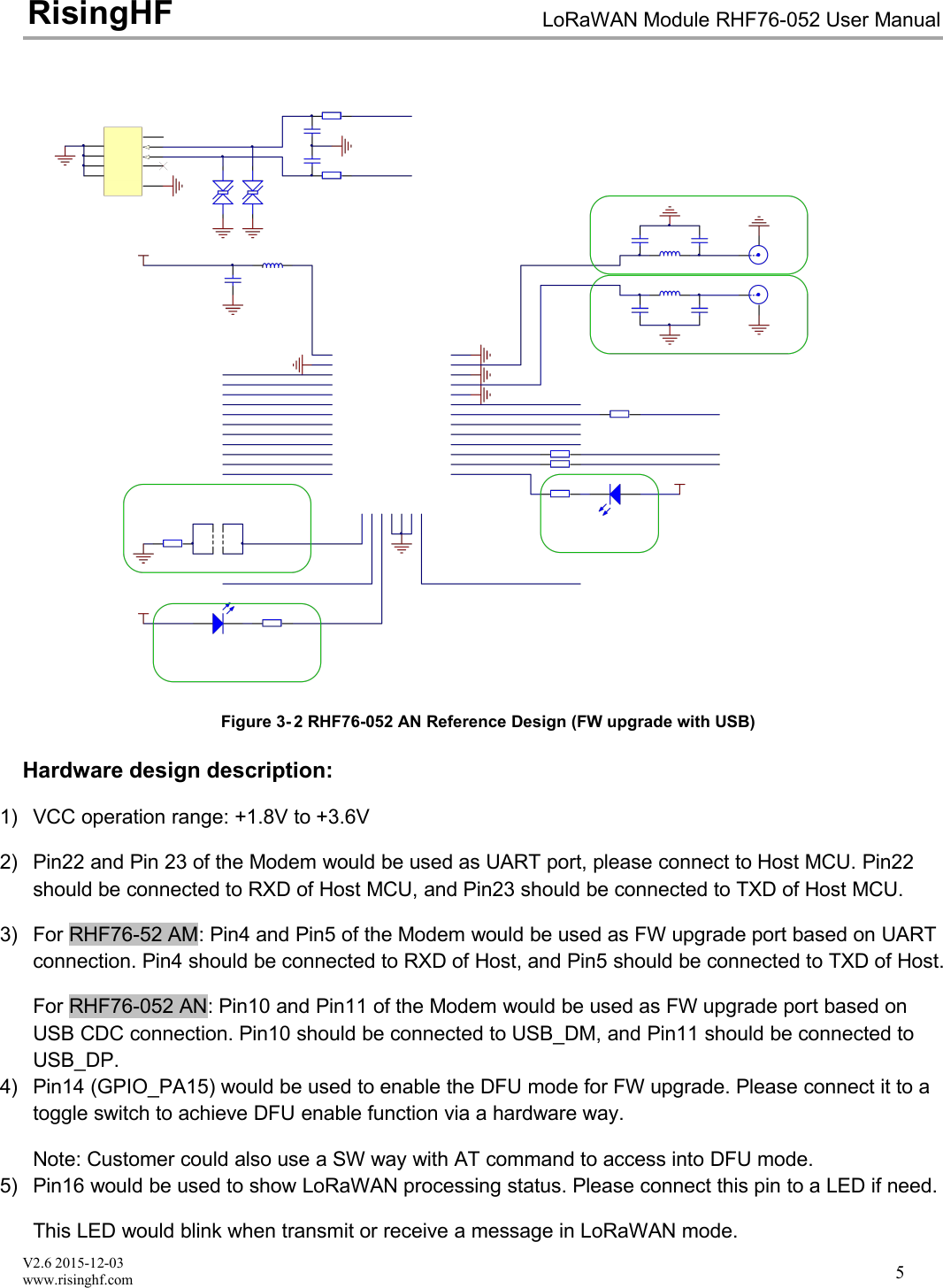
V2.6 2015-12-03www.risinghf.comLoRaWAN Module RHF76-052 User ManualRisingHF5Figure 3- 2 RHF76-052 AN Reference Design (FW upgrade with USB)Hardware design description:1) VCC operation range: +1.8V to +3.6V2) Pin22 and Pin 23 of the Modem would be used as UART port, please connect to Host MCU. Pin22should be connected to RXD of Host MCU, and Pin23 should be connected to TXD of Host MCU.3) For RHF76-52 AM: Pin4 and Pin5 of the Modem would be used as FW upgrade port based on UARTconnection. Pin4 should be connected to RXD of Host, and Pin5 should be connected to TXD of Host.For RHF76-052 AN: Pin10 and Pin11 of the Modem would be used as FW upgrade port based onUSB CDC connection. Pin10 should be connected to USB_DM, and Pin11 should be connected toUSB_DP.4) Pin14 (GPIO_PA15) would be used to enable the DFU mode for FW upgrade. Please connect it to atoggle switch to achieve DFU enable function via a hardware way.Note: Customer could also use a SW way with AT command to access into DFU mode.5) Pin16 would be used to show LoRaWAN processing status. Please connect this pin to a LED if need.This LED would blink when transmit or receive a message in LoRaWAN mode.
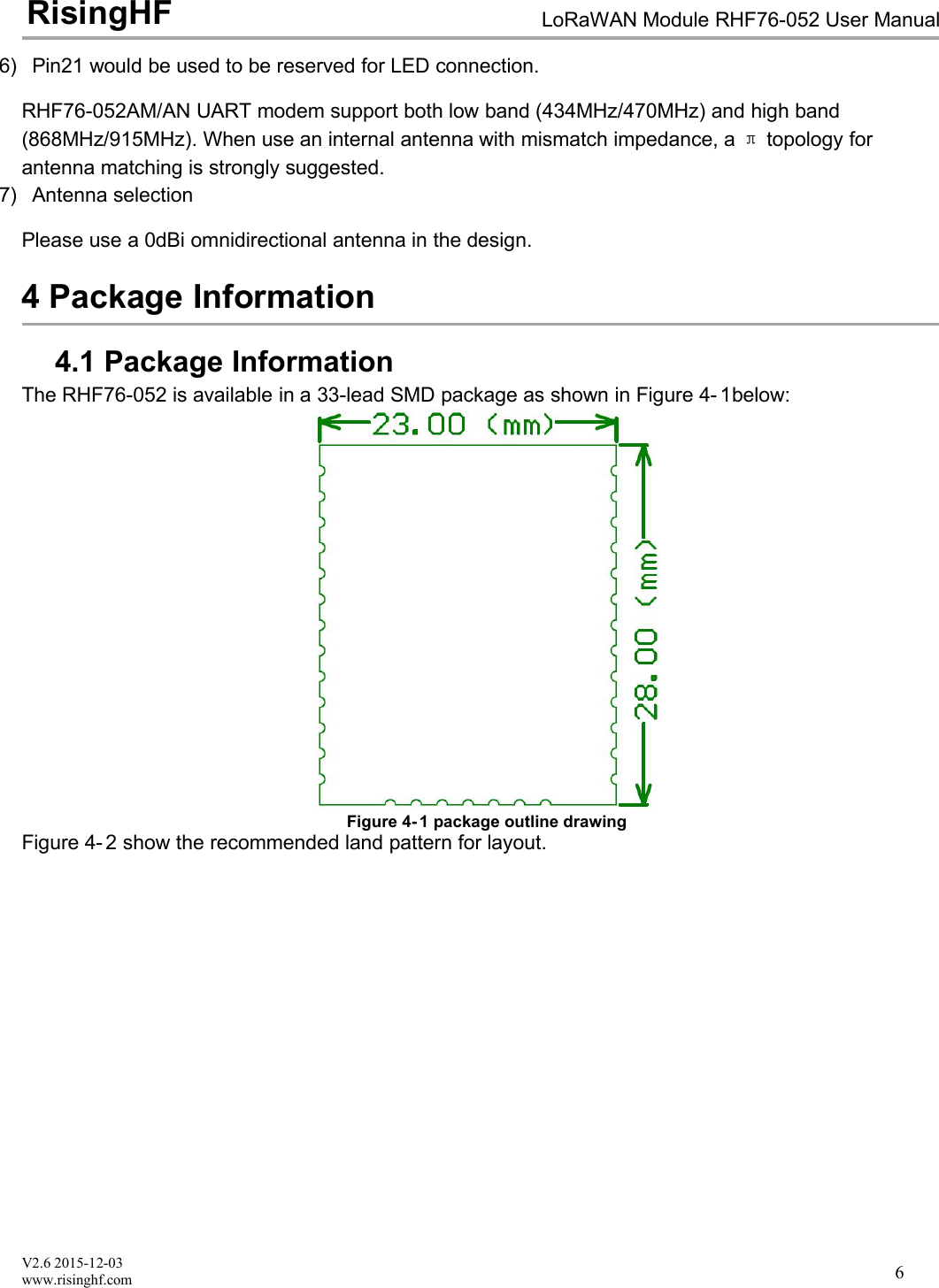
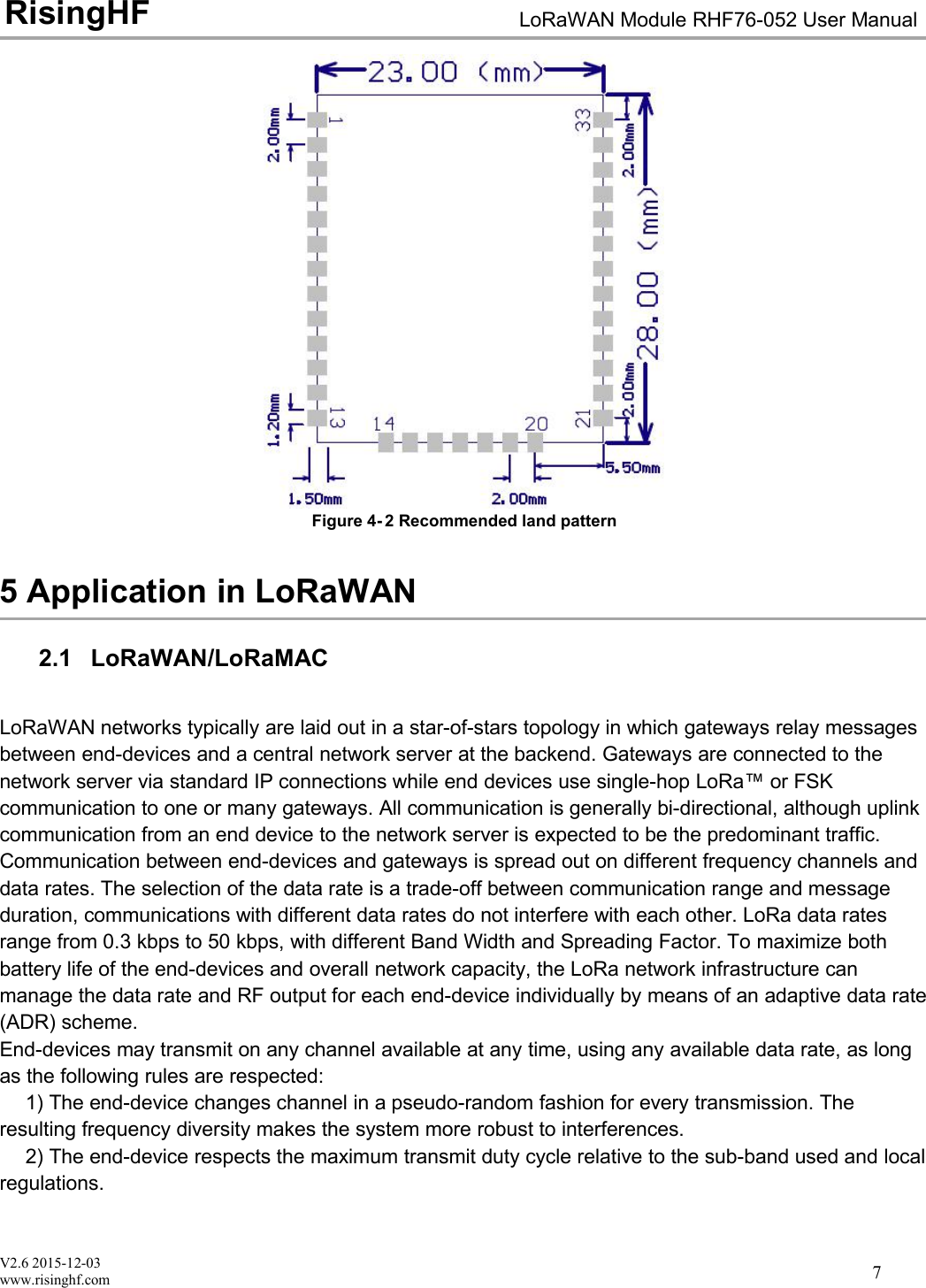
V2.6 2015-12-03www.risinghf.comLoRaWAN Module RHF76-052 User ManualRisingHF66) Pin21 would be used to be reserved for LED connection.RHF76-052AM/AN UART modem support both low band (434MHz/470MHz) and high band(868MHz/915MHz). When use an internal antenna with mismatch impedance, a πtopology forantenna matching is strongly suggested.7) Antenna selectionPlease use a 0dBi omnidirectional antenna in the design.4 Package Information4.1 Package InformationThe RHF76-052 is available in a 33-lead SMD package as shown in Figure 4- 1below:Figure 4- 1 package outline drawingFigure 4- 2 show the recommended land pattern for layout.
V2.6 2015-12-03www.risinghf.comLoRaWAN Module RHF76-052 User ManualRisingHF7Figure 4- 2 Recommended land pattern5 Application in LoRaWAN2.1 LoRaWAN/LoRaMACLoRaWAN networks typically are laid out in a star-of-stars topology in which gateways relay messagesbetween end-devices and a central network server at the backend. Gateways are connected to thenetwork server via standard IP connections while end devices use single-hop LoRa™ or FSKcommunication to one or many gateways. All communication is generally bi-directional, although uplinkcommunication from an end device to the network server is expected to be the predominant traffic.Communication between end-devices and gateways is spread out on different frequency channels anddata rates. The selection of the data rate is a trade-off between communication range and messageduration, communications with different data rates do not interfere with each other. LoRa data ratesrange from 0.3 kbps to 50 kbps, with different Band Width and Spreading Factor. To maximize bothbattery life of the end-devices and overall network capacity, the LoRa network infrastructure canmanage the data rate and RF output for each end-device individually by means of an adaptive data rate(ADR) scheme.End-devices may transmit on any channel available at any time, using any available data rate, as longas the following rules are respected:1) The end-device changes channel in a pseudo-random fashion for every transmission. Theresulting frequency diversity makes the system more robust to interferences.2) The end-device respects the maximum transmit duty cycle relative to the sub-band used and localregulations.
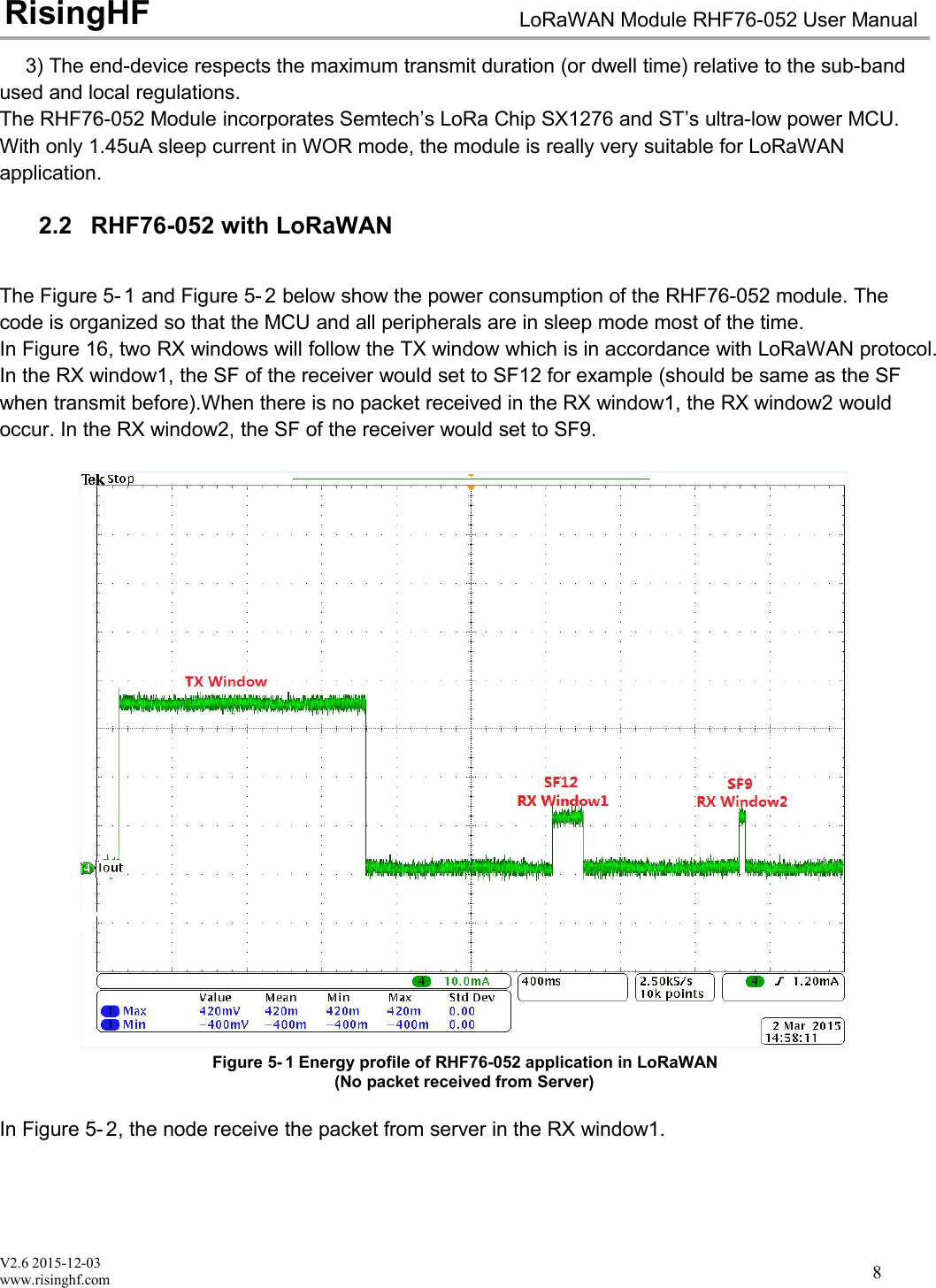
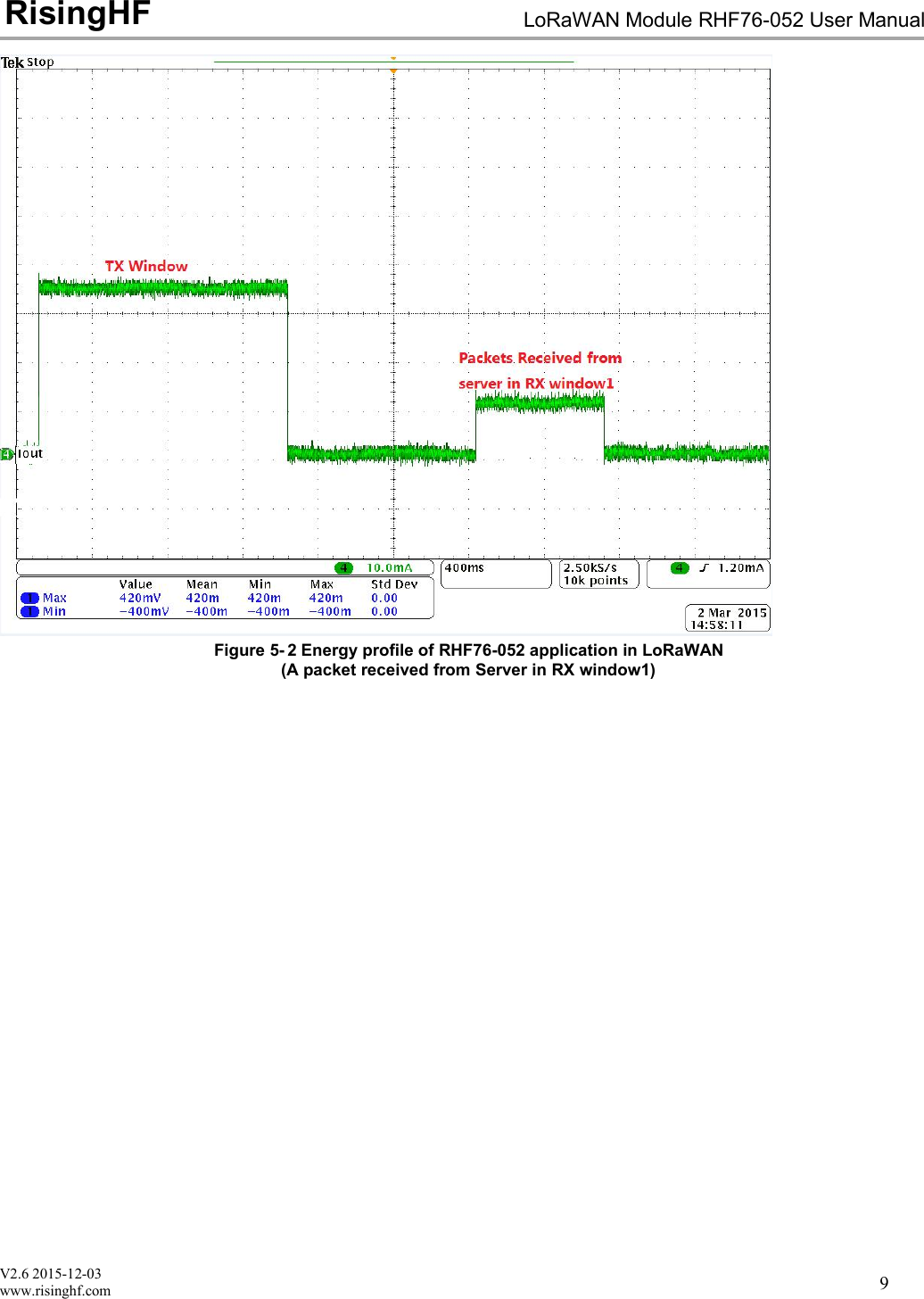
V2.6 2015-12-03www.risinghf.comLoRaWAN Module RHF76-052 User ManualRisingHF83) The end-device respects the maximum transmit duration (or dwell time) relative to the sub-bandused and local regulations.The RHF76-052 Module incorporates Semtech’s LoRa Chip SX1276 and ST’s ultra-low power MCU.With only 1.45uA sleep current in WOR mode, the module is really very suitable for LoRaWANapplication.2.2 RHF76-052 with LoRaWANThe Figure 5- 1 and Figure 5- 2 below show the power consumption of the RHF76-052 module. Thecode is organized so that the MCU and all peripherals are in sleep mode most of the time.In Figure 16, two RX windows will follow the TX window which is in accordance with LoRaWAN protocol.In the RX window1, the SF of the receiver would set to SF12 for example (should be same as the SFwhen transmit before).When there is no packet received in the RX window1, the RX window2 wouldoccur. In the RX window2, the SF of the receiver would set to SF9.Figure 5- 1 Energy profile of RHF76-052 application in LoRaWAN(No packet received from Server)In Figure 5- 2, the node receive the packet from server in the RX window1.
V2.6 2015-12-03www.risinghf.comLoRaWAN Module RHF76-052 User ManualRisingHF9Figure 5- 2 Energy profile of RHF76-052 application in LoRaWAN(A packet received from Server in RX window1)
V2.6 2015-12-03www.risinghf.comLoRaWAN Module RHF76-052 User ManualRisingHF10Part II-AT Command Specifications6 Introduction of AT CommandRisingHF™ LoRaWAN™ modem is LoRaWAN compatible device, which supports flexible LoRaWANcommunication. This document is intended to describe a command interface implementation ofLoRaWAN Class A/C protocol. LoRaWAN protocol is available from LoRa Alliance, it is recommendedto review LoRaWAN specification before using LoRaWAN modem.6.1 FeatureMaximum 255 bytes frameUser configuration nonvolatileSupport all LoRaWAN R1.0 data rate schemes(EU868/US915/EU868-like)Customized data rate schemeLoRaWAN Class A/CNumerous test commands (LoRa P2P, Class C downlink, Continuous Wave etc.)Flexible hexadecimal string parserUltra-low power (1.4uA@3.3V)1Case insensitive commandsFlexible RXWIN2 configuration interfaceConfigurable RXWIN1 channel frequencyPossibility to enable full-duplex LoRaWAN system6.2 Related ProductsPart NumberBootloaderInterfaceRHF3M076USBUSBRHF76-052AMUARTUARTRHF76-052ANUSBUARTTable 4- 1 Related products listNote: RHF76-052 AM and RHF76-052 AN is based on the same hardware, which is that only thefirmware upgrade is different1UART interface modem only
V2.6 2015-12-03www.risinghf.comLoRaWAN Module RHF76-052 User ManualRisingHF117 Essential informations before using AT command7.1 ConventionsCommand is case insensitive;All commands have response;Command length never exceeds total 528 characters;One valid AT Command must end with '\n', "\r\n" is also valid;If command timeout feature is enabled, end '\n' will not be mandatory;<LF> means the newline character. <CR> means carriage return;UART2configuration "9600, 8, n 1" (8 bits data, no parity, 1 stop bit);7.2 Symbols= --> Set value for command? --> Query: --> Start a list input parameter+ --> Prefix of command, --> Separator of parametersSpace --> Empty character, could be used to format commandNOTE: You could use quote sign < "> to force input parameter with space, such as <AT+MSGHEX="AA BB CC DD EE">, then "AA BB CCDD EE" is treated as one parameter. But if you input command <AT+MSGHEX=AA BB CC DD EE>, "AA BB CC DD EE" will treated as 5parameters, AT+MSGHEX returns error.7.3 FormatAll commands in this document are end with <CR><LF>. In order to facilitate the description, all<CR><LF> is intentionally omitted in this document.7.3.1 QueryUse query command to check LoRaWAN modem configuration, such as channel configuration, ADRstatus, TX power, etc.AT+COMMANDAT+COMMAND?AT+COMMAND=?NOTE: Query format is available with every LoRaWAN supported command7.3.2 Configure / ControlUses configure/control command to set new configuration or control transaction.AT+COMMAND=DATA7.3.3 ReturnReturn data is in format like "+CMD: RETURN DATA"+COMMAND: “RETURN DATA”2RHF76-052AM supports UART interfaceRHF3M076 supports USB CDC interface of which UART configuration is unconcerned
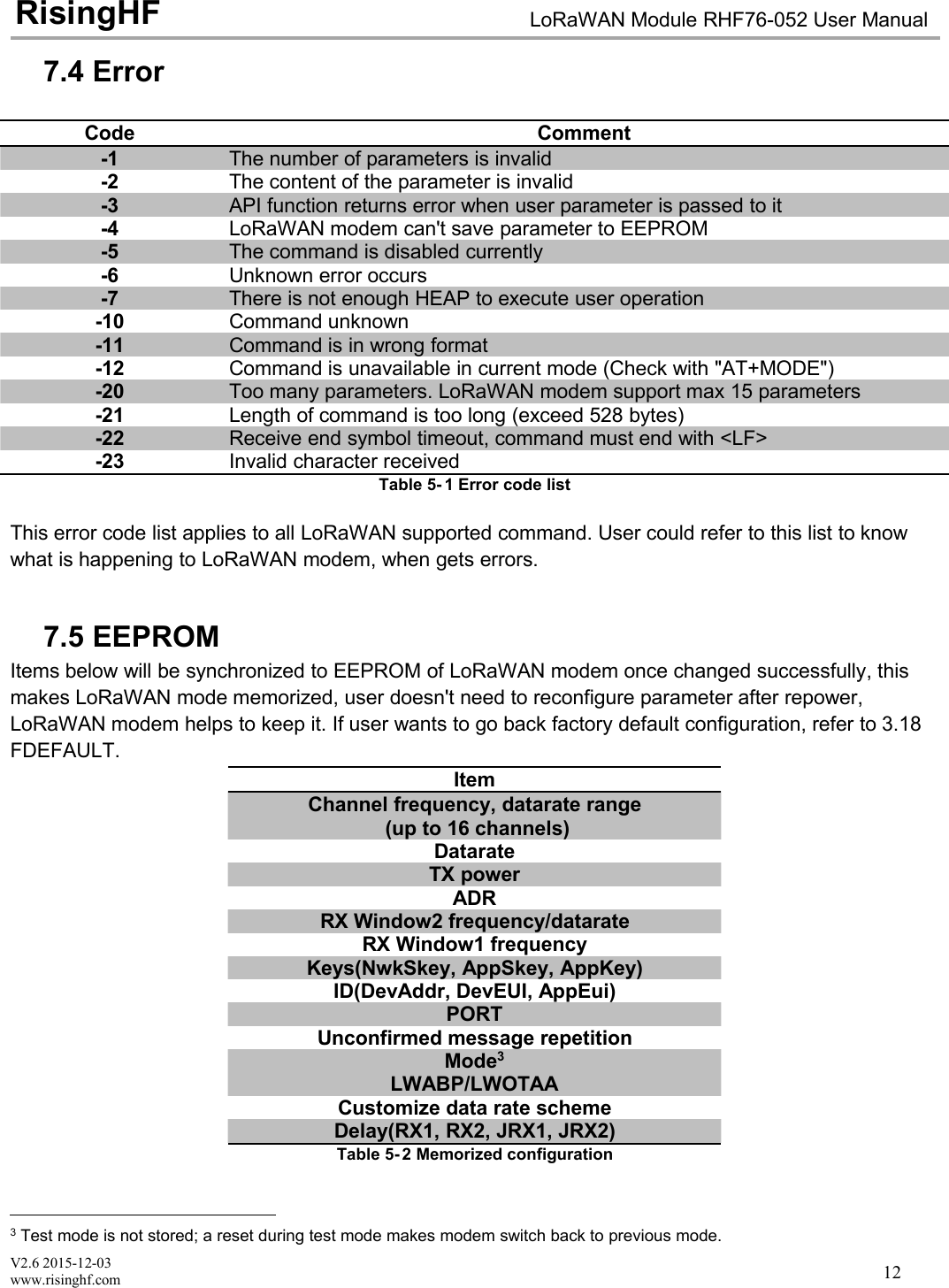
V2.6 2015-12-03www.risinghf.comLoRaWAN Module RHF76-052 User ManualRisingHF127.4 ErrorCodeComment-1The number of parameters is invalid-2The content of the parameter is invalid-3API function returns error when user parameter is passed to it-4LoRaWAN modem can't save parameter to EEPROM-5The command is disabled currently-6Unknown error occurs-7There is not enough HEAP to execute user operation-10Command unknown-11Command is in wrong format-12Command is unavailable in current mode (Check with "AT+MODE")-20Too many parameters. LoRaWAN modem support max 15 parameters-21Length of command is too long (exceed 528 bytes)-22Receive end symbol timeout, command must end with <LF>-23Invalid character receivedTable 5- 1 Error code listThis error code list applies to all LoRaWAN supported command. User could refer to this list to knowwhat is happening to LoRaWAN modem, when gets errors.7.5 EEPROMItems below will be synchronized to EEPROM of LoRaWAN modem once changed successfully, thismakes LoRaWAN mode memorized, user doesn't need to reconfigure parameter after repower,LoRaWAN modem helps to keep it. If user wants to go back factory default configuration, refer to 3.18FDEFAULT.ItemChannel frequency, datarate range(up to 16 channels)DatarateTX powerADRRX Window2 frequency/datarateRX Window1 frequencyKeys(NwkSkey, AppSkey, AppKey)ID(DevAddr, DevEUI, AppEui)PORTUnconfirmed message repetitionMode3LWABP/LWOTAACustomize data rate schemeDelay(RX1, RX2, JRX1, JRX2)Table 5- 2 Memorized configuration3Test mode is not stored; a reset during test mode makes modem switch back to previous mode.
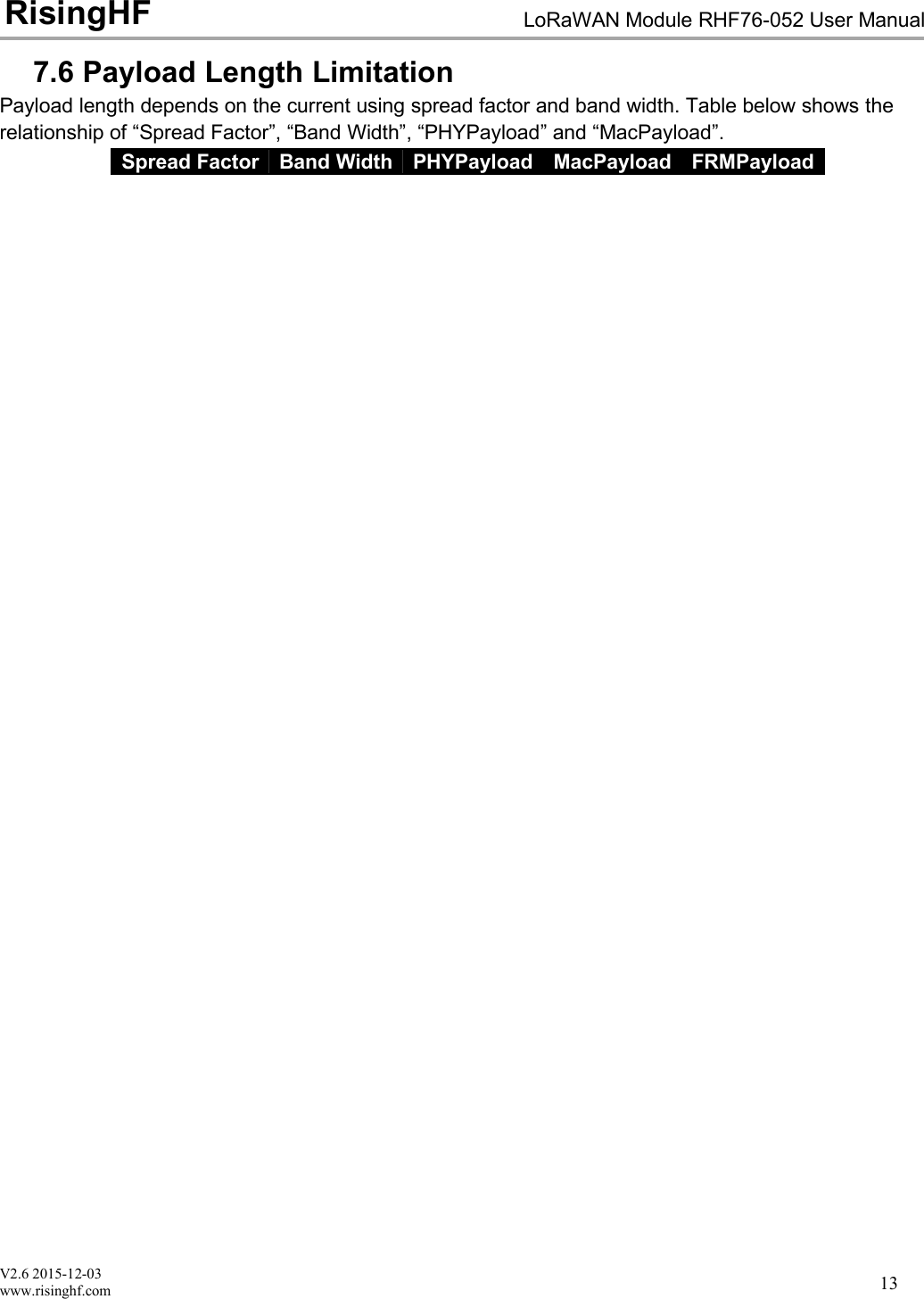
V2.6 2015-12-03www.risinghf.comLoRaWAN Module RHF76-052 User ManualRisingHF137.6 Payload Length LimitationPayload length depends on the current using spread factor and band width. Table below shows therelationship of “Spread Factor”, “Band Width”, “PHYPayload” and “MacPayload”.Spread FactorBand WidthPHYPayloadMacPayloadFRMPayload
V2.6 2015-12-03www.risinghf.comLoRaWAN Module RHF76-052 User ManualRisingHF148 AT Commands descriptionCommandDescriptionATTest commandHELPPrint command listFDEFAULTFactory data resetRESETSoftware resetDFUForce bootloader to enter dfu modeLOWPOWEREnter sleep modeVERVersion[Major.Minor.Patch]MSGLoRaWAN unconfirmed dataMSGHEXLoRaWAN unconfirmed data in hexCMSGLoRaWAN confirmed dataCMSGHEXLoRaWAN confirmed data in hexCHLoRaWAN channel frequencyDRLoRaWAN datarateADRLoRaWAN ADR controlREPTUnconfirmed message repetitionPOWERLoRaWAN TX powerRXWIN2LoRaWAN RX window2RXWIN1Customized RXWIN1 frequencyPORTLoRaWAN communication portMODELWABP, LWOTAA, TESTIDLoRaWAN DevAddr/DevEui/AppEuiKEYSet NWKSKEY/APPSKEY/APPKEYCLASSChoose LoRaWAN modem class(A/B/C)JOINLoRaWAN OTAA JOINTESTSend test serious commandUARTUART configureDELAYRX window delayTable 6- 1 Command List
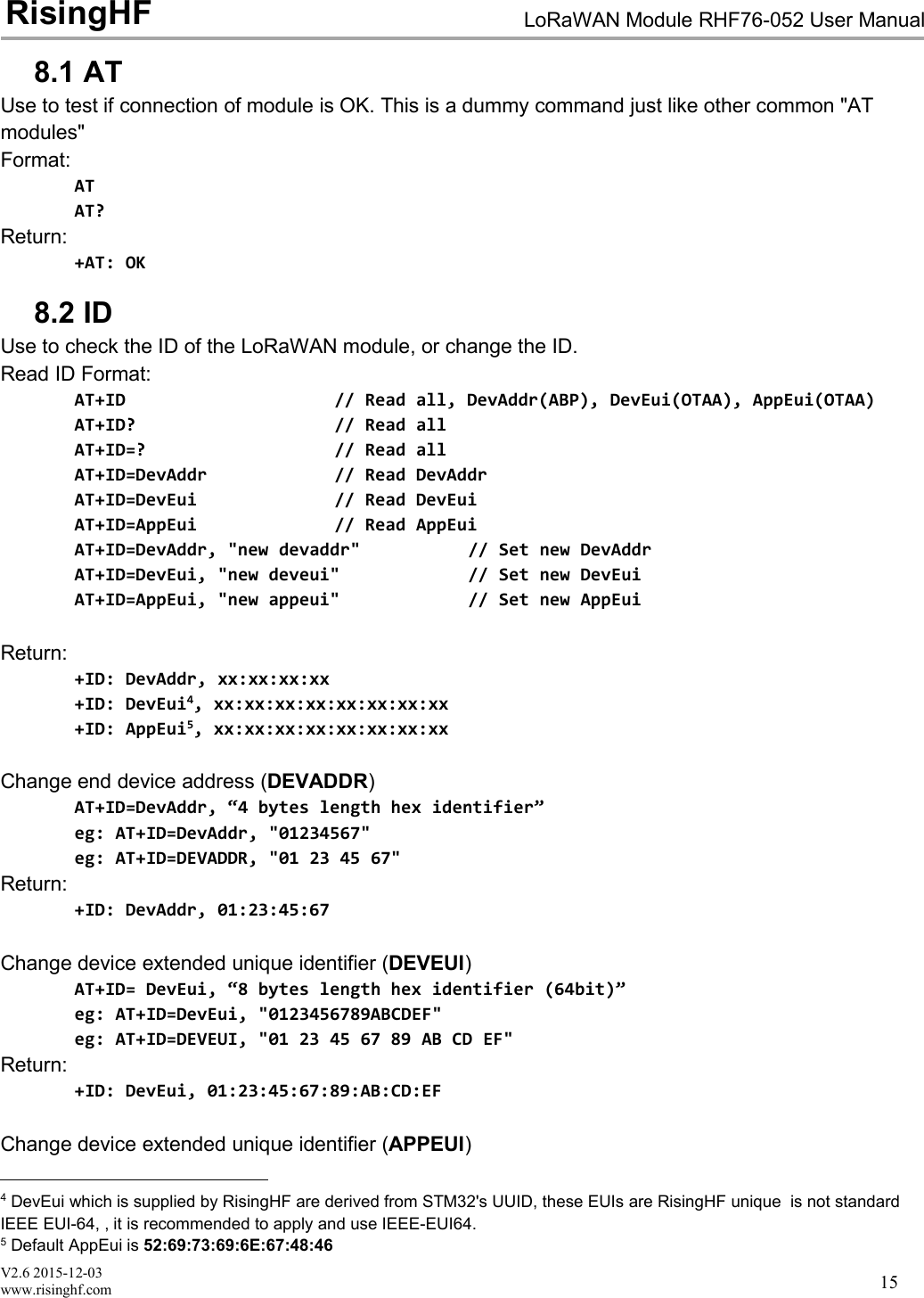
V2.6 2015-12-03www.risinghf.comLoRaWAN Module RHF76-052 User ManualRisingHF158.1 ATUse to test if connection of module is OK. This is a dummy command just like other common "ATmodules"Format:ATAT?Return:+AT: OK8.2 IDUse to check the ID of the LoRaWAN module, or change the ID.Read ID Format:AT+ID // Read all, DevAddr(ABP), DevEui(OTAA), AppEui(OTAA)AT+ID? // Read allAT+ID=? // Read allAT+ID=DevAddr // Read DevAddrAT+ID=DevEui // Read DevEuiAT+ID=AppEui // Read AppEuiAT+ID=DevAddr, "new devaddr" // Set new DevAddrAT+ID=DevEui, "new deveui" // Set new DevEuiAT+ID=AppEui, "new appeui" // Set new AppEuiReturn:+ID: DevAddr, xx:xx:xx:xx+ID: DevEui4, xx:xx:xx:xx:xx:xx:xx:xx+ID: AppEui5, xx:xx:xx:xx:xx:xx:xx:xxChange end device address (DEVADDR)AT+ID=DevAddr, “4 bytes length hex identifier”eg: AT+ID=DevAddr, "01234567"eg: AT+ID=DEVADDR, "01 23 45 67"Return:+ID: DevAddr, 01:23:45:67Change device extended unique identifier (DEVEUI)AT+ID= DevEui, “8 bytes length hex identifier (64bit)”eg: AT+ID=DevEui, "0123456789ABCDEF"eg: AT+ID=DEVEUI, "01 23 45 67 89 AB CD EF"Return:+ID: DevEui, 01:23:45:67:89:AB:CD:EFChange device extended unique identifier (APPEUI)4DevEui which is supplied by RisingHF are derived from STM32's UUID, these EUIs are RisingHF unique is not standardIEEE EUI-64, , it is recommended to apply and use IEEE-EUI64.5Default AppEui is 52:69:73:69:6E:67:48:46
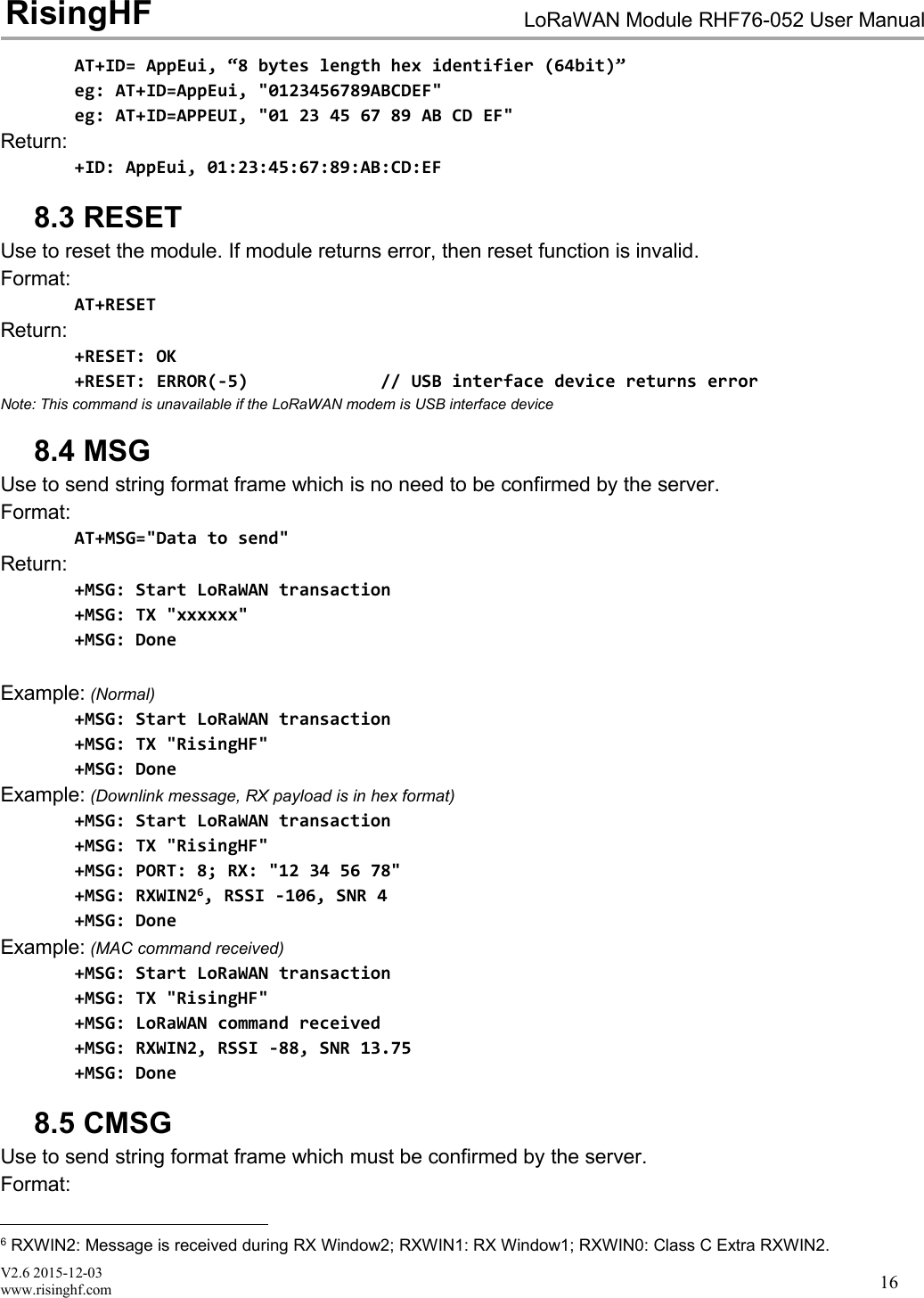
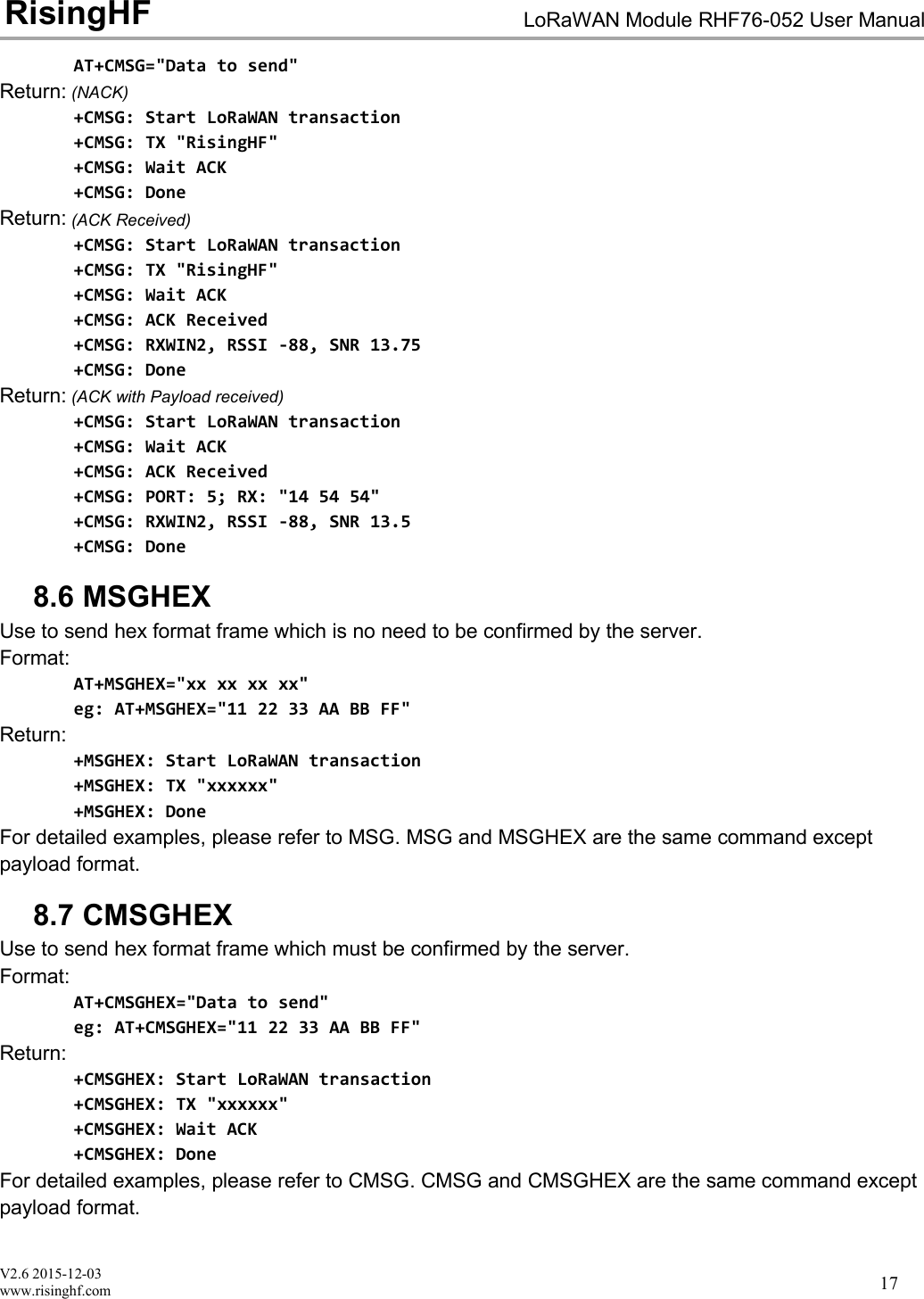
V2.6 2015-12-03www.risinghf.comLoRaWAN Module RHF76-052 User ManualRisingHF16AT+ID= AppEui, “8 bytes length hex identifier (64bit)”eg: AT+ID=AppEui, "0123456789ABCDEF"eg: AT+ID=APPEUI, "01 23 45 67 89 AB CD EF"Return:+ID: AppEui, 01:23:45:67:89:AB:CD:EF8.3 RESETUse to reset the module. If module returns error, then reset function is invalid.Format:AT+RESETReturn:+RESET: OK+RESET: ERROR(-5) // USB interface device returns errorNote: This command is unavailable if the LoRaWAN modem is USB interface device8.4 MSGUse to send string format frame which is no need to be confirmed by the server.Format:AT+MSG="Data to send"Return:+MSG: Start LoRaWAN transaction+MSG: TX "xxxxxx"+MSG: DoneExample: (Normal)+MSG: Start LoRaWAN transaction+MSG: TX "RisingHF"+MSG: DoneExample: (Downlink message, RX payload is in hex format)+MSG: Start LoRaWAN transaction+MSG: TX "RisingHF"+MSG: PORT: 8; RX: "12 34 56 78"+MSG: RXWIN26, RSSI -106, SNR 4+MSG: DoneExample: (MAC command received)+MSG: Start LoRaWAN transaction+MSG: TX "RisingHF"+MSG: LoRaWAN command received+MSG: RXWIN2, RSSI -88, SNR 13.75+MSG: Done8.5 CMSGUse to send string format frame which must be confirmed by the server.Format:6RXWIN2: Message is received during RX Window2; RXWIN1: RX Window1; RXWIN0: Class C Extra RXWIN2.
V2.6 2015-12-03www.risinghf.comLoRaWAN Module RHF76-052 User ManualRisingHF17AT+CMSG="Data to send"Return: (NACK)+CMSG: Start LoRaWAN transaction+CMSG: TX "RisingHF"+CMSG: Wait ACK+CMSG: DoneReturn: (ACK Received)+CMSG: Start LoRaWAN transaction+CMSG: TX "RisingHF"+CMSG: Wait ACK+CMSG: ACK Received+CMSG: RXWIN2, RSSI -88, SNR 13.75+CMSG: DoneReturn: (ACK with Payload received)+CMSG: Start LoRaWAN transaction+CMSG: Wait ACK+CMSG: ACK Received+CMSG: PORT: 5; RX: "14 54 54"+CMSG: RXWIN2, RSSI -88, SNR 13.5+CMSG: Done8.6 MSGHEXUse to send hex format frame which is no need to be confirmed by the server.Format:AT+MSGHEX="xx xx xx xx"eg: AT+MSGHEX="11 22 33 AA BB FF"Return:+MSGHEX: Start LoRaWAN transaction+MSGHEX: TX "xxxxxx"+MSGHEX: DoneFor detailed examples, please refer to MSG. MSG and MSGHEX are the same command exceptpayload format.8.7 CMSGHEXUse to send hex format frame which must be confirmed by the server.Format:AT+CMSGHEX="Data to send"eg: AT+CMSGHEX="11 22 33 AA BB FF"Return:+CMSGHEX: Start LoRaWAN transaction+CMSGHEX: TX "xxxxxx"+CMSGHEX: Wait ACK+CMSGHEX: DoneFor detailed examples, please refer to CMSG. CMSG and CMSGHEX are the same command exceptpayload format.
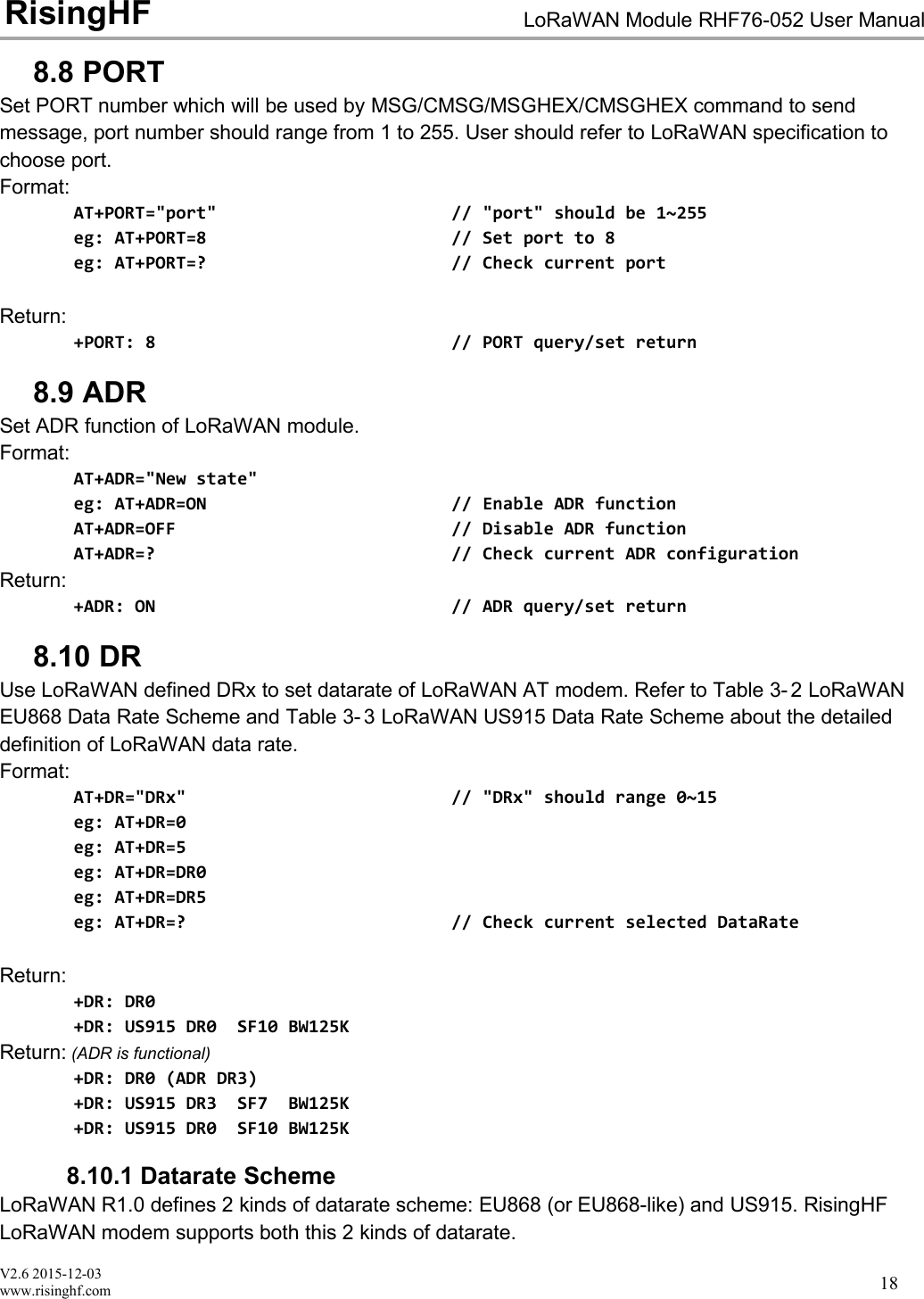
V2.6 2015-12-03www.risinghf.comLoRaWAN Module RHF76-052 User ManualRisingHF188.8 PORTSet PORT number which will be used by MSG/CMSG/MSGHEX/CMSGHEX command to sendmessage, port number should range from 1 to 255. User should refer to LoRaWAN specification tochoose port.Format:AT+PORT="port" // "port" should be 1~255eg: AT+PORT=8 // Set port to 8eg: AT+PORT=? // Check current portReturn:+PORT: 8 // PORT query/set return8.9 ADRSet ADR function of LoRaWAN module.Format:AT+ADR="New state"eg: AT+ADR=ON // Enable ADR functionAT+ADR=OFF // Disable ADR functionAT+ADR=? // Check current ADR configurationReturn:+ADR: ON // ADR query/set return8.10 DRUse LoRaWAN defined DRx to set datarate of LoRaWAN AT modem. Refer to Table 3- 2 LoRaWANEU868 Data Rate Scheme and Table 3- 3 LoRaWAN US915 Data Rate Scheme about the detaileddefinition of LoRaWAN data rate.Format:AT+DR="DRx" // "DRx" should range 0~15eg: AT+DR=0eg: AT+DR=5eg: AT+DR=DR0eg: AT+DR=DR5eg: AT+DR=? // Check current selected DataRateReturn:+DR: DR0+DR: US915 DR0 SF10 BW125KReturn: (ADR is functional)+DR: DR0 (ADR DR3)+DR: US915 DR3 SF7 BW125K+DR: US915 DR0 SF10 BW125K8.10.1 Datarate SchemeLoRaWAN R1.0 defines 2 kinds of datarate scheme: EU868 (or EU868-like) and US915. RisingHFLoRaWAN modem supports both this 2 kinds of datarate.
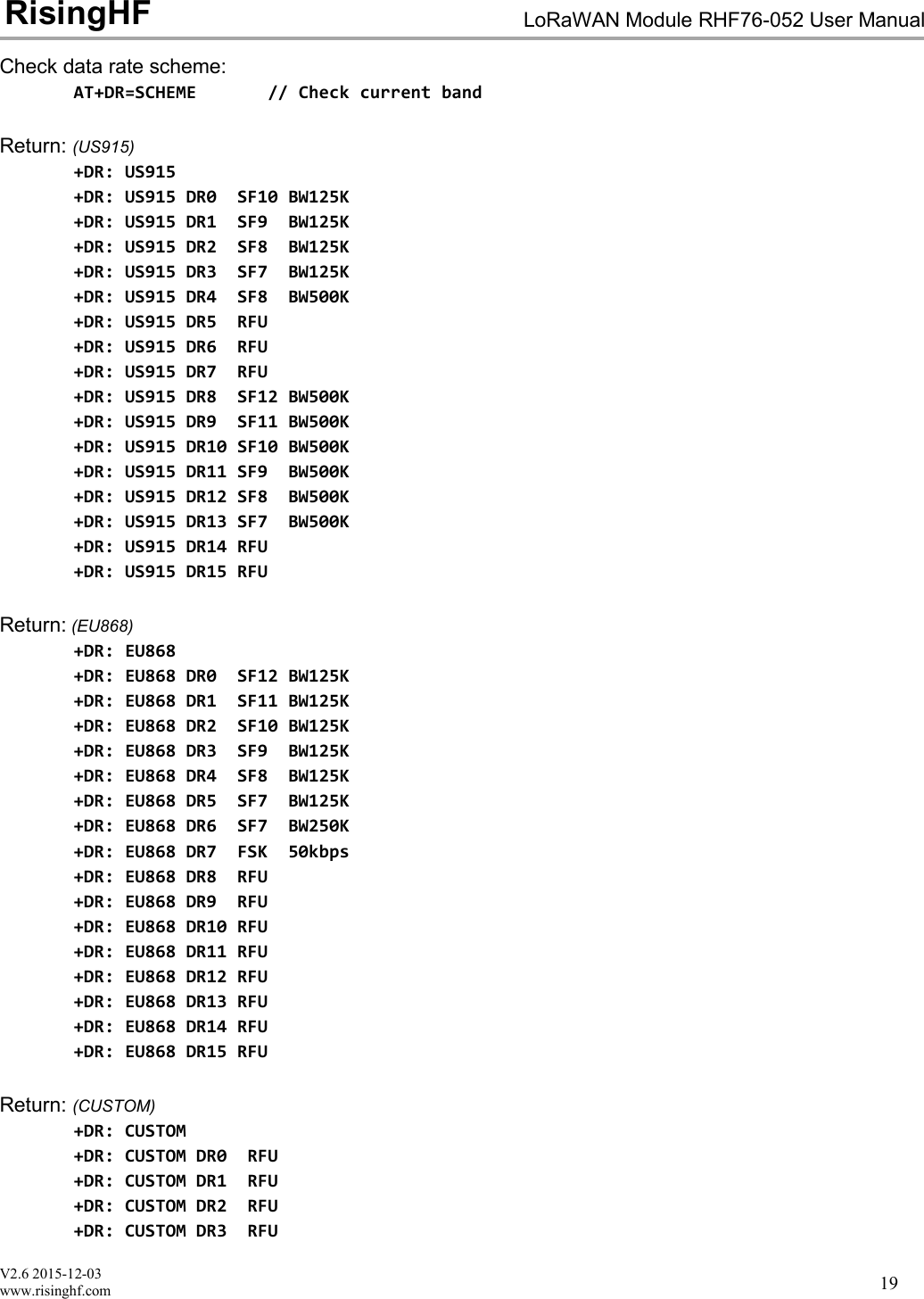
V2.6 2015-12-03www.risinghf.comLoRaWAN Module RHF76-052 User ManualRisingHF19Check data rate scheme:AT+DR=SCHEME // Check current bandReturn: (US915)+DR: US915+DR: US915 DR0 SF10 BW125K+DR: US915 DR1 SF9 BW125K+DR: US915 DR2 SF8 BW125K+DR: US915 DR3 SF7 BW125K+DR: US915 DR4 SF8 BW500K+DR: US915 DR5 RFU+DR: US915 DR6 RFU+DR: US915 DR7 RFU+DR: US915 DR8 SF12 BW500K+DR: US915 DR9 SF11 BW500K+DR: US915 DR10 SF10 BW500K+DR: US915 DR11 SF9 BW500K+DR: US915 DR12 SF8 BW500K+DR: US915 DR13 SF7 BW500K+DR: US915 DR14 RFU+DR: US915 DR15 RFUReturn: (EU868)+DR: EU868+DR: EU868 DR0 SF12 BW125K+DR: EU868 DR1 SF11 BW125K+DR: EU868 DR2 SF10 BW125K+DR: EU868 DR3 SF9 BW125K+DR: EU868 DR4 SF8 BW125K+DR: EU868 DR5 SF7 BW125K+DR: EU868 DR6 SF7 BW250K+DR: EU868 DR7 FSK 50kbps+DR: EU868 DR8 RFU+DR: EU868 DR9 RFU+DR: EU868 DR10 RFU+DR: EU868 DR11 RFU+DR: EU868 DR12 RFU+DR: EU868 DR13 RFU+DR: EU868 DR14 RFU+DR: EU868 DR15 RFUReturn: (CUSTOM)+DR: CUSTOM+DR: CUSTOM DR0 RFU+DR: CUSTOM DR1 RFU+DR: CUSTOM DR2 RFU+DR: CUSTOM DR3 RFU
V2.6 2015-12-03www.risinghf.comLoRaWAN Module RHF76-052 User ManualRisingHF20+DR: CUSTOM DR4 RFU+DR: CUSTOM DR5 RFU+DR: CUSTOM DR6 RFU+DR: CUSTOM DR7 RFU+DR: CUSTOM DR8 RFU+DR: CUSTOM DR9 RFU+DR: CUSTOM DR10 RFU+DR: CUSTOM DR11 RFU+DR: CUSTOM DR12 RFU+DR: CUSTOM DR13 RFU+DR: CUSTOM DR14 RFU+DR: CUSTOM DR15 RFUChoose data rate schemeAT+DR=EU868 // LoRaWAN EU868 data rate schemeAT+DR=US915 // LoRaWAN US915 data rate schemeAT+DR=CUSTOM // Customized data rate schemeLoRaWAN Data RateConfigurationIndicative physicalbit rate [bit/s]DR0LoRa SF12/125KHz250DR1LoRa SF11/125KHz440DR2LoRa SF10/125KHz980DR3LoRa SF9/125KHz1760DR4LoRa SF8/125KHz3125DR5LoRa SF7/125KHz5470DR6LoRa SF7/250KHz11000DR7FSK:50kbps50000DR8-DR15RFURFUTable 6- 2 LoRaWAN EU868 Data Rate SchemeLoRaWAN Data RateConfigurationIndicative physicalbit rate [bit/s]DR0LoRa SF10/125KHz980DR1LoRa SF9/125KHz1760DR2LoRa SF8/125KHz3125DR3LoRa SF7/125KHz5470DR4LoRa SF8/500KHz12500DR5-DR7RFURFUDR8LoRa SF12/500KHz980DR9LoRa SF11/500KHz1760DR10LoRa SF10/500KHz3900DR11LoRa SF9/500KHz7000DR12LoRa SF8/500KHz12500DR13LoRa SF7/500KHz21900DR14-DR15RFURFUTable 6- 3 LoRaWAN US915 Data Rate Scheme
V2.6 2015-12-03www.risinghf.comLoRaWAN Module RHF76-052 User ManualRisingHF218.10.2 Customized Data Rate SchemeIn order to provide maximum flexibility to define data rate, this customized data rate scheme feature isadded from firmware v1.8.0.Define a new data rate:AT+DR=CUSTOM, DRx, SFx, BW, [DRx (RXWin1)]Note: [DRx (RXWin1)] is optional parameter, which could be used to specify an RXWin1 data rate for apredefined data rate. For example, “AT+DR=CUSTOM, DR0, SF10, 500, DR4” will map DR0 and DR4, thismeans when sending a message use DR0, RXWIN1 will set DR11 to receive downlink. This feature isuseful when downlink output power is higher than uplink, in this situation, it is reasonable to use higherdata rate and still keep uplink budget and downlink budget balance, and make whole network highefficient. If absent, RXWIN1 data rate will be set to the same as uplink data rate in default.Set data rate to RFU (Reserve For Use)AT+DR=CUSTOM, DRx, RFUExample:// Set DR0 to SF7 and BW125KHzAT+DR=CUSTOM, DR0, SF7, 125Return:+DR: CUSTOM DR0 SF7 BW125K //By default downlink DR is the same as uplink DRExample:// Set DR0 to SF9 and BW500KHz, and map DR0 (uplink) with DR11 (downlink).AT+DR=CUSTOM, DR3, SF10, 500, DR4Return:+DR: CUSTOM DR3 SF10 BW500K DLDR4Example:// Set DR0 to FSK 50kpbsAT+DR=CUSTOM,DR0,FSKReturn:+DR: CUSTOM DR0 FSK 50kbpsExample:// Set DR0 to FSK 50kpbs, and map DR0 with DR5,// Note: [BW] parameter should be set to 0 or any other integer.AT+DR=CUSTOM,DR0,FSK,0,DR5Return:+DR: CUSTOM DR0 FSK 50kbpsExample:// Set DR0 to RFUAT+DR=CUSTOM, DR0, RFU
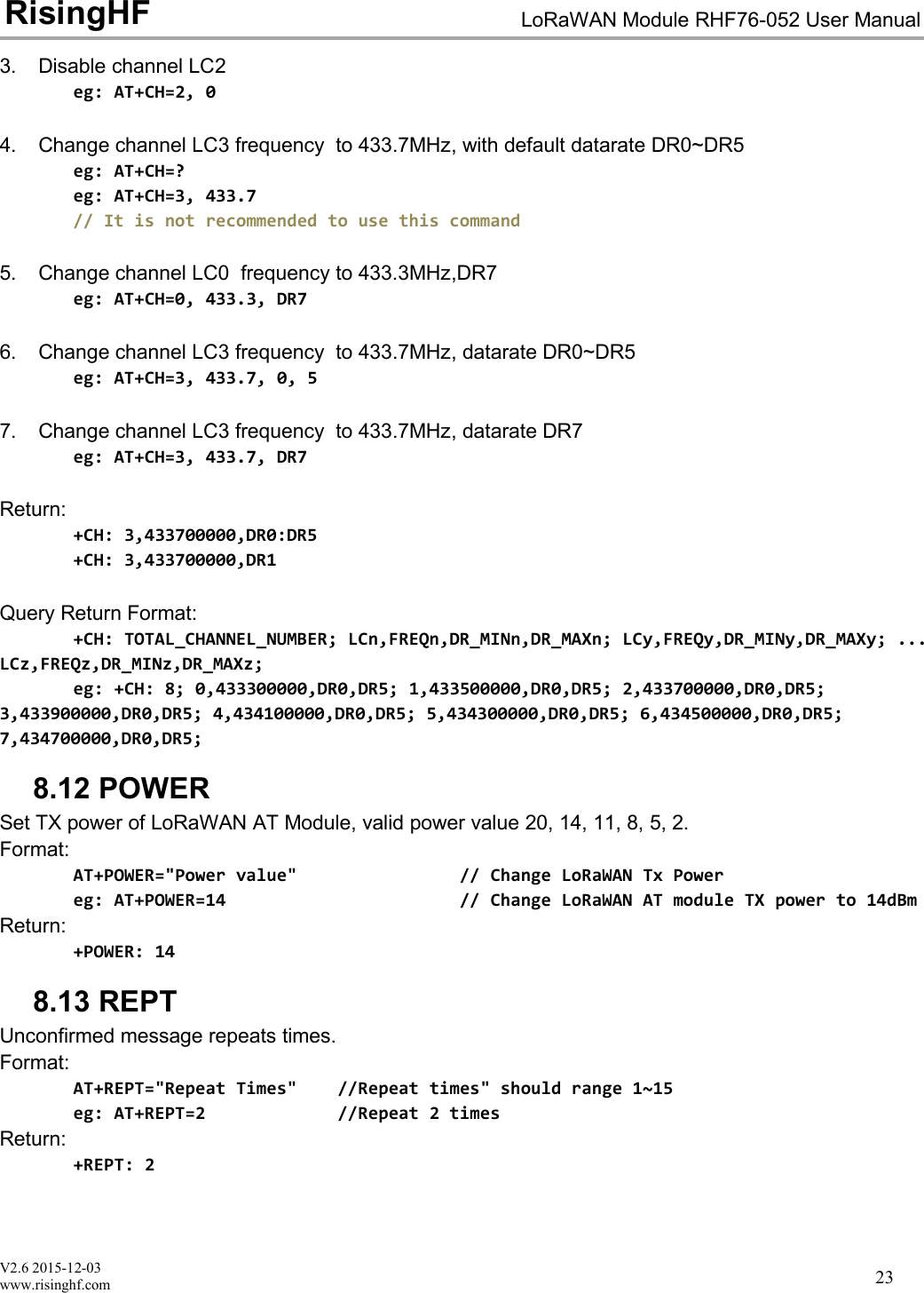
V2.6 2015-12-03www.risinghf.comLoRaWAN Module RHF76-052 User ManualRisingHF22Return:+DR: CUSTOM DR0 RFUExample:// Check custom data rate schemeAT+DR=CUSTOMAT+DR=SCHEMEReturn:+DR: CUSTOM+DR: CUSTOM DR0 SF7 BW125K+DR: CUSTOM DR1 RFU+DR: CUSTOM DR2 RFU+DR: CUSTOM DR3 SF10 BW500K DLDR4+DR: CUSTOM DR4 RFU+DR: CUSTOM DR5 RFU+DR: CUSTOM DR6 RFU+DR: CUSTOM DR7 RFU+DR: CUSTOM DR8 RFU+DR: CUSTOM DR9 RFU+DR: CUSTOM DR10 RFU+DR: CUSTOM DR11 RFU+DR: CUSTOM DR12 RFU+DR: CUSTOM DR13 RFU+DR: CUSTOM DR14 RFU+DR: CUSTOM DR15 RFUNote: After changing the data rate scheme, user should run commands below to check if the data ratesettings are valid, and make sure no RFU data rate is used.AT+CHAT+RXWIN2AT+DR8.11 CHSet channel parameter of LoRaWAN modem, Set frequecy zero to disable one channel.Format:AT+CH="LCn", ["Freq"], ["DR_MIN"], ["DR_MAX"]// Change the LCn channel frequency to "Freq"// "Freq" is in MHz.// Available DR_MIN/DR_MAX range DR0 ~ DR151. Change channel LC0 frequency to 433.3MHz, datarate DR0~DR5eg: AT+CH=0, 433.3, DR0, DR52. Change channel LC1 frequency to 433.5MHz, datarate DR0~DR2eg: AT+CH=1, 433.5, DR0, DR2
V2.6 2015-12-03www.risinghf.comLoRaWAN Module RHF76-052 User ManualRisingHF233. Disable channel LC2eg: AT+CH=2, 04. Change channel LC3 frequency to 433.7MHz, with default datarate DR0~DR5eg: AT+CH=?eg: AT+CH=3, 433.7// It is not recommended to use this command5. Change channel LC0 frequency to 433.3MHz,DR7eg: AT+CH=0, 433.3, DR76. Change channel LC3 frequency to 433.7MHz, datarate DR0~DR5eg: AT+CH=3, 433.7, 0, 57. Change channel LC3 frequency to 433.7MHz, datarate DR7eg: AT+CH=3, 433.7, DR7Return:+CH: 3,433700000,DR0:DR5+CH: 3,433700000,DR1Query Return Format:+CH: TOTAL_CHANNEL_NUMBER; LCn,FREQn,DR_MINn,DR_MAXn; LCy,FREQy,DR_MINy,DR_MAXy; ...LCz,FREQz,DR_MINz,DR_MAXz;eg: +CH: 8; 0,433300000,DR0,DR5; 1,433500000,DR0,DR5; 2,433700000,DR0,DR5;3,433900000,DR0,DR5; 4,434100000,DR0,DR5; 5,434300000,DR0,DR5; 6,434500000,DR0,DR5;7,434700000,DR0,DR5;8.12 POWERSet TX power of LoRaWAN AT Module, valid power value 20, 14, 11, 8, 5, 2.Format:AT+POWER="Power value" // Change LoRaWAN Tx Powereg: AT+POWER=14 // Change LoRaWAN AT module TX power to 14dBmReturn:+POWER: 148.13 REPTUnconfirmed message repeats times.Format:AT+REPT="Repeat Times" //Repeat times" should range 1~15eg: AT+REPT=2 //Repeat 2 timesReturn:+REPT: 2
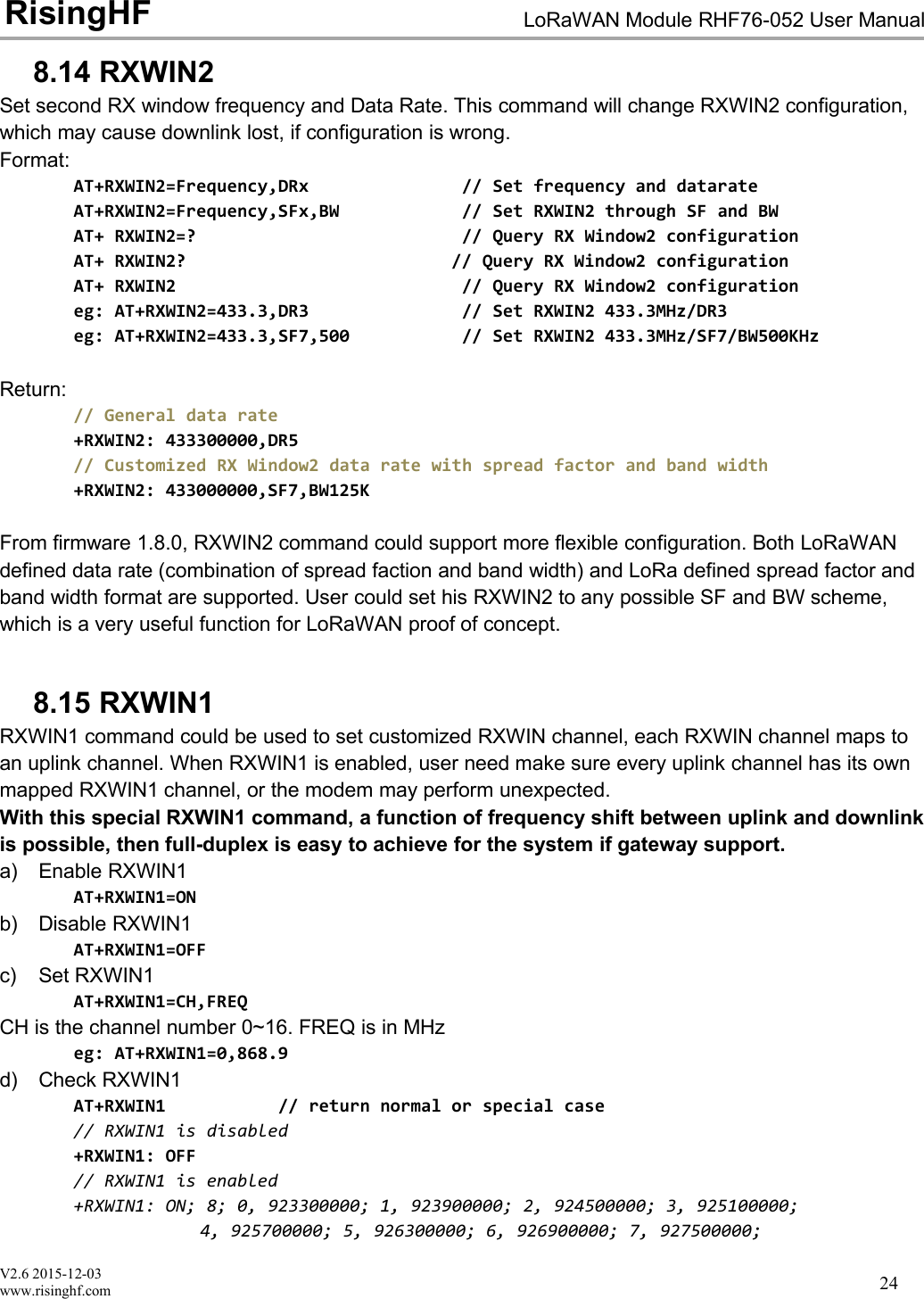
V2.6 2015-12-03www.risinghf.comLoRaWAN Module RHF76-052 User ManualRisingHF248.14 RXWIN2Set second RX window frequency and Data Rate. This command will change RXWIN2 configuration,which may cause downlink lost, if configuration is wrong.Format:AT+RXWIN2=Frequency,DRx // Set frequency and datarateAT+RXWIN2=Frequency,SFx,BW // Set RXWIN2 through SF and BWAT+ RXWIN2=? // Query RX Window2 configurationAT+ RXWIN2? // Query RX Window2 configurationAT+ RXWIN2 // Query RX Window2 configurationeg: AT+RXWIN2=433.3,DR3 // Set RXWIN2 433.3MHz/DR3eg: AT+RXWIN2=433.3,SF7,500 // Set RXWIN2 433.3MHz/SF7/BW500KHzReturn:// General data rate+RXWIN2: 433300000,DR5// Customized RX Window2 data rate with spread factor and band width+RXWIN2: 433000000,SF7,BW125KFrom firmware 1.8.0, RXWIN2 command could support more flexible configuration. Both LoRaWANdefined data rate (combination of spread faction and band width) and LoRa defined spread factor andband width format are supported. User could set his RXWIN2 to any possible SF and BW scheme,which is a very useful function for LoRaWAN proof of concept.8.15 RXWIN1RXWIN1 command could be used to set customized RXWIN channel, each RXWIN channel maps toan uplink channel. When RXWIN1 is enabled, user need make sure every uplink channel has its ownmapped RXWIN1 channel, or the modem may perform unexpected.With this special RXWIN1 command, a function of frequency shift between uplink and downlinkis possible, then full-duplex is easy to achieve for the system if gateway support.a) Enable RXWIN1AT+RXWIN1=ONb) Disable RXWIN1AT+RXWIN1=OFFc) Set RXWIN1AT+RXWIN1=CH,FREQCH is the channel number 0~16. FREQ is in MHzeg: AT+RXWIN1=0,868.9d) Check RXWIN1AT+RXWIN1 // return normal or special case// RXWIN1 is disabled+RXWIN1: OFF// RXWIN1 is enabled+RXWIN1: ON; 8; 0, 923300000; 1, 923900000; 2, 924500000; 3, 925100000;4, 925700000; 5, 926300000; 6, 926900000; 7, 927500000;
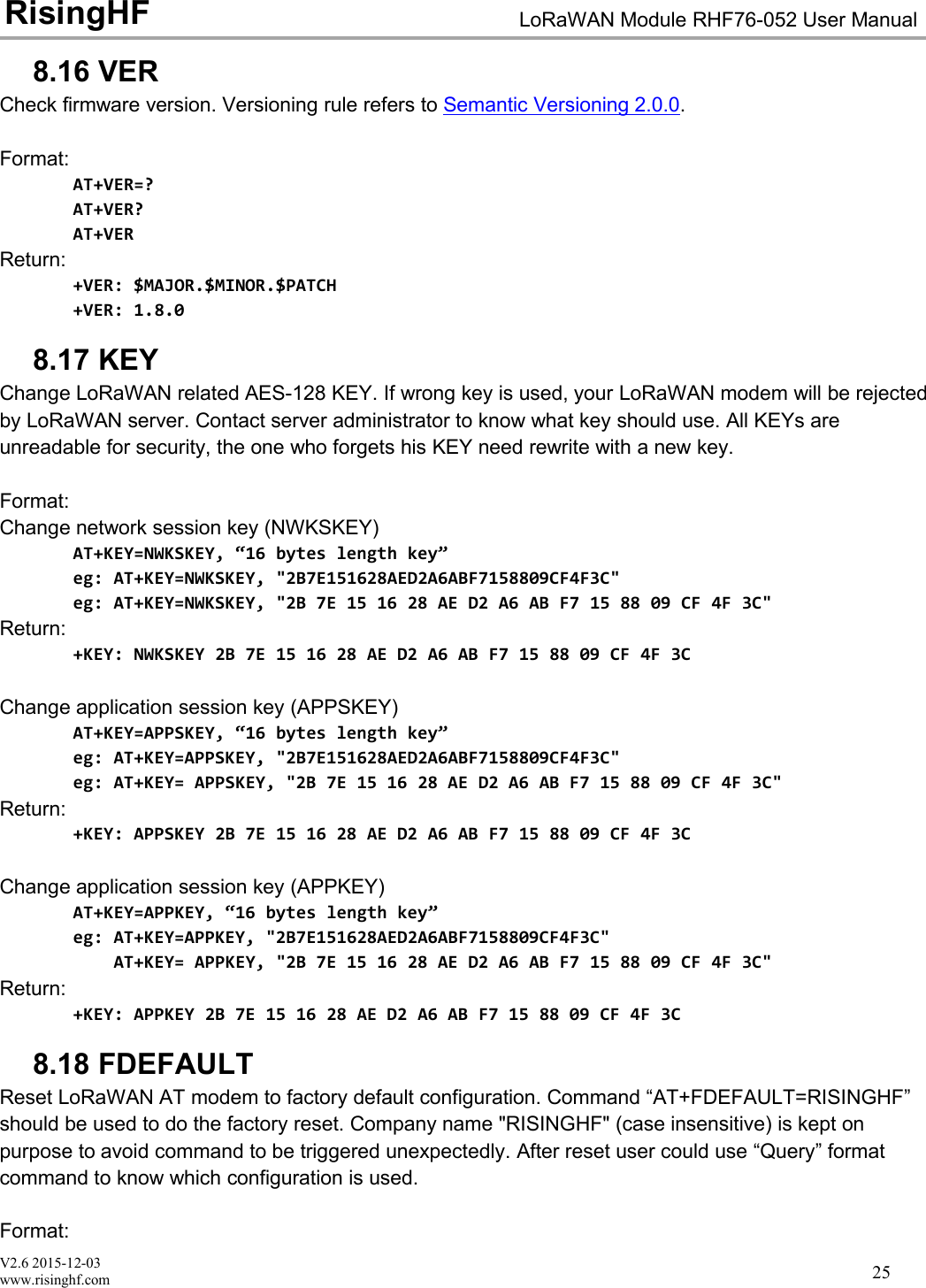
V2.6 2015-12-03www.risinghf.comLoRaWAN Module RHF76-052 User ManualRisingHF258.16 VERCheck firmware version. Versioning rule refers to Semantic Versioning 2.0.0.Format:AT+VER=?AT+VER?AT+VERReturn:+VER: $MAJOR.$MINOR.$PATCH+VER: 1.8.08.17 KEYChange LoRaWAN related AES-128 KEY. If wrong key is used, your LoRaWAN modem will be rejectedby LoRaWAN server. Contact server administrator to know what key should use. All KEYs areunreadable for security, the one who forgets his KEY need rewrite with a new key.Format:Change network session key (NWKSKEY)AT+KEY=NWKSKEY, “16 bytes length key”eg: AT+KEY=NWKSKEY, "2B7E151628AED2A6ABF7158809CF4F3C"eg: AT+KEY=NWKSKEY, "2B 7E 15 16 28 AE D2 A6 AB F7 15 88 09 CF 4F 3C"Return:+KEY: NWKSKEY 2B 7E 15 16 28 AE D2 A6 AB F7 15 88 09 CF 4F 3CChange application session key (APPSKEY)AT+KEY=APPSKEY, “16 bytes length key”eg: AT+KEY=APPSKEY, "2B7E151628AED2A6ABF7158809CF4F3C"eg: AT+KEY= APPSKEY, "2B 7E 15 16 28 AE D2 A6 AB F7 15 88 09 CF 4F 3C"Return:+KEY: APPSKEY 2B 7E 15 16 28 AE D2 A6 AB F7 15 88 09 CF 4F 3CChange application session key (APPKEY)AT+KEY=APPKEY, “16 bytes length key”eg: AT+KEY=APPKEY, "2B7E151628AED2A6ABF7158809CF4F3C"AT+KEY= APPKEY, "2B 7E 15 16 28 AE D2 A6 AB F7 15 88 09 CF 4F 3C"Return:+KEY: APPKEY 2B 7E 15 16 28 AE D2 A6 AB F7 15 88 09 CF 4F 3C8.18 FDEFAULTReset LoRaWAN AT modem to factory default configuration. Command “AT+FDEFAULT=RISINGHF”should be used to do the factory reset. Company name "RISINGHF" (case insensitive) is kept onpurpose to avoid command to be triggered unexpectedly. After reset user could use “Query” formatcommand to know which configuration is used.Format:
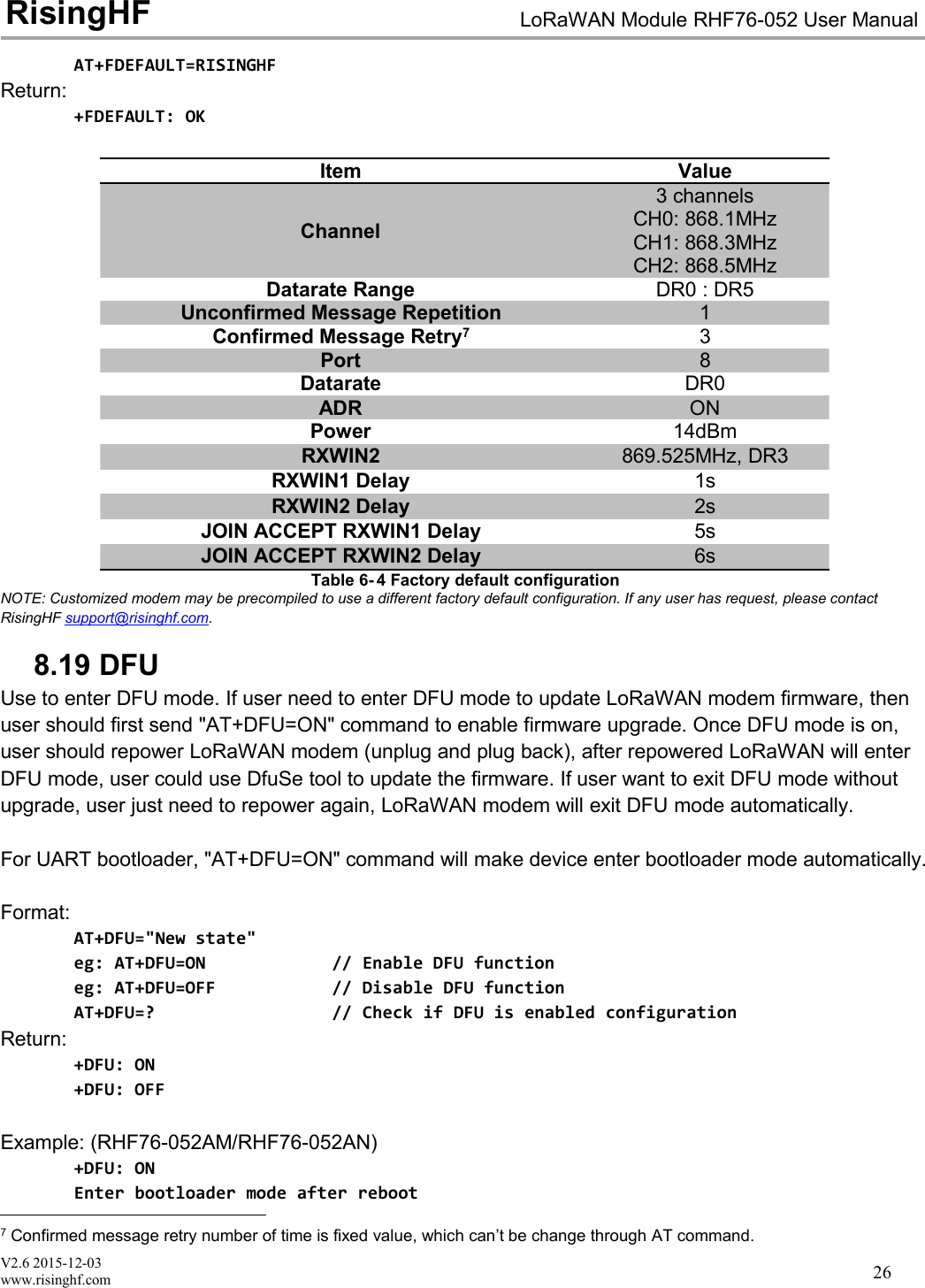
V2.6 2015-12-03www.risinghf.comLoRaWAN Module RHF76-052 User ManualRisingHF26AT+FDEFAULT=RISINGHFReturn:+FDEFAULT: OKItemValueChannel3 channelsCH0: 868.1MHzCH1: 868.3MHzCH2: 868.5MHzDatarate RangeDR0 : DR5Unconfirmed Message Repetition1Confirmed Message Retry73Port8DatarateDR0ADRONPower14dBmRXWIN2869.525MHz, DR3RXWIN1 Delay1sRXWIN2 Delay2sJOIN ACCEPT RXWIN1 Delay5sJOIN ACCEPT RXWIN2 Delay6sTable 6- 4 Factory default configurationNOTE: Customized modem may be precompiled to use a different factory default configuration. If any user has request, please contactRisingHF support@risinghf.com.8.19 DFUUse to enter DFU mode. If user need to enter DFU mode to update LoRaWAN modem firmware, thenuser should first send "AT+DFU=ON" command to enable firmware upgrade. Once DFU mode is on,user should repower LoRaWAN modem (unplug and plug back), after repowered LoRaWAN will enterDFU mode, user could use DfuSe tool to update the firmware. If user want to exit DFU mode withoutupgrade, user just need to repower again, LoRaWAN modem will exit DFU mode automatically.For UART bootloader, "AT+DFU=ON" command will make device enter bootloader mode automatically.Format:AT+DFU="New state"eg: AT+DFU=ON // Enable DFU functioneg: AT+DFU=OFF // Disable DFU functionAT+DFU=? // Check if DFU is enabled configurationReturn:+DFU: ON+DFU: OFFExample: (RHF76-052AM/RHF76-052AN)+DFU: ONEnter bootloader mode after reboot7Confirmed message retry number of time is fixed value, which can’t be change through AT command.
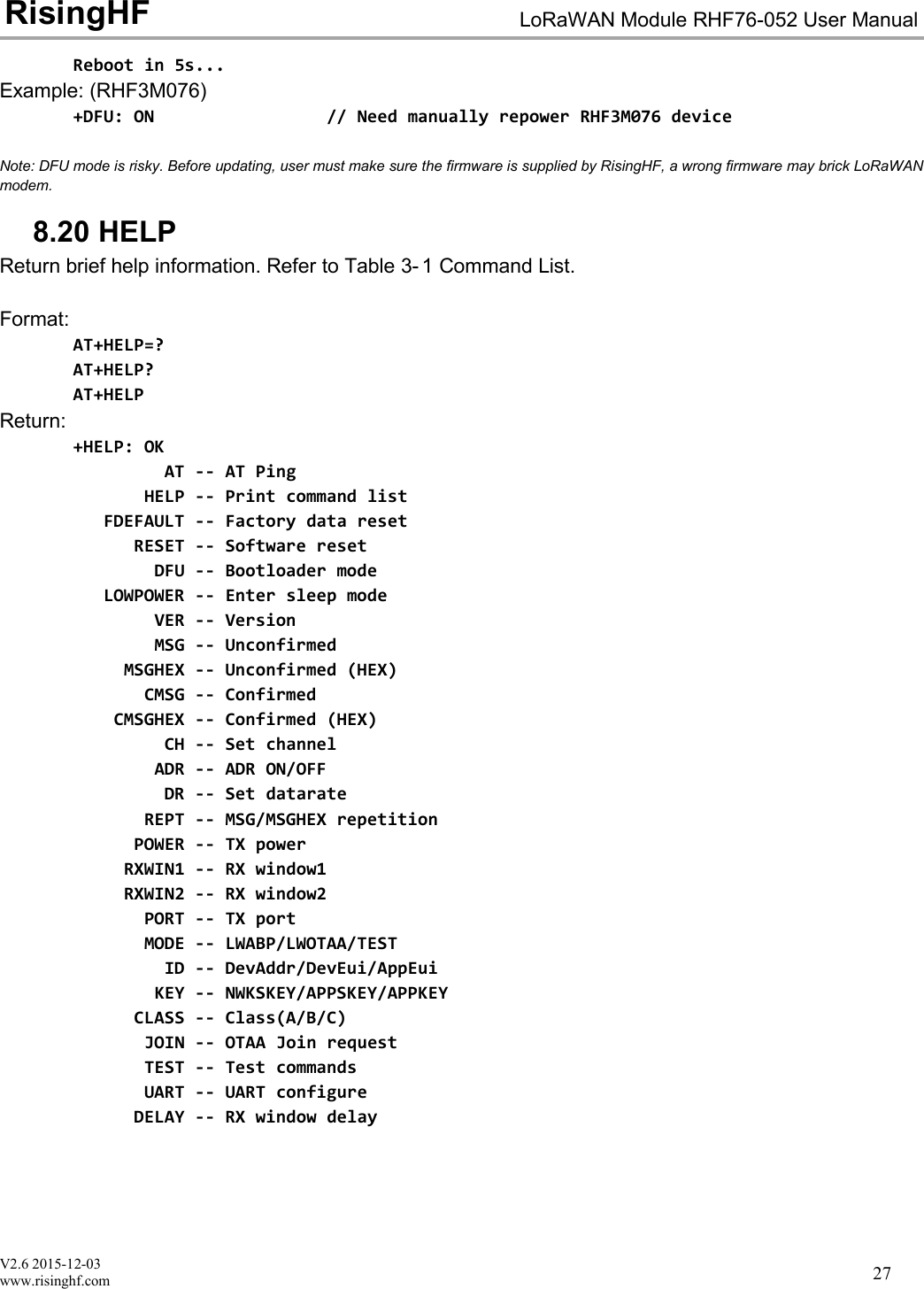
V2.6 2015-12-03www.risinghf.comLoRaWAN Module RHF76-052 User ManualRisingHF27Reboot in 5s...Example: (RHF3M076)+DFU: ON // Need manually repower RHF3M076 deviceNote: DFU mode is risky. Before updating, user must make sure the firmware is supplied by RisingHF, a wrong firmware may brick LoRaWANmodem.8.20 HELPReturn brief help information. Refer to Table 3- 1 Command List.Format:AT+HELP=?AT+HELP?AT+HELPReturn:+HELP: OKAT -- AT PingHELP -- Print command listFDEFAULT -- Factory data resetRESET -- Software resetDFU -- Bootloader modeLOWPOWER -- Enter sleep modeVER -- VersionMSG -- UnconfirmedMSGHEX -- Unconfirmed (HEX)CMSG -- ConfirmedCMSGHEX -- Confirmed (HEX)CH -- Set channelADR -- ADR ON/OFFDR -- Set datarateREPT -- MSG/MSGHEX repetitionPOWER -- TX powerRXWIN1 -- RX window1RXWIN2 -- RX window2PORT -- TX portMODE -- LWABP/LWOTAA/TESTID -- DevAddr/DevEui/AppEuiKEY -- NWKSKEY/APPSKEY/APPKEYCLASS -- Class(A/B/C)JOIN -- OTAA Join requestTEST -- Test commandsUART -- UART configureDELAY -- RX window delay
V2.6 2015-12-03www.risinghf.comLoRaWAN Module RHF76-052 User ManualRisingHF288.21 MODEUse to select work mode. LWABP8, LWOTAA9, TEST are supported. LoRaWAN modem can only workwith one mode at a time. By default, LWABP is enabled, all test commands are unavailable, LoRaWANwill return error(-12) if it receives test command in non-test mode."AT+MODE" command will reset LoRaWAN stack when first enter LWABP/LWOTTA mode and resetLoRa chip when first enter test mode.LWABP/LWOTAA mode status is remembered by LoRaWAN modem, each time LoRaWAN modemstarts, it will enter previous working mode before reset or repower.Format:AT+MODE="New mode"eg: AT+MODE=TEST // Enter TEST modeeg: AT+MODE=LWOTAA // Enter TEST modeeg: AT+MODE=LWABP // Enter LWABP modeReturn+MODE: LWABP // Enter LWABP mode successfully+MODE: LWOTAA // Enter LWABP mode successfully+MODE: TEST // Enter TEST mode successfully8.22 JOINWhen OTAA mode is enabled, JOIN command could use to join a known network.Format:AT+JOIN=["Times"], ["DELAY"], ["DELAY RANDOM OFFSET"]AT+JOIN=REJOIN1. Queryeg: AT+JOIN=? // Query JOIN statuseg: AT+JOIN? // Query JOIN status2. Joineg: AT+JOIN // Send JOIN request3. Disconnect with current network, force send one JOIN requesteg: AT+JOIN=FORCE4. Stop JOINeg: AT+JOIN=STOP5. Auto send JOIN request 10 times with (20 +/- 4)s delay, set times to 0 join forever.eg: AT+JOIN=10, 20, 4eg: AT+JOIN=0 // JOIN forever with default delay(10 +/- 2)s8LWABP is short for LoRaWAN Activation ByPersonalization. Check < LoRaWAN™ Specification> for details9LWOTAA is short for LoRaWAN Over-The-Air-Activation.
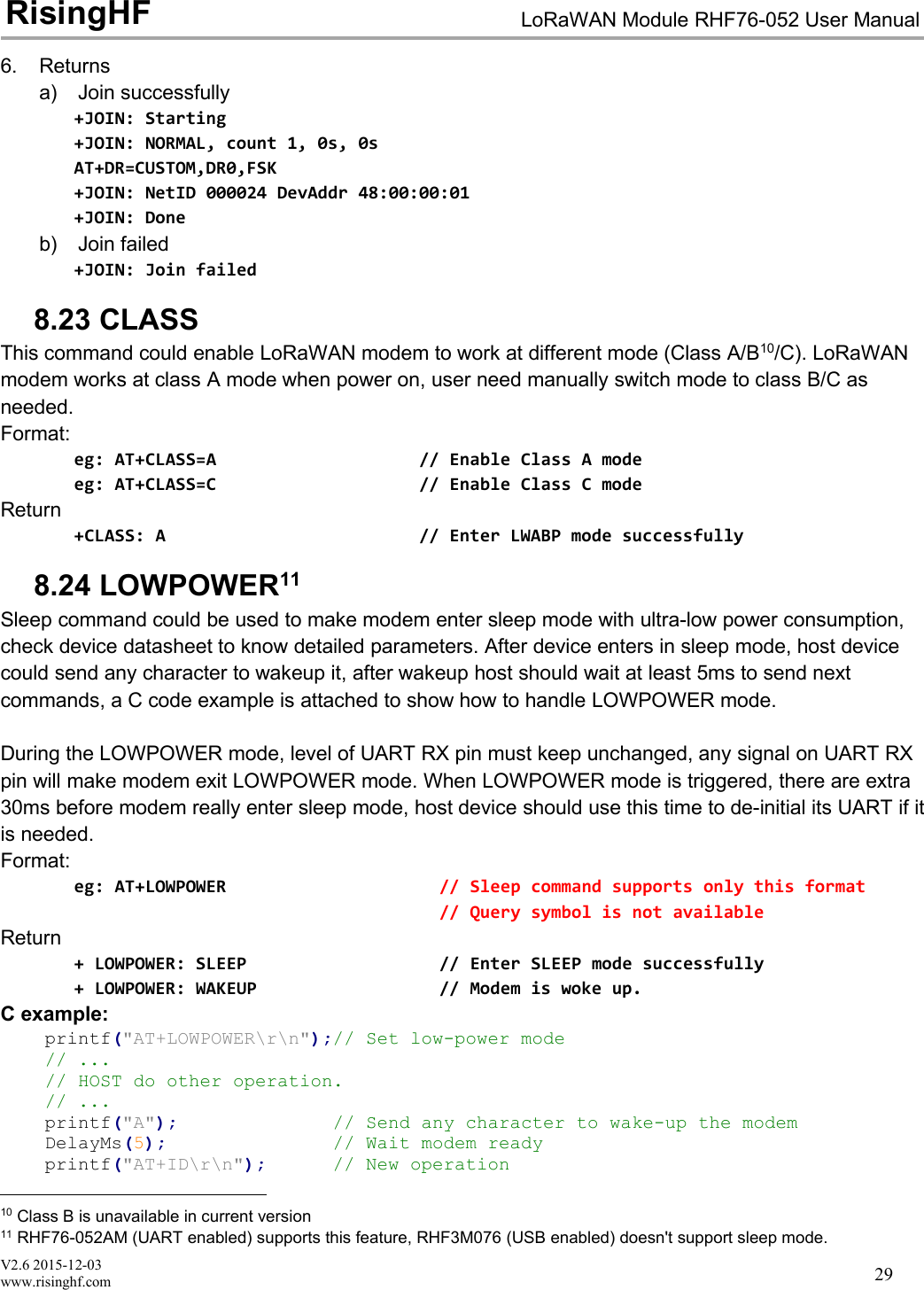
V2.6 2015-12-03www.risinghf.comLoRaWAN Module RHF76-052 User ManualRisingHF296. Returnsa) Join successfully+JOIN: Starting+JOIN: NORMAL, count 1, 0s, 0sAT+DR=CUSTOM,DR0,FSK+JOIN: NetID 000024 DevAddr 48:00:00:01+JOIN: Doneb) Join failed+JOIN: Join failed8.23 CLASSThis command could enable LoRaWAN modem to work at different mode (Class A/B10/C). LoRaWANmodem works at class A mode when power on, user need manually switch mode to class B/C asneeded.Format:eg: AT+CLASS=A // Enable Class A modeeg: AT+CLASS=C // Enable Class C modeReturn+CLASS: A // Enter LWABP mode successfully8.24 LOWPOWER11Sleep command could be used to make modem enter sleep mode with ultra-low power consumption,check device datasheet to know detailed parameters. After device enters in sleep mode, host devicecould send any character to wakeup it, after wakeup host should wait at least 5ms to send nextcommands, a C code example is attached to show how to handle LOWPOWER mode.During the LOWPOWER mode, level of UART RX pin must keep unchanged, any signal on UART RXpin will make modem exit LOWPOWER mode. When LOWPOWER mode is triggered, there are extra30ms before modem really enter sleep mode, host device should use this time to de-initial its UART if itis needed.Format:eg: AT+LOWPOWER // Sleep command supports only this format// Query symbol is not availableReturn+ LOWPOWER: SLEEP // Enter SLEEP mode successfully+ LOWPOWER: WAKEUP // Modem is woke up.C example:printf("AT+LOWPOWER\r\n");// Set low-power mode// ...// HOST do other operation.// ...printf("A"); // Send any character to wake-up the modemDelayMs(5); // Wait modem readyprintf("AT+ID\r\n"); // New operation10 Class B is unavailable in current version11 RHF76-052AM (UART enabled) supports this feature, RHF3M076 (USB enabled) doesn't support sleep mode.
V2.6 2015-12-03www.risinghf.comLoRaWAN Module RHF76-052 User ManualRisingHF308.25 TESTTEST command is not like other command, it is a serious command, includes several sub-commands,refer to table below. With test mode, user could do RF performance test quickly without any knowledgeof LoRa chip. Commands which are related to RF configuration is disabled in test mode.Sub-CommandCommentHELPPrint test command help information, make LoRa transceiver to standby modeSTOPSet LoRaWAN Modem to TEST stop modeTXCWTransmit continuous waveTXCLORATransmit continuous LoRa signalRFCFGSet RF configuration in TEST modeRXLRPKTContinuous receive pure LoRa packet, print once there is new packet receivedTXLRPKTSend one HEX format packet outTXLRSTRSend one string format packetRSSIGet RSSI value of specified channelLWDLSend LoRaWAN downlink packet, useful tool to test CLASS C deviceTable 6- 5 TEST mode sub-command list8.25.1 Print Help InformationFormat:AT+TSET=HELPReturn:+TEST: HELPSTOP -- AT+TEST=STOPHELP -- AT+TSET=HELPTXCW -- AT+TEST=TXCWTXCLORA -- AT+TEST=TXCLORARFCFG -- AT+TEST=RFCFG,[F],[SF],[BW],[TXPR],[RXPR],[POW]RXLRPKT -- AT+TEST=RXLRPKTTXLRPKT -- AT+TEST=TXLRPKT,"HEX"TXLRSTR -- AT+TEST=TXLRSTR,"TEXT"RSSI -- AT+TEST=RSSI,F,[CNT]LWDL -- AT+TEST=LWDL,TYPE,DevAddr,"HEX",[FCNT],[FPORT],[FCTRL]"[ ]" means the parameter is omissible together with parameters behind it8.25.2 Enter TEST modeBefore use any TEST command, LoRaWAN should work in test mode, or error code -12 will bereported.Command:AT+MODE=TESTReturn:+MODE: TEST // LoRaWAN modem enter TEST mode successfully8.25.3 Query RF configurationFirst thing after enter TEST mode should be check RF configuration.Command:
V2.6 2015-12-03www.risinghf.comLoRaWAN Module RHF76-052 User ManualRisingHF31AT+TEST=? // Query test mode and RF configurationReturn Error:+TEST: ERROR(-12)When come with ERROR(-12), user could try "AT+MODE=?" to check if LoRaWAN modem is in TEST mode, if not user should enter testmode first.Return STOP:+TEST: STOP+TEST: RFCFG F:433300000, SF12, BW125K, TXPR:8, RXPR:8, POW:14dBmReturn TXLRPKT:+TEST: TXLRPKT+TEST: RFCFG F:433300000, SF12, BW125K, TXPR:8, RXPR:8, POW:14dBmReturn RXLRPKT:+TEST: RXLRPKT+TEST: RFCFG F:433300000, SF12, BW125K, TXPR:8, RXPR:8, POW:14dBmReturn TXCW:+TEST: TXCW+TEST: RFCFG F:433300000, SF12, BW125K, TXPR:8, RXPR:8, POW:14dBm8.25.4 Set RF ConfigurationRFCFG supports set frequency, SF, band width, TX preamble, RX preamble and TX power settings.TX and RX shares all configuration except "preamble length", user could choose different preamblelength. For LoRa communication, it is strongly recommended to set RX preamble length longer thanTX's. Bandwidth only supports 125KHz / 250KHz / 500KHz.Depend on Semtech SX1276 (PA_BOOST/RFO) and design solution of RisingHF module, MAX outputpower of different band LoRaWAN modem could be different. Check below table about the details.DeviceBootloaderInterfaceLF Band12HF Band13RHF3M076USBUSB20dBm14dBmRHF76-052AMUARTUART20dBm14dBmRHF76-052ANUSBUART20dBm14dBmTable 6- 6 MAX output power of HF and LF bandRHF3M076 is part number of RisingHF LoRaWAN modem.Format:"[ ]" means the parameter is omissible together with parameters after it12 LF Band: Frequency is less than 525MHz13 HF Band: Frequency is larger than 525MHz
V2.6 2015-12-03www.risinghf.comLoRaWAN Module RHF76-052 User ManualRisingHF32AT+TEST=RFCFG,[FREQUENCY],[SF],[BANDWIDTH],[TX PR],[RX PR],[TX POWER]// TX Configuration/868MHz/SF9/BW125KHz/TXPREAMBEL 12/RXPREAMBEL 15/14dBmeg: AT+TEST=RFCFG,866,SF12,125,12,15,14Return:+TEST: RFCFG F:866000000,SF12,BW125K,TXPR:12,RXPR:15,POW:14dBm8.25.5 TX LoRa PacketAfter enter test mode, user could send LoRa packet through "AT+TEST=TXLRPKT" sub-command.The command format is like below:AT+TEST=TXLRPKT, "HEX STRING"Command sequence to send LoRa packet:// Set test modeAT+MODE=TEST// Query test mode, check RF configurationAT+TEST=?// Set RF ConfigurationAT+TEST=RFCFG,[FREQUENCY],[SF],[BANDWIDTH],[TX PR],[RX PR],[TX POWER]// Send HEX format packetAT+TEST=TXLRPKT, "HEX String"eg:AT+TEST=TXLRPKT, "00 AA 11 BB 22 CC"// Send TEXT format packetAT+TEST=TXLRSTR, "TEXT"eg:AT+TEST=TXLRSTR, "LoRaWAN Modem"Return:+TEST: TXLRPKT “00 11 22 33 44”+TEST: TXLRSTR "LoRaWAN Modem"+TEST: TX DONE8.25.6 RX LoRa PacketAfter enter test mode, user could enter LoRa packet continuous RX mode through RXLRPKT sub-command. Like below:AT+TEST=RXLRPKTCommand sequence to receive LoRa packet:// Set test modeAT+MODE=TEST// Query test mode, check RF configurationAT+TEST=?// Set RF ConfigurationAT+TEST=RFCFG,[FREQUENCY],[SF],[BANDWIDTH],[TX PR],[RX PR],[TX POWER]// Enter RX continuous modeAT+TEST=RXLRPKT
V2.6 2015-12-03www.risinghf.comLoRaWAN Module RHF76-052 User ManualRisingHF33Return:+TEST: LEN:250, RSSI:-106, SNR:10+TEST: RX 00 11 22 33 448.25.7 TX Continuous WaveBefore enable TXCW function, right frequency and TX power should be set. Format:AT+TEST=TXCWReturn:+TEST: TXCW8.25.8 TX Continuous LoRaBefore enable TXCLORA function, right frequency and TX power should be set. Format:AT+TEST= TXCLORAReturn:+TEST: TXCLORA8.25.9 RSSIRead RSSI from a specified channel. Format:AT+TEST = RSSI, frequency(MHz), [times]Return:+TEST: RSSI, frequency+TEST: RSSI 0, RSSI0; 1, RSSI1; ... n, RSSIn;...+TEST: RSSI n+1, RSSI0; n+2, RSSI1; ..., ......+TEST: RSSI, AVG average, MAX maximum, MIN minimum8.25.10 LWDLLWDL command is designed to test LoRaWAN modem CLASS C function. Use this command, usercan easily send data to a working LoRaWAN Class C device.AT+TEST = LWDL, TYPE, "DevAddr", "HEX STRING", [FCNT], [FPORT], [FCTRL]Return:AT+TEST=LWDL,MSG,"009291ad","14 54 54 88 08 93 122 35", 1, 5, 00+TEST: LWDL "A0 AD 91 92 00 00 01 00 05 13 4D 37 EA 53 E3 02 3A 9F 01 25 D2 34"+TEST: LORAWAN DOWNLINK TX DONE8.26 UART8.26.1 TIMEOUTLoRaWAN AT modem supports UART receive timeout feature, AT parser inside the modem startcounts from first "AT" character is received, when counter overflows, a "Input timeout" event will betriggered. One message like below will be showed. Maximum timeout value is 300ms.+INFO: Input timeout, start parse
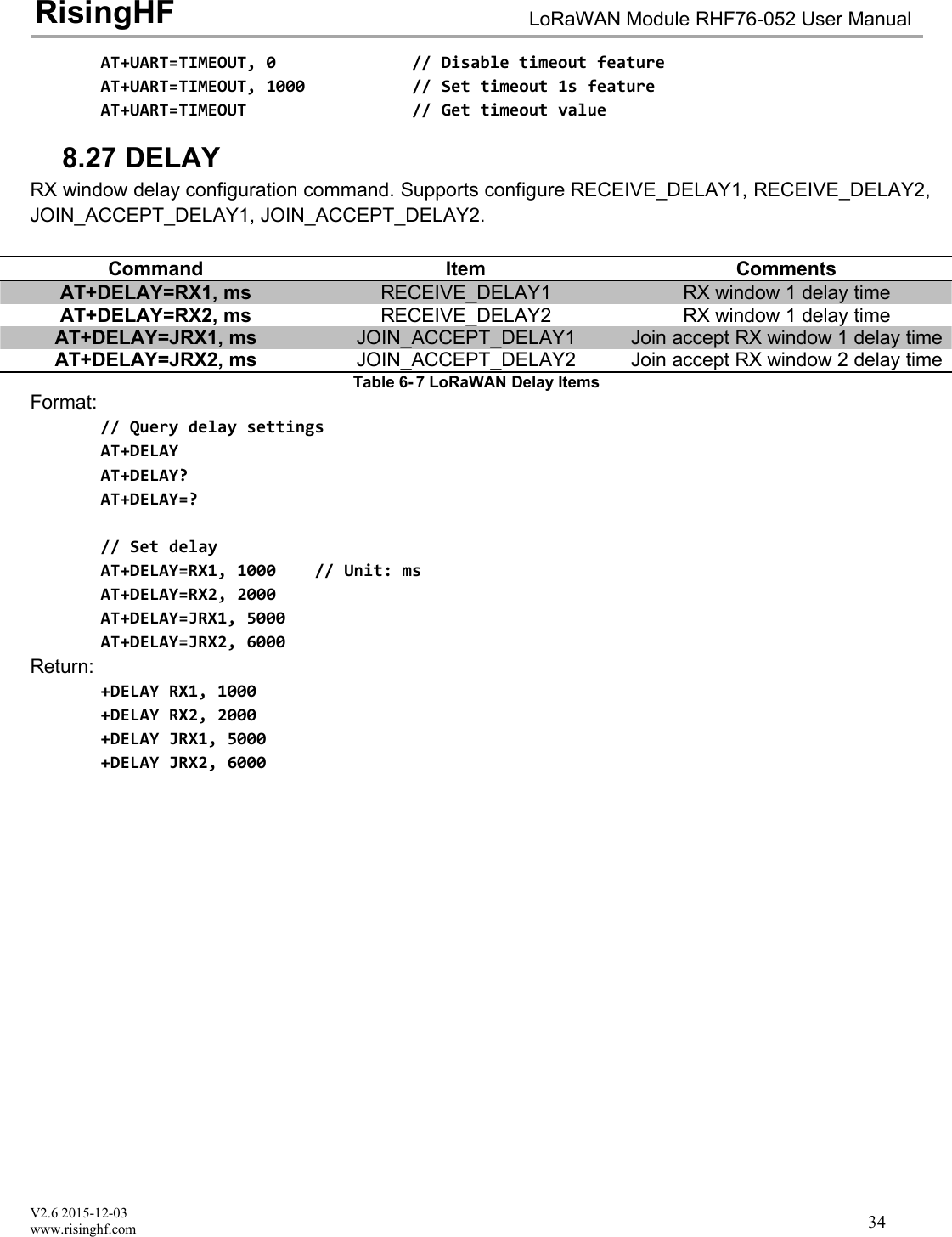
V2.6 2015-12-03www.risinghf.comLoRaWAN Module RHF76-052 User ManualRisingHF34AT+UART=TIMEOUT, 0 // Disable timeout featureAT+UART=TIMEOUT, 1000 // Set timeout 1s featureAT+UART=TIMEOUT // Get timeout value8.27 DELAYRX window delay configuration command. Supports configure RECEIVE_DELAY1, RECEIVE_DELAY2,JOIN_ACCEPT_DELAY1, JOIN_ACCEPT_DELAY2.CommandItemCommentsAT+DELAY=RX1, msRECEIVE_DELAY1RX window 1 delay timeAT+DELAY=RX2, msRECEIVE_DELAY2RX window 1 delay timeAT+DELAY=JRX1, msJOIN_ACCEPT_DELAY1Join accept RX window 1 delay timeAT+DELAY=JRX2, msJOIN_ACCEPT_DELAY2Join accept RX window 2 delay timeTable 6- 7 LoRaWAN Delay ItemsFormat:// Query delay settingsAT+DELAYAT+DELAY?AT+DELAY=?// Set delayAT+DELAY=RX1, 1000 // Unit: msAT+DELAY=RX2, 2000AT+DELAY=JRX1, 5000AT+DELAY=JRX2, 6000Return:+DELAY RX1, 1000+DELAY RX2, 2000+DELAY JRX1, 5000+DELAY JRX2, 6000
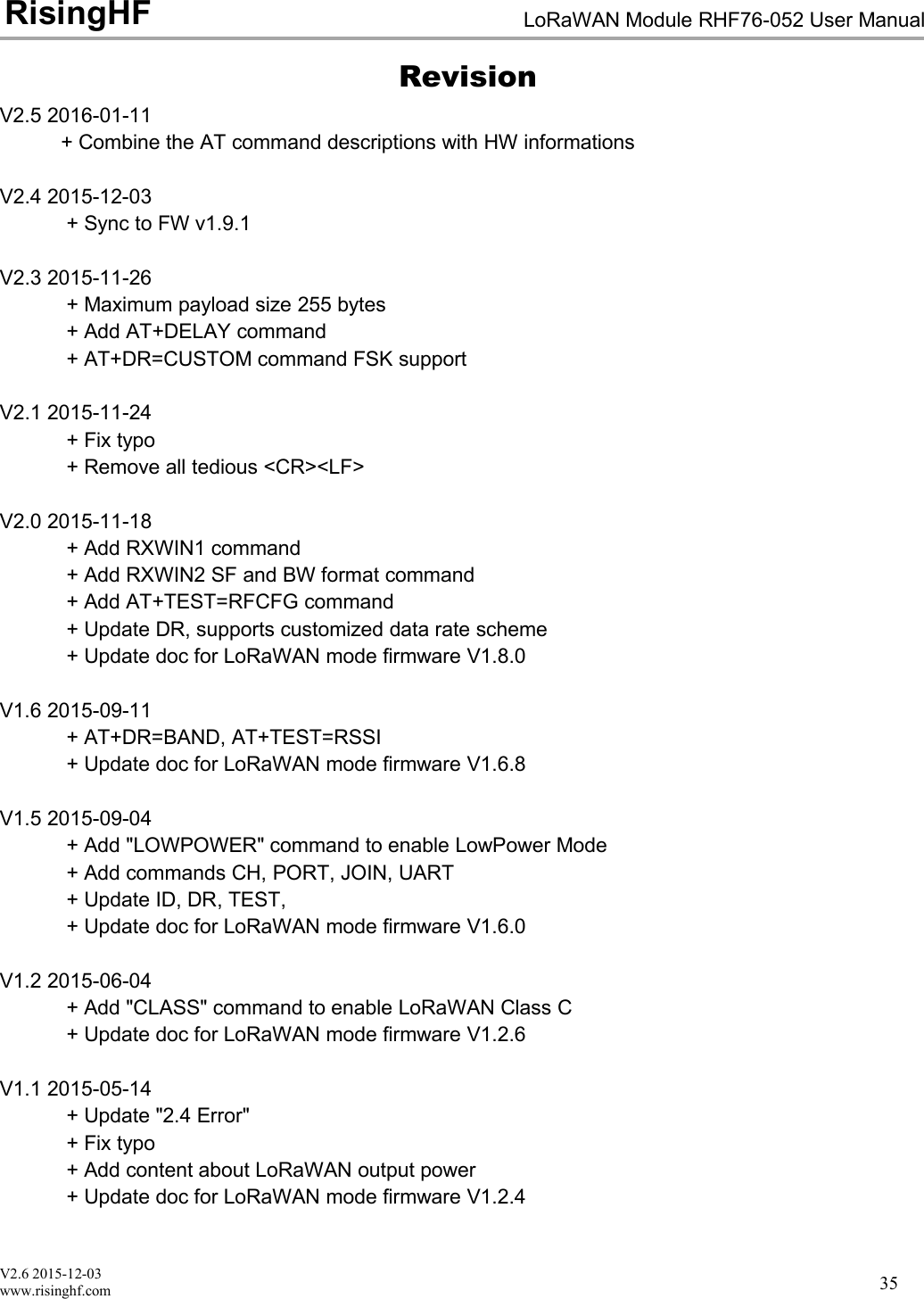
V2.6 2015-12-03www.risinghf.comLoRaWAN Module RHF76-052 User ManualRisingHF35RevisionV2.5 2016-01-11+ Combine the AT command descriptions with HW informationsV2.4 2015-12-03+ Sync to FW v1.9.1V2.3 2015-11-26+ Maximum payload size 255 bytes+ Add AT+DELAY command+ AT+DR=CUSTOM command FSK supportV2.1 2015-11-24+ Fix typo+ Remove all tedious <CR><LF>V2.0 2015-11-18+ Add RXWIN1 command+ Add RXWIN2 SF and BW format command+ Add AT+TEST=RFCFG command+ Update DR, supports customized data rate scheme+ Update doc for LoRaWAN mode firmware V1.8.0V1.6 2015-09-11+ AT+DR=BAND, AT+TEST=RSSI+ Update doc for LoRaWAN mode firmware V1.6.8V1.5 2015-09-04+ Add "LOWPOWER" command to enable LowPower Mode+ Add commands CH, PORT, JOIN, UART+ Update ID, DR, TEST,+ Update doc for LoRaWAN mode firmware V1.6.0V1.2 2015-06-04+ Add "CLASS" command to enable LoRaWAN Class C+ Update doc for LoRaWAN mode firmware V1.2.6V1.1 2015-05-14+ Update "2.4 Error"+ Fix typo+ Add content about LoRaWAN output power+ Update doc for LoRaWAN mode firmware V1.2.4
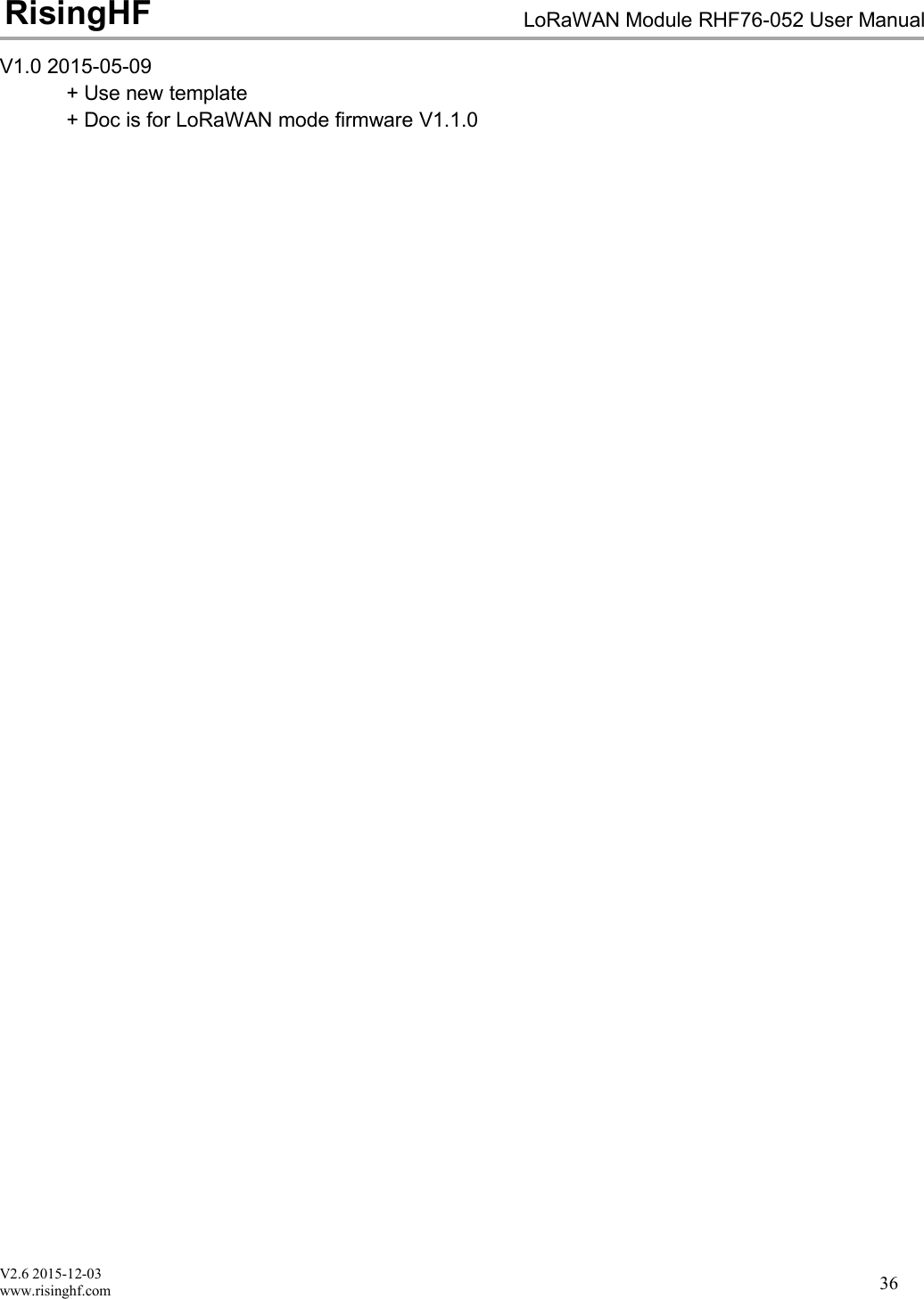
V2.6 2015-12-03www.risinghf.comLoRaWAN Module RHF76-052 User ManualRisingHF36V1.0 2015-05-09+ Use new template+ Doc is for LoRaWAN mode firmware V1.1.0
V2.6 2015-12-03www.risinghf.comLoRaWAN Module RHF76-052 User ManualRisingHF37Please Read Carefully:Information in this document is provided solely in connection with RisingHF products. RisingHF reserve the right to make changes, corrections,modifications or improvements, to this document, and the products and services described herein at any time, without notice.All RisingHF products are sold pursuant to RisingHF’s terms and conditions of sale.Purchasers are solely responsible for the choice, selection and use of the RisingHF products and services described herein, and RisingHFassumes no liability whatsoever relating to the choice, selection or use of the RisingHF products and services described herein.No license, express or implied, by estoppel or otherwise, to any intellectual property rights is granted under this document. If any part of thisdocument refers to any third party products or services it shall not be deemed a license grant by RisingHF for the use of such third partyproducts or services, or any intellectual property contained therein or considered as a warranty covering the use in any manner whatsoever ofsuch third party products or services or any intellectual property contained therein.UNLESS OTHERWISE SET FORTH IN RISINGHF’S TERMS AND CONDITIONS OF SALE RisingHF DISCLAIMS ANY EXPRESS ORIMPLIEDWARRANTY WITH RESPECT TO THE USE AND/OR SALE OF RisingHF PRODUCTS INCLUDING WITHOUT LIMITATIONIMPLIEDWARRANTIES OF MERCHANTABILITY, FITNESS FOR A PARTICULAR PURPOSE (AND THEIR EQUIVALENTS UNDER THELAWSOF ANY JURISDICTION), OR INFRINGEMENT OF ANY PATENT, COPYRIGHT OR OTHER INTELLECTUAL PROPERTY RIGHT.RISINGHF PRODUCTS ARE NOT DESIGNED OR AUTHORIZED FOR USE IN: (A) SAFETY CRITICAL APPLICATIONS SUCH AS LIFESUPPORTING, ACTIVE IMPLANTED DEVICES OR SYSTEMS WITH PRODUCT FUNCTIONAL SAFETY REQUIREMENTS; (B)AERONAUTIC APPLICATIONS; (C) AUTOMOTIVE APPLICATIONS OR ENVIRONMENTS, AND/OR (D) AEROSPACE APPLICATIONS ORENVIRONMENTS. WHERE RISINGHF PRODUCTS ARE NOT DESIGNED FOR SUCH USE, THE PURCHASER SHALL USE PRODUCTSAT PURCHASER’S SOLE RISK, EVEN IF RISINGHF HAS BEEN INFORMED IN WRITING OF SUCH USAGE, UNLESS A PRODUCT ISEXPRESSLY DESIGNATED BY RISINGHF AS BEING INTENDED FOR “AUTOMOTIVE, AUTOMOTIVE SAFETY OR MEDICAL” INDUSTRYDOMAINS ACCORDING TO RISINGHF PRODUCT DESIGN SPECIFICATIONS. PRODUCTS FORMALLY ESCC, QML OR JAN QUALIFIEDARE DEEMED SUITABLE FOR USE IN AEROSPACE BY THE CORRESPONDING GOVERNMENTAL AGENCY.Resale of RisingHF products with provisions different from the statements and/or technical features set forth in this document shallimmediately void any warranty granted by RisingHF for the RisingHF product or service described herein and shall not create or extend in anymanner whatsoever, any liability of RisingHF.RisingHF and the RisingHF logo are trademarks or registered trademarks of RisingHF in various countries.Information in this document supersedes and replaces all information previously supplied.The RisingHF logo is a registered trademark of RisingHF. All other names are the property of their respective owners.© 2016 RISINGHF - All rights reservedhttp://www.risinghf.com
FEDERALCOMMUNICATIONSCOMMISSION(FCC)STATEMENTSThelora GatewayMo dulecomplieswithPart15oftheUnitedStatesofAmericaFCCrulesandregulations.TheOriginalEquipmentManufacturer(OEM)mustcomplywiththeFCCcertificationrequirements.15.21Anychangesormodificationsmadetothemodulewithoutthemanufacturer’sapprovalcouldvoidtheuser’sauthoritytooperatethemodule.15.105(b)ThisequipmenthasbeentestedandfoundtocomplywiththelimitsforaClassBdigitaldevice,pursuanttopart15oftheFCCrules.Theselimitsaredesignedtoprovidereasonableprotectionagainstharmfulinterferenceinaresidentialinstallation.Thisequipmentgenerates,usesandcanradiateradiofrequencyenergyand,ifnotinstalledandusedinaccordancewiththeinstructions,maycauseharmfulinterferencetoradiocommunications.However,thereisnoguaranteethatinterferencewillnotoccurinaparticularinstallation.Ifthisequipmentdoescauseharmfulinterferencetoradioortelevisionreception,whichcanbedeterminedbyturningtheequipmentoffandon,theuserisencouragedtotrytocorrecttheinterferencebyoneormoreofthefollowingmeasures: Reorientorrelocatethereceivingantenna. Increasetheseparationbetweentheequipmentandreceiver. Connecttheequipmentintoanoutletonacircuitdifferentfromthattowhichthereceiverisconnected. Consultthedealeroranexperiencedradio/TVtechnicianforhelp.PLEASENOTETHEMODULEOPERATIONISSUBJECTTOTHEFOLLOWINGTWOCONDITIONS:1. Thisdevicemaynotcauseharmfulinterferences.2. Thisdevicemustacceptanyinterferencereceived,includinginterferencethatmaycauseundesiredoperation.RADIATIONEXPOSURESTATEMENTThisequipmentcomplieswithFCCradiationexposurelimitssetforthforanuncontrolledenvironment.EndusersmustfollowthespecificoperatinginstructionsforsatisfyingRFexposurecompliance.Thistransmittermustnotbeco‐locatedoroperatinginconjunctionwithanyotherantennaortransmitter,andtheendproductmusthaveaseparationdistanceofatleast20cmfromall persons.WiththedocumentedmaxoutputpowerthemodulemeetstheFCCSARExemptiontocomplywithanyapplicableRFexposurerequirementsinitsfinalconfiguration.
ORIGINALEQUIPMENTMANUFACTURER(OEM)NOTES TheOEMmustcertifythefinalendproducttocomplywithunintentionalradiators(FCCSections15.107and15.109)beforedeclaringcomplianceofthefinalproducttoPart15oftheFCCrulesandregulations.IntegrationintodevicesthataredirectlyorindirectlyconnectedtoAClinesmustaddwithClassIIPermissiveChange. TheOEMmustcomplywiththeFCClabelingrequirements.Ifthemodule’slabelisnotvisiblewheninstalled,thenanadditionalpermanentlabelmustbeappliedontheoutsideofthefinishedproductwhichstates:“ContainstransmittermoduleFCCID:2AJUZ76052”.Additionally, the followingstatementshould be included onthelabelandinthefinalproduct’susermanual:“ThisdevicecomplieswithPart15oftheFCCRules.Operationissubjecttothefollowingtwoconditions:(1)Thisdevicemaynotcauseharmfulinterferences,and(2)thisdevicemustacceptanyinterferencereceived,includinginterferencethatmaycauseundesiredoperation.” Themoduleislimitedtoinstallationinmobileorfixedapplications.Separateapprovalisrequiredforallotheroperatingconfigurations,includingportableconfigurationwithrespecttoPart2.1093anddifferentantennaconfigurations. Amoduleormodulescanonlybeusedwithoutadditionalauthorizationsiftheyhavebeentestedandgrantedunderthesameintendedend‐useoperationalconditions,includingsimultaneoustransmissionoperations.Whentheyhavenotbeentestedandgrantedinthismanner,additionaltestingand/orFCCapplicationfilingmayberequired.Themoststraightforwardapproachtoaddressadditionaltestingconditionsistohavethegranteeresponsibleforthecertificationofatleastoneofthemodulessubmitapermissivechangeapplication.Whenhavingamodulegranteefileapermissivechangeisnotpracticalorfeasible,thefollowingguidanceprovidessomeadditionaloptionsforhostmanufacturers.Integrationsusingmoduleswhereadditionaltestingand/orFCCapplicationfiling(s)mayberequiredare:(A)amoduleusedindevicesrequiringadditionalRFexposurecomplianceinformation(e.g.,MPEevaluationorSARtesting);(B)limitedand/orsplitmodulesnotmeetingallofthemodulerequirements;and(C)simultaneoustransmissionsforindependentcollocatedtransmittersnotpreviouslygrantedtogether.                This Module is Limited modular approval, it is limited to OEM installation ONLY.               Change another host devices or Integration into different devices must add with Class II Permissive Change.                             Additional measurements (15B) and/or equipment authorizations (e.g Verification) may need to be addressed             depending on co-location or simultaneous transmission issues if applicable.             (OEM) Integrator is reminded to assure that these installation instructions will not be made available to the end user         of the final host device. 

Navigation menu