SECOM TWSECOMOPC001C Access Reader User Manual 20171201 OPC001C 2C

TAIWAN SECOM CO., LTD. Access Reader 20171201 OPC001C 2C

User Manual

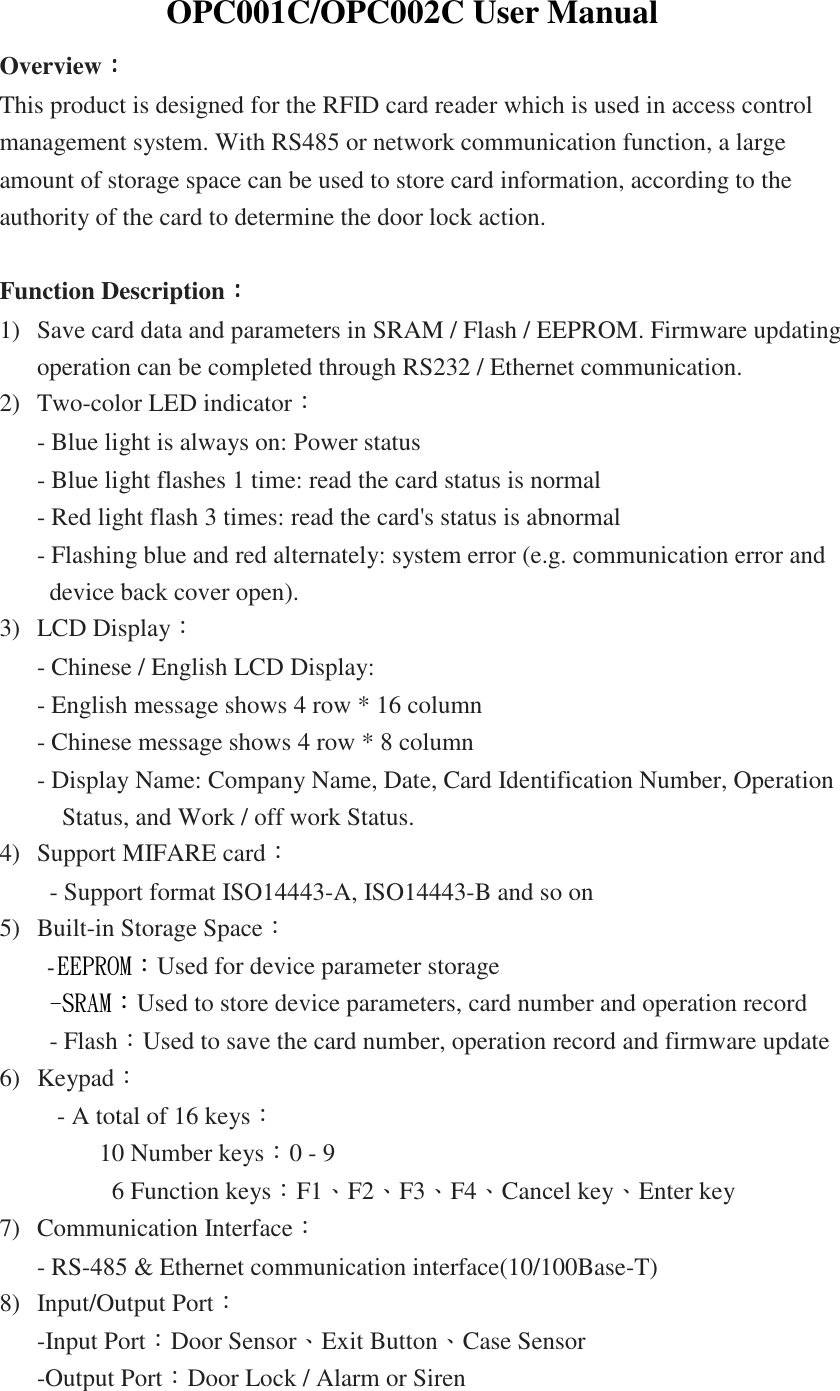
OPC001C/OPC002C User Manual Overview:::: This product is designed for the RFID card reader which is used in access control management system. With RS485 or network communication function, a large amount of storage space can be used to store card information, according to the authority of the card to determine the door lock action.  Function Description:::: 1) Save card data and parameters in SRAM / Flash / EEPROM. Firmware updating operation can be completed through RS232 / Ethernet communication. 2) Two-color LED indicator: - Blue light is always on: Power status - Blue light flashes 1 time: read the card status is normal - Red light flash 3 times: read the card's status is abnormal - Flashing blue and red alternately: system error (e.g. communication error and device back cover open). 3) LCD Display: - Chinese / English LCD Display: - English message shows 4 row * 16 column - Chinese message shows 4 row * 8 column - Display Name: Company Name, Date, Card Identification Number, Operation Status, and Work / off work Status. 4) Support MIFARE card: - Support format ISO14443-A, ISO14443-B and so on 5) Built-in Storage Space:   -EEPROM:Used for device parameter storage -SRAM:Used to store device parameters, card number and operation record - Flash:Used to save the card number, operation record and firmware update 6) Keypad:   - A total of 16 keys:           10 Number keys:0 - 9       6 Function keys:F1、F2、F3、F4、Cancel key、Enter key 7) Communication Interface: - RS-485 & Ethernet communication interface(10/100Base-T) 8) Input/Output Port: -Input Port:Door Sensor、Exit Button、Case Sensor   -Output Port:Door Lock / Alarm or Siren
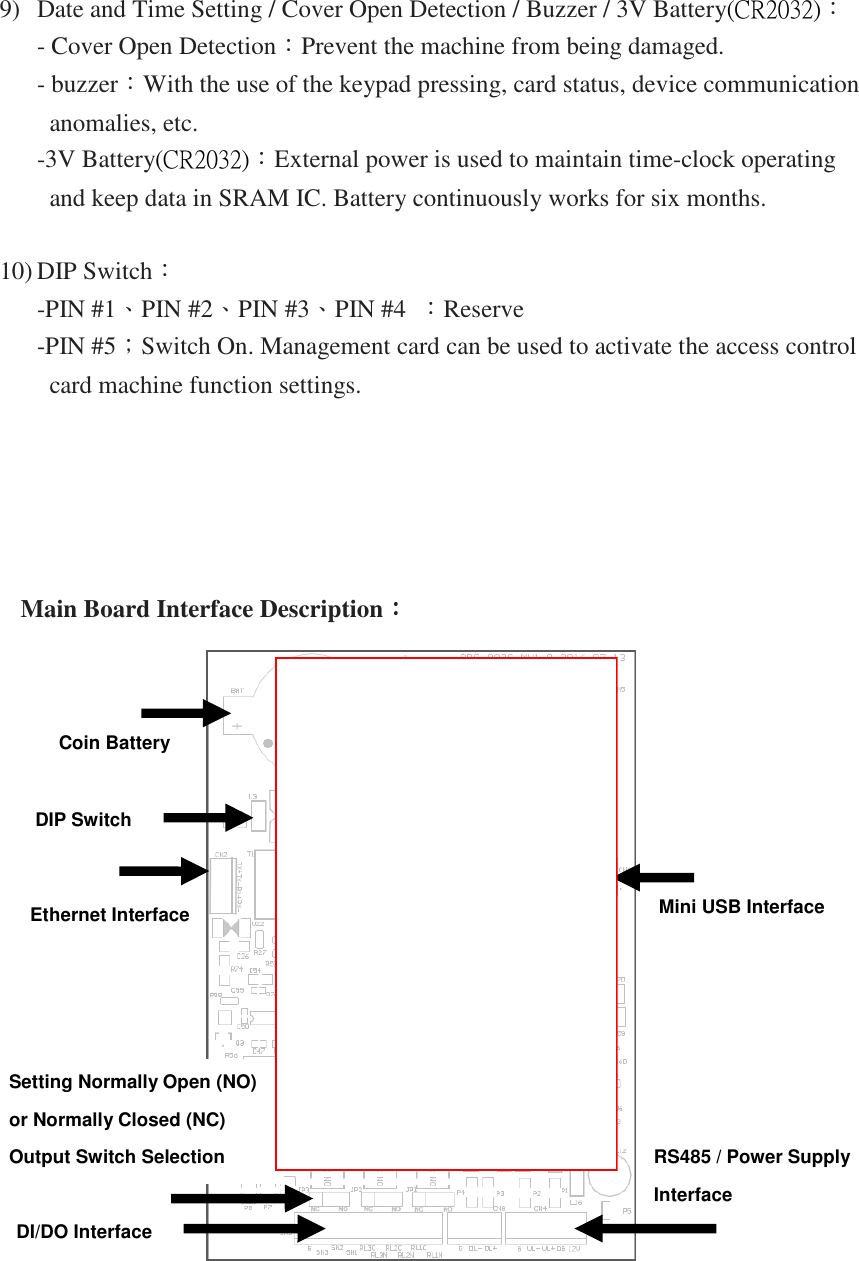
9) Date and Time Setting / Cover Open Detection / Buzzer / 3V Battery(CR2032): - Cover Open Detection:Prevent the machine from being damaged. - buzzer:With the use of the keypad pressing, card status, device communication anomalies, etc. -3V Battery(CR2032):External power is used to maintain time-clock operating and keep data in SRAM IC. Battery continuously works for six months.  10) DIP Switch: -PIN #1、PIN #2、PIN #3、PIN #4  :Reserve   -PIN #5;Switch On. Management card can be used to activate the access control card machine function settings.          Main Board Interface Description::::     Coin Battery  DIP Switch Ethernet Interface  Mini USB Interface  Setting Normally Open (NO)  or Normally Closed (NC)  Output Switch Selection   DI/DO Interface RS485 / Power Supply  Interface
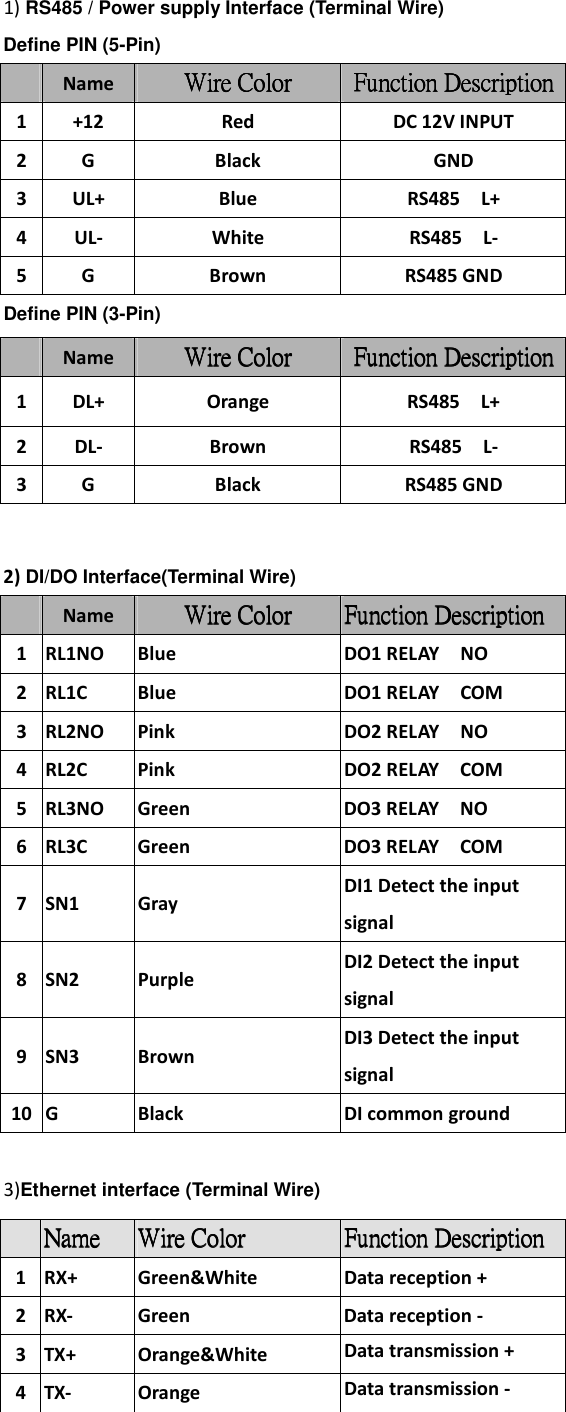
1) RS485 / Power supply Interface (Terminal Wire) Define PIN (5-Pin)   Name  WireWireWireWire    CCCColorolorolorolor Function DescriptionFunction DescriptionFunction DescriptionFunction Description 1 +12  Red  DC 12V INPUT 2 G  Black  GND 3 UL+  Blue  RS485    L+ 4 UL-  White  RS485    L- 5 G  Brown  RS485 GND Define PIN (3-Pin)       2) DI/DO Interface(Terminal Wire)      Name  Wire Wire Wire Wire CCCColorolorolorolor Function DescriptionFunction DescriptionFunction DescriptionFunction Description 1 RL1NO  Blue  DO1 RELAY    NO 2 RL1C  Blue  DO1 RELAY    COM 3 RL2NO  Pink  DO2 RELAY    NO 4 RL2C  Pink  DO2 RELAY    COM 5 RL3NO  Green  DO3 RELAY    NO 6 RL3C  Green  DO3 RELAY    COM 7 SN1  Gray DI1 Detect the input signal 8 SN2  Purple DI2 Detect the input signal 9 SN3  Brown DI3 Detect the input signal 10 G  Black  DI common ground  3)Ethernet interface (Terminal Wire)             Name  Wire Wire Wire Wire CCCColorolorolorolor Function DescriptionFunction DescriptionFunction DescriptionFunction Description 1 DL+  Orange  RS485    L+ 2 DL-  Brown  RS485    L- 3 G  Black  RS485 GND  NameNameNameName     Wire Wire Wire Wire CCCColorolorolorolor     Function DescriptionFunction DescriptionFunction DescriptionFunction Description 1 RX+  Green&White  Data reception + 2 RX-  Green  Data reception - 3 TX+  Orange&White  Data transmission + 4 TX-  Orange  Data transmission -
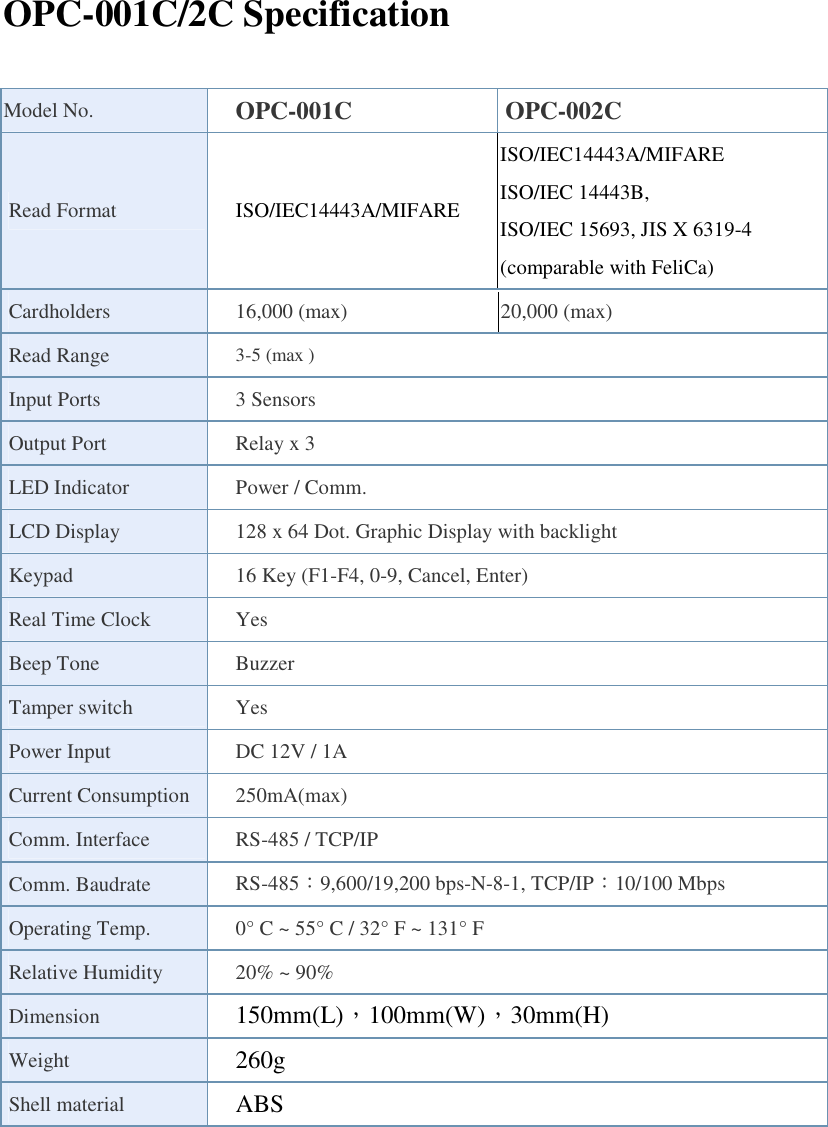
OPC-001C/2C Specification  Model No.  OPC-001C  OPC-002C Read Format  ISO/IEC14443A/MIFARE ISO/IEC14443A/MIFARE ISO/IEC 14443B, ISO/IEC 15693, JIS X 6319-4 (comparable with FeliCa) Cardholders  16,000 (max)  20,000 (max) Read Range  3-5 (max ) Input Ports  3 Sensors   Output Port    Relay x 3   LED Indicator  Power / Comm. LCD Display  128 x 64 Dot. Graphic Display with backlight Keypad  16 Key (F1-F4, 0-9, Cancel, Enter)   Real Time Clock  Yes Beep Tone  Buzzer Tamper switch  Yes Power Input  DC 12V / 1A Current Consumption 250mA(max)   Comm. Interface  RS-485 / TCP/IP Comm. Baudrate  RS-485:9,600/19,200 bps-N-8-1, TCP/IP:10/100 Mbps Operating Temp.  0° C ~ 55° C / 32° F ~ 131° F Relative Humidity  20% ~ 90% Dimension  150mm(L),100mm(W),30mm(H) Weight      260g Shell material  ABS
Cautions to the user The changes or modifications not expressly approved by the party responsible for compliance could void the user’s authority to operate the equipment. This Device complies with Part 15 of the FCC rules. Operation is subject to the following two conditions: (1)  This Device may not cause harmful interference   (2)  This Device must accept any interference received, including interference that may cause undesired operation.       I Note: This equipment has been tested and found to comply with the limits for a Class B digital device, pursuant to part 15 of the FCC Rules. These limits are designed to provide reasonable protection against harmful interference in a residential installation. This equipment generates, uses and can radiate radio frequency energy and, if not installed and used in accordance with the instructions, may cause harmful interference to radio communications. However, there is no guaranty that interference will not occur in a particular installation. If this equipment does cause harmful interference to radio or television reception, which can be determined by turning the equipment off and on, the user is encouraged to try to correct the interference by one or more of the following measures: ● Reorient or relocate the receiving antenna. ● Increase the separation between the equipment and receiver. ● Connect the equipment into an outlet on a circuit different from that to which the receiver is connected. ● Consult the dealer or an experienced radio / TV technician for help.

Navigation menu