SEECODE SFK411 VOSSOR (Bluetooth Rear-View Mirror Handsfree Kit) User Manual

SEECODE Co., Ltd. VOSSOR (Bluetooth Rear-View Mirror Handsfree Kit) Users Manual

Users Manual

User’s Manual●Be sure to read this user manual before using the VOSSOR.●Please keep this manual as it may be useful later.SFK411Bluetooth Rear-View Mirror Handsfree Kit
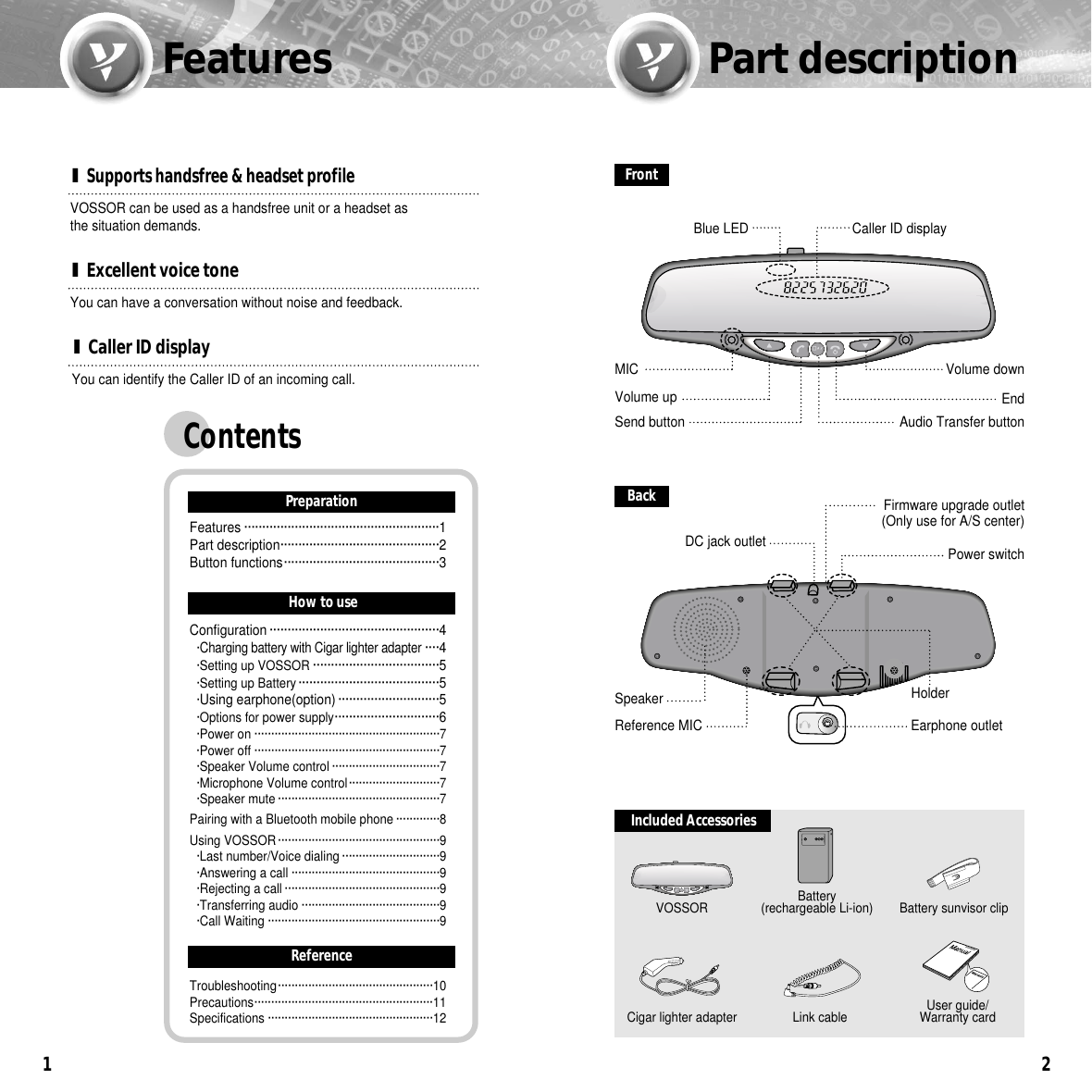
Features1I Caller ID displayYou can have a conversation without noise and feedback.I Excellent voice toneVOSSOR can be used as a handsfree unit or a headset as the situation demands.I Supports handsfree & headset profileYou can identify the Caller ID of an incoming call.Part descriptionFrontA/TEndSend buttonFirmware upgrade outlet (Only use for A/S center)DC jack outletBlue LEDPower switchCaller ID display Volume downHolderReference MICSpeaker2BackMICAudio Transfer buttonEarphone outletVolume upBattery sunvisor clip Included AccessoriesVOSSORA/TBattery (rechargeable Li-ion)Cigar lighter adapter Link cable User guide/Warranty cardContentsPreparationFeatures ······················································1Part description············································2Button functions···········································3How to useReferenceConfiguration ···············································4·Charging battery with Cigar lighter adapter····4·Setting up VOSSOR ···································5·Setting up Battery ·······································5·Using earphone(option) ····························5·Options for power supply·····························6·Power on ·······················································7·Power off ·······················································7·Speaker Volume control ································7·Microphone Volume control···························7·Speaker mute ················································7Pairing with a Bluetooth mobile phone ·············8Using VOSSOR················································9·Last number/Voice dialing ·····························9·Answering a call ············································9·Rejecting a call ··············································9·Transferring audio ·········································9·Call Waiting ···················································9Troubleshooting··············································10Precautions·····················································11Specifications ·················································12
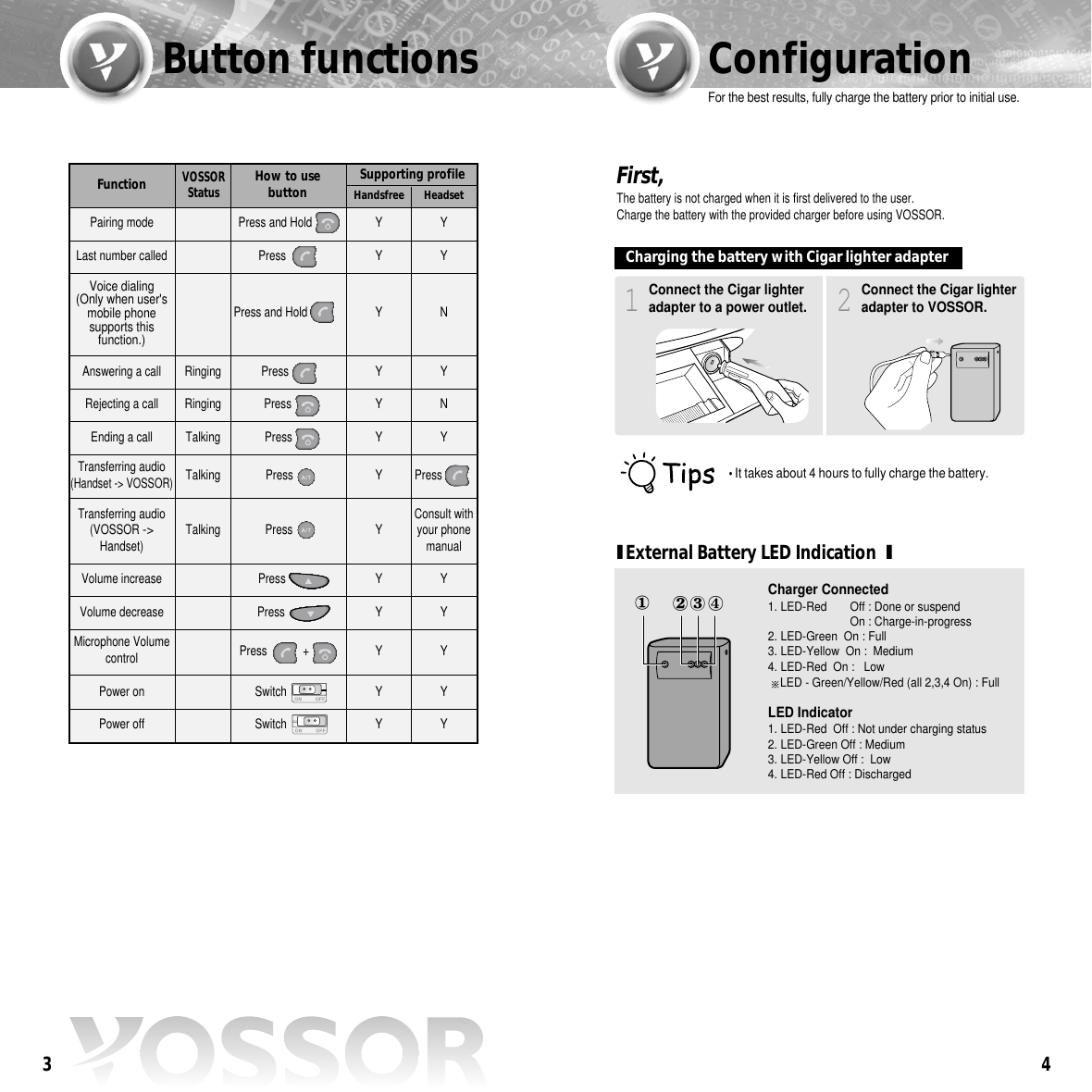
Function4Button functions Configuration3VOSSORStatusSupporting profileHandsfree HeadsetPairing mode Y YLast number called Y YAnswering a call Ringing Y YRejecting a call Ringing Y NEnding a call Talking Y YVolume increase  Y YVolume decreaseMicrophone Volumecontrol YYYYPower on Y YPower off Y YTransferring audio (Handset -> VOSSOR)Talking Y Press    Transferring audio (VOSSOR ->Handset) Talking Y Consult withyour phonemanualVoice dialing (Only when user'smobile phonesupports thisfunction.)YNHow to use buttonPressPress Press PressPress PressSwitch SwitchPress Press Press and HoldPress and HoldPress +Connect the Cigar lighteradapter to a power outlet.1Connect the Cigar lighteradapter to VOSSOR.2First, The battery is not charged when it is first delivered to the user.Charge the battery with the provided charger before using VOSSOR.For the best results, fully charge the battery prior to initial use.�It takes about 4 hours to fully charge the battery.Charging the battery with Cigar lighter adapterIExternal Battery LED Indication  ICharger Connected 1. LED-Red  Off : Done or suspend On : Charge-in-progress2. LED-Green  On : Full3. LED-Yellow  On :  Medium4. LED-Red  On :   Low  LED - Green/Yellow/Red (all 2,3,4 On) : FullLED Indicator 1. LED-Red  Off : Not under charging status2. LED-Green Off : Medium3. LED-Yellow Off :  Low4. LED-Red Off : Discharged
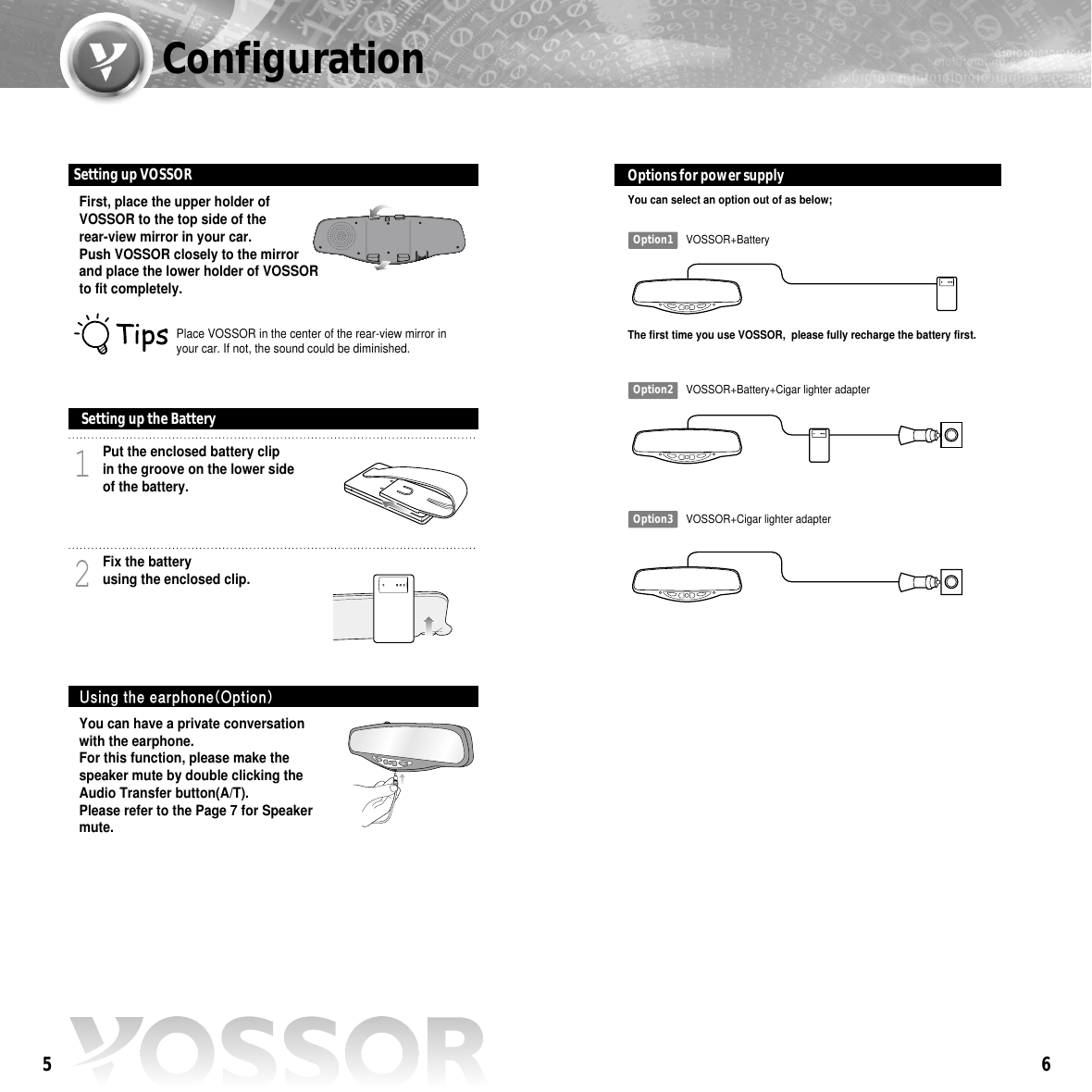
6Configuration5First, place the upper holder ofVOSSOR to the top side of the rear-view mirror in your car.Push VOSSOR closely to the mirrorand place the lower holder of VOSSORto fit completely.Place VOSSOR in the center of the rear-view mirror inyour car. If not, the sound could be diminished.Setting up VOSSOR You can have a private conversationwith the earphone.For this function, please make thespeaker mute by double clicking theAudio Transfer button(A/T).Please refer to the Page 7 for Speakermute.Using the earphone(Option)Put the enclosed battery clip in the groove on the lower sideof the battery.1Fix the battery using the enclosed clip.2Setting up the BatteryYou can select an option out of as below;The first time you use VOSSOR,  please fully recharge the battery first.Option1 VOSSOR+BatteryOption2 VOSSOR+Battery+Cigar lighter adapterOption3 VOSSOR+Cigar lighter adapterOptions for power supply
8ConfigurationPairing with a Bluetoothmobile phone7Turn on the Power switch. Power onTurn off the Power switchPower off●●For higher volume, press  button .●●For lower volume, press  button.Speaker Volume controlIn order to increase the volume of themicrophone, press SEND and END buttonsimultaneously until you hear the "beep"sound.●Repeat four times to go back to initial stage.Microphone Volume controlDouble click the Audio Transfer button.●The speaker will mute after the beep sound is heard.(The sound will still be heard through the earphones.)●To cancel the mute function, double click the AudioTransfer button.Speaker mutePress the END button for more than 2 seconds.The blue LED will flash once a second with a melody.1From the handset, search for and register VOSSOR.Please refer to the user’s manual of the handset.Enter "0000" when a pincode(or passcode) is requested.when the pairing is completed, the blue LED of VOSSOR flashesevery 4~5 seconds with a melody. If it flashes once a second, please try again from the beginning.2After pairing the Bluetooth mobile phone with VOSSOR,you can use it as a handsfree unit.IPairing can be done with up to a maximum of 3 handsets.I• VOSSOR stores up to 3 different phones in memory.• Keep in mind that the latest phone number removes the earliest one whenthe memory is full.• Priority is given to the most recently paired handset.• If you want to change the handset priority, try to connect VOSSOR fromthe handset.• If the latest paired handset supports handsfree profile, VOSSOR isconnected automatically to the handset when the power is on. Once your phone is paired with VOSSOR, it will automaticallyrecognize VOSSOR.
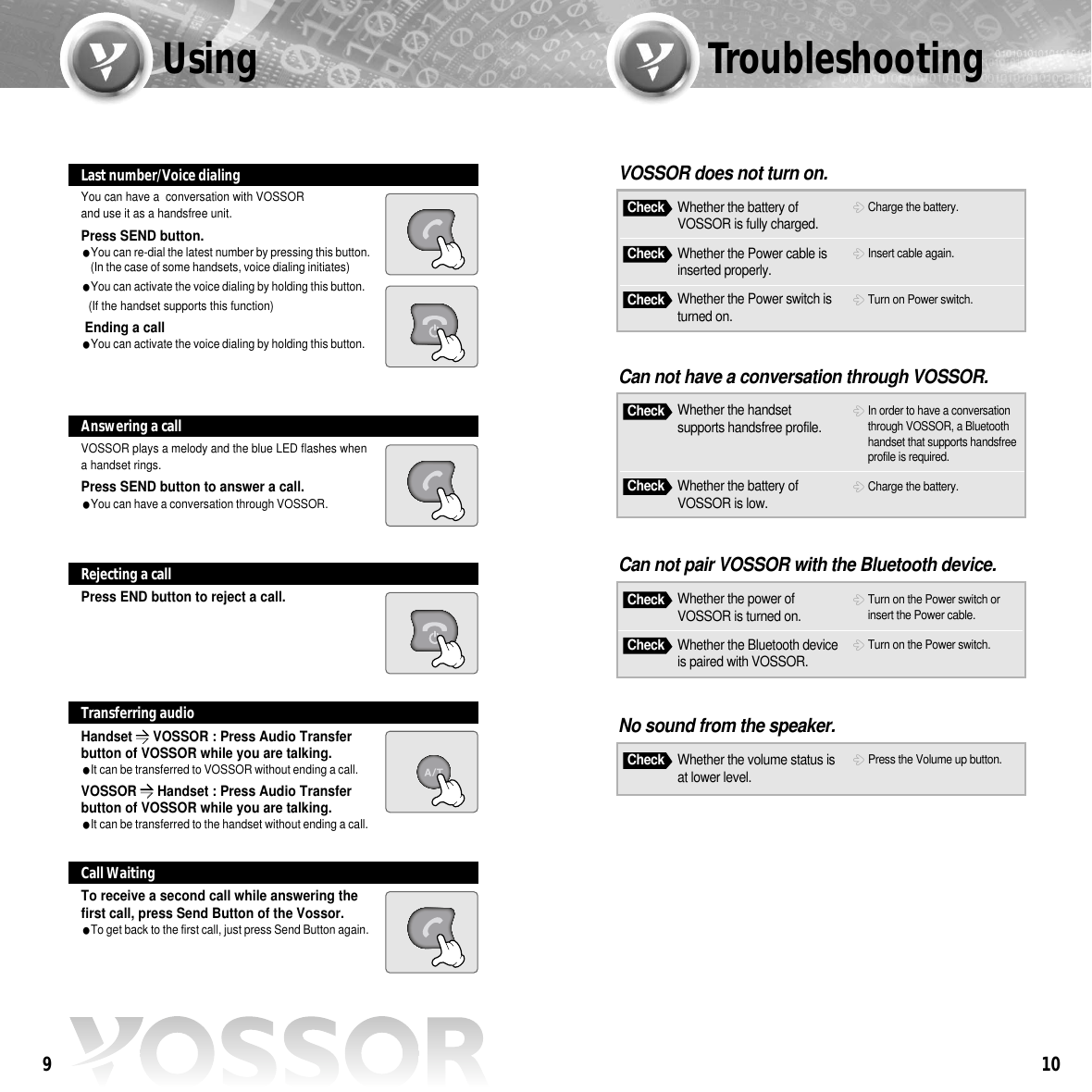
10Using Troubleshooting9You can have a  conversation with VOSSOR and use it as a handsfree unit.Press SEND button.You can re-dial the latest number by pressing this button.(In the case of some handsets, voice dialing initiates)You can activate the voice dialing by holding this button. (If the handset supports this function)Ending a callYou can activate the voice dialing by holding this button.Last number/Voice dialingVOSSOR plays a melody and the blue LED flashes whena handset rings.Press SEND button to answer a call.You can have a conversation through VOSSOR.Answering a callPress END button to reject a call.Rejecting a callHandset ��VOSSOR : Press Audio Transferbutton of VOSSOR while you are talking.It can be transferred to VOSSOR without ending a call.VOSSOR ��Handset : Press Audio Transferbutton of VOSSOR while you are talking.It can be transferred to the handset without ending a call.Transferring audioTo receive a second call while answering thefirst call, press Send Button of the Vossor.To get back to the first call, just press Send Button again.Call WaitingWhether the battery ofVOSSOR is fully charged.Charge the battery.VOSSOR does not turn on.CheckWhether the Power cable isinserted properly.Insert cable again.CheckWhether the Power switch isturned on.Turn on Power switch.CheckWhether the handsetsupports handsfree profile.In order to have a conversationthrough VOSSOR, a Bluetoothhandset that supports handsfreeprofile is required.Can not have a conversation through VOSSOR.CheckWhether the battery ofVOSSOR is low.Charge the battery.CheckWhether the power ofVOSSOR is turned on.Turn on the Power switch orinsert the Power cable.Can not pair VOSSOR with the Bluetooth device.CheckWhether the Bluetooth deviceis paired with VOSSOR.Turn on the Power switch.CheckWhether the volume status isat lower level.Press the Volume up button.No sound from the speaker.Check
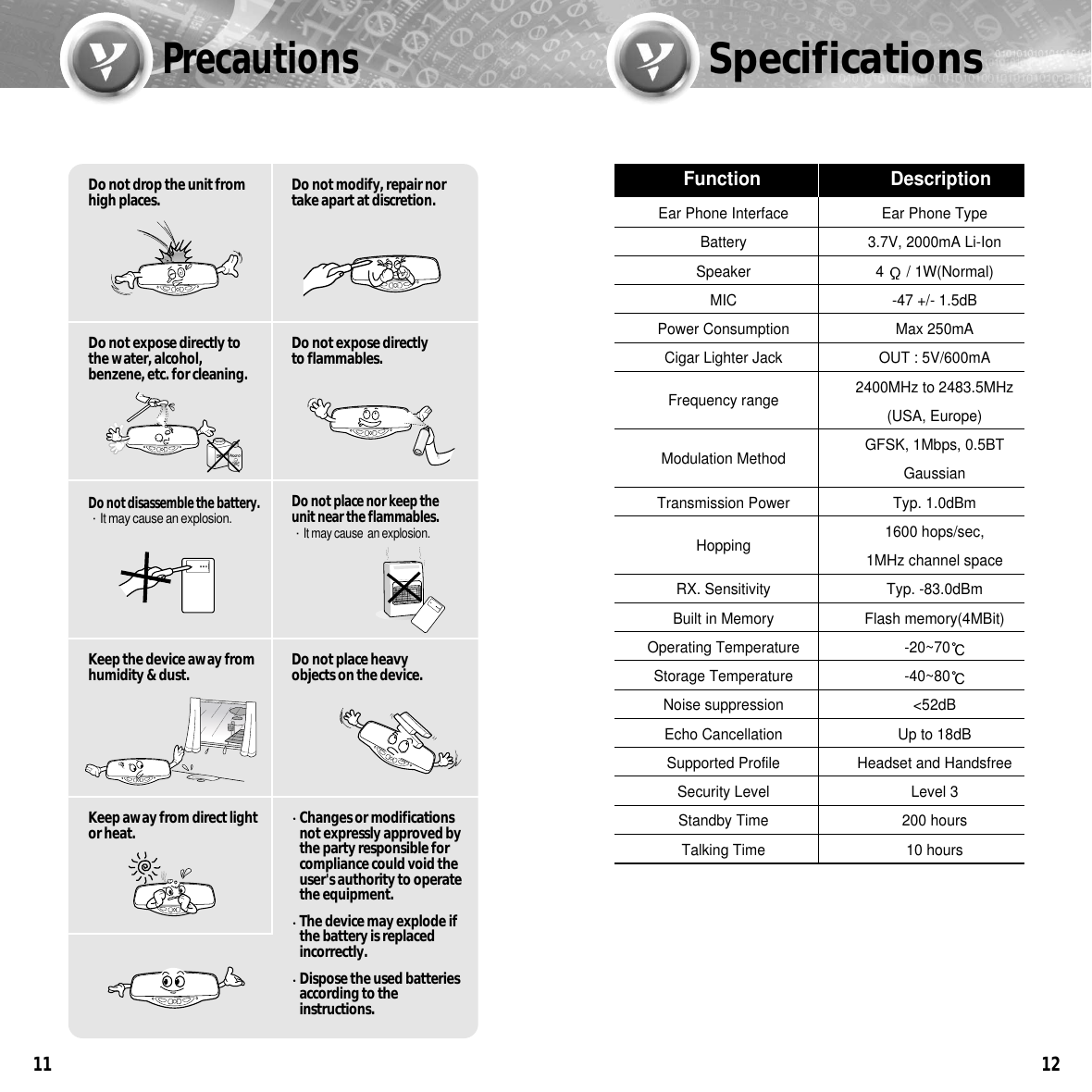
12PrecautionsSpecifications11Ear Phone Interface Ear Phone TypeBattery 3.7V, 2000mA Li-IonSpeaker 4  / 1W(Normal)MIC -47 +/- 1.5dBPower Consumption Max 250mACigar Lighter Jack OUT : 5V/600mAFrequency range 2400MHz to 2483.5MHz(USA, Europe)Modulation Method GFSK, 1Mbps, 0.5BT GaussianTransmission Power Typ. 1.0dBmHopping 1600 hops/sec, 1MHz channel spaceRX. Sensitivity Typ. -83.0dBmBuilt in Memory Flash memory(4MBit)Operating Temperature -20~70Storage Temperature -40~80Noise suppression <52dBEcho Cancellation Up to 18dBSupported Profile Headset and HandsfreeSecurity Level Level 3Standby Time 200 hoursTalking Time 10 hoursFunction DescriptionDo not drop the unit fromhigh places. Do not modify, repair nortake apart at discretion.Do not expose directly tothe water, alcohol,benzene, etc. for cleaning.Do not expose directlyto flammables.Do not disassemble the battery. ∙It may cause an explosion.Do not place nor keep theunit near the flammables.∙It may cause  an explosion.Keep the device away fromhumidity & dust. Do not place heavyobjects on the device.Keep away from direct lightor heat. Changes or modificationsnot expressly approved bythe party responsible forcompliance could void theuser's authority to operatethe equipment.The device may explode ifthe battery is replacedincorrectly.Dispose the used batteriesaccording to theinstructions.
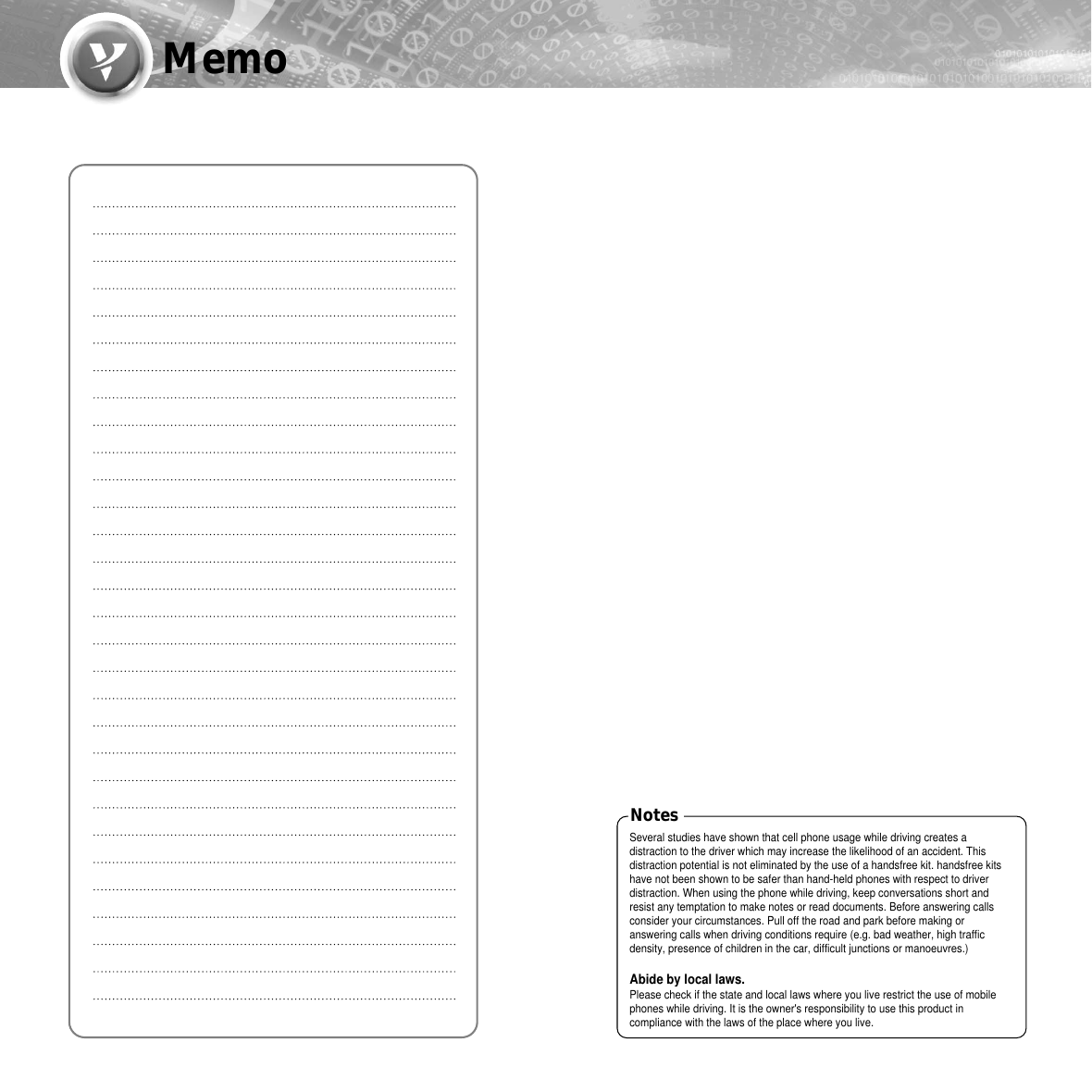
MemoSeveral studies have shown that cell phone usage while driving creates adistraction to the driver which may increase the likelihood of an accident. Thisdistraction potential is not eliminated by the use of a handsfree kit. handsfree kitshave not been shown to be safer than hand-held phones with respect to driverdistraction. When using the phone while driving, keep conversations short andresist any temptation to make notes or read documents. Before answering callsconsider your circumstances. Pull off the road and park before making oranswering calls when driving conditions require (e.g. bad weather, high trafficdensity, presence of children in the car, difficult junctions or manoeuvres.)Abide by local laws.Please check if the state and local laws where you live restrict the use of mobilephones while driving. It is the owner's responsibility to use this product incompliance with the laws of the place where you live.Notes

Navigation menu