SEMACONNECT 19840917 ChargePro 620 User Manual Installation Guide

SEMACONNECT INC. ChargePro 620 Installation Guide

Installation Guide

ChargePro™!620$Charging$Station!       Installation Guide       SemaConnect Inc. 175 Admiral Cochrane Dr, Suite 300 Annapolis MD 21401 www.semaconnect.com  Version 0.9D
                 WARNING  SemaConnect  recommends  that  only  a  qualified  electrical  professional  should install or service electric vehicle charging station equipment.  This  equipment  requires  a  heavy  load  electrical  connection.  Before  beginning  work, make  certain  all  electrical  power  has  been  turned  off,  such  that  the  electrical  supply wires are disconnected from all power sources. This may require that you contact your electric  utility  to  disconnect  power  to  an  existing  load-center.  SemaConnect  will  not assume responsibility for property damage or personal injury resulting from wrong use or inadequate safety measures in servicing this equipment.         HAZARDOUS VOLTAGE CAN CAUSE SEVERE INJURY  OR DEATH.   Turn off Main power before installing or servicing this device.
 3 | Page  IMPORTANT SAFETY INSTRUCTIONS SAVE THESE INSTRUCTIONS  Install Equipment in Conformance with codes This product must be installed in accordance with the National Electrical Code (NEC) or the Canadian Electrical Code (CEC) or any applicable local code.  Before  installing  the  equipment  do  check with  your  local electrical authority.  If you  have  any  questions  or need assistance, contact a qualified electrical contractor.  Grounding instructions  The ChargePro™ 620 Charging Station is grounded using a dedicated grounding conductor that grounds the charging station to the power distribution panel ground.  FCC Compliance Statement  This equipment has been tested and found to comply with the limits for a Class A digital device pursuant to Part 15 of the FCC Rules. These limits are designed to provide reasonable protection against harmful interference when the equipment is operated in a commercial environment. This equipment generates, uses, and can radiate radio frequency energy and, if not installed and used in accordance with the manufacturer’s instruction manual, may cause harmful interference with radio communications.  Important:  Any  Changes  or  modifications to  this product  not  authorized  by SemaConnect,  Inc., could  affect  the  EMC  compliance  and revoke your authority to operate this product.  Exposure to Radio Frequency Energy: The radiated power output of the Zigbee radio and cellular modem (optional) in this device is below the FCC radio frequency exposure limits for uncontrolled equipment.   Safety and compliance  This  document  provides  instructions  to  install  the  ChargePro™  620  Charging  Station  and  should  not  be  used  for  any  other  product. Before installing the ChargePro™ 620 Charging Station, you should review this manual carefully and consult with a licensed contractor, licensed electrician and trained installation expert to ensure compliance with local building practices, climate conditions, safety standards, and  state  and  local  codes.  The  ChargePro™  620  Charging  Station  should  be  installed  only  by  a  licensed  contractor  and  a  licensed electrician  and  in  accordance  with  all  local  and  national  codes  and  standards.  The  ChargePro™  620  Charging  Station  should  be inspected by a qualified installer prior to the initial use. Under no circumstances will compliance with the information in this manual relieve the user of his/her responsibility to comply with all applicable codes or safety standards. This document describes the most commonly-used installation and mounting scenarios. If situations arise in which it is not possible to perform an installation following the procedures provided  in  this  document,  contact  SemaConnect.  SemaConnect  is  not  responsible  for  any  damages  that  may  occur  resulting  from custom installations that are not described in this document.  No accuracy guarantee  Reasonable effort was made to ensure that the specifications and other information in this manual are accurate and complete at the  time  of  its  publication.  However,  the  specifications  and  other  information  in  this  manual  are  subject  to  change  at  any  time without prior notice.  Warranty information and disclaimer  Your  use  of,  or  modification  to,  the  ChargePro™  620  Charging  Station  in  a  manner  in  which  the  ChargePro™  620  Charging Station is not intended to be used or modified will void the limited warranty. Other than any such limited warranty, SemaConnect products  are  provided  “AS  IS,”  and  SemaConnect  and  its  distributors  expressly  disclaim  all  implied  warranties,  including  any warranty of design, merchantability, and fitness for a particular purposes and non-infringement, to the maximum extent permitted by law.  Limitation of liability  IN  NO  EVENT  SHALL  SEMACONNECT,  INC.  OR  ITS  AUTHORIZED  DISTRIBUTORS  BE  LIABLE  FOR  ANY  INDIRECT, INCIDENTAL, SPECIAL, PUNITIVE, OR CONSEQUENTIAL DAMAGES, INCLUDING WITHOUT LIMITATION, LOST PROFITS, LOST DATA, LOSS OF USE, COST OF COVER, OR LOSS OR DAMAGE TO THE CHARGEPRO™ 620 CHARGING STATION, ARISING OUT  OF OR RELATING TO  THE  USE OR INABILITY TO USE THIS MANUAL, EVEN  IF SEMACONNECT, INC. OR ITS AUTHORIZED DISTRIBUTORS HAVE BEEN ADVISED OF THE POSSIBILITY OF SUCH DAMAGES.  Copyright and Trademarks Copyright ©2010 SemaConnect, Inc. All rights reserved. This material is protected by the copyright laws of the United States and other countries. It may not be modified, reproduced or distributed without the prior, express written consent of SemaConnect, Inc. ChargePro™  620  Charging  Station  is  a  trademark  of  SemaConnect,  Inc.  All  other  products  or  services  mentioned  are  the trademarks, service marks, registered trademarks or registered service marks of their respective owners.  !! !
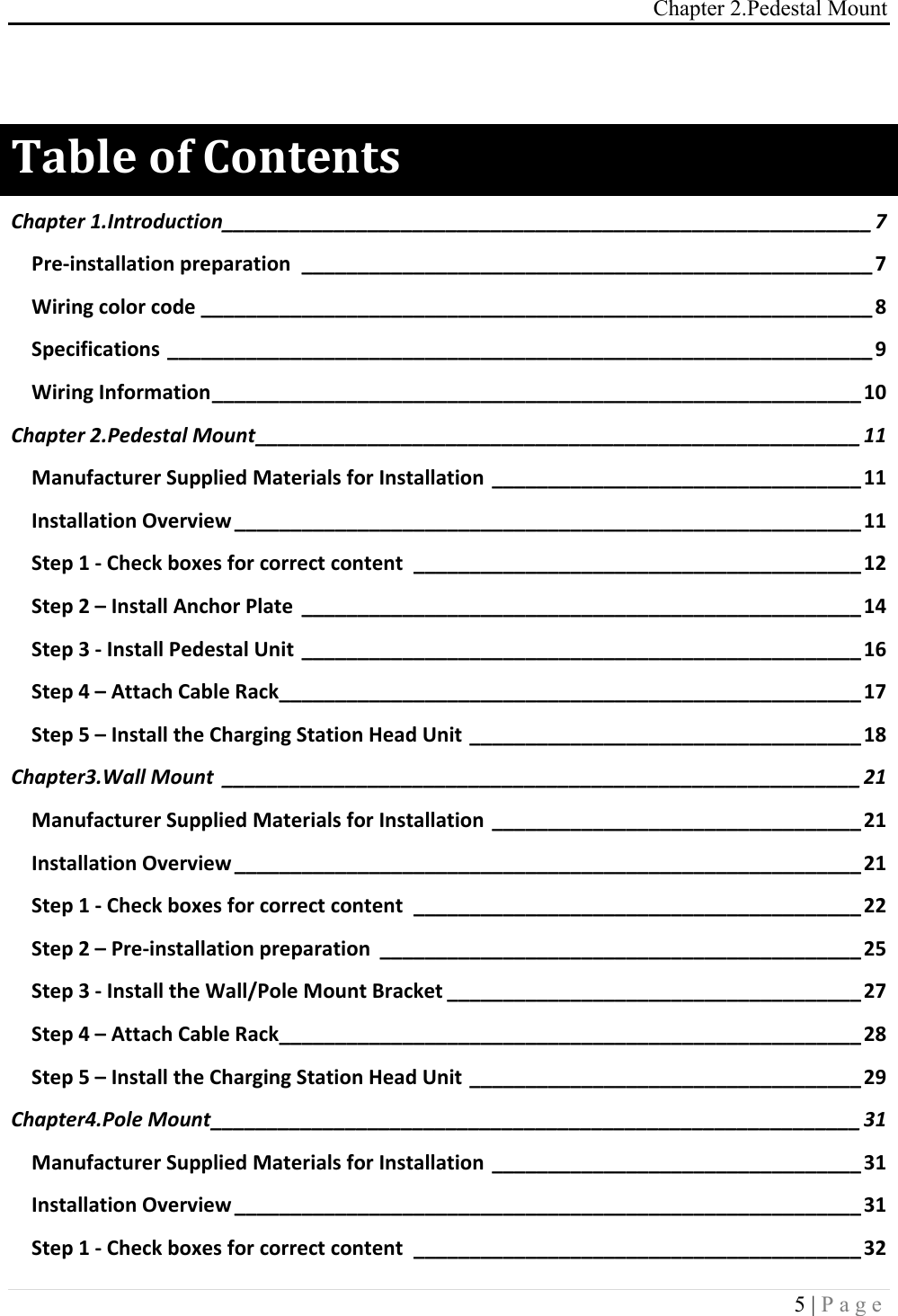
Chapter 2.Pedestal Mount 5 | Page   "#$%&!'(!)'*+&*+,!Chapter(1.Introduction(__________________________________________________________(7!Pre$installation,preparation, ___________________________________________________,7!Wiring,color,code,____________________________________________________________,8!Specifications,_______________________________________________________________,9!Wiring,Information,__________________________________________________________,10!Chapter(2.Pedestal(Mount(______________________________________________________(11!Manufacturer,Supplied,Materials,for,Installation,_________________________________,11!Installation,Overview,________________________________________________________,11!Step,1,$,Check,boxes,for,correct,content, ________________________________________,12!Step,2,–,Install,Anchor,Plate, __________________________________________________,14!Step,3,$,Install,Pedestal,Unit, __________________________________________________,16!Step,4,–,Attach,Cable,Rack,____________________________________________________,17!Step,5,–,Install,the,Charging,Station,Head,Unit,___________________________________,18!Chapter3.Wall(Mount( _________________________________________________________(21!Manufacturer,Supplied,Materials,for,Installation,_________________________________,21!Installation,Overview,________________________________________________________,21!Step,1,$,Check,boxes,for,correct,content, ________________________________________,22!Step,2,–,Pre$installation,preparation, ___________________________________________,25!Step,3,$,Install,the,Wall/Pole,Mount,Bracket,_____________________________________,27!Step,4,–,Attach,Cable,Rack,____________________________________________________,28!Step,5,–,Install,the,Charging,Station,Head,Unit,___________________________________,29!Chapter4.Pole(Mount(__________________________________________________________(31!Manufacturer,Supplied,Materials,for,Installation,_________________________________,31!Installation,Overview,________________________________________________________,31!Step,1,$,Check,boxes,for,correct,content, ________________________________________,32!
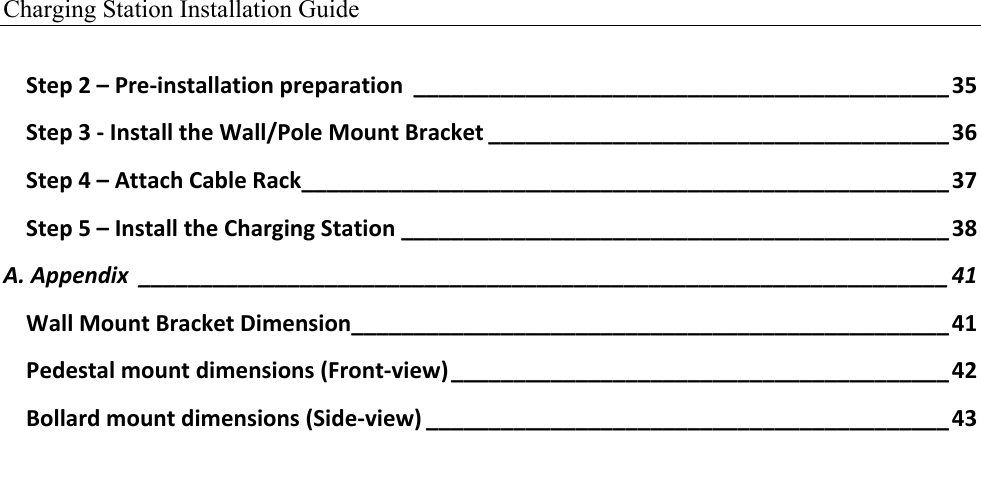
Charging Station Installation Guide   Step,2,–,Pre$installation,preparation, ___________________________________________,35!Step,3,$,Install,the,Wall/Pole,Mount,Bracket,_____________________________________,36!Step,4,–,Attach,Cable,Rack,____________________________________________________,37!Step,5,–,Install,the,Charging,Station,____________________________________________,38!A.(Appendix( _________________________________________________________________(41!Wall,Mount,Bracket,Dimension,________________________________________________,41!Pedestal,mount,dimensions,(Front$view),________________________________________,42!Bollard,mount,dimensions,(Side$view),__________________________________________,43!
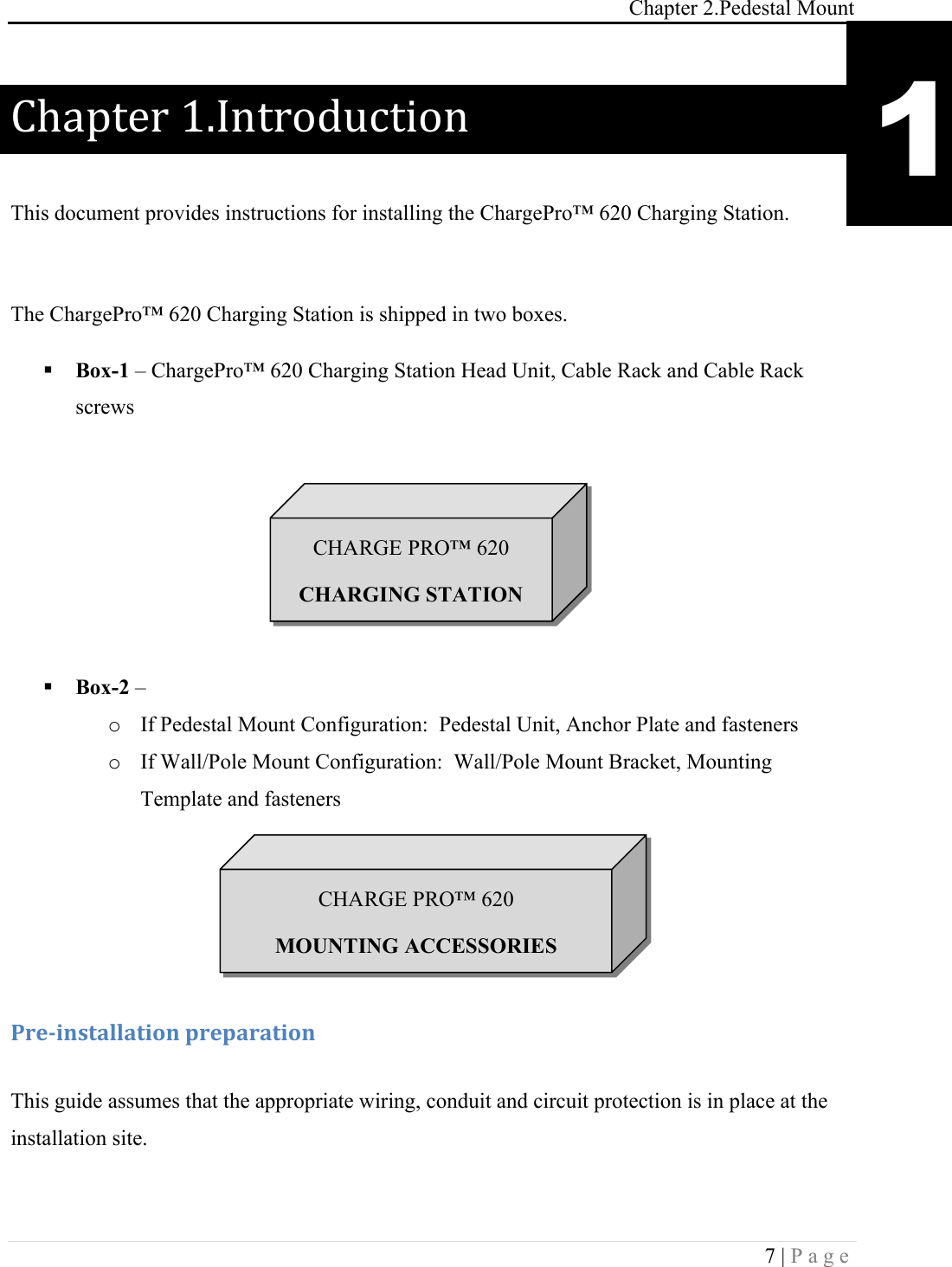
Chapter 2.Pedestal Mount 7 | Page  Chapter(1.Introduction( This document provides instructions for installing the ChargePro™ 620 Charging Station.  The ChargePro™ 620 Charging Station is shipped in two boxes. ! Box-1 – ChargePro™ 620 Charging Station Head Unit, Cable Rack and Cable Rack screws       ! Box-2 –  o If Pedestal Mount Configuration:  Pedestal Unit, Anchor Plate and fasteners o If Wall/Pole Mount Configuration:  Wall/Pole Mount Bracket, Mounting Template and fasteners   !!!-.&/0*,+#%%#+0'*!1.&1#.#+0'*! This guide assumes that the appropriate wiring, conduit and circuit protection is in place at the installation site.  1 CHARGE PRO™ 620 CHARGING STATION CHARGE PRO™ 620 MOUNTING ACCESSORIES
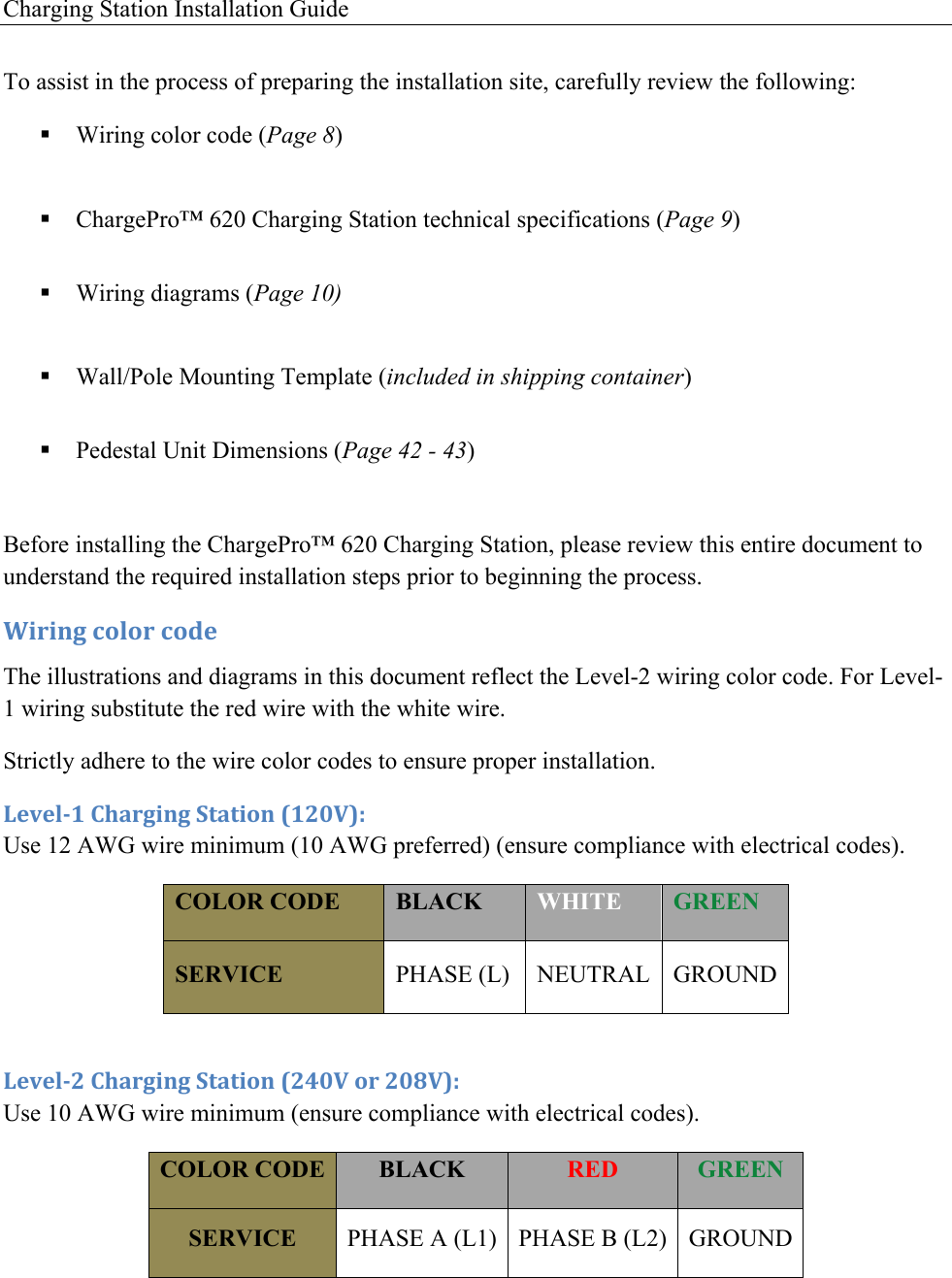
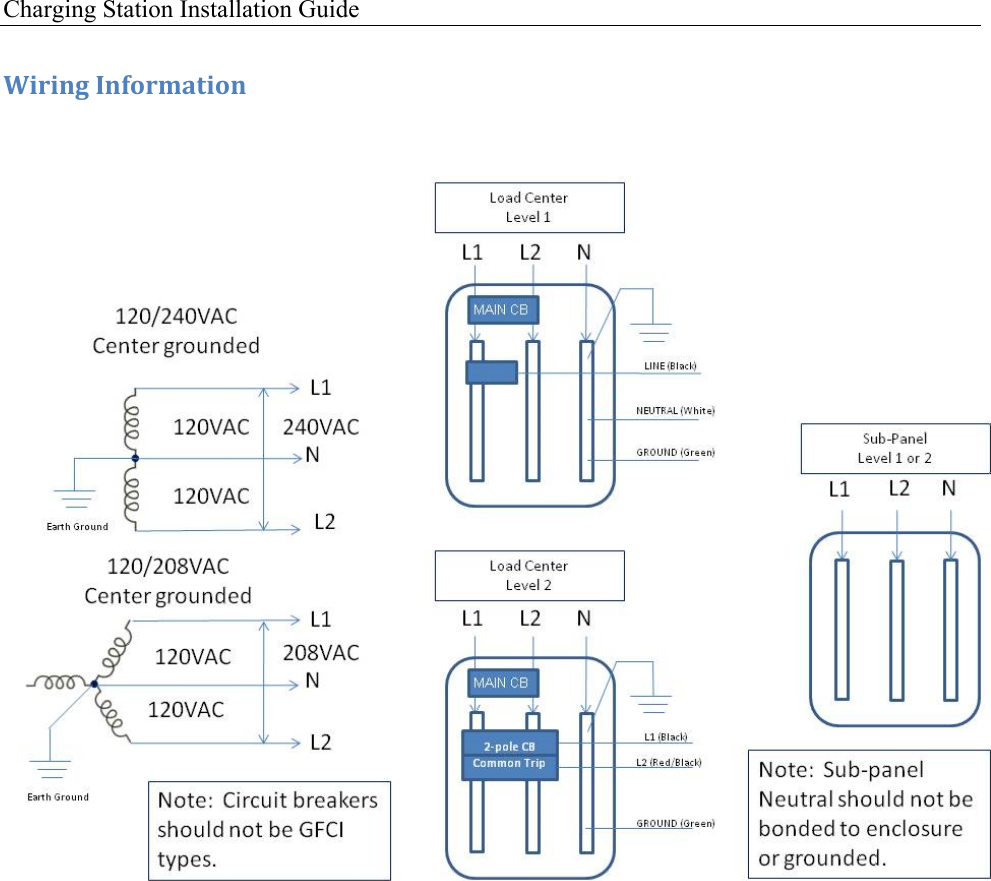
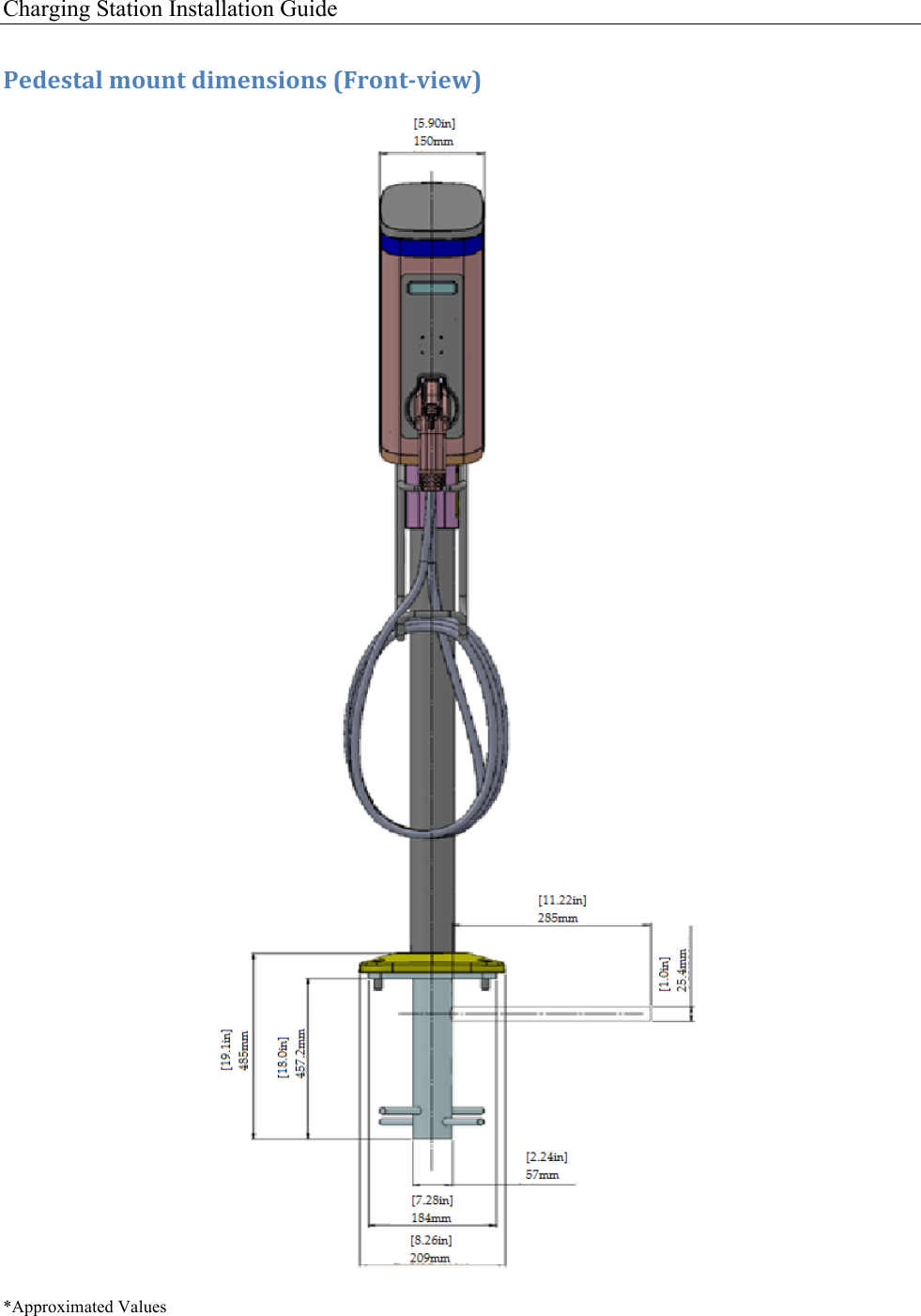
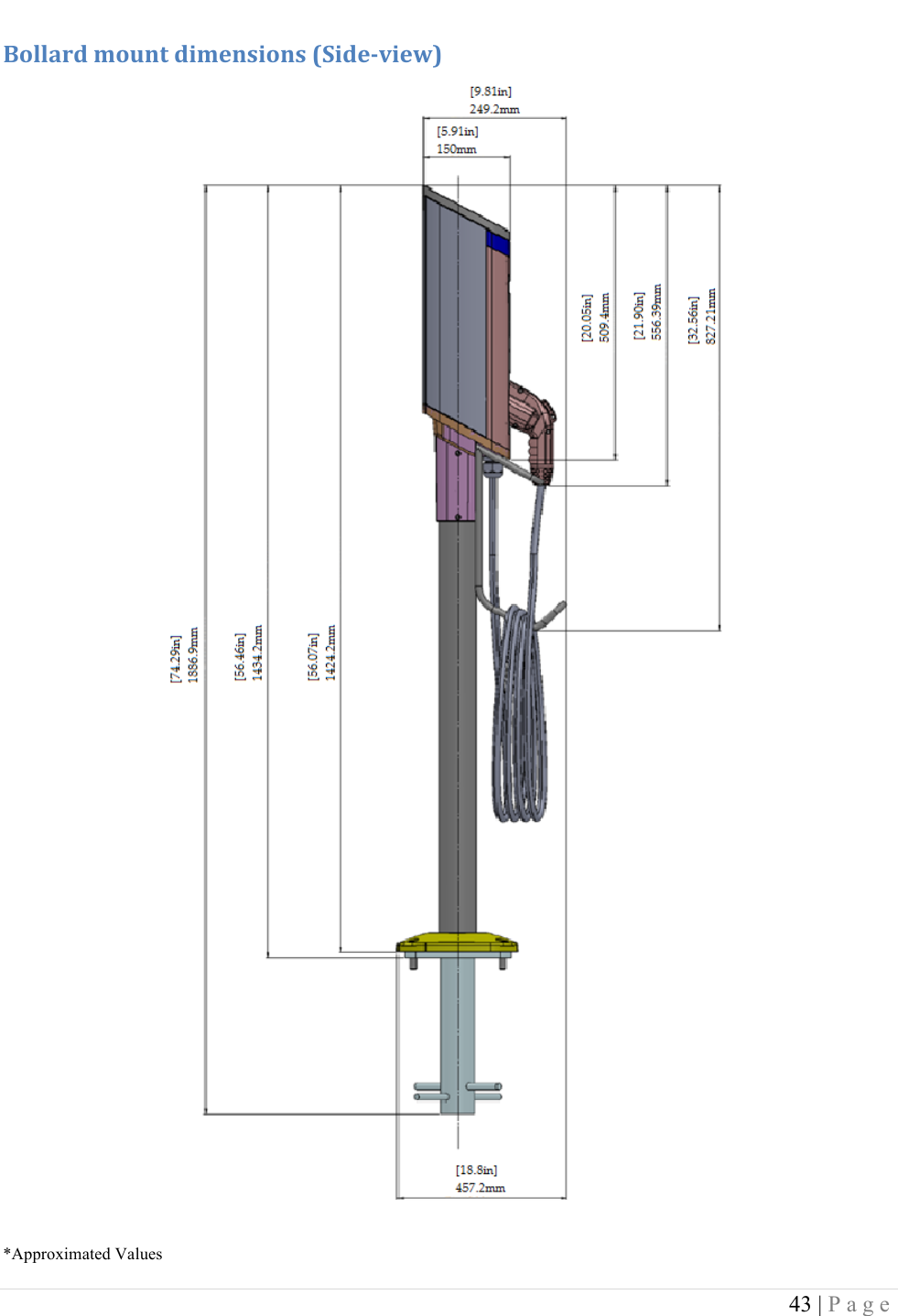
Charging Station Installation Guide   To assist in the process of preparing the installation site, carefully review the following: ! Wiring color code (Page 8)  ! ChargePro™ 620 Charging Station technical specifications (Page 9)  ! Wiring diagrams (Page 10)  ! Wall/Pole Mounting Template (included in shipping container)  ! Pedestal Unit Dimensions (Page 42 - 43)  Before installing the ChargePro™ 620 Charging Station, please review this entire document to understand the required installation steps prior to beginning the process. 20.0*3!4'%'.!4'5&!The illustrations and diagrams in this document reflect the Level-2 wiring color code. For Level-1 wiring substitute the red wire with the white wire. Strictly adhere to the wire color codes to ensure proper installation. 6&7&%/8!)9#.30*3!:+#+0'*!;8<=>?@!Use 12 AWG wire minimum (10 AWG preferred) (ensure compliance with electrical codes).  COLOR CODE BLACK WHITE GREEN SERVICE PHASE (L) NEUTRAL GROUND  6&7&%/<!)9#.30*3!:+#+0'*!;<A=>!'.!<=B>?@!Use 10 AWG wire minimum (ensure compliance with electrical codes).  COLOR CODE BLACK RED GREEN SERVICE PHASE A (L1) PHASE B (L2) GROUND
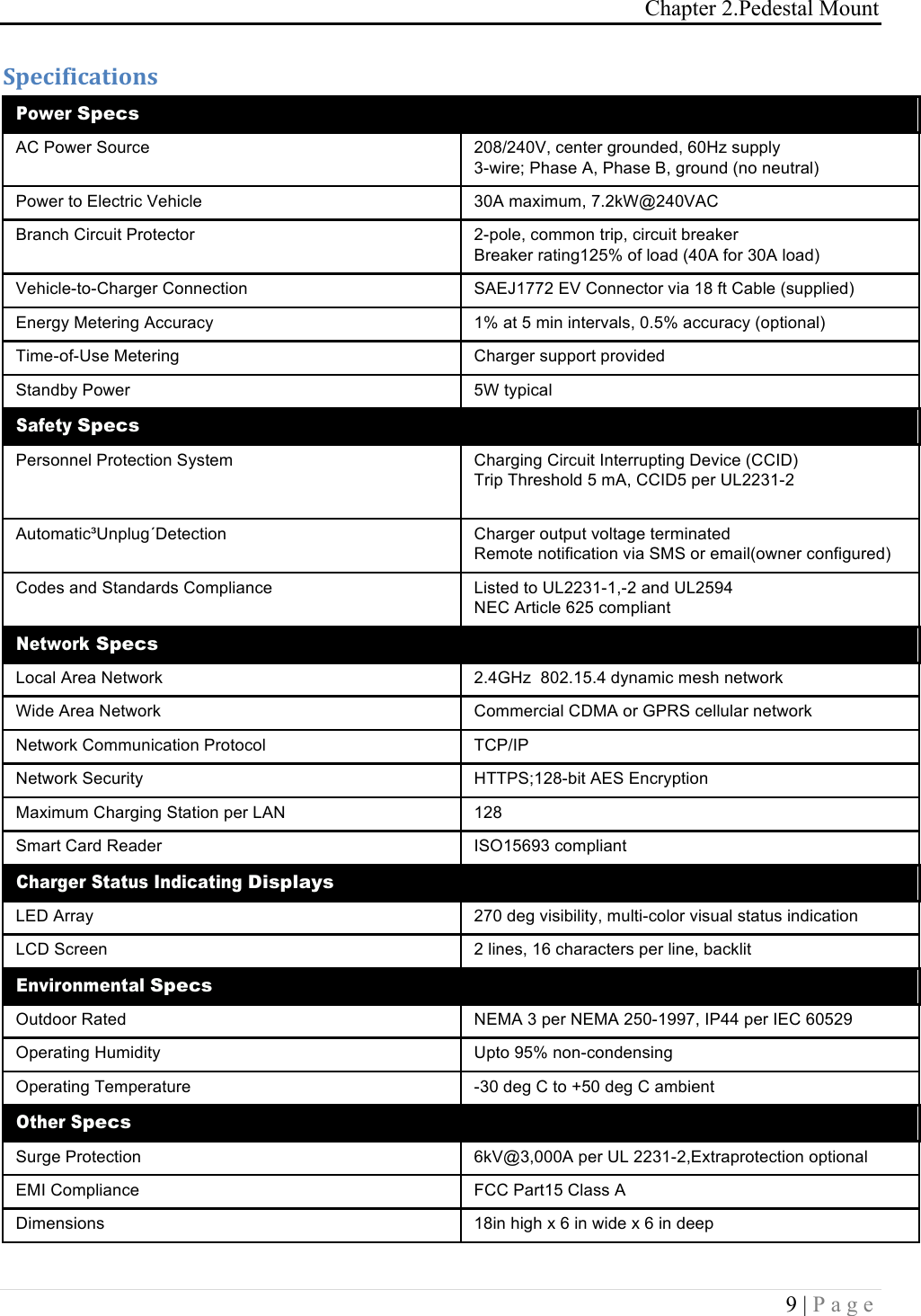
Chapter 2.Pedestal Mount 9 | Page  :1&40(04#+0'*,!Power Specs AC Power Source 208/240V, center grounded, 60Hz supply 3-wire; Phase A, Phase B, ground (no neutral) Power to Electric Vehicle 30A maximum, 7.2kW@240VAC Branch Circuit Protector 2-pole, common trip, circuit breaker Breaker rating125% of load (40A for 30A load) Vehicle-to-Charger Connection SAEJ1772 EV Connector via 18 ft Cable (supplied) Energy Metering Accuracy 1% at 5 min intervals, 0.5% accuracy (optional) Time-of-Use Metering Charger support provided Standby Power 5W typical Safety Specs Personnel Protection System Charging Circuit Interrupting Device (CCID) Trip Threshold 5 mA, CCID5 per UL2231-2  Automatic³Unplug´Detection Charger output voltage terminated Remote notification via SMS or email(owner configured) Codes and Standards Compliance Listed to UL2231-1,-2 and UL2594 NEC Article 625 compliant Network Specs Local Area Network 2.4GHz  802.15.4 dynamic mesh network Wide Area Network Commercial CDMA or GPRS cellular network Network Communication Protocol TCP/IP Network Security HTTPS;128-bit AES Encryption Maximum Charging Station per LAN 128 Smart Card Reader ISO15693 compliant Charger Status Indicating Displays LED Array 270 deg visibility, multi-color visual status indication LCD Screen 2 lines, 16 characters per line, backlit Environmental Specs Outdoor Rated NEMA 3 per NEMA 250-1997, IP44 per IEC 60529 Operating Humidity Upto 95% non-condensing Operating Temperature -30 deg C to +50 deg C ambient Other Specs Surge Protection 6kV@3,000A per UL 2231-2,Extraprotection optional EMI Compliance FCC Part15 Class A Dimensions 18in high x 6 in wide x 6 in deep
Charging Station Installation Guide   20.0*3!C*('.D#+0'*!
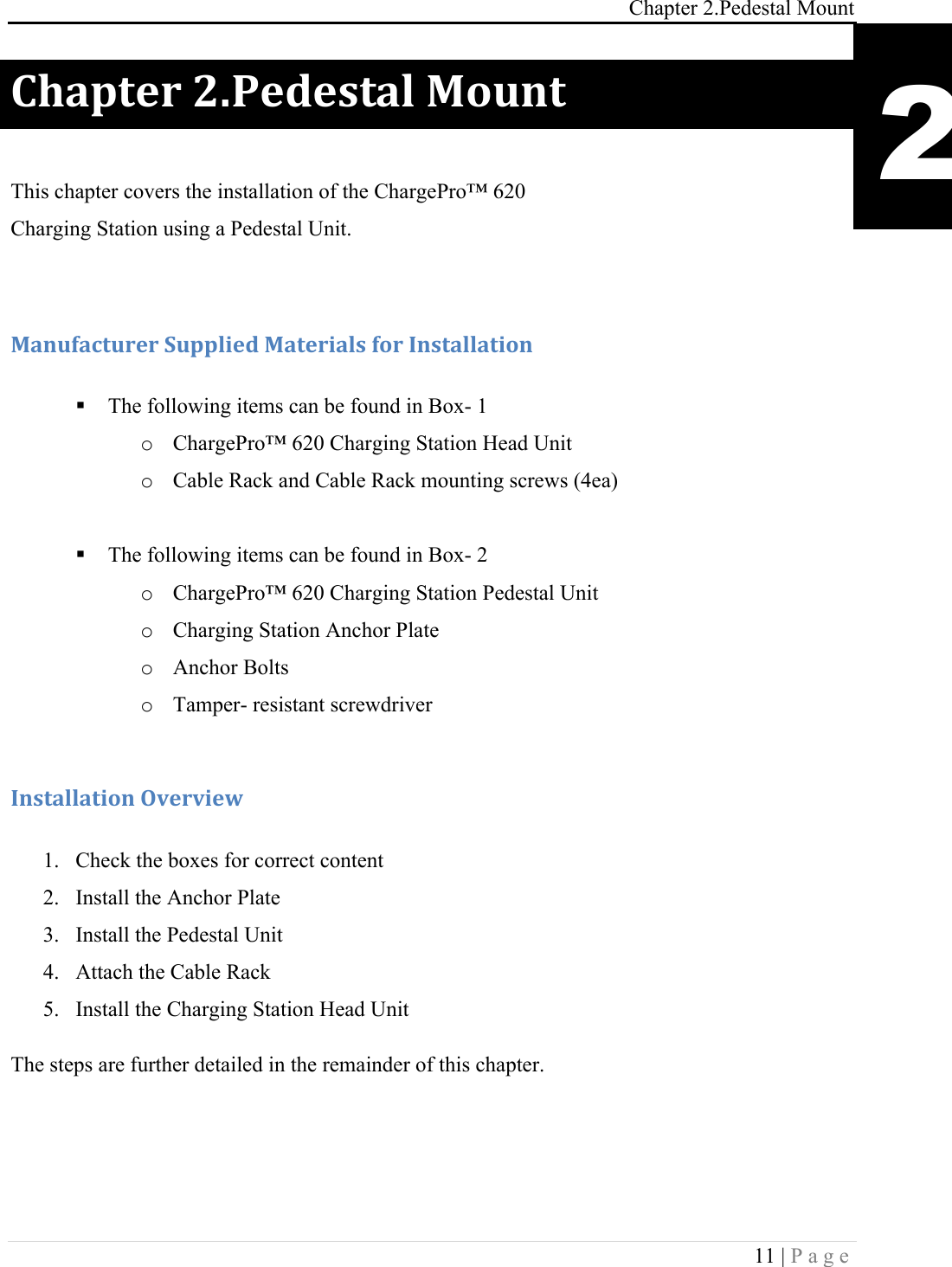
Chapter 2.Pedestal Mount 11 | Page  )9#1+&.!<E-&5&,+#%!F'G*+! This chapter covers the installation of the ChargePro™ 620  Charging Station using a Pedestal Unit.  F#*G(#4+G.&.!:G11%0&5!F#+&.0#%,!('.!C*,+#%%#+0'*!! The following items can be found in Box- 1 o ChargePro™ 620 Charging Station Head Unit o Cable Rack and Cable Rack mounting screws (4ea)  ! The following items can be found in Box- 2 o ChargePro™ 620 Charging Station Pedestal Unit o Charging Station Anchor Plate o Anchor Bolts  o Tamper- resistant screwdriver  C*,+#%%#+0'*!H7&.70&I!!1. Check the boxes for correct content 2. Install the Anchor Plate 3. Install the Pedestal Unit 4. Attach the Cable Rack  5. Install the Charging Station Head Unit The steps are further detailed in the remainder of this chapter. 2
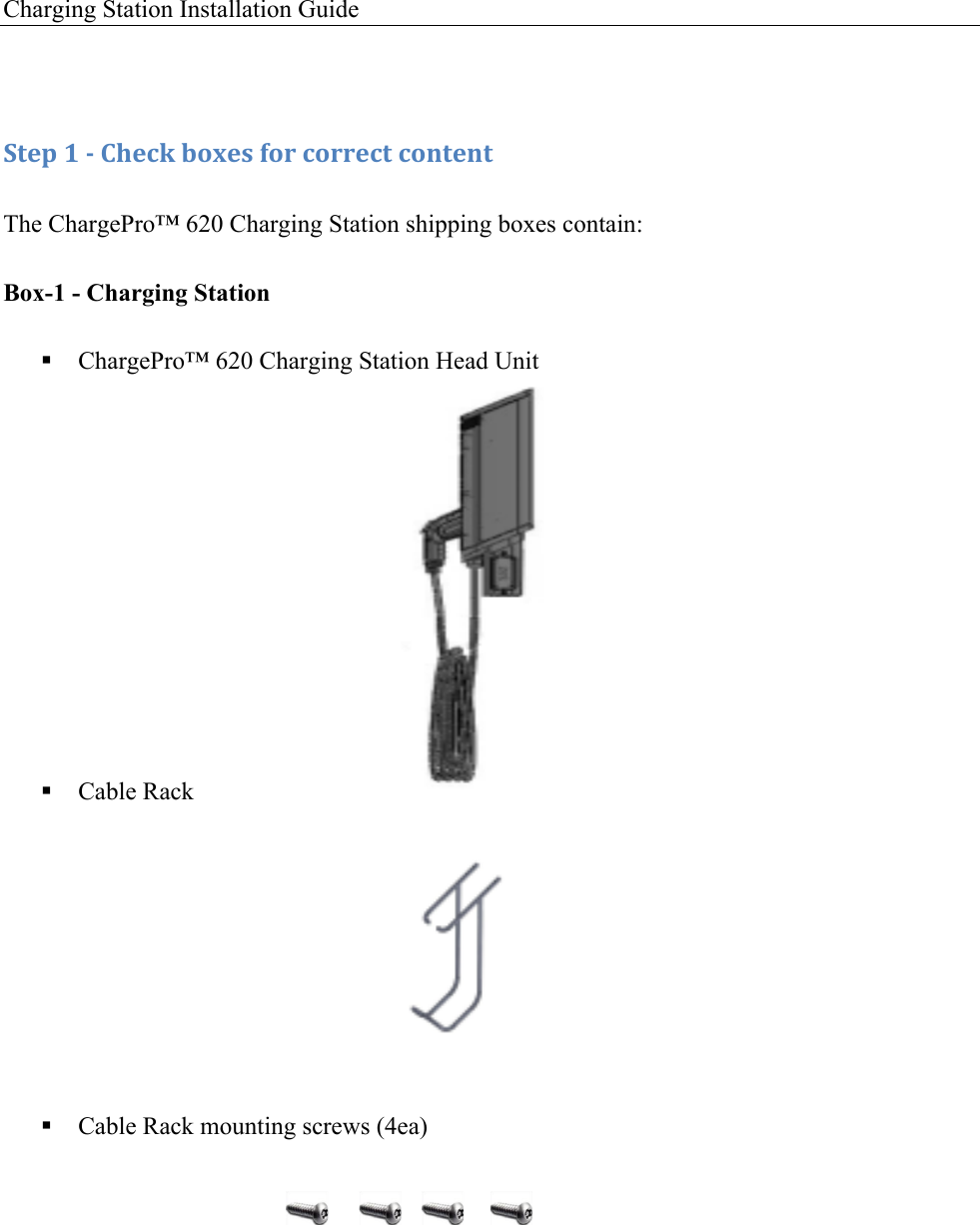
Charging Station Installation Guide   !:+&1!8!/!)9&4J!$'K&,!('.!4'..&4+!4'*+&*+!The ChargePro™ 620 Charging Station shipping boxes contain: Box-1 - Charging Station ! ChargePro™ 620 Charging Station Head Unit          ! Cable Rack                  ! Cable Rack mounting screws (4ea)
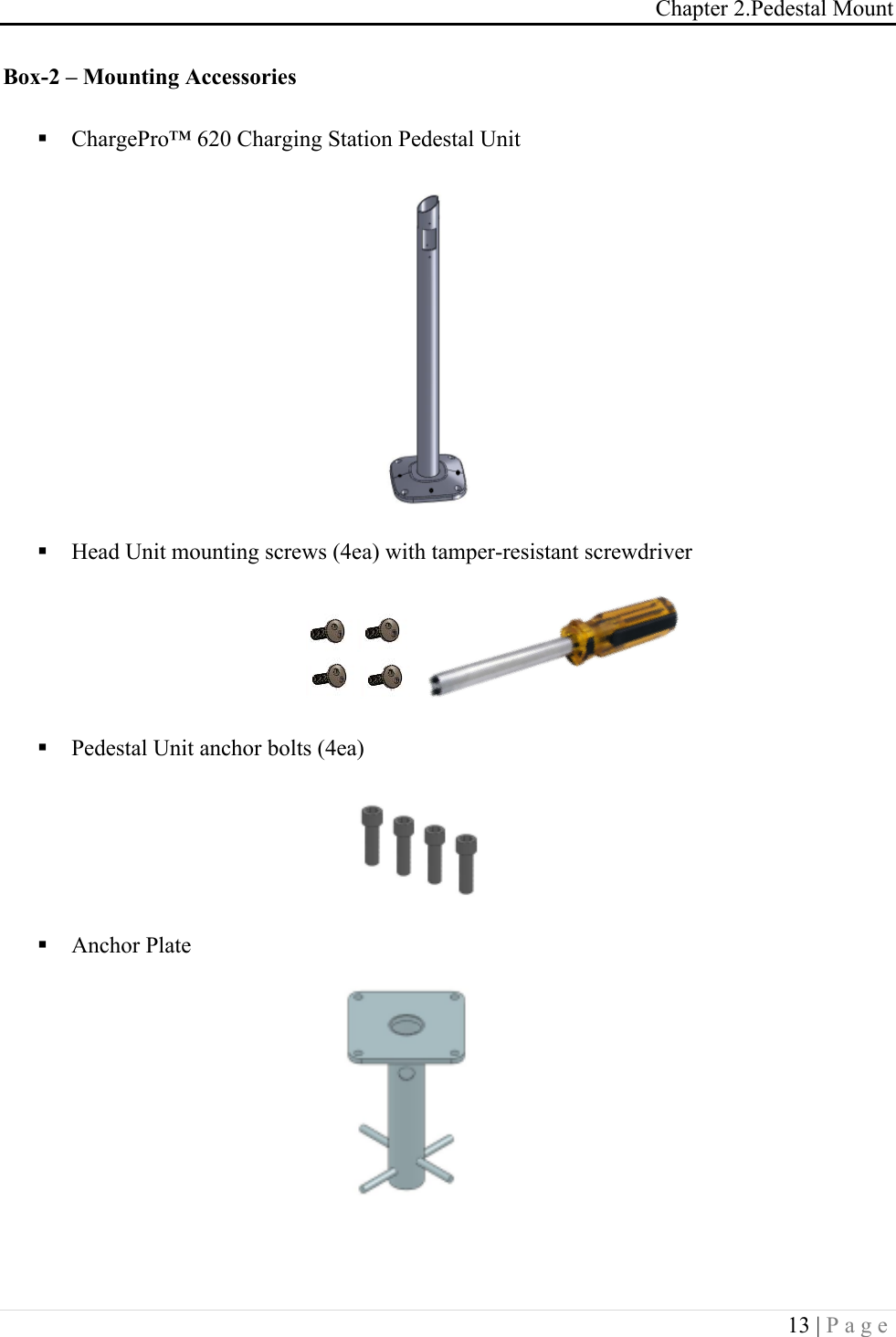
Chapter 2.Pedestal Mount 13 | Page  Box-2 – Mounting Accessories ! ChargePro™ 620 Charging Station Pedestal Unit       ! Head Unit mounting screws (4ea) with tamper-resistant screwdriver     ! Pedestal Unit anchor bolts (4ea)     ! Anchor Plate   !!
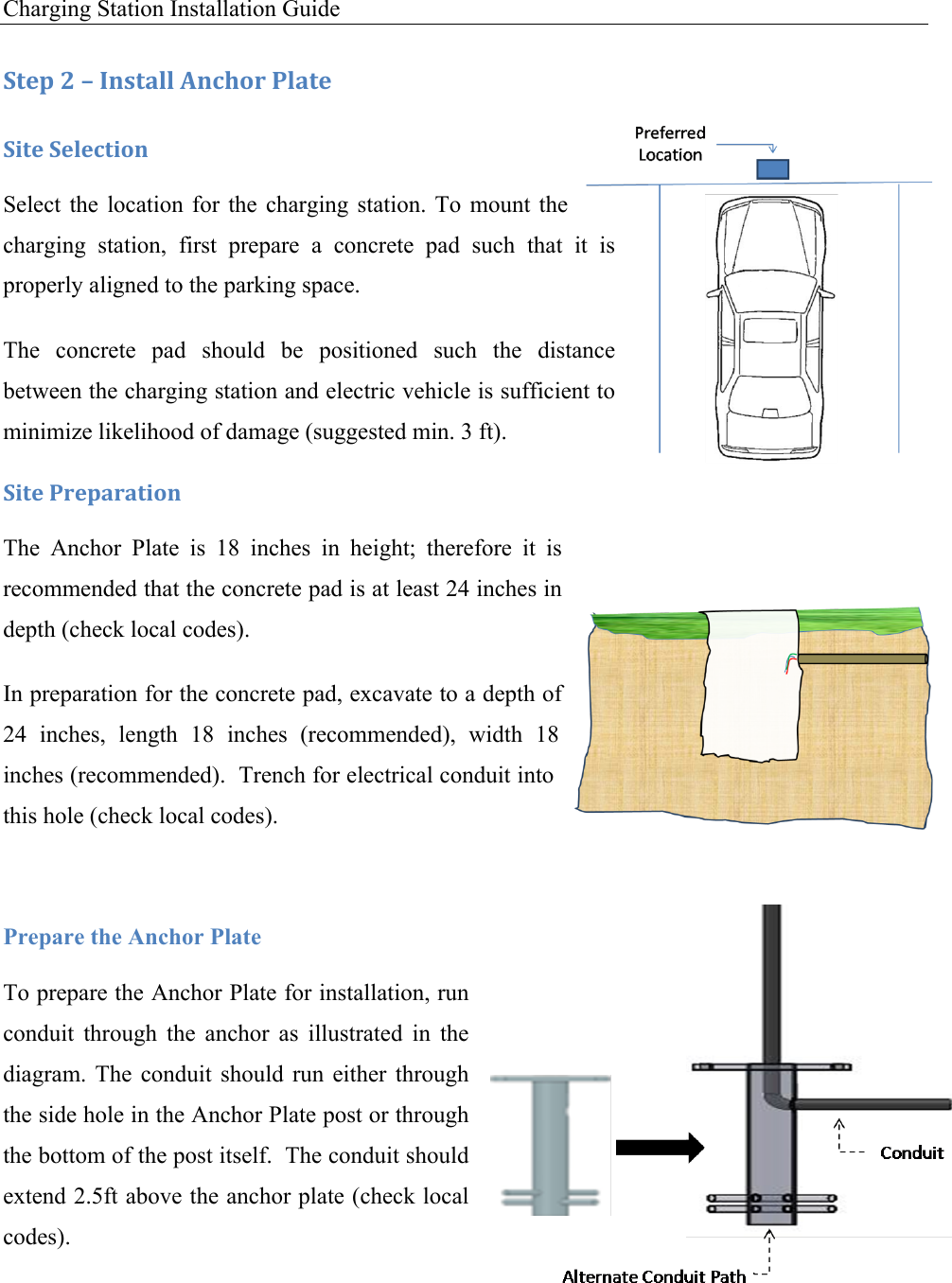
Charging Station Installation Guide   :+&1!<!L!C*,+#%%!M*49'.!-%#+&!:0+&!:&%&4+0'*!Select  the location for  the  charging  station.  To  mount  the charging  station,  first  prepare  a  concrete  pad  such  that  it  is properly aligned to the parking space. The  concrete  pad  should  be  positioned  such  the  distance between the charging station and electric vehicle is sufficient to minimize likelihood of damage (suggested min. 3 ft). :0+&!-.&1#.#+0'*!The  Anchor  Plate  is  18  inches  in  height;  therefore  it  is recommended that the concrete pad is at least 24 inches in depth (check local codes). In preparation for the concrete pad, excavate to a depth of 24  inches,  length  18  inches  (recommended),  width  18 inches (recommended).  Trench for electrical conduit into this hole (check local codes).  Prepare the Anchor Plate To prepare the Anchor Plate for installation, run conduit  through  the  anchor  as  illustrated  in  the diagram.  The  conduit  should  run  either  through the side hole in the Anchor Plate post or through the bottom of the post itself.  The conduit should extend 2.5ft above the anchor plate (check local codes).
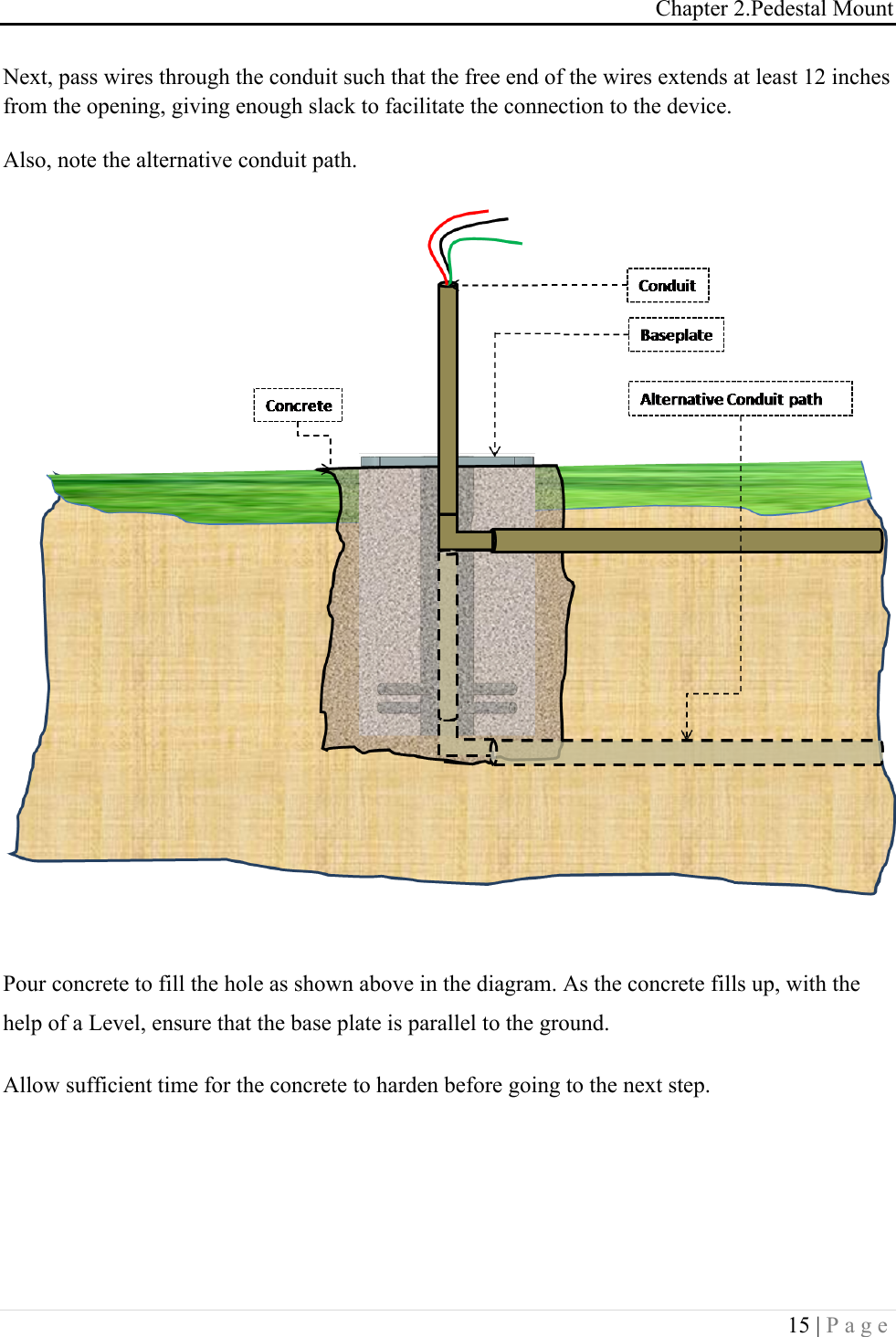
Chapter 2.Pedestal Mount 15 | Page  Next, pass wires through the conduit such that the free end of the wires extends at least 12 inches from the opening, giving enough slack to facilitate the connection to the device. Also, note the alternative conduit path.   Pour concrete to fill the hole as shown above in the diagram. As the concrete fills up, with the help of a Level, ensure that the base plate is parallel to the ground.  Allow sufficient time for the concrete to harden before going to the next step.  ! !
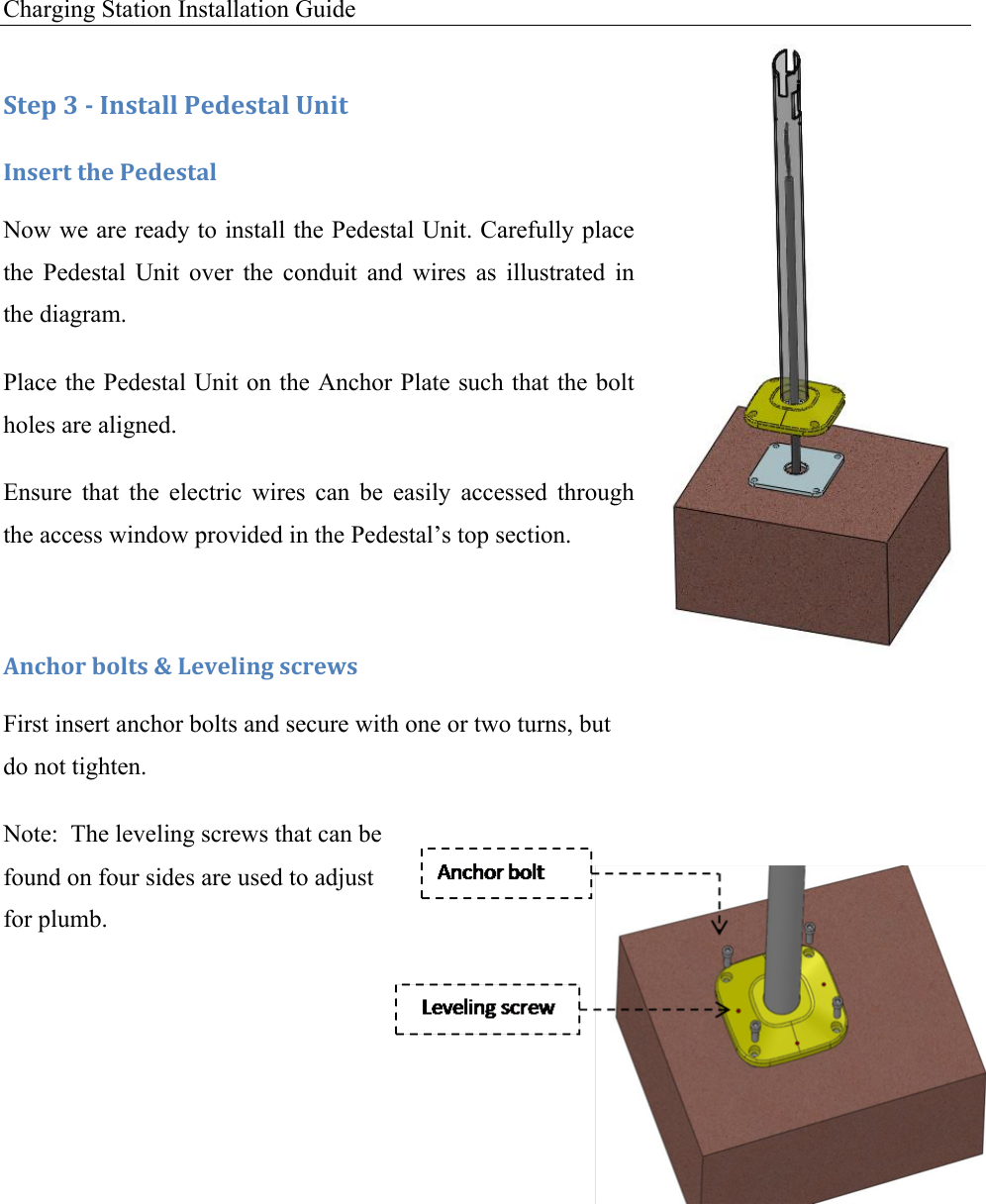
Charging Station Installation Guide   :+&1!N!/!C*,+#%%!-&5&,+#%!O*0+!C*,&.+!+9&!-&5&,+#%!Now we are ready to install the Pedestal Unit. Carefully place the  Pedestal  Unit  over  the  conduit  and  wires  as  illustrated  in the diagram. Place the Pedestal Unit on the Anchor Plate such that the bolt holes are aligned. Ensure  that  the  electric  wires  can  be  easily  accessed  through the access window provided in the Pedestal’s top section.  M*49'.!$'%+,!P!6&7&%0*3!,4.&I,!First insert anchor bolts and secure with one or two turns, but do not tighten. Note:  The leveling screws that can be found on four sides are used to adjust for plumb.
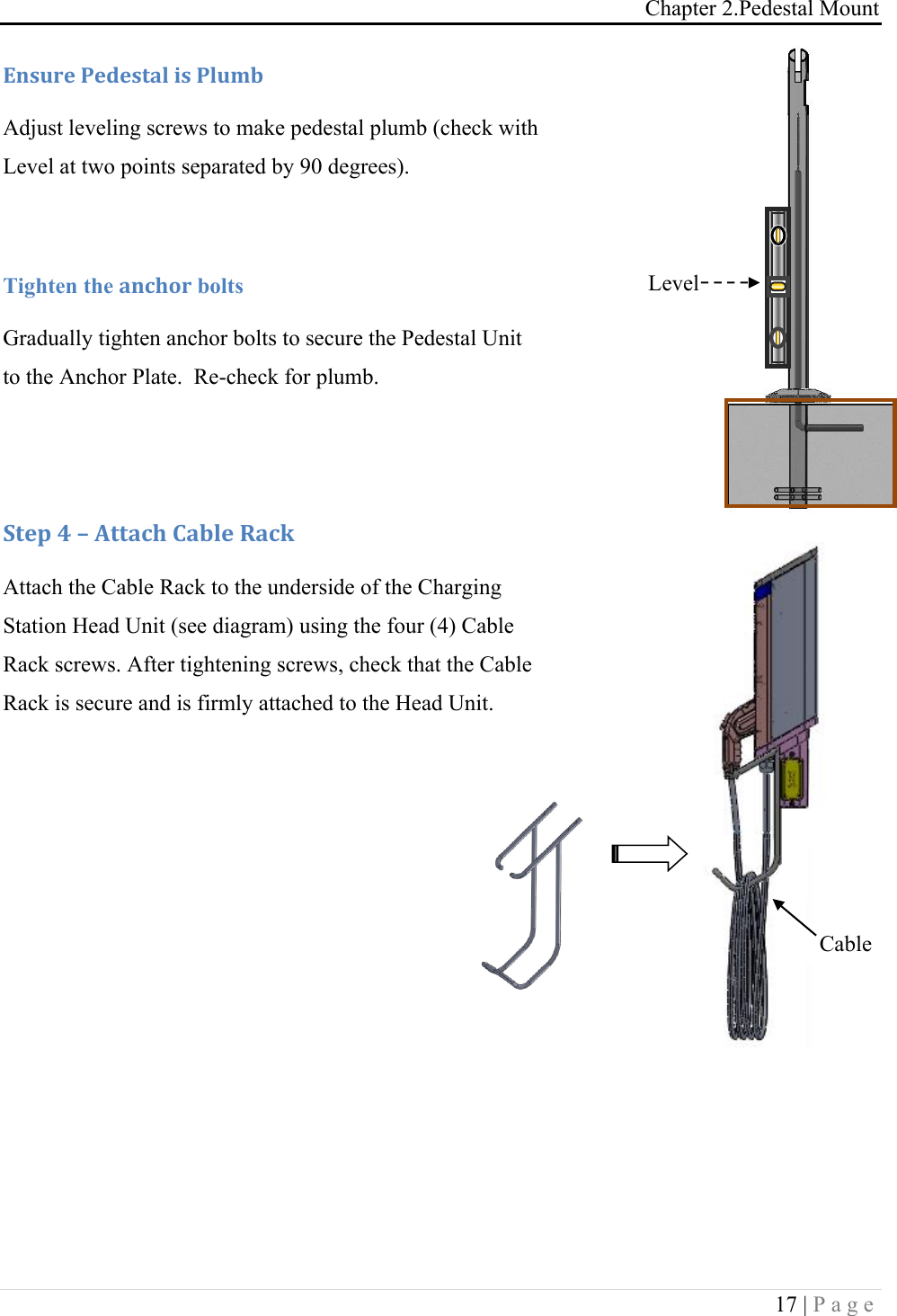
Chapter 2.Pedestal Mount 17 | Page            Q*,G.&!-&5&,+#%!0,!-%GD$!Adjust leveling screws to make pedestal plumb (check with Level at two points separated by 90 degrees).  Tighten the #*49'. bolts Gradually tighten anchor bolts to secure the Pedestal Unit to the Anchor Plate.  Re-check for plumb.   :+&1!A!L!M++#49!)#$%&!R#4J!Attach the Cable Rack to the underside of the Charging Station Head Unit (see diagram) using the four (4) Cable Rack screws. After tightening screws, check that the Cable Rack is secure and is firmly attached to the Head Unit.   Cable Rack Level
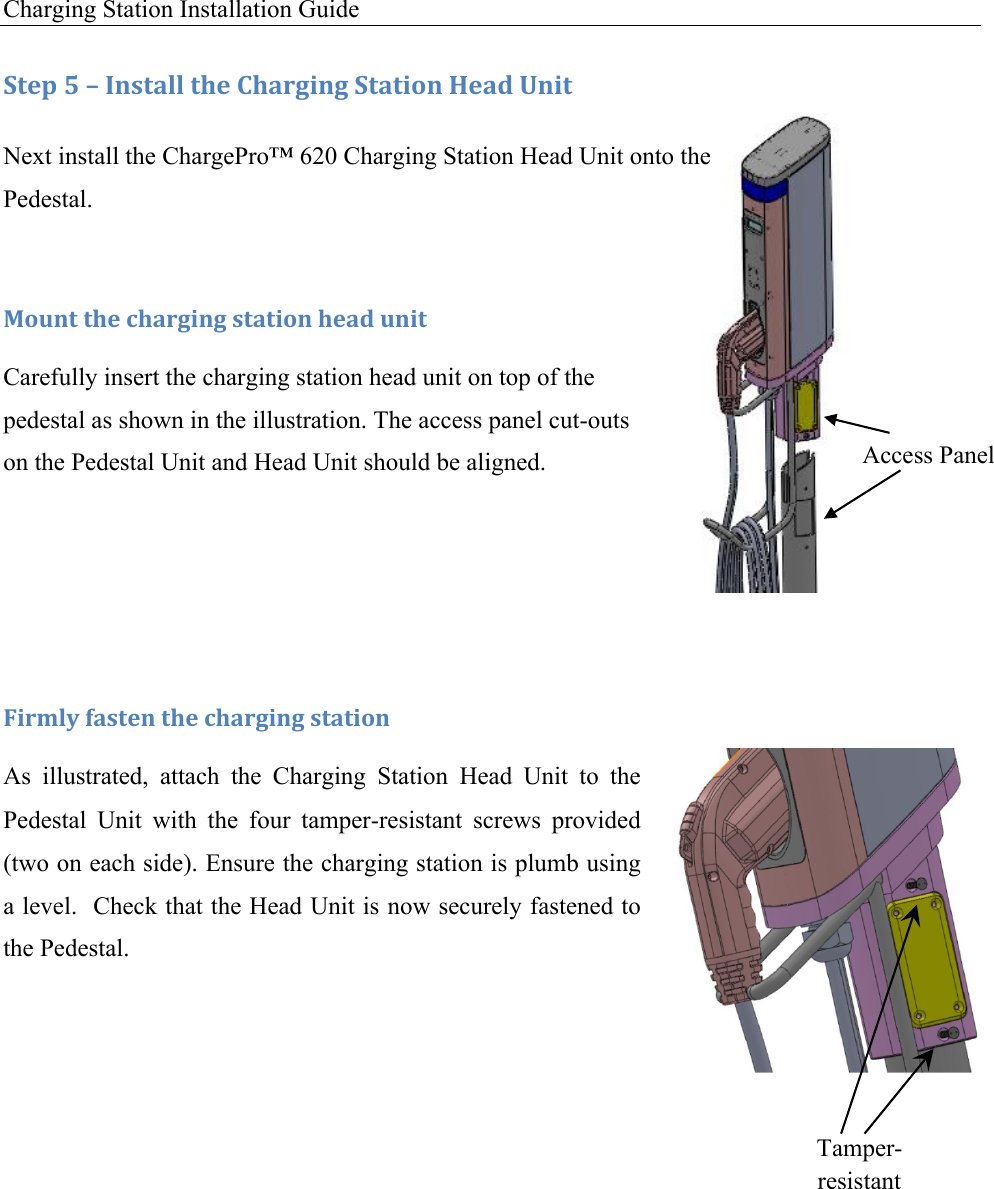
Charging Station Installation Guide   Access Panel Tamper-resistant Screws :+&1!S!L!C*,+#%%!+9&!)9#.30*3!:+#+0'*!T&#5!O*0+!Next install the ChargePro™ 620 Charging Station Head Unit onto the Pedestal. !F'G*+!+9&!49#.30*3!,+#+0'*!9&#5!G*0+!Carefully insert the charging station head unit on top of the pedestal as shown in the illustration. The access panel cut-outs on the Pedestal Unit and Head Unit should be aligned.   !U0.D%V!(#,+&*!+9&!49#.30*3!,+#+0'*!As  illustrated,  attach  the  Charging  Station  Head  Unit  to  the Pedestal  Unit  with  the  four  tamper-resistant  screws  provided (two on each side). Ensure the charging station is plumb using a level.  Check that the Head Unit is now securely fastened to the Pedestal.
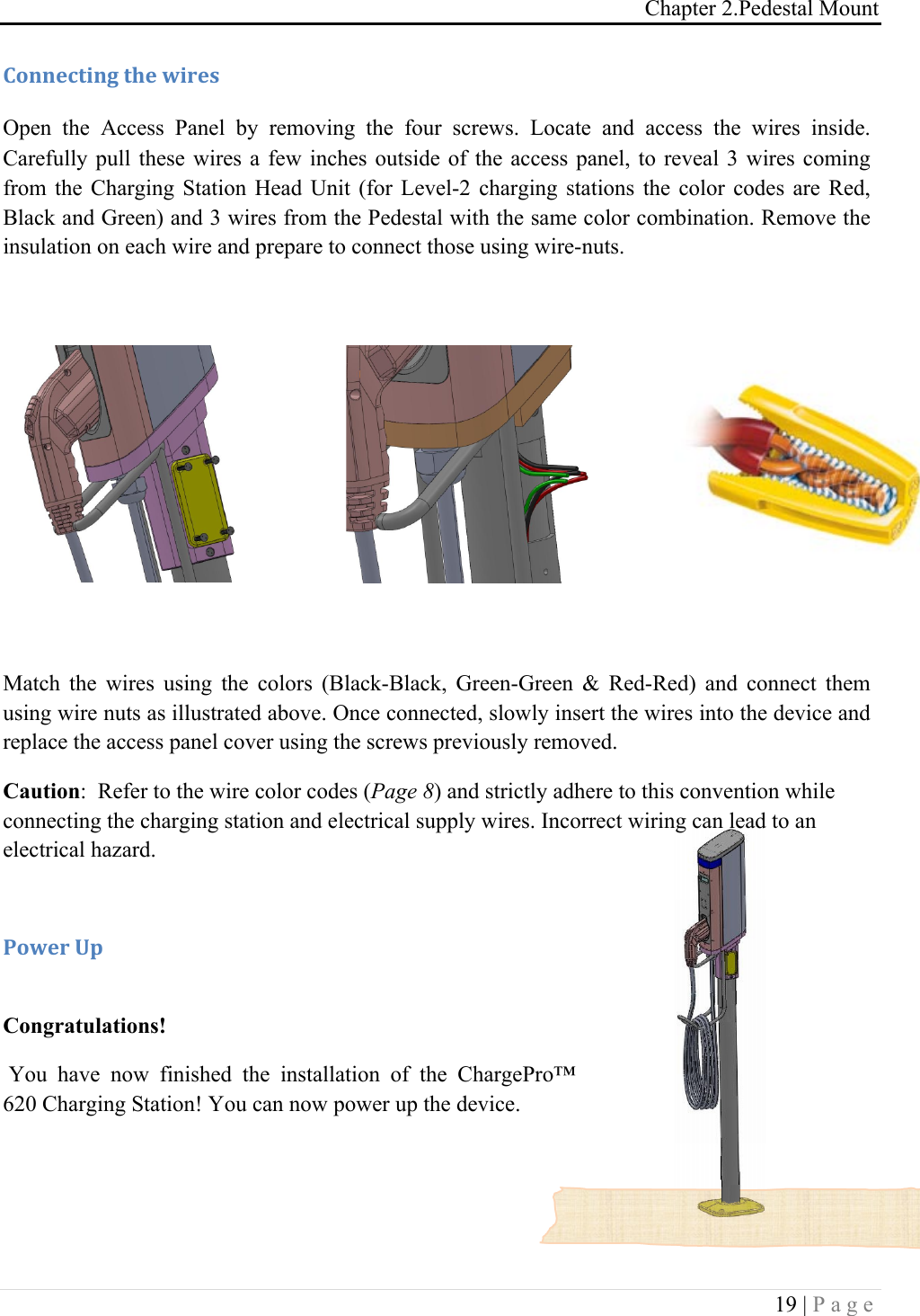
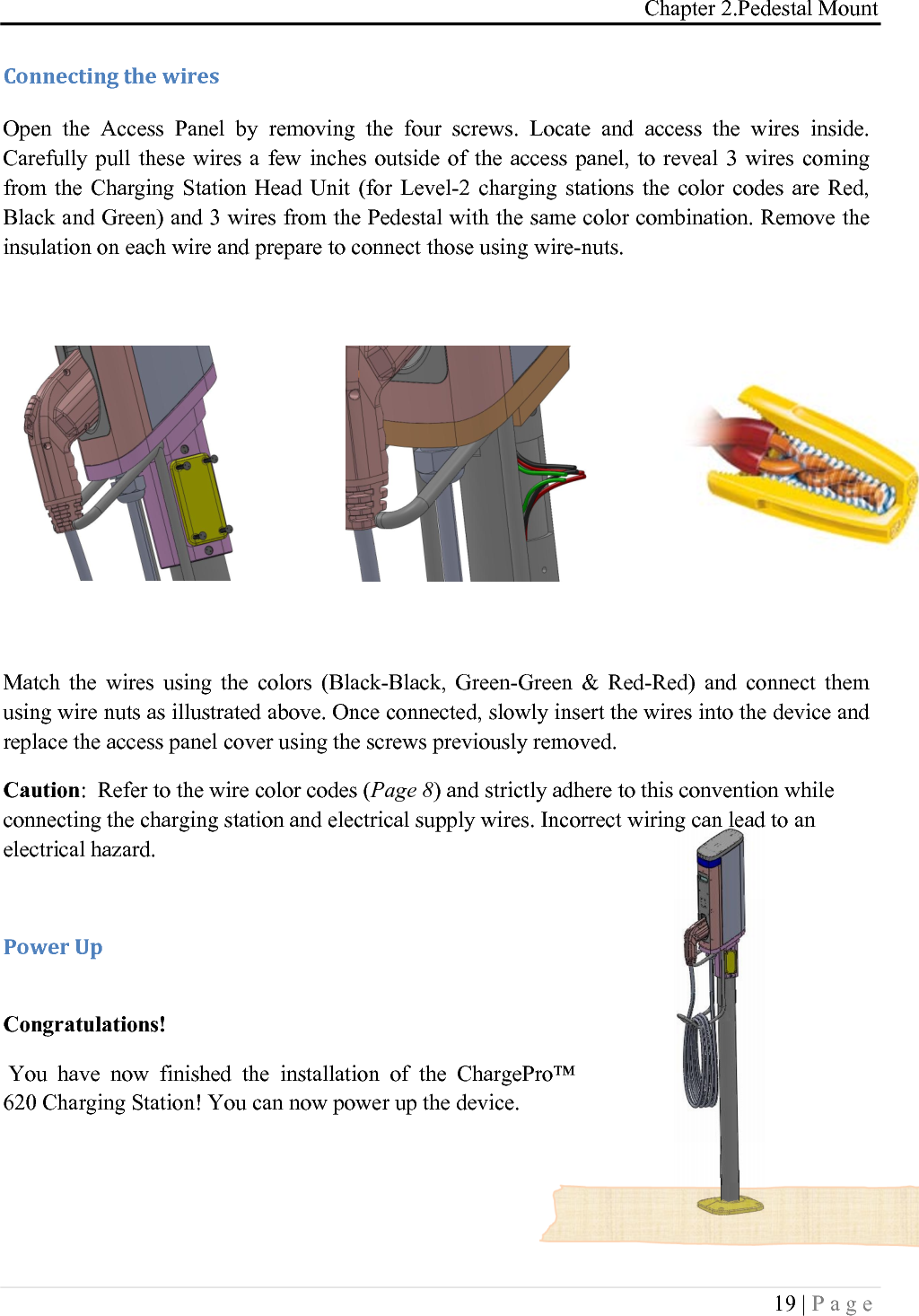
Chapter 2.Pedestal Mount 19 | Page  )'**&4+0*3!+9&!I0.&,!Open  the  Access  Panel  by  removing  the  four  screws.  Locate  and  access  the  wires  inside. Carefully pull these  wires  a few  inches  outside of the access  panel,  to reveal  3  wires coming from  the  Charging  Station  Head  Unit  (for  Level-2  charging  stations  the  color  codes  are  Red, Black and Green) and 3 wires from the Pedestal with the same color combination. Remove the insulation on each wire and prepare to connect those using wire-nuts.          Match  the  wires  using  the  colors  (Black-Black,  Green-Green  &  Red-Red)  and  connect  them using wire nuts as illustrated above. Once connected, slowly insert the wires into the device and replace the access panel cover using the screws previously removed. Caution:  Refer to the wire color codes (Page 8) and strictly adhere to this convention while connecting the charging station and electrical supply wires. Incorrect wiring can lead to an electrical hazard.   -'I&.!O1! Congratulations!  You  have  now  finished  the  installation  of  the  ChargePro™ 620 Charging Station! You can now power up the device.
Charging Station Installation Guide
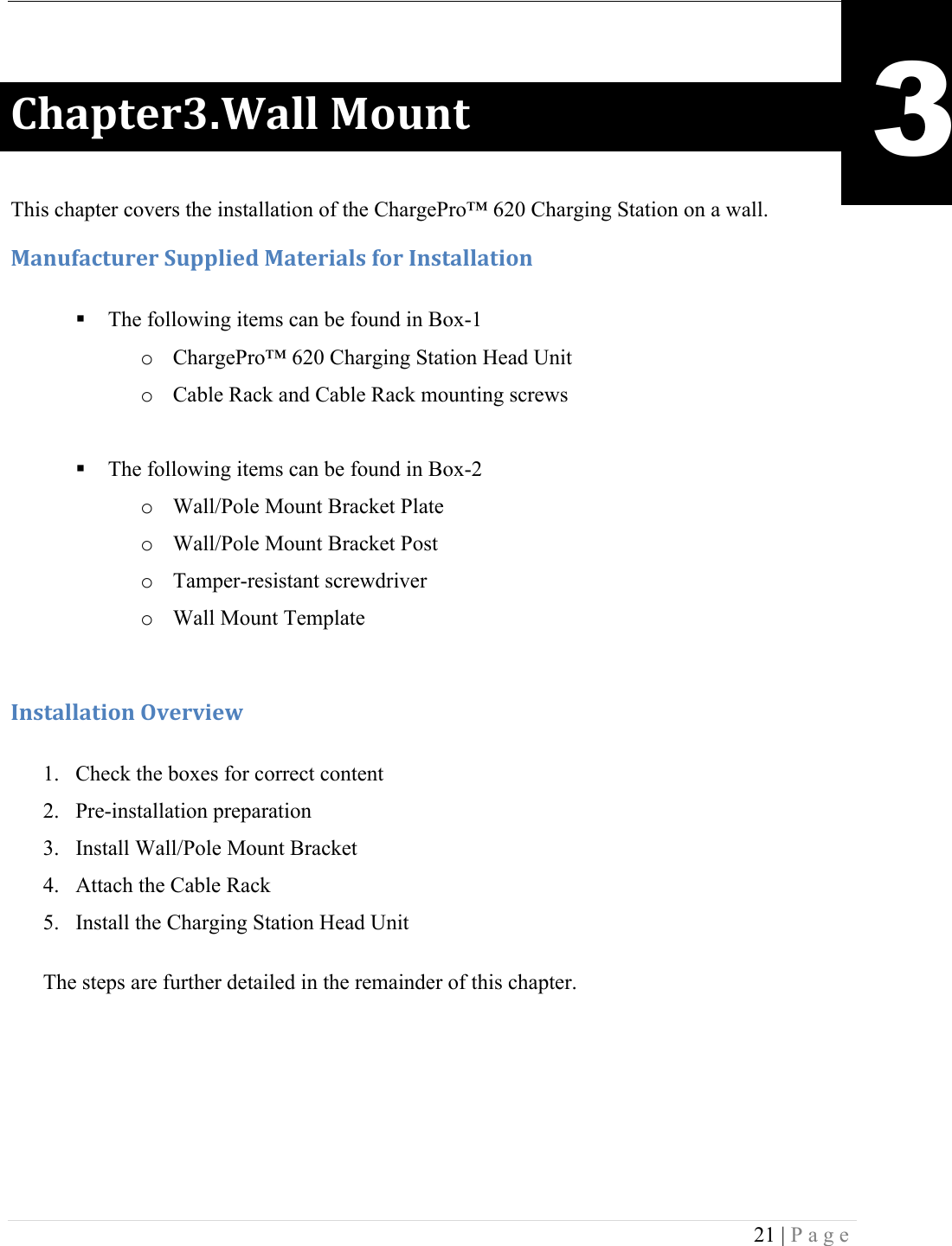
 21 | Page  )9#1+&.NE2#%%!F'G*+! This chapter covers the installation of the ChargePro™ 620 Charging Station on a wall. F#*G(#4+G.&.!:G11%0&5!F#+&.0#%,!('.!C*,+#%%#+0'*!! The following items can be found in Box-1 o ChargePro™ 620 Charging Station Head Unit o Cable Rack and Cable Rack mounting screws   ! The following items can be found in Box-2 o Wall/Pole Mount Bracket Plate o Wall/Pole Mount Bracket Post o Tamper-resistant screwdriver o Wall Mount Template   C*,+#%%#+0'*!H7&.70&I!!1. Check the boxes for correct content 2. Pre-installation preparation 3. Install Wall/Pole Mount Bracket 4. Attach the Cable Rack 5. Install the Charging Station Head Unit The steps are further detailed in the remainder of this chapter.   3
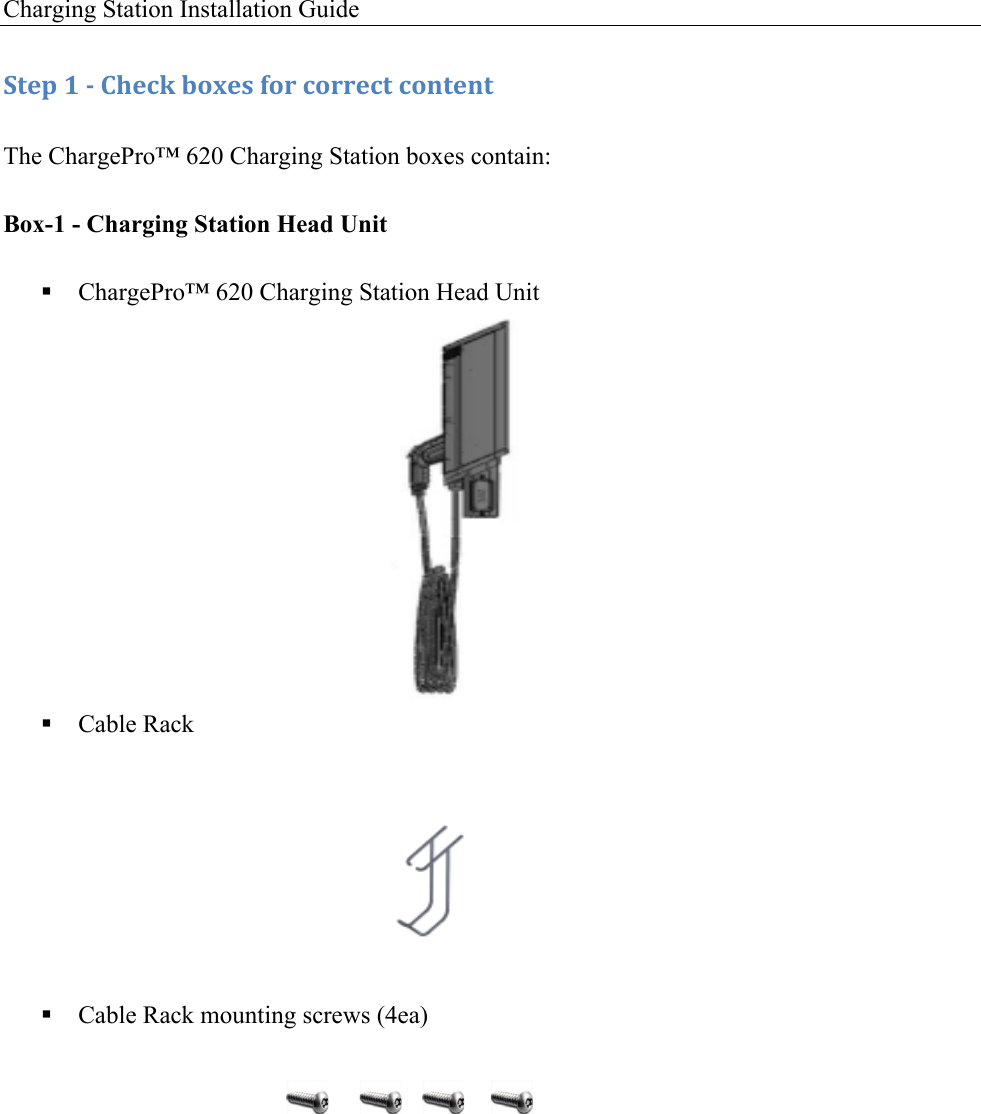
Charging Station Installation Guide   :+&1!8!/!)9&4J!$'K&,!('.!4'..&4+!4'*+&*+!The ChargePro™ 620 Charging Station boxes contain: Box-1 - Charging Station Head Unit ! ChargePro™ 620 Charging Station Head Unit          ! Cable Rack             ! Cable Rack mounting screws (4ea)
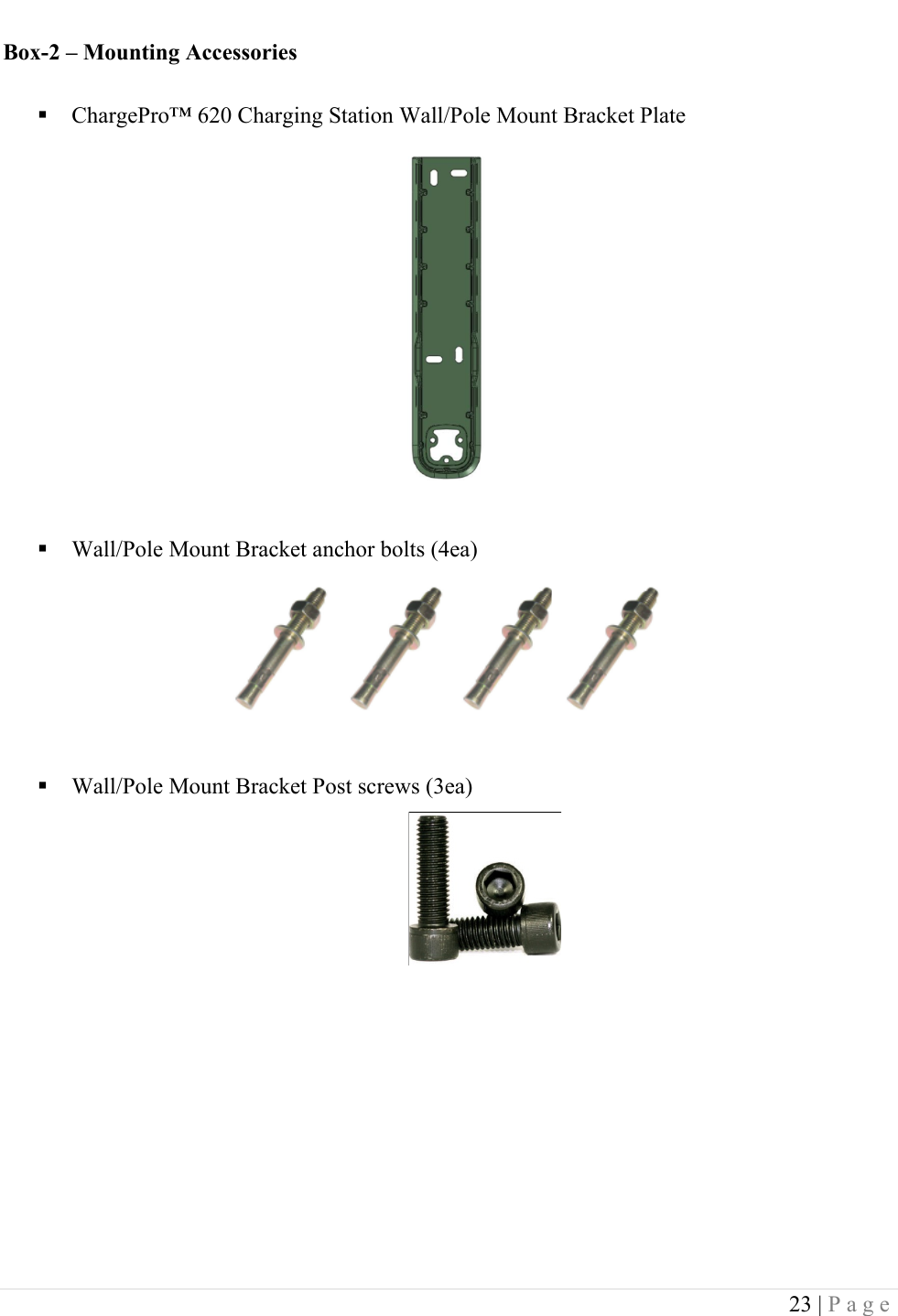
 23 | Page  Box-2 – Mounting Accessories ! ChargePro™ 620 Charging Station Wall/Pole Mount Bracket Plate           ! Wall/Pole Mount Bracket anchor bolts (4ea)       ! Wall/Pole Mount Bracket Post screws (3ea)
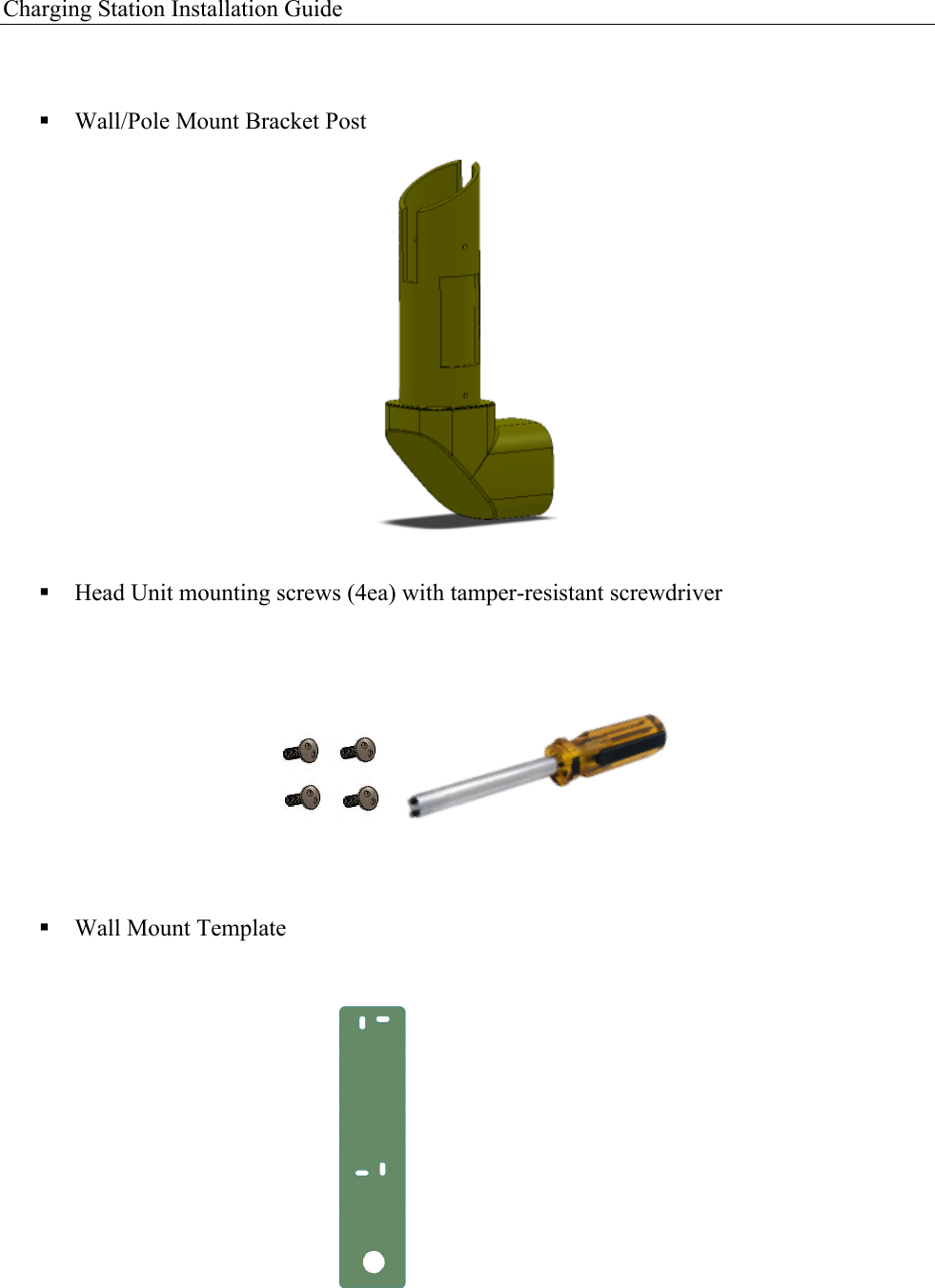
Charging Station Installation Guide    ! Wall/Pole Mount Bracket Post               ! Head Unit mounting screws (4ea) with tamper-resistant screwdriver       ! Wall Mount Template
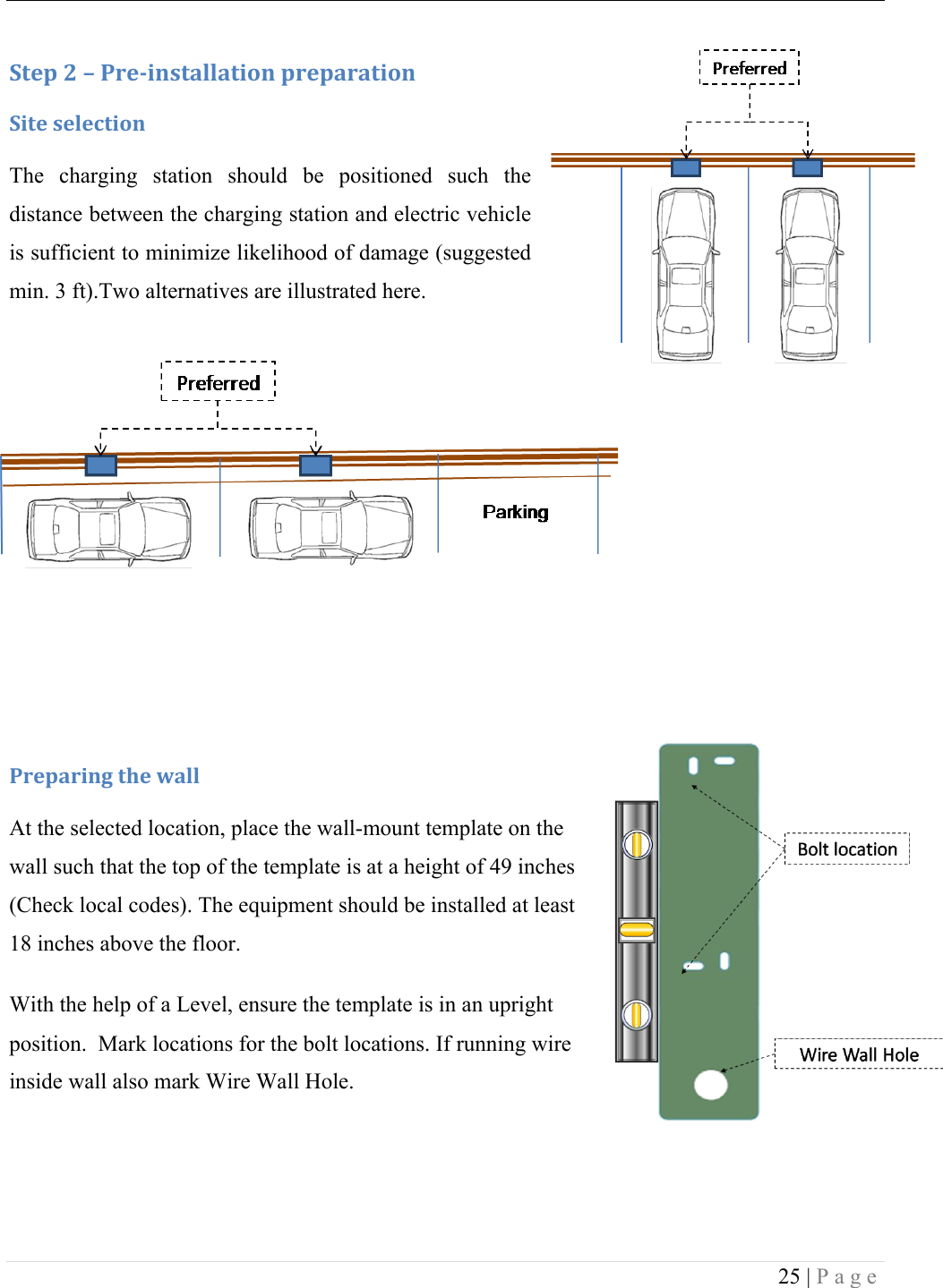
 25 | Page  :+&1!<!L!-.&/0*,+#%%#+0'*!1.&1#.#+0'*!:0+&!,&%&4+0'*!The  charging  station  should  be  positioned  such  the distance between the charging station and electric vehicle is sufficient to minimize likelihood of damage (suggested min. 3 ft).Two alternatives are illustrated here. ! !!!!!!-.&1#.0*3!+9&!I#%%!At the selected location, place the wall-mount template on the wall such that the top of the template is at a height of 49 inches (Check local codes). The equipment should be installed at least 18 inches above the floor.  With the help of a Level, ensure the template is in an upright position.  Mark locations for the bolt locations. If running wire inside wall also mark Wire Wall Hole.
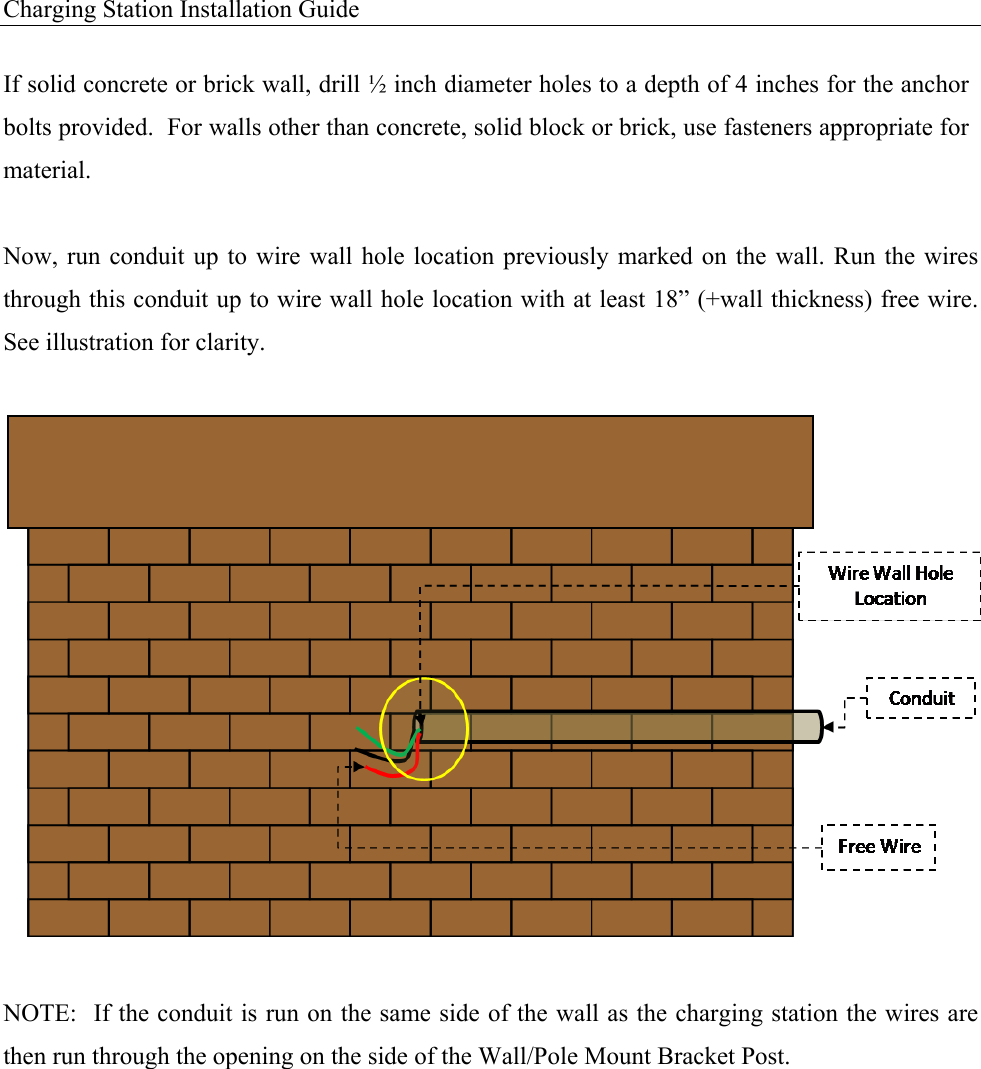
Charging Station Installation Guide   If solid concrete or brick wall, drill ½ inch diameter holes to a depth of 4 inches for the anchor bolts provided.  For walls other than concrete, solid block or brick, use fasteners appropriate for material.  Now, run conduit  up  to wire  wall  hole location previously  marked  on the wall.  Run  the wires through this conduit up to wire wall hole location with at least 18” (+wall thickness) free wire. See illustration for clarity.   NOTE:  If the conduit is run on the same side of the wall as the charging station the wires are then run through the opening on the side of the Wall/Pole Mount Bracket Post.
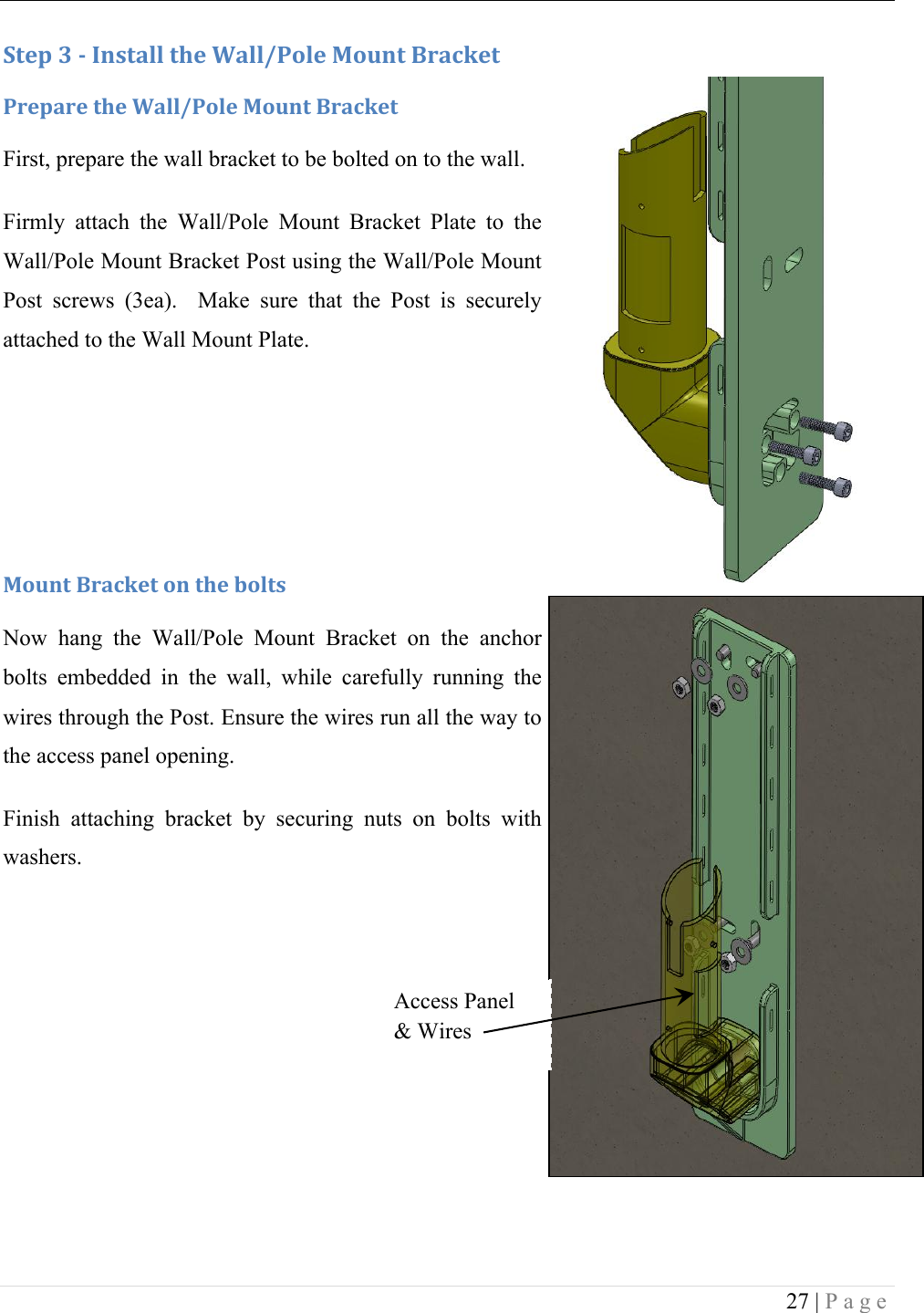
 27 | Page     :+&1!N!/!C*,+#%%!+9&!2#%%W-'%&!F'G*+!X.#4J&+!-.&1#.&!+9&!2#%%W-'%&!F'G*+!X.#4J&+!First, prepare the wall bracket to be bolted on to the wall.  Firmly  attach  the  Wall/Pole  Mount  Bracket  Plate  to  the Wall/Pole Mount Bracket Post using the Wall/Pole Mount Post  screws  (3ea).    Make  sure  that  the  Post  is  securely attached to the Wall Mount Plate.    F'G*+!X.#4J&+!'*!+9&!$'%+,!Now  hang  the  Wall/Pole  Mount  Bracket  on  the  anchor bolts  embedded  in  the  wall,  while  carefully  running  the wires through the Post. Ensure the wires run all the way to the access panel opening. Finish  attaching  bracket  by  securing  nuts  on  bolts  with washers. !! !Access Panel & Wires
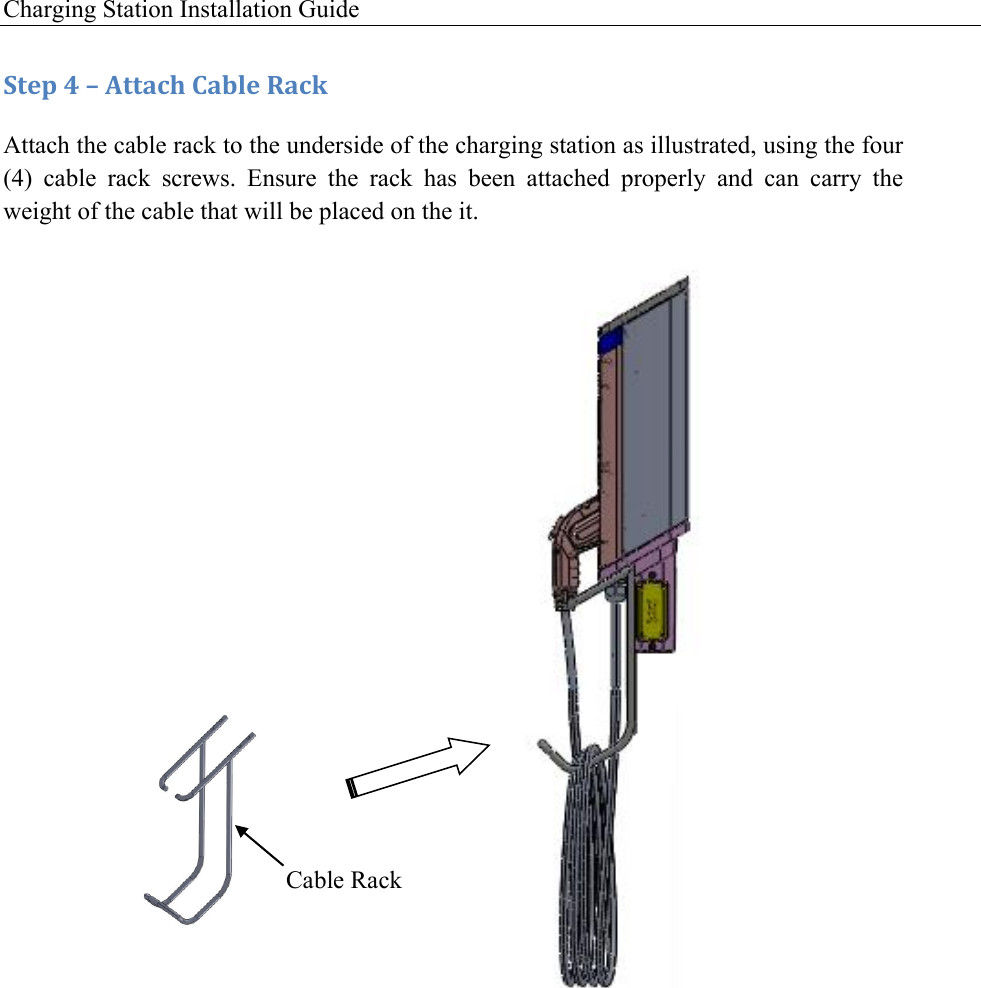
Charging Station Installation Guide   :+&1!A!L!M++#49!)#$%&!R#4J!Attach the cable rack to the underside of the charging station as illustrated, using the four (4)  cable  rack  screws.  Ensure  the  rack  has  been  attached  properly  and  can  carry  the weight of the cable that will be placed on the it.         !   Cable Rack
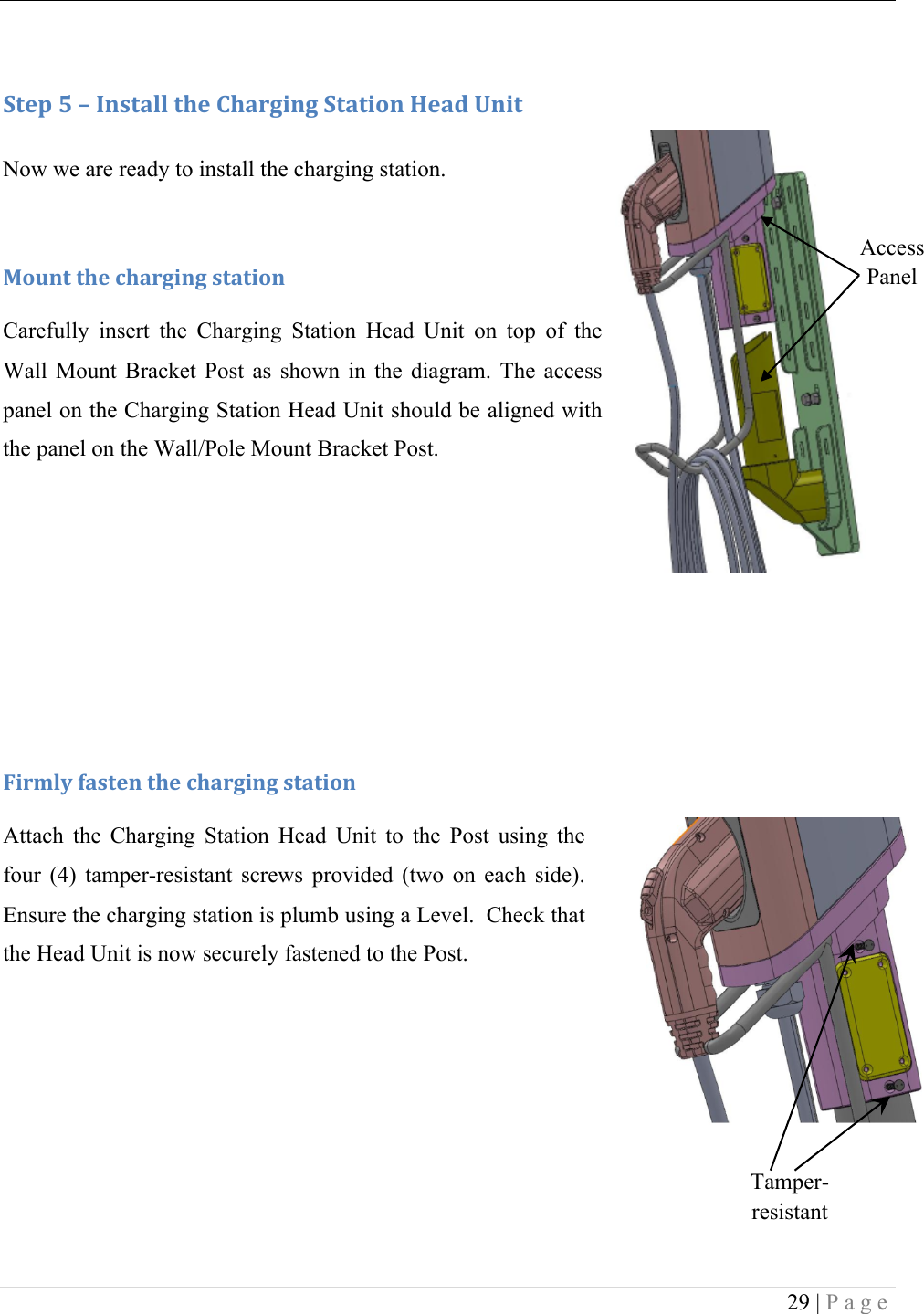
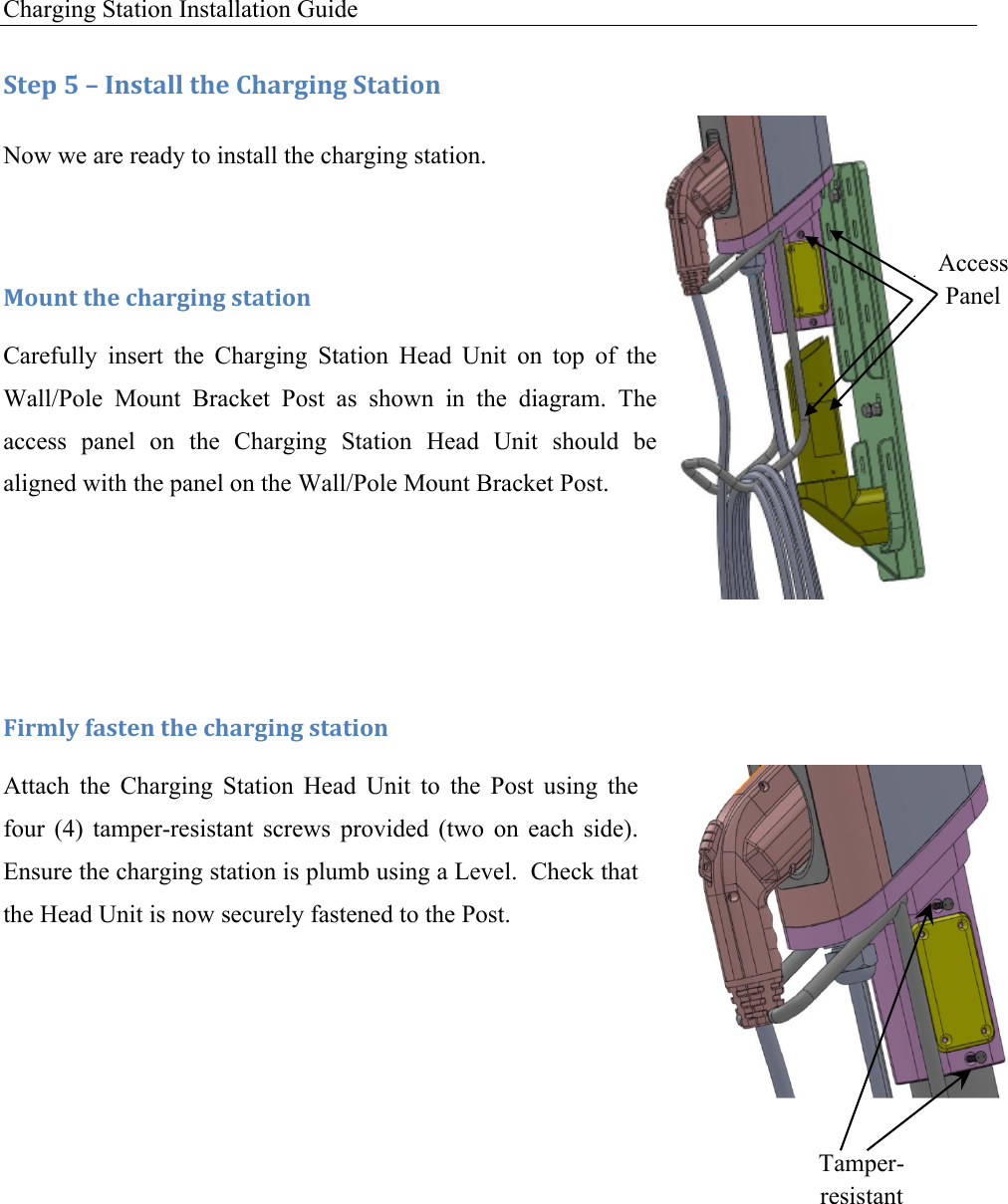
 29 | Page   :+&1!S!L!C*,+#%%!+9&!)9#.30*3!:+#+0'*!T&#5!O*0+!Now we are ready to install the charging station. !F'G*+!+9&!49#.30*3!,+#+0'*!Carefully  insert  the  Charging  Station  Head  Unit  on  top  of  the Wall  Mount  Bracket  Post  as  shown  in  the  diagram.  The  access panel on the Charging Station Head Unit should be aligned with the panel on the Wall/Pole Mount Bracket Post.        U0.D%V!(#,+&*!+9&!49#.30*3!,+#+0'*!Attach  the  Charging  Station  Head  Unit  to  the  Post  using  the four  (4)  tamper-resistant  screws  provided  (two  on  each  side). Ensure the charging station is plumb using a Level.  Check that the Head Unit is now securely fastened to the Post.     Tamper-resistant Screws Access Panel
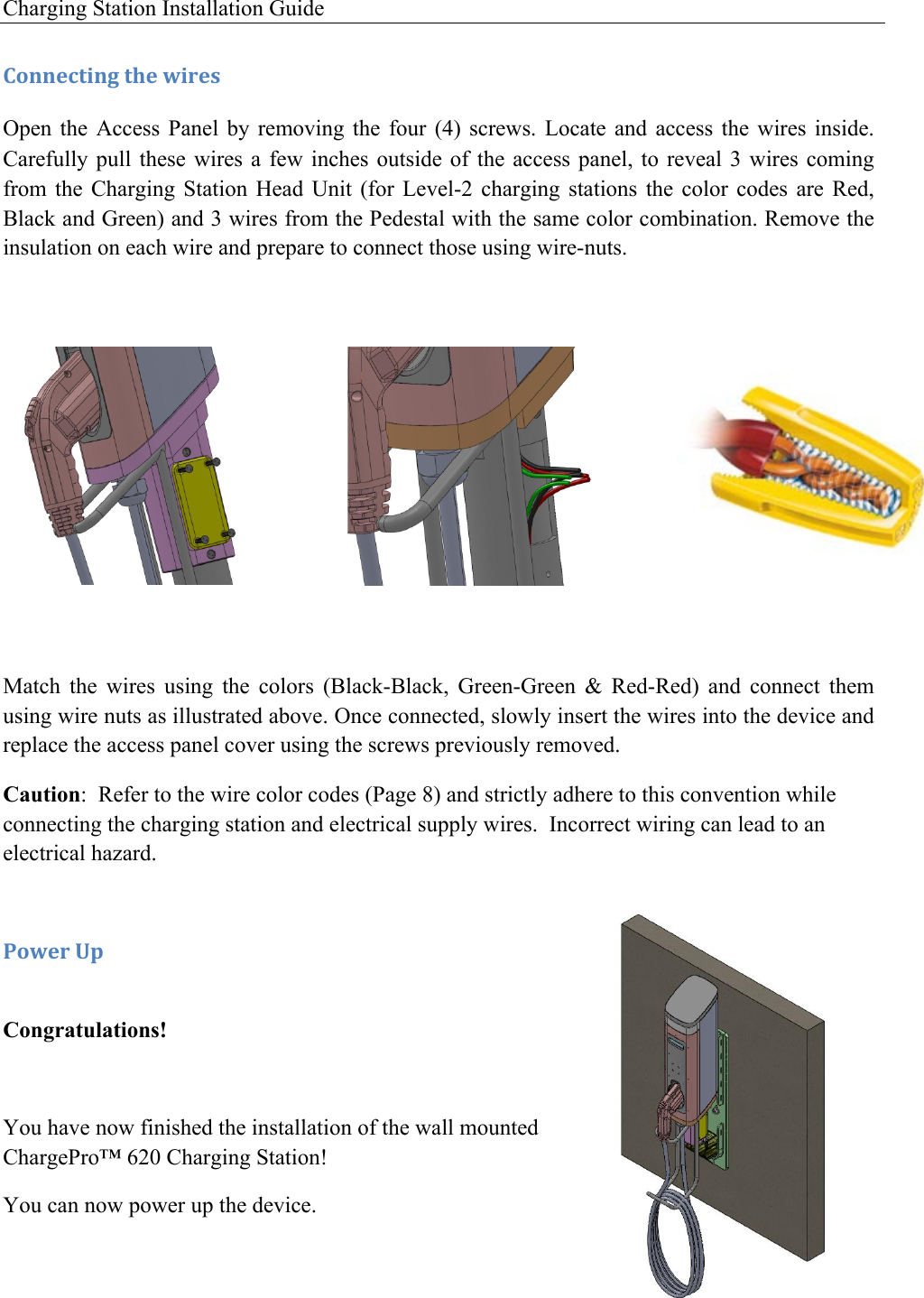
Charging Station Installation Guide   )'**&4+0*3!+9&!I0.&,!Open  the  Access  Panel  by  removing  the  four  (4)  screws.  Locate  and  access  the  wires  inside. Carefully pull these  wires  a few  inches  outside of  the  access panel, to  reveal  3 wires  coming from  the  Charging  Station  Head  Unit  (for  Level-2  charging  stations  the  color  codes  are  Red, Black and Green) and 3 wires from the Pedestal with the same color combination. Remove the insulation on each wire and prepare to connect those using wire-nuts.          Match  the  wires  using  the  colors  (Black-Black,  Green-Green  &  Red-Red)  and  connect  them using wire nuts as illustrated above. Once connected, slowly insert the wires into the device and replace the access panel cover using the screws previously removed. Caution:  Refer to the wire color codes (Page 8) and strictly adhere to this convention while connecting the charging station and electrical supply wires.  Incorrect wiring can lead to an electrical hazard.   -'I&.!O1! Congratulations!  You have now finished the installation of the wall mounted ChargePro™ 620 Charging Station!  You can now power up the device.
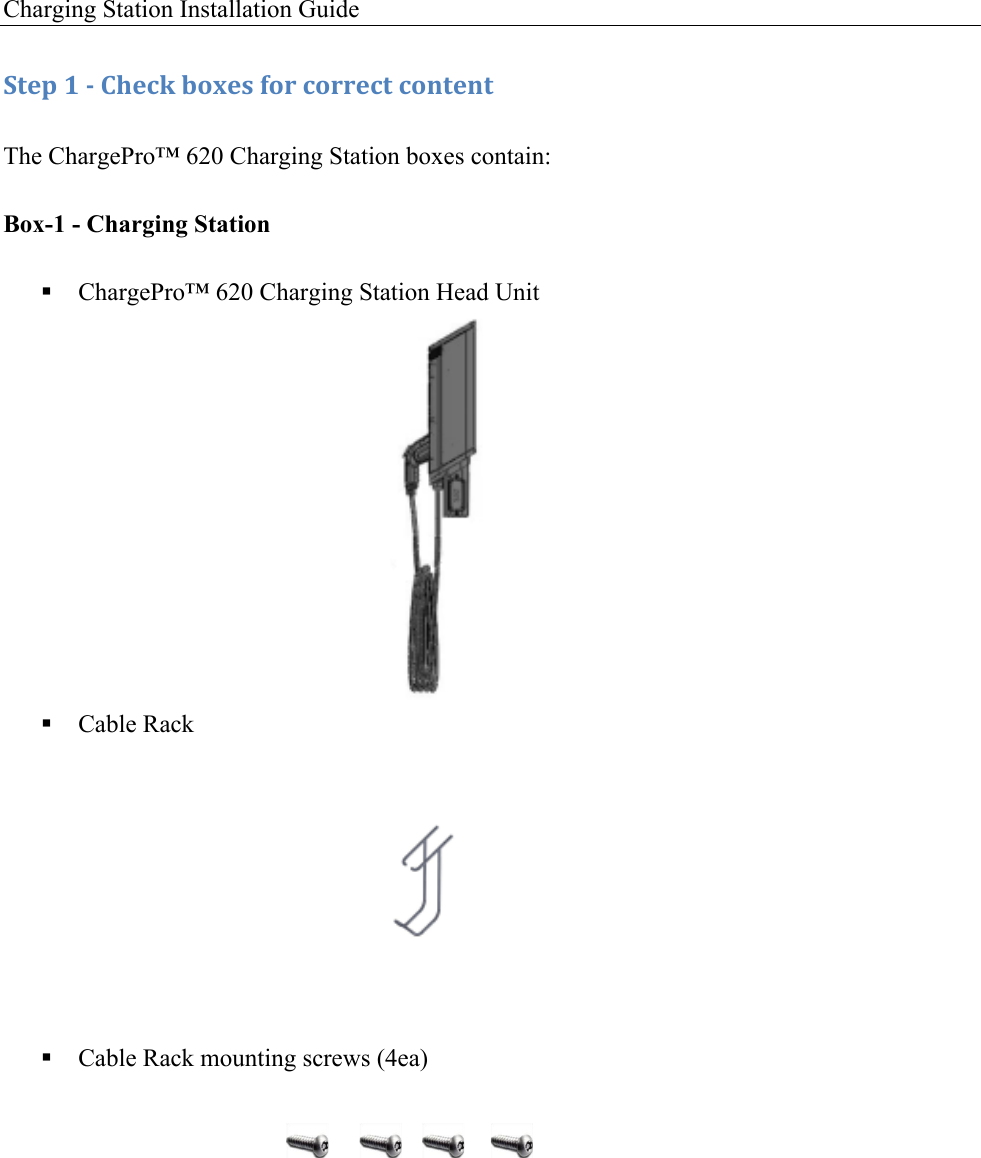
 31 | Page  )9#1+&.AE-'%&!F'G*+! This chapter covers the installation of the ChargePro™ 620 Charging Stations on a pole mount. F#*G(#4+G.&.!:G11%0&5!F#+&.0#%,!('.!C*,+#%%#+0'*!! The following items can be found in Box- 1 o ChargePro™ 620 Charging Station Head Unit o Cable Rack and Cable Rack mounting screws (4ea)  ! The following items can be found in Box-2 o Wall/Pole Mount Bracket Plate o Wall/Pole Mount Bracket Post o Tamper-resistant screwdriver o Wall Mount Template (not needed for Pole Mount configuration)  ! The following Items are to be supplied by the Installer o Straps to secure the Wall/Pole Mount Bracket Plate C*,+#%%#+0'*!H7&.70&I!!1. Check the boxes for correct content 2. Pre-installation preparation 3. Install Wall/Pole Mount Bracket  4. Attach the Cable Rack 5. Install the Charging Station Head Unit The steps are further detailed in the remainder of this chapter. 4
Charging Station Installation Guide   :+&1!8!/!)9&4J!$'K&,!('.!4'..&4+!4'*+&*+!The ChargePro™ 620 Charging Station boxes contain: Box-1 - Charging Station ! ChargePro™ 620 Charging Station Head Unit          ! Cable Rack              ! Cable Rack mounting screws (4ea)
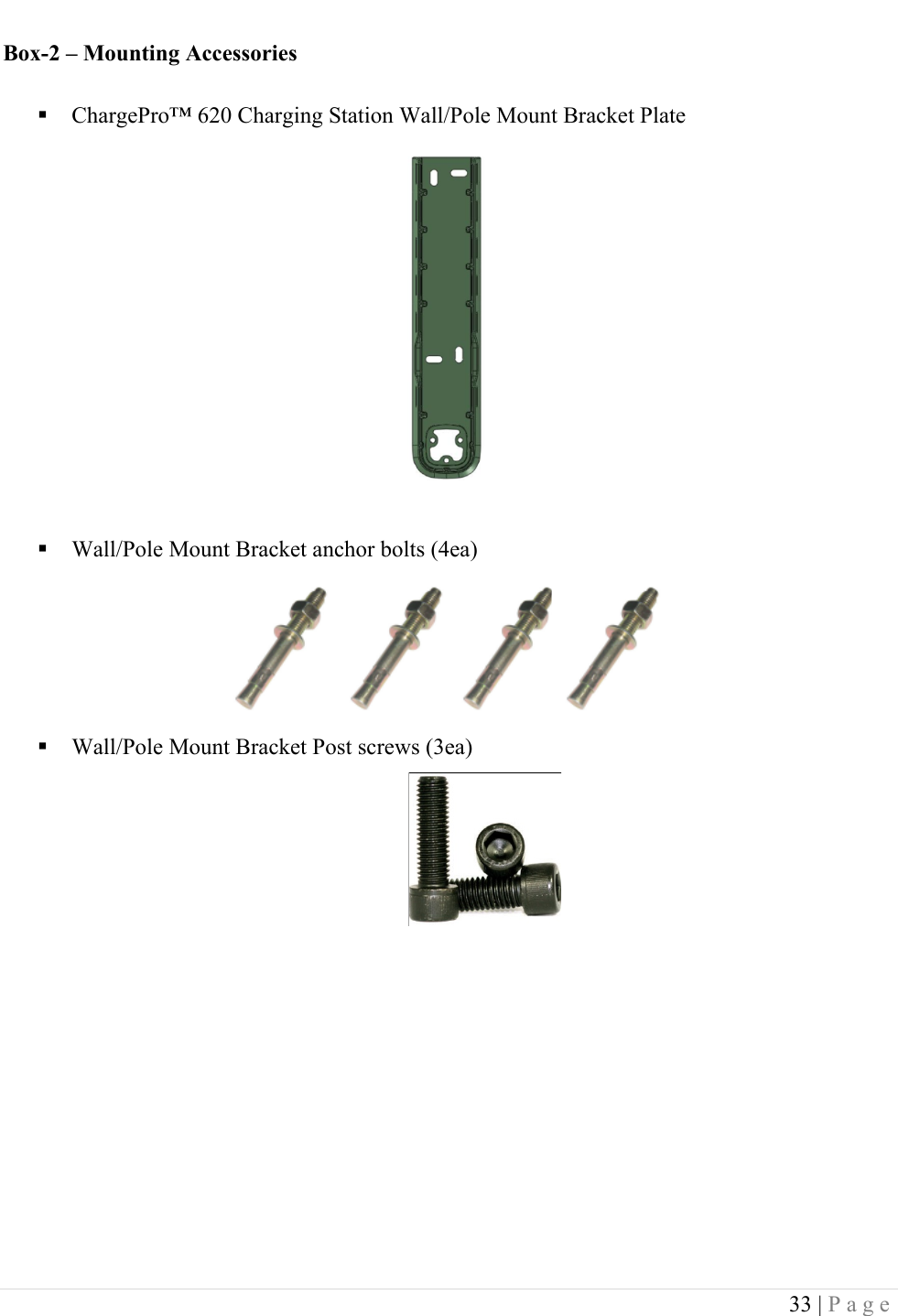
 33 | Page  Box-2 – Mounting Accessories ! ChargePro™ 620 Charging Station Wall/Pole Mount Bracket Plate           ! Wall/Pole Mount Bracket anchor bolts (4ea)      ! Wall/Pole Mount Bracket Post screws (3ea)
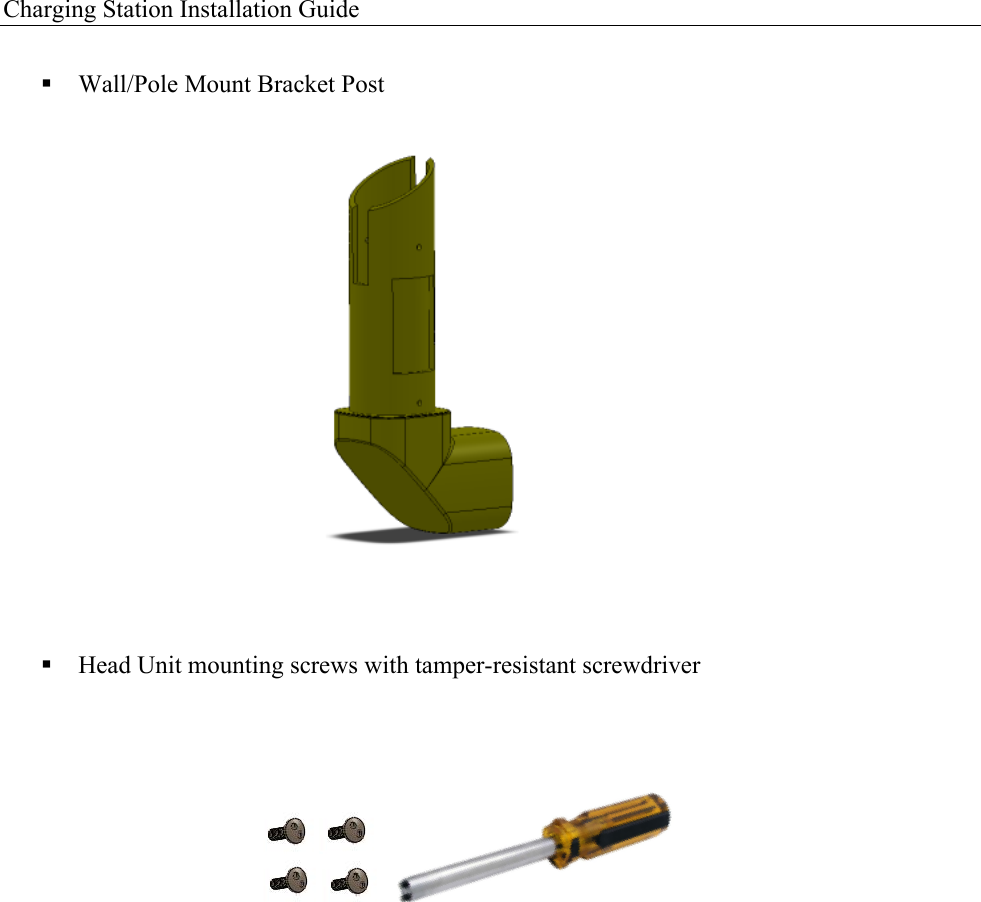
Charging Station Installation Guide   ! Wall/Pole Mount Bracket Post                 ! Head Unit mounting screws with tamper-resistant screwdriver         !
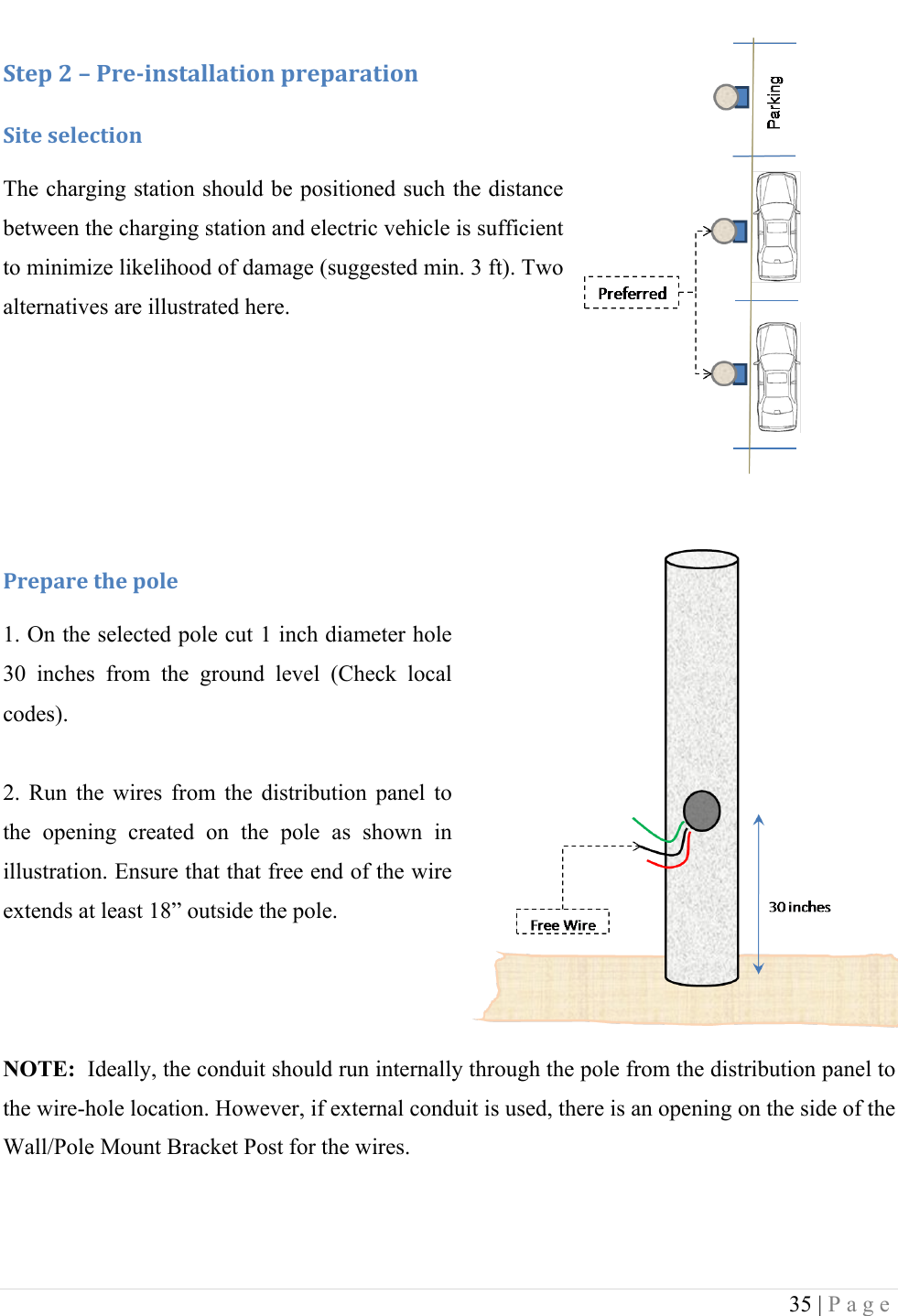
 35 | Page  :+&1!<!L!-.&/0*,+#%%#+0'*!1.&1#.#+0'*!:0+&!,&%&4+0'*!The charging station should be positioned such the distance between the charging station and electric vehicle is sufficient to minimize likelihood of damage (suggested min. 3 ft). Two alternatives are illustrated here.    !-.&1#.&!+9&!1'%&!1. On the selected pole cut 1 inch diameter hole 30  inches  from  the  ground  level  (Check  local codes).  2.  Run  the  wires  from  the  distribution  panel  to the  opening  created  on  the  pole  as  shown  in illustration. Ensure that that free end of the wire extends at least 18” outside the pole.    NOTE:  Ideally, the conduit should run internally through the pole from the distribution panel to the wire-hole location. However, if external conduit is used, there is an opening on the side of the Wall/Pole Mount Bracket Post for the wires.  !
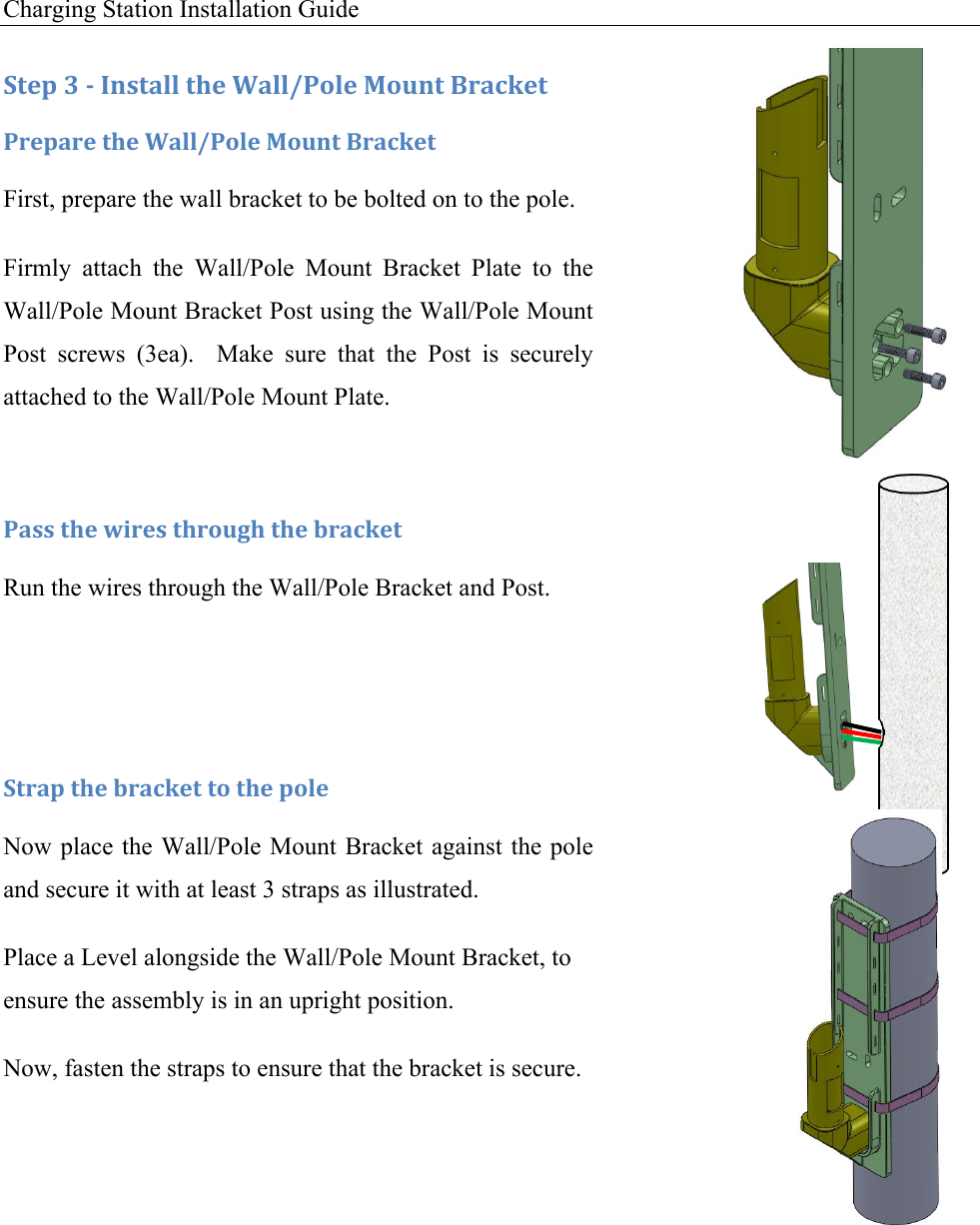
Charging Station Installation Guide      :+&1!N!/!C*,+#%%!+9&!2#%%W-'%&!F'G*+!X.#4J&+!-.&1#.&!+9&!2#%%W-'%&!F'G*+!X.#4J&+!First, prepare the wall bracket to be bolted on to the pole.  Firmly  attach  the  Wall/Pole  Mount  Bracket  Plate  to  the Wall/Pole Mount Bracket Post using the Wall/Pole Mount Post  screws  (3ea).    Make  sure  that  the  Post  is  securely attached to the Wall/Pole Mount Plate.  -#,,!+9&!I0.&,!+9.'G39!+9&!$.#4J&+!Run the wires through the Wall/Pole Bracket and Post.   :+.#1!+9&!$.#4J&+!+'!+9&!1'%&!Now place the Wall/Pole Mount Bracket against the pole and secure it with at least 3 straps as illustrated. Place a Level alongside the Wall/Pole Mount Bracket, to ensure the assembly is in an upright position. Now, fasten the straps to ensure that the bracket is secure. !!!
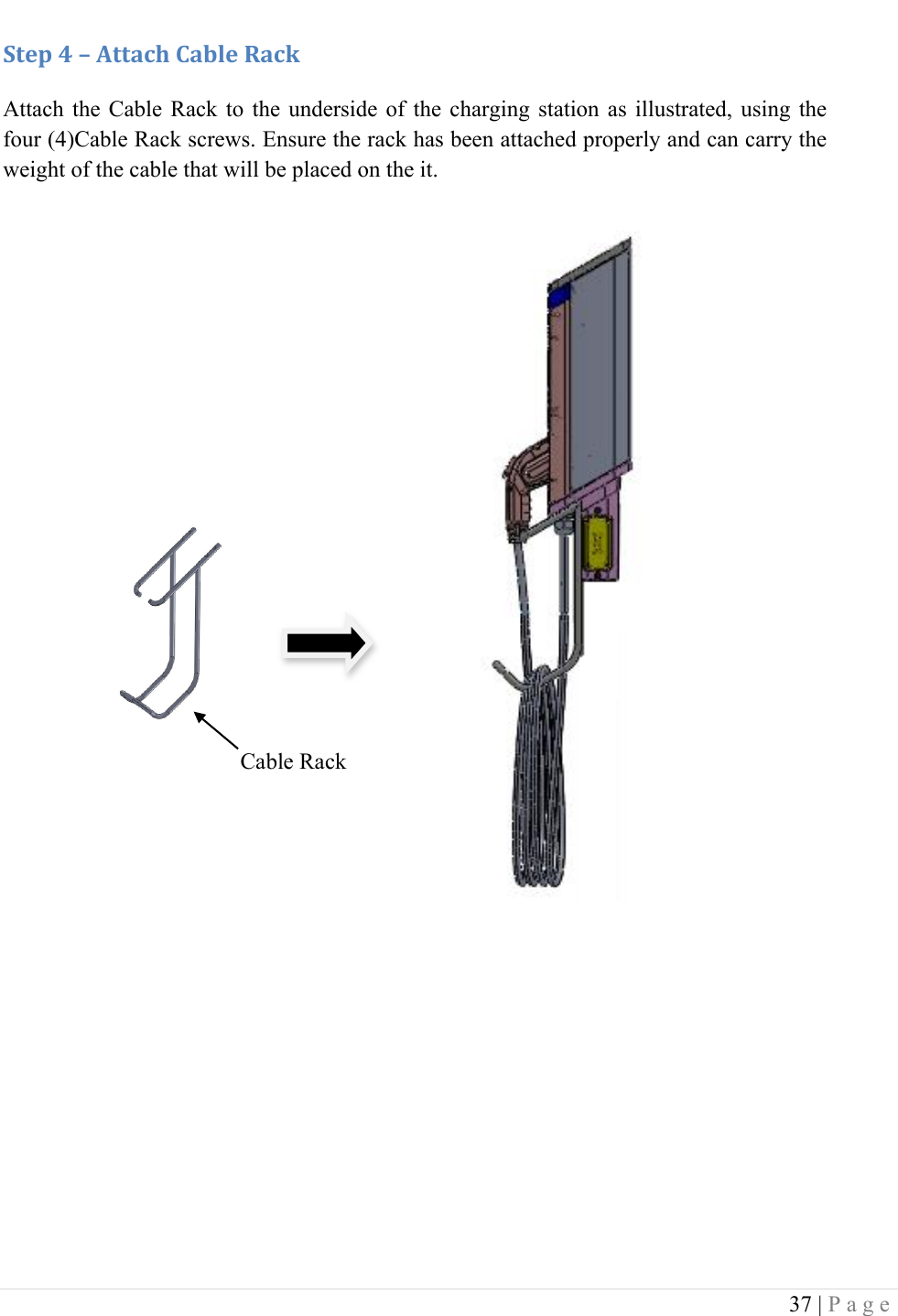
 37 | Page  :+&1!A!L!M++#49!)#$%&!R#4J!Attach  the  Cable Rack to  the  underside  of  the  charging  station  as  illustrated,  using  the four (4)Cable Rack screws. Ensure the rack has been attached properly and can carry the weight of the cable that will be placed on the it.         !! ! !Cable Rack
Charging Station Installation Guide   :+&1!S!L!C*,+#%%!+9&!)9#.30*3!:+#+0'*!Now we are ready to install the charging station. !F'G*+!+9&!49#.30*3!,+#+0'*!Carefully  insert  the  Charging  Station  Head  Unit  on  top  of  the Wall/Pole  Mount  Bracket  Post  as  shown  in  the  diagram.  The access  panel  on  the  Charging  Station  Head  Unit  should  be aligned with the panel on the Wall/Pole Mount Bracket Post.    !U0.D%V!(#,+&*!+9&!49#.30*3!,+#+0'*!Attach  the  Charging  Station  Head  Unit  to  the  Post  using  the four  (4)  tamper-resistant  screws  provided  (two  on  each  side). Ensure the charging station is plumb using a Level.  Check that the Head Unit is now securely fastened to the Post.     Access Panel Access Panel Tamper-resistant Screws
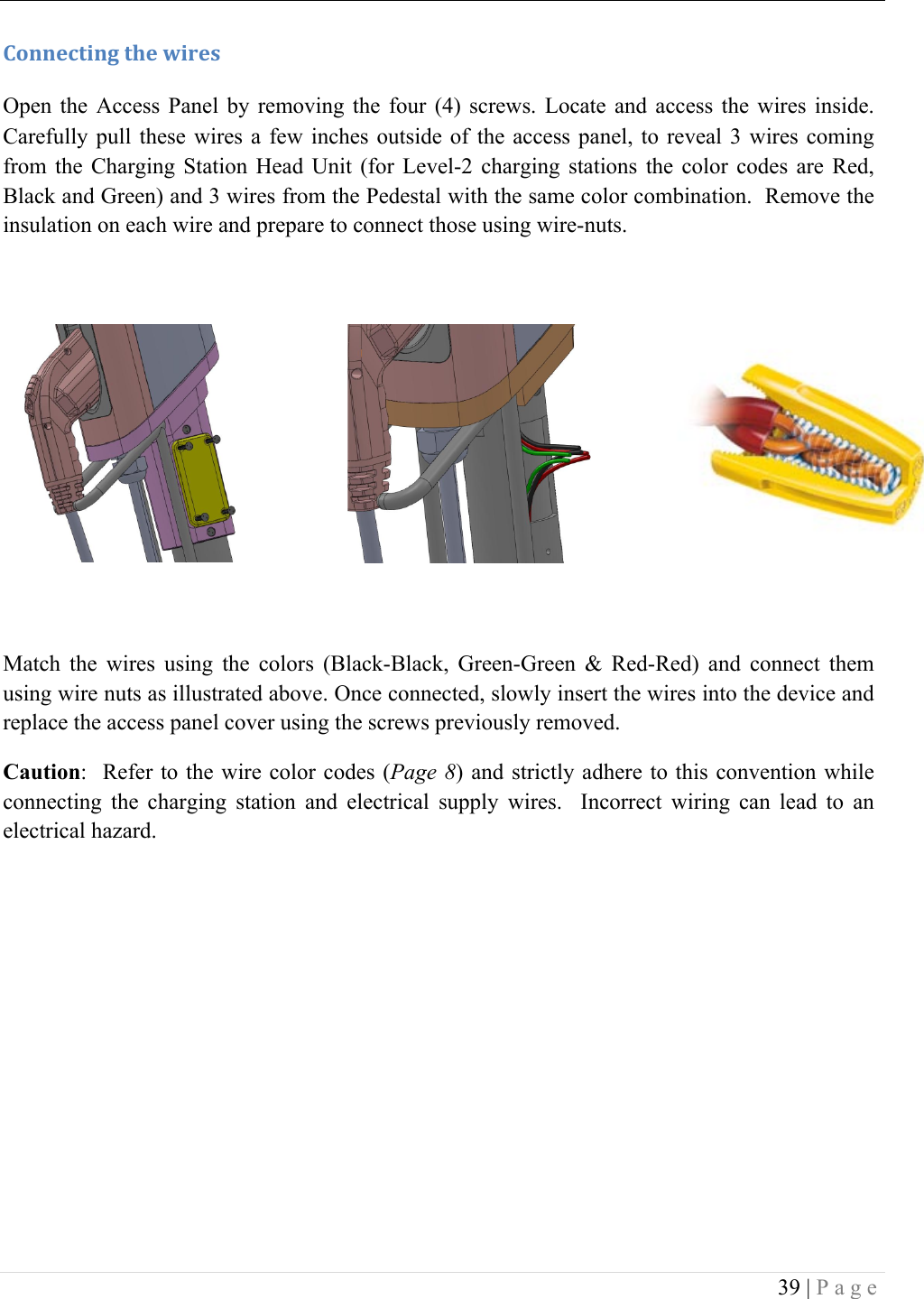
 39 | Page  )'**&4+0*3!+9&!I0.&,!Open  the  Access  Panel  by  removing  the  four  (4)  screws.  Locate  and  access  the  wires  inside. Carefully pull these  wires  a few  inches  outside of  the  access panel, to  reveal  3 wires  coming from  the  Charging  Station  Head  Unit  (for  Level-2  charging  stations  the  color  codes  are  Red, Black and Green) and 3 wires from the Pedestal with the same color combination.  Remove the insulation on each wire and prepare to connect those using wire-nuts.          Match  the  wires  using  the  colors  (Black-Black,  Green-Green  &  Red-Red)  and  connect  them using wire nuts as illustrated above. Once connected, slowly insert the wires into the device and replace the access panel cover using the screws previously removed. Caution:  Refer  to the wire  color codes (Page  8) and strictly adhere to this convention while connecting  the  charging  station  and  electrical  supply  wires.    Incorrect  wiring  can  lead  to  an electrical hazard.
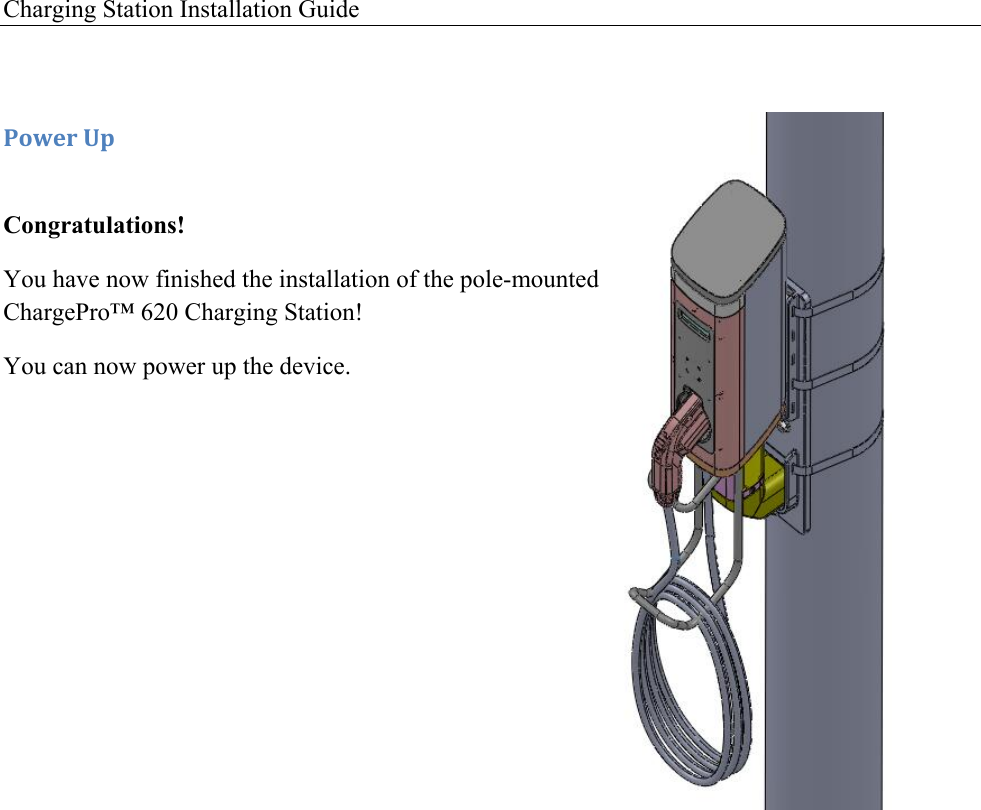
Charging Station Installation Guide    -'I&.!O1! Congratulations! You have now finished the installation of the pole-mounted ChargePro™ 620 Charging Station!  You can now power up the device.
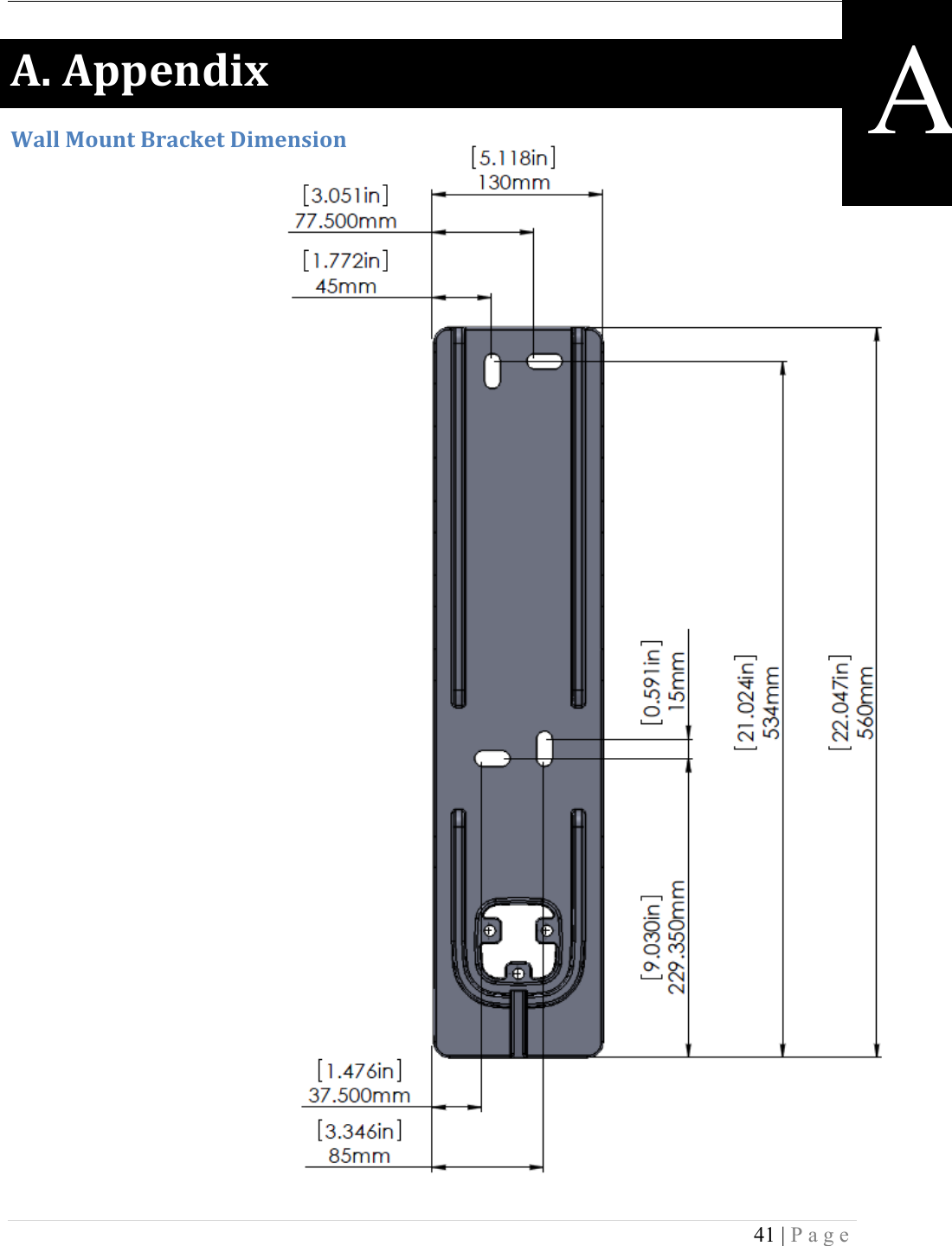
 41 | Page  ME!M11&*50K!2#%%!F'G*+!X.#4J&+!Y0D&*,0'*!        A
Charging Station Installation Guide   -&5&,+#%!D'G*+!50D&*,0'*,!;U.'*+/70&I?! *Approximated Values
 43 | Page  X'%%#.5!D'G*+!50D&*,0'*,!;:05&/70&I?! *Approximated Values
Charging Station Installation Guide    IMPORTANT INSTRUCTIONS FOR MAINTAINING ENVIRONMENTAL INTEGRITY ! Maintenance of the device  The device does not need any regular maintenance and there are no customer serviceable parts inside. Any maintenance of the device needs to be done by a qualified manufacturer authorized service professional. When maintenance needs to be done please adhere to the following instructions.  -  Turn off the power to the device. -  Open the access panel and disconnect all wires. For more explanation on access panel read chapter 2 or 3. -  Remove the screws used to mount the charger device on the Pedastal or Wall mount. -  Lift up the device and take it to an indoor facility, where you can proceed to open the bottom screws for maintenance. -  DO NOT open up the device out-doors, exposing the inner circuits to environmental hazard. !Cleaning the device  The device may be cleaned from time to time by following the instructions below:  -  Use clean soft cloth along with mild detergent to wash the dirt off the device. -  Do not use high pressure water on the device to wash it. You may pour water gently from the top and use a wet/dry cloth to clean all the sides. -  Never use strong detergents or any other chemicals (Acids, petrol, thinner or any other solvent) on the device. -  Do not exert too much of pressure on the device while cleaning it. -  There is no need to open the device for cleaning up, so do not remove any of the screws. -  Do not use vacuum cleaners to clean the device.

Navigation menu