SK Telecom LB2010 Beacon User Manual 15 HW LB2010 ENG 2015x

SK Telecom Co., Ltd. Beacon 15 HW LB2010 ENG 2015x

User Manual

 1 Documen t Num ber : 14-D -0 001   Beacon LB2010 (Type marBLE) Product Document Writer: Richard Jung   Date: 2014. 11. 26
 2 Document Purpose This document was produced for Users’ understanding and guide    Contact   For inquiries: sh.roh@sk.com  Document version and History  No Version Release Date History Etc 1 v1.0 2014.09.20 First Release  2 v1.1 2014.11.26 Revised  3 v1.2 2015.09.09 Revised                   Beacon Resale Site http://beacon.diointeractive.com/
 3  Table of Content 1. Product Specification ...........................................................................................4
 4 1. PRODUCT SPECIFICATION  A. Product Overview  ●  Compatible with Bluetooth Low Energy®, Android 4.3. ●  Battery lasts over 1 year   ●  Android Mobile SDK   ●Bluetooth API available: Battery, Device Information, Proximity
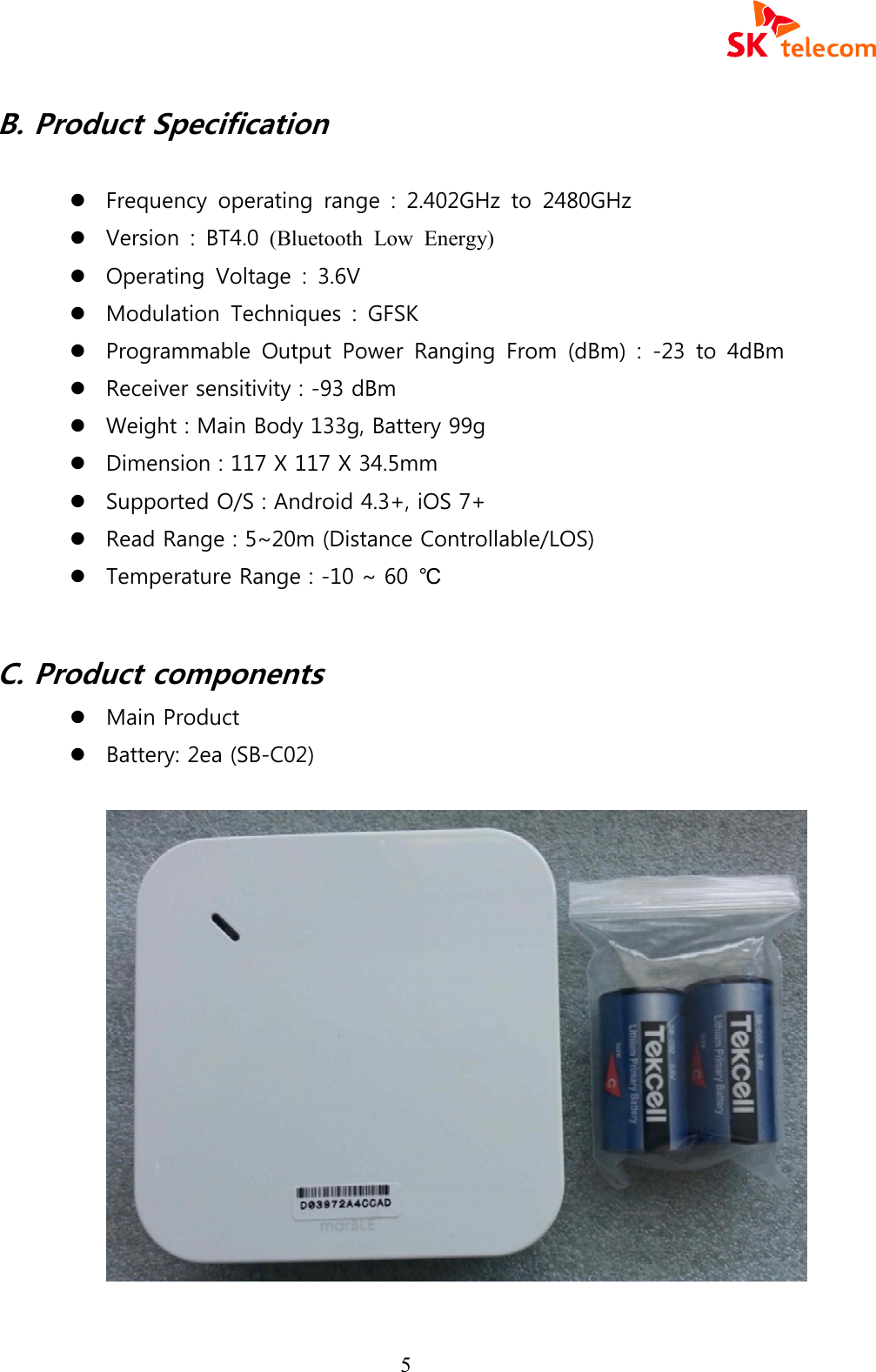
 5 B. Product Specification    l Frequency  operating  range  :  2.402GHz  to  2480GHz l Version  :  BT4.0  (Bluetooth  Low  Energy)  l Operating  Voltage  :  3.6V l Modulation  Techniques  :  GFSK   l Programmable  Output  Power  Ranging  From  (dBm)  :  -23  to  4dBm l Receiver sensitivity : -93 dBm l Weight : Main Body 133g, Battery 99g l Dimension : 117 X 117 X 34.5mm l Supported O/S : Android 4.3+, iOS 7+ l Read Range : 5~20m (Distance Controllable/LOS) l Temperature Range : -10 ~ 60  ℃  C. Product components l Main Product l Battery: 2ea (SB-C02)
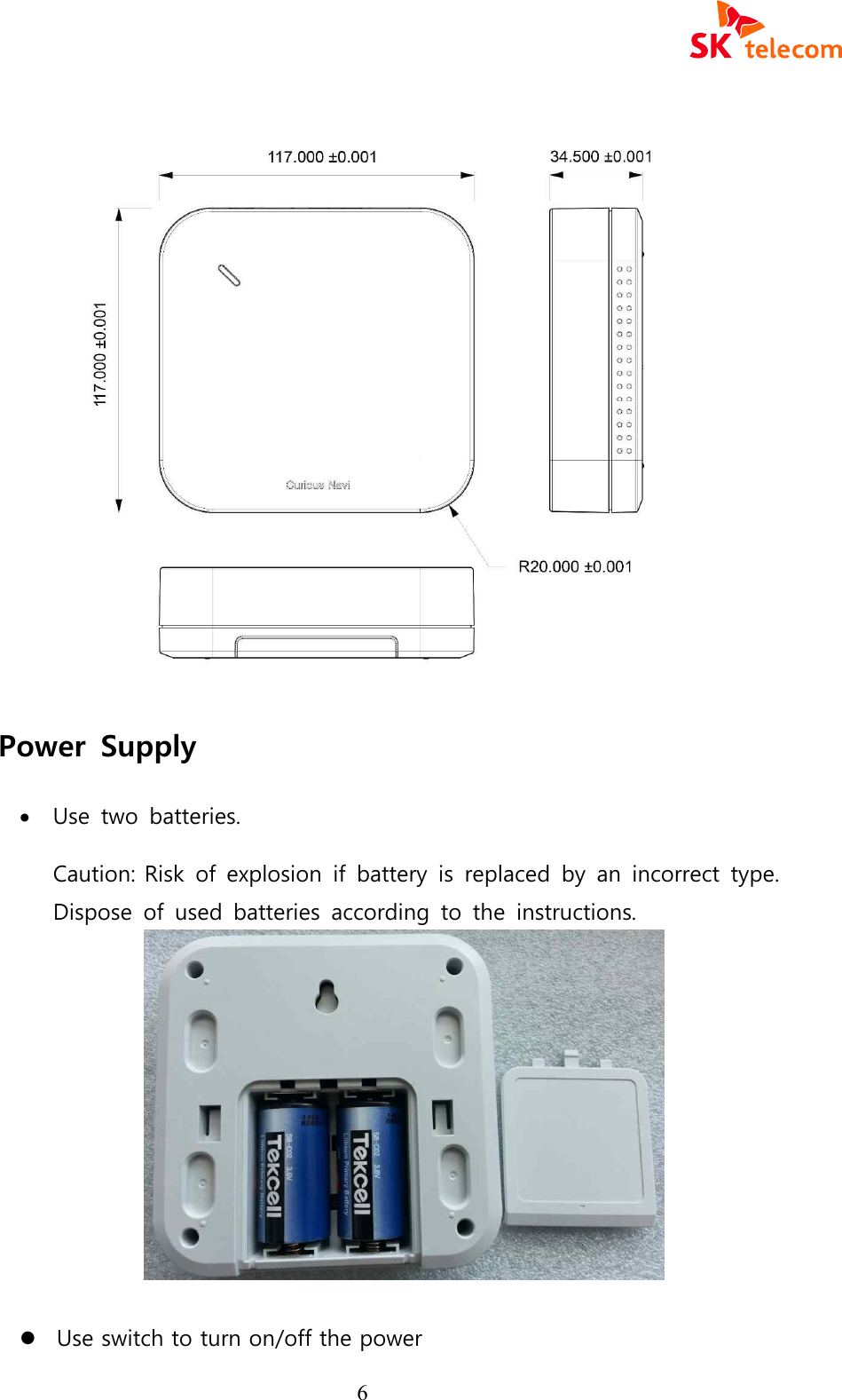
 6    Power  Supply · Use  two  batteries.   Caution: Risk  of  explosion  if  battery  is  replaced  by  an  incorrect  type. Dispose  of  used  batteries  according  to  the  instructions.               l Use switch to turn on/off the power
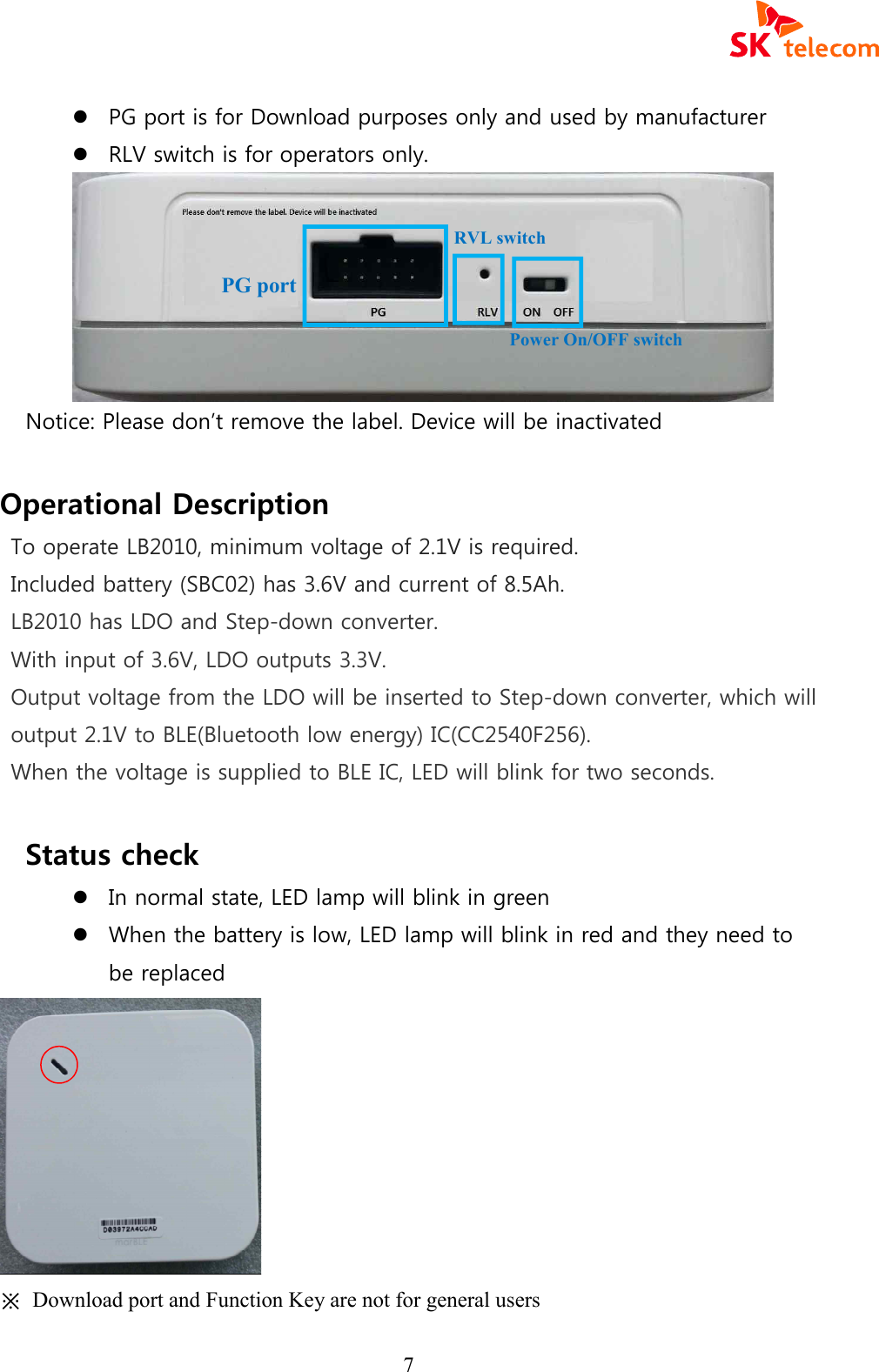
 7 l PG port is for Download purposes only and used by manufacturer l RLV switch is for operators only.  Notice: Please don’t remove the label. Device will be inactivated  Operational Description To operate LB2010, minimum voltage of 2.1V is required. Included battery (SBC02) has 3.6V and current of 8.5Ah. LB2010 has LDO and Step-down converter. With input of 3.6V, LDO outputs 3.3V. Output voltage from the LDO will be inserted to Step-down converter, which will output 2.1V to BLE(Bluetooth low energy) IC(CC2540F256). When the voltage is supplied to BLE IC, LED will blink for two seconds.   Status check   l In normal state, LED lamp will blink in green   l When the battery is low, LED lamp will blink in red and they need to be replaced  ※  Download port and Function Key are not for general users   PG port RVL switch Power On/OFF switch
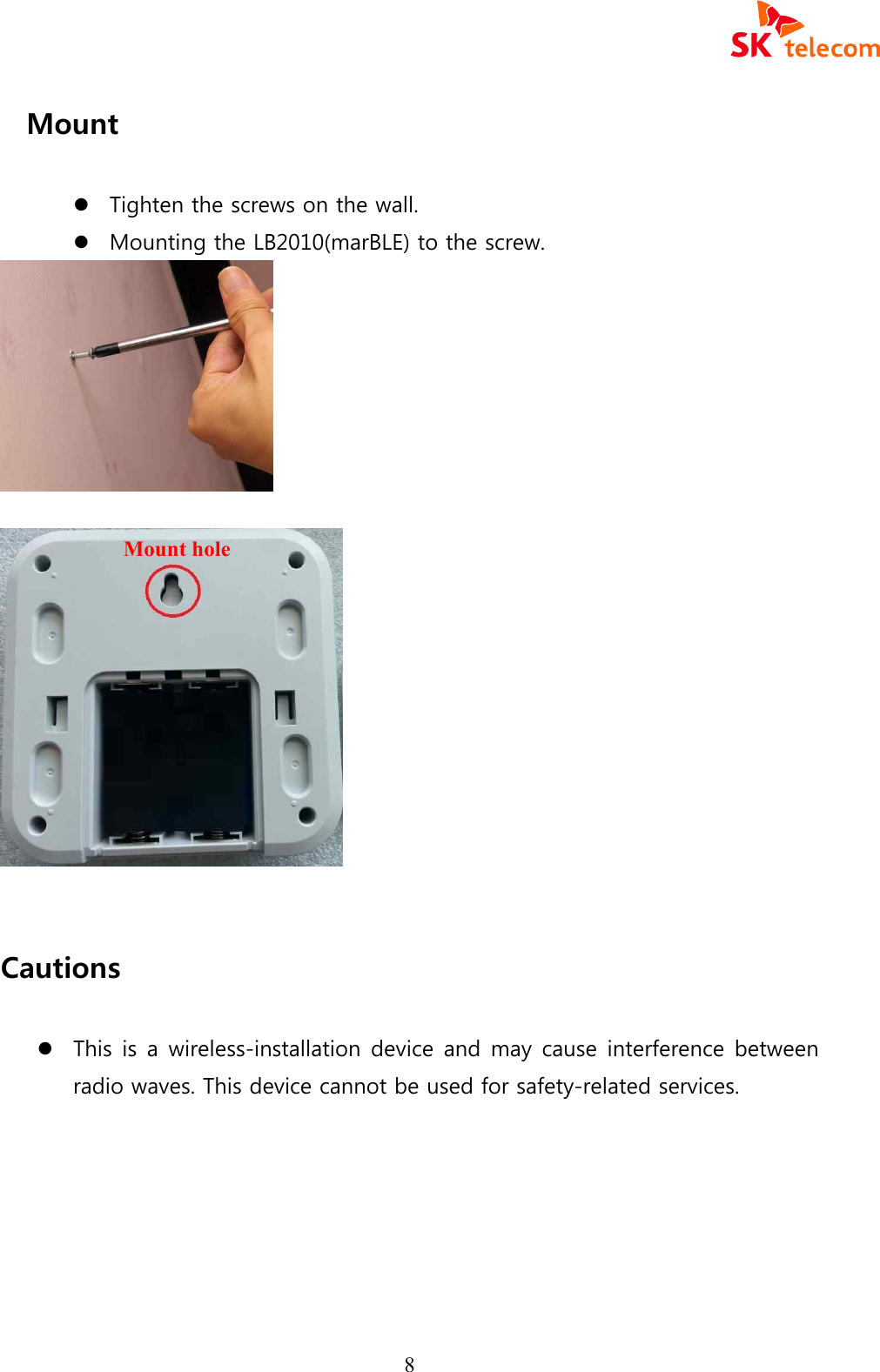
 8 Mount    l Tighten the screws on the wall. l Mounting the LB2010(marBLE) to the screw.      Cautions  l This is a wireless-installation device and may cause interference between radio waves. This device cannot be used for safety-related services.         Mount hole
 9  D. Product Support Application l Sample App: https://play.google.com/store/apps/details?id=com.wizturn.manager    Bluetooth 4.0 Low Energy(BLE) app for Wizturn Beacon-Type pebBLE. Try to test Wizturn Beacon with this app and learn more about beacon based service. - Scan marBLE (device discovery)
 10 E. Safety Precautions This equipment has been tested and found to comply with the limits for a Class B digital device, pursuant to part 15 of the FCC Rules. These limits are designed to provide reasonable protection against harmful interference in a residential installation. This equipment generates, uses, and can radiate radio frequency energy and, if not installed and used in accordance with the instructions, may cause harmful interference to radio communications. However, there is no guarantee that interference will not occur in a particular installation. If this equipment does cause harmful interference to radio or television reception, which can be determined by turning the equipment off and on, the user is encouraged to try to correct the interference by one or more of the following measures: · Reorient or relocate the receiving antenna. · Increase the separation between the equipment and receiver. · Connect the equipment to an outlet on a circuit different from that to which the receiver is connected. · Consult the dealer or an experienced radio/TV technician for help. · Only shielded interface cable should be used. Finally, any changes or modifications to the equipment by the user not expressly approved by the grantee or manufacture could void the user’s authority to operate such equipment. This device complies with part 15 of the FCC Rules. Operation is subject to the following two conditions:   (1) This device may not cause harmful interference, and (2) this device must accept any interference received, including interference that may cause undesired operation.  CAUTION Any changes or modifications in construction of this device which are not expressly approved by the party responsible for compliance could void the user’s authority to operate the equipment.
 11 CE WARNING · Changes and modifications not expressly approved by the party responsible for compliance could void the user’s authority to operate the equipment. · It is desirable that it be installed and operated with at least 20 cm or more between the radiator and person’s body(excluding extremities: hand, wrists, feet, and ankles)    FCC ID : 2ADMB-LB2010  For A/S & other inquiries:       l Technical Support : sh.roh@sk.com l Sales & Others Support : http://beacon.diointeractive l A/S  Support  :  (Tel)  +82-2-6100-7334        - End of document –

Navigation menu