SKANNEX AS X500 SkanFlexi User Manual

SKANNEX AS SkanFlexi

User Manual

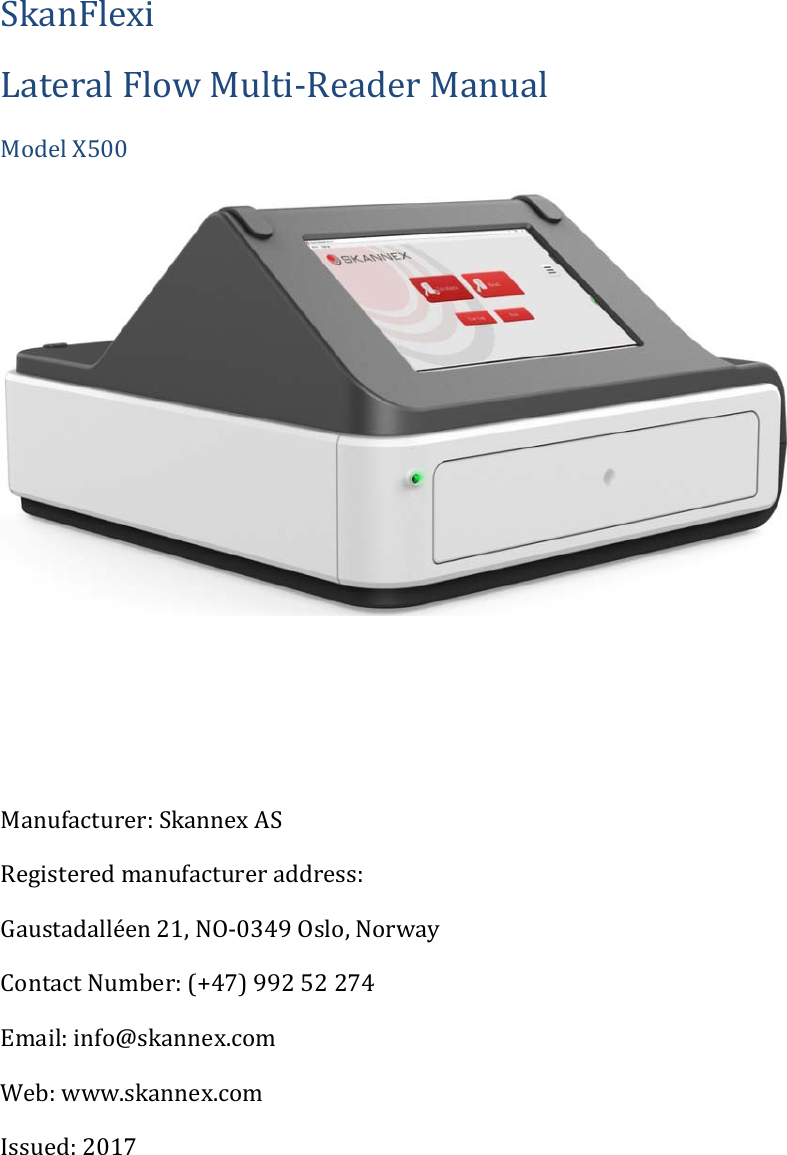
SkanFlexiLateralFlowMulti‐ReaderManualModelX500Manufacturer:SkannexASRegisteredmanufactureraddress:Gaustadalléen21,NO‐0349Oslo,NorwayContactNumber:(+47)99252274Email:info@skannex.comWeb:www.skannex.comIssued:2017
2 NoticeAllrightsreserved.Theinformationcontainedinthisdocumentissubjecttochangewithoutnotice.ReproductionorpublicationofthisdocumentinanyformatisprohibitedwithoutthewrittenconsentofSkannexAS.CopyrightInformationSkanFlexiLateralFlowMulti‐ReaderManualDocumentversion1.0/November2017©Copyright2017bySkannexASPrintedinNorwaySkannexASGaustadallén21N‐0349OsloPhone:+4799252274email:info@skannex.comweb:www.skannex.com
3 Tableofcontent1Generaldescription....................................................................................................................................42Readertechnicalparameters................................................................................................................52.1MainTechnicalParameters..........................................................................................................52.2Calibrationandperformancecharacteristics .......................................................................63Intendeduse.................................................................................................................................................64UnpackandInstallation ..........................................................................................................................74.1Unpack ...................................................................................................................................................74.2WorkingEnvironment ....................................................................................................................74.3InstallationofSkanFlexi.................................................................................................................85OperatingSkanFlexireader...................................................................................................................95.1Switchingreaderonandoff .........................................................................................................95.2Readingtestdevices .....................................................................................................................105.2.1PrintingfromSkanFlexiX500 ...............................................................................................125.4SkanFlexiisnotworking.............................................................................................................155.4.1Useofresetpin.............................................................................................................................156Maintenance..............................................................................................................................................166.1Dailycleaning...................................................................................................................................167Precautions................................................................................................................................................177.1Environmentlight..........................................................................................................................177.2Environmentingeneral...............................................................................................................178Transportationandstorage ...............................................................................................................178.1Transportation................................................................................................................................178.2.Storage................................................................................................................................................17
4 1Generalde s c r i p ti o n SkanFlexiisareaderforanalyzingcolorimetricassaysbycapturingascannedimage.Oneormultipletestscanbeanalyzedinonerun.Thescanningallowsthedetectionofqualitativeand/orquantitativeresultdependingonthetestrunand/orsoftwareinformation.Thedataareautomaticallystoredandcanbeprintedand/orexportedtoexternalsystem.TheIVDequipmentcomplieswiththeemissionandimmunityrequirementsdescribedinthepartoftheIEC61326series,andtheelectricalandelectronicallysafetyrequirementsdescribedinIEC61010.SkanFlexihasthefollowingadvantages: ReliableandCompactHardwareDesign AdoptsRGBimagesfromPlustekOS550plusscannerforhighqualityresults. Adoptspoweradaptorofprofessionalmanufacturerforsafetyandadaptability. Possibilitytoreadmanydifferentcassettes/stripsinonescan. Possibilitytoreadmanydifferentcassettes/stripsinonescan. Extractbatchspecificinformationfrombarcodeoneachcassette/strip. Computequalitativeand/orquantitativeresults. Friendlyuserinterface.Easytolearn,easytouse. Storesmorethan75000results. Software upgrade can be done by connecting the analyzer to Internet orupgradefromanUSBmemorystick.   Thefollowingsignsareusedinthisdocument. RiskofelectricshockDangerous!Becareful.ReferencetherequirementsofthismanualIVD  Invitrodiagnosticdevices
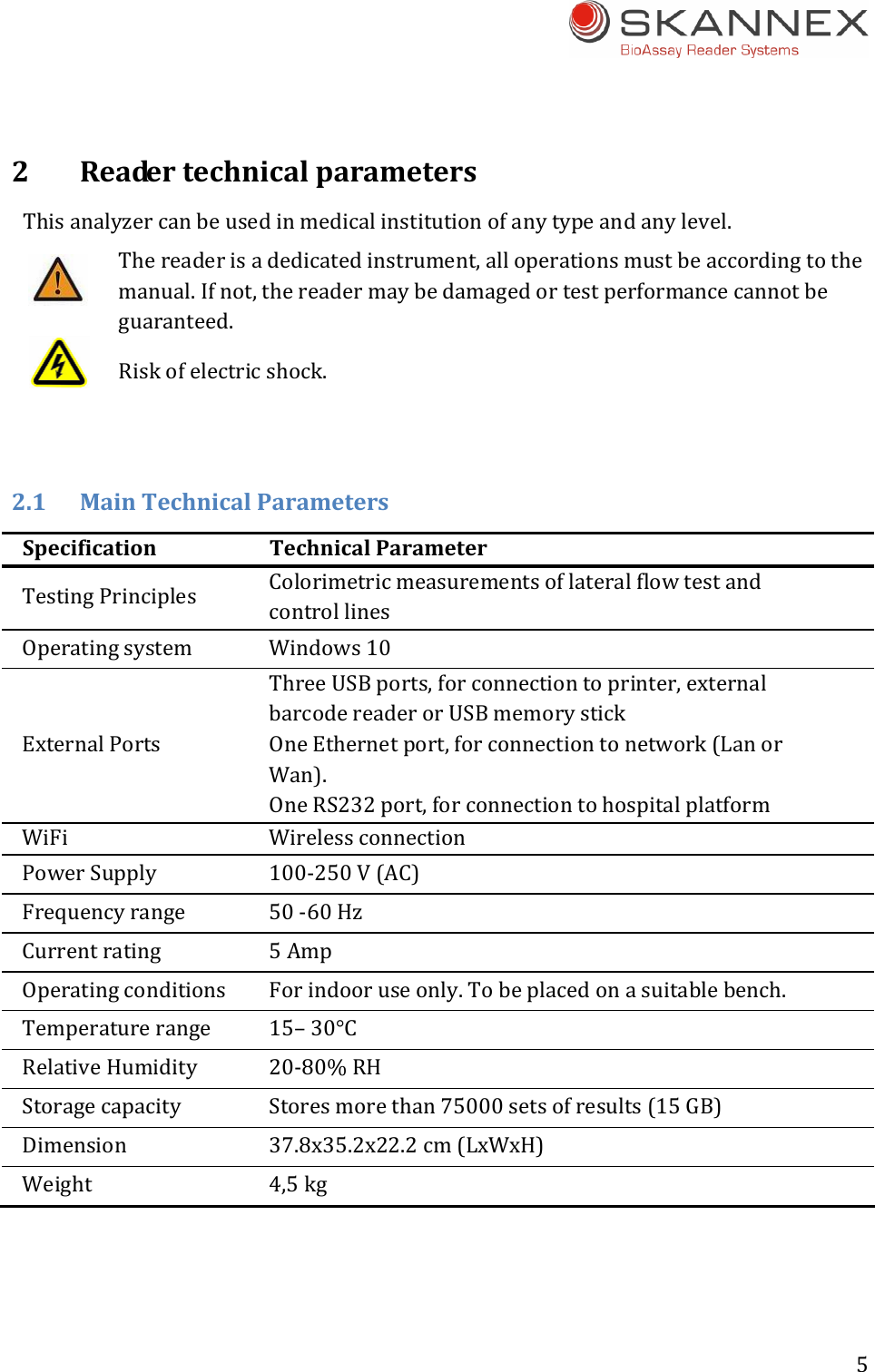
5 2ReadertechnicalparametersThisanalyzercanbeusedinmedicalinstitutionofanytypeandanylevel.Thereaderisadedicatedinstrument,alloperationsmustbeaccordingtothemanual.Ifnot,thereadermaybedamagedortestperformancecannotbeguaranteed.Riskofelectricshock.2.1 MainTechnicalParametersSpecificationTechnicalParameterTestingPrinciples ColorimetricmeasurementsoflateralflowtestandcontrollinesOperatingsystem Windows10ExternalPortsThreeUSBports,forconnectiontoprinter,externalbarcodereaderorUSBmemorystickOneEthernetport,forconnectiontonetwork(LanorWan).OneRS232port,forconnectiontohospitalplatformWiFi WirelessconnectionPowerSupply 100‐250V(AC)Frequencyrange 50‐60HzCurrentrating 5AmpOperatingconditions Forindooruseonly.Tobeplacedonasuitablebench.Temperaturerange 15–30°CRelativeHumidity 20‐80%RHStoragecapacity Storesmorethan75000setsofresults(15GB)Dimension 37.8x35.2x22.2cm(LxWxH)Weight 4,5kg
6 2.2CalibrationandperformancecharacteristicsTheSkanFlexireader’stouchdisplayandthescannerpartarecalibratedandtheopticalperformancequalitycheckedaspartoftheQCinthemanufacturingprocess.ThescannerpartisfurtherrecalibratedbytheSWevery2ndweek.Theperformancecharacteristicsofthereaderhavebeenevaluated.Inastudytheintravariationandintervariationbetween4SkanFlexireadersshowedCVsbelow5%.Thecomputedresultswerecalculatedaspropertyvalues;(test–background)/(control–background).Standardcurvesorthresholdsforthedifferenttestsareestablishedbythetestmanufacturer.Itisincludedaspartofthebarcodefollowingeachcassetteortemplateandreadbythereader’sSW.3Intendeduse“TheintendeduseoftheSkanFlexireaderistoscan,readandcalculateresultsfromlateralflowtestswithinthemarketareasinvitrodiagnostics(IVD),e.g.laterflowcassettesinMyocardialmarkers,CtnI,Myoglobin,CK‐MB,H‐FABP,etc.,orinfectiousdisease,HbsAg,HbsAb,HCV,HP,etc.,orvenerealdisease,TP,Chlamydia,NGH,PSA,CEA,etc.,drugsofabuse,veterinarydiagnostics,foodandfeedandenvironmentalinbodyfluidsandotherextractedbiologicalliquids.”Indicationsforuse:Itisindicatedforbothquantitativeandqualitativetests.Todetectvariablebiomoleculeswithinhumanbodyfluids,andliquidextractsfromagricultural,animalandenvironmentalsamples.TheSkanFlexiproductisenabledbyaprogramkeyallowingcustomerstoupgradetheproprietarysoftwaredirectlyfromWeboraUSBmemorystick.Itisindicatedforrapidanalysisonsite.Theuserinterfaceshallbedesignedsuchthatalayusershallbeabletooperatethesysteminsuchawaythaterrorsofoperationandresultinterpretationareminimizedtoanacceptablelevel. 
7 4UnpackandInstallation4.1UnpackCarefullyremovetheSkanFlexireaderfromtheshippingbox.Inspectthereaderforvisiblesignsofdamage.Ifdamagetothereaderexists,pleasefileacomplainttothelogisticcompanyorretailersassoonaspossible.Listofcontent:ItemQuantitySkanFlexireader 1CertificateofQuality 1WarrantyCard 1SkanFleximanual 1Powersupply 1Resetpin 1Packagelist 14.2WorkingEnvironmentForoperator’ssafetyandtheproperoperationofthereader,thepowercordmustbepluggedintoanappropriatelygroundedACelectricaloutlet.Connectinganydualcordpowersurgeprotectorisstrictlyprohibited.SkanFlexiisaprofessionalinstrument.Openingthecoverwithoutauthorizationisprohibited.Theinstrumentandinstrumentpartsareonlytobeinspectedandprovidedbythemanufacturer.Operationviolatingthemanual’sdescriptionswillcausetheanalyzerdamaged.Placethereaderonafirm,leveldesignedworkarea.Pleaseavoidoperatinginthefollowingenvironment: Indirectsunlight Nearflammableandexplosivegas Nexttoanopeningwindow Nexttoheatingorrefrigerationequipment
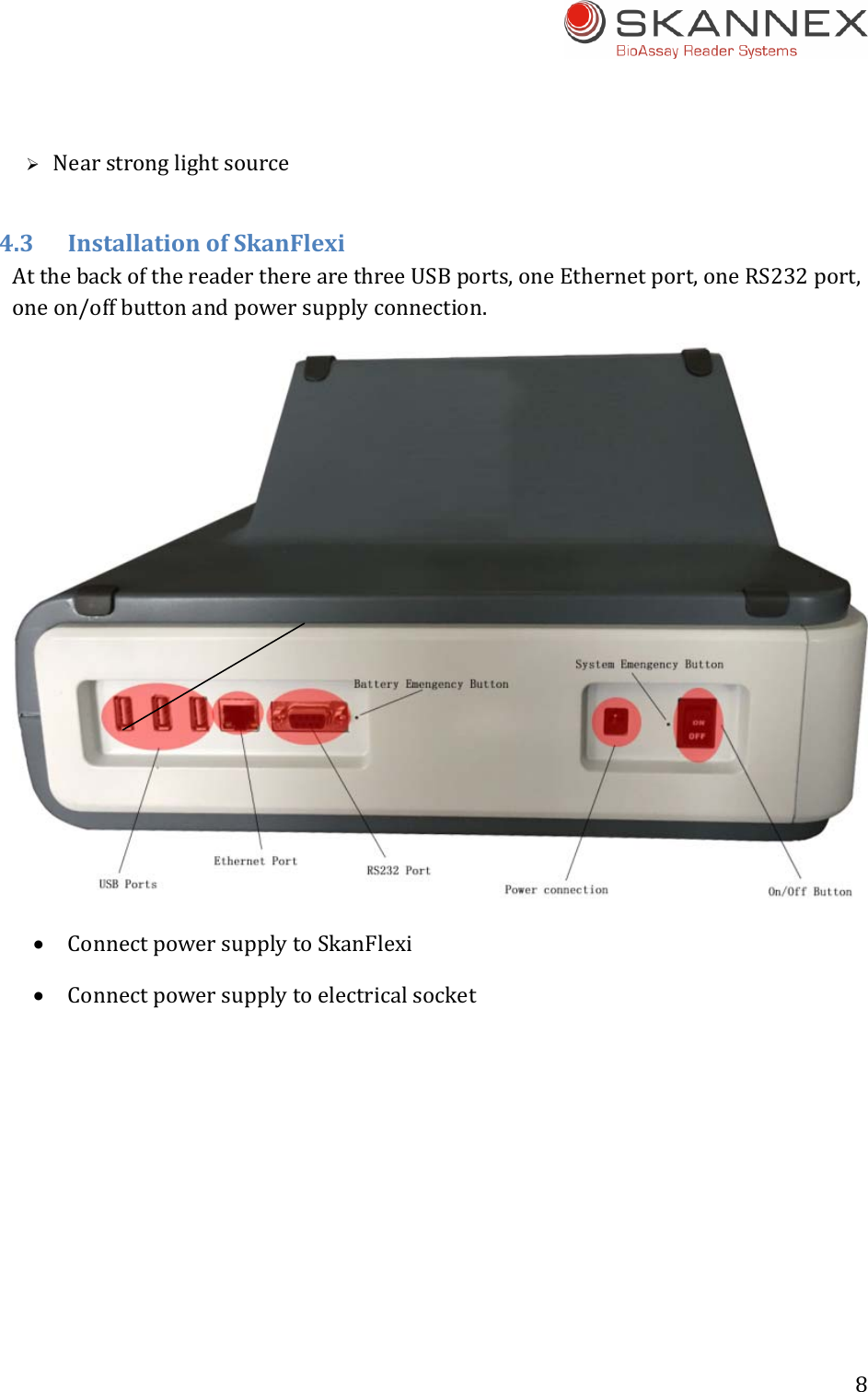
8  Nearstronglightsource4.3InstallationofSkanFlexiAtthebackofthereadertherearethreeUSBports,oneEthernetport,oneRS232port,oneon/offbuttonandpowersupplyconnection. ConnectpowersupplytoSkanFlexi Connectpowersupplytoelectricalsocket
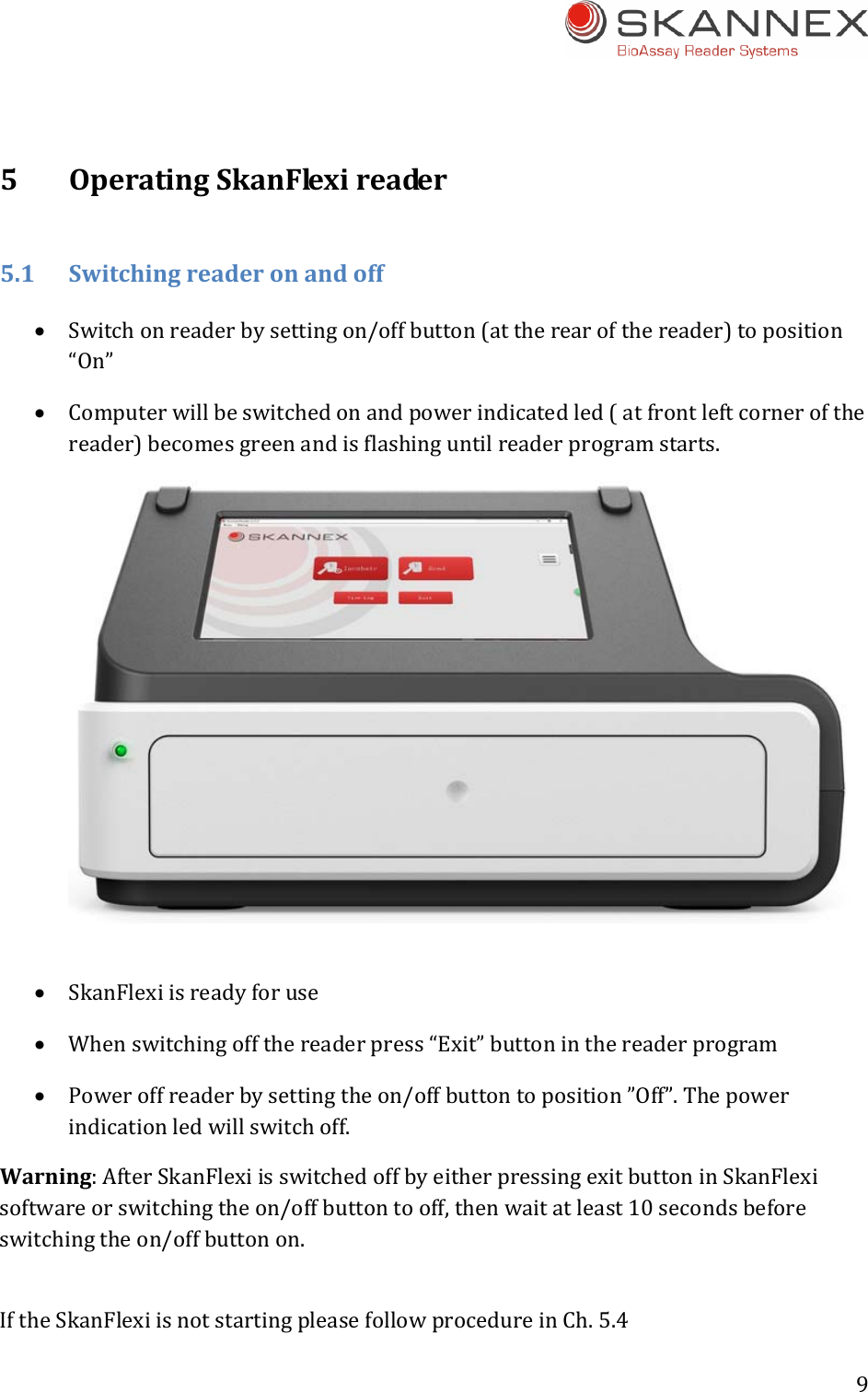
9 5OperatingSkanFlexireader5.1Switchingreaderonandoff Switchonreaderbysettingon/offbutton(attherearofthereader)toposition“On” Computerwillbeswitchedonandpowerindicatedled(atfrontleftcornerofthereader)becomesgreenandisflashinguntilreaderprogramstarts. SkanFlexiisreadyforuse Whenswitchingoffthereaderpress“Exit”buttoninthereaderprogram Poweroffreaderbysettingtheon/offbuttontoposition”Off”.Thepowerindicationledwillswitchoff.Warning:AfterSkanFlexiisswitchedoffbyeitherpressingexitbuttoninSkanFlexisoftwareorswitchingtheon/offbuttontooff,thenwaitatleast10secondsbeforeswitchingtheon/offbuttonon.IftheSkanFlexiisnotstartingpleasefollowprocedureinCh.5.4
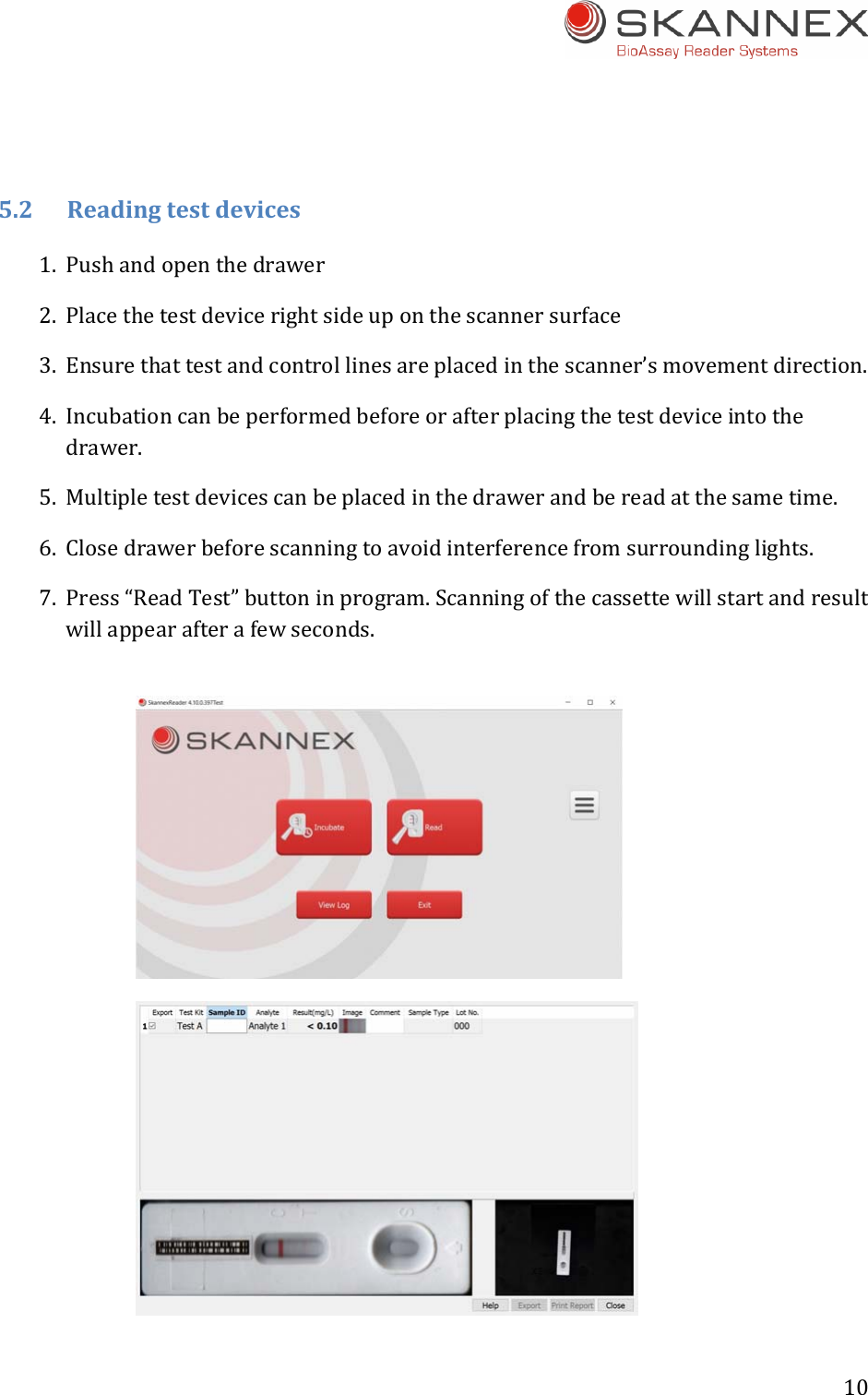
10 5.2Readingtestdevices1. Pushandopenthedrawer2. Placethetestdevicerightsideuponthescannersurface3. Ensurethattestandcontrollinesareplacedinthescanner’smovementdirection.4. Incubationcanbeperformedbeforeorafterplacingthetestdeviceintothedrawer.5. Multipletestdevicescanbeplacedinthedrawerandbereadatthesametime.6. Closedrawerbeforescanningtoavoidinterferencefromsurroundinglights.7. Press“ReadTest”buttoninprogram.Scanningofthecassettewillstartandresultwillappearafterafewseconds.
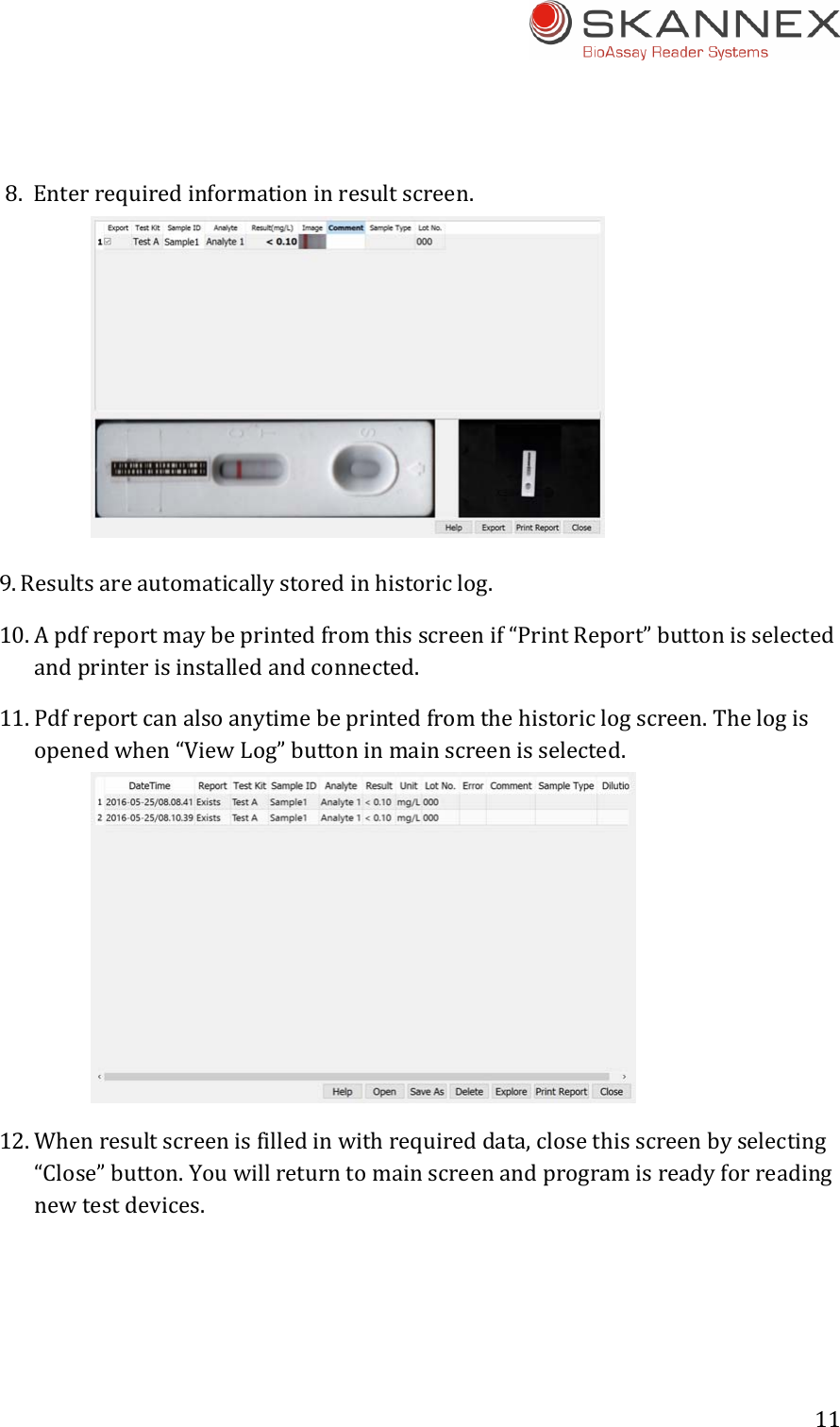
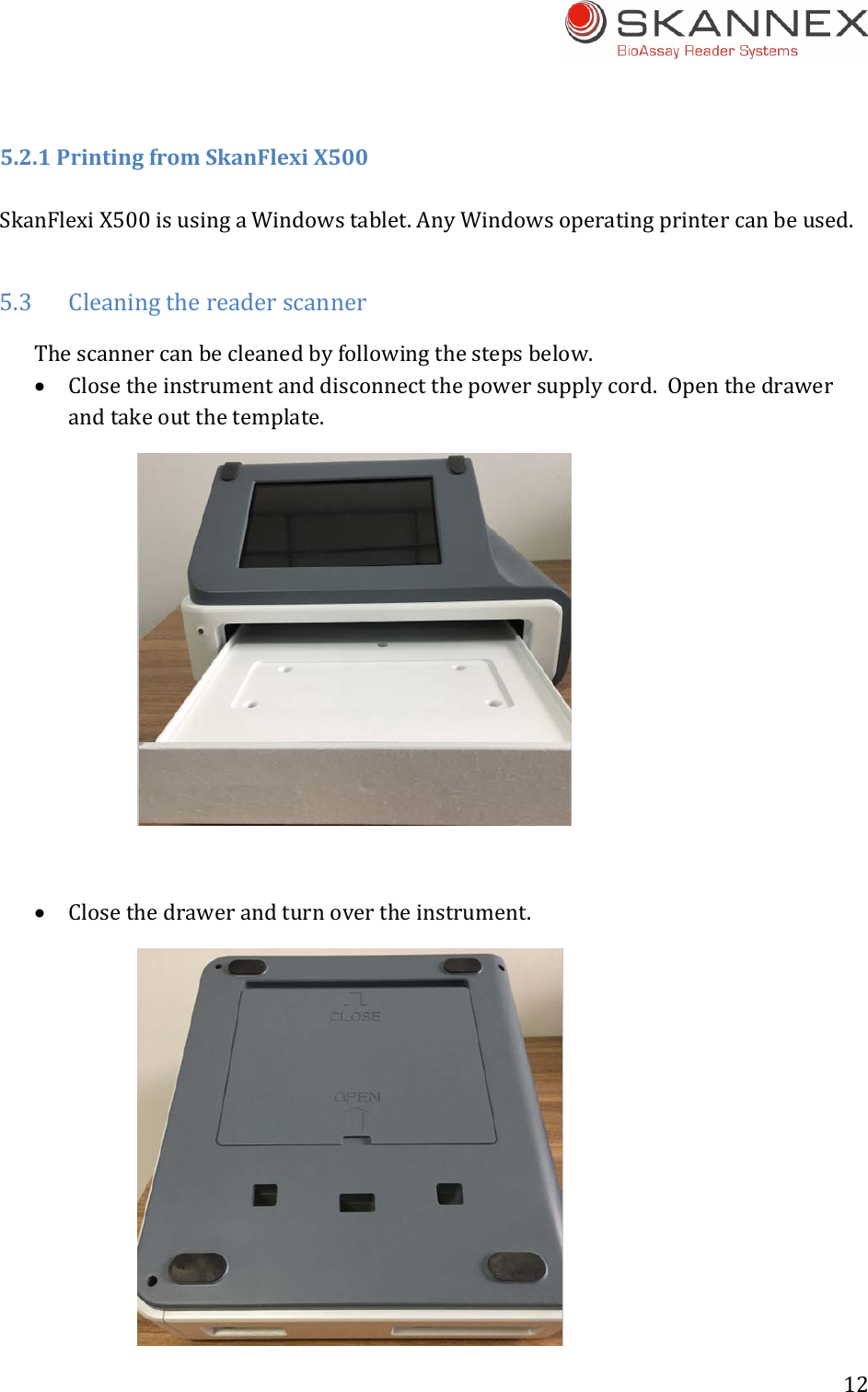
11 8. Enterrequiredinformationinresultscreen.9. Resultsareautomaticallystoredinhistoriclog.10. Apdfreportmaybeprintedfromthisscreenif“PrintReport”buttonisselectedandprinterisinstalledandconnected.11. Pdfreportcanalsoanytimebeprintedfromthehistoriclogscreen.Thelogisopenedwhen“ViewLog”buttoninmainscreenisselected.12. Whenresultscreenisfilledinwithrequireddata,closethisscreenbyselecting“Close”button.Youwillreturntomainscreenandprogramisreadyforreadingnewtestdevices.
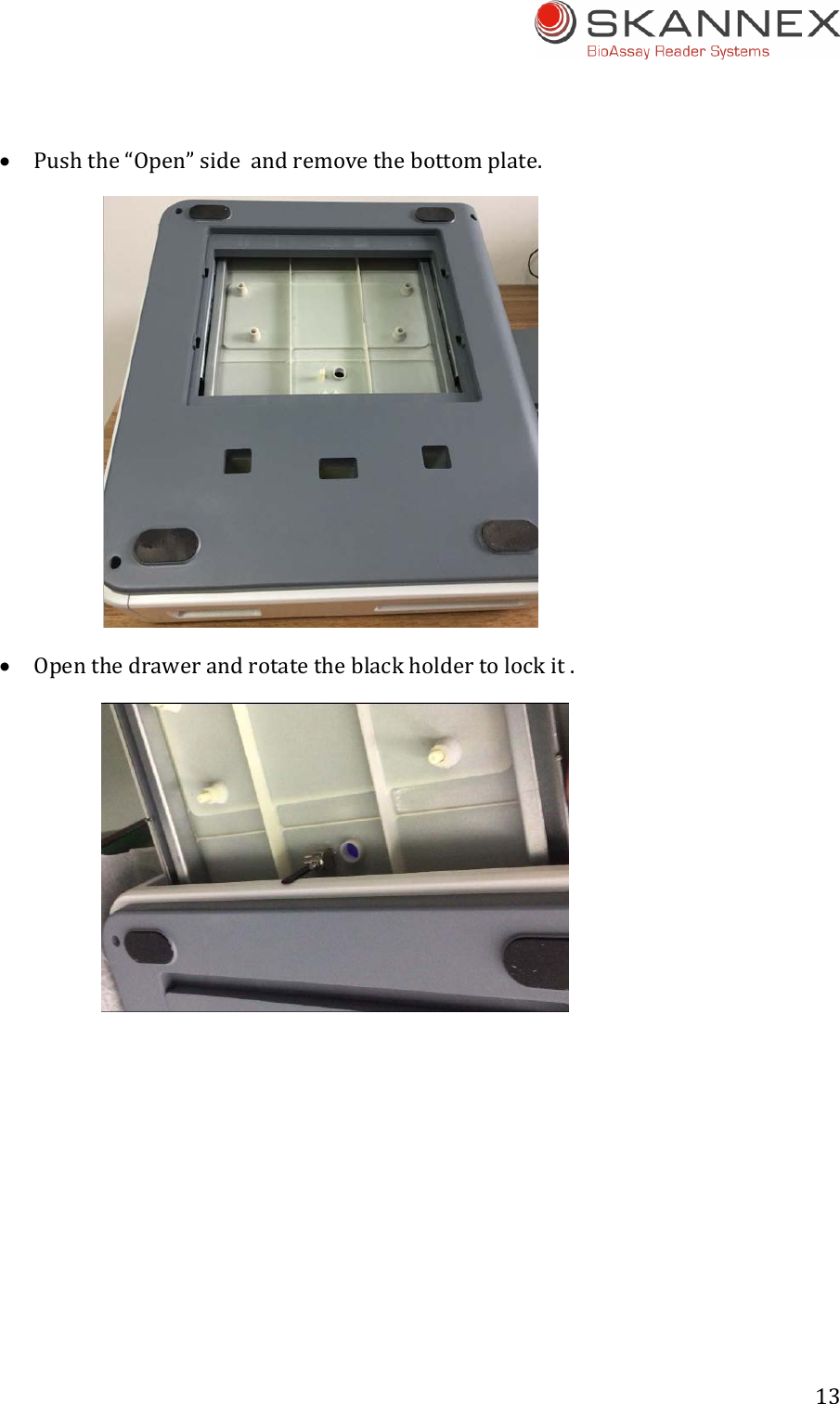
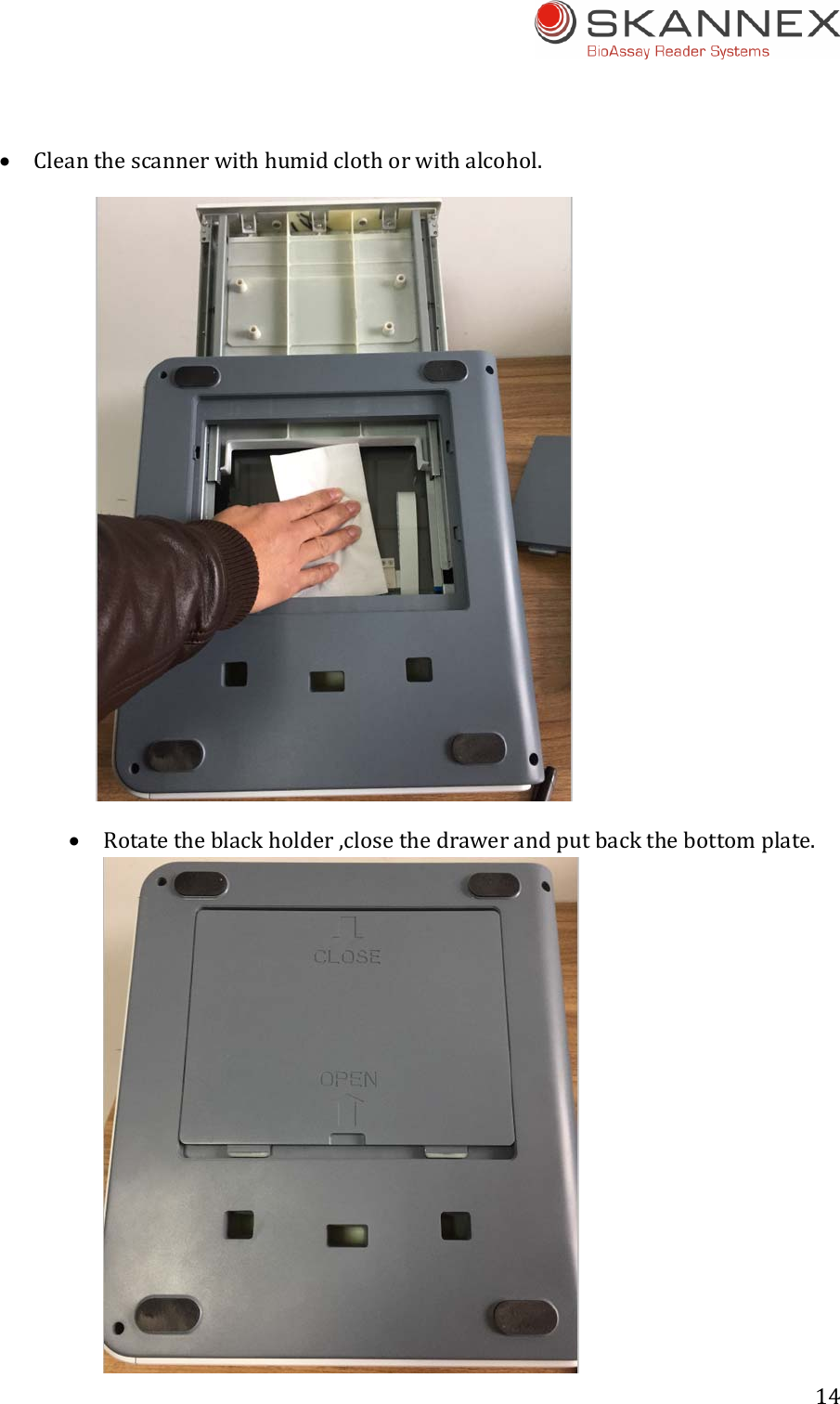
12 5.2.1PrintingfromSkanFlexiX500SkanFlexiX500isusingaWindowstablet.AnyWindowsoperatingprintercanbeused.5.3 CleaningthereaderscannerThescannercanbecleanedbyfollowingthestepsbelow. Closetheinstrumentanddisconnectthepowersupplycord.Openthedrawerandtakeoutthetemplate. Closethedrawerandturnovertheinstrument.
13  Pushthe“Open”sideandremovethebottomplate. Openthedrawerandrotatetheblackholdertolockit. 
14  Cleanthescannerwithhumidclothorwithalcohol.  Rotatetheblackholder,closethedrawerandputbackthebottomplate.
15  Pushthe“Close”sideandfixthebottomplate.Turnovertheinstrumentandputbackthetemplateintothedrawer.5.4SkanFlexiisnotworkingSkanFlexi’stouchpanelhasabatteryinside.InthecaseSkanFlexihasnotbeenusedfordays,thetouchpanelwillhavenopower.Therefore,pleasechargetheSkanFlexiforatleast10minutesifSkanFlexihasnotbeenworkingfordays.1)ConnectpowersupplytoSkanFlexi2)Switchonreaderbysettingon/offbutton(attherearofthereader)toposition“On”3)AfterchargingtheSkanFlexiforatleast10minutes,switchoffthereaderbysettingon/offbutton(atrearofthereader)toposition“Off”4)Switchonreaderagain,andSkanFlexiwillstart5.4.1UseofresetpinIfSkanFlexiisstillnotworkingafterperformingtheabovestepsin5.4,pleasefollowbelowresetprocedure:1) Switchonreaderbysettingon/offbutton(attherearofthereader)toposition“On”2) UsetheprovidedResetpintopushtheresetbuttonfor15‐20seconds3) Switchoffthereaderbysettingon/offbutton(attherearofthereader)toposition“Off”4) Switchonthereaderagainbysettingon/offbutton(attherearofthereader)toposition“On”5) SkanFlexiwillstart
16 IftheSkanFlexiisstillnotworking,pleasecontactSkannexASat:support@skannex.comAswithanyotherinstrumentsthetabletinSkanFleximightappearwiththefollowing:1. Systemcrash/tabletseemtobe“frozen”2. BlurredscreenwhenyoustartupSkanFlexiorwhenSkanFlexiisrunning3. RecoverynotificationwhenyoustartupSkanFlexiInallthesecasesthe“Resetpin”shouldbeused.Pleasefollowdescriptionabove.6Maintenance6.1Dailycleaning Keepreadercleanbyusingadampcloth Scannersurfacemaybecleaned/decontaminatedwithalcoholifnecessary Touchscreenshallbecleanedwithspecialtissuesintendedforresistivescreen Donotuseaggressivesolventssuchasacetone.
17 7Precautions7.1EnvironmentlightKeepSkanFlexioutofdirectsunlightorotherstronglightsourcesasthiscancauseinterferencewhenscanning,whichagaincanresultinwrongornoresults.7.2EnvironmentingeneralProtectthereaderfromhighhumidityandextensivecontacttoliquids.Donotexposethereadertoextensiveheat.Insomecasesapoorgroundconnectioninsocketandinterferenceofsomelargemedicalequipment(X‐raymachine,CTmachine),cancausethattheSkanFlexigetElectroMagneticInterference(EMI)problem.Thiscanbeseenasaseriesofsmallcircles/rectanglesappearingwhentouchingthepanel.Thiscanmakeitdifficulttotouchthecorrectposition.ChangingtosocketwithbettergroundingormovingSkanFlexiawayfrominterferenceenvironmentwillresolvethiskindofproblem..8Transportationandstorage8.1 TransportationSkanFleximustbetransportedinthesamepackingmaterialasitwasreceivedin.Transportationshouldbedoneusingacommonshippingcompanyundernormalconditions.8.2.StorageSkanFlexishouldbestoredinanup‐rightpositionintheoriginalpackingmaterial,indoorandundernormalroomtemperatureandenvironmentconditions.Avoiddirectsunlight.Formoredetailsseetable2.1.
18 FCC STATEMENT 1. This device complies with Part 15 of the FCC Rules. Operation is subject to the following two conditions: (1) This device may not cause harmful interference, and (2) This device must accept any interference received, including interference that may cause undesired operation. 2. Changes or modifications not expressly approved by the party responsible for compliance could void the user’s authority to operate the equipment. This equipment has been tested and found to comply with the limits for a Class B digital device, pursuant to part 15 of the FCC Rules. These limits are designed to provide reasonable protection against harmful interference in a residential installation. This equipment generates, uses and can radiate radio frequency energy and, if not installed and used in accordance with the instructions, may cause harmful interference to radio communications. However, there is no guarantee that interference will not occur in a particular installation. If this equipment does cause harmful interference to radio or television reception, which can be determined by turning the equipment off and on, the user is encouraged to try to correct the interference by one or more of the following measures: —Reorient or relocate the receiving antenna. —Increase the separation between the equipment and receiver. —Connect the equipment into an outlet on a circuit different from that to which the receiver is connected. —Consult the dealer or an experienced radio/ TV technician for help.  FCC Radiation Exposure Statement: This equipment complies with FCC radiation exposurere quirement. The device can be used in portable exposure condition without RF striction

Navigation menu