SRT Acquisition BSHDT Base Station Transeiver User Manual Base Station Installation

SRT Acquisition Base Station Transeiver Base Station Installation

Installation manual

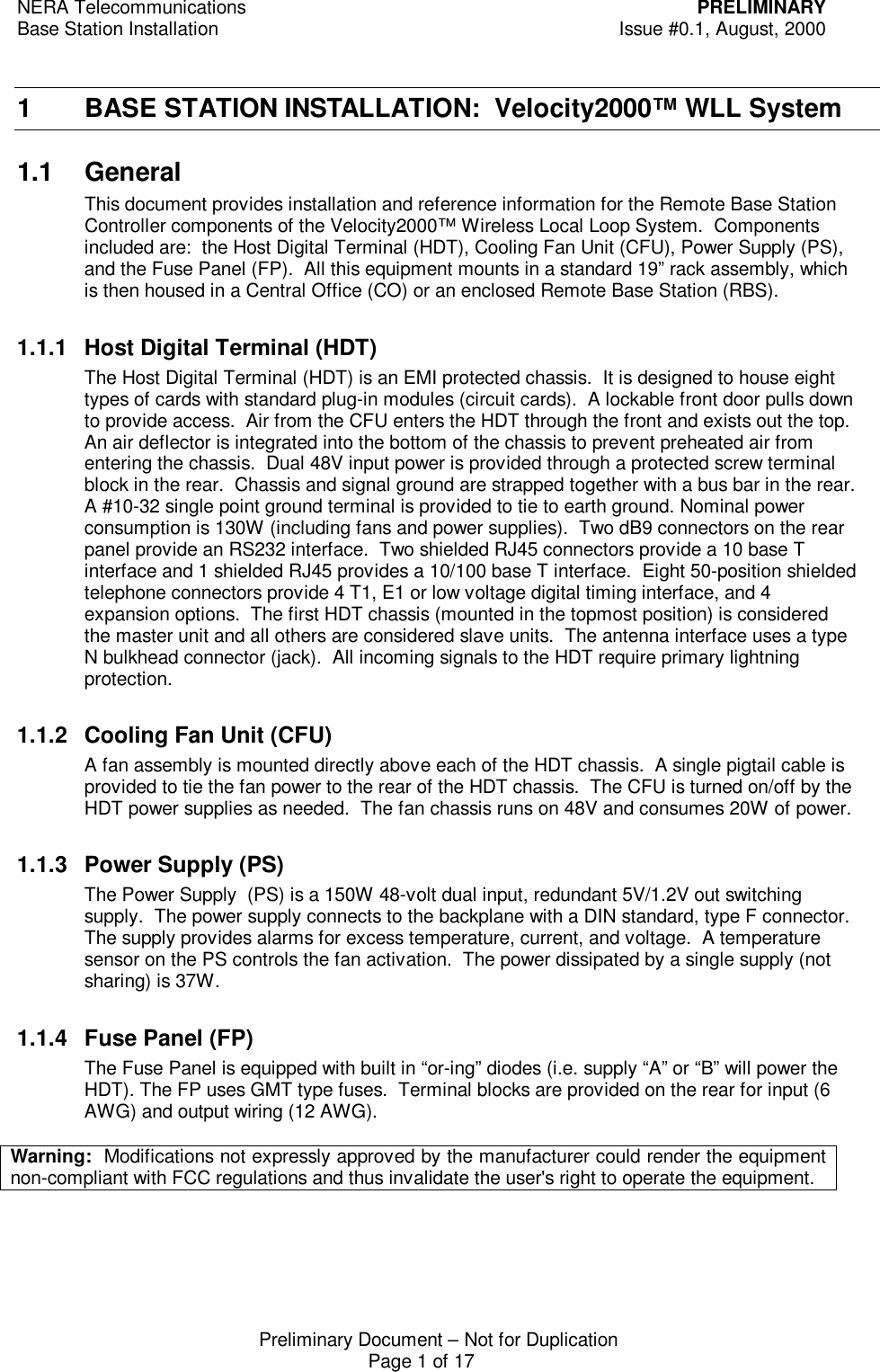
NERA Telecommunications PRELIMINARYBase Station Installation Issue #0.1, August, 2000Preliminary Document – Not for DuplicationPage 1 of 171 BASE STATION INSTALLATION:  Velocity2000™ WLL System1.1 GeneralThis document provides installation and reference information for the Remote Base StationController components of the Velocity2000™ Wireless Local Loop System.  Componentsincluded are:  the Host Digital Terminal (HDT), Cooling Fan Unit (CFU), Power Supply (PS),and the Fuse Panel (FP).  All this equipment mounts in a standard 19” rack assembly, whichis then housed in a Central Office (CO) or an enclosed Remote Base Station (RBS).1.1.1 Host Digital Terminal (HDT)The Host Digital Terminal (HDT) is an EMI protected chassis.  It is designed to house eighttypes of cards with standard plug-in modules (circuit cards).  A lockable front door pulls downto provide access.  Air from the CFU enters the HDT through the front and exists out the top.An air deflector is integrated into the bottom of the chassis to prevent preheated air fromentering the chassis.  Dual 48V input power is provided through a protected screw terminalblock in the rear.  Chassis and signal ground are strapped together with a bus bar in the rear.A #10-32 single point ground terminal is provided to tie to earth ground. Nominal powerconsumption is 130W (including fans and power supplies).  Two dB9 connectors on the rearpanel provide an RS232 interface.  Two shielded RJ45 connectors provide a 10 base Tinterface and 1 shielded RJ45 provides a 10/100 base T interface.  Eight 50-position shieldedtelephone connectors provide 4 T1, E1 or low voltage digital timing interface, and 4expansion options.  The first HDT chassis (mounted in the topmost position) is consideredthe master unit and all others are considered slave units.  The antenna interface uses a typeN bulkhead connector (jack).  All incoming signals to the HDT require primary lightningprotection.1.1.2 Cooling Fan Unit (CFU)A fan assembly is mounted directly above each of the HDT chassis.  A single pigtail cable isprovided to tie the fan power to the rear of the HDT chassis.  The CFU is turned on/off by theHDT power supplies as needed.  The fan chassis runs on 48V and consumes 20W of power.1.1.3 Power Supply (PS)The Power Supply  (PS) is a 150W 48-volt dual input, redundant 5V/1.2V out switchingsupply.  The power supply connects to the backplane with a DIN standard, type F connector.The supply provides alarms for excess temperature, current, and voltage.  A temperaturesensor on the PS controls the fan activation.  The power dissipated by a single supply (notsharing) is 37W.1.1.4 Fuse Panel (FP)The Fuse Panel is equipped with built in “or-ing” diodes (i.e. supply “A” or “B” will power theHDT). The FP uses GMT type fuses.  Terminal blocks are provided on the rear for input (6AWG) and output wiring (12 AWG).Warning:  Modifications not expressly approved by the manufacturer could render the equipmentnon-compliant with FCC regulations and thus invalidate the user's right to operate the equipment.
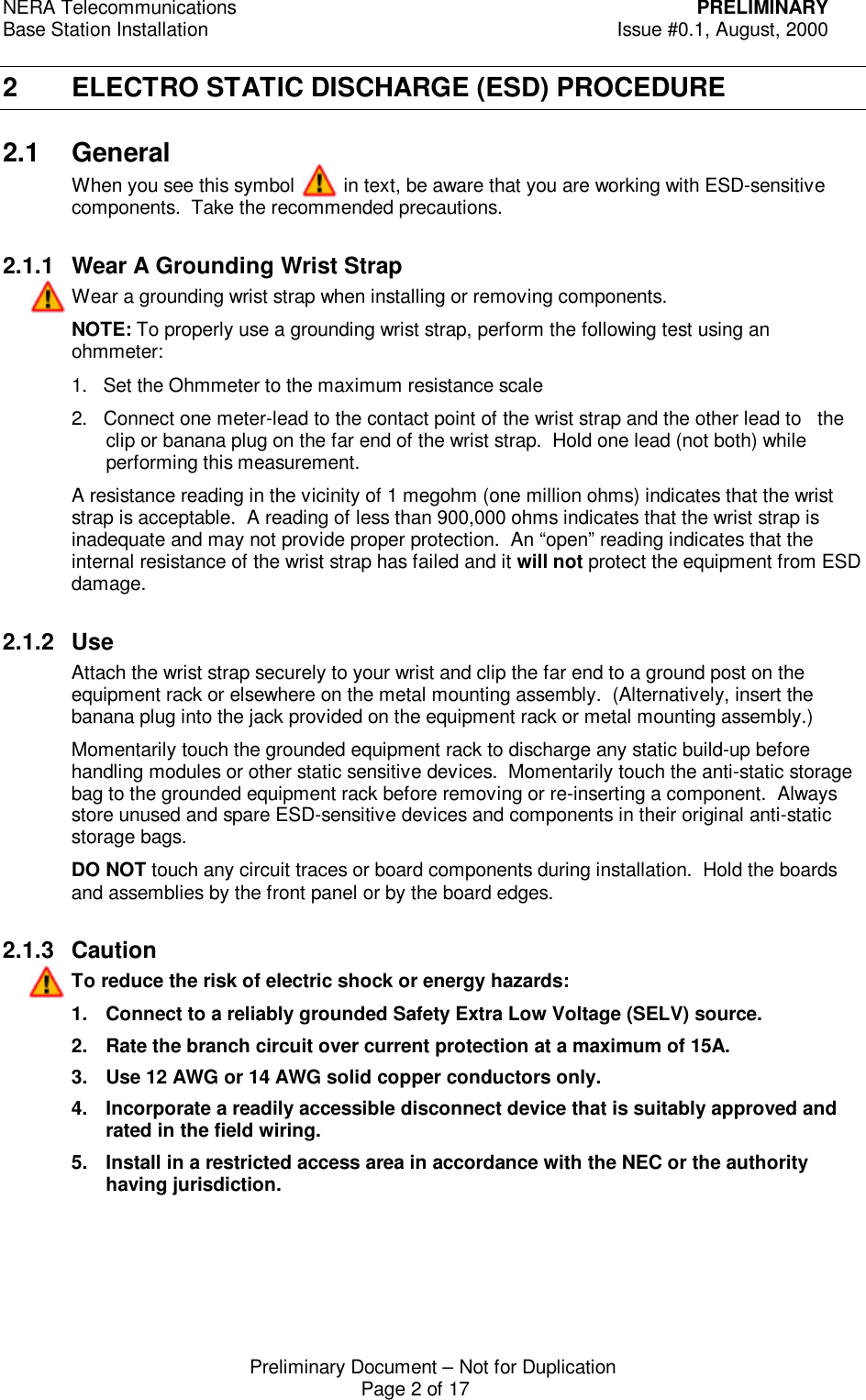
NERA Telecommunications PRELIMINARYBase Station Installation Issue #0.1, August, 2000Preliminary Document – Not for DuplicationPage 2 of 172 ELECTRO STATIC DISCHARGE (ESD) PROCEDURE2.1 GeneralWhen you see this symbol         in text, be aware that you are working with ESD-sensitivecomponents.  Take the recommended precautions.2.1.1 Wear A Grounding Wrist StrapWear a grounding wrist strap when installing or removing components.NOTE: To properly use a grounding wrist strap, perform the following test using anohmmeter:1.   Set the Ohmmeter to the maximum resistance scale2.   Connect one meter-lead to the contact point of the wrist strap and the other lead to   theclip or banana plug on the far end of the wrist strap.  Hold one lead (not both) whileperforming this measurement.A resistance reading in the vicinity of 1 megohm (one million ohms) indicates that the wriststrap is acceptable.  A reading of less than 900,000 ohms indicates that the wrist strap isinadequate and may not provide proper protection.  An “open” reading indicates that theinternal resistance of the wrist strap has failed and it will not protect the equipment from ESDdamage.2.1.2 UseAttach the wrist strap securely to your wrist and clip the far end to a ground post on theequipment rack or elsewhere on the metal mounting assembly.  (Alternatively, insert thebanana plug into the jack provided on the equipment rack or metal mounting assembly.)Momentarily touch the grounded equipment rack to discharge any static build-up beforehandling modules or other static sensitive devices.  Momentarily touch the anti-static storagebag to the grounded equipment rack before removing or re-inserting a component.  Alwaysstore unused and spare ESD-sensitive devices and components in their original anti-staticstorage bags.DO NOT touch any circuit traces or board components during installation.  Hold the boardsand assemblies by the front panel or by the board edges.2.1.3 CautionTo reduce the risk of electric shock or energy hazards:1. Connect to a reliably grounded Safety Extra Low Voltage (SELV) source.2. Rate the branch circuit over current protection at a maximum of 15A.3. Use 12 AWG or 14 AWG solid copper conductors only.4. Incorporate a readily accessible disconnect device that is suitably approved andrated in the field wiring.5. Install in a restricted access area in accordance with the NEC or the authorityhaving jurisdiction.
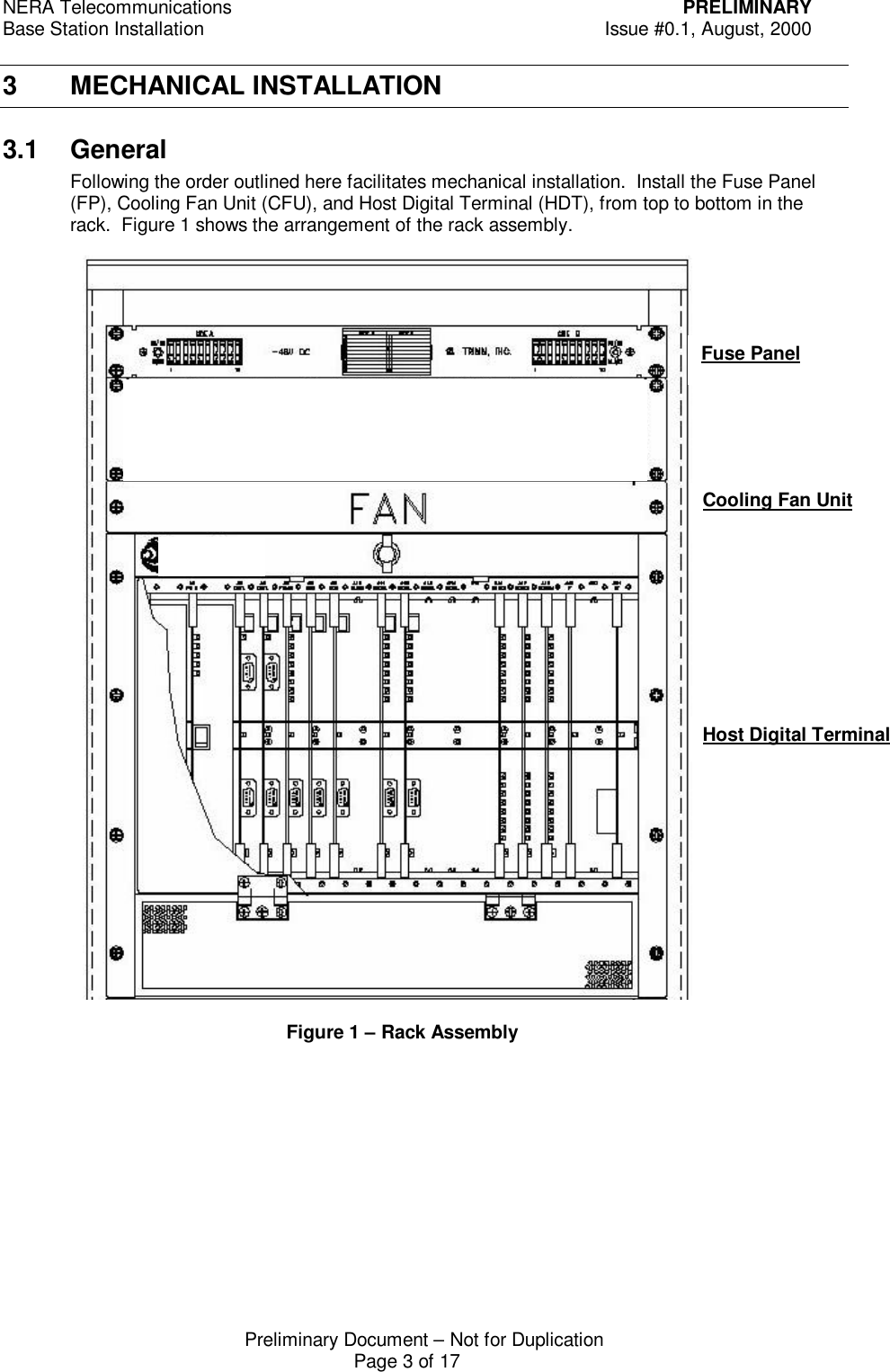
NERA Telecommunications PRELIMINARYBase Station Installation Issue #0.1, August, 2000Preliminary Document – Not for DuplicationPage 3 of 173 MECHANICAL INSTALLATION3.1 GeneralFollowing the order outlined here facilitates mechanical installation.  Install the Fuse Panel(FP), Cooling Fan Unit (CFU), and Host Digital Terminal (HDT), from top to bottom in therack.  Figure 1 shows the arrangement of the rack assembly.Fuse PanelCooling Fan UnitHost Digital Terminal  Figure 1 – Rack Assembly
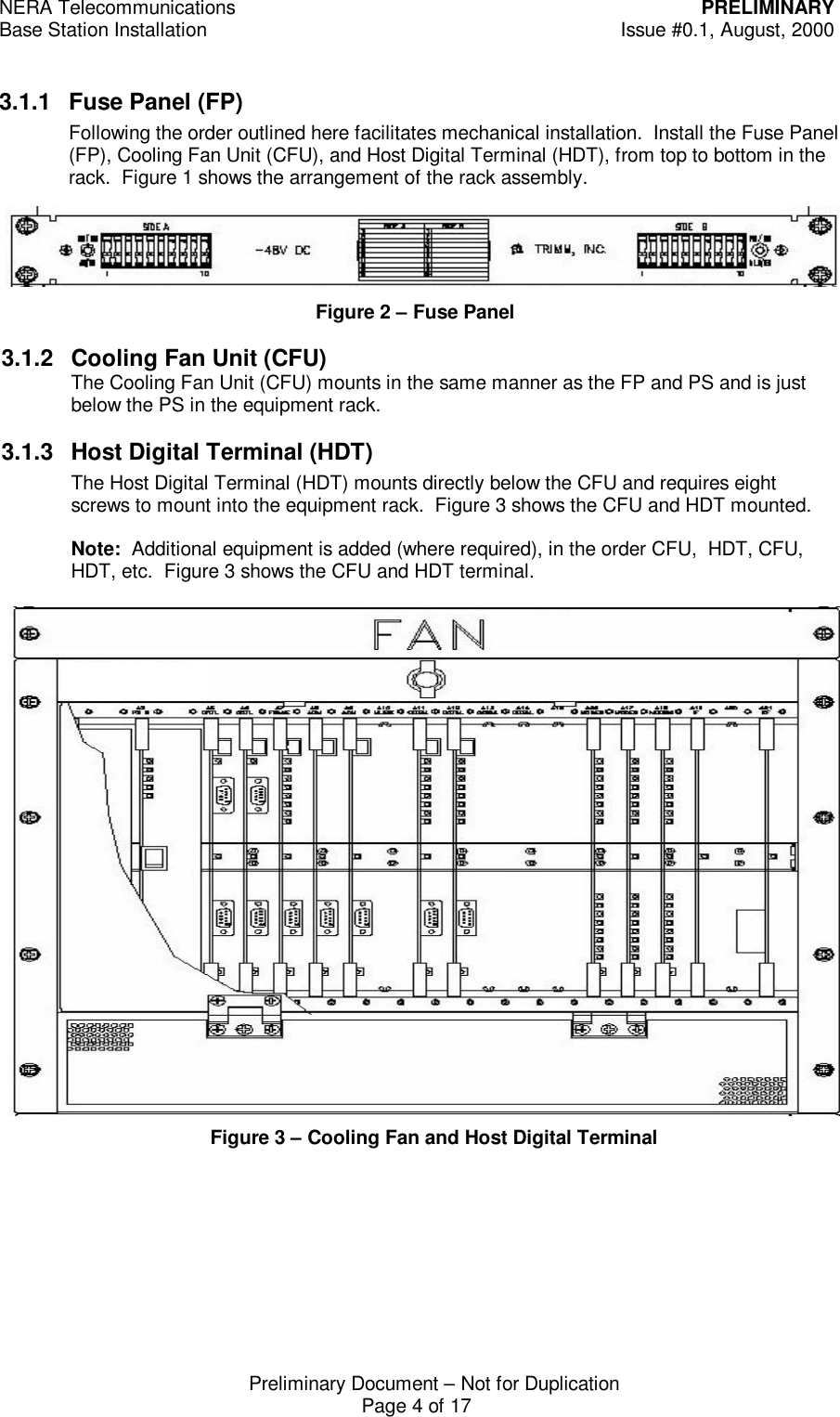
NERA Telecommunications PRELIMINARYBase Station Installation Issue #0.1, August, 2000Preliminary Document – Not for DuplicationPage 4 of 173.1.1 Fuse Panel (FP)Following the order outlined here facilitates mechanical installation.  Install the Fuse Panel(FP), Cooling Fan Unit (CFU), and Host Digital Terminal (HDT), from top to bottom in therack.  Figure 1 shows the arrangement of the rack assembly.Figure 3 – Cooling Fan and Host Digital TerminalFigure 2 – Fuse Panel3.1.2 Cooling Fan Unit (CFU)The Cooling Fan Unit (CFU) mounts in the same manner as the FP and PS and is justbelow the PS in the equipment rack.3.1.3 Host Digital Terminal (HDT)The Host Digital Terminal (HDT) mounts directly below the CFU and requires eightscrews to mount into the equipment rack.  Figure 3 shows the CFU and HDT mounted.Note:  Additional equipment is added (where required), in the order CFU,  HDT, CFU,HDT, etc.  Figure 3 shows the CFU and HDT terminal.
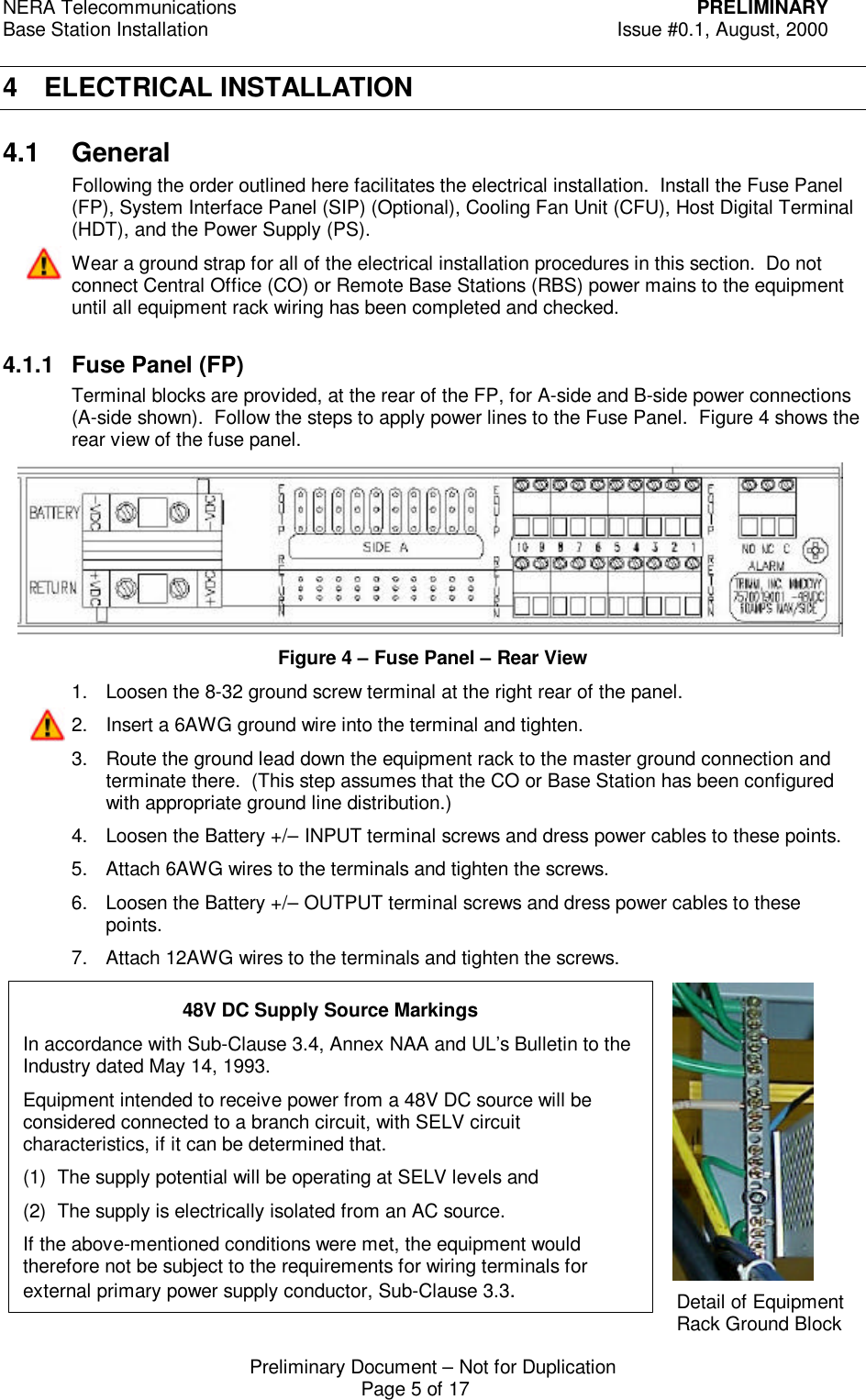
NERA Telecommunications PRELIMINARYBase Station Installation Issue #0.1, August, 2000Preliminary Document – Not for DuplicationPage 5 of 174 ELECTRICAL INSTALLATION4.1 GeneralFollowing the order outlined here facilitates the electrical installation.  Install the Fuse Panel(FP), System Interface Panel (SIP) (Optional), Cooling Fan Unit (CFU), Host Digital Terminal(HDT), and the Power Supply (PS).Wear a ground strap for all of the electrical installation procedures in this section.  Do notconnect Central Office (CO) or Remote Base Stations (RBS) power mains to the equipmentuntil all equipment rack wiring has been completed and checked.4.1.1 Fuse Panel (FP)Terminal blocks are provided, at the rear of the FP, for A-side and B-side power connections(A-side shown).  Follow the steps to apply power lines to the Fuse Panel.  Figure 4 shows therear view of the fuse panel.Figure 4 – Fuse Panel – Rear View1. Loosen the 8-32 ground screw terminal at the right rear of the panel.2. Insert a 6AWG ground wire into the terminal and tighten.3. Route the ground lead down the equipment rack to the master ground connection andterminate there.  (This step assumes that the CO or Base Station has been configuredwith appropriate ground line distribution.)4. Loosen the Battery +/– INPUT terminal screws and dress power cables to these points.5. Attach 6AWG wires to the terminals and tighten the screws.6. Loosen the Battery +/– OUTPUT terminal screws and dress power cables to thesepoints.7. Attach 12AWG wires to the terminals and tighten the screws.Detail of EquipmentRack Ground Block48V DC Supply Source MarkingsIn accordance with Sub-Clause 3.4, Annex NAA and UL’s Bulletin to theIndustry dated May 14, 1993.Equipment intended to receive power from a 48V DC source will beconsidered connected to a branch circuit, with SELV circuitcharacteristics, if it can be determined that.(1) The supply potential will be operating at SELV levels and(2) The supply is electrically isolated from an AC source.If the above-mentioned conditions were met, the equipment wouldtherefore not be subject to the requirements for wiring terminals forexternal primary power supply conductor, Sub-Clause 3.3.
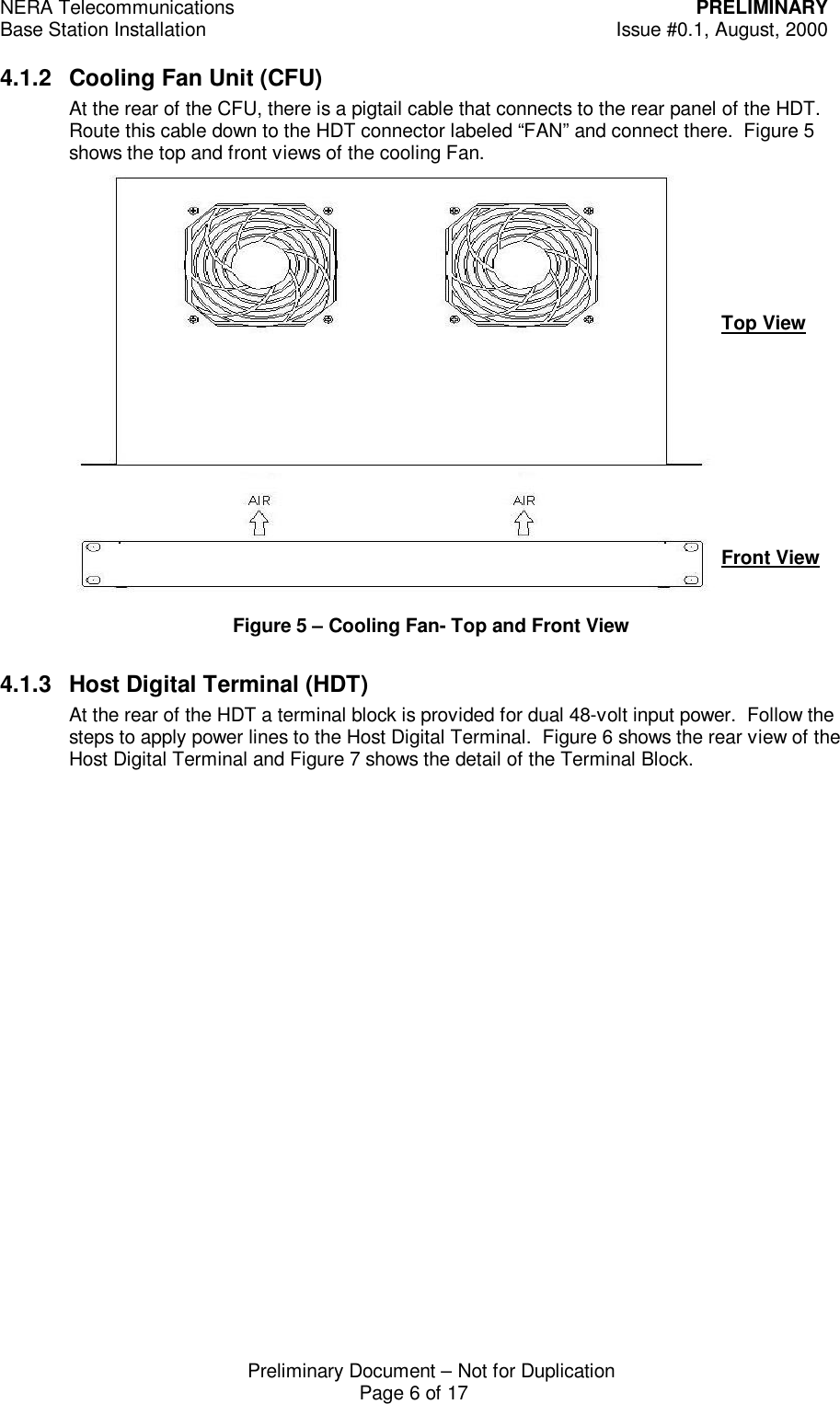
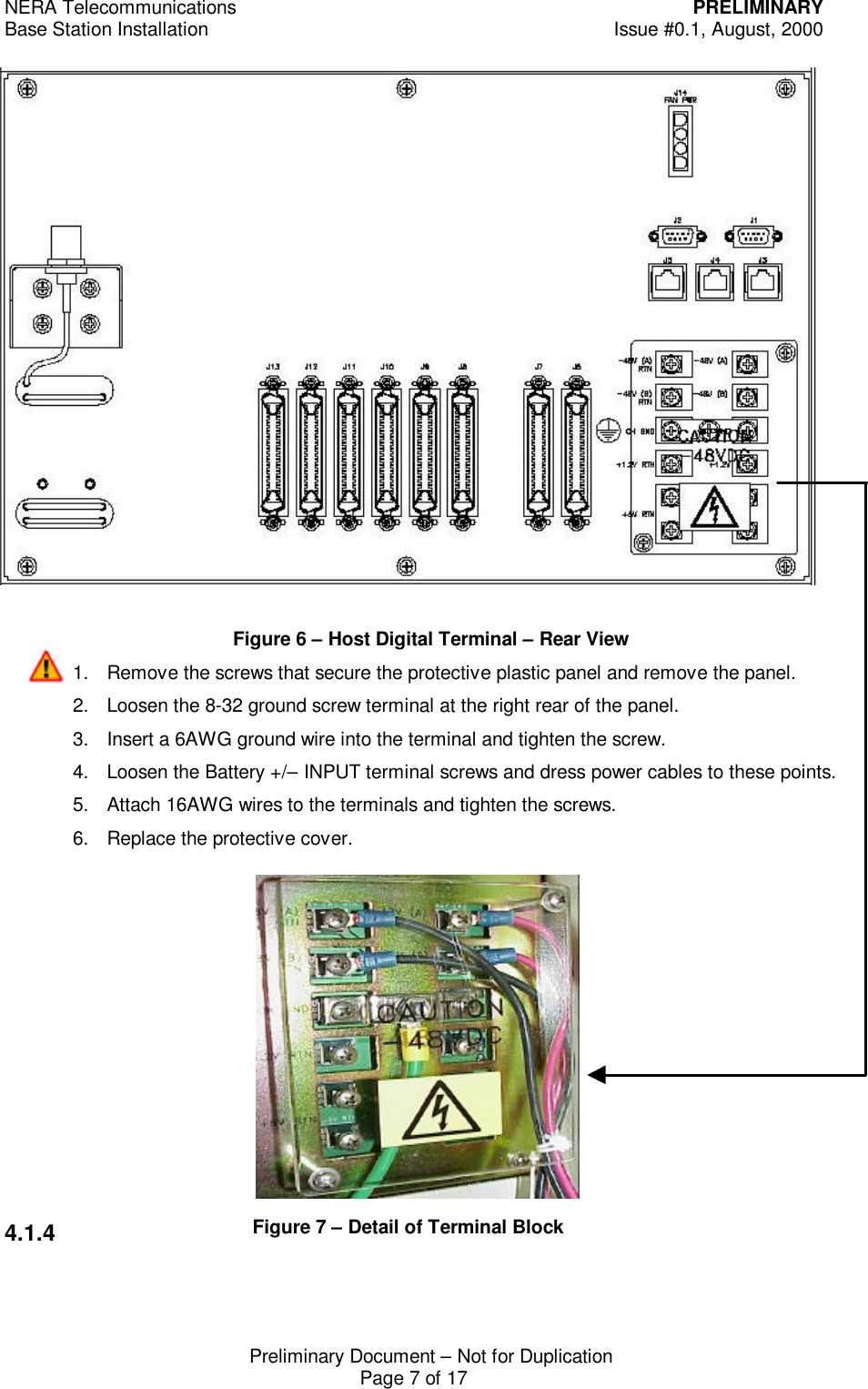
NERA Telecommunications PRELIMINARYBase Station Installation Issue #0.1, August, 2000Preliminary Document – Not for DuplicationPage 6 of 174.1.2 Cooling Fan Unit (CFU)At the rear of the CFU, there is a pigtail cable that connects to the rear panel of the HDT.Route this cable down to the HDT connector labeled “FAN” and connect there.  Figure 5shows the top and front views of the cooling Fan.Figure 5 – Cooling Fan- Top and Front View4.1.3 Host Digital Terminal (HDT)At the rear of the HDT a terminal block is provided for dual 48-volt input power.  Follow thesteps to apply power lines to the Host Digital Terminal.  Figure 6 shows the rear view of theHost Digital Terminal and Figure 7 shows the detail of the Terminal Block.Top ViewFront View
NERA Telecommunications PRELIMINARYBase Station Installation Issue #0.1, August, 2000Preliminary Document – Not for DuplicationPage 7 of 17Figure 6 – Host Digital Terminal – Rear View1. Remove the screws that secure the protective plastic panel and remove the panel.2. Loosen the 8-32 ground screw terminal at the right rear of the panel.3. Insert a 6AWG ground wire into the terminal and tighten the screw.4. Loosen the Battery +/– INPUT terminal screws and dress power cables to these points.5. Attach 16AWG wires to the terminals and tighten the screws.6. Replace the protective cover.4.1.4 Figure 7 – Detail of Terminal Block
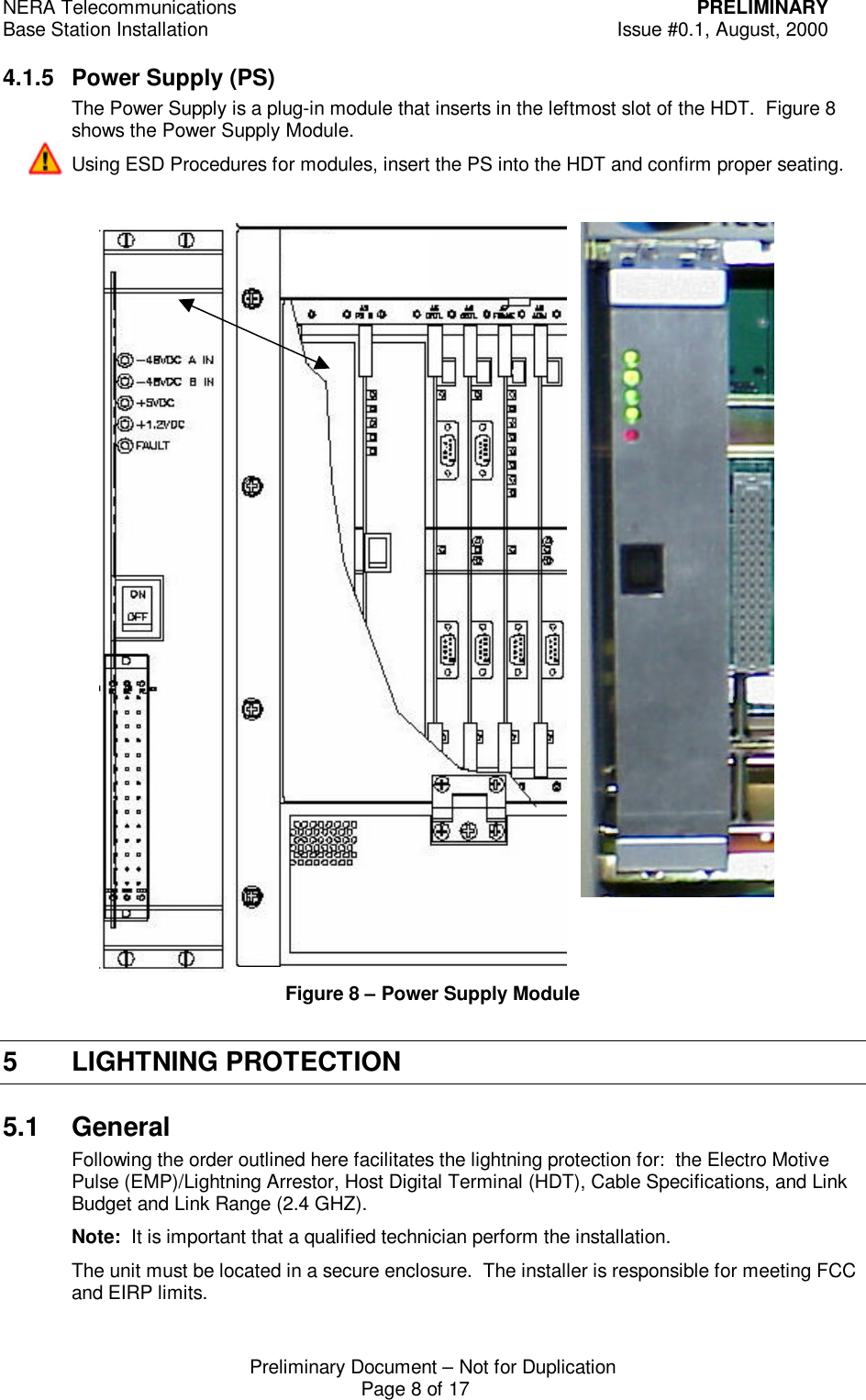
NERA Telecommunications PRELIMINARYBase Station Installation Issue #0.1, August, 2000Preliminary Document – Not for DuplicationPage 8 of 174.1.5 Power Supply (PS)The Power Supply is a plug-in module that inserts in the leftmost slot of the HDT.  Figure 8shows the Power Supply Module.Using ESD Procedures for modules, insert the PS into the HDT and confirm proper seating.Figure 8 – Power Supply Module5 LIGHTNING PROTECTION5.1 GeneralFollowing the order outlined here facilitates the lightning protection for:  the Electro MotivePulse (EMP)/Lightning Arrestor, Host Digital Terminal (HDT), Cable Specifications, and LinkBudget and Link Range (2.4 GHZ).Note:  It is important that a qualified technician perform the installation.The unit must be located in a secure enclosure.  The installer is responsible for meeting FCCand EIRP limits.
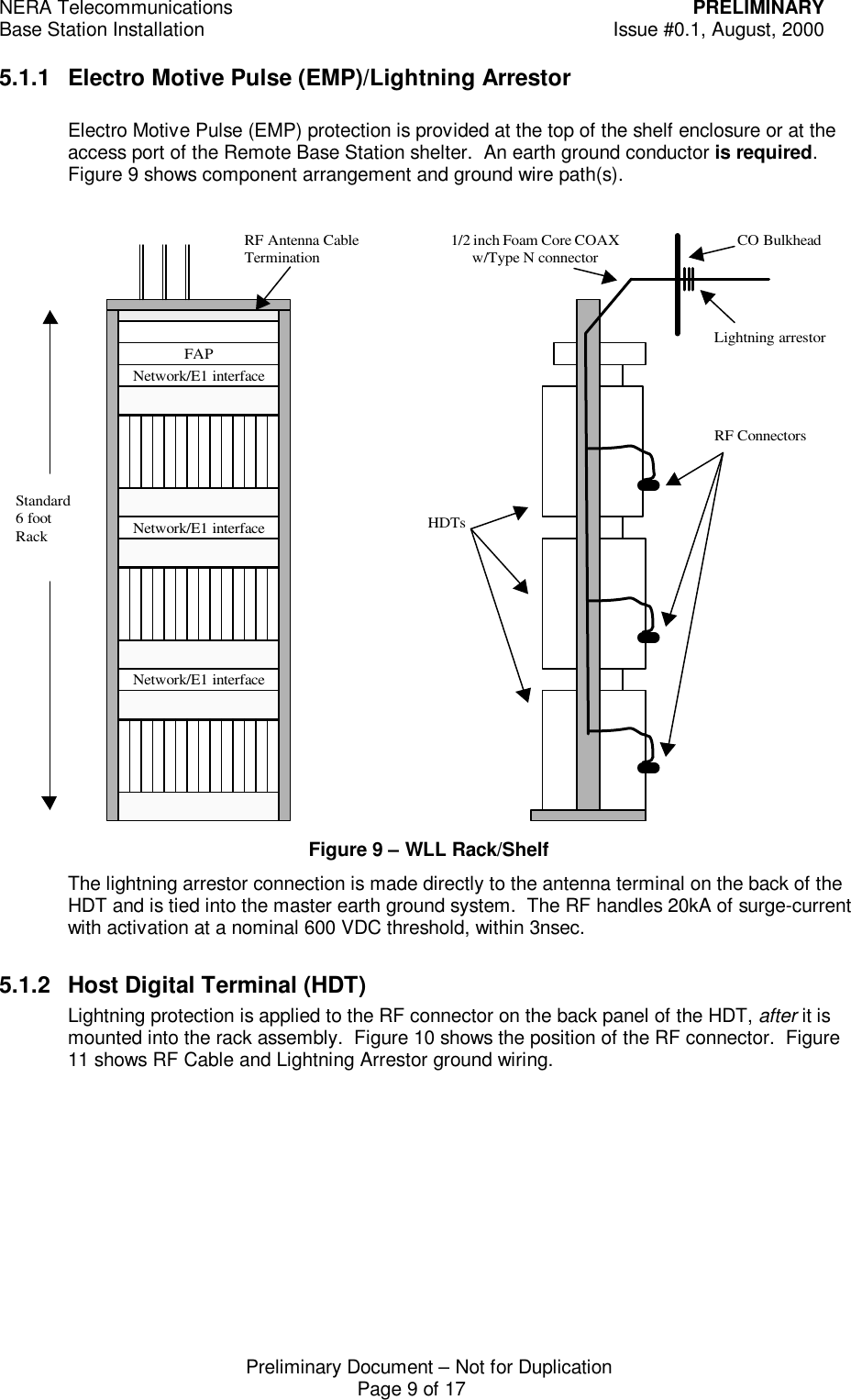
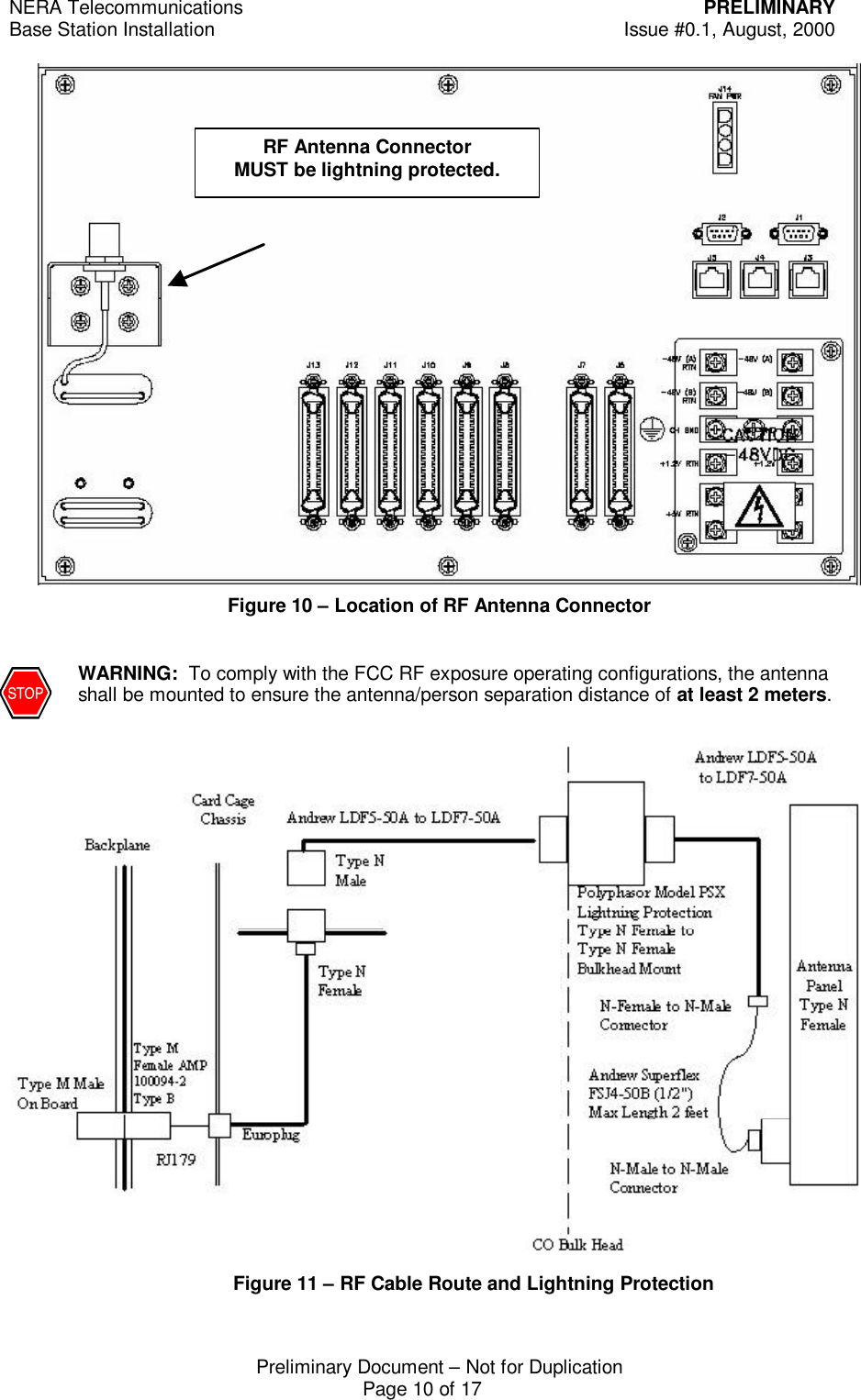
NERA Telecommunications PRELIMINARYBase Station Installation Issue #0.1, August, 2000Preliminary Document – Not for DuplicationPage 9 of 175.1.1 Electro Motive Pulse (EMP)/Lightning ArrestorElectro Motive Pulse (EMP) protection is provided at the top of the shelf enclosure or at theaccess port of the Remote Base Station shelter.  An earth ground conductor is required.Figure 9 shows component arrangement and ground wire path(s).Figure 9 – WLL Rack/ShelfThe lightning arrestor connection is made directly to the antenna terminal on the back of theHDT and is tied into the master earth ground system.  The RF handles 20kA of surge-currentwith activation at a nominal 600 VDC threshold, within 3nsec.5.1.2 Host Digital Terminal (HDT)Lightning protection is applied to the RF connector on the back panel of the HDT, after it ismounted into the rack assembly.  Figure 10 shows the position of the RF connector.  Figure11 shows RF Cable and Lightning Arrestor ground wiring.FAPStandard6 footRackNetwork/E1 interfaceNetwork/E1 interfaceNetwork/E1 interfaceRF Antenna CableTermination 1/2 inch Foam Core COAXw/Type N connectorLightning arrestorCO BulkheadHDTsRF Connectors
NERA Telecommunications PRELIMINARYBase Station Installation Issue #0.1, August, 2000Preliminary Document – Not for DuplicationPage 10 of 17Figure 10 – Location of RF Antenna ConnectorWARNING:  To comply with the FCC RF exposure operating configurations, the antennashall be mounted to ensure the antenna/person separation distance of at least 2 meters. Figure 11 – RF Cable Route and Lightning ProtectionRF Antenna ConnectorMUST be lightning protected.
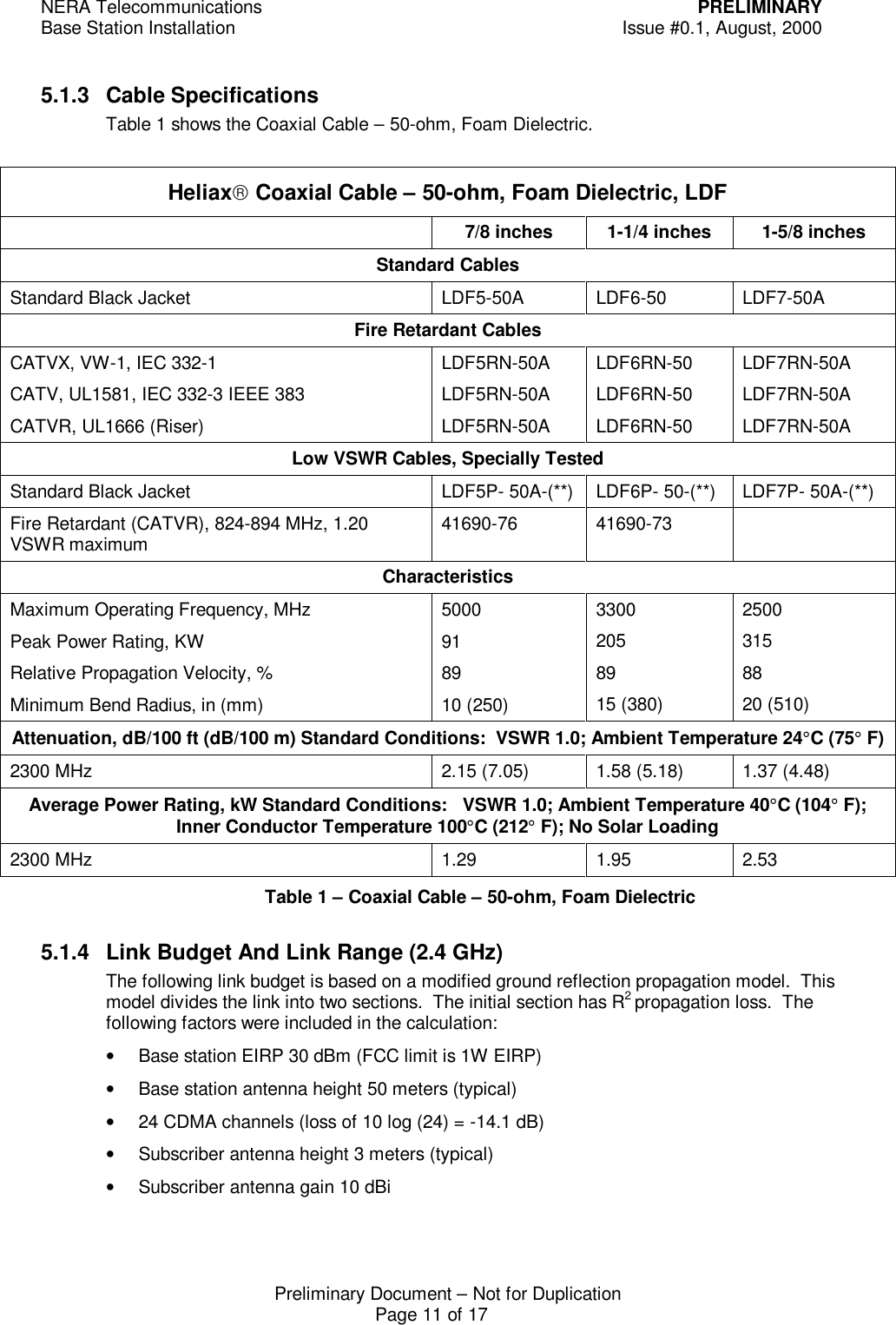
NERA Telecommunications PRELIMINARYBase Station Installation Issue #0.1, August, 2000Preliminary Document – Not for DuplicationPage 11 of 175.1.3 Cable SpecificationsTable 1 shows the Coaxial Cable – 50-ohm, Foam Dielectric.Heliax Coaxial Cable – 50-ohm, Foam Dielectric, LDF7/8 inches 1-1/4 inches 1-5/8 inchesStandard CablesStandard Black Jacket LDF5-50A LDF6-50 LDF7-50AFire Retardant CablesCATVX, VW-1, IEC 332-1CATV, UL1581, IEC 332-3 IEEE 383CATVR, UL1666 (Riser)LDF5RN-50ALDF5RN-50ALDF5RN-50ALDF6RN-50LDF6RN-50LDF6RN-50LDF7RN-50ALDF7RN-50ALDF7RN-50ALow VSWR Cables, Specially TestedStandard Black Jacket LDF5P- 50A-(**) LDF6P- 50-(**) LDF7P- 50A-(**)Fire Retardant (CATVR), 824-894 MHz, 1.20VSWR maximum 41690-76 41690-73CharacteristicsMaximum Operating Frequency, MHzPeak Power Rating, KWRelative Propagation Velocity, %Minimum Bend Radius, in (mm)5000918910 (250)33002058915 (380)25003158820 (510)Attenuation, dB/100 ft (dB/100 m) Standard Conditions:  VSWR 1.0; Ambient Temperature 24°C (75° F)2300 MHz 2.15 (7.05) 1.58 (5.18) 1.37 (4.48)Average Power Rating, kW Standard Conditions:   VSWR 1.0; Ambient Temperature 40°C (104° F);Inner Conductor Temperature 100°C (212° F); No Solar Loading2300 MHz 1.29 1.95 2.53Table 1 – Coaxial Cable – 50-ohm, Foam Dielectric5.1.4 Link Budget And Link Range (2.4 GHz)The following link budget is based on a modified ground reflection propagation model.  Thismodel divides the link into two sections.  The initial section has R2 propagation loss.  Thefollowing factors were included in the calculation:• Base station EIRP 30 dBm (FCC limit is 1W EIRP)• Base station antenna height 50 meters (typical)• 24 CDMA channels (loss of 10 log (24) = -14.1 dB)• Subscriber antenna height 3 meters (typical)• Subscriber antenna gain 10 dBi
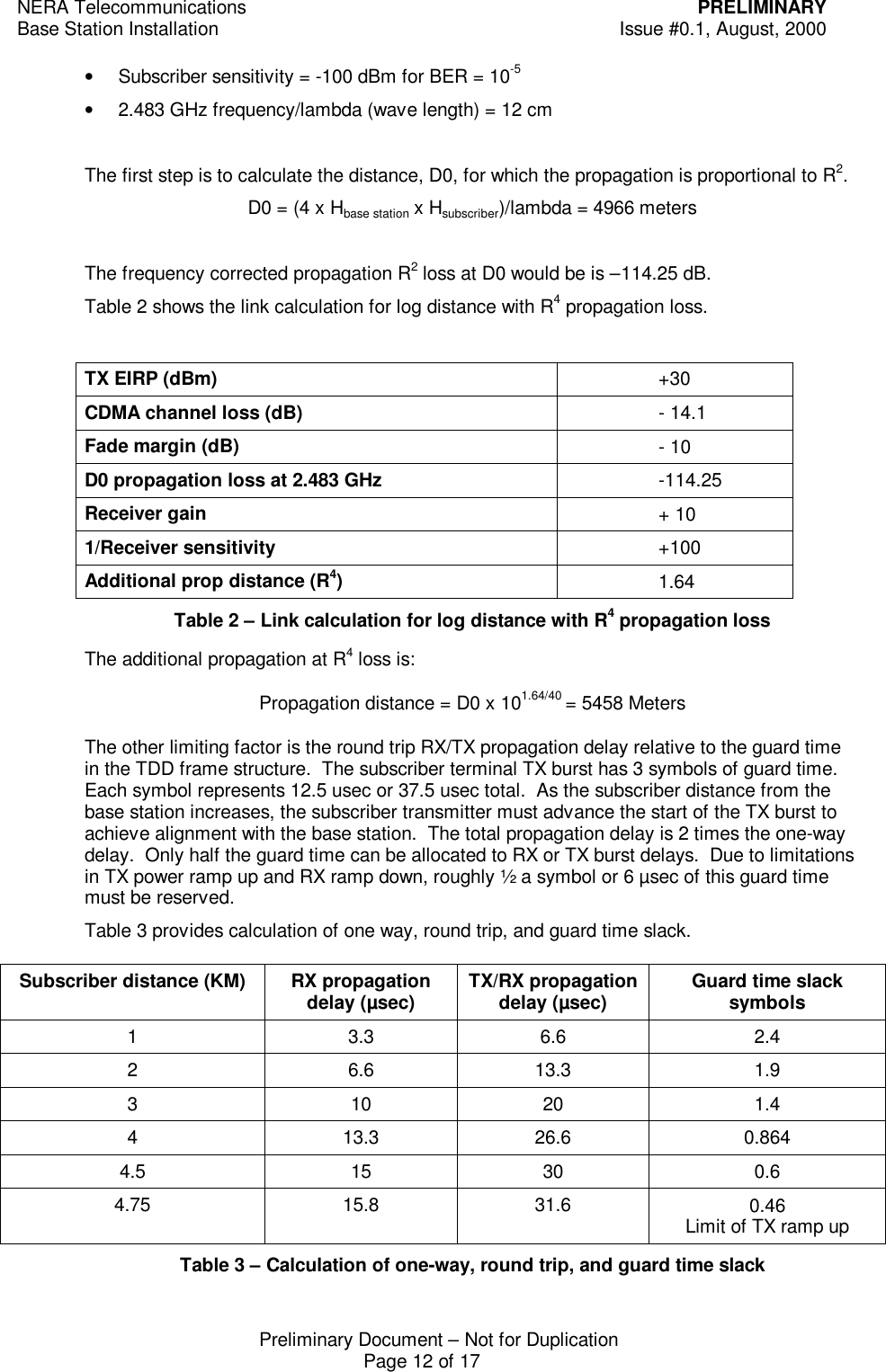
NERA Telecommunications PRELIMINARYBase Station Installation Issue #0.1, August, 2000Preliminary Document – Not for DuplicationPage 12 of 17• Subscriber sensitivity = -100 dBm for BER = 10-5• 2.483 GHz frequency/lambda (wave length) = 12 cmThe first step is to calculate the distance, D0, for which the propagation is proportional to R2.D0 = (4 x Hbase station x Hsubscriber)/lambda = 4966 metersThe frequency corrected propagation R2 loss at D0 would be is –114.25 dB.Table 2 shows the link calculation for log distance with R4 propagation loss.TX EIRP (dBm) +30CDMA channel loss (dB) - 14.1Fade margin (dB) - 10D0 propagation loss at 2.483 GHz -114.25Receiver gain + 101/Receiver sensitivity +100Additional prop distance (R4)1.64Table 2 – Link calculation for log distance with R4 propagation lossThe additional propagation at R4 loss is:Propagation distance = D0 x 101.64/40 = 5458 MetersThe other limiting factor is the round trip RX/TX propagation delay relative to the guard timein the TDD frame structure.  The subscriber terminal TX burst has 3 symbols of guard time.Each symbol represents 12.5 usec or 37.5 usec total.  As the subscriber distance from thebase station increases, the subscriber transmitter must advance the start of the TX burst toachieve alignment with the base station.  The total propagation delay is 2 times the one-waydelay.  Only half the guard time can be allocated to RX or TX burst delays.  Due to limitationsin TX power ramp up and RX ramp down, roughly ½ a symbol or 6 µsec of this guard timemust be reserved.Table 3 provides calculation of one way, round trip, and guard time slack.Subscriber distance (KM) RX propagationdelay (µsec) TX/RX propagationdelay (µsec) Guard time slacksymbols13.3 6.6 2.426.6 13.3 1.93 10 20 1.4413.3 26.6 0.8644.5 15 30 0.64.75 15.8 31.6 0.46Limit of TX ramp upTable 3 – Calculation of one-way, round trip, and guard time slack
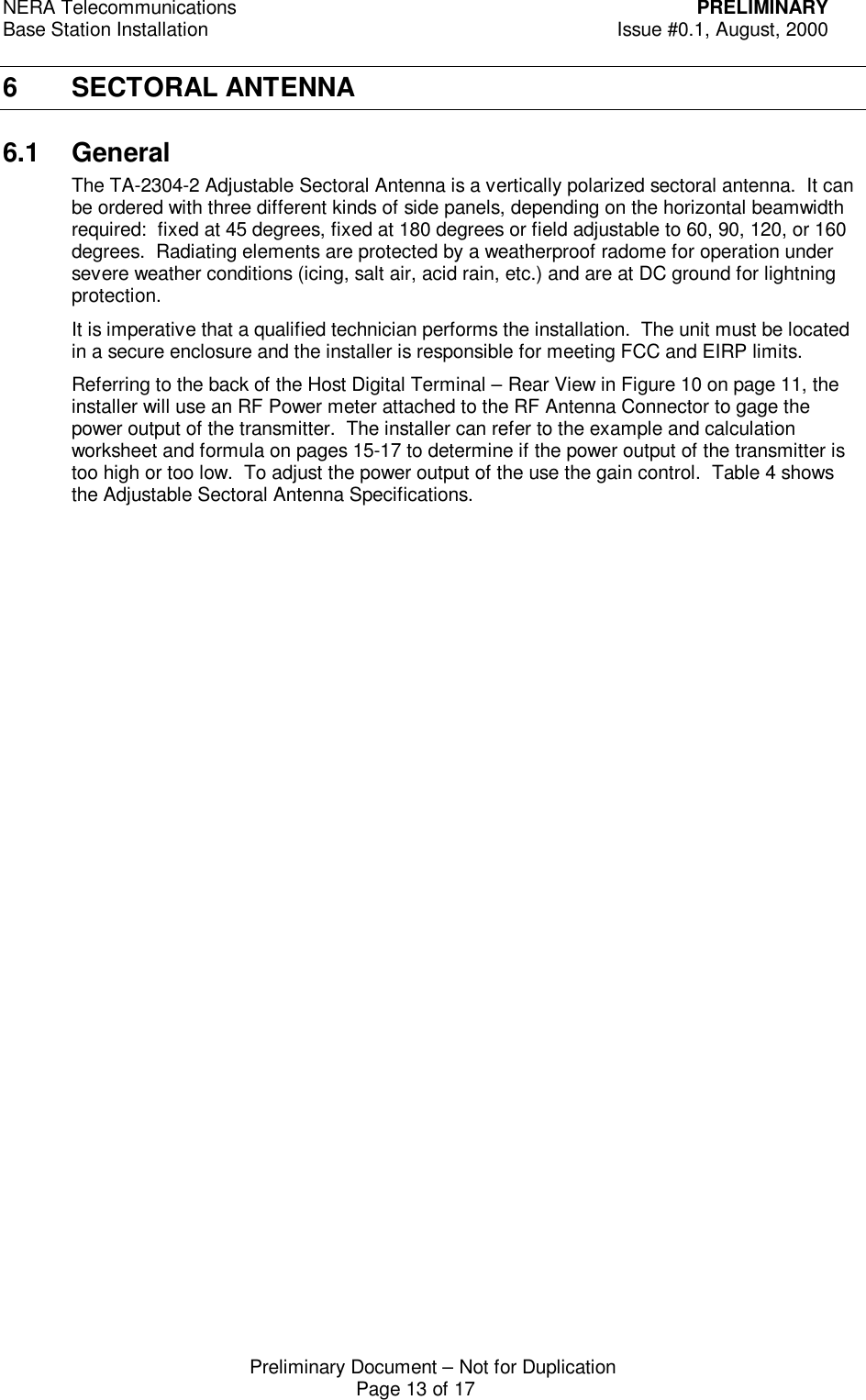
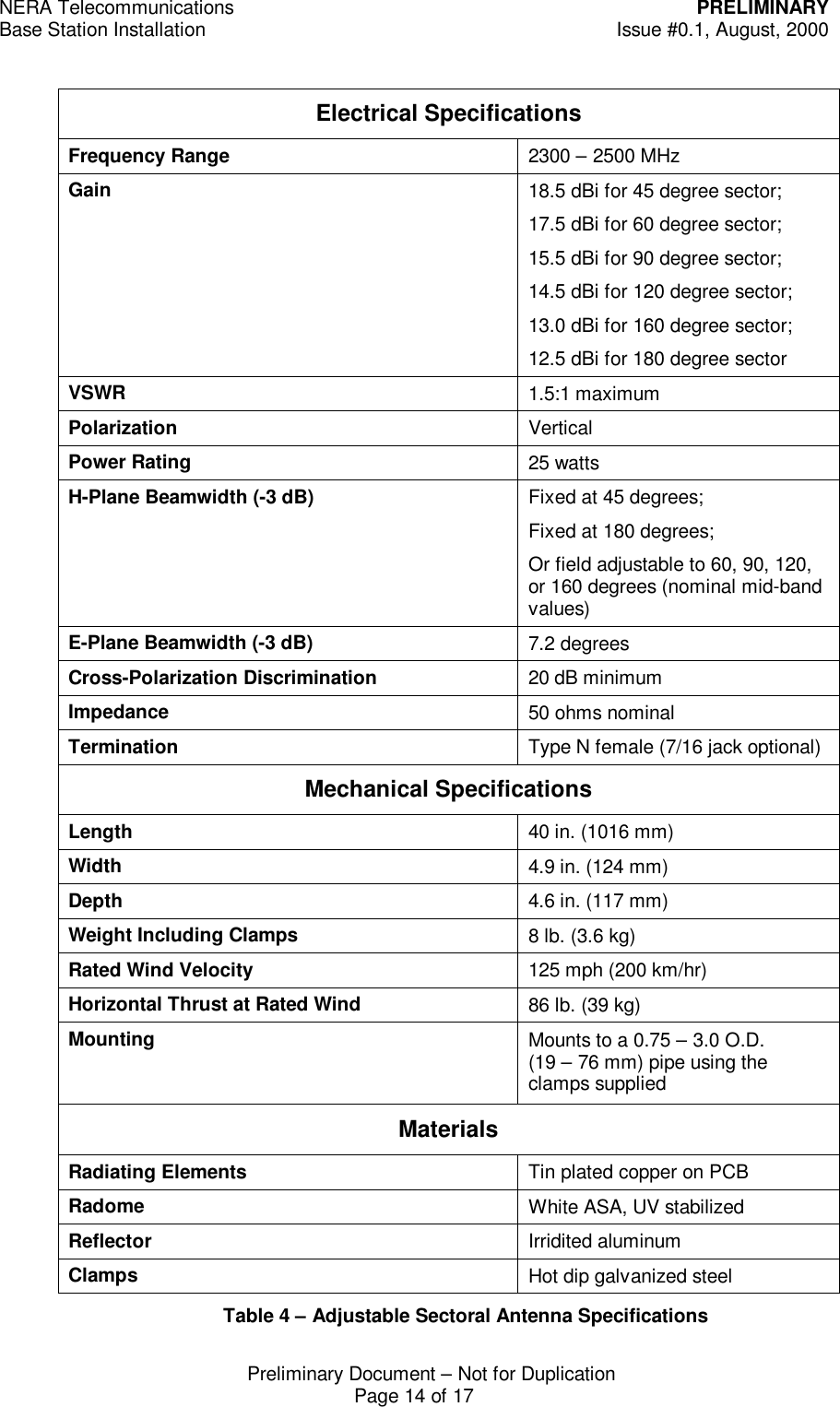
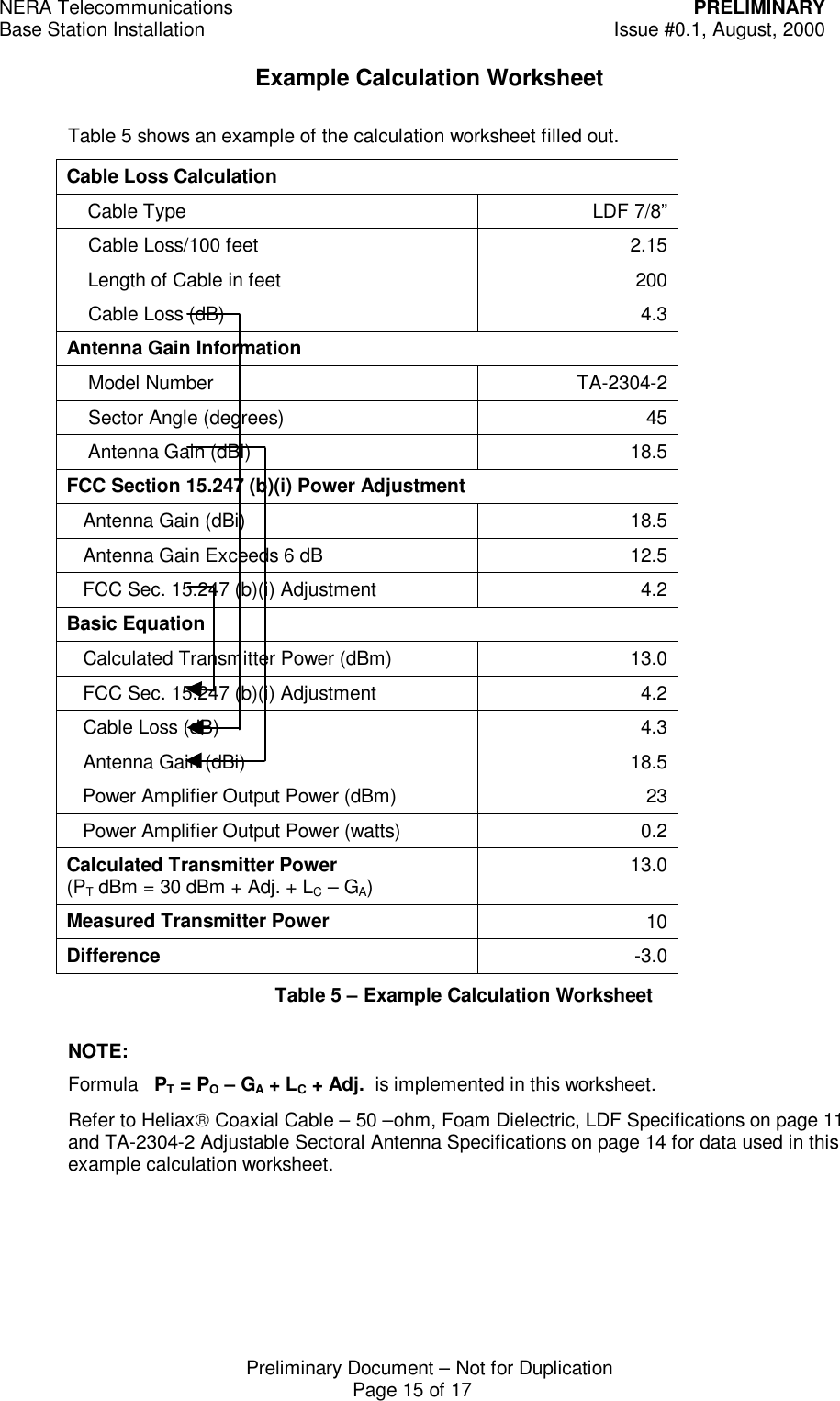
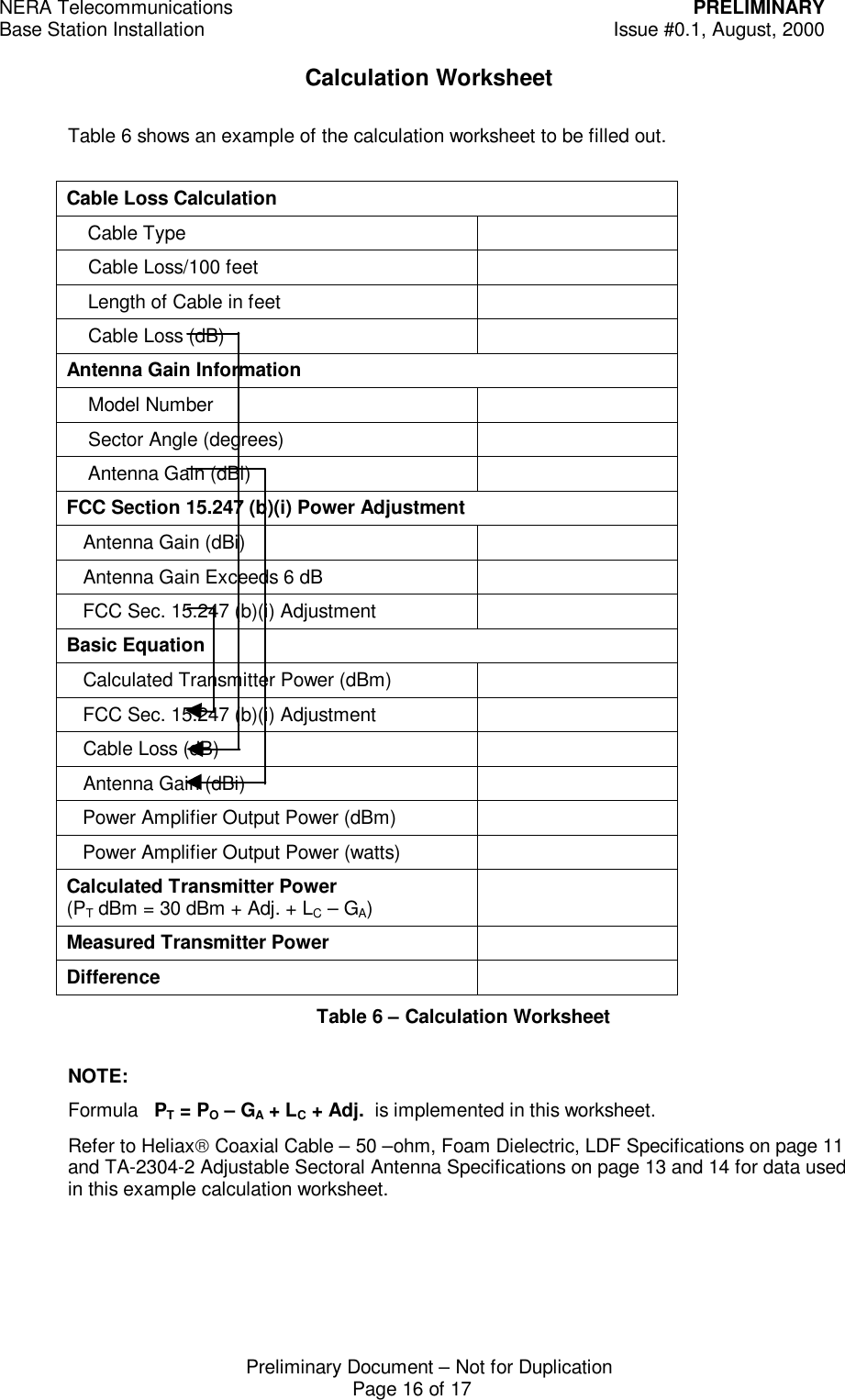
NERA Telecommunications PRELIMINARYBase Station Installation Issue #0.1, August, 2000Preliminary Document – Not for DuplicationPage 13 of 176 SECTORAL ANTENNA6.1 GeneralThe TA-2304-2 Adjustable Sectoral Antenna is a vertically polarized sectoral antenna.  It canbe ordered with three different kinds of side panels, depending on the horizontal beamwidthrequired:  fixed at 45 degrees, fixed at 180 degrees or field adjustable to 60, 90, 120, or 160degrees.  Radiating elements are protected by a weatherproof radome for operation undersevere weather conditions (icing, salt air, acid rain, etc.) and are at DC ground for lightningprotection.It is imperative that a qualified technician performs the installation.  The unit must be locatedin a secure enclosure and the installer is responsible for meeting FCC and EIRP limits.Referring to the back of the Host Digital Terminal – Rear View in Figure 10 on page 11, theinstaller will use an RF Power meter attached to the RF Antenna Connector to gage thepower output of the transmitter.  The installer can refer to the example and calculationworksheet and formula on pages 15-17 to determine if the power output of the transmitter istoo high or too low.  To adjust the power output of the use the gain control.  Table 4 showsthe Adjustable Sectoral Antenna Specifications.
NERA Telecommunications PRELIMINARYBase Station Installation Issue #0.1, August, 2000Preliminary Document – Not for DuplicationPage 14 of 17Electrical SpecificationsFrequency Range 2300 – 2500 MHzGain 18.5 dBi for 45 degree sector;17.5 dBi for 60 degree sector;15.5 dBi for 90 degree sector;14.5 dBi for 120 degree sector;13.0 dBi for 160 degree sector;12.5 dBi for 180 degree sectorVSWR 1.5:1 maximumPolarization VerticalPower Rating 25 wattsH-Plane Beamwidth (-3 dB) Fixed at 45 degrees;Fixed at 180 degrees;Or field adjustable to 60, 90, 120,or 160 degrees (nominal mid-bandvalues)E-Plane Beamwidth (-3 dB) 7.2 degreesCross-Polarization Discrimination 20 dB minimumImpedance 50 ohms nominalTermination Type N female (7/16 jack optional)Mechanical SpecificationsLength 40 in. (1016 mm)Width 4.9 in. (124 mm)Depth 4.6 in. (117 mm)Weight Including Clamps 8 lb. (3.6 kg)Rated Wind Velocity 125 mph (200 km/hr)Horizontal Thrust at Rated Wind 86 lb. (39 kg)Mounting Mounts to a 0.75 – 3.0 O.D.(19 – 76 mm) pipe using theclamps suppliedMaterialsRadiating Elements Tin plated copper on PCBRadome White ASA, UV stabilizedReflector Irridited aluminumClamps Hot dip galvanized steelTable 4 – Adjustable Sectoral Antenna Specifications
NERA Telecommunications PRELIMINARYBase Station Installation Issue #0.1, August, 2000Preliminary Document – Not for DuplicationPage 15 of 17Example Calculation WorksheetTable 5 shows an example of the calculation worksheet filled out.Cable Loss Calculation    Cable Type LDF 7/8”    Cable Loss/100 feet 2.15    Length of Cable in feet 200    Cable Loss (dB) 4.3Antenna Gain Information    Model Number TA-2304-2    Sector Angle (degrees) 45    Antenna Gain (dBi) 18.5FCC Section 15.247 (b)(i) Power Adjustment   Antenna Gain (dBi) 18.5   Antenna Gain Exceeds 6 dB 12.5   FCC Sec. 15.247 (b)(i) Adjustment 4.2Basic Equation   Calculated Transmitter Power (dBm) 13.0   FCC Sec. 15.247 (b)(i) Adjustment 4.2   Cable Loss (dB) 4.3   Antenna Gain (dBi) 18.5   Power Amplifier Output Power (dBm) 23   Power Amplifier Output Power (watts) 0.2Calculated Transmitter Power(PT dBm = 30 dBm + Adj. + LC – GA)13.0Measured Transmitter Power 10Difference -3.0Table 5 – Example Calculation WorksheetNOTE:Formula   PT = PO – GA + LC + Adj.  is implemented in this worksheet.Refer to Heliax Coaxial Cable – 50 –ohm, Foam Dielectric, LDF Specifications on page 11and TA-2304-2 Adjustable Sectoral Antenna Specifications on page 14 for data used in thisexample calculation worksheet.
NERA Telecommunications PRELIMINARYBase Station Installation Issue #0.1, August, 2000Preliminary Document – Not for DuplicationPage 16 of 17Calculation WorksheetTable 6 shows an example of the calculation worksheet to be filled out.Cable Loss Calculation    Cable Type    Cable Loss/100 feet    Length of Cable in feet    Cable Loss (dB)Antenna Gain Information    Model Number    Sector Angle (degrees)    Antenna Gain (dBi)FCC Section 15.247 (b)(i) Power Adjustment   Antenna Gain (dBi)   Antenna Gain Exceeds 6 dB   FCC Sec. 15.247 (b)(i) AdjustmentBasic Equation   Calculated Transmitter Power (dBm)   FCC Sec. 15.247 (b)(i) Adjustment   Cable Loss (dB)   Antenna Gain (dBi)   Power Amplifier Output Power (dBm)   Power Amplifier Output Power (watts)Calculated Transmitter Power(PT dBm = 30 dBm + Adj. + LC – GA)Measured Transmitter PowerDifferenceTable 6 – Calculation WorksheetNOTE:Formula   PT = PO – GA + LC + Adj.  is implemented in this worksheet.Refer to Heliax Coaxial Cable – 50 –ohm, Foam Dielectric, LDF Specifications on page 11and TA-2304-2 Adjustable Sectoral Antenna Specifications on page 13 and 14 for data usedin this example calculation worksheet.
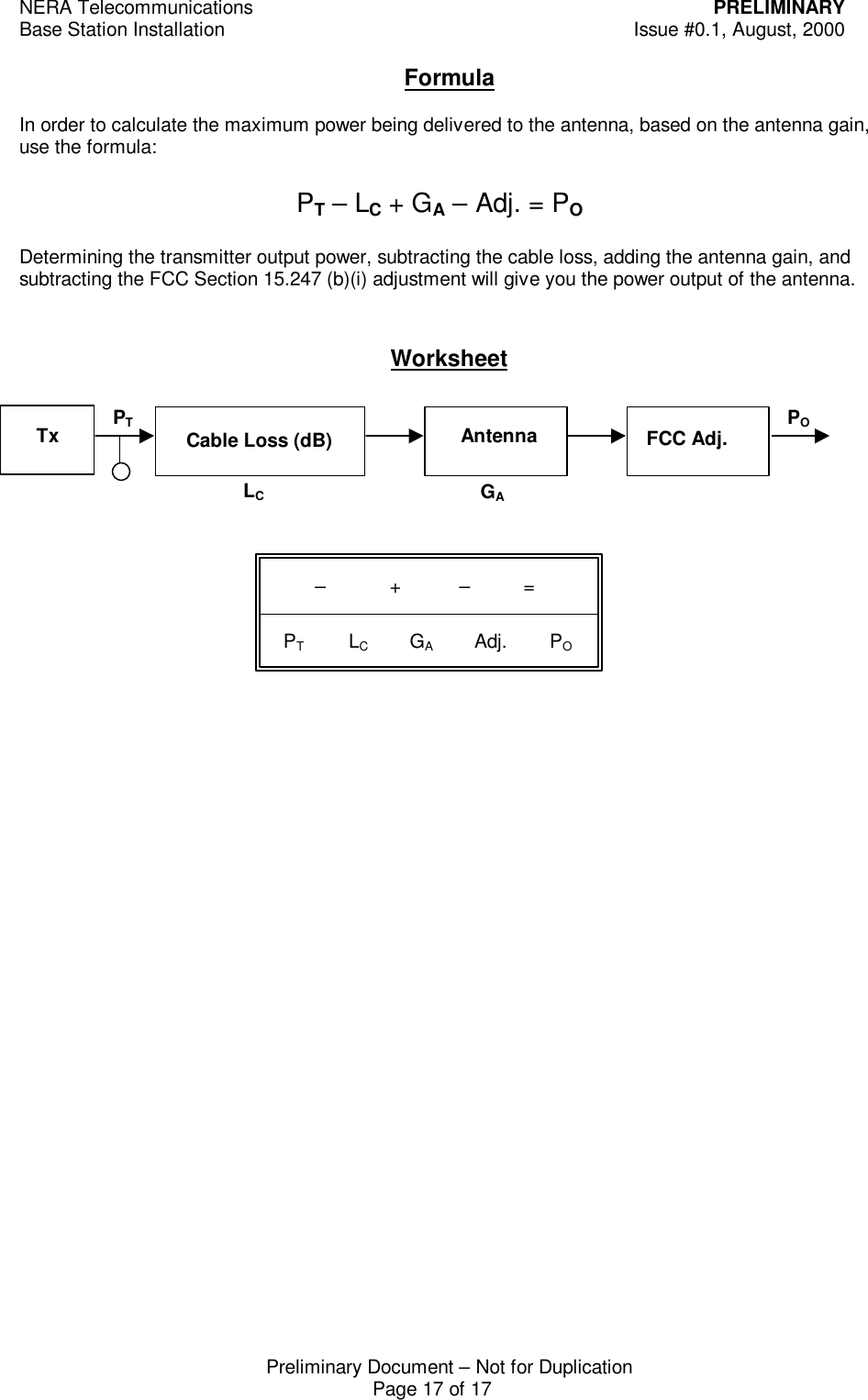
NERA Telecommunications PRELIMINARYBase Station Installation Issue #0.1, August, 2000Preliminary Document – Not for DuplicationPage 17 of 17FormulaIn order to calculate the maximum power being delivered to the antenna, based on the antenna gain,use the formula:Determining the transmitter output power, subtracting the cable loss, adding the antenna gain, andsubtracting the FCC Section 15.247 (b)(i) adjustment will give you the power output of the antenna.WorksheetCable Loss (dB)PTLCGAPOPT – LC + GA – Adj. = PO        –            +           –          =  PT             LC            GA            Adj.        POFCC Adj.Tx Antenna

Navigation menu