Samsung Electronics Co GTY3300 Cellular/ PCS WCDMA/ GSM/ EDGE Module User Manual 5

Samsung Electronics Co Ltd Cellular/ PCS WCDMA/ GSM/ EDGE Module 5

User Manual 5

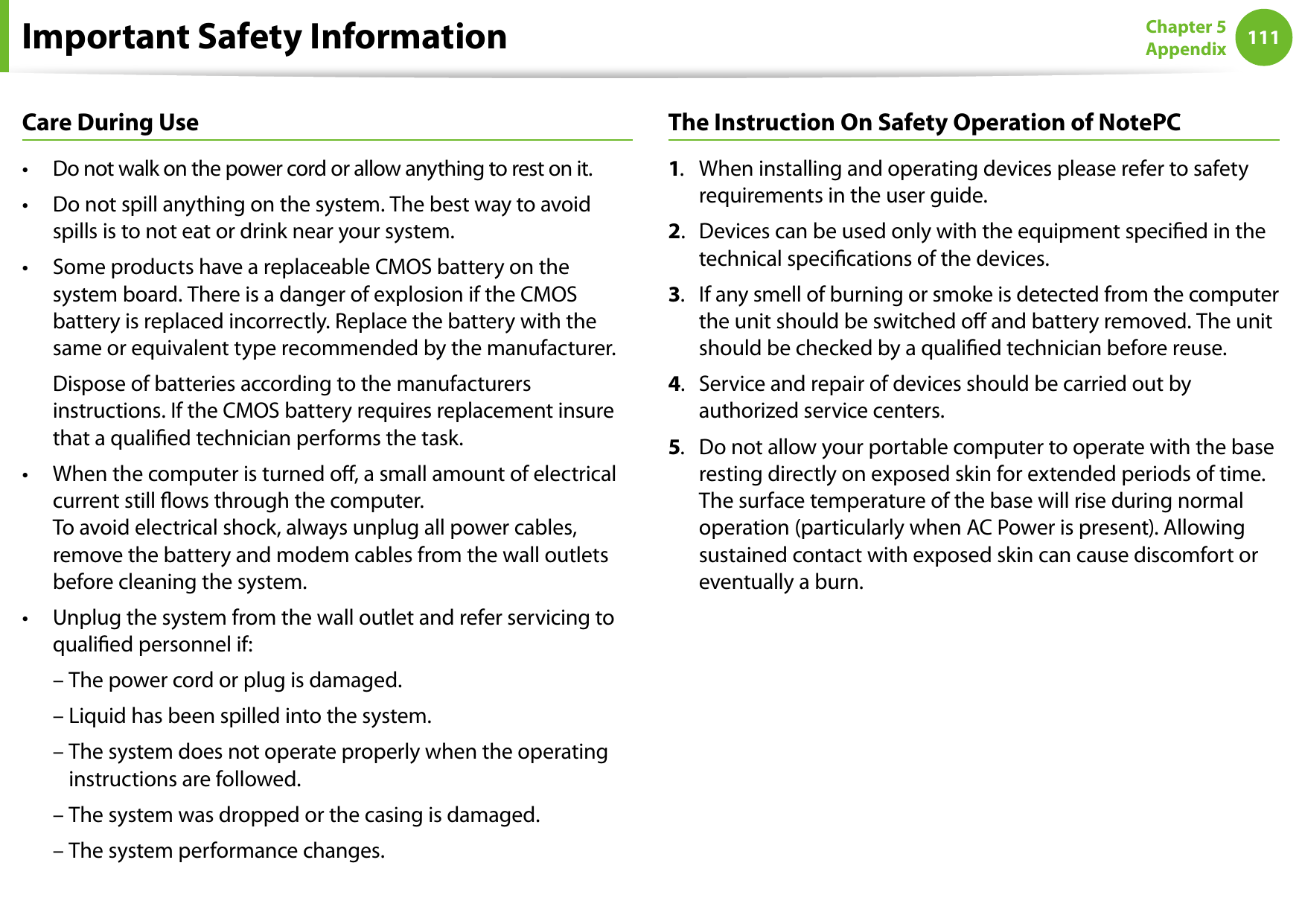
110111Chapter 5 AppendixCare During UseDo not walk on the power cord or allow anything to rest on it.• Do not spill anything on the system. The best way to avoid • spills is to not eat or drink near your system.Some products have a replaceable CMOS battery on the • system board. There is a danger of explosion if the CMOS battery is replaced incorrectly. Replace the battery with the same or equivalent type recommended by the manufacturer.  Dispose of batteries according to the manufacturers instructions. If the CMOS battery requires replacement insure that a qualied technician performs the task.When the computer is turned o, a small amount of electrical • current still ows through the computer.  To avoid electrical shock, always unplug all power cables, remove the battery and modem cables from the wall outlets before cleaning the system.Unplug the system from the wall outlet and refer servicing to • qualied personnel if:  – The power cord or plug is damaged.  – Liquid has been spilled into the system.  –  The system does not operate properly when the operating instructions are followed.  – The system was dropped or the casing is damaged.  – The system performance changes.The Instruction On Safety Operation of NotePC1.  When installing and operating devices please refer to safety requirements in the user guide.2.  Devices can be used only with the equipment specied in the technical specications of the devices.3.  If any smell of burning or smoke is detected from the computer the unit should be switched o and battery removed. The unit should be checked by a qualied technician before reuse.4.  Service and repair of devices should be carried out by authorized service centers.5.  Do not allow your portable computer to operate with the base resting directly on exposed skin for extended periods of time. The surface temperature of the base will rise during normal operation (particularly when AC Power is present). Allowing sustained contact with exposed skin can cause discomfort or  eventually a burn.Important Safety Information
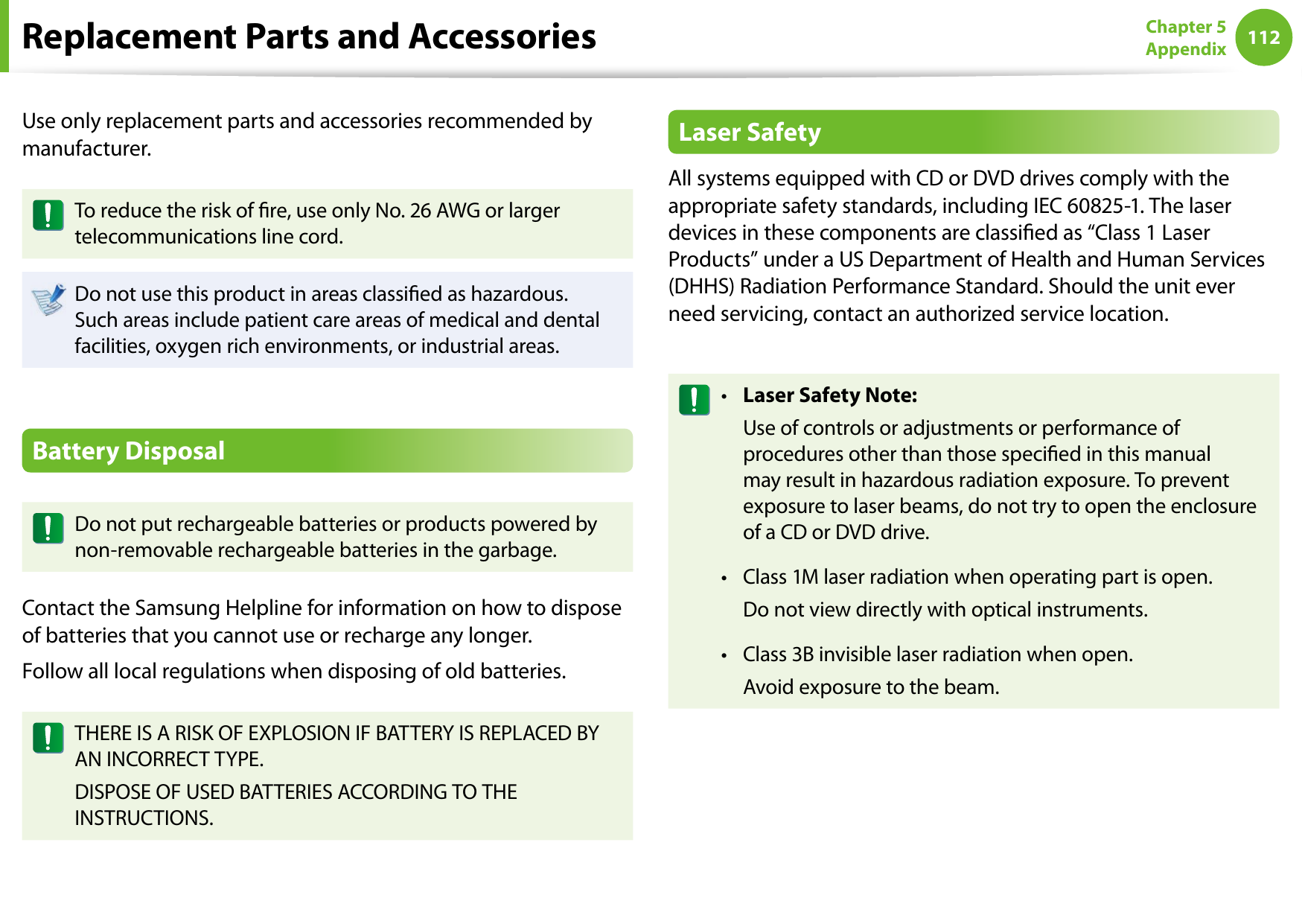
112Chapter 5 AppendixReplacement Parts and AccessoriesUse only replacement parts and accessories recommended by manufacturer.To reduce the risk of re, use only No. 26 AWG or larger telecommunications line cord.Do not use this product in areas classied as hazardous. Such areas include patient care areas of medical and dental facilities, oxygen rich environments, or industrial areas.Battery DisposalDo not put rechargeable batteries or products powered by non-removable rechargeable batteries in the garbage.Contact the Samsung Helpline for information on how to dispose of batteries that you cannot use or recharge any longer.Follow all local regulations when disposing of old batteries.THERE IS A RISK OF EXPLOSION IF BATTERY IS REPLACED BY AN INCORRECT TYPE.DISPOSE OF USED BATTERIES ACCORDING TO THE INSTRUCTIONS.Laser SafetyAll systems equipped with CD or DVD drives comply with the appropriate safety standards, including IEC 60825-1. The laser devices in these components are classied as “Class 1 Laser Products” under a US Department of Health and Human Services (DHHS) Radiation Performance Standard. Should the unit ever need servicing, contact an authorized service location.Laser Safety Note:•   Use of controls or adjustments or performance of procedures other than those specied in this manual may result in hazardous radiation exposure. To prevent exposure to laser beams, do not try to open the enclosure of a CD or DVD drive.Class 1M laser radiation when operating part is open.•   Do not view directly with optical instruments.Class 3B invisible laser radiation when open.•   Avoid exposure to the beam.
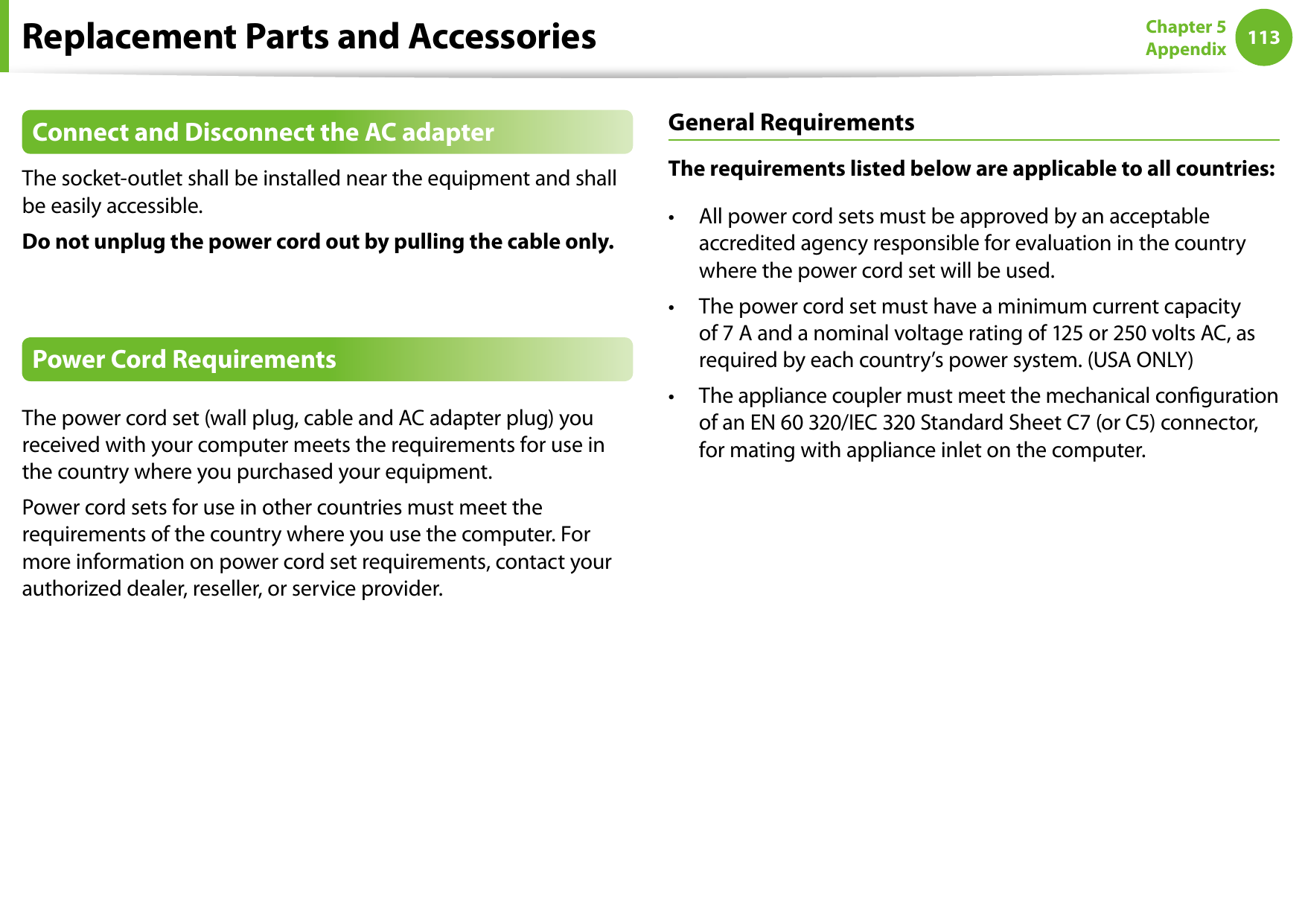
112113Chapter 5 AppendixReplacement Parts and AccessoriesConnect and Disconnect the AC adapterThe socket-outlet shall be installed near the equipment and shall be easily accessible.Do not unplug the power cord out by pulling the cable only.Power Cord RequirementsThe power cord set (wall plug, cable and AC adapter plug) you received with your computer meets the requirements for use in the country where you purchased your equipment.Power cord sets for use in other countries must meet the requirements of the country where you use the computer. For more information on power cord set requirements, contact your authorized dealer, reseller, or service provider.General RequirementsThe requirements listed below are applicable to all countries:All power cord sets must be approved by an acceptable • accredited agency responsible for evaluation in the country where the power cord set will be used.The power cord set must have a minimum current capacity • of 7 A and a nominal voltage rating of 125 or 250 volts AC, as required by each country’s power system. (USA ONLY)The appliance coupler must meet the mechanical conguration • of an EN 60 320/IEC 320 Standard Sheet C7 (or C5) connector, for mating with appliance inlet on the computer.
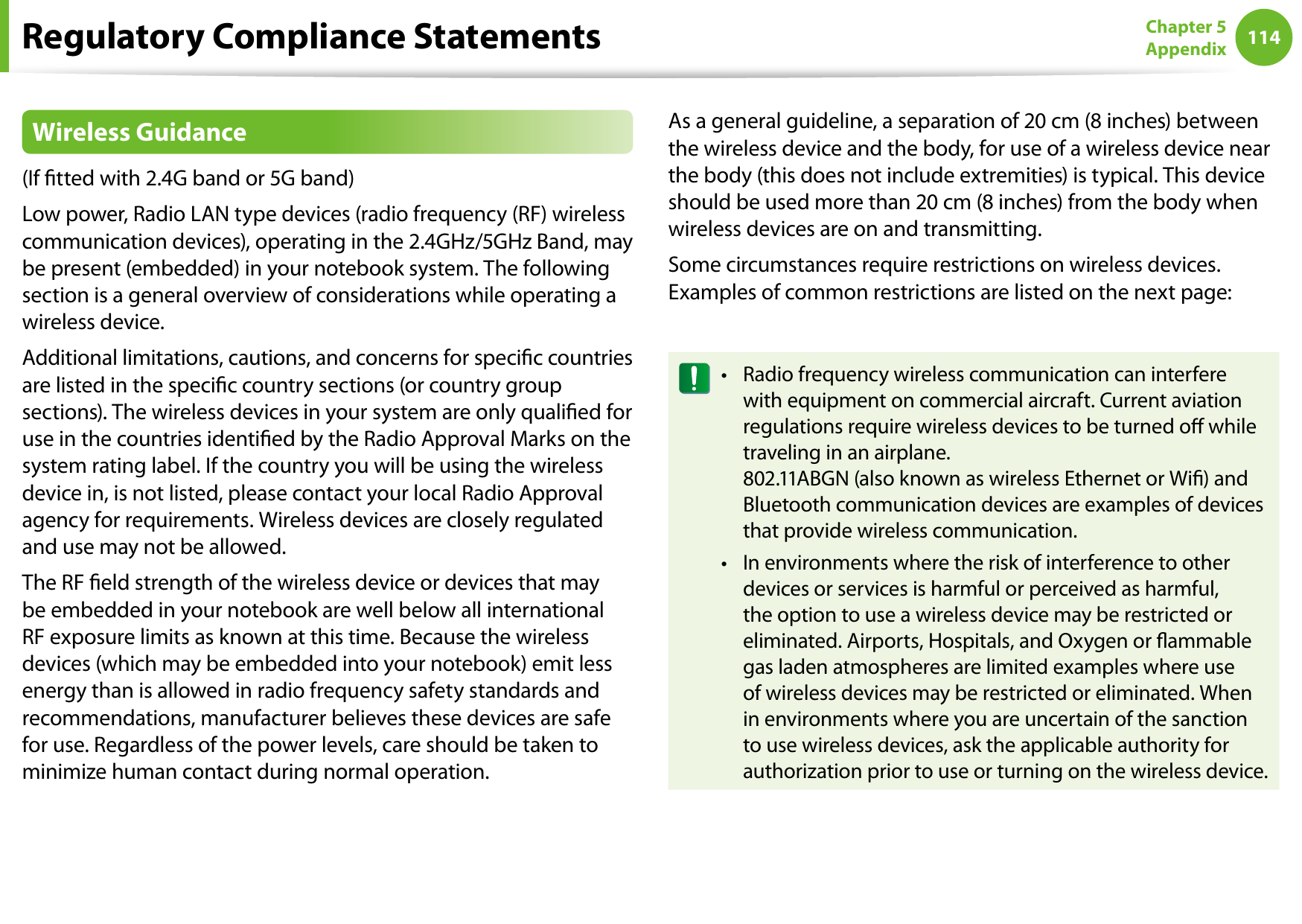
114Chapter 5 AppendixRegulatory Compliance StatementsWireless Guidance(If tted with 2.4G band or 5G band) Low power, Radio LAN type devices (radio frequency (RF) wireless communication devices), operating in the 2.4GHz/5GHz Band, may be present (embedded) in your notebook system. The following section is a general overview of considerations while operating a wireless device.Additional limitations, cautions, and concerns for specic countries are listed in the specic country sections (or country group sections). The wireless devices in your system are only qualied for use in the countries identied by the Radio Approval Marks on the system rating label. If the country you will be using the wireless device in, is not listed, please contact your local Radio Approval agency for requirements. Wireless devices are closely regulated and use may not be allowed.The RF eld strength of the wireless device or devices that may be embedded in your notebook are well below all international RF exposure limits as known at this time. Because the wireless devices (which may be embedded into your notebook) emit less energy than is allowed in radio frequency safety standards and recommendations, manufacturer believes these devices are safe for use. Regardless of the power levels, care should be taken to minimize human contact during normal operation.As a general guideline, a separation of 20 cm (8 inches) between the wireless device and the body, for use of a wireless device near the body (this does not include extremities) is typical. This device should be used more than 20 cm (8 inches) from the body when wireless devices are on and transmitting.Some circumstances require restrictions on wireless devices. Examples of common restrictions are listed on the next page:Radio frequency wireless communication can interfere •with equipment on commercial aircraft. Current aviation regulations require wireless devices to be turned o while traveling in an airplane.  802.11ABGN (also known as wireless Ethernet or Wi) and Bluetooth communication devices are examples of devices that provide wireless communication.In environments where the risk of interference to other •devices or services is harmful or perceived as harmful, the option to use a wireless device may be restricted or eliminated. Airports, Hospitals, and Oxygen or ammable gas laden atmospheres are limited examples where use of wireless devices may be restricted or eliminated. When in environments where you are uncertain of the sanction to use wireless devices, ask the applicable authority for authorization prior to use or turning on the wireless device.
114115Chapter 5 AppendixRegulatory Compliance StatementsEvery country has dierent restrictions on the use of •wireless devices. Since your system is equipped with a wireless device, when traveling between countries with your system, check with the local Radio Approval authorities prior to any move or trip for any restrictions on the use of a wireless device in the destination country.If your system came equipped with an internal embedded •wireless device, do not operate the wireless device unless all covers and shields are in place and the system is fully assembled.Wireless devices are not user serviceable. Do not modify •them in any way. Modication to a wireless device will void the authorization to use it. Please contact manufacturer for service.Only use drivers approved for the country in which •the device will be used. See the manufacturer System Restoration Kit, or contact manufacturer Technical Support for additional information.United States of AmericaUSA and Canada Safety Requirements and NoticesDo not touch or move antenna while the unit is transmitting or receiving.Do not hold any component containing the radio such that the antenna is very close or touching any exposed parts of the body, especially the face or eyes, while transmitting.Do not operate the radio or attempt to transmit data unless the antenna is connected; if not, the radio may be damaged.Use in specic environments:The use of wireless devices in hazardous locations is limited by the constraints posed by the safety directors of such environments.The use of wireless devices on airplanes is governed by the Federal Aviation Administration (FAA).The use of wireless devices in hospitals is restricted to the limits set forth by each hospital.Explosive Device Proximity WarningDo not operate a portable transmitter (such as a wireless network device) near unshielded blasting caps or in an explosive environment unless the device has been modied to be qualied for such use.
116Chapter 5 AppendixUse On Aircraft CautionRegulations of the FCC and FAA prohibit airborne operation of radio-frequency wireless devices because their signals could interfere with critical aircraft instruments.Other Wireless DevicesSafety Notices for Other Devices in the Wireless Network: Refer to the documentation supplied with wireless Ethernet adapters or other devices in the wireless network.The Part 15 radio device operates on a non-interference basis with other devices operating at this frequency. Any changes or modication to said product not expressly approved by Intel could void the user’s authority to operate this device.Unintentional Emitter per FCC Part 15This device complies with Part 15 of the FCC Rules. Operation is subject to the following two conditions:(1) this device may not cause harmful interference, and (2) this device must accept any interference received, including interference that may cause undesired operation.This equipment has been tested and found to comply with the limits for a Class B digital device pursuant to Part 15 of the FCC Rules. These limits are designed to provide reasonable protection against harmful interference in a residential installation. This equipment generates, uses, and can radiate radio frequency energy. If not installed and used in accordance with the instructions, it may cause harmful interference. If this equipment does cause harmful interference to radio or television reception, which can be determined by turning the equipment o and on, the user is encouraged to try to correct the interference by one or more of the following measures:Reorient or relocate the receiving antenna.• Increase the separation between the equipment and • receiver.Connect the equipment into an outlet on a circuit dierent • from that to which the receiver is connected.Consult the dealer or an experienced radio/TV technician • for help.Regulatory Compliance Statements
116117Chapter 5 AppendixIf necessary, the user should consult the dealer or an experienced radio/television technician for additional suggestions. The user may nd the following booklet helpful: “Something About Interference.”This is available at FCC local regional oces. Our company is not responsible for any radio or television interference caused by unauthorized modications of this equipment or the substitution or attachment of connecting cables and equipment other than those specied by our company. The correction will be the responsibility of the user. Use only shielded data cables with this system.Intentional emitter per FCC Part 15(If tted with 2.4G band or 5G band) Low power, Radio LAN type devices (radio frequency (RF) wireless communication devices), operating in the 2.4GHz/5GHz Band, may be present (embedded) in your notebook system. This section is only applicable if these devices are present. Refer to the system label to verify the presence of wireless devices.Wireless devices that may be in your system are only qualied for use in the United States of America if an FCC ID number is on the system label.This device is restricted to indoor use due to its operation in the 5.15 to 5.25 GHz frequency range. FCC requires this product to be used indoors for the frequency range 5.15 to 5.25 GHz to reduce the potential for harmful interference to co-channel Mobile Satellite systems. High power radars are allocated as primary users of the 5.25 to 5.35 GHz and 5.65 to 5.85 GHz bands. These radar stations can cause interference with and /or damage this device.The FCC has set a general guideline of 20 cm (8 inches) separation between the device and the body, for use of a wireless device near the body (this does not include extremities). This device should be used more than 20 cm (8 inches) from the body when wireless devices are on. The power output of the wireless device (or devices), which may be embedded in your notebook, is well below the RF exposure limits as set by the FCC.This transmitter must not be collocated or operate in conjunction with any other antenna or transmitter except the installed Bluetooth transmitter.Operation of this device is subject to the following two conditions: (1) This device may not cause harmful interference, and (2) this device must accept any interference received, including interference that may cause undesired operation of the device.Regulatory Compliance Statements
118Chapter 5 AppendixWireless devices are not user serviceable. Do not modify them in any way.Modication to a wireless device will void the authorization to use it. Contact manufacturer for service.FCC Statement for Wireless LAN use:While installing and operating this transmitter and antenna combination the radio frequency exposure limit of 1mW/cm2 may be exceeded at distances close to the antenna installed. Therefore, the user must maintain a minimum distance of 20cm from the antenna at all times. This device can not be colocated with another transmitter and transmitting antenna.FCC Part 68 (If tted with a modem device.)This equipment compiles with part of the FCC rules. On the back of this equipment is a label that contains, among other information, the FCC registration number and ringer equivalence number (REN) for this equipment. If requested, this information must be provided to the telephone company.This equipment uses the following USOC jacks : RJ11CAn FCC compliant telephone cord and modular plug is provided with this equipment. This equipment is designed to be connected to the telephone network or promises wiring using a compatible modular jack which is Part 68 compliant. See Installation Instructions for details.The REN is used to determine the quantity of devices which may be connected to telephone line. Excessive RENs on the telephone line may result in the devices not ringing in response to an incoming call. In most, but not all areas, the sum of RENs should not exceed ve (5.0). To be certain of the number of devices that may be connected to a line, as determined by total RENs, contact the local telephone company to determine the maximum REN for the calling area.If the terminal equipment causes harm to the telephone network, the Telephone Company will notify you in advance that temporary discontinuance of service may be required. But if advance notice is not practical, the telephone company will notify the customer as soon as possible. Also, you will be advised of your right to le a complaint with the FCC if you believe it is necessary.The telephone company may make changes in its facilities, equipment, operations, or procedures that could aect the operation of the equipment. If this happens, the telephone company will provide advanced notice in order for you to make necessary modications to maintain uninterrupted service.If trouble is experienced with this equipment (Modem) for repair or warranty information, please contact your local distributor. If the equipment is causing harm to the telephone network, the telephone company may request that you disconnect the equipment until the problem is resolved.Regulatory Compliance Statements
118119Chapter 5 AppendixThe user must use the accessories and cables supplied by the manufacturer to get optimum performance from the product.No repairs may be done by the customer.This equipment cannot be used on public coin phone service provided by the telephone company. Connection to party line service is subject to state taris.The Telephone Consumer Protection Act of 1991 makes it unlawful for any person to use a computer or other electronic device, including fax machines, to send any message unless such message clearly contains in a margin at the top or bottom of each transmitted page or on the rst page of the transmission, the date and time it is sent and an identication of the business or other entity, or other individual sending the message and the telephone number of the sending machine or such business, other entity, or individual. (The telephone number provided may not be any number for which charges exceed local or long-distance transmission charges.)In order to program this information into your fax machine, refer to your communications software user manual.CanadaUnintentional Emitter per ICES-003This digital apparatus does not exceed the Class B limits for radio noise emissions from digital apparatus as set out in the radio interference regulations of Industry Canada.Le présent appareil numérique n’émet pas de bruits radioélectriques dépassant les limitesapplicables aux appareils numériques de Classe B prescrites dans le règlement sur le brouillage radioélectrique édicté par Industrie Canada.Intentional Emitter per RSS 210(If tted with 2.4G band or 5G band) Low power, Radio LAN type devices (radio frequency (RF) wireless communication devices), operating in the 2.4GHz/5GHz Band, may be present (embedded) in your notebook system. This section is only applicable if these devices are present. Refer to the system label to verify the presence of wireless devices.Wireless devices that may be in your system are only qualied for use in Canada if an Industry Canada ID number is on the system label.Regulatory Compliance Statements
120Chapter 5 AppendixWhen using IEEE 802.11a wireless LAN, this product is restricted to indoor use due to its operation in the 5.15- to 5.25-GHz frequency range. Industry Canada requires this product to be used indoors for the frequency range of 5.15 GHz to 5.25 GHz to reduce the potential for harmful interference to co-channel mobile satellite systems. High power radar is allocated as the primary user of the 5.25- to 5.35-GHz and 5.65 to 5.85-GHz bands. These radar stations can cause interference with and/or damage to this device.The maximum allowed antenna gain for use with this device is 6dBi in order to comply with the E.I.R.P limit for the 5.25- to 5.35 and 5.725 to 5.85 GHz frequency range in point-to-point operation.As a general guideline, a separation of 20 cm (8 inches) between the wireless device and the body, for use of a wireless device near the body (this does not include extremities) is typical. This device should be used more than 20 cm (8 inches) from the body when wireless devices are on.The power output of the wireless device (or devices), which may be embedded in your notebook, is well below the RF exposure limits as set by Industry Canada.This transmitter must not be collocated or operate in conjunction with any other antenna or transmitter except the installed Bluetooth transmitter.Operation of this device is subject to the following two conditions: (1) This device may not cause harmful interference, and (2) this device must accept any interference received, including interference that may cause undesired operation of the device.To prevent radio interference to licensed service, this device is intended to be operated indoors and away from windows to provide maximum shielding. Equipment (or its transmit antenna) that is installed outdoors is subject to licensing.Wireless devices are not user serviceable. Do not modify them in any way. Modication to a wireless device will void the authorization to use it. Contact manufacturer for service.Regulatory Compliance Statements
120121Chapter 5 AppendixTelecommunications per DOC notice  (for products tted with an IC-compliant modem)The Industry Canada label identies certied equipment. This certication means that the equipment meets certain telecommunications network protective, operation, and safety requirements. The Department does not guarantee the equipment will operate to the users’ satisfaction.Before installing this equipment, users should make sure that it is permissible to be connected to the facilities of the local telecommunications company. The equipment must also be installed using an acceptable method of connection. In some cases, the inside wiring associated with a single-line individual service may be extended by means of a certied connector assembly. The customer should be aware that compliance with the above conditions may not prevent degradation of service in some situations.Repairs to certied equipment should be made by an authorized Canadian maintenance facility designated by the supplier. Any repairs or alterations made by the user to this equipment, or equipment malfunctions, may give the telecommunications company cause to request the user to disconnect the equipment.Users should make sure, for their own protection, that the electrical ground connections of the power utility, telephone lines, and internal metallic water pipe system, if present, are connected together. This precaution may be particularly important in rural areas.To avoid electrical shock or equipment malfunction do not attempt to make electrical ground connections by yourself. Contact the appropriate inspection authority or an electrician, as appropriate.The Ringer Equivalence Number (REN) assigned to each terminal device provides an indication of the maximum number of terminals allowed to be connected to a telephone interface. The termination on an interface may consist of any combination of devices subject only to the requirement that the sum of the Ringer Equivalence Numbers of all the devices does not exceed 5.Regulatory Compliance Statements
122Chapter 5 AppendixBrazilEste equipamento opera em caráter secundário, isto é, não tem direito a proteção contra interferência prejudicial, mesmo de estações do mesmo tipo, e não pode causar interferência a sistemas operando em caráter primário.European UnionEuropean Union CE Marking and Compliance NoticesProducts intended for sale within the European Union are marked with the Conformité Européene (CE) Marking, which indicates compliance with the applicable Directives and European standards and amendments identied below. This equipment also carries the Class 2 identier.The following information is only applicable to systems labeled with the CE mark   .European DirectivesThis Information Technology Equipment has been tested and found to comply with the following European directives:EMC Directive 2004/108/EC• Low Voltage Directive 2006/95/EC• R&TTE Directive 1999/5/EC• Manufacturer InformationSamsung Electronics Co., Ltd.416, Maetan-3Dong, Yeongtong-Gu, Suwon-City, Gyeonggi-Do, 443-742, KoreaSamsung Electronics Suzhou Computer Co., Ltd.No. 198, Fangzhou Road, Suzhou Industrial Park, Jiangsu Province, 215021, ChinaTel: +86-512-6253-8988For the web or the phone number of Samsung Service Centre, see the Warranty or contact the retailer where you purchased your product.Regulatory Compliance Statements
122123Chapter 5 AppendixEuropean Radio Approval Information  (for products tted with EU-approved radio devices)This Product is a Notebook computer; low power, Radio LAN type devices (radio frequency (RF) wireless communication devices), operating in the 2.4GHz/5GHz band, may be present (embedded) in your notebook system which is intended for home or oce use. This section is only applicable if these devices are present. Refer to the system label to verify the presence of wireless devices.Wireless devices that may be in your system are only qualied for use in the European Union or associated areas if a CE mark   with a Notied Body Registration Number and the Alert Symbol is on the system label.The power output of the wireless device or devices that may be embedded in you notebook is well below the RF exposure limits as set by the European Commission through the R&TTE directive.The low band 5.15 - 5.35 GHz is for indoor use only.See 802.11b and 802.11g restrictions for specic countries or regions within countries under the heading “European Economic Area Restrictions” below.EU R&TTE Compliance StatementsČesky [Czech]Samsung tímto prohlašuje, že tento Notebook PC je ve shodě se základními požadavky a dalšími příslušnými ustanoveními směrnice 1999/5/ES.Dansk [Danish]Undertegnede Samsung erklærer herved, at følgende udstyr Notebook PC overholder de væsentlige krav og øvrige relevante krav i direktiv 1999/5/EF.Deutsch [German]Hiermit erklärt Samsung, dass sich das Gerät Notebook PC in Übereinstimmung mit den grundlegenden Anforderungen und den übrigen einschlägigen Bestimmungen der Richtlinie 1999/5/EG bendet.Eesti [Estonian]Käesolevaga kinnitab Samsung seadme Notebook PC vastavust direktiivi 1999/5/EÜ põhinõuetele ja nimetatud direktiivist tulenevatele teistele asjakohastele sätetele.EnglishHereby, Samsung, declares that this Notebook PC is in compliance with the essential requirements and other relevant provisions of Directive 1999/5/EC.Español [Spanish]Por medio de la presente Samsung declara que el Notebook PC cumple con los requisitos esenciales y cualesquiera otras disposiciones aplicables o exigibles de la Directiva 1999/5/CE.Regulatory Compliance Statements
124Chapter 5 AppendixΕλληνική [Greek]ΜΕ ΤΗΝ ΠΑΡΟΥΣΑ Samsung ΔΗΛΩΝΕΙ ΟΤΙ Notebook PC ΣΥΜΜΟΡΦΩΝΕΤΑΙ ΠΡΟΣ ΤΙΣ ΟΥΣΙΩΔΕΙΣ ΑΠΑΙΤΗΣΕΙΣ ΚΑΙ ΤΙΣ ΛΟΙΠΕΣ ΣΧΕΤΙΚΕΣ ΔΙΑΤΑΞΕΙΣ ΤΗΣ ΟΔΗΓΙΑΣ 1999/5/ΕΚ.Français [French]Par la présente Samsung déclare que l’appareil Notebook PC est conforme aux exigences essentielles et aux autres dispositions pertinentes de la directive 1999/5/CE.Italiano [Italian]Con la presente Samsung dichiara che questo Notebook PC è conforme ai requisiti essenziali ed alle altre disposizioni pertinenti stabilite dalla direttiva 1999/5/CE.Latviski [Latvian]Ar šo Samsung deklarē, ka Notebook PC atbilst Direktīvas 1999/5/EK būtiskajām prasībām un citiem ar to saistītajiem noteikumiem.Lietuvių [Lithuanian]Šiuo Samsung deklaruoja, kad šis Notebook PC atitinka esminius reikalavimus ir kitas 1999/5/EB Direktyvos nuostatas.Nederlands [Dutch]Hierbij verklaart Samsung dat het toestel Notebook PC in overeenstemming is met de essentiële eisen en de andere relevante bepalingen van richtlijn 1999/5/EG.Malti [Maltese]Hawnhekk, Samsung, jiddikjara li dan Notebook PC jikkonforma mal-ħtiāijiet essenzjali u ma provvedimenti oħrajn relevanti li hemm d-Dirrettiva 1999/5/EC.Magyar [Hungarian]Alulírott, Samsung nyilatkozom, hogy a Notebook PC megfelel a vonatkozó alapvetõ követelményeknek és az 1999/5/EC irányelv egyéb elõírásainak.Polski [Polish]Niniejszym Samsung oświadcza, Ŝe Notebook PC jest zgodny z zasadniczymi wymogami oraz pozostałymi stosownymi postanowieniami Dyrektywy 1999/5/EC.Português [Portuguese]Samsung declara que este Notebook PC está conforme com os requisitos essenciais e outras disposições da Directiva 1999/5/CE.Slovensko [Slovenian]Samsung izjavlja, da je ta Notebook PC v skladu z bistvenimi zahtevami in ostalimi relevantnimi določili direktive 1999/5/ES.Slovensky [Slovak]Samsung týmto vyhlasuje, že Notebook PC spĺňa základné požiadavky a všetky príslušné ustanovenia Smernice 1999/5/ES.Suomi [Finnish]Samsung vakuuttaa täten että Notebook PC tyyppinen laite on direktiivin 1999/5/EY oleellisten vaatimusten ja sitä koskevien direktiivin muiden ehtojen mukainen.Svenska [Swedish]Härmed intygar Samsung att denna Notebook PC står I överensstämmelse med de väsentliga egenskapskrav och övriga relevanta bestämmelser som framgår av direktiv 1999/5/EG.Regulatory Compliance Statements
124125Chapter 5 AppendixÍslenska [Icelandic]Hér með lýsir Samsung yr því að Notebook PC er í samræmi við grunnkröfur og aðrar kröfur, sem gerðar eru í tilskipun 1999/5/EC.Norsk [Norwegian]Samsung erklærer herved at utstyret Notebook PC er i samsvar med de grunnleggende krav og øvrige relevante krav i direktiv 1999/5/EF.Türkiye [Türkçe]Bu belge ile, Samsung bu Notebook PC’nin 1999/5/EC Yönetmeliğinin temel gerekliliklerine ve ilgili hükümlerine uygun olduğunu beyan eder.To view the EU Declaration of Conformity for this product (in English only), go to: http://www.samsung.com/uk/support/download/supportDownMain.do then search the model number of the product.If the Declaration of Conformity for the model you are interested in is not available on our web-site, please contact your distributor.European Economic Area RestrictionsLocal Restriction of 802.11b/802.11g Radio Usage[Note to integrator: The following statements on local restrictions must be published in all end-user documentation provided with the system or product incorporating the wireless product.]Due to the fact that the frequencies used by 802.11b/802.11g wireless LAN devices may not yet be harmonized in all countries, 802.11b/802.11g products are designed for use only in specic countries or regions, and are not allowed to be operated in countries or regions other than those of designated use.As a user of these products, you are responsible for ensuring that the products are used only in the countries or regions for which they were intended and for verifying that they are congured with the correct selection of frequency and channel for the country or region of use. Any deviation from permissible settings and restrictions in the country or region of use could be an infringement of local law and may be punished as such.Regulatory Compliance Statements
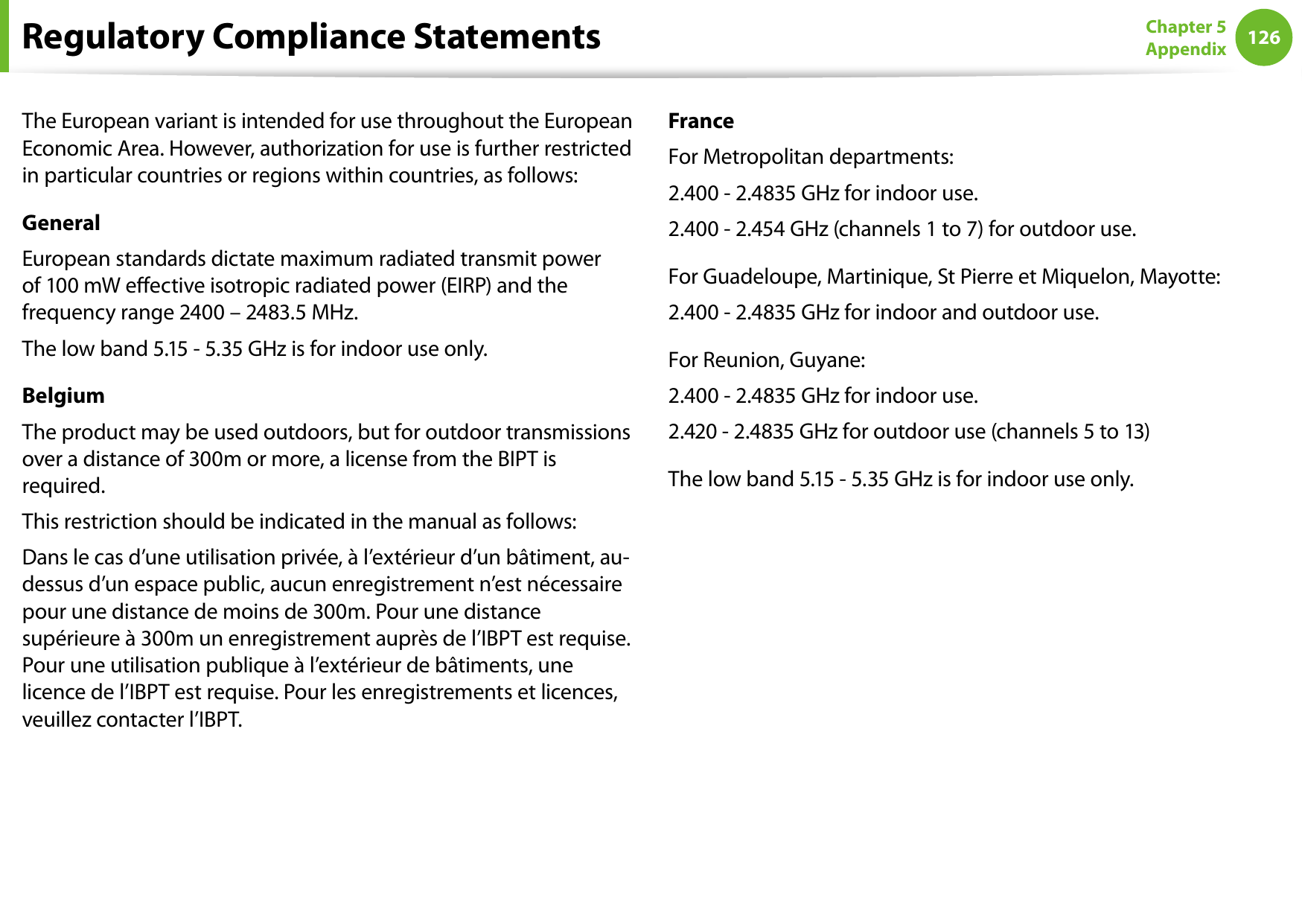
126Chapter 5 AppendixThe European variant is intended for use throughout the European Economic Area. However, authorization for use is further restricted in particular countries or regions within countries, as follows: GeneralEuropean standards dictate maximum radiated transmit power of 100 mW eective isotropic radiated power (EIRP) and the frequency range 2400 – 2483.5 MHz.The low band 5.15 - 5.35 GHz is for indoor use only.BelgiumThe product may be used outdoors, but for outdoor transmissions over a distance of 300m or more, a license from the BIPT is required.This restriction should be indicated in the manual as follows:Dans le cas d’une utilisation privée, à l’extérieur d’un bâtiment, au-dessus d’un espace public, aucun enregistrement n’est nécessaire pour une distance de moins de 300m. Pour une distance supérieure à 300m un enregistrement auprès de l’IBPT est requise. Pour une utilisation publique à l’extérieur de bâtiments, une licence de l’IBPT est requise. Pour les enregistrements et licences, veuillez contacter l’IBPT.FranceFor Metropolitan departments:2.400 - 2.4835 GHz for indoor use.2.400 - 2.454 GHz (channels 1 to 7) for outdoor use.For Guadeloupe, Martinique, St Pierre et Miquelon, Mayotte:2.400 - 2.4835 GHz for indoor and outdoor use.For Reunion, Guyane:2.400 - 2.4835 GHz for indoor use.2.420 - 2.4835 GHz for outdoor use (channels 5 to 13)The low band 5.15 - 5.35 GHz is for indoor use only.Regulatory Compliance Statements
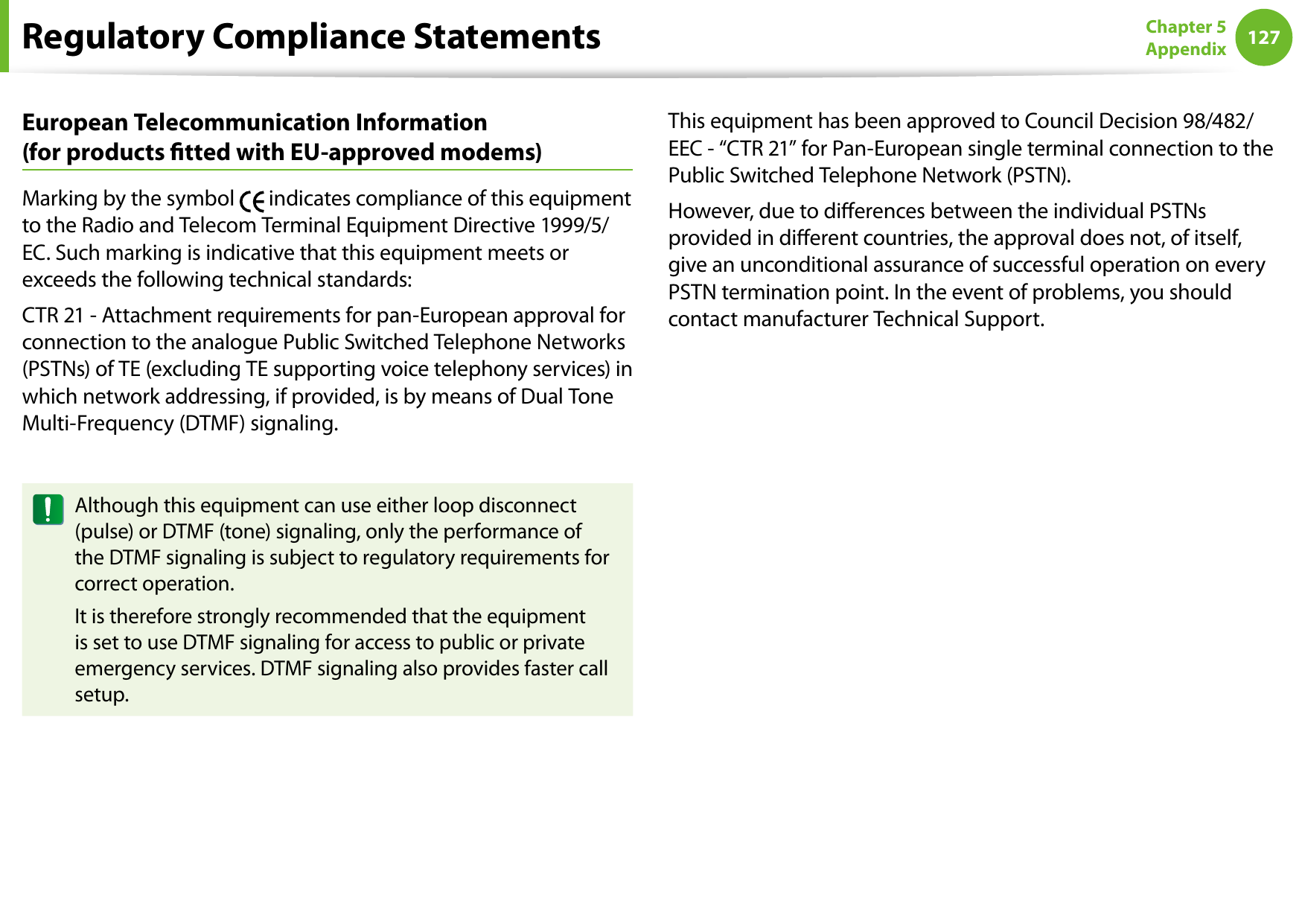
126127Chapter 5 AppendixEuropean Telecommunication Information  (for products tted with EU-approved modems)Marking by the symbol   indicates compliance of this equipment to the Radio and Telecom Terminal Equipment Directive 1999/5/EC. Such marking is indicative that this equipment meets or exceeds the following technical standards:CTR 21 - Attachment requirements for pan-European approval for connection to the analogue Public Switched Telephone Networks (PSTNs) of TE (excluding TE supporting voice telephony services) in which network addressing, if provided, is by means of Dual Tone Multi-Frequency (DTMF) signaling.Although this equipment can use either loop disconnect (pulse) or DTMF (tone) signaling, only the performance of the DTMF signaling is subject to regulatory requirements for correct operation.It is therefore strongly recommended that the equipment is set to use DTMF signaling for access to public or private emergency services. DTMF signaling also provides faster call setup.This equipment has been approved to Council Decision 98/482/EEC - “CTR 21” for Pan-European single terminal connection to the Public Switched Telephone Network (PSTN).However, due to dierences between the individual PSTNs provided in dierent countries, the approval does not, of itself, give an unconditional assurance of successful operation on every PSTN termination point. In the event of problems, you should contact manufacturer Technical Support.Regulatory Compliance Statements
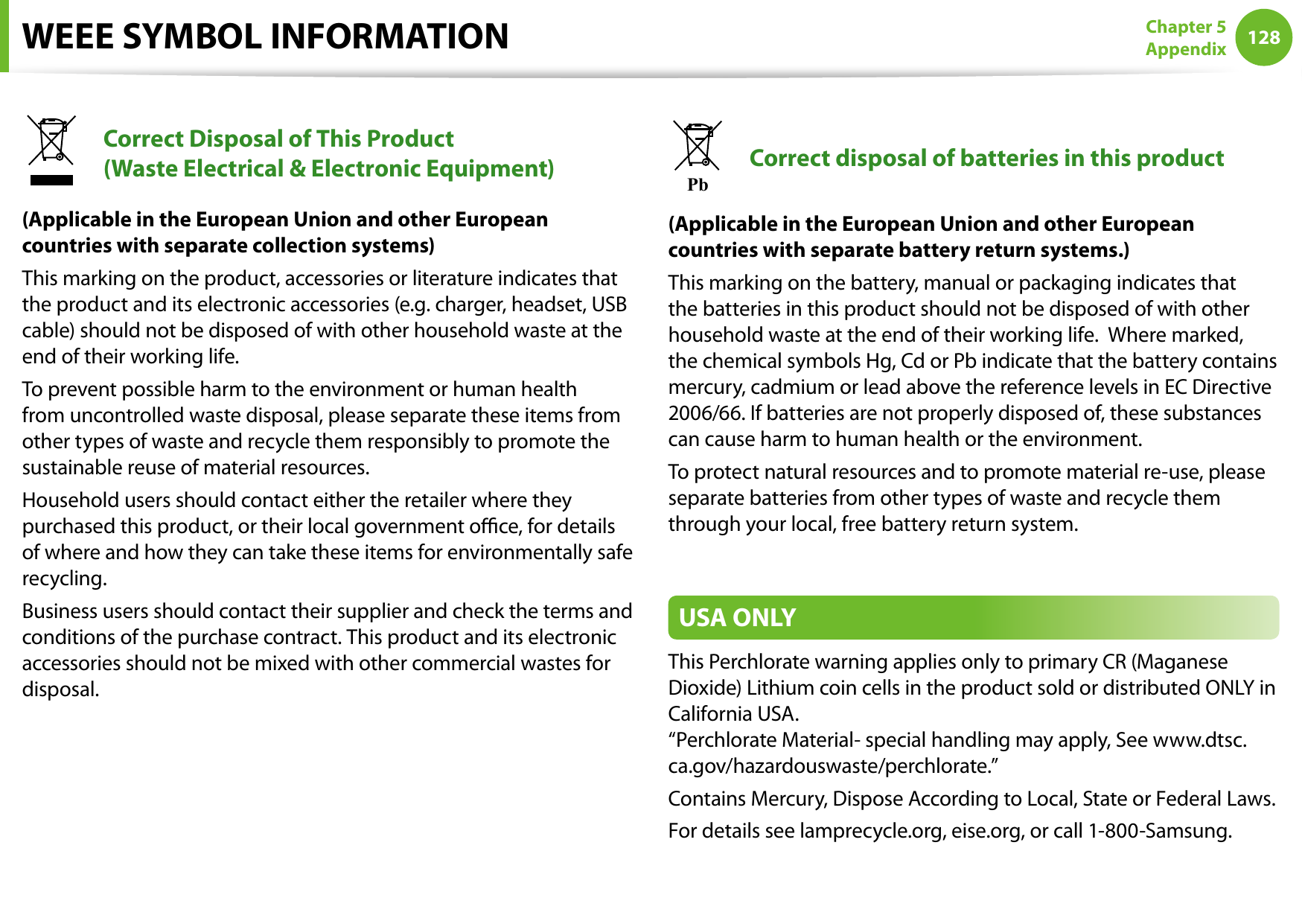
128Chapter 5 AppendixWEEE SYMBOL INFORMATIONCorrect Disposal of This Product  (Waste Electrical & Electronic Equipment)(Applicable in the European Union and other European countries with separate collection systems)This marking on the product, accessories or literature indicates that the product and its electronic accessories (e.g. charger, headset, USB cable) should not be disposed of with other household waste at the end of their working life. To prevent possible harm to the environment or human health from uncontrolled waste disposal, please separate these items from other types of waste and recycle them responsibly to promote the sustainable reuse of material resources.Household users should contact either the retailer where they purchased this product, or their local government oce, for details of where and how they can take these items for environmentally safe recycling.Business users should contact their supplier and check the terms and conditions of the purchase contract. This product and its electronic accessories should not be mixed with other commercial wastes for disposal.PbCorrect disposal of batteries in this product(Applicable in the European Union and other European countries with separate battery return systems.)This marking on the battery, manual or packaging indicates that the batteries in this product should not be disposed of with other household waste at the end of their working life.  Where marked, the chemical symbols Hg, Cd or Pb indicate that the battery contains mercury, cadmium or lead above the reference levels in EC Directive 2006/66. If batteries are not properly disposed of, these substances can cause harm to human health or the environment.To protect natural resources and to promote material re-use, please separate batteries from other types of waste and recycle them through your local, free battery return system.USA ONLYThis Perchlorate warning applies only to primary CR (Maganese Dioxide) Lithium coin cells in the product sold or distributed ONLY in California USA. “Perchlorate Material- special handling may apply, See www.dtsc.ca.gov/hazardouswaste/perchlorate.”Contains Mercury, Dispose According to Local, State or Federal Laws.For details see lamprecycle.org, eise.org, or call 1-800-Samsung.
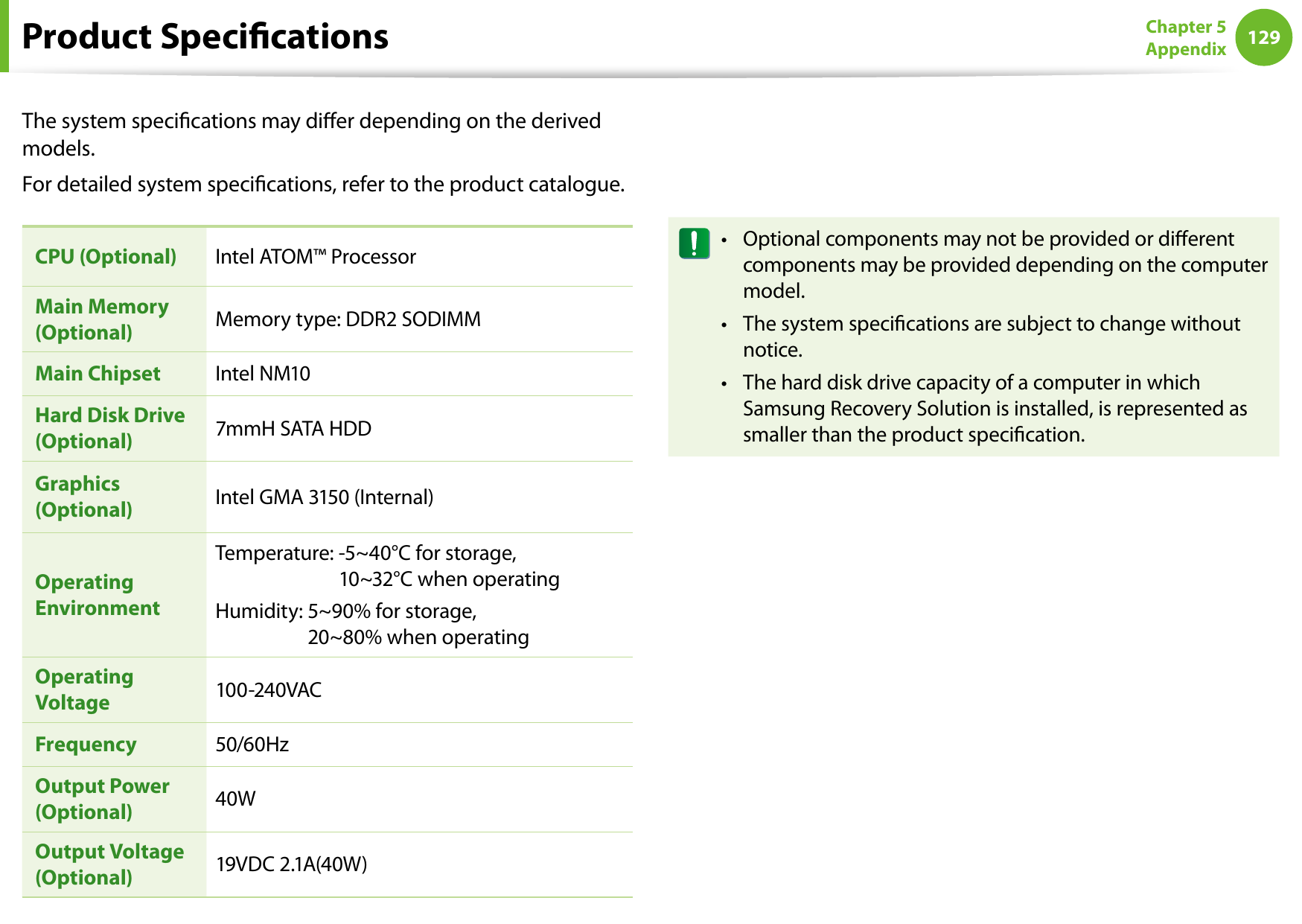
128129Chapter 5 AppendixThe system specications may dier depending on the derived models.For detailed system specications, refer to the product catalogue.CPU (Optional) Intel ATOM™ ProcessorMain Memory (Optional) Memory type: DDR2 SODIMMMain Chipset Intel NM10Hard Disk Drive (Optional) 7mmH SATA HDDGraphics (Optional) Intel GMA 3150 (Internal)Operating EnvironmentTemperature:  -5~40°C for storage,  10~32°C when operatingHumidity:  5~90% for storage,  20~80% when operatingOperating Voltage 100-240VACFrequency 50/60HzOutput Power (Optional) 40WOutput Voltage (Optional) 19VDC 2.1A(40W)Optional components may not be provided or dierent • components may be provided depending on the computer model.The system specications are subject to change without • notice.The hard disk drive capacity of a computer in which • Samsung Recovery Solution is installed, is represented as smaller than the product specication.Product Specications
130Chapter 5 AppendixProduct SpecicationsRegistered TrademarksSamsung is a registered trademark of Samsung Co., Ltd.Intel, Pentium/Celeron are registered trademarks of the Intel Corporation.Microsoft, MS-DOS, and Windows are registered trademarks of the Microsoft Corporation. is a trademark of SRS Labs, Inc.TruSurround XT technology is incorporated under license from SRS Labs, Inc.SRS TruSurround XT™ processes multichannel audio content to create a truly immersive surround sound experience with rich bass and clear dialog from the laptop speakers or headphones. is a trademark of SRS Labs, Inc. WOW HD technology is incorporated under license from SRS Labs, Inc.SRS WOW HD™ signicantly improves the playback quality of mono and stereo audio, delivering a dynamic 3D entertainment experience with deep bass and high frequency clarity for crisp detail. is a trademark of SRS Labs, Inc.WOW XT technology is incorporated under license from SRS Labs, Inc.SRS WOW XT™ signicantly improves the playback quality of audio, delivering a dynamic 3D entertainment experience with deep bass from even the smallest and most closely spaced speakers. is a trademark of SRS Labs, Inc. CS Headphone technology is incorporated under license from SRS Labs, Inc.CS Headphone™ delivers a 5.1 surround sound experience over standard headphones or earbuds when listening to multichannel content, such as DVD movies.All other product or company names mentioned herein are registered trademarks of their respective companies.ENERGY STAR® PartnerAs an ENERGY STAR® Partner, SAMSUNG has determined that this product meets the ENERGY STAR® guidelines for energy eciency.
130131Chapter 5 AppendixGlossaryThe Glossary lists the terminologies used in this User Guide. For terminologies other than these, look in Windows Help.BackupA way to save the current data to restore it later if necessary. A backup is a way to restore computer data when the data or computer is damaged.Chargeable USBThis program enables supplying power to a specic USB port when the system is in power saving mode, hibernation mode or o.ClientThis refers to a computer that uses a shared network resource provided by a server.DDR SDRAM  (Double Data Rate Synchronous Dynamic Random Access Memory)DRAM is a memory type whose cells consist of a capacitor and transistor manufactured at a low price. SDRAM is a memory type whose performance has been improved by synchronizing the clock with the external CPU clock. DDR SDRAM is a memory type whose performance has been improved by doubling the operating speed of the SDRAM and is widely used nowadays. This computer uses DDR SDRAM.Device ManagerAn administrative tool used to manage computer devices. You can add or remove hardware or update a device driver using the Device Manager.DHCP (Dynamic Host Conguration Protocol)This refers to automatically allocating IP addresses to the users on the network by the network administrators.Direct XAn application interface developed to enable Windows application programs to access hardware devices at a very high speed. Since the operating speed of graphics, memory and sound cards must be very fast to provide high quality video and sound for games, Direct X enables faster control and interaction between applications and hardware devices. By using Direct X, the multimedia performance of Windows has been hugely improved.DriverSoftware that interacts between the hardware and the operating system. An operating system knows the hardware information and controls the hardware. In general, a driver is supplied with the corresponding hardware device.D-sub (D-subminiature)This is the cable connecting a general CRT monitor and the computer. Analog video is output through this cable.
132Chapter 5 AppendixDVD (Digital Versatile Disk)DVD was developed to replace CD (compact disk). Although the shape and size of the disc are the same as that of a CD, the capacity of a DVD is at least 4.7GB while the capacity of a CD is 600MB. DVD video is digital unlike VHS (analog) video and supports MPEG2 compression and digital audio. To play a DVD, a DVD drive is required.eSATAThis is an external version of the SATA interface currently being used to connect a hard disk drive or ODD in a computer. It is an external port used to connect a main board or a hard disk drive.FirewallA security system used to protect an internal network or intranet from external networks through an authentication procedure.HDMIThis is a digital video / audio interface specication that transmits video and audio signals over a single cable.Hibernation ModeA power mode that saves all data in memory to the hard disk and turns the CPU and hard disk o. When canceling Hibernation Mode, all application programs that were running are restored to their last state.IconThis refers to a small image that represents a le that users can use.IEEE802.XXThis is a set fo specications developed by the 802 committee of IEEE for the LAN connection method called XX.LAN (Local Area Network)A communications network connecting computers, printers and other devices within a local area such as within a building. A LAN enables all connected devices to interact with other devices on the network. The current LAN uses the Ethernet media access control method developed in the early 1980s. To connect to an Ethernet, a network card called a LAN card, Ethernet card or network interface card is required. To exchange data between computers, a protocol is required besides the hardware equipment. Windows Vista uses TCP/IP as the default protocol.LCD (Liquid Crystal Display)There are Passive Matrix and Active Matrix LCD types. This computer uses the Active Matrix type LCD called a TFT LCD. Since an LCD is implemented by transistors instead of a cathode-ray tube unlike a CRT, its size can be slim. And because it does not blink, it reduces eye strain.MMC (MultiMedia Card) cardThis is an external-type ash memory used for mobile devices such as mobile phones or digital cameras.Glossary
132133Chapter 5 AppendixNetworkA group of computers and devices, such as printers and scanners, connected by a communications link. A network can be either small or large and can be connected permanently through cables or temporarily through telephone lines or wireless links. The biggest network is the Internet, a worldwide network.Network AdministratorA user who plans, congures and manages network operations. Sometimes, a network administrator is called a system administrator.Notication AreaThis refers to the right area of the Taskbar including program icons such as the volume control, the power options and the time.PartitionThis refers to the act or practice of dividing the storage space of a hard disk drive into separate data areas known as partitions. If a 100GB hard disk drive is partitioned into 2 x 50GB partitions, the hard disk drive can be used as if there are 2 hard disk drives.PCMCIA (Personal Computer Memory Card International Association) cardThis is an extended card slot specication for mobile computers such as a notebook computer. Not only a memory,  device but also most peripherals such as hard disk drives, LAN cards, etc. can be connected to this card slot.ProtocolA protocol is a set of rules used by computers to communicate with each other across a network. A protocol is a convention or standard that controls or enables the connection, communication, and data transfer between computing endpoints. It denes the data transmission procedures and the transmission medium for more ecient network functions.Quick LaunchThis refers to a toolbar that can be congured so that you can launch a program such as Internet Explorer or display the Windows Desktop with one click. You can add any icon to the quick launch area of the Taskbar and launch frequently used program by clicking that icon.SD (Secure Digital) cardAn SD card is a ash (non-volatile) memory card developed for mobile devices by improving on the MMC card. Although an MMC card can be used in an SD card slot, an SD card is not recognized when inserted into an MMC card.SDHC (Secure Digital High Capacity) cardThis is the extension of the SD card that supports over 2GB bytes.ServerIn general, a server refers to a computer that provides shared resources for network users.Glossary
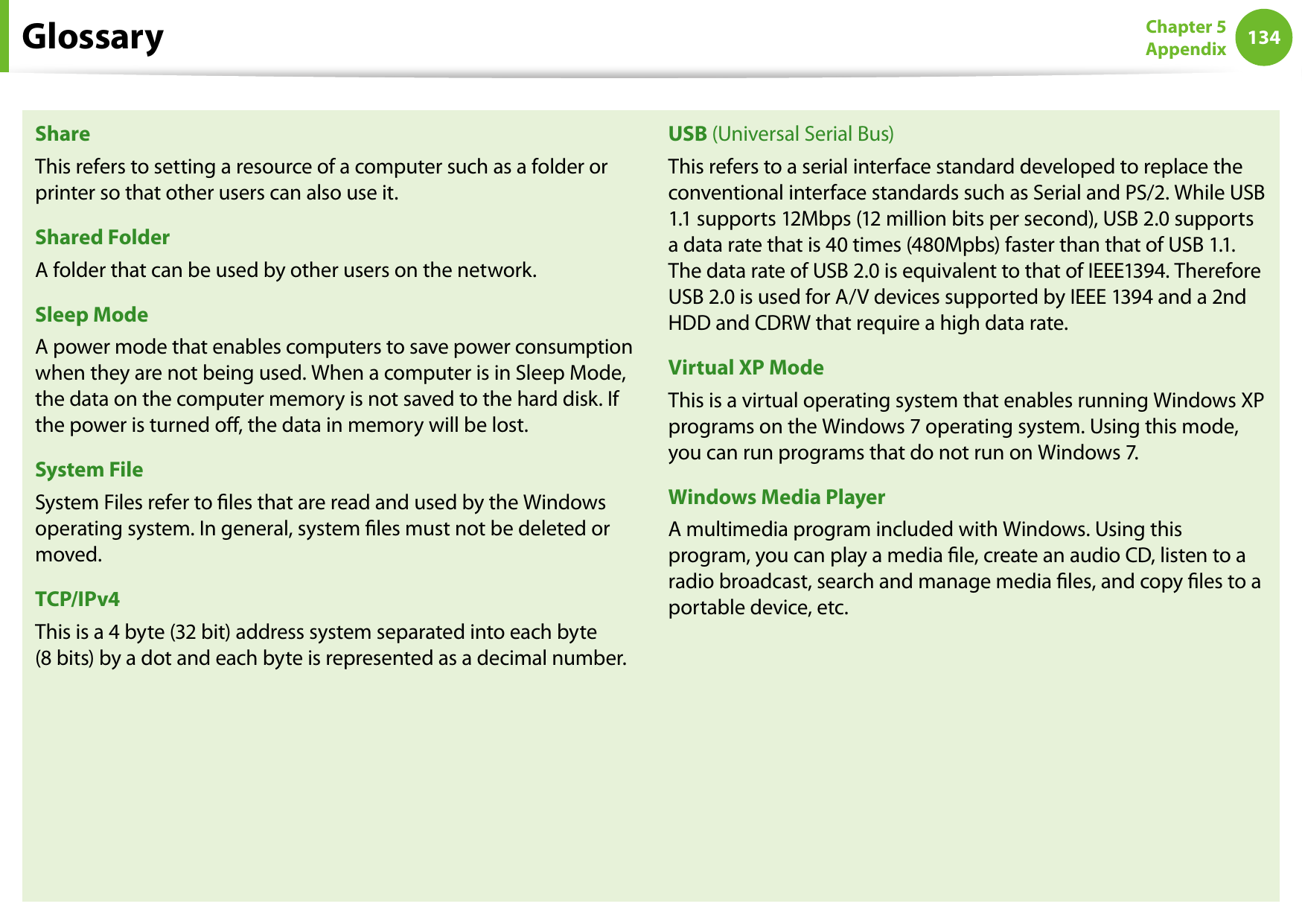
134Chapter 5 AppendixShareThis refers to setting a resource of a computer such as a folder or printer so that other users can also use it.Shared FolderA folder that can be used by other users on the network.Sleep ModeA power mode that enables computers to save power consumption when they are not being used. When a computer is in Sleep Mode, the data on the computer memory is not saved to the hard disk. If the power is turned o, the data in memory will be lost.System FileSystem Files refer to les that are read and used by the Windows operating system. In general, system les must not be deleted or moved.TCP/IPv4This is a 4 byte (32 bit) address system separated into each byte  (8 bits) by a dot and each byte is represented as a decimal number.USB (Universal Serial Bus)This refers to a serial interface standard developed to replace the conventional interface standards such as Serial and PS/2. While USB 1.1 supports 12Mbps (12 million bits per second), USB 2.0 supports a data rate that is 40 times (480Mpbs) faster than that of USB 1.1. The data rate of USB 2.0 is equivalent to that of IEEE1394. Therefore USB 2.0 is used for A/V devices supported by IEEE 1394 and a 2nd HDD and CDRW that require a high data rate.Virtual XP ModeThis is a virtual operating system that enables running Windows XP programs on the Windows 7 operating system. Using this mode, you can run programs that do not run on Windows 7.Windows Media PlayerA multimedia program included with Windows. Using this program, you can play a media le, create an audio CD, listen to a radio broadcast, search and manage media les, and copy les to a portable device, etc.Glossary
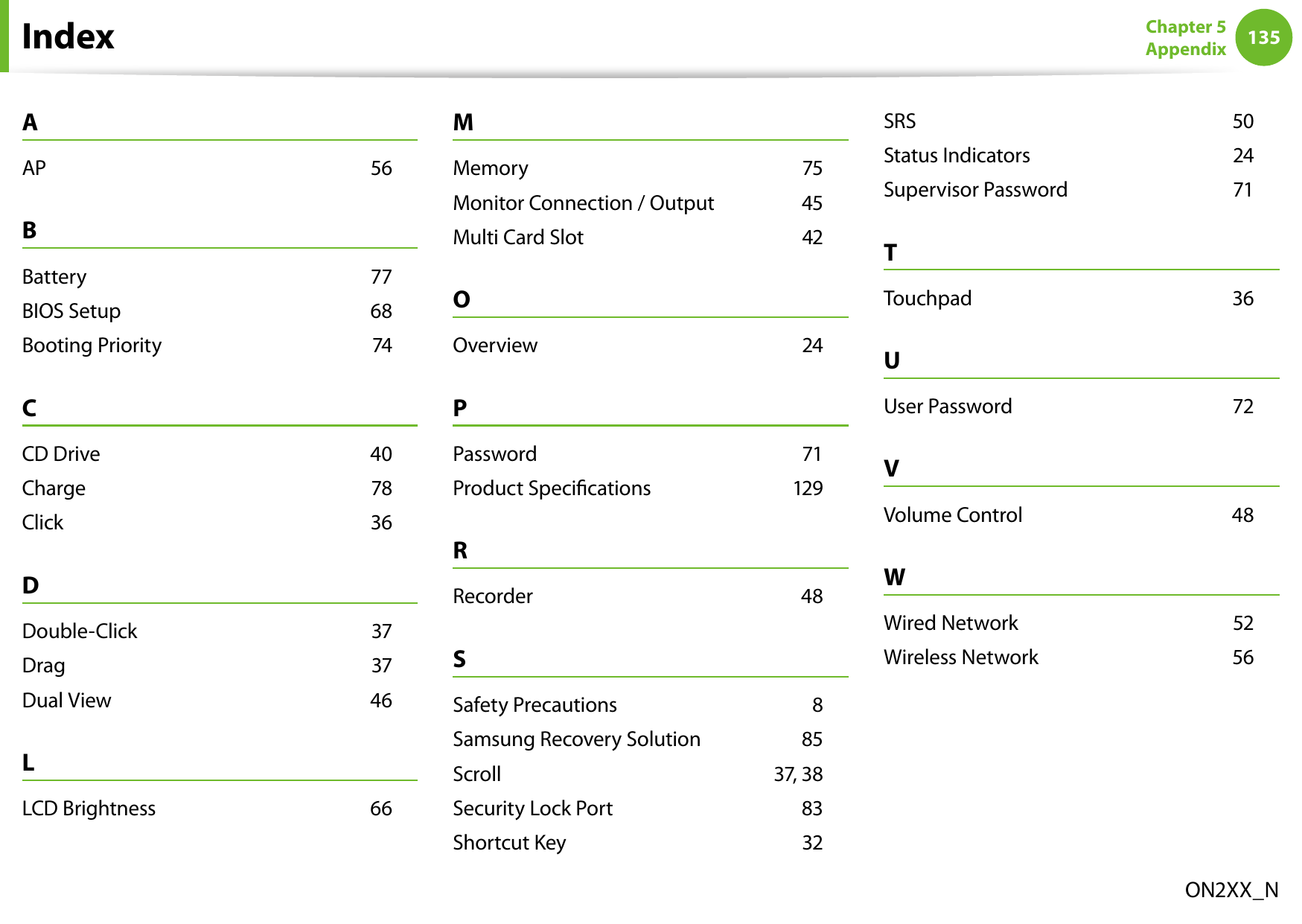
134135Chapter 5 AppendixIndexON2XX_NAAP    56BBattery    77BIOS Setup    68Booting Priority    74CCD Drive    40Charge    78Click    36DDouble-Click    37Drag    37Dual View    46LLCD Brightness    66MMemory    75Monitor Connection / Output    45Multi Card Slot    42OOverview    24PPassword    71Product Specications    129RRecorder    48SSafety Precautions    8Samsung Recovery Solution    85Scroll    37, 38Security Lock Port    83Shortcut Key    32SRS    50Status Indicators    24Supervisor Password    71TTouchpad    36UUser Password    72VVolume Control    48WWired Network    52Wireless Network    56

Navigation menu