Sequans Communications VZ120Q LTE Module User Manual J20H027

Sequans Communications LTE Module J20H027

user guide rev2

Confidential and Proprietary SEQUANS Communications         1 VZ120Q User’s Manual       SEQUANS Communications www.sequans.com contact@sequans.com
Confidential and Proprietary SEQUANS Communications         2 Preface  Legal Notices Copyright© 2015, SEQUANS Communications  All information contained herein and disclosed by this document is confidential and the proprietary property of SEQUANS Communications, and all rights therein are expressly reserved. Acceptance of this material signifies agreement by the recipient that the information contained in this document is confidential and that it will be used solely for the purposes set forth herein. Acceptance of this material signifies agreement by the recipient that it will not be used, reproduced in whole or in part, disclosed, distributed, or conveyed to others in any manner or by any means – graphic, electronic, or mechanical, including photocopying, recording, taping, or information storage and retrieval systems – without the express written permission of SEQUANS Communications. All Sequans’ logos and trademarks are the property of SEQUANS Communications. Unauthorized usage is strictly prohibited without the express written permission of SEQUANS Communications. All other company and product names may be trademarks or registered trademarks of their respective owners. Products and services of SEQUANS Communications, and those of its licensees may be protected by one or more pending or issued U.S. or foreign patents. Verizon Wireless® is a registered trademark of Verizon Wireless, see www.verizonwireless.com. Because of continuing developments and improvements in design, manufacturing, and deployment, material in this document is subject to change without notification and does not represent any commitment or obligation on the part of SEQUANS Communications. SEQUANS Communications shall have no liability for any error or damages resulting from the use of this document.
Confidential and Proprietary SEQUANS Communications         3 Document Revision History Revision   Date        Product Application V1.0    July 07 2015      First edition of the VZ120Q User Manual V2.0    Apr 25 2016    Second edition of the VZ120Q User Manual, following FCC recommendations
Confidential and Proprietary SEQUANS Communications         4 About this Document  Purpose and Scope This user manual is intended for engineers who use the VZ120Q to run various qualification tests in Verizon environment.   Who Should Read this User Manual This document is intended for engineers who want to operate the evaluation kit based on the VZ120Q module, for IOT and certification tests purposes.
Confidential and Proprietary SEQUANS Communications         5 Table of Contents   1 VZ120Q PRODUCT DESCRIPTION....................................................................................... 6 1.1 PRODUCT FEATURES ............................................................................................................... 6 1.2 SOFTWARE DESCRIPTION ........................................................................................................ 7 2 INSTALLATION PROCEDURES ............................................................................................ 8 2.1 PREREQUISITES....................................................................................................................... 8 2.2 FIRST INSTALLATION ............................................................................................................... 9 2.3 VZ120Q BOARD CONNECTION ............................................................................................... 9 2.4 FIRMWARE UPGRADE .............................................................................................................. 9 2.5 SOFTWARE UNINSTALLATION ................................................................................................ 10 3 FCC REGULATORY NOTICES TO THE OEM AND END PRODUCT USERS ............... 11 4 OPERATIONAL CONDITIONS ............................................................................................ 15
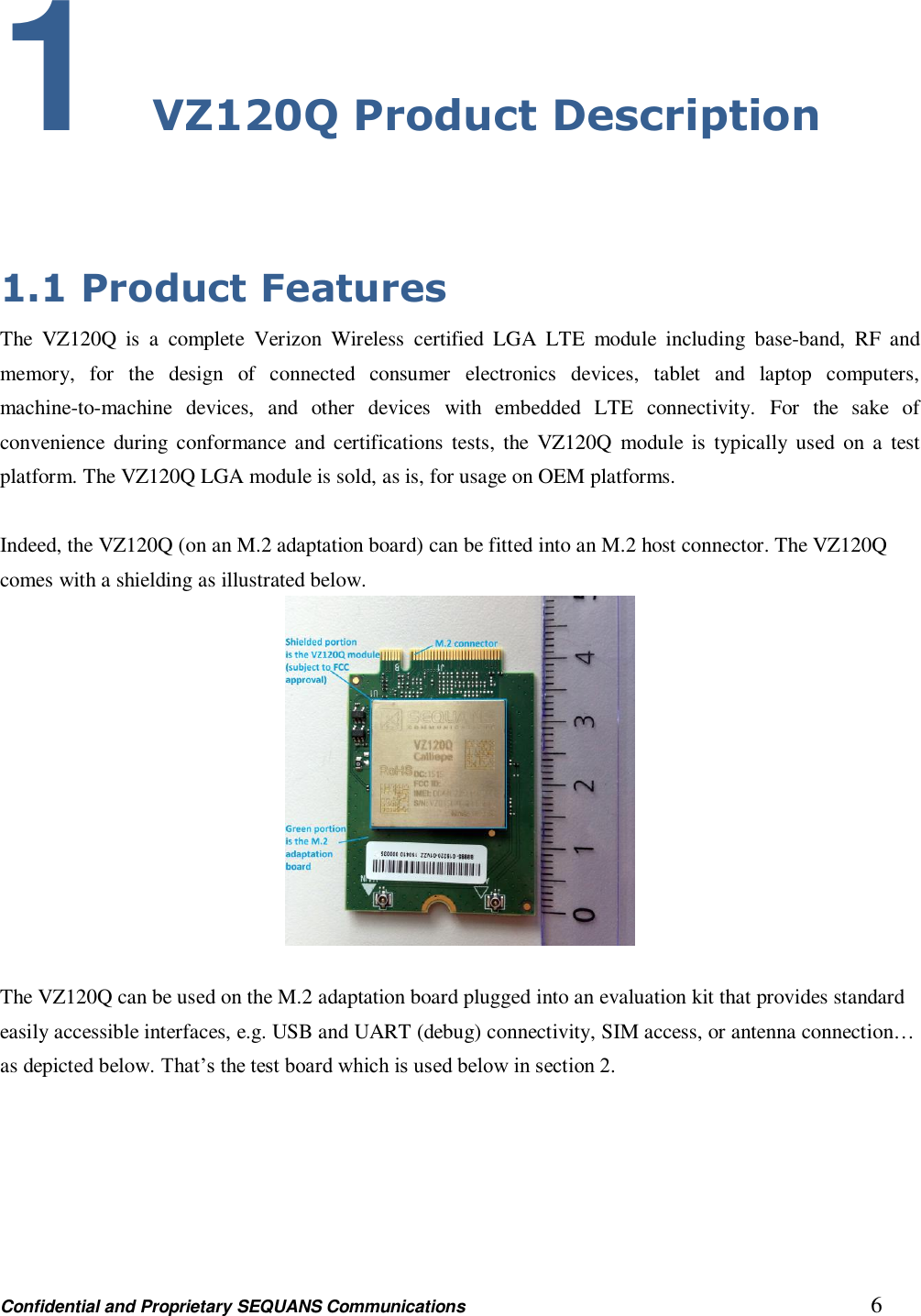
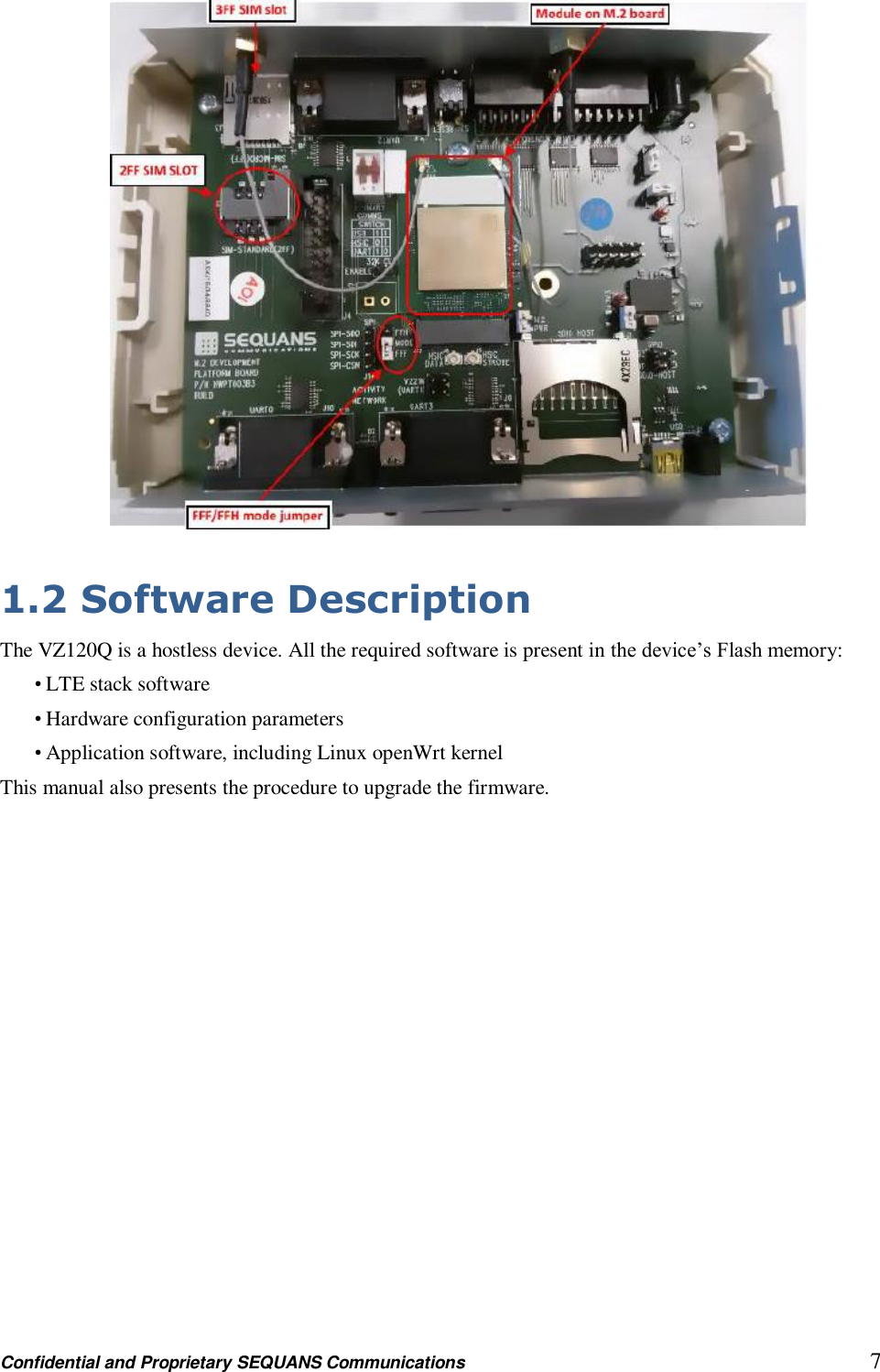
Confidential and Proprietary SEQUANS Communications         6 1 VZ120Q Product Description  1.1 Product Features The  VZ120Q  is  a  complete  Verizon  Wireless  certified  LGA  LTE  module  including  base-band,  RF  and memory,  for  the  design  of  connected  consumer  electronics  devices,  tablet  and  laptop  computers, machine-to-machine  devices,  and  other  devices  with  embedded  LTE  connectivity.  For  the  sake  of convenience  during  conformance and  certifications tests,  the  VZ120Q  module  is typically  used  on  a  test platform. The VZ120Q LGA module is sold, as is, for usage on OEM platforms.  Indeed, the VZ120Q (on an M.2 adaptation board) can be fitted into an M.2 host connector. The VZ120Q comes with a shielding as illustrated below.   The VZ120Q can be used on the M.2 adaptation board plugged into an evaluation kit that provides standard easily accessible interfaces, e.g. USB and UART (debug) connectivity, SIM access, or antenna connection… as depicted below. That’s the test board which is used below in section 2.
Confidential and Proprietary SEQUANS Communications         7   1.2 Software Description The VZ120Q is a hostless device. All the required software is present in the device’s Flash memory: • LTE stack software • Hardware configuration parameters • Application software, including Linux openWrt kernel This manual also presents the procedure to upgrade the firmware.
Confidential and Proprietary SEQUANS Communications         8 2 Installation Procedures 2.1 Prerequisites 2.1.1 Hardware Sequans’ VZ120Q LGA module (soldered on an M.2 adaptation board) requires a Windows® PC, running Windows 8, Windows XP or Window7 with either a M.2 host connector or an USB 2.0 port. It can also be used with a computer running Linux.  2.1.3 Sequans Software Delivery •   Verizon_x.y.z-abcd.exe This installs the host software providing access to the system with WebUI interface. You will connect the VZ120Q on its evaluation board to the PC when this installation completes. It is only required on Windows.
Confidential and Proprietary SEQUANS Communications         9 2.2 First Installation 2.2.1 Install the Host Software Without plugging in the device, launch the Windows installer. It automatically installs the Sequans’ VZ120Q   drivers on the PC.  Follow the procedure: 1. Launch the installer and confirm its execution. Click Yes button to start the installation process. 2. Click the Next> button. 3. Select the installation directory. The default directory can be changed by clicking the Browse... button. Click Next when the appropriate directory is selected. 4. Verify the installation directory and click Install if no change is required. You can update the installation directory by clicking the Back button at this stage. 5. Check the box to trust Sequans software and proceed with the installation process. 6. Click Finish to complete the installation process.   2.3 VZ120Q Board Connection After the installation of the Host Software is completed, you can plug the device bearing the VZ120Q module in an USB port. Three drivers should be installed: • One composite driver, • One serial over USB driver (SqnAcm) to control the device using AT commands • One Ethernet over USB driver (SqnUsb) to transport the data traffic between the device and the PC  1. Plug the test board on an USB port of your PC. 2. Wait for the automatic driver installation. It takes some time (a few dozens of seconds) before the evaluation kit is properly identified on the USB interface. 3. When the process is completed, the PC indicates that the device is ready to use.  You can launch a web browser and connect.   2.4 Firmware Upgrade 2.4.1 Upgrade Prerequisites The firmware upgrade process requires: • An operational board bearing the module connected to a PC with USB
Confidential and Proprietary SEQUANS Communications         10 • A web browser launched and connected to the said board at http://192.128.15.1. • An upgrade package such as *.s fp .  2.4.2 Upgrade Execution Execute the following steps of the upgrade procedure. 1. Click on System tab. 2. Click on Backup / Flash Firmware item. 3. In the Flash new firmware image frame, click the Browse button and navigate to select the sfp file that contains the upgrade. 4. Click the Flash image... button when you have selected the appropriate file. 5. Confirm the operation when the firmware checksum is verified, by clicking the Proceed button. 6. Do not disconnect or power the device off while the following screen is displayed. 7. The login screen is displayed when the automatic reboot operation has completed.  2.5 Software Uninstallation Use Windows’ uninstaller service.
Confidential and Proprietary SEQUANS Communications         11 3 FCC Regulatory Notices to the OEM and End product Users  FCC-ID: 2AAGMVZ120Q (limited modular approval)  This  above  identified  LTE  radio  module  is  not  intended  to  be  provided  to  end-users  but  is  for installation by OEM integrators only.  Installation/Integration  OEM integrators must follow Sequans installation instructions to provide for and benefit from FCC compliant module integrations and must arbide especially by the following:  The  maximum  antenna  gain  values  (accounting  for  cable  attenuation)  to  comply  with  the  FCC maximum ERP/EIRP limits and with RF Exposure rules:  LTE band 13 (700MHz): 8.9 dBi LTE band 4 (1700MHz): 5.0 dBi  The Sequans PCB design guidelines provided with this filing must be closely followed.    Compliance of host integrations of the module is limited to hosts adaption designs which are identical to  the  documented  reference  design  as  documented  in  this  filing  (M.2  adaptation  PCB).  Design guidance for host integration are provided under NDA.  Host  integrations  with  adaption  designs  deviating  from  the  documented  reference  design  require either class 2 permissive change to this modular approval or a separate host approval with different   FCC-ID;    Host integrations with co-located (simultaneously operating) radio transmitters must be evaluated in
Confidential and Proprietary SEQUANS Communications         12 accordance with FCC multi-transmitter rules and may require either class 2 permissive change to this modular approval or a separate host approval with different    FCC-ID, dependent on the result of the evaluation; Inquiry at FCC or a TCB is urgently recommended.  Integrations of the module into host products which are intended for portable use, i.e. less than 20cm distance  between  its  radiating  structures  (antenna)  and  the  body  of  nearby  persons,  or  which otherwise put additional technical requirements like Hearing Aid compatibility require either class 2 permissive change to this modular approval or a separate host approval with different    FCC-ID;    Compliance with Unwanted Emission Limits for Digital Device If  the  OEM  host  integration  fully  complies  with  the  above  described  reference  design  and  can completely inherit and  rest on  compliance of the  existing modular  approval the  OEM  remains  still responsible  to  show  compliance  of  the  overall  end-product  with  the  FCC  limits  for  unwanted conducted  and  radiated  emissions  from  the  digital  device  (unintentional  radio)  portion  of  such end-product (commonly addressed as part 15B compliance or similar).   End-product Labelling  FCC-ID The module's FCC-ID must either be visible from the exterior of the host product (e.g. per window) or per electronic display, or shall be displayed on an additional exterior label per the following or similar string: contains FCC-ID:    2AAGMVZ120Q  Digital Device - Unwanted Emissions Notice   If the  end-product  falls  under  part  15  of  the  FCC  rules  (it  shall  display  the following  user  notice  on  its exterior acc. to part 15.19 (the notice may be printed in the manual in case the host is too small): This device complies with Part 15 of the FCC Rules. Operation is subject to the following two conditions:   (1) This device may not cause harmful interference, and   (2) This device must accept any interference received, including interference that may cause  undesired operation.  Further Labelling Requirements   may apply dependent on the FCC rule parts relevant to the host product.       End-product User Instructions / Notices in the Manual
Confidential and Proprietary SEQUANS Communications         13  At a minimum, end-product users must be provided with the following notices at a prominent location of the product literature furnished with the product:  Product Modifications Modifications  not  expressly  approved  by  the  party  responsible  for  compliance  could  void  the  user's authority to operate this equipment.    RF Exposure Compliance This equipment complies with FCC radio frequency radiation exposure rules and limits set forth for an uncontrolled  environment,  when  installed  and  operated  with  minimum  distance  of  20cm  between  its radiating structures (antenna) and the body of nearby persons and when not operated simultaneously with other nearby radio-transmitters.   Maximum Antenna Gain The user instructions of end-products equipped with standard external antenna connectors for the  modular radio transmitter subject to this filing i.e. providing the option to connect other antennae than those which may or  may not be  bundled with the  end-product  must list the  maximum allowed  antenna gain values as derived from those given above, accounting for the cable attenuations of the actual installation.  Digital Device - Unwanted Emissions Notice   If the end-product is or contains a digital device (unintentional radio portions) and is not exempted by it's use case (like vehicular use) the following part 15.105 (b) user notice shall be provided at prominent location of the product literature:    This equipment has been tested and found to comply with the limits for a Class B digital device, pursuant to part 15 of the FCC rules. These limits are designed to provide reasonable protection against harmful interference in a residential installation.   This equipment generates uses and can radiate radio frequency energy and, if not installed and used in accordance with  the instructions,  may cause  harmful interference to  radio  communications.  However, there is no guarantee that interference will not occur in a particular installation. If this equipment does cause  harmful  interference  to  radio  or  television  reception,  which  can  be  determined  by  turning  the equipment  off  and on, the user is encouraged to try to correct the  interference  by  one or  more  of the following measures:   o Reorient or relocate the receiving antenna.   o Increase the separation between the equipment and receiver.
Confidential and Proprietary SEQUANS Communications         14 o  Connect  the  equipment  into  an  outlet  on  a  circuit  different  from  that  to which  the  receiver  is connected.   o Consult the dealer or an experienced radio/TV technician for help.  Further User Notices   May be required dependent on the FCC rule parts relevant to the host product.      Non-allowed User Instructions   The end-product user guidance may NOT include instructions about how to install or de-install the module.
Confidential and Proprietary SEQUANS Communications         15  4 Operational conditions The VZ120Q module is built to support operational conditions in temperature of -30° up to 60°C Its voltage operation range is 3.135-4.4V.

Navigation menu