Sequel Technologies EXTX01 Expander, Transceiver User Manual CERTIFICATE OF COMPLIANCE

Sequel Technologies, LLC Expander, Transceiver CERTIFICATE OF COMPLIANCE

User Manual

Rhein Tech Laboratories, Inc.  Client:  Sequel Technologies, LLC 360 Herndon Parkway    Model:  STPF-EXT Suite 1400  Standard: FCC 15.231                                             FCC ID:  V4X-EXTX01 Herndon, VA 20170 http://www.rheintech.com Report #: 2008040    Page 23 of 32       Appendix G:  Manual  Please see the following pages.
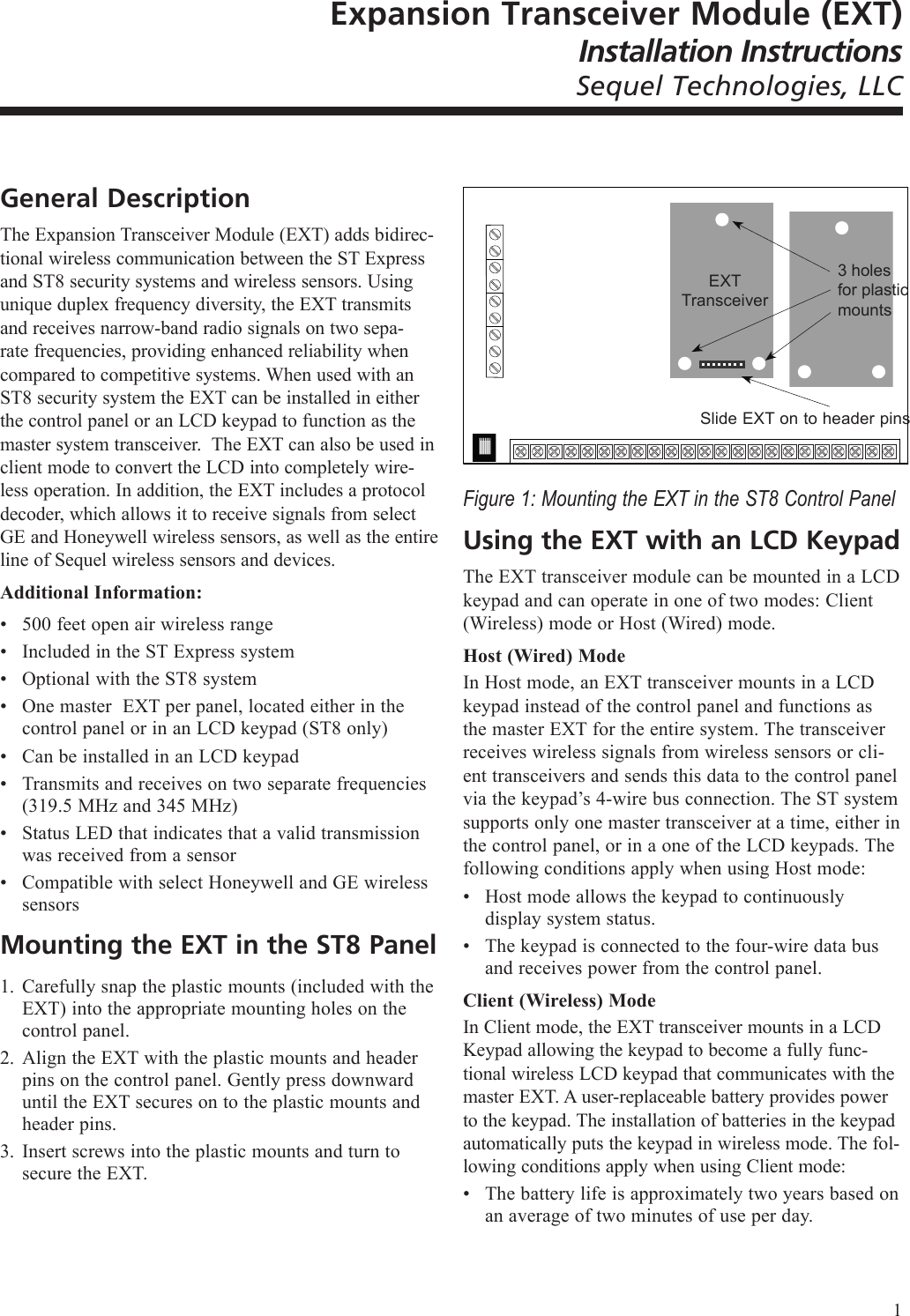
Expansion Transceiver Module (EXT)Installation InstructionsSequel Technologies, LLCGeneral DescriptionThe Expansion Transceiver Module (EXT) adds bidirec-tional wireless communication between the ST Express and ST8 security systems and wireless sensors. Using unique duplex frequency diversity, the EXT transmits and receives narrow-band radio signals on two sepa-rate frequencies, providing enhanced reliability when compared to competitive systems. When used with an ST8 security system the EXT can be installed in either the control panel or an LCD keypad to function as the master system transceiver.  The EXT can also be used in client mode to convert the LCD into completely wire-less operation. In addition, the EXT includes a protocol decoder, which allows it to receive signals from select GE and Honeywell wireless sensors, as well as the entire line of Sequel wireless sensors and devices.Additional Information:500 feet open air wireless rangeIncluded in the ST Express system Optional with the ST8 systemOne master  EXT per panel, located either in the control panel or in an LCD keypad (ST8 only)Can be installed in an LCD keypadTransmits and receives on two separate frequencies (319.5 MHz and 345 MHz)Status LED that indicates that a valid transmission was received from a sensorCompatible with select Honeywell and GE wireless sensorsMounting the EXT in the ST8 PanelCarefully snap the plastic mounts (included with the EXT) into the appropriate mounting holes on the control panel.Align the EXT with the plastic mounts and header pins on the control panel. Gently press downward until the EXT secures on to the plastic mounts and header pins.Insert screws into the plastic mounts and turn to secure the EXT.••••••••1.2.3.Figure 1: Mounting the EXT in the ST8 Control PanelUsing the EXT with an LCD KeypadThe EXT transceiver module can be mounted in a LCD keypad and can operate in one of two modes: Client (Wireless) mode or Host (Wired) mode.Host (Wired) ModeIn Host mode, an EXT transceiver mounts in a LCD keypad instead of the control panel and functions as the master EXT for the entire system. The transceiver receives wireless signals from wireless sensors or cli-ent transceivers and sends this data to the control panel via the keypad’s 4-wire bus connection. The ST system supports only one master transceiver at a time, either in the control panel, or in a one of the LCD keypads. The following conditions apply when using Host mode:Host mode allows the keypad to continuously display system status.The keypad is connected to the four-wire data bus and receives power from the control panel.Client (Wireless) ModeIn Client mode, the EXT transceiver mounts in a LCD Keypad allowing the keypad to become a fully func-tional wireless LCD keypad that communicates with the master EXT. A user-replaceable battery provides power to the keypad. The installation of batteries in the keypad automatically puts the keypad in wireless mode. The fol-lowing conditions apply when using Client mode:The battery life is approximately two years based on an average of two minutes of use per day.•••EXT Transceiver3 holes for plastic mountsSlide EXT on to header pins1
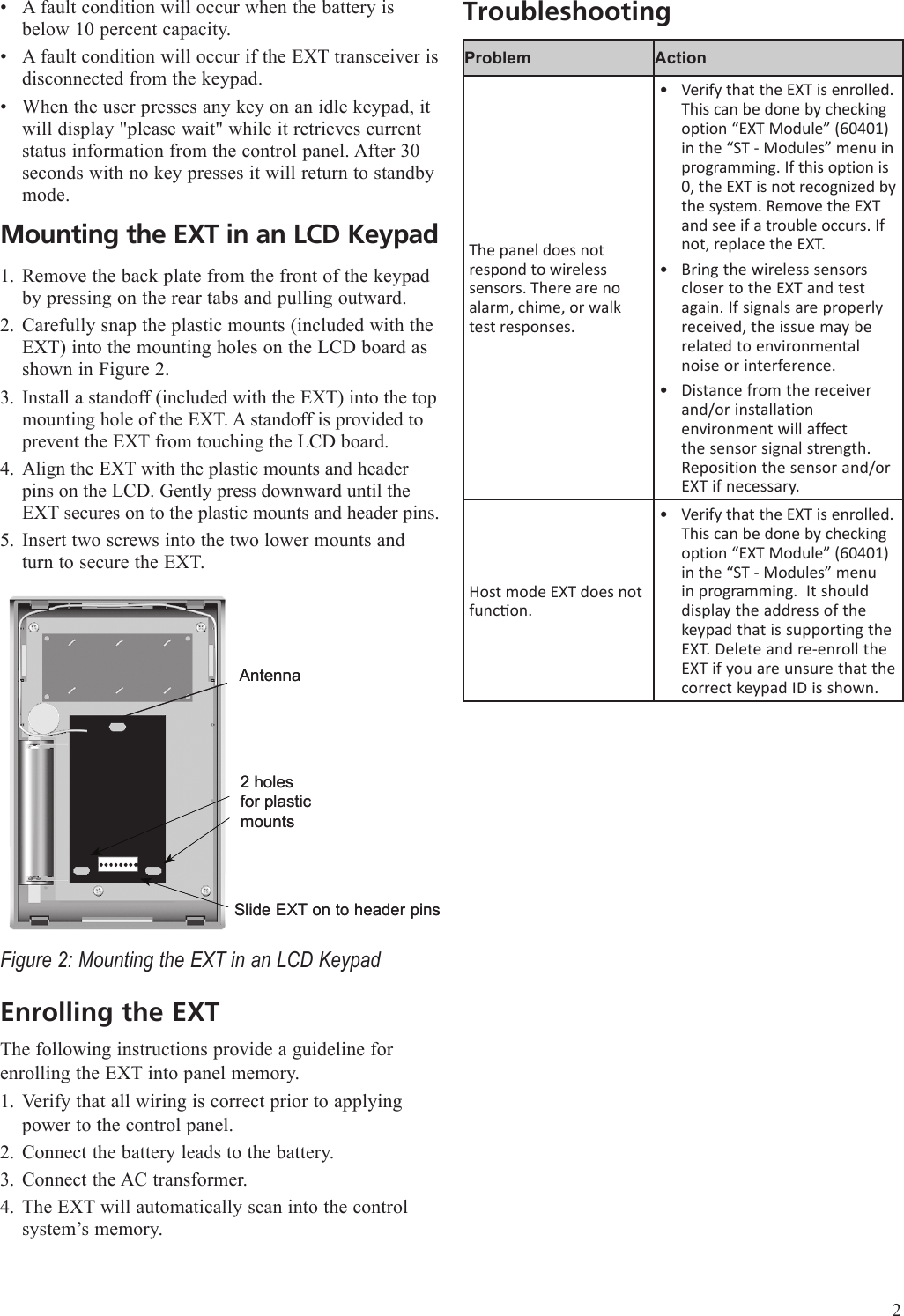
A fault condition will occur when the battery is below 10 percent capacity. A fault condition will occur if the EXT transceiver is disconnected from the keypad.When the user presses any key on an idle keypad, it will display "please wait" while it retrieves current status information from the control panel. After 30 seconds with no key presses it will return to standby mode.Mounting the EXT in an LCD KeypadRemove the back plate from the front of the keypad by pressing on the rear tabs and pulling outward.Carefully snap the plastic mounts (included with the EXT) into the mounting holes on the LCD board as shown in Figure 2.Install a standoff (included with the EXT) into the top mounting hole of the EXT. A standoff is provided to prevent the EXT from touching the LCD board.Align the EXT with the plastic mounts and header pins on the LCD. Gently press downward until the EXT secures on to the plastic mounts and header pins.Insert two screws into the two lower mounts and turn to secure the EXT.Figure 2: Mounting the EXT in an LCD KeypadEnrolling the EXTThe following instructions provide a guideline for enrolling the EXT into panel memory. Verify that all wiring is correct prior to applying power to the control panel.Connect the battery leads to the battery.Connect the AC transformer.The EXT will automatically scan into the control system’s memory.•••1.2.3.4.5.1.2.3.4.Slide EXT on to header pinsSlide EXT on to header pins2 holes for plastic mounts2 holes for plastic mountsAntennaAntennaTroubleshootingProblem ActionThe panel does not respond to wireless sensors. There are no alarm, chime, or walk test responses.Verify that the EXT is enrolled. This can be done by checking option “EXT Module” (60401) in the “ST - Modules” menu in programming. If this option is 0, the EXT is not recognized by the system. Remove the EXT and see if a trouble occurs. If not, replace the EXT.Bring the wireless sensors closer to the EXT and test again. If signals are properly received, the issue may be related to environmental noise or interference.Distance from the receiver and/or installation environment will affect the sensor signal strength. Reposition the sensor and/or EXT if necessary.•••Host mode EXT does not funcon.Verify that the EXT is enrolled. This can be done by checking option “EXT Module” (60401) in the “ST - Modules” menu in programming.  It should display the address of the keypad that is supporting the EXT. Delete and re-enroll the EXT if you are unsure that the correct keypad ID is shown.•2
SpecificationsPower: 12VDC, 18 mA (provided by the control panel)Mounting optionsBuilt-in with the ST ExpressInstalls in a specific mounting location in the ST8 control panelInstalls in an LCD keypad to convert the keypad to wireless operation (client mode) or as the master transceiver (host mode)Transmitting frequency: 319.5 MHz and 345 MHzWireless range: 500 feet, open airNumber of wireless sensors: No limit other than the system’s maximum capacityOperating temperature:  32°F to 120°F (0° to 49°C)Storage temperature: -30°F to 140°F (-34° to 60°C)Max. humidity: 90% relative humidity, non condensingRegulatory approvals: FCC 15, UL 1023FCC NoticeThis device complies with Part 15 of the FCC Rules. Operation is subject to the following two conditions: (1) this device may not cause harmful interfer-ence, and (2) this device must accept any interference received, including interference that may cause undesired operation. Changes and/or modica-tions not approved by Sequel Technologies, LLC could void the user’s author-ity to operate the equipment.FCC ID: V4X-EXTX01••◦◦◦•••••••    Sequel Technologies2958 Cleveland Ave. NRoseville, MN  55113  USACopyright © 2008 Sequel Technologies, LLC.3

Navigation menu