Sequel Technologies SLIMDWS Door/Window Sensor, Slimline User Manual CERTIFICATE OF COMPLIANCE

Sequel Technologies, LLC Door/Window Sensor, Slimline CERTIFICATE OF COMPLIANCE

User Manual

Rhein Tech Laboratories, Inc. Client: Sequel Technologies LLC 360 Herndon Parkway Model: STWS-DWS-SLIM Suite 1400 Standard: FCC 15.231 Herndon, VA 20170 http://www.rheintech.com FCC ID: V4X-SLIMDWS Report #: 2009214      Appendix G:  Manual  Please see the following pages.
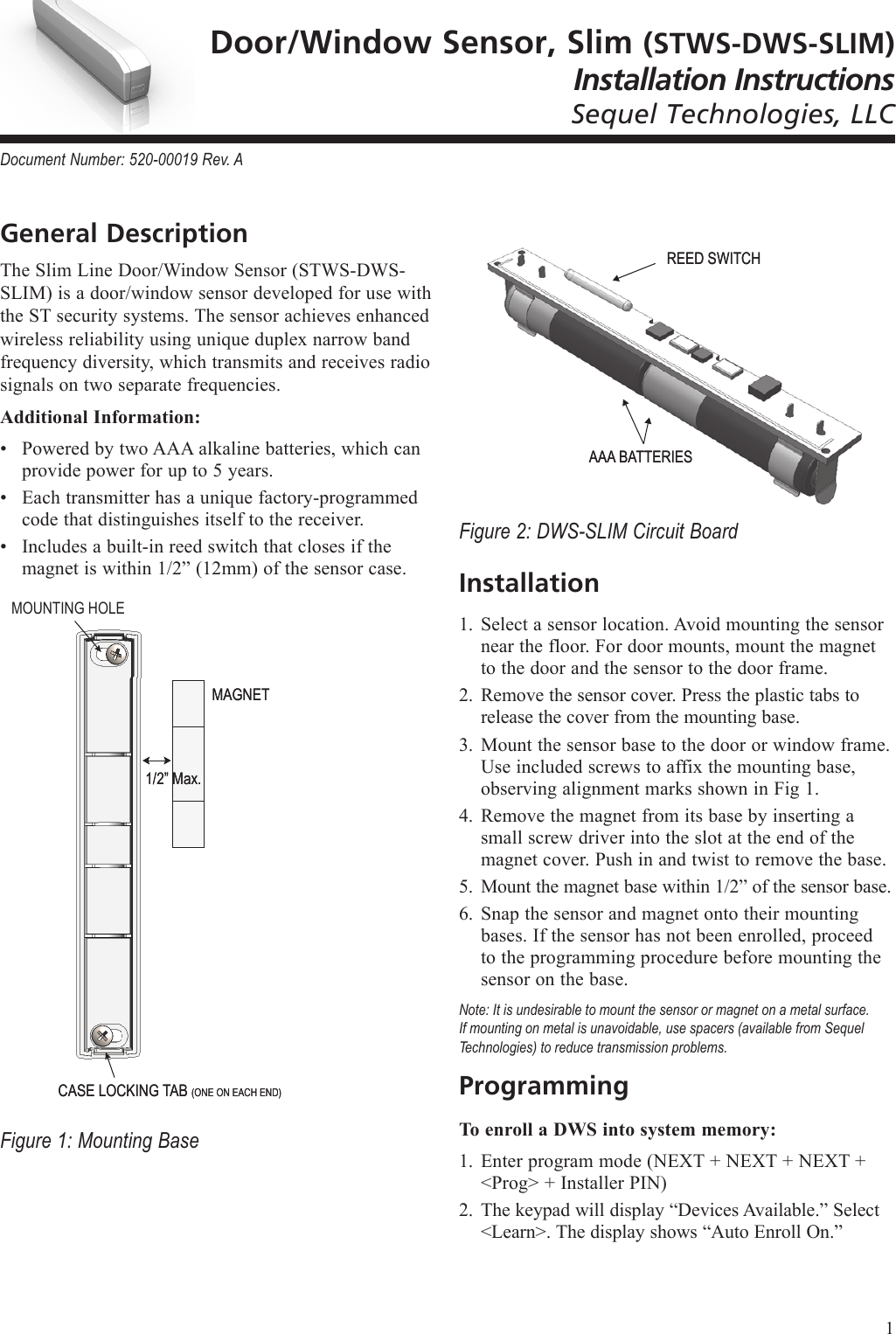
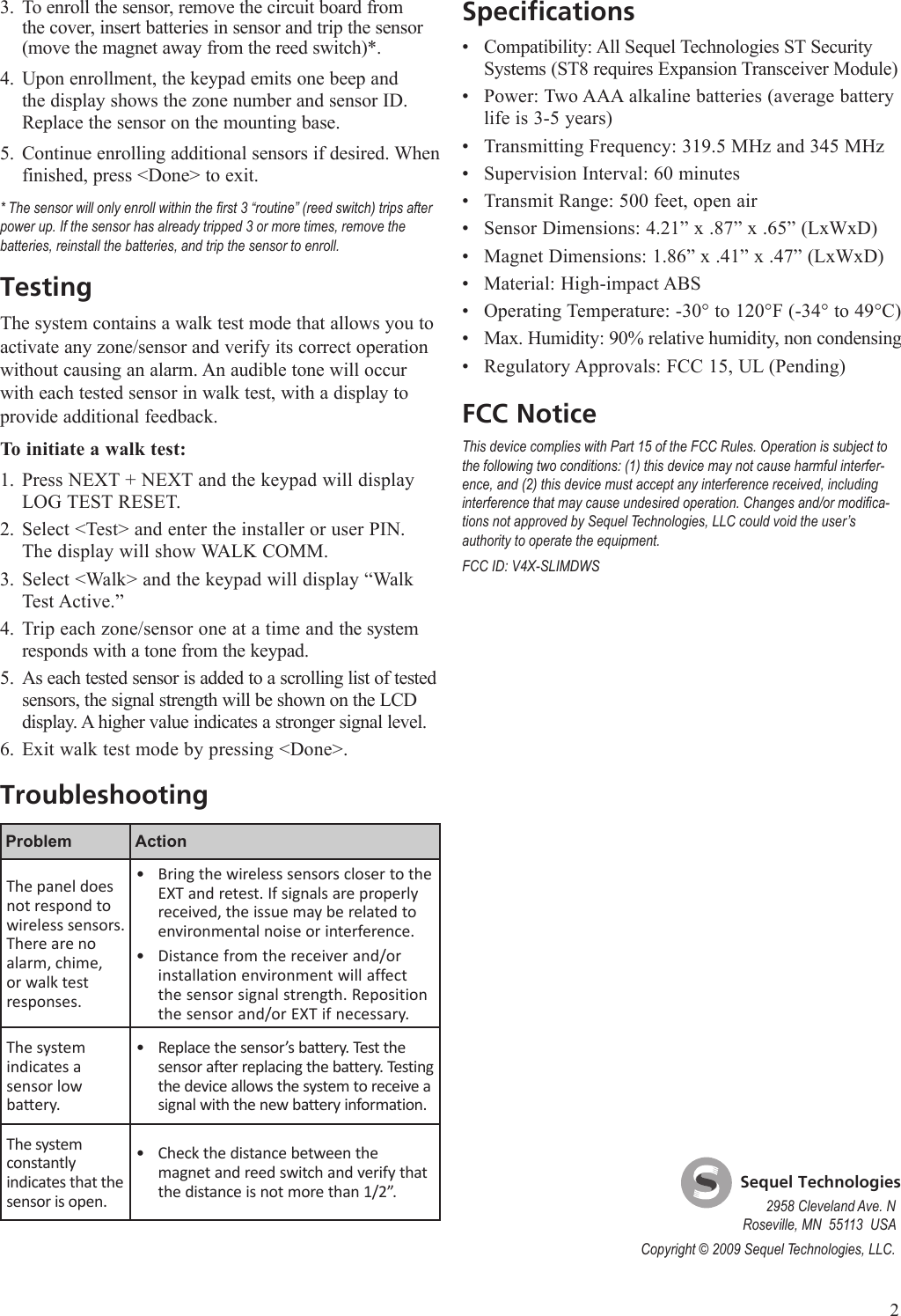
Door/Window Sensor, Slim (STWS-DWS-SLIM)Installation InstructionsSequel Technologies, LLCDocument Number: 520-00019 Rev. AGeneral DescriptionThe Slim Line Door/Window Sensor (STWS-DWS-SLIM) is a door/window sensor developed for use with the ST security systems. The sensor achieves enhanced wireless reliability using unique duplex narrow band frequency diversity, which transmits and receives radio signals on two separate frequencies.Additional Information:Powered by two AAA alkaline batteries, which can provide power for up to 5 years.Each transmitter has a unique factory-programmed code that distinguishes itself to the receiver.Includes a built-in reed switch that closes if the magnet is within 1/2” (12mm) of the sensor case.Figure 1: Mounting Base•••CASE LOCKING TAB (ONE ON EACH END)CASE LOCKING TAB (ONE ON EACH END)1/2” Max.1/2” Max.MAGNETMAGNETFigure 2: DWS-SLIM Circuit BoardInstallationSelect a sensor location. Avoid mounting the sensor near the floor. For door mounts, mount the magnet to the door and the sensor to the door frame.Remove the sensor cover. Press the plastic tabs to release the cover from the mounting base. Mount the sensor base to the door or window frame. Use included screws to affix the mounting base, observing alignment marks shown in Fig 1.Remove the magnet from its base by inserting a small screw driver into the slot at the end of the magnet cover. Push in and twist to remove the base.Mount the magnet base within 1/2” of the sensor base.Snap the sensor and magnet onto their mounting bases. If the sensor has not been enrolled, proceed to the programming procedure before mounting the sensor on the base.Note: It is undesirable to mount the sensor or magnet on a metal surface. If mounting on metal is unavoidable, use spacers (available from Sequel Technologies) to reduce transmission problems.ProgrammingTo enroll a DWS into system memory:Enter program mode (NEXT + NEXT + NEXT + <Prog> + Installer PIN)The keypad will display “Devices Available.” Select <Learn>. The display shows “Auto Enroll On.”1.2.3.4.5.6.1.2.REED SWITCHREED SWITCHAAA BATTERIESAAA BATTERIESMOUNTING HOLE1
To enroll the sensor, remove the circuit board from the cover, insert batteries in sensor and trip the sensor (move the magnet away from the reed switch)*.Upon enrollment, the keypad emits one beep and the display shows the zone number and sensor ID. Replace the sensor on the mounting base.Continue enrolling additional sensors if desired. When finished, press <Done> to exit.* The sensor will only enroll within the rst 3 “routine” (reed switch) trips after power up. If the sensor has already tripped 3 or more times, remove the batteries, reinstall the batteries, and trip the sensor to enroll.TestingThe system contains a walk test mode that allows you to activate any zone/sensor and verify its correct operation without causing an alarm. An audible tone will occur with each tested sensor in walk test, with a display to provide additional feedback.To initiate a walk test:Press NEXT + NEXT and the keypad will display LOG TEST RESET. Select <Test> and enter the installer or user PIN. The display will show WALK COMM.Select <Walk> and the keypad will display “Walk Test Active.”Trip each zone/sensor one at a time and the system responds with a tone from the keypad. As each tested sensor is added to a scrolling list of tested sensors, the signal strength will be shown on the LCD display. A higher value indicates a stronger signal level.Exit walk test mode by pressing <Done>.TroubleshootingProblem ActionThe panel does not respond to wireless sensors. There are no alarm, chime, or walk test responses.Bring the wireless sensors closer to the EXT and retest. If signals are properly received, the issue may be related to environmental noise or interference.Distance from the receiver and/or installation environment will affect the sensor signal strength. Reposition the sensor and/or EXT if necessary.••The system indicates a  sensor low baery.Replace the sensor’s battery. Test the sensor after replacing the battery. Testing the device allows the system to receive a signal with the new battery information.•The system constantly indicates that the sensor is open.Check the distance between the magnet and reed switch and verify that the distance is not more than 1/2”.•3.4.5.1.2.3.4.5.6.SpecificationsCompatibility: All Sequel Technologies ST Security Systems (ST8 requires Expansion Transceiver Module)Power: Two AAA alkaline batteries (average battery life is 3-5 years)Transmitting Frequency: 319.5 MHz and 345 MHzSupervision Interval: 60 minutesTransmit Range: 500 feet, open airSensor Dimensions: 4.21” x .87” x .65” (LxWxD)Magnet Dimensions: 1.86” x .41” x .47” (LxWxD)Material: High-impact ABSOperating Temperature: -30° to 120°F (-34° to 49°C)Max. Humidity: 90% relative humidity, non condensingRegulatory Approvals: FCC 15, UL (Pending)FCC NoticeThis device complies with Part 15 of the FCC Rules. Operation is subject to the following two conditions: (1) this device may not cause harmful interfer-ence, and (2) this device must accept any interference received, including interference that may cause undesired operation. Changes and/or modica-tions not approved by Sequel Technologies, LLC could void the user’s authority to operate the equipment.FCC ID: V4X-SLIMDWS•••••••••••2    Sequel Technologies2958 Cleveland Ave. NRoseville, MN  55113  USACopyright © 2009 Sequel Technologies, LLC.

Navigation menu